CDCX227 - Car stereo AIWA - Free user manual and instructions
Find the device manual for free CDCX227 AIWA in PDF.



| Product type | Car radio |
| Brand | Aiwa |
| Model | CDCX227 |
| Dimensions (W x H x D) | 182 x 53 x 155 mm |
| Power supply | 14.4 V DC (11 to 16 V tolerated), negative ground |
| Maximum output power | 45 W x 4 channels |
| Load impedance | 4 Ω |
| Radio bands | FM (87.5-108 MHz), MW (531-1602 kHz), LW (144-288 kHz) |
| CD player | CD, CD-R, CD-RW (8 cm not compatible) |
| Auxiliary input | AUX 3.5 mm jack |
| Front panel | Detachable (anti-theft protection) |
| Key illumination | Blue or red (adjustable) |
| Sound adjustment | Bass, treble, balance, fader, enhanced bass |
| ATRC reception control | Automatic FM noise reduction |
| Clock adjustment | Yes, with display |
| CD functions | Repeat, random, intro scan |
| Telephone mute | Switchable via brown wire |
| Included accessory | Carrying case |
| Maintenance | Clean front panel with soft dry cloth; connector with cotton and alcohol |
| Fuse | Use a fuse of the same rating |
| Laser class | Class 1 |
Frequently Asked Questions - CDCX227 AIWA
User questions about CDCX227 AIWA
0 question about this device. Answer the ones you know or ask your own.
Ask a new question about this device
Download the instructions for your Car stereo in PDF format for free! Find your manual CDCX227 - AIWA and take your electronic device back in hand. On this page are published all the documents necessary for the use of your device. CDCX227 by AIWA.
USER MANUAL CDCX227 AIWA
- Use only in a 12-volt DC negative-ground electrical system.
- Disconnect the vehicle's negative battery terminal while mounting and connecting the unit.
- When replacing the fuse, be sure to use one with an identical amperage rating. Using a fuse with a higher amperage rating may cause serious damage to the unit.
- Do NOT attempt to disassemble the unit. Laser beams from the optical pickup are dangerous to the eyes.
- Make sure that pins or other foreign objects do not get inside the unit; they may cause malfunctions, or create safety hazards such as electrical shock or laser beam exposure.
- When your vehicle has been parked in direct sunlight resulting in a considerable rise in the temperature inside, allow the unit to cool off before operating it.
- Keep the volume at a level at which you can hear outside warning sounds (horns, sirens, etc.).
CAUTION
Modifications or adjustments to this product, which are not expressly approved by the manufacturer, may void the user's right or authority to operate this product.
In addition to ordinary CDs, CD-Rs or CD-RWs can be read by this unit. However, NEVER use a CD-R or CD-RW that contains no data or data in the wrong format, such as MP3 or other computer files.
CAUTION
Use of controls or adjustments or performance of procedures other than those specified herein may result in hazardous radiation exposure.
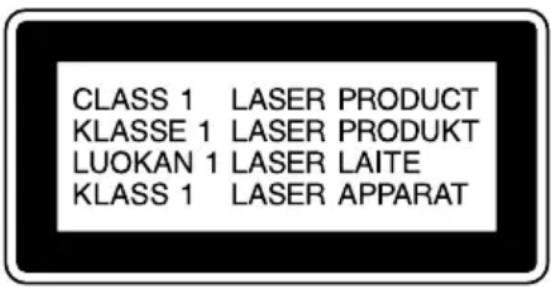
This compact disc player is classified as a CLASS 1 LASER product. The CLASS 1 LASER PRODUCT label is located on the exterior.
CAUTION!
Invisible laser radiation when open and interlocks defeated. Avoid exposure to beam.
ADVARSEL!
The above information is only for Italy.
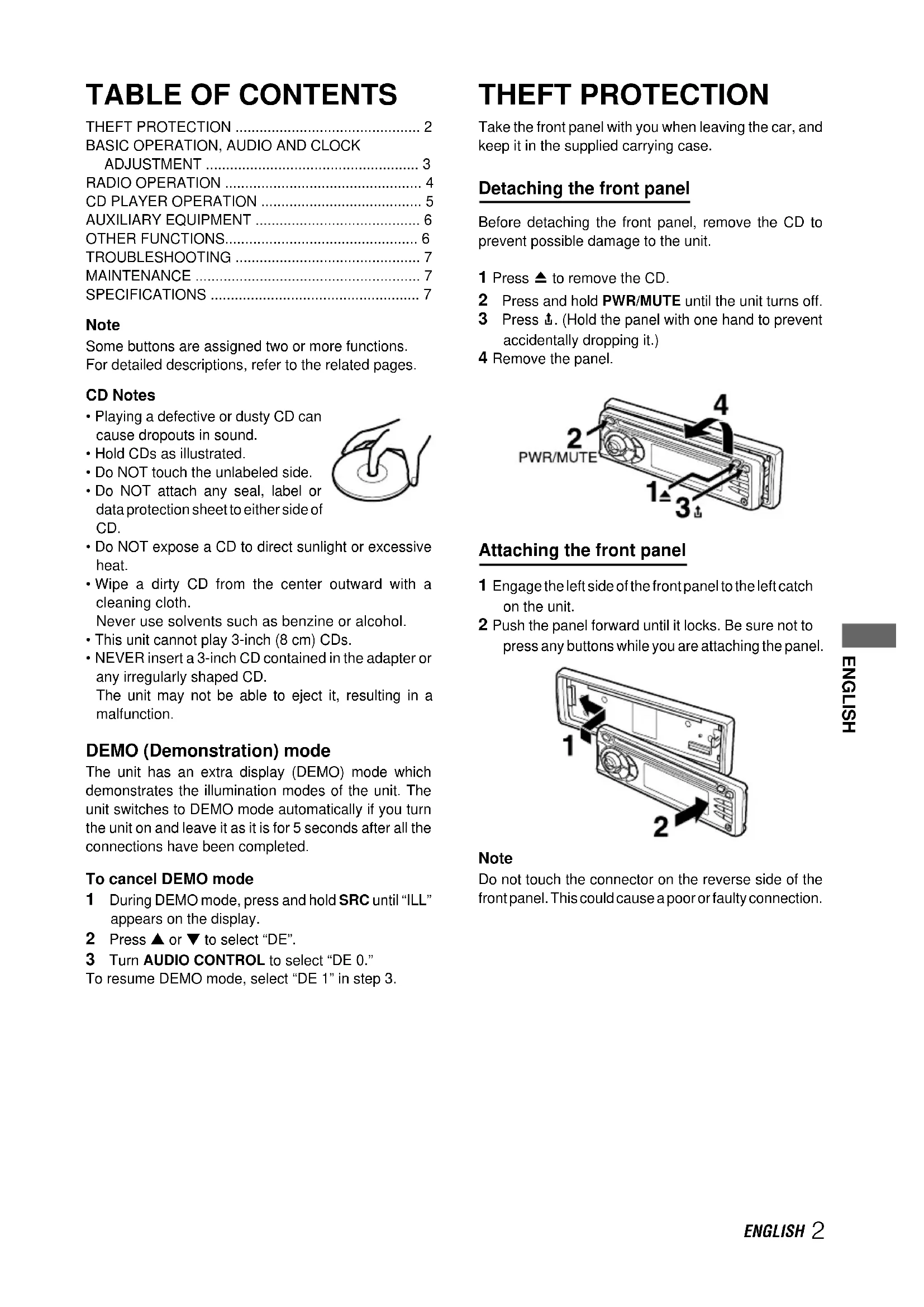
TABLE OF CONTENTS
THEFT PROTECTION 2
BASIC OPERATION, AUDIO AND CLOCK ADJUSTMENT 3
RADIO OPERATION 4
Some buttons are assigned two or more functions. For detailed descriptions, refer to the related pages.
CD Notes
- Playing a defective or dusty CD can cause dropouts in sound.
- Hold CDs as illustrated.
- Do NOT touch the unlabeled side.
- Do NOT attach any seal, label or data protection sheet to either side of CD.
- Do NOT expose a CD to direct sunlight or excessive heat.
- Wipe a dirty CD from the center outward with a cleaning cloth.
Never use solvents such as benzine or alcohol.
- This unit cannot play 3-inch (8 cm) CDs.
- NEVER insert a 3-inch CD contained in the adapter or any irregularly shaped CD.
The unit may not be able to eject it, resulting in a malfunction.
DEMO (Demonstration) mode
The unit has an extra display (DEMO) mode which demonstrates the illumination modes of the unit. The unit switches to DEMO mode automatically if you turn the unit on and leave it as it is for 5 seconds after all the connections have been completed.
To cancel DEMO mode
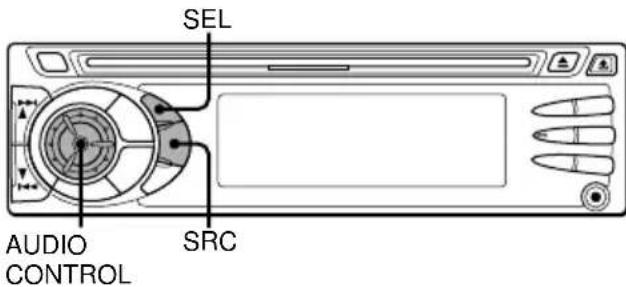
1 During DEMO mode, press and hold SRC until "ILL" appears on the display.
2 Press or to select "DE".
3 Turn AUDIO CONTROL to select "DE 0."
To resume DEMO mode, select "DE 1" in step 3.
THEFT PROTECTION
Take the front panel with you when leaving the car, and keep it in the supplied carrying case.
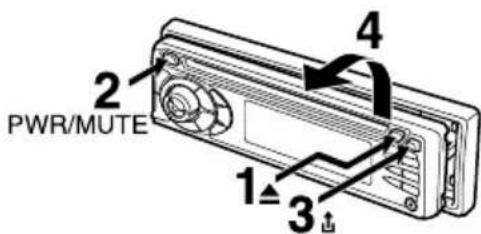
Detaching the front panel
Before detaching the front panel, remove the CD to prevent possible damage to the unit.
1 Press to remove the CD.
2 Press and hold PWR/MUTE until the unit turns off.
3 Press . (Hold the panel with one hand to prevent accidentally dropping it.)
4 Remove the panel.
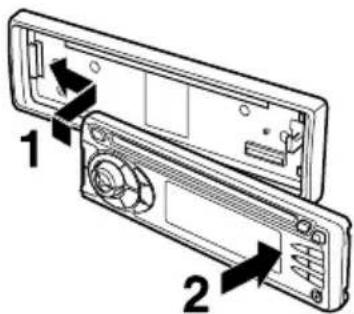
Attaching the front panel
1 Engage the left side of the front panel to the left catch on the unit.
2 Push the panel forward until it locks. Be sure not to press any buttons while you are attaching the panel.
Note
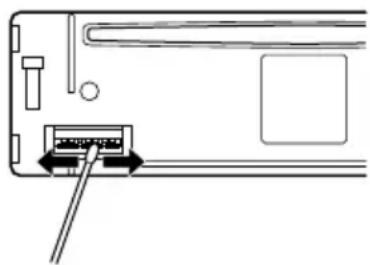
Do not touch the connector on the reverse side of the front panel. This could cause a poor or faulty connection.
BASIC OPERATION, AUDIO AND CLOCK ADJUSTMENT
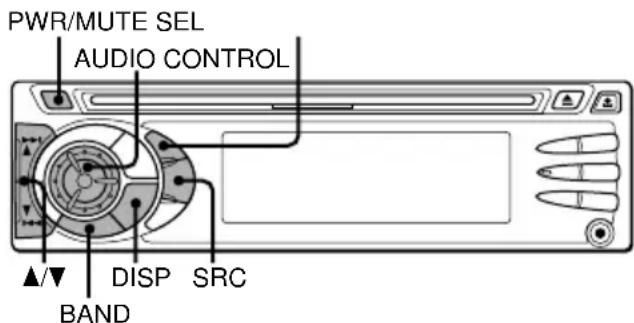
Turning the unit on/off
- Press PWR/MUTE to turn on the unit. The unit also turns on when you insert a CD.
- Press and hold PWR/MUTE until the unit turns off.
Note
Most operations described in this manual require the unit to be turned on before starting the operation, unless explicitly stated otherwise.
Changing the source mode
1 Press SRC.
Pressing SRC cycles through source modes in the following order:
FM1 (FM2/FM3/MW/LW) CD* AUX
1
- "CD" does not appear in the display when there is no CD in the unit.
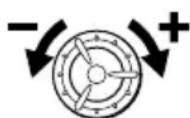
Adjusting the volume
1 Turn AUDIO CONTROL.
VOL (volume) indicator flashes.
Muting the sound
1 Press PWR/MUTE briefly.
MUTE indicator flashes.
To restore volume, briefly press PWR/MUTE again.
Adjusting sound
You can select the following modes for adjusting sound depending on the music you listen to: BASS (low frequencies), TRE (high frequencies), BAL (left/right), FAD (front/rear) and H-BASS (high bass).
1 Press SEL repeatedly to select the mode to be adjusted.
Pressing SEL cycles through the modes. The selected mode's indicator flashes.
2 Turn AUDIO CONTROL to increase/decrease the level or to select on/off for the selected mode.
Note
Adjust the level or select on/off within 5 seconds, or the selected mode will return to previous state.
Aligning the source levels
(Source Level Adjuster)
Volume may vary each time you change the source mode. In this case, you can align each source mode's volume to almost the same level.
1 Press SRC or BAND repeatedly to select the desired mode.
2 Press DISP while pressing SEL.
"LA 0" appears on the display.
3 Turn AUDIO CONTROL to adjust the level.
Note
Adjust the level within 5 seconds, or the selected mode will be canceled.
Restoring the factory settings
1 Turn off the unit.
2 Press and hold DISP until "LA --" appears on the display.
Note
You can restore the factory settings only for VOL, BASS, TRE, BAL, FAD, and H-BASS, and aligned source volume levels.
Muting button beep sounds
1 Turn off the unit.
2 Press and hold SEL until "bEEP" appears on the display.
3 Turn AUDIO CONTROL to select on (level indicators appear) or off (level indicators disappear).
4 Press SEL.
Setting the clock
1 Press and hold DISP until the clock indicator flashes on the display.
2 Press (to set hour) or (to set minute), and then turn AUDIO CONTROL.
3 Press DISP.
Displaying the clock
1 Press DISP.
To return to the former display, press DISP again.
RADIO OPERATION
Tuning in to a station
(Seek/Manual Tuning)
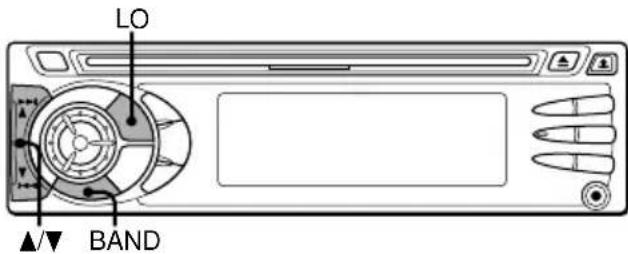
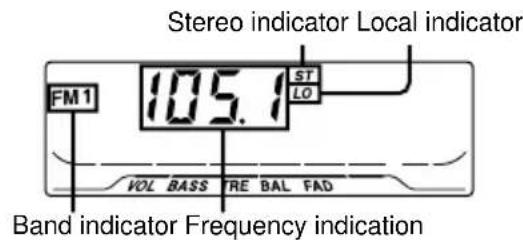
1 Press BAND repeatedly to select the desired band (FM1, FM2, FM3, MW, or LW).
2* Press (to move to higher frequencies) or (to move to lower frequencies) to tune in to a station. "ST" appears on the display when an FM station is broadcasting in stereo, and receiving conditions are good.
*Seek Tuning and Manual Tuning
- Press and hold or until seek Tuning starts. The unit locates a station automatically (Seek Tuning).
- Press or repeatedly to search for a desired station while increasing or decreasing the frequency step by step (Manual Tuning).
To stop Seek Tuning, press or again.
Monaural mode
When FM signals become weak, or FM reception becomes poor, the unit automatically switches to Monaural mode to reduce noise.
Local mode
Local mode allows you to tune on only to strong stations during Seek Tuning.
1 Press LO before you start seek tuning.
"LO" appears on the display.
To return to Distant mode, press LO again.
"LO" disappears and the unit tunes in to all receivable stations.
Using preset stations
You must preset stations before you can tune in to a station using preset station number buttons.
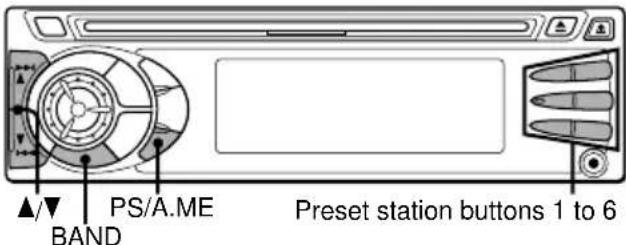
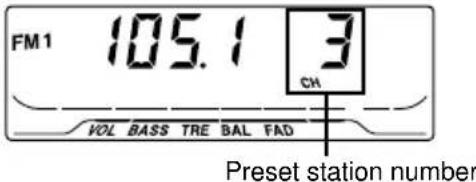
Presetting stations automatically
(Auto Memory)
1 Press BAND repeatedly to select the desired band (FM1, FM2, FM3, MW, or LW).
2 Press and hold PS/A.ME until automatic presetting starts.
The unit automatically stores up to 6 stations for each band.
After completion of automatic presetting, the unit tunes in to the station stored on preset station button 1.
To cancel automatic presetting, press PS/A.ME again.
Checking the preset stations (Preset Scan)
1 Press PS/A.ME briefly.
Each preset station will be tuned in for 5 seconds in order.
To cancel Preset Scan, press PS/A.ME again or any preset station button.
Presetting stations manually
(Manual Memory)
1 Press BAND repeatedly to select the desired band (FM1, FM2, FM3, MW, or LW).
2 Press or to tune in to a desired station (see "Tuning in to a station" as well for another tuning method).
3 Press and hold the desired preset station button until the unit beeps.
Note
A newly preset station replaces the station on the same band that was previously stored on that preset station button.
Tuning in to a preset station
1 Press BAND repeatedly to select the desired band (FM1, FM2, FM3, MW, or LW).
2 Press the preset station button on which the desired station is stored.
Active tuning reception control (ATRC)
The unit automatically suppresses FM noise caused by vehicle movement, and maintains sound quality.
CD PLAYER OPERATION
Playing a CD
You can play CDs, CD-Rs and CD-RWs using the procedure described below.
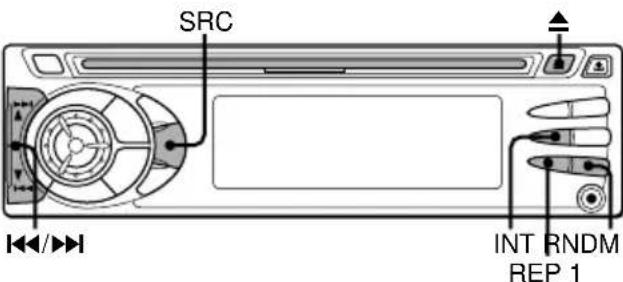
1 Insert a CD.
"CD" appears on the display.
CD play starts.
If a CD is already inserted, press SRC repeatedly to select CD play mode.
In normal play, when the last track finishes, the unit returns to the first track and continues to play.
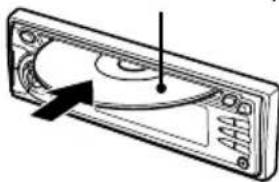
Labeled-side up
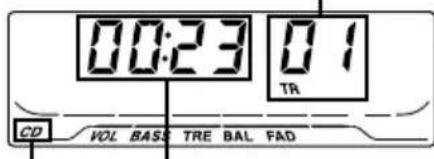
Track number
CD indicator Elapsed playing time
| To | Press |
| Eject a CD | ▲ |
| Skip to the next track | ▶■ |
| Go back to the beginning of the current track | ■▲ |
| Each extra press skips backward one extra track | |
| Locate a specific point in a track | Press and hold ▲or ▷ until you find the point. |
Note
- When you play a CD that is already inserted, CD plays starts at the point where it stopped the previous time. A newly inserted CD starts from the first track.
- A CD-R or CD-RW may take some time to start playing back, but this is not a malfunction.
- If a CD-R or CD-RW with no data or incompatible data is inserted, "E03" will appear on the display. The unit cannot play such discs.
Intro Play
You can locate a desired track by monitoring the first 10 seconds of all the tracks on a CD.
1 Press INT during CD play.
"SCAN" appears on the display.
2 Press INT again when the desired track is played. The unit returns to normal CD play.
One track Repeat Play
You can play a track repeatedly.
1 Press REP1 during CD play.
"REPEAT1" appears on the display.
To cancel One track Repeat Play, press REP1 again.
Random Play
You can play all the tracks in random order.
1 Press RNDM during CD play.
"RANDOM" appears on the display.
To cancel Random Play, press RNDM again.
Note
During Random Play, pressing allows you to skip only to the beginning of the current track, not to the previous track.
AUXILIARY EQUIPMENT
Listening to a cassette/MD/MP3 portable player or other equipment
You can listen to equipment connected to the unit. Refer to the operating instructions for the corresponding equipment for more detailed information.
Be sure to remove inserted CDs to prevent possible damage to the unit before connecting the equipment.
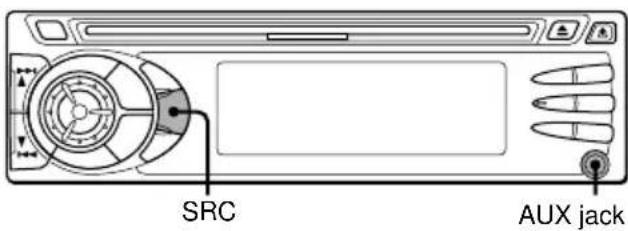
1 Connect a cassette/MD/MP3 portable player or other equipment to the unit's AUX jack (3.5 mm dia.).
2 Press SRC repeatedly until "AUX" appears on the display. During AUX mode, the clock display appears.
OTHER FUNCTIONS
Changing the key illumination color
You can choose blue or red as the key illumination color.
1 Press and hold SRC until "ILL" appears on the display.
2 Turn AUDIO CONTROL to select 1 (for blue) or 2 (for red).
Setting the dimmer of the display
1 Press and hold SEL until "D" appears on the display.
2 Turn AUDIO CONTROL to select 0 (bright) or 1 (dimmed).
Muting the sound while using the phone
When the telephone mute lead (brown) of the unit is connected to a cellular phone hands-free car kit, etc., the unit mutes the sound from the speakers automatically during your conversation on the cellular phone.
For details, refer to the separate "INSTALLATION AND CONNECTIONS" for the unit and the instruction manual for the cellular phone hands-free car kit.
TROUBLESHOOTING
Error code
In the following cases the corresponding error code indication appears. Follow the suggestions below to solve such problems. If the error code indication does not disappear, consult an AIWA service center.
E03 Focus error. Check that the CD is loaded properly (right side up, etc.), and the CD contains valid data.
Reset button
If a CD does not operate properly, press the reset button with a pointed object such as a pencil, etc. Note that all your settings will be erased if this button is pressed.

MAINTENANCE
Cleaning the front panel
Wipe the surface with a soft, dry cloth. Do not use liquid cleaners or aerosol cleaners.
Cleaning the connector
The connector needs to be cleaned occasionally. Wipe the surface of the connector with a cotton swab slightly moistened with alcohol.
Back of the front panel
SPECIFICATIONS
RADIO SECTION
(FM)
Frequency Range: 87.5 MHz - 108 MHz
Usable Sensitivity: 12.7 dBf
50 dB Quieting Sensitivity: 17.2 dBf
IF Rejection: 100 dB
Frequency Response: 30Hz - 15,000Hz
S/N Ratio: 70 dB
Stereo Separation: 35 dB at 1 kHz
Alternate Channel Selectivity: 90 dB
Capture Ratio: 3 dB
(MW)
Frequency Range: 531 kHz-1,602 kHz
Usable Sensitivity: 30 V (30 dB)
(LW)
Frequency Range: 144 kHz-288 kHz (1-kHz/9-kHz steps)
Usable Sensitivity: 30 V (30 dB)
CD SECTION
Frequency Response: 17Hz - 20kHz + 0 / - 3 dB
Dynamic Range: More than 85 dB
Channel Separation: More than 60 dB
S/N Ratio: More than 90 dB
Wow/Flutter: Unmeasurable
AUDIO SECTION
Max. Power Output: 45 W·4 channels
AUX input
Input sensitivity (load impedance) AUX: 300mV (10k)
GENERAL
Power-Supply Voltage: 14.4 V (11 to 16 V
allowable), DC, negative ground
Load Impedance: 4 Ω
Tone Control:
Bass ± 10 dB at 100Hz Treble ± 10 dB at 10kHz
Preamp Output Voltage (load impedance): 2.2 V (10 kΩ)
Installed size: 182 (W) · 53 (H) · 155 (D) mm
Supplied Accessory: Carrying case (1)
- Specifications and external appearance are subject to change without notice due to product improvement.
REAR PANEL
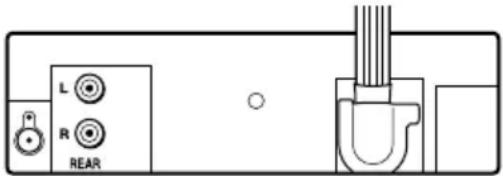
For details, refer to the separate "INSTALLATION AND CONNECTIONS".
PRECAUCIONES
Remarques relatives aux CD
Mode DEMO (Demonstration)
Bassi ± 10 dB a 100 Hz, Alti ± 10 dB a 10 kHz
VOORZORGSGMAATREGELEN
Pomer S/N: Vice nez 90 dB