P500 - Humidifier BONECO - Free user manual and instructions
Find the device manual for free P500 BONECO in PDF.


Frequently Asked Questions - P500 BONECO
User questions about P500 BONECO
0 question about this device. Answer the ones you know or ask your own.
Ask a new question about this device
Download the instructions for your Humidifier in PDF format for free! Find your manual P500 - BONECO and take your electronic device back in hand. On this page are published all the documents necessary for the use of your device. P500 by BONECO.
USER MANUAL P500 BONECO
READ AND SAFE THESE INSTRUCTIONS

Downloaded from www.vandenberg.be
Instructions for use 12
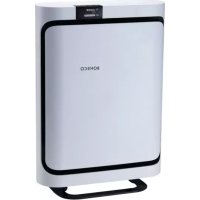
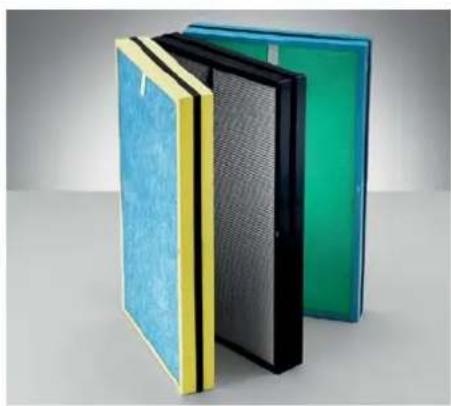
Congratulations on your purchase of the BONECO P500. The highly efficient air purifier is equipped with a triple filter system that rids the air of odors as well pollen and contaminants. The filter also effectively alleviates many forms of discomfort caused by allergies. This includes hay fever or allergic reactions to dust mites and household dust.
The BONECO P500 is designed for convenient, fully automated operation. The smart control system ensures that the noise level remains as low as possible. In SLEEP comfort mode, the fan works so quietly that you can even use the BONECO P500 at night in the bedroom. And thanks to the integrated automatic timer, cleaning starts while you are still on the way home. This means you can always come home to an optimal living climate.
We hope you enjoy your new BONECO P500 air purifier!
SCOPE OF DELIVERY
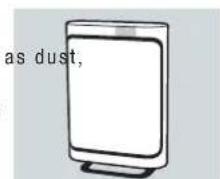
BONECO P500 with country-specific power cable
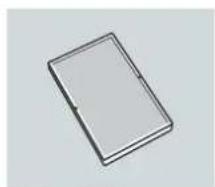
"BABY", "SMOG" or "ALLERGY" filter
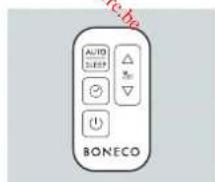
Remote control including CR 2025 battery
CD with manuals in other languages
TECHNICAL SPECIFICATIONS
| Type designation | BONECO P500 |
| Power supply voltage | 220-240V, 50Hz |
| Power consumption | 30W |
| Operation noise level | 31-60 dB(A) |
| Recommended room size | \( {26}{\mathrm{\;m}}^{2} \) (ALLERGY filter), \( {23}{\mathrm{\;m}}^{2} \) (BABY filter), \( {29}{\mathrm{\;m}}^{2} \) (SMOG filter) |
| \( {65}{\mathrm{\;m}}^{3} \) (ALLERGY filter), \( {58}{\mathrm{\;m}}^{3} \) (BABY filter), \( {72}{\mathrm{\;m}}^{3} \) (SMOG filter) | |
| Cleaning output (CADR) | \( {258}{\mathrm{\;m}}^{3}/\mathrm{h} \) (ALLERGY filter), \( {226}{\mathrm{\;m}}^{3}/\mathrm{h} \) (BABY filter), \( {295}{\mathrm{\;m}}^{3}/\mathrm{h} \) (SMOG filter) |
| Air flow | \( {300}{\mathrm{\;m}}^{3}/\mathrm{h} \) |
| Dimensions L×W×H | \( {224} \times {450} \times {642}\mathrm{\;{mm}} \) |
| Weight (empty) | 7.35 kg / 8.20 kg (with «ALLERGY» filter) |
- Subject to change
OVERVIEW AND PART NAMES
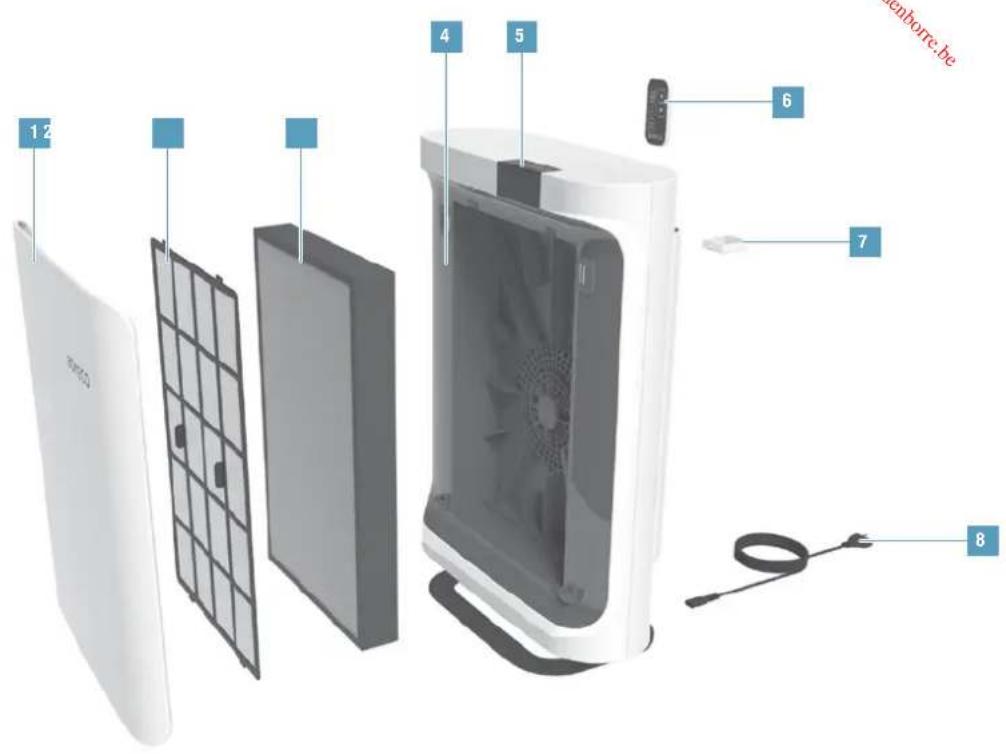
1 Front cover
2 Pre-filter
3 Filter*
4 BONECO P500
5 Touch display
6 Remote control
7 Fragrance container
8 Power cable
The BONECO P500 front cover is held on by magnets. The air purifier does not switch on if the front cover is missing or positioned incorrectly.
NOTES ON THE FILTERS
Your BONECO P500 was shipped from the factory with the "ALLERGY", "SMOG" or "BABY" filter. However, the appliance is compatible with all three filter types. The delivered filter can be replaced by another model at any time if your requirements change.
REPLACEMENT FILTERS
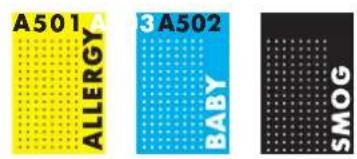
You can get the replacement filters at your BONECO specialist dealer or at the online store at www.shop.boneco.com. The filters are identified by these labels:
INDICATORS ON THE DISPLAY
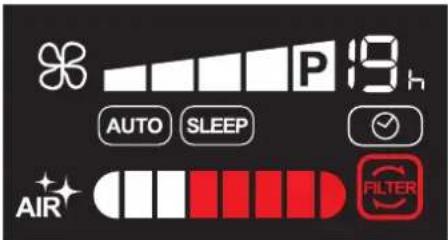
Overview of all indicators on the display
Symbol Meaning
i
19.
Duration of the ON timer/OFF timer 18
AUTO
Fully automated operation 17
SLEEP
Low-noise nighttime mode 17
Timer function 18
AIR

Air quality 17
83

Fan level 17
Filter used up, replace 19
BRIGHTNESS OF THE DISPLAY
The brightness of the display depends on the ambient light. The display is dimmed automatically if the BONECO P500 is used in a dark room (such as a bedroom).
CLEARING THE FILTER WARNING
The symbol does not go out automatically after the filter has been replaced. Press and hold the button for five seconds to hide the symbol. This also resets the counter for the new filter at the same time.
BASIC FUNCTIONS
The BONECO P500 can easily be adapted to suit your needs. Whenever you switch off the unit, all settings are saved until the next use. However, the settings are reset whenever the unit is disconnected from the power supply.
"AUTO" COMFORT MODE
In the AUTO mode, the BONECO P500 is fully automatic and controls the fan levels, achieving an optimum effect.
"SLEEP" COMFORT MODE
In comfort mode, the fan operates at the lowest level to keep the noise level as low as possible. This setting is suitable for use in a bedroom, nursery or baby's room.
COMFORT MODE SWITCH
- On the keypad or the remote control, push the button to switch between two and four modes.
AIR QUALITY INDICATOR
The air quality is shown on the display by 8 segments. The better the air quality, the more segments are displayed in white:

MANUALLY CONTROLLING THE FAN LEVEL
The fan level of the BONECO P500 can be controlled manually, such as if you want the air to be thoroughly purified in the shortest possible time.
- Push the button repeatedly until the desired fan setting is achieved.
- On the keypad or the remote control, push button to switch back to the AUTO contrP mode.
POWER LEVEL
The power level (P) can only be selected manually using the button. The fan is now working at its maximum output.
USING FRAGRANCES
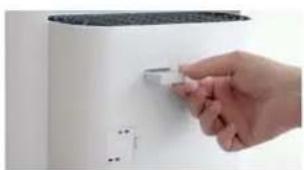
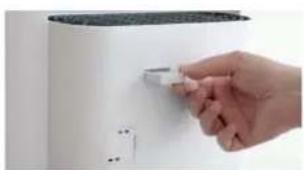
The fragrance container for adding fragrances is on the backside of the BONECO P500.
- Briefly push on the fragrance container to unlock it and then remove the compartment.
-
Insert the fragrance into the fragrance container.
-
Push the fragrance container into the air purifier until it clicks into place.
TIMER FUNCTION
TIMER FUNCTION
The timer function lets you determine how long the BONECO P500 should run before it switches matically (OFF timer).
Alternatively, you can specify a time for when the appliance should switch on automatically (ON timer). Use this function, for example, to activate the BONECO P500 before you return home, so that you have the perfect living climate waiting for you.
The maximum duration of the timer is 19 hours.
SETTING THE OFF TIMER
- Switch on the BONECO P500 using the button. Off auto-
- Select the desired operating setting and the desired comfort mode.
- Press the button once.
- Use the button to set how long the appliance operates (1 to 19 hours).
The appliance then runs for the specified period and then switches itself off.
- To deactivate the timer early, press the button again and select Alternatively, you can switch off the BONECO P500 using the button.
SETTING THE ON TIMER
- Select the desired operating setting and the desired comfort mode.
- Switch off the BONECO P500 using the button.
- Press the button once.
- Use the button to set the start preselection time (1 to 19 hours).
The BONECO P500 switches on after the defined time and operates with the selected program.
5. To deactivate the ON timer early, press the button again and select Alternatively, you can switch on the BONECO P500 using the button.
CLEANING AND MAINTENANCE
REPLACING THE FILTER
The filter is worn out if the symbol is illuminated. The filter must be replaced at this point to continue to ensure optimal air purification.
The filter must be replaced as soon as possible after the reminder is displayed but after one year at the latest.
The procedure for replacing the filter corresponds to the figures on page 14.
- Replace the filter in accordance with the instructions on page 14.
- Hold the button for 5 seconds to the hide the symbol
CLEANING THE PRE-FILTER
The pre-filter prevents excessive dust accumulation from getting inside the BONECO P500.
- Clean the pre-filter under running water or using a vacuum cleaner.
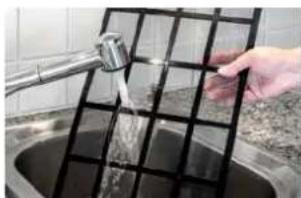
- Allow the pre-filter to dry completely before re-inserting it.
CLEANING THE PARTICLE SENSOR
The particle sensor detects the amount of dirt in the air in the room by analyzing a passing air stream. Over time, dirt can accumulate and affect measuring accuracy.
The flap over the particle sensor has to be closed during operation to ensure the measurement is correct. It should only be opened to clean the sensor.
- Wipe the sensor with a damp cotton swab.
- Dry the sensor with a dry cotton swab.
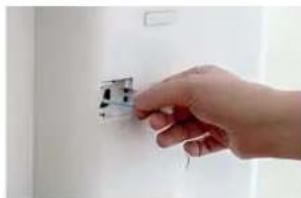
Do not use alcohol or corrosive cleaning agents for cleaning.

INSTRUCTIONS D'UTILISATION DU BONECO P500
CHER CLIENT,
FILTERWAARSCHUWING WISSEN
Varighed for ON-timer / OFF-timer 58
AUTO
Fuldautomatisk drift 57
SLEEP
Stojsvag nattilstand 57
Timerfunktion 58
AIR
Luftkvalitet 57
83
Ventilatortrin 57
INDIKASJONER I DISPLAYET
Varighet for ON-timer/OFF-timer 66
AUTO
Helautomatisk drift 65
SLEEP
Stillegaende nattmodus 65
Tidsur-funksjon 66
AIR
Luftkvalitet 65
83
Viftetrinn 65
REGULERE VIFTETRINN MANUEL
RENGJØRING OG VEDLIKEHOLD
SKIPTFILTER
Filteret er oppbrukt nár symbolet lyser pa displayet. Da mā filteret skiftes for at luftrensingen fortssatt skal vare optimal.
Filteret mskiftes nár paminnels vises,men senest etterettar.
MANUALNI REGULACE STUPNE VENTILATORU
Stupeñ ventilatóruprístroje BONECO P500 Ize regulovat manualne -naprikladPokudse ma cilene beshem co moins nejkratsi doby dosahnout dukladného ycişeni vzduchu.
VENTILATORA PAKAPES MANUALA REGULESANA
lekartas BONECO P500 ventilatorapakapi var vadit, piem., tad, kad iespejami isa laikajapanak pamatiga gaisa attiriisana.
- Vairakas reizes spiediet taustinu, idz ir sasnigta vajadziga ventilatorapakpe.
- Nospiediet taustinpuaneli vailtalvadibas puli taustinu ALLOF, lai atkal parslegos rezima wato SLEEP
PAKAPE POWER
Pakapi Power (P) ir iespejams izveleties tikai manuali ar taustinu Ventilators darbojas tikai ar maksimalo jauu.
SMARZVIELU IZMANTOSANA
BONECO P500 aizmugureja dala atrodas smarzvielas tvertne smarzvieliu pievienosanai.
- Nedaudz nospiediet smarzvielas tvertni, la to atvertu, un iznemiet ieliktni.