SBLL 4.2 A1 - Speaker SILVERCREST - Free user manual and instructions
Find the device manual for free SBLL 4.2 A1 SILVERCREST in PDF.



Frequently Asked Questions - SBLL 4.2 A1 SILVERCREST
User questions about SBLL 4.2 A1 SILVERCREST
0 question about this device. Answer the ones you know or ask your own.
Ask a new question about this device
Download the instructions for your Speaker in PDF format for free! Find your manual SBLL 4.2 A1 - SILVERCREST and take your electronic device back in hand. On this page are published all the documents necessary for the use of your device. SBLL 4.2 A1 by SILVERCREST.
USER MANUAL SBLL 4.2 A1 SILVERCREST
https://www.targa.gmbh/downloads/conformity/331696_1907.pdf
6.1 Operating environment 39
- Copyright 40
8.Before initial use 40
8.1Charging the battery. 40
- Operation 42
9.1 Overview of button functions 42
9.2 Pair with a Bluetooth device 43
9.2.1 Connect speaker to another Bluetooth device 44
9.2.2 Automatic connection when switching on 44
9.3 TWS mode 45
9.3.1 Activate TWS mode 45
9.3.2 Deactivate TWS mode 46
28 - English
9.4 AUX IN mode 46
10.Troubleshooting 47
11. Cleaning 48
12. Storing the device when not in use 48
13. Environmental and waste disposal information.... 49
14. Marks of conformity 50
15. Notes on guarantee and service 51
Congratulations!
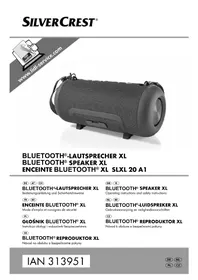
By purchasing the SilverCrest Bluetooth® speaker SLL 10 B1, you have opted for a high-quality product.
Familiarise yourself with the speaker before using it for the first time and read these operating instructions carefully. Observe the safety instructions and only use the speaker in the manner described in these operating instructions and for the indicated fields of application.
Keep these operating instructions in a safe place. Hand over all documents in the event that you pass on the speaker to a third party. These operating instructions are part of the product.
The speaker meets all relevant standards and directives specified in the EU Declaration of Conformity. The manufacturer will not be liable for any damage or faults arising as a result of unauthorised modification of the device. Only use the accessories specified by the manufacturer. Please observe the national regulations and/or laws of the country in which the device is used.
1. Information on trademarks
The Bluetooth® word mark and logos are registered trademarks of Bluetooth SIG, Inc. (Special Interest Group). Any use of these marks by TARGA GmbH is under license.
The SilverCrest trademark and SilverCrest store brands are the property of their respective owners.
USB is a registered trademark of USB Implementers Forum, Inc.
Other names and products may be trademarks or registered trademarks of their respective owners.
2. Intended use
This device is a consumer electronics device, intended for playing music. Audio information may be transferred to the device via Bluetooth® or using the 3.5 mm jack (AUX IN). By purchasing a second speaker of the same type (SLL 10 B1), it is possible to pair both speakers and use them as a stereo speaker system. The speaker may only be used for private purposes and is not for industrial or commercial use. The device should also not be used in tropical climates. The manufacturer will not be liable for any damage or faults arising as a result of unauthorized modification of the device. Please observe the national regulations and/or laws in the respective country of use.
3. Package contents
Unpack the device and all accessories. Remove all packaging materials and check all of the parts for completeness and signs of damage. If any parts are missing or damaged, please contact the manufacturer.
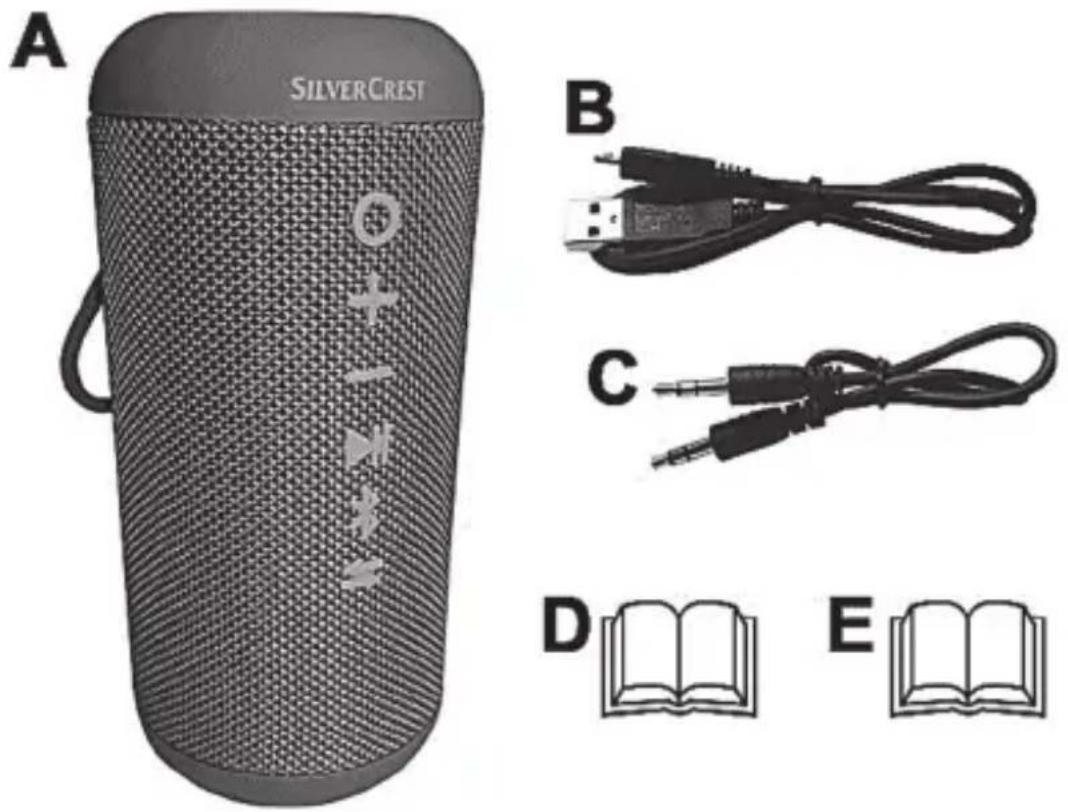
| A | SilverCrest Bluetooth speaker SLL 10 B1 |
| B | Charging cable (USB A to Micro USB) |
| C | 3.5 mm jack cable |
| D | These instructions (picture symbol) |
| E | Quick start guide (symbolic representation) |
4. Controls
These instructions contain a cover that can be unfolded. The inside of the cover provides a schematic of the speaker and a number legend. The numbers identify the following parts/functions:
1 button (on/off)
2 button (volume up/next track)
3 button (volume down/previous track)
4 button (play/pause)
5 button (Bluetooth®)
6 button (TWS)
7 TWS LED
8 Micro USB charging socket
9 AUX IN (3.5 mm jack)
10 Appliance lid
11 Carrying strap
12 Power/charging LED
5. Technical data
| Operating voltage/current: 5 V / 950 mA | |
| Battery: 3.7 V/6000 mAh/22 .2 Wh | |
| Rated output: 1 x 10 watt RMS | |
| Bluetooth® specification: V4.2 | |
| Supported profiles: A2DP/AVRCP | |
| Bluetooth® transmitting capacity: | Max. 10 dBm |
| Bluetooth® frequency band: 2.402 - 2.480GHz, 2.4G ISM band | |
| Bluetooth® range: Approx. 10 metres | |
| Charging time: Max. 9,5 hours | |
| Music playback: Up to 12 hours at medium volume | |
| Dimensions: Approx. width 84 x 180 mm | |
| Weight: Approx. 550 g | |
| Protection class IPX7 | |
| Operating environment: 0°C to +45°C, max. 85% relative humidity | |
| Storage temperature: 0°C to +60°C | |
The specifications and design are subject to change without notice.
6. Safety instructions
Before using the speaker for the first time, please read the following instructions carefully and observe all warnings, even if you are familiar
with using electronic devices. Keep these operating instructions in a safe place for future reference.
Warnings and symbols used and their meaning

DANGER! This signal word indicates danger involving a high level of risk, which if not avoided, may result in severe injury or even death.

WARNING! This signal word indicates danger involving a medium level of risk, which if not avoided, may result in severe injury or even death.

CAUTION! This signal word indicates danger involving a low level of risk, which if not avoided, may result in minor or moderate injury.

CAUTION! This signal word indicates important information for protection against damage to property.
IPX7
This icon indicates that further information on the topic is available.

DC voltage
Protection class IPX7: Protection against temporary immersion in water with the cover closed (10).
This icon indicates that the operating instructions must be observed.

CAUTION! Wireless interface
Switch the speaker off if you are on a plane, in a hospital, operating room or in the vicinity of a medical electronic system. The radio waves transmitted can damage the functioning of sensitive devices. Keep the loudspeaker at least 20~cm away from a pacemaker or an implanted defibrillator, as otherwise the correct functioning of the pacemaker could be adversely affected by radio waves. The radio waves transmitted can cause static noise in hearing aids. When wireless components are switched on, do not place the speaker in the vicinity of flammable gases or in a potentially explosive environment (for example, paint shop), as the radio waves transmitted can trigger an explosion or a fire. The range of the radio waves depends on the setting and ambient conditions. When transmitting data via a wireless connection, it is also possible for unauthorised third parties to receive this data. TARGA GmbH is not responsible for wireless or radio interference caused by unauthorised changes to this device. Furthermore, TARGA accepts no liability for replacing or exchanging connecting cables and devices that were not specified by TARGA GmbH. The user alone is responsible for remedying malfunctions caused by such unauthorised changes and replacing or exchanging devices.

WARNING! Risk of explosion!
The speaker must not be thrown into a fire, as the integrated battery may explode.

WARNING! Please make sure that:
- no naked flames (for example, burning candles) are placed on or near the speaker.
- no foreign bodies penetrate into the device.
- the speaker is not exposed to excessive temperature fluctuations, as otherwise condensation can occur and lead to electrical short circuits; if, however, the speaker has been exposed to large temperature fluctuations, wait approximately two hours until the speaker has reached ambient temperature before starting it up.
- the speaker is not covered while charging, as the device can heat up in the process.
- always lay connected cables in such a way that nobody can stand or trip on them. There is a risk of injury.

CAUTION! Please make sure that:
- the speaker is not exposed to direct sources of heat (for example, heaters).
- the speaker is not exposed to direct sunlight or strong artificial light.
- contact with aggressive liquids is avoided. Make sure that no cables are connected and the cover (10) is properly closed when operating the speaker near water. Containers filled with liquids, for example vases or drinks, should never be placed on or near the speaker.
-
the speaker is not placed close to magnetic fields (for example, loudspeakers).
-
the speaker is not exposed to excessive shocks and vibrations.
- always take hold of all cables by the plug and do not pull on the cable itself. Do not place any items of furniture or other heavy objects on cables. Make sure that the cables are not bent, particularly at the plug and at the connecting sockets. Never make a knot in a cable and do not connect it with other cables.
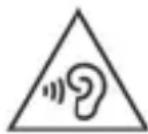
WARNING! Risk of injury due to high volume.
Loud music can cause hearing damage. Avoid extreme volumes!

WARNING! Personal safety
This speaker can be used by children aged eight and over, as well as by people with reduced physical, sensory or mental abilities or who lack experience and knowledge, provided they are supervised or have been instructed in the safe use of the speaker and understand the resulting dangers. Children must not play with the speaker. Cleaning and user maintenance must not be carried out by children unless they are supervised. Therefore, also keep the packaging film away from children. The packaging material is not a toy.

DANGER! There is a risk of suffocation!

WARNING! Maintenance/cleaning
Repair work is required if the speaker has been damaged, for example, the speaker housing is damaged, liquids or objects have got inside the speaker, or if the speaker has been exposed to rain or moisture. To prevent moisture damage, be sure to close the cover (10) correctly when cleaning the device. Repair work is also required if the device does not work properly or has been dropped. If you notice any smoke, unusual noises or smells, immediately switch off the speaker and unplug any cables that may be connected to the device. If this happens, you must stop using the speaker until it has been checked by a specialist. All repair work should only be carried out by qualified specialists. Clean the device using a clean, dry cloth and never use abrasive liquids. Never open the housing of the speaker, as there are no parts inside the speaker that require maintenance. Furthermore, opening the housing will void your guarantee.
6.1 Operating environment
The speaker is suitable for outdoor use and is protected against temporary immersion in water when the connection socket cover is closed (10). Only charge the device in dry environments.
7. Copyright
All contents of these instructions are subject to copyright law, and are provided to the user solely as a source of information. copying or reproduction of data and information without the express written permission of the author is prohibited. This also concerns commercial use of the content and data. The text and illustrations correspond to the technical standards at the time of printing. Subject to alterations.
8. Before initial use
Remove the protective film from the base of the device, if needed.
8.1 Charging the battery

CAUTION! Only charge the battery with a suitable USB mains adapter with an output voltage of 5V and an output current of at least 950~mA . A USB mains adapter is not included. Only use the USB charging cable (B) supplied to charge the device. Never use a USB port on a PC or laptop to charge it.
The integrated battery must be fully charged before using the speaker for the first time. Proceed as follows:
- Open the cover (10) on the back of the speaker.
- Connect the USB A plug of the charging cable (B) to a suitable USB mains adapter.
- Connect the Micro USB connector of the charging cable (B) to the Micro USB charging socket (8) of the speaker. The power/charging
LED (12) lights up orange while charging and switches off when charging is complete.
- Disconnect the USB charging cable (B) from the speaker after charging and close the cover (10).

A low battery level will be indicated as follows:
A beep sounds. The power/charging LED (12) then flashes orange for approximately 15 seconds. Then, the power/charging LED (12) will display the current operating mode for approximately 45 seconds.
This process is repeated until the battery is depleted. The speaker will then switch off automatically.
9. Operation
9.1 Overview of button functions
| Button | Button function |
| ○ | ➢Switch device on: press briefly➢Switch device off: press and hold for approx. 3 seconds |
| + | ➢Volume up: press briefly A beep sounds when the maximum volume is reached.➢Jump to next track: press and hold for approx. 2 seconds |
| - | ➢Volume down press briefly➢Replay current track from the beginning: press and hold for approx. 2 seconds➢Jump to previous track: When restarting the current track, press and hold the - (3) button again for approx. 2 seconds |
| ►II | ➢Play/pause: press briefly |
| ※ | ➢Activate Bluetooth®: press briefly, a beep sounds➢Disconnect Bluetooth® connection: press briefly/a new pairing is then possible immediately |
| ← | ➢Activate TWS mode: press briefly➢Deactivate TWS mode: press briefly |
9.2 Pair with a Bluetooth® device

The AUX IN socket (9) must not be used during the coupling process.

The Bluetooth® device name of the speaker is SLL 10 B1. Enter '0000' if you are asked for a PIN during the pairing process. The connection may take a long time to establish, depending on the device used.
- Set your Bluetooth device, such as your smartphone, to search for available Bluetooth devices nearby. Please consult the operating instructions of your Bluetooth device.
- Briefly press the on/off button (1) to switch the speaker on. The power/charging LED (12) will flash brightly twice, a series of beeps will sound and then the power/charge LED (12) will flash blue rapidly. Coupling mode is now active.
- Select device SLL 10 B1 from the list of found devices to pair the two devices. A series of beeps will sound and the power/charge LED (12) will flash blue twice every 3 seconds once the connection is successful.
- Now, start playback on your Bluetooth device. Playback occurs via the connected speaker.
- Hold down the on/off button (1) for approximately 3 seconds to end the Bluetooth connection. A beep will sound and the power/charge LED (12) will flash twice and then switch off.
9.2.1 Connect speaker to another Bluetooth® device
To connect the currently connected speaker to another Bluetooth® device, the existing connection must first be disconnected by pressing the (5) button. Alternatively, you can disable the Bluetooth® feature on the currently connected Bluetooth® device.
A beep will sound and the power/charge LED (12) will flash blue rapidly. Pairing mode is now active and the speaker can be connected to another Bluetooth device.

The speaker will switch off automatically after 3 minutes if no connection is established. The process must be restarted in this case.

The speaker will switch off automatically after 10 minutes if no signal is received in Bluetooth mode for 10 minutes.
9.2.2 Automatic connection when switching on
The speaker automatically connects to the last connected Bluetooth® device when switched on.
If this is not the case, you will need to connect manually. Please consult the operating instructions of your Bluetooth device.
9.3 TWS mode
By purchasing a second speaker of the same type (SLL 10 possible to pair both speakers and use them as a stereo speaker system. A second speaker can be purchased at www.lidl.de/de/onlineshop [in German].

TWS: 'True Wireless Stereo'.
This function allows two speakers to be coupled.
The left speaker acts as the main speaker, which is connected to a Bluetooth® device. It transmits the audio signals it receives to the second (right) speaker.
9.3.1 Activate TWS mode

A speaker must not be connected to a Bluetooth® device when TWS mode is activated. If necessary, disconnect any existing connection.
- Switch on both speakers and select which speaker should act as the left speaker (main speaker).
- Press the (6) button on the left speaker. A beep will sound and the TWS LED (7) will flash green rapidly during pairing.
- Now, briefly press the (5) button on the other (right) speaker.
- A beep indicates the coupling was successful. TWS mode is now active.
- The TWS LED (7) will light up green on both speakers.

The two speakers will switch off automatically after about 6 minutes if no connection is made within that time. The coupling process must be restarted after switching the
speakers on again. The playback controls (4), (3) and
(2) work on both speakers.
- Start the playback on your Bluetooth device.
9.3.2 Deactivate TWS mode
- Briefly press (6) on any speaker to disable TWS mode. After a beep, the TWS LED (7) will switch off on both speakers.
- Playback will now continue on the left speaker only.
- You can reactivate TWS mode by briefly pressing the (6) button on the right speaker.
9.4 AUX IN mode
You can listen to music from a portable audio device connected to the 3.5mm jack cable (C).

Use the supplied 3.5mm jack cable (C) for AUX IN mode.

Once a 3.5mm jack plug is inserted into the AUX IN jack (9) of the speaker, it will automatically switch to the AUX IN input. At this point, any active Bluetooth® connection will be

interrupted and playback will continue via the AUX IN input. Tracks cannot be skipped using the (-3) and (2) buttons in AUX IN mode.

The speaker will switch off automatically after 10 minutes if no signal is received in AUX IN mode for 10 minutes.
- Switch off the speaker and open the cover (10).
-
Connect the audio device to the AUX IN jack of the speaker. Use the supplied 3.5 ~mm jack cable (C).
-
Briefly press the on/off button (1) to switch the speaker on. A beep will sound and the power/charge LED (12) will light up blue.
- Start the playback on your audio device. Make sure the volume is set to a low level.
- Then, adjust the speaker volume to the desired level using the -(3) and +(2) buttons. The playback can be muted with the (4) button.
- Remove the 3.5mm jack cable (C) from the AUX IN jack (9) once AUX IN mode is ended.
- Close the cover (10).

Do not operate the unit near water when using the AUX IN connection.
10. Troubleshooting
The speaker will not switch on
- The battery of the speaker is empty. Charge the battery with a suitable USB mains adapter.
Pairing with a compatible Bluetooth® device will not work
- Check whether the speaker is switched on. Switch it on, if necessary.
- Check the distance between the speaker and Bluetooth® device. This may not exceed 10 metres. Obstacles and electronic devices can have a negative impact on the reception range. Reduce the distance between the devices, if necessary.
-
Check that the Bluetooth® feature is enabled on the Bluetooth® device that is providing the audio. Activate the Bluetooth® feature, if necessary.
-
If a 3.5mm cable is plugged into the AUX IN jack (9), remove it, because the Bluetooth® feature does not work if a cable is plugged in.
- Make sure that a previously paired connection with another Bluetooth® device is no longer active. If necessary, disconnect the connection and reconnect to the desired audio source.
No sound
- Increase the volume of the speaker. In AUX IN mode, increasing the volume on your playback device can also solve the problem.
You notice limitations in functionality
- This problem may be related to the software of your Bluetooth® device not being up to date. If necessary, try to update the software version. Please consult the operating manual of your Bluetooth® device.
11. Cleaning
- Do not allow moisture to enter the speaker or the connection socket. Keep the cover (10) closed during cleaning.
- Clean the speaker with a slightly damp, soft cloth only.
- Do not use abrasive, scouring or solvent-based cleaning agents. The surfaces of the speaker can be irreparably damaged.
12. Storing the device when not in use
Store the speaker in a dry, clean location away from direct sunlight. Recharge the integrated battery from time to time to extend its service life.
13. Environmental and waste disposal information
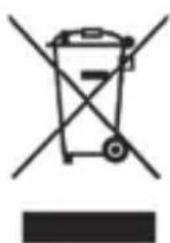
The product bears a symbol of a crossed-through waste bin. It is therefore subject to European Directive 2012/19/EU. Electrical and electronic equipment must not be put in the household waste, but must be disposed of via designated public disposal centres. Further information can be obtained from your local authority or the shop where you purchased the product.

The built-in battery cannot be removed for disposal.
Make sure the packaging is disposed of in an environmentally friendly manner. Cardboard packaging can be put out for waste-paper collection or taken to public collection points for recycling. The plastic packaging used for your device is collected by your local waste management company and disposed of in an environmentally friendly manner.

Please pay attention to the labels on packaging materials when you separate waste; these are marked with abbreviations (a) and numbers (b) that mean the following:
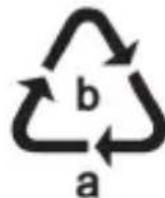
1-7: Plastics/20-22: Paper and cardboard/80-98: Composite materials.
14. Marks of conformity

This device conforms to the fundamental requirements and other relevant regulations of the RE Directive 2014/53/EU and the RoHS Directive 2011/65/EU.
You can download the full EU declaration of conformity at the following link:
https://www.targa.gmbh/downloads/conformity/331696_1907.pdf
15. Notes on guarantee and service
Warranty of TARGA GmbH
This device is sold with three years warranty from the date of purchase. Please keep the original receipt in a safe place as proof of purchase. Before using your product for the first time, please read the enclosed documentation. Should any problems arise which cannot be solved in this way, please call our hotline. Please have the article number and, if available, the serial number to hand for all enquiries. If it is not possible to solve the problem on the phone, our hotline support staff will initiate further servicing procedures depending on the fault. Within the warranty period the product will be repaired or replaced free of charge as we deem appropriate. No new warranty period commences if the product is repaired or replaced. Consumables such as batteries, rechargeable batteries and lamps are not covered by the warranty.
Your statutory rights towards the seller are not affected or restricted by this warranty.
Service

Phone: 0800 404 7657
E-Mail: targa@lidl.co.uk

Phone: 1890 930 034
E-Mail: targa@lidl.ie

Phone: 800 62230
E-Mail: targa@lidl.com.mt

Phone: 8009 4409
E-Mail: targa@lidl.com.cy
IAN: 331696_1907
Manufacturer
TARGA GmbH
Coesterweg 45
59494 Soest
GERMANY
Contenu
https://www.targa.gmbh/downloads/conformity/331696_1907.pdf
WAARSCHUWING! Explosiegevaar!
https://www.targa.gmbh/downloads/conformity/331696_1907.pdf
https://www.targa.gmbh/downloads/conformity/331696_1907.pdf
https://www.targa.gmbh/downloads/conformity/331696_1907.pdf