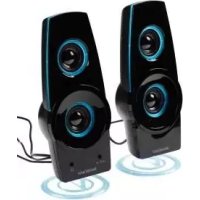
SLB 1.2 E3 - Speaker SILVERCREST - Free user manual and instructions
Find the device manual for free SLB 1.2 E3 SILVERCREST in PDF.



| Product Type | Stereo speaker for PC and audio devices |
| Brand | SilverCrest |
| Model | SLB 1.2 E3 |
| Output Power | 2 x 0.6 W |
| Power Supply | USB port 5 V ≈ 500 mA (via included USB cable) |
| Audio Connectivity | AUX input (3.5 mm jack) and 3.5 mm audio cable included |
| Headphone Jack | Yes, 3.5 mm jack |
| Controls | Volume (ON/OFF), bass (BASS), treble (TREBLE), lighting LIGHT |
| Lighting | Yes, LIGHT ON/OFF switch |
| Dimensions (W x H x D) | Approx. 8.5 x 22.2 x 8.5 cm |
| Weight | Approx. 480 g |
| Operating Temperature | +5 °C to +35 °C |
| Storage Temperature | 0 °C to +40 °C |
| Humidity (non-condensing) | 15 % to 75 % |
| Package Contents | Speaker, 2 feet, USB power cable, 3.5 mm jack cable, user manual |
| Intended Use | Connection to a PC, laptop or audio device (MP3 player) via 3.5 mm jack |
| Housing Material | Plastic (not specified) |
| Color | Black (estimated) |
| Warranty | 3 years (manufacturer warranty) |
| Protection Rating | Not waterproof; protect from moisture |
| Maintenance | Clean with a slightly damp cloth and mild detergent |
| Repairability | Do not open; refer repairs to authorized service center |
| Standards | EU directives: electromagnetic compatibility 2014/30/EU and RoHS 2011/65/EU |
Frequently Asked Questions - SLB 1.2 E3 SILVERCREST
User questions about SLB 1.2 E3 SILVERCREST
0 question about this device. Answer the ones you know or ask your own.
Ask a new question about this device
Download the instructions for your Speaker in PDF format for free! Find your manual SLB 1.2 E3 - SILVERCREST and take your electronic device back in hand. On this page are published all the documents necessary for the use of your device. SLB 1.2 E3 by SILVERCREST.
USER MANUAL SLB 1.2 E3 SILVERCREST
Operating instructions and safety instructions
FR BE
ENCEINTES ACTIVES
Before reading, unfold the page containing the illustrations and familiarise yourself with all functions of the device.
FR BE
GB/IE Operating instructions and safety instructions Page 15
KOMPERNASS HANDELS GMBH
BURGSTRASSE 21
DE-44867 BOCHUM
DEUTSCHLAND
www.kompernass.com
Table of contents
Introduction 16
Information concerning these operating instructions 16
Copyright 16
Limitation of liability 16
Notes on trademarks 16
Warnings used 16
Intended use 17
Safety 17
Basic safety instructions 17
Initial operation 19
Check scope of delivery 19
Disposal of packaging 19
Fitting the support feet 20
Installation site requirements 20
Controls 20
Handling and use 21
System requirements 21
Connecting the loudspeaker 21
Switching on/off and adjusting the volume 21
Switching the light on and off 2 2
Switching bass and treble boost on/off 22
Connecting headphones 22
Fault rectification 23
Malfunction causes and remedies 23
Cleaning. 24
Safety instructions 24
Storage/Disposal 24
Storage when not in use 24
Disposal of the device 24
Appendix 24
Technical details 24
Notes on the EU-Declaration of Conformity 25
Information concerning these operating instructions
Congratulations on the purchase of your new device.
You have decided to purchase a high-quality product. The operating instructions are a constituent of this product. They contain important information with regard to safety, use and disposal. Before using the product, familiarise yourself with all operating and safety instructions. Use this device only as described and only for the specified areas of application. Retain these instructions for future reference. Please also pass these operating instructions on to any future owner(s).
Copyright
This documentation is subject to copyright protection.
Any copying or reproduction of it, including as extracts, as well as the reproduction of images, also in an altered state, is only permitted with the written authorisation of the manufacturer.
Limitation of liability
All technical information, data and information for installation, connection and operation contained in these operating instructions correspond to the latest version at time of printing and, to the best of our knowledge, take into account our previous experience and know-how. No claims can be derived from the details, illustrations and descriptions in these instructions. The manufacturer assumes no responsibility for damage caused by failure to observe these instructions, improper use, incompetent repairs, making unauthorised modifications or for using non-approved replacement parts.
Notes on trademarks
-
USB® is a registered trademark of USB Implementers Forum, Inc.
-
The SilverCrest trademark and the retail name are the property of their respective owner.
All other names and products may be trademarks or registered trademarks of their respective owners.
Warnings used
The following warnings are used in these operating instructions:
DANGER
A warning at this risk level indicates a potentially dangerous situation.
Failure to avoid this hazardous situation could result in physical injury or death.
Follow the directives in this warning to avoid personal injuries.
CAUTION
A warning of this risk level indicates potential damage to property.
Failure to avoid this situation could result in damage to property.
- Follow the instructions in this warning to prevent damage to property.
NOTE
A note indicates additional information that will assist you in handling the device.
Intended use
The speakers are information technology devices. They are designed exclusively for connection to a PC, a notebook, or an audio device* (e.g. MP3 player) using a 3.5 mm jack plug and are intended for playing back audio signals. This device is exclusively for private use, and is not intended for industrial or commercial purposes. The device is not intended for any other use or for uses extending beyond those stated. Claims of any kind for damage arising as a result of non-intended use will not be accepted. The user is the sole bearer of the risk.
- If the loudspeaker is to be connected to a device without a USB connection, an external power supply with USB output is required (not included in delivery). The mains adapter should have the following specifications: 5 ~V = = (direct current), min. 500 ~mA .
Safety
This section provides you with important safety information regarding the handling of the device. The device complies with the statutory safety regulations. Incorrect usage can lead to personal injury and property damage.
Basic safety instructions
For safe handling of the device, follow the safety information below:
Check device for visible external damage before use. Do not use devices that have been damaged or dropped.
Damaged cables or connections should be replaced by the Customer Service department.
Always grasp the connection cable by the plug. Do not pull on the power cable itself!
- Do not place any objects, furniture or similar on the connection cable and make sure that the cable is not trapped.
- Never make a knot in the connection cable and do not bind it together with other cables. The power cable should be routed so that it cannot be stepped on or tripped over.
This device may be used by children aged 8 years and above and by persons with limited physical, sensory or mental capabilities or lack of experience and knowledge, provided that they are under supervision or have been told how to use the device safely and are aware of the potential risks. Children must not use the device as a plaything. Cleaning and user maintenance tasks may not be carried out by children unless they are supervised.
DANGER! Packaging materials such as plastic film or polystyrene must not be used by children as a plaything.
Risk of suffocation!
Only have repairs carried out by authorised specialist companies or the Customer Service department. Improper repairs can pose significant risks to the user. Warranty claims also become void.
Repairs to the device during the warranty period may only be carried out by a customer service department authorised by the manufacturer. Otherwise no additional warranty claims can be considered for subsequent damage.
Defective components must always be replaced with original replacement parts. It can only be guaranteed that safety requirements are complied with if original replacement parts are used.
Never attempt to open the device. There are no parts which can be cleaned or maintained inside the device. Do not perform any modifications or changes to the device yourself.
Never operate the device in the vicinity of naked flames, and do not place candles on or next to the device.
- Protect the device from moisture, spray and dripping water and the penetration of liquids. Do not place objects containing liquid (e.g. flower vases) on or near the device.
If liquid penetrates the device, switch it off, disconnect it from the power supply and have it inspected by qualified specialists before using it again.
If the device is moved from cold to warm surroundings, wait for approx. 2 hours until the device has reached the ambient temperature before switching it on.
If you are using a USB power supply, the mains socket used must always be easily accessible so that the USB power supply can be quickly disconnected from the socket in a hazardous situation. You should also observe the operating instructions for the USB power supply.
If you notice a burning smell or smoke coming from your device, unplug all connections immediately.
Initial operation
Check scope of delivery
(see fold-out page)
This device is supplied with the following components as standard:
- Loudspeaker5
- 2 support fee8
This operating manu
Remove all parts of the device and the operating instructions from the box.
Remove all packaging material.
NOTE
- Check the contents for completeness and for signs of visible damage.
If the contents are incomplete or damaged due to defective packaging or through transportation, contact the Service Hotline (see chapter Service).
Disposal of packaging
The packaging protects the device from transport damage.
The packaging materials have been selected in accordance with their environmental friendliness and disposal attributes, and are therefore recyclable.

The recirculation of packaging into the material cycle saves raw materials and reduces the amount of waste generated. Dispose of packaging material that is no longer needed in accordance with applicable local regulations.
NOTE
If possible, keep the original packaging during the warranty period so that the device can be properly packed for returning in the event of a warranty claim.
Fitting the support feet
Slide the support feet onto the loudspeaker guide rails from behind 5 see fig.1).
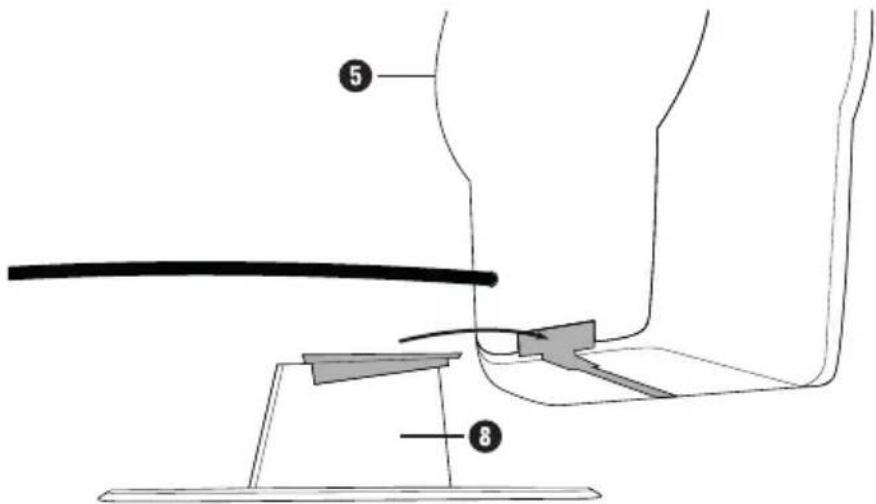
Fig. 1
Installation site requirements
For safe and trouble-free operation of the device, the installation site must fulfil the following requirements:
The device must be placed on a firm, flat and level surface.
Do not place the device in a hot, wet or extremely moist environment or in the vicinity of flammable materials.
Place the device so that it is not exposed to direct sunlight, strong artificial light or heated air.
Controls
TREBLE control (MIN/MAX)
BASS control (MIN/MAX)
3 LIGHT switch (ON/OFF)
ON/OFF VOL control (On/Off and volume control)
5 Loudspeakers
6 AUX IN socket (3.5 mm jack)
Headphone socket (3.5 mm jack)
Support foot
9 Power supply cable with USB plug
10 Loudspeaker cable with 3.5mm jack plug
10 Operating instructions (Symbol image)
Handling and use
This section provides you with important information on handling and using the device.
System requirements
Computer with sound card and USB connection
or
- audio device with audio output (3.5 mm jack plug) and USB connection (alternatively with external USB power supply).
Connecting the loudspeaker
Ensure that the ON/OFF| VOL control 4 in the "OFF" position.
Plug the 3.5mm jack plug into the line out or headphone socket of your audio device (e.g. notebook, MP3 player). The audio signals are transmitted via this connection.
NOTE
- Alternatively you can connect an audio cable (not supplied) to the loudspeaker. One end of the cable must have a 3.5mm jack plug to connect to the AUX IN socket 6. The type of plug on the other end of the cable will depend on the audio output of the external device.
As soon as you connect a device to the AUX IN socket, the sound signal will be exclusively output via this socket.
Plug the USB plug into a USB socket of your audio device (alternatively into the USB socket of an external USB power supply). The mains adapter should have the following specifications: 5V min. 500mA . The power supply for the loudspeaker is provided via this connection.
NOTE
The loudspeaker do not work without a USB connection!
Switching on/off and adjusting the volume
Turn the ON/OFFVOL control 4 clockwise until you hear a click to switch the loudspeakers 5 n.
Continue turning the ON/OFF | VOL control clockwise to increase the volume.
Turn the ON/OFF| VOL control 4 anticlockwise to reduce the volume.
Turn the ON/OFF| VOL control ④ anticlockwise until you hear a click ("OFF" position) to switch off the loudspeakers ⑤.
Switching the light on and off
Turn the LIGHT switch 3 to the "ON" position in order to switch the loudspeaker 5ght on.
Turn the LIGHT switch to the "OFF" position in order to switch the loudspeaker light off.
Switching bass and treble boost on/off
Turn the BASS control 2 clockwise to increase the bass.
Turn the BASS control 2 anticlockwise to reduce the bass.
Turn the TREBLE control clockwise to increase the treble.
Turn the TREBLE control 1 anticlockwise to reduce the treble.
Connecting headphones
DANGER
Loud music can lead to hearing damage.
- Avoid extremely loud sound levels, especially over long periods of time, when you are using headphones.
Ensure that the ON/OFF| VOL control 4 is in the "OFF" position.
Insert the 3.5mm jack plug of the headphones into the headphone socket
Before placing the headphones on your head, switch the loudspeaker 5 on again and carefully increase the volume.
NOTE
As soon as you connect the headphones, the loudspeaker will be muted.
The headphone output is passive, which means that the volume can be controlled using the ON/OFF | VOL control 4 The maximum volume, however, is specified by the computer or audio device. Please note that headphones may only be connected if the audio device has the necessary standard volume limitation applied to its output. Please refer to your audio device instruction manual for more information.
Fault rectification
This section contains important information on fault localisation and rectification. Observe the instructions in order to avoid risks and damage.
Malfunction causes and remedies
CAUTION
The loudspeakers may not be opened!
There are no parts which can be cleaned or maintained inside the device. Opening the loudspeakers will result in irreparable damage to the device.
The following table will help with localising and remedying minor malfunctions:
| Defect Possible | cause Rectification | |
| No sound. | The volume control of the player or the loud-speaker 5 is set to the minimum volume. | Increase the volume at the audio device or the loudspeaker 5 |
| The audio device has been muted. | Switch the audio device muting off again. | |
| Audio device or loudspeaker 5 not switched on. | Ensure that all devices are switched on. | |
| The 3.5 mm jack plug 10 is not fully inserted into the audio device's headphone socket. | Insert the 3.5 mm jack plug 10 fully into the socket. | |
| The 3.5 mm jack plug of the headphones is connected to the headphone socket 7. | Pull the 3.5 mm jack plug of the headphones out of the headphone socket 7. | |
| No sound or volume too low on connected headphones. | The volume control of the audio device is set to the minimum volume. | Increase the volume at the audio device. |
| Headphones defective. | Check the head- phone function on the audio device itself. |
NOTE
If the aforementioned solutions do not resolve the problem, please contact Customer Service (see chapter Service).
Cleaning
Safety instructions
CAUTION
Possible damage to the device
Penetrating moisture can cause damage to the device.
To avoid irreparable damage, ensure that no moisture penetrates the device during cleaning.
Clean the housing of the device with a lightly moistened cloth and a mild detergent only.
Storage/Disposal
Storage when not in use
Store the device in a dry environment.
Disposal of the device
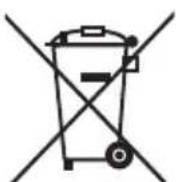
The symbol of a crossed-out wheelie bin means that this product is subject to European Directive 2012/19/EU and may not be disposed of in the domestic waste. The product must be taken to a dedicated collection point for electrical and electronic appliances.
This disposal is free of charge for the user. You will be helping to protect both the environment and your personal health and recycling valuable raw materials.
More information on disposal and the nearest collection point is available from your town council.
Appendix
Technical details
| Output power 2 x 0.6 W | |
| Voltage supply - input voltage - current consumption | via USB-A plug 5 V=- max. 500 mA |
| Audio connection: 3.5 mm jack plug | |
| Headphone connection 3.5 mm jack socket | |
| Operating temperature +5 - +35°C | |
| Storage Temperature 0 - +40°C | |
| Humidity (no condensation) 15 - 75 % | |
| Dimensions (W x H x D) approx. 8.5 x 22,2 x 8.5 cm | |
| Weight 480 g approx. | |
Notes on the EU-Declaration of Conformity
With regard to conformity with the basic requirements and other relevant provisions, this device complies with the Electromagnetic Compatibility Directive 2014/30/EU and the RoHS Directive 2011/65/EU.

The full EU-Declaration of Conformity is available from the importer.
This appliance has a 3-year warranty valid from the date of purchase. If this product has any faults, you, the buyer, have certain statutory rights. Your statutory rights are not restricted in any way by the warranty described below.
Warranty conditions
The validity period of the warranty starts from the date of purchase. Please keep your original receipt in a safe place. This document will be required as proof of purchase.
If any material or production fault occurs within three years of the date of purchase of the product, we will either repair or replace the product for you at our discretion. This warranty service is dependent on you presenting the defective appliance and the proof of purchase (receipt) and a short written description of the fault and its time of occurrence.
If the defect is covered by the warranty, your product will either be repaired or replaced by us. The repair or replacement of a product does not signify the beginning of a new warranty period.
Warranty period and statutory claims for defects
The warranty period is not prolonged by repairs effected under the warranty. This also applies to replaced and repaired components. Any damage and defects present at the time of purchase must be reported immediately after unpacking. Repairs carried out after expiry of the warranty period shall be subject to a fee.
Scope of the warranty
This appliance has been manufactured in accordance with strict quality guidelines and inspected meticulously prior to delivery.
The warranty covers material faults or production faults. The warranty does not extend to product parts subject to normal wear and tear or fragile parts such as switches, batteries, baking moulds or parts made of glass.
The warranty does not apply if the product has been damaged, improperly used or improperly maintained. The directions in the operating instructions for the product regarding proper use of the product are to be strictly followed. Uses and actions that are discouraged in the operating instructions or which are warned against must be avoided.
This product is intended solely for private use and not for commercial purposes. The warranty shall be deemed void in cases of misuse or improper handling, use of force and modifications / repairs which have not been carried out by one of our authorised Service centres.
Warranty claim procedure
To ensure quick processing of your case, please observe the following instructions:
Please have the till receipt and the item number (e.g. IAN 12345) available as proof of purchase.
You will find the item number on the type plate, an engraving on the front page of the instructions (bottom left), or as a sticker on the rear or bottom of the appliance.
If functional or other defects occur, please contact the service department listed either by telephone or by e-mail.
You can return a defective product to us free of charge to the service address that will be provided to you. Ensure that you enclose the proof of purchase (till receipt) and information about what the defect is and when it occurred.

You can download these instructions along with many other manuals, product videos and software on www. lidl-service.com.
Service
GB Service Great Britain
Tel.: 0871 5000 720 (£ 0.10/Min.)
E-Mail: kompernass@lidl.co.uk
IE Service Ireland
Tel.: 1890 930 034
{0,08 EUR/Min., {peak})
(0,06 EUR/Min., (off peak))
E-Mail: kompernass@lidl.ie
IAN 298512
Importer
Please note that the following address is not the service address:
Please use the service address provided in the operating instructions.
KOMPERNASS HANDELS GMBH
BURGSTRASSE 21
DE-44867 BOCHUM
GERMANY
www.kompernass.com
Table des matieres
Introduction 28
Chere cliente, cher client,
KOMPERNASS HANDELS GMBH
BURGSTRASSE 21
DE-44867 BOCHUM
ALLEMAGNE
www.kompernass.com
Inhoud
Inleiding 42
KOMPERNASS HANDELS GMBH
BURGSTRASSE 21
DE-44867 BOCHUM
DUITSLAND
www.kompernass.com
Obsah
Uvod. 56
Informace k tomuto navodu k obsluze 56
Autorske pravo 56
KOMPERNASS HANDELS GMBH
BURGSTRASSE 21
DE-44867 BOCHUM
NÉMECKO
www.kompernass.com
Indices
Introduccion 68
Caracteristicas techniques 77
KOMPERNASS HANDELS GMBH
BURGSTRASSE 21
DE-44867 BOCHUM
ALEMANIA
www.kompernass.com
Indices
Introducao 82
KOMPERNASS HANDELS GMBH
BURGSTRASSE 21
DE-44867 BOCHUM
ALEMANHA
www.kompernass.com
KOMPERNASS HANDELS GMBH
BURGSTRASSE 21
DE-44867 BOCHUM
GERMANY
www.kompernass.com

- ENCEINTES ACTIVES
- FR BE
- Table of contents
- Introduction 16
- Safety 17
- Initial operation 19
- Controls 20
- Handling and use 21
- Fault rectification 23
- Cleaning. 24
- Storage/Disposal 24
- Appendix 24
- Information concerning these operating instructions
- Copyright
- Limitation of liability
- Notes on trademarks
- Warnings used
- DANGER
- A warning at this risk level indicates a potentially dangerous situation.
- CAUTION
- A warning of this risk level indicates potential damage to property.
- NOTE
- Intended use
- Safety
- Basic safety instructions
- Risk of suffocation!
- Initial operation
- Check scope of delivery
- Disposal of packaging
- Fitting the support feet
- Installation site requirements
- Controls
- Handling and use
- System requirements
- Connecting the loudspeaker
- Switching on/off and adjusting the volume
- Switching the light on and off
- Switching bass and treble boost on/off
- Connecting headphones
- Loud music can lead to hearing damage.
- Fault rectification
- Malfunction causes and remedies
- The loudspeakers may not be opened!
- Cleaning
- Safety instructions
- Possible damage to the device
- Storage/Disposal
- Storage when not in use
- Disposal of the device
- This disposal is free of charge for the user. You will be helping to protect both the environment and your personal health and recycling valuable raw materials.
- Appendix
- Technical details
- Notes on the EU-Declaration of Conformity
- Warranty conditions
- Warranty period and statutory claims for defects
- Scope of the warranty
- Warranty claim procedure
- Service
- GB Service Great Britain
- IE Service Ireland
- Importer
- Table des matieres
- Introduction 28
- Inhoud
- Inleiding 42
- Obsah
- Uvod. 56
- Indices
- Introduccion 68
- Introducao 82
- KOMPERNASS HANDELS GMBH
Brand : SILVERCREST
Model : SLB 1.2 E3
Category : Speaker