
SBLS 6 A1 - Loudspeaker SILVERCREST - Free user manual and instructions
Find the device manual for free SBLS 6 A1 SILVERCREST in PDF.


| Product Type | Portable Bluetooth Speaker |
| Model | SBLS 6 A1 |
| Brand | SilverCrest |
| Dimensions (W x H x D) | 17.0 x 6.5 x 6.5 cm |
| Weight | Approx. 450 g |
| Power Source | Built-in rechargeable Li-ion battery (1800 mAh, 3.7 V) |
| Charging Input | Micro USB (5 V, 1 A) |
| Speaker Power | 10 W (RMS) |
| Frequency Range | 100 Hz – 20 kHz |
| Bluetooth Version | 5.0 |
| Bluetooth Range | Up to 10 m |
| Supported Profiles | A2DP, AVRCP, HFP, HSP |
| Controls | Power, Volume +/-, Play/Pause, Track skip, Pairing button |
| Audio Input | 3.5 mm AUX, Bluetooth |
| Playback Time | Up to 8 hours (at 50% volume) |
| Charging Time | Approx. 3 hours |
| Material | Plastic with fabric grille |
| Water Resistance | IPX5 (splash proof) |
| Included Accessories | Micro USB charging cable, AUX cable, user manual |
| Compatibility | Smartphones, tablets, computers with Bluetooth or AUX |
| Maintenance | Clean with a soft, dry cloth; avoid liquids |
| Safety | Do not expose to extreme temperatures or water; use original charger |
| Repairability | Battery may be replaceable by a professional |
Frequently Asked Questions - SBLS 6 A1 SILVERCREST
User questions about SBLS 6 A1 SILVERCREST
0 question about this device. Answer the ones you know or ask your own.
Ask a new question about this device
Download the instructions for your Loudspeaker in PDF format for free! Find your manual SBLS 6 A1 - SILVERCREST and take your electronic device back in hand. On this page are published all the documents necessary for the use of your device. SBLS 6 A1 by SILVERCREST.
USER MANUAL SBLS 6 A1 SILVERCREST
BLUETOOTH® STEREO SPEAKER SBLS 20 A1
GB
BLUETOOTH® STEREO SPEAKER
Operating instructions
CZ
STEREOFONNÍ REPRODUKTOR S BLUETOOTH®
Návod k obsluze
IAN 110636
GB CZ
English....2
Česky 10
Overview / Přehled
Contents
- Overview 2
- Intended purpose .... 3
- Safety information .... 3
- Items supplied .... 5
- Before using for the first time .... 5
- How to use .... 5
- Operation 5
7.1 Establish a Bluetooth connection 5
7.2 Changing the audio device 6
7.3 Playing music using the cable.... 6
- Cleaning and storing 6
- Disposal 6
- Troubleshooting 7
- Technical specifications .... 7
- Warranty of the HOYER Handel GmbH 8
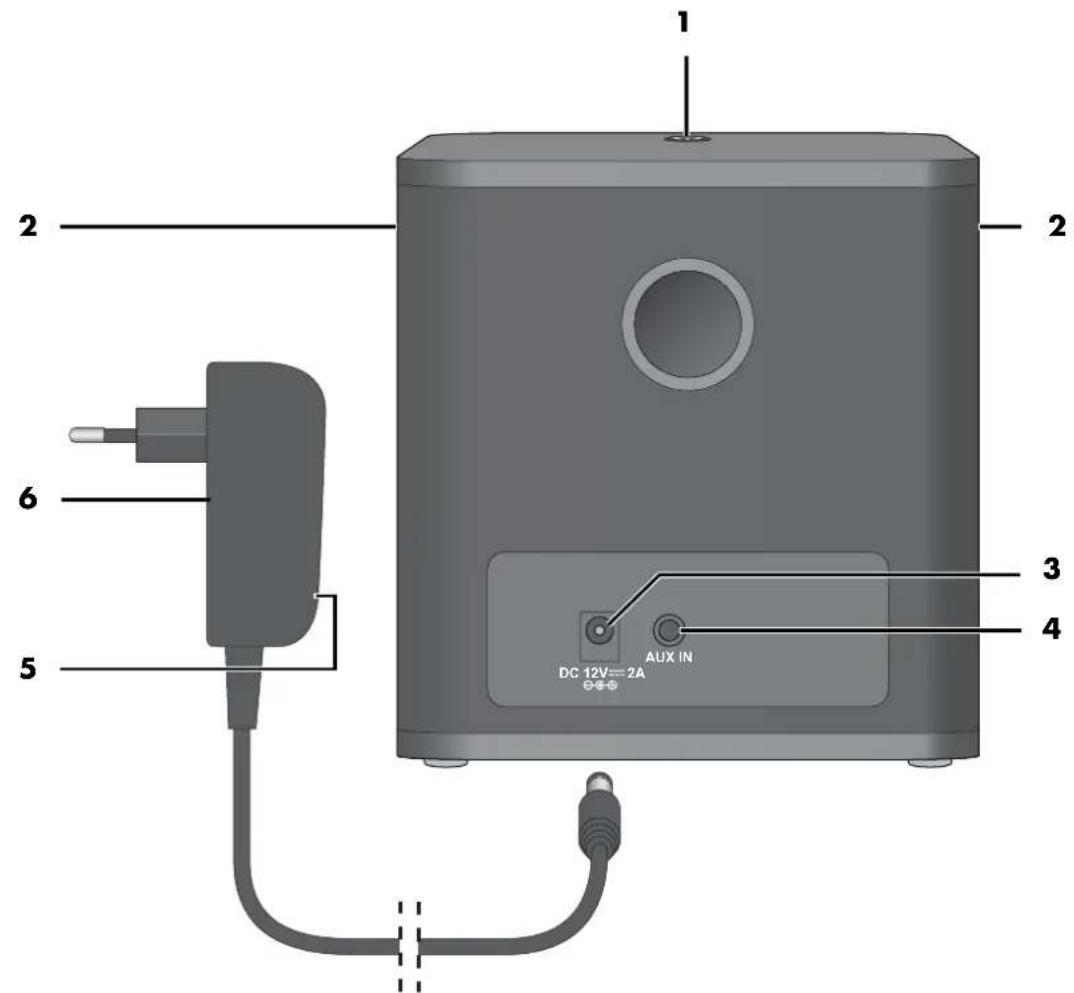
1. Overview
1 Press On/Off button briefly:
switch on from standby mode / switch to standby mode press and hold: establish a new Bluetooth connection
2 Speaker
3 DC 12V === 2A Socket for power unit

4 AUX IN 3.5 mm stereo jack socket
5 blue LED: lights up when the power unit is plugged into the wall socket
6 Power unit
2 GB
Thank you for your trust!
Congratulations on your new Bluetooth speaker.
For a safe handling of the device and in order to get to know the entire scope of features:
• Thoroughly read these operating instructions prior to initial commissioning.
- Above all, observe the safety instructions!
• The device should only be used as described in these operating instructions.
- Keep these operating instructions for reference.
- If you pass the device on to someone else, please include these operating instructions. The operating instructions are a part of the product.
We hope you enjoy your new Bluetooth speaker!
The Bluetooth ® brand and corresponding logos are the property of Bluetooth SIG, Inc.
2. Intended purpose
This is a communication technology device. The Bluetooth speaker is intended for playing sound from audio devices.
The device is designed for private home use and must not be used for commercial purposes. The device must only be used indoors.
3. Safety information
Warnings
If necessary, the following warnings will be used in these operating instructions:

DANGER! High risk: failure to observe this warning may result in injury to life and limb.
WARNING! Moderate risk: failure to observe this warning may result in injury or serious material damage.
CAUTION: low risk: failure to observe this warning may result in minor injury or material damage.
NOTE: circumstances and specifics that must be observed when handling the device.

DANGER for children and people with disabilities
- Packing materials are not children's toys. Children should not be allowed to play with the plastic bags: there is a risk of suffocation!
- This device is not designed to be used by people (including children) with limited physical, sensory or mental capabilities or people without adequate experience and/or understanding, unless they are supervised by someone responsible for their safety or are instructed by them on how to use the device.
-Children must not play with the device.
- Keep the device out of the reach of children.

DANGER! Risk of electric shock due to moisture
The device must not be used in extreme conditions, e.g. rooms with high humidity (bathrooms).
- Protect the device and power unit from dampness and dripping or splashing water.
- Never touch the device and power unit with wet hands.
- Pull the power unit out of the wall socket if liquid gets into the device.
- Should liquid enter the device, have it checked before starting the device up again.

DANGER! Risk of electric shock
- Never put the device into operation if there are visible damages to the device, the power unit or the cable or if the device has been dropped before. Do not use the device again, but have this checked by a specialist workshop.
- Never open the casing of the device or power unit.
- Connect the cable to the device before plugging the power unit into a wall socket.
- Only connect the power unit to a properly installed, easily accessible wall socket, the voltage of which corresponds to the specifications on the rating plate. The wall socket must continue to be easily accessible after the device is plugged in.
- Ensure that the cable cannot be damaged by sharp edges or hot surfaces.
- Ensure that the cable is not trapped or crushed.
- When removing the power unit from the wall socket, always pull the power unit and never the cable.
- Pull the power unit out of the wall socket, ...
... after each use (disconnection from the mains),
... if there is a fault,
... before connecting the device to the power unit,
... before you clean the device and ... during thunderstorms.
To avoid any risk, do not make modifications to the device. Repairs must be carried out by a specialist workshop or the Service Centre.
WARNING! Risk of material damage
- If you notice any irregularities (e.g. unusual noises, strange smells or smoke developing) pull the power unit out of the wall socket immediately. Do not use the device any longer.
- If the device is moved from a cold location to a warm location, condensate may form in the device. Leave the device switched off for a few hours.
- Protect the device against damage, e.g. from:
- Heat, direct sunlight and open flames
- Impacts and similar violent effects
Do not cover the power unit to prevent overheating.
- Do not use any astringent or abrasive cleaning agents.
The device is fitted with non-slip silicon feet. Because furniture can be coated with a wide variety of varnishes and plastics, and treated with various care products, the possibility cannot be excluded that some of these substances have ingredients that may attack and soften the silicon feet. If necessary, place a non-slip mat under the device.
4. Items supplied
1 Bluetooth speaker
1 Power unit 6
1 Operating instructions
Please observe the illustrations on the fold-out page.
5. Before using for the first time
- Remove all packing material.
- Check that the device is undamaged.
6. How to use
NOTE: the device remains in standby mode after being switched off. As the device still uses some electricity in this mode, unplug the power unit 6 from the wall socket after each use, to disconnect the device from the mains.
- Place the device on a level surface.
- Connect the power unit 6 to the device.
- Connect the power unit 6 with an easily accessible wall socket. The blue LED 5 on the power unit 6 lights up. The device is now in standby mode.
7. Operation
7.1 Establish a Bluetooth connection
NOTES:
-
The identification of the device is "SBLS 20 A1".
• After turning it on from standby mode, the device automatically tries to reconnect to the last paired device or to establish a new connection. -
Please observe that the establishment process of the connection may vary slightly depending on the device and the software used.
-
The device switches to standby mode... ... if no Bluetooth connection is established within 20 minutes or ... if it does not receive a signal for 20 minutes.
-
Remove a plug from the AUX IN 4 socket if applicable.
- Press the On/Off button ⬆ to switch on the device from standby mode. The On/Off button ⬆ flashes. An acoustic signal sounds.
- Switch on the audio device (e.g. smartphone) and start the Bluetooth connection. The audio device will now receive the device identification "SBLS 20 A1".
- Establish a connection to the Bluetooth speaker on the audio device. Both devices are now interconnected. The On/Off button lights up and an acoustic signal sounds.
NOTE: it is possible that audio devices remember the identification of the device. Thus it is possible that a new manual connection establishment is not required while the Bluetooth function is active.
- Now play a song on the audio device. The sound is reproduced via the loud-speakers 2.
- Use the audio device to select and control the songs and to set the desired volume.
7.2 Changing the audio device
- If you want to connect the Bluetooth speaker with a different audio device, press and hold the On/Off button ⏻1, until it blinks and an acoustic signal sounds. The previous audio device is now disconnected.
- Switch on the new audio device and start the Bluetooth connection. The audio device will now receive the device identification "SBLS 20 A1".
- Establish a connection to the Bluetooth speaker on the audio device. Both devices are now interconnected. The On/Off button lights up and an acoustic signal sounds.
7.3 Playing music using the cable
NOTE: if there is a device connected via a cable, this connection has priority over the Bluetooth connection. A possibly existing Bluetooth connection will be interrupted.
- Plug the TRS connector of a 3.5 mm stereo jack cable (not included in scope of supply) into the headphone socket of the audio device (e.g. MP3 player, telephone) and the socket AUX IN 4 on the device.
- Switch on the audio device.
- Press the On/Off button ① to switch on the device from standby mode.
- Now play a song on the audio device. The sound is reproduced via the loudspeakers 2.
- Use the audio device to select and control the songs and to set the desired volume.
8. Cleaning and storing

DANGER! Risk of electric shock!
Pull the power unit 6 out of the wall socket before you clean the Bluetooth speaker. Make sure that no liquid gets into the device.
- Clean the device with a slightly damp cloth. Solvents, spirits, thinners etc. must not be used, as they can damage the surface of the device.
- When not using the device, store it in a place where neither high temperatures nor moisture can affect it.
9. Disposal
This product is subject to the provisions of European Directive 2012/19/EC. The symbol showing a wheelie bin crossed through indicates that the product re-
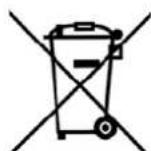
quires separate refuse collection in the European Union. This applies to the product and all accessories marked with this symbol. Products identified with this symbol may not be discarded with normal household waste, but have to be taken to a collection point for recycling electric and electronic devices. This disposal is free of charge. Protect the environment and dispose of waste properly. Further information can be obtained from your local disposal service or city/municipal administration.
Packaging
The packaging is made from recyclable materials. Dispose of the packaging sorted by materials. When disposing of the packaging, make sure you comply with the environmental regulations applicable in your country.
10. Troubleshooting
If your device fails to function as required, please try this checklist first. Perhaps there is only a minor problem, and you can solve it yourself.

DANGER! Risk of electric shock!
Do not attempt to repair the device yourself under any circumstances.
| Fault | Possible causes / Action |
| No function | Has the device been connected to the power supply?Is the blue LED 5 lit up? |
| No Bluetooth connection | Is the Bluetooth function of the audio device active?Did you switch off the device? |
| Music cannot be played via Bluetooth | Is the volume set too low on the audio device?Is a TRS connector plugged into the socket AUX IN 4 on the device? |
11. Technical specifications
| Model: SBLS 20 A1 | |
| Bluetooth: v2.1 | |
| Range: | up to 10 m |
| Power rating: | 2x 10 W RMS |
| Bluetooth speaker: Input:12.0 =¥⊖⊖⊖⊕ | |
| Protection class of the loudspeaker: III | |
| Power unitFIT-POWERTP24-120200EorTP24-120200B(only for UK): | Input:100–240 V ~50/60 Hz,1.5 A maxOutput:12.0 =¥ ,⊖⊖⊖⊕ |
| Protection class of the power unit: II | |
| Dimensions(WxDxH): | approx. 13 x 13 x13 cm |
| Weight: approx. 1.2 kg | |
| Ambient conditions: | ♡ only approved for indoor use10 °C to 35 °CRelative humidity 40 to 85 % |
b
A,
2
A,
Subject to technical modification.
CE
Declaration of conformity
A complete declaration of conformity can be requested from HOYER Handel GmbH, see Service Centre.
12. Warranty of the HOYER Handel GmbH
Dear Customer,
your device is provided with a 3 year warranty starting with the purchase date. In the event of product defects, you are entitled to statutory rights against the vendor. These statutory rights are not restricted by our warranty presented in the following.
Warranty conditions
The warranty period starts with the purchase date. Please keep the original purchase receipt in a safe place. This document is required to verify the purchase.
If within three years from the purchase date of this product a material or factory defect occurs, the product will be repaired or replaced by us – at our discretion – free of charge to you. This warranty implies that within the period of three years the defective device and the purchase receipt are presented, including a brief written description of the defect and the time it occurred. If the defect is covered by our warranty, the repaired or a new product will be returned to you. No new warranty period starts with a repair or replacement of the product.
Warranty period and statutory claims for defects
The warranty period is not extended when the warranty has been claimed. This also applies to replaced and repaired parts. Any damages and defects already existing at the time of purchase must be reported immediately upon unpacking. Repairs arising after the expiration of the warranty period are subject to a charge.
Warranty coverage
The device was produced carefully according to strict quality guidelines and tested diligently prior to delivery.
The warranty applies to material or factory defects. This warranty does not include product parts that are subject to standard wear and therefore can be considered wear parts; the same applies to damages at fragile parts, e.g. switches, rechargeable batteries or parts made of glass.
This warranty expires if the product is damaged, not used as intended or not serviced. For the proper operation of the product, all instructions listed in the operating instructions must be observed carefully. Any form of use and handling that is advised against in the operating instructions or warned against must always be avoided.
The product is only intended for private and not for commercial use. In the case of incorrect and improper treatment, use of force and interventions not performed by our authorised Service Centre, the warranty shall cease.
Handling in case of a warranty claim
In order to ensure prompt processing of your matter, please observe the following notes:
- Please keep the article number
IAN: 110636 and the purchase receipt as a purchase verification for all inquiries. - If faulty operation or other defects occur, first contact the Service Centre listed in the following by telephone or email.
- Then, you are able to send a product reported as defective free of charge to the service address specified to you, including the purchase receipt and the information on the defect and when it occurred.

Please visit www.lidl-service.com to download this and many other manuals, product videos and software.

Service Centre
GB Service Great Britain
Tel.: 0871 5000 720 (£ 0.10/Min.)
E-Mail: hoyer@lidl.co.uk
IE Service Ireland
Tel.: 1890 930 034
(0,08 EUR/Min., (peak))
(0,06 EUR/Min., (off peak))
E-Mail: hoyer@lidl.ie
IAN: 110636

Supplier
Please note that the following address is no
service address. First contact the aforementioned Service Centre.
HOYER Handel GmbH
Kühnehöfe 5
22761 Hamburg
Germany


GB
9



Obsah



- BLUETOOTH® STEREO SPEAKER SBLS 20 A1
- BLUETOOTH® STEREO SPEAKER
- STEREOFONNÍ REPRODUKTOR S BLUETOOTH®
- CONTENTS
- OVERVIEW
- THANK YOU FOR YOUR TRUST
- INTENDED PURPOSE
- SAFETY INFORMATION
- WARNINGS
- DANGER FOR CHILDREN AND PEOPLE WITH DISABILITIES
- DANGER! RISK OF ELECTRIC SHOCK DUE TO MOISTURE
- DANGER! RISK OF ELECTRIC SHOCK
- WARNING! RISK OF MATERIAL DAMAGE
- ITEMS SUPPLIED
- BEFORE USING FOR THE FIRST TIME
- HOW TO USE
- OPERATION
- 7.1 ESTABLISH A BLUETOOTH CONNECTION
- NOTES
- 7.2 CHANGING THE AUDIO DEVICE
- 7.3 PLAYING MUSIC USING THE CABLE
- CLEANING AND STORING
- DISPOSAL
- PACKAGING
- TROUBLESHOOTING
- TECHNICAL SPECIFICATIONS
- CE
- DECLARATION OF CONFORMITY
- WARRANTY OF THE HOYER HANDEL GMBH
- WARRANTY CONDITIONS
- WARRANTY PERIOD AND STATUTORY CLAIMS FOR DEFECTS
- WARRANTY COVERAGE
- HANDLING IN CASE OF A WARRANTY CLAIM
- SERVICE CENTRE
- SUPPLIER
- OBSAH
Brand : SILVERCREST
Model : SBLS 6 A1
Category : Loudspeaker