
SBLH 10 A1 - Speaker SILVERCREST - Free user manual and instructions
Find the device manual for free SBLH 10 A1 SILVERCREST in PDF.


| Brand | SilverCrest |
| Model | SBLH 10 A1 |
| Product type | Portable Bluetooth speaker |
| Dimensions (L x D x H) | Approx. 195 x 58 x 65 mm |
| Weight | Approx. 400 g (without accessories) |
| Power supply | Lithium-ion battery 7.4 V, 1800 mAh (13.32 Wh), charging via micro USB (5 V, max. 3 A) |
| Charging time | Approximately 2.5 hours (with 5 V adapter, min. 3 A) |
| Battery life | Up to 10 hours at medium volume |
| Connectivity | Bluetooth v4.2 (AVRCP, A2DP), NFC, 3.5 mm jack input (Aux in) |
| Audio power | 2 x 5 W RMS |
| Bluetooth range | Up to 10 m |
| Protection rating | IP55 (dust and water jet resistant, cover closed) |
| Key features | Play/pause, volume control, track skip, hands-free calls, voice assistant, True Wireless Stereo (TWS) mode for two speakers |
| Cleaning | Soft cloth slightly damp, without harsh detergent |
| Operating temperature | 10 °C to 40 °C, relative humidity 40-85 % |
| Warranty | 3 years (manufacturer's warranty) |
| Package contents | 1 speaker, 1 micro USB/Type A cable, 1 3.5 mm jack cable, 1 user manual, 1 quick start guide |
Frequently Asked Questions - SBLH 10 A1 SILVERCREST
User questions about SBLH 10 A1 SILVERCREST
0 question about this device. Answer the ones you know or ask your own.
Ask a new question about this device
Download the instructions for your Speaker in PDF format for free! Find your manual SBLH 10 A1 - SILVERCREST and take your electronic device back in hand. On this page are published all the documents necessary for the use of your device. SBLH 10 A1 by SILVERCREST.
USER MANUAL SBLH 10 A1 SILVERCREST
natural_image
Exterior view of a modern silver-colored cylindrical electronic device with rounded body and buttons (no visible text or symbols)BLUETOOTH® SPEAKER
SBLH 10 A1
GB IE NI
Operating instructions
BLUETOOTH® SPEAKER
DK
natural_image
Black curved arrow pointing left, no text or symbols presentEnglish...... 2
Dansk...... 38
Français.... 74
Nederlands...... 114
Deutsch...... 152
natural_image
Black curved arrow pointing left, no text or symbols presentOverview / Oversigt / Aperçu de l'appareil / Overzicht / Übersicht
Contents
- Overview ......3
- Intended purpose ......6
- Safety information ...... 7
- Items supplied ......12
- Before using for the first time 13
5.1 Charging the battery...... 14
5.2 Functions of the buttons ..... 14
5.3 LED display.... 16
5.4 Establishing a Bluetooth connection 17
5.5 Establishing connection via NFC 19
5.6 Connecting two loudspeakers 20
5.7 Calls.... 22
5.8 Interruption of the connection 22
5.9 Playback using a cable (Aux in) 23
-
Cleaning ......25
-
Storing if not in use ......25
-
Disposal ......26
-
Trouble-shooting 27
-
Technical specifications ..... 29
-
Warranty of HOYER Handel GmbH ...... 32
1. Overview
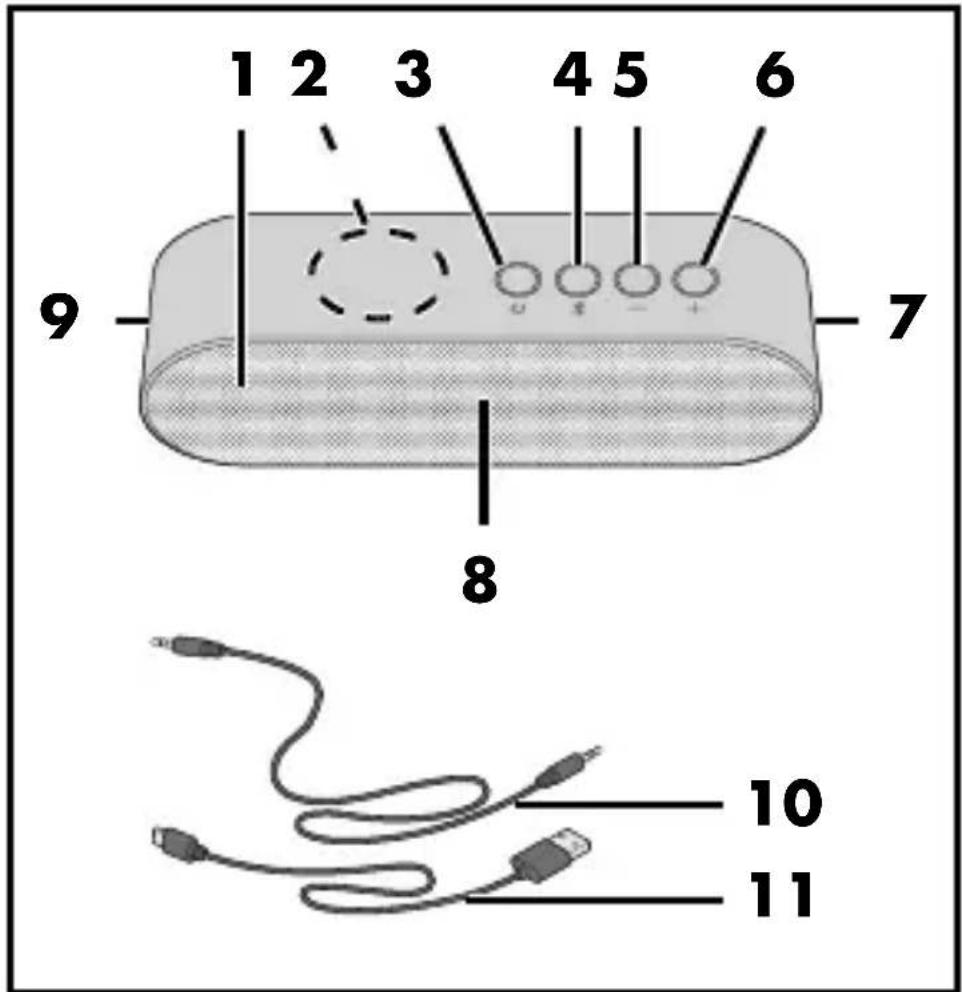
| 1 | Loudspeaker | |
| 2 | NFC transponder | |
| 3 |  | On/off button / Pause/Play |
| 4 |  | Pairing button / Start language assistant on the connected smartphone |
| 5 | — | Beginning of a song/previous song / reduce the volume |
| 6 | Next song  | increase the volume |
| 7 | RESET AUX IN USB | Cover |
| 8 | LED: charging indicator / Bluetooth status indicator | |
| 9 | Lug for wrist strap | |
| 10 | 3.5 mm jack cable | |
| 11 |  | USB charger cable for Micro USB/Type A |
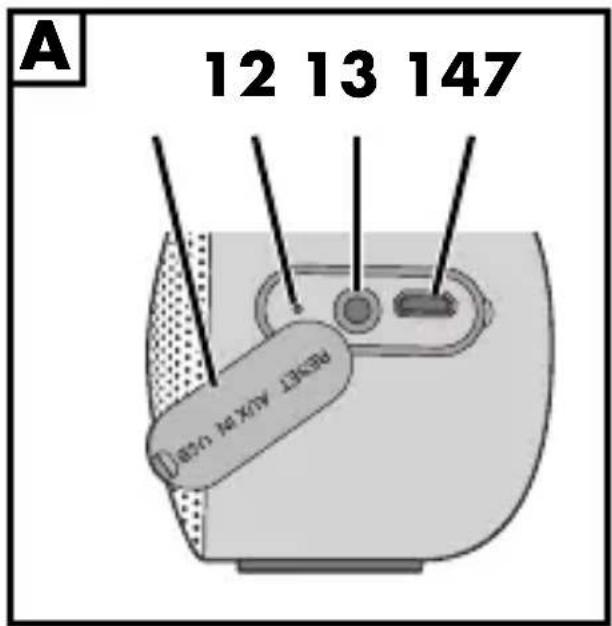
Connections Figure A
| 12 | RESET | Reset button |
| 13 | AUX IN | 3.5 mm jack socket |
| 14 | USB | Micro USB port |
Symbols on your device

This symbol means that the content of the user instructions must be observed.
Thank you for your trust!
Congratulations on your new Bluetooth® loudspeaker.
For safe handling of the product and in order to get to know the entire range of features:
- Thoroughly read these user instructions prior to initial use.
- Above all, observe the safety information!
- The device should only be used as described in this copy of the user instructions.
- Keep this copy of the user instructions for reference.
- If you pass the device on to someone else, please include this copy of the user instructions. The user instructions are a part of the product.
We hope you enjoy your new Bluetooth loudspeaker!
Trademarks
The Bluetooth ^® word mark and the Bluetooth logo are registered trademarks of Bluetooth SIG, Inc. (Special Interest Group), any use of the trademark by the Hoyer Handel GmbH is effected within the framework of a licence.
USB ^® is a registered trademark of USB Implementers Forum, Inc..
The N-Mark logo is a registered trademark of NFC Forum, Inc..
2. Intended purpose
This is an entertainment electronics device. The Bluetooth loudspeaker is intended for playing sound from audio devices via Bluetooth or using the 3.5 mm jack socket. The device is designed for private use and must not be used for commercial purposes.
3. Safety information
Warnings
If necessary, the following warnings are used in this copy of the user instructions:

DANGER! This symbol, in combination with the note "Danger" means a high risk. Failure to observe this warning may result in injury to life and limb.

WARNING! This symbol, in combination with the note "Warning" means a moderate risk. Failure to observe this warning may result in injury or serious material damage.

CAUTION! Low risk: failure to observe this warning may result in minor injury or material damage.
NOTE: circumstances and specifics that must be observed when handling the device.

DANGER for children and people with disabilities
- Packing materials are not children's toys. Children must not play with the packing material. There is a risk of suffocation.
- This device is not designed to be used by people (including children) with limited physical, sensory or mental capabilities or people without adequate experience and/or understanding, unless they are supervised by someone responsible for their safety or are instructed by them on how to use the device.
- Children must not play with the device.
- Cleaning and user maintenance must not be performed by children without supervision.
- Keep the device out of the reach of children.

DANGER to and from pets and livestock
Electrical devices can represent a danger to pets and livestock. In addition, animals can also cause damage to the device. For this reason you should keep animals away from electrical devices at all times.

DANGER from the battery
- The device is provided with a lithium-ion battery.
- The battery cannot be removed.
- This device must not be opened.
- Completely dispose of the device.
- When using a USB power unit, the wall socket used must always be easily accessible so that, in a dangerous situation, the USB power unit can be disconnected quickly from the wall socket. Observe also the user instructions of the USB power unit.
- Do not use the device if there is visible damage to the housing or the USB charger cable.
- This device must not be thrown into fire.
DANGER OF EXPLOSION!
- The device must not be covered while the battery is charging.
- The device must only be charged in a dry environment.
- Foreign objects must not be inserted into any of the components of the loudspeaker.
- Do not expose the device to direct sunshine or heat. The ambient temperature should not be lower than 10 °C or
higher than 40 °C. Please remember that in a car the storage temperature may significantly exceed 40 °C.
Because of the high power consumption, do not charge the loudspeaker through a laptop / PC. Only charge the loudspeaker via a USB power unit (5 V, min. 3 A, not included in the items supplied).
- Charge the battery using the original accessory (USB charger cable).

WARNING! Risk of material damage
- If you notice any irregularities (e.g. unusual noises, strange smells or smoke developing) turn the device off immediately and remove all cables. Do not use the device any longer.
- If the device is moved from a cold location to a warm location, condensate may form in the device. Leave the device switched off for a few hours to become acclimatised.
- Protect the device against damage, e.g. from:
- drips and water splashes
- heat, direct sun radiation and open flames (e.g. candles)
- knocks and similar violent effects
- Protect the cables against damage, e.g. from:
- s h a r p e d g e s - hot places - clamping or crushing
- If cables are used other than those included in the items supplied, they must not exceed a length of 3 metres.
- Do not use any astringent or abrasive cleaning agents.
- In order to avoid any hazards, do not make modifications to the device. Repairs must be carried out by a specialist workshop or the Service Centre.
- The device is fitted with non-slip plastic feet. As furniture is coated with a wide array of varnishes and synthetics, and is also treated with different care products, it cannot be fully ruled out that some of these materials contain components that could attack and soften the non-slip plastic feet. If necessary, place a non-slip mat under the device.
4. Items supplied
1 Bluetooth loudspeaker
1 USB charger cable for Micro USB/Type A 11
1 3.5 mm jack cable 10
1 copy of the user instructions
1 copy of the quick reference guide
- Remove all packing materials.
- Check that the device is undamaged. A damaged device must never be used.
If the delivery is incomplete or defective, please contact the responsible service centre of the manufacturer (see "Warranty of HOYER Handel GmbH" on page 32).
5. Before using for the first time

WARNING!
Because of the high power consumption, do not charge the loudspeaker through a laptop / PC. Only charge the loudspeaker via a USB power unit (5 V, min. 3 A, not included in the items supplied).
- The device must not be covered while the battery is charging.
- The device must only be charged in a dry environment.
NOTES:
- When using a USB power unit (not included in items supplied), comply with its user instructions.
- Charge the battery fully before using the device.
- The maximum battery capacity is reached after approx. 4 - 5 charging cycles.
- The charging time of an empty battery is approx. 2.5 hours (with a USB power unit not included in the items supplied and a charging current of min. 3 A).
5.1 Charging the battery
- Connect the Micro USB plug of the USB charger cable 11 to the Micro USB port 14 of the device.
- Connect the USB A plug of the USB charger cable 11 with a USB power unit (not included in the items supplied). The LED 8 is lit red. It goes out when the battery is fully charged.
NOTE: if the device is switched on during charging of the battery, the LED will be lit light red.
5.2 Functions of the buttons
NOTES:
- When the maximum volume is reached, the loudspeaker signals this with a sound.
- It is possible that not all of the functions will be supported by all mobile telephones.
| Button | Function |
| 3 | Press long: switching on/off (audio signal)Press briefly: Pause / Play |
| -5 | Press briefly: reduce the volume1x press long: start of track2x long press: previous track |
| +6 | Press briefly: increase the volumePress long: next track |
| *4 | Press briefly: start pairing / end Bluetooth connectionPress long: activate the language assistant of the connected smartphonesPress briefly twice: start pairing a second loudspeaker |
5.3 LED display
| LED display 8 | Function |
| Flashes red | Battery capacity is low |
| Lit red | The battery is being charged |
| Flashes rapidly white | Device sending device identification in order to establish a Bluetooth connection (pairing) |
| Lit white | Bluetooth connection is establishedThe plug of the 3.5 mm jack cable 10 is plugged into the jack socket 13 (no Bluetooth function) |
5.4 Establishing a Bluetooth connection
NOTES:
- The identification of the device is "SBLH 10 A1".
- After switching on, the device automatically tries to reconnect to the last paired device.
- Please note that establishing the connection may vary slightly depending on the device and the software used.
- The device switches off if no Bluetooth connection can be established within 10 minutes.
-
If you pass the device on to someone else, in order to protect your data and your privacy, you should disconnect the Bluetooth connection to the device and delete it from the connection list on your smartphone.
-
Keep the button ⏻ 3 pressed until the device is switched on. An audio signal sounds and the LED 8 flashes white.
-
Switch on the audio device (e.g. smartphone) and start the Bluetooth connection.
-
The audio device will now receive the device identification "SBLH 10 A1". If nothing happens, briefly press the button § 4.
- Establish a connection to the loud-speakers on the audio device. If you are asked for a password, enter "0000". Both devices are now interconnected. The LED 8 now lights up in white and an audio signal is heard.
NOTE: usually, audio devices remember the identification of the device. In this case, it may not be necessary to establish the connection manually again if the Bluetooth function is activated.
-
Now start the playback of a music track on the audio device. The sound is played by the loudspeaker.
-
Use the -5, +6 and ⏻3 buttons to select and control the music tracks.
5.5 Establishing connection via NFC
The process of establishing the connection can be started automatically with NFC-capable audio devices. NFC stands for Near Field Communication.
- Refer to the user instructions of the audio device for the position of the NFC transponder. Switch on NFC and Bluetooth on the audio device if necessary.
- Switch on the loudspeaker. An audio signal sounds and the LED 8 flashes white.
- Hold the part of the audio device with the NFC transponder in direct contact with the NFC logo 2 on the loudspeaker. Depending on the type and software, proceed as described in the user instructions for the audio device and confirm the link with the loudspeaker. When the two devices are paired with one another, the LED 8 will be lit white.
- Now start the playback of a music track on the audio device. The sound is played by the loudspeaker.
NOTE: repeat the previous step 3. if the pairing was not successful.
5.6 Connecting two loudspeakers
NOTE: playback via cable is always only possible with one loudspeaker.
- If you are using two loudspeakers of type SBLH 10 A1 together with your smartphone, these can play the sound in stereo (True Wireless Stereo TWS).
- If the audio device has previously been connected with a loudspeaker of type SBLH 10 A1, please delete that connection from the list of Bluetooth connections.
- Switch on both loudspeakers using the buttons ⏻ 3. An audio signal sounds and the LED 8 flashes white. If one loudspeaker is still connected to an audio device (LED 8 is lit white), briefly press the pairing button ✦ 4 on this loudspeaker.
- Briefly press the button *4 2x on one loudspeaker. the two loudspeakers are now being paired with one another.
- After a brief time, the LED 8 on one of the loudspeakers will be lit white,
while on the other the LED flashes white. These two paired loudspeakers can now be connected to an audio device. The loudspeaker with the flashing LED plays the left audio channel, and the loudspeaker with the lit LED plays the right audio channel.
-
Switch on the audio device (e.g. smartphone) and start the Bluetooth connection. The audio device will now receive the device identification "SBLH 10 A1".
-
Establish a connection to the loudspeakers on the audio device. If you are asked for a password, enter "0000".
or Hold the part of the audio device with the NFC logo in direct contact with the NFC logo 2 on the loudspeaker with the flashing LED 8 (see "Establishing connection via NFC" on page 19). All three devices are now interconnected. The list of Bluetooth connections on the audio device displays the identification "SBLH 10 A1". The LEDs 8 on both loudspeakers now light up in white and an audio signal is heard.
- Now start the playback of a music track on the audio device. The sound is played back via the loudspeakers.
NOTE: hold down the button ⏻ 3 on one of the two paired loudspeakers to switch off both devices simultaneously.
5.7 Calls
If the device is connected to a smartphone, the sound on the loudspeaker is turned down if you accept a phone call. When the call is finished, playback will normally resume at the previously set volume.
5.8 Interruption of the connection
The connection is interrupted if ...
... one of the devices is switched off; ... the Bluetooth function is switched off; ... the range (approx. 10 metres) is exceeded;
... you press the button *4 briefly. The LED 8 flashes white and an audio signal sounds. In this case, a new connection to another device can be established immediately.
5.9 Playback using a cable (Aux in)

WARNING Risk of material damage!
- Switch all devices off before interconnecting them, and observe the instructions of the device you want to connect.
NOTES:
- Playback via a cable has priority over the Bluetooth connection. Any existing Bluetooth connection will be interrupted when the 3.5 mm jack cable 10 is plugged in.
- An audio signal sounds on the switched-on device ... ... when plugging in and ... when unplugging the 3.5 mm jack cable 10.
- Playback via cable only takes place in mono mode.
-
Playback via cable is always only possible with one loudspeaker.
-
Plug the jack of the 3.5 mm jack cable 10 into the headphone socket of the sound source (e.g. tablet, smartphone) and the jack socket AUX IN 13 on the loudspeaker.
-
Switch on the sound source.
- Switch the loudspeaker on using the button ⏻ 3. The LED 8 is lit white.
- Start playback from the sound source. The sound is played back via the loudspeaker. The music track can only be chosen via the sound source.
To mute, press the button ⏻ 3 briefly.
NOTES:
- For playback via cable, note that the volume can also be set on the external device.
- If the playback sounds distorted, reduce the volume on the external device.
6. Cleaning

WARNING Risk of material damage!
- Protect the device from water drops and water splashes.
- Do not use any astringent or abrasive cleaning agents.
- If necessary, clean the device with a soft, damp cloth.
7. Storing if not in use
NOTES:
- Disconnect all cable connections.
-
Switch off the device using the button
3. -
When no longer using the device, store it in a place where neither high temperatures nor moisture can affect it.
- Charge the battery before storing the device away for a prolonged period. Please note that if the device is stored for too long, this may reduce the battery capacity. Avoid a deep discharge of the battery.
8. Disposal
The battery integrated into this device must not be disposed of in household waste. The device must be disposed of properly with the battery installed.
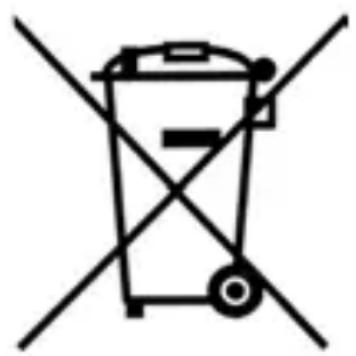
This product is subject to the provisions of European Directive 2012/19/EC.
The symbol showing a wheelie bin crossed through indicates that the product requires separate
natural_image
Symbol of a trash bin crossed with two diagonal lines, representing no waste or discharge (no text or labels)refuse collection in the European Union. This applies to the product and all accessories marked with this symbol. Products identified with this symbol may not be discarded with normal household waste, but must be taken to a collection point for recycling electric and electronic appliances.
This recycling symbol marks e.g. an object or parts of the material as valuable for recycling. Recycling helps to reduce the consumption of

natural_image
Recycling symbol composed of three chasing arrows forming a triangle (no text or labels)raw materials and protect the environment.
Packaging
When disposing of the packaging, make sure you comply with the environmental regulations applicable in your country.
9. Trouble-shooting
If your loudspeaker ever fails to function as required, please try this checklist first. Perhaps there is only a minor problem, and you can solve it yourself.

CAUTION!
- Do not attempt to repair the device yourself under any circumstances.
| Fault Possible causes | |
| No function | Is the battery empty?Has the device switched off automatically? |
| No Bluetooth connection | Is the Bluetooth function of the audio device activated?Did you switch off the device?Is there a plug in the jack socket 13? |
| Music can-not be played via Bluetooth | Is the volume set too low?Is there a plug in the jack socket 13? |
| Device does not react when buttons are pressed | Carefully use a pointed object to press the RESET button 12. The device will switch itself off and then immediately back on again. All settings will be saved. |
10. Technical specifications
| Model: SBLH | 10 A1 |
| Power rating: | 2x 5 W RMS |
| Bluetooth: | Bluetooth v4.2 (AVRCP, A2DP) |
| Frequency range: | 2.402 - 2.480 MHz |
| Transmitting power: | 4 dbm (max.) |
| Range: | up to 10 m |
| Battery: Lithium ion, 7,4 V, 1.800 mAh (13,32 Wh) | |
| Charging voltage: | 5 V = = = |
| Charging current: | max. 3 A |
| Sockets: 1 x Micro USB 1x 3.5 mm jack | |
| Running time: | up to 10 hours running time at medium volume |
| Protection class: | IP55: very resistant to dust and jets of water (e.g. from a nozzle) at any angle (with closed cover 7) |
| Dimensions(WxDxH): | approx. 195 x 58 x65 cm |
| Weight: approx. 400 g (without accessories) | |
| Operation and storage conditions: | 10 - 40 °Chumidity 40 up to 85 % relative |
Symbols used
 | With the CE marking, HOYER Handel GmbH declares conformity with EU guidelines. |
 | This symbol reminds you to dispose of the packaging in an environmentally friendly manner. |
 | Recyclable materials: card-board (except corrugated cardboard) |
| Direct current |
Subject to technical modification.
Notes on the EU declaration of conformity
The firm HOYER Handel GmbH hereby declares that this product meets the fundamental requirements of
- the RE Directive 2014/53/EU and
- the RoHS Directive 2011/65/EU.
A complete declaration of conformity can be found on the internet at
http://qr.hoyerhandel.com/d/317177.2
11. Warranty of HOYER Handel GmbH
Dear Customer,
your device is provided with a 3 year warranty starting with the purchase date. In the event of product defects, you are entitled to statutory rights against the vendor. These statutory rights are not restricted by our warranty presented in the following.
Warranty conditions
The warranty period starts with the purchase date. Please keep the original purchase receipt in a safe place. This document is required to verify the purchase.
If within three years from the purchase date of this product a material or factory defect occurs, the product will be repaired or replaced by us – at our discretion – free of charge to you, or the purchase price will be refunded. This warranty implies that within the period of three years the defective device and the purchase receipt are presented, including a brief written description of the defect and the time it occurred.
If the defect is covered by our warranty, the repaired or a new product will be returned to you. No new warranty period starts with a repair or replacement of the product.
Warranty period and statutory claims for defects
The warranty period is not extended when the warranty has been claimed. This also applies to replaced and repaired parts.
Any damages and defects already existing at the time of purchase must be reported immediately upon unpacking. Repairs arising after the expiration of the warranty period are subject to a charge.
Warranty coverage
The device was produced carefully according to strict quality guidelines and tested diligently prior to delivery.
The warranty applies to material or factory defects.
Excluded from the warranty are wear parts subject to normal wear and damages to fragile parts, e.g. switches, batteries, lamps or other parts manufactured from glass.
This warranty expires if the product is damaged, not used as intended or not serviced. For the proper operation of the product, all instructions listed in the operating instructions must be observed carefully. Any form
of use and handling that is advised against in the operating instructions or warned against must always be avoided.
The product is only intended for private and not for commercial use. In the case of incorrect and improper treatment, use of force and interventions not performed by our authorised Service Centre, the warranty shall cease.
Handling in case of a warranty claim
In order to ensure prompt processing of your matter, please observe the following notes:
- Please keep the article number
IAN: 317177 and the purchase receipt as a purchase verification for all inquiries. - The article number can be found on the rating plate, an engraving, the title page of your instructions (in the bottom left), or as a label on the rear or underside of the device.
- If faulty operation or other defects occur, first contact the Service Centre listed in the following by telephone or email.
- Then, you are able to send a product reported as defective free of charge to the service address specified to you, including the purchase receipt and the information on the defect and when it occurred.
At www.lidl-service.com you can download this and many other manuals, product videos and installation software.
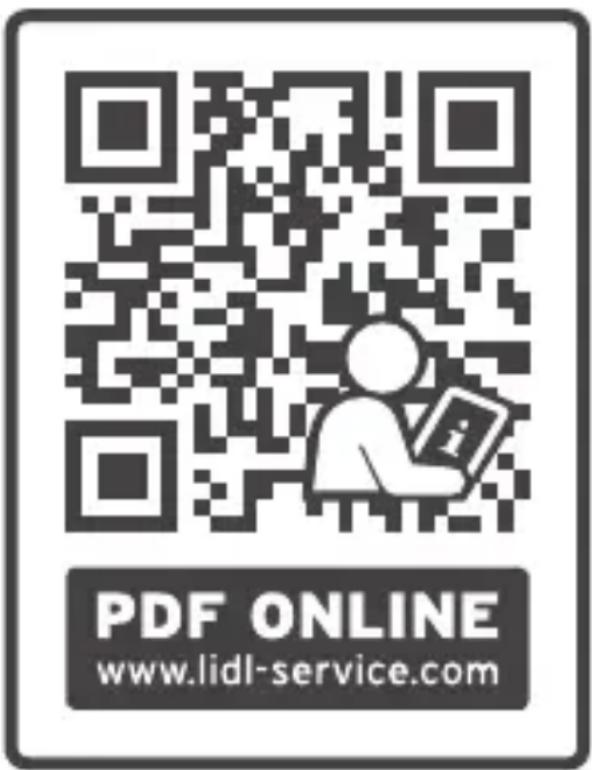
This QR code takes you directly to the Lidl Service website (www.lidl-service.com), where you can enter the article number (IAN) 317177 to open your user instructions.
Service Centre
GB Service Great Britain
Tel.: 0800 404 7657
E-Mail: hoyer@lidl.co.uk
IE Service Ireland
Tel.: 1890 930 034
(0,08 EUR/Min., (peak)) (0,06 EUR/Min.,
(off peak))
E-Mail: hoyer@lidl.ie
IAN: 317177
Supplier
Please note that the following address is no service address. First contact the aforementioned Service Centre.
HOYER Handel GmbH
Tasköprüstraße 3
22761 Hamburg
GERMANY
Indhold
natural_image
Symbol of a trash bin crossed with two diagonal lines, representing no waste or discharge (no text or labels)natural_image
Recycling symbol composed of three chasing arrows forming a triangle (no text or labels)Emballage
Raccordements figure A
| 12 | RESET | Bouton de réinitialisation |
| 13 | AUX IN | Port jack 3,5 mm |
| 14 | USB | Port micro USB |
natural_image
Symbol of a trash bin crossed with no text or numbers, representing waste sorting or disposal (no text present)natural_image
Recycling symbol composed of three chasing arrows forming a triangle (no text or labels)natural_image
Symbolic icon of a person walking with arrows indicating cycle (no text or numbers)Emballage
natural_image
Symbol of a trash bin crossed with no text or numbers, representing waste sorting or disposal (no text present)natural_image
Recycling symbol composed of three chasing arrows forming a triangle (no text or labels)Verpakking
natural_image
Symbol of a trash bin crossed with two diagonal lines, representing no waste or discharge (no text or labels)natural_image
Recycling symbol composed of three chasing arrows forming a triangle (no text or labels)Verpackung
- Overview / Oversigt / Aperçu de l'appareil / Overzicht / Übersicht
- Contents
- Overview
- Connections Figure A
- Symbols on your device
- Thank you for your trust!
- Trademarks
- Intended purpose
- Safety information
- Warnings
- DANGER for children and people with disabilities
- DANGER to and from pets and livestock
- DANGER from the battery
- DANGER OF EXPLOSION!
- WARNING! Risk of material damage
- Items supplied
- Before using for the first time
- WARNING!
- NOTES:
- Charging the battery
- Functions of the buttons
- LED display
- Establishing a Bluetooth connection
- Establishing connection via NFC
- Connecting two loudspeakers
- Calls
- Interruption of the connection
- Playback using a cable (Aux in)
- WARNING Risk of material damage!
- Cleaning
- Storing if not in use
- Disposal
- Packaging
- Trouble-shooting
- CAUTION!
- Technical specifications
- Symbols used
- Notes on the EU declaration of conformity
- Warranty of HOYER Handel GmbH
- Warranty conditions
- Warranty period and statutory claims for defects
- Warranty coverage
- Handling in case of a warranty claim
- Service Centre
- Supplier
- Indhold
- Emballage
- Raccordements figure A
- Verpakking
- Verpackung
Brand : SILVERCREST
Model : SBLH 10 A1
Category : Speaker