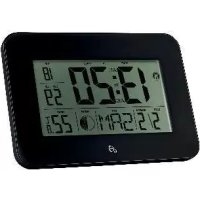
HG02036A - Alarm Clock AURIOL - Free user manual and instructions
Find the device manual for free HG02036A AURIOL in PDF.



| Product Type | Radio alarm clock |
| Brand | Auriol |
| Model | HG02036A |
| Power supply | 2 AAA 1.5V DC batteries (included) |
| Display | LCD with backlight |
| Radio reception | DCF signal (range up to 1500 km) |
| Alarm functions | 2 independent alarms with snooze (5 min) and repeat (M-F, S-S, daily) |
| Event reminder (TA) | Timer for single event with alarm |
| Timer | Up to 19h59, with approx. 1 min alarm |
| Temperature display | Indoor in °C/°F |
| Moon phase | Display of 8 phases |
| Time zone | Adjustable from -23 to +23 h |
| Daylight saving time | Automatic switching (DST) |
| Time format | 12h/24h with PM indicator |
| Available languages | German, English, Italian, French, Dutch, Spanish, Danish |
| Dimensions (approx.) | 15 × 10 × 5 cm |
| Weight (approx.) | 200 g (with batteries) |
| Housing material | Plastic |
| Mounting | Foldable stand or wall mounting device |
| Safety | Do not disassemble; keep batteries away from children; use only AAA batteries |
| Maintenance | Clean with a soft, dry cloth; do not use liquids |
| Warranty | 3 years from date of purchase |
Frequently Asked Questions - HG02036A AURIOL
User questions about HG02036A AURIOL
0 question about this device. Answer the ones you know or ask your own.
Ask a new question about this device
Download the instructions for your Alarm Clock in PDF format for free! Find your manual HG02036A - AURIOL and take your electronic device back in hand. On this page are published all the documents necessary for the use of your device. HG02036A by AURIOL.
USER MANUAL HG02036A AURIOL
Operation and Safety Notes
NL BE
LCD-RADIOWEKKER
GB/IEOperation and Safety NotesPage 13
Proper Use. Page 14
Description of Parts.. Page 14
Included items . Page 14
Technical data.. Page 14
Safety
General Safety Information.. Page 14
Safety instructions for batteries/rechargeable batteries Page 15
Before Initial Use
Setting up the product.. Page 15
Inserting or replacing batteries.. Page 15
Operation
Reception of DCF radio signal.. Page 16
Changing basic settings.. Page 16
Using the 12/24-hour display. Page 17
Setting the alarm.. Page 17
Activating/deactivating the alarm Page 17
Setting the Schedule Alarm (TA) Page 17
Activating/Deactivating the Schedule Alarm (TA) Page 18
Switching off the alarm signal.. Page 18
Displaying the temperature in irc C / irc F Page 18
Moon phase. Page 18
Displaying summertime. Page 18
Setting the Timer.. Page 18
Troubleshooting
Cleaning and Maintenance.. Page 19
Disposal
Declaration of Conformity
Warranty
Radio-controlled LCD Clock
Introduction
We congratulate you on the purchase of your new product. You have chosen a high quality product. The instructions for use are part of the product. They contain important information concerning safety, use and disposal. Before using the product, please familiarise yourself with all of the safety information and instructions for use. Only use the product as described and for the specified applications. If you pass the product on to anyone else, please ensure that you also pass on all the documentation with it.
- Proper Use
The product is only suitable for operation in enclosed spaces at normal room temperature. The product is not intended for commercial use.
Description of Parts
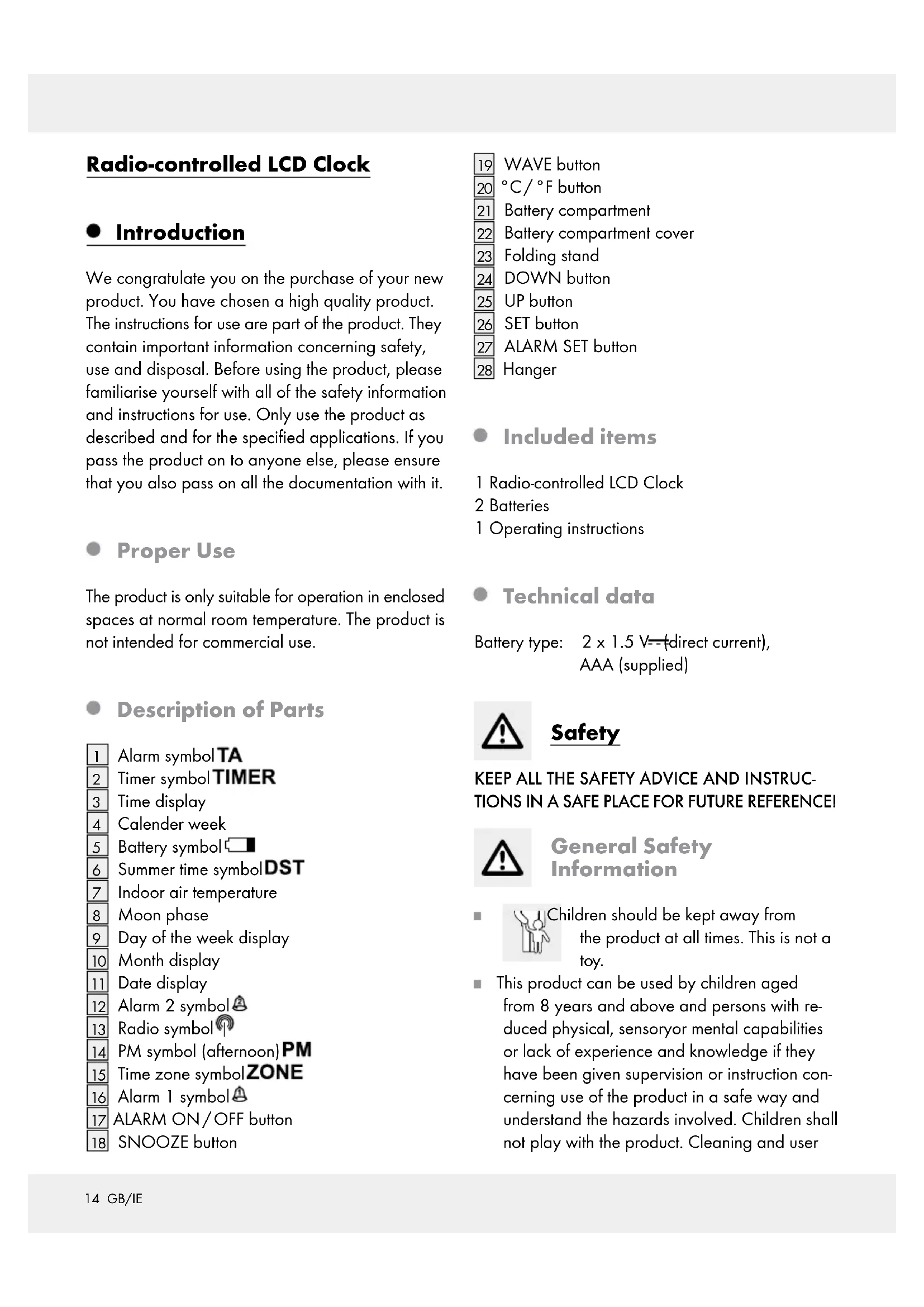
1 Alarm symbol TA
2 Timer symbol TIMER
3 Time display
4 Calender week
5 Battery symbol
6 Summer time symbolDST
7 Indoor air temperature
8 Moon phase
9 Day of the week display
10 Month display
11 Date display
12 Alarm 2 symbol A
13 Radio symbol
PM symbol (afternoon)PM
15 Time zone symbol ZONE
16 Alarm 1 symbol A
17 ALARM ON/OFF button
18 SNOOZE button
19 WAVE button
20 irc C / ΩircF button
21 Battery compartment
22 Battery compartment cover
23 Folding stand
24 DOWN button
25 UP button
26 SET button
27 ALARM SET button
28 Hanger
- Included items
1 Radio-controlled LCD Clock
2 Batteries
1 Operating instructions
- Technical data
Battery type: 2 × 1.5 V (direct current), AAA (supplied)

KEEP ALL THE SAFETY ADVICE AND INSTRUCTIONS IN A SAFE PLACE FOR FUTURE REFERENCE!
General Safety Information
Children should be kept away from the product at all times. This is not a toy.
This product can be used by children aged from 8 years and above and persons with reduced physical, sensory or mental capabilities or lack of experience and knowledge if they have been given supervision or instruction concerning use of the product in a safe way and understand the hazards involved. Children shall not play with the product. Cleaning and user
maintenance shall not be made by children without supervision.
WARNING! Do not use the product in hospitals or medical facilities, as otherwise this may result in malfunctions of life-support systems.
Under no circumstances should you take the product apart. Improper repairs may place the user in considerable danger. Repairs should only be carried out by specialist personnel.

Safety instructions for batteries/rechargeable batteries
DANGER TO LIFE! Keep batteries/rechargeable batteries out of reach of children. If accidentally swallowed seek immediate medical attention.

DANGER OF EXPLOSION!
Never recharge non-rechargeable batteries. Do not short-circuit batteries / rechargeable batteries and / or open them. Overheating, fire or bursting can be the result.
Never throw batteries / rechargeable batteries into fire or water.
Do not exert mechanical loads to batteries / rechargeable batteries.
Risk of leakage of batteries / rechargeable batteries
Avoid extreme environmental conditions and temperatures, which could affect batteries / rechargeable batteries, e.g. radiators / direct sunlight.
Avoid contact with the skin, eyes and mucous membranes. In the event of contact with battery acid, thoroughly flush the affected area with plenty of clean water and seek immediate medical attention.

WEAR PROTECTIVE GLOVES!

Leaked or damaged batteries / rechargeable batteries can cause
burns on contact with the skin. Wear suitable
protective gloves at all times if such an event occurs.
In the event of a battery leak, immediately remove it from the product to prevent damage.
Only use the same type of batteries / rechargeable batteries. Do not mix used and new batteries/rechargeable batteries.
Remove the batteries / rechargeable batteries if the product will not be used for a longer period.
Risk of damage of the product
Only use the specified type of battery / rechargeable battery!
When inserting ensure the correct polarity! This is shown inside the battery compartment!
Clean the contacts on the battery and in the battery compartment before inserting!
Remove exhausted batteries/rechargeable batteries from the product immediately.
Before Initial Use
Remove the protective foil before first use.
Remove the plastic strip sticking out of the battery compartment 21.
- Setting up the product
Stand the product on its folding stand 23 or mount it on the wall.
Place the product on a level, horizontal surface.
Do not place the product anywhere near to sources of interference such as televisions, computers, thick walls, etc. These may hinder reception of the radio signal.
- Inserting or replacing batteries
The battery symbol 5 appears in the LC display if the batteries are too weak. Make sure you replace the batteries at the earliest opportunity.
The product starts to receive the radio time signal as soon as the batteries are inserted.
Note: Do not alter the position of the product during reception of the signal. This may disrupt reception.
Radio time signal (DCF):
The DCF signal (time signal transmission) consists of time pulses broadcast from one of the most accurate clocks in the world. It is situated near Frankfurt / Main, Germany.
Your product receives these signals under ideal conditions up to a distance of approx. 1,500km around Frankfurt / Main. Reception of the radio signal generally takes approx. 3-10 minutes.
If it does not work properly, restart the product. To do this, keep the WAVE button pressed for approx. 3 seconds.
Reception can be considerably impaired by obstacles (e.g. concrete walls) or sources of interference (e.g. other electrical devices). If necessary, change the location of the product (e.g. by putting it near a window) if you have problems with reception.
Operation
- Reception of DCF radio signal
The product automatically starts to search for the DCF radio signal. The radio icon 13 on the LCD indicates that the product is searching for the radio signal.
It is also possible to start reception of the DCF radio signal manually on the product.
Press and keep pressed the WAVE button for longer than 3 seconds. The product attempts to receive the DCF radio time signal. This process takes several minutes and is indicated in the LC display by a flashing radio symbol
Note: If the product cannot pick up the DCF radio signal on account of an error, it is also possible to set the time manually. As soon as reception of the DCF signal is successful, the manual settings are overwritten.
- Changing basic settings
- Press and keep pressed the WAVE button 19 for approx. 3 seconds. The radio symbol 13 flashes.
- Press and keep pressed the WAVE button again for approx. 3 seconds to stop the reception of the radio time signal.
- Press and keep pressed the SET button 26 for approx. 3 seconds. The acronym for the current language flashes in the day of the week display 9.
- Set the desired language by pressing the UP25 or DOWN button 24.
- Confirm your settings by pressing the SET button. The time display flashes.
- Repeat step 4 and 5 to set the values for year, month, day, hour, minute, time zone and DCF ON/OFF.
The following languages are available:
GER = German
ENG = English
ITA = Italian
FRE = French
DUT = Dutch
SPA = Spanish
DAN = Danish
Hint: If you press and hold down the UP or DOWN, you accelerate the process and reach the desired value more quickly. This can also be used for setting up the other functions in the following chapters.
Note: If the buttons are not pressed for approx. 20 seconds, it will automatically exit setting mode and return to the normal time display.
Note: Should you be in a country in which the DCF signal can be received but the time is different to
your current local time, you can use the time zone setting to have the product display your current local time. If you find yourself in a country in which, for example, the local time is an hour ahead of Central European Time (CET), you set the time zone to +01. The product is now still controlled by DCF but shows the time as one hour ahead of CET.
Using the 12 / 24-hour display
While time display 3 is indicated press the UP button 25 to switch between 12-hour and 24-hour format.
Note: The PM iRM 14 on the LCD stands for afternoons in 12-hour format.
- Setting the alarm
Press the ALARM SET button 27 once or twice. "A1" or "A2" will be displayed in the display.
Press and keep pressed the ALARM SET button for about 2 seconds. The hour display flashes.
Press the UP 25 or DOWN button 24 to set the desired value.
Press the ALARM SET button to confirm your setting. The minute display flashes.
Press the UP or DOWN button to set the desired minute value.
Press the ALARM SET button to confirm your setting.
Press the SNOOZE button 18 as soon as the alarm signal sounds. The alarm signal stops sounding. The alarm will sound again 5 minutes after the set waking time or alarm time.
Press any button except the SNOOZE button to stop the alarm signal sounding.
- Activating/deactivating the alarm
Press the ALARM SET button 27 once or twice to select alarm 1 or alarm 2.
Press the ALARM ON/OFF button 17 once or twice or three times to select from M-F, S-S or M-F S-S alarm mode. The alarm 1 symbol (add symbol) or alarm 2 symbol (add symbol) will be displayed to indicate that the respective alarm is activated.
Note:
M - Fmode = Alarmisonfrom MondaytoFriday
S-Smode = Alarm is on from
M - FS - Smode = SaturdarytoSunday Alarmisonthewhole week
Pressing the ALARM ON/OFF button again causes the appropriate alarm symbol 16 or 12 to cease to be displayed. The alarm is deactivated.
- Setting the Schedule Alarm (TA)
- Press the ALARM SET button 27 three times. "TA" will be displayed in the display.
- Press and keep pressed the ALARM SET button for approx. 3 seconds. The year display will flash.
- Press the UP25 or DOWN button 24 to set the desired value.
- Press the ALARM SET button to confirm your setting. The month display flashes.
- Repeat the above step 3 and 4 to set the values for month, date, hour and minute.
- Activating/Deactivating the Schedule Alarm (TA)
- Press the ALARM SET button 27 three times. "TA" will be displayed in the display.
- Press the ALARM ON/OFF button once. The Schedule alarm symbol TA 1 will be displayed to indicate that the Schedule alarm is activated.
- Press the ALARM ON/OFF button again causes the Schedule alarm symbol TA to cease to be displayed. The schedule alarm is deactivated.
- Switching off the alarm signal
Press any button except the SNOOZE button to stop the alarm signal sounding. You do not have to reactivate the alarm. It reactivates itself automatically according to the weekly rhythm.
Note: The alarm signal switches itself off after 2 minutes.
- Displaying the temperature in irc C / irc F
The current indoor air temperature 7 is indicated on the LCD.
Press the irc C / irc F button 20 to switch between the Celsius and Fahrenheit temperature scales.
Moonphase
The product shows the current moon phase 8 in the LC display.
It uses the following symbols:

| Full moon Waning gibbous | Last quarter Waning crescent |
| New moon | Waxing crescent |
| First quarter | Waxing gibbous |
- Displaying summertime
Summertime is automatically indicated on the LCD by the summertime icon DST. The product receives the information as to whether it is summertime or not from the DCF radio signal.
Note: Reception of the radio signal may be seriously disrupted in reinforced concrete buildings.
- Setting the Timer
Press and hold the irc C / button 20 for approx.3 seconds.The Timer symbol TIMER 2 will be displayed.
Press UP button 25 to change the values for hours and DOWN button 24 to change the values for minutes.
Hint: If you press and hold down the UP or DOWN, you accelerate the process and reach the desired value more quickly.
Press the WAVE button 19 to start the timer. The timer now begins counting down and the Timer symbol TIMER 2 is flashing.
You can press the WAVE button again anytime to stop the timer from counting down. Press the WAVE button again to continue the count down. When the set time has elapsed, a signal tone will sound for a period of one minute.
Press the WAVE button to stop the signal tone from sounding.
Press the ALARM ON/OFF button to reset the timer back to 00:00.
Press and hold irc C / button 20 for approx. 3 seconds to return to the normal time display.
Note: The maximum countdown time is 19 hour and 59 minutes!
- Troubleshooting
This product has delicate electronic components. This means that if it is placed near an object that transmits radio signals, it could cause interference. If the display indicates a problem, move such objects away from it.
- Electrostatic discharges may cause malfunctions. In the event of such malfunctions, remove the batteries briefly and reinsert them.
- Cleaning and Maintenance
Under no circumstances should you use liquids or detergents, as these will damage the product.
The product should only be cleaned on the outside with a soft dry cloth.
Disposal

The packaging is made entirely of recyclable materials, which you may dispose of at local recycling facilities. The Green Dot is not valid for Germany.

Observe the marking of the packaging materials for waste separation, which are marked with abbreviations (a) and numbers (b) with following meaning: 1-7: plastics / 20-22: paper and fibreboard / 80-98: composite materials.

The product and packaging materials are recyclable, dispose of it separately for better waste treatment. The Triman logo is valid in France only.

Contact your local refuse disposal authority for more details of how to dispose of your worn-out product.
To help protect the environment, please dispose of the product properly when it has reached the end of its useful life and not in the household waste. Information on collection points and their opening hours can be obtained from your local authority.
Faulty or used batteries must be recycled in accordance with Directive 2006 / 66 / EC and its amendments. Please return the batteries and / or the product to the available collection points.
Environmental damage through incorrect disposal of the batteries!
Batteries may not be disposed of with the usual domestic waste. They may contain toxic heavy metals and are subject to hazardous waste treatment rules and regulations. The chemical symbols for heavy metals are as follows: Cd = cadmium, Hg = mercury, Pb = lead. That is why you should dispose of used batteries at a local collection point.
Declaration of Conformity
We, OWIM GmbH & Co. KG, Stiftsbergstraße 1, DE-74167 Neckarsulm, GERMANY, hereby declare under our sole responsibility that the product: Radio-controlled LCD clock, Model No.: HG02036A/HG02036B, Version: 12/2016, to which this declaration refers, complies with the standards/normative documents of 1999/5/EC.
The complete declaration of conformity can be viewed at: www.owim.com
Warranty
The product has been manufactured to strict quality guidelines and meticulously examined before delivery. In the event of product defects you have legal rights against the retailer of this product. Your legal rights are not limited in any way by our warranty detailed below.
The warranty for this product is 3 years from the date of purchase. Should this product show any fault in materials or manufacture within 3 years from the date of purchase, we will repair or replace it - at our choice - free of charge to you.
The warranty period begins on the date of purchase. Please keep the original sales receipt in a safe location. This document is required as your proof of purchase. This warranty becomes void if the product has been damaged, or used or maintained improperly.
The warranty applies to defects in material or manufacture. This warranty does not cover product parts subject to normal wear, thus possibly considered consumables (e.g. batteries) or for damage to fragile parts, e.g. switches, rechargeable batteries or glass parts.
C
Introduction
Signal radio (DCF) :
NOSTE OCHRANNÉ RUKA-
VICE! Vyteklé i poskozené baterie nebo akumuláry mohou pri kontaktu sPokozkou zpúsobit jej poleptání. Noste proto vchodné rukavice.



- LCD-RADIOWEKKER
- Safety
- Before Initial Use
- Operation
- Troubleshooting
- Cleaning and Maintenance.. Page 19
- Disposal
- Declaration of Conformity
- Warranty
- Radio-controlled LCD Clock
- Introduction
- - Proper Use
- Description of Parts
- - Included items
- - Technical data
- General Safety Information
- Safety instructions for batteries/rechargeable batteries
- DANGER OF EXPLOSION!
- Risk of leakage of batteries / rechargeable batteries
- WEAR PROTECTIVE GLOVES!
- Risk of damage of the product
- - Setting up the product
- - Inserting or replacing batteries
- Radio time signal (DCF):
- - Reception of DCF radio signal
- - Changing basic settings
- Using the 12 / 24-hour display
- - Setting the alarm
- - Activating/deactivating the alarm
- Note:
- - Setting the Schedule Alarm (TA)
- - Activating/Deactivating the Schedule Alarm (TA)
- - Switching off the alarm signal
- - Displaying the temperature in irc C / irc F
- Moonphase
- - Displaying summertime
- - Setting the Timer
- - Troubleshooting
- - Cleaning and Maintenance
- Environmental damage through incorrect disposal of the batteries!
- Signal radio (DCF) :
- NOSTE OCHRANNÉ RUKA-
Brand : AURIOL
Model : HG02036A
Category : Alarm Clock