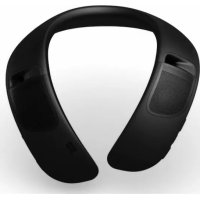
SoundWear Companion - Headphones BOSE - Free user manual and instructions
Find the device manual for free SoundWear Companion BOSE in PDF.



| Product Type | Portable neckband speaker |
| Brand | Bose |
| Model | SoundWear Companion |
| Color | Black (cover included), colored covers optional |
| Power | Rechargeable lithium-ion battery via USB (5V, 1.5A) |
| Battery Life | Up to 12 hours |
| Charging Time | Approximately 3 hours (fast charge: 15 minutes for 2 hours of use) |
| Connectivity | Bluetooth 4.1 (range 9 m); compatible with iPhone, iPad, iPod, and Android |
| Water Resistance | IPX4 (splash resistant) |
| Weight | Approximately 230 g |
| Dimensions (L x W x H) | Approximately 25 x 20 x 3 cm (folded) |
| Speakers | Two upward-facing full-range drivers |
| Main Functions | Play/pause, track skip, fast forward/rewind, volume, call answering, voice assistant access (Siri, Google Now), voice prompts, vibrating notifications |
| Companion App | Bose Connect (connection management, customization, software update) |
| Cover | Removable and hand washable |
| Cleaning | Speaker: damp soft cloth (water only); cover: hand wash with mild detergent |
| Materials | Flexible plastic, fabric (cover) |
| Package Contents | Speaker with cover, USB cable, documentation |
| Warranty | Limited warranty (details at global.Bose.com/warranty) |
| Certifications | FCC, IC, CE, IMDA, compliant with directive 2014/53/EU |
Frequently Asked Questions - SoundWear Companion BOSE
User questions about SoundWear Companion BOSE
0 question about this device. Answer the ones you know or ask your own.
Ask a new question about this device
Download the instructions for your Headphones in PDF format for free! Find your manual SoundWear Companion - BOSE and take your electronic device back in hand. On this page are published all the documents necessary for the use of your device. SoundWear Companion by BOSE.
USER MANUAL SoundWear Companion BOSE
Please read and keep all safety and use instructions.
Important Safety Instructions
- Read these instructions.
- Keep these instructions.
- Heed all warnings.
- Follow all instructions.
- Only use attachments/accessories specified by the manufacturer.
- Refer all servicing to qualified personnel. Servicing is required when the apparatus has been damaged in any way, such as power-supply cord or plug is damaged, does not operate normally, or has been dropped.
WARNING/CAUTIONS
-
Do NOT use the speaker at a high volume for any extended period.
-
To avoid hearing damage, use your speaker at a comfortable, moderate volume level.
-
Turn the volume down on your device before wearing the speaker or placing it near your ears, then turn the volume up gradually until you reach a comfortable listening level.
-
Use caution while driving and follow applicable laws regarding use of a mobile phone and personal speaker.
- Focus on your safety and that of others if you use the personal speaker while engaging in any activity requiring your attention, e.g., while riding a bicycle or walking in or near traffic, a construction site or railroad, etc. Remove the personal speaker or adjust your volume to ensure you can hear surrounding sounds, including alarms and warning signals.

This product contains magnetic material. Consult your physician on whether this might affect your implantable medical device.
- Do NOT make unauthorized alterations to this product.
- Use this product only with an agency approved power supply which meets local regulatory requirements (e.g., UL, CSA, VDE, CCC).
- Do not expose products containing batteries to excessive heat (e.g. from storage in direct sunlight, fire or the like).
- The product label is located on the bottom of the product.
NOTE: This equipment has been tested and found to comply with the limits for a Class B digital device, pursuant to Part 15 of the FCC Rules. These limits are designed to provide reasonable protection against harmful interference in a residential installation. This equipment generates, uses, and can radiate radio frequency energy and, if not installed and used in accordance with the instructions, may cause harmful interference to radio communications. However, there is no guarantee that interference will not occur in a particular installation. If this equipment does cause harmful interference to radio or television reception, which can be determined by turning the equipment off and on, the user is encouraged to try to correct the interference by one or more of the following measures:
- Reorient or relocate the receiving antenna.
- Increase the separation between the equipment and receiver.
- Connect the equipment into an outlet on a circuit different from that to which the receiver is connected.
- Consult the dealer or an experienced radio/TV technician for help.
Changes or modifications not expressly approved by Bose Corporation could void the user's authority to operate this equipment.
This device complies with part 15 of the FCC Rules and with Industry Canada license-exempt RSS standard(s). Operation is subject to the following two conditions: (1) This device may not cause harmful interference, and (2) this device must accept any interference received, including interference that may cause undesired operation.
This device complies with FCC and Industry Canada radiation exposure limits set forth for general population.
This transmitter must not be co-located or operating in conjunction with any other antenna or transmitter.
Meets IMDA Requirements.
CANICES-3(B)/NMB-3(B)
C Bose Corporation hereby declares that this product is in compliance with the essential requirements and other relevant provisions of Directive 2014/53/EU and all other EU directive requirements. The complete declaration of conformity can be found at: www.Bose.com/compliance
Frequency band of operation 2400 to 2480MHz
Bluetooth*: Maximum transmit power less than 20 dBm EIRP
Bluetooth Low Energy: Maximum power spectral density less than 10 dBm/MHz EIRP
Management Regulation for Low-power Radio-frequency Devices
Article XII
According to "Management Regulation for Low-power Radio-frequency Devices" without permission granted by the NCC, any company, enterprise, or user is not allowed to change frequency, enhance transmitting power or alter original characteristic as well as performance to an approved low power radio-frequency devices.
Article XIV
The low power radio-frequency devices shall not influence aircraft security and interfere legal communications; If found, the user shall cease operating immediately until no interference is achieved. The said legal communications means radio communications operated in compliance with the Telecommunications Act.
The low power radio-frequency devices must be susceptible with the interference from legal communications or ISM radio wave radiated devices.
DON'T attempt to remove the rechargeable lithium-ion battery from this product. Contact your local Bose retailer or other qualified professional for removal.

Please dispose of used batteries properly, following local regulations. Do not incinerate.
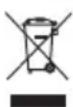
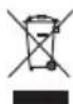
This symbol means the product must not be discarded as household waste, and should be delivered to an appropriate collection facility for recycling. Proper disposal and recycling helps protect natural resources, human health and the environment. For more information on disposal and recycling of this product, contact your local municipality, disposal service, or the shop where you bought this product.

Removal of the rechargeable lithium-ion battery in this product should be conducted only by a qualified professional. Please contact your local Bose retailer or see http://products.bose.com/static/compliance/index.html for further information.


| Names and Contents of Toxic or Hazardous Substances or Elements | ||||||
| Toxic or Hazardous Substances and Elements | ||||||
| Part Name | Lead(Pb) | Mercury(Hg) | Cadmium(Cd) | Hexavalent(CR(VI)) | PolybrominatedBiphenyl(PBB) | Polybrominateddiphenylether(PBDE) |
| PCBs X 0 0 0 0 0 | ||||||
| Metal Parts X 0 0 0 0 0 | ||||||
| Plastic Parts 0 0 0 0 0 | 0 | |||||
| Speakers X 0 0 0 0 0 | ||||||
| Cables X 0 0 0 0 0 | ||||||
| This table is prepared in accordance with the provisions of SJ/T 11364. O: Indicates that this toxic or hazardous substance contained in all of the homogeneous materials for this part is below the limit requirement of GB/T 26572. | 5 | |||||
| X: Indicates that this toxic or hazardous substance contained in at least one of the homogeneous materials used for this part is above the limit requirement of GB/T 26572. | ||||||
Date of Manufacture: The eighth digit in the serial number indicates the year of manufacture; "7" is 2007 or 2017.
China Importer: Bose Electronics (Shanghai) Company Limited, Part C, Plan 9, No. 353 North Riying Road, China (Shanghai) Pilot Free Trade Zone
EU Importer: Bose Products B.V., Gorslaan 60, 1441 RG Purmerend, The Netherlands
Taiwan Importer: Bose Taiwan Branch, 9F-A1, No.10, Section 3, Minsheng East Road, Taipei City 104, Taiwan Phone Number: +886-2-2514 7676
Mexico Importer: Bose de Mexico, S. de R.L. de C.V., Paseo de las Palmas 405-204, Lomas de Chapultepec, 11000 Mexico, D.F. Phone Number: +5255 (5202) 3545
Input Rating: 5V -1.5A
Apple, the Apple logo, iPad, iPhone, iPod, and Siri are trademarks of Apple Inc., registered in the U.S. and other countries. App Store is a service mark of Apple Inc. The trademark "iPhone" is used with a license from Aiphone K.K.
Android, Google Now, Google Play, and the Google Play logo are trademarks of Google Inc.
The Bluetooth® word mark and logos are registered trademarks owned by Bluetooth SIG, Inc. and any use of such marks by Bose Corporation is under license.
"Made for iPod," "Made for iPhone," and "Made for iPad" mean that an electronic accessory has been designed to connect specifically to iPod, iPhone, or iPad, respectively, and has been certified by the developer to meet Apple performance standards. Apple is not responsible for the operation of this device or its compliance with safety and regulatory standards. Please note that the use of this accessory with iPod, iPhone, or iPad may affect wireless performance.
The Japan Radio Law approval number, Telecommunication Business Law approval number, Giteki mark, and serial number are located on the center underside of the speaker, beneath the cover.
Bose Corporation Headquarters: 1-877-230-5639
©2017 Bose Corporation. No part of this work may be reproduced, modified, distributed or otherwise used without prior written permission.
Bose Connect App
What can I do with the Bose Connect app? 8
What's in the Carton
Contents 9
Ways to Wear
Adjust for comfort. 10
Water resistance. 11
Speaker Controls
Power on/off 13
Auto-off timer 13
Speaker functions 14
Volume functions 14
Media playback functions 15
Call functions 16
Access voice control 17
Battery
Charge the speaker 18
Charging time. 19
Hear the battery level 19
Battery storage guidelines 19
Safety protection mode 19
Status Indicators
Bluetooth indicator 20
Battery indicators 21
Voice Prompts
Pre-installed languages 22
Change the language 22
Disable voice prompts 22
Call Notifications
Voice prompt notifications 23
Vibration notifications 23
Bluetooth Connections
Connect your mobile device using the Bose Connect app (recommended) 24
Connect using the Bluetooth menu on your mobile device 25
Disconnect a mobile device 27
Reconnect a mobile device 27
Multiple Bluetooth Connections
Connect an additional mobile device 28
Identify connected mobile devices 28
Switch between two connected mobile devices 28
Reconnect a previously connected mobile device 29
Clear the speaker pairing list 29
Cover Replacement
Remove the cover. 30
Attach the cover 31
Care and Maintenance
Clean the speaker and cover 32
Replacement parts and accessories 33
Limited warranty 33
Serial number location 33
Troubleshooting
Common solutions 34
Reset your speaker 35
Download the Bose Connect app to keep your software up-to-date, personalize your speaker settings, easily manage Bluetooth connections and access new features.
What can I do with the Bose Connect app?
- Easily connect to and switch between multiple mobile devices with a single swipe.
-
Customize your speaker experience:
-
Name your speaker.
- Select a voice prompt language or disable voice prompts.
-
Enable silent mode by disabling vibration.
-
Use the dialogue adjust feature to increase clarity of speech for podcasts, radio talks or audiobooks.
-
Adjust the auto-off timer.
-
Find answers to frequently asked questions.

Download on the
App Store

GETITON
Google Play
Contents
Confirm that the following parts are included:
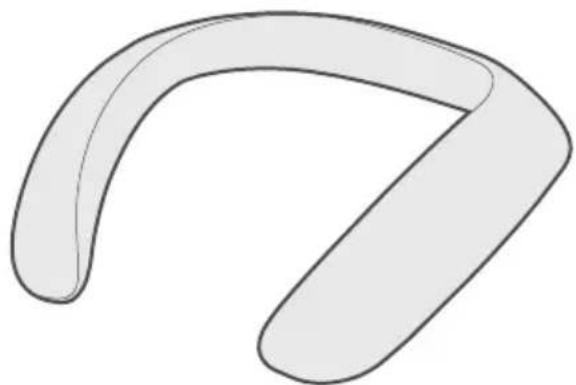
Bose® SoundWear™ Companion® speaker (with included cover)

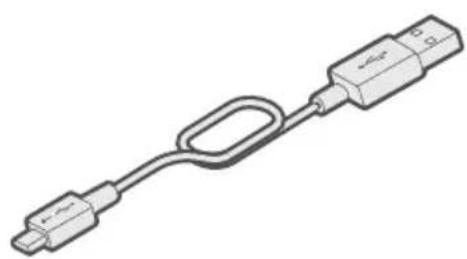
USB cable
Note: If any part of the product is damaged, do not use it. Contact your authorized Bose dealer or Bose customer service. Visit: global.Bose.com/Support/SWC
Adjust for comfort
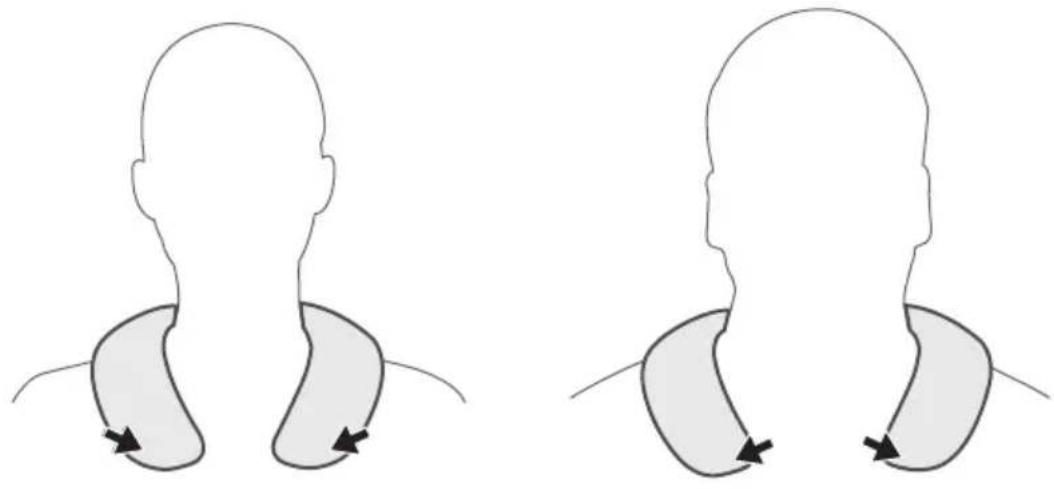
Your speaker is flexible to allow you to adjust to what feels comfortable for you.

CAUTIONS:
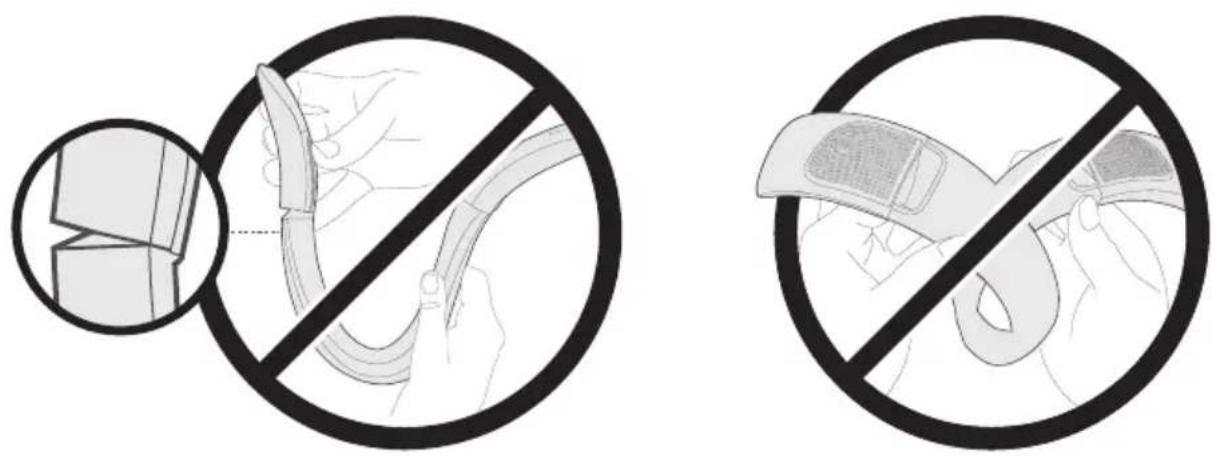
- Avoid excessively bending your speaker. Only invert the flexible speaker ends when removing or attaching the cover.
- Do NOT bend your speaker so that it folds back onto itself.
- Do NOT tightly wrap your speaker around objects.
- Use caution when storing your speaker to avoid crushing.

Water resistance
Your speaker is rated IPX4 water resistant and can withstand a light splash of water.
CAUTION: Do NOT swim or shower with this speaker. Never submerge your speaker in any pool of water.

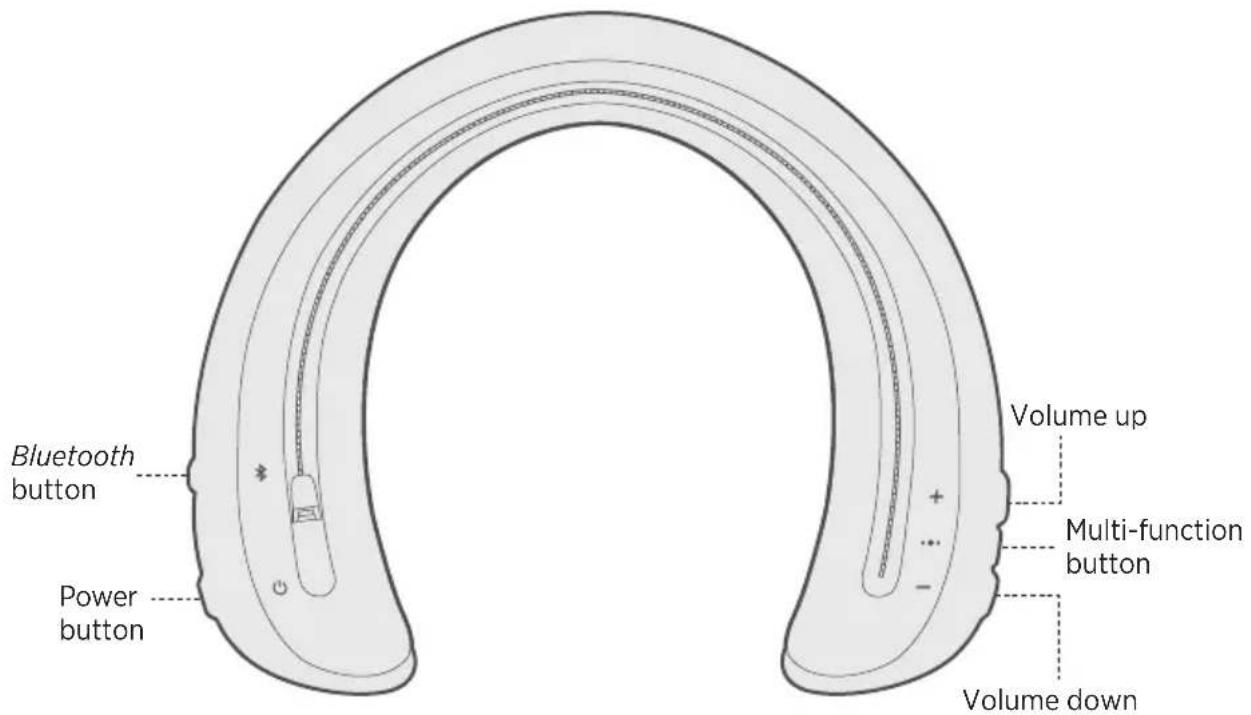
Controls are located on the outer edge of the speaker.
Power on/off
Press the Power button
The battery indicators glow solid white, and a voice prompt announces the battery level.
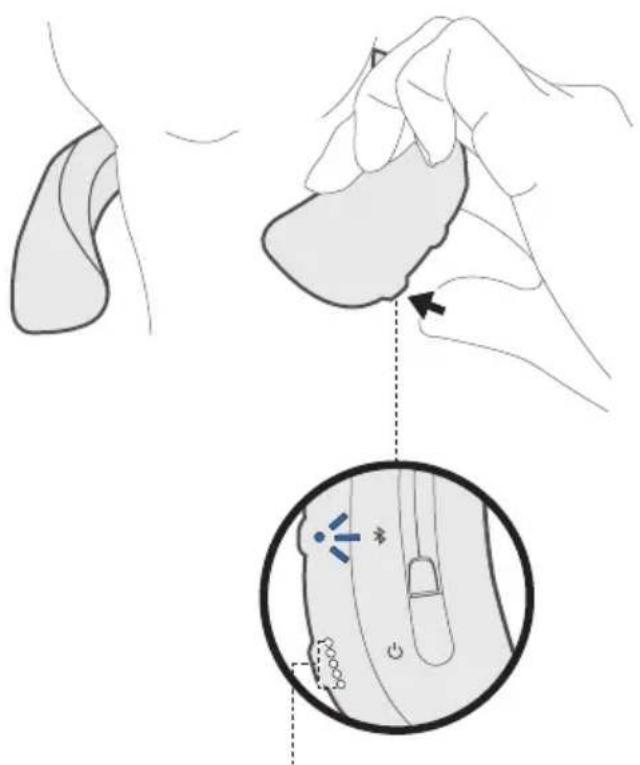
Battery indicators
Auto-off timer
The auto-off timer conserves the battery when the speaker is not being used. The speaker switches off when audio has stopped and no buttons have been pressed for three hours.
Note: To adjust the time it takes for your speaker to automatically power off or to disable the auto-off timer, use the Bose Connect app.
Speaker functions
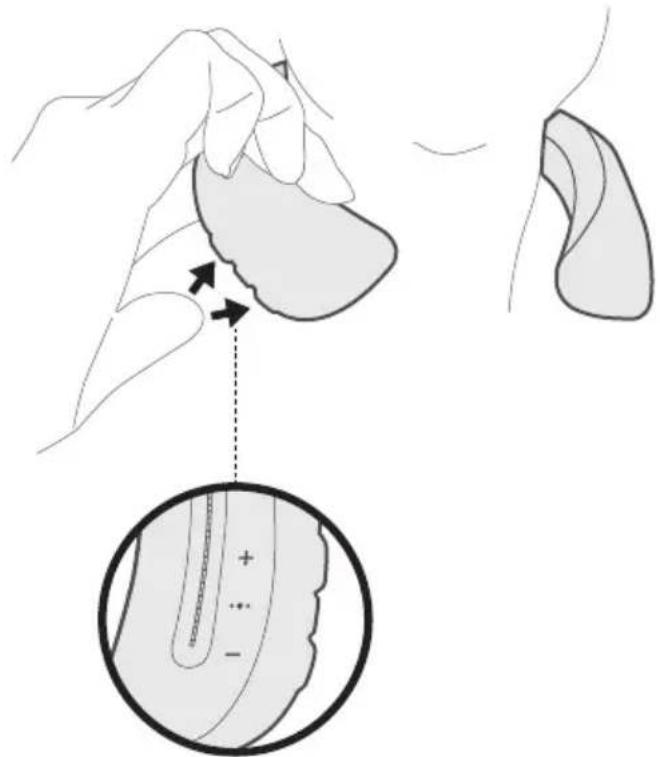
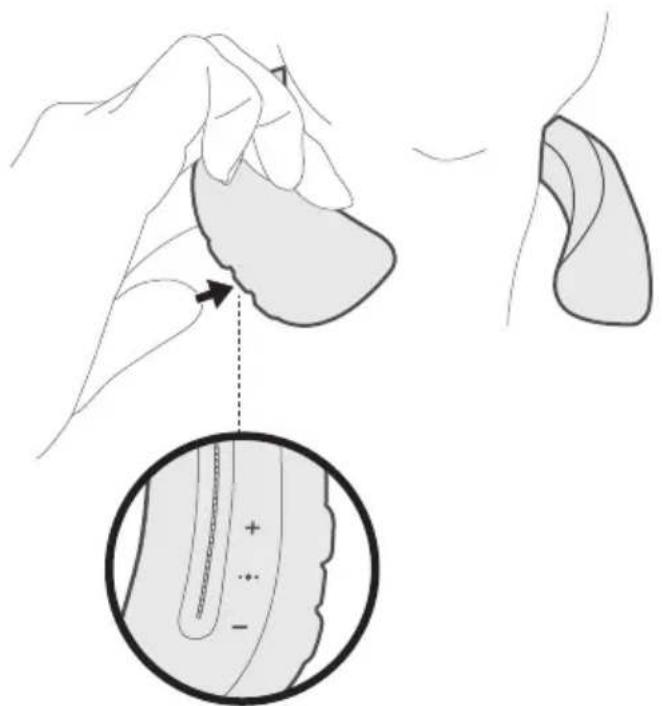
The controls for speaker functions are located on the outer right edge of the speaker.
Volume functions

| Function What to do | |
| Volume Up | Press + . |
| Volume Down | Press - . |
Media playback functions

| Function What to do | |
| Play/Pause Press the Multi-function button . | ••• |
| Skip Forward Press | ••• twice quickly. |
| Skip Backward Press | ••• three times quickly. |
| Fast Forward Press | ••• twice quickly and hold the second press. |
| Rewind Press | ••• three times quickly and hold the third press. |
Call functions
| Function What to do | |
| Answer a call Press the Multi-function button. | ••• |
| End a call Press. | ••• |
| Decline an incoming call Press and hold | for one second. •• |
| Answer a second incoming call and put the current call on hold | While on a call, press ••• . |
| Decline a second incoming call and stay on current call | While on a call, press and hold ••• for one second. |
| Switch between two calls With two active calls, press | ••• twice quickly. |
| Create a conference call | With two active calls, press and hold •f••onessecond. |
| Access voice control to make a call | While not on a call, press and hold ••• for one second. Your mobile device may not support voice control. Refer to your device owner's guide for more information. |
| Mute/unmute a call | While on a call, press + and - simultaneously. |
Access voice control
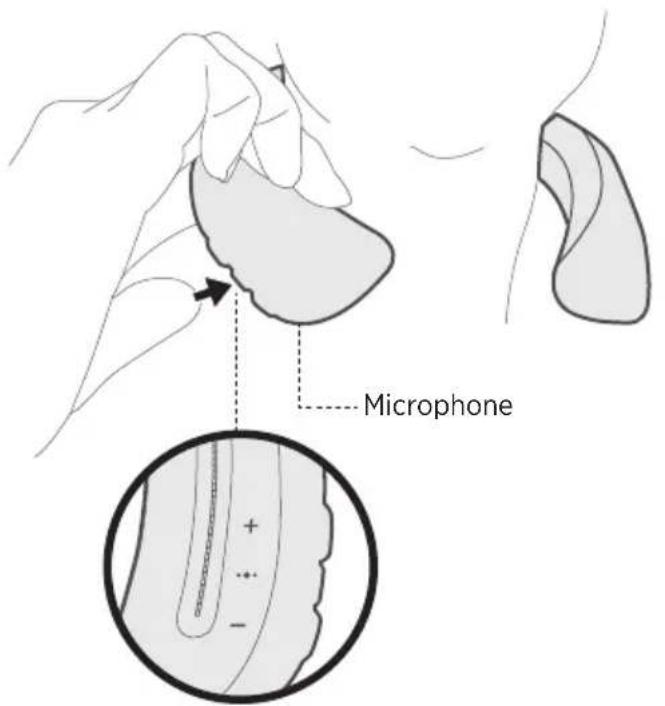
The speaker microphone acts as an extension of the microphone in your mobile device. Using the Multi-function button on the speaker, you can access the voice control capabilities on your device to make/take calls or ask Siri or Google Now™ to play music, tell you the weather, give you the score of a game and more.
Press and hold to access voice control on your device. You hear a tone that indicates voice control is active.
Charge the speaker
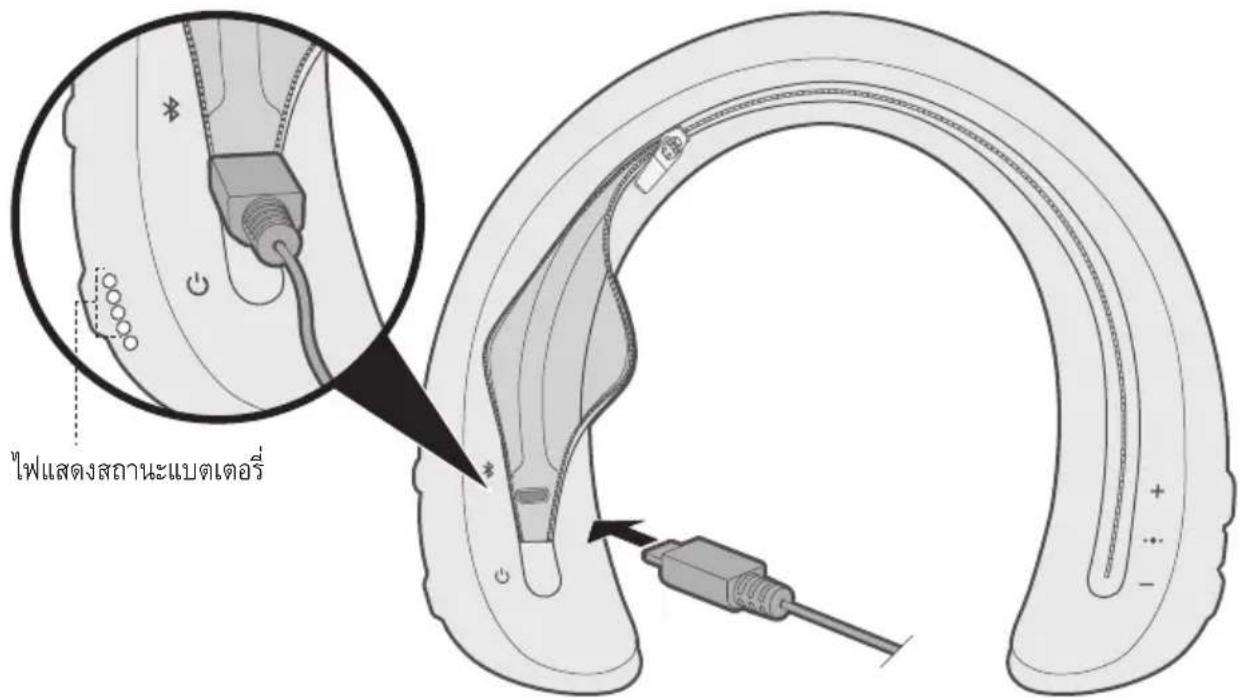
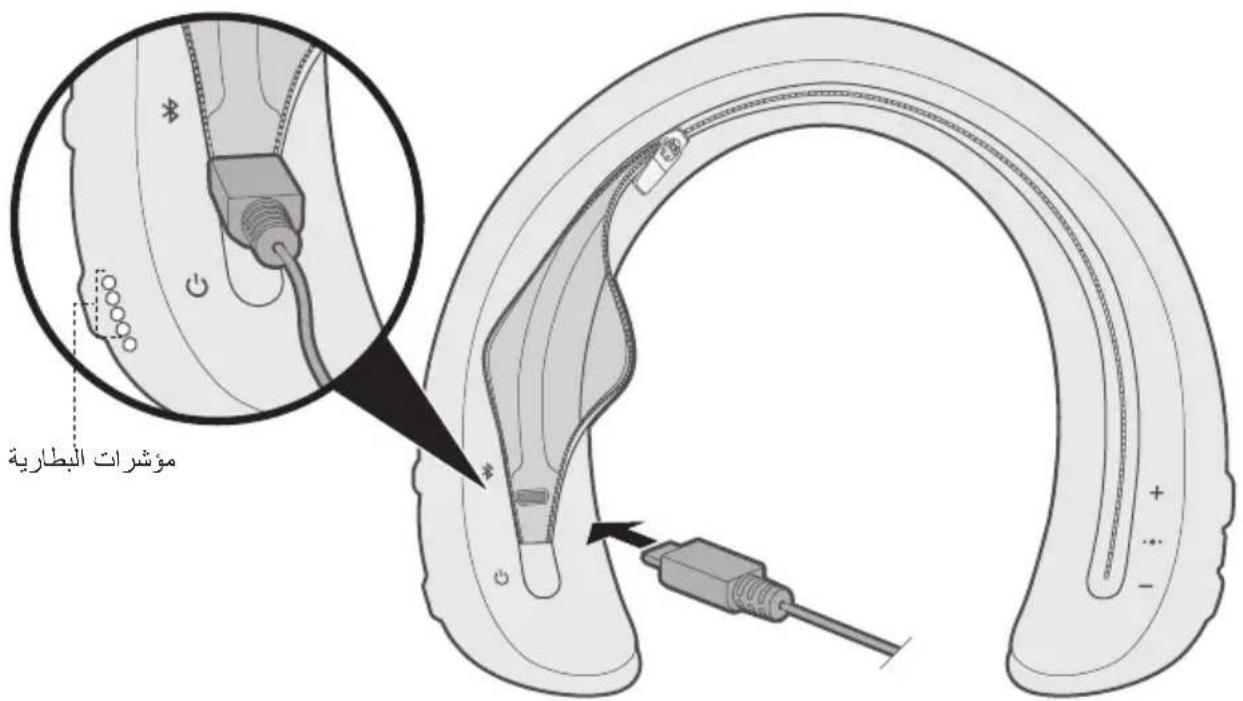
- Open the zipper on the underside of the cover to access the USB connector.
- Plug the small end of the USB cable into the USB connector.

- Plug the other end of the USB cable into a wall charger or computer that is powered on.
While charging, the last lit battery indicator blinks white. When the battery is fully charged, all five battery indicators glow solid white.
Note: The speaker does not play while charging.
Charging time
Allow up to three hours to fully charge the battery. A full charge powers the speaker for up to 12 hours.
Tip: A 15-minute charge powers the speaker for up to two hours.
Hear the battery level
Each time you power on the speaker, a voice prompt announces the battery level. When the speaker is in use, a voice prompt announces if the battery needs to be charged.
To hear the battery charge level while using your speaker, press and hold the Power button until you hear a voice prompt.
Note: To visually check the battery, press and hold while viewing the battery indicators (see page 20).
Battery storage guidelines
Do not store your speaker for more than 90 days when fully charged or with a remaining charge of less than 10 percent.
Safety protection mode
When your speaker battery is depleted (0%), and remains unplugged for more than 90 days, it enters safety protection mode and is permanently disabled. If your speaker enters safety protection mode, contact Bose customer service.
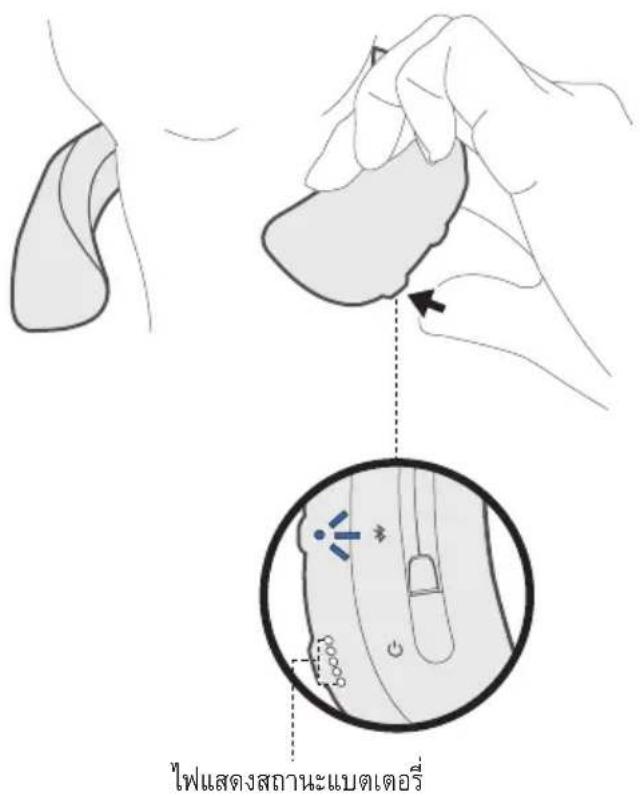
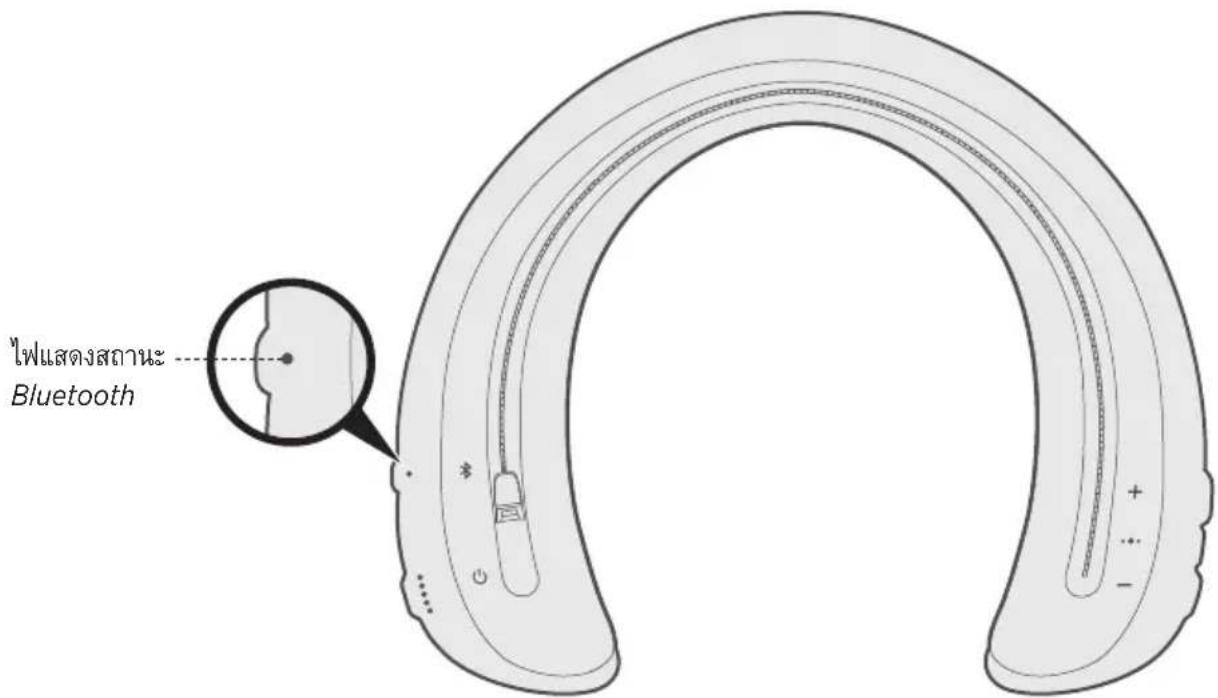
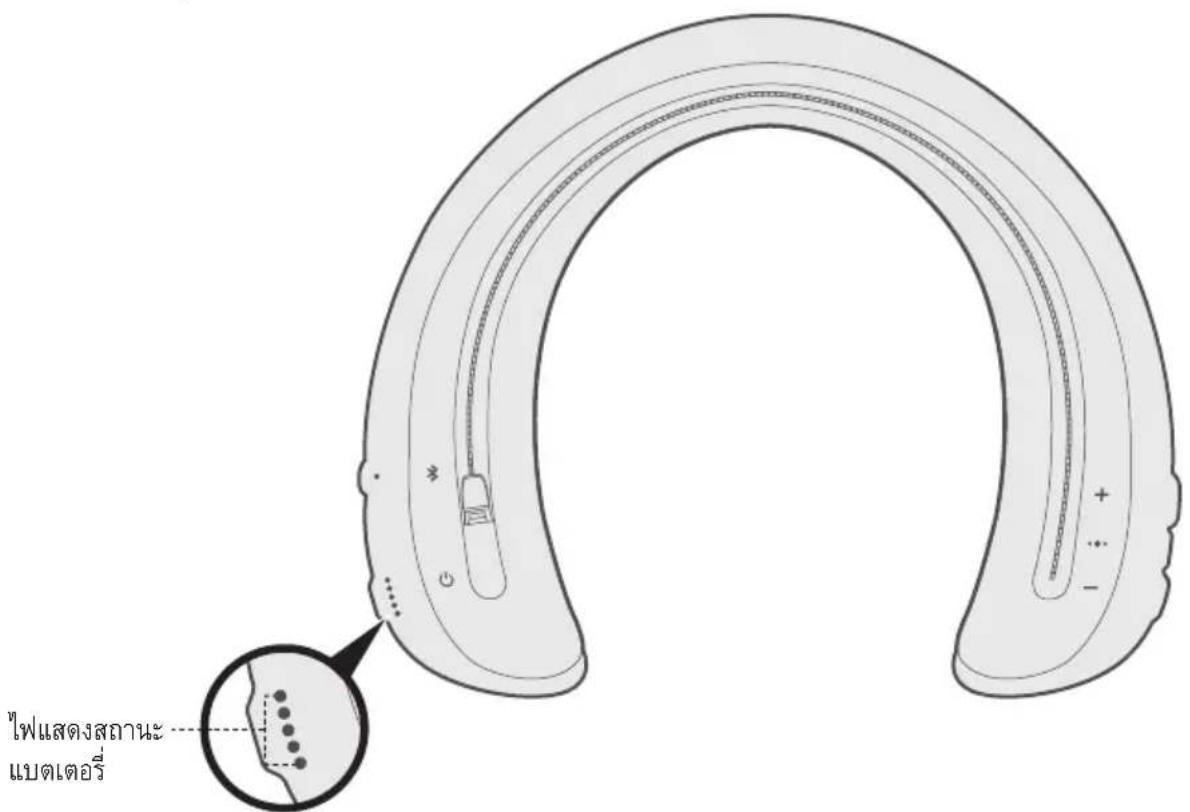
The Bluetooth and battery indicators are located on the underside of the speaker.
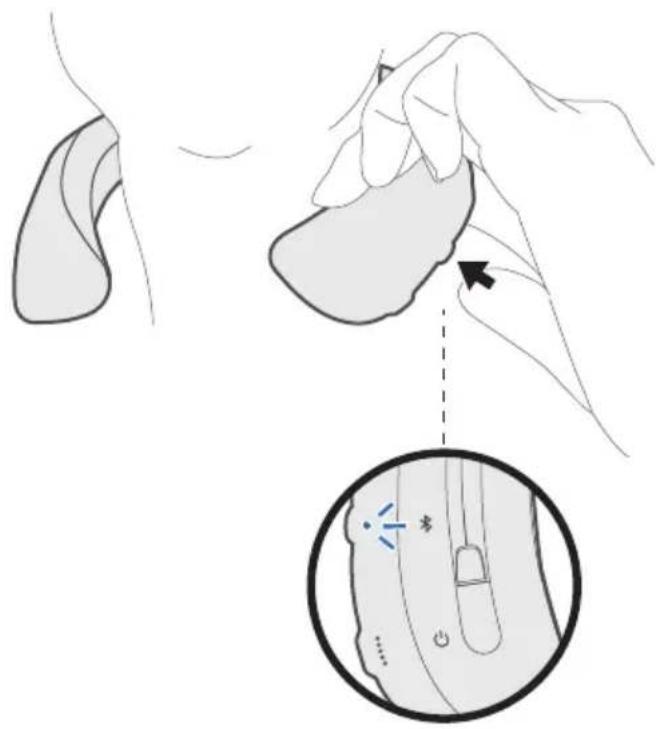
Bluetooth indicator
Shows the connection status of a mobile device.
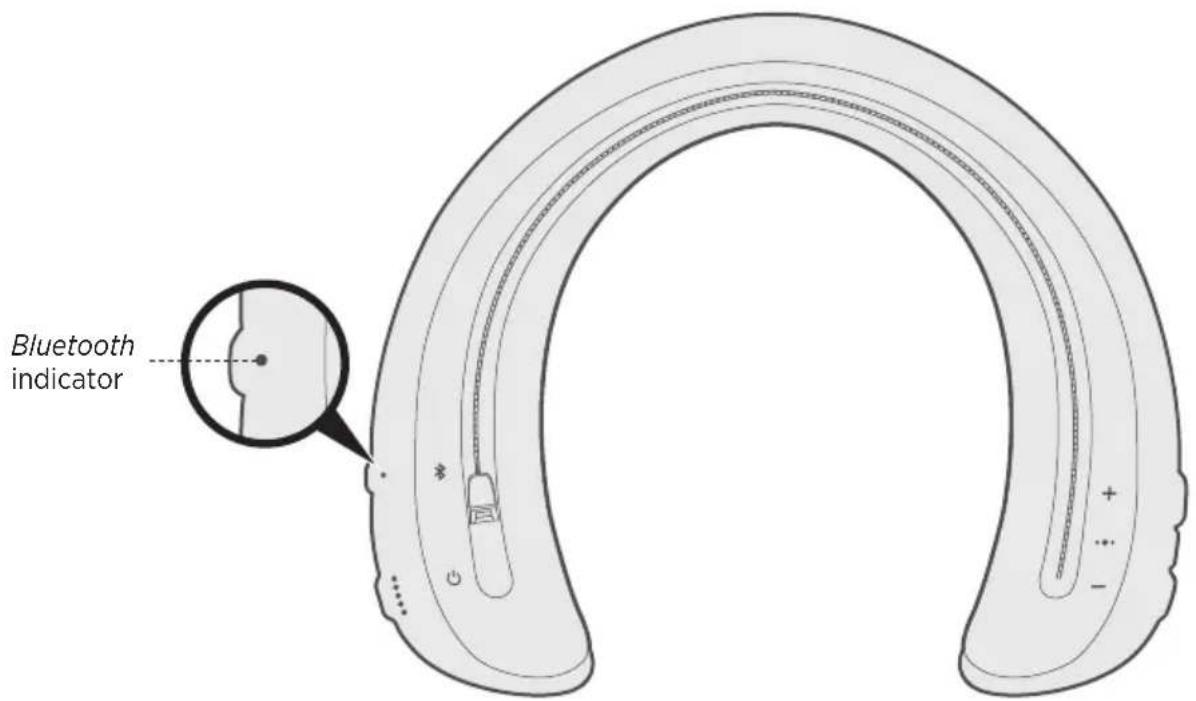
| Indicator activity System state | |
| Blinking blue Ready to connect | |
| Blinking white Connecting | |
| Solid white Connected | |
| Solid blue Select language |
Battery indicators
Shows the battery charge level.
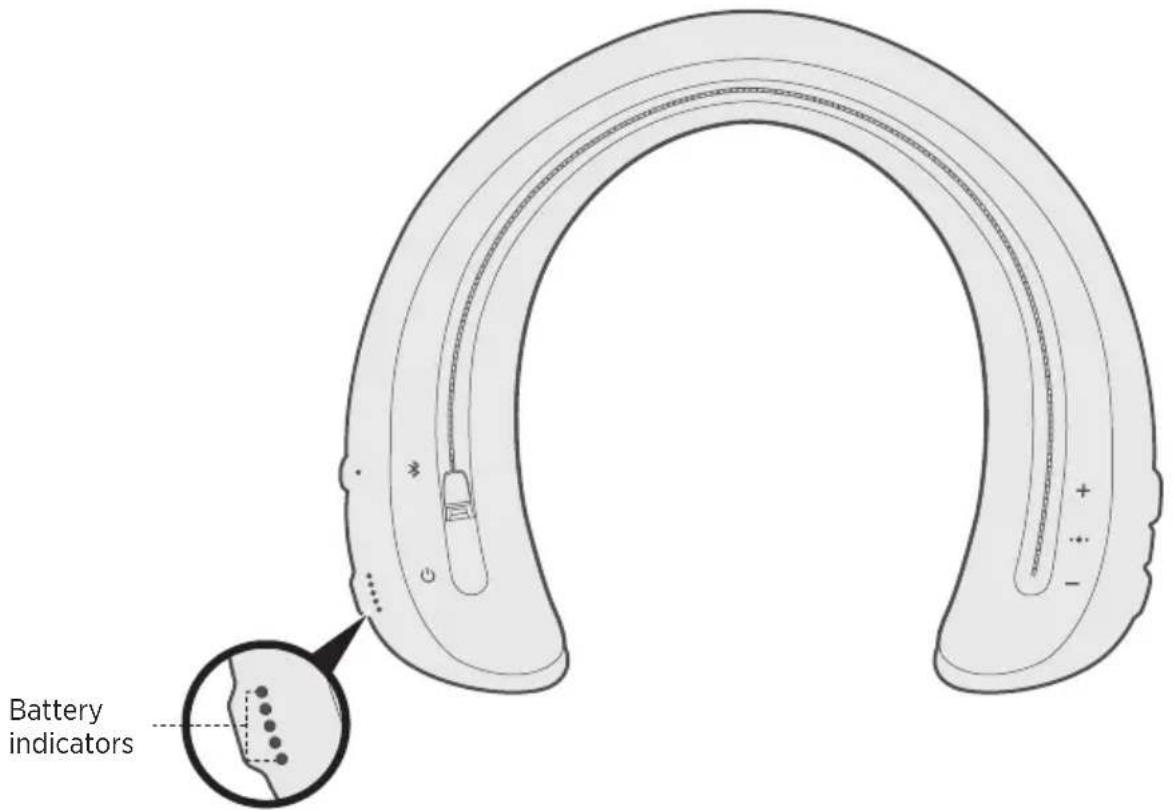
| Indicator activity Charging percentage | |
| ••••• | 0% - 20% |
| ••••• | 20% - 40% |
| ••••• | 40% - 60% |
| ••••• | 60% - 80% |
| ••••• | 80% - 100% |
| ○○○○ | Error - contact Bose customer service |
Notes:
- When charging, the last lit battery indicator blinks white. When the speaker is fully charged, all battery indicators glow solid white.
- To visually check the battery level, press and hold the Power button while viewing the battery indicators.
- If connected to an Apple device, the device displays the speaker battery level near the upper right corner of the screen and in the notification center.
Voice prompts guide you through the Bluetooth connection process, announce the battery level and identify connected devices. You can customize voice prompts using the buttons on your speaker.
Tip: You can also easily manage voice prompts using the Bose Connect app.
Pre-installed languages
The following languages are pre-installed on your speaker:
- English - Japanese - Dutch
- Spanish - Korean - Russian
- French - Italian - Polish
German Portuguese
Mandarin • Swedish
Change the language
When you power on the speaker for the first time, the voice prompts are in English.
- Press and hold the Multi-function button and + simultaneously until you hear the voice prompt for the first language option.
- Press + or - to move through the list of languages.
- When you hear your language, press and hold to select.
Disable voice prompts
Disabling voice prompts also disables voice notifications (see page 23).
Press and hold + and - simultaneously until you hear a voice prompt.
Note: Repeat to re-enable voice prompts.
Voice prompt notifications
Your speaker identifies incoming callers which are saved in your contact list.
To disable this feature, see page 22. You can also disable voice prompt notifications using the Bose Connect app.
Note: Disabling voice prompt notifications also disables voice prompts.
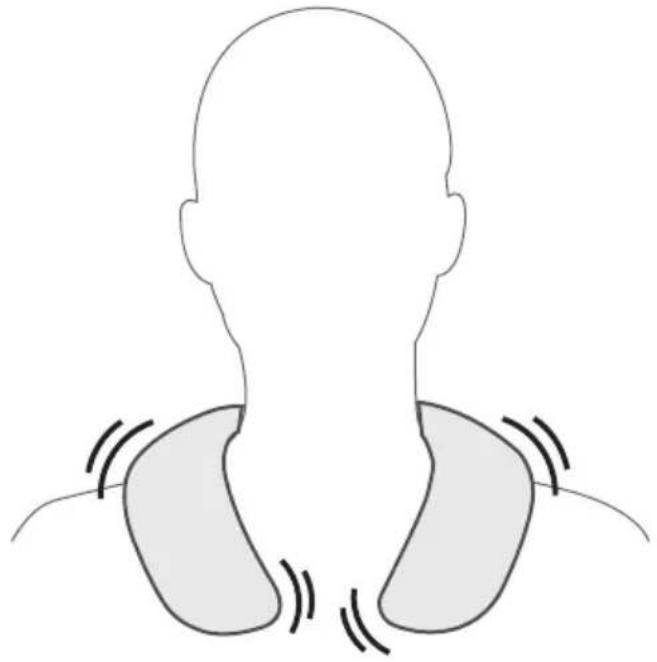
Vibration notifications
Your speaker provides vibration notifications to notify you of incoming calls.

| Alert Notification | |
| Long pulse Vibration enabled | |
| Long, repeating pulses Incoming call | |
| Short pulse Voice control activated |
Note: To disable vibration notifications, use the Bose Connect app.
Bluetooth wireless technology lets you stream music from mobile devices such as smartphones, tablets and laptop computers. Before you can stream music from a device, you must connect the device with your speaker.
Connect your mobile device using the Bose® Connect app (recommended)
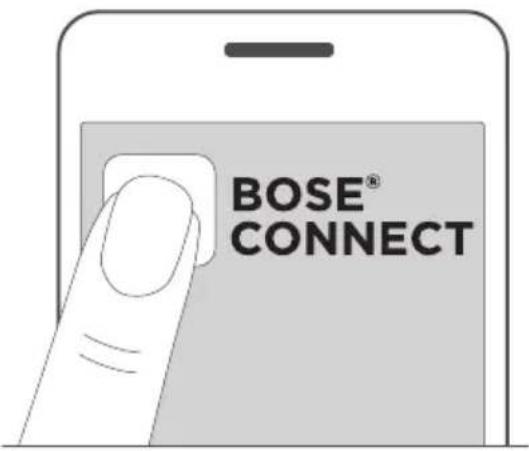
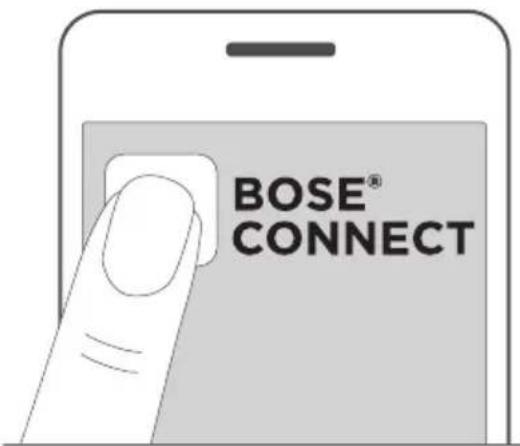
With your speaker powered on, download the Bose Connect app and follow the on-screen connection instructions.

Once connected, you hear "Connected to
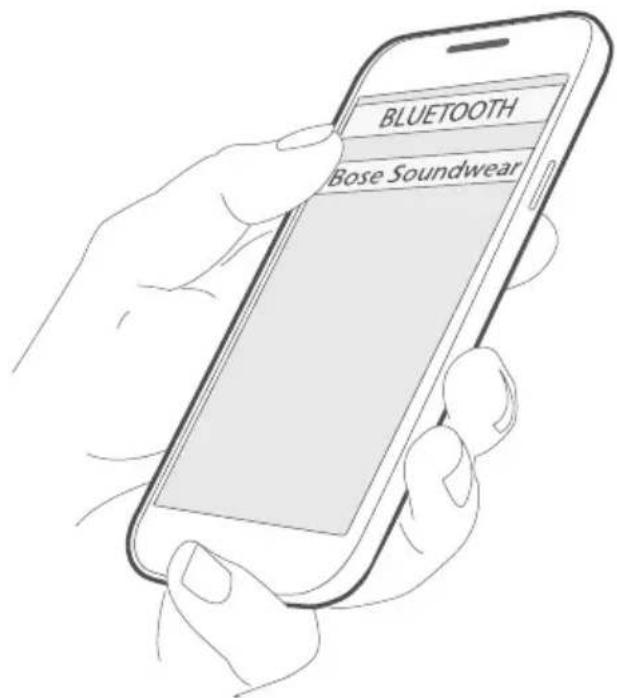
Connect using the Bluetooth menu on your mobiledevice
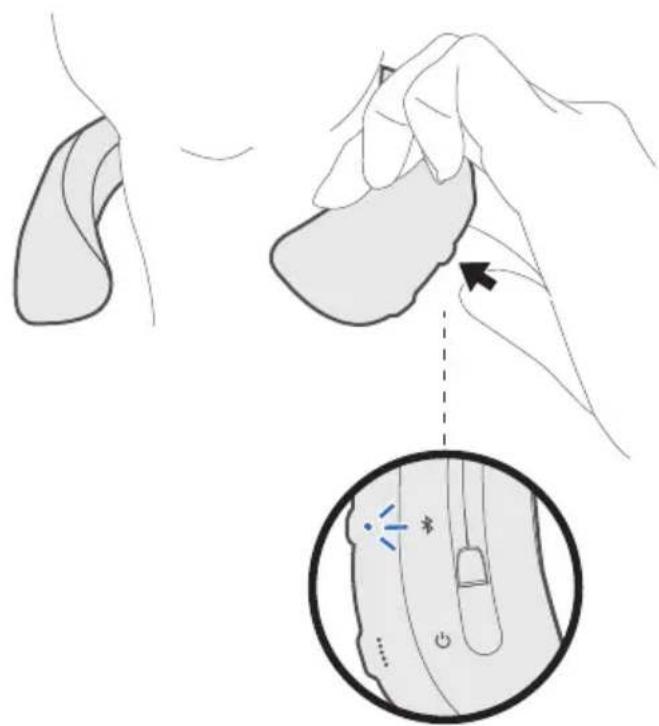
- With your speaker powered on, press and hold the Bluetooth button until you hear "Ready to connect another device," and the Bluetooth indicator blinks blue.
- On your device, enable the Bluetooth feature.
Tip: The Bluetooth feature is usually found in the Settings menu.
- Select your speaker from the device list.

Once connected, you hear "Connected to
Tip: Look for the name you entered for your speaker in the Bose Connect app.
Disconnect a mobile device
Disable the Bluetoothfeature on your device.
Tip: You can also disconnect your mobile device using the Bose Connect app.
Reconnect a mobile device
When powered on, the speaker tries to reconnect with the two most recently-connected devices.
Note: The devices must be within range (30 ft. or 9 m) and powered on.
You can pair additional devices to your speaker. These Bluetooth connections are controlled with the Bluetooth button. Voice prompts guide you through controlling multiple connections. Before connecting an additional mobile device, make sure this feature is enabled.
Tip: You can also easily manage multiple connected devices using the Bose Connect app.
Connect an additional mobile device
You can store up to eight paired devices in the speaker pairing list, and your speaker can be actively connected to two devices at a time.
To connect an additional device, download the Bose Connect app (see page 24) or use the Bluetooth menu on your mobile device (page 25).
Note: You can play audio from only one device at a time.
Identify connected mobile devices
Press to hear which devices are currently connected.
Switch between two connected mobile devices
- Pause audio on your first device.
- Play audio on your second device.
Reconnect a previously connected mobiledevice
- Press the Bluetooth button to hear which device is connected.
- Press again within three seconds to connect to the next device in the speaker pairing list.
- Repeat until you hear the correct device name.
- Play audio on the connected device.
Clear the speaker pairing list
- Press and hold for 10 seconds until you hear "Bluetooth device list cleared" and the Bluetooth indicator blinks blue.
- Delete your speaker from the Bluetooth list on your device. All devices are cleared, and the speaker is ready to connect.
You can customize your speaker with different colored accessory covers (not provided).
Accessory covers can be purchased through Bose customer service.
Visit: global.Bose.com/Support/SWC
Remove the cover
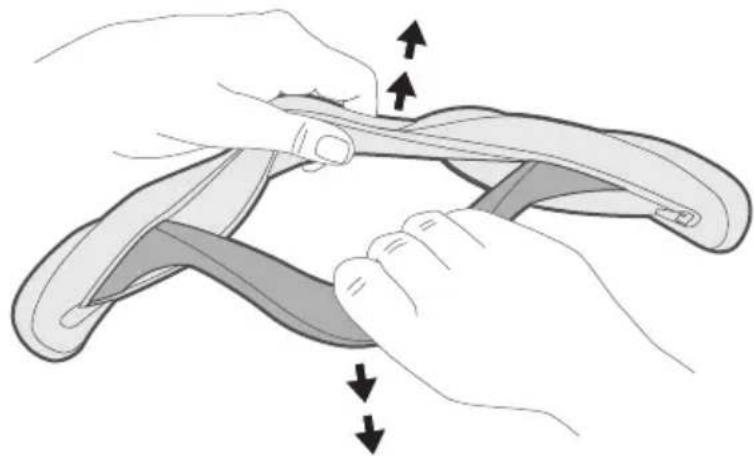
Remove the cover to clean the speaker or to attach a new accessory cover.
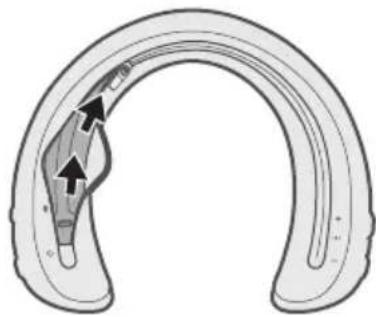
- Unzip the cover.
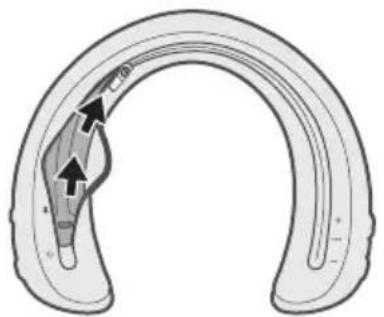
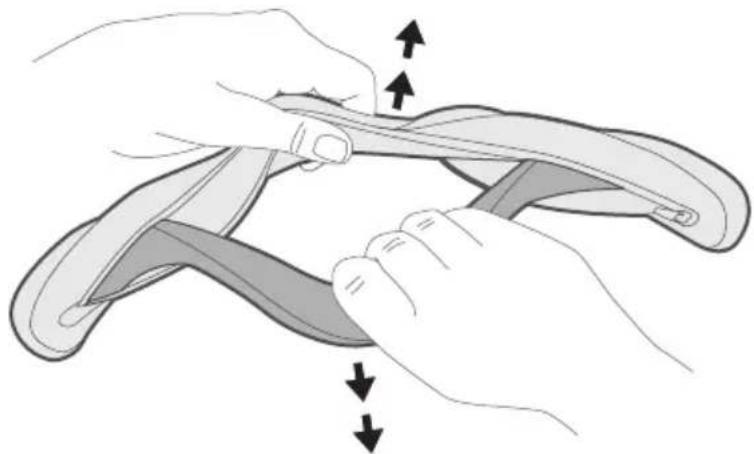
- Bend the ends of the speaker outward to flatten the speaker and pull it away from the cover.
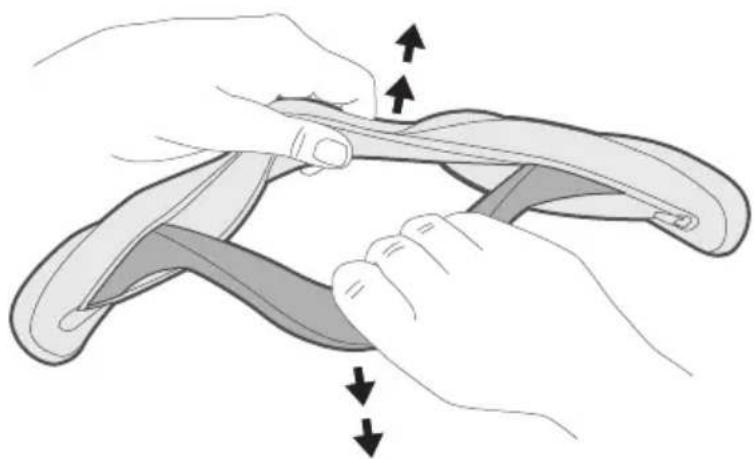
Note: While your speaker is flexible and can bend horizontally, do NOT bend your speaker so that it folds back onto itself. Minimize excessive bending.
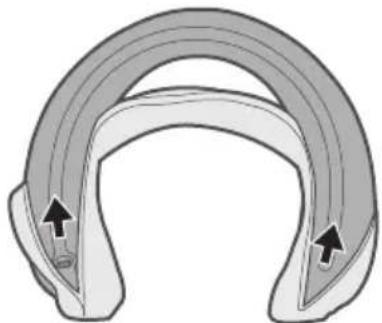
- Bend the ends of the speaker inward and remove the tips of the speaker from the cover.
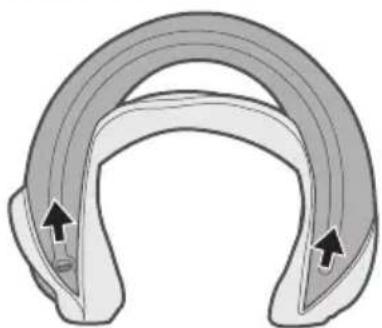
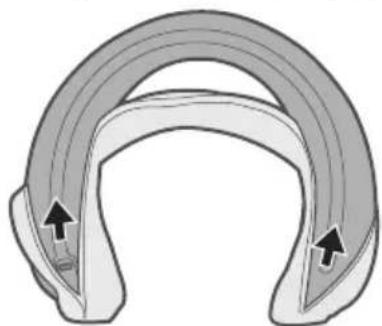
Attach the cover
- Anchor the tips of the speaker into the ends of the cover.
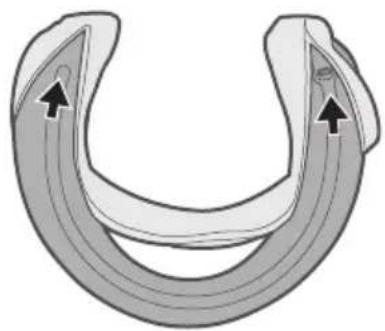
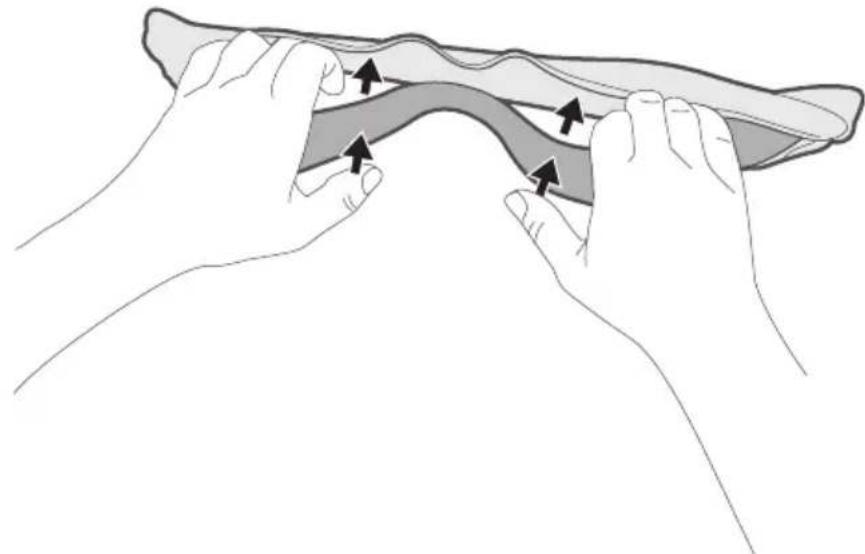
- Bend outward on the ends while pushing inward on the speaker to flatten and fit it into the cover.
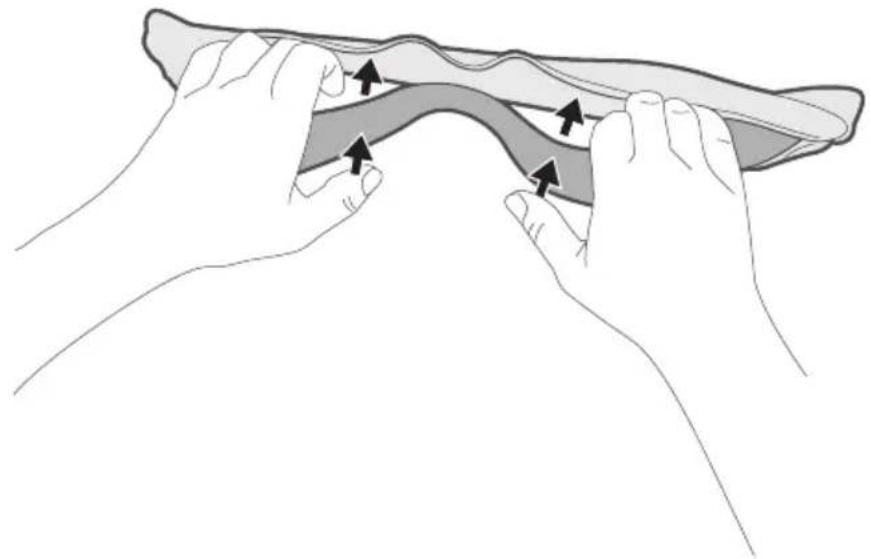
Note: While your speaker is flexible and can bend horizontally, do NOT bend your speaker so that it folds back onto itself. Minimize excessive bending.
- Pull the cover over the speaker and zip it closed.

Clean the speaker and cover
Your speaker and cover may require periodic cleaning.
| Component Cleaning procedure | |
| Cover | 1. Remove the cover from the speaker. 2. Wash by hand with lukewarm water and a mild detergent. 3. Hang to dry. Note: Make sure you thoroughly dry the cover before putting it back on. |
| Speaker | 1. Remove the cover from the speaker. 2. Clean the surface of the speaker with a soft, damp cloth (water only). Notes: ·Do not use any solvents, chemicals or cleaning solutions containing alcohol, ammonia or abrasives. ·Do not allow any liquids to spill into any openings. ·Make sure you thoroughly dry the speaker before putting the cover back on. |
Replacement parts and accessories
Replacement parts and accessories can be ordered through Bose customer service. Visit: global.Bose.com/Support/SWC
Limited warranty
Your speaker is covered by a limited warranty. Visit our website at global.Bose.com/warranty for details of the limited warranty.
To register your product, visit global.Bose.com/register for instructions. Failure to register will not affect your limited warranty rights.
Serial number location
The serial number is located on the underside of the speaker, near the USB connector. To view the serial number, unzip the cover.

Common solutions
If you experience problems with your speaker:
- Power on the speaker (see page 13).
- Check the state of the status indicators (see page 20).
- Make sure your mobile device supports Bluetooth technology (see page 24).
- Charge the battery (see page 18).
- Increase the volume on your speaker, device and music app.
- Move your device closer to the speaker and away from any interference or obstruction.
- Try connecting another device (see page 28).
If you could not resolve your issue, see the table below to identify symptoms and solutions to common problems. If you are unable to resolve your issue, contact Bose customer service.
Visit: global.Bose.com/Support/SWC
| Symptom Solution | |
| Speaker does not connect with mobile device | • On your device: - Disable and then enable the Bluetooth feature. - Delete your speaker from the Bluetooth list on your device. Connect again (see page 28). • Connect a different device (see page 29). • Visit: global.Bose.com/Support/SWC to see how-to videos. • Clear the speaker pairing list (see page 29). Connect again. |
| No sound | • Make sure voice prompts are on. Press the Bluetooth button × to hear the connected device. Make sure you are using the correct device. • Use a different music source. • Connect a different device (see page 28). • If two devices are connected, pause audio on the first device and play audio on the other device. • If two devices are connected, move the devices within range of the speaker (30 ft. or 9 m). |
| Poor sound quality • Use a different music source. • Connect a different device. • Disconnect the second device. • Disable any audio enhancement features on the device or music app. | |
| Speaker does not charge · | Make sure the connector on the cable is correctly aligned with the connector on the speaker. ·Secure both ends of the USB cable. ·Try another charging source. ·If your speaker has been exposed to high or low temperatures, let it return to room temperature and then try charging again. ·Reset your speaker (see “Reset your speaker”). ·Your speaker may be in safety protection mode (see page 19). |
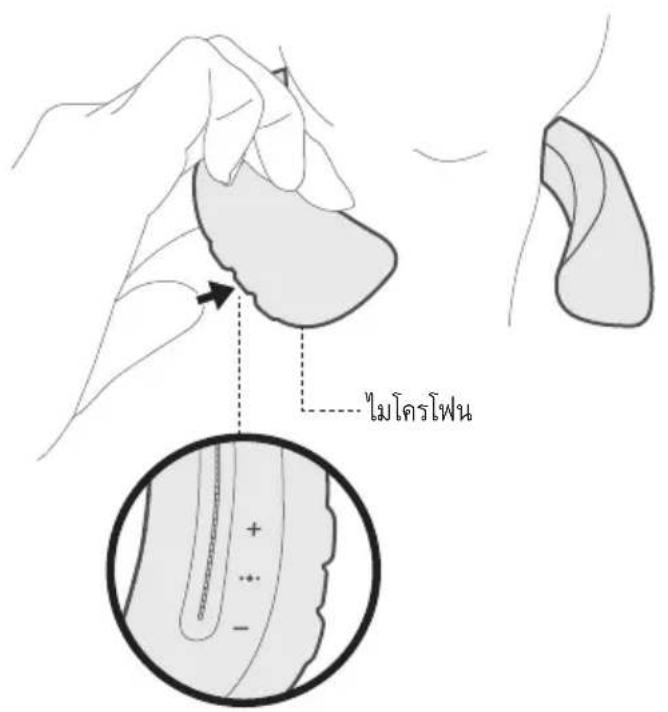
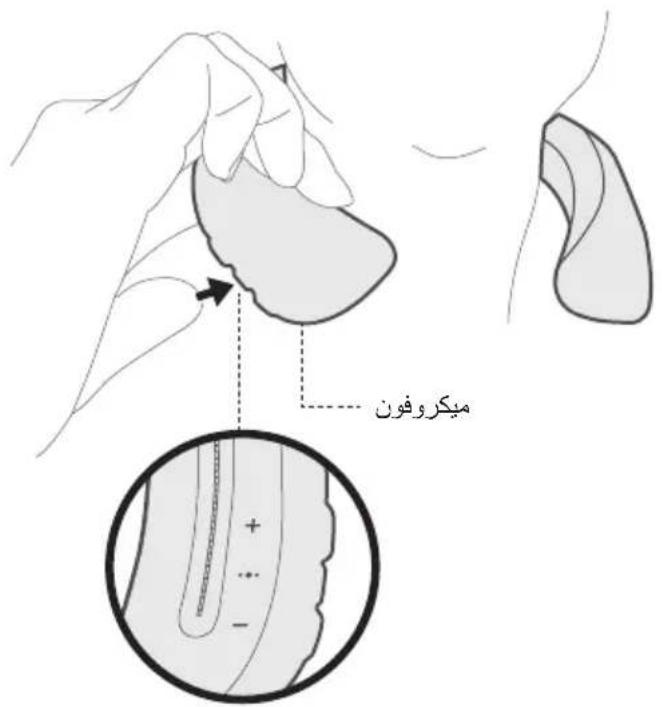
| Microphone is not picking up sound | ·Make sure the microphone opening on the left side of the speaker is not blocked. ·Try another phone call. ·Try another compatible device. |
| Mobile device not responding to button presses | ·For multi-press functions using the Multi-function button •●●, vary the speed of presses. ·Full controls may not be available for some models. ·Try another compatible device. |
Reset your speaker
Factory reset clears connected devices and language settings from your speaker and returns it to the original factory settings.
- Power on your speaker.
- Press and hold and — simultaneously for 10 seconds, until the Bluetooth indicator glows blue, and you hear "Ready to connect. To start setup, download the Bose Connect app" (see page 24).
Management Regulation for Low-power Radio-frequency Devices
ArticleXII
Juster for comfort 10
Vandafvisende. 11
Download on the App Store

GETITON Google Play
Indhold
China-Import: Bose Electronics (Shanghai) Company Limited, Part C, Plan 9, No. 353 North Riying Road, China (Shanghai) Pilot Free Trade Zone
EU-Import: Bose Products B.V., Gorslaan 60, 1441 RG Purmerend, Niederlande
Taiwan-Import: Bose Taiwan Branch, 9F-A1, No.10, Section 3, Minsheng East Road, Taipei City 104, Taiwan
Telefonnummer: +886-2-2514 7676
Mexiko-Import: Bose de Mexico, S. de R.L. de C.V., Paseo de las Palmas 405-204, Lomas de Chapultepec, 11000 Mexico, D.F. Telefonummer: +5255 (5202) 3545
Download on the App Store

GETITON GooglePlay
Inhoud
Gaaar: global.Bose.com/Support/SWC
Gaaar: global.Bose.com/Support/SWC
Importador en China: Bose Electronics (Shanghai) Company Limited, Part C, Plan 9, No. 353 North Riying Road, China (Shanghai) Pilot Free Trade Zone
Importador en UE: Bose Products B.V., Gorslaan 60, 1441 RG Purmerend, Paises Bajos
Importador en Taiwán: Sucursal de Bose en Taiwán, 9F-A1, No.10, Section 3, Minsheng East Road, Taipei City 104, Taiwan
Número de téléphone: +886-2-25147676
Importador en Mexico: Bose de Mexico, S. de R.L. de C.V., Paseo de las Palmas 405-204, Lomas de Chapultepec, 11000 Mexico, D.F.Numero de téléphone: +5255 (5202) 3545
Download on the App Store

GETITON Google Play
Contidente
Visite: global.Bose.com/Support/SWC
Retirar la cubierta
Visite: global.Bose.com/Support/SWC
Application Bose Connect
Download on the App Store

GETITON Google Play
Sommaire
Concessioni Bluetooth
Kinai importor: Bose Electronics (Shanghai) Company Limited, Part C, Plan 9, No. 353 North Riying Road, Kina (Shanghai) Pilot Free Trade Zone
EU-importor: Bose Products B.V., Gorslaan 60, 1441 RG Purmerend, The Netherlands
Tajvani importor: Bose Taiwan Branch, 9F-A1, No.10, Section 3, Minsheng East Road, Taipei City 104, Tajvan. Telefonszam: +886-2-2514 7676
Mexikó importo: Bose de México, S. de R.L. de C.V., Paseo de las Palmas 405-204, Lomas de Chapultepec, 11000 Mexico, D.F. Telefonszám: +5255 (5202) 3545
Nevleges bemeneti ertekek: 5 V-1,5A
Download on the App Store

GETITON GooglePlay
Tartalom
Management Regulation for Low-power Radio-frequency Devices
Artikkel XII
Juster for comfort. 10
Vannbestandighet. 11
Høytalerkontroller
Strøm paaav 13
Download on the App Store

GETITON Google Play
Innhold
Importer — Chiny: Bose Electronics (Shanghai) Company Limited, Part C, Plan 9, No. 353 North Riying Road, China (Shanghai) Pilot Free Trade Zone
Importer - UE: Bose Products B.V., Gorslaan 60, 1441 RG Purmerend, Holandia
Importer - Tajwan: Bose Taiwan Branch, 9F-A1, No.10, Section 3, Minsheng East Road, Taipei City 104, Taiwan. Numer telefonu: +886-2-2514 7676
Importer - Meksyk: Bose de Mexico, S. de R.L. de C.V., Paseo de las Palmas 405-204, Lomas de Chapultepec, 11000 Mexico, D.F. Numer Telefonu: +5255 (5202) 3545
Zasilanie: 5V 1,5A
Kinainportor: Bose Electronics (Shanghai) Company Limited, Part C, Plan 9, No. 353 North Riying Road, Kina (Shanghai) Pilot Free Trade Zone
EU-importor: Bose Products B.V., Gorslaan 60, 1441 RG Purmerend, Nederländerna
Taiwanimportor: Bose Taiwan Branch, 9F-A1, No.10, Section 3, Minsheng East Road, Taipei City 104, Telefonummer Taiwan: +886-2-2514 7676
Mexikoimportor: Bose de Mexico, S. de R.L. de C.V., Paseo de las Palmas 405-204, Lomas de Chapultepec, 11000 Mexico, D.F. Telefonummer: +5255 (5202) 3545
Indata:5V-1,5A
Download on the App Store

GETITON Google Play
Innehäll
·山
1000 + 1 - x = 0
·
- 15000000000000000000000000000000000000000000000000000000000000000000000000000000
IMDA
CANICES-3(B)/NMB-3(B)
Bluetooth Low Energy: 10 dBm/MHz EIRP
nnnnnnnnnnnnnnnnnnnnnnnnnnnnnnnnnnnnnnnnnnnnnnnnnnnnnnnnnnnnnnnnnnnnnnnnnnnnnnnnnnnnnnnnnnnnnnnnnnnnnnnnn
12
n nn nnnnnnnnnnnnnnnnnnnnnnnnnnnnnnnnnnnnnnnnnnnnnnnnnnnnnnnnnnnnnnnnnnnnnnnnnnnnnnnnnnnnnnnnnnnnnnnnnnnnnnnnnnnnnnnnnnnnnnnnnnnnnnnnnnnnn
15
Hnnnnaaannnnnnaanennnnnnnnnnnnnnnnnnnnnnnnnnnnnnnnnnnnnnnnnnnnnnnnnnnnnnnnnnnnnnnnnnnnnnnnnnnnnnnnnnnnnnnnnnnnnnnnnnnnnnnnnnnnnnnnnnnnnnnnnnnnnnnnnnnnnnnnnnnnnn
a

雪雪达国
1

nnaaannnnnnaanennnnnnaanennnnnnnnnnnnnnnnnnnnnnnnnnnnnnnnnnnnnnnnnnnnnnnnnnnnnnnnnnnnnnnnnnnnnnnnnnnnnnnnnnnnnnnnnnnnnnnnnnnnnnnnnnnnnnnnnnnnnnnnnnnnnnnnnnn nn nannn nn nannn nn nannn nn nannn nn nannn nn nannn nn nannn nn nannn nn nannn nn nannn nn nannn nn nannn nn nannn nn nannn nn nannn nn nannn nn nannn nn nannn nn nannn nn nannn nn nannn nn nannn nn nannn nn nannn nn nannn nn n annn nn nannn nn nannn nn nannn nn nannn nn nannn nn nannn nn nannn nn nannn nn nannn nn nannn nn nannn nn nannn nn nannn nn nannn nn nannn nn nannn nn nannn nn nannn nn nannn nn nannn nn nannn nn nannn nn nannn nn nannn nn nennn nn nannn nn nannn nn nannn nn nannn nn nannn nn nannn nn nannn nn nannn nn nannn nn nannn nn nannn nn nannn nn


| (Pb) | (2019) (Hg) | (2019) (Cd) | (2019) (CR(VI)) | (2019) (PBB) | (2019) (PBDE) | |
| PCB | X | 0 | 0 | 0 | 0 | 0 |
| X | 0 | 0 | 0 | 0 | 0 | |
| 0 | 0 | 0 | 0 | 0 | 0 | |
| X | 0 | 0 | 0 | 0 | 0 | |
| X | 0 | 0 | 0 | 0 | 0 | |
| 5 | ||||||
| X: | ||||||
ywnn: 8 nnnnnae nn nnnnne nnnnne nnnnne nnnnne nnnnne nnnnne nnnnne nnnnne nnnnne nnnnne nnnnne nnnnne nnnnne nnnnne nnnnne nnnnne nnnnne nnnnne nnnnne nnnnne nnnnne nnnnne nnnnne nnnnne nnnnne nnnnnee nnnnne nnnnne nnnnne nnnnne nnnnne nnnnne nnnnne nnnnne nnnnne nnnnne nnnnne nnnnne nnnnne nnnnne nnnnne nnnnne nnnnne nnnnne nnnnne nnnnne nnnnne nnnnne nnnnne nnnnne nnnnae
Bose Electronics (Shanghai) Company Limited, Part C, Plan 9, No. 353 North Riying Road, China (Shanghai) Pilot Free Trade Zone
Bose Products B.V., Gorslaan 60, 1441 RG Purmerend, The Netherlands
BouuauuauauauauauauauauauauauauauauauauauauauauauauauauauauauauuuuuuuuuuuuuuuuuuuuuuuuuuuuuuuuuuuuuuuuuuuuuuuuuuuuuuuuuuuuuuuuuuuuuuuuuuuuuuuuuuuuuuuuuuuuuuuuuuuuuuuuuuuuuuuuuuuuuuuuuuuuuuuuuuuuuuuuuuuuuuuuuuuuuuuuuuuuuuuuuuuuuuuuuuuuuuuuuuuuuuuuuuuuuuuuuuuuuuuuuUU
Bose de Mexico, S. de R.L. de C.V., Paseo de las Palmas 405-204, Lomas de Chapultepec, 11000 Mexico, D.F. wuynw: +5255 (5202) 3545
nna 17 nla 5V-1.5A
Apple, laln Apple, iPad, iPhone, iPod uae Siri Siri Apple Inc. nnnn nn nnnn nn nnnn nn nnnn nn nnnn nn nnnn nn nnnn nn nnnn nn nnnn nn nnnn nn nnnn nn nnnn nn nnnn nn nnnn nn nnnn nn nnnn nn nnnn nn nnnn nn nnnn nn nnnn nn nnnn nn nnnn nn nnnn nn nnnn nn nnnn nn nnnn nnnn nn nnnn nn nnnn nn nnnn nn nnnn nn nnnn nn nnnn nn nnnn nn nnnn nn nnnn nn nnnn nn nnnn nn nnnn nn nnnn nn nnnn nn nnnn nn nnnn nn nnnn nn nnnn nn nnnn nn nnnn nn nnnn nn nnnn nn nnnn nn nnnn nan aiphone K.K
Android, Google Now, Google Play uzai na Google Play uunnunnunnunnunnunnunnunnunnunnunnunnunnun.
Bose Corporation
"ipod", "iPhone" nd "iPad" wuyuipyipu
Nnunnnn nn nnnnnnnnnnnnnnnnnnnnnnnnnnnnnnnnnnnnnnnnnnnnnnnnnnnnnnnnnnnnnnnnnnnnnnnnnnnnnnnnnnnnnnnnnnnnnnnnnnnnnnnnnnnnnnnnnnnnnnnnnnnnnnnnnnnnnnnnnnnnnnnnnnnnnnnn nn
© 2017 Bose Corporation wannnunu uunu wuww wunwnu wunanr wunnnn nn nnnn
Bose Connect
uunnnaaun uawwauuBose Connect 8
a
9
#
10
nuù 11
nunnuovw
13
13
14
Wananaenlan
Wanannnnaa
Wanannslns 16
17
#
18
19
WuJiuHuaYueYueYueYueYueYueYueYueYueYueYueYueYueYueYueYueYueYueYueYueYueYueYueYueYueYueYueYueYueYueYueYueYueYueYueYueYueYueYueYueYueYueYueYueYueYueYueYueYueYueYUE
WuWanJuaeBluetooth 20
Wuān wǎn wǒu shì 21
1
Bose Connect WaiWawwauuunuunuauuuu uuuuuu uuuuuu uuuuuuuuuuuuuuuuuuuuuuuuuuuuuuuuuuuuuuuuuuuuuuuuuuuuuuuuuuuuuuuuuuuuuuuuuuuuuuuuuuuuuuuuuuuuuuuuuuuuuuuuuuuuuuuuuuuuuuuuuuuuuuuuuuuuuuuuuuuuuuuuuuuuuuuuuuuuuuuuuuuuuuuuuuuuuuuuuUU
Bose Connect
- ·
一
-60777777777777777777
-1
-
-
·

Download on the
App Store

GET IT ON
Google Play
a
y

Bose SoundWearTM Companion (waan)
USB
Nan: nannnnuuunnuuunnuuunnuuunnuu uuuuunnnn nn annnnnnnnnnnnnnnnnnnnnnnnnnnnnnnnnnnnnnnnnnnnnnnnnnnnnnnnnnnnnnnnnnnnnnnnnnnnnnnnnnnnnnnnnnnnnnnnnnnnnnnnnnnnnnnnnnnnnnnnnnnnnnnnnnnnnnnnnnnnnnnnnnnnnnnnnnnnnnnnn nn nannnne
y
nWwJyJnJnJnJnJnJnJnJnJnJnJnJnJnJnJnJnJnJn
2007
- a
·
-
n
IPX7
:


W

//
nuiu
Wuhanan hua xue hua nonguo
#
Hn: nn nnnnnaaannnnnnae nnne nnnnnae nnne nnnnne ne nnnnne nnnnne nnnnne nnnnne nnnnne nnnnne nnnnne nnnnne nnnnne nnnnne nnnnne nnnnne nnnnne nnnnne nnnnne nnnnne nnnnne nnnnne nnnnne nnnnne nnnnne nnnnne nnnnne nnnnne nnnnne nnnnnee
Wn
7777777777777777777
WnHs
| ### | |
| ### | ### |
| ### | ### |
WnBn76
| watthu | |
| ### | ●● |
| ### | ●● |
| ### | ●●●●●●●●●●●●●●●●●●●●●●●●●●●●●●●●●●●●●●●●●●●●●●●●●●●●●●●●●●●●●●●●●●●●●●●●●●●●●●●●●●●●●●●●●●●●●●●●●●●● ● |
| ### | ●●●●●●●●●●●●●●●●●●●●●●●●●●●●●●●●●●●●●●●●●●●●●●●●●●●●●●●●●●●●●●●●●●●●●●●●●●●●●●●●●●●●●●●●●●●●●● |
WnBnns
| ### | |
| ### | ### |
| ### | ### |
| ### | ### |
| ### | ### |
| ### | ### |
| ### | ### |
| ### | ### |
| ### | ### |
| ### | ### |
| ### | ### |
| ### | ### |
| ### | ### |
| ### | ### |
| ### | ### |
| ### | ### |
| ### | ### |
| ### | ### |
| #### | ### |
2
WwWwWwWwWwWwWwWwWwWwWwWwWwWwWwWwWwWwWwWwWwWwWwWwWwWwWwWwWwWwWwWwWwWwWwWwWwWwWwWwWwWwWwWwWwWwWwWwWwWwW
nna 1
W
- 1
- 1
- 1
nannnnn: nwnnnaaennnnnnnnnnnnnnnnnnnnnnnnnnnnnnnnnnnnnnnnnnnnnnnnnnnnnnnnnnnnnnnnnnnnnnnnnnnnnnnnnnnnnnnnnnnnnnnnnnnnnnnn
1
12 1
15 1
Wv
Waaananaananaananaananaananaananaananaananaananaananaananaananaananaananaananaananaananaananaananaananaananaananaananaananaananaananaananaananaananaananaananaananaananaananaananaananaananaananaananaananaananaananaananaananaananaananaananaananaananaananaan ana
Wbwnnnnblteoohh 1111111111111111111
Bluetooth
H
| 政务服务网 | |
Wwwnnnaaennnnnne
1
| 泰国泰国泰国泰国泰国泰国 | |
| 0% - 20% | |
| 20% - 40% | |
| 40% - 60% | |
| 60% - 80% | |
| 80% - 100% | |
N
Wuwananwunwunwunwunwunwunwunwunwunwunwunwunwunwunwunwun
- 1
- 1000000000000000 Apple
B
Bose Connect
n
7777777777777777777777777777777777777
- English - Japanese - Dutch
- Spanish - Korean - Russian
- French - Italian - Polish
German Portuguese
Mandarin • Swedish
山
- n+na-wwaaaunmnn
3.
y
(20 23)
+
HJ1
#
nWyyyBxuBxuBxuBxuBxuBxuBxuBxuBxuBxuBxuBxuBxuBxuBxuBxuBxuBxuBxuBxuBxuBxuBxuBxuBxuBxuBxuBxuBxuBxuBxuBxuBxuBxu
wnnnaananaananaananaananaananaananaananaananaananaananaananaananaananaananaananaananaananaananaananaananaananaananaananaananaananaananaananaananaananaananaananaananaananaananaananaananaananaananaananaananaananaananaananaananaananaananaananaananaananaananaanaraa
:
nss
nnuuulnuu uuuuauu uuuuuuuuuuuuuuuuuuuuuuuuuuuuuuuuuuuuuuuuuuuuuuuuuuuuuuuuuuuuuuuuuuuuuuuuuuuuuuuuuuuuuuuuuuuuuuuuuuuuuuuuuuuuuuuuuuuuuuuuuuuuuuuuuuuuuuuuuuuuuuuuuuuuuuuuuuuuuuuuuuuuuuuuuuuuuuuuuuuuuuuuUU
Bose Connect (w)
Jaaanw Jnnaaannnnaaawwnn Bose Connect uauuunnnnnnnnnnnnnnnnnnnnn
"
Dnnae 1nue 2nue Bluetooth nnae
- 1

- 1
3.

"
global.Bose.com/Support/SWC
nnaananaan
nnaananaananaananaananaananaananaananaananaananaananaananaananaananaananaananaananaananaananaananaananaananaananaananaananaananaananaananaananaananaananaananaananaananaananaananaananaananaananaananaananaananaananaananaananaananaananaananaananaananaananaanaraannaa
1.
- 1
HJ17H: 1
- 1
nraan
1.

- 2
:
- 1

nnaananaananaananaananaan
nWuJUaunnnnnaeunnnnneunnnnneunnnnneunnnnne
| wnwnwn | 1. ยงleenยaanoodanw 2. ยงleenยaanoodanw 3. ยงleenยaanoodanw wnwnwn: ยงleenยaanoodanw wnwnwn: |
| wnwn | 1. ยงleenยaanoodanw 2. ยงleenwa wnwn: ยงleenwa wnwn: |
2
Bose: global.Bose.com/Support/SWC
n
13
- 20
Bluetooth (24)
(18)
WJWJWJWJWJWJWJWJWJWJWJWJWJWJWJWJWJWJWJWJWJWJWJWJWJWJWJWJWJWJWJWJWJW
-
·aunnnnnaanrnnn (28)
Wannnnaaannnnnnaanennnnnne nnnnnnnnnnnnnnnnnnnnnnnnnnnnnnnnnnnnnnnnnnnnnnnnnnnnnnnnnnnnnnnnnnnnnnnnnnnnnnnnnnnnnnnnnnnnnnnnnnnnnnnnnnnnnnnnnnnnnnnnnnnn nn
global.Bose.com/Support/SWC
| ### | |
| ### | |
| ### | |
| ### | |
| ### | |
| ### | |
| ### | |
| ### | |
| ### | |
| ### | |
| ### | |
| ### | |
| ### | |
| ### | |
| ### | |
| ### | |
| ### | |
| ### | |
| ### | |
| ### | |
| ### | |
| 成语 | |
n
nnnnnnnnnnnnnnnnnnnnnnnnnnnnnnnnnnnnnnnnnnnnnnnnnnnnnnnnnnnnnnnnnnnnnnnnnnnnnnnnnnnnnnnnnnnnnnnnnnnnnnnnnnnnnnnnn
- n·-10n 10n nn nnnn nnnn nnnn nnnn nnnn nnnn nnnn nnnn nnnn nnnn nnnn nnnn nnnn nnnn nnnn nnnn nnnn nnnn nnnn nnnn nnnn nnnn nnnn nnnn nnnn nnnn nnnn nnnn nnnn nnnn nnnn nnnn nnnn nnnn nn
毎日
中
·此賊者,哉有哉。
·IiJtEepEnnTjFyRgUqHgUeHhHnHnHnHnHnHnHnHnHnHnHnHnHnHnHnHnHnHnHnHnHnHnHnHnHnHnHnHnHnHnHnHnHnHnHnHnHnHnHnHnHnHnHnHnHnHnHnHnHnHnHnn H
·迦托拉告者有在国音的,
·賊者拉尅是賊者日用間以號知
Bose Connect Cameroon
·SwaIeFh hainbromoreroureRorMoBaIJHajtchouenfHnnaTn
- Sūṭṭṭṭṭṭṭṭṭṭṭṭṭṭṭṭṭṭṭṭṭṭṭ
| 标注通勤直通车 | |
| 0%-20% | 0%-20% |
| 20%-40% | 20%-40% |
| 40%-60% | 40%-60% |
| 60%-80% | 60%-80% |
| 80%-100% | 80%-100% |
| Bose Highway Service Center of the HAI SHI SI NO. | Adobe Bose Highway Service Center of the HAI SHI SI NO. |
相卫:
Note: This equipment has been tested and found to comply with the limits for a Class B digital device, pursuant to Part 15 of the FCC Rules. These limits are designed to provide reasonable protection against harmful interference in a residential installation. This equipment generates, uses, and can radiate radio frequency energy and, if not installed and used in accordance with the instructions, may cause harmful interference to radio communications. However, there is no guarantee that interference will not occur in a particular installation. If this equipment does cause harmful interference to radio or television reception, which can be determined by turning the equipment off and on, the user is encouraged to try to correct the interference by one or more of the following measures:
- Reorient or relocate the receiving antenna.
- Increase the separation between the equipment and receiver.
- Connect the equipment into an outlet on a circuit different from that to which the receiver is connected.
- Consult the dealer or an experienced radio/TV technician for help.
Changes or modifications not expressly approved by Bose Corporation could void the user's authority to operate this equipment.
This device complies with part 15 of the FCC Rules and with Industry Canada license-exempt RSS standard(s). Operation is subject to the following two conditions: (1) This device may not cause harmful interference, and (2) this device must accept any interference received, including interference that may cause undesired operation.
This device complies with FCC and Industry Canada radiation exposure limits set forth for general population. This transmitter must not be co-located or operating in conjunction with any other antenna or transmitter.
Meets IMDA Requirements.
CANICES-3 (B)/NMB-3(B)

Bose Corporation hereby declares that this product is in compliance with the essential requirements and other relevant provisions of Directive 2014/53/EU and all other EU directive requirements. The complete declaration of conformity can be found at: www.Bose.com/compliance
Management Regulation for Low-power Radio-frequency Devices
Article XII
According to "Management Regulation for Low-power Radio-frequency Devices" without permission granted by the NCC, any company, enterprise, or user is not allowed to change frequency, enhance transmitting power or alter original characteristic as well as performance to an approved low power radio-frequency devices.
Article XIV
The low power radio-frequency devices shall not influence aircraft security and interfere legal communications; If found, the user shall cease operating immediately until no interference is achieved. The said legal communications means radio communications operated in compliance with the Telecommunications Act.
The low power radio-frequency devices must be susceptible with the interference from legal communications or ISM radio wave radiated devices.
This symbol means the product must not be discarded as household waste, and should be delivered to an appropriate collection facility for recycling. Proper disposal and recycling helps protect natural resources, human health and the environment. For more information on disposal and recycling of this product, contact your local municipality, disposal service, or the shop where you bought this product.

| Names and Contents of Toxic or Hazardous Substances or Elements | ||||||
| Toxic or Hazardous Substances and Elements | ||||||
| Part Name | Lead(Pb) | Mercury(Hg) | Cadmium(Cd) | Hexavalent(CR(VI)) | PolybrominatedBiphenyl(PBB) | Polybrominated diphenylether(PBDE) |
| PCBs X 0 0 0 0 0 | ||||||
| Metal Parts X 0 0 0 0 0 | ||||||
| Plastic Parts 0 0 0 0 0 | 0 | |||||
| Speakers X 0 0 0 0 0 | ||||||
| Cables | X 0 0 | 0 0 0 | ||||
| This table is prepared in accordance with the provisions of SJ/T 11364.O: Indicates that this toxic or hazardous substance contained in all of the homogeneous materials for this part is below the limit requirement of GB/T 26572. | 5 | |||||
| X: Indicates that this toxic or hazardous substance contained in at least one of the homogeneous materials used for this part is above the limit requirement of GB/T 26572. | ||||||
入力定格:5V;5A
global.Bose.com/Support/SWC
保证
g yào 1
Bluetooth 1.2
< Bose^® Connect 品 Jz, dLdLdLdLdLdLdLdLdLdLdLdLdLdLdLdLdLdLdLdLdLdLdLdLdLdLdLdLdLdLdLdLdLdLdLdLdLdLdLdLdLdLdLdLdLdLdLdLdLdLdL
(24 a.u.)
auiu
:clie law jiu ci 10
(13
(20
.(24)Bluetooth
(18
.
…(28)
1
. Bose ,Lac and Juaia 1
global.Bose.com/Support/SWC
- AD = 25

a 1
.Bose -Lac
global.Bose.com/Support/SWC
11 11 j
- a. b.

2.
s 1
3.
Laaa Jaaa Jgaa jgsaagdcl
Jalll jll pwlgaw Bluetooth jge bia 1
2.
3.
4.
G
"Bluetooth jg Cw g 1
Bluetooth
Bluetooth 2
JUaui Jalj gusll jy jz
Jabluo 1000u Bluetooth 10000000000000000000000000000000000000000000000000000000000000000000000000
Connect 1
i j 1 1 1 1 1 1 1 1 1 1 1 1 1 1 1 1 1 1 1 1 1 1 1
Bluetooth a (24 a) Bose Connect 1j j j j j j j j j j j j j j j j j j j j j j j j j j j j j j j j j
S OBC = S BOC + S_ BOC
aaiiaai jgaaai 0jzai
Jusgall Jglal Eclw
i 1
1.
2.
Jieiieiee Juaai jyjiaui 1
30) 3
S OBC = S COD + S_ BOC
J 1
Connect 4
Jlglj j 8i Bluetooth aiaa
山
jai jai" 8i Bluetooth 2g 100000000000000000000000000000000000000000000000
Bluethoth
2.
y
Bose® (Jusss) Connect
Bose Connect
.
aagallalbail
Bose 22 aai 2. Connect
yall llllal 1
j1j
aJg aiee 1000000000000000000000000000000000000000000
Jaae aae aee 1n nn nnnn nn nnnn nn nnnn nn nnnn nn nnnn nn nnnn nn nnnn
12
15 1
aIbIgss
Joo Jn Jn Jn Jn Jn Jn Jn Jn Jn Jn Jn Jn Jn Jn Jn Jn Jn Jn Jn Jn Jn Jn Jn Jn Jn Jn Jn Jn Jn Jn Jn Jn Jn Jn Jn Jn Jn Jn Jn Jn Jn Jn
a 1
eaii 1
i
1 1
(20 1
a
Jai jaii jaii jai i jai i jai i jai i jai i jai i jai i jai i jai i jai i jai i jai i jai i jai i jai i jai i jai i jai i jai i jai i jai i jai i jai i jai i jai i jai i jai i jai i jai i jai i jai i jai i jai i jai i
10
a
g 90 no j 8 (0%) aalal alalal y b
aal aasaae 1111111111111111111
#
.USBJgJgJgJgJgJgJgJgJgJgJgJgJgJgJgJgJgJgJgJgJgJgJgJgJgJgJgJgJgJgJgJgJgJgJgJgJgJgJgJgJgJgJgJg
.USB USB 2
J 3
e 1
J 1
:
g
Jj j 111111111111111111111111111111111111111111
Jauai jilg
. Bose 150243,150243,150243,150243,150243,150243,150243, global.Bose.com/Support/SWC:
aill y lall Coglls! aas, g alal jie bll Bose Connect Jji .
Bose Connect 1
S OBC = S COD + S_ BOC
·
1
一
-jl
i 1
- S BCD = S COD + S BDO - S BOC

GET IT ON Google Play

Download on the App Store
23
23
Bluetooth
24 (J) Bose Connect 1
25 1
27 1
27 1
Bluetooth
28
28 1
28 1
29 1
29 1
1
30 1
31 1
aalgl aie
32 1
33 1
33 2
33
LgXlaI g IbsI Lus
34 1
35
Bose Connect
8 .Bose Connect
aagai aiee
9 1
1
10
11 1
a
13
13
14
14
15
16
17
1
18
19 2
19 1
19 1
19 2
a
20 Bluetooth
21
aaiia
22
22 1
22 2
.2017 2007 "7" p# j#j#
Bose Electronics (Shanghai) Company Limited, Part C, Plan 9, :
No. 353 North Riying Road, China (Shanghai) Pilot Free Trade Zone
Bose Products B.V., Gorslaan 60, 1441 RG Purmerend, The Netherlands:
Bose Taiwan Branch, 9F-A1, No.10, Section 3, Minsheng East Road, :
Taipei City 104, Taiwan
+886-2-25147676:
"iPhone"Apple App Store .
.Aiphone K.K
. Google Inc 45
blt 10
. Bose Corporation 45
iipipipipipipipipipipipipipipipipipipipipipipipipipipipipipipipipipipipipipipipipipipipipipipipipipipipipipipipipipipipipipipipipipipipipipipipipipipipipipipipipipipipipipipipip
Apple iipipipipipipipipipipipipipipipipipipipipipipipipipipipipipipipipipipipipipipipipipipipipipipipipipipipipipipipipipipipipipipipipipipipipipipipipipipipipipipipipipipipipipip
Apple
iPad iPhone iPod
e 1
eill 1
1-877-230-5639:Bose
Bose Corporation 2017© pl
.
Bose 100000000000000000000000000000000000000000
y 2.

y y 1 1 1 1 1 1 1 1 1 1 1 1 1 1 1 1 1 1 1 1 1 1 1 1 1 1 1 1 1 1 1 1
4a = 50, = 60^
.
j j j j j j j j j j j j j j j j j j j j j j j j j j j
j k 时 1.1 ÷ 1.2 = 6
Rss 15 jll jll (1)
A
y 1
J J 1
Clllaiy, Clogall yjbjill ciibio
CANICES-3(B)/NMB-3(B)
www.Bose.com/compliance:
2480 2400
aallll aell lal 20 n jai jai jai jai jai jai jai jai jai jai jai jai jai jai jai jai jai jai jai jai jai jai jai jai jai jai jai jai jai jai jai jai jai jai jai jai jai jai jai jai jai jai jai jai jai jai jai jai jai jai jali jali jali jali jali jali jali jali jali jali jali jali jali jali jali jali jali jali
aalll aell al lal 10 n aall
aaiin
oic ailll oall
y 1
aalll aaiiaaae 22 j 8j g o1y j aal y aall j j j j j
suii jiljldai
y 1 y
1SM 1
