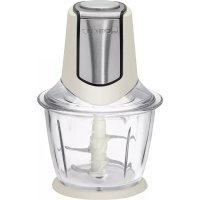
MZ 3560 - Food Processor CLATRONIC - Free user manual and instructions
Find the device manual for free MZ 3560 CLATRONIC in PDF.



| Product type | Food processor / Multifunction chopper |
| Brand | Clatronic |
| Model | MZ 3560 |
| Power supply | 220-240 V~, 50 Hz |
| Power consumption | 300 W |
| Protection class | II |
| Bowl capacity | Approximately 1.2 liters |
| Net weight | Approximately 2.00 kg |
| Operation | Short duration: 30 seconds max, then 2 minutes rest |
| Main functions | Chop: meat, vegetables, dried fruits, cheese, chocolate, ice cubes, bread, etc. |
| Included accessories | Motor unit, bowl, safety lid, 2 knives, non-slip mat |
| Switch | Push button (maintained operation) |
| Safety | Safety switch preventing start without correct assembly |
| Blade material | Stainless steel |
| Cleaning | Bowl, lid, knives and mat: hand wash (not dishwasher). Motor unit: dry cloth |
| Maintenance | Do not immerse motor unit, do not use abrasive utensils |
| Repairability | Do not repair yourself; contact a qualified professional |
Frequently Asked Questions - MZ 3560 CLATRONIC
User questions about MZ 3560 CLATRONIC
0 question about this device. Answer the ones you know or ask your own.
Ask a new question about this device
Download the instructions for your Food Processor in PDF format for free! Find your manual MZ 3560 - CLATRONIC and take your electronic device back in hand. On this page are published all the documents necessary for the use of your device. MZ 3560 by CLATRONIC.
USER MANUAL MZ 3560 CLATRONIC
Thank you for selecting our product. We hope that you will enjoy use of the appliance.
Symbols in this user manual
Important notes for your safety are marked distinctively. Pay absolute attention to them to avoid accidents and damage to the device:
WARNING:
Wards of dangers for your health and indicates potential risks of injury.
CAUTION:
Indicates potential dangers for the device or other objects.
NOTE:
Highlights tips and information for you.
General Notes
Before using this device, carefully read this user manual and keep it together with the Warranty Certificate, cashier receipt and if possible, the original package inclusive its interior packing. If you hand on the device to any third person, include the user manual as well.
- Use the device for private and its intended purpose only. The device is not intended for commercial use.
- Do not use the device outdoors. Protect it from heat, direct sunlight, humidity (do not immerse into liquids under any circumstances) and sharp edges. Do not use the device with wet hands. If the device gets wet, unplug it immediately.
- Always switch off and unplug the device (pull the plug, not the cable) when you do not use the device, or when you attach accessories, during cleaning or malfunctioning.
- Do not leave the device unattended during operation. Always switch off the device when leaving the room. Unplug the device.
- Regularly check the device and cable for signs of damage. Do not continue to operate the device in case of damage.
- Do only use original parts.
- For the safety of your children, keep any packing parts (plastic bags, cartilage, Styrofoam etc.) out of their reach.
WARNING!
Don't let small children play with foils for danger of suffocation!
Special Safety Precautions for this Device

WARNING: Risk of injury!
- Always disconnect the appliance from the supply if it is left unattended and before assembling, disassembling or cleaning.
- Do not repair the device by yourself. Please contact authorized personnel. In order to avoid hazards, a damaged mains cable must be replaced with an equivalent cable by the manufacturer, our customer service or any other qualified specialist.
- This appliance shall not be used by children.
- Keep the appliance and its cord out of reach of children.
Children shall not play with the appliance.
WARNING: Risk of injury!
- Appliances can be used by persons with reduced physical, sensory or mental capabilities or lack of experience and knowledge if they have been given supervision or instruction concerning use of the appliance in a safe way and if they understand the hazards involved.
WARNING:
- The blades of the knives are sharp!
- Handle the knives with the necessary care!
- There is a risk of injury, especially when inserting/removing the knives from the bowl and when cleaning them!
CAUTION:
The motor assembly must not be immersed in water for cleaning. Follow the instructions provided in the chapter "Cleaning".
Overview of the Components
1 Switch
2 Motor unit
3 Safety cover
4 Two knives
5 Container
6 Non-slip rubber mat
Intended Use
This appliance is intended for processing foodstuffs that can be shredded.
It is only designed for this use and should only be used for this intended purpose.
It is not suitable for stirring or mixing liquids.
Do not operate the appliance when empty.
Only use this device as instructed in this user manual. Do not use this device commercially.
No other use is intended and can cause damage or personal injuries.
The manufacturer does not assume any liability for damages resulting from improper use.
Unpack Device
- Take the device out of its packaging.
- Remove all packaging materials, such as foils, filling materials, cable ties and cartons.
- Check that all accessories are included in the box.
NOTE:
Clean manufacturing residues and dust from the device as described under "Cleaning".
Preparations and general information
- Prepare the dish. Refer to the table below.
- Place the rubber mat on a level, flat surface. Place the bowl into the rubber mat.
Assembling the appliance
Whether you use only one knife or both knives depends on the quantity and consistency of your food.
- Place the knife with the long shaft onto the pin of the bowl. If required, place the second knife with the blades at the bottom onto the shaft of the first knife.
NOTE:
- The shaft on the bottom of the bowl drives the knife.
Always fit the knife first. Only then fill in the food. - The protective cover has a seal at the bottom.
-
First check to make sure that the seal is positioned correctly.
-
Put on the protective cover. The shaft of the tool must now protrude through the hole in the protective cover.
- Place the motor unit on the cover. In doing so, use the recesses in the safety cover.
Electric Connection
- Check if the mains voltage of your plug matches the voltage of the appliance from the type plate.
- Connect the mains plug to a properly installed protective contact socket.
i NOTE:
- The motor unit is fitted with a safety switch.
- If the appliance does not start, check if the motor housing, protective cover and knife are correctly fitted.
Operation
The multi-purpose shredder has push-button operation. The motor will run as long as you keep the switch pressed down.
CAUTION:
- The appliance is suited for a short-term operation of maximum 30 seconds. Allow it to cool down for approx. 2 minutes before using it again.
After 5 operating cycles, allow the appliance to cool down for approx. 15 - 20 minutes.
The following table comprises information for usage. You would like to use food that is not listed in the table? Make comparisons:
Apple pieces have a similar consistency as garlic cloves.
Table
| Food Preparation | Max. Quantity ca. Duration | ||
| Boiled eggs Shelled, quartered 300 g (1/4 pieces) 10 seconds | |||
| Herbs 200 g 15 seconds | |||
| Walnuts/ hazelnuts Without nutshells! 250 g 20 seconds | |||
| Almonds Without shells! | 250 g 20 seconds | ||
| Garlic | Peeled | 250 g 25 seconds | |
| Onions | 2 cm cubes | 250 g 20 seconds | |
| Parsley | Wash, destalk | 50 g | 20 seconds |
| Bread (breadcrumbs) | 2 cm cubes | 100 g 25 seconds | |
| Raw meat | 2 cm cubes, without bones, skin and sinews! | 400 g | 30 seconds |
| Parmesan cheese | 2 cm cubes | 200 g 25 seconds | |
| Cooking chocolate | 1 cm cubesice cold | 100 g 30 seconds | |
| Carrots | 1 cm cubes | 200 g 30 seconds | |
You may also chop up ice cubes:
- Use two knives for this.
- Fill the bowl with ice cubes to max. 200g .
- Repeatedly press the button for only a brief amount of time.
i NOTE:
The ice cubes are chopped more evenly and you may specify the granularity better.
Cleaning

WARNING:
- After use and before cleaning always disconnect from mains power supply!

WARNING:
- Do not submerge the motor unit in water! It could lead to electric shock or fire.
- The cutting surfaces of the knives are sharp. There is a risk of injury! Handle these with the necessary care!

CAUTION:
- Do not use a wire brush or other abrasive utensils for cleaning.
- Do not use aggressive or abrasive cleaning agents.
- Clean the motor unit with a dry cloth without additional cleaning agents.
Bowl, protective cover, knife and rubber mat

CAUTION:
- Do not wash these accessories in the dishwasher. The surfaces may become dull.
-
Do not fill the bowl with boiling water.
-
Wash these accessories manually in dishwater.
- Rinse with clear water and dry with a cloth.
- Assemble the Multi Chopper before storage.
Troubleshooting
Device does not work.
Solution:
Check mains power connection.
Further possible causes:
The device is fitted with a safety switch.
This prevents accidental starting of the motor.
Solution:
Check that the motor unit, safety cover and blade are fitted correctly.
Noise Emission
The sound pressure level was measured close to the ear of an operator (LpA) according to DIN EN ISO 3744.
Resulting sound pressure level: 75.0dB(A) (no limit)
Technical Data
Model: MZ 3560
Power supply: 220 - 240 V~, 50 Hz
Power consumption: 300 W
Protection class: II
Short term operation:............On 30 seconds / Off 2 minutes
Capacity: approx. 1.2 liters
Net weight: approx. 2.00 kg
The right to make technical and design modifications in the course of continuous product development remains reserved.
This device complies with all current CE directives, such as electromagnetic compatibility and low voltage directive and is manufactured according to the latest safety regulations.
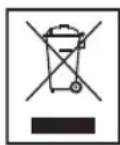
Disposal
Meaning of the "Wheelie Bin" Symbol
Take care of our environment, do not dispose of electrical appliances via the household waste.
Dispose of obsolete or defective electrical appliances via municipal collection points.
Please help to avoid potential environmental and health impacts through improper waste disposal.
You contribute to recycling and other forms of utilization of old electric and electronic appliances.
Your municipality provides you with information about collecting points.
Instrukcja obstrugi
CTC Clatronic Sp. z 0.0
BkaayHa nikka3ky uinhcpmaqioIpnKopncTyBaay.
3araJIbHI BkazIBKn
Iepu HIX BIKOPNCTOBYBATN pncptpi, ybaXHO npOHTaHTe uei nocibHK KOpncTyBaHa i 36epiraate Ioro, a TAKOX rapaH-1IO, Yek i, kUo MOKINBO, opirihAIBHy ynakOBky pa3OM i3 BHYtpiHIM nakyBaHHM. KaUo Bu nepeDacte npCPTpi Tpeti OOC6I,doaiTe TAKOX uei nocibHK KopcTByBaHa.
BnKOpNCToByTe ue npncpi DnnpBaTHnx ciinei 3a npns3HaueHHm. Ppncpi He npns3HaueHn DnKOMepui-HORO BnKOpNCtAHH
He BnKOpNCTOByNTe cen npNCTpiHa ByNuIc.3axuauTe npNCTpiB iD TEIIa, pRIMNX COHryHIX npOMEHIB, BOIOn (3a KODHx o6ctabMn He 3aHypoIte npNCTpiy piDNH) I roCTPnx kpaIB. He KOpNCTyTEcR npNCTPOcM, KaIO y Bac Bonior pyKn. KaIO npNCTpii HamokHe, HeraHO BiE EDHnTE NOro BiD MepeKi.
3aBKnBmNkaTe npctpi i BiD'edHyTe BiMpekix (TnHt3a Wtekep, a He 3a Ka6enb), kIo npctpi He BIKoepocToByeTBcA abo KOnPi ndHyTe npuaJa, nIac HmueHHy u pa3i HehaneKHO pObot npctpo.
He 3aHnauTe npncptiB 6e3 Hargy niD cac po60tn. 3aHnauOuN KIMHaTy, 3abXdN BmMkaTe npncptiB. BiEHNHTe npncTlB iD MepeKj.
Perynpho npebiprTe npctpi i kaebHa haarBHCtbo noikokxeh. He BMkaTe npctpi, kkuo BnaBHeHO noikokxehn.
BVKOPNCTOBVITeIIMeOpHINbHI Detani.
3aJnBe3neKnBaunxDitei 36epiraTe nakyBaIbHm MaTepiAn (nactNKoBI nakeTn, ckoBn, niHOnPiact ToO) y MicuX, HeoCTVnHX DnI dITE.

NONEPEDXEHH
He do3BOJnTe MaMM DITM 6aBNTnC4 pOJIbTOIO, icHyc He6e3neka 3aDyWeHH!
3aTepeXeHnI 7oDo 6e3neKn iD Yac KopncTyBaHHn npJaIaIOM

BnKOpNCTaHH3 iHIOo MeTOO He nepeD6aueHo, iHaKwE MoXHa noIkwODHT npuad a60 TpaBMyBaTmca.
Bnpo6HnK He 6epe Ha ce6e K0dHOI BiINOBiAaIbHoCTI 3a 36ntK, 3aBdaHI HeuIbOBIM BIKOPNCaHHM.
Po3nakyBaHHa
BnMItb npnaad 3 ynaKOBKn.
- NobHicTIO 3HIMITb yci nakyBaJIbHi MaTepiAIn, a came: foIbry, MaTepiAIn HAnOBHeHHra, CKpyTKn UHypiB Ta KAPTOH.
- PnepeBipTe HaaBnHcTb Ycboro npinapdny y Kopo6ui.
IITPIMITKA.
Budanitb 3 npnndy nnt Ta 3nnuKn Bid Bnpo6nucTba (onncao B po3di "HueHHA".
IidroTobKa Ta 3araNbHa iHopmaui
-Пиг罗ТуИte ctpaBy.ДиВITьсЯТаБИнчИку Инжпe.
- Po3a7yIte rymobn KINIMOK Ha IIaacki ropnOHTaJIbHI NOBepxHi. BCTaHOBiT bAly Ha rymobn KINIMOK.
36ɪpaɪnɪŋpɪnɪlaɪd
Te,CKJbKn HOXiB 3aCTOCOByBATN,OINH YN DBA,3aNEKNTb BiD KJIbKOCTI I KOHCNCHTEHJI iKi.
- JIkuo nOtpi6Ho, BCTaHOBt b npytn HIX 3 ne3amn BHN3y Ha cTepeXeHb nepWoTO HOxa.
I PYNMITKA.
Bicb y HnKnni qactnhi yaani kpyntnb hix.
3aBxDn Cnepuy BCTaHOBNIHTe HIX. TInbKn nCJN 2b0rO 3aIOBHIOTe NocyDHy npOdyKTAMN.
Ha Kpaio 3axinooi Kpiuikn E KIOH.
- PeneBipTe, YI npaBnIbHO BCTaHOBNeHNI KJIHO.
- 3akpiTe 3axiNCHy KpUkUy. Ban HacaKm MaE BXoDHTn B OTBip 3axiNCHOJI KpUkU.
- Po3aIyTe DnHyH Ha KpUuJI, BkOpNCTOByOuy 3aRn6NeHH Ha 3axNCHI KpUuJI.
EneKtpnHe XnBnHeHHH
- Ipebipte, YI BiNobiJaE Hanpyra MepeXi Hanpy3i npnny, 30 3a3NaHeHa nacnopTHi Tabnui.
- BCTaBTe BnKy KINBHeHn B HaNKeHHM YHOM BCTaHOBNEHy PO3EtKy 3 aXINCHM KOHTAKTOM.
I PIMITKA.
-ДИВИУN OСHAJIЕно 3aNo6iXHIM NepeMnKaUeM.
IIPUMITKA.
- RaKIO npIaN He 3aynckaETbC, nepeBipTe npaBnIb-HICTb BCTaHOBJIeHHa KOpNcUy DmRgamma, 3axnCHOI KpNIKKTa HOka.
KopncTyBaHHa
BaratoyHKJIOHaBHH Wpeep npaioe npn HATNCKaHH KONKn. DInrHy npaioe Becb lac, nOKn HactirHryTa KHONka.
YBATA.
- Pnpia npiaatn Dn KOPOTKOTEPMIOHORO KOPNCTyBaHH: OHOKpaTHe BBIMKHeHHMa TpNBAtn He 6iBbJr30 cekHy. DaIte Nomy OxOLOHYtn IpOTARoPn pN6n.2 XBNIN INpeD NOaJIbShIM BKNOPCTAHHM.
Picn5po0uynxuKnBdaIte npnaDy oxoohytnpotrom np6n.15-20 xbnH.
YHaCyTnHi Ta6nui NodaH iHOpMaui npo BnKOpNCTaHH.
PiTpioHo nprirotyBatn Ctpaby, koi Hema B Ta6nui?
PiopBHOHe:
Ckn6kn 16nyka MaOToB Taky K camy KOHCnCTeHciio, IIO n 3y6ci yachniKy.
Tabn
Ky6nI NbOy NoPi6HIOIObCg OHopiHiIe, i MoXHa KpaIe KOHTPOINOBaTn PO3Mip qACTHOK.
YnueHHa
PONEPEJXEHHJ.
YcTpoCTBO He pa60TaE.
PelleHme:
IpoBepbTe, yTo ycTpoiCTBO IOcOeINHeHO K cETn 3NeKtpoNITaHn.
DpyTNE BO3MOXHbIe PnUHHbI.
YCTPOIcTBO CHa6KeHO aBapINHbIM BbIKNIOuTeNeM.
3To npedotbpaaetcnyaHbI 3anyck DnvarateTna.
PelleHie:
Y6eNTecb, YTO DnBraTeJIb, KpbIuKa I Ne3Bne ycTaHOBJeHb npaBnloHo.
TexHnueckne daHHbIe
Modenb: MZ 3560
3JektponTuHHe: 220-240 B\~,50 T
IopTe6JrMaMoUHocTb: 300BT
Klacc 3aunrbl:
BecnppebHna pa6ota: ...BKJI 30 cekyHd / BblKI 2 mHyT
EMKocTB: npMepHo 1,2
Bec HETTO: npn6n.2,00 K
CoxpaHEno npaBO Ha TexHNueckne N KOHCTpyKNUOHbIe N3-MeHENH B pAMkax npOdoNkaIOUeMc pa3pa60TKn npOdykTa.
JaHHoe yCTPOINCTBO COOTBETCTBYET BCEM TEKUIM DInpeKTHBAM CE, TAKIM KAK 3JIeKTPOMAHINTHAR COBMECTMOCTB INH3KOE HAnpRKeHHe; OHO IPOIN3BeDEHO B COOTBETCTBIM C HOBeIIMN INPABINAMTIexHNIK6E0NaCHOCTN.
4. x_1 = 1 & 若 y_1 0 \ 2 & 若 y_1 = 0 .
Jaa Jgai
:
ailll 1s jssjj
aaiaiil (j)
Aa 2j0 jzll
a
:
aayjy jai jaiil, aaiuill alb aaii yaiai sii jia
A
A
MZ3560
50.240-220
300
11 1
/30 2al j.
J 1
1.2
2.00
y j 1
jiali jiuaill
CE
Lg yjuspi Ls jnssll 1y 1y
a
aal Jaaai jaii i aai
Jaaie all Iaiaal ll
中
45j1.30 gai 36 jai s jai alai jai
(2)已知数列中 an = 1( 3n - 1) ( 3n + 5) ,求此数列的前 n 项和 Sn
20-15 2d 45 jil
J
e g jia jiaill jia jia jia jia jia jia jia jia jia jia jia
1
j4
Aiiin jai jai
aJg aJell gag aJzall gai jil gai gaiS
gaiall 152 gao
45^ BO = 90^
sio gao la jia qie o a yjll iai
1 1
L
jlll lilii jilil 1
p1suii1i ciaij jga
1 1
cogdall gillllg cglll joll
Iale Cukai
Lai Laiyll bai jai li Jai yai Jai lai Jai 1
. g i jai gai ai . jai 1 , gai 1 Jai gai ai ai
g i jai gai ai jai 1i ie ayai gai
#
!:
aui jieai
Jg
1
suiy jiey 2
a 1
.
.
12y 111
JbJ 1
.
15
alaiinall jbiinll
3
GARANTIEKARTE
warranty card · garantiekaart · carte de garantie · schedadi garanzia · tarjeta de garantia · cartao de garantia · garantikort karta gwarancyjna · zaru.cnli list · karta jamstva · carte de garantie · rapaunonHnKaPa · zaru.cnly list · garancijski list · garanciajegy · rapaHTnHnHnΦOpMnyap · rapaHTnHbI TaON ·
MZ 3560
24 Monate Garantie gemäß Garantieerklarung - 24 months warranty according to warranty declaration - 24 maanden garantie volgens garantieverklaring - 24 mois de garantie selon la déclaration de garantie - 24 mesi de garanzia secondo la dichiarazione di garanzia - 24 meses de garantia de acuerdo con la déclaration de garantia - 24 meses de garantia, de acordo com a déclaration de garantia - 24 mandes garanti (i) henhold t garantibetingelsene - 24 misesc gwarancjna na podstawie owsiadzcnia gwarancyjnego - zaruka 24 misi ci podle prohlasei o zarucre - 24 mjesecno jamstvo u skladu s jamstvenom declarajcom - 24 luni garantie conform declarejie de garantie - 24 mecaa rapanau b cbotetetrmbe c rapaunohnata dekapraa - 24-measna zaruka podla vyhlasenia o zarucre - 24-mesecona garancija, skladno z garancjsko izavo - 24 honap garancia garanciafeftetelekben leirtak szerit - rapaHTHnA 24 Miciu ilinno103a8Bnpro parnTIO - rapaHTNn 24 MeCAa cornACHO 3aRRNEHHM rapanTINHM npabviam.
Kaufdatum, Handlertemspitel, Unterschied - date of purchase, dealer stamp, signature - kankopdatum, dealerstempel, handlstekening - date d'achat, tampon du concessionaire, signature - data de acquistio, timbo del revinditori, fornca - fecha de compa, sella dei distribuidor, fornca - data de compa, carinato do distribuidor, assinatura - kgjepdato, forhandltemspitel, signature - data zupezco, piecerei spredavuty, podis - datum zukepeni, suizika prodejece, podis - datum kapovine, big trogova, podis - data de achirzie, stampia furnitorul, semmata - Data n epimcnatia, Tena la Ipojevua, Tognpic - datum naukpu, petalica obchodnich/predajcu, podis - datum nauka, big trogova, podis - flavas datuma, kereskedé belyegzje. alilas - data npapagbana, neiva na pnojauu, npinoe - Deta nprodpesiehur, LITAM npojaeu, Ptofnius Oliguiu

CiatRONIC
INTERNATIONAL GMBH
www.clatronic.com


- Symbols in this user manual
- WARNING:
- CAUTION:
- NOTE:
- General Notes
- WARNING!
- Special Safety Precautions for this Device
- WARNING: Risk of injury!
- Overview of the Components
- Intended Use
- Unpack Device
- Preparations and general information
- Assembling the appliance
- Electric Connection
- i NOTE:
- Operation
- Cleaning
- Bowl, protective cover, knife and rubber mat
- Troubleshooting
- Device does not work.
- Noise Emission
- Technical Data
- Disposal
- Meaning of the "Wheelie Bin" Symbol
- Instrukcja obstrugi
- 3araJIbHI BkazIBKn
- NONEPEDXEHH
- 3aTepeXeHnI 7oDo 6e3neKn iD Yac KopncTyBaHHn npJaIaIOM
- Po3nakyBaHHa
- IITPIMITKA.
- IidroTobKa Ta 3araNbHa iHopmaui
- 36ɪpaɪnɪŋpɪnɪlaɪd
- I PYNMITKA.
- EneKtpnHe XnBnHeHHH
- I PIMITKA.
- IIPUMITKA.
- KopncTyBaHHa
- YBATA.
- YnueHHa
- PONEPEJXEHHJ.
- YcTpoCTBO He pa60TaE.
- TexHnueckne daHHbIe
- x_1 = arrayll 1 & 若 y_1 0 \ 2 & 若 y_1 = 0 array.
- A
- j4
- 45^ ° BO = 90^ °
- L
- Iale Cukai
- #
- GARANTIEKARTE
- MZ 3560
- CiatRONIC
Brand : CLATRONIC
Model : MZ 3560
Category : Food Processor