DEM105 - Thermometer VELLEMAN - Free user manual and instructions
Find the device manual for free DEM105 VELLEMAN in PDF.


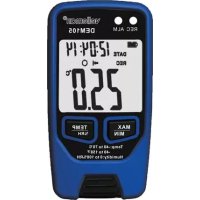
| Product type | Data logging thermometer (temperature and humidity) |
| Brand | Velleman |
| Model | DEM105 |
| Dimensions | 96 x 50 x 30 mm |
| Weight (with battery) | 82 g |
| Power supply | 1 lithium battery 3.6 V / 1200 mAh (type SAFT 1/2 AA) |
| Battery life | Approximately 2 years (ideal conditions at 22 °C) |
| Temperature measurement range | -40 °C to 70 °C (-40 °F to 158 °F) |
| Temperature accuracy (0 °C to 70 °C) | ± 1 °C |
| Temperature accuracy (-40 °C to 0 °C) | ± 1.5 °C |
| Relative humidity measurement range | 0 % to 100 % RH |
| Humidity accuracy (0-30 % and 70-100 % RH) | ± 5.0 % RH |
| Humidity accuracy (30-70 % RH) | ± 3.0 % RH |
| Recording interval | Adjustable from 1 second to 24 hours |
| Memory capacity | 32,700 measurements |
| Display | LCD with LED backlight |
| Interface | USB (cable included) |
| Main functions | Continuous recording, high/low alarm, MIN/MAX display, °C/°F unit change, single or cyclic recording mode, graphic analysis software |
| Included accessories | Protective cap, belt clip, USB cable, software for Windows (XP/Vista/7/8.1 32/64-bit), battery |
| Warranty | 24 months (consumer) |
| Maintenance and cleaning | Clean with a damp, lint-free cloth. Avoid alcohol and solvents. Never immerse in liquid. |
| Safety | Keep out of reach of children. Protect from rain, moisture, shocks and dust. |
| Spare parts and repairability | No user-serviceable parts. Order spare parts from your dealer. |
| General information | Follow local regulations for disposal at end of life. Do not dispose of with household waste. |
Frequently Asked Questions - DEM105 VELLEMAN
User questions about DEM105 VELLEMAN
0 question about this device. Answer the ones you know or ask your own.
Ask a new question about this device
Download the instructions for your Thermometer in PDF format for free! Find your manual DEM105 - VELLEMAN and take your electronic device back in hand. On this page are published all the documents necessary for the use of your device. DEM105 by VELLEMAN.
USER MANUAL DEM105 VELLEMAN
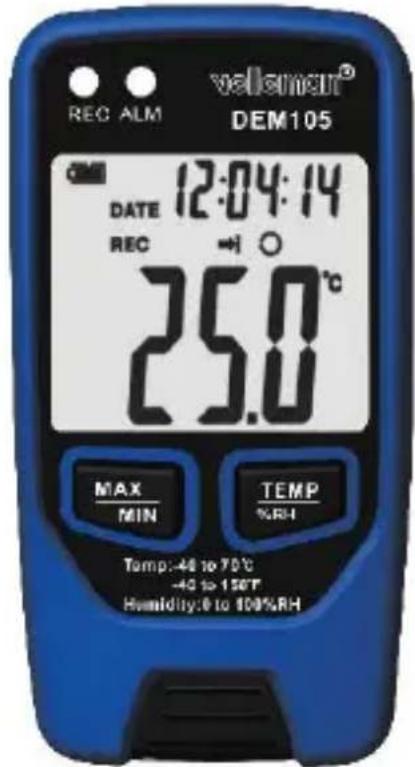
TEMPERATURE AND HUMIDITY DATABLOGGER
DATABLOGGER VOOR TEMPERATUUR EN VOCHTIGHEID
ENREGISTREUR DE DONNÉES THERMIQUES ET D'HUMIDIT
REGISTRADOR DE DATOS PARA TEMPERATUREA Y HUMEDA
DATENLOGGER FÜR TEMPERATURE UND FEUCHTIGKEIT
REJESTRATOR TEMPERATUREI WILGOTNOŚCI
COLETOR DE DADOS DA TEMPERATUREA E HUMIDADE
USER MANUAL 3
GEBRUIKERSHANDLEIDING 12
MODE D'EMPLOI 21
MANUAL DEL USUARIO 30
BEDIENUNGSANLEITUNG 39
INSTRUKCJA OBSŁUGI 49
MANUAL DO UTILIZADOR 58
CE
USER MANUAL
1. Introduction
To all residents of the European Union Important environmental information about this product

This symbol on the device or the package indicates that disposal of the device after its lifecycle could harm the environment. Do not dispose of the unit (or batteries) as unsorted municipal waste; it should be taken to a specialized company for recycling. This device should be returned to your distributor or to a local recycling service. Respect the local environmental rules.
If in doubt, contact your local waste disposal authorities.
Thank you for choosing Velleman! Please read the manual thoroughly before bringing this device into service. If the device was damaged in transit, do not install or use it and contact your dealer.
2. Safety Instructions
| Keep this device away from children and unauthorized users. |
| Keep this device away from rain, moisture, splashing and dripping liquids. |
| Protect this device from shocks and abuse. Avoid brute force when operating the device. |
| Protect the device against extreme heat and dust. |
| There are no user-serviceable parts inside the device. Refer to an authorized dealer for service and/or spare parts. |
3. General Guidelines
Refer to the Velleman® Service and Quality Warranty on the last pages of this manual.
- Familiarise yourself with the functions of the device before actually using it.
- All modifications of the device are forbidden.
- Only use the device for its intended purpose. Using the device in an unauthorised way will void the warranty.
4. Features
memory for 32700 readings
- LCD to show logging information easily
- free selectable measurement cycle from 1 sec to 24 hours
- long battery life: more than 2 years (under ideal conditions at 22^ C )
- display all alarm and record statuses with 2 LEDs
- alarm will output a high pulse per 10 milliseconds if it exceeds the set high/low alarm value
analysis software used to view graphically or text mode for logging data
- USB computer interface (advanced software programme for all windows)
- comes with protective cover, mounting clip, USB cable, English software for Windows® XP, Vista, 7, 8.1 (32 and 64 bit), manual, battery
5. Overview
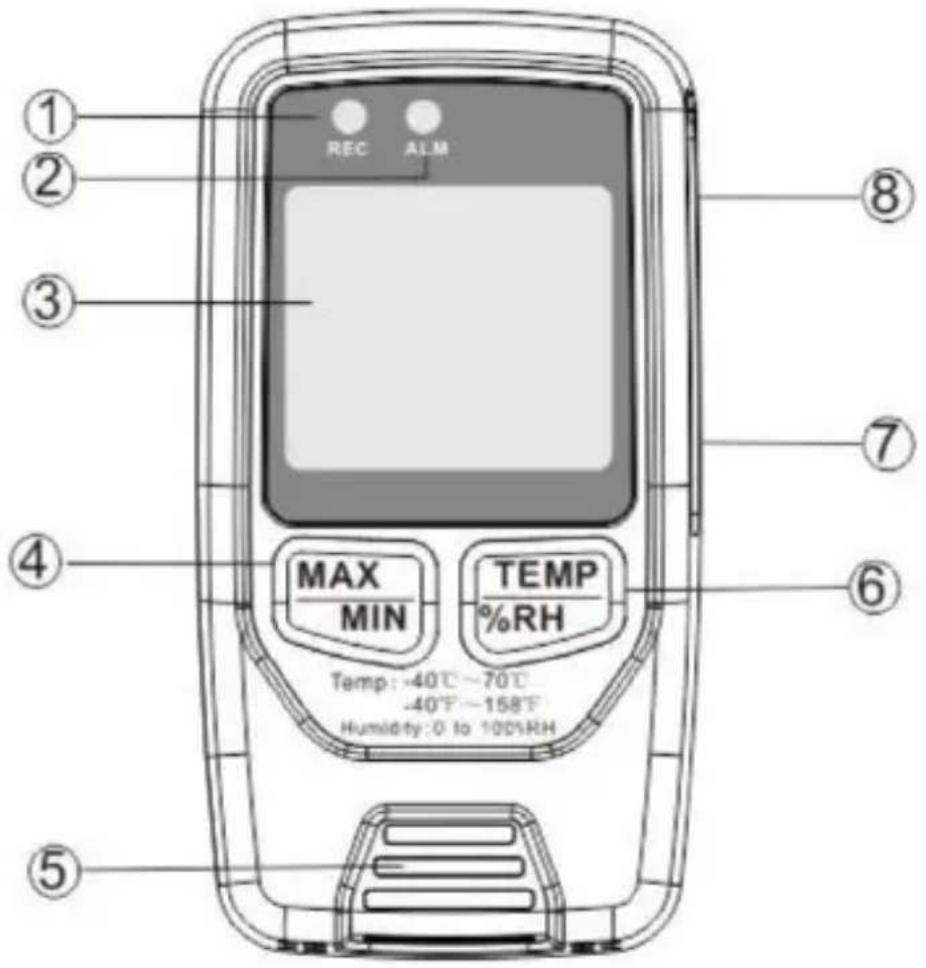
Refer to the illustrations on page 2 of this manual.
| 1 | recording LED |
| 2 | alarm LED |
| 3 | LCD display |
| 4 | MIN/MAX button |
| 5 | sensor |
| 6 | °C/°F button |
| 7 | USB socket |
| 8 | alarm output socket |
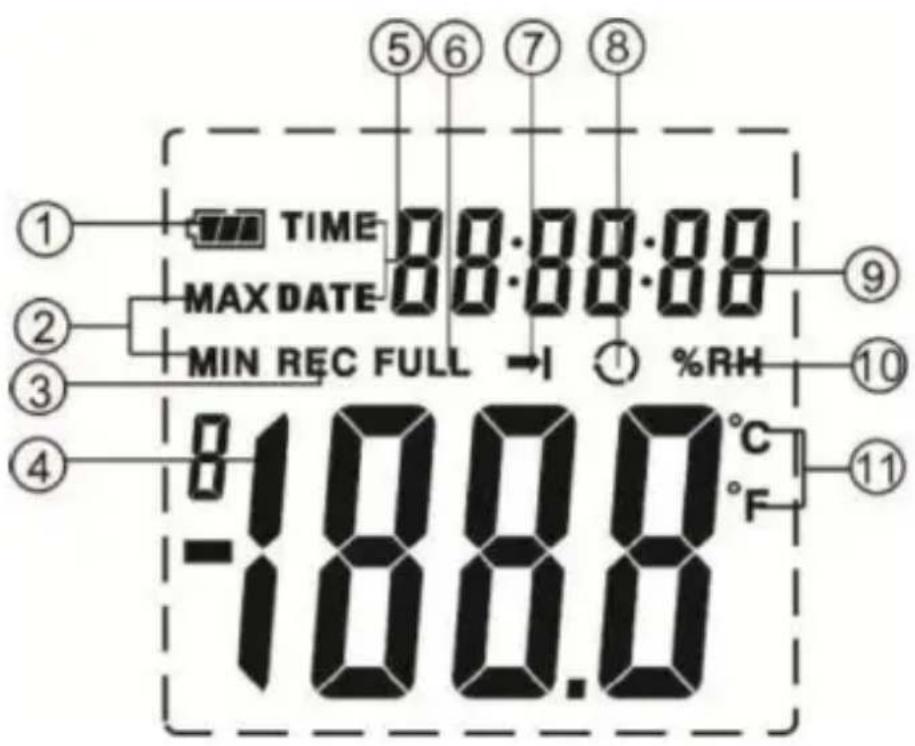
Display
| 1 | battery level |
| 2 | MIN/MAX |
| 3 | recording |
| 4 | current reading |
| 5 | time/date |
| 6 | full memory |
| 7 | single recording mode |
| 8 | loop recording mode |
| 9 | time/date reading |
| 10 | % RH |
| 11 | °C/°F |
6. Battery
- To replace the battery, make sure the device is switched off.
- Open the battery compartment at the back using an appropriate screwdriver.
- Take out the old battery and replace with a new and identical 3.6 V battery following the polarity markings inside the compartment.
- Close the battery compartment.

Warning: Do not puncture batteries or throw them in fire as they may explode. Do not attempt to recharge non-rechargeable batteries (alkaline). Dispose of batteries in accordance with local regulations. Keep batteries away from children.
7. Adapter
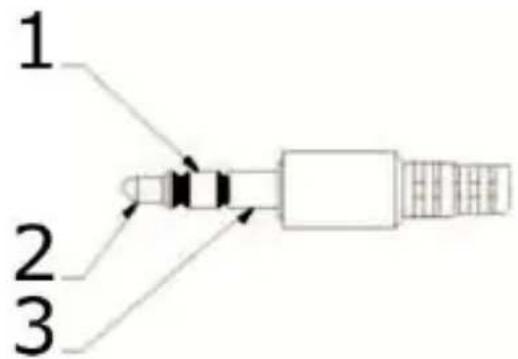
The DEM105 comes with a special adapter, which can be connected to a relay card. This relay card may be used as an alarm or a buzzer. The connected alarm/buzzer will be activated if the measured value exceeds the high/low alarm value.
- temperature alarm
- humidity alarm
- ground
8. Operation
- Using the DEM105 is easy: fit the meter with a battery and it works. The meter will measure temperature and humidity continuously.
- Press the MIN/MAX button to display the recorded maximum value, briefly press to display the recorded minimum value, hold pressed to exit the function.
- Press the ^ C / ^ button to toggle between the temperature and humidity reading.
9. Software
9.1 Installation
- Download the software from the www.VELLEMAN.eu website. Unzip the software and double-click the setup.exe file.
a. Direct link: https://www.VELLEMAN.eu/support/downloads/?code DEM105
b. Scan QR code:

- Follow the installation steps and install the software.
9.2 Introduction
- Click on the software icon to run the software.
- Connect the meter to the PC using the included USB cable.
- After having started up the software, the menu and toolbar appear.
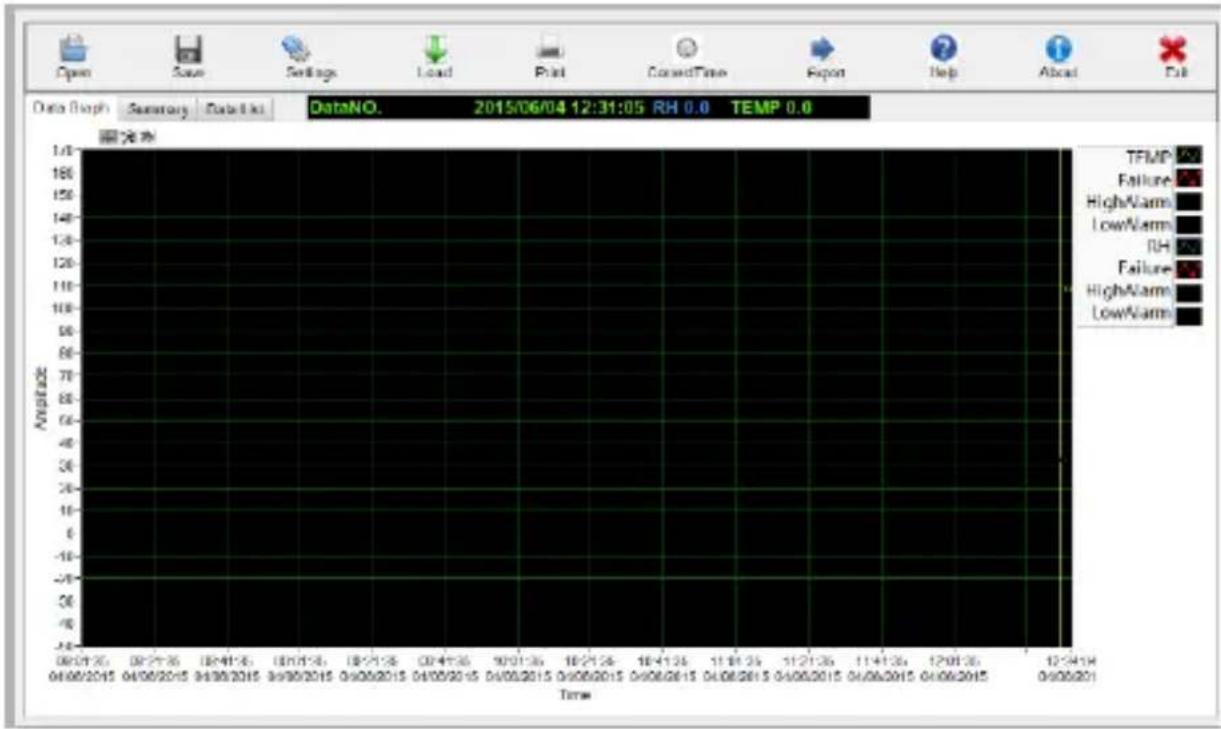
| open a saved data file | |
| save a data file | |
| datalogger setup | |
| upload the recorded data onto the user's PC | |
| print the recorded data | |
| date and time setting | |
| Export | export the recorded data to an Excel worksheet |
| help window | |
| about the software |
DEM105

exit the software
9.3 Date and Time Setting
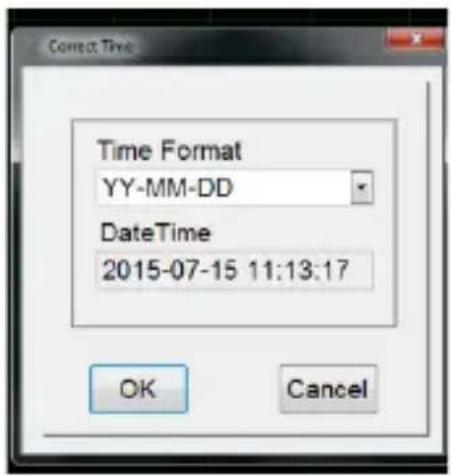
- Left-click on the date and time setting icon to open the interface.
- Set the desired date and time, and press [OK] to confirm.
Remarks:
- (Re)setting date and time will delete all saved data. It is advised to previously back up data.
9.4 Datalogger Setup
- Left-click on the datalogger setup icon to open the interface.
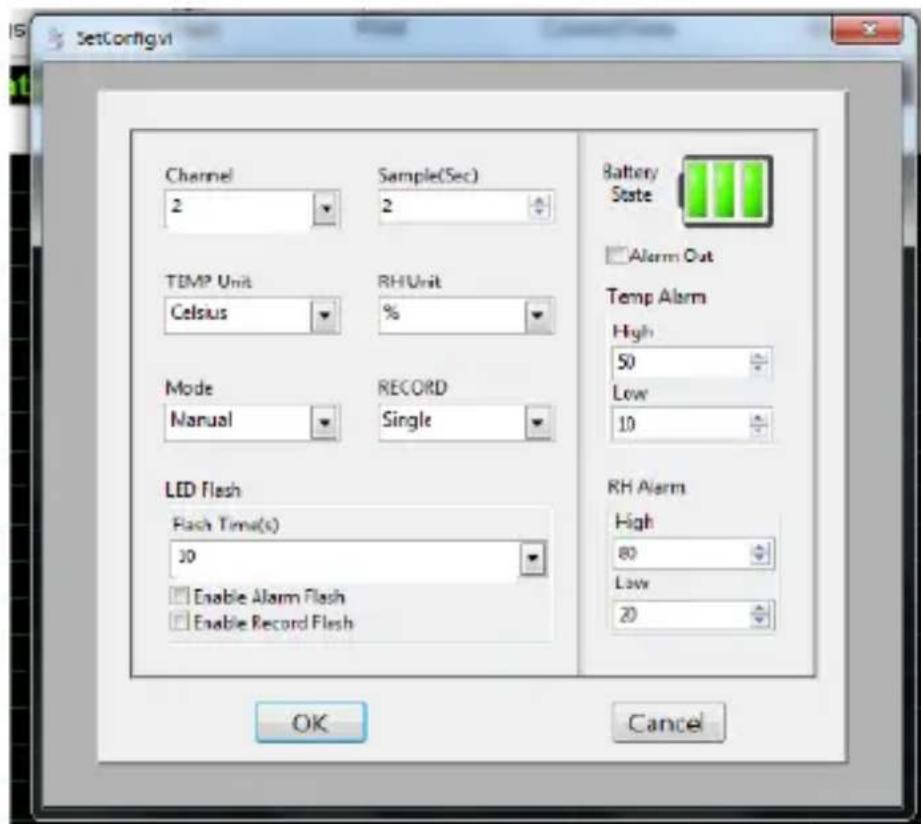
- Set all parameters as desired and press [OK] to confirm.
Channel
Please leave this setting as 2 as the data logger will log the humidity and the temperature.
DEM105
Sample(Sec)
Select your logging interval from 1 second to 24 hours.
TEMP Unit
Select the temperature unit.
RH Unit
The relative humidity level is expressed in %
Mode
Select [Instant] for the meter to start logging as soon as you press [OK], select [Manual] to start logging as soon you press the [TEMP/% RH] button on the meter.
RECORD
Select [Single] to stop the recording when the memory is full, select [Cycle] for the meter to overwrite the previously recorded data.
LED Flash
Select the LED flash rate and whether or not you desire to activate the LEDs.
Battery State
Indicates the battery power level.
Alarm Out
Check this box to set the alarm and to view the downloaded results on the graph.
Temp Alarm
Set the high and low alarm levels.
RH Alarm
Set the high and low alarm levels.
Remarks:
- (Re)setting date and time will delete all saved data. It is advised to previously back up data.
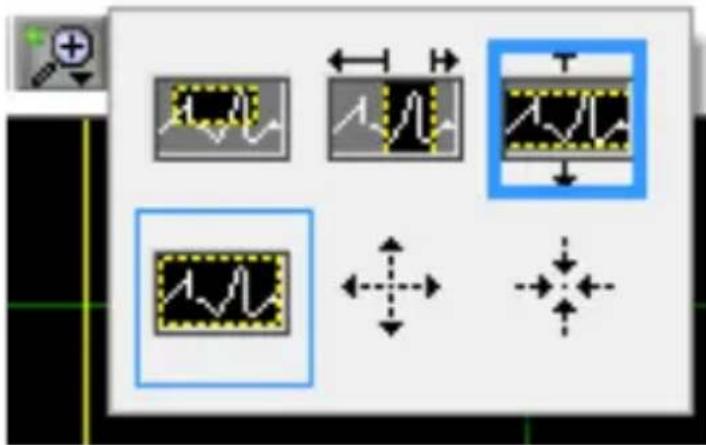
9.5 Zooming In and Out
Zooming In
- Click the zoom icon above the graph.
- Left-click the icon on the top-left side.
DEM105
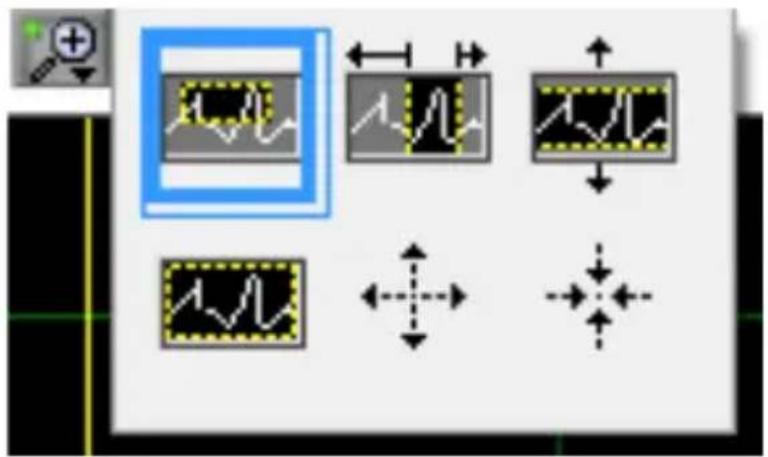
Zooming Out
- Left-click the zoom out or normal zoom ratio button.
9.6 Downloading Data
- Left-click the upload button to transfer all data from the meter to your PC.
- After data transfer, all data will be shown in a graph.
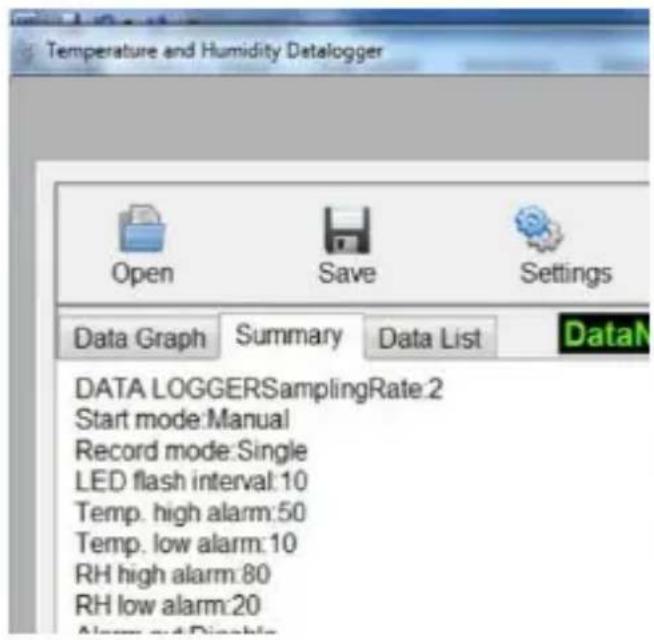
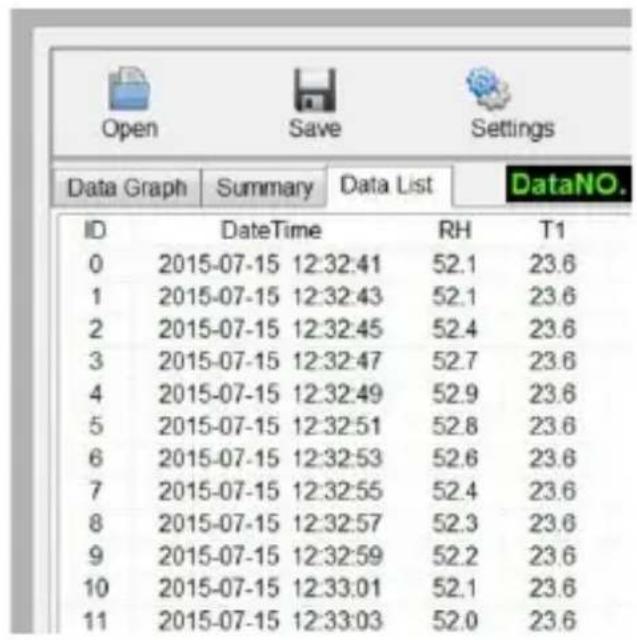
9.7 Viewing Saved Files
- Open a previously saved file.
- Left-click the [Summary] or [Data List] tab to view a data list.
DEM105
9.8 Combination Lock
The DEM105 meter comes with a combination lock. To default security code is 0000. To change the security code:
- Press the button with a small screwdriver.
- Set your security code by turning the code wheels.
- Release the button.
10. Cleaning and Maintenance
- Wipe the device regularly with a moist, lint-free cloth. Do not use alcohol or solvents. DO NOT submerge the device in any liquid.
- Store the meter in a dry place away from humidity and vibrations.
- Remove the battery when the meter is to be stored for long periods of time.
11. Technical Specifications
| relative humidity | ||
| overall range | 0 ~ 100 % RH | |
| accuracy (0 % ~ 30 % and 70 % ~ 100 %) | ± 5.0 % RH | |
| accuracy (30 % ~ 70 %) | ± 3.0 % RH | |
| temperature | ||
| overall range | -40° C ~ 70° C (-40° F ~ 158° F) | |
DEM105
| accuracy (0° C ~ 70° C / 32° F ~ 158° F) | ± 1°C |
| accuracy (-40° C ~ 0° C / -40° F ~ 32° F) | ± 1.5°C |
| logging rate | selectable sampling interval: from 1 sec to 24 hours, operating temperature -35°C to 80°C (-31°F to 176°F) |
| power supply | 1 x lithium 3.6 V/1200 mAh SAFT 1⁄2 AA (incl.) |
| battery life | ± 2 years |
| dimensions | 96 x 50 x 30 mm |
| weight (with battery) | 82 g |
Use this device with original accessories only. Velleman Group nv cannot be held responsible in the event of damage or injury resulting from (incorrect) use of this device. For more info concerning this product and the latest version of this manual, please visit our website www.VELLEMAN.eu. The information in this manual is subject to change without prior notice.
© COPYRIGHT NOTICE
The copyright to this manual is owned by Velleman Group nv. All worldwide rights reserved. No part of this manual may be copied, reproduced, translated or reduced to any electronic medium or otherwise without the prior written consent of the copyright holder.
GEBRUIKERSHANDLEIDING
1. Inleiding
a. Direkter Link: https://www.VELleman.eu/support/downloads/?code DEM105
b. QR-Code scanner:

© INFORMACJA O PRAWACH WŁASNOŚCI
Velleman® Service and Quality Warranty
Since its foundation in 1972, Velleman® acquired extensive experience in the electronics world and currently distributes its products in over 85 countries.
All our products fulfil strict quality requirements and legal stipulations in the EU. In order to ensure the quality, our products regularly go through an extra quality check, both by an internal quality department and by specialized external organisations. If, all precautionary measures notwithstanding, problems should occur, please make appeal to our warranty (see guarantee conditions).
General Warranty Conditions Concerning Consumer Products (for EU):
-
All consumer products are subject to a 24-month warranty on production flaws and defective material as from the original date of purchase.
-
Velleman® can decide to replace an article with an equivalent article, or to refund the retail value totally or partially when the complaint is valid and a free repair or replacement of the article is impossible, or if the expenses are out of proportion.
You will be delivered a replacing article or a refund at the value of 100% of the purchase price in case of a flaw occurred in the first year after the date of purchase and delivery, or a replacing article at 50% of the purchase price or a refund at the value of 50% of the retail value in case of a flaw occurred in the second year after the date of purchase and delivery.
Not covered by warranty:
-
all direct or indirect damage caused after delivery to the article (e.g. by oxidation, shocks, falls, dust, dirt, humidity...), and by the article, as well as its contents (e.g. data loss), compensation for loss of profits;
-
consumable goods, parts or accessories that are subject to an aging process during normal use, such as batteries (rechargeable, non-rechargeable, built-in or replaceable), lamps, rubber parts, drive belts... (unlimited list);
-
flaws resulting from fire, water damage, lightning, accident, natural disaster, etc....;
-
flaws caused deliberately, negligently or resulting from improper handling, negligent maintenance, abusive use or use contrary to the manufacturer's instructions;
-
damage caused by a commercial, professional or collective use of the article (the warranty validity will be reduced to six (6) months when the article is used professionally);
-
damage resulting from an inappropriate packing and shipping of the article;
-
all damage caused by modification, repair or alteration performed by a third party without written permission by Velleman®.
-
Articles to be repaired must be delivered to your Velleman® dealer, solidly packed (preferably in the original packaging), and be completed with the original receipt of purchase and a clear flaw description.
-
Hint: In order to save on cost and time, please reread the manual and check if the flaw is caused by obvious causes prior to presenting the article for repair. Note that returning a non-defective article can also involve handling costs.
-
Repairs occurring after warranty expiration are subject to shipping costs.
-
The above conditions are without prejudice to all commercial warranties.
The above enumeration is subject to modification according to the article (see article's manual).