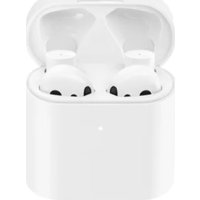
Mi True Wireless Earphones 2S - Wristwatch Xiaomi - Free user manual and instructions
Find the device manual for free Mi True Wireless Earphones 2S Xiaomi in PDF.



| Product type | True wireless earphones |
| Brand | Xiaomi |
| Model | Mi True Wireless Earphones 2S (TWSEJ07WM) |
| Net weight (case included) | 52 g |
| Power supply | Rechargeable via USB-C or wireless charging (case) |
| Input | 5 V ⎓ 1 A |
| Battery life (earphones only) | 5 hours |
| Total battery life (with case) | 24 hours |
| Charging time (wired) | Approximately 1 hour |
| Connectivity | Bluetooth 5.0 |
| Range | 10 m (open space without obstacles) |
| Supported audio codecs | SBC, AAC, LHDC |
| Bluetooth profiles | BLE, HFP, HSP, A2DP, AVRCP |
| Impedance | 32 Ω |
| Touch controls | Double tap: play/pause, answer/end call, voice assistant |
| Voice assistant | Yes (if connected device supports) |
| Mi quick connection | Yes (with compatible Mi phones) |
| Operating temperature | 0°C to 40°C |
| Bluetooth frequency | 2402 – 2480 MHz |
| Max transmission power (BT/BLE) | 10 dBm |
| Safety | Do not expose to excessive heat; replace battery only with a compatible model; max ambient temperature 40°C |
| Maintenance and cleaning | Clean with a soft, dry cloth; avoid moisture and liquids |
| Spare parts and repairability | Not specified; limited warranty according to legal conditions |
| General information | Compliant with European directive 2014/53/EU; Bluetooth® brand under license |
Frequently Asked Questions - Mi True Wireless Earphones 2S Xiaomi
User questions about Mi True Wireless Earphones 2S Xiaomi
0 question about this device. Answer the ones you know or ask your own.
Ask a new question about this device
Download the instructions for your Wristwatch in PDF format for free! Find your manual Mi True Wireless Earphones 2S - Xiaomi and take your electronic device back in hand. On this page are published all the documents necessary for the use of your device. Mi True Wireless Earphones 2S by Xiaomi.
USER MANUAL Mi True Wireless Earphones 2S Xiaomi
Mi True Wireless Earphones 2S User Manual -01
Read this manual carefully before use, and retain it for future reference.
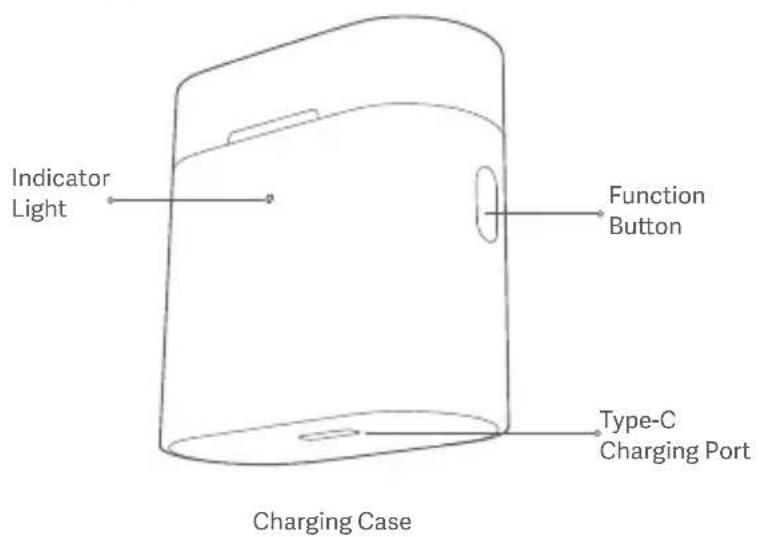
Product Overview
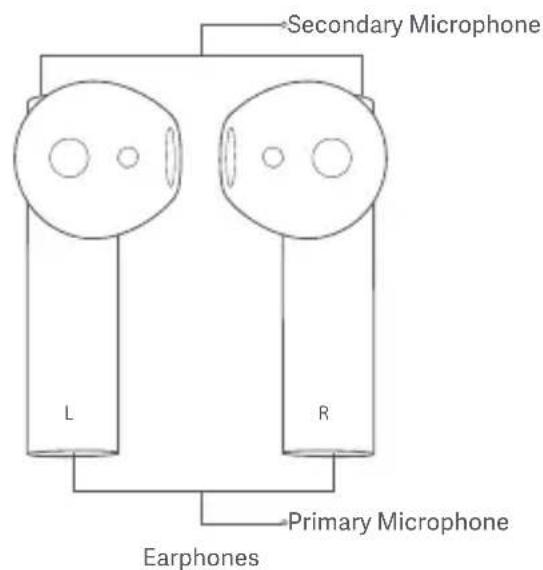
l due to product enhancements.
Instructions
Charging
-
Charging the earphones When the earphones are placed in the charging case, they will automatically start charging.
-
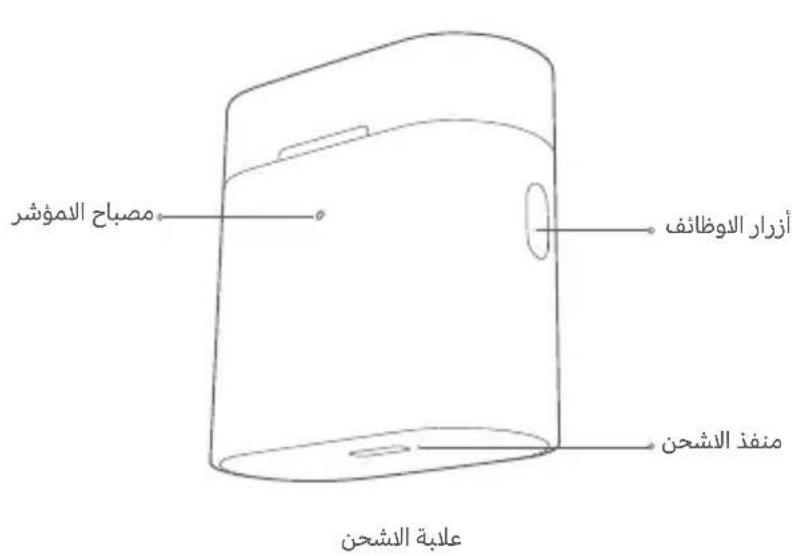
Charging the charging case Use a Type-C charger to charge the charging case, or place the charging box light up on a compatible wireless charger. The red indicator light flashes during charging, and the white indicator light turns off after charging for 10 seconds.
Note: Prior to first use, the earphones are deactivated. To activate them, place them into the charging case, and press the function button for 5 seconds. We recommend fully charging the earphones before using them for the first time.
Checking Battery Level
- Checking the battery level of the earphones After connecting the earphones to a phone, you can check the earphones' battery level on the phone's status bar.
Note: The phone's status bar always displays the battery level of the telephone with the lowest battery level. This feature is not supported 02
by some phones.
- Checking the battery level of the charging case Open the charging case's lid, or press the function button if the lid is closed:
① When the indicator light of the charging case stays lit for 5 seconds, it means the battery is sufficient.
② When the charging case's indicator light is blinking, it means the battery level is low and should be charged immediately.
- Checking the battery level by a Mi phone After successfully connecting to a phone, place the earphones into the charging case and close its lid. Make sure the Bluetooth function is enabled on your Mi phone. Hold your phone close to the charging case, then open the case's lid. A notification will appear on the phone, then you can check the battery level of the earphones and the charging case.
Note: When checking the battery level on your phone, please update your Mi phone to the latest stable version. This feature is currently only supported by some Mi phones.
Turning On
When opening the charging case, the earphones will automatically turn on.
Sleep Mode
Place the earphones back into the charging case and close the lid, the earphones will disconnect and go into sleep mode automatically.
Wearing
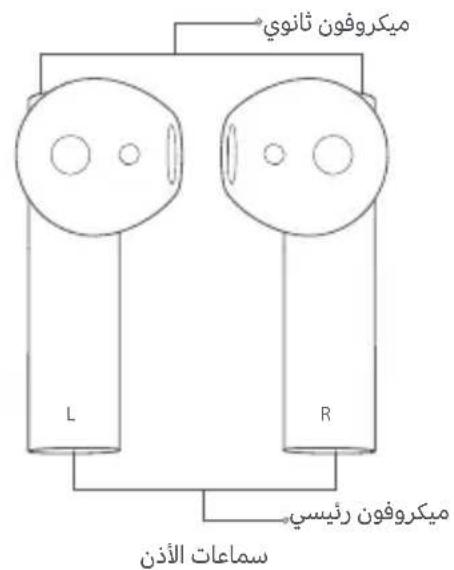
Take the earphones out of the charging case, and insert them into your ears according to the left (L) and right (R) marks.
Note: After using the earphones, place them back into the charging case. This will extend their lifespan and help you avoid losing or misplacing them.
Connecting
Connecting the earphones to a new device
① Place the earphones into the charging case, then press and hold the function button for 2 seconds. The charging case indicator light will start blinking, indicating that the earphones are waiting to be connected.
② Enable the device's Bluetooth, then locate and connect to "Mi TW Earphones 2S". If a passcode is requested, enter "0000".
- Connecting the earphones with a Mi phone
- Place the earphones into the charging case and close its lid. Make sure the Bluetooth function is enabled on your Mi phone. Hold your
phone close to the charging case, then open the case's lid. Follow the on-screen instructions of the phone to connect to the earphones.
Note: The feature of fast connection is currently only supported by some Mi phones, please update your Mi phone to the latest stable version.
- Connection interrupted
When a device's Bluetooth is disabled, or if the earphones are out of range, the earphones will automatically enter awaiting connection mode. If the earphones remain disconnected to a device for 5 minutes, they will enter sleep mode. Wearing the earphones again will wake them up and enter awaiting connection mode.
Automatic connection
While the earphones are in the charging case, opening the case will cause the earphones to automatically connect to the most recently used Bluetooth device. If no connection history is detected, or if the earphones cannot successfully connect to any Bluetooth device, the earphones will automatically enter the awaiting connection mode.
Note: If the earphones cannot automatically connect to a device, you will need to manually connect the earphones to the desired device via the device's Bluetooth settings.
Due to the connection characteristics of the Bluetooth signal, in dense environments with 2.4 GHz electromagnetic signal interferences, there may be occasional disconnects or no sound.
Clearing connection history
① Place the earphones into the charging case.
② Press and hold the function button on the charging case for more than 10 seconds. Once the indicator alternately blinks red and white, release the button.
The connection history has been cleared and the indicator of the charging case blinks white. Then the earphones are awaiting for a pairing.
Function Overview
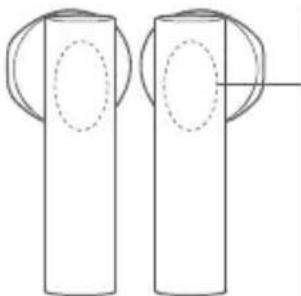
- Incoming calls
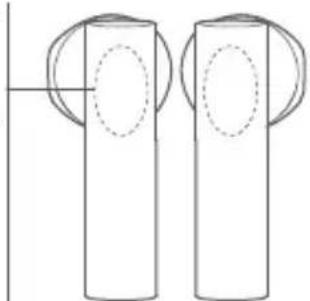
Gently tap either one of the earphones twice: Answer/End calls
Music and voice assistant
While wearing both earphones: Gently tap the right (R) earphone twice: Play/Pause music
Gently tap the left (L)earphone twice:Access the voice assistant Taking out an earphone:Pause music
While wearing one earphone:
Gently tap the earphone twice:
Play/Pause music
Notes:
The voice assistant function can be used only if your device supports it, and this function needs to be granted permission on the device.
② When only using the left earphone, place the right earphone into the charging case and close the lid.
Specifications
Model: TWSEJ07WM
Net Weight: 52g
Input: 5V = 1A
Charging Port: Type-C Impedance: 32 Ω
Charging Time: Approx. 1 h
Wireless Connectivity: Bluetooth 5.0
Bluetooth Profiles: BLE/HFP/HSP/A2DP/AVRCP
Supported Audio Codescs: SBC/AAC/LHDC
Wireless Range: 10 m (open space without obstacles)
Earphones' Battery Life (standalone): Approx. 5 h
Total Battery Life (with charging case): Approx. 24 h
Bluetooth Operation Frequency: 2402-2480 MHz (for EU)
Maximum Transmit Power for BT: 10 dBm (for EU)
Maximum Transmit Power for BLE:10 dBm (for EU)
WEEE Information

All products bearing this symbol are waste electrical and electronic equipment (WEEE as in directive 2012/19/EU) which should not be mixed with unsorted household waste. Instead, you should protect human health and the
environment by handing over your waste equipment to a designated collection point for the recycling of waste electrical and electronic equipment, appointed by the government or local authorities. Correct disposal and recycling will help prevent potential negative consequences to the environment and human health. Please contact the installer or local authorities for more information about the location as well as terms and conditions of such collection points.

Hereby, Tiinlab declares that the radio equipment type TWSEJ07WM is in compliance with Directive 2014/53/EU.
The full text of the EU declaration of conformity is available at the following internet address:
http://www.mi.com/global/service/support/declaration.html
Safety Caution
- Do not expose batteries or battery packs to excessive heat such as sunshine, fire or the like.
- Replacement of a battery with an incorrect type that can defeat a safeguard (such as catching fire, explosion, leakage of corrosive electrolyte etc).
- Disposal of a battery into fire or a hot oven, or mechanically crushing or cutting of a battery, that can result in an explosion.
- Leaving a battery in an extremely high temperature surrounding environment that can result in an explosion or the leakage of flammable liquid or gas.
- A battery subjected to extremely low air pressure that may result in an explosion or the leakage of flammable liquid or gas.
- Risk of explosion if battery is replaced by an incorrect type.
- Dispose of used batteries according to the instructions.
The product operation maximum ambient temperature is 40°C

To prevent possible hearing damage, do not listen at high volume levels for long periods.
The symbol indicates DC voltage
The Bluetooth® word mark and logos are registered trademarks owned by Bluetooth SIG, Inc. and any use of such marks by Xiaomi Inc. is under license. Other trademarks and trade names are those of their respective owners.
Manufactured for: Xiaomi Communications Co., Ltd.
Manufactured by: Tiinlab Acoustic Technology Limited
(a Mi Ecosystem company)
Address: Tianliao Building 1403, Tianliao Industrial Area A, Taoyuan
Street, Nanshan District, Shenzhen 518055, China
For further information, please go to www.mi.com
Adresse: Tianliao Building 1403, Tianliao Industrial Area A, Taoyuan
Street, Nanshan District, Shenzhen 518055, China
http://www.mi.com/global/service/support/declaration.html
Street, Nanshan District, Shenzhen 518055, China
Connettivita wireless: Bluetooth 5.0
Profili Bluetooth: BLE/HFP/HSP/A2DP/AVRCP
Codec audio supporto: SBC/AAC/IHDC
http://www.mi.com/global/service/support/declaration.html
Indirizzo: Tianliao Building 1403, Tianliao Industrial Area A, Taoyuan
Street, Nanshan District, Shenzhen 518055, Cina
docTypeH no cIeDyUoIeMy aIpcCy: http://www.mi.com/global/service/support/declaration.html
PpeynpeKdeneo6e0anacHocTn
- He noDBepraTe 6batape n 6batapeHhble 6bnOKn Upe3MepHomy HarapeBy, HanaPImep, BO3dEInCTBnIO npAMyx COJIHeuHbIX LyueN, NCTOCHIKOB ORHn T. P.
-He3aMeHnIe6batapeHoHaHnOxOJaUyO6batapeo,KOTopar MoKeT HApuWntb 3aUnTy(HaNPImep,3aRopaHne,B3pbIB,yTeKa arpeccNBHOrO3JIeKTPoJNTaN.T.D.) - He n36abIyItecb ot 6aTapeen cXnrae ee n He nOmeuaTe ee B ropaIy OxOBky, He noDBepraTe MExaHnueckOMy pa3pyWeHIO n He pa3pe3aIte 6aTapeu, 3TO MOKeT npNBecTn K B3pbBy.
He octabTnTe 6aTapeIO B Okpykaioe cpee C OueHb BicOKoT TemNepaTyPoI, KOTOPA MoKet PnBecTN K B3pbBy nIyTeKe rOpoue JnkOcTn nn Ira3a.
-He noDBepraTe 6aTaapeIO BO3DeIcTBnIO Upe3BbUaHNO HN3KOrO DaBLeHnRAoDyxa, YTO MOKe IpNBecTn K B3pBlBy NlnyteueRTopoue JxIKOCTn NlN rA3a. - INCIOJIb3OBAHHe HENPABUNbHOTo TnIa BATAPEN MOKET PNPBECTN K B3PbIBY.
- yTUNI3NPUYNE OTPABOTABUINE BATAPEIN COJIACHO
INHCTPYKUINM.
- MakcimmaIbHaj TemnepaTpa OkpykaIoSei cpebl npN 3KcPnyatauIN N3dEINN CoCTabJIeT 40°C

YTo6bI He nCnOpTnTb Cnyx, He cNywaTe aydno Ha BbICOKO rPOMKoCTN B TeueHne dInTeNbHO BpemeHN.

CunboJ 0603Haayet noctoHHoe HanpJKeHne
CNoBecHbI 3NaK I JorOTn Bluetooth® ABLIAOTcR
3apeRncTpnpoBaHHbIMTOBapNbIMn 3HaKaAMn,
PpnaAdJnxAaUmbluTooth SIG,Inc.,NIO6oe
NCnoJIb3OBAHHe TaNKx 3HaKOB KOMpaHne Xiaomi Inc.
OcyueCTBnAE TcR NO LiueeH3nn.ДpyrVe TOpROBle Mapkn N
TOPROBbIe HAnMeHOBaHINRAIBIAOTc CO6CTBeHHOCtBIO INX
COOTBeTCTByIOUxN BlaJeBLeB.
Изговлени дя: Xiaomi Communications Co., Ltd.
I3rotobnteJIb: Tiinlab Acoustic Technology Limited (komnaHnMi Ecosystem)
Ampec: Tianliao Building 1403, Tianliao Industrial Area A, Taoyuan Street, Nanshan District, Shenzhen 518055, Ktai DopoHnTeIbIhIe CBeEHHa CM. Ha Be6-caIte www.mi.com
http://www.mi.com/global/service/support/declaration.html
Środki ostrożnosci
Adres: Tianliao Building 1403, Tianliao Industrial Area A, Taoyuan
Street, Nanshan District, Shenzhen 518055, Chiny
http://www.mi.com/global/service/support/declaration.html#ser
<|im_start|>assistant
http://www.mi.com全球/service/support/declaration.html#ser
<|im_start|>assistant
http://www.mi.com全球/服务/support/declaration.html#ser
<|im_start|>assistant
http://www.mi.com全球/服务/support/declaration.html#ser
安朝君的治
主社:Tianliao Building 1403, Tianliao Industrial Area A, Taoyuan Street, Nanshan District, Shenzhen 518055, China
本版责编:刘丽峰,郭春燕
www.mi.com
http://www.mi.com/global/service/support/declaration.html
安全上的注意
a aagaae 1000000000000000000000000000000000000000000000000
g 10000000000000000000000000000000000000000000
山
J
jill cllaw jao
iiaai jaiil aaiw waii aie g iil ciaowgao
aull aueo
ggo gogall oggy aagglgall aylll jaaill agil jaaill aale gio slj gull yab gogll gogicg C egj no jaiill jp saiol gl Jollcjnaaie ggi 10 cegy p aajll lglgng jao
aue gao galeal albeo jil lclaw gjgJgll plaxwll Jgabgallo Jgolji ndl lclaw jauy gai ylg5 5 aadgll jlc le aolg jnll .glill oall golxwll
aJbJIJIgIoo no gaxill
clalawll ayjbu 5gmo oo saaill
claw ayjby jw sgsn no gaoill cikay, ally jy jll caleaw yogd .alall all bwr wle
jgo jll claw aill jw gaiwo lails caiell alb bai w joe:abgxtlo. aillgell aagcdo yacaiall oia ayjbllln w gsiwo
aull aulc ayjby sgiuoo gaxill
lae o aue elae jls ayolall jj lle bai gl aull aule sllac gsi 5 0al aoe nss aie yagao lytoic ①
aclaw ayjay gaoo o jdu's yu wll ufo guao yao loie ②
jgsgiaowagjaoxio
Mi caiabwagjyblw jaw gwiwo jao gaxill
joo aolllg jnll aie g jlll lclaw g o, jaoi ciagly jolglll aueo ao jaoe ie jall Jaoi. du oal Mi cai e cigilai aegog noi
no aai iuiu oiae ie jaiw jayw. aaiell cbe gai np aaii
auii aulcg ndi iclaw ayabai
pcllloo oocolllglljckyjllblln wos gssno gaaill sis:abgdo. cagll aogcso jull oia .jauu oio! 1111111111Mi oaiagaoa
J
jilali jilllclaw jaiw piw waii aie
gswll gog
Jl Jssg nll lclaw jdp pws ellal glg noaill aie g nnll cclaw g o.
1
jU(L)cllall lagg jlaiglaag.aaill aue jll claw j
aill (R) gswll
ae no uu Jbaw.aaill aue g paeo.aaill cieaw plsiwl ayd ail
pglw g piale w
Jogill
jgld jill lclaw
a aal j 1gba beol p cull ucl g sll celaw o ①
laai lelaanl all lau yagogll uall ugo glao
"Mi TW Earphones 2S "J Jssgall g jagllg sai ② .0000"
Mi jglg2 uill lclawuagj
gglal aagn no gaoel algel gail aie gnil cielaw g 1aell sial piaai ae yrae ie iagll Joo jol mi wls 1i lclaw uogil aiil
Mi ciigag aabolgy jll caggl gao ge yjgill Jlaa abgaxo
Juaill gblai
Jl 1 Jg jai jilai jilai jilai jilai jilai jilai jilai jilai jilai jilai jilai jilai jilai jilai jilai jilai jilai jilai jilai jilai jilai jilai jilai jilai jilai jilai jilai jilai jilai jilai jilai jilai jilai jilal jilal jilal jilal jilal jilal jilal jilal jilal jilal jilal jilal jilal jilal jilal jilal jilal jilal jilal jilal jilal jilal jilal jilal jilal jilal
Jlll Jll
Jlali cIeawll Joggi g aell g Cwauu wai uae g jill cIeaw sgg clal
cIeawll nai p gl jai I Jauw sgg pae alg .piaaag igjgl jg j
Jaiil jaii agoog lali cielawll Jsiw .gigjgl g jclw jaiill no
Iggy cIeawll Joggi gliaow jgjgl Jaiill no cIeawll saoi p i
Jgal igjgl ciai g ogball jqally
Jalw go aasll caii g aol. Bluetooth oJui Jaiil qialla |jbi
g g 100000000000000000000000000000000000000000000000000
Juaill Jw w
aai 10 aai 10 aai 10 aai 10 aai 10 aai 10 aai 10 aai 10 aai 10 aai 10 aai 10 aai 10 aai 10 aai 10 aai 10 aai 10 aai 10 aai 10 aai 10 aai 10 aai 10
aillbgyllc aolcojbi
aJglllalll
jclaw no aolg jlc calb bao 1llcal elj/
gaiy dclwailg gawgai
clalll 15 slil (R) call nsl aclaw l cably bai
aagall caagall gll/Jeauill: y
(L) sllnll aclaw l c cably bai
agall aeellw! Jgwl: y
aagall gll: nll aclaw gll
:glnll aclaw slil slil
:nsll aclaw lce bai bai
aagall caagall gll/Jae
:山
aagbgl oae gagc ucljg 15 jigall selwall aabg pslwol
10
jaii 10
TWSEJ07WM:Jbbl
52:glalgljgll
C-egull:uawill siao
32Ω:aglaal
1.0 Cg5:Jd
5.0gglj:JLJU
BLE/HFP/HSP/A2DP/AVRCP:
SBC/AAC/LHDC:agcdo
(g1geoagaoaLuo)010:SLwlllglill
(ajwlljwwlplxuw)1jw1aew:ww
Ljai cIcIw5:(alauo) :jJlclaw ayjbydo
Ljai ael 24: (jaill alc go) aylalb ao3 oio
2402-2480:gjjgllaswssj
(1ggljll)blg llo (BT):10gglu (saaal jaiilab
(1)blg JLoJLW(BLE):10 ggluA aiaaiial aibu Gaaai jaiaiab
(g9g)1
(a)gjckjlg ajjyckjlll lalj) WEE cloglae
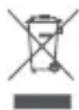
WEEE) aigyglg aylglll alayai yjrglll lajgiall gao 10jgey jll (EU/2012/19 agg 10g 10aai i all jyglalll 10eog yag 10g 10aai 10g 10aai 10g 10aai 10g 10aai 10g 10aai 10g 10aai 10g 10aai 10g 10aai 10g 10aai 10g 10aai 10g 10aai 10g 10aai
.0

aay aal yag glgggaegy
Jaeil Gg
gssu 10000000000000000000000000000000000000000000000
JLWJgJgJswj
gJilw w gJbawu y u j 0s o aouo agaal ayjblll y
JuewuJia jie
a a a a a a a a a a a a a a a a a a a a
Lalalalalalalalalalalalalalal
agio a>40 gaiall jaiil sgai all ayj
yjia jie 10000000000000000000000000000000000000000000000
a
一
jaiwail jilil 1y joi jiy


Bluetooth asw asgao alwo ao jai oolc
Xiaomi Inc 000000000000000000000000000000000000000000000000000000000000000
aall aal all 100000000000000000000000000000000000000000000
Xiaomi Communications Co., Ltd. :
. Tiiinlab Acoustic Technology Limited abwgl
(Mi Ecosystem 化尔尔尔
Tianliao Building 1403, Tianliao Industrial Area A, Taoyuan Street, Nanshan District, Shenzhen 518055, China
. www.mi.com gao jlllalai llogale all
WARRANTY NOTICE-01
As a Xiaomi consumer, you benefit under certain conditions from additional warranties. Xiaomi offers specific consumer warranty benefits which are in addition to, and not instead of, any legal warranties provided by your national consumer law. The duration and conditions related to the legal warranties are provided by respective local laws. For more information about the consumer warranty benefits, please refer to Xiaomi's official website https://www.mi.com/en/service/warranty/. Except as prohibited by laws or otherwise promised by Xiaomi, the after-sales services shall be limited to the country or region of the original purchase. Under the consumer warranty, to the fullest extent permitted by law, Xiaomi will, at its discretion, repair, replace or refund your product. Normal wear and tear, force majeure, abuse or damage caused by the user's negligence or fault are not warranted. The contact person for the after-sale service may be any person in Xiaomi's authorized service network, Xiaomi's authorized distributors or the final vendor who sold the products to you. If in doubt please contact the relevant person as Xiaomi may identify.
The present warranties do not apply in Hong Kong and Taiwan.
Products which were not duly imported and/or were not duly manufactured by Xiaomi and/or were not duly acquired from Xiaomi or a Xiaomi's official seller are not covered by the present warranties. As per applicable law you may benefit from warranties from the non-official retailer who sold the product. Therefore, Xiaomi invites you to contact the retailer from whom you purchased the product.
GARANTIERKLÄRUNG
- INSTRUCTIONS
- CHARGING
- CHECKING BATTERY LEVEL
- TURNING ON
- SLEEP MODE
- WEARING
- CONNECTING
- CONNECTING THE EARPHONES TO A NEW DEVICE
- CONNECTION INTERRUPTED
- AUTOMATIC CONNECTION
- CLEARING CONNECTION HISTORY
- FUNCTION OVERVIEW
- INCOMING CALLS
- MUSIC AND VOICE ASSISTANT
- NOTES
- SPECIFICATIONS
- WEEE INFORMATION
- SAFETY CAUTION
- PPEYNPEKDENEO6E0ANACHOCTN
- ŚRODKI OSTROŻNOSCI
- 安朝君的治
- 安全上的注意
- 山
- (A)GJCKJLG AJJYCKJLLL LALJ) WEE CLOGLAE
- GARANTIERKLÄRUNG
Brand : Xiaomi
Model : Mi True Wireless Earphones 2S
Category : Wristwatch