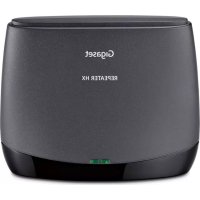
Repeater HX - Telephone GIGASET - Free user manual and instructions
Find the device manual for free Repeater HX GIGASET in PDF.



| Product Type | DECT repeater for cordless phone |
| Brand | Gigaset |
| Model | Repeater HX |
| Dimensions (L x W x H) | 131 x 111 x 50 mm |
| Weight | 154 g |
| Power supply | 230 V, 50 Hz via power adapter |
| Standby power consumption | 0.7 W |
| Talk time power consumption | 0.9 W |
| Frequency range | 1880 MHz – 1900 MHz |
| Transmission power | 10 mW per channel (average) |
| Outdoor range | Up to 300 m |
| Indoor range | Up to 50 m |
| Compatibility | DECT, GAP, CAT-iq |
| Max. number of repeaters per base | 6 (2 with encryption enabled) |
| Main functions | Range extension, automatic pairing, control tone, communication encryption |
| Maintenance and cleaning | Wipe with a slightly damp or antistatic cloth. Do not use solvents or a dry cloth. |
| Safety | Use only the supplied power adapter. Do not use in explosive environments. Use rechargeable batteries that comply with specifications. |
| Spare parts and repairability | Repair by authorized service. Warranty 24 months (consumable parts: 6 months). Replacement with equivalent model if defective. |
| Ambient conditions | -10 °C to +45 °C |
Frequently Asked Questions - Repeater HX GIGASET
User questions about Repeater HX GIGASET
0 question about this device. Answer the ones you know or ask your own.
Ask a new question about this device
Download the instructions for your Telephone in PDF format for free! Find your manual Repeater HX - GIGASET and take your electronic device back in hand. On this page are published all the documents necessary for the use of your device. Repeater HX by GIGASET.
USER MANUAL Repeater HX GIGASET
natural_image
Simple 3D illustration of a rectangular object with a curved line and an arrow pointing to its bottom (no text or symbols)Vorderseite
natural_image
Back view of a portable electronic device with ports and buttons, no visible text or symbolsRückseite
Repeater-Taste
Kundenservice (Customer Care)
Kundenservice (Customer Care)
For Gigaset cordless phones/routers.
Safety precautions

Read the safety precautions and the user guide before use.
The device cannot be used in the event of a power failure. In case of a power failure it is also not possible to make emergency calls.
 | Do not use the devices in environments with a potential explosion hazard (e.g. paint shops). |
 | The devices are not splashproof. For this reason do not install them in a damp environment such as bathrooms or shower rooms. |
 | Use only the power adapter indicated on the device.Whilst charging, the power socket must be easily accessible. |
 | Use only rechargeable batteries that correspond to the specification (see "Specifications"). Never use a conventional (non-rechargeable) battery or other battery types as this could result in significant health risks and personal injury. Rechargeable batteries, which are noticeably damaged, must be replaced. |
 | Remove faulty devices from use or have them repaired by our Service team, as these could interfere with other wireless services. |
 | Using your telephone may affect nearby medical equipment. Be aware of the technical conditions in your particular environment, e.g. doctor's surgery. If you use a medical device (e.g. a pacemaker), please contact the device manufacturer. They will be able to advise you regarding the susceptibility of the device to external sources of high frequency energy (for the specifications of your Gigaset product see "Specifications"). |
Contents of the package
- 1 Repeater HX
• 1 power supply unit for Repeater HX - 1 user guide
Introduction
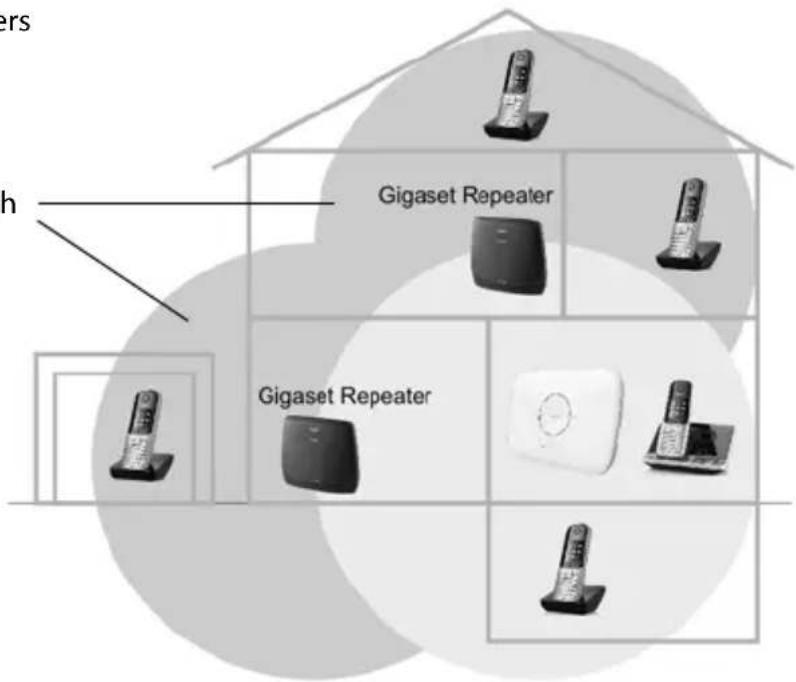
With the Gigaset Repeater, you can extend the range and reception strength of your base station. Up to 6 Gigaset Repeater units can be used with a single base station. The maximum number depends on your base station and the type of DECT transmission (encrypted/unencrypted).
A maximum of 2 conversations can be held at the same time within the extended reception range.
The number of handsets that can be registered to your base station is not affected by the Gigaset Repeater.
Example with 2 Gigaset Repeaters
Additional reception ranges with Gigaset Repeater
Features of the Repeater HX:
- Encrypted calls
- Calls over a broadband connection (for internal or VoIP calls)
- Two repeaters per base for encrypted calls
- Six repeaters per base for unencrypted calls
Not all DECT phones support all features of the Repeater HX.
Details on the functionality of the Repeater HX on various Gigaset bases and routers can be found on www.gigaset.com/compatibility

Repeater mode is not possible when ECO DECT is enabled on the base (radiation-free or reduced range).
Overview
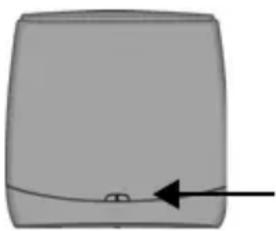
natural_image
Simple 3D illustration of a rectangular object with a curved line and an arrow pointing to its bottom (no text or symbols)Front
Two function lights (LEDs) indicate the different operating modes (Explanation see page 15).
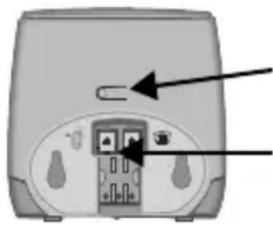
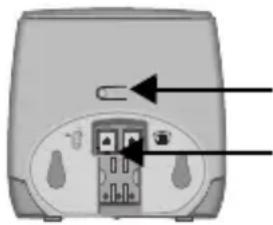
natural_image
Back view of a portable electronic device with ports and a switch, no visible text or symbolsBack
Repeater button (for reset see page 16 and to activate/deactivate the veri tone see page 16)
Socket for power supply unit
Plug the lead from the power supply unit provided into the socket.
Preparing
Please refer to the user guide for your phone/router to check whether your base is suitable for operating the repeater and how to prepare it for registering the repeater.
Before starting registration, position the Gigaset Repeater directly adjacent to the base station and to a power connection. If you are already using Gigaset Repeaters, these must be switched on and positioned close to the base station for this registration procedure.
Automatic registration
Carry out the following steps:
Switch on Gigaset Repeater: Connect the power supply unit to a plug socket. Following this, the device will enter registration mode for 5 minutes.
Prepare the base station for registering the repeater, in the same way as you would to manually register a handset. Please refer to the operating instructions for your base station.
The repeater will automatically be registered to the base station. The LEDs will indicate whether registration was successful or unsuccessful, see page 15.

Ensure that no other base stations in registration mode are located close to the Gigaset Repeater during this procedure.
De-registration
It may be necessary to de-register the repeater, for example if it has to be replaced. Information about this can be found in the operating instructions of your base station, or via the system menu of your phone e.g. C430/C430A, C530/C530A, CL660/CL660A, E630/E630A. For phones without a repeater system menu, the repeater can be de-registered using the Reset Repeater procedure, see page 16.
Installation
Once registration has been carried out successfully, you can install the Gigaset Repeater wherever you would like to extend the reception range of your handsets. However, you must ensure that there is a power point at the place of installation and that the left LED remains on constantly after the device has been switched on.
If the left LED flashes, the Gigaset Repeater is too far away from the base station or reception is being hindered by thick walls or metal objects for example (e.g. radiators).
When looking for a suitable installation site, a useful guide is a handset which requires a good connection with the base station at the Gigaset Repeater installation site.
To operate a handset for the first time in the extended Gigaset Repeater area, switch off the handset within the new reception range of the Gigaset Repeater, but outside the reception range of the base station, and then switch it back on again.
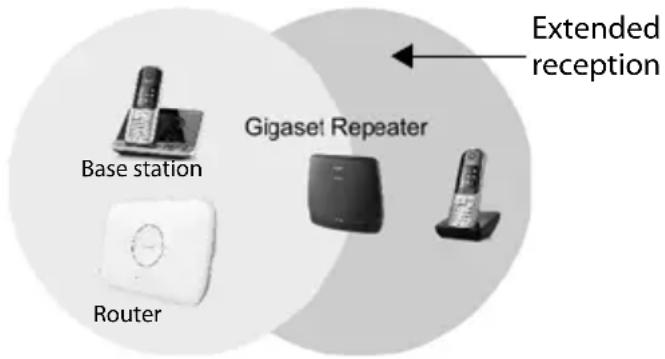

If you are using more than one Gigaset Repeater in the area of your base station, you must keep the Gigaset Repeaters at least 10 m apart.
Operation
LED display of functions
Left LED: display registration and operation function
| In operation L | light off power supply off | |
| Constantly on normal link to base station | ||
| Flashing no link to base station | ||
| Not yet registered | Flashing twice per second ready for automatic registration | |
| Light off automatic registration unsuccessful after 5 mins | ||
Right LED: displays the handset traffic via the repeater
| In operation Light off no traffic | |
| Flashing once every 3 seconds | one handset linked via repeater |
| Flashing twice every 3 seconds | two handset linked via repeater |
| Constantly on base station not prepared for operation with a repeater (does not apply to base stations where Repeater Mode can be switched off and on) | |
Reset repeater
If registration was not successful or re-registration has to be carried out for another reason, you can reset the repeater as follows.
▶ Press repeater button (left LED flashes slowly).
▶ Release repeater button once the left LED flashes quickly (after approximately 10 seconds).
The repeater is ready for registration once again.
Check the accessibility of a handset using a verification tone
The verification tone enables you to establish whether or not the handset is working in the extended area, see page 15 of the Gigaset Repeater. This tone is audible on the handset every 2.5 seconds as long as a line is allocated.
Proceed as follows:
Repeater: ▶ To switch on the verification tone:
Press repeater button until the right LED lights up (after approximately 20 seconds).
▶ To switch off the verification tone again:
Press repeater button again until the right LED goes out (after approximately 20 seconds).
Handset: ▶ Allocate line (hold down call answer button).
When you hear the verification tone, you are in the extended reception area. If you don't hear a verification tone, move towards the repeater with the handset until you hear it.
Miscellaneous
Troubleshooting
| Problem Cause Action | ||
| Left LED flashes continuously when the registration procedure has been concluded | No radio connection to the base station | Repeat registration |
| Left LED flashes continuously at a selected location | No radio connection to the base station | Select a new location |
| Left LED does not light up at all | Power supply off Check the | power point |
| No reception of the handset in the area of the repeater | Repeater not registeredNo radio connection to the base stationHandset cannot find the repeater | Repeat registrationSelect a new locationSwitch handset on and off |
| Right LED lit constantly Base | station has not been prepared for repeater operation | Check the preconditions and preparatory steps required by your base station for registering a repeater. Then repeat these steps to register the repeater. |
| No registration of additional repeaters possible with encryption activated | Maximum number of repeaters that can be connected to the base station has been reached | De-register repeaters that are no longer required using the repeater de-registration procedure described in the user guide or system menu of your phone.If you need more repeaters to relay the base station, please note that you can run up to 6 repeaters, if encryption is deactivated.To deactivate encryption, all registered repeaters must first be de-registered. You can then deactivate encryption and register your repeaters again. |
Care
Wipe the device with a damp cloth or an antistatic cloth. Do not use solvents or microfibre cloths.
Never use a dry cloth; this can cause static.
In rare cases, contact with chemical substances can cause changes to the device's exterior. Due to the wide variety of chemical products available on the market, it was not possible to test all substances.
Impairments in high-gloss finishes can be carefully removed using display polishes for mobile phones.
Technical data
Standards: Compatible with DECT, GAP, CAT-iq
(Compatible with Repeater standard ETS300700 V2.1.1)
Radio frequency range: 1880 MHz - 1900 MHz
Transmit power: 10 mW average power per channel
Range: max. 300 m outdoors
max. 50 m in buildings
Power supply: 230 V, 50 Hz (plug-in power unit)
Power consumption: Standby: 0.7 W
During call: 0.9 W
Acceptable environmental
conditions: -10^ to +45^
Dimensions (mm): 131 x 111 x 50 (LxWxH)
Weight: 154 g
Power cable length: approx. 1.8 m
Service (Customer Care)
Step by step towards your solution with Gigaset Customer Care www.gigaset.com/service

Visit our Customer Care pages
Here you will find:
• Frequently asked questions
• Free software and user manual downloads
- Compatibility checks

Contact our Customer Care team
Couldn't find a solution in the FAQs section?
We are happy to help...
... online:
via our contact form on the customer service page
... by telephone:
United Kingdom
Service Hotline: 020 36953111
(local call cost charge)
Ireland
Service Hotline: 0818 200 033
(6.6561 Ct./Call)
Please have your proof of purchase ready when calling.
Please note that if the Gigaset product is not sold by authorised dealers in the national territory the product may not be fully compatible with the national telephone network. It is clearly specified on the box near the CE mark for which country/countries the equipment has been developed. If the equipment is used in a manner inconsistent with this advice or with the instructions of the manual and on the product itself, this may have implications on the conditions for warranty or guarantee claims (repair or exchange of product).
In order to make use of the warranty, the product purchaser is asked to submit a receipt which proves the date of purchase (date from which the warranty period starts) and the type of goods that have been purchased.
Customer Service & Assistance
Do you have any questions? As a Gigaset customer, you can find help quickly in this User Manual and in the service section of our Gigaset online portal www.gigaset.com/service.
Australia- - - - - - - - - - - +61 1300 780 878
Austria -0043 1 311 3046
Bahrain 31 73 11 173
Belgium 07815 6679
Bosnia Herzegovina-033 276 649
Brazil
Germany 02871/912912
Greece - - - - - - - - - - - - +30 2111 98 1778
Hong Kong 2763 0203 2389 7285
Hungary----06(1)267-2109
India - Please refer to your - local warranty card
Indonesia----(62-21) 5673813 ----(62-21) 888856000
Ireland 0818 200 033
Please have your record of purchase ready when calling. After sales service is not offered in countries where our product is not sold by authorised dealers.
Manufacturer warranty (Middle East)
On the purchase of your new Gigaset product, we guarantee that this equipment is a genuine manufacturer's product and extend the following warranty:
We guarantee this product against manufacturing defects for two full years from the date of purchase, unless specified otherwise.
Adaptors and batteries for cordless phones carry 6 months warranty from the date of purchase.
Gigaset Communications authorized Service Centres will replace or repair, if necessary, any defective part/parts free of charge by presenting this certificate of warranty at the Service Centre mentioned overleaf.
This Certificate of warranty does not apply if the telephone has:
1 Been misused, mishandled, willfull damaged, neglected, damaged by lightning, improperly repaired, tested, altered improperly in any way.
2 A defect arising out of any failure to follow instructions either in the manual or product specification.
3 In case repairs are carried out of by unauthorized personnel or unauthorized source warranty will be void.
4 A defect arising from using non-Gigaset approved accessories or ancillary items attached to or in connection with the telephone.
5 If this certificate of warranty is not signed and stamped by the authorised distributor.
6 Any other claim resulting out of or in connection with the device shall be excluded from this warranty.
For Southern Africa:
In the event of an after-sales issue/warranty claim please refer back to your point of purchase. Proof of purchase (receipt) has to be submitted.
Certificate of warranty (Middle East)
The warranty is not valid if it is not signed and stamped by the authorized distributor.
Please fill in the following details and stamp the card to validate the warranty.
All details must be filled in by the dealer and retained by the customer.
This warranty shall apply to products purchased in the Middle East only.
Customer's Name:
Product / Model:
Dealer's Name:
Date of Purchase:
Invoice / Cash Memo Details:
Dealer's Stamp
Service Centres (Midde East)
UAE
Customer Service Hotline UAE
TEL: 00971-4-4458255 / 00971-4-4458254
Service Collection Point
https://technocare-prodigy.com/Customer
Oman
National Telephone Services Co. LLC
P.O. Box 2786 PC:112, Sultanate of Oman
Tel: +968-709281 Ext. 45/21/75
Fax: +968-791013
E-mail: isonts@omentel.net.om
Qatar
Modern Home,
51-East - Salwa Road,
Al-Maha Complex, Doha
Tel: 00974-4257844 / 00974-4257777
Fax: 00974-4314700
Bahrain
Authorized Service Center,
Bldg: 211, Rd: 339, Block: 321,
Old Place Road, Manama,
Tel: 00973-17311173
E-mail: servicemanager@ashrafs.com.bh
Saudi Arabian Service Centers:
Ahmed Abdulwahed Trading Co.
Jeddah Service Center
Al-Amal Plaza, Hail Street,
Jeddeh, Saudi Arabia,
Tel: 02-6500282 Ext. 209
Riyadh Service Center
Olaya Street
Riyadh, Saudi Arabia,
Tel: 01-4622470 / 4623850
Khobar Service Centre
Al-Khobar Street,
Al-Khobar, Saudi Arabia,
Tel: 03-8944193/03-8952359
Madina Munawara
Al-Ayon Street,
Tel: 00966-4-8387931
Khamis Mushyat
Al-Khalidiya St.,
Tel: 00966-7-2230772
Tabuk
Main Street,
Tel: 00966-4-4219232
Kuwait
Customer Service Hotline Kuwait
Tel: 00965-22458737 / 00965-22458738
Al-Baptain Service Center
Shop #: 247
Qibla, Block 11,
Avenue 11,
Souk al Kabeer,
Fahad Al Salem Street,
Tel: 00965-2464993
Jordan
SEDR Home & office Electronics
Co - Tronicom
Wasfi Al-Tal St.,
Building No. 80,
2nd floor,
Tel: 00962-6-5625460/1/2
Lebanon
306, Jdeideh Sin el Fil Blvd,
Tel: 00961-1240259 / 00961-1236110
Authorisation
This device is intended for use worldwide. Use outside the European Economic Area (with the exception of Switzerland) is subject to national approval.
Country-specific requirements have been taken into consideration.
Hereby, Gigaset Communications GmbH declares that the radio equipment type Gigaset Repeater HX is in compliance with Directive 2014/53/EU.
The full text of the EU declaration of conformity is available at the following internet address: www.gigaset.com/docs.
This declaration could also be available in the "International Declarations of Conformity" or "European Declarations of Conformity" files.
Therefore please check all of these files.
Guarantee Certificate - United Kingdom and Ireland
Without prejudice to any claim the user (customer) may have in relation to the dealer or retailer, the customer shall be granted a manufacturer's Guarantee under the conditions set out below:
- In the case of new devices and their components exhibiting defects resulting from manufacturing and/or material faults within 24 months of purchase, Gigaset Communications shall, at its own option and free of charge, either replace the device with another device reflecting the current state of the art, or repair the said device. In respect of parts subject to wear and tear (including but not limited to, batteries, keypads, casing), this warranty shall be valid for six months from the date of purchase.
- This Guarantee shall be invalid if the device defect is attributable to improper care or use and/or failure to comply with information contained in the user manuals. In particular claims under the Guarantee cannot be made if:
- The device is opened (this is classed as third party intervention)
• Repairs or other work done by persons not authorised by Gigaset Communications.
- Components on the printed circuit board are manipulated
• The software is manipulated
- Defects or damage caused by dropping, breaking, lightning or ingress of moisture. This also applies if defects or damage was caused by mechanical, chemical, radio interference or thermal factors (e.g.: microwave, sauna etc.)
• Devices fitted with accessories not authorised by Gigaset Communications
- This Guarantee shall not apply to or extend to services performed by the authorised dealer or the customer themselves (e.g. installation, configuration, software downloads). User manuals and any software supplied on a separate data medium shall be excluded from the Guarantee.
- The purchase receipt, together with the date of purchase, shall be required as evidence for invoking the Guarantee. Claims under the Guarantee must be submitted within two months of the Guarantee default becoming evident.
- Ownership of devices or components replaced by and returned to Gigaset Communications shall vest in Gigaset Communications.
- This Guarantee shall apply to new devices purchased in the European Union. For Products sold in the United Kingdom and in the Republic of Ireland the Guarantee is issued by: Gigaset Communications UK Limited, 2 White Friars, Chester, CH1 1NZ.
- Any other claims resulting out of or in connection with the device shall be excluded from this Guarantee. Nothing in this Guarantee shall attempt to limit or exclude a Customers Statutory Rights, nor the manufacturer's liability for death or personal injury resulting from its negligence.
- The duration of the Guarantee shall not be extended by services rendered under the terms of the Guarantee.
- Insofar as no Guarantee default exists, Gigaset Communications reserves the right to charge the customer for replacement or repair.
• The above provisions do not imply a change in the burden of proof to the detriment of the customer.
To invoke this Guarantee, please contact the Gigaset Communications helpdesk. This number is also to be found in the accompanying user guide.
Environment
Our environmental statement
We at Gigaset Communications GmbH are aware of our social responsibility. That is why we actively take steps to create a better world. In all areas of our business – from product planning and production to sales and waste of disposal – following our environmental conscience in everything we do is of utmost importance to us.
Learn more about our earth-friendly products and processes online at www.gigaset.com.
Environmental management system

Gigaset Communications GmbH is certified pursuant to the international standards ISO 14001 and ISO 9001.
ISO 14001 (Environment): Certified since September 2007 by TÜV SÜD Management Service GmbH.
ISO 9001 (Quality): Certified since 17/02/1994 by TÜV SÜD Management Service GmbH.
Disposal
All electrical and electronic products should be disposed of separately from the municipal waste stream via designated collection facilities appointed by the government or the local authorities.
This crossed-out wheeled bin symbol on the product means the product is covered by the European Directive 2012/19/EU.
The correct disposal and separate collection of your old appliance will help prevent potential negative consequences for the environment and human health. It is a precondition for reuse and recycling of used electrical and electronic equipment.
For more detailed information about disposal of your old appliance, please contact your local council refuse centre or the original supplier of the product.
Remarques importantes
Utilisation
natural_image
Simple 3D diagram of a rectangular object with a curved line and an arrow pointing to its bottom (no text or symbols)Avant
natural_image
Back view of a portable electronic device with ports and buttons (no text or symbols visible)Arrière
Service clients (Customer Care)
Service clients (Customer Care)
natural_image
Simple diagram of a rectangular object with a curved line and an arrow pointing to its bottom (no text or symbols)Lato anteriore
natural_image
Back view of a portable electronic device with internal components and a labeled arrow pointing to a component (no text or symbols present)Lato posteriore
natural_image
Simple 3D-rendered object with a curved line and arrow pointing to a small square (no text or symbols)Parte delantera
natural_image
Back view of a portable electronic device with ports and buttons, no visible text or symbolsParte posterior
natural_image
Simple 3D diagram of a rectangular object with a curved line and an arrow pointing to its bottom (no text or symbols)Frente
Dois LEDs indicam os diferentes estados de funcionamento. (Nota explicativa pág. 61).
natural_image
Front view of a portable electronic device with ports and buttons, no visible text or symbolsAtrás
natural_image
Simple 3D diagram of a rectangular object with a curved line and an arrow pointing to its bottom (no text or symbols)Voorzijde
natural_image
Front view of a portable electronic device with buttons and ports (no visible text or symbols)Achterzijde
natural_image
Simple 3D diagram of a rectangular object with a curved line and an arrow pointing to its bottom (no text or symbols)Forside
natural_image
Back view of a portable electronic device with internal components and an arrow pointing to a button (no text or symbols visible)Bagside
natural_image
Simple 3D diagram of a rectangular object with a curved line and an arrow pointing to its bottom (no text or symbols)Framsida
natural_image
Back view of a portable electronic device with internal components and an arrow pointing to a button (no text or symbols visible)Baksida
natural_image
Simple 3D diagram of a rectangular object with a curved line and an arrow pointing to its bottom (no text or symbols)Etuosa
natural_image
Front view of a portable electronic device with ports and buttons, no visible text or symbolsTakaosa
natural_image
Simple 3D diagram of a rectangular object with a curved line and an arrow pointing to its bottom (no text or symbols)Foran
natural_image
Front view of a portable electronic device with ports and buttons, no visible text or symbolsBakside
natural_image
Simple 3D diagram of a rectangular object with a curved line and an arrow pointing to its bottom (no text or symbols)Передняя панель
natural_image
Back view of a portable electronic device with ports and buttons, no visible text or symbolsЗадняя панель
A31008-N603-R101-1-SU19
Issued by
Gigaset Communications GmbH
Frankenstr. 2a, D-46395 Bocholt
© Gigaset Communications GmbH 2019
Subject to availability.
All rights reserved. Rights of modification reserved.
www.gigaset.com
- Vorderseite
- Rückseite
- Repeater-Taste
- Kundenservice (Customer Care)
- Safety precautions
- Contents of the package
- Introduction
- Overview
- Front
- Back
- Preparing
- Automatic registration
- De-registration
- Installation
- Operation
- LED display of functions
- Reset repeater
- Check the accessibility of a handset using a verification tone
- Miscellaneous
- Care
- Technical data
- Service (Customer Care)
- Visit our Customer Care pages
- Contact our Customer Care team
- United Kingdom
- Ireland
- Service Hotline: 0818 200 033
- Customer Service & Assistance
- Manufacturer warranty (Middle East)
- For Southern Africa:
- Certificate of warranty (Middle East)
- Service Centres (Midde East)
- UAE
- Oman
- Qatar
- Bahrain
- Saudi Arabian Service Centers:
- Kuwait
- Jordan
- Lebanon
- Authorisation
- Guarantee Certificate - United Kingdom and Ireland
- Environment
- Our environmental statement
- Environmental management system
- Disposal
- Remarques importantes
- Utilisation
- Avant
- Arrière
- Service clients (Customer Care)
- Lato anteriore
- Lato posteriore
- Parte posterior
- Frente
- Atrás
- Voorzijde
- Achterzijde
- Forside
- Bagside
- Framsida
- Baksida
- Etuosa
- Takaosa
- Foran
- Bakside
- Передняя панель
- Задняя панель
Brand : GIGASET
Model : Repeater HX
Category : Telephone