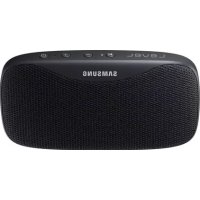
Level Box Slim EOSG930 - Loudspeaker SAMSUNG - Free user manual and instructions
Find the device manual for free Level Box Slim EOSG930 SAMSUNG in PDF.
 FR
FR
 BG
BG
 CS
CS
 DA
DA
 DE
DE
 EL
EL
 EN
EN
 ES
ES
 ET
ET
 FI
FI
 HU
HU
 IT
IT
 KK
KK
 KO
KO
 LT
LT
 LV
LV
 NL
NL
 NO
NO
 PL
PL
 PT
PT
 RO
RO
 RU
RU
 SK
SK
 SL
SL
 SV
SV
 TR
TR
 UK
UK
 ZH
ZH
| Product type | Portable Bluetooth speaker |
| Model | Level Box Slim EOSG930 |
| Brand | Samsung |
| Water resistance | IPX7: submersible up to 1 m for 30 min max |
| Connectivity | Bluetooth |
| Main functions | Listen to music, answer calls, external battery, Dual Sound |
| Box contents | Bluetooth speaker, quick start guide, USB cable, power sharing cable |
| Power supply | Charging via USB 5 V / 2 A (charger not included) |
| Use as external battery | Yes, via power sharing cable |
| Buttons | Power, Volume +/-, Bluetooth/Play |
| Indicator light | Indicates battery status and Bluetooth connection |
| Automatic power saving mode | Yes, adjustable (auto-off after 1 hour without playback) |
| Samsung Level app | Compatible with Android 4.2.2+ (check battery, settings, Dual Sound) |
| Dual Sound | Allows sharing audio between two compatible speakers |
| Care and cleaning | Dry thoroughly after contact with water; use a soft cloth |
| Safety | Do not submerge beyond 1 m or more than 30 min; use only Samsung accessories |
| Warranty | Consult your retailer or Samsung service center |
Frequently Asked Questions - Level Box Slim EOSG930 SAMSUNG
User questions about Level Box Slim EOSG930 SAMSUNG
0 question about this device. Answer the ones you know or ask your own.
Ask a new question about this device
Download the instructions for your Loudspeaker in PDF format for free! Find your manual Level Box Slim EOSG930 - SAMSUNG and take your electronic device back in hand. On this page are published all the documents necessary for the use of your device. Level Box Slim EOSG930 by SAMSUNG.
USER MANUAL Level Box Slim EOSG930 SAMSUNG
Please read this manual before using the device to ensure safe and proper use.
- Images may differ in appearance from the actual product. Content is subject to change without prior notice.
- Before using the Bluetooth speaker, make sure it is compatible with your device.
Instructional icons

Warning: situations that could cause injury to yourself or others

Caution: situations that could cause damage to your device or other equipment

Notice: notes, usage tips, or additional information
Maintaining water resistance
Your device supports water-resistance. Follow these tips carefully to maintain the water-resistance of your device. Failure to do so may result in damage to your device.
- Do not immerse the device in water deeper than 1m or keep it submerged for more than 30 minutes.
- Do not expose the device to water moving with force.
- If the device is exposed to clean water, dry it thoroughly with a clean, soft cloth. If the device is exposed to other liquids, such as salt water, ionised water, or alcoholic beverage, rinse it with clean water and dry it thoroughly with a clean, soft cloth. If you do not follow these instructions, the device's performance and appearance may be affected.
- If the device has been immersed in water or the microphone or speaker is wet, sound may not be heard clearly during a call. Wipe the device with a dry cloth or dry it thoroughly before using it.
- Your device has been tested in a controlled environment and certified to be water-resistant in specific situations (meets requirements of classification IPX7 as described by the international standard IEC 60529-Degrees of Protection provided by Enclosures [IP Code]; test conditions: 15 - 35°C , 86-106 kPa, 1 metre, 30 minutes). Despite this classification, it is still possible for your device to be damaged in certain situations.
About the Level Box Slim
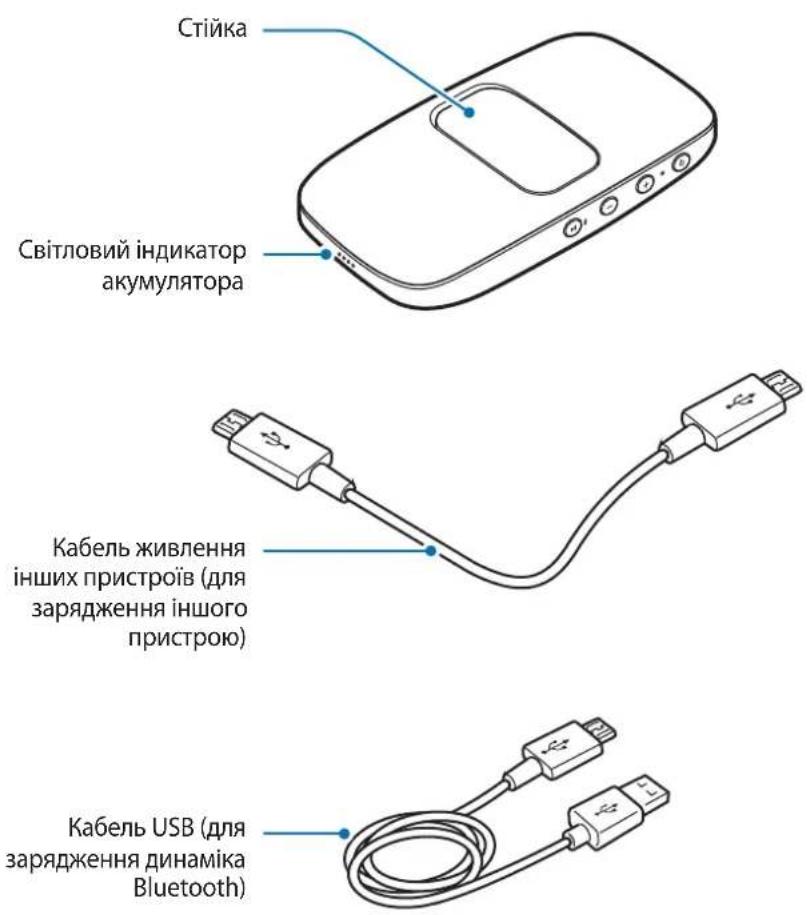
You can use this product as a Bluetooth speaker or as a battery pack for other devices.
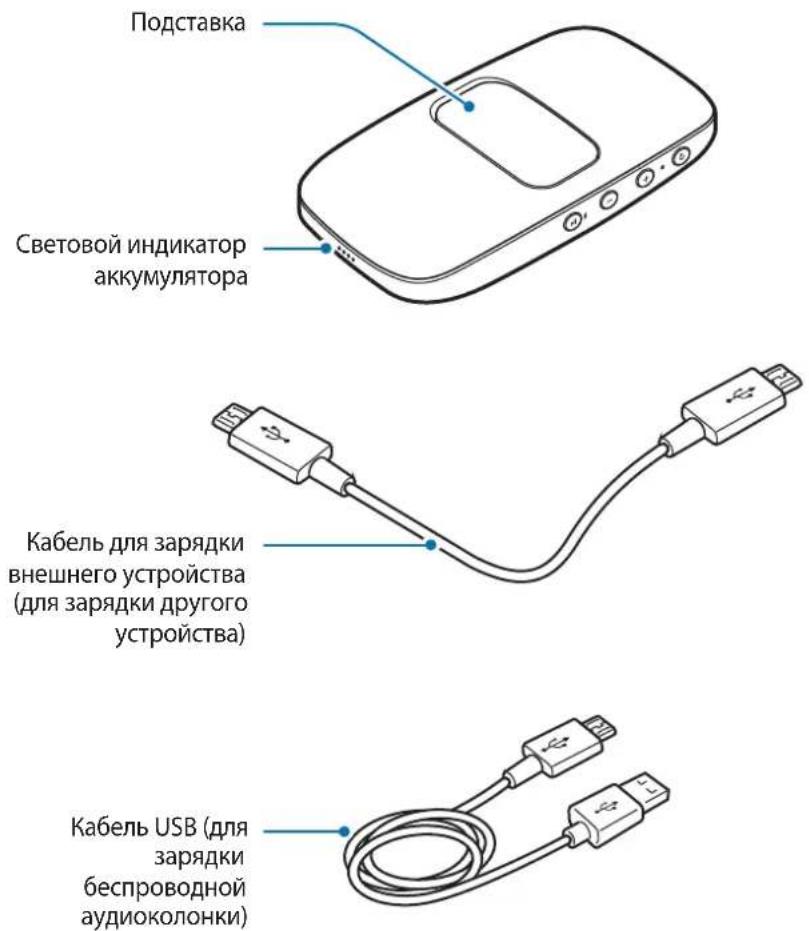
Package contents
Check the product box for the following items:
- Bluetooth Speaker
- Quick start guide
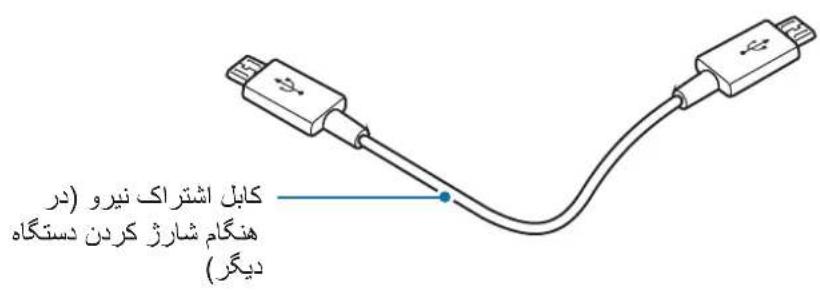
Power sharing cable
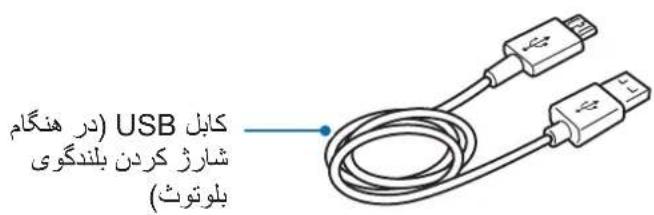
USB cable

- The items supplied with the device and any available accessories may vary depending on the region or service provider.
- The supplied items are designed only for this device and may not be compatible with other devices.
- Appearances and specifications are subject to change without prior notice.
- You can purchase additional accessories from your local Samsung retailer. Make sure they are compatible with the device before purchase.
- Use only Samsung-approved accessories. Using unapproved accessories may cause the performance problems and malfunctions that are not covered by the warranty.
- Availability of all accessories is subject to change depending entirely on manufacturing companies. For more information about available accessories, refer to the Samsung website.
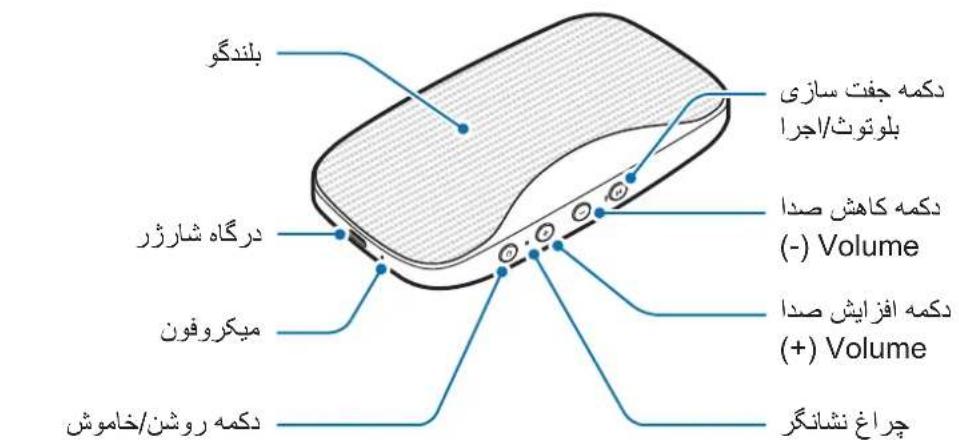
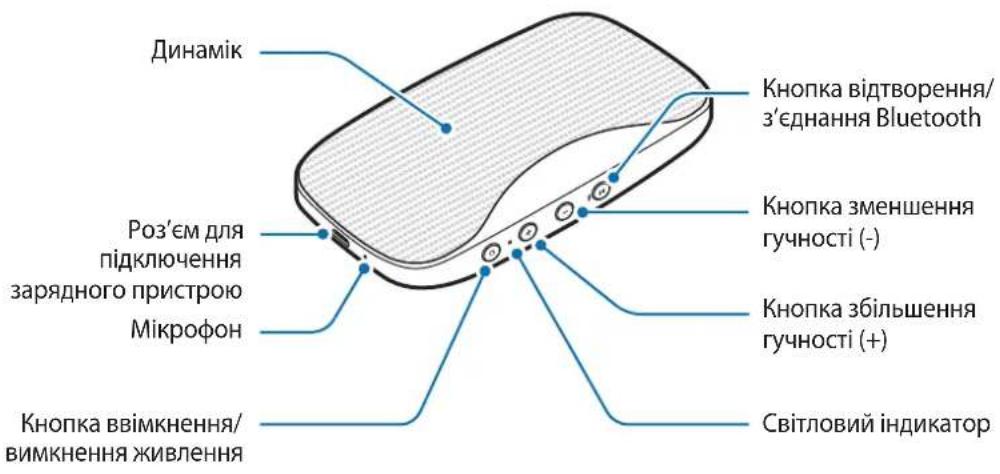
Device layout
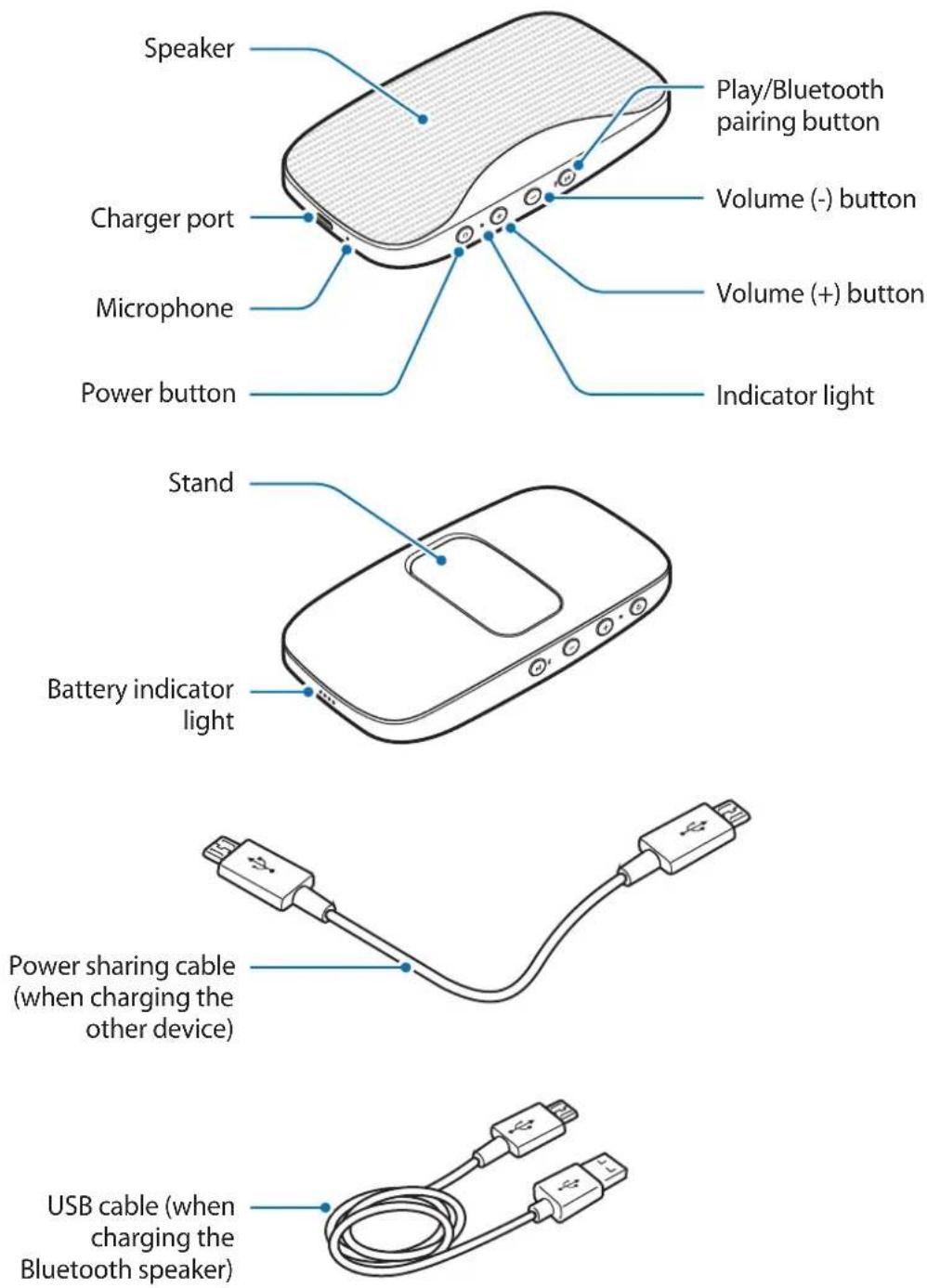

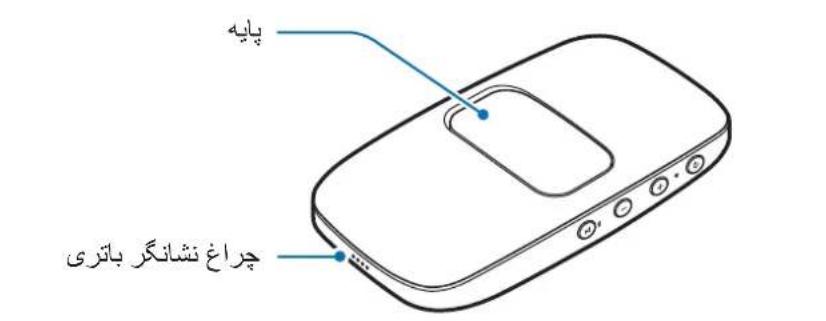
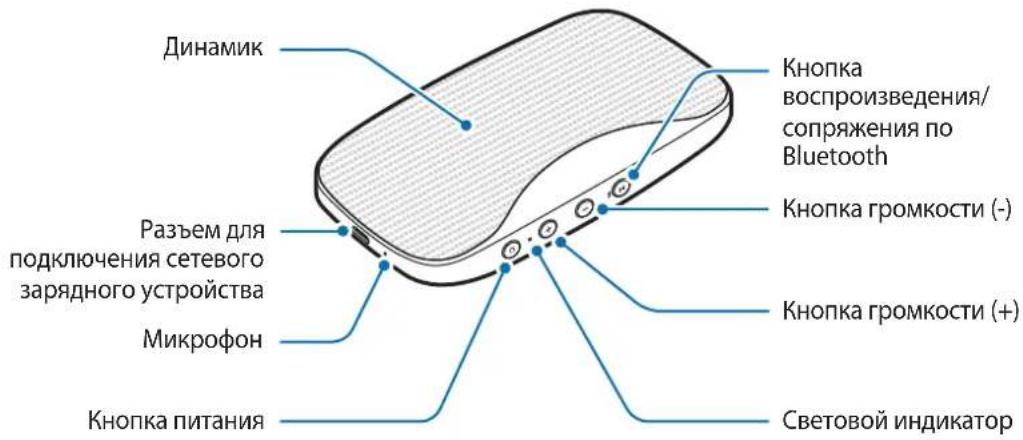
Use the stand to support the device.
Buttons
| Button Function | |
| Power button | ·Press and hold to turn the Bluetooth speaker on or off. ·Press to check the remaining battery power. ·Press to begin charging an external device when using the Bluetooth speaker as a battery pack. |
| Volume (+) button | ·Press to increase the volume. ·Press and hold to skip to the next song during music playback. |
| Volume (-) button | ·Press to decrease the volume. ·Press and hold to skip to the previous song during music playback. |
| Play/Bluetooth pairing button | ·Press and hold to enter Bluetooth pairing mode. ·Press for approximately one second to launch S Voice when the Bluetooth speaker is connected to another device via Bluetooth. ·Press to reconnect devices when the Bluetooth connection is lost. ·Press to pause or resume music during music playback. ·Press to answer an incoming call. ·Press and hold to reject an incoming call. ·Press to end the current call. |
Indicator light
The indicator light alerts you to the Bluetooth speaker status.
| Colour Status | |
| Flashes blue threetimes | The Bluetooth speaker is powering on |
| Flashes red three times The Bluetooth speaker is powering off | |
| Flashes red and blue The Bluetooth speaker is in Bluetooth pairing mode | |
| Blue Bluetooth is connected | |
| Red Bluetooth is not connected | |
Battery
Battery charging tips and precautions
- You can charge the Bluetooth speaker using the charger (sold separately).
- If the battery is completely discharged, the Bluetooth speaker cannot be turned on immediately when the charger is connected. Allow a depleted battery to charge for a few minutes before turning on the Bluetooth speaker.
- Using a power source other than the charger, such as a computer, may result in a slower charging speed due to a lower electric current.
- The Bluetooth speaker can be used while it is charging, but it may take longer to fully charge the battery.
- If the Bluetooth speaker receives an unstable power supply while charging, it may not function. If this happens, unplug the charger from the Bluetooth speaker.
-
While charging, the Bluetooth speaker and the charger may heat up. This is normal and should not affect the Bluetooth speaker lifespan or performance. If the battery gets hotter than usual, the charger may stop charging.
-
Charging the Bluetooth speaker while the charger port is wet may damage the speaker. Dry the speaker thoroughly if it becomes wet.
- If the Bluetooth speaker is not charging properly, take the Bluetooth speaker and the charger to a Samsung Service Centre.
- The charging time may vary depending on the charger specification.
Charging the battery
Charge the Bluetooth speaker before using it for the first time or when it has been unused for extended periods.

Use only Samsung-approved chargers (5 V/2 A or higher). Unapproved chargers can cause the battery to explode or damage the Bluetooth speaker.
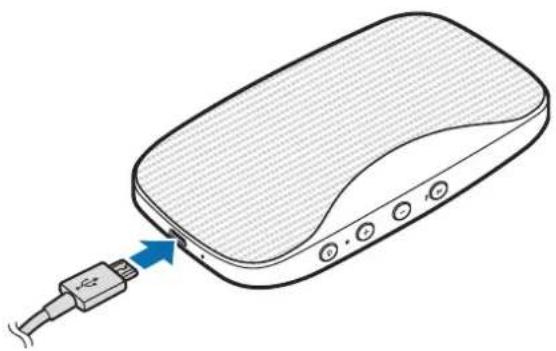
1 Connect the Bluetooth speaker to a charger.
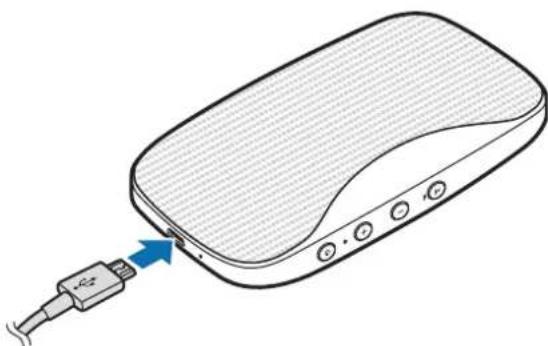

Connecting the charger improperly may cause serious damage to the Bluetooth speaker. Any damage caused by misuse is not covered by the warranty.

If the charger port is wet, the four battery indicator lights will blink when you connect the Bluetooth speaker to a charger.
2 After fully charging, disconnect the Bluetooth speaker from the charger.

- To save energy, unplug the charger when not in use. The charger does not have a power switch, so you must unplug the charger from the electric socket when not in use to avoid wasting power. The charger should remain close to the electric socket and be easily accessible while charging.
- The socket-outlet shall be installed near the equipment and shall be easily accessible.
Checking the remaining battery power
Press the Power button to check the remaining battery power.
| Remaining battery power Battery indicator light status |
| 70-100 % Four indicator lights on |
| 40-70 % Three indicator lights on |
| 20-40 % Two indicator lights on |
| 10-20 % One indicator light on |
| 0-10 % One indicator light blinking |
Auto power saving mode
Save battery power by activating auto power saving mode.
Press and hold the Power button and the Volume (+) button simultaneously to activate auto power saving mode. The Bluetooth speaker is automatically turned off when one hour has passed since the media file playback paused.
To deactivate auto power saving mode, press and hold the Power button and the Volume (-) button simultaneously.

When you turn on the Bluetooth speaker for the first time, it automatically enters auto power saving mode.
Using the Bluetooth speaker
Turning the Bluetooth speaker on and off
Press and hold the Power button to turn the Bluetooth speaker on or off.
When you turn on the Bluetooth speaker for the first time, it enters Bluetooth pairing mode.

- If your Bluetooth speaker is frozen and unresponsive, press and hold the Power button more than eight seconds.
- Follow all posted warnings and directions from authorised personnel in areas where the use of wireless devices is restricted, such as aeroplanes and hospitals.
Connecting to another device
Notices for using Bluetooth
Bluetooth is a wireless technology standard that uses a 2.4 GHz frequency to connect to various devices over short distances. It can connect and exchange data with other Bluetooth enabled devices, such as mobile devices, computers, printers, and other digital home appliances, without connecting via cables.
- To avoid problems when connecting your Bluetooth speaker to another device, place the devices close to each other.
- Ensure that your Bluetooth speaker and the other Bluetooth device are within the maximum Bluetooth range (10 m). The distance may vary depending on the environment the devices are used in.
- Ensure that there are no obstacles between the Bluetooth speaker and a connected device, including human bodies, walls, corners, or fences.
-
Do not touch the Bluetooth antenna of a connected device.
-
Bluetooth uses the same frequency as some industrial, scientific, medical, and low power products and interference may occur when making connections near these types of products.
- Some devices, especially those that are not tested or approved by the Bluetooth SIG, may be incompatible with your Bluetooth speaker.
- Do not use the Bluetooth feature for illegal purposes (for example, pirating copies of files or illegally tapping communications for commercial purposes).
Connecting device via Bluetooth
Pair the Bluetooth speaker with an available Bluetooth device. Once the devices are paired, the Bluetooth speaker will automatically connect to the mobile device whenever you turn on the Bluetooth speaker.
1 Bluetooth speaker Press and hold the Play/Bluetooth pairing button for more than three seconds to enter Bluetooth pairing mode.
The indicator light will flash red and blue.

When you turn on the Bluetooth speaker for the first time, it enters Bluetooth pairing mode.
2 Other device Activate the Bluetooth feature and search for Bluetooth devices.
For more information, refer to the other device's user manual.
3 Other device Tap [Speaker] Level Box Slim (0000) from the list of available devices.
The indicator light will flash blue.

- The PIN for the Bluetooth speaker is the four-digit number in parenthesis displayed on the other device's Bluetooth settings screen. The number differs depending on the Bluetooth speaker.
- If the Bluetooth connection fails or the other device cannot locate the Bluetooth speaker, remove the device's information from the other device's list. Then, try to connect again.
- The Bluetooth connection range and sound quality may vary depending on the connected devices.
Disconnecting or reconnecting devices
Press and hold the Play/Bluetooth pairing button for more than three seconds. The current connection will end.
You can also end the connection by deactivating the Bluetooth feature on the connected device.
If the Bluetooth connection ends due to the distance between the devices, bring the devices closer together within a certain period of time. The devices will automatically reconnect.

- You can also end the connection by turning off the Bluetooth speaker or deactivating the Bluetooth feature on the connected device. When you turn on the Bluetooth speaker again and the devices are in range, or activate the Bluetooth feature on the connected device, the devices will automatically reconnect.
- If the Bluetooth connection ends because of a device malfunction, use the Bluetooth menu on the disconnected device to reconnect the devices.
- Noise may occur if the Bluetooth connection is disconnected improperly.
Connecting to other devices
After ending the connection between the Bluetooth speaker and the currently connected device, you can connect the Bluetooth speaker to another device.
1 Press and hold the Play/Bluetooth pairing button for more than three seconds. The Bluetooth speaker will end the current Bluetooth connection and enter Bluetooth pairing mode.
2 Connect the Bluetooth speaker to another device.
Connecting additional devices
The Bluetooth speaker can connect to a maximum of two Bluetooth-enabled devices at the same time. When you connect the Bluetooth speaker to two devices, the last device you connect is recognised as the primary device. The other device is recognised as the secondary device.
1 Connect the Bluetooth speaker and a device via Bluetooth. Refer to Connecting device via Bluetooth for more information.
2 Press and hold the Play/Bluetooth pairing button for approximately three seconds to enter Bluetooth pairing mode.
The indicator light will flash red and blue and the first device will be disconnected.
3 Follow the same connection procedure used for connecting the first device to connect the Bluetooth speaker to second device.
4 Tap [Speaker] Level Box Slim (0000) from the first device's list to reconnect the Bluetooth speaker to the first device.

This feature may not be supported on some devices.
Listening to music
Listen to music played on the connected device.
Press the Play/Bluetooth pairing button to play music.
Pausing or resuming playback
Press the Play/Bluetooth pairing button to pause or resume music playback.
Adjusting the volume
Press the Volume (+) button or Volume (-) button to adjust the volume.
Skipping to other songs
Press and hold the Volume (+) button to skip to the next song during music playback.
Press and hold the Volume (-) button to skip to the previous song during music playback.
Using call features
When the Bluetooth speaker is connected to a mobile device, you can answer and control calls from the connected mobile device.
Answering or rejecting a call
Press the Play/Bluetooth pairing button to answer a call.
Press and hold the Play/Bluetooth pairing button to reject an incoming call.
Adjusting the volume
Press the Volume (+) button or Volume (-) button to adjust the volume during a call.
Answering a second call
When a second call comes in during a call, the Bluetooth speaker will emit a beep.
Press and hold the Play/Bluetooth pairing button to reject an incoming second call during a call.
Press the Play/Bluetooth pairing button to place a call on hold and answer a second call.
Press the Play/Bluetooth pairing button to switch between two calls.
Ending a call
Press the Play/Bluetooth pairing button to end a call.
Press and hold the Play/Bluetooth pairing button to end a current call and answer the held call.
Using the Samsung Level
On the connected device, download the Samsung Level app from Play Store or Galaxy Apps. With the Samsung Level app, you can check the remaining battery power and adjust the volume. You can also set the Bluetooth speaker to notify you via voice notification when you have notifications on the connected device.
Also, on the connected mobile device, launch the Samsung Level app to share audio with another Bluetooth speaker. If you activate the sound separation feature with the Samsung Level app, you can also use two speakers to separate the left and right speaker into different channels. Refer to Using the dual sound feature for more information.
For more information, refer to the help menu of the Samsung Level.

The Samsung Level app is compatible with Samsung mobile devices running Android 4.2.2 or higher. Some features may differ or may not work on your Bluetooth speaker depending on the connected device or the operating system.
Using the dual sound feature
This Bluetooth speaker supports the Dual Sound feature. You can connect two Bluetooth speakers to share the same audio. You can also use two speakers to separate the left and right speaker into different channels.
Ensure that the Bluetooth speaker that you want to share audio with is turned on.

- Your Bluetooth speaker must be connected to a mobile device. If your Bluetooth speaker is not connected to a mobile device, or is connected to more than two mobile devices, you cannot activate the Dual Sound feature.
- If the distance between your Bluetooth speaker and the connected devices is too great, there is an obstacle obstructs the signal, or the Wi-Fi signal is strong, the audio quality may be poor.
- If you restart your Bluetooth speaker while using the Dual Sound feature, it will try to reactivate the Dual Sound feature automatically. However, if your other Bluetooth speaker is connected to another mobile device, the Dual Sound feature will not reactivate automatically.
- If your other Bluetooth speaker is turned off while using the Dual Sound feature, the connection between the two Bluetooth speakers will end. When you turn it on again, it will automatically reconnect to the mobile device that it was connected to before activating the Dual Sound feature.
While sharing audio, the voice notification feature will be disabled. - Visit www.samsung.com to view the product specifications for the other Bluetooth speaker to confirm that it supports the Dual Sound feature.
1 Other Bluetooth speaker Press and hold the Play/Bluetooth pairing button and Volume (-) button simultaneously for approximately one second.
2 Bluetooth speaker Press and hold the Play/Bluetooth pairing button and Volume (+) button simultaneously for approximately one second.
The audio will be shared.
Press and hold the Volume (+) and Volume (-) button on Bluetooth speaker simultaneously for approximately one second to stop sharing audio.
Using as a battery pack
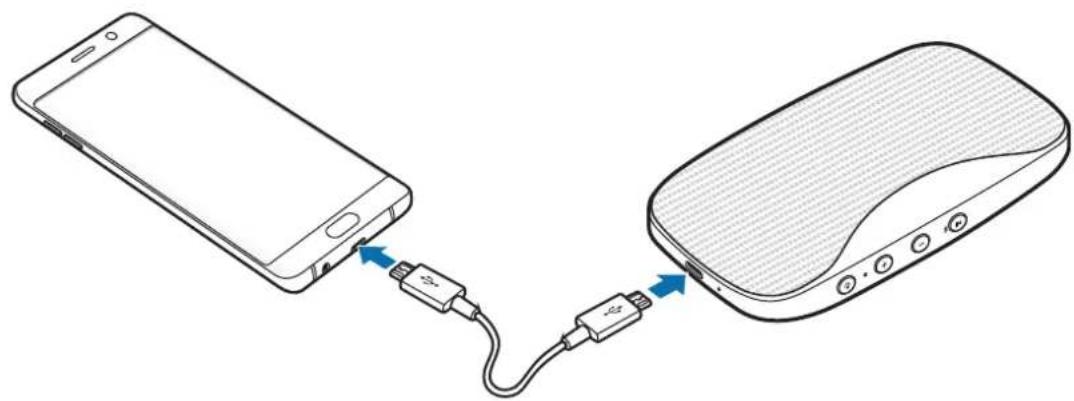
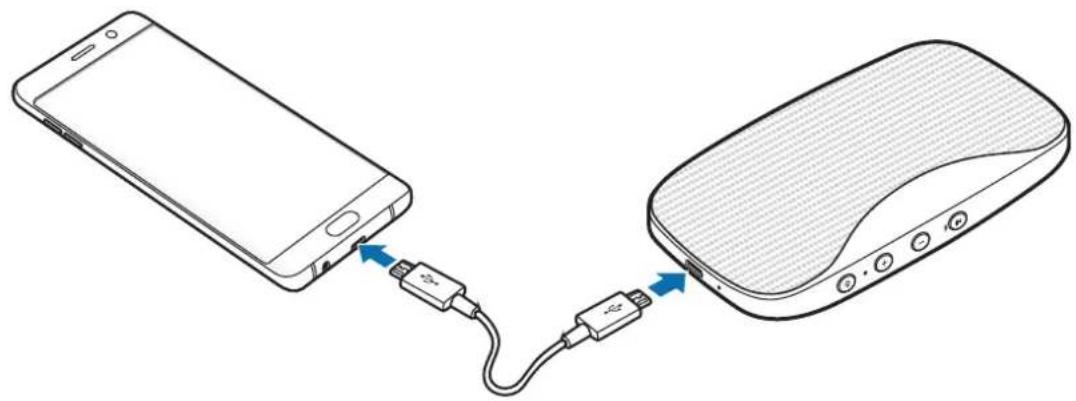
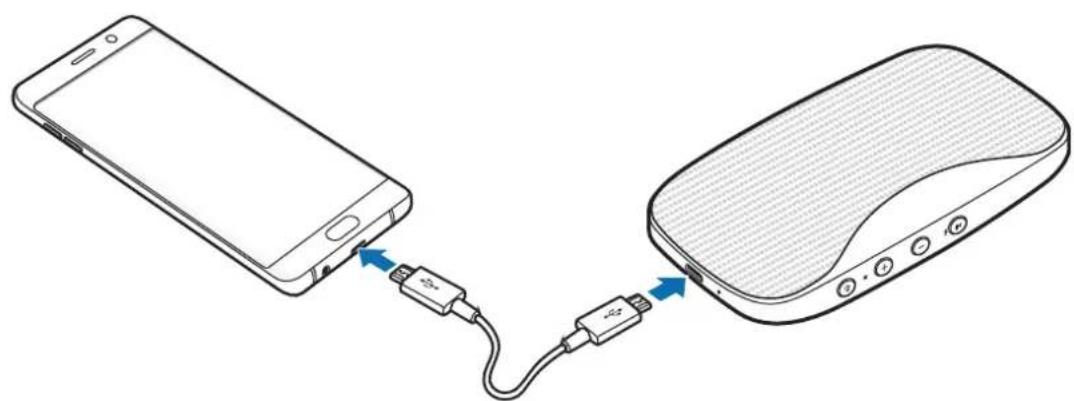
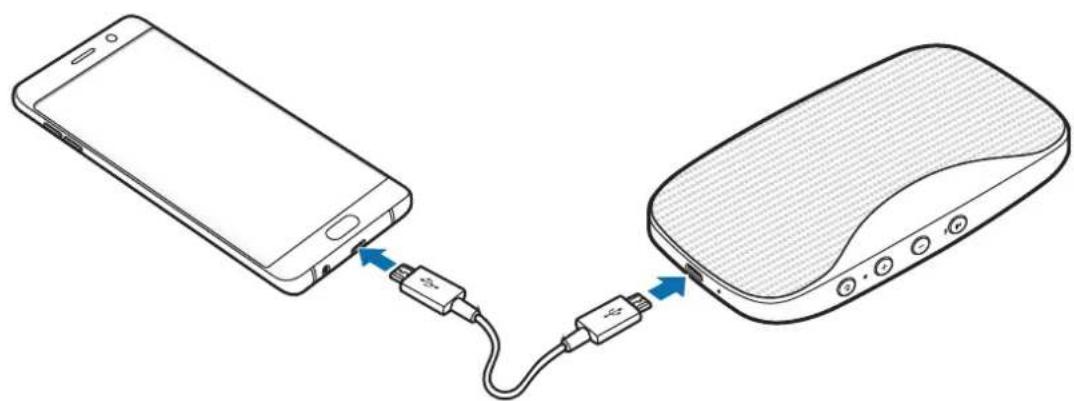
Use the Bluetooth speaker as a battery pack while connecting to another device via the power sharing cable.
1 Bluetooth speaker Insert the power sharing cable into the charger port.
2 Charged device Insert the other end of the power sharing cable into the multipurpose jack.
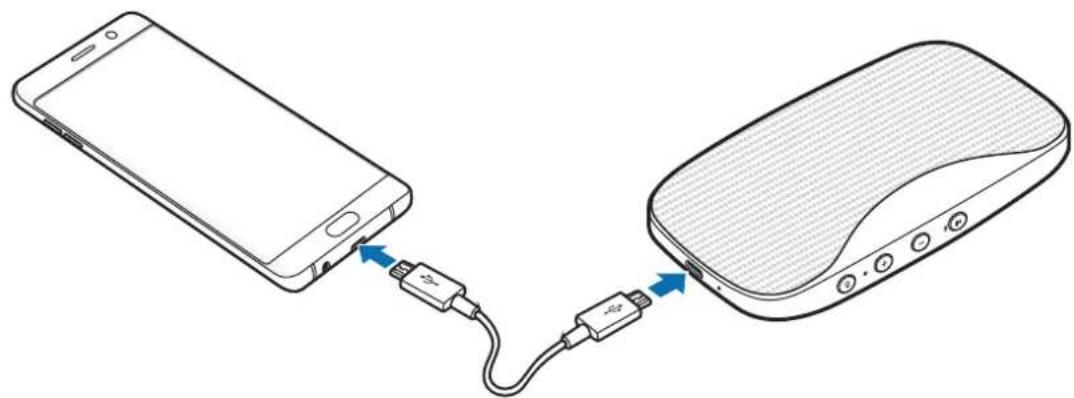
3 Bluetooth speaker Press the Power button to start charging the battery.
4 After fully charging, disconnect the power sharing cable from the Bluetooth speaker and other device for charging.

- You can use the Bluetooth speaker while charging the other device. However, if the battery power is low, some features may be limited.
- The actual capacity (Wh) is measured based on the battery's output current and voltage. It may differ from the capacity (Wh) indicated on the device, depending on the output power condition, the connected device's circuit configuration, and the operation environment.
Appendix
Troubleshooting
Before contacting a Samsung Service Centre, please attempt the following solutions.
Your Bluetooth speaker does not turn on
When the battery is completely discharged, your Bluetooth speaker will not turn on. Charge the battery completely before turning on the Bluetooth speaker.
Your Bluetooth speaker freezes
If the Bluetooth speaker freezes or hangs, try to resolve it by turning off the Bluetooth speaker and then turning it on again.
If the Bluetooth speaker is still unresponsive, end the Bluetooth connection and reconnect it. To do this, press the Play/Bluetooth pairing button for approximately three seconds. When the Bluetooth speaker enters Bluetooth pairing mode, connect the devices again, and then check the operation of the Bluetooth speaker.
If the problem is still not resolved, contact a Samsung Service Centre.
The battery does not charge properly (For Samsung-approved USB cables and chargers)
- Ensure that the USB cable or the charger is connected properly.
- Check whether your speaker has enough battery power before using it as a battery pack. If the tips above do not solve the problem, contact a Samsung Service Centre.
Another Bluetooth device cannot locate your Bluetooth speaker
- Ensure that your Bluetooth speaker is in Bluetooth pairing mode.
- Restart your Bluetooth speaker and search for the Bluetooth speaker again.
- Ensure that your Bluetooth speaker and the other Bluetooth device are within the maximum Bluetooth range (10 m).
If the tips above do not solve the problem, contact a Samsung Service Centre.
Your Bluetooth speaker cannot connect to another Bluetooth device
- Ensure that your Bluetooth speaker and the other Bluetooth device are within the maximum Bluetooth range (10 m).
- On the device you want to connect with, disconnect all paired devices and try to connect again.
Bluetooth connection is often disconnected
- If there are obstacles between the devices, the operating distance may be reduced.
- Ensure that your Bluetooth speaker and the other Bluetooth device are within the maximum Bluetooth range (10 m).
- When using the Bluetooth speaker with other Bluetooth devices, the connection may be affected by electromagnetic waves. Use the Bluetooth speaker in environments with fewer wireless devices present.
The Bluetooth speaker works differently as described in the manual
Available functions may differ depending on the connected device.
The battery depletes faster than when first purchased
- When you expose the Bluetooth speaker or the battery to very cold or very hot temperatures, the useful charge may be reduced.
- The battery is consumable and the useful charge will get shorter over time.
Removing the battery
- To remove the battery, contact an authorised service centre. To obtain battery removal instructions, please visit www.samsung.com/global/ecodesign_energy.
- For your safety, you must not attempt to remove the battery. If the battery is not properly removed, it may lead to damage to the battery and device, cause personal injury, and/or result in the device being unsafe.
- Samsung does not accept liability for any damage or loss (whether in contract or tort, including negligence) which may arise from failure to precisely follow these warnings and instructions, other than death or personal injury caused by Samsung's negligence.
Copyright
Copyright © 2016 Samsung Electronics
This manual is protected under international copyright laws.
No part of this manual may be reproduced, distributed, translated, or transmitted in any form or by any means, electronic or mechanical, including photocopying, recording, or storing in any information storage and retrieval system, without the prior written permission of Samsung Electronics.
Trademarks
SAMSUNG and the SAMSUNG logo are registered trademarks of Samsung Electronics.
- Bluetooth® is a registered trademark of Bluetooth SIG, Inc. worldwide.
- All other trademarks and copyrights are the property of their respective owners.
Démarrage
Copyright © 2016 Samsung Electronics
Copyright © 2016 Samsung Electronics
Copyright © 2016 Samsung Electronics
Alternatively, you can use the following two methods to connect to a Wi-Fi device.
Copyright © 2016 Samsung Electronics
Copyright © 2016 Samsung Electronics
Copyright © 2016 Samsung Electronics
www.samsung.com/global/ecodesign_energy.
I3KIIIOUBaHe I IOBTOpHO CBbp3BaHe Ha yCTpoiCTBa
HaTnCHete 3aApbXte 6yToHa 3a Bb3PpOn3BexJaHe/cDBoRaHe c Bluetooth 3a nobuee ot Tprn cekyHn. Tekuata Bpb3ka ige 6bde npekpaTeHa.
Moxete cBIO da npekpaTne Bpb3kaTa Upe3 DeaKTnBupaHe Ha Bluetooth fynKcnaTa Ha Cbbp3aHOTO yCTpOietBO.
Ako Bluetooth Bpb3kaTa npeKbcHe nopadn pa3ctOHHeTo Mejdy yCTpoiCTBaTa,do6nHexe Te yCTpoiCTBaTa B pAMKeTe Ha onpeJeH nepnoD ot BpeMe. YCTpoiCTBaTa ige ce cBbpxaT OTHOBo aBTOMaTuHNo.

- MojkeTe nДа npeKpaTne Bpb3kaTa Upe3 n3KnIOUbaHe Ha Bluetooth BucOKorOBopuTeJIte
- nIype3 DeaAKTNbIPaHe Ha Bluetooth ФуннкцЯТа Ha CBbp3aHOTO yCTpoIcTBo. Korato
- BKIOUHTe OTHOBO Bluetooth BucOKOROBOpuTeJIy uCTpoIcTBaTa ca B o6XBaT, nIYn
- aKO akTNbIPaTe Bluetooth ФуннкцЯТa Ha CBbp3aHOTO yCTpoIcTBO, DBeTe yCTpoIcTBa
- ABTomATNUHO Μe ce CBbpXaT.
- Ako Bluetooth Bpb3kata npeKbche npaDi NOBPeDa B HjaKoe OT yCTpOCTBaTa, n3noJ3BaIte Bluetooth MeHIOTo Ha HeCbbp3aHOTy yCTpOICTBO, 3a Da CbbpXeTe yCTpOICTBaTa OTHOBO.
Mozhe na Bb3nKHe wym, ako Bluetooth Bp3kata 6bJe HnpabuHNo npeKpaTeHa.
Cbbp3BaHe Ha npyru yctpoicTba
Cne KaTo npeKpaTnTe Bp3KaTa Mekdy Bluetooth BnCOKOrOBOpnteN TeKyUo Cbbp3aHOTo Mo6uHNO yCTpoIcTB0, MoKeTe Da CBpbXeTe BnCOKOrOBOpnteN KbM DpyrO yCTpoIcTB0.
1 Hatnche Te 3aepbxte 6yToHa 3a Bb3npOn3BexJaHe/cDBoRaHe c Bluetooth 3a noBeue ot Tprn ceKHydN.
PpneMaHe nn OTXBbPnHe Ha NOBnKBaHn
HaTnCHHe 6yToHa 3a Bb3npOn3BexKaHe/cDBoRABaHe c Bluetooth, 3a da OTROBOpTe Ha NOBnKBaHe.
HaTnSchHeTe 3aApbXkTe 6yToHa Bb3Pon3BexKaHe/cDBoJaHe c Bluetooth, 3a da oTxBbPnTe BxOJaIIOBnKBaHe.
PerynipaHe Ha cnlaTa Ha 3Byka
HaTnuchete 6yToH (+) 3a yBeneucaBaHe Ha 3ByKa, nIIy6yToH (-) 3a HamaJraBaHe Ha 3ByKa, 3a da perynipaTe cnlaTa Ha 3ByKa no BpeMe Ha o6axdaHe.
Copyright © 2016 Samsung Electronics
ToBa pbkoBOIDCTBO e 3aunTeHO OT MeKdyHapOHN 3aKOHN 3a ABTOPCKn npaba.
HnKoJtO pBkoBODCTBOTo He MoKe da 6bJe Bb3POn3BexJaHa, pa3npocTpaHraHa, npeBexJaHa nn npexBpIaHa NOD KaKBaTO I Da e fOpMa nn NO KaKBbTO I Da e Naun, eneKtponeH nn MExAHueH, B TOBa YncNo fOTOKOpnpaHe, 3anC nn CbXpaHeHne B KaKBaTO I Da e CnCTema 3a HfOpMaunHO CbXpaHHeHne I n3BnuHae, 6e3 npedBapntelHoto pa3peHne Ha Samsung Electronics.
TbproBcN MapKn
SAMSUNG n IoroTo Ha SAMSUNG ca pernctpupaH TbproBckn MapKn Ha Samsung Electronics.
- Bluetooth® e périçtrpùpaHa TbproBcka Mapka Ha Bluetooth SIG, Inc. 3a ÇeɪnəcBЯT.
- Bcnyn npytn Tbprobckn Mapkn n aBtOpckn npaba ca co6ctBeHocT ha CbOTBeHTHe IM co6CTBeHnCn.
Kako započeti
Najprije pročitajte
Prije uporabe urea ja paizljivo procitajte ovaj prisucnik kako biste osigurali sigurnu i pravilnu uporabu.
Copyright © 2016 Samsung Electronics
Ovaj je prisucnik zasticen medunarodnim zakonima o zastiti autorskih prava.
Niti jegan dio ovog prisučnika ne smije se reproducrati, distribuirati, prevoditi ili prenositi u bilo kojem obliku, ni na koji način, elektronici ili mehanički, uključujuci fotokopiranje, snimanje ili pohranjivanje na bilo kojem mediju za pohranu informacije i sustavu dohvata podataka, bez prethodnog pisanog dopustejena Samsung Electronicsa.
Zašitni znakovi
Copyright © 2016 Samsung Electronics
Ovaj prisucnik je zasticen medunarodnim zakonima o autorskim pravima.
Nijedan deo ovog prisučnika se ne sme reprodukovati, distribuirati, prevoditi niti prenositi ni u Jednom obliku niti bilo kojim putem, elektronskim niti mehaničkim, što podrazumeva fotokopiranje, snimanje i skladistenje u okviru bilo kog skladišta informacija i systemdama za preuzimanje, bez prethodne dozvole kompanije Samsung Electronics u pisanom obliku.
Trgovačke marke
- SAMSUNG i SAMSUNG logotip su registrovane trgovace marke kompanije Samsung Electronics.
- Bluetooth® je registrovana trgovačka marka kompanije Bluetooth SIG, Inc. širom sveta.
Sve ostale trgovačke marke i autorska prava su vlasništro njihovih vlasnika.
Começar
Leia primeiro
Copyright © 2016 Samsung Electronics
Copyright © 2016 Samsung Electronics
Copyright © 2016 Samsung Electronics
Copyright © 2016 Samsung Electronics
Alternativekanduringevarkundesupportpatelefon81556480.
Opphavsrett
Copyright © 2016 Samsung Electronics
Copyright © 2016 Samsung Electronics
Copyright © 2016 Samsung Electronics
Copyright © 2016 Samsung Electronics
Telif hakki © 2016 Samsung Electronics
Jalill alal go jilil 13
山
Jia jia jia jia jia jia jia jia jia jia
i 1
Bluht 5
yaiy 1
()
g
.
1
.
Jgglg j 1 Jgglg g

gglg jgj gglg jgglg jgglg jgglg
jgl jgl jgl jgl jgl jgl jgl jgl
[Speaker] Level Box Slim (0000)
.
PIN j
. 1
.
alaiall jgjll Jaiil gblgall

j 1
J 1
Jiaai jie jie jie jie jie jie jie jie jie jie jie jie jie jie jie jie jie jie jie jie jie jie jie jie jie jie jie jie jie jie jie jie jie
j j 1
Jaii 1
jie jie jie jie jie jie jie jie jie jie jie jie jie jie jie jie jie jie jie jie jie jie jie jie jie jie jie jie jie jie jie jie jie jie jie jie jie jie jie jie jie
Jl jll Jg 1
gag gglal 1jgl jbc g jgl Jail
jgl jgl
a

s jgj
jeg jg gglgall kgsaagai gai jiaaii jiaaii jiaaii jiaaii jai i
.
.
1
J 1
i
Ldie 125 gai jggljggljggljggljggljggljggljggljggljggljggljgglj
.
Jgssll gglg jglg jglg jglg jglg jglg jglg jglg jglg jglg jglg jglg jglg jglg jglg jglg jglg jglg jglg jglg jglg jglg jglg jglg jglg jglg jglg jglg jglg jglg jglg jglg
1
Jg jge Jg 1 g
1
[Speaker] Level Box Slim (0000)
Jg jglj ggl
0j 1

aagaae
Jaiil jglil ie glaia yjll gaoi gai i e laaiy
aagall jgglj ggl jg jy/ jie
aaii 1
aaii i 1
G
.()g(+)
s
gall llll ylll yiey ll bill (+) gall s j 1e
gall lll aill 111 gbiill (-) gall sss jgc sb bi
Jauaii
Jgssssssssssssssssssssssssssssssssssssssssssssssssssssssssssssssssssssssssssssssssss
Jiaolil
gaa
aLs 12
a 1
gai guaa
aillsoj! cii i gall s gina biai (-) + (+) gai s gina zlaia
s
a 1
aalso 1j! aaiiaai aaii aaiiaai
aaiia aalssie 1y ylll llll jgjgl 1/1j
.
aollso sglj
gll gglgglgglgglgglgglgglgglgglgglgglgglgglgglgglgglgglgglgglgglgglgglgglgglgglgglgglgglgglgglgglgglgglgglgglgglgglgglgglgglgglgglgglgglgglgglgglgglgglgglggl
a
y
aalaae aee
1
1
a
J 1
y 1
jglg jglg jglg jglg jglg jglg jglg jglg jglg jglg jglg jglg jglg jglg jglg jglg jglg jglg jglg jglg jglg jglg jglg jglg jglg jglg jglg jglg jglg jglg jglg jglg jglg jglg j
.
g
i j 117
aJgdl gglg 1000
i 1
Jg Jg j 1 g j j j j j j j j j j j j j j j j j j
i 1
a
.
Bluetooth SIG, Inc.
oJai
i
1 1
1
15
J 1
gai slai
i 1

1

Sui ci 1u b1 y oai i si

i
J 1 J
.
.
S 1
J 1 1 J 1 1 1 1 1 1 1 1 1 1 1 1 1 1 1 1 1 1 1 1 1 1 1 1 1 1 1 1 1 1 1 1
ii
1
1 1
IEC 60529 45
j 1 1 1 1 1 1 1 1 1 1 1 1 1 1 1 1 1 1 1 1 1 1 1
J 1.9 19
1
Level Box Slim
jLjLjSglaolkssLbJcNcNcNcNcNcNcNcNcNcNcNcNcNcNcNcNcNcNcNcNcNcNcNcNcNcNcNcNcNcNcNcNcNcNcNcNcNcNcNcNc
.
1
j 1 j 1 j 1 j 1 j 1 j 1 j 1 j 1 j 1 j 1
1
d 1000000000000000000000000000000000000000
i 1
1
142
Oo
1

| الإستعمال | |
| .ف謇ر الحرفی نهورشامبلا بعس پورشامبلا بعس پورشامبلا بعس پورشامبلا بعس پورشامبلا بعس پورشامبلا بعس پورشامبلا بعس پورشامبلا بعس پورشامبلا بعس پورشامبلا بعس پورشامبلا بعس پورشامبلا بعس پ线上线下 مصطفير رززه پورشامبلا بعس پ线上线下 مصطفير رززه پورشامبلا بعس پ线上线下 مصطفير رززه پورشامبلا بعس پ线上线下 مصطفير رززه پ线上线下 مصطفير رززه پ线上线下 مصطفير رززه پ线上线下 مصطفير رززه پ线上线下 مصطفير رززه پ线上线下 مصطفير رززه پ线上线下 مصطفير رززه پ线上线下 مصطفير رززه پ线上线下 مصطفير رززه پ线上线下 مصطفير رززه پ线上线下 مصطفير رزز�. . . . . . . . . . . . . . . . . . . . . . . . . . . . . . . . . . . . . . . . . . . . . . . . . . . . . . . . . . . . . . . . . . . . . . . . . . . . . . . . . . . . . . . . . . . . . . . . . . . . - . . . . . . . . . . . . . . . . . . . . . . . . . . . . . . . . . . . . . . . . . . . . . . . . . . . . . . . . . . . . . . . . . . . . . . . . . . . . . . . . . . . . . . . . . . . . . . . . . . . ? . . . . . . . . . . . . . . . . . . . . . . . . . . . . . . . . . . . . . . . . . . . . . . . . . . . . . . . . . . . . . . . . . . . . . . . . . . . . . . . . . . . . . . . . . . . . . . . . . . . ; . . . . . . . . . . . . . . . . . . . . . . . . . . . . . . . . . . . . . . . . . . . . . . . . . . . . . . . . . . . . . . . . . . . . . . . . . . . . . . . . . . . . . . . . . . . . . . . . . . . •. • • • • • • • • • • • • • • • • • • • • • • • • • • • • • • • • • • • • • • • • • • • • • • • • • • • | |
| .ف謇ر الحرفی نهورشامبlea بعس پورشامبlea بعس پورشامبlea بعس پورشامبlea بعس پورشامبlea بعس پورشامبlea بعس پورشامبlea بعس پورشامبlea بعس پورشامبlea بعس پورشامبlea بعس پورشامبlea بعس پورشامبlea بعس پ线上线下 مص TFT管制ر رززه پورشامبlea بعس پ线上线下 مص TFT管制ر رززه پورشامبlea بعس پ线上线下 مص TFT管制ر رززه پورشامبlea بعس پ线上线下 مص TFT管制ر رززه پ线上线下 مص TFT管制ر رززه پ线上线下 مص TFT管制ر رززه پ线上线下 مص TFT管制ر رززه پ线上线下 مص TFT管制ر رززه پ线上线下 مص TFT管制ر رززه پ线上线下 مص TFT管制ر رززه پ线上线下 مص TFT管制ر رززه پ线上线下 مص TFT管制ر رززه پ线上线下 مص TFT管制ر رززه蒲 • • • • • • • • • • • • • • • • • • • • • • • • • • • • • • • • • • • • • • • • • • • • • • • • • - |
2
i
∴ A D = 90 °
j 1
s
J 1

1
aaii iiaaii aaii

J 1

1 1
J 1 J 1 J 1 J 1 J 1 J 1 J 1 J 1 J 1 J 1 J 1 J 1 J 1 J 1 J 1 J 1 J 1 J 1 J 1 J 1 J 1 J 1 J 1 J 1 J 1 J 1 J 1 J 1 J 1

s
1
| %1. . . [V. . .] |
| %V. . . [Y. . .] |
| %Y. . . [Z. . .] |
| %Y. . . [W. . .] |
| %1. . . [Z. . .] |
J 1
. 1
J 1 +) Volum 1200000000000000000000000000000000000000000000
2g 50
1 (-) Volume 120
. 1

i 1
g g g g g g g g g g
.
j 1 j 1 j 1 j 1 j 1 j 1 j 1 j 1 j 1 j 1 j 1 j 1 j 1 j 1 j 1 j 1 j 1 j 1 j 1 j 1 j 1 j 1 j 1
∴ SΔACD = SΔCOD + SΔDCE
jolaiw 45 jilw jay g lay gaa iila y jka jdoa piai gla Jaoell jswg Jraa aas
15

J
i
a 1
aIyI yIyI yIyI yIyI yIyI yIyI yIyI yIyI yIyI yIyI yIyI yIyI yIyI yIyI yIyI yIyI yIyI yIyI yIyI yIyI yIyI yIyI yIyI yIyI yIyI yIyI
4 1
.
Jy j 1 J 1 1 1 1 1 1 1 1 1 1 1 1 1 1 1 1 1
∴ MQ = 90 ° - 30 °
.1jSaa 1 jra Sii jil
g

1
1
. 1
100

j 1
-
.25 2

1 1
.1JgIJI 10
.
a
J 1
1
Sj j 4 j j j j j j j j j j j j j j j j j j j j j j j j j j j j j j j j j j j j j j j j j j j j j j j j j j j j j j j j j j
i 1
02g 18 00
Jia jia jia jia jia jia jia jia jia jia jia jia jia jia jia jia jia jia jia jia jia jia jia jia jia jia jia jia jia jia jia jia jia jia jia jia jia jia jia jia jia jia jia jia jia jia jia jia jia jia jia
- = ( x1,y1) , = ( x2,y2)
1
1
1
laol
J 1
yis
a
J 1
J 1
JyAndroid 4.2.2 Jn Samsung Level aJn Jle y Jn Jn Jn Jn Jn Jn Jn Jn Jn Jn Jn Jn Jn Jn Jn Jn Jn Jn Jn Jn Jn Jn Jn Jn Jn Jn Jn Jn Jn Jn Jn Jn Jn Jn Jn Jn Jn Jn Jn

aillgglg jolal
Sj 1 j 1 1 1 1 1 1 1 1 1 1 1 1 1 1 1 1 1 1 1 1 1 1 1 1 1 1 1 1 1 1 1 1 1 1
a
J 1

1 1
W
1 1
y
Jg 1 Jg
.
J 1 J
. www.samsung.com 4
Volume (-) 1
y
Volume (+) 120
45
1
Volume (-) Volume (+)
s j 1
oaii i 1
1
J 1
Y
1
T
2
Y
∴ 1 = 2
y j 1 y

J 1 J 1
J 1 (Wh)
(Wh) 1
.
J 1 J
.215 304
15
10
1
1
g j 1 1 1 1 1 1 1 1 1 1 1 1
1
1
u USB 1a 1g 1a j 1d a
(Sigualu
L 150
1
.
15 1 1
.
.
(1)gjglg jgldg 45
.
J 1
d g d g d g d g d g d g d g d g d g d g d g d g d g d g d g d g d g d g d g d g d g d g d g d g d g d g d g d g d g d g d g d g d g d g d g d g d g d g d g d g d g d g d g d g d g d g d g d g d g d g d g
Copyright © 2016 Samsung Electronics
.
Samsung Electronics j 1j 0j 0j 0j 0j 0j 0j 0j 0j 0j 0j 0j 0j 0j 0j 0j 0j 0j 0j 0j 0j 0j 0j 0j 0j 0j 0j
J 14 j j j j j j j j j j j j j j j j j j
sJgsl
Samsung Electronics
Bluetooth SIG, Inc.
.
Hauza lo pa60tbl
BHeuHn BnD yCTpoIcTba

IOnCTaBka npeHa3HaueHa dny yCTaHOBKn yCTpOInCTBa.
Khonkn
IOnHnTeBhIe CBeHeHn CM. B pyKOBoCTBe NOb3ObaTeN K npromy yCToPoiCTBy.
3 DpyroeyctpoiCTBO BbI6epnTe NyHKT [Speaker] Level Box Slim (0000) B cncKe doctyihbx yctpoiCTB.
CBeTOBOHnHnKATOpMnraeTcHnM.

PIN-KoI 6ecnpoBOHO ayDnOKOLOHKn -3TO YeTbIpex3HaUHbI HOMep B CkO6kax, KOTOpbI OTo6paKaETcRa Ha 3KpaHe HAcTpoE kpyrOу cTpoiCtBa Bluetooth. Homep OTnuaetcB 3aBnCmOCTn OT TnPa 6ecnpoBOHO ayDnOKOLOHKn.
- Ecn npon3oienct c6oN noKluueHnra Bluetooth nnn dpyromy yctpoiCTBy He ydaCTc8 o6napxntb 6ecnpoBOnHyu ayDnokOLOHky, ydaIInTe CBeJeHnro 6 ycTpoiCTBe n3 cnNcKa yctpoiCTB. 3aTeM NOBToprte NOnbITKy noDKluueHnra.
PaDnyc DeiCTBnA Bluetooth n KaueCTBO 3Byka 3aBnCt OT Tnna POnkNIOUeHHbIX yCTpoIcTB.
PoiKIOUeHne i OTKIIOUeHne yCTPOIcTB
Haxmnte u ydepknaTe KhoNky Bocnpoun3BeHeHry/conpJxHn no Bluetooth Ha npotJxHn 6oJe Tpex cekynd. Tekuee coeHHne 6ydt pa3OpBaHo.
CoeHHeHne MoKHO 3aBepuTb, BbIKIOUHb FyHKUIO Bluetooth Ha NOkJIIOueHHOM yCTPOIcTBe.
Ecnn nodknueHne no Bluetooth 6ydt npepBaHO n3-3a 6oIbIoro paCCToHnMa MeJy yCTpoiCTBaMn, pa3MeTnte yCTpOiCTBa pIOM dpyr C dpyrom Ha HeKOTOpoe BpeMn. NOBTOHoe eoKJIouHne MeJy yCTpOiCTBaMn 6ydt yCTaHOBNeHO aBTOMaTHueCKn.

CoeINHeHne MoXHO 3aBepuNTb, BbIKIOUHb 6ecpOBOHyU aYIOKOnOHky IIn fYHKcIIO Bluetooth Ha noKIOUeHHOM yCTpoICTBe. CoeINHeHne MExNy UcTPOICTBaAMN 6yIET BOCCTaHOBHeO ABtOMaTnueCKn, KaT ToJIbKO 6ecpOBOHaayIOKOnOHka 6yIET BKIOUeHa CHOBA N yCTPOICTBa OKaJyTCB 30He DeIcTBnA NOkIOUeHHa IIn KaT ToJIbKO Ha noKIOUeHHOM yCTpoICTBe 6yIET BKNIOUeHa fYHKcIua Bluetooth.
- Ecni nodklouhe nno Bluetooth 6ydt npepBaHO n3-3a HeucnpaBHOCTn yCTPOICTBa, BocnoJIb3yInTeCb MeHIO Bluetooth Ha oTKIOUeHHOM yCTPOICTBe IIN NOBTOPHOro noDKIIOUeHn yCTPOICTB.
- Ecni nodklouehne Bluetooth otknioyeho HekoppeKTHO, MoryT cnblaTaBcra yMbI.
IopKIOUeHne KdpYrUm yCTpoiCTBaM
IocJI pKeKpaueHn IoKJIoueHn 6ecnpoBOJHO ayINOKOJONKn K IOKJIUeHHOMy B HactoI MometM O6NJIbHOMy yCTpOJCTBy ee MOxH NoKJIQUHTb K dpyROMy yCTpOJCTBy.
1 Haxmnte u ydepkuaite KhoNky Bocnpoun3BedeHn/a copjxHn no Bluetooth Ha npotjxHn 6oJee Tpex cekyHd.
Iopknouehne 6ecnpoBODno aynokOJHKn no Bluetooth 6ydt 3aBepseHo n OHa nepeiDeT B pexm copjxehna no Bluetooth.
2 IopknuHte 6ecnpoBODHyO aynokOLOHky Kdpyromy yctpoiCTby.
OTBeT Ha BTOPOB Bbl3OB
EcnB O BpeMa pa3roBopa nocTynaET BTOPOBbI3OB,6ecnpoBOHaay aynIOKOLHka n3daCT cnHaJI.
YTO6bI OTKNOHnTB BTOPOB BXOJUmN BBIOB BO Bpemr TeKyUeRo Bbl3OBa, HaxMMTe N ydepxuBaNTe KHOKNy BOCPON3BeDHeNr/CoPRAKeHn rno Bluetooth.
YTo6bl nepeBecTN TeKyuN Bbl3OB B pexnM OxuaHna N OTBeTb Ha BTOPO, HaxMTe KhoNky BocnpoN3BedeHna/conpJxHnna no Bluetooth.
IpeKluHm Meky Bb3OBaMn HxKMnTE KhoNkY BocpOu3BeHeHra/CoPjaKeHn no Bluetooth.
3aBepseHne Bbl3OBa
Длгзавершени ВьizOBa HabKMITE KhoNkY BocPon3BeDeHnA/copJxKeHn no Bluetooth.
Haxmnte u ydepkubai Te KhoNky Bocnpon3BeDeHn/ConpXeHn no Bluetooth, 706b1 3aBepuNTb nepBbI Bbl3OB I OTBeTb Ha ydepKnbAembl.
ИспOLTьоване Samsung Level
3a rpy3nte npinnojxeSamsung Level Ha noKIOUeHoe yCTPOICTBO n3 Mara3nHa Play Mapket nn Galaxy Apps. C nOmoBIO npinnoJxng Samsung Level moKHO cIeINb 3a yPOBHeM 3apJa aKKymyIaTopa n perynipOBaTb rpoMKoCTb. TaKKe moKHO hAcTPOITb 6ecnpoBODHyO ayDINOKOLOHKy Ha onOBeSeHne o6 yBeOMLeHnx Ha noKIOUeHHom yCTPOICTBe nocpeiCTBOM rOLOca.
3aynctte npnoxehne Samsung Level Ha noeknueenHom MObubHom yctpoiCTBe dIy OndHOBpeMeHHoro npocnyuBaHna aydnofoaHOB uepe3 Btopyo 6ecnpobOnHyo aydnoKoONky. EcnB KIOUeHa fYHKzra pa3deJeHn 3Byka B npnoxehn Samsung Level, To Dbe aydnoKoONKn MOryt BOCpOIN3BOIDNb IeBbI n npabbl KaHaI. DonoJHntelbHna INfOpMaZna coepkntcB pa3deNe FyHKzra Dual Sound.
IOnoHnTeBhBie CBeHeHn CM. B MeHcCpAkBn PnpJIOxHeHn Samsung Level.

Прилобжени Samsung Level COBmecTmo C MO6nIbHbIMN yCTpoiCTBaMn Samsung noJ npaBHeHem OC Android 4.2.2 nIIu Bblwe. HeKOTOpbie fynKcunu MoRy T OTnUaTbcr nIIu He pa6OtaTb Ha 6ecnpoBOJHO aYdIOKOJOHKe B 3aBNCIMOCtN OT NOkJIIOueHHORO yCTpoiCTBa nIIu OepaCNUHNO CNCTeMbI.
Функця Dual Sound
BecnpoBOnHa ayDnOKoHka noDepKuBaET yHKcIIO Dual Sound. DBe 6ecnpoBOnHbie ayDnOKoHKn MoKHO nOdkJIouHTb dpyr K dpyrHy n BOCpOu3BecTn Ha Hnx OndHy n Ty Jx e ayDnO3aNcB. Kpome TOrO, IeBaA n npaBaA ayDnOKoHKn MOyT BOCpOu3BOUHTb 3ByK OTdJIbHbIX KaHaJOB.
Y6eHNTecb, YTO 6ecnpoBODnAayDIOKOLOHKa, Upe3 KOtOpyIO ByET OcyUeCTBnTbcr COBMeCTHOe npocnyuINBaHne ayDIOphiJIOB, BKIIOueHa.

BeCnpoBOnHa ayDnOKOLOHka DoJXHa 6bItb NODKnIOUeHa K Mo6NtBHomy yCTpoiCTBy. Ecnn 6ecnpoBOnHa ayDnOKOLOHka He NODKnIOUeHa K Mo6NtBHomy yCTpoiCTBy nIIN NOKIOUeHa K 60nee Yem DBym MO6NtBHM yCTpoiCTBaM, fYHKuio Dual Sound BkNIOHTb HeNb3r.
- Ecni pacctoHne meKdy 6ecnpoBODHO ayDnOKOLOHKO i NOkJIIOueHHbIMN yCTpOJCTBaMn cIiXKom 6oJIbShoe, MeKdy HmM NMeETcA npEeTCTBNE dJa IpoXoxKeHna CnHaIa nn CnHaI Wi-Fi cIIxKom cnIbHbI, KaueCTBO 3ByKa MoKeT 6blb Hn3KIM.
- Ecni BO BpemnIcnoJIb3OBAHnIyHKnIu Dual Sound nepe3aynCTnb 6ecnpoBOHyU aYdIOKOLOHky, OHa nonblTaetcBepHyTbcB pexm Dual Sound aBTOMaTUnecKn. OHaKo ecNI Btopa 6ecnpoBOHnaayDIOKOLOHka nOdkNIOuaETcK dpyromy MObNbHOMy yctpoiCTBy, pa6ota yHKuIN Dual Sound He Bo306HOBJIeTcA BTOMaTUnecKn.
- Ecni Btopuyo 6ecnpoBODnay aydnoKOLOHky BbIKIOuHTb BO Bpemr NcNoIb3OBAHnA yHKUIN Dual Sound, noKIOUeHne MeJy dByMg 6ecnpoBOHbIMN aydNOKOLOHkAmn IpepbBaetc. Ppi NOBTOPHom noKIOUeHn 6ecnpoBOHnay aydNOKOLOHka 6yJeT aBTOMaTnueckn NOBTOPO NoKIOUeHa K MO6nIbHOMy yCTpoiCTBy, K KOtOpOMy OHa 6bla NoKIOUeHa Do BKIOUeHn yHKUIN Dual Sound.
Bo Bpemr coBmecTHoro npocnyuBaHnaydnofoaaiNoB yHKuny yBeOMneHn 6ydet OTKJIIOUeHa.
- Пocете Be6-caT www.samsung.com, чобл порсмOTpeТ ТхнчecкпхаразКтерNTКИ ДруюбесправODнй aydnoKoJHKNи убeДиТьСВ ТOM, ChTo OHa ПОДдрЖиВаET ФУHKUIO Dual Sound.
1 BToPaa 6ecnpoBODnay aynokOJohKa HaxMnte n ydepxnBaIte KHOKBy BocnpOn3BeDeHnra/ copxkeHnno Bluetooth n KHOkny rpoMKoCTn (-) OndOBpeMeHNO Ha npotxxeHn np6n3nTbHo oDHO CEyHDbI.
2 BeCnpoBODnay aUdnoKoIOnKa HaxMnte uYdepxNBAuTe KhoNky BocnpOu3BeDeHn/ conpJxHeHn no Bluetooth n KhoNky rpoMKoCTn (+) oDHOBpeMeHNO Ha npToJxHeHn np6n3ntelbHo OndHcekyHdbI.
Haunetc Bocnpon3BeDeHne ayDnO3aPiNCn Ha dBvX ayDnOKoJOhkax.
Ha 6ecnpoBODHoi aydnoKoJohKe HaxMnte n ydepxnBaIte KhoNky rpoMKocTn (+) n (-) odHObpeMeHHo Ha npotjxeHnn pni6n3nTeNbHO oHoi cekyHdbI, YTO6bl npekpaNTb BOCpOu3BeDeHne aydno3aPiNCn Ha dBYx aydnoKoJohKax.
ИспOLSванеВКачесТВСHEШero aKKуMuЯTopa
Ecn c nomou kabeI 3apKn BHeHero yctpoCTBa K 6ecnpoBOHO ayIOKOLOHKe NOKIOHTb dpyoe yctpoCTBO, To 6ecnpoBOHyO ayIOKOLOHky MOxHO 6yTe NcNoB3OBaTb B KaueCTBe BHeHero aKKymylrTopa.
1 BeCnpoBODnay ayDnOKoJOnKa POnCoeHInTe Ka6JIb IJa 3apAKn BHeuHero yCTpoiCTBa K pa3bemy IJa IopKlIoUeHnI CeTeBOrO 3apAHorO yCTpoiCTBa.
2 3apjkaemoe yctpoiCTBO POncoeHNHTe pyroK KOHeC Ka6eN Ipn 3apJKN BHeHero yctpoiCTBa K yHnBepcaIbHOMy pa3bemy.
3 BeCnpoBODnay aynokOJohKa HaxMnte KONky nHTaHn, YTO6bHaayatb 3apAky aKKymyIaTopa.
4 1o 3aBepseHn 3apAkn OTcoeHNHe Ka6JIb IJy 3apAKn BHeHrO yCTpoNCTBa O T 6ecnpoBOHOy ayDnOKOJOHKn n DpyrOуCTPOICTBa.

Bo Bpem 3apn DpyrO yctpoCTBa 6ecnpoBOHO aydNOKOnHKO MOxHO nIb3OBaTcA. Ondako npu Hn3kOM yPOBHe 3apra aKKymyTATopa HeKOTOpbIe FyHKmMOrTy 6bITb HeIOCTynHbl.
-Фaktnueckaj emkocb (Bt-ч) n3mepaetcna ha akkymnytope npabha erO bixohomy TOKy nHaipjkeHIO. OHa moKeT OTnuaTbcra OT emkocn (Bt-ч), KOTopar oTo6paJkaeTcna Ha yCTpoiCTBe, B 3aBnCnMOCTn OT bIXoHOn MOuHOCn, KOHfNpyaun 3JIeKTPnuECKoI CXembl NOdkloueHHoro yCTpOiCTBa n YcNoBn OkpykaIoSe cpebl.
Приложкени
YcTpaHHe NHeNoJaDOK
Ipeed o6paueHnem B cepBnchbI ueTp Samsung nonpo6yIte cIeDyUoIne cnocO6bl yCTpaHeHn HeNoJaOK.
Бес四项idadа удиноюнka He BKlioucaetcra
BecnpoBOHaaydIOKOLHka He BkIIOHTc,ecn aKKymyTAOp nOHOCTbO pa3pJKeH.3apAInTe aKKymyTAOp nepeB BKIOUeHNem 6ecnpoBOHOaYDIOKOLOHKn.
Бес四项idadа удиноюнka 3abncaeT
Ecn 6ecnpoBODnay aydnoKoONHka npekpaaaet BocnpoN3BeDeHne nn «3aBncaeT》,Jny peweHn npo6Iembl nonpOBynte BbIKNoHTb 6ecnpoBDHyO aydNOKOLOHky N BKIOHTb ee CHOba.
Ecn 6ecnpoBODnay aydnoKoONKa He pearnpyET Ha DeiCTBn, 3abepuTe nokquene no Bluetooth n oDkNoHTe ee noBTOHO. Iy 3tOro haxmte KhoNky Bocpon3BeHnra/ conpJKeHn no Bluetooth np6n3ntbHo Ha 3 cekynbl. Korda 6ecnpoBODnay aydnoKoONKa nepeienet B pexim coPjKeHn no Bluetooth, noBTOPOYcTaHOBnTe nokquene MeJdy ycTpoiCTBaMn i npOBepbTe, pa6oTaet nn 6ecnpoBODnay aydnoKoONKa.
Ecnn HeNoJaKa He yCtpaHeHa, o6patntecb B cepBncbI ueHtp Samsung.
AkkymyIaTOp He 3apJxaeTcR (PnN nCpOJIb3OBaHmN Odo6peHHbIX Ka6eJe USB n 3apJndbIX yCTpoiCTB Samsung)
- Y6eHntecb,чTo Ka6eIb USB innn 3apAnHoe yCTpoiCTBO nOdkJIOueHb npaBnIbHO.
- Праздучиминользоватыадиоколонку в каунгвпшeroakkymлгога убдntecb,чTo OHa DoCTaTOUHO 3apJxeha.
EcnBbINJHHe OINCAHHbIX BblIe DeIcTBn He NOMOKeT yCTpaHITb npo6JeMy, o6paTNTecb B cepBnCHbI cHTp Samsung.
AkkymyIaTOp pa3pJxKaeTc8 6bIcTpee, yem o6bIuHo
- ΘΦΦeKTnBhbl 3apRd aKKymyIaTopa 6ecnpoBOJHO ayINOKOJHKn MoXeT CHNJaTBcR npN CnIuKOM Hn3KoI INCnUkOM BbICOKO TeMnepaType OKpyKaIOSeI cpebl.
- Akkymyatop yBnEeTcpaXoHbIM MaTePnaIOM, n erO 3ΦΦeKTHBbI 3apd 6ydt co BpeMeHem CHNXaTbcra.
| ИнфОРМАЦЕ O ПОДУКТ Бесчобдая КOLONКа Samsung Level Box Slim (EO-SG930) ИспосьзуETСДЯ ВОCSПОЗВЕDEНЯ MYЗБКИ И COBEРSEНЯ TELЕФОньх 3BOHКOB | |
| EAC Данны пожд СооветECTBYET TReбовaning Текнистор Таможеного сюза. | Страна, дата пожд; Сраза раши, Сраза раши. Сраза раши. Сраза раши. Сраза раши. Сраза раши. Сраза раши. Сраза раши. Сраза раши. Сраза раши. Сраза раши. Сраза раши. Сраза раши. Сраза раши. Сраза раши. Сраза раши. Сrazы. Сrazы. Сrazы. Сrazы. Сrazы. Сrazы. Сrazы. Сrazы. Сrazы. Сrazы. Сrazы. Сrazы. Сrazы. Сrazы. Сrazы. Сrazы. Сrazы. Сrazы. Сrazы. Сrazы. Сrazы. Сrazы. Сrazы. Сrazы. Сrazы. Сraz�. Сrazы. Сrazы. Сrazы. Сrazы. Сrazы. Сrazы. Сrazы. Сrazы. Сrazы. Сrazы. Сrazы. Сrazы. Сrazы. Сrazы. Сrazы. Сrazы. Сrazы. Сrazы. Сrazы. Сrazы. Сrazы. Сrazы. Сrazы. Сrazы. Сrazity. Сrazity. Сrazity. Сrazity. Сrazity. Сrazity. Сrazity. Сrazity. Сrazity. Сrazity. Сrazity. Сrazity. Сrazity. Сrazity. Сrazity. Сrazity. Сrazity. Сrazity. Сrazity. Сrazity. Сrazity. Сrazity. Сrazity. Сrazity. Сrazity. СrazITY. СrazITY. СrazITY. СrazITY. СrazITY. СrazITY. СrazITY. СrazITY. СrazITY. СrazITY. СrazITY. СrazITY. СrazITY. СrazITY. СrazITY. СrazITY. СrazITY. СrazITY. СrazITY. СrazITY. СrazITY. СrazITY. СrazITY. СrazITY. СrazITY. Сrazity. Сrazity. Сrazity. Сrazity. Сrazity. Сrazity. Сrazity. Сrazity. Сrazity. Сrazity. Сrazity. Сrazity. Сrazity. Сrazity. Сrazity. Сrazity. Сrazity. Сrazity. Сrazity. Сrazity. Сrazity. Сrazity. Сrazity. Сrazity. Сraz性. Сraz性. Сraz性. Сraz性. Сraz性. Сraz性. Сraz性. Сraz性. Сraz性. Сraz性. Сraz性. Сraz性. Сraz性. Сraz性. Сraz性. Сraz性. Сraz性. Сraz性. Сraz性. Сraz性. Сraz性. Сraz性. Сraz性. Сraz性. Сraz性. Сraz性和 Сraz性和 Сraz性和 Сraz性和 Сraz性和 Сraz性和 Сraz性和 Сraz性和 Сraz性和 Сraz性和 Сraz性和 Сraz性和 Сraz性和 Сraz性和 Сraz性和 Сraz性和 Сraz性和 Сraz性和 Сraz性和 Сraz性和 Сraz性和 Сraz性和 Сraz性和 Сraz性和 Сraz性和 Сraz性和 |
| Имpopгетр: | OOO «Самсунг Эльсклонок Сус Компани», 123242, Рожа, Мосва, Новинский 6ульвар, 31 |
| Юрид専ческиMadres ИЗот Овітеля: | Самсунг Эльсклонок К. Лт. (Mэтан-донг) 129, Самсунг-р. ENГTOH-у. Г. Сувон, К. Д. Д. Д. Д. Д. Д. Д. Д. Д. Д. Д. Д. Д. Д. Д. Д. Д. D. D. D. D. D. D. D. D. D. D. D. D. D. D. D. D. D. D. D. D. D. D. D. D. D. D. D. D. D. D. D. D. D. D. D. D. D. D. D. D. D. D. D. D. D. D. D. D. D. D. |
| Адеса завODов: "Самсунг Эльсклонок К., Лт", 94-1, Имсо-Донг, Гим-Сити, Кунг-Бak, 39388, Рес neuropлески Корег "Тянжий Camсунг Телегом Тхнолдж К., Лт", BeiBy PoaД, МИкpoэлсклонок Инданлллллллллллллллллллллллллллллллллллллллллллллллллллллллллллллллллллллллллллллллллллллллллллллллллллл "Самсунг Эльсклонок Хужоу К., Лт", Yeнжианг тayн, Xужоу, повинця Гуангдог, Ктуй "Самсунг Эльсклонок Beteham К., Лт", PlpOMblшенин的答案 "Мелегаимллллллллллллллллллллллллллллллллл Доюгпен Камьюн, okpyг Фоейен, повинця Тугл'dог, Ктуй "Самсунг Эльсклонок Beteham Tхайнген", PlpOMblшенин的答案 "Мелегаимллллллллллллллллллллл Доюгпен Камьюн, okpyg Фоейен, повинця Тугл'dог, Ктуй "Самсунг Эльсклонок Beteham Tхайнген", PlpOMblшенин的答案 "Мелегаимллллллллллл Доюгпен Камьюн, okpyg Фоейен, повинця Тугл'dог, Ктуй "Самсунг Эльсклонок Beteham Tхайнген", PlpOMblшенин的答案 "Мелегаимллллллл Доюгпен Камьюн, okpyg Фоейен, повинця Тугл'dог, Ктуй "Самсунг Эльсклонок Beteham Tхайнген", PlpOMblшенин的答案 "Мелегаимллллл Доюгпен Камьюн, okpyg Фоейен, повинця Тугл'dог, Ктуй "Самсунг Эльсклонок Beteham Tхайнген", PlpOMblшенин的答案 "Мелегаимллл Доюгпен Камьюн, okpyg Фоейен, повинця Тугл'dог, Ктуй "Самсунг Эльсклонок Beteham Tхайнген", PlpOMblшенин的答案 "Мелегаимлл Доюгпен Камьюн, okpyg Фоейен, повинця Тугл'dог, Ктуй "Самсунг Эльсклонок Beteham Tхайнген", PlpOMblшенин的答案 "Мелегаимлл Доюгпен Камьюн, okpyg Фоейен, псвинця "Самсунг Эльсклонок Beteham Tхайнген", PlpOMblшенин的答案 "Мелегаимлл Доюгпен Камьюн, okpyg Фоейен, псвинця "Самсунг Эльсклонок Beteham Tхайнген", PlpOMblшенин的答案 'Мелегаимлл Доюгпен Камьюн, okpyg Фоейен, псвинця "Самсунг Эльсклонок Beteham Tхайнген", PlpOMblшенин的答案 "Мелегаимлл Доюгпен Камьюн, okpyg Фоейен, псвин固化 "Самсунг Эльсклонок Beteham Tхайнген", PlpOMblшенин的答案 "Мелегаимлл Доюгпен Камьюн, okpyg Фоейен, псвин固化 "Самсунг Эльсклонок Beteham Tхайнген", PlpOMblшенин的答案 " Мелегаимлл Доюгпен Камьюн, okpyg Фоейен, псвин固化 "Самсунг Эльсклонок Beteham Tхайнген", PlpOMblшенин的答案 "Мелегаимлл Доюгпен Камьюн, okpyg Фоейен, псвин固化 'Самсунг Эльсклонок Beteham Tхайнген", PlpOMblшенин的答案 "Мелегаимлл Доюгпен Камьюн, okpyg Фоейен, псвин固化 "Самсунг Эльсклонок Beteham Tхайнген", PlpOMblшенин的答案 "Мелergаимлл Доюгпен Камьюн, okpyg Фоейен, псвин固化 "Самсунг Эльсклонок Beteham Tхайнген", PlpOMblшенин的答案 "Мелегаимлл Доюгпен Камьюн, okpyg Фоейен, псвин固化 "Сamcunrg Eelsko "Мелегаимлл Доюгпен KAMbyuH, okpyg Фоейен, псвин固化 "Самсунг Эelsko "Мелегаимлл Доюгпен KAMbyuH, okpyg Фоейен, псвин固化 "Самсунг Эelsko "Мелегаимлл Доюгпен KAMbyuH, okpyg Фоейен, псвин固化 "Самсунг Эelsko "МелGER "Мелегаимлл Доюгпен KAMbyuH, okpyg Фоейен, псвин固化 "Самсунг Эelsko "МелGER "МелGER "МелGER "МелGER "МелGER "МелGER "МелGER "МелGER "МелGER "МелGER "МелGER "МелGER "МелGER "МелGER "МелGER "МелGER "МелGER "МелGER "МелGER "МелGER "Мелger "МелGER "МелGER "МелGER "МелGER "МелGER "МелGER "МелGER "МелGER "МелGER "МелGER "МелGER "МелGER "МелGER "МелGER "МелGER "МелGER "МелGER "МелGER "МелGER "Мел GER "МелGER "МелGER "МелGER "МелGER "МелGER "МелGER "МелGER "МелGER "МелGER "МелGER "МелGER "МелGER "МелGER "МелGER "МелGER "МелGER "МелGER "МелGER "МелGER "МелZ "МелZ "МелZ "МелZ "МелZ "МелZ "МелZ "МелZ "МелZ "МелZ "МелZ "МелZ "МелZ "МелZ "МелZ "МелZ "МелZ "МелZ "МелZ "МелZ "МелZE "МелZ "МелZ "МелZ "МелZ "МелZ "МелZ "МелZ "МелZ "МелZ "МелZ "МелZ "МелZ "МелZ "МелZ "МелZ "МелZ "МелZ "МелZ "МелZ "МелZA "МелZA "МелZA "МелZA "МелZA "МелZA "МелZA "МелZA "МелZA "МелZA "МелZA "МелZA "МелZA "МелZA "МелZA "МелZA "МелZA "МелZA "МелZA "МелZA "МелZ "МелZ "МелZ "МелZ "МелZ "МелZ "МелZ "МелZ "МелZ "МелZ "МелZ "МелZ "МелZ "МелZ "МелZ "МелZ "МелZ "МелZ "МелZ "МелZO "МелZO "МелZO "МелZO "МелZO "МелZO "МелZO "МелZO "МелZO "МелZO "МелZO "МелZO "МелZO "МелZO "МелZO "МелZO "МелZO "МелZO "МелZO "МелZO "МелZ "МелZ "МелZ "МелZ "МелZ "МелZ "МелZ "МелZ "МелZ "МелZ "МелZ "МелZ "МелZ "МелZ "МелZ "МелZ "МелZ "МелZ "МелZ "Мел乙 "Мел乙 "Мел乙 "Мел乙 "Мел乙 "Мел乙 "Мел乙 "Мел乙 "Мел乙 "Мел乙 "Мел乙 "Мел乙 "Мел乙 "Мел乙 "Мел乙 "Мел乙 "Мел乙 "Мел乙 "Мел乙 "Мел乙 "МелZ "Мел乙 "Мел乙 "Мел乙 "Мел乙 "Мел乙 "Мел乙 "Мел乙 "Мел乙 "Мел乙 "Мел乙 "Мел乙 "Мел乙 "Мел乙 "Мел乙 "Мел乙 "Мел乙 "Мел乙 "Мел乙 "МелZ "МелZ "МелZ "МелZ "МелZ "МелZ "МелZ "МелZ "МелZ "МелZ "МелZ "МелZ "МелZ "МелZ "МелZ "МелZ "МелZ "МелZ "МелZ "МелZZ "МелZZ "МелZZ "МелZZ "МелZZ "МелZZ "МелZZ "МелZZ "МелZZ "МелZZ "МелZZ "МелZZ "МелZZ "МелZZ "МелZZ "МелZZ "МелZZ "МелZZ "МелZZ "МелZZ "МелZ "МелZ "МелZ "МелZ "МелZ "МелZ "МелZ "МелZ "МелZ "МелZ "МелZ "МелZ "МелZ "МелZ "МелZ "МелZ "МелZ "МелZ "МелZ "Мел.Z "МелZ "МелZ "МелZ "МелZ "МелZ "МелZ "МелZ "МелZ "МелZ "МелZ "МелZ "МелZ "МелZ "МелZ "МелZ "МелZ "МелZ "МелZ "МелZ "МелZW "МелZW "МелZW "МелZW "МелZW "МелZW "МелZW "МелZW "МелZW "МелZW "МелZW "МелZW "МелZW "МелZW "МелZW "МелZW "МелZW "МелZW "МелZW "МелZW "МелZ "МелZ "МелZ "МелZ "МелZ "МелZ "МелZ "МелZ "МелZ "МелZ "МелZ "МелZ "МелZ "МелZ "МелZ "МелZ "МелZ "МелZ "МелZ "Мелz "МелZ "МелZ "МелZ "МелZ "МелZ "МелZ "МелZ "МелZ "МелZ "МелZ "МелZ "МелZ "МелZ "МелZ "МелZ "МелZ "МелZ "МелZ "МелZ "МелW "МелW "МелW "МелW "МелW "МелW "МелW "МелW "МелW "МелW "МелW "МелW "МелW "МелW "МелW "МелW "МелW "МелW "МелW "МелW "МелZ "МелZ "МелZ "МелZ "МелZ "МелZ "МелZ "МелZ "МелZ "МелZ "МелZ "МелZ "МелZ "МелZ "МелZ "МелZ "МелZ "МелZ "МелZ "Мел2 "Мел2 "Мел2 "Мел2 "Мел2 "Мatel2 "Мatel2 "Мatel2 "Мatel2 "Мatel2 "Мatel2 "Мatel2 "Мatel2 "Мatel2 "Мatel2 "Мatel2 "Мatel2 "Мatel2 "Мatel2 "Мatel2 "Мatel2 "Мatel2 "Мatel2 "Мatel2 "Мatel2 "МSELZ "МSELZ "МSELZ "МSELZ "МSELZ "МSELZ "МSELZ "МSELZ "МSELZ "МSELZ "МSELZ "МSELZ "МSELZ "МSELZ "МSELZ "МSELZ "МSELZ "МSELZ "МSELZ "МSELZ "МSEL2 "МSELZ "МSELZ "МSELZ "МSELZ "МSELZ "МSELZ "МSELZ "МSELZ "МSELZ "МSELZ "МSELZ "МSELZ "МSELZ "МSELZ "МSELZ "МSELZ "МSELZ "МSELZ "МSELZ "М SELZ "МSELZ "МSELZ "МSELZ "МSELZ "МSELZ "МSELZ "МSELZ "МSELZ "МSELZ "МSELZ "МSELZ "МSELZ "МSELZ "МSELZ "МSELZ "МSELZ "МSELZ "МSELZ "МSELZ "М SEL2 "МSELZ "МSELZ "МSELZ "МSELZ "МSELZ "МSELZ "МSELZ "МSELZ "МSELZ "МSELZ "МSELZ "МSELZ "МSELZ "МSELZ "МSELZ "МSELZ "МSELZ "МSELZ "МSELZ "МSLZ "МSLZ "МSLZ "МSLZ "МSLZ "МSLZ "МSLZ "МSLZ "МSLZ "МSLZ "МSLZ "МSLZ "МSLZ "МSLZ "МSLZ "МSLZ "МSLZ "МSLZ "МSLZ "МSLZ "МSELZ "МSELZ "МSELZ "МSELZ "МSELZ "МSELZ "МSELZ "МSELZ "МSELZ "МSELZ "МSELZ "МSELZ "МSELZ "МSELZ "МSELZ "МSELZ "МSELZ "МSELZ "МSELZ "МSL2 "МSLZ "МSLZ "МSLZ "МSLZ "МSLZ "МSLZ "МSLZ "МSLZ "МSLZ "МSLZ "МSLZ "МSLZ "МSLZ "МSLZ "МSLZ "МSLZ "МSLZ "МSLZ "МSLZ "МSL2 "МSLZ "МSLZ "МSLZ "МSLZ "МSLZ "МSLZ "МSLZ "МSLZ "МSLZ "МSLZ "МSLZ "МSLZ "МSLZ "МSLZ "МSLZ "МSLZ "МSLZ "МSLZ "МLZ "МLZ "МLZ "МLZ "МLZ "МLZ "МLZ "МLZ "МLZ "МLZ "МLZ "МLZ "МLZ "МLZ "МLZ "МLZ "МLZ "МLZ "МLZ "МLZ "МSLZ "МSLZ "МSLZ "МSLZ "МSLZ "МSLZ "МSLZ "МSLZ "МSLZ "МSLZ "МSLZ "МSLZ "МSLZ "МSLZ "МSLZ "МSLZ "МSLZ "МSLZ "МSLZ "МLZ "МL2 "МLZ "МLZ "МLZ "МLZ "МLZ "МLZ "МLZ "МLZ "МLZ "МLZ "МLZ "МLZ "МLZ "МLZ "МLZ "МLZ "МLZ "МLZ "МLZ "МL2 "МLZ "МLZ "МLZ "МLZ "МLZ "МLZ "МLZ "МLZ "МLZ "МLZ "МLZ "МLZ "МLZ "МLZ "МLZ "МLZ "МLZ "МLEZ "МLEZ "МLEZ "МLEZ "МLEZ "МLEZ "МLEZ "МLEZ "МLEZ "МLEZ "МLEZ "МLEZ "МLEZ "МLEZ "МLEZ "МLEZ "МLEZ "МLEZ "МLEZ "МLEZ "МleZ "МleZ "МleZ "МleZ "МleZ "МleZ "МleZ "МleZ "МleZ "МleZ "МleZ "МleZ "МleZ "МleZ "МleZ "МleZ "МleZ "МleZ "МleZ "МleZ "МLEZ "МleZ "МleZ "МleZ "МleZ "МleZ "МleZ "МleZ "МleZ "МleZ "МleZ "МleZ "МleZ "МleZ "МleZ "МleZ "МleZ "МleZ "МleZ "МLEZ "МLEZ "МLEZ "МLEZ "МLEZ "МLEZ "МLEZ "МLEZ "МLEZ "МLEZ "МLEZ "МLEZ "МLEZ "МLEZ "МLEZ "МLEZ "МLEZ "МLEZ "МLEZ "МLGZ "МLGZ "МLGZ "МLGZ "МLGZ "МLGZ "МLGZ "МLGZ "МLGZ "МLGZ "МLGZ "МLGZ "МLGZ "МLGZ "МLGZ "МLGZ "МLGZ "МLGZ "МLGZ "МLGZ "МLEZ "МLEZ "МLEZ "МLEZ "МLEZ "МLEZ "МLEZ "МLEZ "МLEZ "МLEZ "МLEZ "МLEZ "МLEZ "МLEZ "МLEZ "МLEZ "МLEZ "МLEZ "МLEZ "МLZ "МLZ "МLZ "МLZ "МLZ "МLZ "МLZ "МLZ "МLZ "МLZ "МLZ "МLZ "МLZ "МLZ "МLZ "МLZ "МLZ "МLZ "МLZ "МLEZ "МLEZ "МLE2 "МLE2 "МLE2 "МLE2 "МLE2 "МLE2 "МLE2 "МLE2 "МLE2 "МLE2 "МLE2 "МLE2 "МLE2 "МLE2 "МLE2 "МLE2 "МLE2 "МLE2 "МLE2 "МLE2 "МLEZ "МLE2 "МLE2 "МLE2 "МLE2 "МLE2 "МLE2 "МLE2 "МLE2 "МLE2 "МLE2 "МLE2 "МLE2 "МLE2 "МLE2 "МLE2 "МLE2 "МLE2 "МLE2 "МLEZ "МLEZ "МLE2 "МLE2 "МLE2 "МLE2 "МLE2 "МLE2 "МLE2 "МLE2 "МLE2 "МLE2 "МLE2 "МLE2 "МLE2 "МLE2 "МLE2 "МLE2 "МLE2 "МLEZ "МLE2 "МLEZ "МLE2 "МLE2 "МLE2 "МLE2 "МLE2 "МLE2 "МLE2 "МLE2 "МLE2 "МLE2 "МLE2 "МLE2 "МLE2 "МLE2 "МLE2 "МLE2 "МLE2 "МLEZ "МLEZ "МLEZ "МLE2 "МLE2 "МLE2 "МLE2 "МLE2 "МLE2 "МLE2 "МLE2 "МLE2 "МLE2 "МLE2 "МLE2 "МLE2 "МLE2 "МLE2 "МLE2 "МLE2 "МLGZ "МLGZ "МLGZ "МLGZ "МLGZ "МLGZ "МLGZ "МLGZ "МLGZ "МLGZ "МLGZ "МLGZ "МLGZ "МLGZ "МLGZ "МLGZ "МLGZ "МLGZ "МLGZ "МLG2 "МLG2 "МLG2 "МLG2 "МLG2 "МLG2 "МLG2 "МLG2 "МLG2 "МLG2 "МLG2 "МLG2 "МLG2 "МLG2 "МLG2 "МLG2 "МLG2 "МLG2 "МLG2 "МLG2 "МLGZ "МLG2 "МLG2 "МLG2 "МLG2 "МLG2 "МLG2 "МLG2 "МLG2 "МLG2 "МLG2 "МLG2 "МLG2 "МLG2 "МLG2 "МLG2 "МLG2 "МLG2 "МLG2 "МLGZ "МLGZ "МLG2 "МLG2 "МLG2 "МLG2 "МLG2 "МLG2 "МLG2 "МLG2 "МLG2 "МLG2 "МLG2 "МLG2 "МLG2 "МLG2 "МLG2 "МLG2 "МLG2 "МLGZ "МLG2 "МLGZ "МLG2 "МLG2 "МLG2 "МLG2 "МLG2 "МLG2 "МLG2 "МLG2 "МLG2 "МLG2 "МLG2 "МLG2 "МLG2 "МLG2 "МLG2 "МLG2 "МLG2 "МLGZ "МLGZ "МLGZ "МLG2 "МLG2 "МLG2 "МLG2 "МLG2 "МLG2 "МLG2 "МLG2 "МLG2 "МLG2 "МLG2 "МLG2 "МLG2 "МLG2 "МLG2 "МLG2 "МLGZ "МLG2 "МLG2 "МLGZ "МLG2 "МLG2 "МLG2 "МLG2 "МLG2 "МLG2 "МLG2 "МLG2 "МLG2 "МLG2 "МLG2 "МLG2 "МLG2 "МLG2 "МLG2 "МLG2 "МLGZ "МLG2 "МLGZ "МLGZ "МLG2 "МLG2 "МLG2 "МLG2 "МLG2 "МLG2 "МLG2 "МLG2 "МLG2 "МLG2 "МLG2 "МLG2 "МLG2 "МLG2 "МLG2 "МLG2 "МLGZ "МLGZ "МLG2 "МLGZ "МLG2 "МLG2 "МLG2 "МLG2 "МLG2 "МLG2 "МLG2 "МLG2 "МLG2 "МLG2 "МLG2 "МLG2 "МLG2 "МLG2 "МLG2 "МLG2 "МLGZ "МLGZ "МLGZ "МLGZ "МLG2 "МLG2 "МLG2 "МLG2 "МLG2 "МLG2 "МLG2 "МLG2 "МLG2 "МLG2 "МLG2 "МLG2 "МLG2 "МLG2 "МLG2 "МLGZ "МLG2 "МLG2 "МLG2 "МLGZ "МLG2 "МLG2 "МLG2 "МLG2 "МLG2 "МLG2 "МLG2 "МLG2 "МLG2 "МLG2 "МLG2 "МLG2 "МLG2 "МLG2 "МLG2 "МLGZ "МLG2 "МLG2 "МLGZ "МLGZ "МLG2 "МLG2 "МLG2 "МLG2 "МLG2 "МLG2 "МLG2 "МLG2 "МLG2 "МLG2 "МLG2 "МLG2 "МLG2 "МLG2 "МLG2 "МLGZ "МLG2 "МLGZ "МLG2 "МLGZ "МLG2 "МLG2 "МLG2 "МLG2 "МLG2 "МLG2 "МLG2 "МLG2 "МLG2 "МLG2 "МLG2 "МLG2 "МLG2 "МLG2 "МLG2 "МLGZ "МLG2 "МLGZ "МLGZ "МLGZ "МLG2 "МLG2 "МLG2 "МLG2 "МLG2 "МLG2 "МLG2 "МLG2 "МLG2 "МLG2 "МLG2 "МLG2 "МLG2 "МLG2 "МLG2 "МLGZ "МLGZ "МLG2 "МLG2 "МLGZ "МLG2 "МLG2 "МLG2 "МLG2 "МLG2 "МLG2 "МLG2 "МLG2 "МLG2 "МLG2 "МLG2 "МLG2 "МLG2 "МLG2 "МLG2 "МLGZ "МLGZ "МLG2 "МLGZ "МLGZ "МLG2 "МLG2 "МLG2 "МLG2 "МLG2 "МLG2 "МLG2 "МLG2 "МLG2 "МLG2 "МLG2 "МLG2 "МLG2 "МLG2 "МLG2 "МLGZ "МLGZ "МLGZ "МLGZ "МLGZ "МLGZ "МLGZ "МLGZ "МLGZ "МLGZ "МLGZ "МLGZ "МLGZ "МLGZ "МLGZ "МLGZ "МLGZ "МLGZ "МLGZ "МLBZ1175117511751175117511751175117511751175117511751175117511751175117511751175117511751175117511751175117611761176117611761176117611761176117611761176117611761176117611761176117611761176117611761176117611751176117611761176117611761176117611761176117611761176117611761176117611761176117611761176117611751175117511751175117511751175117511751175117511751175117511751175117511751175117511751175117511749117611761176117611761176117611761176117611761176117611761176117611761176117611761176117611761176117491176117611761176117611761176117611761176117611761176117611761176117611761176117611761176117611809117611809117611809117611809117611809117611809117611809117611809117611809117611809117611809117611809 | |
Abtopckne npaba
Samsung Electronics, 2016.
Данhoe рукововсBO 3aшишно мждуharopним 3akohamn 6abTOpcknx npaBax.
3a nppeaetcB BOCpOuN3BOUHTb, paCnpocTpaHrTb, nepeBoUHTb IINI nepeDaBaTb KaKne-JI6o Yactn DaHHoro pyKOBOdCTBa B IIO6oI FOpmE N IIO6bIM CnOCOBOM, 3JeKTPoHNbIM IINI MExaHueckm, BKIOUay ATOKOpNipOBaHne, 3aNcB N XpaHEnE B IIO6oI CnCTeMe XpaHEny INONCKa INΦopMaun, 6e3 PpeBapNTelbHO rnoNcbMehHOrpoa3peSeHnKOMPaNnSamsung Electronics.
TobapHbIe 3HaKn
SAMSUNG n Iorotn SAMSUNG yBJIOTc3apeRNCpnpOBaHHbIMN TOBaPbIMN 3HaKaMn KOMNaHm Samsung Electronics.
- Bluetooth®яваяетсаразгострпювным Товарным 3нakомBluetooth SIG, Inc. BO BCEM Mnpe.
OCTaIbHbIe aBTOpCKne npaba n TOBaPbHbIe 3HaKn YBJIaOTcCo6CTBeHHOCtBu IN BlaJeIbIeB.
Початок роботи
OzhahomTece nepei noaTKOM BnKOpncTaHna
Дя 6e3neuHOro Ta HanexKHorO KOpNcTyBaHHЯ npnCTpoE m nepw 3a BCE yBaXHo O3HaJOMTeC8 3 LIM noci6HnKOM.
3OBHiiHnBnI BnrrnI npOdykTu MoKe BiDpi3HrTncB iD 3o6paXeHHa. Bmict MoKe 3miHIOBaTnC8e3 3aBuachoro nonepdXeHHa.
- Pered BnKOpNCTaHHm DnHaMika Bluetooth nepekoHaTecr, 0o BOHO cymiHo i3 npnstpoem.
IoRCHIOBaJIbHi 3HaUKN

PonepeJxHn: cTyaui, 0o MoKytb npN3BcTn do TpaBMyBaHHa6e a6o iHux oci6

Ybara: cnTuayi, iO moKytb npn3BecTIO noNtKOJKeHHn npncTPOo a6o iHoro 06naHaHH

PpIMitKa: npMItK, npaI 3 KopnctyBaHna 6o doaTKoBa iHopMaucia
3aTepeXeHNa ⅢOdo CTiKoCTi Do BVnBy BODn
Baw npnna d cikn do Bnny Bo. Iy 36epxeHHa ckiKoCTi npcTpoIO DO BnHy BoN peTeJbHO DOTpmyntecb HabeHnX HxKue peKomeHaaz. HeDopummaHnix MoKe npn3BeCTn Do NookoJxehnnpctpoio.
He 3aHypioTe npictri y BODy Ha rIbHy noHa1 M a6o He TpMaTe Ioro y BODi DOBwe 30xbuInH.
He nidaabaTe npictpi i CnIbHoro HAnOpy BoN.
-ЯкwoHa npictriП notpanna 3BuaHа BODa,peTeNbHO BVtpiTb Ioro 3a DOnomorOu YnCToi M'koI TkaHH.ЯкsoHa npictriП notpanna iHsa piHNa, HapnKlaD, coLoHa BODa,IOHIzOBaHa BODa a6o aIKORobHn HaII, npOMInTe NOrO 3BuaaHIO BOHO Ta peTeNbHO BVtpiTb 3a DOnomorOu YnCToi M'koI TkaHH.Якso He DotpIMyBaTnCzix IHctpyKci,Ze MoKe BnINHyTu Ha PO6OTy Ta 3OBHiHn BVrIaN pnpCTpoU.
- Y pa3i 3aHypenHn npncIpoU y BODy a6o NotpanJIHHB OBDn Ha MIKpOfoH uNHaMik, 3ByK nId
- cac BnKInky MoKe 6yTu HeuITkM. PpOTpiTb npncIpi CxOIO TkaHnHO a6o peTeJbHO BucyWitb
- nepeD BnKOpNCtAHHM.
Bnnp6ybaHna npncptpo Bid6ybaOcB KOHTpObBOaHOMy cepeOBu. Bin 6yb ceptnoikobAHn k npncpti, ctiKn do BnNBy Bodn y BN3NaeHx yMOBX (npncpti BIDNObiaE BmOram KlaacnphiKaui IPX7, k3a3NaeHO y MIXnapoHOMy cTaNapTi IEC 60529 «Ctynnb 3axncty, lo 3a6e3neUeTbc o6oONkAmn [KoD IP]'; yMOBN Bnnp6yBaHn: 15-35 ° C 86-106 KPa, 1 M, npotraom 30 xBnInH). He dinBnueHc b na KlaacnphiKaio, icHy e BiporidHictb nookdoJeHH npiocptpo B OKpeMnx cnTuayix.
Пробпострий Level Box Slim
Bn moxete BnKOpncToBvBaTn uei npOdyKT k DnHaMik Bluetooth a6o k akymyIaTOP dI iHux npicctpoIB.
Kompanečaţia
IpebeipTe HABHICTb y KOMNNEKTi TAKNX KOMNHOHTiB:
-ДиHamikBluetooth
KopoTkn noci6nK KopncTyBaHa
Ka6eIbXnBHeHnHiNx npucTpoB
Ka6eJb USB

KOMnoHeHTn, rki BXoJaTb Do KOMnIeKTy npNcTpoU, MoKyTB p3HNTnc 3aJexHo BiD KpaIHn a6o onepaTopa 3B'ra3Ky.
KOMnoHeHTN, 1o nocTaauToBcB KOMnIeKti, po3po6JIeHi cneuaIbHO Ira ZbOro npunctpoTo Ta MoKyTb 6yTu HeCymicHmM 3 iHUnMn npunctpOAM.
3OBHIHINBnI xapaKTePncTNI KMOKyTB 3MIHOBaTnC86e3 3aBuachoro nonepdxKeHH.
-ДоаТКОВIakceCyapnMoKHa npu6aTn B MiceBOro noCTaaybHnka Samsung.пердix npu6aHHmpekeHOaTeCra,цо BOHc cyMiCiHi i3 cIM npicStpoE M.
Bukopnctobyte Iiwe akcecyapn, pekomehoBahi KOMnHiO Samsung. BkOpncTahHHepeKomeHIOBaHnx akcecyapIMoKe npu3BeCTN Do BUNHKHeHH np6Jem y po6oti Ta HecnpaBHOCTe, Ha kI He p03NOBcOJxUyETbCra rapaHTi.
- Доступнисту усix akcesуаров може зminюватися залижно вд компай-Bиробнков. Достаков сю по доступни akcesуаров можна дзотся на Be6-caTi Samsung.
3OBHiushiBvrgIaI npncTroIO

BnKopncOByte cIy dIy nItpmKn npncpo.
Khonkn
Lf yHKiMoKe He NiTpmyBaTnca Ha deaKnx npncTopx.
NoHETbcnIbHe BiTbOpEHNaayiofoaayy.
Дя npиненспього biTbpeнгаayiofoaay haTNCiMbOndHocHO KNOpKn 36iNbweHHraуhocti (+) ta 3meHseHHraуhocti (-) Ha duHaMiky Bluetooth i yTpmyTe ix npu6n3Ho npotarom odHiie cekyn.
Bvnkopnctahnnaakymyjtopa
Pn niknueHHI do iHoro npncpo 3a donomoro kabeIO xNBHeHH Iuix npntpoB Bnkopncobyte dHaMik Bluetooth akymyIaTOp.
1 Dnhamik Bluetooth BCTaBTe Ka6eIb JxNBJIeHn IInuX npNCTpoIB y po3'EM nIiKnIOueHn 3apAnHO npNCTPOU.
2 3apJxByBn npucpiPi dHaTe iHnn KHeue b Ka6eIIO XNBnEHn IHnx npucpoB do nopTy Micro USB.
3 Dnhamik Bluetooth HATNCIb KHOKNy BBIMKHeHHB/BBIMKHeHHJ XNBLeHH, 06 noaTn 3apdKeHH aKymyIaTopa.
4Пия noBHorO 3apJxKeHHaKymyIaTopa BiD'EnHaIte Ka6eJIb KINBHeHHa IHnIX npicTroB BID nHaMiKa Bluetooth Ta iHoro npicTroIO.

-Пд ус зардженин орпостю ви можete викорочьВaTN duHaMik Bluetooth. Потe,у раз iиькоу зарду akumлгета,викорочандаякx Функui може 6ут n obmexжehm.
-ФaktnuHa emHicb (Bt-r) BmipHOeTbc Ha akymyIaTOpi i dopiBnOe BnxiDHomy ctpmy Ta Happy3i Ha HbOMy.BoHa moKe BiDiPI3NaTcB iD EmHOCTi (Bt-r), kA BiIO6paXaETbcR Ha npICrpoi, B 3aJIexKHOCTi BiD BNXIDHOI NotJxHOCti, KOHfIpyaCi eJeKTPnuHOI cxEMn NiD'EDHaHOrO npICrpoU yMOB HABKoINHbOro cepedOBuIa.
ДодаТOK
YcyuHnHa HenoJaDOK
Nepw Hix 3BepHyTnca Do cepBicHoro ceHTpy Samsung, cnpo6yTe cKOpNCaTnca TaKIMn piWeHHaMn.
Диhamik Bluetooth He BMnkaetbca
Kkto akymyTOp nobHicTo p03pAKeHn, dHaMik Bluetooth He yBIMKHeTbCra. NobHicTo 3aprItb akymyTOp, nepw hIX yBIMKHyTu dHaMik Bluetooth.
Диhamik Bluetooth замер3
Jkuo dHAmik Bluetooth 3amep3 a60 3aBncae, nBupiueHHn np6nmeu cnpo6yute BIMKHyTN dHaMik Bluetooth Ta BBIMKHyTn noro 3HOby.
Якwo dinamik Bluetooth Bce ue He pearye, 3aBepuItb πiKluoyenHra 3a donomoro Bluetooth i πiKluoyitb ii NobtopHo. Дя zufo ro HaTnchItb i uTpMuyte KhoNky BiTbOpeHHy/pexmmy 3'edHaHHa 3a donomoro Bluetooth 6n3bko Tpbox cekyHd.Яkuo Ha dinamiky Bluetooth 3anyueHO pexim 3'edHaHHa 3a donomoro Bluetooth, nobtopHO BCTahOBiTB πiKluoyenHra MIX npictpoamTu nepebiTe, cn npaioe dinamik Bluetooth.
Якwo npo6nemy He Bdaetbca ycyhTu, 3BepHitbcra do cepbicoro uehtpy Samsung.
AkymyIaTOp He 3apJkaeTbCra HaleXHm YInHom (dЯ Ka6eJIb USB i 3apJdHnx npinCTpoiB, peKOMeHdoBaHnx KOMnaiHeio Samsung)
Samsung Electronics, 2016
Ley noci6nK KopncTyBaHa 3axnueHo 3rIHO 3 MxHapOnHMn 3aKoHaMn 1Odo aBTOpcbKnX npaB.
3a6opoheno biTbopouBaTu, po3noBcOJkyBaTu, nepeKnaIaTu a6o nepeJaBaTu B 6ydb-akii fOpMi a6o 6yb-kaIMN 3ac06aMn, eJeKTpoHHmN a6o MexaHicNHmN, BKIOUHO i3 KcepOKoiOBaHHam,
3aHcCyBaHHaM a6o 36epirAHnMa Ha 6ydb-akomy npncTrooi dIra 36epiraHHaDaHx uB iHOpMaiziHo- noUykoBii cIcTeMi, KODHy qacTInHy cboRo noci6Hnka 6e3 nonepedhboro rncbMOBoro do3BOny KomnaHii Samsung Electronics.
TobapHi 3HaKn
SAMSUNG i norotin SAMSUNG e 3apeectpoBaHmToBapHmN 3HaKaMn KOMnaHii Samsung Electronics.
- Bluetooth® € 3apeεctpoBaHIM TOBAPHIM 3HaKOM KOMNaHII Bluetooth SIG, Inc. Bycby My cBiTI.
- Yci iHsi TOBAPHI 3NaKn aBTOpcbKi npaba HaleKaT bIINOBiHN M BlaCHNKaM.
Kmbictbi 6actay
KymbICTbi 6actamac 6ypbIH OKbIHbl3
Kayinci3 api dypbic naaIalaHy ysiH KypblfblHbI naIdaIah6ac 6ypbIH OcbI HyCKayIbIKTbI OKbln bIfblHbI3.
CpeTepdiH cbipTKbl Typi HaKTbl eHimHeH epeKweJeHyi MymKiH. Ma3Myn aIdbH aIaeceptyci3 03reptinyi MymKiH.
Bluetooth dHnAMKti naJaIaHydbIH aIbIH, OHbIH KypblfbiHBi36eH yJleCiMdi eKeHiTEkcepini3.
HycayIbIK 6eJIiweIep

Eckepty: 3iH3iH HeMece 6aKaIapDbH XapaKaT aIyBaHa eKeJyIMyMKiH KaFdaIap

A6aIahbI3: KypblfblHbI Hemece 6aca Xa6dbkTbI 3akbldaybl Mymkn H KaFdaJap

Eckepim: eckepTuJIep, naДaIaHy TpyaJIbI KeHeCTep Hemece KocbIMwa aKnapaT
Cy etki36ey ka6iJeTih caKtay
Kypblfby cy etki36ey kaibineH KOlaNbI. WaHa Te3imdiikTi caKtay ywiH, 6ydaH api KeTipilreH YcbHbICTapdb MyKnT opbIHdaHbI3. KepiciHwe XaFdaJa KaYpbIbnfbl 6y3blnybIMyMknH.
KypbIbIbIbI 1 M TepeH cyfa 6aTbIPMaHbI3 Hemece 30 MNHyTTaH KEN yaKaBIT cy actbHaYCTaMaHbI3.
KypbIfblHbI Kywnen Ko3FaJatbIH cy acepiHeH KopfaHbI3.
- Erep Kypblfba Ta3a cy Tuce, OHbTa3a, Xymca Wybepekneh KeNTipiH3. Erep Kypblfba Ta3daHaH, NOHaJaH Cy Hemece aKOrOJIc CysHbI CNaKTbI Backa CyBbIK TnCe, OHb Ta3a Cymen WaBbIn, Ta3a, KypFak Wybepekneh KypFaTbIn CypTHi3. Erep OcbH Ncaynap OpbHdAlMaCa, Kypblfbl eHIMdiirige XHe KepiHicHe Kepi ocep etyi MymKiH.
- Erep KypbIbI cyfa 6aTbIpbIca Hemece MKNpOoH He dINHaMnK bINFaIaHca, KOhbpay 6apbcihda db6bic aHbIK ecTImeyi yMkIH. KypblfbiHbIKyPfak yBepeKeH cypTiH3 Hemece naJaIahy aIdbIHda dypbICTan KeNTipiH3.
KypbIbI 6aCKapblaTbIH opTaHa cblHaJIbI JxHe 6eJIriI 6ip JkaFdaJnapda cy KopFaHbICbHa cepTNphiNKaTTaJIbI (IEC 60529-KopnyctapMen 6epiIreH KOpfaHbIC deHreJlepi [IP KoIbI] xaIbIKapaJIbIK cTAHdApTBInDa cIINaTTaJIfAnJa IPX7 JxIKtey TaIaNTapbHa cMykec; cblHaK JkaFdaJnapbl: 15-35 ° C 86-106 KPa, 1 MeTp, 30 MmHyT). Ocbl cbIHbITAmafa KapamacTaH, KypbIbI bI Kei6ip JkaFdaJTTa 6opi6ip 6y3blNybl MYMKiH.
Level Box Slim kypbIJIfblcbl TypaIbl
C3 6yI 6yIbIMdbI 6aKa Kypblfblap ywiH Bluetooth dHaMnri Hemece 6atape Tontamacbi petiHde KolldaHa aJacbl3.
Opama Kypambl
ΘHIM Kopa6bHaMbHa 3aTap 6ap eKeHH TeKcepii3:
- Bluetooth ὑнhamnirī
XbIJaam6actayHcyckaylbIfbl
CbiptKbl KypblfblHbI 3apay ka6eJI
USB ka6eJI

KypbIfBImeH 6ipre 6epiIReH 3JeMeHTTep XaHe Ke3 KeJIReH KOJI XeTIIMdi KocalKbl KypaIap aMakKa Hemece KbI3MeT KOpctyWIRE 6aJlaHbICTbI O3repin OTbIPybl MymKiH.
- Бернген Демп对接Tek Ocbi Крьлфыа apHaJfah XaHe 6acka КрьлфыapMeH
- Улесимдболмaybl MymKin.
CbipTkbl Typi kHe cunataamalap eckepTci3 e3reptinyi MymkiH.
KocbIMwa KocaIKbl KypalapdbI JepriikTi Samsung catyubicihan catbn anyfa 6oJadbl. Catbn any aIdbHda oJapdbIH KypblfBImeH yIiecimDi eKeHH TeKcepiH3.
Tek Samsung pyKcat etKeH KocalkbI KypaIapdbI fHa naJaIahbIHb3. BekiTImereH KocalkbI KypaIapdbI naJaIahy KeiJIkTe KaMTbIMaFahn OHIMdiIK Macelepein XHe aKaylbIKTapdbI TydbIPybIMMKIN.
KocalkbI KypaIapdbH, KOJ XeTIMdiIiri Tek eHdpuyi KOMnHaNnaIapfa fHa 6aIahbictbI 6oIaDbI. KoJ XeTIMdi KocalkbI KypaIap TypaIbI KocbIMwa aKnapaT, Samsung Be6-caTbIHda YcblHbIHaH.
KypblfblbIHcblptkbl KepiHici
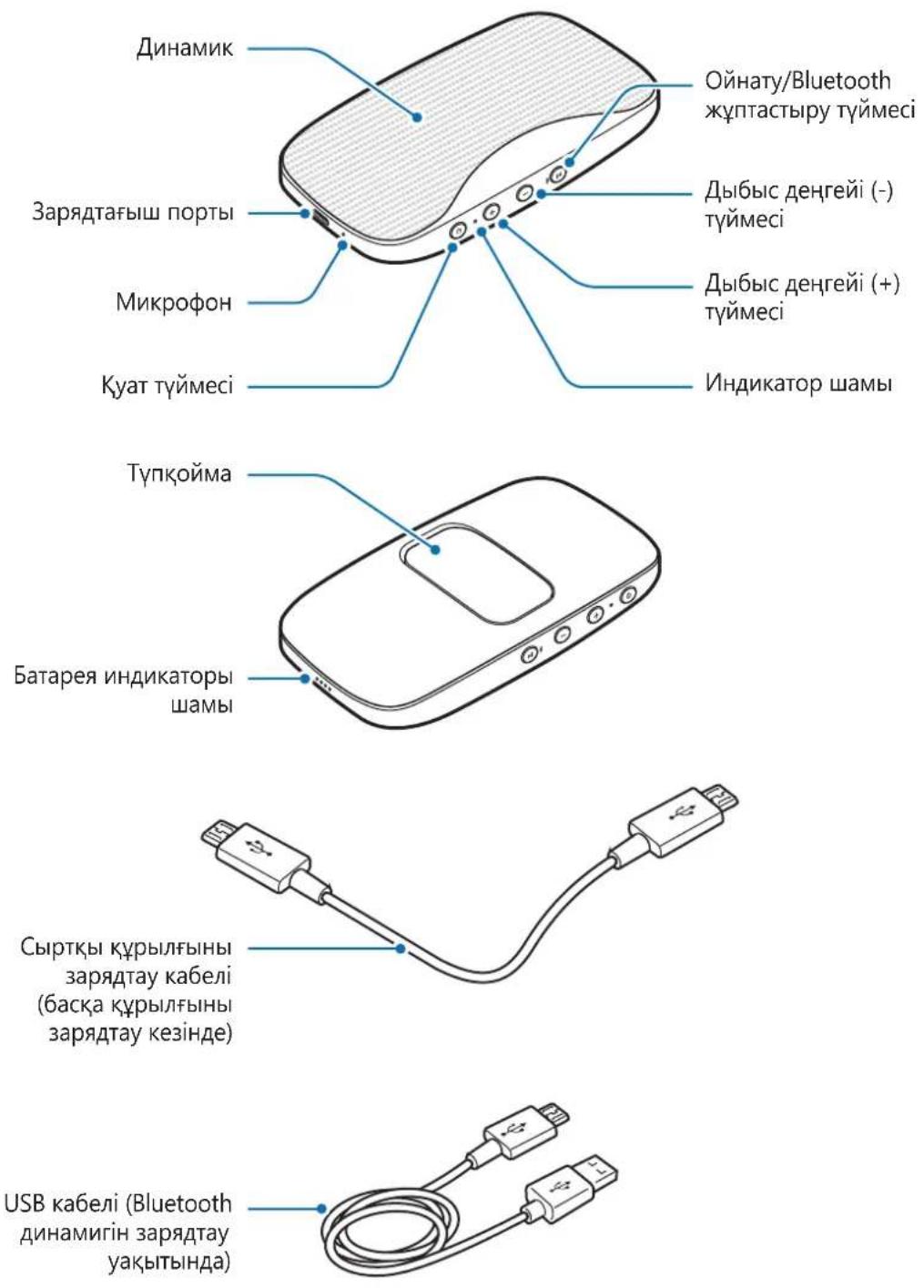

TynKoMa KypbIbIbHbKoJaaywH KOJaHbIaDbI.
Tуйменер
3 BaKa Kypblfbl KoJxetimdi Kypblfblap tiImiHi iHHeH [Speaker] Level Box Slim (0000) TaHaHbI3.
Hdkatop 1aMbI Kek TycnEH XbInbIbIKTaIbI.

BluetoothДиHamriH PIN KoIbI,6aKa KypblfblHn Bluetooth napametpJIepi 3KpaHbIHda KepeTilreH JkaJha iuiHderi Tep TnOpdaH TypaTBn CaH 6oJbIN Ta6bIaN. Can BluetoothДиHamriHc BaIahbICTb epeKweJeHei.
Bluetooth Kocblmbi cTci3 aKtaIca Hemece ekHwi Kypblfbl Bluetooth dHaMriH aHbIKa aImaca, eKiHsi KypblfblHbIH Ti3IMHeH KypblfblHbIH aKnapaTbIH KObIHbI3. Codan Kein Kocblny apeketih KaTalaHbI3.
Bluetooth KocblbIM aykbmbI MeH dI6bc Canacbl, Kocblfahn Kypblfblapfa 6aIahbictbl e3repin OTbIPybl MymKiH.
Kypblfblapdbl aXkbipaty Hemece Kaeta Kocy
OHaTy/Bluetooth xynTay Tymecin yw cekyHdTah aca 6acbIn typbHb3. AfbIMdafti Kocblim axbipaTbIaTbIH 6oJaBl.
Kocblmbdi, Kocblfah Kypblfdafti Bluetooth MymkiHirin eipy apkblbiaaKaTayfa 6oIaIbI.
Erep Bluetooth Kocblmbi KypblfblapdbiH apacbHaftb KaushkTBk ce6e6iHeh y3iNce, Kypblfblapdbi 6ipa3 yaKbIT 60nbI 6ip-6ipiHe XaKaBHaTbHbI3. Kypblfblap aBTOMaTTb Tpyde KaTa Kocbladbl.

KocblimdbI,Bluetooth dHAmriH eipy Hemece Kocblfah Kypblfdafti Bluetooth MymkiHirin eipy apkbliaarayfa 6ola dbi. Bluetooth dHAmriH kaTadah KockaHa JxHe Kypblfap aykbimbIH iwiHde 6oJFaHa Hemece Kocblfah Kypblfda Bluetooth MymkiHirin 6eIceHdipreHde, Kypblfap aBTOMattby Tpyde KaTa KocbltaBn 6ola dbi.
- Erep Bluetooth Kocblmbi KypblfblbH, aKaylbflc6e6iHeH y3iCe, Kypblfblapdbi KaTakocy ywiH axbipatblfah Kypblfbldafti Bluetooth m3ipin naDanaHbI3.
Bluetooth KocbIbIMbi Dypbc AxbipaTbImaFaH 60Jca, yj ectiJy i MymKih.
Baca Kypblfblapfa KaIay
Bluetooth dInhamrIm MeH aFBIMda KocblfAH KypblfBbIH apacblHafti KocblbIM axbipatblfAHnH KeiH, Bluetooth dInhamrIn 6acka KypblfBa fKa Kocyfa 6oIaBl.
1 OHaTy/Bluetooth Kytay TyImeCin yw ceKyHdTaH aca 6acbln TypbHb3.
Bluetooth dInhamurir aftbIMdaftbl Bluetooth KocbIbIMbIH aKtaNbI JxHe Bluetooth xyntay pexmHne eTei.
2 Bluetooth dHnHaMnirH 6acKa KypbIfbifa Kocblhbl3.
KocbIMwa KypblfblapdbI Kocy
Bluetooth dinhamirip yaKbTTa eh K6bi eki Bluetooth KoJaTbIH Kypblffa Kocbla aIadbl.
Bluetooth dinhamirih eki Kypblffa KockaHda coHfbi KockaH Kypblfbi Herizri Kypblfbi peiHde TaHbIaBl. Ekinwi Kypblfbi KocbIMwa Kypblfbi peiTHe TaHbIaBl.
1 Bluetooth dinHaMri MeH Kypblfblnbl Bluetooth apKbIbI XaJIFaHbI3. KocbIMua aKnapaTbI Kypblfblnbl Bluetooth apKbIbI XaJIfay 6eJIiMeH KapaHbI3.
2 Bluetooth xynay pexnime He kipy yuih OHaTy/Bluetooth xynay Tymecin uamameh yu cekynd 6oynb6acbin TypbHb3.
Hndkatop wambl Kblbl XaHe KeK TycTe XaHbIn, 6ipihwi Kypblfbl aXbipTaIlaDbI.
3 Bluetooth dHnAmnirn ekHsi Kypblfba fxaIay ywiH bipihi KypblfbHbI xaIay ywiH KOJaHbIHaH 6ipDeN KocblbIM ic pacimH opbHaB13.
4 Bluetooth ДИнамагин 6iPihwi KypblfbaKaIHa KaIHa Kocy yuHin 6ipihwi Kypblfbi TizimineH [Speaker] Level Box Slim (0000) TaHdaHbI3.

ByI MymKiHdiKti Kei6ip Kypblfblap Kollamaybl MymKiH.
My3bikaHbITbIHday
Kocblfah Kypblfda OHaTbIaTbIH My3bIKaHbI TbIH aHbI3.
My3bikaHbOHaTy ysiH OHaTy/Bluetooth KytacTbpy TyMeciH 6aCbHbI3.
OHaTydbi KiIdipty HeMece KaIfactbipy
My3bika OiHaTydbi KiipTy Hemece KaIFactbipy ysiH OiHaTy/Bluetooth Kytay TyMecin 6acblb13.
IbI6bcIeHrein peTtey
Дыбьс дeнг_REин peTrey yшiH dbl6bIC deHreii (+) Tymecin Hemece dbl6bIC deHreii (-) Tymecin 6acblb3.
BaKa aHdepdi oTKi3in xi6epy
My3bika OiHaTy 6apbIcbIHda KeIeCi faiHa eTu ywiH dbl6bc DeHrei (+) TyImeCIn 6acBIn TpybIHbI3.
My3bika oHaty 6apbcihda aIdbihfbl aHre ety ywiH dbibc deHrei (-) tyMecin 6acbl TpybHb3.
KoNsIpaYIapIbIh MymKiHdIkTepiN paIdaJaHy
Bluetooth dInHAMNK MO6nIbI Kypblfba KaOcbIraH Ke3e KocblraH YaIbI Kypblrbl KoHbpayapbIH Ka6bldayFa XaHe 6ackapyfa 6oIaBl.
KoHbIpayFa Jxayan 6epy Hemece Ka6bldAmay
Kohbpayfα kayan 6epy ywiH OuiHaTy/Bluetooth xynTay TyMecin 6acbIb3.
Kipic KOnbipaydbKa6bIJaMaay ysiH OHaTy/Bluetooth xynTay TymeciH 6acbl typbHb3.
BaTapeHbIH KyaTbI, caTbIN aIFaHHaH KeiHri cOTKe KaPafHaTaTe3 TaycblaIbI
- Erep Bluetooth ДИнамаги He Mece 6aTapeЯfa eTe TEmeH Hemece eTe JxOfarbI TeMnepaTypa acep eTce, NaДаЛы 3apRd KblCKapybl MymKIn.
Batape T03aIbIXeHne naIdaIbI 3apd yaKbIT eTe KeIe KbcIcapa 6epei.
EAC
ABTOPbIK KyKbIK
Copyright © 2016 Samsung Electronics
Byn HcyckayIbIK XaIbIKapaIbIK aBTOpIbIK KyKbIKTapTypaJIbI 3aHapMeH KopfaiHaH.
Samsung Electronics KOMnHaHcBbIH aIbIH aIa Xa36aHa pyKcTaHcB13 6yI HycaylbIKTBiH e6ip 6eJIirH Ke3 KeIReH TypDe Hemece Ke3 KeIReH aDic, 3JeKTPOHdbIK Hemece MExaHnKaIbIK, coBH iWiHde, fOToKeWipy, Xa3y Hemece Ke3 KeIReH aKnapaTbIK KOImada XHe IbIFapbIn aIy JxueCInDe caTay apKbIbI Kewipyre, TapaTyfA, aydapyfA Hemece TaCbMaJdAyfA 6oImaNDbI.
Cayda 6eIrilepi
SAMSUNG XaHe SAMSUNG Iorotnpi — Samsung Electronics KOMnaHcBbH, tipKeJIreH cayda 6eIriepi.
- Bluetooth® — Bluetooth SIG koprnapauncbln anemderi tipkejreh cayda 6enrici.
- BapIbIK 6acKa cayda 6eIriepi XaHe aBTOpIbIK KYKbIKTap caKeC nelepiH MeHsiRi 6oJIbIn Ta6blnAdbI.
Getting started
Read me first
Please read this manual before using the device to ensure safe and proper use.
- Images may differ in appearance from the actual product. Content is subject to change without prior notice.
- Before using the Bluetooth speaker, make sure it is compatible with your device.
Instructional icons

Warning: situations that could cause injury to yourself or others

Caution: situations that could cause damage to your device or other equipment

Notice: notes, usage tips, or additional information
Maintaining water resistance
Your device supports water-resistance. Follow these tips carefully to maintain the water-resistance of your device. Failure to do so may result in damage to your device.
- Do not immerse the device in water deeper than 1m or keep it submerged for more than 30 minutes.
- Do not expose the device to water moving with force.
- If the device is exposed to clean water, dry it thoroughly with a clean, soft cloth. If the device is exposed to other liquids, such as salt water, ionised water, or alcoholic beverage, rinse it with clean water and dry it thoroughly with a clean, soft cloth. If you do not follow these instructions, the device's performance and appearance may be affected.
- If the device has been immersed in water or the microphone or speaker is wet, sound may not be heard clearly during a call. Wipe the device with a dry cloth or dry it thoroughly before using it.
- Your device has been tested in a controlled environment and certified to be water-resistant in specific situations (meets requirements of classification IPX7 as described by the international standard IEC 60529-Degrees of Protection provided by Enclosures [IP Code]; test conditions: 15 - 35°C , 86-106 kPa, 1 meter, 30 minutes). Despite this classification, it is still possible for your device to be damaged in certain situations.
About the Level Box Slim
You can use this product as a Bluetooth speaker or as a battery pack for other devices.
Package contents
Check the product box for the following items:
Bluetooth Speaker
- Quick start guide
Power sharing cable
USB cable

- The items supplied with the device and any available accessories may vary depending on the region or service provider.
- The supplied items are designed only for this device and may not be compatible with other devices.
- Appearances and specifications are subject to change without prior notice.
- You can purchase additional accessories from your local Samsung retailer. Make sure they are compatible with the device before purchase.
- Use only Samsung-approved accessories. Using unapproved accessories may cause the performance problems and malfunctions that are not covered by the warranty.
- Availability of all accessories is subject to change depending entirely on manufacturing companies. For more information about available accessories, refer to the Samsung website.
Device layout
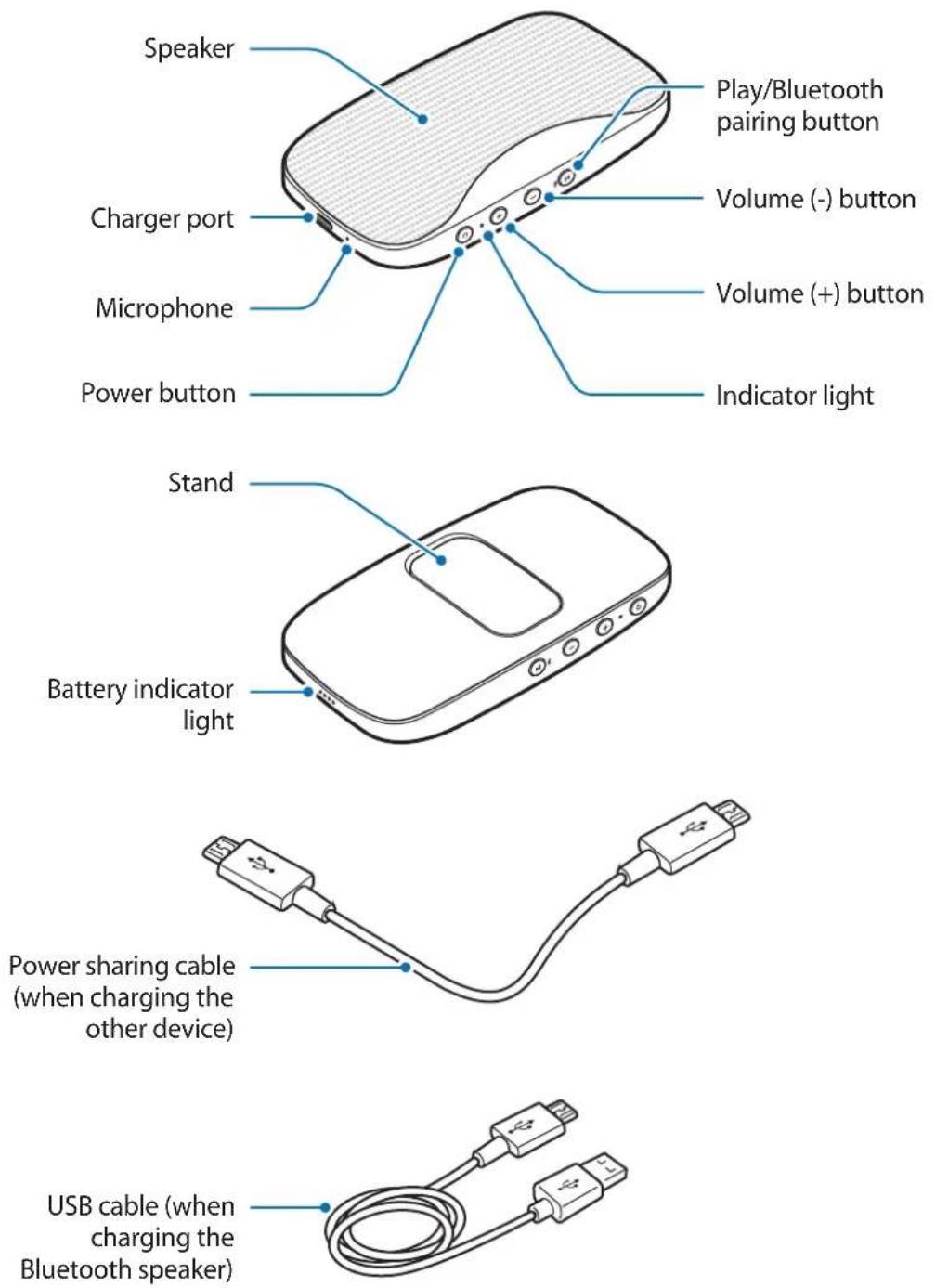

Use the stand to support the device.
Buttons
| Button Function | |
| Power button | ·Press and hold to turn the Bluetooth speaker on or off. ·Press to check the remaining battery power. ·Press to begin charging an external device when using the Bluetooth speaker as a battery pack. |
| Volume (+) button | ·Press to increase the volume. ·Press and hold to skip to the next song during music playback. |
| Volume (-) button | ·Press to decrease the volume. ·Press and hold to skip to the previous song during music playback. |
| Play/Bluetooth pairing button | ·Press and hold to enter Bluetooth pairing mode. ·Press for approximately one second to launch S Voice when the Bluetooth speaker is connected to another device via Bluetooth. ·Press to reconnect devices when the Bluetooth connection is lost. ·Press to pause or resume music during music playback. ·Press to answer an incoming call. ·Press and hold to reject an incoming call. ·Press to end the current call. |
Indicator light
The indicator light alerts you to the Bluetooth speaker status.
| Color Status | |
| Flashes blue threetimes | The Bluetooth speaker is powering on |
| Flashes red three times The Bluetooth speaker is powering off | |
| Flashes red and blue The Bluetooth speaker is in Bluetooth pairing mode | |
| Blue Bluetooth is connected | |
| Red Bluetooth is not connected | |
Battery
Battery charging tips and precautions
- You can charge the Bluetooth speaker using the charger (sold separately).
- If the battery is completely discharged, the Bluetooth speaker cannot be turned on immediately when the charger is connected. Allow a depleted battery to charge for a few minutes before turning on the Bluetooth speaker.
- Using a power source other than the charger, such as a computer, may result in a slower charging speed due to a lower electric current.
- The Bluetooth speaker can be used while it is charging, but it may take longer to fully charge the battery.
- If the Bluetooth speaker receives an unstable power supply while charging, it may not function. If this happens, unplug the charger from the Bluetooth speaker.
-
While charging, the Bluetooth speaker and the charger may heat up. This is normal and should not affect the Bluetooth speaker lifespan or performance. If the battery gets hotter than usual, the charger may stop charging.
-
Charging the Bluetooth speaker while the charger port is wet may damage the speaker. Dry the speaker thoroughly if it becomes wet.
- If the Bluetooth speaker is not charging properly, take the Bluetooth speaker and the charger to a Samsung Service Center.
- The charging time may vary depending on the charger specification.
Charging the battery
Charge the Bluetooth speaker before using it for the first time or when it has been unused for extended periods.

Use only Samsung-approved chargers (5 V/2 A or higher). Unapproved chargers can cause the battery to explode or damage the Bluetooth speaker.
1 Connect the Bluetooth speaker to a charger.
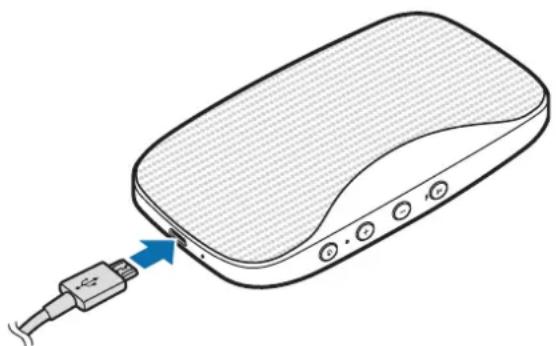

Connecting the charger improperly may cause serious damage to the Bluetooth speaker. Any damage caused by misuse is not covered by the warranty.

If the charger port is wet, the four battery indicator lights will blink when you connect the Bluetooth speaker to a charger.
2 After fully charging, disconnect the Bluetooth speaker from the charger.

To save energy, unplug the charger when not in use. The charger does not have a power switch, so you must unplug the charger from the electric socket when not in use to avoid wasting power. The charger should remain close to the electric socket and be easily accessible while charging.
Checking the remaining battery power
Press the Power button to check the remaining battery power.
| Remaining battery power Battery indicator light status |
| 70-100 % Four indicator lights on |
| 40-70 % Three indicator lights on |
| 20-40 % Two indicator lights on |
| 10-20 % One indicator light on |
| 0-10 % One indicator light blinking |
Auto power saving mode
Save battery power by activating auto power saving mode.
Press and hold the Power button and the Volume (+) button simultaneously to activate auto power saving mode. The Bluetooth speaker is automatically turned off when one hour has passed since the media file playback paused.
To deactivate auto power saving mode, press and hold the Power button and the Volume (-) button simultaneously.

When you turn on the Bluetooth speaker for the first time, it automatically enters auto power saving mode.
Using the Bluetooth speaker
Turning the Bluetooth speaker on and off
Press and hold the Power button to turn the Bluetooth speaker on or off.
When you turn on the Bluetooth speaker for the first time, it enters Bluetooth pairing mode.

- If your Bluetooth speaker is frozen and unresponsive, press and hold the Power button more than eight seconds.
- Follow all posted warnings and directions from authorized personnel in areas where the use of wireless devices is restricted, such as airplanes and hospitals.
Connecting to another device
Notices for using Bluetooth
Bluetooth is a wireless technology standard that uses a 2.4 GHz frequency to connect to various devices over short distances. It can connect and exchange data with other Bluetooth enabled devices, such as mobile devices, computers, printers, and other digital home appliances, without connecting via cables.
- To avoid problems when connecting your Bluetooth speaker to another device, place the devices close to each other.
- Ensure that your Bluetooth speaker and the other Bluetooth device are within the maximum Bluetooth range (10 m). The distance may vary depending on the environment the devices are used in.
- Ensure that there are no obstacles between the Bluetooth speaker and a connected device, including human bodies, walls, corners, or fences.
-
Do not touch the Bluetooth antenna of a connected device.
-
Bluetooth uses the same frequency as some industrial, scientific, medical, and low power products and interference may occur when making connections near these types of products.
- Some devices, especially those that are not tested or approved by the Bluetooth SIG, may be incompatible with your Bluetooth speaker.
- Do not use the Bluetooth feature for illegal purposes (for example, pirating copies of files or illegally tapping communications for commercial purposes).
Connecting device via Bluetooth
Pair the Bluetooth speaker with an available Bluetooth device. Once the devices are paired, the Bluetooth speaker will automatically connect to the mobile device whenever you turn on the Bluetooth speaker.
1 Bluetooth speaker Press and hold the Play/Bluetooth pairing button for more than three seconds to enter Bluetooth pairing mode.
The indicator light will flash red and blue.

When you turn on the Bluetooth speaker for the first time, it enters Bluetooth pairing mode.
2 Other device Activate the Bluetooth feature and search for Bluetooth devices.
For more information, refer to the other device's user manual.
3 Other device Tap [Speaker] Level Box Slim (0000) from the list of available devices.
The indicator light will flash blue.

- The PIN for the Bluetooth speaker is the four-digit number in parenthesis displayed on the other device's Bluetooth settings screen. The number differs depending on the Bluetooth speaker.
- If the Bluetooth connection fails or the other device cannot locate the Bluetooth speaker, remove the device's information from the other device's list. Then, try to connect again.
- The Bluetooth connection range and sound quality may vary depending on the connected devices.
Disconnecting or reconnecting devices
Press and hold the Play/Bluetooth pairing button for more than three seconds. The current connection will end.
You can also end the connection by deactivating the Bluetooth feature on the connected device.
If the Bluetooth connection ends due to the distance between the devices, bring the devices closer together within a certain period of time. The devices will automatically reconnect.

- You can also end the connection by turning off the Bluetooth speaker or deactivating the Bluetooth feature on the connected device. When you turn on the Bluetooth speaker again and the devices are in range, or activate the Bluetooth feature on the connected device, the devices will automatically reconnect.
- If the Bluetooth connection ends because of a device malfunction, use the Bluetooth menu on the disconnected device to reconnect the devices.
- Noise may occur if the Bluetooth connection is disconnected improperly.
Connecting to other devices
After ending the connection between the Bluetooth speaker and the currently connected device, you can connect the Bluetooth speaker to another device.
1 Press and hold the Play/Bluetooth pairing button for more than three seconds. The Bluetooth speaker will end the current Bluetooth connection and enter Bluetooth pairing mode.
2 Connect the Bluetooth speaker to another device.
Connecting additional devices
The Bluetooth speaker can connect to a maximum of two Bluetooth-enabled devices at the same time. When you connect the Bluetooth speaker to two devices, the last device you connect is recognized as the primary device. The other device is recognized as the secondary device.
1 Connect the Bluetooth speaker and a device via Bluetooth. Refer to Connecting device via Bluetooth for more information.
2 Press and hold the Play/Bluetooth pairing button for approximately three seconds to enter Bluetooth pairing mode.
The indicator light will flash red and blue and the first device will be disconnected.
3 Follow the same connection procedure used for connecting the first device to connect the Bluetooth speaker to second device.
4 Tap [Speaker] Level Box Slim (0000) from the first device's list to reconnect the Bluetooth speaker to the first device.

This feature may not be supported on some devices.
Listening to music
Listen to music played on the connected device.
Press the Play/Bluetooth pairing button to play music.
Pausing or resuming playback
Press the Play/Bluetooth pairing button to pause or resume music playback.
Adjusting the volume
Press the Volume (+) button or Volume (-) button to adjust the volume.
Skipping to other songs
Press and hold the Volume (+) button to skip to the next song during music playback.
Press and hold the Volume (-) button to skip to the previous song during music playback.
Using call features
When the Bluetooth speaker is connected to a mobile device, you can answer and control calls from the connected mobile device.
Answering or rejecting a call
Press the Play/Bluetooth pairing button to answer a call.
Press and hold the Play/Bluetooth pairing button to reject an incoming call.
Adjusting the volume
Press the Volume (+) button or Volume (-) button to adjust the volume during a call.
Answering a second call
When a second call comes in during a call, the Bluetooth speaker will emit a beep.
Press and hold the Play/Bluetooth pairing button to reject an incoming second call during a call.
Press the Play/Bluetooth pairing button to place a call on hold and answer a second call.
Press the Play/Bluetooth pairing button to switch between two calls.
Ending a call
Press the Play/Bluetooth pairing button to end a call.
Press and hold the Play/Bluetooth pairing button to end a current call and answer the held call.
Using the Samsung Level
On the connected device, download the Samsung Level app from Play Store or Galaxy Apps. With the Samsung Level app, you can check the remaining battery power and adjust the volume. You can also set the Bluetooth speaker to notify you via voice notification when you have notifications on the connected device.
Also, on the connected mobile device, launch the Samsung Level app to share audio with another Bluetooth speaker. If you activate the sound separation feature with the Samsung Level app, you can also use two speakers to separate the left and right speaker into different channels. Refer to Using the dual sound feature for more information.
For more information, refer to the help menu of the Samsung Level.

The Samsung Level app is compatible with Samsung mobile devices running Android 4.2.2 or higher. Some features may differ or may not work on your Bluetooth speaker depending on the connected device or the operating system.
Using the dual sound feature
This Bluetooth speaker supports the Dual Sound feature. You can connect two Bluetooth speakers to share the same audio. You can also use two speakers to separate the left and right speaker into different channels.
Ensure that the Bluetooth speaker that you want to share audio with is turned on.

- Your Bluetooth speaker must be connected to a mobile device. If your Bluetooth speaker is not connected to a mobile device, or is connected to more than two mobile devices, you cannot activate the Dual Sound feature.
- If the distance between your Bluetooth speaker and the connected devices is too great, there is an obstacle obstructs the signal, or the Wi-Fi signal is strong, the audio quality may be poor.
- If you restart your Bluetooth speaker while using the Dual Sound feature, it will try to reactivate the Dual Sound feature automatically. However, if your other Bluetooth speaker is connected to another mobile device, the Dual Sound feature will not reactivate automatically.
- If your other Bluetooth speaker is turned off while using the Dual Sound feature, the connection between the two Bluetooth speakers will end. When you turn it on again, it will automatically reconnect to the mobile device that it was connected to before activating the Dual Sound feature.
While sharing audio, the voice notification feature will be disabled. - Visit www.samsung.com to view the product specifications for the other Bluetooth speaker to confirm that it supports the Dual Sound feature.
1 Other Bluetooth speaker Press and hold the Play/Bluetooth pairing button and Volume (-) button simultaneously for approximately one second.
2 Bluetooth speaker Press and hold the Play/Bluetooth pairing button and Volume (+) button simultaneously for approximately one second.
The audio will be shared.
Press and hold the Volume (+) and Volume (-) button on Bluetooth speaker simultaneously for approximately one second to stop sharing audio.
Using as a battery pack
Use the Bluetooth speaker as a battery pack while connecting to another device via the power sharing cable.
1 Bluetooth speaker Insert the power sharing cable into the charger port.
2 Charged device Insert the other end of the power sharing cable into the multipurpose jack.
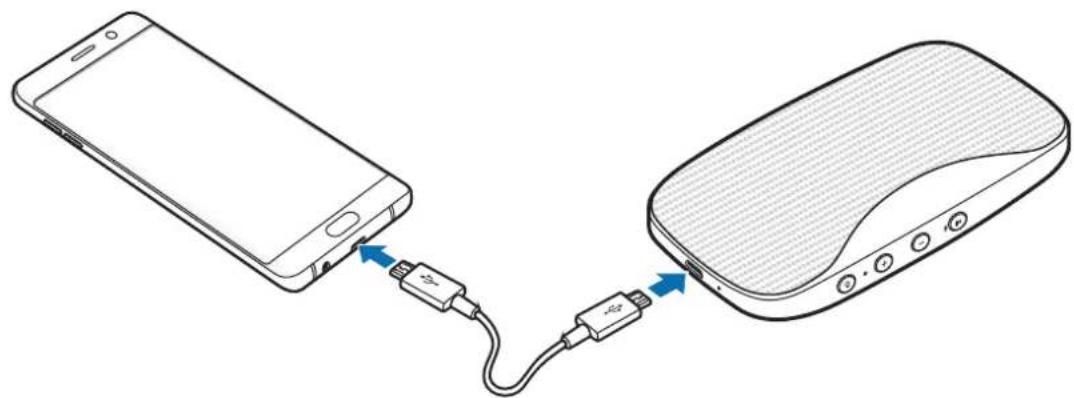
3 Bluetooth speaker Press the Power button to start charging the battery.
4 After fully charging, disconnect the power sharing cable from the Bluetooth speaker and other device for charging.

- You can use the Bluetooth speaker while charging the other device. However, if the battery power is low, some features may be limited.
- The actual capacity (Wh) is measured based on the battery's output current and voltage. It may differ from the capacity (Wh) indicated on the device, depending on the output power condition, the connected device's circuit configuration, and the operation environment.
Appendix
Troubleshooting
Before contacting a Samsung Service Center, please attempt the following solutions.
Your Bluetooth speaker does not turn on
When the battery is completely discharged, your Bluetooth speaker will not turn on. Charge the battery completely before turning on the Bluetooth speaker.
Your Bluetooth speaker freezes
If the Bluetooth speaker freezes or hangs, try to resolve it by turning off the Bluetooth speaker and then turning it on again.
If the Bluetooth speaker is still unresponsive, end the Bluetooth connection and reconnect it. To do this, press the Play/Bluetooth pairing button for approximately three seconds. When the Bluetooth speaker enters Bluetooth pairing mode, connect the devices again, and then check the operation of the Bluetooth speaker.
If the problem is still not resolved, contact a Samsung Service Center.
The battery does not charge properly (For Samsung-approved USB cables and chargers)
- Ensure that the USB cable or the charger is connected properly.
- Check whether your speaker has enough battery power before using it as a battery pack. If the tips above do not solve the problem, contact a Samsung Service Center.
Another Bluetooth device cannot locate your Bluetooth speaker
- Ensure that your Bluetooth speaker is in Bluetooth pairing mode.
- Restart your Bluetooth speaker and search for the Bluetooth speaker again.
- Ensure that your Bluetooth speaker and the other Bluetooth device are within the maximum Bluetooth range (10 m).
If the tips above do not solve the problem, contact a Samsung Service Center.
Your Bluetooth speaker cannot connect to another Bluetooth device
- Ensure that your Bluetooth speaker and the other Bluetooth device are within the maximum Bluetooth range (10 m).
- On the device you want to connect with, disconnect all paired devices and try to connect again.
Bluetooth connection is often disconnected
- If there are obstacles between the devices, the operating distance may be reduced.
- Ensure that your Bluetooth speaker and the other Bluetooth device are within the maximum Bluetooth range (10 m).
- When using the Bluetooth speaker with other Bluetooth devices, the connection may be affected by electromagnetic waves. Use the Bluetooth speaker in environments with fewer wireless devices present.
The Bluetooth speaker works differently as described in the manual
Available functions may differ depending on the connected device.
The battery depletes faster than when first purchased
- When you expose the Bluetooth speaker or the battery to very cold or very hot temperatures, the useful charge may be reduced.
- The battery is consumable and the useful charge will get shorter over time.
Copyright
Copyright © 2016 Samsung Electronics
This manual is protected under international copyright laws.
No part of this manual may be reproduced, distributed, translated, or transmitted in any form or by any means, electronic or mechanical, including photocopying, recording, or storing in any information storage and retrieval system, without the prior written permission of Samsung Electronics.
Trademarks
SAMSUNG and the SAMSUNG logo are registered trademarks of Samsung Electronics.
- Bluetooth® is a registered trademark of Bluetooth SIG, Inc. worldwide.
- All other trademarks and copyrights are the property of their respective owners.
Para comenzar
Copyright © 2016 Samsung Electronics
Copyright © 2016 Samsung Electronics
本手册受國際版權法保護。
Copyright © 2016 www.ox.ac.uk
i
国
- 상성, SAMSUNG, SAMSUNG로고는상성 전자선식회사의등목상품일지.
- 融綫捲スはBluetooth SIG, Inc.の連絡協議iners。
- 奇拉多隆上座后,君主就将王室的君主召回。

- INSTRUCTIONAL ICONS
- MAINTAINING WATER RESISTANCE
- ABOUT THE LEVEL BOX SLIM
- PACKAGE CONTENTS
- DEVICE LAYOUT
- INDICATOR LIGHT
- BATTERY
- BATTERY CHARGING TIPS AND PRECAUTIONS
- CHARGING THE BATTERY
- CHECKING THE REMAINING BATTERY POWER
- AUTO POWER SAVING MODE
- USING THE BLUETOOTH SPEAKER
- TURNING THE BLUETOOTH SPEAKER ON AND OFF
- CONNECTING TO ANOTHER DEVICE
- NOTICES FOR USING BLUETOOTH
- CONNECTING DEVICE VIA BLUETOOTH
- DISCONNECTING OR RECONNECTING DEVICES
- CONNECTING TO OTHER DEVICES
- CONNECTING ADDITIONAL DEVICES
- LISTENING TO MUSIC
- PAUSING OR RESUMING PLAYBACK
- ADJUSTING THE VOLUME
- SKIPPING TO OTHER SONGS
- USING CALL FEATURES
- ANSWERING OR REJECTING A CALL
- ANSWERING A SECOND CALL
- ENDING A CALL
- USING THE SAMSUNG LEVEL
- USING THE DUAL SOUND FEATURE
- USING AS A BATTERY PACK
- APPENDIX
- TROUBLESHOOTING
- YOUR BLUETOOTH SPEAKER DOES NOT TURN ON
- YOUR BLUETOOTH SPEAKER FREEZES
- THE BATTERY DOES NOT CHARGE PROPERLY (FOR SAMSUNG-APPROVED USB CABLES AND CHARGERS)
- ANOTHER BLUETOOTH DEVICE CANNOT LOCATE YOUR BLUETOOTH SPEAKER
- YOUR BLUETOOTH SPEAKER CANNOT CONNECT TO ANOTHER BLUETOOTH DEVICE
- BLUETOOTH CONNECTION IS OFTEN DISCONNECTED
- THE BLUETOOTH SPEAKER WORKS DIFFERENTLY AS DESCRIBED IN THE MANUAL
- THE BATTERY DEPLETES FASTER THAN WHEN FIRST PURCHASED
- REMOVING THE BATTERY
- COPYRIGHT
- TRADEMARKS
- DÉMARRAGE
- I3KIIIOUBAHE I IOBTOPHO CBBP3BAHE HA YCTPOICTBA
- CBBP3BAHE HA NPYRU YCTPOICTBA
- PPNEMAHE NN OTXBBPNHE HA NOBNKBAHN
- PERYNIPAHE HA CNLATA HA 3BYKA
- TBPROBCN MAPKN
- KAKO ZAPOČETI
- NAJPRIJE PROČITAJTE
- ZAŠITNI ZNAKOVI
- TRGOVAČKE MARKE
- COMEÇAR
- LEIA PRIMEIRO
- OPPHAVSRETT
- G
- J 1
- S JGJ
- I
- AAGAAE
- Y
- JGLG JGLG JGLG JGLG JGLG JGLG JGLG JGLG JGLG JGLG JGLG JGLG JGLG JGLG JGLG JGLG JGLG JGLG JGLG JGLG JGLG JGLG JGLG JGLG JGLG JGLG JGLG JGLG JGLG JGLG JGLG JGLG JGLG JGLG J
- OJAI
- LEVEL BOX SLIM
- OO
- S
- I 1
- G G G G G G G G G G
- 100
- A
- AILLGGLG JOLAL
- S J 1
- HAUZA LO PA60TBL
- BHEUHN BND YCTPOICTBA
- POIKIOUEHNE I OTKIIOUEHNE YCTPOICTB
- IOPKIOUEHNE KDPYRUM YCTPOICTBAM
- OTBET HA BTOPOB BBL3OB
- 3ABEPSEHNE BBL3OBA
- ИСПOLTЬОВАНЕ SAMSUNG LEVEL
- ФУНКЦЯ DUAL SOUND
- ИСПOLSВАНЕВКАЧЕСТВСHEШERO AKKУMUЯTOPA
- ПРИЛОЖКЕНИ
- YCTPAHHE NHENOJADOK
- БЕС四项IDADА УДИНОЮНKA HE BKLIOUCAETCRA
- БЕС四项IDADА УДИНОЮНKA 3ABNCAET
- AKKYMYIATOP HE 3APJXAETCR (PNN NCPOJIB3OBAHMN ODO6PEHHBIX KA6EJE USB N 3APJNDBIX YCTPOICTB SAMSUNG)
- AKKYMYIATOP PA3PJXKAETC8 6BICTPEE, YEM O6BIUHO
- ABTOPCKNE NPABA
- TOBAPHBIE 3HAKN
- ПОЧАТОК РОБОТИ
- OZHAHOMTECE NEPEI NOATKOM BNKOPNCTAHNA
- IORCHIOBAJIBHI 3HAUKN
- 3ATEPEXEHNA ⅢODO CTIKOCTI DO BVNBY BODN
- ПРОБПОСТРИЙ LEVEL BOX SLIM
- KOMPANEČAŢIA
- 3OBHIUSHIBVRGIAI NPNCTROIO
- BVNKOPNCTAHNNAAKYMYJTOPA
- ДОДАТOK
- YCYUHNHA HENOJADOK
- ДИHAMIK BLUETOOTH HE BMNKAETBCA
- ДИHAMIK BLUETOOTH ЗАМЕР3
- AKYMYIATOP HE 3APJKAETBCRA HALEXHM YINHOM (DЯ KA6EJIB USB I 3APJDHNX NPINCTPOIB, PEKOMEHDOBAHNX KOMNAIHEIO SAMSUNG)
- TOBAPHI 3HAKN
- KMBICTBI 6ACTAY
- KYMBICTBI 6ACTAMAC 6YPBIH OKBIHBL3
- HYCAYIBIK 6EJIIWEIEP
- CY ETKI36EY KA6IJETIH CAKTAY
- LEVEL BOX SLIM KYPBIJIFBLCBL TYPAIBL
- OPAMA KYPAMBL
- KYPBLFBLBIHCBLPTKBL KEPIHICI
- KYPBLFBLAPDBL AXKBIPATY HEMECE KAETA KOCY
- BACA KYPBLFBLAPFA KAIAY
- KOCBIMWA KYPBLFBLAPDBI KOCY
- MY3BIKAHBITBIHDAY
- OHATYDBI KIIDIPTY HEMECE KAIFACTBIPY
- IBI6BCIEHREIN PETTEY
- BAKA AHDEPDI OTKI3IN XI6EPY
- KONSIPAYIAPIBIH MYMKIHDIKTEPIN PAIDAJAHY
- KOHBIPAYFA JXAYAN 6EPY HEMECE KA6BLDAMAY
- BATAPEHBIH KYATBI, CATBIN AIFAHHAH KEIHRI COTKE KAPAFHATATE3 TAYCBLAIBI
- EAC
- ABTOPBIK KYKBIK
- CAYDA 6EIRILEPI
- GETTING STARTED
- READ ME FIRST
- PARA COMENZAR
- 国
Brand : SAMSUNG
Model : Level Box Slim EOSG930
Category : Loudspeaker