
Cordless III - Telephone SWATCH - Free user manual and instructions
Find the device manual for free Cordless III SWATCH in PDF.

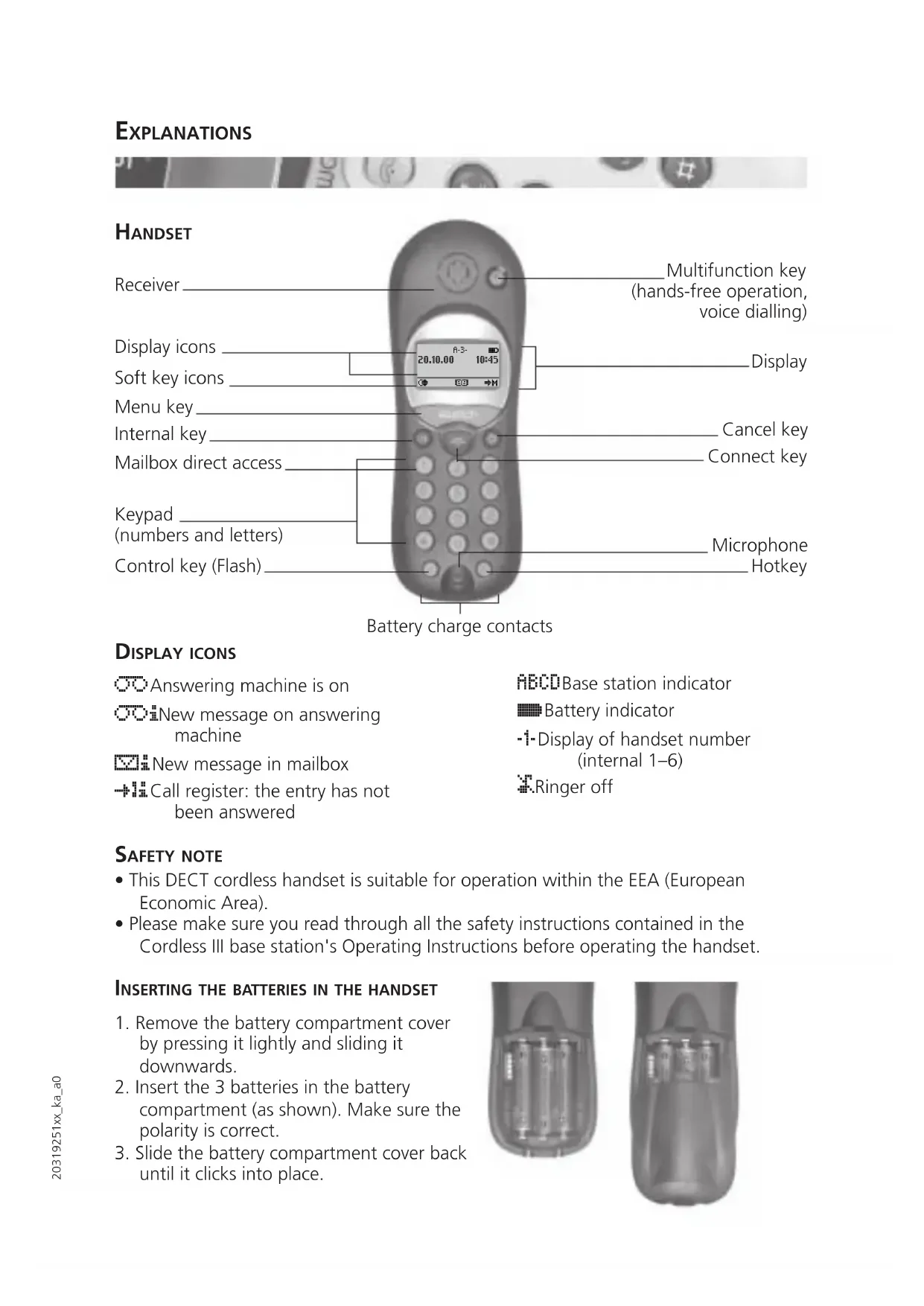


| Product Type | DECT Cordless Phone |
| Brand | Swatch |
| Model | Cordless III |
| Technology | DECT / GAP |
| Handset power supply | 3 NiMH batteries (1.2 V) |
| Standby time | 150 hours |
| Talk time | 15 hours |
| Charging time | 12 hours |
| Display | Letters and symbols (charge indicator, ring, call) |
| Integrated answering machine | Yes (Answer model) |
| Caller list | Yes (depending on operator) |
| Phonebook | Yes, with voice entries |
| Voice dialing | Yes |
| Hands-free | Yes, on handset and speakerphone |
| Maximum number of handsets | 6 (internal 1-6) |
| Menu languages | French, German, English, Italian, Dutch, etc. |
| Cleaning | Slightly damp or antistatic cloth, avoid detergents |
| Warranty | 12 months (except batteries, antenna, fuses) |
| Approval | Compliant with R&TTE Directive 99/5/EC |
| Recommended battery type | NiMH |
Frequently Asked Questions - Cordless III SWATCH
User questions about Cordless III SWATCH
0 question about this device. Answer the ones you know or ask your own.
Ask a new question about this device
Download the instructions for your Telephone in PDF format for free! Find your manual Cordless III - SWATCH and take your electronic device back in hand. On this page are published all the documents necessary for the use of your device. Cordless III by SWATCH.
USER MANUAL Cordless III SWATCH
Answering machine is on
New message on answering machine
New message in mailbox
Call register: the entry has not been answered
ABCDBase station indicator
Battery indicator
-1-Display of handset number (internal 1-6)
Ringer off
SAFETY NOTE
- This DECT cordless handset is suitable for operation within the EEA (European Economic Area).
- Please make sure you read through all the safety instructions contained in the Cordless III base station's Operating Instructions before operating the handset.
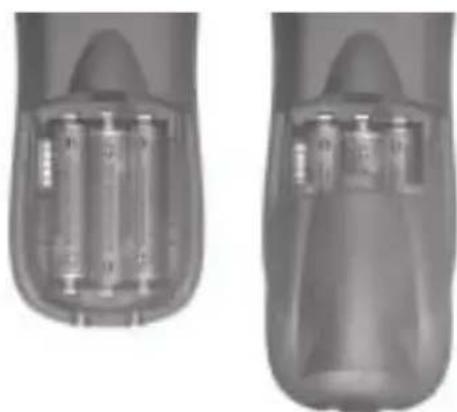
INSERTING THE BATTERIES IN THE HANDSET
- Remove the battery compartment cover by pressing it lightly and sliding it downwards.
- Insert the 3 batteries in the battery compartment (as shown). Make sure the polarity is correct.
- Slide the battery compartment cover back until it clicks into place.
Charging the batteries
The batteries are in a discharged state when supplied; they will first need to be charged:
- Place the handset on the base station or the charging bracket. An acknowledgement sound indicates that the handset is correctly positioned and the flowing battery indicator is displayed.
Service time between charging/charging time
With a set of NiMH batteries:
150 hrs standby
15 hrs talk time
- requires 12 hrs charging time
Battery indicator
When the batteries are first inserted, the battery status is unclear. A correct indication in the display is obtained only after a complete charging cycle.
flowing: battery charging
continuous: battery between 70% and 100%
continuous: battery between 50% and 70%
continuous: battery between 30% and 50%
continuous: battery between 5% and 30%
□ continuous: battery below 5%
□ flashing: battery almost discharged
continuous: battery status unclear
□ flashing: battery status unclear and battery almost discharged
Note:
If the charge state of the batteries approaches 5% , a warning beep sounds.
LANGUAGE SETTING
- Select the desired language.
- Press
- Press
Display icons
Display Function
Select main menu
Info on an entry in the call register
Redial register
Directory
中Edit directory
ABC Edit an entry
Delete an entry
Change case
Choose from list
Switch function on/off
Delete last character (backspace)
Call up further menu items (navigate)
+/- Select settings (ringer melody)
Reject call waiting during a call
/ Microphone → mute on/off
1+2/2+1 Alternate between call partners 1 to 2/2 to 1 (brokering)
OK NEW Confirm selection
YES NO Answer dialogue
Accept call waiting during a call
Start voice recording
K/ Jump forward/back when playing back recorded messages
START Record voice entry
OPT Determine options for each directory entry
END Back from directory entry
ON/OFFSwitchavailable functions on/off
QUICK REFERENCE USER GUIDE
This Guide describes the main operating sequences. For more detailed information please refer to the detailed Cordless III User Guide.
After pressing the menu key below "M" you have the following choice:
Main menu in standby state
Answer. machine (Swatch Cordless III Answer only)
Call register (if supported by provider)
Key lock
Ringer On/Off
Handset settings
BaseStat. setting
Service function
Charges
Provider services
Voice dialling
Logging the handset on the Cordless III base
- On the base station keep pressed until the key flashes.
- In the menu of the handset under "BaseStat. setting" - "Log on" - "On base station" prepare the handset for log on.
GAP uses
Your telephone supports the multi-vendor DECT GAP protocol. To be able to log it onto another base station, the latter must support the GAP protocol.
Among others the following functions are available:
- Outgoing calls from the handset
- Taking incoming calls
- Internal calls from handset to handset
Logging the handset onto another base station
- Prepare the other base station.
- In the menu of the handset under "BaseStat. setting" - "Log on" - "On other system" prepare the handset for log on.
- Enter the 4-8 digit access code (AC) of the previously prepared base station (e.g. 12345).
- Key in the designation of the base station (A-D).
- Press YES.
Setting the language
- Press
- Select "Handset settings".
- Press OK.
- Select "Language".
- Press OK.
- Select the desired language.
- Press 念
Menu guidance changes to the new language.
Selecting the battery type
- Press
- Select "Handset settings".
- Press OK.
- Select "Battery type".
- Press OK.
- Select "NiMH" or "NiCd".
- Press .
Menu in the communication state
Volume (hands-free operation only)
Loudspeaker (Swatch Cordless III)
Answer only)
Provider services
Handset volume
Send DTMF/Keypad
Directory
Recording on/off (Swatch Cordless III
Answer only)
Listening 2nd Handset
Taking/ending a call
- Press
Dialling out
- Press
- Dial the number
or - Dial the number.
- Press
(the character last entered can be deleted with "<")
Last number redial
- Press
- Select entry.
- Press
Dialling from the call register
- Press
- Select "Call register".
- Press OK.
- Select "Unanswered" or "Answered".
- Press OK.
- Select entry.
- Press
Dialling from the directory
- Press 国国
- Enter initial letters.
- Select entry.
- Press
Directory entry
- Enter the number.
- Press
- Enter name.
- Press OK.
- Enter any required options.
Off-line call preparation (Call by Call)
- Take over an entry from the directory, the call register or the radial register.
- Press
- Press OK
or enter a number via the keypad. - Store/edit the number in the directory
or combine numbers (Call by Call), e.g. a provider number and a call number
or edit the number
or to dial.
Switching loudspeaker on base station on/off (Swatch Cordless III Answer only)
You are in the middle of a call.
- Press
- Select "Loudspeaker".
- Press OK.
Making an internal call between two handsets
- Press int.
- Press ①...⑧
- Make your call.
- End your call.
QUICK REFERENCE USER GUIDE

Transferring a call internally
You are in the middle of an external call.
- Press (inb).
- Enter ①... ⑥ internal number.
- Press OK.
- End your call. The external call partner is connected to the second internal call partner.
Transferring a call externally
You are in the middle of an internal call.
- Press int.
- Enter zero (for external) plus the external number.
- Press OK.
- End your call. The internal call partner is connected to the external call partner.
Switching hands-free operation on
You are in the middle of a call.
- Press the multifunction key on the handset.
- Put the handset down.
- Continue the call in hands-free mode.
Switching hands-free operation off
Hands-free operation is on.
- Press the multifunction key on the handset.
- Hold the handset to your ear.
- Continue the call.
Carry out voice dialling
You have added a voice entry to a directory entry.
The handset is in standby state.
- Press the multifunction key.
- Pronounce the name. The telephone dials.
- Make your call.
Your Swatch Cordless III is guaranteed by Swatch Ltd.* for a period of twelve (12) months from the date of purchase under the terms and conditions of this warranty. The International Swatch Warranty covers material and manufac-turing defects. The warranty comes into force only if the warranty certificate has been filled out in full and correctly by an official Swatch dealer.
The manufacturer's warranty does not cover:
- fuses, bulbs, antennas and batteries;
network and transmission problems that are not related to the Swatch cordless handset; - damage not due to defects in material or manufacturing, specifically damage caused by water, humidity or vibration and shock;
possible consequential damage resulting in particular from use, nonfunctioning or defect of the product.
In case of defects covered by the warranty, your Swatch Cordless handset will, at the sole option of Swatch Ltd., be repaired or replaced free of charge. In case of replacement it cannot be guaranteed that you will receive the same model. The warranty for the replacement handset ends twelve (12) months after the date of purchase of the replaced handset. Any further claims against Swatch Ltd. and any performance under warranty promised by the dealer are the sole responsibility of that dealer.
the handset is serviced or repaired by any person not authorised by Swatch Ltd. or its representatives.
- the telephone is damaged through the use of accessories not approved by Swatch Ltd.
- the equipment designation (serial number) is damaged or removed.
Should you require work under warranty, please contact your official Swatch dealer or one of our authorised Swatch service centres. The handset must be submitted along with the fully and correctly completed warranty certificate. If sending the product to the service centre by post, please enclose the postage due for returning the product to you.
The above Manufacturer's Warranty does not affect your rights against the specialist dealer nor any other national statutory rights to which you are entitled. If you experience any faults with your equipment, please contact your national Swatch Telecom Service on the following telephone number:
Germany: 01805 237170
Austria: (1) 513 95 55
Switzerland: 032 343 9882
Netherlands: (045) 56 56 161
Italy: 02575971
- Swatch Ltd, CH-2501 Biel/ Switzerland
APPROVAL
CE Your SWATCH Cordless III Comfort Handset has been approved in accordance with Annex III of the R&TTE Directive 99/5/EC. This device complies with the requirements of the R&TTE Directives.
CLEANING-WHENNECESSARY
Simply wipe the telephone with a slightly damp cloth or anti-static pad. Never use a dry cloth. Avoid the use of all polishes and abrasives.
NOTES

NOTES

WARRANTY CERTIFICATE

Product: Date of purchase (please enclose purchase receipt)
Cordless III Comfort Handset
Serial No. handset: Dealer: (Name, full address and telephone number)

Buyer: (Name, full address and telephone number)
Buyer's signature:
Dealer's stamp and signature:
NOTES

NOTES

Enn
ERLÄUTERUNGEN

HANDGERAT

DISPLAYSYMBOLE
(nur Swatch Cordless III Answer)
Lauthoren (nur Swatch Cordless III Answer)
Dienste
Höerluststärke
DTMF/Keypad senden
Telefonbuch
Cordless III Answer)
Services
Volume combiné
Emetre DTMF/Keypad
Répertoir
Swatch Cordless Ill Answer)
Preparation du numero (Call by Call)
Segreteria (solo Swatch Cordless III Answer)
Cordless III Comfort Portatile
BEKNOPTE HANDLEIDING

Swatch Cordless III Answer)
BEKNOPTE HANDLEIDING

BEKNOPTE HANDLEIDING

Handset is in standby.
The telephone complies with the requirements of the EU-Recommendations

89/336/EWG "Electromagnetic compatibility", 73/23/EWG "Electrical equipment for use within specific voltage limits".
Compliance of the telephone with the aforementioned Recommendations is confirmed through the CE label.
Technical Data
Standard: DECT/GAP
Frequency range: 1880 MHz to 1900 MHz
Number of channels: 120 duplex channels
Channel spacing: 1728 kHz
Channel selection: dynamic
Modulation: GFSK
Voice coding: 32 kbit/s, ADPCM
Transmit output: 10mW mean output per channel
Range: up to 300 m outdoors,
up to 50m inside buildings
Admissible
ambient conditions
for operation: 5ircC to 40ircC
5% to 85% relative humidity
Dimensions: approx. 145 × 51 × 30 mm
Weight: approx. 140 g
swatch
(DECLARATION OF CONFORMITY)
Wir,
(IVa)
SWATCH AG
Jakob - Stämpflistrasse 94
CH-2500 Biel 4
Switzerland
(declare under our sole responsibility that the product)
Swatch Cordless Ill Comfort (Handgerat/Portable Part)
to which this declaration relates is in conformity with the following Common Technical Regulations and/or normative documents
ETS 300 329
EN 60950,
CTR6
(Tolowng the provisions of RATTE Directive 99/5EC)
Biel, 30.10.2000
(Place & Date of Issue)
Peter Steiger
Name & Signature or equivalent marking of authorised person)
H
Hans-Lothar Thurn
swatch®
cordless
CORDLESS III
WWW.SWATCH.COM
Published by SWATCH AG
JAKOB STAMPFLISTRASSE 94 . P.O.BOX . 2500 BIEL 4 . SWITZERLAND
SWATCH AG 2000.
Availability and technical alterations reserved. Order No. 20319251. Ausgabe 11/2000
- SAFETY NOTE
- INSERTING THE BATTERIES IN THE HANDSET
- Charging the batteries
- Service time between charging/charging time
- Battery indicator
- Note:
- LANGUAGE SETTING
- Display icons
- Display Function
- QUICK REFERENCE USER GUIDE
- Main menu in standby state
- Logging the handset on the Cordless III base
- GAP uses
- Logging the handset onto another base station
- Setting the language
- Selecting the battery type
- Menu in the communication state
- Taking/ending a call
- Dialling out
- Last number redial
- Dialling from the call register
- Dialling from the directory
- Directory entry
- Off-line call preparation (Call by Call)
- Switching loudspeaker on base station on/off (Swatch Cordless III Answer only)
- Making an internal call between two handsets
- Transferring a call internally
- Transferring a call externally
- Switching hands-free operation on
- Switching hands-free operation off
- Carry out voice dialling
- APPROVAL
- CLEANING-WHENNECESSARY
- NOTES
- WARRANTY CERTIFICATE
- ERLÄUTERUNGEN
- HANDGERAT
- DISPLAYSYMBOLE
- Preparation du numero (Call by Call)
- BEKNOPTE HANDLEIDING
- Technical Data
- swatch®
- cordless
- CORDLESS III
Brand : SWATCH
Model : Cordless III
Category : Telephone