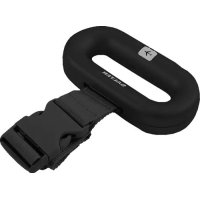
9500 - Scale SALTER - Free user manual and instructions
Find the device manual for free 9500 SALTER in PDF.



| Product type | Luggage scale |
| Brand | Salter |
| Model | 9500 |
| Maximum capacity | 40 kg / 88 lb |
| Power supply | 1 CR2032 battery (included) |
| Display | LCD digital screen |
| Measurement units | kg / lb (selectable) |
| Accuracy | Rounds to nearest value, manufacturing tolerance |
| Main functions | Luggage weighing with auto-hold, stabilization beep, auto-off after 1 minute |
| Usage | Attach strap to luggage handle, turn on, lift gently, wait for beep |
| Care and cleaning | Wipe with a soft cloth; do not use chemical detergents |
| Safety | Do not exceed maximum capacity; lift keeping back straight and knees bent; do not use if strap is worn |
| Warranty | 5 years (domestic use), excluding batteries and cosmetic damage |
| Weight (estimated) | Approximately 100 g |
| Dimensions (estimated) | Approximately 10 x 5 x 2 cm |
Frequently Asked Questions - 9500 SALTER
User questions about 9500 SALTER
0 question about this device. Answer the ones you know or ask your own.
Ask a new question about this device
Download the instructions for your Scale in PDF format for free! Find your manual 9500 - SALTER and take your electronic device back in hand. On this page are published all the documents necessary for the use of your device. 9500 by SALTER.
USER MANUAL 9500 SALTER
9500 IB V1 SL2079-3.oxd:Layout 1 14/10/09 09:57 Pa
SALTER
Luggage Scale
Instructions and Guarantee
Please read these instructions before using
the product for the first time
Balance à bagage
The Selter luggage scale has a simple one button operation. Compact and light it can be stored neatly within your luggage when you are travelling.
PREPARING YOUR SCALE
- Remove battery isolator tab from rear of scale.
- The scale is set to kg weight mode.To change default to Ib take the following steps:
- Ensure scale is switched off.
- Press button to switch scale on. While display shows 8.8.8 press button again until
desired weight mode is shown on right of display, (kg / lb) - Wait for display to show 0.0'. Scale is ready for use.
LIFTING GUIDE
- Important - if you cannot comfortably lift your luggage to not attempt to weigh it.
- Stand with luggage to your side.
- Hold scale with one hand only.
- Keeping back straight, bend knees then lift.
- Look ahead, not at the display, while lifting. The scale will beep to alert you once the weight reading has been taken.
Avoid twisting the back or leaning sideways. Keep shoulders level and facing same direction as hips keeping back upright at all times. - Keep luggage close to the body but not touching.
Luggage only needs to be just clear of floor to take reading. - Lift smoothly.
- When measurement is complete, lower the luggage in the reverse manner you lifted. (Figure 1 shows the correct lifting method)
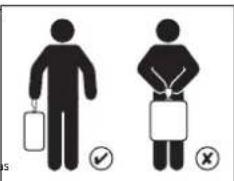
Figure 1

- Attach strap around luggage handle with buckle facing you. Ensure
- Hold scale with one hand. Allow strap to dangle beneath scale to enable an accurate zero reading.
- Press button to switch scale on. Wait until display shows zero.
- Gently lift scale until luggage is off the floor. 5. When a stable weight reading is achieved, the scale will begin
- When a stable weight reading is achieved the scale will be deep. 6. Lower the language to the floor.
- Weight is displayed for approximately 1 minute before switching off, or press button to switch off.
ACCURACY AND ALLOWANCES
Some factors affecting accuracy need to be allowed for:
- If the strap is pulled while taking a zero reading or the luggage touches yourself or an obstacle during weighing this can affect the accuracy.
- Your scale rounds up or down to the nearest increment. If you take two readings and get different readings, the weight lies between the two.
- Your scale readings may not match the airline check-in desk due to manufacturing tolerances.
- After a flight allows the scale to return to room temperature before use. For these reasons we recommend your luggage weights at least 500g/1.1lb less than your airline allowance, this should also allow you to take your luggage scale with you
9500_IB_V1_SL2079-3.qxd:Layout 1 14/10/09 09:57 Pa
ADVICE FOR USE AND CARE
- Do not exceed the 40kg / 88lb maximum weight capacity
- Clean your scale with a damp cloth. Do not use chemical cleaning agents.
- Do not use scale if the strap or buckle show any signs of fatigue.
- Treat your scale with care - it is a precision instrument.
- Do not drop it.
TROUBLESHOOTING GUIDI
If you experience any difficulty in the use of your scale:
- Check the battery is correctly fitted
- Check that you have selected your preference of kilos or pounds.
- If when you use the scale there is no display at all or if 'Lo'is displayed - try a new battery.
If 'EEE' is displayed the scale has been overloaded.
WARNING INDICATORS
'Lo' + battery symbol Replace battery
'EEE' Weight exceeds maximum capacity
REPLACE BATTERY
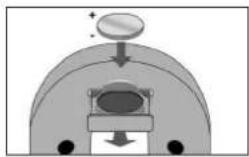
Insert batteries (1 x CR2032) observing the polarity signs (+ and -) inside the battery compartment.
5
告

GUARANTEE
This product is intended for domestic use only. Salter will repair or replace the product or any pair of this product, (excluding batteries) free of charge if within 5 years of the date of purchase, it can be shown to have failed through defective workmanship or materials. This guarantee covers working parts that affect the function of the scale. It does not cover cosmetic deterioration caused by fair wear and tear or damage caused by accident or misuse. Opening or taking apart the scale its components will void the guarantee. Claims under guarantee must be supported by proof of purchase and be returned carriage paid to Salter (or local Salter appointed agent if outside the UK). Care should be taken in packing the scale so that it is not damaged while in transit. Salter is not responsible for excess baggage fees. Salter is not responsible for injuries relating to lifting your luggage or using the luggage scale. This undertaking is in addition to a consumer's statutory rights and does not affect those rights in any way. For UK Sales and Service contact HalMedics Group Ltd PO Box 460, Tombidge, Kent1T9 9EW, UK. HelplineTel No: (01732) 360783. Outside the UK contact your local Salter appointed agent.

This marking indicates that this product should not be disposed with other household wastes throughout the EU. To prevent possible harm to the environment or human health from uncontrolled waste disposal, recycle it responsibly to promote the sustainable reuse of material resources. To return your used device, please use the return and collection systems or contact the retailer where the product was purchased. They can take this product for environmental safe recycling. (WEEE explanation)
WAARSCHUWINGSMELDINGEN
'Lo+ batterljsymbol Batterij verrangen
MetoxigencE in Cypodidae, 164
MnV Tny GAFNVE VA NEOE KETW.
OAHFOI ANTIMETQNIIEH TPOBAHMATQN
Av avnterwnlaete bookoliec kara th xpon tnCuyapicac
BeBaioueEOTI hntipotpexytoaonoeiouo.
BeBaioueEOTI xOETE enAeiOIOAovAOeMPOtnPnOPTAE, mTeAU
Avot xponooueueuyapai deepuovccta kajua evSei n eupovciTea n EvoeiLo-6kuaqote vae upragia.
- Av eepavctetai n evseisEEE, n cuyapia exeunepopotwbel.
IPOEIAONIOHTIKEENDEIEEIE
Lo+ofoo npataapac avkataotane npatapia
'EEE To apoc unepaive m yeiin kavotna Cuyionc
ANTIKATAETAH MNATAPIAe
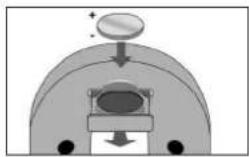
TOno0eTeIeIunatapiec (1xCR2032) npooOxyoTa ooupOa noAoiKoIyoc (i kai-) 0 eoureepko Tou youpou unatapivv.
33
ETYYEH
Auro to npoiov npoopicra anokkntia y ou ksnki xonn. H Salter 0 nnnkoua n 0
avikataoae o npoiov, n onoioiobne pepoc ouro tpoiovotc u (e eapcoic n. uanupacie),
bapev, saoov npoei va anoedge, svrcl 15 stvo an rny nupounyia ayopac, dn napouciace
Bpaq enoic ckeatnojau vyaolacn aukow. Aunr n syenoy konlotea oea eapnptna
empoeae T aenourayly Cuyapid. dev kawotte anwaiu cty opxkyic aohtnkiy n
opeoce T cnooyoiakogipho n BBAecn ouo npoeivotn ac otanyn n or koxi xonp. Av
avogtnt ny aayia n anoosnuoyoojel n Cyaovni T e npoeipatmnc n, cn ywnny oukopoetvat.
O ciauaek kakunc and myvynon nperevi va unoattkovotn and omdsaln ayopac kai va
empoeotpvoty me npueyane ta peopatopka otny Salter (n otroc kato tonouvont auropounoumc nT
Salter, av (pckokee extoc, Tou H.B). H ouokoukouia ng cyapic, nperevi va yvetia je npoooyu.
wotve na yuvno utei kaita n metepodig T. H Salter dev qepei euvwn y xpeoicoc
umepapovv noaekuku. H Salter dev qepei auovce vaa tonauanounpou ne oovsotlent
avuovu wau noaekoukowacn oit n thx npoc ty cokovu h npavoora uroxpovovov tewu
npoeotn orra vovobertqvva bokoukowit evc katovakwkt kai dev epipeca kato Kevve tpono
aura to bokaukata. Ta nuayekz kai oepici, oto H.B., zinkovovotne je my HoMedics Group Ltd,
PO Box 460,Tonbridge.Kent,TN9 9W.H.A.p. ktpovovu ypuquc unoortpinc (01732) 360783.
Exctoc Tou H.B. Kevoukouvoty ne tvosfvtarpoimtuorng tse Salter.

Aurin ouvionmouaiu de ano rnoo oovc evnici vaoopimctt pa dA
akakaaorBtae aean ty EE. Nau mypokpknBie Ouaonrnpaekdo n tny uyaoy aay
kayauocortoppncnatoivuv, ovukukauetoro untebUva, npodovotac n Bauun
enowooepoohnrpoivu uukukovapoe. Va va ematpeetene tn xpaonoiomaeynovoukeu,
xpanopoeitote to ouoetaa entnoopoe kauuoyoue knxovotne p teokataqnta onco
ono yopoae aarotopoe. O utebUva mupouwamopadouavouta ra npokov yaaopaoyia ta
pebalkawakauokauo. (EneynnnAnHE)
XnpaBbBpabOeBcBosSAller BoMnOHO pnnomooIeHcNtBHeHKnHKA. KOMnKTHne I neKHeC H C N EKTOBC BMOyTb6BbP aMaeeHbI bGaKaXe.
NOIOTOBKAKIACTPINB3OBAHIO
1.YaHnnte HsONmOHHy npoknky 6atapenc3aHHei cTOPOHbBecOB.
2.BKANCTE EHNMBH MNEPENH NO MUHAMMAD YOHTAHONBEN KUMORAPN. Yoobu nepaTH B PCXMM E3EEMBAH N BYHTAX, BEBIOINTY KJZAHJIIE HNC DECTBH
3.Y6eMTecb,HToBecblBbIKIOHHeH.
4.HakMMTE KHOKNY,TOObBI BIKMOHHT BeCH. KOrDa HA DCNNEOT OF6pKaAeTc 3HAHN8E.8.8.HAKMAJITE KHOKNY DO TEP NOK.NOKHYA EJINHHA VMEpeHnRA (Kg -KIOrPAMMBI Ib -FyTHB) He NOBRICTC nPBA HdNCIIe.
5.KaKoTkoHa nCnIe86dTeOTOBpaKaTb3HAnEhMo0,0BecrTOBOyK KcNtObTaobAHm.
KAKOoBMMATbSATAX
BANKHOE ZAMUHANHE, ECIIN Bb HE MOKOTCE C KIOKCTBOI NOHTHB CBW BAKH, KE BNTAIETCBCTO BDOUBHBAIT.
BCTaHbTe c60ky ot 6araKa.
+yeepxmbaHTeBeCbOHOHpykon.
-Дерета СИНУ ПТМО,СОПЕТУ.KОЛЕМА
ПОДМЕЧЕ ВAZAK.
B.Bo pema nmoa cmaotrpe npma,a he Ha nnnnnc. KaK tonko BcB Daet opendeneH, Bc Ycunnila 3ykoBocm HTHN BOCB
Ctapaatech He NaHONHTCBNAEPEN INM BOK, Pnneu JOnmKHa HNOAHCTBc HA ONDUM YOPOBEA, a CINHb -BbIpyHM, pIa TOM He cndyet p3ADBOOPAHMBAT KOpNTCena BOK.
-Держгет baraxбнзкк teny, He npucnohy erK cebe.
+TO6b y3HaB Bec 6aKa,doCTaTOHNO NnO bOTOpBaT ero ot nona.
- PdHmMaTe barax nlaBHO.
KoJaAaMnpeHHe 6yDat TaBepueHo, OryCtne BapKar, BuOpNHaPe HpeMnCnHHe BbIe peTbnB oOpaTHOM nopAraKe. (Ha pK.) NOKa3AH npabInbHb CnOcO bNoBema)
PPOLEVPA B3BEEBAHMR
1.06peHnTe pEmhB bOKpy pyKk B4aKa TAK, YO6b3aCtckKa HxuaDnAeBc NpeDa BAMN. 8yEbeTcB, yO3aCtckKa HaeKko CKePnEHa, a PEmhB cNoCoEB BdePekAtB Bec, 6oBnBuBeBaBnero 6oRaKa.
2.Bozumtme BcHIOI OIOHpyoK.PeMHcIOJOLJKeH BOOBOHO CINCBATy,HTOBI BoCHeM MOFJI BbTbBkCTADJIH HNHYELO 3HNHEYE.
3. Hakmiche KONKHY, YOtsbi BIKONOHBTBBeCblIPOdoKoDnTE, NOKA Ha DCNCEE He NOBIRCBT HYNBEDE 3HUYENHE.
4. Otoopoxho noHmMaite Bc, noka 6atax He otopbetcr ot nona
5.KoHa OIpOeKINHe Bc6 bDzBpeHIO,BeCbNIOaIy1 38kyKOcOvCNHAI.
6. Onycture 6araa Ha non
7.Cec 6y0et OTOBAPKbATn HAN CJIeIeO DO ABOTAMHECKGOrO TIOKIOBCHENH PINHOpa PIPIMPEHcpe31 MNHTY INN Do HAKANTKHNOKH BECO.
NOPTBULHOGTMAIOTAAABK
Heo6xmoOyHTbTaBpndkTOpOB,8nIOUXHaTOHcObB3BeuHaHa
+EcnnpeembeHATAHTyBO sPmeYcTAHOBKHyNEBORO 3aHeyHNb6Bb npncnHOHBAKTeNHYIOHOTOPOHemynpdMeTYBO sPmeR B3BeeHNbHNH, mEPOHMOXKT bHt HTOHbM.
POKAAHANBCERDA OKPYBNTOcD6IbIKAHIeroIeNOrOUICNCA.EcmpeyMbTaTH PIXY BRIEINBAHAPaNNHUM, HCTNHOHE 3AHUEHNE Beca JENK IN POMekyTKE MEKUYIPOHNCHIMPCyBHTATAM.
- NOK3AABHOB CEBIO MTO COBETCTBOBAT B NOK3AHHM CTONA pRNTCPALIN B
A3PONOTYV 43-A 3TEXHONORWCKKX OTKHOEHNEI
TcBbI cNcNIOB3Bc BcBcHcEIOECPCTBHeHO hOncNE 2aBaePHEUH aHneT, HEOxOHO mNOoKoDAt, NOO hOH NnHpOePTy KCMATHYO TEmeHATpy.
9500_IB_V1_SL2079-3.qxd:Layout 1 14/10/09 09:57 Pa
B CBAH C BAOXMHN HMM HHTHOCTHM PPN HMAPEHNA PEKOMENYETCH, YTOB6 BEC 64aKa6 bbl Ha500 [1, fyn] MeHeBE cBa, paeHHNOrHO pOeBO6KbM CAMONE, Nn TAKOM PaCteB EBI KAK a3 CMOKNEI NOONWtB aBARK BECb
COBEBI INCINbBOAHMOYXOy
- MakcimKbHBDIOTyIMMBCBEGARAK,KOPTORHECNDEYETPNEBbWATPBPP338EHHUH,COCTABEN40KT,NINRAVDRTH.
BnKrtbBeCnCneyET BnAChNOI TpKnO. He KcNtBsyTe XmMnEeckne HcTnIIaep cpeCTDa.
He nOblbYIte BcE cPiMaJIeHbIX pIaHJAKX HIOHOCA 3ACTeKNI MHN PEMI.
06paaiTeBcBcBaAMBepeKHO:3TO bBCOKOTOHbN I3MePHTbHb NpIMo6p. He
poHnAIE Kx
MOCKXXTPAHBMENBNAOK
Ecn npnncnonb3oBAHmBecOB803HmHHeNoaIa
IPOBEBPTE,INPAIBINOHO NCTAOBILHEA GATAPER;
Y6EaIEC,HTO Bb6paHbHeo6XoAMMbEeMHNcH3MEpeHHN (KIOIOPaMMbIKM)
yHNT;
EcnipnriB3BbHMAHnHaN HJCNHHee HeOBoPAaTeCR NHAKHXIuPfHPO OBOPTAKPeKTHZHEHNEULOY,LaTOHAYOBIEHOYBOYBaTAPEO
- Ecm Ha pncnnee oto6paKaAeTc3HaenHe EEE, Becb nperepykeHb.
PDPKDAIOWEHMKATQPbI
'Lo' + cmmn 6atapen Heo6xmoaamehb 6atapoe 'EEE'bec npbeBuaet MaKcmmnBho DOYCTMIOE 3HaeHH
37
2
9500_IB_V1_SL2079-3.qxd:Layout 1 14/10/09 09:57 Pa
MBOXOJMM03AMEEHTSATAPE
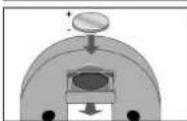
YCTAHOBHTB6bATAPENHbOTcEKbATAPEN (1xCR2032),coBmDnIaIINPbHOCT CmBMOHn+I-).
TAPAHTVIA
30 TcypoTPOPnHmHHeNTOBbI BbIbIOIOIOIOIOIOIOIOIOIOIOIOIOIOIOIOIOIOIOIOIOIOIOIOIOIOIOIOIOIOIOIOIOIOIOIOIOIOIOIOIOIOIOIOIOIOIOIOIOIOIOIOIOIOIOIOIOIOIOIOIOIOIOIOIOIOIOIOIOIOIOIOIOIOIOIOIOIOIOIOIOIOIOIOIOIOIOIOIOIOIOIOIOIOIOIOIOIOIOIOOOBHTBcOeHHaHbMBOHbMBOHbMBOHbMBOHbMBOHbMBOHbMBOHbMBOHbMBOHbMBOHbMBOHbMBOHbMBOHbMBOHbMBOHbMBOHbMBOHbMBOHbMBOHbMBOHbMBOHbMBOHbMBOHbMBOHbMBOHbMBoHHaBcBcBcBcBcBcBcBcBcBcBcBcBcBcBcBcBcBcBcBcBcBcBcBcBcBcBcBcBcBcBcBcBcBcBcBcBcBcBcBcBcBcBcBcBcBcBcBcBcBcBbCboHHaBBHOHOHOHOHOHOHOHOHOHOHOHOHOHOHOHOHOHOHOHOHOHOHOHOHOHOHOHOHOHOHOHOHOHOHOHOHOHOHOHOHOHOHOHOHOHOHOHOHOHOHOHOHOHOHOHOHOHOHOHOHOHOHOHOHOHOHOHOHOHOHOHOHOHOHOHOHOHOHOHOHOHOHOHOHOHOHOHOHOHOHOHOHOHOHOHOHOHOHOHO HOHHaBBHoHHaBBHoHHaBBHoHHaBBHoHHaBBHoHHaBBHoHHaBBHoHHaBBHoHHaBBHoHHaBBHoHHaBBHoHHaBBHoHHaBBHoHHaBBHoHHaBBHoHHaBBHoHHaBBHoHHaBBHoHHaBBHoHHaBBHoHHaBBHoHHaBBHoHHaBBHoHHaBBHoHHaBBHoHHaBBHbCboHHaBBHoHHaBBHoHHaBBHoHHaBBHoHHaBBHoHHaBBHoHHaBBHoHHaBBHoHHaBBHoHHaBBHoHHaBBHoHHaBBHoHHaBBHoHHaBBHoHHaBBHoHHaBBHoHHaBBHoHHaBBHoHHaBBHoHHaBBHoHHaBBHoHHaBBHoHHaBBHoHHaBBHoHHaBBHaBHcCboHHaBBHoHHaBBHoHHaBBHoHHaBBHoHHaBBHoHHaBBHoHHaBBHoHHaBBHoHHaBBHoHHaBBHoHHaBBHoHHaBBHoHHaBBHoHHaBBHoHHaBBHoHHaBBHoHHaBBHoHHaBBHoHHaBBHoHHaBBHoHHaBBHoHHaBBHoHHaBBHoHHaBBHoHH aBoHHoPpOoK bOpOoK bOpOoK bOpOoK bOpOoK bOpOoK bOpOoK bOpOoK bOpOoK bOpOoK bOpOoK bOpOoK bOpOoK bOpOoK bOpOoK bOpOoK bOpOoK bOpOoK bOpOoK bOpOoK bOpOoK bOPOoK bOpOoK bOpOoK bOpOoK bOpOoK bOpOoK bOpOoK bOpOoK bOpOoK bOpOoK bOpOoK bOpOoK bOpOoK bOpOoK bOpOoK bOpOoK bOpOoK bOpOoK bOpOoK bOpOoK bOsOHoo HOOOOOOOOOOOOOOOOOOOOOOOOOOOOOOOOOOOOOOOOOOOOOOOOOOOOOOOOOOOOOOOOOOOOOOOOOOOOOOOOOOOOOOOOOOOOOOOOOOOOOOOOOOOOOOOOOOOOOOOOoo

38
DAHAR MAKHPKRAO 03AHTT, YTO B CTPAHX EBOHNA HE DYOTCACTR YNTHPOVROI PNOOP BMCTC CDPYIMTA B60BMOH OTOXDMN. THOBCH HHECTEY UZP6PA OOKYKAHIN CRPEI ANDPOBIO HAETENB P BYEPNTATE HEBEOH YTNMAIAEM IONTOXD. NPOIPD CNETDY CTADH NA HEPPOBATOY, TTOBBA OBEACHN ENKOROHNE NOPTOBEP HNCTOBAHA MATEPHANALPCYCPOB. BEHPTE B6UBIHN BYOTPEHNNH NPOIPD HEPCE CHENTMY BOBATA CBOA OPOBTOXDN MIB CBNKITCCB C pNDPNRTMRC O03HNIKTOPROMA, RAE BNIPOPBENI PNOOP. TAM BYCMOKECT CAGT BT OT PROUYI KRAOHNIECKS B601AHOH NPERAOBDO (TONCHENHE WEEE)

9500 IB V1 SL2079-3.qxd:Layout 1 14/10/09 09:57 Pa

SALTER
HoMedics Group Ltd
PO Box 460, Tonbridge, Kent, TN9 9EW, UK
www.salterhousewares.co.uk
REF:SL2079-3

- SALTER
- Luggage Scale
- PREPARING YOUR SCALE
- LIFTING GUIDE
- ACCURACY AND ALLOWANCES
- ADVICE FOR USE AND CARE
- TROUBLESHOOTING GUIDI
- WARNING INDICATORS
- REPLACE BATTERY
- GUARANTEE
- WAARSCHUWINGSMELDINGEN
- OAHFOI ANTIMETQNIIEH TPOBAHMATQN
- IPOEIAONIOHTIKEENDEIEEIE
- ANTIKATAETAH MNATAPIAe
- ETYYEH
- NOIOTOBKAKIACTPINB3OBAHIO
- KAKOoBMMATbSATAX
- PPOLEVPA B3BEEBAHMR
- NOPTBULHOGTMAIOTAAABK
- COBEBI INCINbBOAHMOYXOy
- MOCKXXTPAHBMENBNAOK
- PDPKDAIOWEHMKATQPbI
- MBOXOJMM03AMEEHTSATAPE
- TAPAHTVIA
Brand : SALTER
Model : 9500
Category : Scale