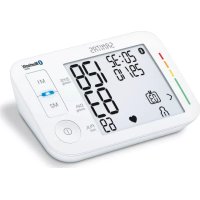
SBM 37 - Blood pressure monitor SANITAS - Free user manual and instructions
Find the device manual for free SBM 37 SANITAS in PDF.



| Product type | Upper arm blood pressure monitor, non-invasive oscillometric measurement |
| Brand | Sanitas |
| Model | SBM 37 |
| Dimensions | 139 mm x 94 mm x 48 mm |
| Weight | 236 g (without cuff) |
| Power supply | 4 x 1.5 V AAA batteries (alkaline LR03) |
| Battery life | Approximately 200 measurements depending on conditions |
| Pressure measurement range | Systolic: 50-250 mmHg, Diastolic: 30-200 mmHg, Pulse: 40-180 beats/min |
| Accuracy | Pressure: ±3 mmHg, Pulse: ±5% of displayed value |
| Memory | 2 x 60 memory slots |
| Connectivity | Bluetooth® Smart (Low Energy) 2.4 GHz |
| Cuff size | 22 to 36 cm (optional large cuff 35-44 cm, ref. 163.387) |
| Display | Screen with date, time, pressure, pulse, WHO classification indicator |
| Arrhythmia detection | Yes, with symbol display |
| Result classification | According to WHO scale (optimal, normal, high normal, mild hypertension, moderate, severe) |
| Averages | Overall, morning (5:00-9:00), and evening (18:00-20:00) averages over 7 days |
| Automatic shut-off | Yes, after 30 seconds of inactivity and after 3 minutes in display mode |
| Operating conditions | +5°C to +40°C, relative humidity 15-93% |
| Storage conditions | -25°C to +70°C, relative humidity ≤93%, pressure 800-1050 hPa |
| Included accessories | Cuff, instruction manual, storage pouch |
| Care and cleaning | Clean with a slightly damp cloth, no detergent or solvent, do not immerse |
| Repairability | Do not repair yourself, contact customer service or an authorized service provider |
| Safety | Type BF equipment, compliant with directive 93/42/EEC, standards EN1060 and IEC80601-2-30 |
| Warranty | Warranty void if opened or repaired without authorization |
Frequently Asked Questions - SBM 37 SANITAS
User questions about SBM 37 SANITAS
0 question about this device. Answer the ones you know or ask your own.
Ask a new question about this device
Download the instructions for your Blood pressure monitor in PDF format for free! Find your manual SBM 37 - SANITAS and take your electronic device back in hand. On this page are published all the documents necessary for the use of your device. SBM 37 by SANITAS.
USER MANUAL SBM 37 SANITAS
Quelle: WHO, 1999 (World Health Organization)
Schritt 2: HealthCoach App
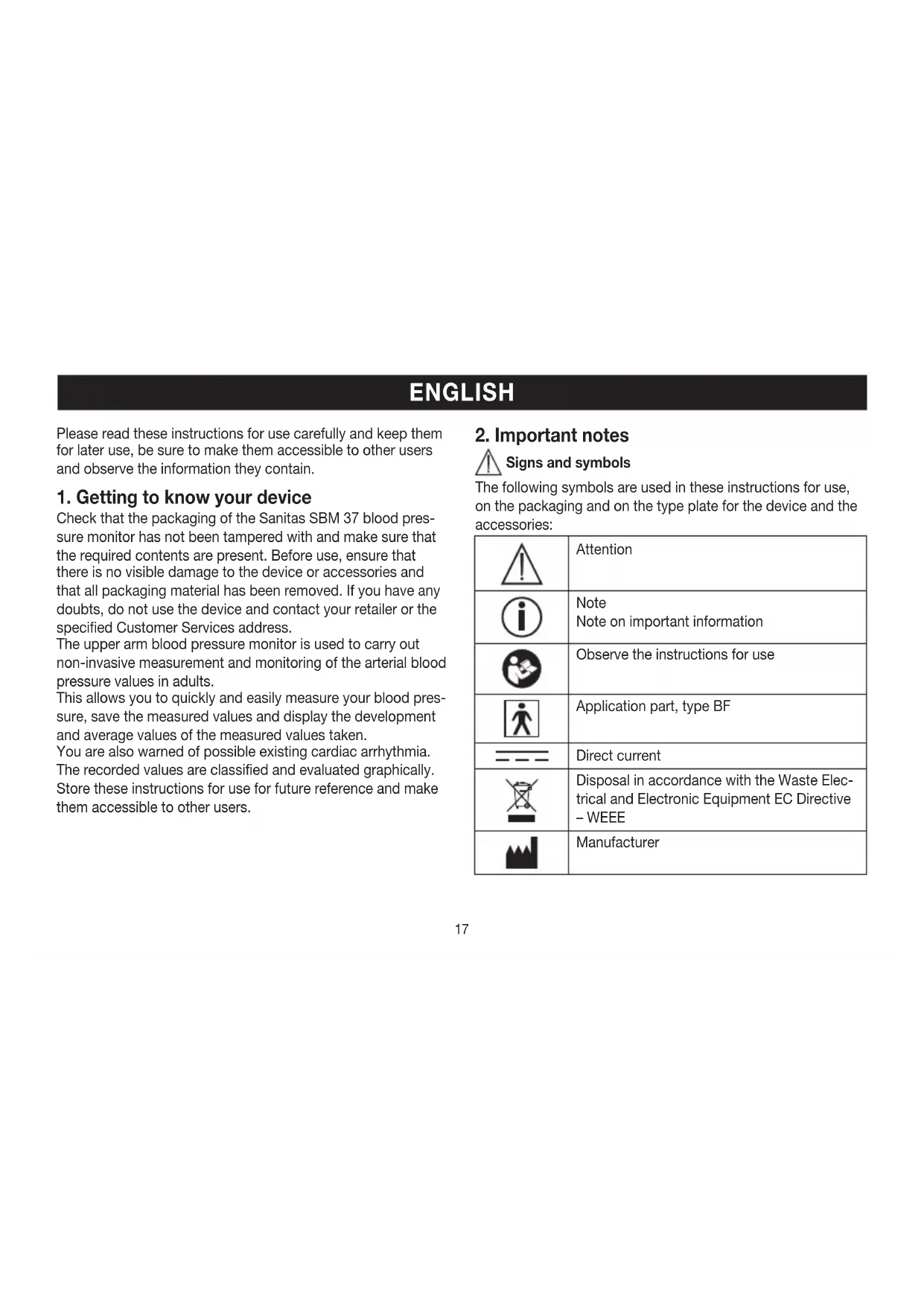
Please read these instructions for use carefully and keep them for later use, be sure to make them accessible to other users and observe the information they contain.
1. Getting to know your device
Check that the packaging of the Sanitas SBM 37 blood pressure monitor has not been tampered with and make sure that the required contents are present. Before use, ensure that there is no visible damage to the device or accessories and that all packaging material has been removed. If you have any doubts, do not use the device and contact your retailer or the specified Customer Services address.
The upper arm blood pressure monitor is used to carry out non-invasive measurement and monitoring of the arterial blood pressure values in adults.
This allows you to quickly and easily measure your blood pressure, save the measured values and display the development and average values of the measured values taken.
You are also warned of possible existing cardiac arrhythmia.
The recorded values are classified and evaluated graphically.
Store these instructions for use for future reference and make them accessible to other users.
2. Important notes

Signs and symbols
The following symbols are used in these instructions for use, on the packaging and on the type plate for the device and the accessories:
| Attention | |
| Note Note on important information | |
| Observe the instructions for use | |
| Application part, type BF | |
| = = = | Direct current |
| Disposal in accordance with the Waste Electrical and Electronic Equipment EC Directive – WEEE | |
| Manufacturer | |
| Storage -25°C RH ≤93% | Permissible storage temperature and humidity |
| Operating 5°C RH 40°C RH 15-93% | Permissible operating temperature and humidity |
| Protect from moisture | |
| SN Serial | number |
| CE 0483 | The CE labelling certifies that the product complies with the essential requirements of Directive 93/42/EEC on medical products. |

Notes on use
- In order to ensure comparable values, always measure your blood pressure at the same time of day.
Before every measurement, relax for about five minutes. - If you want to perform several measurements on the same person, wait five minutes between each measurement.
- Do not take a measurement within 30 minutes of eating, drinking, smoking or exercising.
- Repeat the measurement if you are unsure of the measured value.
- The measured values taken by you are for your information only - they are no substitute for a medical examination. Discuss the measured values with your doctor and never base
any medical decisions on them (e.g. medicines and their administration).
- Do not use the blood pressure monitor on newborns or patients with preeclampsia. We recommend consulting a doctor before using the blood pressure monitor during pregnancy.
- Cardiovascular diseases may lead to incorrect measurements or have a detrimental effect on measurement accuracy. The same also applies to very low blood pressure, diabetes, circulatory disorders and arrhythmias as well as chills or shaking.
- The blood pressure monitor must not be used in connection with a high-frequency surgical unit.
- Only use the device on people who have the specified upper arm measurement for the device.
- Please note that when inflating, the functions of the limb in question may be impaired.
- During the blood pressure measurement, the blood circulation must not be stopped for an unnecessarily long time. If the device malfunctions remove the cuff from the arm.
- Avoid any mechanical restriction, compression or bending of the cuff line.
- Do not allow sustained pressure in the cuff or frequent measurements. The resulting restriction of the blood flow may cause injury.
- Make sure that the cuff is not placed on an arm in which the arteries or veins are undergoing medical treatment, e.g. intravascular access or intravascular therapy, or an arteriovenous (AV) shunt.
-
Do not use the cuff on people who have undergone a mastectomy.
-
Do not place the cuff over wounds as this may cause further injury.
- Please note that data transfer and data storage is only possible when your blood pressure monitor is supplied with power. As soon as the batteries are empty, the blood pressure monitor loses the date and time.
- To conserve the batteries, the blood pressure monitor switches off automatically if no buttons are pressed for 30 seconds.
- The device is only intended for the purpose described in these instructions for use. The manufacturer is not liable for damage resulting from improper or careless use.

Instructions for storage and maintenance
-
The blood pressure monitor is made from precision and electronic components. The accuracy of the measured values and service life of the device depend on its careful handling:
-
Protect the device from impacts, humidity, dirt, marked temperature fluctuations and direct sunlight.
- Do not drop the device.
- Do not use the device in the vicinity of strong electromagnetic fields and keep it away from radio systems or mobile telephones.
-
Only use the cuff included with the delivery or original replacement parts. Otherwise incorrect measured values will be recorded.
-
Do not press the buttons before the cuff is placed on the arm.

Notes on handling batteries
- If your skin or eyes come into contact with battery fluid, rinse the affected areas with water and seek medical assistance.
- Choking hazard! Small children may swallow and choke on batteries. Store the batteries out of the reach of small children.
- Observe the plus (+) and minus (-) polarity signs.
- If a battery has leaked, put on protective gloves and clean the battery compartment with a dry cloth.
- Protect batteries from excessive heat.
- Risk of explosion! Never throw batteries into a fire.
- Do not charge or short-circuit batteries.
- If the device is not to be used for a relatively long period, take the batteries out of the battery compartment.
- Use identical or equivalent battery types only.
Always replace all batteries at the same time. - Do not use rechargeable batteries.
- Do not disassemble, open or crush the batteries.

Battery disposal
- The empty, completely discharged batteries must be disposed of through specially designated collection boxes, recycling points or electronics retailers. You are legally required to dispose of the batteries.
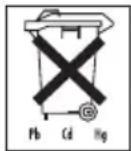
- The codes below are printed on batteries containing harmful substances:
Pb = Battery contains lead,
Cd = Battery contains cadmium,
Hg = Battery contains mercury
Instructions for repairs and disposal
- Batteries do not belong in household waste. Please dispose of empty batteries at the collection points intended for this purpose.
- Do not repair or adjust the device yourself. Proper operation can no longer be guaranteed in this case.
- Repairs must only be carried out by Customer Services or authorised suppliers.
- Do not open the device. Failure to comply will invalidate the warranty.
- For environmental reasons, do not dispose of the device in the household waste at the end of its useful life. Dispos of the device at a suitable local collection or recycling point. Dispos of the device in accordance with EC Directive - WEEE (Waste Electrical and Electronic Equipment). If you have any questions, please contact the local authorities responsible for waste disposal.
3. Device description
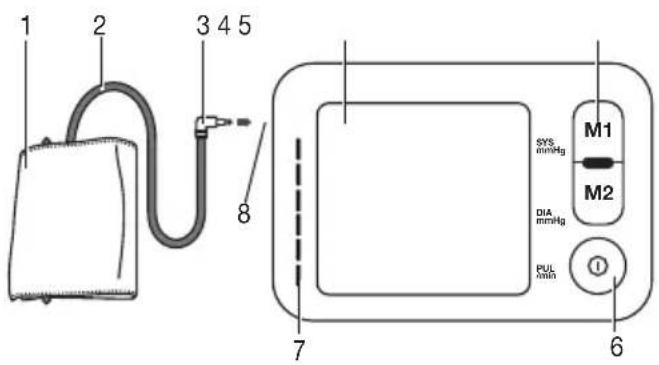
1.Cuff
2. Cuff line
3. Cuff connector
4. Display
5. Memory buttons M1/M2
6. START/STOP button ①
7. Scale for classifying the measurements
8. Connection for cuff connector (left-hand side)
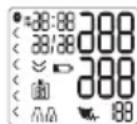
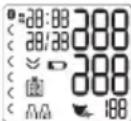
Information on the display:
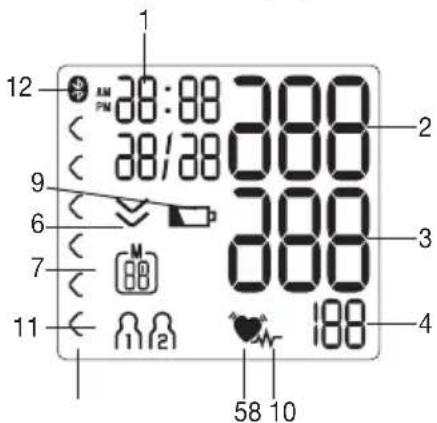
- Time/date
- Systolic pressure
- Diastolic pressure
- Calculated pulse value
- Pulse symbol
- Release air (arrow)
- Number of memory space/memory display for average value (A), morning (B), evening (C)
- Classification of measurements
- Battery display symbol
10.Cardiac arrhythmia symbol - User memory
- Symbol for Bluetooth® transfer 8
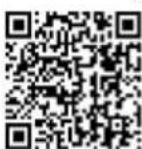
System requirements for the HealthCoach app
Bluetooth®4.0, iOS from Version 7.0, Android™ devices from
Version 4.3 with Bluetooth® Smart Ready
List of compatible devices:
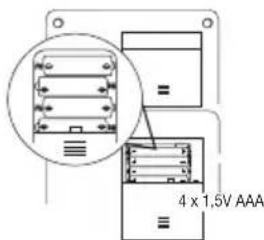
4. Preparing the measurement Inserting the batteries
- Remove the battery compartment lid on the rear of the device.
- Insert four 1.5 V AAA (alkaline type LR03) batteries. Make sure that the batteries are inserted the correct way round. Do not use rechargeable batteries.
- Close the battery compartment lid again carefully.
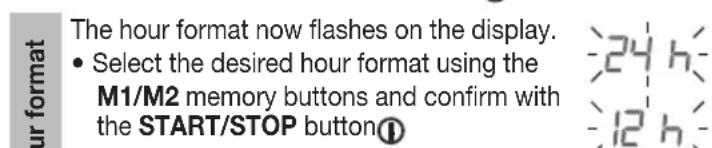
All display elements are briefly displayed, 24 h or 1 flashes in the display. Now set the date and time as described below.
If the battery replacement symbol is permanently displayed, you can no longer perform any measurements and must replace all batteries. Once the batteries have been removed from the device, the date and time must be set again. Any saved measured values are retained.
Set the hour format, date, time and Bluetooth® settings
The following section describes the functions and settings available on the blood pressure monitor.

It is essential to set the correct date and time. Otherwise, you will not be able to save your measured values correctly with a date and time and access them again later.
If you press and hold the M1 or M2 memory button, you can set the values more quickly.
Press and hold the START/STOP button for 5 seconds.
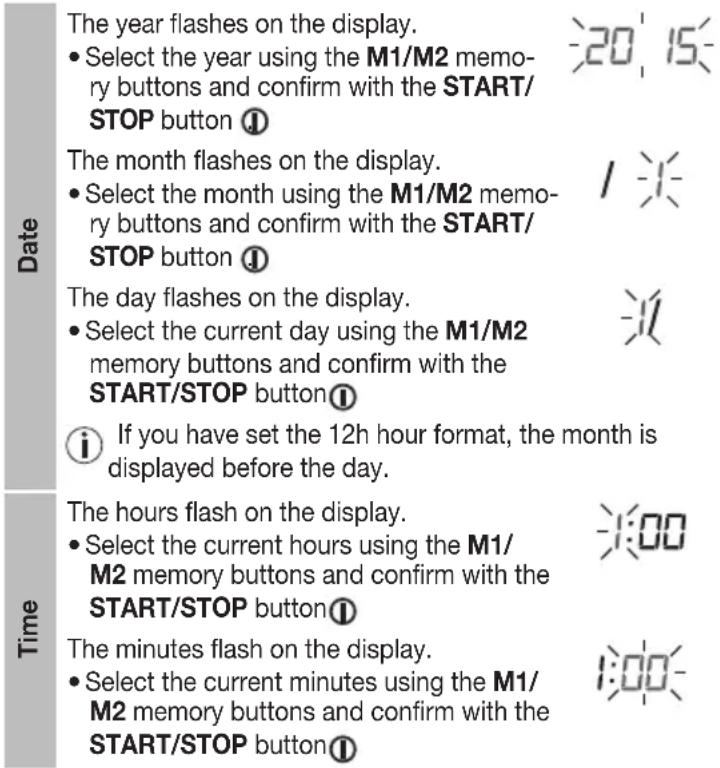
The Bluetooth® symbol flashes on the display.
- Use the M1/M2 memory buttons to select whether automatic Bluetooth® data transfer is activated (Bluetooth® symbol flashes) or deactivated (Bluetooth® symbol is not shown) and confirm with the START/STOP button ①
Bluetooth transfers will reduce the battery life.
5. Measuring blood pressure
Ensure the device is at room temperature before measuring. The measurement can be performed on the left or right arm.
Attaching the cuff
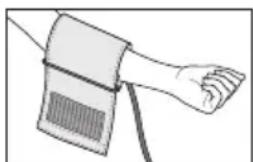
Place the cuff on to the bare left upper arm. The circulation of the arm must not be hindered by tight clothing or similar.
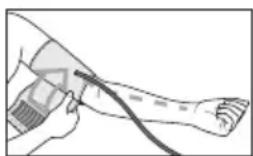
The cuff must be placed on the upper arm so that the bottom edge is positioned 2 - 3cm above the elbow and over the artery. The line should point to the centre of the palm.
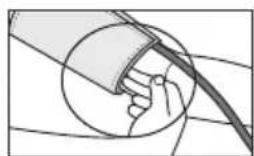
Now tighten the free end of the cuff, but make sure that it is not too tight around the arm and close the hook-and-loop fastener. The cuff should be fastened so that two fingers fit under the cuff.
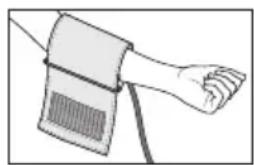
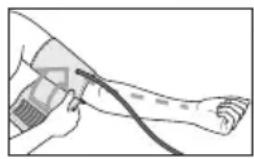
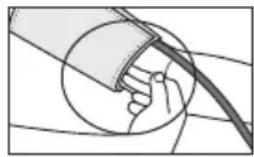
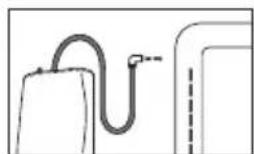
Now insert the cuff line into the connection for the cuff connector.
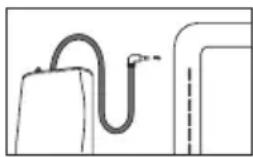
If the measurement is performed on the right upper arm, the line should be located on the inside of your elbow. Ensure that your arm is not pressing on the line.
Blood pressure may vary between the right and left arm, which may mean that the measured blood pressure values are different. Always perform the measurement on the same arm.
If the values between the two arms are significantly different, please consult your doctor to determine which arm should be used for the measurement.
Important: The unit may only be operated with the original cuff. The cuff is suitable for an arm circumference of 22 to 36~cm
A larger cuff for upper-arm circumferences of 35 to 44cm can be obtained from specialist retailers or from the service address using order number 163.387.
Adopting the correct posture
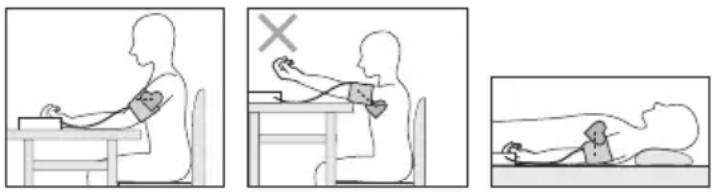
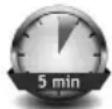
Before every measurement, relax for about five minutes. Otherwise deviations can occur.
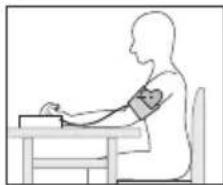
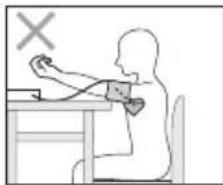
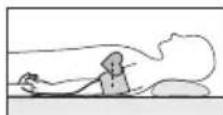
- You can take the measurement while sitting or lying down. Always make sure that the cuff is at heart level.
- To carry out a blood pressure measurement, make sure you are sitting comfortably with your arms and back leaning on something. Do not cross your legs. Place your feet flat on the ground.
- To avoid falsifying the measurement, it is important to remain still during the measurement and not to speak.
Performing the blood pressure measurement
As described above, attach the cuff and adopt the posture in which you want to perform the measurement.
- Press the START/STOP button to start the blood pressure monitor. All display elements are briefly displayed.
The blood pressure monitor will begin the measurement automatically after 3 seconds.
You can cancel the measurement at any time by pressing the START/STOP button
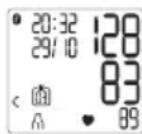
As soon as a pulse is found, the pulse symbol will be displayed.
- The systolic pressure, diastolic pressure and pulse rate measurements are displayed.
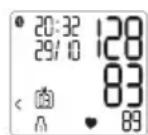
- E_r appears if the measurement could not be performed properly (see chapter 9 "Error messages/troubleshooting"). Repeat the measurement.

- Now select the desired user memory by pressing the M1 or M2 memory buttons. If you do not select a user memory, the measurement is stored in the most recently used user memory. The relevant symbol appears on the display.
- Press the START/STOP button to switch off the blood pressure monitor. The measurement is then stored in the selected user memory.
- If the device is not switched off manually, it will switch off automatically after 3 minutes.
If Bluetooth® data transfer has been activated, data is by transferred after having confirmed the user memory by pressing the pressing the START/STOP button ①.
- TheBluetooth® symbol on the display flashes and the blue LED lights up. The blood pressure monitor now attempts to connect to the app for approx. 30 seconds.
- TheBluetooth® symbol stops flashing as soon as a connection is established. All measurement data is automatically transferred to the app. Once the data has been successfully transferred, the device switches off. If the data transfer was unsuccessful, the blue LED goes out and "Erappears on the display.
- If a connection to the app cannot be established after 30 seconds, the Bluetooth® symbol goes out and the blood pressure monitor switches off automatically after 3 minutes.
Measurement
Please note that you must add the blood pressure monitor in "My devices" in the "HealthCoach" app to enable data transfers. The "HealthCoach" app must be active to allow data transfer.
If the latest data is not displayed on your smartphone, repeat the data transfer as described in chapter 7.
If you forget to turn off the blood pressure monitor, it will switch off automatically after approximately 3 minutes. In this case too, the value is stored in the selected or most recent user memory and the data is transferred if Bluetooth® data transfer has been activated.
- Wait at least 5 minutes before taking another measurement.
6. Evaluating results
Cardiac arrhythmia:
This device can identify potential disruptions of the heart rhythm when measuring and if necessary, indicates this after the measurement with the symbol
This can be an indicator for arrhythmia. Arrhythmia is a condition in which the heart rhythm is abnormal because of flaws in the bioelectrical system that regulates the heartbeat. The symptoms (skipped or premature heart beats, pulse being slow or too fast) can be caused by factors such as heart disease, age, physical make-up, excess stimulants, stress or lack of sleep.
Arrhythmia can only be determined through an examination by your doctor.
If the symbol is shown on the display after the measurement has been taken, repeat the measurement. Please ensure that you rest for 5 minutes beforehand and do not speak or move during the measurement. If the symbol appears frequently, please consult your doctor.
Self-diagnosis and treatment based on the measurements can be dangerous. Always follow your GP's instructions.
Classification of measurements:
The measurements can be classified and evaluated in accordance with the following table.
However, these standard values serve only as a general guideline, as the individual blood pressure varies in different people and different age groups etc.
It is important to consult your doctor regularly for advice. Your doctor will tell you your individual values for normal blood pressure as well as the value above which your blood pressure is classified as dangerous.
The classification on the display and the scale on the unit show which category the recorded blood pressure values fall into. If the values of systole and diastole fall into two different categories (e.g. systole in the ,High normal' category and diastole in the ,Normal' category), the graphical classification on the device always shows the higher category; for the example given this would be ,High normal'.
| Blood pressure value category | Systole (in mmHg) | Diastole (in mmHg) | Action |
| Setting 3: severe hyper-tension | ≥180≥110 | seek medical at- tention | |
| Setting 2: moderate hyper-tension | 160–179 | 00–109 | seek medical at- tention |
| Setting 1: mild hyperten-sion | 140–159 | 0–99 | regular monitoring by doctor |
| High normal 130– | 13985–89 | regular monitoring by doctor | |
| Normal 120–129 | 80–84 self- monitoring | ||
| Optimal <120<80 self-monitoring | |||
Source: WHO, 1999 (World Health Organization)
7. Display and delete measured values
The results of every successful measurement are stored together with the date and time. The oldest measurement is overwritten in the event of more than 60 measurements.
- Select the desired user memory ( with the M1 or M2 memory buttons if the device is switched off.
-
To view the measurement data for user memory press the M1 memory button.
-
To view the measurement data for user memory press the M2 memory button. The average of all measurements appears on the display.
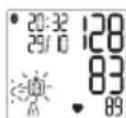
If Bluetooth® is activated (the symbol flashes on the display), the blood pressure monitor attempts to connect to the app. If you press the M1 button in the meantime, the transfer is cancelled and the average values are displayed. If you press the M2 button, the transfer is cancelled and the measurement data of user memory is displayed. The symbol is no longer shown. The buttons are deactivated as soon as a connection is established and the data is transferred.
Press the M1 button if you have selected user memory 1. Press the M2 memory button if you have selected user memory 2.
R flashes on the display. The average value of all saved measured values in this user memory is displayed.
- Press the relevant memory button (M1 or M2).
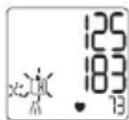
flashes on the display. The average value of the morning measurements for the last 7 days is displayed (morning:5.00 a.m.-9.00 a.m.).
Press the relevant memory button (M1 or M2).
PfI flashes on the display. The average value of the evening measurements for the last 7 days is displayed (evening:6.00 p.m.-8.00 p.m.).
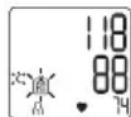
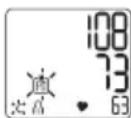
When the relevant memory button (M1 or M2) is pressed again, the last individual measurement is displayed (in this example, measurement 03).
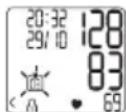
When the relevant memory button (M1 or M2) is pressed again, you can view your individual measurements.
- To switch the device off again, press the START/STOP button ①
You can exit the menu at any time by pressing the START/STOP button - To clear the memory of the relevant user memory, you must first select a user memory.
- Start the retrieval of the average measured values. R flashes on the display and the average value of all saved measured values in this user memory is displayed.
- Press and hold the memory button M1 or M2 for 5 seconds depending on the user memory you are in.
All the values in the current user memory are deleted.
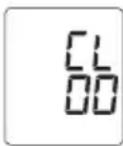
To clear individual measurements from the relevant user memory, you must first select a user memory.
- Start the retrieval of the individual measured values.
- Press and hold the memory button M1 or M2 for 5 seconds (depending on the user memory you are in).
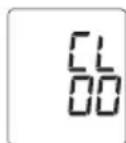
- The selected value is deleted. The device briefly displays CL03.
- If you would like to delete other values, repeat the process described above.
You can switch off the device at any time by pressing the START/STOP ① button.
Transfer via Bluetooth® Smart
It is also possible to transfer the measured values saved on the device to your smartphone using Bluetooth® Smart.
You will need the HealthCoach app for this. The app is available from the App Store.
Proceed as follows to transfer values:
If Bluetooth® is activated in the settings menu, the data is transferred automatically after the measurement. The 0 symbol appears in the top left of the display (see chapter 4 „Preparing the measurement").
Step 1: SBM 37
Activate Bluetooth® on your device (see chapter 4 "Preparing the measurement", Bluetooth®).
Step 2: "HealthCoach" app
In the HealthCoach app, add the SBM 37 under "Settings/My devices".
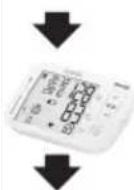
Step 3: SBM 37
take a measurement.

Step 4: SBM 37
data transfer immediately following measurements.
- If Bluetooth® data transfer has been activated, data is by transferred after having confirmed the user memory by pressing the pressing the START/STOP button ①
Step 4: SBM 37
Data transfer at a later point:
- Go to memory mode (chapter 7). Select the desired user memory. The Bluetooth® transfer starts automatically.
The HealthCoach app must be active to allow data transfer. If your smartphone has a protective cover, remove this to ensure that there is no interference during the transfer. Begin the data transfer in the HealthCoach app.
8. Cleaning and storing the unit
- Clean the device and cuff carefully using a slightly damp cloth only.
- Do not use any cleaning agents or solvents.
- Under no circumstances should you hold the unit under water, as this can cause liquid to enter and damage the unit.
- If you store the device, no heavy objects should be placed on top of it. The cuff line should not be bent sharply.
In such cases, repeat the measurement and/or data transfer. Ensure that the cuff line is correctly attached and that you do not move or speak during the measurement.
9. Error messages/troubleshooting
In the event of errors, the error message Er_ appears on the display.
Error messages may appear if:
- it was not possible to record the pulse: E_r1
- you move or speak during the measurement: E_R ;
- the cuff is fastened too tightly or loosely: E_r = 3 ;
errors occur during the measurement: E_r^H - the pump pressure is higher than 300mmHg : E - 5 ;
the batteries are almost empty Erb; - E the data could not be sent via Bluetooth ®.
The word mark Bluetooth® and accompanying logo are registered trademarks of Bluetooth®SIG, Inc. Any and all use of these marks by Hans Dinslage GmbH is done so under licence. Other trademarks and trade names are the property of the relevant holder.
10. Technical specifications
Model No. SBM 37
| Measurement method | Oscillometric, non-invasive blood pressure measurement on the upper arm |
| Measurement range | Cuff pressure 0 - 250 mmHg, Systolic 50 - 250 mmHg, Diastolic 30 - 200 mmHg, Pulse 40 - 180 beats/minute |
| Display accuracy | Systolic ± 3 mmHg, Diastolic ± 3 mmHg, Pulse ± 5 % of the value shown |
| Measurement inaccuracy | Max. permissible standard deviation according to clinical testing: Systolic 8 mmHg / Diastolic 8 mmHg |
| Memory | 2 x 60 memory spaces |
| Dimensions | L 139 mm x W 94 mm x H 48 mm |
| Weight | 236 (without cuff) |
| Cuff size | 22 to 36 cm |
| Permissible operating conditions | + 5°C to + 40°C, 15-93% relative humidity (non-condensing) |
| Permissible storage conditions | -25°C to + 70°C, ≤ 93% relative humidity, 800 - 1050 hPa ambient pressure |
| Power supply 4x 1.5 V AAA batteries | |
| Battery life Lasts for approx. 200 measurements depending on the blood pressure and pump pressure as well as the number of Bluetooth® connections. | |
| Accessories Cuff, instructions for use, storage pouch | |
| Classification | Internal supply, IPX0, no AP or APG, continuous operation, application part type BF |
| Data transfer via Bluetooth® wireless technology | The blood pressure monitor uses Blu- etooth® Smart (low energy), 2.4 GHz frequency band, compatible with Blu- tooth 4.0 smartphones/tablets |
| List of supported smartphones/tablets | |
Technical information is subject to change without notification to allow for updates.
- This device complies with European Standard EN60601-1-2 and is subject to particular precautions with regard to electromagnetic compatibility. Please note that portable and
mobile HF communication systems may interfere with this unit. More details can be requested from the stated Customer Services address or found at the end of the instructions for use.
- The device complies with the EU Medical Devices Directive 93/42/EC, the German Medical Devices Act (Medizinproduktgesetz) and the standards EN1060-1 (non-invasive sphygmomanometers - Part 1: General requirements), EN1060-3 (non-invasive sphygmomanometers - Part 3: Supplementary requirements for electro-mechanical blood pressure measuring systems) and IEC80601-2-30 (Medical electrical equipment - Part 2 - 30: Particular requirements for the basic safety and essential performance of automated non-invasive sphygmomanometers).
- The accuracy of this blood pressure monitor has been carefully checked and developed with regard to a long useful life. If using the device for commercial medical purposes, it must be regularly tested for accuracy by appropriate means. Precise instructions for checking accuracy may be requested from the service address.
We hereby guarantee that this product complies with the European R&TTE Directive 1999/5/EC. Please contact the specified service address to obtain more detailed information such as the CE conformity declaration.
FRANÇAIS
2. Consels important
Symbolesutilisés
Transmission via Bluetooth® Smart
Étape 2: Application HealthCoach
Transmission via Bluetooth® Smart
Fase 2: App HealthCoach
Ha nciie 3amraet cmbon Bluetooth
C nOMOJIbIO KHOJOK COxpaHEnIaM1/M2 BKJIQUHTe (3AMIRaET CmBON Bluteoth®)nn OTKJIQUHTe (CMBON Bluteoth® He 6yJeT OTo6paxKaTbcra Ha DCnIee) aBTOMaTIuYeCKyIO AKTINBaUIO nepeJaun DaHHbIX Yepe3 Bluteoth® I NOITBepdnte BblOp HaxaTneM KHONK IN BKJ./BbIKJ. ①
Bo BpemnpepaHdHHbIXc nmoouBIO BluoteoP pacxoOyETc3apn aKKMyJrToPA.
InpoBeHnI3MpeHn TeMepaTpy np6opa DoJxHa COOTBETCTBOBaTb KOMHaTHOH.
IImpeHne moXHO OcyuCETBnHa JneBOHn npaBoPyke.
HaKnaJaBbAHHeMaHKeTbl
HaonKeMaHKeTy Ha 6hXKeHHyIO JeByIO pyKy BbIe JOKT.
KpoBocha6keHne pyKn He IOnJxHo 6bIb HApUWeHO n3-3a CnIuKOM y3KoI OeXdbI N.
HaKaIaIbIbAteMaHKeTe Ha nJeO TaK, 4To6bl ee HIXHN KpaJ pacNoIarIcra BbIe IOKTeBOrO crI6a N apTepeHHa 2-3 cm. LJIaHr DoJIkeH 6bITb HApRaBHeN B CTOPOHy JaDoHn No UcHTpy.
IIOTHO,HO He CNIuKOM Tyo OeepHInTe CBO6oHbI KOHeu MaHKeTbI BOKpyr pyKn 3aCTeRHTte C NMOUbIO 3actexKn-1NpyuKn.MaHKeTa D0JXHa npIneratb TaK, YTO6bI NOd Hee MoxHo 6bINO npocHyTb Dba naJIbua.
BctabbTe Wnahr MaHKeTbI B pa3beM nnWTEkepaMaHKeTbl.
Ecnn n3MepeHne BbINOJHReTcH Na npaBOM nIeue, WnHaR dONKeH HaxoHTbcra Ha BHyTpehHe CTOpOHe JOKT. PocneDnte 3a TeM, YTObI pyKa He Jekana Ha WnAhr.
IabnHne B neBOu n npaBoi pyKe MoKet OTnuaTbcra, YTO 6brcHReT Bo3MOxHoe pa3NtueB pe3yJbTaTax N3MepeHn. Bcerda npoBODInTe N3MepeHne Ha oHDou Toj Xe pyKe.
Ecni pa3nHne B pe3yIbTaTax CnIuKOM BeNko, Heo6xoJIMO 06cyntb c BpaHOM, Ha KaKo pyKe 6ydyT npoBOnTbcra n3MepeHna.
BHMMaHHe: PpIbOp pa3peWaaTcra NcNoJIb3OBA TbToJIbKOC opuHaJIbHbIM MaHKeTaM. MaHKeTa paccHTaHa Ha pyKy C OKpyxHocTbIO npea ot 22 do 36 cm.
B cneuaaun3npoBaHHOM mara3nHe nnuepe3 cepBncHyocny6by moKHO npno6pctTu MaHKeTy 60JIbUero pa3MepaIg OkpyxNcTo npeya ot 35 do 44 cm (Homep IJra 3aka3a163.387).
Ppabnblhoe noJoxKeHne TeNa
- OТьхаиTeВ TeueHne 5 MmHyT npei KaKdIIM n3MepeHnemДавпeHn! B npOTuBHom cnyae BO3MOxHbI OTKIOHeHnpe3yIbTaTOB n3MepeHnI.
I3mepeHne MOxHO pOBOnTb cnIa IJI JLeKa. O63aTeNbHO CJeNTe 3a TeM, YTObI MaHXeTa HaxOuJIacb Ha yPoBHe cepua.
-ⅡIaIIN3MepeHnKPOBAnHO DaBHeHn 3aIMTe yO6Hoe IIONoXKeHnE CnJa.CnHa n pyKn DoJXHb IMeTb ONopy. He CKpeuBaTe HOrn. NocTaBBte CTynHn POBHO Ha NOI.
-TO6bI N36ExKaTb NCKaKHeHn pe3yNbTaTOB, BO BpeMa N3MepeHn CJIeDyET BcTeN Ce6r CnOKoHNo Hpe pa3roBaPbTaB.
HaonKeMaHKeTy, KaK OINcHo BbIe, N 3aMnTe yD6Hoe dIyN3MepeHnI NOXKeHne.
Длгзanycka npin6opa nIЯ n3MepeHnKPOBraHOrO DaBHeHnHaXmTe KHOKNy BKJ./BbIKJ.①
HaKopoTKeBpemHaDnCnlee OTo6pa3rTcBce3JIeMeHtbl.
Ipoceccn3MepeHnHaHHeTcABTOMaTHuecknYepe3 3cekyHdbI.
13MepeHne MoKHO npeBaTb B JIO6oMOMeHT, HaxKaB KHONky BKJ./BblKJ. ①
Kak Tolbko npnbop pacno3Haet nyIbc, oTo6pa3ntc
- OTo6pa3rTcpe3yIbTaTbI n3MepeHnCnCTOJIueCKOro daBHeHn,DAACTOJIueCKOro daBHeHn nIyIbCa.
CmB0JERnoBnreTc,eCNn3MepeHne 6bIIO npOn3BeJeHO HeHaJIeKaUIMo6pa3OM (CM.ΓaBy 9 «CoO6uHne o6 OUn6Ke/ycTaPaeHne HncnPabHocteN»).PiOBTopiTe n3MepeHne.

Tenepb npn nomooun Khoonk coxpaehn M1 nn M2 BbIepeTe noIb3OBAteBckyU naMraTb. Ecnn Bbl He BblpaN noIb3OBAteBckyU naMraTb, To pe3yIbTaT n3MepeHn 6ydt COXpAHn B noIb3OBAteBckoN naMrtu nocJeHero noIb3OBAteJHa dnCnnee NOBJIaETcQOTBeTCTByUOnmCBON
BbIKIOHTe np6Op IJIa N3MepeHnKPOBHOrO DaJIeHn, Haxab KHOJky BKN./BbIKI. ①. TaKIM O6pa3OM B BbIbPAHHo NOJIb3OBaTeJIbCKOINaMRTN COxpaHITcpe3yJIbTaT N3MepeHn.
- Ecnn Bbl He OTKJIIOHHTe npn6op, To uepe3 MmHyTbI OH BbIKJIIOHITc CaMOCTOReJIbHO.
EcnnakTnBnpoBaHaФyHKnnapepaHnDaHHbIX
pee3Bluetooth®TO nocne NOaTBepKDeHnA
noJIb3OBaTeNbCKoNnAMrTHNaKaTHeM KHONKn BKJl./
BblKl. ① NaHcHTcnapepaHaDaHHbIX.
CmBbOJuBtooth Mrraet Ha nucnnee n ropnt rojyba CBeToNDnHa JAmnoUka. B TeueHne 30 ceKyuH np6Op dIy I3MepeHn KpOBAHO daBHeHn yCTaHaBnBaET CBraBc PnIOXeHnEM.
Kak TjIbKO coeHHeHne 6yIeT yCTaHOBHeO CmBOJ Bluetooth® nepeTaHET MURATb. Bce pe3yNbTaTbI n3MepeHHA ABTomAtuYeCKn nepeAdOTcR npINIOKeHHIO. Nocne ycNeuHOn nepeDaHnBHX npINbOp OTKIOUaETcR.Ecnn nepeDau DaHHbIX He ydaNacb, rOly6a CBTeODNOHna JAMNOOKa NORACHT N Ha INCJIeE NOBITcCmBOJ (Er7).
EcnnB TeueHne 30 ckynd npnbop He cMOxket ycTaHOBNb CoeUNHeHne C npNUOKeHNEM, CMBON Bluetooth norachet n np6bp dny n3MepeHHKPOBnHO rDaJIeHn OTKJIOUHTcY uepe3 MmHyTbI.
i UyTnTe, yTo dIa nepeDaun daHbIX B npNJIOXKeHN HealthCoach Heo6xOdImo Iobabntb np6op n3MepeHna DaJIeHnB pa3JeN «Mon ycTpoCTBa>. DnI nepeDaun daHbIX Heo6xOdImo 3aNyCTNTb npNJIOXKeHne HealthCoach.
EcIn TeKyuIe DaHHbIe He OTo6paKaIOTCa Ha BaWEM cMapTfoHe, NOBTOPe NpeDaCy DaHHbIX B COOTBeTCTBn C yKa3aHnA M nJaBb 7.
EcIn Bbl 3a6ynde Te BbIKJIOHTb np6op, OH BbIKIOHTcra abTOMaTnueeckn npIMepHO uepe3 3 MmHytbl. B 3tOM cnUyae n3MpeHHoe 3NaueHne TaKke COxpaHNTcB B Bbl6paHHo nnI NocJIeHne NcNoJIb3ObaHHo NOJIb3OBAteNBCKoN naMaTn, a DaHHbe npn AKTNbIPOBaHHo fYHKUIN nepeJaHn DaHHbIX uepe3 Bluetooth® 6dyT pepeHecebl.
- Ipeep NOBTOPbIM IN3MepeHnEM IOOxKdTe He MeHee 5 MNHyT!
6. Ouzehka pe3yIbTaTOB
HapyeHn cepdeyHoro pHTMa
JaHHbI npH6Op BO BpEma3MepeHn MoKeT IeHTnHcHIpObaT Bo3MOXHbI HApUeHn cepdHoro
pNTMa n npn nx HaHnHm COO6aet O Hnx Nocne I3MepeHnra CMMBOJOM 3TO MoXeT yka3bIbTaB Ha apNTMIO. ApNTMnra - 3TO
60Je3Nb, npn KOTOpoB Bo3HnKaeT aHOMaJIbHbI cepDeHbI
pNTM, Bbl3BaHHbO uIN6kAmu B 6Noo3LeKtpueckO
CnCTeme, peryInpyUoey 6uneHne cepDua. CmmTOMbl (HepaBHOmePoe INn npExKeBpeMeHnoe cepDue6neHne, MeJeHHb INn CInuKOM 6bICTpbI pyIbc) MOYr
6bITb Bbl3BaHbI 3a6OJeBAHNMA m cepDua, BO3pactOM,
npEpaTNOLOXeHHOCtBuK COOTBETCTBYUOUM 3a6OJeBAHNMA,
4pe3MePHbIM yNtPe6BeHnEM KoFe, HNKOTnHa n aIKORoJ,
CTpeCCOM INn HeINOCTaTKOM CHA. ApNTMnRA MoXeT 6bITb
BblNeHa TOnbKO B pe3yIbTaTe obcneDoBaHry U Bpaua.
EcNI nocle nepBoro I3MepeHnra Ha dncnnee oToobpaXaeTcra
CMBOJ IOBTopTE I3MepeHnne. ObpaTIte BHMaHne
Ha TO, YTO B TeueHne 5 MmHT nepei I3MepeHnem HeIb3ra
3aHIMaTBCs AKTINBHO JdeTeJIbHOCTbIO, a BO BpeMn
I3MepeHnra HeIb3ra IOBopTu b INn DIBRaTcR. EcNI CmBBOI
IOABJIeTcra YacTo, ObpaTIteCB K BpaCy.
CamOJaarHOCTnKa n camOJeHne Ha ochobe pe3yIbTaTOB
I3MepeHnra MOrY 6bITb OAnChbI. Ob8aTeJIbHO cJeNyIte
peKOMeHaaQnM CBOero BpaCa.
OueHka pe3yIbTaTOB n3MepeHn:
OueHky pe3yIbTaTOB n3MepeHn MOxHO npOBecTn C NOMOuTo Ta6Ntbl, IpEcdTaBHeHHo HHXe. Ondako 3TN cTaNdapTHbIE 3HaueHn CnyKAT ToJIbKO o6UIM opHeHTnpOM, TAK KAK INDINbUdyaJIbHbIE 3HaueHn KPOBraHO daBHeHry pa3HbIX IIODe BapbpyOTcB 3aBNCMOCr OT npINAanExHoCTN K TOI INI INHO B03pactHO rpyPnE n T. P.
Baxho peryulrno KOhcyIbTnpoBaTbCra C BpaQom.Bpa onpeJeHt Baun HnDnBnDyAJIbHbIe 3HaueHn HOpMaJIbHOKPOBAnHO DaBHeNIA, a TaXKe 3HaueHn, BblSe KOTOpbIX KPOBAnHO DaBHeHne cIeDyET KlaaccnPnIpOBA Tb KaK onachoe.
13 MeHIO MOXHO BJIHOE BPeM BAITN HaKaTneM KHONK BKJ./BbIKI. ①
Дя удаленя codepkmoro COOTBETCTByIOUeI NOJB3OBaTeJIbCKOIN PAMrTN Bbl6epNTe NOJIb3OBaTeJIbCKyIO PAMrTb.
3anyctnte 3anpoc cpeHnix pe3yIbTATOB n3MepeHn. Ha dincnnee 3amiraeT H n OTo6pa3ntc r cepeHee 3NaueHHe Bcex coXpaHeHHbIX B daHHOI N0b3OBaTeJIbCKoI nAmrTI pe3yJIbTATOB n3MepeHn.
- YdepknBaTBe B TeeHne 5 cekyHKnONky CoxpaHeHH M1 NmM2 B3aBcunMoCTn OT TOrO, B KaKoN POnb30-BaTeNbckO namTn Bbl HaxoDntecb.
Bce 3NaeHnTeKuIeI noJIb3OBaTeIbckOINamrTn 6ydyT ydaJeHbl.
Дяудаленя OTДьнIxpe3yЛТаTOBИЗмepenI COOTBETCTByUOSeI NOJb3OBaTeNbCKOЯNamrN CHaJaNA BbIbepuTE NOJb3OBaTeNbCKYIOЯMaTb.
3anycntte 3anpoc pe3yIbTaTOB OTdIbHbIX n3MepeHn.
- HaxMMTe O6e KHOJKN COxpaHeHnM1 NIM M2
N ydepXNBaIte INx HaxKaTbIMN B TeueHne 5 cekyHd.
(B 3aBNCIMOCTN OT TO, B KaKo IIOJIb3OBaTeJIbCKOINamrTn Bbl HaxOJNTecb).
- Bb6paHHb pe3yIbTaT n3MepeHn8 6yTeYdaJIeH. Ha dncnlee Ha HeKOTOpoe Bpem OTo6pa3NTc8 3HaueHne CL00.
- EcInn BxOTnTe ydaNTb dpyrne pe3yNbTaTbI n3MepeHn, NOBTOpTE DeNCTBnA, ONiCaHHbE Bblue. Bbl NIO6oe Bpem MoKeTe BbIKNoHTb np6Op HaxKaTneM KONKn BKl./BblKl. ①
Ipepaa daHbix c nOmoBIO Bluetooth® Smart
Y Bac ecTb Bo3MOxHocTb nepeHeCTn 13MepeHHbIe
i coXpaHeHHbIe Ha npi6ope 3HaueHn Ha cMaprfoH npi
nomoUy Bluetooth® Smart.
Bam noHaIO6uTcnpiNoXeHne HealthCoach.OHO docty
IIra 3aRpy3Kn B App Store.
YTo6bI nepeHeCTn daHbIe, BblONHInTE cJeMyOuIe DeIcTBnA: EcIn B MeHIO HAcTpoE kAKTNBnPOBaHa fHyHKUra Blueteoth®TO nocne npoBeHnI N3MepeHn IpeDaIaHHbIX npOn30iET abTomAtueckn. B JEBOM BepxHem yrLy dncnner IOABNTc CmBOJ (cm, rnaBy 4 «PioDrTOBka K N3MepeHnO»).
Lar1:SBM37
AknBpyTe Bluetooth ha BaIeM np6ope (cm. rnaBy 4 «PnroToBka K n3MepeHIO», Bluetooth®).

Uar 2: PpnoJoxeHne HealthCoach
ДобавBLESBM37ВpaZdene«HAcTpoKn/MOn yCtpoNCTBa» npInOKeHnA HealthCoach.
Liar 3:SBM 37
PpOBeaTe n3MepeHne daBHeHnA.

LlAr 4:SBM37
Pepedaa daHHbIX cpa3y nocJe n3MepeHnI:
- EcniakTnBnpoBaHa
ФункиЯпeраду
Данных Yepe3 Blu
etoothToNoCTBepKdENH
ПОЛБ3OBaTeIbCKOIN
NamrTu HaxaTNEm KHOJIKN
BKl./BblKl. ① NaHcHTcra
пeраду daHbIx.
LlAr 4:SBM37
Pepeda daHbIX B pyroe Bpem:
- PpeiDnte B pexim Bbl3OBA daHHbIX n3 namrtn (rn.7). Bbl6epnTe hyxHyIO nolb3OBaTeIbckyIO namrTb. Ppepa daHHbIX uepe3 Blueteoth® 6ydt 3anyueHa aBTOMaTHueCKN.
I Inra nepeaun daHHbIX Heo6xOIMO 3aNyCTnTb npuJoxKeHne HealthCoach.
YTo6bI o6ecneuTb nepeaHy daHHbIX 6e3 NOMEX, CHIMITE qExoJI co cMaprfoHa, ecn OH eCTb. 3aynctnte nepeaHy daHHbIX B npInoxKeHm HealthCoach.
8. OuInCTka n xpaHeHne npnbopa
- PpOu3BODnTe OUHCTKy pPbOpa IJr N3MepeHnApTepnAIBHO rABNeHnC octOpoxHoCTbIO. UcNoIb3yIeToNbKO CJIeK Ka BnaXHyO CaΦeTKy.
He nCnoIb3yIte YnCTaIuIe CpeIcTbA uN pAcTBOpNTeJI. -
Hn B Koem Cnyahe He OnyckaIte npnbop B Boy, TaK KaK npn 3TOM B Hero MoKeT NOnactb BOda, YTO npnbEdet K nobpeXdHIO npnbopa.
-
Pnp xpaHeHn Ha npnbope He dOJIxHbI CToRb TReKeIbIe npedMeTbI. HeIb3a CnUkOM CnIbHO crN6aTb WnaHr MaHXKeTbI.
B TaKnx CnyaX NOBTOPNe I3MepeHne IINI nepeJaCy daHHbIX.
IpoCJIeIte 3a TeM, YTO6bI UJNaHr MaHKeTbI 6blJ HauNexKaUIM Oba3OM NODCoEINHe, He DBrVaITeCb I He pa3roBapuBaIte BO BpeMa I3MepeHn.
9. Coo6eHne o6 oun6Ke/ycTpaHHe Oun6ok
PnB O3HKnHOBeHHOu6ok Ha DnCnIee NOBJIeTcAo06ueHne 6 ou6ke Er.
Co06eHn8o6uWbKaxnoBnAHTc,ecn
- He ydaioocb n3Meepntb npJIbc: Erl;
- BO Bpemr n3MepeHnBblDnBraeTecb nnroBopute: E;
MaHKeTa npInIeAet CnUHKOM CNbHO NnCNIuHKOM Cna6o: Er3; - ppon3own Own6Kn BO Bpemn 3mepeHn: Er4;
-Давлиейно HabakimbaHnnpeBbIaet 300 MM pt..E5 - 6aTapeiKN noTu pa3paXKeHbE;
- Npepaa daHHbIX no Bluetooth® HeBO3MOXHa: Er7
CNoBechbl TOBapHbI 3HaK Buteothn COOTBeTCTByIOUnn IIOROTIN RAJIANTCS 3apeNCTpnpOBaHHbIMN TOPROBbIMN 3HaKaMn BLuteothSIG,Inc. NIO6oe nCNOJb3OBAHne DaHHbIX 3HaKOB KOMNaHmE Hans Dinslage GmbH ocUeCTBnRETCs NO JInueHmN. PPOyne TOpROBbIE 3HaKn HAnMeHOBaHnRAJBIAOTCS CO6CTBEHHOCTbIO COOTBeTCTBYIOUX O6JaTaTeJeN.
10. TexHnueckne daHHbIe
MoDJIIN SBM 37
Electromagnetic emissions
Guidance and manufacturer's declaration - electromagnetic emissions for all EQUIPMENT and SYSTEMS
The Blood pressure monitor (SBM 37) is intended for use in the electromagnetic environment specified below. The customer of the user of the Blood pressure monitor (SBM 37) should assure that it is used in such and environment.
| Emission test | Compliance | Electromagnetic environment–guidance |
| RF emissions CISPR 11 | Group 1 The Blood pressure monitor (SBM 37) uses RF energy only for its internal function. Therefore, its RF emissions are very low and are not likely to cause any interference in nearby electronic equipment. | |
| RF emission CISPR 11 | Class B The Blood pressure monitor (SBM 37) is suitable for use in all establishments, including domestic establishments and those directly connected to the public low-voltage power supply network that supplies buildings used for domestic purposes. | |
Electromagnetic immunity
Guidance and manufacturer's declaration - electromagnetic immunity - for all EQUIPMENT and SYSTEMS
The Blood pressure monitor (SBM 37) is intended for use in the electromagnetic environment specified below. The customer of the user of the Blood pressure monitor (SBM 37) should assure that it is used in such and environment.
| Immunity test IEC 60601 | test level | Compliance level | Electromagnetic environment–guidance |
| Electrostatic discharge (ESD) IEC 61000-4-2 | ±6 kV contact ±8 kV air | ±6 kV contact ±8 kV air | Floors should be wood, concrete or ceramic tile. If floor are covered with synthetic material, the relative humidity should be at least 30%. |
| Power frequency (50Hz) magnetic field IEC 61000-4-8 | 3A/m | 3A/m | Power frequency magnetic fields should be at levels characteri-ristic of a typical location in a typical commercial or hospital environment. |
Guidance and manufacturer's declaration - electromagnetic immunity for EQUIPMENT and SYSTEMS that are not LIFE-SUPPORTING
The Blood pressure monitor (SBM 37) is intended for use in the electromagnetic environment specified below. The customer or the user of Blood pressure monitor (SBM 37) should assure that it is used in such an environment.
| Immunity test IEC 60601 test level | Compliance level | Electromagnetic environment–guidance |
| Portable and mobile RF communications equipment should be used no closer to any part of the Blood pressure monitor (SBM 37), incl- ding cables, than the recommended separation distance calculated from the equation applicable to the frequency of the transmitter. Recommended separation distance. | ||
| Conducted RF | 3 Vrms | 3 Vrms |
| IEC 61000-4-6 | 150 kHz to 80 MHz | |
| Radiated RF | 3 V/m | 3 V/m |
| IEC 61000-4-3 | 80 MHz to 2.5 GHz | |
| 80 MHz to 800 MHz | ||
| 800 MHz to 2.5 GHz |
| Where P is the maximum output power rating of the transmitter in watts (W) according to the transmitter manufacturer and d is the recommended separation distance in metres (m).Field strengths from fixed RF transmitters, as determined by an electromagnetic site surveya should be less than the compliance level in each frequency rangeb. Interference may occur in the vicinity of equipment marked with the following symbol: | |||
| NOTE 1 At 80 MHz and 800 MHz, the higher frequency range applies.NOTE 2 These guidelines may not apply in all situations. Electromagnetic propagation is affected by absorption and reflection from structures, objects and people. | |||
| a Field strengths from fixed transmitters, such as base stations for radio (cellular/cordless) telephones and land mobile radios, amateur radio,AM and FM radio broadcast and TV broadcast cannot be predicted theoretically with accuracy.To assess the electromagnetic environment due to fixed RF transmitters, an electromagnetic site survey should be considered. If the measured field strength in the location in which the Blood pressure monitor (SBM 37) is used exceeds the applicable RF compliance level above, the Blood pressure monitor (SBM 37) should be observed to verify normal operation. If abnormal performance is observed, additional measures may be necessary, such as reorienting or relocating the Blood pressure monitor (SBM 37).b Over the frequency range 150 kHz to 80 MHz, field strengths should be less than 3 V/m. | |||
Recommended separation distances
Recommended separation distances between portable and mobile RF communications equipment and the EQUIPMENT or SYSTEM - for EQUIPMENT or SYSTEM that are not LIFESUPPORTING
Recommended separation distances between portable and mobile RF communications equipment and the Blood pressure monitor (SBM 37).
The Blood pressure monitor (SBM 37) is intended for use in an electromagnetic environment in which radiated RF disturbances are controlled. The customer or the user of the Blood pressure monitor (SBM 37) can help prevent electromagnetic interference by maintaining a minimum distance between portable and mobile RF communications equipment (transmitters) and the Blood pressure monitor (SBM 37) as recommended below, according to the maximum output power of the communications equipment.
| Rated maximum output power of transmitter (W) | Separation distance according to frequency of transmitter (m) | |
| 80 MHz to 800 MHzd=[3.5/E1]√P | 800 MHz to 2.5 GHzd=[7/E1]√P | |
| 0,01 0.1167 0.2334 | ||
| 0,1 0.3689 0.7378 | ||
| 1 1.1667 2.3334 | ||
| 10 3.6893 7.3786 | ||
| 100 11.6667 23.3334 | ||
For transmitters rated at a maximum output power not listed above, the recommended separation distance in metres (m) can be estimated using the equation applicable to the frequency of the transmitter, where P is the maximum output power rating of the transmitter in watts (W) according to the transmitter manufacturer.
NOTE 1 At 80MHz and 800MHz , the separation distance for the higher frequency range applies.
NOTE 2 These guidelines may not apply in all situations. Electromagnetic propagation is affected by absorption and reflection from structures, objects and people.

- Schritt 2: HealthCoach App
- Getting to know your device
- Important notes
- Signs and symbols
- Notes on use
- Instructions for storage and maintenance
- Notes on handling batteries
- Battery disposal
- Instructions for repairs and disposal
- Device description
- Information on the display:
- System requirements for the HealthCoach app
- Preparing the measurement Inserting the batteries
- Set the hour format, date, time and Bluetooth® settings
- Press and hold the START/STOP button for 5 seconds.
- Measuring blood pressure
- Attaching the cuff
- Adopting the correct posture
- Performing the blood pressure measurement
- Measurement
- Evaluating results
- Cardiac arrhythmia:
- Classification of measurements:
- Display and delete measured values
- Transfer via Bluetooth® Smart
- Step 1: SBM 37
- Step 2: "HealthCoach" app
- Step 3: SBM 37
- Step 4: SBM 37
- Cleaning and storing the unit
- Error messages/troubleshooting
- Technical specifications
- FRANÇAIS
- Consels important
- Symbolesutilisés
- Transmission via Bluetooth® Smart
- Étape 2: Application HealthCoach
- Fase 2: App HealthCoach
- HaKnaJaBbAHHeMaHKeTbl
- Ppabnblhoe noJoxKeHne TeNa
- Ouzehka pe3yIbTaTOB
- HapyeHn cepdeyHoro pHTMa
- OueHka pe3yIbTaTOB n3MepeHn:
- Ipepaa daHbix c nOmoBIO Bluetooth® Smart
- Lar1:SBM37
- Uar 2: PpnoJoxeHne HealthCoach
- Liar 3:SBM 37
- LlAr 4:SBM37
- OuInCTka n xpaHeHne npnbopa
- Coo6eHne o6 oun6Ke/ycTpaHHe Oun6ok
- TexHnueckne daHHbIe
- Electromagnetic emissions
- Guidance and manufacturer's declaration - electromagnetic emissions for all EQUIPMENT and SYSTEMS
- Electromagnetic immunity
- Guidance and manufacturer's declaration - electromagnetic immunity - for all EQUIPMENT and SYSTEMS
- Guidance and manufacturer's declaration - electromagnetic immunity for EQUIPMENT and SYSTEMS that are not LIFE-SUPPORTING
- Recommended separation distances
- Recommended separation distances between portable and mobile RF communications equipment and the EQUIPMENT or SYSTEM - for EQUIPMENT or SYSTEM that are not LIFESUPPORTING
Brand : SANITAS
Model : SBM 37
Category : Blood pressure monitor