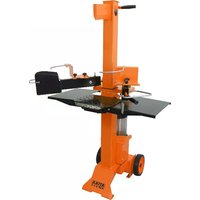
ASP 6 L - Log splitter ATIKA - Free user manual and instructions
Find the device manual for free ASP 6 L ATIKA in PDF.


| Product Type | Vertical electric log splitter |
| Brand | ATIKA |
| Model | ASP 6 L |
| Splitting Force | 60 kN (6 tons) |
| Max. Log Length | 1030 mm |
| Recommended Log Diameter | 120 mm - 300 mm |
| Splitting Stroke | Approx. 500 mm |
| Advance Speed | 0.04 m/s |
| Return Speed | 0.17 m/s |
| Oil Tank Capacity | 4.4 liters |
| Hydraulic Pressure | 24 MPa (240 bars) |
| Motor Power (absorbed) | 2.8 kW (S6 - 40%) |
| Power Supply | 230 V ~ 50 Hz, 16 A (inert) |
| Dimensions (L x W x H) | 840 x 510 x 990 / 1520 mm (depending on table height) |
| Weight | Approx. 103.5 kg |
| Adjustable Table Heights | 3 positions: 570 mm, 820 mm, 1035 mm |
| Main Functions | Vertical splitting with adjustable table, splitting cross, clamping claws |
| Safety | Emergency stop, restart safety, overload protection |
| Maintenance | Cleaning after each use, lubrication of the splitting column |
| Spare Parts | Use only original ATIKA parts |
| Warranty | See attached warranty statement |
Frequently Asked Questions - ASP 6 L ATIKA
User questions about ASP 6 L ATIKA
0 question about this device. Answer the ones you know or ask your own.
Ask a new question about this device
Download the instructions for your Log splitter in PDF format for free! Find your manual ASP 6 L - ATIKA and take your electronic device back in hand. On this page are published all the documents necessary for the use of your device. ASP 6 L by ATIKA.
USER MANUAL ASP 6 L ATIKA
Brennholzspalter
Original instructions
GB EC Declaration of Conformity according to Directive: 2006/42/EC
GB We herewith declare
GB under our sole responsibility, that the product
Brennholzspalter (Log splitter) ASP 6 L
is conform with the above mentioned EC directive as well as with the provisions of the guideline below: 2004/108/EC.
GB Following harmonized standards have been applied:
natural_image
Close-up of a hand holding a tool with a pen, partially open a metal mechanical component (no visible text or symbols)D Bedienarme montieren
Tip: grease the metal plates at first!
natural_image
Person operating a mechanical lift or lift press machine with a textured base and control panel (no visible text or symbols)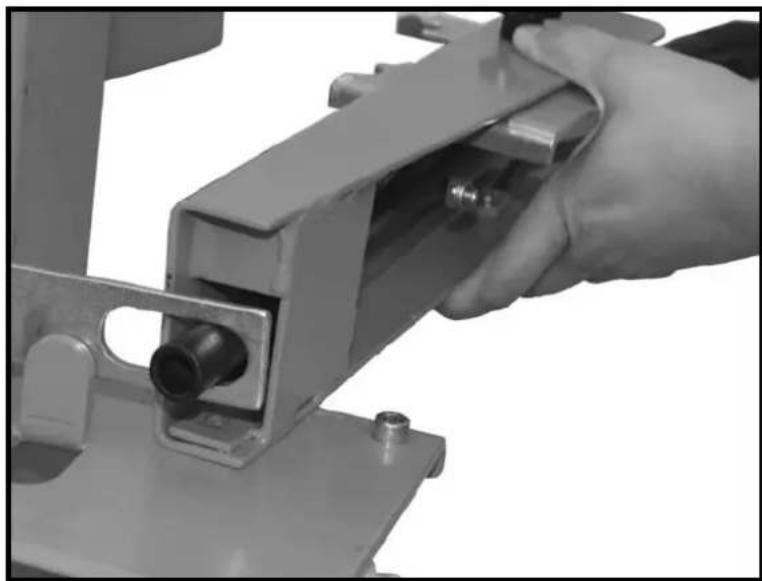
natural_image
Close-up of a hand operating a metal mechanical device with a cylindrical component inserted (no visible text or symbols)GB Insert control arms and insert pipe in recess of cross connection.
natural_image
Mechanical assembly diagram showing hands operating a workpiece with a close-up inset of two bolts (no text or symbols present)GB Secure the operating levers using the screws, washers and nuts.
natural_image
Mechanical component with two views of a wheeled vehicle, showing tire and wheel assembly (no text or symbols)D Räder montieren
GB Mount wheels
F Montage des roues
natural_image
Black-and-white photo of a man walking beside a small wheeled device (no visible text or symbols)Aufstellen
natural_image
Close-up of a mechanical device with a circular dial and tire, showing no visible text or symbols.Öltankverschluss
natural_image
Close-up of a mechanical control panel with two buttons and a circular dial (no visible text or symbols)Einschalten
natural_image
Person operating a lathe machine with tools and components (no visible text or symbols)natural_image
Person operating a machine with a close-up inset showing a mechanical component (no visible text or symbols)natural_image
Person operating a machine tool with a textured cylindrical component, no visible text or symbolsnatural_image
Person operating a manual machine with a cylindrical component, no visible text or symbolsnatural_image
Two views of a mechanical device with arrows indicating assembly or component (no visible text or symbols)Kanten schärfen

natural_image
Industrial machine with dual levers and control panel (no visible text or symbols)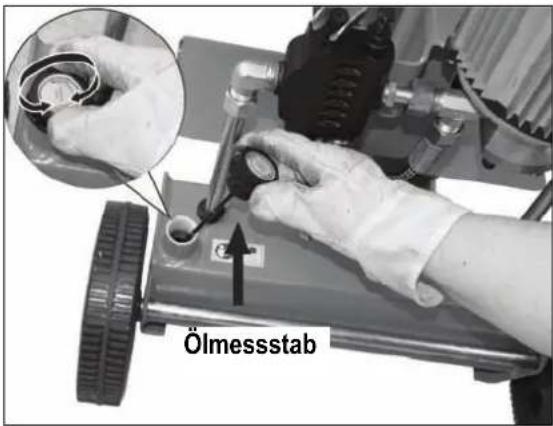
Do not operate machine before having read the operating instructions, understood all the notes and assembly the machine as described here.
Keep the instructions in a safe place for future use.
Contents
EC-Declaration of Conformity 1
Spare parts / Description of device 3
Assembly 6
Extent of delivery 19
Symbols 19 / 20
Proper use 20
Residual risks 20
Safe working 20
Transport instructions 21
Positioning 21
Start-up 21
Working with the log splitter 22
Maintenance and cleaning 24
Technical data 26
Possible problems 26
Guarantee 26
Extend of delivery
After unpacking, check the contents of the box
▶ That it is complete
▶ Check for possible transport damage
Report any damage or missing items to your dealer, supplier or the manufacturer immediately. Complaints made at a later date will not be acknowledged.
| ■ 1 ready mounted machine unit | ■ 2 hubcaps |
| ■ 1 control arm, right | ■ 1 axle |
| ■ 1 control arm, left | ■ 1 bag of accessories |
| ■ 1 table plate | ■ 1 operating manual |
| ■ 2 wheels | ■ 1 warranty declaration |
Symbols machine

Read the operating and safety instructions thoroughly before commissioning the machine.

Caution!
Before starting any repair, maintenance or cleaning work, always switch off the motor and remove the plug from the socket.
Cutting and crushing risk! Never touch dangerous areas when splitting blade is moving.
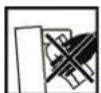
Do not remove jammed logs with your hands.
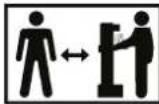
Nobody else should be in the working area of the machine other than the operator. Keep other persons or animals out of the danger area (minimum distance 5 m).

Wear hearing protection when working with the machine to protect your hearing.

Wear face mask when working with the machine to protect the eyes from chips and splinters.

Wear safety gloves when working with the machine to protect the hands from chips and splinters.

Wear safety shoes when working with the machine to protect the feet from falling logs.

Keep your work space tidy! Untidiness may result in accidents.

Oil is a fire hazard and can explode. Smoking and open fire are prohibited.

Dispose of the old oil properly (local oil disposal point). The old oil must not be poured into the ground or drainage system, or mixed with other waste.

Do not remove or modify any protection or safety devices.
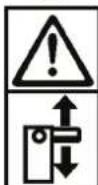
Always pay full attention to the splitting blade's movement.
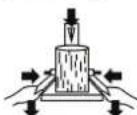
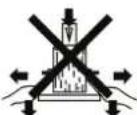

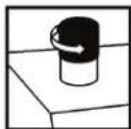
Hold the work piece when splitting with the clamping claw.
Vent the hydraulic system before putting the log splitter into operation. (see "Start-up")
Symbols machine / packaging

Do not dispose of electrical devices as domestic waste. Dispose of devices, accessories and packaging by means of environmentally friendly recycling.
According to the European Directive 2002/96/EC on electrical and electronic scrap, electrical devices that are no longer serviceable must be separately collected and brought to a facility for an environmentally compatible recycling.
Symbols operating manual

Threatened hazard or hazardous situation. Not observing this instruction can lead to injuries or cause damage to property.

Important information on proper handling. Not observing this instruction can lead to faults.

User information. This information helps you to use all the functions optimally.

Assembly, operation and servicing. Here you are explained exactly what to do.
Proper use
- The log splitter must only be used for splitting logs.
- Only straight-cut logs are suitable for use with the log splitter.
- Foreign bodies (nails, wire, concrete etc.) must always be removed from the wood before it is split.
- The intended usage also includes compliance with the operating, servicing and repair conditions prescribed by the manufacturer and following the safety instructions included in the instructions.
- Any other use is deemed not to be use as prescribed. The manufacturer is not liable for any type of damage resulting from this: the user bears the sole risk.
- Unauthorised modifications on the log splitter exclude a liability of the manufacturer for damages of any kind resulting from it.
- Only persons who are familiarised with the device and informed about possible risks are allowed to prepare, operate and service this device. Repair works may only be carried out by us or by a customer service agent nominated by us.
Residual risks

Even if used properly, residual risks can exist even if the unit safety regulations are complied with due to the design mined by the intended purpose.
Residual risks can be minimised if the “Safe working” and the “Proper use” as well as the whole of the operating instructions are observed.
Observing these instructions, and taking proper care, will reduce the risk of personal injury or damage to the equipment.
- Failure to observe the safety precautions can lead to injury to the operator or damage to property.
- Carelessness, failure to comply with the safety regulations and incorrect use can result in injuries to your hands and fingers when the splitting blade is moving.
- Risk from electricity, by using non-standard electrical connections.
■ Touching live parts of opened electrical components. - Impairment of hearing when working on the machine for longer periods of time without ear protection.
In addition, in spite of all the precautionary measures taken, non-obvious residual risks can still exist.
Safe working
⚠️ Before commissioning this product, read and keep to the following advice. Also observe the preventive regulations of your professional association and the safety provisions applicable in the respective country, in order to protect yourself and others from possible injury.
Pass the safety instructions on to all persons who work with the machine.
① Keep these safety instructions in a safe place.
- Be observant. Attend to what you do. Start working with rationality. Do not use the device when you are tired or under the influence of drugs, alcohol or medicaments. One moment of carelessness when using the device can result in serious injuries.
■ Make yourself familiar with the equipment before using it, by reading and understanding the operating instructions. - Do not use the machine for unsuitable purposes (see "Proper use" and "Working with the log splitter").
- Ensure that you have stand in a secure standing position and maintain your balance at all times.
■ Take up a working position which is close to the controls.
■ Never stand on top of the machine. - When working with the machine, always wear
- face mask
- safety gloves
- hearing protection
— safety shoes with steel toe-caps
- Wear suitable work clothing: - do not wear any loose-fitting clothing or jewellery, since these may be caught or trapped by moving parts
- Within his area of work the operator is responsible for third parties.
- The machine may not be operated by children or young people under the age of 18.
- Keep children away form machine.
- Never operate the machine if other persons are in the immediate vicinity.
■ Never leave the machine unattended.
- Keep your workplace in an orderly condition! Untidiness can result in accidents.
- Do not overload the machine! You work better and safer in the given performance range.
- Only operate the machine with complete and correctly attached safety equipment and do not alter anything on the machine that could impair the safety.
- Do not modify the machine or parts of it.
- Do not spray machine with water (this is hazardous due to live components).
- Do not leave the machine standing in the rain or use when raining.
- Store the unused machine in a dry locked place away from the reach of children.
- Switch the machine off and remove the mains plug from the socket when
– carrying out repair works
- maintenance and cleaning work
– checking connecting lines, whether these are knotted or damaged
- removing faults
- transporting
— leaving unattended (even during short interruptions)
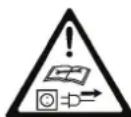
■ Check the machine for possible damage
- Before continuing to use the machine, the protective devices must be inspected to ensure that they work perfectly and with their intended function
- Check whether the movable parts function perfectly and do not stick or whether the parts are damaged. All parts must be correctly installed and fulfil all conditions to ensure perfect operation of the machine.
- Damaged guards and parts must be properly repaired or exchanged by a recognized, specialist workshop; insofar as nothing else is stated in the instructions for use.
- Damaged or illegible safety warning labels should be replaced immediately.

Electrical safety
- Electrical connections must conform to IEC 60245 (H 07 RN-F) with a cable cross-section of at least
230 V
3 x 1.5 mm² for a maximum cable length of up to 10 m
- Never use the machine with a power supply cable of over 10 m in length. Longer power supply cables will cause a drop in voltage. The motor will not be able to provide its maximum performance and the operation of the machine will be impaired.
- Plugs and coupler outlets on connection cables must be made of rubber, plasticised PVC or other thermoplastic material of same mechanical stability or be covered with this material.
■ The connector of the connection cable must be splash-proof. - When running the connection line observe that it does not interfere, is not squeezed, bended and the plug connection does not get wet.
- Wind off completely the cable when using a cable drum.
- Do not use the cable for purposes for which it is not meant. Protect the cable against heat, oil and sharp edges. Do not use the cable to pull the plug from the socket.
- Regularly check the extension cables and replace them if they are damaged.
- Do not use any defective connection cables.
- When working outdoors, only use extension cables especially approved and appropriately labelled for outdoor use.
- Do not set up any provisional electrical connections.
■ Never bypass protective devices or deactivate them.

The electrical connection or repairs to electrical parts of the machine must be carried out by a certified electrician or one of our customer service points. Local regulations – especially regarding protective measures – must be observed.

Repairs to other parts of the machine must be carried out by the manufacturer or one of his customer service points.

Use only original spare parts. Accidents can arise for the user through the use of other spare parts. The manufacturer is not liable for any damage or injury resulting from such action.
Transport Instructions

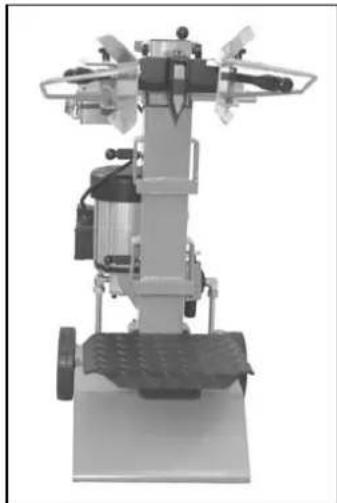
Move the splitting blade right down every time before the he is transported.
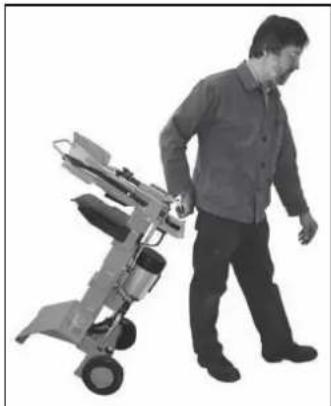
To transport the machine, grasp the handle and tilt the log splitter slightly towards you. The log splitter can be easily transported in this position.
Make sure that the oil tank cap is securely tightened to prevent oil from leaking during transport.
natural_image
Black-and-white photo of a person walking beside a small mobile device (no visible text or symbols)Positioning
Ensure that the working area meets the following conditions:
- no danger of slipping
- level
- free of obstacles
— sufficiently well lit

Do not operate the machine in the direct vicinity of gas petrol pipes or containers, or any other easily inflammable serials.
Start-up
- Check that the machine is completely and correctly assembled.
■ Before using the log splitter, make sure each time that
– there are no faulty connections (tears, cuts, etc.)
Do not use defective power supply cables.
– there are no damages at the machine
- all screws are tight
– check the hydraulic system for any possible leaks
- the oil level
Venting
Vent the hydraulic system before putting the log splitter into operation.
➢ Unscrew the oil cap by several turns so that air may escape from the oil tank.
Leave the oil cap open during operation.
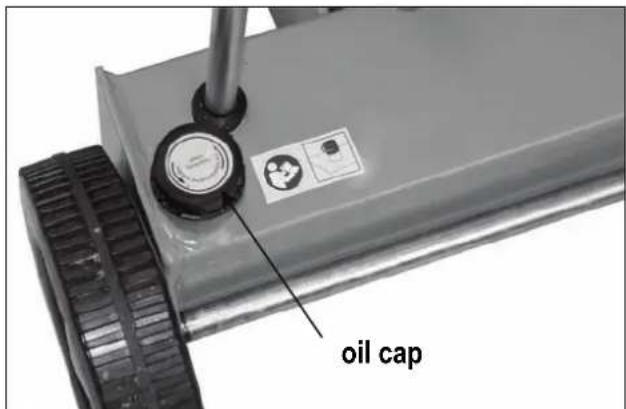
➢ Close the oil cap before moving the log splitter, as otherwise oil will leak at this point.
① If the hydraulic system is not vented, the trapped air will damage the seals and cause permanent damage to the log splitter.
i Mains connection
- Compare the voltage given on the machine model plate e.g. 230 V with the mains voltage and connect the machine to the relevant and properly earthed plug.
- Only use connection cables with sufficient cross-sections.
■ Connect the machine via a 30 mA fault current safety switch.
i Fuse protection
230 V \~ → 16 A time-lag

i Switching on / off
⚠️ Prior to every use, check the function of the disconnection mechanism (by switching on and off).
Do not use any device where the switch can not be switched on and off. Damaged switches must be repaired or replaced immediately by the customer service.
natural_image
Close-up of a mechanical control panel with a square button and indicator lights (no visible text or symbols)
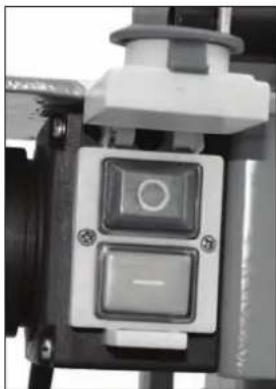
Switching on
Press the green button.

Switching off
Press the red button.
① Lock in case of power (zero-voltage initiator)
The equipment will switch off automatically if there is a power cut. Repress the green button to switch it on again.
i Hydraulics
- Never operate the machine in the event of any possible danger from hydraulic fluid.
- Ensure that the machine and working area are clean and free of oil.
Danger of slippage or fire! - Check the hydraulic reservoir regularly to ensure that it contains enough hydraulic oil (see "Care and maintenance").
Capacity: approx. 4.4 litres
Working with the log splitter
Additional SAFETY INSTRUCTIONS
■ The log splitter may only be operated by a single person.
- The machine may only be operated by persons over the age of 18 years, and who have read and understood these operating instructions.
- Wear protective equipment (safety goggles/mask, gloves, safety shoes) to protect yourself from possible injury.
- Never try to split logs containing nails, wire or other similar objects.
- Already split wood and wood chips create a dangerous working area. The operator may stumble, slip or fall. Always keep the working area neat and tidy.
- Never place the hands on or near any moving parts of the machine when it is switched on. Maintain a safe distance from the log, the ram and the wedge in order to protect your hands from injury.
- The machine should only be used for splitting logs with a maximum length of 1030 mm.
- Check before splitting if the splitting column has been sufficiently lubricated to allow its trouble-free retraction and extension.
What type of logs can I split?
Size of logs
Length: max. 1030 mm
Diameter: min. 120 - max. 300 mm
The log diameter is a recommended guideline figure, because:
- thin logs can be difficult to split if they contain knots or if the fibres are too strong.
Do not try to split green logs. Dry logs are much easier to split, and do not cause jams as often as green (damp) wood.
⚠️ Hardwood tend to bursting: Exercise utmost caution!
Operation
Two-hand operation
⚠️ Never operate the log splitter with two people.
⚠️ Never block the control handles (clamping claws).
- Press the green switch on the electric motor. Wait a few moments until the motor has reached its operating revolutions and the required pressure has been built up in the hydraulic pump.
At temperatures below -5^ C, let the log splitter run for at least 15 min. in neutral to heat up the oil.
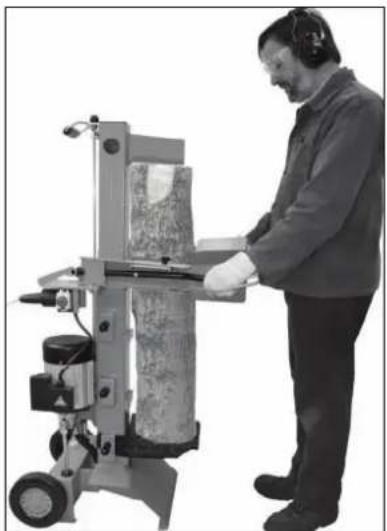
- Place the log on the log splitter table.
① Only split the logs in the direction of the wood fibres.
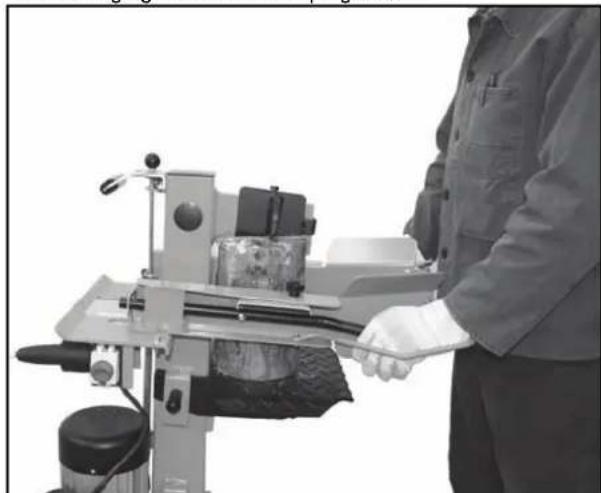
- Hold the log tight with the clamping claws.
natural_image
Person operating a machine tool with a tool handle, no visible text or symbols- Press both operating handles down simultaneously:
→ The splitting blade falls down and splits the log. - Release the two control handles, the splitting blade returns to its initial position.
① If you only release one control handle, then the splitting blade remains where it is.

Special instructions for splitting logs:
■ Preparations:
The logs to be split should be cut to the maximum dimensions. Ensure also that the logs are cut straight and square.
Place the log properly on the log splitter, so as not to cause any risk of stumbling or falling to the operator.
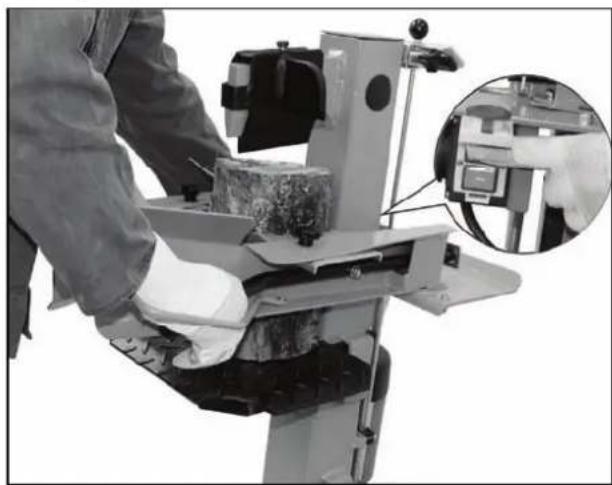
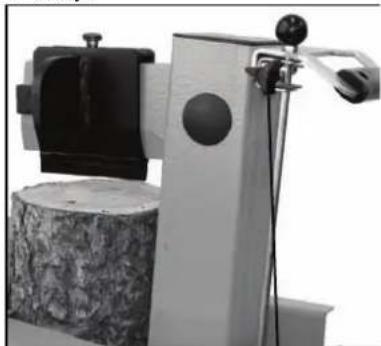
- Adjusting the stroke height
In case of shorter wood pieces the efficiency can be increased by shortening the return of the splitting cutter.
- Place the log on the splitting table and press the two control handles to bring the splitting blade down to approx. 2 cm above the log.
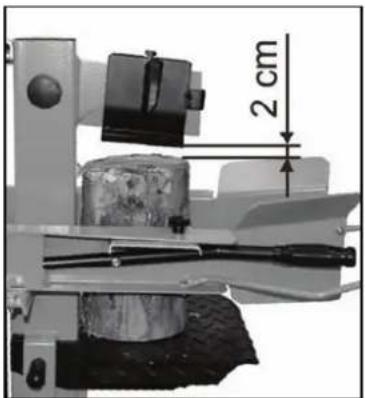
- Release one control handle so that the blade stays in this position.
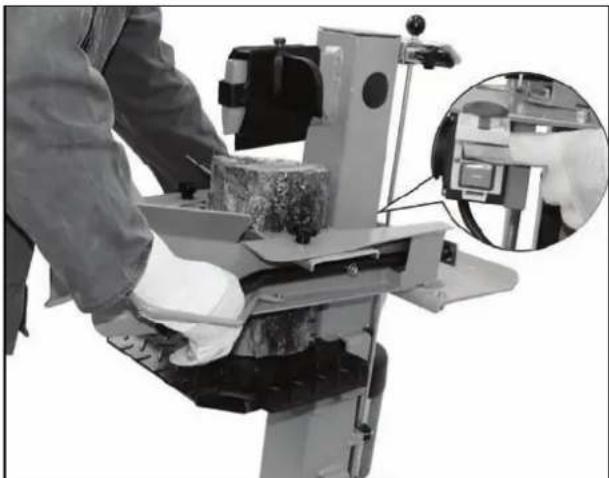
natural_image
Person operating a machine with a close-up inset showing a close-up of the tool (no visible text or symbols)-
Switch the machine off and disconnect the power.
-
Release the second control handle.
-
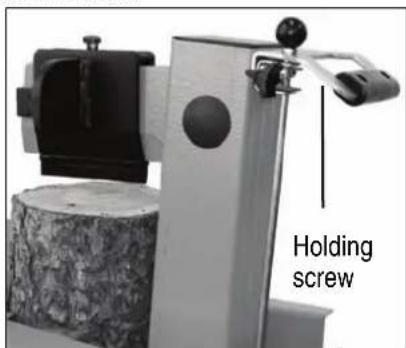
Shorten the return path at the rod fitted to the side by fixing the holding screw at the necessary height.
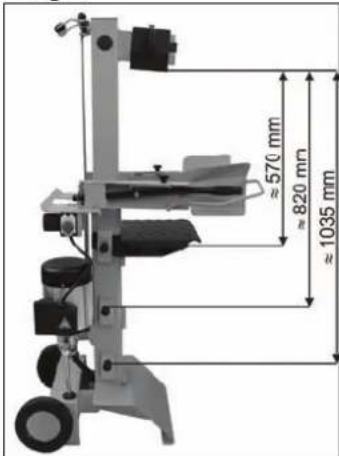
- Adjusting the table height
Upper table plate position: ≈ 570 mm.
Middle table plate position: ≈ 820 mm.
Lower table plate position: ≈ 1035 mm.
- Release the locking bolt.
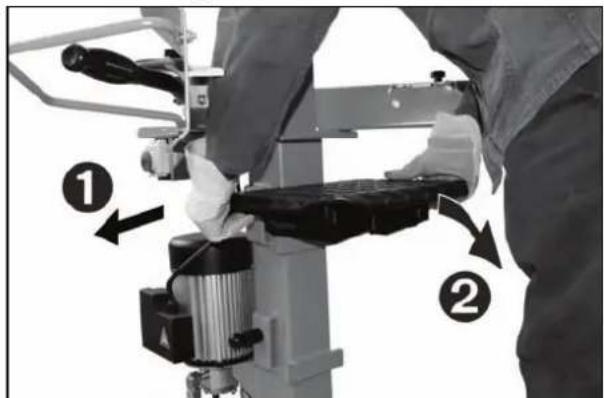
- Pull the table out.
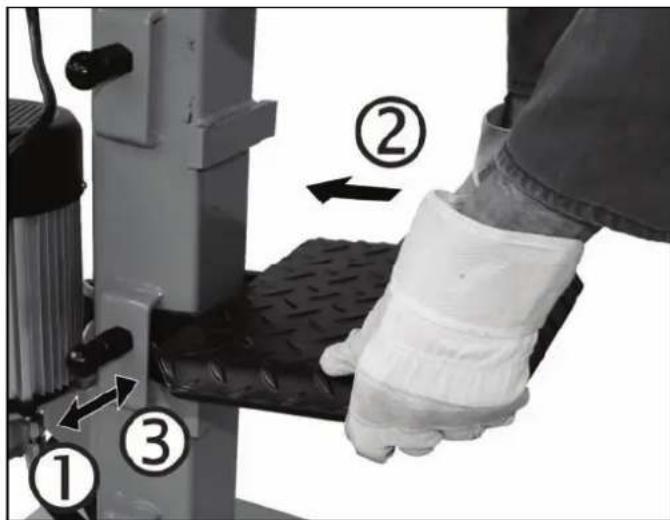
- Use the table in a position that comes close to the log length and secure it with the locking bolt.
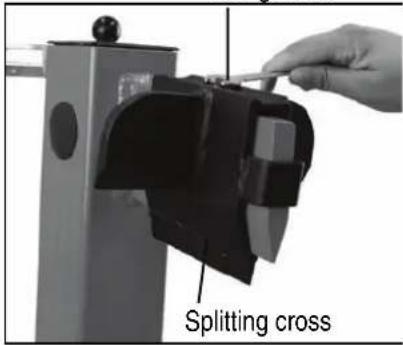
■ Adjusting the splitting cross:
-
Loosen fixing screw.
-
Move the splitting cross to the correct position (The fixing screw is beyond the borehole in the splitting blade).
-
Mount fixing screw.
Fixing screw
- Splitting short wood:
-
Upper position of table plate.
-
Place the log on the splitter's table plate.
-
Hold the log tight with the clamping claws.
① Only split the logs in the direction of the wood fibres.
- Splitting long wood:
-
Middle or low position of table or base.
-
Remove the splitting cross.
-
Place the log on the splitter's table.
i Possible
malfunction when cleaving logs: The log to be cleaved is not cleaved right through, jams on the cleaving blade and is pulled up during the blade's return movement.
In this case, proceed as follows:
-
Switch off the device.
-
Depending on the log still to be cleaved fix the table plate in the middle or upper position.
-
Switch on the device and continue the splitting operation.
⚠️ Never try to split two logs at once.
⚠️ Never try to remove or replace the log during the splitting process.
natural_image
Man operating a machine tool with a cylindrical component, no visible text or symbols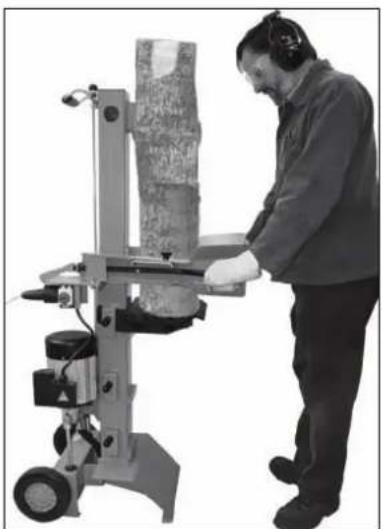
natural_image
Person operating a machine tool with a textured cylindrical component (no visible text or symbols)Never try to force the splitting of the log by maintaining the pressure for several seconds. This can lead to damage to the machine.
Position the log on the table again and repeat the splitting phase, or put the log on one side.
How to release a jammed log?
There is a risk of knotted logs getting stuck during the splitting process.
-
Switch machine off and disconnect the power.
-
Do not remove jammed logs with your hands.
-
Carefully move the stuck log with a crowbar backwards and forwards to loosen it. Don't damage the splitting pillar.
⚠️ Never hammer on the stuck log.
⚠️ Never use a saw to cut the stuck log out of the machine.
Do not enlist the aid of a second person - this is a one-man job.
Finishing work:
➢ Bring the splitting blade to the lower position (run-in state).
Release one of the control handles.
Switch the machine off and disconnect the power.
➢ Follow the care and maintenance instructions.
Maintenance and cleaning

Before each maintenance and cleaning work:
- switch off device
— pull out main plug

Wear protective gloves in order to avoid injury to the hands.
For maintaining and cleaning, removed security devices must unconditionally be mounted properly and proved again.
Use only original parts. Other parts can result in unexpected damages and injuries.
Be sure to have removed any tools from the machine after completion of service work.
Maintenance and repair work other than those described in this chapter is only allowed to be carried out by service staff.
To guarantee a long and reliable usage of the product carry out the following maintenance works regularly.
① Observe the following in order to keep the log splitter in good working order:
- Clean the machine thoroughly after you have finished using it.
■ Remove any resin remains on the machine.
- Check the device for obvious defects such as
- Loose fastening elements
- Worn out or damaged parts
- Correct assembly and faultless covers and protective devices
- Lubricate the splitting column regularly or oil it using environmentally friendly spray oil.
- Check hydraulic hoses and hose connections regularly for any leaks and firm fitting.
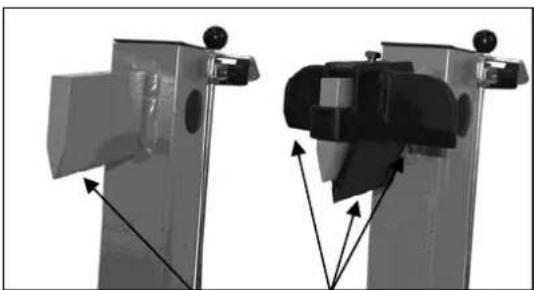
Sharpening the splitting blade
After longer operating periods, for reduced splitting performance or slight deformation of the cutting edge, grind the splitting blade or sharpen it with a fine file (remove burrs).
natural_image
Two mechanical components with arrows indicating assembly or movement, no visible text or symbolsSharpen wedges

How do I check the oil level?
-
The splitting column must be in run-in state. Now remove the dipstick.
-
Clean the dipstick and the oil seal.
-
Replace the dipstick fully into the oil reservoir.
-
Now remove the dipstick again and read off the oil level.
natural_image
Industrial machine with articulated arms and wheels (no visible text or symbols)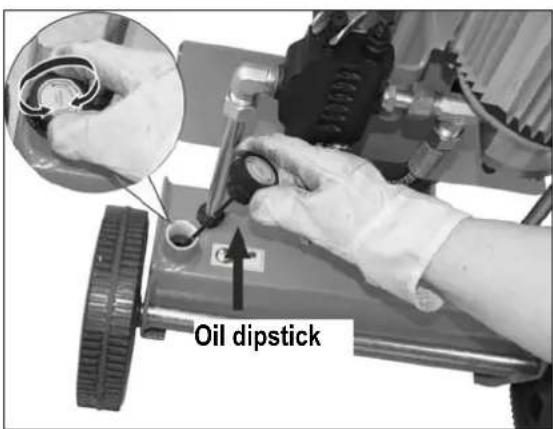
If the oil level is between the two marking on the oil dipstick, there is sufficient oil in the reservoir.
If the oil level is below the lower marking, more oil should be added with the aid of a clean funnel.
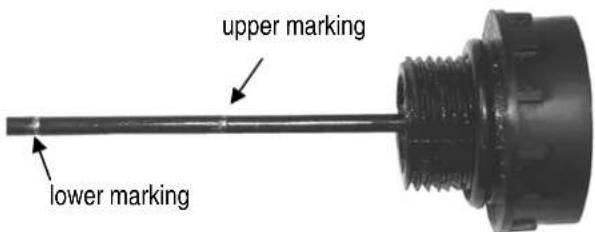
-
Check the oil seal and replace it if it is damaged in any way.
-
Replace the dipstick into the oil reservoir.

When should I change the oil?
The first oil change should be carried out after 50 operating hours, and then every 500 operating hours.

Two persons are required for this.
Changing the oil:
- The splitting column must be in run-in state.
- Now remove the dipstick.
- Place a container under the log splitter to catch the old oil. The container should have a capacity of at least 4.4 litres.
- Screw off the drain plug to allow the oil to flow out.
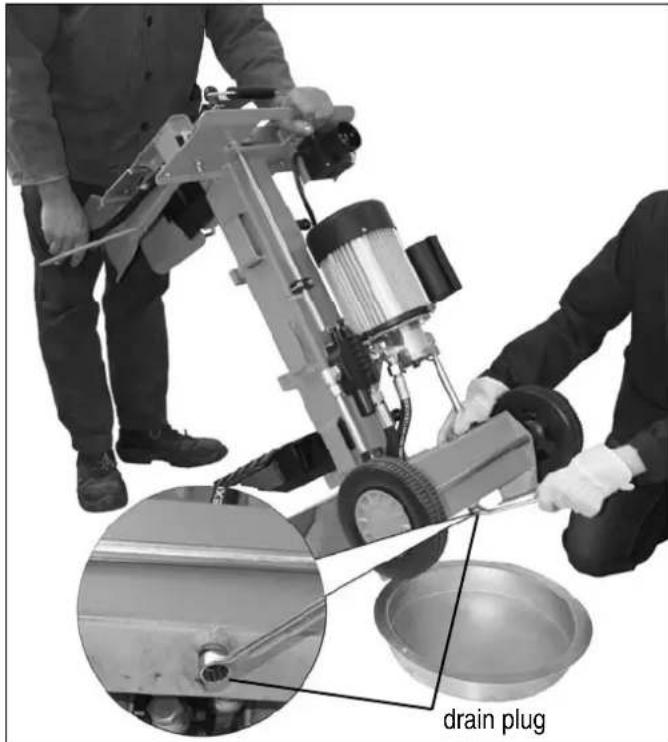
- Insert the seal and drain plug again.
- Pour in the new hydraulic oil (approx. 2.8 litres) using a clean funnel.
- Clean the dipstick and the oil seal.
- Check the oil seal and replace it if it is damaged in any way.
- Replace the dipstick.
Dispose of the old oil properly (local oil disposal point). The old oil must not be poured into the ground or drainage system, or mixed with other waste.
i Hydraulic oil
We recommend the following hydraulic oils for the hydraulic cylinder:
Shell Tellus T 22
Mobil DTE 11
Aral Vitam Gf 22
or equivalent
BP Energol HLP 22
Do not use any other types of oil. The use of any other type of oil will adversely affect the operation of the hydraulic cylinder.
Technical data
| Model / Type | ASP 6 L |
| Year of construction | see last page |
| Splitting force | 60 kN (6 t) ± 10 % |
| Log length | max. 1030 mm |
| Log diameter | min. 120 mm – max. 300 mm |
| Stroke | ≈ 500 mm |
| Feed speed | approx. 0.04 m/sek. |
| Return speed | approx. 0.17 m/sek. |
| Hydraulic oil (max.) | 4.4 litres |
| Hydraulic pressure | 24 MPa (240 bar) |
| Electric motor performance (power consumption) | P1 2.8 kW S6 – 40% |
| Power supply | 230 V~ 50 Hz, 16 A time-lag |
| Dimensions | length 840 x width 510 x height 990 / 1520 mm |
| Weight approx. 103.5 kg |
Possible problems
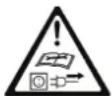
Before each fault clearance:
- switch off device
- pull out main plug
| Problem | Possible cause | Remedy |
| Logs are not being split properly(insufficient splitting performance). | ⇒ The log is not positioned correctly.⇒ The log exceeds the maximum dimensions or the wood is too hard for the performance of the machine.⇒ Splitting blade does not split log.⇒ Hydraulic pressure too low.⇒ Release rods bent (hydraulic tappet not quite pressed in).⇒ Incorrect connecting lead (longer than 10 m or too small cable cross-section). | ⇒ Reposition the log correctly.⇒ Cut the log to the required dimensions.⇒ Sharpen splitting blade, check for burrs or notches.⇒ Check the oil level and add more oil if necessary.If the problem cannot be rectified, refer to the manufacturer or other approved service centre.⇒ Arrange for manufacturer or authorised company to adjust the rods.⇒ Use the correct connecting lead. |
| Splitting column moves unsteadily or with strong vibrations. | ⇒ Air in the circuit.⇒ Splitting column not sufficiently lubricated or oiled. | ⇒ Check the oil level and add more oil if necessary.⇒ Lubricate splitting column or oil with environmentally friendly spray oil.If the problem cannot be rectified, refer to the manufacturer or other approved service centre. |
| Splitting column does not move in. | ⇒ Hydraulic pump defective. | ⇒ To correct the problem, refer to the manufacturer or other approved service centre. |
| Motor starts, but splitting column does not move in. | Motor turns in wrong direction To correct the problem, refer to the manufacturer or other approved service centre. | |
| Motor will not start. | ⇒ No electrical power.⇒ Connection cable defective.⇒ Electric motor defective. | ⇒ Check the fuse.⇒ Replace the connection cable or have it checked by an electrician.⇒ To correct the problem, refer to the manufacturer or other approved service centre. |
Guarantee
Please observe the enclosed terms of guarantee.

natural_image
Man walking beside a portable electronic device (no visible text or symbols)Installation
natural_image
Close-up of a mechanical control panel with two buttons and a circular dial (no visible text or symbols)Mise en marche
natural_image
Person operating a mechanical machine with tool handle (no visible text or symbols)natural_image
Person operating a machine with a close-up inset showing a close-up of a device (no visible text or symbols)natural_image
Person operating a mechanical device with a textured cylindrical component, no visible text or symbols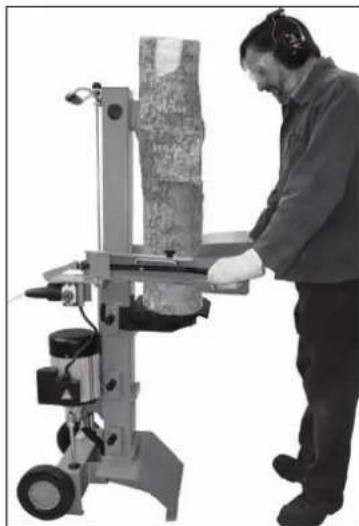
natural_image
Person operating a machine tool with a textured cylindrical object, no visible text or symbolsnatural_image
Two views of a mechanical device with arrows indicating assembly or component (no visible text or symbols)Affûtage des arêtes
natural_image
Industrial machine with dual-axis wheels and control panel (no visible text or symbols)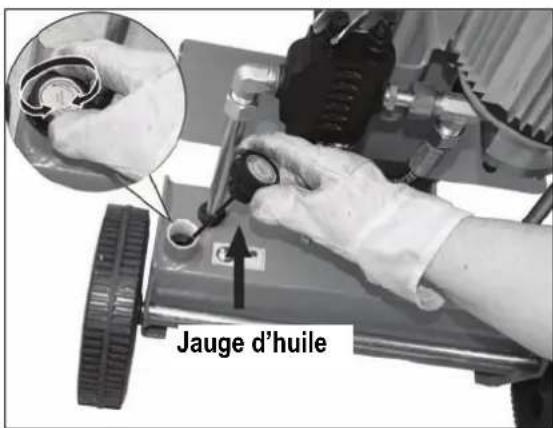
natural_image
Black-and-white photo of a man walking beside a portable electronic device (no visible text or symbols)Поставяне
natural_image
Close-up of a mechanical control panel with a square button and circular dial (no visible text or symbols)
Включване
natural_image
Person operating a mechanical machine with a tool, no visible text or symbolsnatural_image
Person operating a machine with a close-up inset showing a close-up of a device (no visible text or symbols)natural_image
Person operating a machine tool with a cylindrical component, no visible text or symbols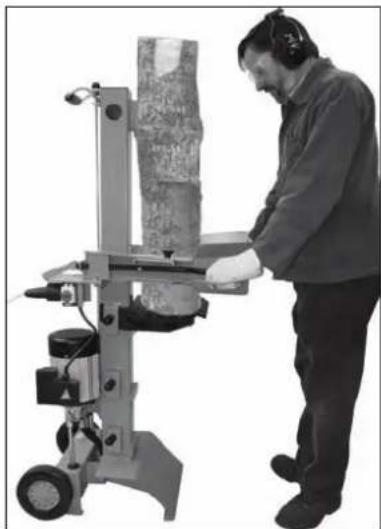
natural_image
Person operating a manual machine with a cylindrical component, no visible text or symbolsnatural_image
Two mechanical device components with arrows indicating assembly or movement, no visible text or symbolsнаточване на ръба

natural_image
Industrial machine with articulated arms and control panel (no visible text or symbols)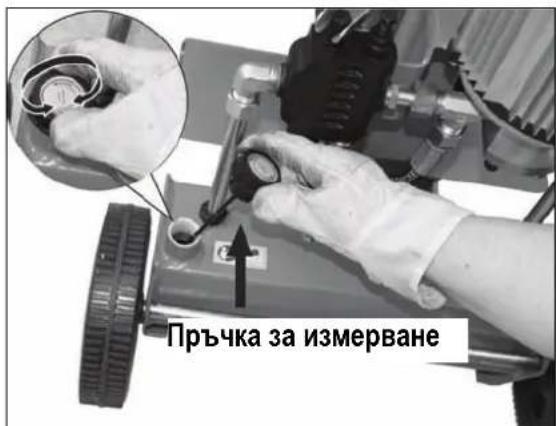
natural_image
Man walking beside a small wheeled device (no visible text or symbols)Umístění stroje
natural_image
Close-up of a mechanical component with a tire, circular dial indicator, and a small icon (no readable text or symbols)natural_image
Close-up of a mechanical control panel with two buttons and a central circular element (no visible text or symbols)
Zapnutí
natural_image
Person operating a machine tool with a tool handle, no visible text or symbolsnatural_image
Mechanical device with a 2 cm measurement annotation, showing mechanical components and a cylindrical body (no readable text or symbols)natural_image
Person operating a machine with a close-up inset showing a close-up of the device (no visible text or symbols)natural_image
Close-up of a hand using a mechanical presser to lift a black textured mat, with arrows indicating motion direction (no text or symbols visible)natural_image
Person operating a machine tool with a cylindrical component, no visible text or symbols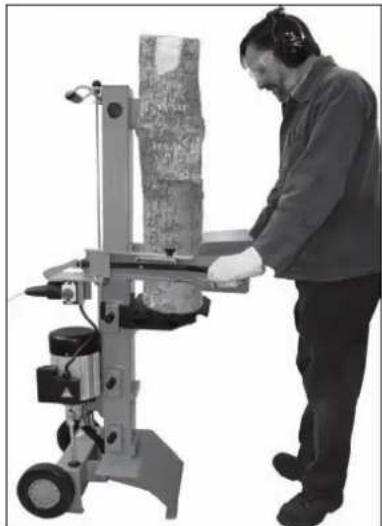
natural_image
Person operating a manual machine with a cylindrical component, no visible text or symbolsnatural_image
Two mechanical device components with arrows indicating assembly or alignment (no visible text or symbols)Ostření hrany

natural_image
Industrial machine with dual levers and control panel (no visible text or symbols)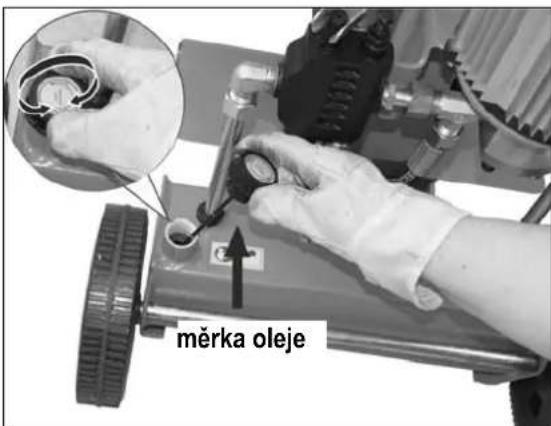
Symbol apparat / emballage

natural_image
Man walking beside a portable electric vehicle (no visible text or symbols)Opstilling
① Indkobling / Frakobling

natural_image
Close-up of a mechanical control panel with a square button and two buttons (no visible text or symbols)
Indkobling
natural_image
Person operating a mechanical machine with a tool, no visible text or symbols- Tryk samtidigt begge betjeningshändtag nedad.
natural_image
Mechanical device with a 2 cm measurement annotation, showing internal components and no readable text or symbols.- Slip et af betjeningshåndtagene for at standse spaltekniven i denne position.
natural_image
Person operating a machine with a close-up inset showing a close-up of the device (no visible text or symbols)natural_image
Person operating a machine tool with a cylindrical component, no visible text or symbolsnatural_image
Person operating a machine tool with a cylindrical component, no visible text or symbolsnatural_image
Two mechanical components with directional arrows indicating assembly or movement (no visible text or symbols)skærpning af kant

natural_image
Industrial machine with dual-axis wheels and control panel (no visible text or symbols)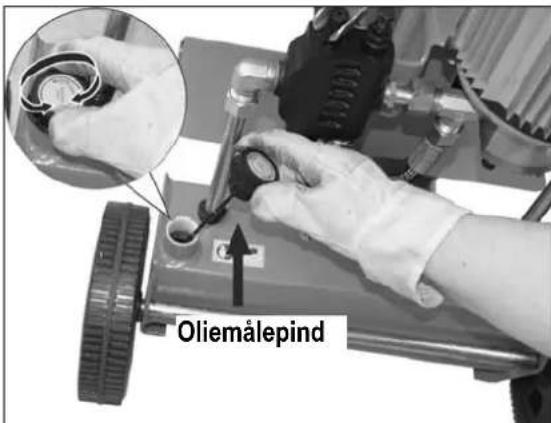
natural_image
Black-and-white photo of a person walking beside a small wheeled device (no visible text or symbols)Pystytys
natural_image
Close-up of a mechanical control panel with two buttons and a central display (no visible text or symbols)natural_image
Person operating a mechanical machine with tools and components (no visible text or symbols)natural_image
Mechanical assembly diagram showing a cylindrical component with a 2 cm dimension label (no readable text or symbols beyond the measurement)natural_image
Person operating a machine with a close-up inset showing a close-up of the device (no visible text or symbols)natural_image
Person operating a machine tool with a cylindrical component, no visible text or symbols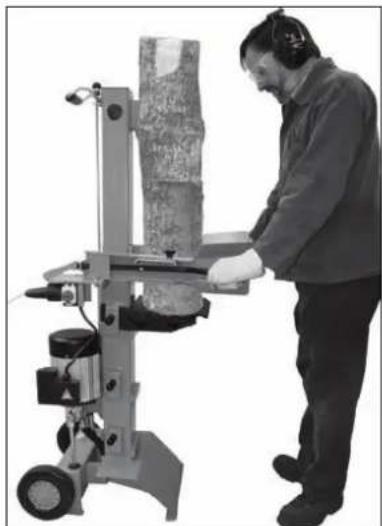
natural_image
Person operating a machine tool with a textured material on its side (no visible text or symbols)natural_image
Two views of a mechanical device with arrows indicating assembly or component (no visible text or symbols)Reunan teroitus

natural_image
Industrial machine with dual blades and control panel (no visible text or symbols)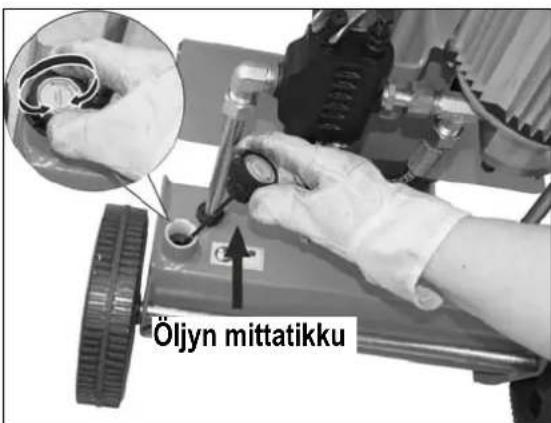
natural_image
Man walking beside a small mobile device (no visible text or symbols)Felállítás
natural_image
Close-up of a mechanical control panel with two buttons and a circular dial (no visible text or symbols)Bekapcsolás
natural_image
Person operating a lathe machine with tool handle (no visible text or symbols)natural_image
Person operating a machine with a close-up inset showing a close-up of the machine's handle (no visible text or symbols)natural_image
Person operating a machine tool with a cylindrical component, no visible text or symbols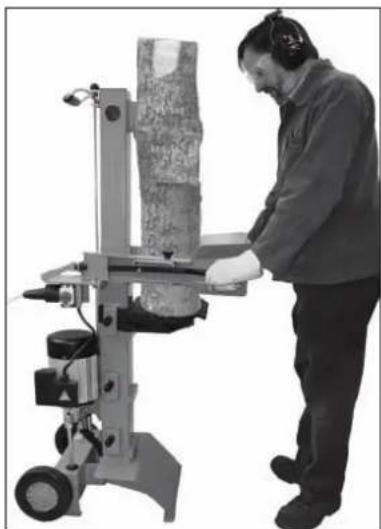
natural_image
Person operating a machine tool with a cylindrical component, wearing head cover (no visible text or symbols)natural_image
Two mechanical components with arrows pointing to features, no visible text or symbolsnatural_image
Industrial machine with articulated arms and control panel (no visible text or symbols)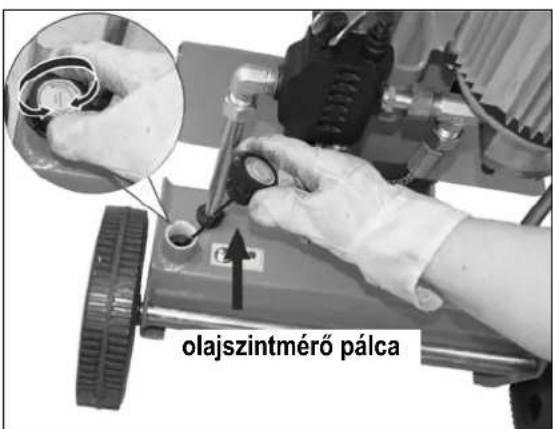
natural_image
Man walking beside a small mobile device (no visible text or symbols)Postavljanje
natural_image
Close-up of a mechanical control panel with two buttons and a central square dial (no visible text or symbols)
Uključivanje
Pritisnite zelenu tipku.

Isključivanje
Pritisnite crvenu tipku.
① Osigurač od ponovnog puštanja u rad u slučaju prekida dovoda struje (nulnaponski okidač)
natural_image
Person operating a mechanical machine with tools and components (no visible text or symbols)natural_image
Person operating a machine with a close-up inset showing a close-up of a mechanical component (no visible text or symbols)-
Izvucite mrežni utikač.
-
Pustite drugi držak za posluživanje.
-
Skratite povratni hod na šipki koja je postavljena na boku, tako što ćete vijak za pričvršćivanje fiksirati na potrebnoj visini.
natural_image
Close-up of a mechanical testing device with a circular component and a cylindrical base (no visible text or symbols)- Stavite stol u poziciju približno duljini debla i osigurajte ga svornjakom za blokiranje.
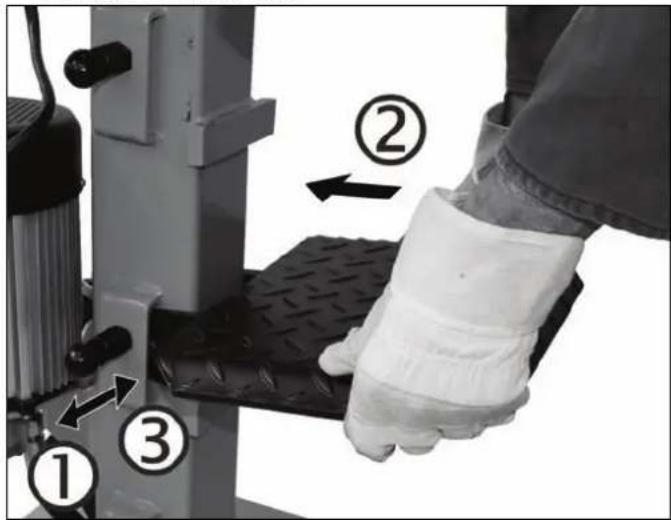
natural_image
Person operating a mechanical machine with a cylindrical component (no visible text or symbols)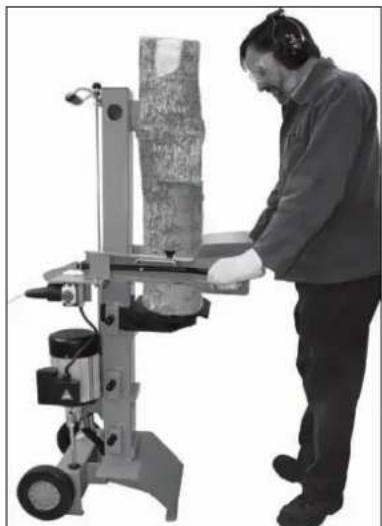
natural_image
Person operating a manual machine with a cylindrical component, no visible text or symbolsNemojte nikada cijepati dva komada drveta u jednom radnom koraku.
⚠ Nikada nemojte drvo dodavati ili mijenjati za vrijeme radnog postupka.
Nikada nemojte nasilu postizati cijepanje drveta održavanjem guranja u trajanju od više sekundi. To može dovesti do oštećenja stroja.
Ponovno pozicionirajte drvo na glavnom okviru i ponovite postupak cijepanja ili ostavite drvo nastranu.
Kako se vadi zaglavljeno drvo?
natural_image
Two views of a mechanical device with arrows indicating assembly or transformation (no visible text or symbols)Oštrenje rubova

natural_image
Industrial machine with dual blades and control panel (no visible text or symbols)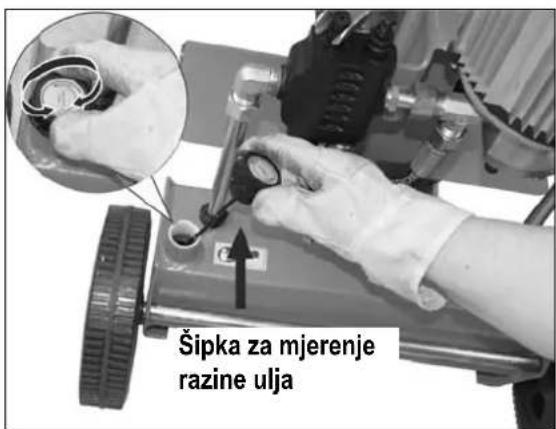
Ako razina ulja leži između dvije markacije, onda u spremniku ima dovoljno ulja.
Ako razina ulja leži ispod donje markacije, ulje se pomoću jednog čistog lijevka mora dopuniti.
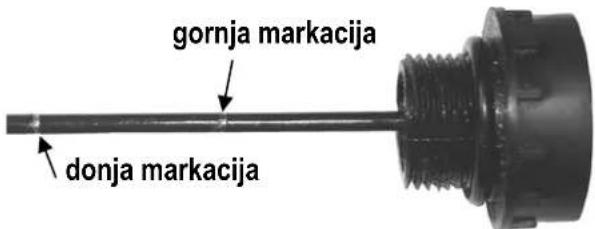
- Provjerite brtvilo za ulje. U slučaju da je oštećeno brtvilo se mora izmijeniti.
- Stavite opet mjernu šipku u otvor do graničnika.

- Opet umetnite brtvilo i ispusni čep.
- Pomoću čistog lijevka uspite novo hidraulično ulje (otprilike 2,8 litara).
- Očistite šipku za mjerenje razine ulja i brtvilo za ulje.
- Provjerite brtvilo za ulje. U slučaju da je oštećeno, brtvilo se mora izmijeniti.
- Zavrnite opet šipku za mjerenje razine ulja čvrsto.
Staro ulje uklonite propisno (odlagalište starog ulja u Vašoj blizini). Zabranjeno je ispuštanje starog ulja u tlo ili miješanje s ostalim otpadom.
① Hidraulično ulje
natural_image
Man walking beside a portable electric vehicle (no visible text or symbols)natural_image
Close-up of a mechanical control panel with two buttons and a central display (no visible text or symbols)
Accensione
natural_image
Person operating a mechanical machine with tool handle (no visible text or symbols)natural_image
Person operating a machine with a magnified inset showing a close-up of the device (no visible text or symbols)natural_image
Person operating a machine tool with a cylindrical component, no visible text or symbolsnatural_image
Person operating a machine tool with a textured cylindrical object, no visible text or symbolsnatural_image
Two views of a mechanical device with arrows indicating assembly or component alignment (no text or symbols visible)Affilare lo spigolo

natural_image
Industrial machine with dual blades and control panel (no visible text or symbols)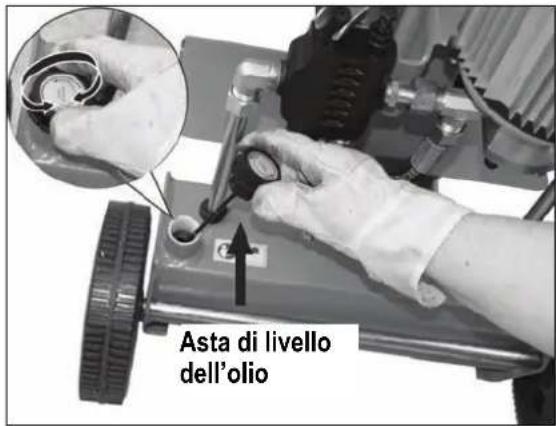
natural_image
Man walking beside a portable electric vehicle (no visible text or symbols)Opstellen
natural_image
Close-up of a mechanical control panel with a square button and two buttons (no visible text or symbols)Inschakelen
natural_image
Person operating a mechanical machine with a tool, no visible text or symbolsnatural_image
Mechanical device with a 2 cm measurement annotation, showing internal components and no readable text or symbols.natural_image
Person operating a machine with a close-up inset showing a close-up of a device (no visible text or symbols)- Splijtkruis justeren
natural_image
Person operating a machine tool with a cylindrical component, no visible text or symbols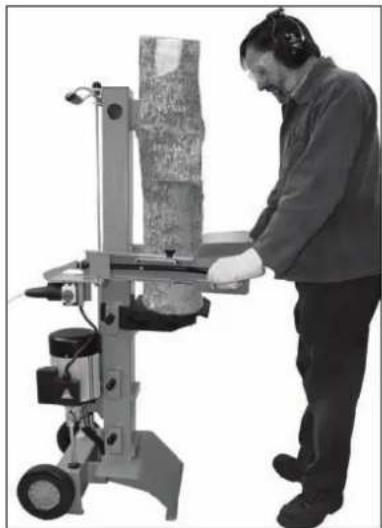
natural_image
Person operating a manual labor machine with a cylindrical workpiece (no visible text or symbols)natural_image
Two mechanical device components with arrows indicating assembly or movement, no visible text or symbolsKant scherpen

natural_image
Industrial machine with dual blades and control panel (no visible text or symbols)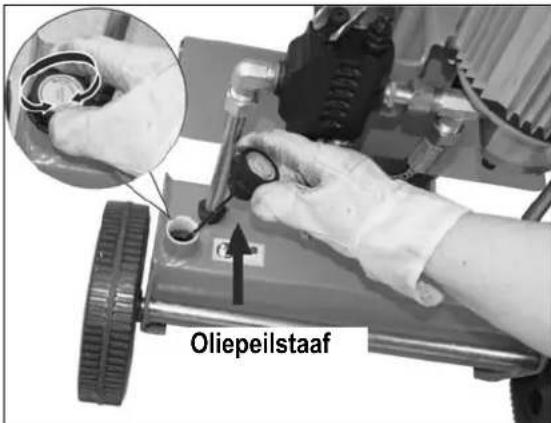
natural_image
Black-and-white photo of a man walking beside a portable electronic device (no visible text or symbols)natural_image
Close-up of a mechanical control panel with two buttons and a central square dial (no visible text or symbols)Włączenie
natural_image
Person operating a mechanical machine with tool handle (no visible text or symbols)natural_image
Mechanical device with a 2 cm measurement annotation, showing internal components and no readable text or symbols.natural_image
Person operating a machine with a close-up inset showing a close-up of a mechanical component (no visible text or symbols)natural_image
Person operating a machine tool with a cylindrical component, no visible text or symbolsnatural_image
Person operating a manual machine with a textured cylindrical component (no visible text or symbols)natural_image
Two views of a mechanical device with arrows indicating assembly or component (no visible text or symbols)natural_image
Industrial machine with dual levers and wheels (no visible text or symbols)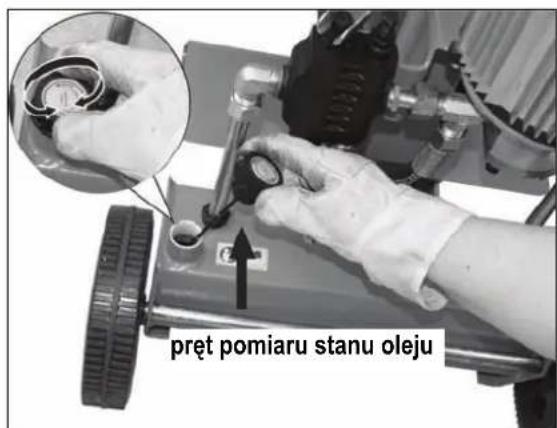
natural_image
Black-and-white photo of a man walking beside a small wheeled device (no visible text or symbols)natural_image
Close-up of a mechanical control panel with two buttons and a central display (no visible text or symbols)Conectarea
natural_image
Person operating a mechanical machine with tool handle (no visible text or symbols)natural_image
Mechanical device with a 2 cm measurement annotation, showing internal components and no readable text or symbols.natural_image
Person operating a machine with a close-up inset showing a close-up of the mechanical component (no visible text or symbols)- Ajustarea crucii de despicat:
natural_image
Person operating a machine tool with a textured surface, no visible text or symbolsnatural_image
Person operating a manual machine with a cylindrical component, no visible text or symbolsnatural_image
Two views of a mechanical device with arrows indicating assembly or component (no visible text or symbols)Ascutiti muchia

natural_image
Industrial machine with dual-axis motors and control panel (no visible text or symbols)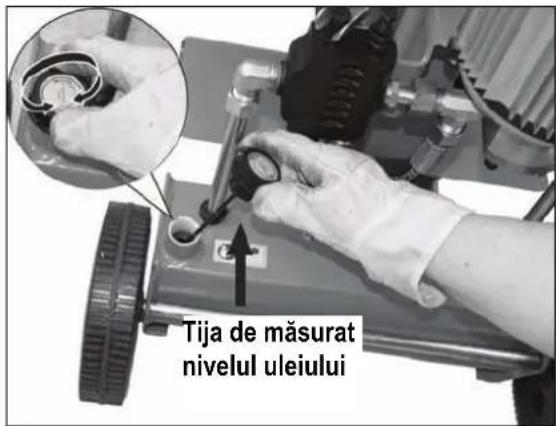
natural_image
Two workers operating a mechanical tool with a close-up inset showing internal components (no visible text or symbols)dop de golire
natural_image
Man walking beside a small mobile device (no visible text or symbols)Placering
natural_image
Close-up of a mechanical control panel with a square button and two buttons (no visible text or symbols)
Tillkoppling
natural_image
Person operating a mechanical machine with tool handle (no visible text or symbols)natural_image
Person operating a machine with a close-up inset showing a close-up of the device (no visible text or symbols)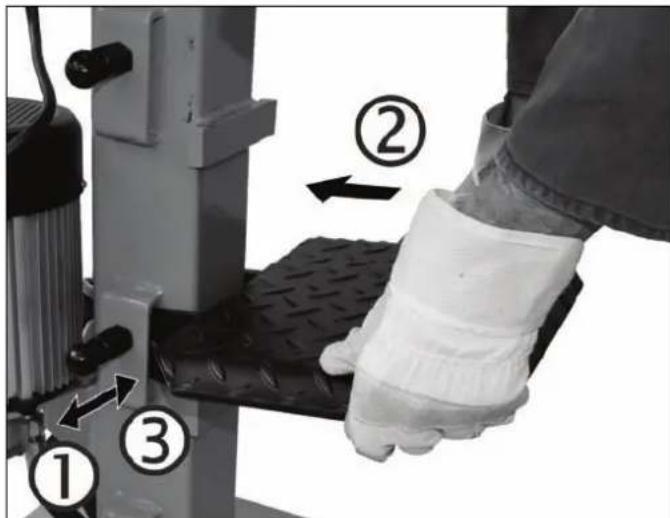
Justera klyvkorset
natural_image
Man operating a machine tool with a textured cylindrical component (no visible text or symbols)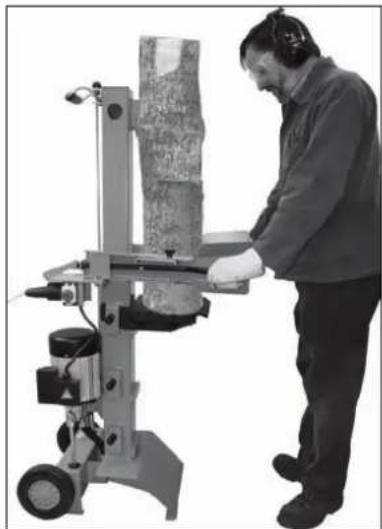
natural_image
Person operating a manual machine with a cylindrical component, no visible text or symbolsnatural_image
Two views of a mechanical device with arrows indicating assembly or component alignment (no text or symbols visible)Skärpa kanten

natural_image
Industrial machine with dual levers and control panel (no visible text or symbols)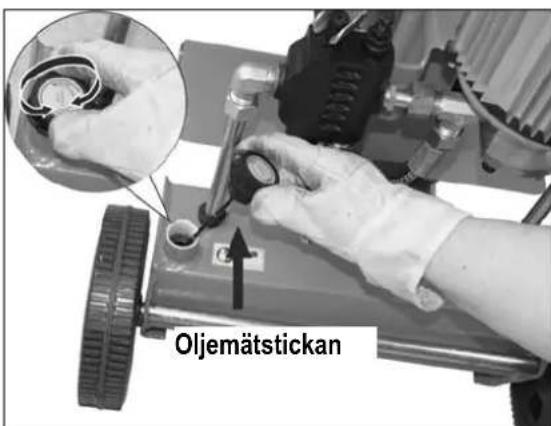
natural_image
Man walking beside a small wheeled device (no visible text or symbols)Umiestnenie stroja
natural_image
Close-up of a mechanical control panel with a square button and circular element (no visible text or symbols)
Zapnutie
natural_image
Person operating a mechanical machine with a tool, no visible text or symbolsnatural_image
Mechanical device with a 2 cm measurement annotation, showing internal components and no readable text or symbols.natural_image
Person operating a machine with a close-up inset showing a close-up of a device (no visible text or symbols)natural_image
Person operating a machine tool with a cylindrical component, no visible text or symbols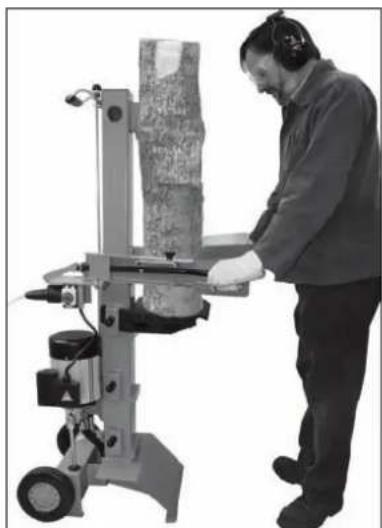
natural_image
Person operating a manual machine with a textured cylindrical component (no visible text or symbols)
natural_image
Two views of a mechanical device with arrows indicating assembly or component (no text or symbols visible)Ostrenie hrany

Ako skontrolovat' stav oleja?
-
Štiepací stípik musí byt' zasunutý.
-
Odmerku vytiahnite.
-
Očistite odmerku a tesnenie.
-
Čistú odmerku opät' zasuňte do otvoru až na doraz.
-
Odmerku opät' vytiahnite.
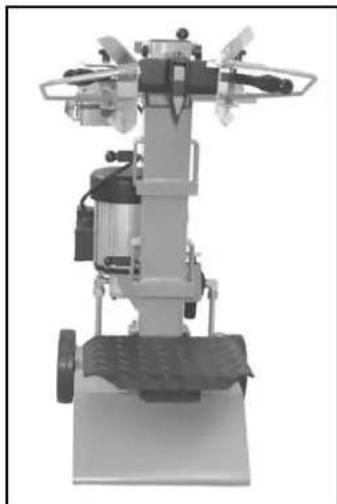
natural_image
Industrial machine with dual-mounted components and wheels (no visible text or symbols)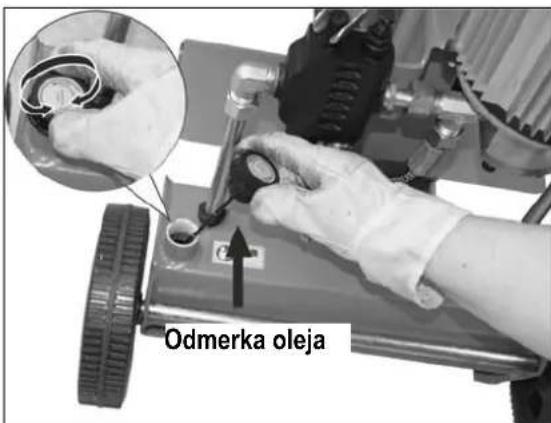
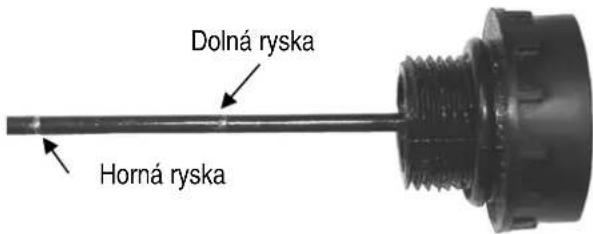
ak leží hladina oleja medzi oboma označeniami, je oleja v stroji dostatok.
ak je hladina oleja pod dolnou ryskou, je potrebné olej doplnit. Použite čistý lievik.
-
Skontrolujte tesnenie. Nesmie byt' poškodené.
-
Čistú odmerku vsuňte opät' do otvoru.

natural_image
Black-and-white photo of a person walking beside a small wheeled device (no text or symbols visible)Postavitev
natural_image
Close-up of a mechanical control panel with a square button and circular element (no visible text or symbols)Vklop
Pritisnite zeleno tipko.
Izklop
natural_image
Person operating a mechanical machine with tool handle (no visible text or symbols)natural_image
Person operating a machine with a close-up inset showing a close-up of a device (no visible text or symbols)natural_image
Man operating a machine tool with a cylindrical component, no visible text or symbols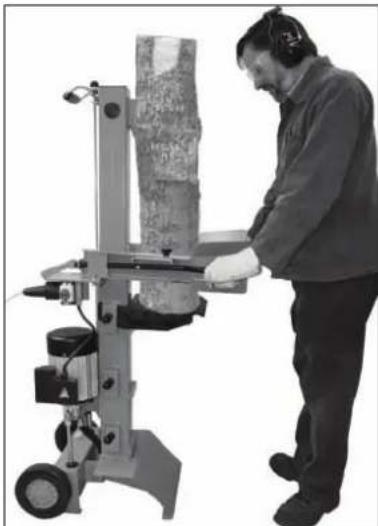
natural_image
Person operating a machine tool with a cylindrical component, no visible text or symbols
Nikoli ne cepite dveh debel v enem delovnem koraku.
Lesa nikoli ne prilagajte ali zamenjajte med delovnim korakom.
natural_image
Two views of a mechanical device with adjustment knobs and a central component (no visible text or symbols)Brušenje roba

Kako preverim stanje olja?
- Cepilni steber mora biti v nevtralnem položaju.
- Izvijačite merilno palico za olje.
- Očistite merilno palico za olje in oljno tesnilo.
- Merilno palico za olje vstavite do omejila nazaj v odprtino.
- Znova izvlecite merilno palico za olje.

natural_image
Industrial machine with dual levers and control panel (no visible text or symbols)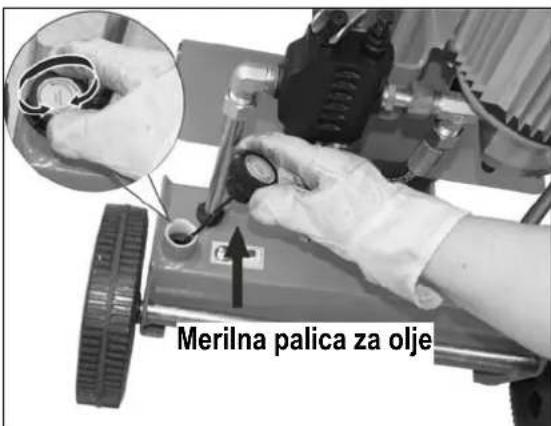
Če je raven olja med obema oznakama, je v rezervoarju dovolj olja.
Če je raven olja pod spodnjo oznako, je treba olje doliti z uporabo čistega lijaka.
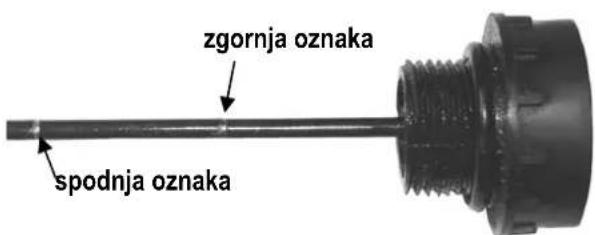
- Preverite oljno tesnilo. Če je poškodovano, ga morate zamenjati.
- Merilno palico za olje vstavite do omejila nazaj v odprtino.

Kdaj moram menjati olje?
GB Year of construction
- Brennholzspalter
- Aufstellen
- Öltankverschluss
- Einschalten
- Contents
- Extend of delivery
- Symbols machine
- Symbols machine / packaging
- Symbols operating manual
- Proper use
- Residual risks
- Safe working
- Electrical safety
- Transport Instructions
- Positioning
- Start-up
- Venting
- i Mains connection
- i Fuse protection
- i Switching on / off
- ① Lock in case of power (zero-voltage initiator)
- i Hydraulics
- Working with the log splitter
- Additional SAFETY INSTRUCTIONS
- What type of logs can I split?
- Size of logs
- Operation
- Two-hand operation
- Special instructions for splitting logs:
- ■ Preparations:
- - Adjusting the stroke height
- - Adjusting the table height
- ■ Adjusting the splitting cross:
- - Splitting short wood:
- - Splitting long wood:
- i Possible
- How to release a jammed log?
- Finishing work:
- Maintenance and cleaning
- Sharpening the splitting blade
- How do I check the oil level?
- When should I change the oil?
- Two persons are required for this.
- Changing the oil:
- i Hydraulic oil
- Possible problems
- Guarantee
- Installation
- Поставяне
- Включване
- Umístění stroje
- Zapnutí
- Symbol apparat / emballage
- Opstilling
- ① Indkobling / Frakobling
- Indkobling
- Pystytys
- Felállítás
- Postavljanje
- Uključivanje
- Isključivanje
- ① Osigurač od ponovnog puštanja u rad u slučaju prekida dovoda struje (nulnaponski okidač)
- Kako se vadi zaglavljeno drvo?
- ① Hidraulično ulje
- Opstellen
- - Splijtkruis justeren
- Conectarea
- - Ajustarea crucii de despicat:
- Placering
- Tillkoppling
- Justera klyvkorset
- Umiestnenie stroja
- Zapnutie
- Ako skontrolovat' stav oleja?
- Postavitev
- Kako preverim stanje olja?
- Kdaj moram menjati olje?
Brand : ATIKA
Model : ASP 6 L
Category : Log splitter