USER MANUAL GC8280 PHILIPS
Thank you for buying the Philips GC8280. Please read these instructions for use, as they contain information about the surprising features of this ironing system and some tips to make ironing easier and more enjoyable.
The Philips GC8280 is a powerful pressurised ironing system that produces non-stop steam to make ironing easier. Thanks to the large water tank you can iron without interruption. When the water tank is empty you can detach it and refill it immediately.
The Philips GC8280 is equipped with a sophisticated display that gives you more control over the ironing process. It gives feedback on the selected temperature setting and has precise pre-programmed temperature settings for 12 different fabrics. It also informs you about the steam setting and the water level and warns you when the iron needs to be rinsed. The iron is very safe thanks to the automatic iron-off function. Last but not least, it is the only ironing system on the market with an integrated drip stop.
We hope you will enjoy using the Philips GC8280.
General description (Fig. 1)
A Supply hose
B Handle with soft grip
Steam activator
D Display
Temperature buttons (+ / - )
F Menu button
6 Soleplate
Safe storage lock
Iron stand
Detachable water tank
Filling cup
Cord & hose storage hook
Calc-Clean rinsing cap
Filling opening
Water tank release lever
P Steam tank
On/off button with power-on light
Transport handgrip
Water tank refill light
1 Mains cord
U Steam buttons (+ / - )
Steam tank control panel with steam light
- = maximum steam
- = moderate steam
- = minimum steam
- = no steam
Important
Read this user manual carefully before you use the appliance and save it for future reference.
-
Check if the voltage indicated on the type plate corresponds to the local mains voltage before you connect the appliance.
Only connect the appliance to an earthed wall socket.
-
Do not use the appliance if the plug, the cord, the supply hose or the appliance itself shows visible damage, or if the appliance has been dropped or is leaking.
Check the cord and the supply hose regularly for possible damage.
If the mains cord or the supply hose is damaged, it must be replaced by Philips, a service centre authorised by Philips or similarly qualified persons in order to avoid a hazard.
- Never leave the appliance unattended when it is connected to the mains.
Never immerse the iron or the steam tank in water.
This appliance is not intended for use by persons (including children) with reduced physical, sensory or mental capabilities, or lack of experience and knowledge, unless they have been given supervision or instruction concerning use of the appliance by a person responsible for their safety.
Children should be supervised to ensure that they do not play with the appliance.
The soleplate of the iron can become extremely hot and may cause burns if touched.
Do not allow the mains cord and supply hose to come into contact with the soleplate when it is hot.
- When you have finished ironing, when you clean the appliance, when you fill or empty the water tank and also when you leave the iron even for a short while: put the iron on the stand, switch the appliance off and remove the mains plug from the wall socket.
Always place and use the iron and the steam tank on a stable, level and horizontal surface. Do not put the steam tank on the soft part of the ironing board.
If steam escapes from under the Calc-Clean rinsing cap when the appliance is heating up, switch the appliance off and tighten the Calc-Clean rinsing cap. If steam continues to escape when the appliance is heating up, switch the appliance off and contact a service centre authorised by Philips.
- Do not use any other cap on the steam tank than the cap that has been supplied with the appliance, as this cap also functions as a safety valve.
- Rinse the steam tank regularly according to the instructions in the chapter 'Cleaning'.
- Never remove the Calc-Clean rinsing cap when the steam tank is hot.
This appliance is intended for household use only.
Electromagnetic fields (EMF)
This Philips appliance complies with all standards regarding electromagnetic fields (EMF). If handled properly and according to the instructions in this user manual, the appliance is safe to use based on scientific evidence available today.
Before first use
Note:The iron may give off some smoke when you use it for the first time. This is normal and will stop after a short while.
Note: Some particles may come out of the soleplate when you use the iron for the first time. This is normal; the particles are harmless and will stop coming out of the iron after a short while.
Note: When you switch the appliance on, the steam tank may produce a pumping sound. This is normal; the sound tells you that water is being pumped into the steam tank.
1 Remove any sticker or protective foil from the soleplate and clean the soleplate with a soft cloth.
2 Check the hardness of the tap water with the test strip supplied.
soft water
- moderately hard water
= hard water
=veryhardwater
Preparing for use
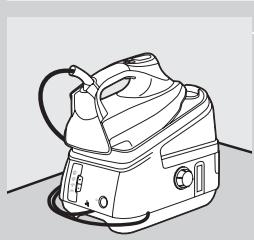
1 Place the steam tank on a stable and level surface, i.e. on the hard part of the ironing board or on a table.
Filling the detachable water tank
The water tank can be refilled at any time during use.
Do not put hot water, perfume, vinegar, starch, descaling agents, ironing aids or other chemicals in the water tank.
Do not overfill the water tank, otherwise water may spill out of the filling opening when you reinsert the water tank.
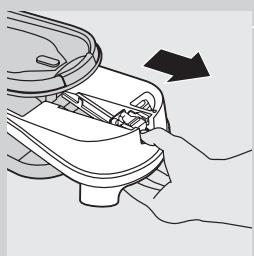
1 Remove the detachable water tank from the steam tank.
If the tap water in your area is very hard, we advise you to mix it with an equal amount of distilled water.
2 Fill the water tank up to the MAX indication.
3 Slide the water tank back into the steam tank ('click').
If the water tank is not properly placed, the iron does not produce any steam.
Water tank refill light
- When the water tank is almost empty, the message 'WATER LOW, REFILL WATER TANK' is shown on the display and you will hear two short beeps.
The water tank refill light starts blinking and steam ironing is no longer possible.
- Refill the water tank. The iron starts steaming again as soon as the water tank has been properly reinserted into the steam tank.
Setting the temperature
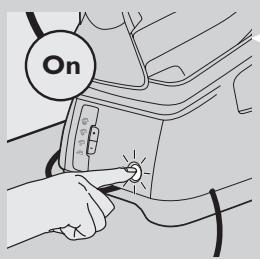


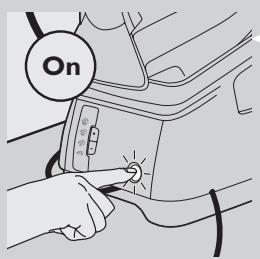
1 Put the mains plug in an earthed wall socket and press the on/off button once.
The power-on light goes on.
The display indicates that the iron is heating up or cooling down to the selected temperature.
The display lights up and you will hear a short beep. The following message moves across the display:
'WELCOME TO PHILIPS - CHECKING SENSORS - CHECKING WATER - WARMING UP'.
The steam light on the steam tank starts blinking.
After approx. 2 minutes the steam light stays on continuously to indicate that the steam tank is ready for steam ironing.
- When you switch the appliance on, it will automatically heat up to the last used temperature setting.
2 Check the garment label for the required ironing temperature.
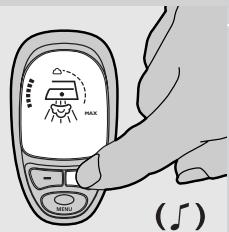
3 Press the temperature button + or - (hotter or colder) to set the required ironing temperature or fabric type.
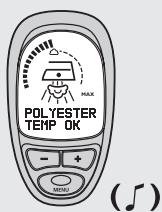
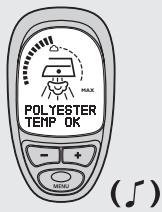
The display shows the fabric type for which the selected temperature setting is most suitable (see chapter 'Iron display guide').
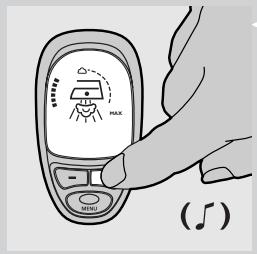
A double beep and a message on the display indicate that the soleplate has reached the selected temperature.
Tips
- If the article consists of various kinds of fibres, always select the temperature required by the most delicate fibre, i.e. the lowest temperature. If, for example, the fabric consists of 60% polyester and 40% cotton, it should be ironed at the temperature indicated for polyester ( ) .
- If you do not know what kind or kinds of fabric an article is made of, determine the right ironing temperature by ironing a part that will not be visible when you wear or use the article.
- Silk, woollen and synthetic materials: iron the reverse side of the fabric to prevent shiny patches.
- Fabrics that tend to acquire shiny patches should be ironed in one direction only (along with the nap) while applying very little pressure.
- Start ironing the articles that require the lowest ironing temperature, i.e. those made of synthetic materials.
To make the iron cool down faster, simply apply steam or iron a piece of cloth.
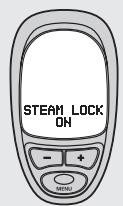
The GC8280 offers 5 functions that allow you to adjust the settings of the appliance to your own preferences.
These functions are listed in a menu. You can use the menu by pressing the menu button and the + and - buttons on the iron.
The menu structure of these functions is:
Sound: (on)/off
- Language: (English)/Dutch/French/German/Italian/Spanish/Portuguese
Water hardness:soft/(medium)/hard
Note: the default settings are shown between brackets.
To select your preferred settings:
1 Press the menu button for 1 second.
2 Use the + and - buttons on the iron to scroll through the available settings.
3 When you have reached the setting of your choice, press the menu button again. The message 'CONFIRMED' appears on the display.
4 To exit the menu, wait 3 seconds.
Using the appliance
Steam ironing
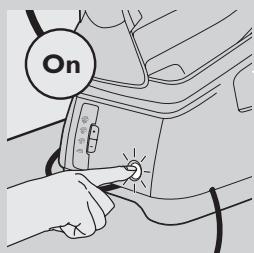
The supply hose may become hot during a long ironing session.
Note:The system may occasionally produce a pumping sound during steam ironing. This is normal and tells you that water is being pumped into the steam tank.
1 Make sure there is enough water in the water tank.
2 Put the mains plug in an earthed wall socket and press the on/off button once.
3 Select the recommended ironing temperature (see chapter 'Preparing for use').
Steam ironing is only possible at ironing temperatures higher than . The steam function will automatically be disabled at ironing temperatures lower than .
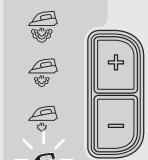
4 Select the required steam setting by means of the + and - buttons on the steam tank control panel.
for maximum steam (temperature setting MAX).
for moderate steam (temperature settings to MAX).
for minimum steam (temperature settings to MAX).
for no steam (temperature settings to MAX).
The steam light blinks to indicate that the steam tank is heating up.
After approx. 2 minutes the steam light stays on continuously to indicate that the steam tank is ready for steam ironing.
During steam ironing, the steam light starts blinking from time to time to indicate that the steam tank is heating up to maintain the right temperature and pressure.
During ironing you can adjust the steam setting by means of the + and - steam buttons.
It will take a few moments before the amount of steam is adjusted.
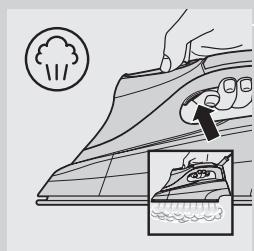
5 Press the steam activator to start steam ironing.
When you put the iron down during ironing, put it on its heel or on the iron stand.
- The opening and closing of the steam valve in the steam tank will cause a clicking sound. This is perfectly normal.
Steam lock function
The steam lock allows you to steam iron non-stop without having to press the steam activator continuously.
- When the steam lock function has been set to 'on' (the default setting in the display menu), the iron starts steaming continuously when the steam activator is pressed once. To stop steaming, press the steam activator once again.
- When the steam lock function has been set to 'off' (see section 'Display menu'), the iron will only produce steam when the steam activator is pressed.
Release the steam lock when you put the iron on its heel or on the iron stand. This prevents hot steam from escaping from the iron or from wetting the iron stand.
Ironing without steam
There are two ways to iron without steam:
1 You can simply start ironing without pressing the steam activator.
2 You can also select steam setting (no steam) and start ironing.
Features
Vertical steaming
Never direct the steam at people.
- You can steam iron hanging curtains and clothes (jackets, suits, coats) by holding the iron in vertical position and pressing the steam activator.
Iron-off function
The iron-off function automatically switches the soleplate off when the steam activator has not been pressed for a particular number of minutes, depending on the iron-off time you have selected.
You can select an iron-off time of 5, 10, 20 or 30 minutes (see section 'Display menu').
1 The display will show the text 'IRON OFF' and you will hear an intermittent beep.
2 If you want to start ironing again, press any button on the iron. The soleplate will then start heating up again.
Note: the iron-off function switches the soleplate off but does not switch the steam tank off. If you intend to stop ironing, you should switch the appliance off and unplug the steam tank.
Cleaning and maintenance
After ironing
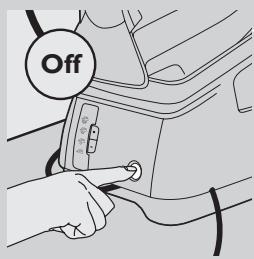
1 Put the iron on the stand and switch it off.
2 Remove the mains plug from the wall socket and let the iron cool down.
3 Wipe scale and any other deposits off the soleplate with a damp cloth and a non-abrasive (liquid) cleaner.
4 Clean the upper part of the appliance with a damp cloth.
5 Empty the water tank after cleaning.
Calc-Clean function
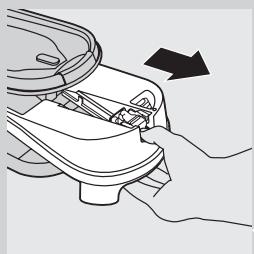
Never remove the Calc-Clean rinsing cap when the steam tank is hot.
VERY IMPORTANT: Rinse the steam tank once a month or after every 10 times of use to prevent damage to the appliance and for optimal steaming performance.
1 Make sure that the appliance has been unplugged and has cooled down for more than 2 hours.
2 Remove the detachable water tank.
3 Hold the steam tank with both hands and shake well.
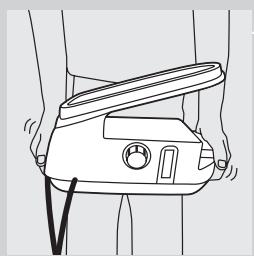
4 Turn the steam tank on its side and remove the Calc-Clean rinsing cap.
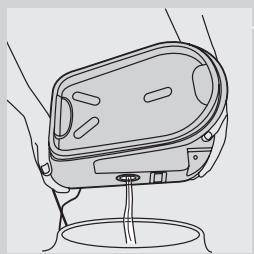
5 Empty the steam tank by pouring out the water into the sink.
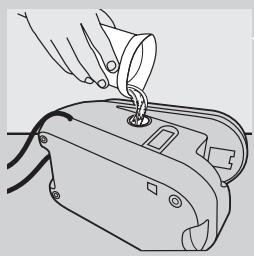
6 Fill the steam tank with fresh water by means of the filling cup and shake again.
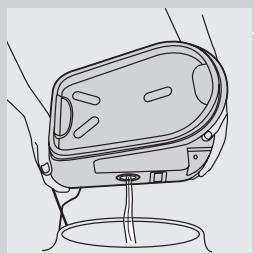
Empty the steam tank into the sink again.
Repeat steps 6 & 7 twice to obtain the best result.
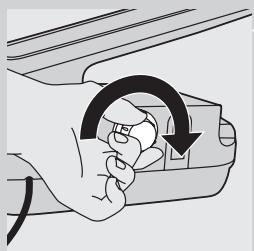
Screw the Calc-Clean rinsing cap tightly back onto the steam tank.
Calc-Clean reminder
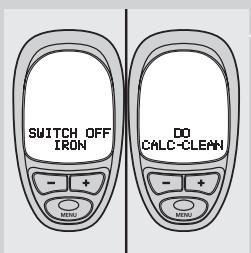
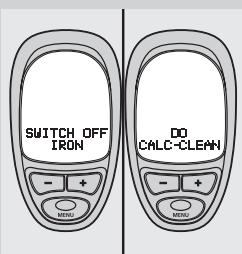
1 When the display shows the message 'SWITCH OFF IRON - DO CALC CLEAN', too much scale has built up inside the appliance and the steam tank needs to be rinsed.
Switch the appliance off immediately.
3 Use the Calc-Clean function as described above.
Storage
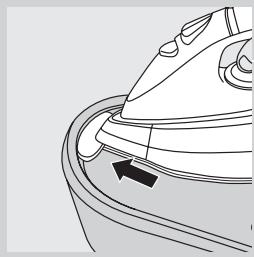
Always let the iron cool down before storing it.
1 Insert the tip of the iron into the safe storage lock on the stand.
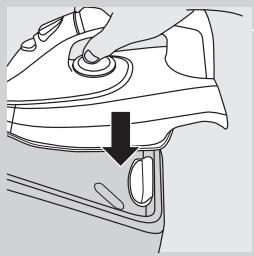
Press the back of the iron firmly down ('click').
3 Empty the water tank.
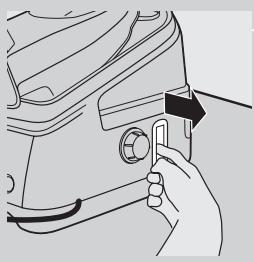
4 Pull out the cord & hose storage hook.
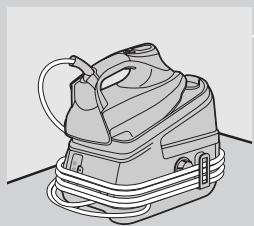
5 Secure the supply hose and mains cord.
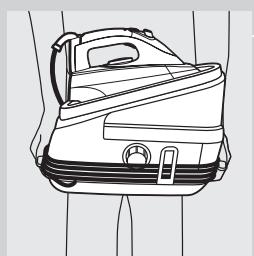
6 There are handgrips on either side of the steam tank for easy transport.
Environment
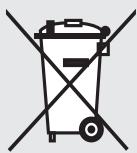
- Do not throw the appliance away with the normal household waste at the end of its life, but hand it in at an official collection point for recycling. By doing this you will help to preserve the environment.
Guarantee & service
If you need information or if you have a problem, please visit the Philips website at www.philips.com or contact the Philips Customer Care Centre in your country (you will find its phone number in the worldwide guarantee leaflet). If there is no Customer Care Centre in your country, contact your local Philips dealer or contact the Service Department of Philips Domestic Appliances and Personal Care BV.
Iron display guide (Fig. 2)
Temperature settings suitable for specific fabric types.
| Action | Option | Message in English |
| Switching the appliance on | | WELCOME TO PHILIPS - CHECKING
SENSORS - CHECKING WATER -
WARMING UP |
| Using the menu button (see
section 'Display menu') | Switching the steam lock
on or off | STEAM LOCK - ON - OFF -
CONFIRMED |
| Setting the iron-off time | IRON OFF - 5 MIN - 10 MIN - 20 MIN
- 30 MIN - CONFIRMED |
| Switching the sound on
or off | SOUND - ON - OFF - CONFIRMED |
| Choosing a language | LANGUAGE - ENGLISH - DUTCH
-FRENCH - GERMAN - PORTUGUESE
-SPANISH - ITALIAN - CONFIRMED |
| Setting the water hardness | WATER HARDNESS - SOFT - MEDIUM
-HARD - CONFIRMED |
| Iron switches off after the
iron-off time has elapsed (see
section 'Iron-off function') | | IRON OFF - STANDBY - PRESS ANY
KEY TO RESUME |
| Pressing the + and - buttons
(see section 'Setting the
temperature') | Choosing the fabric type | ACETATE - ACRYLIC - VELVET - NYLON
-SILK - VISCOSE - POLYESTER - WOOL
-RAYON - COTTON - JEANS - LINEN |
| Iron warming up because different fabric type has been selected | WARMING UP |
| Iron cooling down because different fabric type has been selected | COOLING |
| Correct temperature for selected fabric type has been reached | TEMP OK |
| Water tank is empty or has not been placed properly or has not been placed at all (see section 'Water tank refill light') | | WATER LOW - REFILL WATER TANK |
| Iron needs to be rinsed (see section 'Calc-Clean function') | | SWITCH OFF IRON - DO CALCCLEAN |
| Iron should not be used (see chapter 'Guarantee & service') | | ERROR 01 |
Troubleshooting
This chapter summarises the most common problems you could encounter with your iron. Please read the different sections for more details. If you are unable to solve the problem, please contact the Philips Customer Care Centre in your country.
| Problem | Cause | Solution |
| The appliance does not become hot. | There is a connection problem. | Check the mains cord, the plug and the wall socket. |
| The appliance has not been switched on. | Press the on/off button. |
| The selected temperature is too low. | Select a higher temperature. |
| Smoke comes out of my new iron when I switch it on. | Some parts of the appliance have been lightly greased in the factory and may initially give off some smoke when heated. | This phenomenon is perfectly normal and will cease after a short while. |
| The iron does not produce any steam. | There is not enough water in the water tank. | Fill the water tank (see 'Preparing for use', section 'Filling the detachable water tank'). |
| The steam tank has not heated up sufficiently. | Wait for approx. 2 minutes until the steam light stays on continuously). |
| The selected ironing temperature is too low for steam ironing. | Select a temperature of ● ● or higher. |
| Steam setting (no steam) has been selected. | Select steam setting (minimum steam), (moderate steam) or (maximum steam). |
| The water tank has not been placed properly in the steam tank. | Place the water tank properly in the steam tank ('click'). |
| When the iron has been set to a very high temperature, the steam produced is dry and hardly visible. It will be even less visible when the ambient temperature is relatively high and it will be entirely invisible when the temperature has been set to MAX. | Set the iron to a lower temperature, e.g. ●●, to check if the iron is actually producing steam. |
| Water droplets come out of the soleplate. | When you start steam ironing and when you have stopped steam ironing for a while, the steam that was still present in the supply hose will have cooled down and condensed into water, which causes water droplets to come out of the soleplate. | This is perfectly normal. Hold the iron over an old cloth and press the steam activator when you start ironing (again). Wait until steam instead of water comes out of the soleplate. |
| Flakes and impurities come out of the soleplate or the soleplate is dirty. | Impurities or chemicals present in the water have deposited in the steam vents and/or on the soleplate. | Clean the soleplate with a damp cloth. |
| 'ERROR' has appeared on the display and the iron beeps continuously. | A sensor failure has been detected. | Contact an authorised Philips service centre. |
| The appliance produces a pumping sound. | Water is being pumped into the steam tank. | This is normal. |
| The pumping sound does not stop. | Unplug the iron immediately and contact an authorised Philips service centre. |
| Dirty water comes out of the soleplate. | Too much scale and minerals have accumulated inside the steam tank. | Rinse the steam tank. See chapter 'Cleaning and maintenance'. |
| The iron produces steam continuously. | The steam lock has been set to 'on'. | Press the steam activator again to stop steaming. Set the steam lock to 'off' if you only want to obtain steam when pressing the steam activator (see section 'Steam lock function'). |
| Steam escapes from under the Calc-Clean rinsing cap when the appliance is heating up. | The Calc-clean rinsing cap has not been tightened properly. | Switch the appliance off, tighten the Calc-Clean rinsing cap and switch the appliance on again. If steam continues to escape when the appliance is heating up, switch the appliance off and contact a service centre authorised by Philips. |
| The iron does not produce enough steam/the amount of steam decreases and increases during steam ironing. | When the appliance pumps water into the boiler, the steam amount sometimes decreases. This is probably when you think that the iron does not produce enough steam. However, this is a completely normal phenomenon and the steam output normalises within a few seconds. | To optimise the steam output, release the steam lock when you do not need steam and when you put the iron down. |
| Wet spots appear on the garment during ironing. | The wet spots that appear on your garment after you have steam ironed for some time may be caused by steam that has condensed onto the ironing board. Iron the wet spots without steam for some time to dry them. If the underside of the ironing board is wet, wipe it with a piece of dry cloth. | To prevent steam from condensing onto the ironing board, use an ironing board with a wire mesh top. |
Introduktion
'WELCOME TO PHILIPS - CHECKING SENSORS - CHECKING WATER
- WARMING UP' (WILLKOMMEN BEI PHILIPS - SENSOREN UND
'WELCOME TO PHILIPS - CHECKING SENSORS - CHECKING WATER
- WARMING UP' (BIENVENIDO A PHILIPS - COMPROBANDO
Promemoria Calc-Clean
- zacht water
= vrij hard water
= hard water
=zeerhardwater
'WELCOME TO PHILIPS - CHECKING SENSORS - CHECKING WATER - WARMING UP' (WELKOM BII PHILIPS - CONTROLE SENSORS -
CONTROLE WATER - WARMT OP).
Stille inn temperature

Stalla in temperature