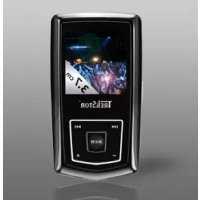
I.Beat emo - Mp3 player TrekStor - Free user manual and instructions
Find the device manual for free I.Beat emo TrekStor in PDF.



| Product type | MP3 player with FM radio, voice recording and video player |
| Dimensions (approx.) | 80 x 40 x 15 mm |
| Weight (approx.) | 50 g |
| Power supply | Built-in rechargeable battery, charging via USB (3-4 h for full charge) |
| Supported audio formats | MP3, WMA (including DRM9) |
| Supported image formats | JPEG, BMP (PHOTO folder) |
| Supported video formats | SMV (created with the supplied Transcoder software) |
| FM radio | Yes, with 20 memory presets, recording possible |
| Voice recording | Yes, via built-in microphone (VOICE folder) |
| Display | Not specified (compatible with image and menu display) |
| Connectivity | USB 2.0, 3.5mm headphone jack |
| Internal memory | Capacity not specified (disk space visible in settings) |
| Equalizer | 19 presets |
| Playback modes | Normal, repeat, shuffle, etc. |
| Maintenance | Protect from electrostatic discharge; use the supplied headphones (32 ohms); avoid moisture |
| Safety | Risk of hearing damage at high volume; do not use while driving |
| Repairability | No spare parts supplied; firmware update possible |
| General information | Manufacturer: TrekStor GmbH & Co. KG; user manual supplied; changes possible without notice |
Frequently Asked Questions - I.Beat emo TrekStor
User questions about I.Beat emo TrekStor
0 question about this device. Answer the ones you know or ask your own.
Ask a new question about this device
Download the instructions for your Mp3 player in PDF format for free! Find your manual I.Beat emo - TrekStor and take your electronic device back in hand. On this page are published all the documents necessary for the use of your device. I.Beat emo by TrekStor.
USER MANUAL I.Beat emo TrekStor
Note: Please charge the i. Beat emo as described in these operating instructions for at least 3 to 4 hours before initial use.
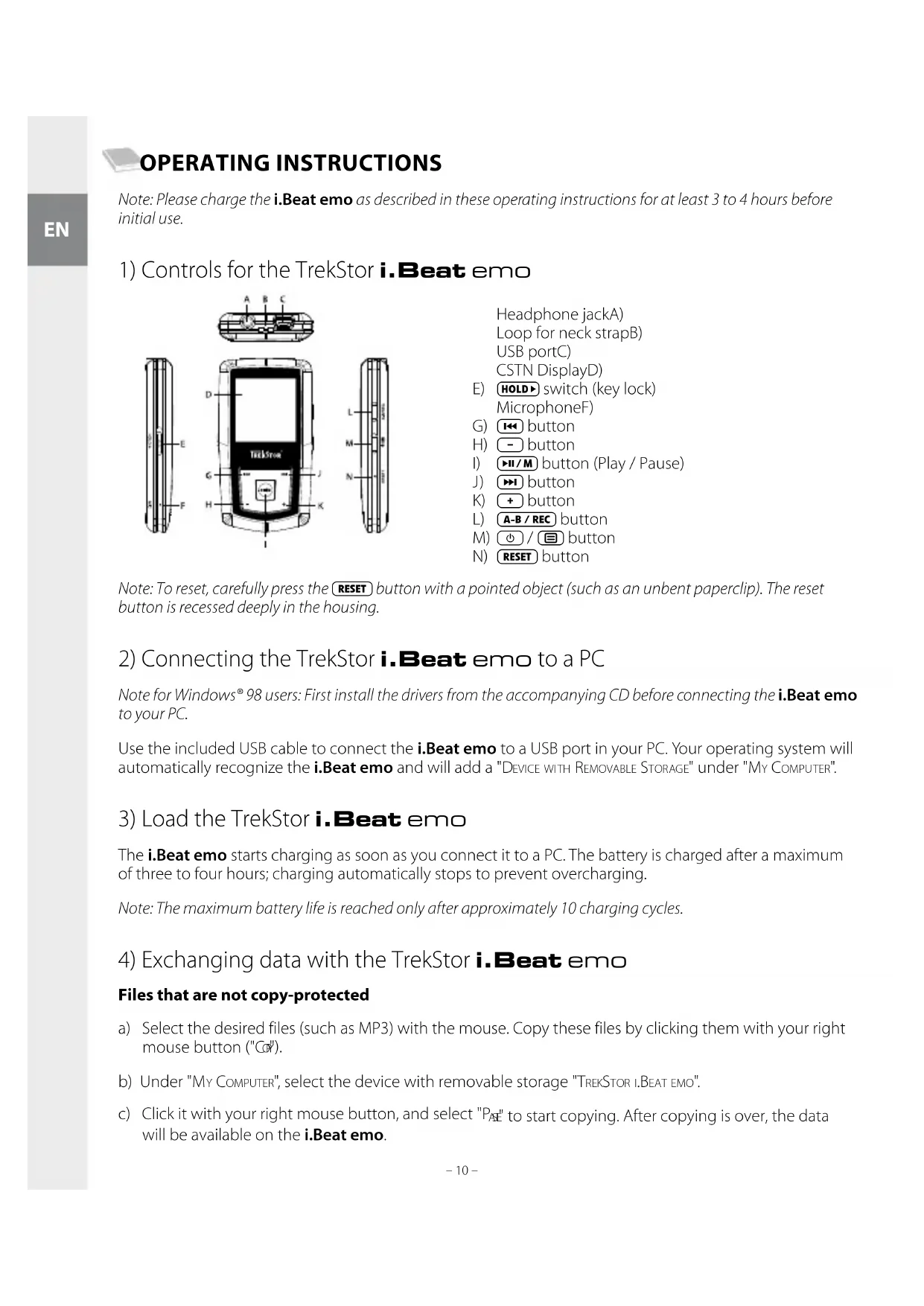
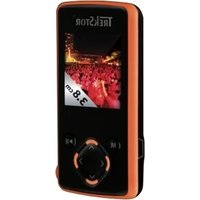
1) Controls for the TrekStor i. Beat emo
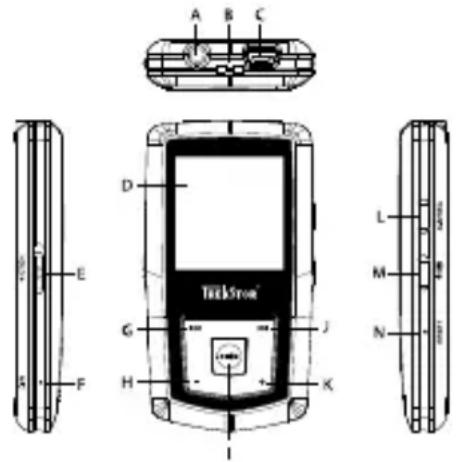
Headphone jackA) Loop for neck strapB) USB portC) CSTN DisplayD)
E) HOLD switch (key lock) MicrophoneF
G) 14 button
H) button
I) button (Play / Pause)
J) button
K) + button
L) A-B/REC button
M) / button
N) RESET button
Note: To reset, carefully press the RESET button with a pointed object (such as an unbent paperclip). The reset button is recessed deeply in the housing.
2) Connecting the TrekStor i. Beat emo to a PC
Note for Windows® 98 users: First install the drivers from the accompanying CD before connecting the i.Beat emo to your PC.
Use the included USB cable to connect the i.Beat emo to a USB port in your PC. Your operating system will automatically recognize the i.Beat emo and will add a "DEVICE WITH REMOVABLE STORAGE" under "MY COMPUTER".
3) Load the TrekStor i.Beat emo
The i.Beat emo starts charging as soon as you connect it to a PC. The battery is charged after a maximum of three to four hours; charging automatically stops to prevent overcharging.
Note: The maximum battery life is reached only after approximately 10 charging cycles.
4) Exchanging data with the TrekStor i.Beat emo
Files that are not copy-protected
a) Select the desired files (such as MP3) with the mouse. Copy these files by clicking them with your right mouse button ("C").
b) Under "MY COMPUTER", select the device with removable storage "TREKSTOR I.BEAT EMO".
c) Click it with your right mouse button, and select "P_AE" to start copying. After copying is over, the data will be available on the i.Beat emo.
WMA DRM9-protected files
To copy DRM9-protected files, you need to use the Windows Media Player (reference version: Windows Media Player 9).
a) Connect your MP3 player to your computer, and start the Windows Media® Player.
b) In the task bar, left click "COPY TO CD OR DEVICE".
c) Drag the desired music files (WMA) to the list "ITEMS TO COPY" on the left.
d) In the pulldown menu at the top right, select the MP3 player under "ITEMS ON DEVICE".
e) Then click the "COPY" button at the top right. The selected music will then be automatically copied to your MP3 player.
5) Logging off and disconnecting the TrekStor i. Beat emo from the PC
Windows® 98 (SE): Click in the lower right of the task bar, on the symbol "SAFELY REMOVE HARDWARE". In the "SAFELY REMOVE HARDWARE" window, select the iBeat emo and click on the "YES" button. You can now disconnect the iBeat emo from the PC.
Windows® 2000/ME/XP/Vista: At the bottom right on the task bar, click the right mouse button on the symbol "SAFELY REMOVE HARDWARE". In the context menu that appears, click the left mouse button on "SAFELY REMOVE MASS STORAGE DEVICE - DRIVE" to select it. You can now disconnect the iBeat emo from the PC.
Note: Please follow the recommended logoff procedure to prevent damage to the device or data loss.
6) Firmware update for the TrekStor i. Beat emo
A firmware update serves to transfer firmware upgrades to your MP3 player. Firmware is the program responsible for the control of your MP3 player. If you should encounter any problems with your MP3 player, please make sure that you have installed the latest firmware version.
Warning: Please read all the instructions, and follow the update procedures exactly to keep from damaging the i.Beat emo.
a) Connect the i.Beat emo to a USB port of your PC.
b) Back up all the important files on your i.Beat emo onto your PC.
c) You can update the i.Beat emo with the most current firmware from the Internet (on the TrekStor homepage at http://www.trekstor.de).
d) Alternatively, insert the provided CD into your CD/DVD drive. When the startup function of your system is activated, a menu showing all the contents of the CD will open.
Note: If the startup function of your system is deactivated, you can access the CD/DVD drive via "My Commu" and start the program "MENU.EXE" in the main directory of the CD.
Select "DRIVER/TOOLS" and follow the instructions. Your internet browser opens, and the TrekStor homepage is loaded.
e) Download the firmware (zip-file), and unzip it to a folder of your choice.
f) Start the "SETUP.EXE" file to install the software for the firmware update on your PC. Follow the installation instructions.
g) Select "START" → "PROGRAMS" → "TREKSTOR.I.BEAT EMO" to run the "FIRMAWARE UPDATE". The update program now searches for your i.Beat emo.
h) Then select "S TART" in order to execute the firmware update of the i. Beat emo.
Note: If you select the option "FORMAT DATA AREA", the internal memory of the iBeat emo will be deleted. Confirm the warning message that appears with "Yes".
i) Please wait until the update procedure is completely finished.
j) After the update procedure has completed, end the update program by clicking the "C" button.
k) Next disconnect the i.Beat emo from the USB port of your PC.
7) Formatting the TrekStor i. Beat emo
Formatting deletes all data (e.g. music tracks, pictures and user settings) on your MP3 player.
a) Connect the i.Beat emo to a USB port of your PC.
b) Back up all the important files on your i.Beat emo onto your PC.
c) Open "MY Computer", and click your right mouse button on "DEVICES WITH REMOVABLE STORAGE".
d) Select "F" from the context menu.
e) Select the "FAT32" option under "FILE SYSTEM" from the dialog window that appears.
f) Click the "S" button to start the formatting.
8) Using the TrekStor i. Beat emo
Turning the device on and off
Turn the i.Beat emo on by pressing the button for approximately 1 second. To turn the i.Beat emo off, hold the button for approximately 3 seconds.
Note: Make sure that the HOLD switch has been moved to the top position, i.e., that the key lock is turned off. If the key lock is activated, the key lock symbol or a corresponding message will appear.
Different modes
The i.Beat emo has different modes. After turning it on, the i.Beat emo is in the last used mode or in the main menu after turning it on for the first time. To go to the main menu, hold the / M button for approximately 1 second. Press the / M or / M button to select the desired mode, and confirm your selection by briefly pressing the / M button. To return to the main menu, hold the / M button for approximately 1 second.
Mode: Music
Switch to the "Mut" mode.
With the aid of the Folder Navigation you will see a clearly-structured display of all music tracks on the iBeat emo. Switch to Folder Navigation by pressing the button. Use the or button to select the desired track or folder and open it by briefly pressing the / M or + button. You can delete a marked track by pressing the A-B/REC button. To end Folder Navigation, hold the / M or - button for approximately 1 second.
Play mode
Briefly press the / M button to play an audio file.
Pause
Briefly press the / M button to stop playback. Repress the / M button to continue playback.
Change track
Briefly press the button to select the next song. If you briefly press the button within 5 seconds after a track starts, you switch to the prior track.
If you briefly press the button within 5 seconds after a track starts, the i.Beat emo returns to the beginning of the current track; if you press the button twice, the i.Beat emo jumps to the previous track.
Fast-forward/rewind within a track
You can navigate within the current song by holding down the 14 or 15 button. Hold down the 14 or 15 button to rewind or fast-forward.
Note: The longer you hold down the (←) or (→) button, the faster you rewind or fast-forward.
Increase/lower volume
Briefly press the (+) or (-) button to raise or lower the volume.
Note: If you hold down the + or - button, the volume changes gradually.
Repeating within a track
If you wish to repeat a section within a track, briefly press the A-B/REC button to specify the beginning of the section to be repeated. To specify the end of the section to be repeated, briefly press the A-B/REC button again. You can cancel the repeat function by pressing the A-B/REC button.
Voice recording
You can execute voice recordings using the integrated microphone. Hold the A-B/REC button for approximately 1 second to start recording. To pause the current recording, briefly press the H/M button. To resume it, briefly press the H/M button again. Press the A-B/REC button for a while to stop recording.
Note: All voice recordings are saved in the "VOICE" folder of the i.Beat emo.
Play voice and FM radio recordings
To play back your voice or FM radio recordings, open Folder Navigation by briefly pressing the button in "Music" mode. Select the menu item "VOICE" or "FM" for voice recordings and FM radio recordings respectively. Briefly press the 14 or 15 button to select the desired file, and start playing back by briefly pressing the 16 or + button.
Mode: FM radio
Switch to the "FM mode.
Note: Always connect your earphone or headphone to the headphone jack of the i. Beat emo since the earphone/ headphone cable serves as an antenna for the internal radio.
To open the FM radio menu, briefly press the button. Press the or button to select the desired menu item, and confirm by briefly pressing the button. Exit the FM radio menu by pressing the button.
Switching between manual station selection and memory mode
Briefly press the / M in the FM radio mode in order to switch between the manual station "SCAN" and the memory mode "STAN".
Automatic memory assignment/automatic station scan
To start the automatic station search, press the button in FM radio mode and select "AUTO SCAN" and confirm the subsequent inquiry. The i.Beat emo now automatically searches for the radio stations with the strongest reception and saves them in 20 memory locations.
Switching between saved stations
In memory mode "STATION", you can switch between the existing memories by briefly pressing the 144 or 145 button.
Manual frequency change/manual search
In manual station selection mode "SCAN", briefly press the 144 or 145 button to change the reception frequency in small steps. Hold down the 144 or 145 button for the i.Beat emo to automatically scan the upper and lower frequencies for stations with strong reception.
Saving individual stations
Change to manual station selection "SCAN". Choose the desired frequency, press the button and select "SAVE STATION" in FM radio mode. Press the or button to select the desired memory and confirm by briefly pressing the button.
Setting the FM radio region
In the radio menu, select "FM" to create regional radio settings.
Recording FM radio
Hold the A-B/REC button for approximately 1 second to start recording. To pause the current recording, briefly press the / button. To restart the current recording, briefly press the / button again. Hold the A-B/REC button for approx. 1 second to stop recording.
Note: All radio recordings are saved in the "FM" folder of the i.Beat emo.
Mode: Pictures
Switch to the "PwE" mode.
You can view picture files (*.jpeg / *.bmp) in "Pictures" mode.
Note: All pictures must be in JPEG or BMP format. The iBeat emo can only display pictures when they are saved in the "PHOTO" folder. Large pictures are automatically displayed in a reduced size which can lengthen the loading time.
Manual
Select "MANUAL" and press the or ← button to go to the next or previous picture. Press the button to start or stop a slide show of the pictures.
Slide show
To directly start a slide show, you can also select "SLIDE SHOW". Briefly press the / M button to stop the slide show.
Thamburger
Select "THUMBNAIL" to view 4 pictures on the display at the same time. Press the >> or <串 button in order to display the next or previous pictures.
Mode: Video
Switch to the "V mode.
You can watch movie files (.smv) in "Video" mode. To create movie files in SMV format, please use the "TRANSCODER" on the accompanying CD. The use of the "TRANSCODER" is described in chapter 9. The operation of the basic functions in video mode is similar to operation in music mode.
Note: The i. Beat emo can only show movie files when they are saved in the "MVIDEO" folder.
Mode: Record
Switch to the "R" mode.
You can execute voice recordings using the integrated microphone. To start a voice recording, please select in the query the option "YES" with the 14 or 15 button, and confirm your selection by pressing the 16 button. To pause the current recording, briefly press the 17 button. To resume it, briefly press the 18 button again. Briefly press the A-B/REC button to stop recording.
Note: All voice recordings are saved in the "VOICE" folder of the iBeat emo.
To play back your FM radio and voice recordings, please switch to Folder Navigation in "Mx" mode.
Mode: Settings
Switch to the "SNTNS" mode.
Here you can make various equalizer settings under "EQUALIZER", play settings under "PLAY MODE", display settings under "DISPLAY", time settings under "TIMER", record quality settings under "RECORD QUALITY" and general system settings under "SYSTEM".
Press the + or > button to select the desired setting and confirm by briefly pressing the > or + button. Press the - or = button to return to the previous menu. To exit the setting, hold the > button for approximately 1 second.
Graphical Equalizer
You can select from 19 preset equalizers under the menu item "FQ
Play mode
Normal: Select the menu item "N to play all tracks once.
Repeat one: Select the menu item "REPEAT ONE" to have the current track repeated in a loop.
Repeat all: Select the menu item "Repeat ALL" to have all the tracks play in sequence repeatedly.
Random: Select the menu item "RND" to have all the tracks played once in a random sequence.
Random & Repeat: Select the menu item "RAND. & REP." to have all the tracks repeated infinitely in a random sequence.
Display
Contrast: Under the "CONTRAST" menu item, you can adjust the contrast of the display.
Title: Unter the menu item "TIL" you can select whether the current track is to be displayed as an ID3 tag or a file name.
Scroll speed: Under the menu item "SCROLL SPEED", you can adjust how fast you scroll through the text.
Backlight time: Under the menu item "BACKLIGHT TIME", you can set the length of time until the display automatically shuts off.
Timer
Energy-saving mode: Under the menu item "Shutdown", you can set how long it takes the i.Beat emo to automatically shut down after it has not been used.
Sleep timer: Under the menu item "Sleep TIMER", you can set how long it takes the i.Beat emo to automatically shut down.
Recording quality
Under the "RECORD QUALITY" menu item, you can set the quality of the recordings with the integrated microphone.
Note: The recording quality for the integrated radio is set at 44.1 kHz.
System
Memory / FW: Under the menu item "MEMORY / FW", you are provided with information about the entire memory and free memory, as well as the firmware version of the iBeat emo.
Language: Under the menu item "LANGUAGE", you can select the menu language of the i.Beat emo.
Load defaults: Under the menu item "LOAD DEFAULTS", you can restore the factory settings (settings upon delivery) of the i.Beat emo.
9) Convert video files
You can play video files in SMV format with the i.Beat emo. Video files with other formats (MPG, AVI, WMV) must first be converted using the "TRANSCODER (VIDEO2SMV)" program.
a) Insert the provided CD into your CD/DVD drive. If the startup function of your system is activated, a menu showing all the contents of the CD will open.
Note: If the startup function of your system is deactivated, you can access the CD/DVD drive via "My Compu" and start the program "MENUE.EXE" in the main directory of the CD.
b) Next, select the item "T"
c) The SMV Transcoder (video2smv.exe) starts automatically.
d) Select the file to be converted (e.g., MPG, AVI, WMV) and specify the destination folder.
e) Select the picture size of "128 x 128" under "SIZE".
f) Under "Quality", select the quality in which the image and sound are to be converted. The greater the selected value, the more memory the file takes up.
g) Start the conversion via the "C" button.
h) Next, copy the SMV files on the i.Beat emo into the "MVIDEO" folder.
Notes:
This MP3 player is optimized for the provided headphones (32 Ohm impedance). Using other headphones with a lower impedance can damage the MP3 player or headphone, especially MP3 players with two headphone jacks.
In certain circumstances, exposing the device to an electrostatic discharge may interrupt the data transfer between the device and the computer and impair the functions of the device. If this occurs, the device should be unplugged from the USB port and then plugged in again.
Note: This device can produce high volumes. In order to avoid hearing loss that can occur immediately, in the future, or gradually, you should not listen at high volumes for extended periods. This applies regardless of whether you listen with speakers, headphones, or earphones. If you notice a ringing noise in your ears, lower the volume immediately or stop using the MP3 player. Please keep in mind that permanent hearing loss can first appear at a later point in time. While you may become accustomed to higher volumes over time so that they may seem normal to you, your sense of hearing may still have been impaired by this. The higher you adjust the volume, the faster your sense of hearing can be damaged.
Note: Using earphones while driving a motor vehicle is not recommended and is prohibited in some countries. Always drive carefully and with full concentration. Stop using your MP3 player if you become distracted or interrupted by it when driving a motor vehicle or during other activities that require your full attention.
Do not use USB cables longer than 3 meters.
The manufacturer retains the right to continually improve the product. These changes may be made without being directly described in these operating instructions. For this reason, the information provided in these operating instructions may not reflect the current state of the art.
The manufacturer only guarantees suitability for the product's intended purpose. In addition, the manufacturer is not responsible for damages or loss of data and subsequent consequences.
Copyright © 2007 TrekStor GmbH & Co. KG. All rights reserved. Other cited product or company names may be trademarks or brand names of the respective owner.

NOTICE D'UTILISATION
A工程技术 of the microfondo is an integrated system that is designed to realize the integration of the microfondo and the microfondo. The microfondo is a device that can be used to integrate the microfondo into the microfondo. It is a device that can be used to integrate the microfondo into the microfondo.
Valtson at "Kun" Üzemmodba.
Valtson at "Vim" Üzemmodba.
Metaeite Otn λειουργia "E
Meow to evomegaatwveov uipopovou npopeite va npayuatoonoe Tyypapec wvnc. Ia tnv evapcnmuacpwvntikc eyypaqc, eniETE kata to epwnuae to nKtpo n to nKtpo NTV eioyn "Nai"kai eBaiwote tnv eioyn oac me to nKtpo H/M).Ia tny naon tnc tpexouoc eyypaqc, natote ouvtota to nKtpo H/M).Ia tnv evapcn tnc avanapaywync, natote cava ouvtota to nKtpo H/M).Natwvtac ouvtota to nKtpo A-B/REC), termuicet e Tnv eyypaqn.
YIIOEiEg:OLeC oI eyypapec qwvrnc ano0nkeovnta oTov pakeo "VICE"tou i.Beat em.
Tia tv avanapaywn twv eyypaawp paioopwov FM n twv wyntkwv eyypaowv,etaeite otnv
Pexm Bocnpoun3BeDenna
Hopma: BbI6epnte NyHKT MeHIO "Ha, YTO6bI BocnpOn3Becn BCE TpeKn Odn pa3.
Nobtop TpeKa: BbIbepuTe nyHKMeHIO "NobTOp TPK"ДЯ NOBTopa TpeKa HeorpaHueHHoe YcCNo pa3.
Iobtop Bcex: Bb6epnte npHKT MeHIO "PDBTOP BCEX", UTo6bl NOBTOpHO BOCnpon3BecTn BCE TpeKN OINH 3a DpyrIM.
CnyaHNo: BbI6epnte NyHKT MeHIO "CnyH" nla BocnpOn3BeDeHnB CEx TpeKOB B CnyauHOI NOcJIeIOBaTeJIbHOCTN.
CnyaHbnoBTOp:BbI6epNTe NyHKT MeHO "Clyu.NOBTOP",YTO6bl NOBTOpNTb CnyaHyIOncJeIOBaTeNbHOCTb BCEx TpeKOB HeorpaHnueHHoe YNCNo pa3.
Ducnnei
KoHTpAcT:BnyHKTe MeHIO "KoB Bb MoKeTe HaCTpOntb KOHTpAcT DnCnJIeJ.
HnDnKaun Ha3BaHnB: B nyHKTe MeHIO "INHnKAUHA3BAHnB" Bbl BBi6npaTe cncO6 nHnKaun H3BaHnTEkyuero Tpeka-B BnDE ID3-Tera nn NMeHn faina.
Ckoocb TeKCTa: B nyHKe MeHIO "CKoOcTb TEKCTA" Bbl MoKeTe HaCTpOnTb ckopoCtB npOKpyTKI oTo6paKaemoro TeKCTa.
BpemnoCBetKn: B nyHKTe MeHIO "BPEMa NOCBETKn" Bbl MOxKeTe yCTaHOBnTb BpeMa,Yepe3 KOtOpoe NOCBETKa DnCnIe 6yDeT BbIKIOueHa aBTOMaTIueCKn.
Taimep
PexnM 3hepro6epekeHn: B nyHKTe MeHIO "Bb MyoKeTe yCTaHOBntb, Hepe3 KaKoe Bpemr i.Beat emo DJIKeH 6bITb BBIKIOueH aBTOMaTneCKN, ecn OH He NCNOJb3yeTcR.
Taimep"cha":B nyHKTe MeHIO "TaMEP"CHA"" Bbl MoKeTe yCTaHOBtB,Yepe3 KaKoe Bpemr nneep i.Beat emo DOJIKeH BbIKIIOHTbcra aBTOMaTIueCKn.
KaueCTBO 3aunncn
B nyHKTe MeHIO "KAeCTBO 3aNcN" BbIMoKTe yCTaHOBnTb KaueCTBO 3aNcN npn NOMOuN BCTpoEHORo MnkpofoHa.
Yka3aHue:Kauecm8o 3anucu 8cmpoeHHO2 npuemHuka HacmpoeHO Ha 44,1 KfU.
Cnctema
Pamr / FW: B nyHKTe MeHIO "PAMr / FW" oTo6paKaIoTc CBeJeHn O Bcei n CBO6oHoi PAMr, a TakaKe Bercn npOuNBk nnepa i.Beat emo.
A3bIK: B nyHKTe MeHIO "Bbl MoXeTe HAcTPOntb A3bIK MeHIO nIeepa i.Beat emo.
3aBoDcKne HaCTpOKn:B nyHKTe MeHIO "3AB.HACTPOKn" Bbl MOKeTe BOCCTaHOBtB 3aBOIDCKne HaCTpOKN (coCToRHe NoCTaBKn) nIeepa i.Beat emo.
9)Преобразоване вдю-файLOB
C nomoIbIO nIeepa iBeat emo moXHO BOCIpON3BOIDnB BIneo-phiNtB BOpMaTe SMV. BIneo-phiNtB Dpynx φ opMaTax (MPG, AVI, WMV) Bbl DoJxHbI cHaJana Ppeo6pa3OBaTb C NOMOJIbIO npOrpaMMbl "TPAHCKOIEP (VIDeo2SMV).
a) BCTabTe npunaraembI KOMnAKT-DnCK B BaW DnCKOBOD nJa CD/DVD. Ecnn aKTNBn3npoBaHa φyHKnA aBTOMaTnueCKO rnycka BaWeJ CnCTeMbI, OTKpbIBaETcMeHIO CO BCEM CoedeXaHNEM KOMnAKT-DnCKa.
Yka3aHue: Ecnu omKluOeHa yHKUa aBomamuuecko 0nycka Bauec ucmembl, Bb moXeme uepe3 "PbOCH CTOn"ocyuEcmbumb docmyn K ducko body dna CD/DVD u b ochOBHom kamanose komnakm-ducka 3anycumb npo2pAMMy "MENUEXE".
6) Nocne 3TOro BbIbepnTe nyHKT "T
B) SMV-tpaHckoep (video2smv.exe) 3anyctntcra bTOMaTnueckn.
r) BbI6epntpeo6pa3yembn (hanp.,MPG,AVI,WMV) nBBeDnTe naNky IJIy BbIOda.
Д) Быберпев "Ра3МЕ" pa3Меризображени "128 x 128".
e) BbI6epnte B "K AueCTBO" KaueCTBO nI pyeo6pa3ObaHn I3O6paXeHn I 3Byka. Yem 60JIbe Bblpaembl pa3Mep, TeM 60JIbWe MeCTa 3aIMET aaiN B NaMRTn.
3anyctnte npeo6pa3ObaHne nocpeCTBOM KHOHN "P
3) Nocne 3Toro ckonnpyTe SMV-phiNbHa nneep i.Beat emo B nanky "MVIDEO".
Yka3aHur:
Hacmouu MP3-nneepnemc onmmabhim dnn Bxodux bKomnnekm nocmabku hayuHKOB (nonhoe compomubeneue 32 Om).Ppumeheue dpyzux hayuHKOB c Mebwm nonhBm conpomubneHuem npu onpedenHHbx 6cbmoermbax moxem npueecmu K noonmke MP3-nneepa uu maKke hayuHKOB; 3mo omHocumc ocobeho K MP3-nneepam c 2 pa3bemaUM dnaHayuHKOB.
- Ecnu ycmpooucmo nodbepaemcnaekmpocmatuueckomy pa3pdy, 8 Hekomopbix cumyaunx moxem npepbambbcn nepedaa daHbIX mexdy ycmpooucboM u KOMnbIomepmu unu moym HApwambc7yHKuu ycmpooucmea. B mom cnyuae ycmpooucbo Heobxdum ocmoeuhmb om USB-nopma u nodcoeuhumt zahobo.
Bhumanue: pomkocmb 3mo2o nleepa moxem 6bmb ouh cunho. Jn npedombaeue hua nopae hcu ma kumalho epomkocmu 8 meuehue mokem hacmnumb cpa3y, no3ke uu nocmenehno, he npocnyuubaume 3anucu Ha makcumalho epomkocmu 8 meuehue dnumelbho npomexymka bpemehu. 3mo deucmbemlho He3abucumo om mozo, nohbyemece lu Bbi zpomko2oopumenamu, hayuHKAMU uHuyuHKAMU-BKnaabuama. Ecnu Bbi ycblauu wum 8 ywax, mo hemedneHno ymehuume epomkocmb uuu bkioume MP3-neeep nonhcmbio. Pohhume, ymo dnumelbna homeep cnxya moxem npoebnma 6akwe cep3 6onee dnumelbho bpema. Ype3 hekomopoe bpmr, xomra u npubbkheme K npocnyuubauuo rpomko mybuku, maK ymo Bam 6ydem kaambc, ymo ypoebnh 2pomkocmu Hopmalnbui, ohdako BaW cnxy moxem 6bmb bcnedcmbue 3mo2o yxe ocnaenbbm. 4em 60bwyio zpomkocmb Bbi ycmhaabnuabe dem npocnyuubauu, mem ckopee moxem hacmnumb nopaxehue Bawezo cnxa.
Bhumahue: Vcnohboaue HayuHukop npu bokehu mpaHcnopmho cpecmba kpaune Hekanamehho u 3anpeueno hekomopbix cmpaHax. Bceda nonHocmbio konueHmpupyimeb monko ha bokehu. Ppekpumme npocnyuubahue MP3 nleepa, eCu o mekaem Bac unu meuaem Bam npu ynpaBneHu aBomomobunem unu bInonHeuu IIO6bx dpyzux deucmbu, mpekyouux Bauezo nonHOO BHumahua.
He pekomehoyemcucnonb30amb USB-Kabenu duuHou 6oee 3M.
Pon3BODNTenb octabnre 3a cobn npabo Ha nocToHHoe yCObepWeHCTBOBaHne u3dennr.3Tu n3MeHeHn MOryT 6b1b OcyuectBnHe b6e npMoro ONCaHn IN B HAcToAe HNCTpyKcnn N O KcnPyataun. N0TOMy HOpMaun B HactoJe IHCTpyKcnn NO EKnPyataum MOKeT He COOTBeTCTBOBaTb yPOBHe TExHNueCKOro NCnonHeHn.
PpOIN3BOIDTeB rapaHTnpyET npriOnHOCTb daHORIO n3dENr TOnbKO dNcNOJIb3OBaHNr NO Ha3HaueHIO. NOMMO 3Toro, npOIN3BOIDTeB He Hecet OTBeTCTBeHHoCTn 3a NOBpeKJdeHne IINI NOTepIO daHHbIX IN KOCBeHHbI yUeP6.
Copyright © 2007 TrekStor GmbH & Co. KG. Bce npaba 3aunuenebl. B cnuyae npnyx yonmahytbx ha3baHH n3dennn nn pnpm pey ndt, BO3MOXHO, O TOBapHbIX 3HaKAX nnn Mapkax fnpm COOTBeCTByOuNX BnaDnbcE.

IHCTPyKlIa3 EKCJIyATAUII
Bka3iBaKa: BybIaCKa, 3apdim b.iBeat emo, kOnucaHO Bciu iHcmpykuui 3 ekcnnyamaui, neped nepuum BMUKAHm KMIHIMMa H npom3i 3-4 zoDuH.
1)Еlementуправлины TrekStor i. Beat emo

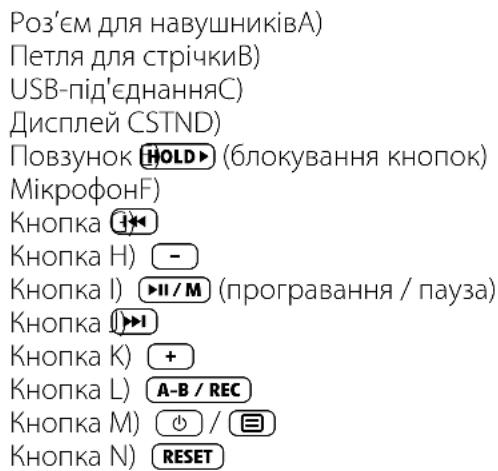
Bka3iBaKa: IJIy BuKoHaHH nepe3aabHmaeHH OepeXHO HamucHmb 2OcmpokHueBum npedMemom (Hanp., po3npAmeHO CKpinKOIO) HA KHonky RESET). LJI KHonka 3aJlu6neHa B Kopnyc npunady.
2) 3'ειнайтЕ TrekStor i. Beat emo 3 ПК
Bkaibka dny kopucmybaiv Windows98:Cnoamky hcmnlome dpaubep, uo 3naodumbcn Ha CD 3 komnnekmy nocmabku, i nuwe nomim nid'edhyume i.Beat emo do PK!
Ii'ednaiTe i. Beat emo 3a donomoro k6eIO USB 3 komnkeTy do USB-po3'emy PIK. OepauiHa cnCTema aBTOMATNUHO p03ni3Ha e iBeat emo i dOdae Ha "MkOMNIOTEP" "3MHHn HOCIN DAHX".
3)Заряда TrekStor i.Beat emo
Iicna 3'edhaHnI.e Beat emo 3IK biH aBtOMaTHUHO 3apJkaETbcra. MaKcMym uepe 3-4 roiHn akymyIaTOp 3apJkaeTbCRA NOBHCTIO I npOuec 3apJkn aBtOMaTHUHO npINHHeTbcra, 06 3anobirtn HaidmipHi 3apAci.
Bka3iBaKa: MaKcumalbHuu 3aprakymyamopaoocra2aembcnluuene npu6nu3Ho uepe3 10 uukni8 3aprKa.
Bka3iBa: Ka mpuamu KhoKy + Yu - Hamuchymo doBwe, yuHicmb npodobkye 3MiHIOaumc.
Iobtop B mexax odhiéi komnozuii
Rkio Bn 6aKaTe NOBtOpHTN NeBnB BiTnHOK B MexKax OndHiEi My3NHyOi KOMNo3Nci, KOPOTKO HaTNCIb Ha KHONky A-B/REC, 06 Bu3HaunTuOy NoaTKy NOBTOpeHH. 06 Bu3HaunTuOy 3aKiHueHH NOBTOpeHH, 3HOBy KOPOTKO HaTNCITb Ha KHONky A-B/REC. 3a DonomoroIO KHONK (A-B/REC) NOBTop 3HOBy aHyIIOETbCra.
3anncr tonocy
Yepe3 B6yobAHm Mikpooh MOxHa 3aHcyBaTu rOIOc.ДЯ NOUATky 3aNcCy rOIOcy HAtNCiB KHOKNy A-B/REC i TpIMaIte II HATNCHTOIO np6bIIN3HO Ha npOTa3I 1 cekyn. Lio6 NoCTaBnTn 3aNNc Ha nay3y, KOPTKO HATNCITb KONKy I/M. Uo6 npODOBKNTu 3aNNC, 3HOBy KOPOTKO HATNCiB KONKy I/M. 3aNNC 3aIKHyETbcr DOBm HATNCKOM Ha KHONKy A-B/REC.
Bkazibka:Bci 3anucu zonocy 36epizaiomb8 kamanosi VOICE"i.Beat emo.
BijTBOpENHa 3anncib roNoCy i 3 paio FM
Iio6 BiTbOpNTn 3aHncr roIOcy npaio FM,notpi6HO KOPOTKm HaTNCOM KHONK BpeKMI "My3nKA" BnKlnKaTH Habiraio B kaTalorax. Bn6epiB drr 3aHcy rOIOcy npHKT MeHO VOICE" nn "FM" IJRA 3aHcy paio FM.Bn6epiB KOPOTKm HAITCKAHHM KHONK HHToPi6Hm faiN i NOHITb BiTbOpEHn KOPOTKm HAITCKAHRM KHONK H/M qH +
Pexm:Paio FM
IpeenidItbBpeKIM"PAPFM".
Bkaizbka: 3aBXdu niO'edHyume HabyuHuku do po3'My dny HabyuHukie i.Beat emo, momy uo Kaebnb dny HabyuHikie cnyxumb b aKocmi ahmenu dny BhympiuHb0zo pado.
Uo6 BnKlnKaTm MeHIO paio FM, HATNCiTB KONKy (O).Bn6epiTB HaTNCaHHaM KHONKn (Iu) uH1 notpi6Hni nyHKT MeHIO iPiTBePitb BN6ip HATNCaHHaM KHONKn (II/M).PiCIA IOBTO RHO HA TNCy KHONKn (II/M), BiD6yBaCTbcra BNXID 3 MeHIO paio FM.
Ipehexi mix pyuHm Bn6opom nepeaBaay i pexHMOM micb B nam'atri
HaTnCHiB pexkmi paio FM KhoNky H/M, 06 nepexoHTn mix pyHm Bn6opom npepaBaay "ScAn" i peKIMOM Micb b Nam'rti "G".
ABTomatuHn 3aHNC B nam'ayb / ABtomatuHn nowyK nepebaayib
Для поатугу abTomatunhyо поуку nepedabayib haTnciB b peximi paio FM kHONky i Bn6epitb B MeHIO paio FM "ATo.Пошу" i niTbepiMbTO CTBepKyBaIbHO BIDNObIIO Ha nITaHHa.Tenep i.Beat emo abTomatunho shkae doCTaTHBO notyxhi paiopepaayi 3ahocntb ix Do naM'rti ha 20 mci.
Ipehexi mix nepebaayamn b nam'atri
B peximi Micb B nam'ari "STATION" KOPOTKIM HaTnCKOM KHONKu CHMOxHa nepexoDHTMix MICaAMN B nam'arTi.
PyHa 3MiHa qactOTn / PyHm noyK
B pexkimi pyuHoro Bn6bopy nepeaBaaya "SCAN" KOPOTKIM HaTnCKOM KHONKU 10 MOxHa HeBeNkMn Kpokam3miHOBAtNI npiHOMHy cactOty. JIIO TpIMATN KHONKU 10 HAChyTOIO DOCTaTHBO DOBRO, i.Beat emo aBTOMaTHUHO 6wkyE HIXHI i BepXHi YACTOTHi diana3OHn i WyKaE IOCTaTHbO NOTyXHi nepeaBaui.
36epexeHHiaHbIyalbHnx nepebaayib
Ipeenidtbo pyuHoro Bn6opy nepeabaya "SCAn".BcTaHOBtB noTpi6Hy qactOTy,HaTNCiTB KONky i Bn6epitb MeHIO paio FM "3ePEKHeHHaIEPABAHIB".Bn6epitb HaNTCKaHHM KONKN HITNOTpi6He Micce b nAm'ari i niTBePdItb BN6ip KOpOTKM HAntCKaHHM KONKN H/M.
Hactpoitnpaedioperioh FM
Bn6epiB b MeHIO paio FM "FM", 0o6 3iINCHTN perioHaIbHI HalaWtYBaHHpaio.
3anuc 3 paio FM
Для поату зану rolocу haTnCHiB kHONky A-B/REC i TpIMaIte II haTnCHyTOI np6n3HO Ha npOTaI 1 cekyn. Iio6 noctabTu 3anC Ha nay3y, KOpOTko haTnCHiB kHONky H/M. Iio6 npoIOBxHTu 3anC, 3HObY kOpOTko haTnCHiB kHONky H/M. Для 3akIHcEHnR 3anCyu haTnCHiB kHONky A-B/REC i TpIMaIte II haTnCHyTOI np6n3HO Ha npOTaI 1 cekyn.
Bka3iBka: Bci 3anucu 3 pado 36epiaomb8 kaman03i "FM" iBeat emo.
Pexum:ΦOTO
IpeeniiBpexum"Φ
B peximi DoTo moxHa neperlaDatn rpaichihi faaII (jpeg / bmp)
Bka3ibka: Bci fomopapaii maomb 6ymu y fopmami JPEG 4u BMP. i.Beata moke noka3yamu fomopapii nuwe kwo BOH 3haxodmbc8 kaman03i "PHOTO". Fomopapii benuko2o po3mpy aBmammuho nokaoymbc8 3MeHueHomv bujdi, uepe3 wO yac 3abaHmaxeHHa Moke 6ymu doouum.
PyuHni
Bn6epitb "PyHm" i HATNCiTb KONky (1) uN (1), 06 nepeuTn do hactynho i nn nonepeHboi fOToIpaii. HATNCiTb KONky (1/ M), 06 noaTn uN 3akInHTn diaWoy.
Diauoy
Iio6 noaTn diaiwo Hynpmy, moXHa TaKoX Bn6paTn "KOpOTKm HaTnCKaHHm KHOPIKn H/MI
iaiwo 3aKiHcyTbcra.
Mihiburna
Bn6epitb "MnHnTnD" 06 odnoacno 6aHTn Ha nncnnei 4 oToRpaqii. HAnchItb KhoNky >> nn <一> 1, 06 BnBeCTn Ha noka3 HAcTyuHi nn nonepeDi foToRpaqii.
Pexmm:Biideo
IpeeniiB bpekum "B
B pexmBiJeo moxHa nepeTn 3 fimbMaMn (*.smv).Ira CTbOpEHn 3 fimnbMaMn B opMaTi SMV BnKopncTOByte "TRANSCODER",Akn 3hAxOHTbcn Ha CD B KOMNKeTI. YnpabHnHn "TRANSCODER" OIncaHO B rnaB9.YnpabHnHn i ochOBHI cyHKuii y BiEoo-PEXmI dYxke cxoxi Ha npabHnHn B My3nHOMy peXmI.
Bka3i8ka: i. Beat emo moxe noka3yamu faunu 3 fInbMaMu luue kkuO BOH u3haxo4mbc8 kamao3i "MVIDEO".
Pekim:3anuc
IpeeniiBpekIM "3A
Yepe3 B6yIOBAMn MIKPOoH MoXHa 3aIncCyBaTn rOIOc. Ioo Nowatn 3aInc rOIOcy, BN6epiTB DiaIO3i KHOKNKO OuONIO "Ok" i nITBepdITb CBI Bn6ip KHOKNIO / M . IO6 noCTaBNTn 3aInc Ha na3y, KOPOTKO HATNCHTb KHOKNY / M . IO6 npOobxNtN 3aInc, 3HOBy KOpOTKO HATNCHTb KHOKNY / M . 3aInc 3aIKHyETbCRA KOPOTKIM HA TNCOM Ha KHOKNY A-B/REC
Bka3iBa: Bci 3anucu 20ocy 36epiaombce kamanosi "VOICE" i.Beat emo.
Iio6 BiTbOpTu 3aIncn 3 paio FM qu 3aIncn rOncy, nepeiDItb Habiraicu B kataIorax B peKmI "M
Pexm:HaauT.
IpeeniiBpekm "Hua
TyT MoXHa po6nTi pi3Hi HanaTuBaHHa EKBaIaN3epa B "EKBaIaN3EP", HanaTuBaHHa BiTBopeHHa B"PeKIM BITBOPEHHa, HanaTuBaHHa NOKa3y B "DNCJIeH", HanaTuBaHHa Yacy B "TAJMEP", "RAKCTb 3AINCy" i 3araJIbHi HanaTuBaHHa CNTeMnB "C
Bn6epiTb HATNCKaHHM KHOJKN CHOTpi6He HanaWtBuHHH i niTBePITb NOrO KOpOTKm HAHTNCKaHHM KHOJKN H/M) qH.3a DOnOMTOIO KHOJKN - Ch BnKOHyETbC3BOpOTHi nepexiB nonepeHne MeHIO. 06 BnItn 3 HanaWtBuHH TpMaTe KHOJKN HATNCHYTO HO Ha npOTa3i np6bn3Ho 1 cekyHnn.
BA-IBEMO-INT-V1.11-070913
- FILES THAT ARE NOT COPY-PROTECTED
- WMA DRM9-PROTECTED FILES
- FORMATTING THE TREKSTOR I. BEAT EMO
- USING THE TREKSTOR I. BEAT EMO
- TURNING THE DEVICE ON AND OFF
- DIFFERENT MODES
- MODE: MUSIC
- PLAY MODE
- PAUSE
- CHANGE TRACK
- FAST-FORWARD/REWIND WITHIN A TRACK
- INCREASE/LOWER VOLUME
- REPEATING WITHIN A TRACK
- VOICE RECORDING
- PLAY VOICE AND FM RADIO RECORDINGS
- MODE: FM RADIO
- SWITCHING BETWEEN MANUAL STATION SELECTION AND MEMORY MODE
- AUTOMATIC MEMORY ASSIGNMENT/AUTOMATIC STATION SCAN
- SWITCHING BETWEEN SAVED STATIONS
- MANUAL FREQUENCY CHANGE/MANUAL SEARCH
- SAVING INDIVIDUAL STATIONS
- SETTING THE FM RADIO REGION
- RECORDING FM RADIO
- MODE: PICTURES
- MANUAL
- SLIDE SHOW
- THAMBURGER
- MODE: VIDEO
- MODE: RECORD
- MODE: SETTINGS
- GRAPHICAL EQUALIZER
- DISPLAY
- TIMER
- RECORDING QUALITY
- SYSTEM
- CONVERT VIDEO FILES
- NOTES
- NOTICE D'UTILISATION
- PEXM BOCNPOUN3BEDENNA
- DUCNNEI
- TAIMEP
- KAUECTBO 3AUNNCN
- CNCTEMA
- 9)ПРЕОБРАЗОВАНЕ ВДЮ-ФАЙLOB
- YKA3AHUR
- IHCTPYKLIA3 EKCJIYATAUII
- 1)ЕLEMENTУПРАВЛИНЫ TREKSTOR I. BEAT EMO
- 3'ΕΙНАЙТЕ TREKSTOR I. BEAT EMO 3 ПК
- 3)ЗАРЯДА TREKSTOR I.BEAT EMO
- IOBTOP B MEXAX ODHIÉI KOMNOZUII
- 3ANNCR TONOCY
- BIJTBOPENHA 3ANNCIB RONOCY I 3 PAIO FM
- PEXM:PAIO FM
- IPEHEXI MIX PYUHM BN6OPOM NEPEABAAY I PEXHMOM MICB B NAM'ATRI
- ABTOMATUHN 3AHNC B NAM'AYB / ABTOMATUHN NOWYK NEPEBAAYIB
- IPEHEXI MIX NEPEBAAYAMN B NAM'ATRI
- PYHA 3MIHA QACTOTN / PYHM NOYK
- 36EPEXEHHIAHBIYALBHNX NEPEBAAYIB
- HACTPOITNPAEDIOPERIOH FM
- 3ANUC 3 PAIO FM
- PEXUM:ΦOTO
- PYUHNI
- DIAUOY
- MIHIBURNA
- PEXMM:BIIDEO
- PEKIM:3ANUC
- PEXM:HAAUT
Brand : TrekStor
Model : I.Beat emo
Category : Mp3 player