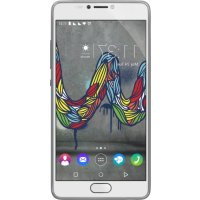
U FEEL FAB - Smartphone WIKO - Free user manual and instructions
Find the device manual for free U FEEL FAB WIKO in PDF.

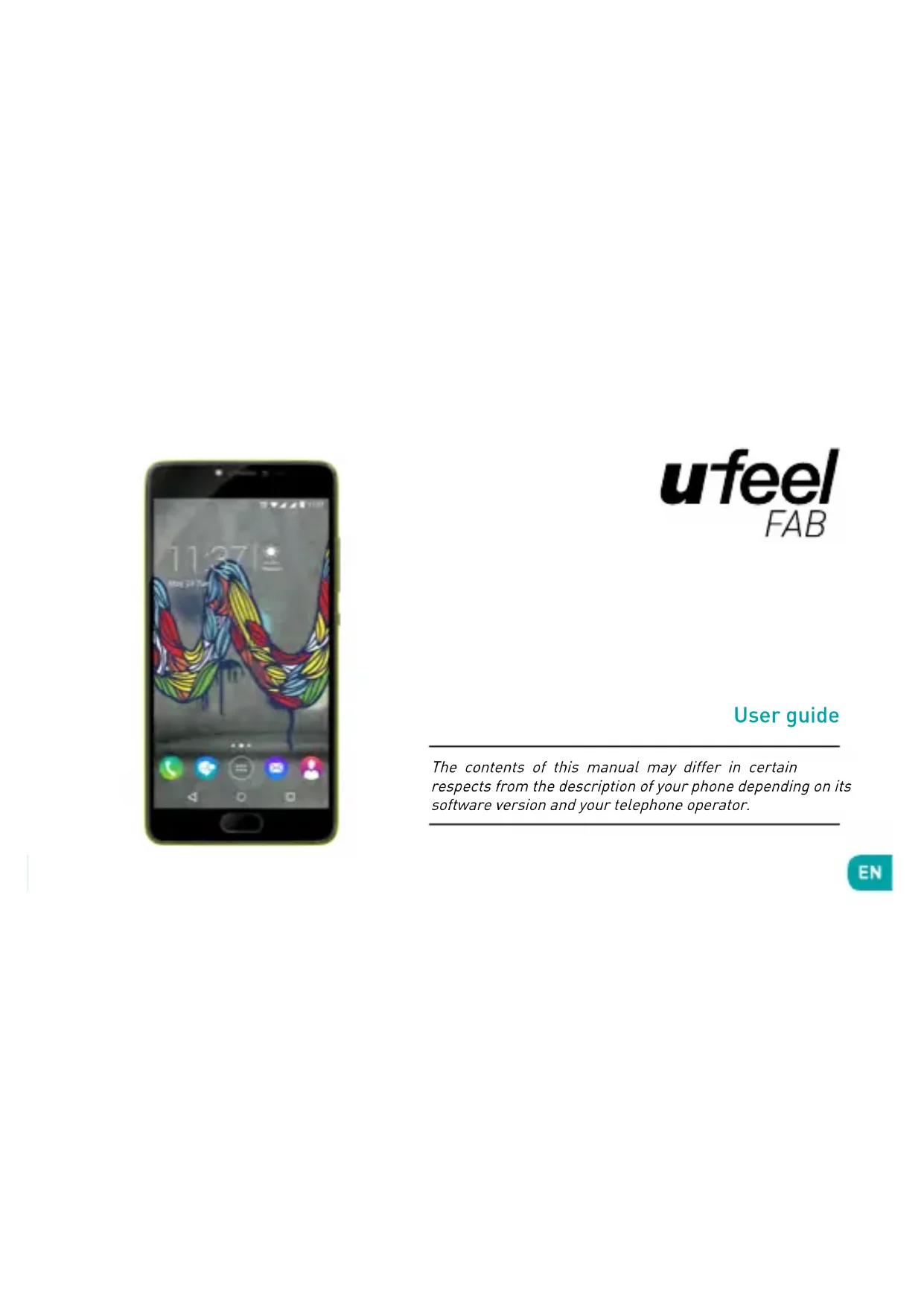


| Product Type | Smartphone |
| Brand | WIKO |
| Model | U FEEL FAB |
| Operating System | Android (version not specified) |
| Network | Dual SIM (GSM, 3G) |
| Connectivity | Micro-USB, Bluetooth, Wi-Fi |
| Power Supply | AC adapter 5.0V / 1.55A (model TN-050155E1 or TN-050155B1 depending on region) |
| Box Contents | Phone, AC adapter, micro-USB cable, headset, user guide |
| Maintenance and Cleaning | Use a dry cloth, do not use solvents (benzene, alcohol) |
| Safety - SAR | Head: 0.233 W/kg; Body (at 5mm): 1.162 W/kg |
| Safety Instructions | Do not use while driving, on airplanes, near medical devices, gas stations, etc. |
| Recycling | Compliant with WEEE (2012/19/EU) and Batteries (2006/66/EC) directives - mandatory sorting |
| Hazardous Substances | Compliant with REACH (EC No 1907/200) and RoHS (2011/65/EU) |
| Manufacturer | WIKO SAS, 1 rue Capitaine Dessemond, 13007 Marseille, France |
| Date of Declaration of Conformity | August 29, 2016 |
| Customer Service France | Tel. +33 4 88 08 95 25, http://fr.wikomobile.com |
Frequently Asked Questions - U FEEL FAB WIKO
User questions about U FEEL FAB WIKO
0 question about this device. Answer the ones you know or ask your own.
Ask a new question about this device
Download the instructions for your Smartphone in PDF format for free! Find your manual U FEEL FAB - WIKO and take your electronic device back in hand. On this page are published all the documents necessary for the use of your device. U FEEL FAB by WIKO.
USER MANUAL U FEEL FAB WIKO
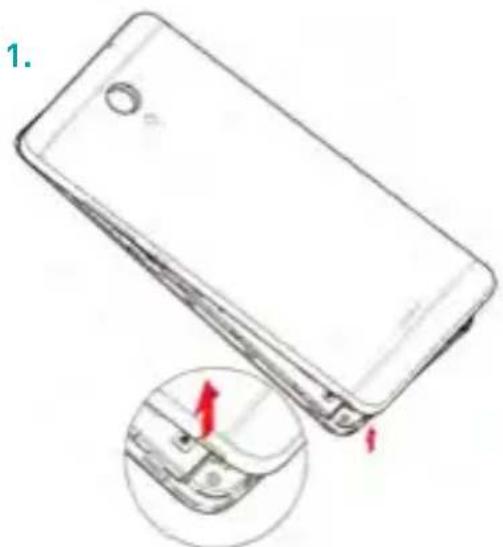
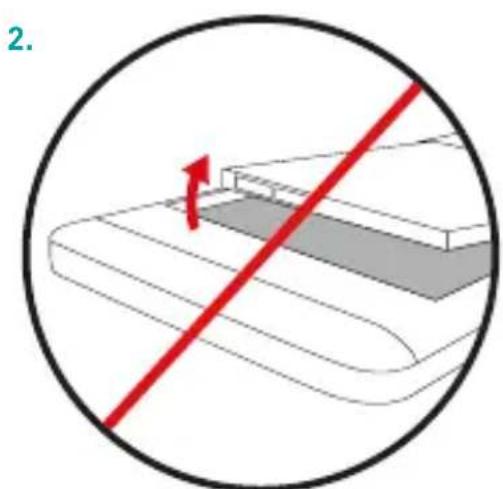
Inserting your cards
Insérer vos cartes / Inserire le vostre card / Instalación de las tarjetas SIM / Inserir os cartões / Ihre Karte einlagen / Installeren SIM-kaart / WkLadanie karty / Umetanje vasih kartica / Vstavljanje kartic / Ubacivanje kartica / Tomoθετηση της κάρτα
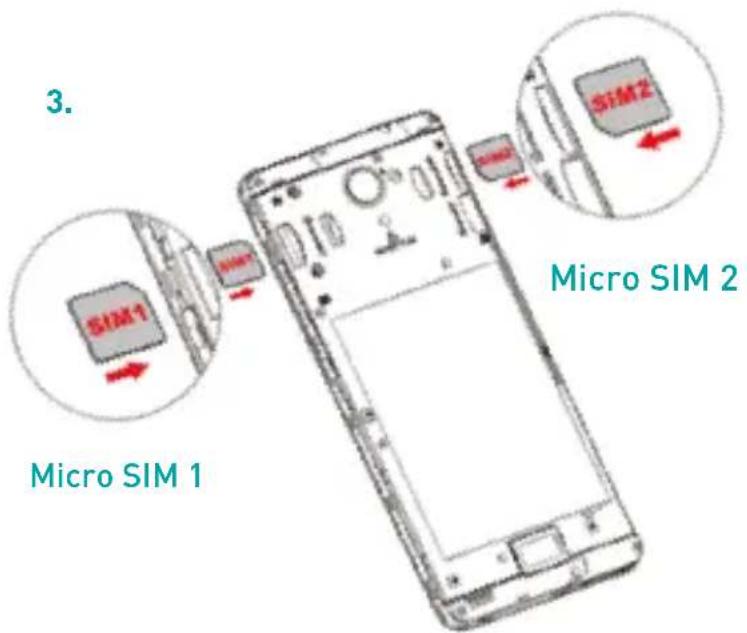
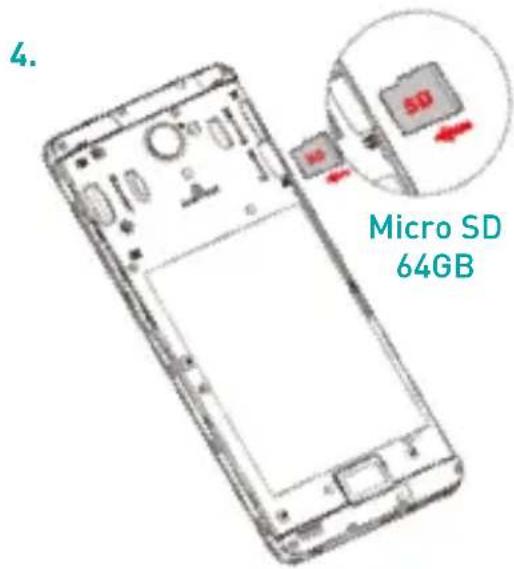
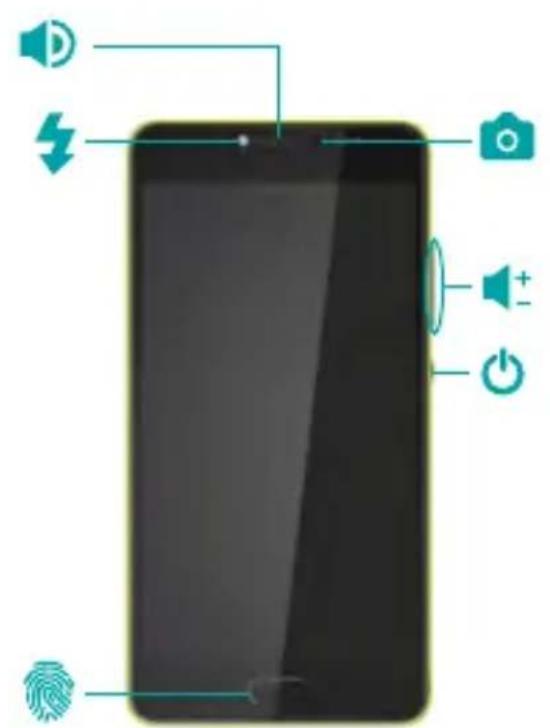
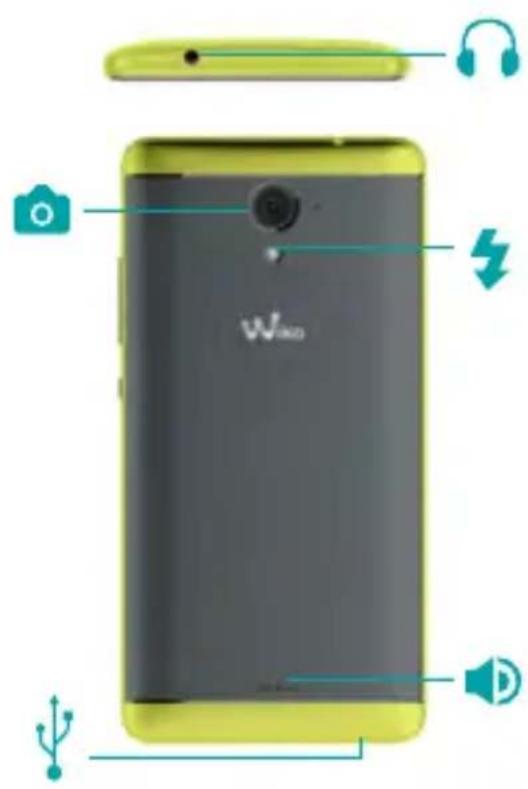
Getting to Know Your Phone
Décovrir votre téléphone / Alla scoperta del vosto telefono / Conoce tu smartphone / Descubra o seu telemóvel / Lernen Sie Ihr Telefon kennen/ Telefon verkennen / Naležy podlączyć Telefon / Upoznavanje vašeg mobitela / Upoznavanje sa Telefonom / Upoznavanje sa Telefonom Vvωpioté To tŋλέφωνo
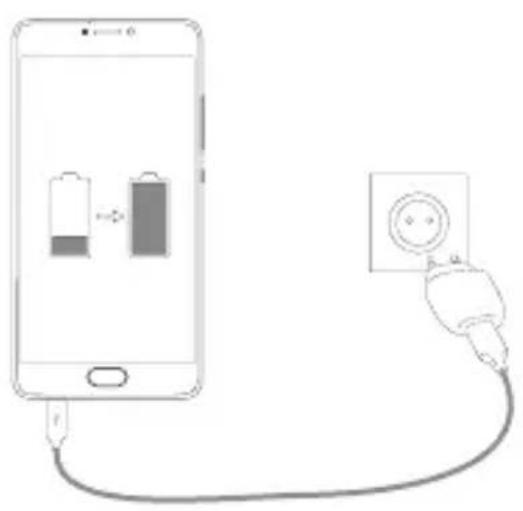
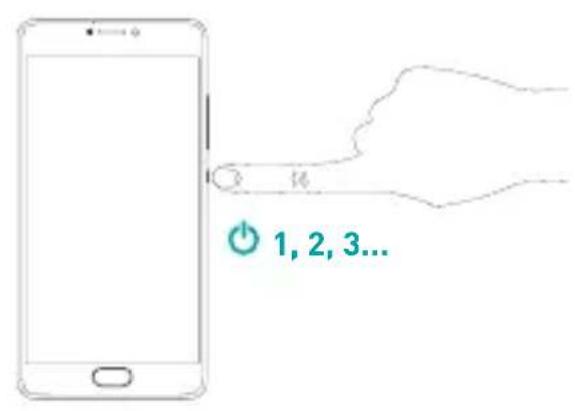
ufeel
FAB
User guide
The contents of this manual may differ in certain respects from the description of your phone depending on its software version and your telephone operator.
EN
CONGRATULATIONS!
You have just purchased your WIKO U FEEL FAB mobile phone. This guide contains basic information to get you started and quickly familiarise yourself, we hope, with the world of WIKO.
A complete version of the guidelines, safety instructions and your device usage user guide is available on our website www.wikomobile.com. You can request a printed version via email or printed letter at the address listed at the end of the user guide.
What's in the Box :
- WIKO U FEEL FAB mobile phone
- AC adaptor
- Micro USB cable
- Hands-free kit
- User guide
Non-removable battery
- The buttons on your phone
| Button | Function |
| On/Off | Press and hold the button to turn the phone on or off. Press the button lightly to lock the touch screen. |
| Home | Returns to the home screen and opens Google NOW (press and hold the button). |
| Overview | Opens the list of recent applications. |
| Return | Returns to the previous screen. Closes the onscreen keyboard. |
| Volume | Increases or decreases the call volume, the ringtone, music, games and other audio functions. Switch the ringtone to silent mode when the phone rings. Press and hold on Volume- to enable the meeting profile. |
Basic Operations
SIM Management
When you turn on your phone for the first time, various items of information about the SIM card(s) are displayed. Follow on screen instruction to set up SIM management.
\~ Network Connection
Operator Not Available
If your operator does not appear in the list or the list is empty, ask your operator how to configure the APN manually. To do this, go to Settings Wireless & networks More Mobile networks SIM1 or SIM2 Access Point Names, press on the button and enter the information provided by your operator. Return to the previous menu, then choose the APN that you have just saved.
Data Connection
To check your data connection settings:
- Go to Settings Wireless & networks More Mobile networks SIM 1 or SIM 2 Access Point Names, then enable the access point according to your operator/package.
- To activate Mobile data, drag the notification panel downward with two fingers and enable data connection by clicking on
- In SIM management, you can select which SIM card is used for data connection.
Data Roaming
Note that for roaming SIM cards, you must enable the data roaming in the Settings Wireless & networks More Mobile networks SIM 1 or SIM 2 Activate Data roaming.
- Notifications Panel
Drag the status bar downwards with 2 fingers to see details of all your notifications. Information about new messages received, upcoming calendar events, download status, etc. will then be displayed.
Safety Information
Please read this safety information carefully so that you can use your phone in complete safety:
- Children: Be very careful with children and your phone. The phone contains small parts that could be swallowed or cause choking.
If your phone is equipped with a camera or lighting device, do not use it too close to children or animals. - Hearing: Prolonged listening at full power using a lightweight headset or headphones can damage your hearing. Reduce the volume to the lowest possible level when listening to music or conversations. Avoid high volumes over extended periods.
- Driving: Exercise care when driving. Driving requires maximum attention at all times in order to minimise the risk of accidents. Using a mobile phone can distract the user and result in an accident. You must fully comply with the local regulations and
laws in force regarding the use of cell phones whilst driving. You are not allowed to use the phone whilst driving. A hands-free kit should not be regarded as an alternative solution.
- Flying: Turn your phone off when flying.
Remember to turn your phone off when you are in a plane [GSM + Bluetooth] as it may cause interference. - Hospitals: Turn your phone off near any medical devices.
It is extremely dangerous to leave a phone switched on near medical devices as it may cause interference. You must observe any instructions or warnings in hospitals and treatment centres.
- Remember to turn your phone off in service stations. Do not use your device in a petrol station near fuel. It is dangerous to use your phone inside a professional garage.
- Electronic implants and pacemakers: Users who wear a pacemaker or who are fitted with an electronic implant must hold the phone on the opposite side to
their implant as a precaution when making a call. If you notice that your phone is causing interference with a pacemaker, switch it off immediately and contact the manufacturer of the pacemaker for advice on what action to take.
8. Fire hazard: Do not leave your device near heat sources such as radiators or cookers.
Do not leave your phone charging near flammable materials as there is a real risk of fire.
9. Contact with liquid: Do not expose the phone to liquid or touch it with wet hands: any damage caused by water may be irreparable.
10. Use only WIKO-approved accessories. The use of unauthorised accessories may damage your phone or cause a safety risk.
11. Do not destroy the batteries and chargers. Never use a battery or charger that has been damaged.
Keep batteries away from magnetic objects asthe latter might cause a short-circuit between the
positive and negative terminals of your batteries and permanently destroy the battery or phone.
As a general rule, you should not expose the batteries to very low or very high temperatures (below 0^ or above 45^ ). Differences in temperature may reduce battery autonomy and service life. It is recommended to recharge the battery at a room temperature of 5 to 25^ . To increase battery life, only use the WIKO battery and charger supplied in the box. Incorrect use of the battery may cause fire, explosion or other risk.
12. Shocks and impact: Handle and use your phone with the utmost care.
Protect your phone: shocks and impact may damage it. Some parts of your phone are made from glass and might break if the phone is dropped or is subject to severe impact. Avoid dropping your phone. Do not touch the screen with sharp objects.
13. Electric shock: Do not try to dismantle your phone as there is a very real risk of electric shock.
14. Maintenance: If you want to clean your handset,
use a dry cloth (do not use a solvent, such as benzene, or alcohol).
- Recharge your phone in a well ventilated area. Do not recharge your device when it is resting on a soft surface.
- Damage to magnetic strips: Keep your phone away from credit cards as it may damage the data on the magnetic strips.
- Do not use the mobile phone in an environment at too high or too low temperature, never expose the mobile phone under strong sunshine or too wet environment. The suitable temperature for the phone is -10^ to +45^ , the maximum charging temperature declared by the manufacturer is +40^ .
- Due to the used enclosure material, the GSM mobile phone should only be connected to a USB Interface of version 2.0 or higher. The connection to so called power USB is prohibited.
- The power adapter is the disconnect device for this equipment. The socket-outlet should be near the
equipment and easily accessible.
- This charger is for indoor use only, the charger type is:
| AREA CO | UNTRIES CHARGER TYPE | |
| Area 1 | France, Germany, Italy, Portugal, Spain, Belgium, Netherland, Switzerland, Luxembourg, Poland, Algeria | TN-050155E1, output voltage/current is 5.0V/1.55A |
| Area 2 | UAE, Saudi Arabia, Nigeria, Kenya | TN-050155B1, output voltage/current is 5.0V/1.55A |
Radio Frequency Exposure:
Your mobile phone has been designed and manufactured in accordance with the international guidelines (ICNIRP) on exposure to radio frequencies. These guidelines, which are based on various studies and research, have been developed by independent scientific organisations to ensure the safety of everyone who uses a mobile phone.
The safety information on exposure to radio waves uses a unit of measurement known as SAR [Specific Absorption Rate]. The international guidelines have set this limit at 2W / kg^* . The phone is used in standard operating positions when being tested for its SAR.
^1 International Commission on Non-Ionising Radiation Protection
Although the SAR is determined using the highest power level, the phone's real rate of specific absorption whilst in operation may be well below the
maximum value.
A phone is designed to operate at different power levels so that it only uses the power it needs to be connected to the network.
In addition, all models of phone must undergo tests before being marketed to ensure compliance with the European R&TTE directive.
This directive publishes strict rules for guaranteeing the safety of users and for preventing any risks to health.
The maximum SAR value tested on this device when used in its normal position at the ear is 0.233W / kg and 1.162W / kg when used close to the body, at a minimum distance of 5mm . It complies with the rules on exposure to radio frequencies when used in its normal position at the ear or at a minimum distance of 5mm from the body. The device uses a high quality network connection for transmitting files, data and messages. On occasion, the transmission of files
or messages may be delayed until the connection is available. When this is the case, be sure to follow the instructions regarding the separation distance for establishing the transmission. If you use a case, belt-clip or holder for carrying the phone, it must not contain any metal and should be kept at a minimum distance of 5mm from your body.
*The SAR limit for mobile devices is 2.0 watts / kilogram (W/kg) averaged over ten grams of body tissue. SAR values may vary according to the standards for reporting information that are in force in different countries.
\~ Recycling
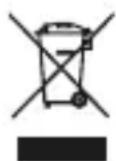
This product is subject to European Directive 2002/96/EC, (WEEE Directive 2012/19/EU) and batteries (Directive 2006/66/EC). Electrical, electronic equipment, batteries, storage batteries
and their accessories must always undergo selective waste management. Therefore, these elements must be reported to an authorized collection point for appropriate reprocessing or recycling.
\~Dangerous substances
This device complies with the requirements resulting from the REACH regulation (Regulation [EC] N°1907/200) and those of the revised RoHS Directive (Directive 2011/65/EU).
Responsibility
Within the limits set by the legislation in force in your country, in case of negligence on your part or on the part of a third party in the use of your device or third party services accessible through it, WIKO will not be responsible for any damages whatsoever, arising from the said negligence. You remain solely responsible for the use of the device in accordance with all regulations applicable to and in effect in your country. These recommendations, safety instructions and use of your device can vary depending on the country in which you reside. To find out more regarding the recommendations, additional safety instructions and usage tips specific to your country, please visit www.wikomobile.com.
STATEMENT OF COMPLIANCE

We, WIKO SAS - 1, rue Capitaine Dessemond - 13007 - Marseille - FRANCE, here by declare that the U FEEL FAB mobile phone complies with the standards and provisions of the Directives.
SAFETY: EN 60950-1:2006+ A11:2009+ A1:2010+ A12:2011 +A2:2013; EN 50332-1:2013; EN 50332-2:2013; EN62471:2008; EMC: EN 301 489-1 V1.9.2; EN 301 489-3 V1.6.1; EN 301 489-7 V1.3.1; EN 301 489-17 V2.2.1; EN 301 489-24 V1.5.1 / SAR: EN 50360:2001+ A1:2012; EN 50566:2013/AC:2014; EN 62209-1:2006; EN 62209-2:2010; EN 62479:2010; / RADIO: EN 301 511 V12.1.1; EN 300 328 V1.9.1; EN 301 908-1 V7.1.1; EN 301 908-2 V6.2.1; EN 301 908-13 V6.2.1; EN 300 440-1 V1.6.1; EN 300 440-2 V1.4.1;
The procedure for the Statement of Compliance, set out in Article 10.5 of Directive 1999/5/EC, was conducted under the supervision of the following organisation:
PHOENIX TESTLAB GmbH, Königswinkel 10
D-32825 Blomberg, Germany
www.phoenix-testlab.de
Phone +49(0)5235-9500-0/Fax +49(0)5235-9500-10
The full text of the device's Statement of Compliance is available on written request to the following address: WIKO SAS - 1, rue Capitaine Dessemond - 13007 - Marseille - FRANCE
29/08/2016
Michel ASSADOURIAN / CEO
(Date)
(Name and signature of the authorised official)


Customer service information
KENYA
http://ke.wikomobile.com/d4687-customer-care
MALTA
http://mt-en.wikomobile.com
UNITED ARAB EMIRATES
http://ae-en.wikicomobile.com/customer-care
KINGDOM OF SAUDI ARABIA
http://sa-en.wikomobile.com/c5-contact-after
sales-service
NIGERIA
http://ng.wikomobile.com/d4689-customer-care
WIKO SAS
Prolonged listening to the music player at full power may damage the user's hearing.
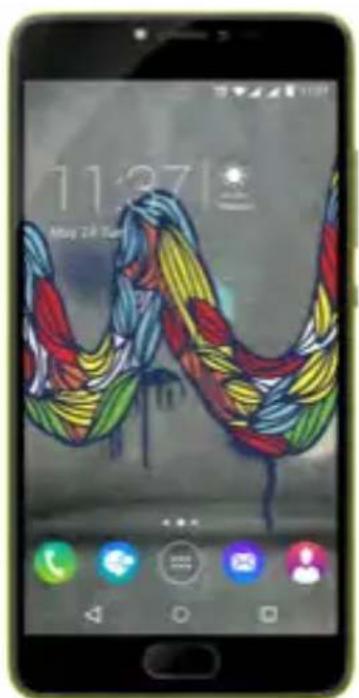
ufeel
FAB
Guide d'utilisateur
D-32825 Blomberg, Germany
www.phoenix-testlab.de
Phone +49(0)5235 - 9500 - 0 / Fax + 49(0)5235 - 9500 - 10
CE 0700
Michel ASSADOURIAN / CEO
(Date)
serviceclients@wikomobile.com
D-32825 Blomberg, Germany
www.phoenix-testlab.de
Tel. +49(0)5235-9500-0 / Fax +49(0)5235-9500-10
Michel ASSADOURIAN / CEO
[Date]
Michel ASSADOURIAN / CEO
(Date)
[Nombre yfirmadelrepresentante autorizzato]

Michel ASSADOURIAN / CEO
(Data)
Michel ASSADOURIAN / CEO
(Date)
^1 International Commission on Non-Ionizing Radiation Protection
Michel ASSADOURIAN / CEO
(Datum)
iell lal aalal alal alal alal
.WIKO alle ale aee
jll jll l, 100000000000000000000000000000000000000
www.wikomobile.com
g 1
jlll lgl aygi aig jz jz jz jz
J 1 J 1 J 1 J 1 J 1 J 1 J 1 J 1 J 1 J 1 J 1 J 1 J 1 J 1 J 1 J 1 J 1 J 1 J 1 J 1 J 1 J 1 J 1 J 1 J 1 J 1 J 1 J 1 J 1 J 1 J 1 J 1 J 1 J 1 J
auiuui 1
SIM
sIM 1
#
(APN)
Jaaal Iglail aIgaiall 151 gaiall gaiall yai bai 12
Lgayy Jgai ll glai caiu ayai S aay
aiai aiaai all iagai all Igai + jil ie Igai ai, ai, alll
aiai ayai I gai lai aiail all jn oosu uyn sui aai J axall
. gill la gail syll Jgai
aLull cIgzo
aaii
:ayie a. dail
i 1.1
g jlll 11 g j 11 11 11 11 11 11
S OBC = S COD + S_ BOC
a 2
a 3
Aa aagaae gaggagagagagagagagagagagagagagagagagagagagagagagagagagagagagagagagagagagagagagagagagagagagagagagagagagagagagagagagagagagagagagagagag
a a a a a a a a a a a a a a a a a a a a a a a a a a a
Lulio Jolal aclaw 12
.3jllall 4
+GSM jilj n jie d jai jai jai jai
+《Ugallglalygalll》
()
5
A. 0 10( 1 - x)
J 1
aie j 1
abaa Jlda aee 2. gill cbaa Jda dtae b! 6
.2g 10
aeg (y) 1 a
j j 15
y
ailllll lllllllllllllllllllllll
aie 1
aiee eae eae eae eae eae eae eae eae eae
1
j 8
J. J. J. J. J. J. J. J. J. J. J. J. J. J. J. J. J. J. J. J. J. J. J. J. J. J. J. J. J. J. J. J. J. J. J. J. J. J. J. J. J. J. J. J. J. J. J. J. J. J. J.
WIKO 10
11
J 25,5
WIKO
y 1000000000000000000000000000000000000000000000000000000000000000
Michel ASSADOURIAN / CEO
()
29/08/2016
()
AR

Game changer.
dLaolll oIs Cio lo
ALGERIE
+213)21449665
wiko.algerie@wikomobile.com
http://dz.wikomobile.com
MAROC
KINGDOM OF SAUDI ARABIA
http://sa-en.wikomobile.com/c5-contact-after
sales-service
WIKO SAS
Michel ASSADOURIAN / CEO
(Data)
- Nedostupan operator
Ako se vaš operater ne pojavni na popisu ili je popis prazan, zatražite od svojeg operatera da manualno konfigurira APN. Przejdz do Postavke > Bežićno povezivanje i mreže > Vise > Mobilne mreže > SIM1 ili SIM2 > Punkty Pristupne točke pritisnite tipku te unesite informacije dane od strane vašeg operatera. Vratite se na prethodni izborni te potom odaberite APN koji ste upravo pohranili.
- Podatkovna veza
Michel ASSADOURIAN / CEO
(Datum)
Nevarne substance
Ta naprava je skladna z zahevami REACH (Uredba (ES) st. 1907/2000) in zahevami revidirane RoHS Direktive (Direktive 2011/65/EU).
Odgovornost
Michel ASSADOURIAN / CEO
(Datum)
(Polno ime in podpis pooblascenega usluzbenca)

Uporabniška sluzba:
SLOVENIJA
http://si.wikicomobile.com/
WIKO SAS
Michel ASSADOURIAN / CEO
(Name and signature of the authorised official)

Ovlašćeni servis:
SRBIJA
http://rs.wikomobile.com/
WIKO SAS
Michel ASSADOURIAN / CEO
[Hερομηνία]
{OvouatETWuvuo apóδiou uTAAλnλou}