
ES7017 - Razor PANASONIC - Free user manual and instructions
Find the device manual for free ES7017 PANASONIC in PDF.
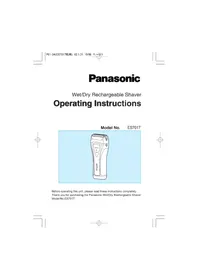



| Product Type | Electric Shaver |
| Brand | Panasonic |
| Model | ES7017 |
| Power Supply | Charging Adapter RE3-88 (100-240 V) |
| Battery Type | Rechargeable Nickel-Metal Hydride (Ni-MH) |
| Charging Time | Approximately 1 hour for full charge |
| Operating Time | Approximately 20 shaves (3 minutes per shave) |
| Usage | Dry or wet shaving (Wet/Dry) |
| Waterproof | Yes, can be used in the shower |
| Shaving Head | System outer foil with center blade |
| Integrated Trimmer | Yes, retractable with handle |
| Cleaning | Under running water with liquid soap |
| Replacement Outer Foil | Every year |
| Replacement Inner Blades | Every two years |
| Included Accessories | Protective cap, wall mount, cleaning brush, travel pouch |
| Dimensions (approx.) | 15 x 5 x 5 cm |
| Weight (approx.) | 200 g |
| AC Adapter | RE3-88 |
| Safety | Do not use if foil or blade is damaged |
Frequently Asked Questions - ES7017 PANASONIC
User questions about ES7017 PANASONIC
0 question about this device. Answer the ones you know or ask your own.
Ask a new question about this device
Download the instructions for your Razor in PDF format for free! Find your manual ES7017 - PANASONIC and take your electronic device back in hand. On this page are published all the documents necessary for the use of your device. ES7017 by PANASONIC.
USER MANUAL ES7017 PANASONIC
Wet/Dry Rechargeable Shaver
Operating Instructions
Model No. ES7017
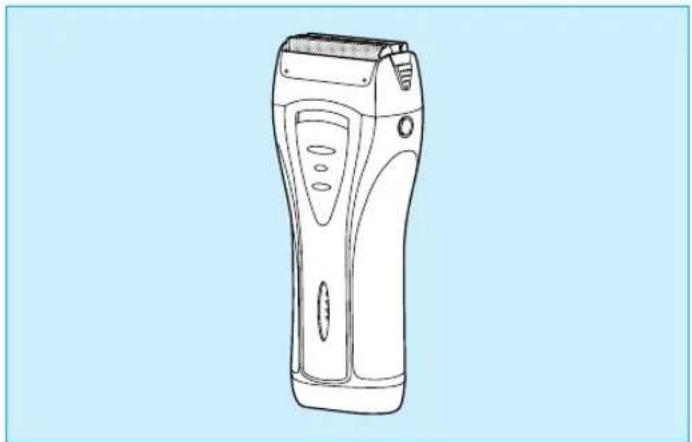
Before operating this unit, please read these instructions completely.
Thank you for purchasing the Panasonic Wet/Dry Rechargeable Shaver Model No. ES7017.
Index
ENGLISH Page 5 NORSK Side 43
This Wet/Dry shaver can be used for wet shaving with shaving lather or for dry shaving. You can use this watertight shaver in the shower and clean it in water. Treat yourself to wet lather shaves for at least three weeks and notice the difference. Your Panasonic Wet/Dry shaver requires a little time to get used to because your skin and beard need about a month to adjust to any new shaving method.
Charge the shaver for at least 8 hours before using it for the first time or when it has not been in use for more than six months.
Parts identification
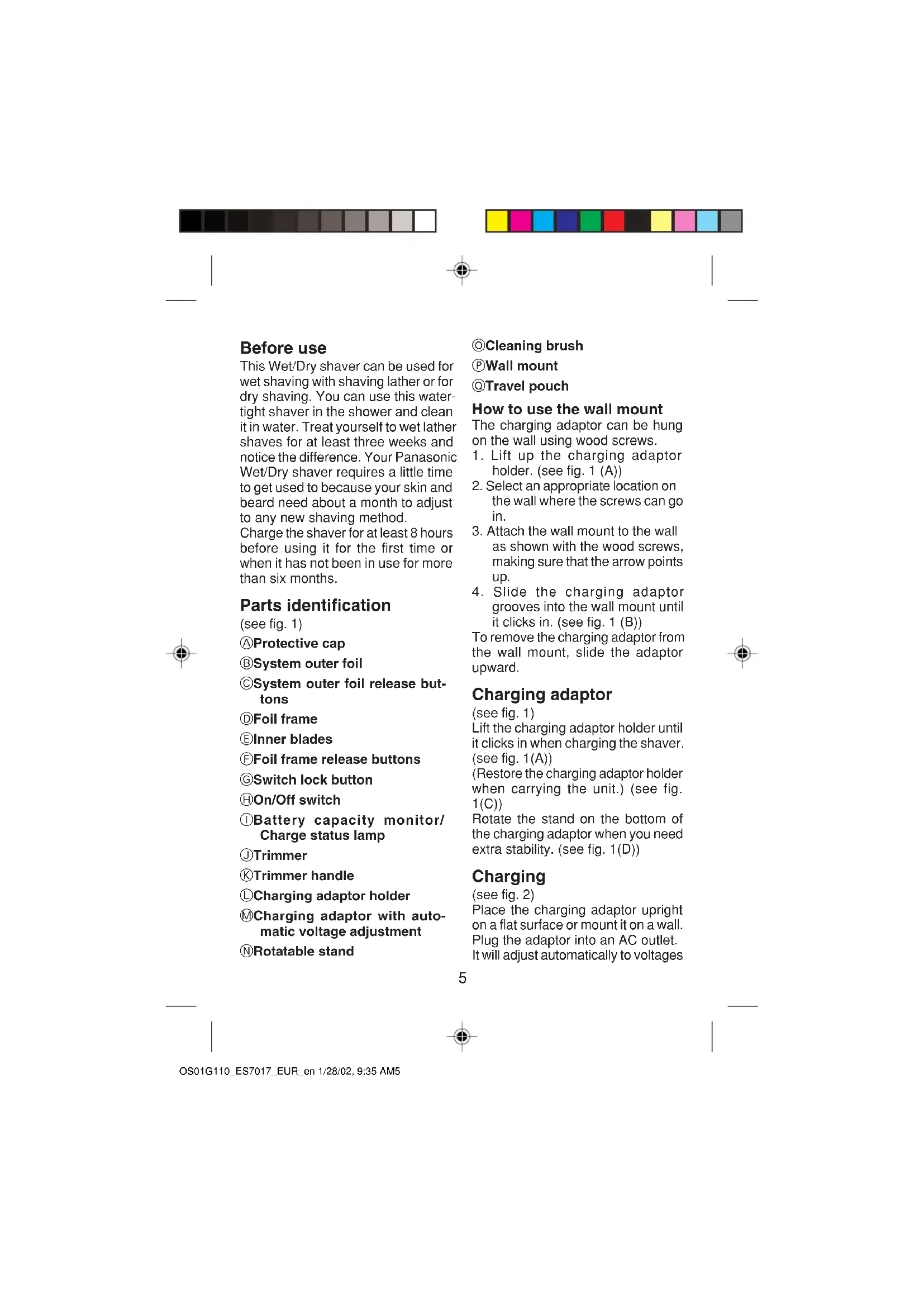
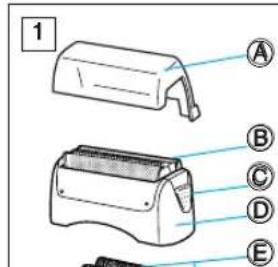
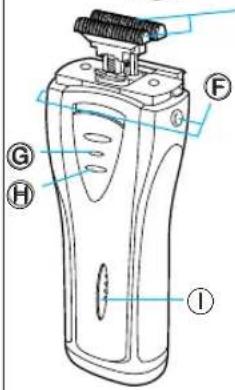
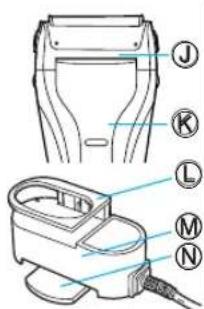
(see fig. 1) Protective cap, System outer foil, System outer foil release buttons, Foil frame, Inner blades, Foil frame release buttons, Switch lock button, On/Off switch, Battery capacity monitor/Charge status lamp, Trimmer, Trimmer handle, Charging adaptor holder, Charging adaptor with automatic voltage adjustment, Rotatable stand
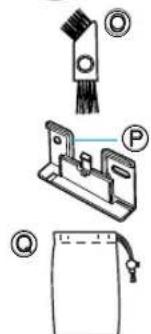
Cleaning brush, Wall mount, Travel pouch
How to use the wall mount
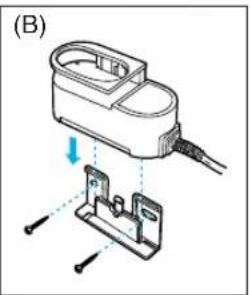
The charging adaptor can be hung on the wall using wood screws.
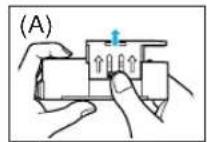
- Lift up the charging adaptor holder. (see fig. 1 (A))
- Select an appropriate location on the wall where the screws can go in.
- Attach the wall mount to the wall as shown with the wood screws, making sure that the arrow points up.
- Slide the charging adaptor grooves into the wall mount until it clicks in. (see fig. 1 (B)) To remove the charging adaptor from the wall mount, slide the adaptor upward.
Charging adaptor
(see fig. 1)
Lift the charging adaptor holder until it clicks in when charging the shaver. (see fig. 1(A))
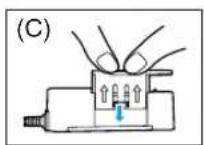
(Restore the charging adaptor holder when carrying the unit.) (see fig. 1(C))
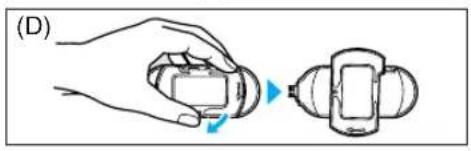
Rotate the stand on the bottom of the charging adaptor when you need extra stability. (see fig. 1(D))
Charging
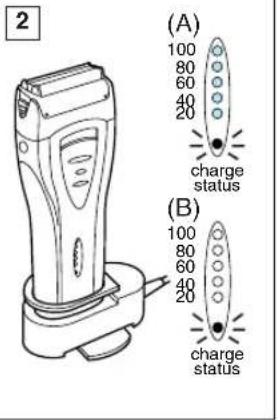
(see fig. 2)
Place the charging adaptor upright on a flat surface or mount it on a wall. Plug the adaptor into an AC outlet.
It will adjust automatically to voltages



between 100-240V AC.
In some areas, a special plug adaptor may be required.
Switch the shaver to the "0 - charge" position and place it upright into the charging adaptor with the switch facing toward the front.
The charge status lamp will glow red when the shaver is placed in the correct position. It will flicker red when charging is completed.
At the same time, the battery capacity monitor will display the fully charged condition (see fig. 2 (A)).
The system will turn off about 10 minutes after charging has been completed (see fig. 2 (B)).
You can fully charge the shaver in one hour if the battery capacity monitor flashes down to the 20% level.
A full charge will supply enough power for about 20 shaves (three minutes per shave for a normal beard).
You can always store your shaver in the charging adaptor to maintain full power capacity. This shaver cannot be overcharged.
Before traveling, charge it fully for 1 hour if you will not be taking the charging adaptor with you.
Using your shaver
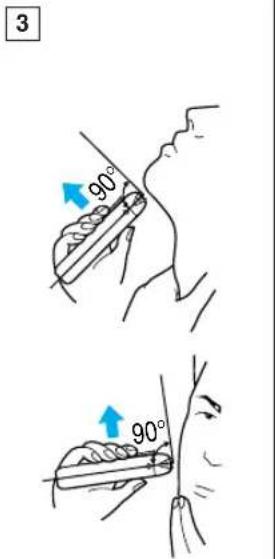
Depress the switch lock button and slide the On/Off switch upward to turn the shaver on. Hold the shaver at a right angle (90°) to your skin (see fig. 3). Start out shaving by applying gentle pressure to your face. Stretch your skin with your free hand and move the shaver back and forth in the direction of your beard. You may gen
tly increase the amount of pressure as your skin becomes accustomed to this shaver. Applying excessive pressure does not provide a closer shave.
System outer foil
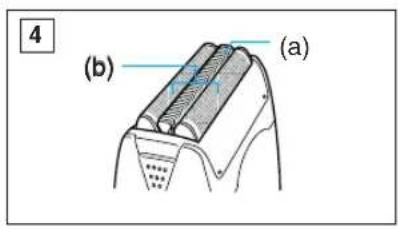
(see fig. 4)
System outer foil has a slit blade (a) between two foils (b). They move up and down independently to follow the contours of your face.
The slit blade catches and cuts longer and lying hairs easily.
For wet shaving
Put a thin layer of shaving foam on your face which works as a lubricant. Shaving foam is the most suitable among many other shaving aids (gel, soap, cream, etc). Do not put a thick layer of shaving foam as it may affect the shaver's performance. If the shaving head is clogged with foam, simply rinse it under running water.
Using the trimmer
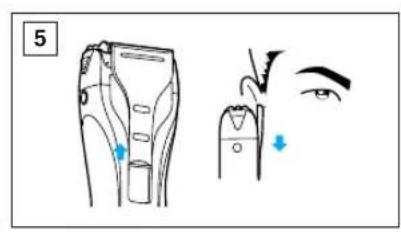
(see fig. 5)
Slide the trimmer handle up to the position until it clicks in.
Place the trimmer at a right angle to your skin and move it downward to trim sideburns.
Cleaning your shaver
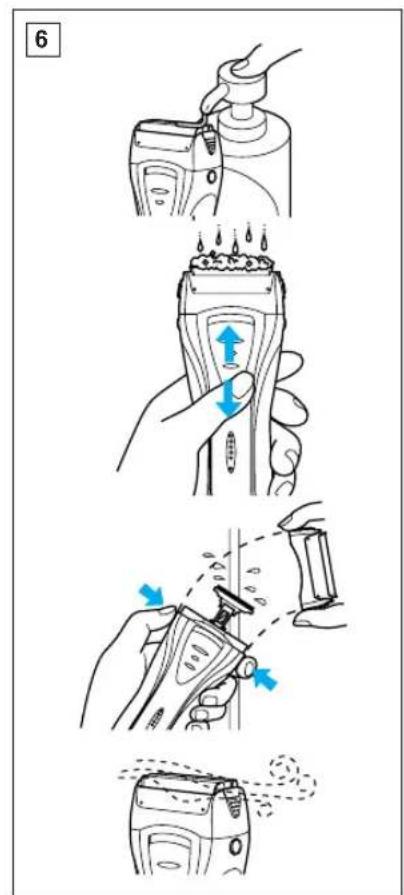
(see fig. 6)
For cleanliness and convenience, we recommend that you clean your shaver with water and a liquid hand soap. Regular cleaning will keep your shaver in good condition while preventing odors or bacteria from devel



oping, and maintain the cutting performance.
With the system outer foil in place, apply some hand soap onto the outer foil.
Turn the shaver on and pour some water over the outer foil.
After about 10-20 seconds, turn the shaver off.
Remove the foil frame and clean it with running water.
Wipe off any moisture from the shaver with a dry cloth and remove the protective cap to allow the system outer foil to dry completely.
Brush cleaning
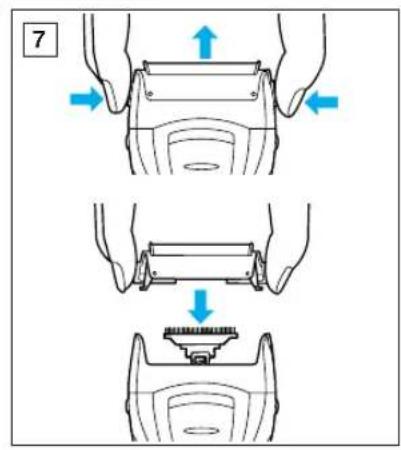
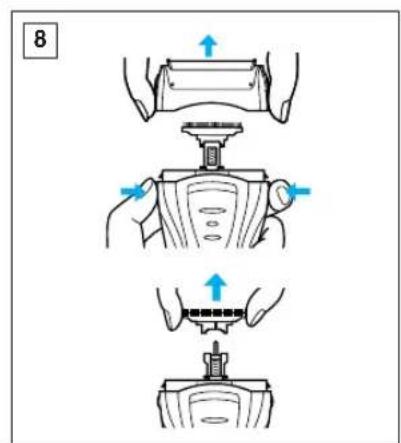
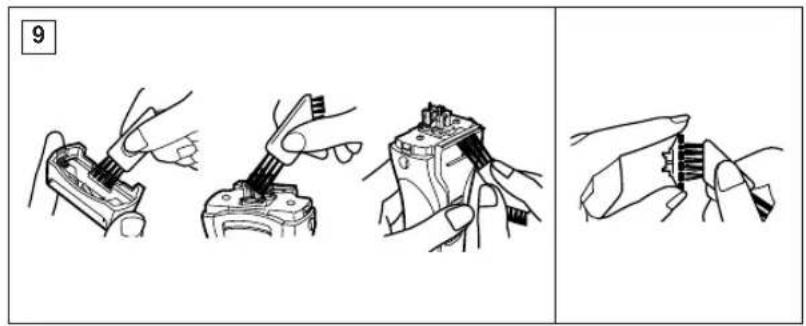
Squeeze the system outer foil release buttons and lift the system outer foils upward to remove them (see fig. 7). Remove the inner blades by grasping them firmly at both ends and pulling them straight away from the shaver (see fig. 8). Clean the outer foils, the shaver body and the trimmer with the long side of the brush. Clean the inner blades with the short side of the brush. Do not use the short brush to clean the outer foils (see fig. 9).
Replacing shaving head components
It is recommended that you replace the outer foil at least every year and the inner blades at least every two years to maintain your shaver's cutting performance.
Replacing the system outer foil (see fig. 7)
Squeeze the system outer foil release buttons and lift the system outer foil upward to remove it. To insert the new system outer foil, press down until it snaps into place.
Squeeze the system outer foil release buttons and lift the system outer foil upward to remove it. To insert the new system outer foil, press down until it snaps into place.
Replacing the inner blades (see fig. 8)
Squeeze the foil frame release buttons and lift the foil frame upward to remove it. Remove the inner blades, one at a time, by grasping them firmly at both ends and pulling straight away from the shaver. To insert the new inner blades, hold the blades, one at a time, at both ends and press downward until they snap into place.
For environmental protection and recycling of materials
This shaver contains Nickel-Metal Hydride battery(s).
Please make sure that the battery(s) are disposed of at an officially assigned location, if there is one in your country.
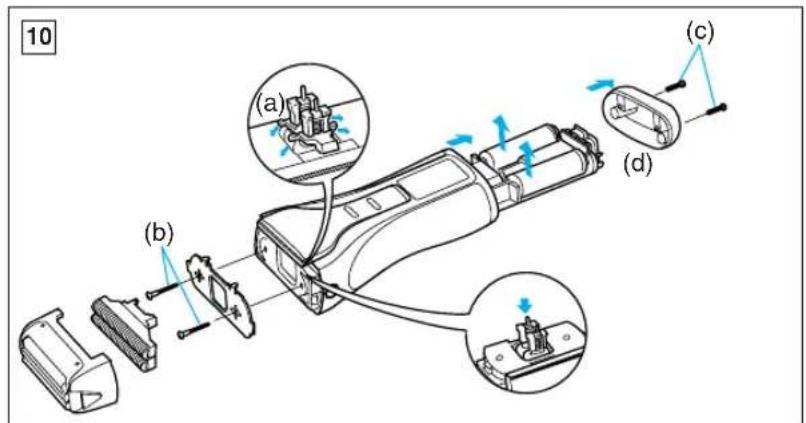
How to remove the built-in rechargeable battery(s) before disposal of the shaver (see fig. 10)
The battery(s) in this shaver is not intended to be replaced by consumers. However, the battery(s) may be replaced at an authorized service center. The procedure described below is intended only for removal of the rechargeable battery(s) for the purpose of proper disposal.
- Remove the cap, outer foil frame and inner blades.
- Remove the two screws (b) and



driving bars (a).
- Remove two screws (c) and bottom cover (d).
- Push the chassis out of the housing.
- Remove the battery(s) from the chassis.
Caution
- Do not charge the shaver where the temperature is below 0°C (32°F) or above 40°C (104°F), where it will be exposed to direct sunlight or a heat source, or where there is a lot of moisture.
- Use only the included shaver charging adaptor RE3-88 to charge the ES7017 shaver.
- The supply cord of the charging adaptor cannot be replaced; if the cord is damaged, the entire charger should be discarded.
- Dry the shaver completely before setting it in the charging adaptor.
- Keep the charging adaptor away from water and handle it only with dry hands. Do not use an extension cord to connect the charging adaptor to an outlet.
- The shaver may not immediately begin to charge after being placed into the charging adaptor after use. Allow the shaver to sit in the charging adaptor for a few minutes and check again to make sure that it is being charged.
- Do not place any metal objects like coins and paper clips on the charging adaptor as they will become warm.
- Grip the plug when disconnecting
the charging adaptor from a receptacle; tugging on the cord may damage it.
- Store the charging adaptor and its cord set in a dry area where it will be protected from damage.
- The outer foil is very thin. If handled improperly, it can be easily damaged. To avoid personal injury, do not use the shaver if it has a damaged foil or inner blade.
- Wash the shaver in tap water. Do not use salt water or boiling water. Also, do not use cleaning products that are designed for toilets, bathrooms or kitchen appliances. Do not submerge the shaver for a long time.
- Do not wipe any part of the shaver with thinner, benzene or alcohol. Clean it by using a cloth dampened with soapy water.
- Do not take the housing apart as this can affect the watertight construction.
- If the shaver is not working properly, have it inspected at the place of purchase or an authorized service center. Always use your shaver for its intended use, as described in this manual.
This product is intended for household use only.



Before use
Parts identification
(see Fig. 1)
Names of parts
(see Fig. 1)
Outer foil, inner blade, system lock button, release button, system lock, foil frame, inner blade, foil lock, power switch
Switch "On/Off"
Battery capacity indicator / charging status light / razor / razor holder / charger with automatic transformer / mains plug / wall bracket / wall bracket for cleaning
Mounting the wall bracket
The charger can be mounted on the wall with the help of screws.
1. Lift the charger holder. (See fig. 1(A)) 2. Choose a suitable place on the wall where the screws can go in. 3. Attach the bracket to the wall, as shown in the illustration, with the help of screws, making sure that the arrow points upwards. 4. Slide the charger into the wall bracket until it clicks into place. (See fig. 1(B))



To remove the charger from the wall bracket, slide the charger upwards.
Charger (see fig. 1)
When the razor is not in use, push the charger holder down until it clicks. (See fig. 1(A)) (Return the charger holder to its original position when using the razor.) (See fig. 1(C))
Turn the charger support if additional stability is required. (See fig. 1(D))
Charging
(see fig. 2)
Place the charger vertically on a flat surface or attach it to the wall. Connect the charger to a wall outlet.
It will automatically adjust to voltages from 100-240 V.
In some regions, a special adapter may be needed to connect to the wall outlet.
Switch the razor to the position marked "0" (charging position) and place it vertically in the charger so that the switch is on the front side.
The charging status light will turn red if the razor is placed correctly.
The indicator will turn red when charging is complete.
At the same time, the battery capacity monitor will show the state of full charge (see Fig. 2(A)).
The system will turn off approximately 10 minutes after charging is complete (see Fig. 2(B)).
Fully charge the shaver within one hour if the battery capacity monitor is at the level of 20%
A full charge will provide enough energy for approximately 20 shaving sessions (3 minutes per shave with normal hair growth).
You can always store the shaver in the charging unit to keep it fully charged. This shaver model is protected against overcharging.
If you are leaving home and not taking the charging unit with you, fully charge the shaver within one hour.
Using the shaver
Press the on/off switch and slide it up to turn on the shaver. Hold the shaver at a right angle to the skin (90°) (see Fig. 3). Start shaving, carefully moving the shaver over the skin. Stretch the skin with your free hand and move



the shaver back and forth in the direction of hair growth. As your skin becomes accustomed to the shaver, you can gently increase pressure on the skin. Excessive pressure on the skin is not necessary, as it does not improve the shaving result.
Trimmer system and lifting plate
(see Fig. 4)
The trimmer system has a disc blade (a) fixed between two screens (b). They move up and down independently of each other, following the contours of your face.
The trimmer catches and cuts longer hairs that lie flat against the skin.
Wet shaving
Apply shaving foam to the skin. This foam will perform a binding function. The foam is a better remedy compared to many others (gel, soap, cream, etc.). Do not apply the foam to the skin in a thick layer, as this may negatively affect the effectiveness of the shave. If the shaving head is clogged with foam, it is enough to rinse it under running water.
USING THE TRIMMER
(see fig. 5)
Press the trimmer lever up until it clicks into place.
Place the trimmer at a right angle to the skin and move the trimmer downwards to trim the sideburns/beard.
CLEANING THE SHAVER
(see fig. 6)
For hygiene and ease of use, it is recommended to clean the shaver with water and liquid soap. Regular cleaning will help keep the shaver in good condition, preventing the appearance of unpleasant odors and bacteria, and also ensure high shaving efficiency. Without removing the outer foil, rinse it with soap.
Turn on the shaver and rinse the outer foil under running water. After about 10-20 seconds, turn off the shaver.
Remove the foil frame and rinse it under running water.
Dry the shaver with a towel to remove moisture from it and remove the protective cap so that the outer foil dries completely.
CLEANING WITH A BRUSH
Press the release buttons of the outer foil system and remove the outer foil system by lifting it up (see fig. 7). Remove the inner blades, firmly grasping them on both sides and pulling them out of the shaver (see fig. 8). Clean the outer foil, the shaver body, and the blades on the long side
77



of the brush. Clean the inner blades on the short side of the brush. Do not use the short brush for cleaning the outer foil (see fig. 9).
Replacing the shaver head parts
To ensure the shaver performs at its best, it is recommended to replace the outer foils at least once a year and the inner cutters at least every two years.
Replacing the outer foil system
(see fig. 7)
Press the foil frame release button and lift it up to remove it. Then remove the inner cutters one by one, gripping them firmly from both sides and pulling them up away from the shaver. To insert new inner cutters, place them one by one, gripping each cutter from both sides and pressing down until they click firmly into place in the shaver.
Replacing the inner cutters (see fig. 8)
Press the foil frame release button and lift it up to remove it. Then remove the inner cutters one by one, gripping them firmly from both sides and pulling them up away from the shaver. To insert new inner cutters, place them one by one, gripping each cutter from both sides and pressing down,
until they click firmly into place in the shaver.
Protecting the environment and disposing of used materials
This shaver contains nickel-metal hydride batteries.
Please dispose of the batteries at a designated collection point, if such a service is available in your country.
Removing the built-in rechargeable battery (batteries) for disposal of the shaver
(see fig. 10)
The battery (batteries) in this shaver are not intended to be replaced by consumers.
However, the battery (batteries) can be replaced at a service center that has the appropriate authorization. The procedure described below is intended only for the removal of the rechargeable battery (batteries) for proper disposal.
- Remove the outer mesh and inner blades. 2. Remove the two screws (b) of the cold rod and the nozzle (a).
- Remove the two screws (c) of the housing cover (d).
- Pull the chassis out of the housing.
- Remove the battery from the chassis.



Caution
Do not charge the trimmer if the temperature is below 0°C or above 40°C, if the trimmer has been exposed to direct sunlight or a heat source, or if the room has high humidity. Use only the included charging device RE3-88 to charge the trimmer ES7017. - The power cord of the charging device is not replaceable; if the cord is damaged, dispose of the entire charging device. - Rinse the trimmer thoroughly before placing it in the charging device. Keep the charging device away from water and touch it only with dry hands. Do not use an extension cord to connect the charging device to the AC outlet. - When placing the trimmer in the charging device after use, the charging process may start with some delay. Leave the trimmer in the charging device for a few minutes, then make sure that the charging process has started. Do not place any metal objects,
such as coins, paper clips, or staples, on the charging device, as they may heat up.
- When disconnecting the charging device from the power outlet, grasp the plug of the power cord: if you pull the cord itself, you may damage it. Store the charging device and its power cord in a dry place where they will be protected from damage. The outer mesh is very thin. If handled incorrectly, it can be easily damaged. To avoid injury, do not use the trimmer if the mesh or inner blades are damaged. - Rinse the trimmer under running water. Do not immerse the trimmer in salt water or boiling water. Also, the use of cleaning agents intended for cleaning toilets or kitchen equipment is prohibited. Do not soak the trimmer in water for extended periods. It is forbidden to wipe any parts of the trimmer with thinner, benzene, or alcohol. Wipe them with a cloth moistened with soapy water. Do not disassemble the trimmer head, as this may impair its water resistance. If the trimmer operates unsatisfactorily, take it for inspection to the place



of purchase of the trimmer or to an authorized service center. Always use the trimmer for its intended purpose, as described in this manual.
The manufacturer establishes, in accordance with clause 2 of Article 5 of the Federal Law of the Russian Federation "On Protection of Consumer Rights", a service life of 7 years from the date of manufacture, provided that the product is used in strict accordance with this instruction manual and applicable technical standards.


BZ02
Made in China
This device is intended for household use only.
80
P01-04(ES7017 Europe) 02.1.31 19:56
Matsushita Electric Works, Ltd.
1048, Kadoma, Osaka 571-8686, Japan
No.1 EN, GR, FR, IT, NE, SP, DN, PO, NR, SW, FN, Po, Cz, Hu, Ru, Russi
Printed in China


- WET/DRY RECHARGEABLE SHAVER
- OPERATING INSTRUCTIONS
- INDEX
- PARTS IDENTIFICATION
- HOW TO USE THE WALL MOUNT
- CHARGING ADAPTOR
- CHARGING
- USING YOUR SHAVER
- SYSTEM OUTER FOIL
- FOR WET SHAVING
- USING THE TRIMMER
- CLEANING YOUR SHAVER
- BRUSH CLEANING
- REPLACING SHAVING HEAD COMPONENTS
- REPLACING THE SYSTEM OUTER FOIL (SEE FIG. 7)
- REPLACING THE INNER BLADES (SEE FIG. 8)
- FOR ENVIRONMENTAL PROTECTION AND RECYCLING OF MATERIALS
- HOW TO REMOVE THE BUILT-IN RECHARGEABLE BATTERY(S) BEFORE DISPOSAL OF THE SHAVER (SEE FIG. 10)
- CAUTION
- BEFORE USE
- NAMES OF PARTS
- MOUNTING THE WALL BRACKET
- CHARGER (SEE FIG. 1)
- USING THE SHAVER
- TRIMMER SYSTEM AND LIFTING PLATE
- WET SHAVING
- CLEANING THE SHAVER
- CLEANING WITH A BRUSH
- REPLACING THE SHAVER HEAD PARTS
- REPLACING THE OUTER FOIL SYSTEM
- REPLACING THE INNER CUTTERS (SEE FIG. 8)
- PROTECTING THE ENVIRONMENT AND DISPOSING OF USED MATERIALS
- REMOVING THE BUILT-IN RECHARGEABLE BATTERY (BATTERIES) FOR DISPOSAL OF THE SHAVER
- BZ
Brand : PANASONIC
Model : ES7017
Category : Razor