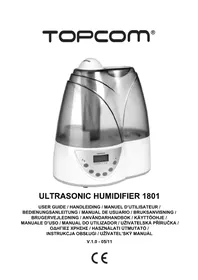
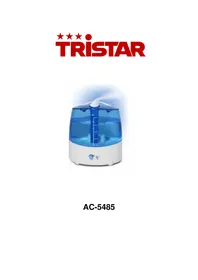
LF4718 - Humidifier TRISTAR - Free user manual and instructions
Find the device manual for free LF4718 TRISTAR in PDF.



| Product type | Ultrasonic humidifier |
| Brand | TriStar |
| Model | LF4718 |
| Tank capacity | 6 liters |
| Humidification capacity | 300 ml/h |
| Power supply | 230 V ~ 50 Hz |
| Nominal power | 50 W |
| Protection class | Type II (double insulation) |
| Main functions | On/Off, humidity control (20-90%), ionizer, mist adjustment (3 levels), timer (2/4/8/12h), automatic shutdown at target humidity or empty tank |
| Display | LCD with humidity level and settings |
| Maintenance and cleaning | Clean the tank with a mild detergent, clean the water channel with a soft cloth, clean the transducer with the provided brush |
| Safety | Do not add perfumes or essential oils, do not use hot water (>40°C), do not immerse the base, do not use if cord is damaged |
| Spare parts and repairability | Removable tank, transducer replaceable by a professional |
| General information | Recommended use between 5 and 40°C, ambient humidity < 50% |
Frequently Asked Questions - LF4718 TRISTAR
User questions about LF4718 TRISTAR
0 question about this device. Answer the ones you know or ask your own.
Ask a new question about this device
Download the instructions for your Humidifier in PDF format for free! Find your manual LF4718 - TRISTAR and take your electronic device back in hand. On this page are published all the documents necessary for the use of your device. LF4718 by TRISTAR.
USER MANUAL LF4718 TRISTAR
UK The features described in this manual are published with reservation to modifications.
1.1 Intended Purpose
Young children commonly get about 6-8 colds and upper respiratory tract infections each year. Increasing the air moisture is a common way to help your child feel better when he is congested. The Ultrasonic Humidiefier generates a cool mist. This excludes the risk of your child getting accidentally burned.
One thing that makes winter uncomfortable for humans, even inside a nice warm building, is low humidity. People need a certain level of humidity to be comfortable. In the winter, indoor humidity can be extremely low and the lack of humidity can dry out your skin and mucous membranes. Low humidity also makes the air feel colder than it actually is. Dry air can also dry out the wood in the walls and floors of our houses. As the drying wood shrinks, it can cause creaks in floors and cracks in drywall and plaster. People tend to feel most comfortable at a relative humidity of about 45 percent. The Ultrasonic Humidifier 1801 will help to keep indoor humidity at a comfortable level.
1.2 Safety advice
- Always read the user guide instructions carefully before using the device
- Keep this User's Manual for future reference.
- Always put the humidifier on a hard, flat horizontal surface, at least 15cm from the walls and away from any source of heat such as burners, radiators etc. The humidifier cannot operate on a surface that is not horizontal.
- Keep the humidifier out of reach of children. Do not permit children to play with it.
- Before using the humidifier, unwind the cord and check if it is not damaged. Do not use it if the cord is damaged.
- Do not plug or unplug the humidifier with wet hands.
- Never disassemble the basic unit.
- Never operate the humidifier with a defective plug or cord, or after a breakdown or damage of any kind. In these cases, return the appliance to the nearest approved dealer/repairer for verification and any necessary repairs or adjustments.
- Do not use additives such as perfumes, essences, etc.
- Never add alkaline substances in the water tank.
- Do not shake the humidifier. This could spill water into the base unit and affect its operation.
- Do not leave the humidifier in the sun for a long period.
If an unusual odour occurs during normal use, turn off the appliance, unplug it and have it verified by qualified personnel. - Unplug the humidifier before cleaning if or removing the tank.
- Never touch the water or the immersed components when the appliance is in operation.
- Never turn on the humidifier when there is no water in the tank.
- Never scratch the transducer.
- To prevent any damage to the components, do not allow water to splash inside the base unit.
- Never wash the entire unit with water; do not immerse it.
- The ultrasonic humidifier should be cleaned regularly. To do this, refer to the cleaning instructions in this manual and respect them.
- Do not use the humidifier if the air in the room is already sufficiently moist (at least 50% relative humidity). Excessive humidity gives rise to condensation on cold surfaces or walls in the room.
2 Technical specifications
- Moisture capacity: 300ml/h
Water tank volume:6L
Rated voltage: 230 V AC - Rated frequency: 50Hz
Rated power:50W
Prevent electric-shock protection: II sort
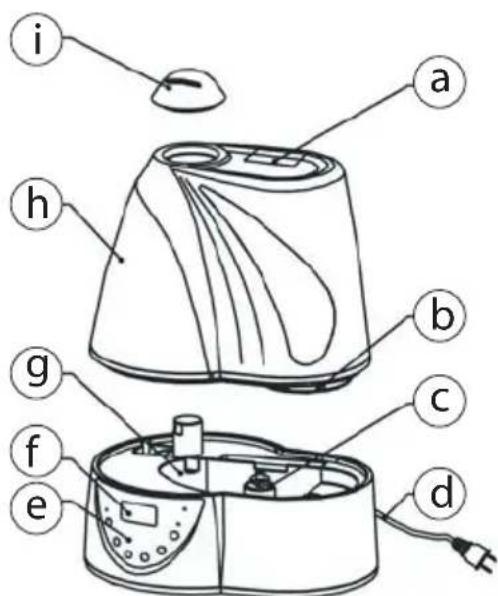
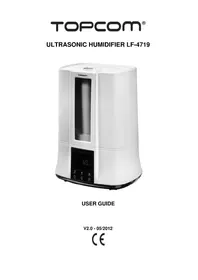
3 Description
a. Handlebar
b. Water Inlet Cap
c. Water level low detection
d. Power cord
e. Key pad
f. LCD display
q. Water flume
h. Water tank
i. Fume dispenser
4 Installation
- Put the humidifier on a flat surface in the room for half an hour. It is important that it reaches the ambient temperature.
We recommend using the humidifier at a temperature between 5 and 40^ and a relative humidity of less than 50% . - Remove the water tank (h) from the humidifier.
- Turn the water tank up side down.
- Unscrew the cap (b) by turning it counter clockwise.
- Fill the water tank with clear water (maximum 40^ ).
- Close the cover by turning clockwise.
- Verify the cleanliness and watertightness and then gently put the & water tank back on the base.
- Position the spray mouth (i) in the desired direction.
- Plug the power cord (d) in the main power wall connector with dry hands.
Do not remove the water tank when the humidifier is connected to the main power.
When you remove the water tank after usage, there will still be water in the water flume.
Remove the water from the tank and flume when it is not used for a long period.
Clean the water box, spray mouth and water flume if the humidifier is not used for a long period. Do not position the humidifier near heat sources or direct sunlight.
Do not aim the fume dispenser to furniture, electronic equipment or baby beds.
5 Simple operation
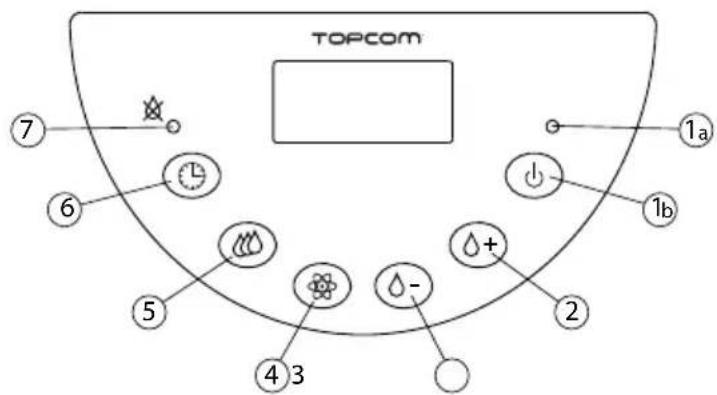
Operation and use of the control panel
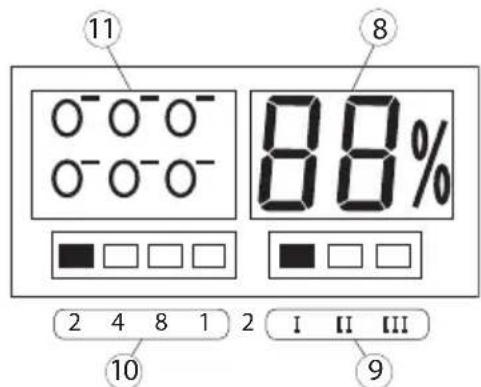
1. On/off
- Press the On/Off button (1b) to activate the humidifier. The power LED lights (1a) on. After 10 seconds, the ambient humidity is displayed.
- Press the On/Off button again to stop the humidifier.
2. Humidity control +
- Press this button to increase the humidity setting from 20% to 90% . After flashing for 5 seconds, the LCD display shows the level of ambient humidity (8).
When the moisture level reaches the pre-set value, the humidifier automatically stops for five minutes in order to test the humidity in the air.
3. Humidity control -
This function is similar to the "Moisture control +", but it decreases the humidity setting from 90% to 20%.
4. Ionizer
The air ioniser is a device which uses high voltage to ionise, or electrically negative charge, molecules of air. Negative ions help freshen and purify bad particles in the air, which are causing allergens such as pollen, mold spores, dust, and animal dander floating in the air. They help to lift mood, alleviate depression and seasonal affective disorder and promote a sense of well-being.
When the Humidifier is on:
Press the Ionizer button to start the ioniser. The ionizer icons (11) blink on the screen.
- Press the Ionizer button again to stop the ioniser.
5. Fog control
- Press the Fog control button to change the generated amount of Fog. The display will indicate the Fog level (9) (I = Maximum, II = Medium, III = Minimum).
6. Timer
- Press the Timer button to alternatively change the timer from 2 hours, to 4, 8 and 12 hours.
The time is displayed (10).
When the Timer is elapsed, the humidifier automatically stops.
!!! The humidifier will also stop, when the set Humidity level is reached.
6 Cleaning
6.1 Water box
- Drop a few drops of detergent into the water tank.
- Fill it half with water and shake it up and down several times.
- Remove the dirty water and use clean water to rinse the box.
6.2 Water flume
If there is waste left in the water flume, use a soft cloth to clean it.
6.3 Transducer
When you use hard water, there will be some waste left on the transducer (J).
Use the brush tool that you can find in the water flume, together with water, to clean the transducer.

7 Disposal of the device (environment)
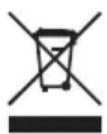
At the end of the product lifecycle, you should not throw this product into the normal household garbage but bring the product to a collection point for the recycling of electrical and electronic equipments. The symbol on the product, user guide and/or box indicate this. Some of the product materials can be re-used if you bring them to a recycling point. By reusing some parts or raw materials from used products you make an important contribution
to the protection of the environment. Please contact your local authorities in case you need more information on the collection points in your area.
Batteries must be removed before disposing of the device.
Dispose of the batteries in an environmental manner according to your country regulations.
8 Topcom warranty
8.1 Warranty period
The Topcom units have a 24-month warranty period. The warranty period starts on the day the new unit is purchased.
Consumables or defects causing a negligible effect on operation or value of the equipment are not covered.
The warranty has to be proven by presentation of the original purchase receipt, on which the date of purchase and the unit-model are indicated.
8.2 Warranty exclusions
Damage or defects caused by incorrect treatment or operation and damage resulting from use of nonoriginal parts or accessories not recommended by Topcom are not covered by the warranty.
The warranty does not cover damage caused by outside factors, such as lightning, water and fire, nor any damage caused during transportation. No warranty can be claimed if the serial number on the units has been changed, removed or rendered illegible.

This product is in compliance with the essential requirements and other relevant provisions of the directive 89/336/EEC.
The Declaration of conformity can be found on:
http://www.topcom.net/cdeclarations.php
http://www.topcom.net/cdeclarations.php
http://www.topcom.net/cdeclarations.php.
http://www.topcom.net/cdeclarations.php
http://www.topcom.net/cdeclarations.php
1. zal./wyl. (On/Off)

- Intended Purpose
- Safety advice
- Technical specifications
- Description
- Installation
- Simple operation
- On/off
- Humidity control +
- Humidity control -
- Ionizer
- Fog control
- Timer
- Cleaning
- Water box
- Water flume
- Transducer
- Disposal of the device (environment)
- Topcom warranty
- Warranty period
- Warranty exclusions
- zal./wyl. (On/Off)
Brand : TRISTAR
Model : LF4718
Category : Humidifier