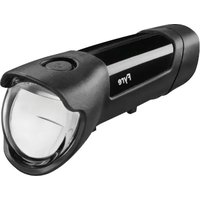
IXON Core - Bike light Busch + Müller - Free user manual and instructions
Find the device manual for free IXON Core Busch + Müller in PDF.



| Product type | Bicycle lamp (headlight) |
| Brand | Busch + Müller |
| Model | IXON Core |
| Dimensions (H x W x D) | 44 mm x 117 mm x 37 mm |
| Weight | 120 g |
| Brightness (low beam) | 70 / 35 / 15 Lux (3 levels) |
| Brightness (high beam) | 100 Lux |
| Battery | Replaceable lithium-ion, 3000 mAh |
| Charging time (standard) | Approximately 2.5 h to 5 h |
| Charging time (fast) | Approximately 1.5 h (20% to 80% in one hour) |
| Powerbank function | Up to 1500 mAh, 5 V max 1.3 A |
| Connectivity | Bluetooth with Blucon button (CR2032 battery) |
| Mounting | On handlebar (standard) or suspended (with optional mount) |
| Water resistance | Splash resistant (not during charging) |
| Mobile app | busch+müller (iOS and Android) |
| Lighting modes | 3 levels (low, medium, high) + high beam |
| Cleaning | Avoid high-pressure water |
| Safety | Correct orientation, do not dazzle, no direct gaze |
| Spare parts | Available at www.bumm-shop.de |
| Warranty | Excluded in case of opening or improper damage |
| Approval | Compliant with StVZO (Germany) |
Frequently Asked Questions - IXON Core Busch + Müller
User questions about IXON Core Busch + Müller
0 question about this device. Answer the ones you know or ask your own.
Ask a new question about this device
Download the instructions for your Bike light in PDF format for free! Find your manual IXON Core - Busch + Müller and take your electronic device back in hand. On this page are published all the documents necessary for the use of your device. IXON Core by Busch + Müller.
USER MANUAL IXON Core Busch + Müller
-
General information Page 26
-
Packaging contents Page 26
-
Safety information Page 27
-
Legal regulations Page 28
-
Technical specification 6. Assembly Page 29
6.1. General assembly instructions
6.2. Headlight alignment
6.3.Installation instructions
IXON Core highbeam
6.4. Suspended mounting
IXON Core Highbeam
6.5. Assembly and connection
of bluetooth button Blucon
- Operation Page 35
7.1. Operating the headlight via button Page 35
7.2. Operating the headlight
7.3. Charging the battery
7.4.Changting the battery
7.5.Powerbank-Function Page 42
7.6.busch+muller-App Page 43 - Further information Page 44
- Liability Page 45
Page 31
Page 33
Page 33
1. General information
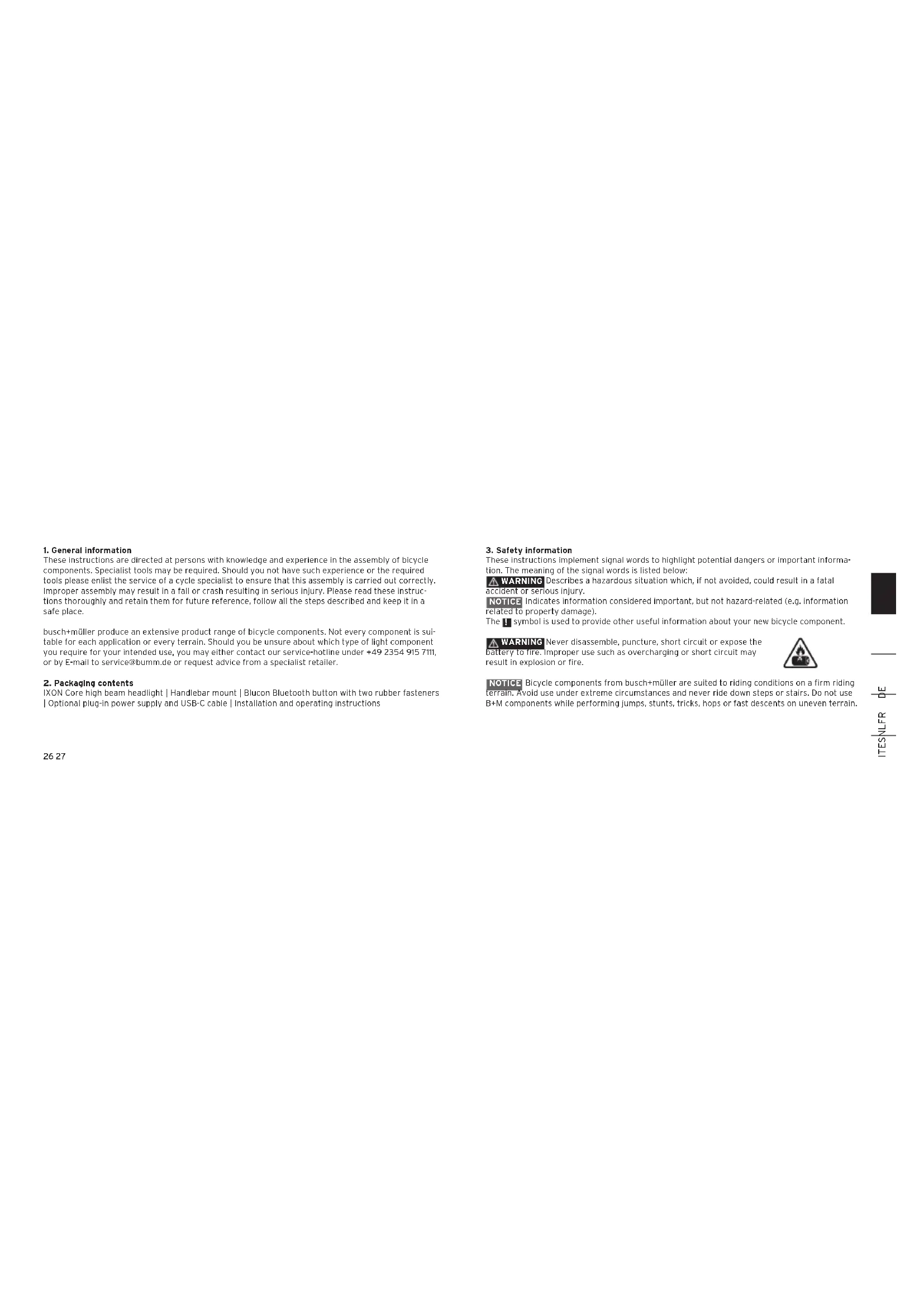
These instructions are directed at persons with knowledge and experience in the assembly of bicycle components. Specialist tools may be required. Should you not have such experience or the required tools please enlist the service of a cycle specialist to ensure that this assembly is carried out correctly. Improper assembly may result in a fall or crash resulting in serious injury. Please read these instructions thoroughly and retain them for future reference, follow all the steps described and keep it in a safe place.
busch + muller produce an extensive product range of bicycle components. Not every component is suitable for each application or every terrain. Should you be unsure about which type of light component you require for your intended use, you may either contact our service-hotline under +49 2354 915 711, or by E-mail to service@bumm.de or request advice from a specialist retailer.
2. Packaging contents
IXON Core high beam headlight | Handlebar mount | Biucon Bluetooth button with two rubber fasteners | Optional plug-in power supply and USB-C cable | Installation and operating instructions
3. Safety information
These instructions implement signal words to highlight potential dangers or important information. The meaning of the signal words is listed below:
WARNING Describes a hazardous situation which, if not avoided, could result in a fatal accident or serious injury.
NOTICE Indicates information considered important, but not hazard-related (e.g. information related to property damage).
The symbol is used to provide other useful information about your new bicycle component.
WARNING
battery to fire. Improper use such as overcharging or short circuit may result in explosion or fire.

NOTICE Bicycle components from busch+muier are suited to riding conditions on a firm riding terrain. Avoid use under extreme circumstances and never ride down steps or stairs. Do not use B + M components while performing jumps, stunts, tricks, hops or fast descents on uneven terrain.

一
TNTESNFT
4. Legal regulations
Before you operate your vehicle in public traffic, you are obliged to ensure that your vehicle complies with national and local laws and regulations, and you, as a traffic participant must abide by the traffic regulations that apply. These can be found in the Highway Code or national equivalent, and depending on the country, also at other sources.
In Germany, the prescribed mounting height for headlights is between 40 and 120~cm . For details, consult your national Road Traffic Regulations or contact a local bicycle specialist retailer. Always make sure the headlight is mounted and aligned in a way to ensure that oncoming traffic is not blinded.
Make sure the headlight is not covered under any circumstances. Also, take care that the headlight has been mounted and aligned as prescribed.
5. Technical specification
Headlight dimensions: Height: 44 mm | Length: 117 mm | Width: 37 mm |
Weight: 120 g | Brightness: 70/35/15 lux | High beam 100 lux
Replaceable lithium battery, 3,000 mAh, quick-charging function via USB-C, power bank function with 1,500 mAh. Bluetooth button Blucon with CR 2032 battery.
28 29
6. Assembly
6.1. General assembly instructions
13 Make sure the headlight is not covered under any circumstances. Also, take care that the headlight has been correctly mounted and aligned as prescribed.
WARNING To avoid falls, accidents and severe injuries, always use the enclosed handlebar bracket assembly 2. If unsuitable or improperly positioned brackets are used, the headlight may loosen and change position, slide down and, in the worst case, get caught in the wheel spokes.
NOTICE Never mount brackets on conical components!
Make sure to tighten all screws just sufficiently to ensure the headlight cannot move inadvertently. This is particularly important when travelling on uneven terrain.

一
TNEER
6.2. Headlight alignment
WARNING Do not use the bicycle if the light beam of your headlight is misaligned or the headlight is too loose. Blinding oncoming traffic can cause accidents. Before aligning the bicycle headlight, loosen the bracket retaining screw first. Make sure to retighten this screw again afterwards.
WARNING Never adjust the light range of your headlight 1 while cycling! This may result in serious falls and injuries.
WARNING Never look directly into the light of the bicycle headlight 1 when switched on.
Attention: Ensure a non-blinding orientation of the beam pattern
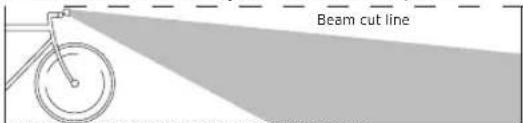
Image: correct beam orientation with light switched on
30 31
6.3. Installation instructions IXON Core highbeam


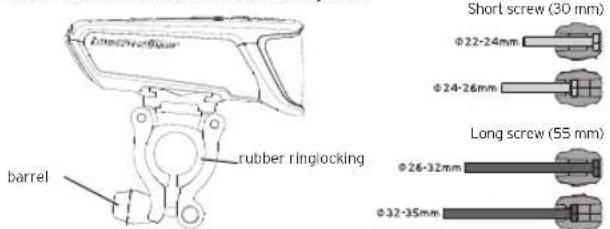
Please note: The locking barrel can be used for shallow or deep insertion to suit handlebar diameter (simply invert as required).
If the rubber ring supplied is too thick for your handlebar, please contact our service team. (Mail: service@bumm.de, Tel.: +49 2354 915-711) We will send you a thinner rubber ring free of charge.
1 Insert the headlight into the upper plate of the headlight bracket from the left (looking in the direction of travel) and firmly push it into place until it audibly engages. Be sure to check that it is securely seated. To remove the headlight press the release button on the bracket located to the right of the headlight in the direction of travel), while firmly holding the headlight and pull it off to the left. We exclude liability for any damage caused by disconnection and drop-falling, e.g. because the headlight was not held tight while it was removed.
Adjustment: Vertically: The headlight can be adjusted vertically (e.g. to adjust for handlebar angle) by tilting around the rubber ring. Horizontally: The headlight can be swivelled (to a limited extent) to the left or right on the rubber ring (eg. to centre beam on the roadway). In both cases, the locking screw of the bracket must be loosened and after adjustment re-tightened.
3233
6.4. Suspended mounting IXON Core Highbeam
Should assembly with the standard handlebar bracket not be preferred, a suspended mount for the headlight be used. This can be mounted under the handlebar to suit the bicycle cockpit situation (but not inverted) by using one of a number of other busch+muller brackets instead of the one supplied. One that is often used is: 48IGPPB for Assembly on e.g GoPro, Garmin or selected Wahoo-Adapter.
For further bracket options please consult our spare parts shop: www.bumm-shop.de.
See 6.5. Assembly and connection of bluetooth button Blucon
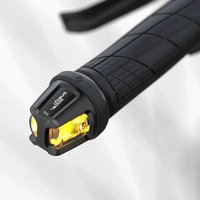
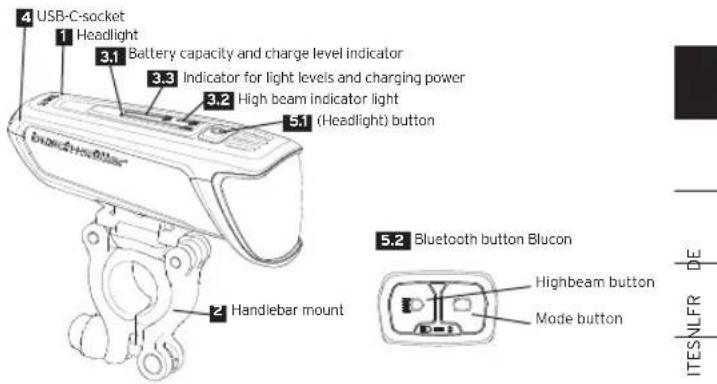
To install, attach the Bluetooth button 5.2 Blucon securely and within easy reach to the handlebars using the rubber fastener provided, so that it can be operated without having to take your hand off the handlebars. Can be installed on handlebars with a diameter of 22 to 32mm .
The headlight is designed to be paired with any Blucon bluetooth button 52 During Initial operation, the headlight and bluetooth button 52 connect and save themselves automatically. During the connection process, the bluetooth symbol on the bluetooth button 52 lights up blue. The headlight can be connected to a Bluetooth button 52 for 5 minutes after switching on. The headlight can be connected to a Bluetooth button 52

for 5 minutes after switching on. If a Bluetooth button 5-2 does not connect to a headlight 1 this may be due to the following reasons:
The Bluetooth button 5.2 is already connected to another headlight.
The spotlight 1 has memorised a different button for control. Stored buttons can be deleted via the app or by resetting the firmware.
If the connection is successful, the blue LED of the Bluetooth symbol on the bluetooth button 5.2 goes off, and the bluetooth symbol on the headlight 1 lights up blue.
To disconnect a connected Bluetooth button 52, switch the headlight on and off five times in quick succession. Alternatively, this can be done via the busch+müller app. For more information about the app, see '7.6. busch+müller app'.
- Operation
7.1. Operating the headlight via button 51
Switch incl. light level indicator;
To switch ON/OFF: push switch 51 for 2 seconds.
To switch between Low-Power/Mid-Power/High-Power modes: Short press to switc 5.1
Low-Power 15 Lux, run-time more than 18 hours with maintained brightness.
Mid-Power 35 Lux, run-time more than 6.5 hours with maintained brightness.
High-Power: 70 Lux, run-time more than 2.5 hours with maintained brightness.
The light level mode is automatically switched down to low power at reduced battery charge level.
Activate high beam function: Briefly press the Bluetooth button 52 The blue LED on the Bluetooth button and In the left headlight bar will illuminate.
Deactivating the high beam function: Briefly press the Bluetooth button 5.2. Display: The blue LED on the Bluetooth button and in the left headlight bar go out.
Charge level indicator:
The top of the headlamp 1 features the battery capacity and charge level indicator 3.1, the high beam indicator light 3.2 and the light level and charging power indicator
3.3
The light level and charging power indicator shows which light level (1st LED: low power, 1st + 2nd LED: mid power, 1st - 3rd LED: high power) is activated or at what intensity (1st LED: < 1 A charging current, 1st + 2nd LED: > 1 A charging current, 1st - 3rd LED fast charging function, 1st + 3rd LED lit + 2nd LED flashing: comfort charging function activated) charging is taking place.
High beam indicator light 32 Illuminates blue when the high beam function is activated.
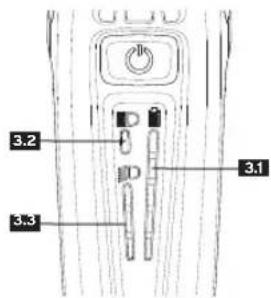
Battery capacity and charge level indicator 31 Battery capacity indicator divided into 4 sections, each representing 20%
| Number of LEDs lit Capacity: | |
| 5 blue 80-100 % | |
| 4 blue 60-80 % | |
| 3 blue 40-60 % | |
| 2 blue 20-40 % | |
| 1 blue 10-20 % | |
| 1 blue +1 red < 10 % | |
Charge indication:
The headlight battery be charged.
Once the battery level sinks below a certain capacity, the headlight will switch into the next lower light mode.
WARNING if an automatic switch into low-power mode due to low battery level takes place, the headlight may remain alight for appr. 1 hr before going out. This may vary due to external temperature differences, and an abrupt extinguish may occur. This can lead to serious accidents and injury so always charge the light battery at the latest when the red LED illuminates.
7.2. Operating the headlight
via Bluetooth button 5.2 Blucon
The headlight (low beam) is switched on and off using the button 51 on the headlight. The high beam function is switched on and off by briefly pressing the Bluetooth button 52 Blucon with the high beam symbol. When the high beam is switched on, the LED on the control unit lights up blue.
The buttons on the Bluetooth button 5.2 Bucon are factory-set with the following functions:
Spotlight 1 on/off: Press and hold the mode button Mode change (3 different driving modes): Briefly press the mode button High beam function on/off: Briefly press the high beam button.
38 39
NOTICEIf the battery in the Bluetooth button 5.2 Blucon is not replaced in time and is too weak, the headlight automatically switches to low beam. The high beam function can no longer be activated.
If a low beam LED fails, the headlight can no longer be switched on. If the high beam LED fails, the headlight will illuminate in low beam mode.
7.3. Charging the battery
The headlight 1 contains a replaceable Lithium-ion battery of 3.000mAh . Before first use, the battery must be charged. To charge the battery open the cap at the rear side of the headlight.
1 Connect an (optionally available) USB-C cable to the port revealed. Connect the 2nd end of the USB cable to the B+M USB - charger (also optionally available), a standard USB - charger or a computer USB port. During the charging process, the charge level indicator will display the charge level of the headlight battery. As soon as the battery has reached full charge, stop the charging process.
During the charging process, the headlight will show the charging speed. This will depend on the charger used.
At slow charging speed, the left LED (blue) in the switch 51 is active. At medium charging speed, the left and central LED's (blue) in the switch 51 are active. At fast charging speed, all three LED's (blue) in the switch 51 are active.


If the charge level falls below 10% , a red LED in the charge level indicator will illuminate. In order to use the headlight for a longer duration charge immediately.
To conserve the battery during charging and increase its service life, the comfort charging function can be activated. This halves the power consumption of the spotlight 1 and doubles the charging time. This allows the battery to be used for longer, as more charging cycles are possible. To activate/deactivate the comfort charging function, press button 5.1 twice in quick succession during charging.
The comfort charging function can only be activated in conjunction with a quick charger and must be activated manually for each charging process. See "7.6.busch+muiller app" for additional information on the app.
Charge time
Standard-Charger: appr. 2.5 h bis 5 hr (depending on power output of the charger) Quick-charger: appr. 1.5 h (20 % to 80 % possible in less than 1 hr) If incompatible USB chargers are used, busch+muiller can offer no guarantee and cannot be made liable for any damage caused to either charger or headlight
WARNING As a security measure place the headlight 1 on to a fireproof surface while charging and do not leave the charging component unattended.
During the charging process, there is no protection against water ingress. The headlight can be charged while in use, but any damage caused by water ingress while charging is not covered by warranty.
Tip: To improve performance longevity of the battery, should the headlight remain unused for longer periods store in a cool and dry place with appr. 30 - 50% remaining capacity. If the remaining capacity sinks below 10% and is then fully charged, the battery will recalibrate itself. Occasional recalibration allows the remaining run time to be shown with best possible exactness.
The cover cap on the back of the headlight is a deliberate tight fit to protect against moisture and dirt. The cap is easier to re-insert if you pressure is applied working from bottom to top.
Charging the battery with dynamo energy:
In combination with busch+muller E-Werk (Type 361), K-Werk (Type 362) or USB-Werk (Type 361BW) the headlight can be charged while riding using the converted energy of a hub-dynamo.
7.4. Changing the battery
The re-chargeable battery can be replaced by specialised personnel.
For a complete product check and repair, please contact the busch+muller service department on +49 2354 915-7111 or email service@bumm.de.
Replacement re-chargeable batteries can be purchased from our spare parts shop. Should any attempt by non-specialised personnel be made at the replacement of this part, then this is at your own risk and invalidates any warranty.
7.5. Powerbank-Function
The headlight 1 can also be used as a power bank. 1500mAh of the replaceable Lithium-Ion battery can be used to charge USB devices with 5V max 1.3A.
In order to activate the power bank function press the switch 31 4 times in rapid succession. Activation/deactivation of the power bank function is indicated by the charge level indicator 31 flashing 3 times.
Activate the Powerbank-Function before connecting a device to be charged to the headlight. Otherwise, the headlight may be recognised as the device to be charged and the Powerbank function cannot be started.
4243
If no device is connected to the USB-C port 4 within 5 minutes of activation, the power bank function will switch itself off.
If the charge level sinks below a certain capacity the headlight will automatically switch off the power bank function to allow the headlight function priority. If the power bank function is used simultaneously to the headlight function, the maximum charge current is 0.5A.
7.6.busch+muller-App
The busch+müller app can be downloaded for iOS via the App Store and for Android via the Play Store and has numerous functions to customize the headlight 1 and, if required, the bluetooth button 32 as required.
Switch between low power/mid power/high power.
The fast charging function can be permanently enabled/disabled. For more information, see '7.3. Charging the battery'.
The power bank function can be activated/deactivated. For more information, see '7.5. Power bank function'.
The battery level can be read more accurately than on the battery capacity and charge level indicator 31 on the headlight 1.
A connected Bluetooth button 3.2 can be disconnected.

Assignment of bluetooth button Blucon:
Apart from the pre-installed settings, the bluetooth button 52 if available, can be customized as required.
To this intent, start the app and connect it to the headlight. Click on "Button configuration". The button now appearing can be used to assign a function to each button. According to German StVZO, however, briefly pressing the high beam button is reserved for switching the high-beam function on or off.
8. Further information
Cleaning: Protect your headlight against exposure to water under high pressure. For example, never point a water hose or high-pressure cleaner directly at the head
Transport: If you transport your bike on your car in the rain, cover the headlight, with a plastic bag, for example, to prevent moisture penetration.
Radio speedometers: The electronics of radio speedometers and LED headlights may interfere with each other. Interference can be reduced by maximising the distance between the LED headlight and the radio speedometer and minimising the distance between the transmitter and receiver of the radio speedometer.
Disposal: Electronic components must not be handled as household waste but are to be disposed of as hazardous waste.
Repairs: In case of defects, please contact your specialist bicycle dealer or our service department at service@bumm.de oder +49 2354 915-711I.
4445
9. Liability
We do not assume liability for any and all damage caused by improper use (e.g. dropping the headlight, inadequate safety of assembly and its consequences, immersion in water or other liquids etc.). The guarantee is rendered invalid if the headlight is opened."
Have fun with your new headlight and enjoy safe cycling!
For spare parts please visit our spare part shop at www.bumm-shop.de
Technical modifications reserved.
Busch & Muller KG · 58540 Meinerzhagen, Germany · Tel. +49 2354 915-711 · service@bumm.de - www.bumm.de

Table des matieres
- Remarques generales Page 48
To switch ON/OFF: push switch 51 for 2 seconds.
To switch between Low-Power/Mid-Power/High-Power modes: Short press to switc 5.1
Low-Power 15 Lux, run-time more than 18 hours with maintained brightness.
Mid-Power 35 Lux, run-time more than 6.5 hours with maintained brightness.
High-Power: 70 Lux, run-time more than 2.5 hours with maintained brightness.
The light level mode is automatically switched down to low power at reduced battery charge level.
Activate high beam function: Briefly press the Bluetooth button 524 The blue LED on the Bluetooth button and in the left headlight bar will illuminate.
Deactivating the high beam function: Briefly press the Bluetooth button 52. Display: The blue LED on the Bluetooth button and in the left headlight bar go out.