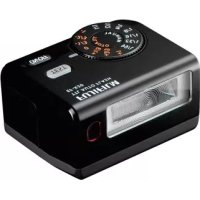
EFX20 - Flash FUJIFILM - Free user manual and instructions
Find the device manual for free EFX20 FUJIFILM in PDF.



| Product type | Electronic flash for camera |
| Brand | Fujifilm |
| Model | EF-X20 |
| Dimensions (H × W × D) | 36 × 59.5 × 50 mm |
| Weight (without batteries) | Approx. 100 g |
| Power supply | 2 AAA alkaline or Ni-MH batteries |
| Guide number (ISO 100, m) | 20 (12 with wide-angle diffuser) |
| Color temperature | Approx. 5600 K at full power |
| Control modes | TTL auto, manual (1/1 to 1/64), slave |
| Exposure compensation | ±1 EV in 1/3 EV steps |
| Effective TTL range | Guide number × √(ISO/100) ÷ aperture |
| Wide-angle diffuser | Built-in, covers 20 mm (35 mm equivalent) |
| Slave mode | With or without pre-flash (P-Mode/N-Mode) |
| Battery life (AAA alkaline batteries ×2) | Approx. 60 flashes (recycling time ~6 s) |
| Battery life (AAA Ni-MH batteries ×2) | Approx. 90 flashes (recycling time ~5 s) |
| Operating temperature | 0 °C to 40 °C |
| Included accessories | Soft case, tripod adapter |
| Care and cleaning | Clean with a soft dry cloth; avoid water, sand, and chemicals |
| Safety | Do not open, do not use non-conforming batteries, avoid heat sources |
| Repairability | Contact your Fujifilm dealer for any repairs |
| Compliance | FCC Class B, CE, WEEE directive |
Frequently Asked Questions - EFX20 FUJIFILM
User questions about EFX20 FUJIFILM
0 question about this device. Answer the ones you know or ask your own.
Ask a new question about this device
Download the instructions for your Flash in PDF format for free! Find your manual EFX20 - FUJIFILM and take your electronic device back in hand. On this page are published all the documents necessary for the use of your device. EFX20 by FUJIFILM.
USER MANUAL EFX20 FUJIFILM
Be sure to read these notes before use
Safety Notes
Thank you for your purchase of this product. For repair, inspection, or internal testing, contact your FUJIFILM dealer.
Make sure that you use your flash correctly. Read these safety notes and your Owner's Manual carefully before use.
After reading these safety notes, store them in a safe place.
About the Icons
The icons shown below are used in this document to indicate the severity of the injury or damage that can result if the information indicated by the icon is ignored and the product is used incorrectly as a result.

This icon indicates that death or serious injury can result if the information is ignored.

This icon indicates that personal injury or material damage can result if the information is ignored.
The icons shown below are used to indicate the nature of the instructions which are to be observed.

Triangular icons tell you that this information requires attention ("important").

Circular icons with a diagonal bar tell you that the action indicated is prohibited ("Prohibited").

Filled circles with an exclamation mark indicate an action that must be performed ("Required").
| WARNING | |
| Unplug from power socket | If a problem arises, turn the flash off, and remove batteries. Continued use of the flash when it is emitting smoke, is emitting any unusual odor, or is in any other abnormal state can cause a fire or electric shock. Contact your FUJIFILM dealer. |
| Avoid exposure to water | Do not allow water or foreign objects to enter the flash. If water or foreign objects get inside the flash, turn the flash off and remove batteries. Continued use of the flash can cause a fire or electric shock. Contact your FUJIFILM dealer. |
| Do not use in the bathroom or shower | Do not use the flash in the bathroom or shower. This can cause a fire or electric shock. |
| Do not disassemble | Never attempt to change or take apart the flash (never open the case). Failure to observe this precaution can cause fire or electric shock. |
| Do not touch internal parts | Should the case break open as the result of a fall or other accident, do not touch the exposed parts. Failure to observe this precaution could result in elec tric shock or in injury from touching the damaged parts. Remove batter- ies immediately, taking care to avoid injury or electric shock, and take the product to the point of purchase for consultation. |
| Do not place the flash on an unstable surface. This can cause the flash to fall or tip over and cause injury. | |
| Never attempt to use your flash while in motion. | |
| Do not touch any metal parts of the flash during a thunderstorm. This can cause an electric shock due to induced current from the lightning dis- charge. | |
| Do not use batteries except as specified. Load batteries as polar characters "+" and "-" indicate. | |
| Do not heat, change or take apart the batteries. Do not drop or subject batteries to impacts. Never attempt to charge alkaline batteries. Do not short batteries. Do not store batteries with metallic products. Use only the specified charger to recharge Ni-MH batteries. Failure to observe these precautions can cause batteries to burst or leak and cause fire or injury as a result. | |
| Use only batteries specified for use with this flash. The use of other power sources can cause a fire or product malfunction. | |
| Do not use your flash nearby cosmetic products or drug containers. The spo or the ingress into flash can cause fire, electric shock, or injury. | |
| Do not direct the flash at the operator of a motor vehicle. This can cause a motor vehicle accident. | |
| Do not use in the presence of flammable objects, explosive gases, or dust. | |
| If batteries leak and fluid gets in contact with your eyes, skin or clothing, fl us the affected area with clean water and seek medical attention or call an emergency number right away. | |
| In dispose or long-term storage of batteries, cover battery terminals by insulation tape. Contact with other metallic objects or batteries could cause batteries to ignite or burst. | |
| Do not use this flash in locations affected by oil fumes, steam, humidity or dust This can cause a fire or electric shock. | |
| Battery shall not be exposed to excessive heat such as sunshine, fire or the like. Do not leave this flash in places subject to extremely high temperatures. Do not leave the flash in locations such as a sealed vehicle or in direct sun light. This can cause a fire. | |
| Keep out of the reach of small children. This product could cause injury in the hands of a child. | |
| CAUTION | |
| Do not place heavy objects on the flash. This can cause the heavy object to rip over or fall and cause injury. | |
| Do not cover or wrap the flash or the charger in a cloth or blanket. This can cause heat to build up and distort the casing or cause a fire. | |
| When you are cleaning the flash or you do not plan to use the flash for an extended period, remove batteries. Failure to do so can cause batteries to leak fluid, a fire, or electric shock. | |
| Using a flash too close to a person's eyes may temporarily affect the eyesight or can cause a visual impairment. Take particular care when photographing infants and young children. | |
| Request regular internal testing and cleaning for your flash. Build-up of dust in your flash can cause a fire or electric shock. Contact your FULIFILM dealer to request internal cleaning every two years. Please note that this service is not free of charge. | |
| Do not use alcohol, thinner, benzene, or other volatile chemicals to clean your flash. This can cause fire or electric shock. | |
| For suffiient ventilation, no object should be placed within 5cm from the apparatus. The ventilation should not be impeded by covering the ventilation openings with items such as newspaper, table-cloths, or curtains. | |
| No naked flame sources such as lighted candles should be placed on the apparatus. | |
| Remove your fingers from the flash window before the flash fires. Failure to ob serve this precaution could result in burns. | |
| Keep the flash window clean and do not use the flash if the window is obstructed. Failure to observe these precautions could cause smoke or discoloration. |
Batteries
Note: Check the type of batteries used in your flash and read the appropriate sections.
The following describes the proper use of batteries and how to prolong their life. Incorrect use can shorten battery life or cause leakage, overheating, fire, or explosion.
Cautions: Handling the Batteries
- Do not expose to flame, or heat.
- Do not transport or store with metal objects such as necklaces or hairpins.
- Do not use batteries that are leaking, deformed, discolored, or with other abnormal states.
- Do not mix old and new batteries, batteries with different charge levels, or batteries of different types.
- If the flash will not be used for an extended period, remove the batteries. Note that various settings of the flash will be reset.
- The batteries may be warm to the touch immediately after use. Turn the flash off and allow the batteries to cool before handling.
- Battery capacity tends to decrease at low temperatures below 10^ (50°F). Keep spare batteries in a pocket or other warm place and exchange as necessary. Cold batteries may recover some of their charge when warmed.
- Fingersprints and other stains on the battery terminals can affect a number of flash firing. Thoroughly clean the terminals with a soft, dry cloth before inserting batteries in the flash.
Rechargeable AAA Ni-MH Batteries
The capacity of Ni-MH batteries may be temporarily reduced when new, after long periods of disuse, or if they are repeatedly recharged before being fully discharged. This is normal and does not indicate a malfunction.
The flash draws a small amount of current even when off. Ni-MH batteries that have been left in the flash for an extended period may be drawn down to the point that they no longer hold a charge. Batteries that no longer hold a charge even after repeatedly being discharged and recharged have reached the end of their service life and must be replaced.
Ni-MH batteries can be recharged in a battery charger (sold separately). Batteries may become warm to the touch after charging. Refer to the instructions provided with the charger for more information. Use the charger with compatible batteries only.
Ni-MH batteries gradually lose their charge when not in use.
Disposal
Dispose of used batteries in accord with local regulations.

Environmental disposal of batteries is advisable.
The apparatus is premised on use in warm climates.
Caring for the Flash
To ensure continued enjoyment of the product, observe the following precautions.
Storage and Use
If the flash will not be used for an extended period, remove batteries. Do not store or use the flash in locations that are:
exposed to rain, steam, or smoke
- very humid or extremely dusty
exposed to direct sunlight or very high temperatures, such as in a closed vehicle on a sunny day
extremely cold
- subject to strong vibration
exposed to strong magnetic fi elds, such as near a broadcasting antenna, power line, radar emitter, motor, transformer, or magnet
- in contact with volatile chemicals such as pesticides
- next to rubber or vinyl products
Water and Sand
Exposure to water and sand can also damage the flash and its internal circuitry and mechanisms. When using the flash at the beach or seaside, avoid exposing the flash to water or sand. Do not place the flash on a wet surface.
Condensation
Sudden increases in temperature, such as occur when entering a heated building on a cold day, can cause condensation inside the flash. If this occurs, turn the flash off and wait for droplets to evaporate.
For Customers in the U.S.A.
Tested To Comply With FCC Standards FOR HOME OR OFFICE USE
FCC Statement: This device complies with Part 15 of the FCC Rules. Operation is subject to the following two conditions: (1) This device may not cause harmful interference, and (2) this device must accept any interference received, including interference that may cause undesired operation.
CAUTION: This equipment has been tested and found to comply with the limits for a Class B digital device, pursuant to Part 15 of the FCC Rules. These limits are designed to provide reasonable protection against harmful interference in a residential installation. This equipment generates, uses, and can radiate radio frequency energy and, if not installed and used in accordance with the instructions, may cause harmful interference to radio communications. However, there is no guarantee that interference will not occur in a particular installation. If this equipment does cause harmful interference to radio or television reception, which can be determined by turning the equipment off and on, the user is encouraged to try to correct the interference by one or more of the following measures:
Reorient or relocate the receiving antenna.
- Increase the separation between the equipment and receiver.
- Connect the equipment into an outlet on a circuit different from that to which the receiver is connected.
- Consult the dealer or an experienced radio/TV technician for help.
- You are cautioned that any changes or modifications not expressly approved in this manual could void the user's authority to operate the equipment.
For Customers in Canada
CAUTION: This Class B digital apparatus complies with Canadian ICES-003.
IMPORTANT SAFETY INSTRUCTIONS
- Read these instructions.
- Keep these instructions.
Heed all warnings. - Follow all instructions.
- Do not use this apparatus near water.
Clean only with a dry cloth. - Do not block any ventilation openings. Install in accordance with the manufacturer's instructions.
- Do not install near any heat sources such as radiators, heat registers, stoves, or other apparatus (including amplifiers) that produce heat.
- Protect the power cord from being walked on or pinched particularly at plugs, convenience receptacles, and the point where they exit from the apparatus.
- Only use attachments/accessories specified by the manufacturer.
- Unplug this apparatus during lightning storms or when unused for long periods of time.
- Refer all servicing to qualified service personal. Servicing is required when the apparatus has been damaged in any way, such as power supply cord or plug is damaged, liquid has been spilled or objects have fallen into the apparatus, the apparatus has been exposed to rain or moisture, does not operate normally, or has been dropped.
Disposal of Electrical and Electronic Equipment in Private Households
In the European Union, Norway, Iceland and Liechtenstein: This symbol on the product, or in the manual and in the warranty, and/or on its packaging indicates that this product shall not be treated as household waste. Instead it should be taken to an applicable collection point for the recycling of electrical and electronic equipment.

By ensuring this product is disposed of correctly, you will help prevent potential negative consequences to the environment and human health, which could otherwise be caused by inappropriate waste handling of this product.
This symbol on the batteries or accumulators indicates that those batteries shall not be treated as household waste.

If your equipment contains easy removable batteries or accumulators please dispose these separately according to your local requirements.
The recycling of materials will help to conserve natural resources. For more detailed information about recycling this product, please contact your local city office, your household waste disposal service or the shop where you purchased the product.
In Countries Outside the European Union, Norway, Iceland and Liechtenstein: If you wish to discard this product, including the batteries or accumulators, please contact your local authorities and ask for the correct way of disposal.
EC Declaration of Conformity
We
Name: FUJIFILM Electronic Imaging Europe GmbH
Address: Benzstrasse 247533 Kleve, Germany
declare that the product
Manufacturer's Name: FUJIFILM Corporation
Manufacturer's 7-3,AKASAKA 9-CHOME,MINATO-KU,TOKYO,107-0052
Address: JAPAN
following the provision of the EMC Directive (2004/108/EC) and Low Voltage Directive (2006/95/EC).

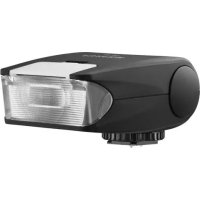
Features and Functions of the FUJIFILM EF-X20
Welcome to the worldwide family of FUJIFILM "Shoe Mount Flash EF-X20" owners.
Please read this owner's manual carefully so that you can use this unit correctly.
Mount the EF-X20 on your camera for a choice of manual and TTL auto flash control. TTL auto uses high-precision flash level adjustment to accurately determine optimal flash output.
Over- or under-illumination can easily be corrected using the exposure setting dial.
In slave mode, the EF-X20 fi res in response to direct or indirect light from a flash on the camera.
Supplied Accessories
- Adapter for setting tripod - Soft case

Table of Contents
For Your Safety.
Features and Functions of the FUJIFILM EF-X20
Supplied Accessories. 1
Parts of the Flash 2
Installing the Batteries 2
Turning the Unit On. 2
Flash Status 3
Mounting the Unit on the Camera 3
TTL Auto Flash Control 3
Manual Flash-Level Adjustment 3
Slave Mode 4
The Wide Panel. 4
Continuous Use 4
Specifications and Performance 5
Handling Precautions
① To prevent the camera falling from the hot shoe, hold the camera, not the flash unit.
Information on compatible cameras may be found at: http://www.fujifilm.com/products/digital Cameras/index.html
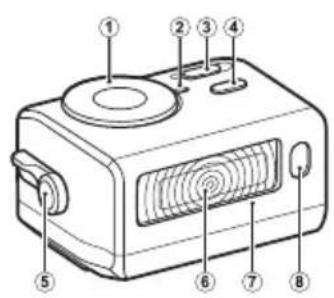
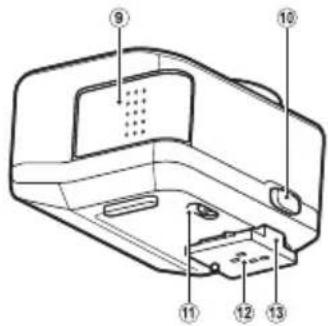
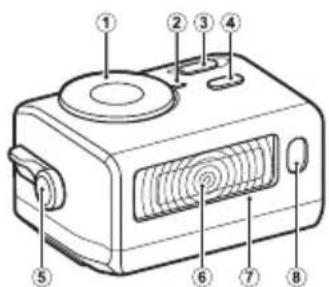
Parts of the Flash
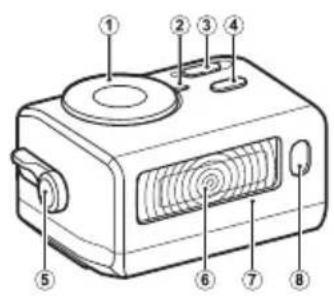

1 Exposure setting dial
Indicator lamp
3 ON/OFF button
4 TEST button (READY lamp)
5 Lever for setting wide panel
6 Light-emitting section
7 Wide panel (built-in)
8 Wireless slave flash sensor
9 Battery cover
10 Mounting lock releasing button
Wireless slave flash selector
Hot-shoe contacts
13 Mounting foot
Installing the Batteries
1 Open the battery cover.

2 Insert two new AAA alkaline or Ni-MH batteries in the orientation shown in the label inside the battery compartment.
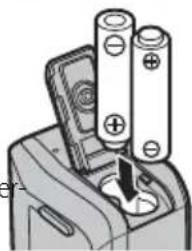
The unit may malfunction if the batteries are not in the correct orientation.
3 Close the battery cover.
Turning the Unit On
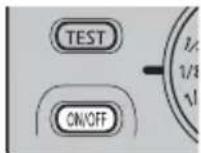
Press the ON/OFF button. The TEST button (READY lamp) will blink as the flash charges. Charging is complete when the lamp stops blinking.
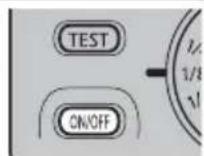
The indicator lamp lights when the unit is on.
To turn the unit off, press the ON/OFF button again. The indicator lamp will turn off.
① Turn the flash off before mounting it on the hot shoe. If the flash is on, it may short the hot-shoe contacts, causing the flash to fire unexpectedly or other product malfunction.
Flash Status
The flash can be used while the TEST button (READY lamp) blinks, but may not fire at full power. To ensure optimal exposure, wait for the lamp to stop blinking.
If the TEST button (READY lamp) does not light after 30 seconds, the batteries are exhausted and should be replaced.
Mounting the Unit on the Camera
1 Turn off the camera and flash unit.
2 Slide the wireless slave flash selector to X.
3 Slide the unit onto the camera hot shoe until it clicks into place.
4 Turn on the camera and flash unit.
To remove the unit, keep the mounting lock releasing button pressed while sliding the unit from the camera.
① Turn the unit off before mounting it on or removing it from the camera. Failure to observe this precaution could result in product malfunction or damage to the camera.
Test Firing
The unit can be test-fired by pressing the TEST button after the READY lamp stops blinking.
TTL Auto Flash Control
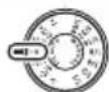
1 Rotate the exposure setting dial to TTL AUTO 0.

2 Turn on the camera and flash unit.
3 Wait for the TEST button (READY lamp) to stop blinking before taking pictures.
1 Using the flash while the TEST button (READY lamp) is blinking reduces the effective TTL flash range.
If your subject is in the effective TTL flash range, the indicator lamp will blink for 3 s after the f ash fi res. If the lamp does not blink, move closer to your subject, choose a wider aperture (lower f-number), or increase ISO sensitivity.
Fine-Tuning Flash Output
Use the exposure setting dial to fi ne-tune fl ash output. Choose negative TTL AUTO values if your subject is too brightly lit, positive if it is too dark. Employ fine-tuning to vary brightness from the level suggested by the camera or when using the flash to "fi ll in" shadows in back- or sun-lit subjects.
Manual Flash-Level Adjustment
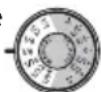
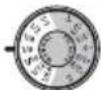
Manual flash output is selected with the MANUAL section of the exposure setting dial.
Slave Mode
In slave mode, the EF-X20 fires in response to direct or indirect light from a flash on the camera, allowing remote flash units to be used for supplemental lighting.

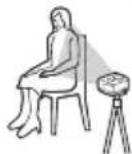
Use the MANUAL section of the exposure setting dial to adjust output for the slave flash.
If the camera uses pre-fl ashes, slide the wireless slave flash selector to P-MODE; otherwise, choose N-MODE. If you are unsure which is correct, select P-MODE, take a test shot to determine whether the EF-X20 fi res at the same time as the camera flash, and choose N-MODE if it does not.
Set the camera flash mode to
The Adapter for Setting Tripod
To mount the flash unit on a tripod, attach the adapter for setting tripod to the mounting foot and the tripod to the adapter, then orient the flash as desired.

The Wide Panel
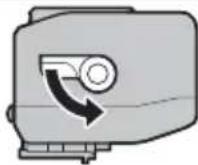
The EF-X20 comes with a built-in wide panel. Without the adapter, the flash covers the angle of view of a 28mm lens (35 mm format equivalent); with the adapter, it can provide coverage
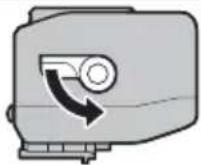
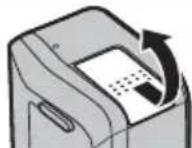
for wide-angle lenses with focal lengths as short as 20 mm. Using the adapter is easy: simply rotate the lever for setting wide panel on the side of the flash as shown. Note that using the wide panel lowers the fl ash Guide Number to 12.
Continuous Use
Using the flash many times in quick succession can cause overheating that may damage the flash. It is recommended that you turn off the flash for 10 minutes after about 15 consecutive shots.
Specifications and Performance
Guide Number (ISO 100, m) 20 (12 when wide panel is used)
Color temperature Approximately 5600 K at full power
Guide ISO sensitivity Effective TTL fash range Number × sensitivityISO 100÷ f-number
Manual flash output 1/1/2, 1/4, 1/8, 1/16, 1/32, or 1/64
Exposure compensation +1 to -1 in increments of 1/3 EV
Slave mode Available (pre-flash and non-pre-flash control supported)
Power source Two AAA alkaline or Ni-MH batteries
Operating temperature 0°C to 40°C (32°F to 104°F)
Dimensions (H× W× D) 36.0× 59.5× 50.0mm(1.4× 2.3× 1.9in)
Weight Approximately 100g (3.5oz), excluding batteries
| Battery Endurance and Initial Recycling Time at Full Power | ||
| Number of uses | Recycling time | |
| AAA alkaline batteries ×2 | Approx. 60 | Approx. 6 s |
| AAA Ni-MH batteries ×2 | Approx. 90 | Approx. 5 s |
Battery endurance measured using fresh batteries manufactured within the previous three months. The number of uses is the number of times the fl ash can be fired at intervals of 30 seconds; the count ends when the TEST button (READY lamp) takes more than 30 seconds to light.
The recycling time is the time needed after the flash fires for the TEST button (READY lamp) to light, as measured under the conditions described above.
Pour VOUE SECURITE
http://www.fujifilm.com/products/digital Cameras/index.html
Nomenclature
Le diff useur grand-angle
①ДлпnpedOTbpaueHnnaeHnKaMepbIC"rOpryeroBaumka", ydepkmbaTe KaMepy,a He BCblkKy.
HΦopmaIIO O COBMcETMmBIX KAmepax MOxHO HaHTn Ha: http://www.fujifilm.com/products/digital Cameras/index.html
Yactn BCblikn
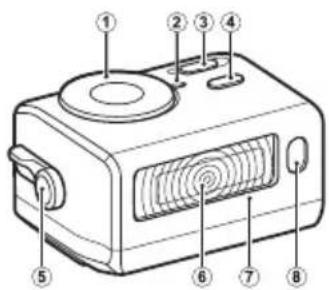
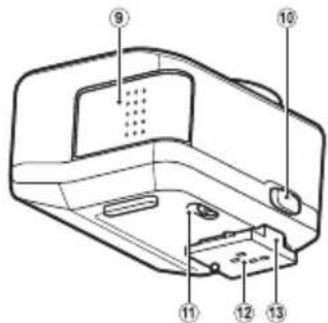
1 CeIeKTop 3Kcno3u
2 INHdkaTop
3 Khoinka ON/OFF
4 KhoNka TEST (naMnoUka READV)
5 Pyuhar yctaHOBKn uipokoyrolbHoro paeeNBateJn
6 OKHO BCnbluIJKI
7 WipokoyonbHbI paCCeNBaTeB BCnbliKn (BCTpoE)
8 DaTcNKIg 6ecnpoBogHO pa6OtbI B pexKIMe BeDOMO BcIIbIKN
9 Kpbuika 6aTaapeHoro oTceKa
10 Khonka qnkcaun BCnblkN
11 PepeknioateIb B 6ecnpoBdoHno pekm BeDOMB BCblIKN
12 KOnTaKbI"rOpaero6aMaka"
13 KpenexHaNoKka
YctaHOBKa 6aTapei
1 OtkponTe KpbIwky Otceka 6aTapeN.
2 BctabbTe DBe HOBbie 8eNoOHyIe Nn Ni-MH 6aTapeu TnOpa3Mepa AAA B nOIOKeHHe, NOKa3aHHoe Ha 3TNKeTke BHyTpN 6aTapeHOro OTceKa.
① BLOK MOKET pa6oTaB HeNCIpaBHO,ecJIN 6atapen pacnonaraiOTc HENpABInbHO.
3 3aKpOte KpbIuKy OTeKa 6aTapeN.

BkIouyen6noka
HaKMTe KhoNky ON/OFF. KhoNka TEST (JaMnOuKa READy) 6ydt MraTb npn 3a- pRKe BcNbIshKn. 3apRkA 3aBepWeHa, KOrDa JAmNoUka nepeCTaET MraTb.
HINKATOP 3aropaeTc, KOrda 6nok BKnIOueH.
YTO6bI BbIKIOUHTb BCNbIaKy, HaxMNTe KHONKy ON/OFF CHOBa. INHIN-KaTOp BbIKIOUHTcR.
① BbIKIOHHTe BCbIuKy nepeJ yCTaHOBKO B "rOpaHn 6aUMaK".EcH N BCbIuKa BKIOUHeHa, OHa MOxET 3aMKHyTb KOHTaKTb "rOpaHro 6aMka", UTO MOxET CTaTb npuHHo HEOXnDaHHOr cpaTaIBaHHN BcIbIuKN IN IN DpyRnx HEICnPABHObTe N3dEIN.
CocToHnE BcNbIiKn
Bcblkmy moxho nCnoJb3ObaTb noka KHonka TEST (namnoka READY) muraet, Ho moKeT He 3arOpetbcR B nonHyu cny. Dna obecneueHn ONTMaIbHOJ KcNo3nU, noDoxte, noka lamnoka nepeCTaHET mRaTb.
Ecnn KhoNkA TEST (nAmnoUka READY) He 3aropaeTcpe3 30 ceKHyd, 6aTapen pa3paKeHbI INx CneJeT 3aMeHHTb.
YcTaHOBka yCtpoNCTBa Ha KaMepy
1 BbIKIOUHTe KaMepy N BCnBtIky.
2 POnBnHbTe nepeKnHouaTeIb B 6ecnpoBoJHOH peKIM BeDomOu BCnbUkN B X.
3 Bctabte BCnblkvB "topyni 6aumak" KaMepbI DO uenka.
4 BkIIOUHTe KaMepu n BCnblIky.
JIN CHIHTN BCNbIuK, ypeKnBaHTe HAKaTOn KHOkKy FHKcauN BCbluK, CdBITra BCbluKy C KaMePbl.
BbIKIOHHTe BCNbIHKy neped ee yCTaHOBKOHa KaMepy nn CHATnem C Hee. HeBbINONHeHne DaHHoro Tpe6oBaHn MoKeT npNBecTN K HeCnpabHocTn N3dennnnn noOBpeKdHNO KaMepbl.
Tectobaa Bcnbwa
BcNbIky MoXHO nPoTeCTnPOBaTb, HaxaB KHONKy TEST no 3abepweHHMmraHnJaMNoQKn READY.
AbTomatnueckoe ynpabLeHne BcnbIshKoT TTL
1 NobepeHnTe ceJIeKTop 3KcNo3nHn Ha Tl AUTO0.
2 BkIOuHTe KaMepy n BCnblIky.
3 IopoJxIte, noka KhoNka TEST (naMnoUka READY) nepeCTaHET MnraTb nepeI oTOcBEmKOi.
① NcnoB3OBAHnE BCnblkN, nOKa KHONKa TEST (naMnoKa READY) MInraeT, yMeHbwaet dana3OH 0000KTHBHO Bcblkn TTL.
Ecnn obekr haxoitcB dnaanaOHe 300eKTHBHO BCbIuKN TTL, Hndnkatop 6ydt Mrratb 3 c nocne TORo, KaK 3arOpTc BcbluKa. Ecnn lamna He mraet, noDBHbTeCb 6mxe K ObBeKty, Bbl6epnte 6one u npokyo daaparmy (6one Hn3kn Homep f) nn yBennuTe cyBCTBNTelbHOCTb ISO.
ToHka HaCTpoKa BbIXOJa BCnbliKu
NcnoB3ynte ceneKTop 3KnO3nDnTOHkON HAcTPOKN BbXoDA BCnblk. Bb6epnte HeratNBhIe 3HaueHIN TYL AUTO, eCNI ObkeTb CnWKOm npKO 3aINTb CBETOM, NIOXHTeBHyE -ecNI CNIWKOm TEMHbc. NcNoB3ynte ToHKyo HAcTPOKY DnA N3McHeHN yPOBH,NpeJNaTaemoro KaMepoN INn Pnp NcNOB3OBaHN BCblkN DnRA "HaONHeHNA" TEHAMn PpeMeTOB Ha FOHE INN 3aINTbX CONHeHBIM CBETOM
PyuHa perynpOBKa ypoBn BCnbIiKn
BbIXoDpyHOn BCnblkN Bbl6paH npn nomOuMMANUAL ceneKTopa 3Kcno3uun.
Bedombyi pekum
B BeIDOM pexime 3aropaetcE F-X20 B OTBeT Ha npMOn nn KocbeHHbI CBET OT BCblIKn KaMepbl, YTO N03BOJAE TNCIOJIb-3OBaTb ydaJIeHHbIe BCblIKn dJa DOnONHHTJIbHO OCBeUeHnA.


NcnoIb3yIte pa3dEN MANUAL ceneKTopa ekCNO3uIN dIpeRyn-POBKN BixOda BEDOMO BCnblkN.
Ecn kamepa nCnoB3yET npedbapntBHe BcNbiuKn, nobepHnte ceneKTop nepeKnIOUATEB 6ecnpoBDHO peKm BeDOMO BcNbiuKn Ha P-MODE; nn BB6epNTe N-MODE. Ecn Bbl He yBepEnb, UTo npabInbHo, BB6epNTe P-MODE, cdenaIte npobHb CNMOK dna ONpeDeHn H3 aTropaetra EF-X20 OndOBpeMeHHo co BCnbl-koi Kamepb, n BB6epNTe N-MODE, eCNI He 3aropaeTc.
YCTaHOBHTepeKIMBCbIuKnKaMepbHa

NoctabKa noBcNbiuKy
IyaYCTaHOBKn BCbIuKHa noCTabKy, npi- KpeHne NOCTABKa NOBcNbiuKy Ha KpenexHyo HOxky I NOCTABKy Ha UtaTb, 3aTeM paCnOJXTE BCNbiuKy No XeJaNIO.

Unpokoyrolbhyi paccenBaTeIb BCnblIKN
EF-X20 niet co BCTpoEHno shpoko naHebu. Be3 aanTepa, BCnblka nokpbBaet yron o63opa 28 MM o6b-ekTna (35 MM fOpMaTa B EKBnBaJeHTe); c aanTepom MoXHo o6ecneHTb
NOKpbITne shpOKOyROJbHOro 6ObekTUBa 0KocYCHOro
pacToHHB 20 MM. NcNoJIb3OBaTb aAnTeP npocTo:
npocTo NOBepHnTe pbIar dJa NaCTPOkN shpOKoN
naHeN Ha CTOpOHe BCbIuKN KaK nokaHO. MeNeTe B
BVdy, YTO NCNoJIb3OBaHHe shpOKoN naHeN yMeHbSha-
ET BeDuJeE qncIO BCbluKN Do 12.
HenpepbBnHOe nCnoJb3ObaHne
Pn nCnONb3OBaHN BcNbIHKM HORO pa3 B 6bICTpoi NocneIOBaTeJIbHOCTN MoKET npOn3oHT nepeRpeB, UTo MoKet npINBeCTN K NOBpeKJDeHNO BCNbIHK. PeKOMeHNyETcB bIKJIouaTb BCNbIHKy Ha 10 MNHyT noCne BBInONHeHn npIMepHO 15 CHIMKOIB NOpRd.
TexHmueckx xapaKTePncTmN npoM3BODnteJbHocTb
Beyuuee uncno (ybcTBn- 20 (12 korgda wnpokoyronbHbn paaceuBaTeNb
TeNbHoCTb ISO 100,M) BCnbluKIMCNOJIb3yeTcA
UBeTobA TemnepaTypa Pn6n3nteHbHO 5600 KHa noHoi
MOLICHOCTV
3ΦΦeKTHBbI dHaNa3OH = BeNyuee HocTb ISO 1000HocTb ISO100
BbIXoIpyHOBcNbIbIKn 1/1,1/2,1/4,1/8,1/16,1/32uIN164
Koppekun EKn03nO+1do-1cwarom 1EV
Bedomby pexkIM IOCTynHO (noDepKnBaetcnynpaBneHne
IpeBaPntBbHOB BCbIbIKo HypaBHeHne
6e3 npEdbapntbHOB BCbIuKn)
HcToUHK NHTAHN DBe ue IeOuHbIe Ni-MH 6aTape
TINOPA3Mepa AAA
http://www.fujifilm.com/products/digital Cameras/index.html
闪光灯部件

This warranty is valid only in JAPAN.
富士菲尔夫株式会社

- Be sure to read these notes before use
- Safety Notes
- About the Icons
- Batteries
- Cautions: Handling the Batteries
- Rechargeable AAA Ni-MH Batteries
- Disposal
- Caring for the Flash
- Storage and Use
- Water and Sand
- Condensation
- For Customers in the U.S.A.
- Tested To Comply With FCC Standards FOR HOME OR OFFICE USE
- For Customers in Canada
- IMPORTANT SAFETY INSTRUCTIONS
- Disposal of Electrical and Electronic Equipment in Private Households
- EC Declaration of Conformity
- Features and Functions of the FUJIFILM EF-X20
- Supplied Accessories
- Table of Contents
- Handling Precautions
- Parts of the Flash
- Installing the Batteries
- Turning the Unit On
- Flash Status
- Mounting the Unit on the Camera
- Test Firing
- TTL Auto Flash Control
- Fine-Tuning Flash Output
- Manual Flash-Level Adjustment
- Slave Mode
- The Adapter for Setting Tripod
- The Wide Panel
- Continuous Use
- Specifications and Performance
- Pour VOUE SECURITE
- Nomenclature
- Le diff useur grand-angle
- Yactn BCblikn
- YctaHOBKa 6aTapei
- BkIouyen6noka
- CocToHnE BcNbIiKn
- YcTaHOBka yCtpoNCTBa Ha KaMepy
- Tectobaa Bcnbwa
- AbTomatnueckoe ynpabLeHne BcnbIshKoT TTL
- ToHka HaCTpoKa BbIXOJa BCnbliKu
- PyuHa perynpOBKa ypoBn BCnbIiKn
- Bedombyi pekum
- Unpokoyrolbhyi paccenBaTeIb BCnblIKN
- HenpepbBnHOe nCnoJb3ObaHne
- TexHmueckx xapaKTePncTmN npoM3BODnteJbHocTb
- 闪光灯部件
- 富士菲尔夫株式会社
Brand : FUJIFILM
Model : EFX20
Category : Flash