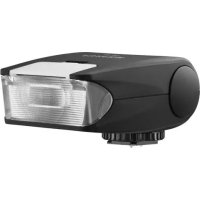
EF20 - Flash FUJIFILM - Free user manual and instructions
Find the device manual for free EF20 FUJIFILM in PDF.



| Brand | Fujifilm |
| Model | EF20 |
| Product type | Electronic flash for camera |
| Guide number | 20 (ISO 100 m); 14 with wide-angle diffuser |
| Color temperature | 5600 K |
| Tilt angles | 0°, 45°, 60°, 75°, 90° upward |
| Power supply | 2 AA alkaline, lithium or rechargeable Ni-MH batteries |
| Dimensions (in use) | 43 (H) x 61 (W) x 88 (D) mm |
| Dimensions (shoe folded) | 35 (H) x 61 (W) x 88 (D) mm |
| Weight | Approx. 100 g (without batteries) |
| Operating temperature | 0 °C to 40 °C |
| Number of flashes (alkaline batteries) | Approx. 200 at full power |
| Number of flashes (Ni-MH batteries) | Approx. 280 at full power |
| Recycling time (alkaline batteries) | Approx. 5 seconds |
| Recycling time (Ni-MH batteries) | Approx. 4 seconds |
| Main features | TTL flash, EV adjustment (+0.5 / +1 / -0.5 / -1), bounce flash, wide-angle diffuser, test firing |
| Compatibility | Fujifilm cameras with hot shoe |
| Maintenance and cleaning | Clean with a dry cloth; remove batteries if not used for a long time |
| Safety | Do not disassemble, do not expose to water or high temperatures, use only specified batteries |
| General information | Tested compliant with FCC class B and ICES-003 |
Frequently Asked Questions - EF20 FUJIFILM
User questions about EF20 FUJIFILM
0 question about this device. Answer the ones you know or ask your own.
Ask a new question about this device
Download the instructions for your Flash in PDF format for free! Find your manual EF20 - FUJIFILM and take your electronic device back in hand. On this page are published all the documents necessary for the use of your device. EF20 by FUJIFILM.
USER MANUAL EF20 FUJIFILM
| Be sure to read these notes before use | |
| Safety Notes | |
| Thank you for your purchase of this product. For repair, inspection, or internal testing, contact your FUJIFILM dealer. ·Make sure that you use your flash correctly. Read these safety notes and you Owner's Manual carefully before use. ·After reading these safety notes, store them in a safe place. | |
| About the Icons | |
| The icons shown below are used in this document to indicate the severity of the injury or damage that can result if the information indicated by the icon is ignored and the product is used incorrectly as a result. | |
| WARNING | This icon indicates that death or serious injury can result if the information is ignored. |
| CAUTION | This icon indicates that personal injury or material damage can result if the information is ignored. |
| The icons shown below are used to indicate the nature of the instructions which are to be observed. | |
| Triangular icons tell you that this information requires attention ("Important"). | |
| Circular icons with a diagonal bar tell you that the action indicated is prohibited ("Prohibited"). | |
| Filled circles with an exclamation mark indicate an action that must be performed ("Required"). | |
| WARNING | |
| Unplug from power socket | If a problem arises, turn the flash off, and remove batteries. Continued use of the flash when it is emitting smoke, is emitting any unusual odor, or is in any other abnormal state can cause a fire or electric shock. Contact your FUJIFILM dealer. |
| Avoid exposure to water | Do not allow water or foreign objects to enter the flash. If water or foreign objects get inside the flash, turn the flash off and remove batteries. Continued use of the flash can cause a fire or electric shock. Contact your FUJIFILM dealer. |
| Do not use in the bathroom or shower | Do not use the flash in the bathroom or shower. This can cause a fire or electric shock. |
| Do not disas-semble | Never attempt to change or take apart the flash (never open the case). Failure to observe this precaution can cause fire or electric shock. |
| Do not touch internal parts | Should the case break open as the result of a fall or other accident, do not touch the exposed parts. Failure to observe this precaution could result in electric shock or in injury from touching the damaged parts. Remove batteries immediately, taking care to avoid injury or electric shock, and take the product to the point of purchase for consultation. |
| Do not place the flash on an unstable surface. This can cause the flash to fall or tip over and cause injury. | |
| Never attempt to use your flash while in motion. | |
| Do not touch any metal parts of the flash during a thunderstorm. This can cause an electric shock due to induced current from the lightning discharge. | |
| ○ | Do not use batteries except as specified. Load batteries as polar charac-ters "+" and "-" indicate. |
| ○ | Do not heat, change or take apart the batteries. Do not drop or subject batteries to impacts. Never attempt to charge lithium, or alkaline batter-ies. Do not short batteries. Do not store batteries with metallic products.Use only the specifi ed charger to recharge Ni-MH Batteries. Any of these actions can cause batteries to burst or leak and cause fire or injury as a result. |
| ○ | Use only batteries specified for use with this flash. The use of othepower sources can cause a fire or product malfunction. |
| ○ | Do not use your flash nearby cosmetic products or drug containers. Thespoil or the ingress into flash can cause fire, electric shock, or injury. |
| ○ | Do not direct the flash at the operator of a motor vehicle. This can causea motor vehicle accident. |
| ○ | Do not use the flash in the presence of flammable or volatile gas. |
| ○ | If batteries leak and fluid gets in contact with your eyes, skin or clothing,flush the affected area with clean water and seek medical attention or call an emergency number right away. |
| ○ | In dispose or long-term storage of batteries, cover battery terminals by insulation tape. Contact with other metallic objects or batteries couldcause batteries to ignite or burst. |
| ○ | Do not use this flash in locations affected by oil fumes, steam, humidity ordust. This can cause a fire or electric shock. |
| ○ | Battery shall not be exposed to excessive heat such as sunshine, fire or thelike. Do not leave this flash in places subject to extremely high tempera-tures. Do not leave the flash in locations such as a sealed vehicle orin direct sunlight. This can cause a fire. |
| ○ | Keep out of the reach of small children. This product could cause injuryin the hands of a child. |
| CAUTION | |
| Do not place heavy objects on the flash. This can cause the heavy object to tip over or fall and cause injury. | |
| Do not cover or wrap the flash or the charger in a cloth or blanket. This can cause heat to build up and distort the casing or cause a fire. | |
| When you are cleaning the flash or you do not plan to use the flash for an extended period, remove batteries. Failure to do so can cause batteries to leak fluid, a fire, or electric shock. | |
| Using a flash too close to a person's eyes may temporarily affect the eye sight or can cause a visual impairment. Take particular care when photographing infants and young children. | |
| Request regular internal testing and cleaning for your flash. Build-up of dust in your flash can cause a fire or electric shock. Contact you FUJIFILM dealer to request internal cleaning every two years. Please note that this service is not free of charge. | |
| Do not use alcohol, thinner, benzene, or other volatile chemicals to clean your flash. This can cause fire or electric shock. |
Batteries
Note: Check the type of batteries used in your flash and read the appropriate sections.
The following describes the proper use of batteries and how to prolong their life. Incorrect use can shorten battery life or cause leakage, overheating, fire, or explosion.
Cautions: Handling the Batteries
- Do not expose to flame, or heat.
- Do not transport or store with metal objects such as necklaces or hairpins.
- Do not use batteries that are leaking, deformed, discolored, or with other abnormal states.
- Do not mix old and new batteries, batteries with different charge levels, or batteries of different types.
- If the flash will not be used for an extended period, remove the batteries. Note that various settings of the flash will be reset.
- The batteries may be warm to the touch immediately after use. Turn the flash off and allow the batteries to cool before handling.
- Battery capacity tends to decrease at low temperatures below 10ircC (50ircF) . Keep spare batteries in a pocket or other warm place and exchange as necessary. Cold batteries may recover some of their charge when warmed.
- Fingersprints and other stains on the battery terminals can affect a number of flash firing. Thoroughly clean the terminals with a soft, dry cloth before inserting batteries in the flash.
Rechargeable AA Ni-MH Batteries
The capacity of Ni-MH batteries may be temporarily reduced when new, after long periods of disuse, or if they are repeatedly recharged before being fully discharged. This is normal and does not indicate a malfunction.
The flash draws a small amount of current even when off. Ni-MH batteries that have been left in the flash for an extended period may be drawn down to the point that they no longer hold a charge. Batteries that no longer hold a charge even after repeatedly being discharged and recharged have reached the end of their service life and must be replaced.
Ni-MH batteries can be recharged in a battery charger (sold separately). Batteries may become warm to the touch after charging. Refer to the instructions provided with the charger for more information. Use the charger with compatible batteries only.
Ni-MH batteries gradually lose their charge when not in use.
Disposal
Dispos of used batteries in accord with local regulations.
Caring for the Flash
To ensure continued enjoyment of the product, observe the following precautions.
Storage and Use
If the flash will not be used for an extended period, remove batteries. Do not store or use the flash in locations that are:
exposed to rain, steam, or smoke
- very humid or extremely dusty
exposed to direct sunlight or very high temperatures, such as in a closed vehicle on a sunny day
extremely cold
subject to strong vibration
exposed to strong magnetic fields, such as near a broadcasting antenna, power line, radar emitter, motor, transformer, or magnet
- in contact with volatile chemicals such as pesticides
- next to rubber or vinyl products
Water and Sand
Exposure to water and sand can also damage the flash and its internal circuitry and mechanisms. When using the flash at the beach or seaside, avoid exposing the flash to water or sand. Do not place the flash on a wet surface.
Condensation
Sudden increases in temperature, such as occur when entering a heated building on a cold day, can cause condensation inside the flash. If this occurs, turn the flash off and wait for droplets to evaporate.
For Customers in the U.S.A.
Tested To Comply With FCC Standards FOR HOME OR OFFICE USE
FCC Statement: This device complies with Part 15 of the FCC Rules. Operation is subject to the following two conditions: (1) This device may not cause harmful interference, and (2) this device must accept any interference received, including interference that may cause undesired operation.
CAUTION: This equipment has been tested and found to comply with the limits for a Class B digital device, pursuant to Part 15 of the FCC Rules. These limits are designed to provide reasonable protection against harmful interference in a residential installation. This equipment generates, uses, and can radiate radio frequency energy and, if not installed and used in accordance with the instructions, may cause harmful interference to radio communications. However, there is no guarantee that interference will not occur in a particular installation. If this equipment does cause harmful interference to radio or television reception, which can be determined by turning the equipment off and on, the user is encouraged to try to correct the interference by one or more of the following measures:
Reorient or relocate the receiving antenna.
- Increase the separation between the equipment and receiver.
- Connect the equipment into an outlet on a circuit diff erent from that to which the receiver is connected.
- Consult the dealer or an experienced radio/TV technician for help.
- You are cautioned that any changes or modifi cations not expressly approved in this manual could void the user's authority to operate the equipment.
For Customers in Canada
CAUTION: This Class B digital apparatus complies with Canadian ICES-003.
IMPORTANT SAFETY INSTRUCTIONS
- Read these instructions.
- Keep these instructions.
Heed all warnings. - Follow all instructions.
- Do not use this apparatus near water.
Clean only with a dry cloth. - Do not block any ventilation openings. Install in accordance with the manufacturer's instructions.
- Do not install near any heat sources such as radiators, heat registers, stoves, or other apparatus (including amplifiers) that produce heat.
- Protect the power cord from being walked on or pinched particularly at plugs, convenience receptacles, and the point where they exit from the apparatus.
- Only use attachments/accessories specified by the manufacturer.
- Unplug this apparatus during lightning storms or when unused for long periods of time.
- Refer all servicing to qualified service personal. Servicing is required when the apparatus has been damaged in any way, such as power supply cord or plug is damaged, liquid has been spilled or objects have fallen into the apparatus, the apparatus has been exposed to rain or moisture, does not operate normally, or has been dropped.
Disposal of Electrical and Electronic Equipment in Private Households
In the European Union, Norway, Iceland and Liechtenstein: This symbol on the product, or in the manual and in the warranty, and/or on its packaging indicates that this product shall not be treated as household waste. Instead it should be taken to an applicable collection point for the recycling of electrical and electronic equipment.

By ensuring this product is disposed of correctly, you will help prevent potential negative consequences to the environment and human health, which could otherwise be caused by inappropriate waste handling of this product.
This symbol on the batteries or accumulators indicates that those batteries shall not be treated as household waste.

If your equipment contains easy removable batteries or accumulators please dispose these separately according to your local requirements.
The recycling of materials will help to conserve natural resources. For more detailed information about recycling this product, please contact your local city office, your household waste disposal service or the shop where you purchased the product.
In Countries Outside the European Union, Norway, Iceland and Liechtenstein: If you wish to discard this product, including the batteries or accumulators, please contact your local authorities and ask for the correct way of disposal.
EC Declaration of Conformity
We
Name: FUJIFILM Electronic Imaging Europe GmbH
Address: Benzstrasse 247533 Kleve, Germany
declare that the product
Manufacturer's Name: FUJIFILM Corporation
Manufacturer's 7-3,AKASAKA 9-CHOME,MINATO-KU,TOKYO,107-0052
Address: JAPAN
following the provision of the EMC Directive (2004/108/EC) and Low Voltage Directive (2006/95/EC).

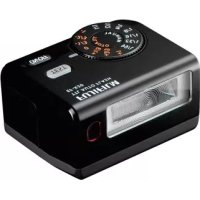
Welcome to the worldwide family of FUJIFILM "Shoe Mount Flash EF-20" owners.
Please read this owner's manual carefully so that you can use this unit correctly.
Features and Functions of the FUJIFILM EF-20
The position of the subject or the use of bounce lighting may make the brightness level insuffcient or excessive. This unit has an EV ADJUST button that allows you to easily increase or decrease the brightness as required.
Bounce lighting is possible at an upward angle of up to 90 degrees.
The EF-20 boasts a compact, lightweight design that provides a high degree of freedom in camera work. In addition, when the unit is not installed on the camera, the shoe section can be rotated inside the flash body so that the unit can be carried even in a shirt pocket.
Table of Contents
For Your Safety. 1
Table of Contents 6
Features and Functions of the FUJIFLM EF-20 6
Description of Parts. 7
Installing the Batteries 8
Mounting the Unit on the Camera 8
Test Firing. 8
TTL Effective Range 9
If the Picture is Too Bright or Too Dark 9
Bounce Lighting 9
Using the Wide Panel 10
Important Note on Successive Firing. 10
Specifications and Performances. 10
Handling Precaution
- When the flash is installed on the camera, do not hold the combination by the flash; otherwise the camera could slip off the shoe.
For information on compatible cameras, visit our website at http://www.fujifilm.com/products/digital Cameras/index.html
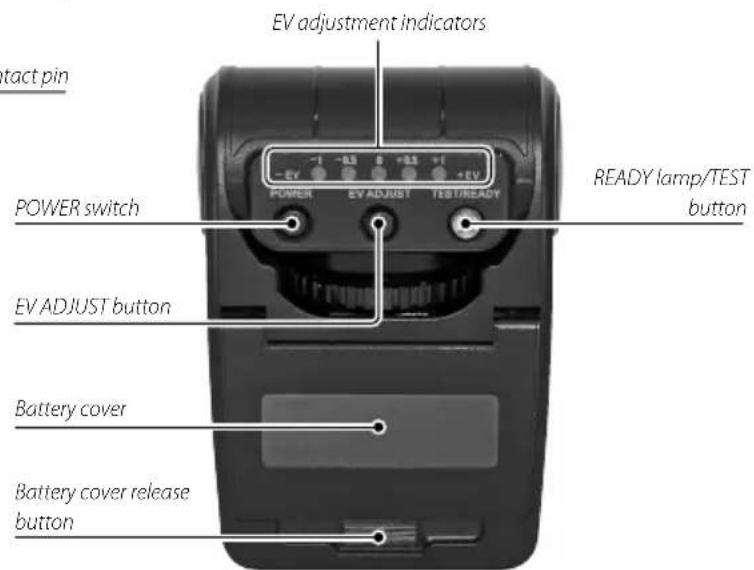
Description of Parts
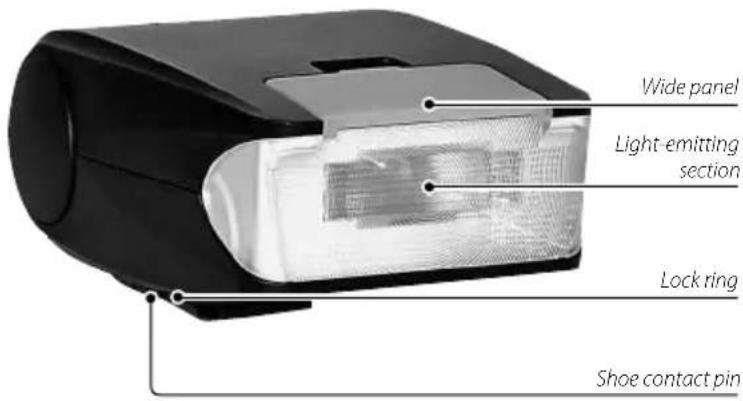

Retracting the Hot Shoe
EN-7
ENGLISH
Installing the Batteries
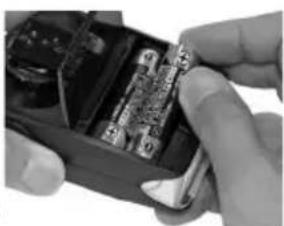
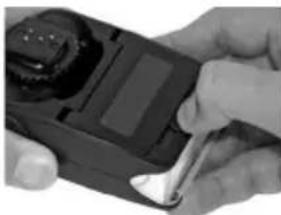
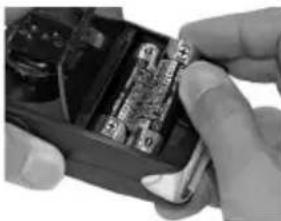
① Slide the battery cover release button downward to open the battery compartment.
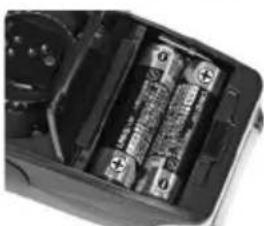
② Insert two new "AA"-size alkaline or NiMH batteries into the battery compartment, ensuring that the polarity indications "+" and "-" are aligned correctly. The unit will not operate properly if the batteries are installed incorrectly.
③ Close the battery cover until it clicks. Press the POWER switch to the "ON" position. When the unit is switched on, it will start charging with a slight humming sound and the READY lamp starts to blink. Now the unit is ready for shooting. (The READY lamp stops blinking and remains illuminated when the unit is fully charged.)
④ To switch the power off, press the POWER switch again. The READY lamp will go off and the unit will not flash.
- Be careful not to short-circuit the shoe terminals while the unit is switched on without being mounted on the camera. Otherwise, unexpected firing or a failure may result.
- It is recommended to use the NiMH (Nickel Metal Hydride) batteries in order to decrease the charging time and increase the f ring count.


About the READY Lamp
The firing power may be insufficient immediately after lighting of the READY lamp. To obtain optimum brightness for shooting, wait a few seconds before releasing the shutter after the READY lamp comes on.
- Replace the batteries if charging takes over 30 seconds following a test flash performed with the EF-20 not mounted on the camera.
Mounting the Unit on the Camera
Be sure to set the POWER switch to OFF before mounting or dismounting the unit. If the POWER switch is left ON, unexpected flashing or a malfunction of the camera may result.
① Firmly slide the flash onto the camera's shoe and turn the lock ring to the left to fix the flash.
(2) Once the flash has been mounted on the shoe, the shutter speed will be automatically set when both the flash and camera are turned on.
Now the camera is ready for flashing.
Test Firing
After the READY lamp lights steadily, press the TEST/READY button to activate test firing. This allows you to confirm that the flash fires.

TTL Eff ective Range
When the subject is within the TTL effective range, the selected EV adjustment indicator lights for about
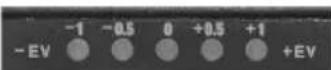
3 seconds after firing. If the indica
tor does not come on, approach the subject or open up the aperture (decrease the f-number) and retry shooting. Changing the ISO speed to a higher sensitivity (higher value) can also be helpful.
- The effective TTL range is shorter than usual immediately after the READY lamp comes on.
If the Picture is Too Bright or Too Dark
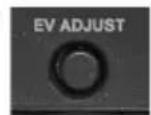
The EF-20 has an EV ADJUST button for fine adjustment of the brightness level.
Use this button to adjust the brightness to obtain a satisfactory effect in the following cases.
When satisfactory brightness cannot be obtained during daylight sync flashing (in outdoor shooting under sunlight, the strobe light can be used as an auxiliary light source to minimize shadows on the subject formed by the sun) or shooting against light.
★ When you want to take several pictures by varying the brightness.
★ When the brightness is insufficient in bounce lighting.
First, shoot a picture in standard auto mode (when the EV adjustment indicator is lit) and check it on the monitor. If you find that the brightness is too high or low, press the EV ADJUST button to fine adjust the brightness and take another picture. If the picture is darker than expected, press the EV ADJUST button once to increase the EV by one step so that the red +0.5 EV adjustment indicator lights up. In this condition, the unit emits light by increasing the brightness by +0.5 EV. After shooting, check the picture on the monitor again. If the brightness is still insufficient, press the button again so that the +1 EV adjustment indicator lights up and retry shooting.
If the picture is too bright, press the EV ADJUST button to change the lighting EV adjustment indicator in the "--" direction until the desired brightness is obtained.
The adjustment with the ED ADJUST button is invalid when no EV adjustment indicator is lit (i.e. when the TTL auto brightness adjustment is not activated). Make sure that one of the EV adjustment indicators is lit before pressing the EV ADJUST button.
To exit from the EV adjustment mode, press the EV ADJUST button again. Alternatively, the EV adjustment mode can also be exited by pressing the POWER switch to OFF then ON again.
Bounce Lighting
The light-emitting section of the EF-20 can be pointed upward for bounce lighting.
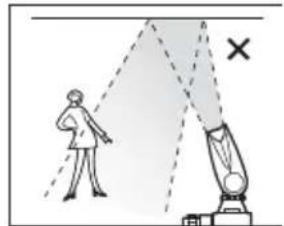
If the flash is fired by pointing the light-emitting section directly at the subject, the picture may look unnatural due to a strong shadow produced behind the subject under certain conditions. In such a case, pointing the light-emitting section to the ceiling may make it possible to take beautiful pictures with softer, more natural shadows.
The brightness of bounce lighting may sometimes be insufficient depending on the distance of the ceiling (wall) surface where the light is reflected. In this case, press the EV ADJUST button to adjust the EV value in the positive direction, position the AF frame in the viewfinder on the subject and half-press the shutter release button. Confirm that the "4" mark is visible in the viewfinder and that the shutter speed and f-stop are correct before fully pressing the shutter release button.


- To prevent damage or malfunction, do not bend the light-emitting section above 90 degrees.
- Bounce lighting is possible simply by turning the light-emitting section up toward the ceiling. All other operations are identical to shooting with direct lighting. However, note that the brightness may drop to about 25%, though this is variable depending on the color and material of the reflect
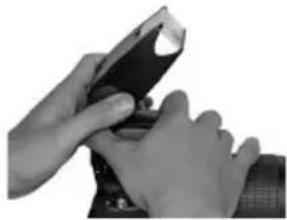
ing surface. It is therefore recommended to open up the aperture (to decrease the f number as much as possible). The surface used for bounce lighting should be as white as possible and its reflectivity as high as possible. Note that, in color photography, if the reflecting surface has a color, the colored reflection will stain the subject in that color.
Using the Wide Panel
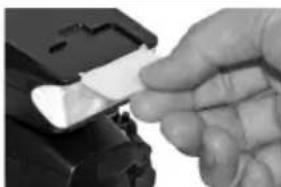
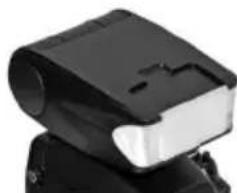
The EF-20 has a "wide panel" attached to it. The flash usually covers an area with a focal length up to 32mm and the wide panel is for use when the lens in use is a wide-angle lens with a shorter focal length. Specifically, the wide panel makes the flash compatible with a focal length up to 24mm .
Operation is easy. All that is needed is flip up the white panel on the lightemitting section with a fingertip and place it on the lens of the light-emitting section.
Note that the use of the guide panel decreases the guide number to 14.


Important Note on Successive Firing
To prevent degradation due to overheating that may result from successive firing, it is recommended to pause firing for more than 10 minutes after successive firing.
Specifications and Performances
Guide number 20ISO100-m(14)
(Figures inside () are the values
when the wide panel is used).
Color temperature 5600K
TTL eff ective range
Snoring Guide Film speed 800 range number ISO 100 f number
Bouncing mechanism 0, 45, 60, 75 and 90 degrees in the upward direction
Operating power "AA" size lithium/alkaline/NiM1 batteries x 2
Operating temperature 0 to 40C
Dimensions During operation: 43(H) x 61(W) x 88(D) mm
When the shoe is accommodated: 35(H) × 61(W) × 88(D) mm
Weight Approx. 100 grams (excl. batteries)
The design and specifications of this product are subject to change without prior notice.
Initial Number of Flashes and Recycling Time
| Number of flashes (100 power) | Recycling time (100 power) | |
| "AA" size alkaline batteries x 2 A | Approx. 200 times | Approx. 5 sec. |
| "AA" size NiMH batteries x 2 | Approx. 280 times | Approx. 4 sec. |
Number of flashes: Measured under normal temperature, with new batteries that are within 3 months from their date of production, flashed every 50 seconds successively and recycled to the point at which the READY lamp takes 30 seconds to come on after the last flash.
Recycling time: The minimum time taken to activate the READY lamp after firing under the above conditions.
Pour vous sécurité
http://www.fujifilm.com/products/digital Cameras/index.html
Nomenclature

PorteeTTL eff ective
PorteeTTL eff ective
He oxonone yximane aaoaohmua aay
HeucnoBsyume 8bnuKy 8aHouKoHMane unu dyue.3To MOKET npmbctn KTOXAPy NkNopaeHIOeKTPuecckMM TOKOM.

fie 024011e
Huko2aHa hnbimameb u3MeHambu pa36upambcnbiuKy (huko2aHa omkpbbaime Kpbuky). HecobnoeHne 3toi Mepu npedoctoPOKHOCTM MOKET CTb npuHOB BO3rOpaHnI NIOpaKeHHN EJIeKTpueckm TOKOM.

Heipozouline symponyhuie dengxu
EcnKopnycpa3bunc6pe3ynbmanne nadeHunu npdy20o Hecacmno 20 cnya, he mpozaime omkpbmbie demaru. HecobIOeHHe 3toi MepbipnpdoctopokHOCTMOKET CTATb pe3yIbTaTOM npapKeHH 3NeKTpueckIM TOKOM INB O3HNKHOBEH NTPAM, eCN BIO- TPOHeTEcB IO NOBPCJdeHHbIX DEtaJIe. HcMeJeHHO N3BNEKTc 6Batapen, u3beran npakHeHNA JNEKTpueckIM TOKOM, nOTHeCt E npodyKT B MecTO npodaJN DIA KOHCyIbTAUIN.

He cmaebme bcnbuKy Ha Heycmouuyo noepxHocmb. 3To MoKet PnpBecTe K NaDEHIO UIN NpeBOPOTy BCnblkN, YTO B CBOIO OpepeBbMOKET BbBaTb TpaBMY.
| ПЕДУПЕХДЕНЕ | |
| Hukozda He nbimaimebucnoxb308aamb bcnb1nky e dbuxhenu. | |
| He npukacaimecbKmemalnuueckmucammbcnb1nku 60 apemr2po-3bl. 3To moket npinBeCTN K nopaxeHIO 3IeKTPnuueckm TOKOM OT rpo3oBOrO p3raJa. | |
| HcnoNB3yume bamapeu molboKOnucaHbIM cnoocobm. BctabniTe 6atapcB C COOTBcTBM C MapKnPOBKO NIOUCOB " + " " -". | |
| He naZpeBaIme, He zameHaIme u He u3AneKaIme bamapeu. He pohaIme u yDapnaIme no bamapeam. He nbimaimeb 3apXkAmb nunueBbe unu uienouhhe bamapeu. He zambkaIme hakopomko bamapeu. He xpanu-me bamapeu bmece M c meaunuueckmu npedmemamu. ДдЗapdku Ni-MH bamapeu cndeyem uncnoB3oBaMb monbko cneuaIbHOe 3apdhoe усроicmo. Ппсeбржснe Млбь IM 3tIXnpdynpeKdHEn MOKET BB3BbTb B3PbB 6bataR euYteKу 3IeKTPoJIHTA, YTO B CBOIO OChepd Moket npinBeCTN K NOxkapy mII TpaBMe. | |
| HcnoNB3yume monbko cneuaIbHO yka3aHbIe dny BcNb1nku bamapeu. NcnoNb3OBAHme npdyHX XTOUYHKOB NITAHN MOKET npinBeCTN K NOxkapy mII NIOJOMKe IPOduKta. | |
| He ucnoNB3yume BCnbHbUq Bo3Ne KocMemuueckux cpeCme unu ynaKo-6ok c nekapcMbAMu. NpOua nII INx nOpaDAHme BHyTpB BCnb1nK MOKET npinBeCTN K NOxkapy mII NpOpaXeHIO 3IeKTPnuueckm TOKOM. | |
| He hapaIaIme BCnbHbUq HbOdumela mpanCnOpHMzo cpeCmBa. 3To Moket npinBeCTN K DpOxHNO-TpaHCnOpTHOMу npOncScheTBIO. | |
| He ucnoNB3yume BCnbHbUq npucymcBtu zopUeze zu nIeNyeze 2a3a. | |
| Eclu npu ymeVe u3 bamapeu 3IeKmpolum nonan Bam 6 2na3a. Na kOxy unu odexdoy, npomoue nporaxhenb yuaCmK quchmou bdoU u hemed-NeHNo obpaammeBcKapayu unu bby3OaBme ckpuyu nomoub. | |
| Ipu blybpa1bHaHUnu duon2ocpoHmXpanenHb bamapeu 3akpoIme ux KOHmkmbUzOJeHMoU. KONTAKT batapeu c MetaIauueckmm 6Obektamm MOket npinBeCTN K BO3rOpaHIO mII B3pyIBy. |
| ПЕДУРЕЖDEHWE |
| He ucnob3yüme 3my acnblukу 6 mecmax skonlenen naopb mocta,napa, nbliu nii 30hax c b6kokoi 6naxhocmb. 3to MOKET npINBECTI K no- japuy iN K nopajekHIO 3neKTprueckIM TOKOM. |
| He ocma8nlae 8cnbluky 8 mecmax c 6b6okoi mempeamypo. Ppi- mepamr TAKIX MECT MOKET b6bT 3akpblB ATOMO6nbl NII MecTo PnadenHRA npRbMx COINHbX Lyuei. 3to MOKET npINBECTI K noXAPy. |
| Jepkume 8 heodzgaem Dny demei Mece. B pykax pe6ehka daH- HOe i3dJIeNE MOKET CTb TcOTHUHKOM TpABMbI. |
| ПЕДОCTPEXKEHWE |
| He smabme Ha 8cnbluky mjaKEnbIe O6BeKmbI. 3to MOKET npINBECTI K pAnenIO IINI nepeBOPOTy o6bEKA, yTo B CBOIO OuepeB MoKET Bb3BaTb TpABMy. |
| He zakpb8aumie u He 3aBopauyeaime 8cnbluky unu 3apadhoe ycmpo- C6o 8 mkanb unu odexdy. 3to MOKET npINBECTI K nepeperBy i De ΦOpMaUMI KOpNycA, a TAKKKe K noXkapY. |
| H3aJIekume 6damapeu npu ouChmke 8cnbluku unu nepeed ee dIunenb- HbIM XpAHENUE. Ecnni 3toro He cdeNaTb, To MOKET npOn3oITN Utey Ka 3JIeKTPoJIHTA, IOXAPar INI npAOJeuHne 3JIeKTPuNECKIM TOKOM. |
| HcONb3O8aUNe 8cnbluku npu c6emke IIODei C6b3koZo paccmoHHu- MOKEM epemEHNO HApuyHbM 1x 3peHue. ByDte OC6eHNO BHIMA- TeIbHbI npN c6emke Detey i MIAJIENUEB. |
| He6bxoDMO pe2ynlphno npOBODMg 8HympeHHIO npO6eKpy u OHUCMKY 8cnbluku. HacONJIeHne nbIn BVHTPN BCbluku MOKET npINBECTI K NoXkapy iN IINI npAOJeuHIO 3JIeKTPuNECKIM TOKOM. IINI peryIpaHNO OCHSTKN KajdzBie Da 70a RaOda 6bpatNTeB K BaWemy duIepy FUJIFILM. IMeJeT B VND, ITO 3Ta YcNryra PIIATHNA. |
| He ucnob3yüme 4nay oucMcKu 8cnbluku cnupm, pacmBopumEnb, 6EH- 3Un u dpyzue neMeyue opzauueckue pacmBopumenu. 3to MOKET npI- BeCTN K NoXkapY iN IINI npAOJeuHIO 3JIeKTPuNECKIM TOKOM. |
Batapen
PnmeHne: Bbchume mun 6amapeu, ycmaHOBHeHHbIX BAueu BCnbUke, u npouumaune coombemcmeyouue pa3debl.
Hnke onncbIbaetc npabnlbHoe nCOnnb3oBaHme 6aTapei, no3BOnlHOuee npOJIb cPOK nx Cnyk6bl. HenpabnlbHoe nCOnlb3oBaHme 6aTapei cokpaauet cPOK nx Cnyk6bl Moket npmbctn Knx nepertpeBy, B03ropaHIO uu Nn B3pbBy.
IpeodocetepexeHne: o6paueHne c 6aTaapeMn
He noDBepraTe BO3dEChTBnIO nIaMeHmNITennA.
He nepehoCte HxpaHnTe 6aTapeIO BmEcTe C MetaIINuYeCKMIM npeMToAM, HapnMep, cOKepeBbMM INN UININbKaMn.
- He nCnOJb3oBaT batape C yTeUcAMn 3neKtpOniTa, a TaKxE deOpMnPoBaH Hbe, n3MeHHBwue UBeT uN N MeIOuNe Dpyrne npnHaKn HncnpaBHOCTn Batape.
He CmeunBaIte cIapIe HIOBble 6aTapeN, 6aTapeN c pa3HbIM yPOBhem 3apra nn 6aTapeN pa3NIuHbIX TINOB.
V3BNEKNTe 6aTapepe neped nntenbHm xpaHHeHem BCnblk. NOMHTe,TO BCE HACPTPOIKN BCblknpn OTOM 6ydyT c6poWeHb.
Cpa3y JeIOJIe IIOJIb3OBAHnIg BAtapEn MOrY 6BtB TcIIbIM HA OUYIb. BblKIOHInTe BCbIbIKU N DaITe 6BataEAM OCTbIb Nepeix BbHMAnHEM.
EMKocb 6bapen ymeHbuaTc npn noHNKeHHN TempeaType Hnke 10°C (50°F). DePKeHTe 6bapen B KAPMaHe NIN Dpyrom TEnmOM MecTe N 3aMeHJrTe npn He- oXoIMOCTN. OcbuBHe 6bapen MOrYt BepHyTb CBOero 3apra,ecnix nomeCTNTB TENIOE MECTo.
- Otneatkn nantbuein npyine 3aepn3HeHHN KOtAKTOB batape MOrTy CHNHTb KOnuueCTBO paOboHx uKNOB BCbluKN. Nepc yTaHOKBoN Batape BHyTpB BCbluKN TtataeBho BttnpaTne KOtAKTBI MARKO CYOIN TKAHko.
3apka6atapeaAaNi-MH
EMKoctb 6atape Tnna Ni-MH MoKet BpemeHNO 6bTb CHNKeHa DnHOBbIX 6atape, nocIe INx dInTeBHO rO XpaHeHNA Wn Pn HECKoJIbKnx NOBTOPAHXCSuKJlax pa3raJa nePei NoHIOH 3apAko. 3To O6bHoe RaJIeHne, He RaJIHOueecn pN3aKOM HcncPabHOCTN.
Bcnbka noTpe6nAeHbeonbwoToK daKe B bblknoeHHOM coCTOHN. BaTApEN TNa Ni-MH, KOtOpBe dInntelbHOe Bpem HaxoINbc BHytpn BCbnuKN, MOrTy pa3paNTcbcdoTuKn HeBOCnpMNHBOcN K 3apJKe. BaTApEN, HecnocOBhie ydepKBA Tb 3apJdAke NoCne MHOROKPAtho Pa3pKn N Ond3apRKn, DocTfNl KOnca cPoka cnXbI, nix Heo6xoIMMo 3aMeHtB.
HnkeIb-MetanIOnmnpDhBie 6aTapeM0KHO 3apXaTaB B 3apJHOM yCTpoIcTBe (npOaTeCRAOTelHo).Cpa3y Je NOcNE 3apJkM6aTapeM0Yr 6bTb TENbIMHa OuyNb. DnI NpUyeHn IONONHTeBHO INΦOpMaUN CMOPTte INHCTpyKNUo DnI 3apJHOrO yCTpoIcTBa. IVcnlo3yIne 3apJHoe yCTpoIcTBo TOnbKO C COMeCTMbIM GatapeMN.
Batapeu Tnna Ni-MH nocteneHHo Teepot 3apr npxpaenm.
yTnun3aun
YTNIMINPnyTE NcNIOJIb3OBAHHbIe 6aTapeB B COOTBECTBNN C MECTHbIMN IpaBnIA-MN.
IpehoKcBcNbIuKn
Tc6bI rapaHTnpoBaTa pa6Oty f0ToKaMePbHa dInTeBHOe Bpem,coBIOaTe CneJeoume Mebl.
XpaHHeHnNCNoJIb3OBaHHe
I3BnKNTe 6atapen nepei nnitebHbIM XpaHeHcM BCbUkN. He xpaHnte HcNOnb3yTe BCbUkN B MeCTax:
-DOXn,napaNNdbima
IOBbIeHHOBIaJXHOCTINIMITbIM
- npAByx CONHeuHbI NyEe NnBvICOKO TemepaTybI, HApPIMep, B 3AkpyTOM ABTOMOBNE BCONHeuHbI DeHb
C0UeHb Hn3KoTEmnepaTypoi
CJIbHOB B6paUIM
CNHbIX MaHTHBIX NOJIe, HApIMep, OKIO aHTEH npepaTHKOB, BICOKO-BOIbTHbIX JINHn, paapob, 3neKTPOBnATenE, TpAHCfOpMaTOPB Nm MaHnTOB
rpe npcyTCTBYOT NetyuXe XmMueckne BeIecTBa,HaPnmuMp,neCTuynds
B03nepeHHOBbIXMNBIHHIOBbIXN3denn
Boda n necok
Bo3dNCTBnE Bo3n n necka MoKet Bb3BaTb NOBpeJHne BCnIuKN, eBHyTpEn Hnx ceNe n MEXAH3MOB. Pn NcNoJIb3OBAHn BCnIuKN Ha IIaJKe IIN 6epery BOoema, IVsberaiTe KOHTAKTa C Bo0n IIN neckom. He CTabBe BCnIuKy Ha MOkpyo NoBepxHOCTb.
KoHdEHaCaun
BheaHoe yBeHHueHe He TnepeAtpb, Hanpmeep, BxO B TereHoe nomee Hne C Mop03a MoKcET Bb3BaT KoHcHcauMIO npoB BoDy BHypn BCbIuKn. B 3TO cnyae BbIKHOHTe BCbIuKy u DoKdTeCb Ncapehra KanEh.
Ytlln3aunna 3neKtpnueckoro n 3neKtpoHHoro 606pydoBaHnB Domaunx ycNoBnx
B CtpaHax Ebponeckoro co103a, HopberHH, McnahmN m JnxTeHwTeHe:
HaHHbCmBcHnHa 3eHN, BpyKOoCTBe, Ha rapaHTNHom TaNoHe
H/INn HyaNakOBKe yKa3bBaEcTa H To, YTO DaHHoc N3eNMe HcNb3aYt
N3ApOBaTb BmecTe C 6bToBbIMn OToDAmN. BmecTo 3TOrO erO HyKHO
OTHeTn BnpMnHb NynKT No c60py, nepepa60Tke N BtropuHOMy
NCIOJIb3OBAHnIO 3eIKTpueckORo IN 3eIKTpOHNO 60pUObaHn.
Ppabnibna ytnnnnnaonno nnojnt npnoTbpataNbhe HeraTNBHe NoocneCTBnIg Okpykaioiue CpebnN3DopOBbyeNoBeka, KOTOpbE MOry T Bo3HKNHyTB pe3yIbTaTe HecOoTBeCTByIOuE yTNINaun DaHHoro N3dEInn.
JaHHbI CUMBON Ha 6aTapeX INN AKKMynATopax yKa3bBaet HA TO, UTo DaHbIe N3dEINr HEnb3r YTNIMNUPoBaT BmecTe C 6bITOBbIMN OTXQAMN.

EcnBbapenHnAkkymyIaTOpblNerKo H3neKaOTcN3 yCTpoiCTBa,yTNIN3pyTeNXOTeJIbHO BCOOTBETCBN CMeCTbIMN TpeBOAHNIM.
NoBTOHoe HcnoNb3OBAHMe MATEpnaIaOB NOMOXET COxPAHb TnpPOdHbe peCypcb. IIN NOUYeHN DIOONIHnTebHO INHOpMaUN O6YINIMBaUN DaHHORo 13DeNNO 06paauTecb B MeCTHbE OprHb Blact, B CnyK6y No C6opy, nepepaOTKe N BTOPNUHOMy HcNOb3OBAHNO OTXoJOnB NIN B MaRa3NH, Ige BB npNoobpei N3DeJIne.
B ctpa hax 3a npedenamn Ebponeckoro coo3a, HopberHH, ncaanm n JlmxtteHneHa:
EcnHc06XoDMO yTINN3MPOBaBt DaHHoe M3Dene, BKNIOaA 8aTapen NNN AKKMyNATOpb,CBAKATECb CMECTbIMN BnACTAMN IYTOAHNTIpaBUNaYTINN3aUN.
Декларачnia o coOTBeTCTBn Tpe6OBaHnM CTanJaPTOB Ebponeckoro coo6uectBa
Mbl
Ha3BaHHe: FUJIFILM Electronic Imaging Europe GmbH
Apec: Benzstrasse 247533 Knebe, TepmaHHa
3aBnem,HTO 3dene
PpOu3BouTeNb FUJIFLM Corporation
Ampocnpn3Bounten7-3,AKASAKA 9-CHOME,MINATO-KU,TOKIO,107-0052
BbnoHReT yCNoBnI DnpeKTHBb 3MC (2004/108/EC) n DnpeKTHBb no Hn3KoBONbTHOMy o6OpDobAHnIO (2006/95/EC).
Добpo noхаловаьсбolyocembnoлбовateenannapatypf FUJIFILM"Shoe Mount Flash EF-20".
I npaBnBHO nCNoB3OBaHn DaHHORo MOyNA BHMAteJbHO npouHTaTe HCTpyKmIO NcB3OBaTeJI.
Bo3MOxHocTn HyHKmN FUJIFILM EF-20
★PacnoJoxeHnE oBeKtAnuNCNoB3OBAHne OtpaKeHHOro OCBe-ueHnMoKet npBecTn K N36bItoHouN uN HeOCTaTOHouOCBe-ueHHocn OBeKtA CbeMKn. Ha daHHOM yCToPiCTBe eCt b KNOnKa EV ADJUST, KOtopaH No3BOJIRe TIERKO yBENuHBaTb MIn yMeHb-uaTb yPoBeHb OCBeUeHHOCTn.
們 OtpaxKeHHoeOCBeueHHeMOKeTBO3HnKaTb npu yrnaXHaKnOHa Do 90 rpaIycob.
HOBAR KOMIAKTHA HEF-20 Ipeoctabniet 6onbue CBOOdbi DnpaobTc KaMepou.Kpome 3TORO,ecn CHaTB BCnblkUy C KaMepuN NOBEPHyTb y3en KpePiEHH BHYtpb KopnyCa,TO MOyNb MoKHO nepeHoCnTb DaKe B KapMaHe pyBaKn.
CopepxaHne
IINBAWeBcONaChocn. 1
ConepXaHne 6
BO3MOXHOCTN OyHKUNFUIFILM EF-20. 6
Onncahne komnohehtob. 7
UcTaHOBKa 6aTapei 8
YCTAHOBKa YCTPOINCTBa Ha KaMepy. 8
PpO6Ha BcNbIka 8
3ΦeKTHBbHmDnana3OH Tl. 9
ECNNCHIMOKCNWKOOMCBETNBIINCNWKOEMHbI 9
OtpaxkeHHoe ocBeueHne 9
IcnoB3OBAHnE Wipoko nHaHn.. 10
BaxHoe npMmeyaHne OTHoCnTeIbHO cepMHO BcIIuK 10
Texnueckne xapaktepnctn.. 10
Mepb npedoctopoxhoctn npa6oTe
Pn yCTaHOBKe BCbIuKHa KaMepy, He DepeKHe YcTPOIcTOB C6ope 3a BCbIuKy-KaMePa MoKet COCKoJIb3HyTc KpENHeHr.
CBeHnO CoBmctMbX fOToKAMepaPnpBedeHb Ha Be6-CTpaHHe http://www.fujifilm.com/products/digital Cameras/index.htm/
OnucaHne KOMnoHeTOB
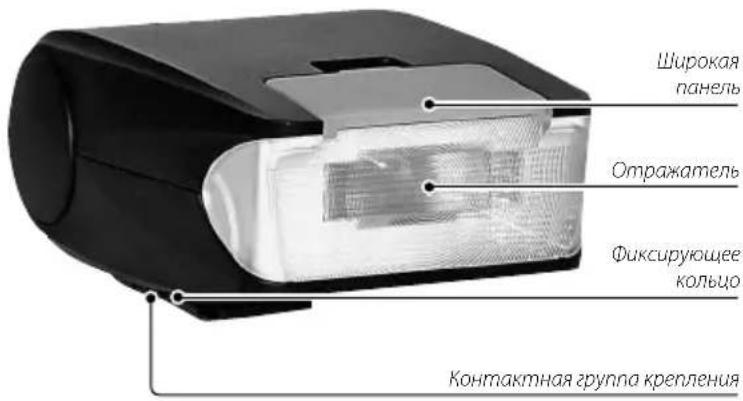

Bo3BpaaueHHe «rOpaYeRo» 6aumaka
RU-7
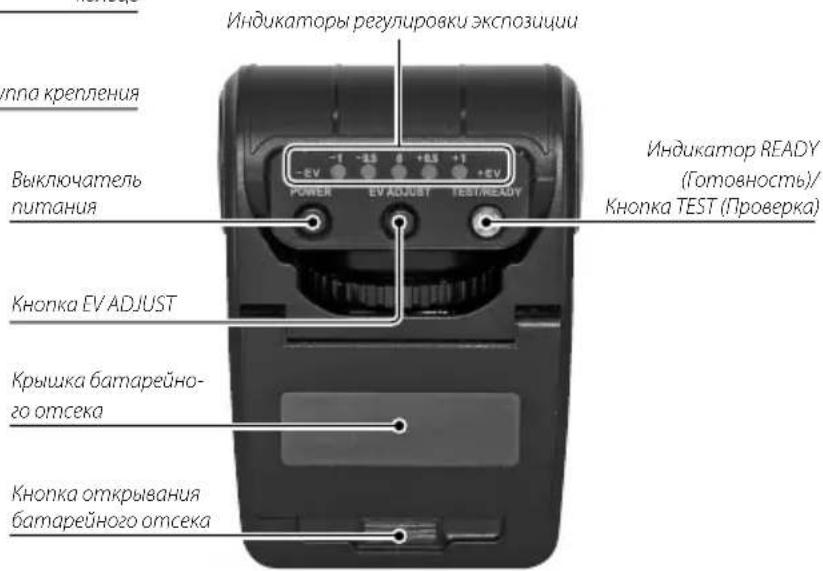
PYCCKN
UcTaHOBKa 6aTapei
① CnBnHbTe BnH3 KHOHkY OTKpbBaHn6 DatapeHHOrO OTCeKa N OKpOte OTCek.
② BCTaBBTeB6atapeHbIOTcKdBeHOBbIeNoOHbIeNNiNIMH6batapennpaMepe"AA",cobnIOaONpHocTb(pa3MeueHHeKOHTAKTOB ^ 十 + " n-"),PiHnEPaBnHoYcTAHOBKe6atapEnyCTPOINBO He 6ydet paBOTab.
3aKpOte KpbIky BaTapeHoro orCeKa do
HaXMMTe BbKIOHATenB POWER (NtraHne) B noJIOKeHHe "ON" (BKJI). PnB bKnIOeHN yCpOietBa HauHHaetc3apRJa, coPpOBOKaIooAoc Cna6bM uEKNaIOuIM 3ByKOM M mTaHMe n lambl READY (ToTOBHOCTb).
Tenep yctpoCTBO rTOBO K cBemke (Pamna READY (rToOBHOCTb) npekpaaet Mntab N OCTaETCBKIOUeHHOIN Pn NOH3apRKe.)
④ 黑KIOHNEHINITAHNACHOHAHKNTeHaKHOTKYPOWER(PiHHe)JIAMnAREADY(TOrOBHOCTb)BbIKIOHAcETCR,NBCbHka nepectaetpaOtaB.
*He 3aMkaIte KOHtKaI Ha KpeNJIeHHn npBKNIOEHm BCbIbIK 6e3 yCTAHOBKn ee Ha KaMEpy.3To MOKeT npNBcTn K 803- TropAHIO Hm HEnCnpABHOCTn.
PekomeHuyetcncnolb0aTb6atapenTtnaNIMH (HkeB-MetanrnpDnHbe) JyMeHbEHH BpeMeHH 3apra yBeHHeHH KOINecBa paBOHXUKNIOB BCnIuKn.
UHΦopMaŋuO6 UHmKAtope READY (TOrTOBHOCTb)
Cpaayke noce BkHouehnnaMnBREADY(ToOBHOCTb)MoOHcTB BCbIaMKMOKet 6bIb HeOCTaTOHO. DnnoNpyeHHOnTmAbHOIOBcBEeHHOCHTn npCBEMKe NOOxHNTHeckOJIbKO CeKHyD NoCNE BKIOUeHH naMnBI TOTOBHOtNIpeHaxKaTMHa CNYCK.
Ee 3aapka ainnr60nee 30 ckyH nncne TectoBn BcnbKn, korga EF-20 He yctahoeheHa foKtAmpe, zameHnte 6atapev.
YctahOBka yCTpoiCTBa Ha KaMepy
Ipeen yctahOBKo/CHMaHmEyCTPOXCTBaOaBATEbHO OTKIOHTe NITAHMe MOnyJI. Pn BKNIOeHHOM NITAHN BO3MOKHO HeoxNdaHHoe CpabaTbHaHne BCblIKN ININ NOOMKa KAMEpb.
① BCTABbTe BCnBbIKy B KpEnEeHbI KPOHHTeHH KaMepbI NOBEPHHTe BNEBOΦKcNpyIOoee KOJIbO.
② Nocne yCTaHOBKn BCbIbKn Ha KpeTJIeHN I OJHOBpeMeHHOM BkIOHeHNI TaHnBCbIbKn N KaMepbl BbldeppKa 6yETN3MeHHTbCA ABTOMaTHueCKn.
TenepbKaMepa IOTOBa Kcbemke.
PpO6HaBcNbIuKa
Iocne yctoynBoro BKIOUeHn HnDnKaTopa READY (ToOBHOCTb), HAKMITE Ha KhoNky TEST/READY (IpOaepKa/ToOBHOCTb) dnn npO6HOro BkIOUeHn BCnBuKn. TaKIM o6pa3OMMOKHO y6eHNbCR B paboTOcNOc6HOCTv BCnBuKn.

3ΦΦeKTHBbI dHaNa3OH TTL
Kordaob6bckcbeMKnHXoOITCHB30
0eKTHBOMdnaa3OHeTTL,HNHkATOP
perynipOBKvEyDcETCBtBcB
TeueHne npmeepno 3 cekynd noce

BCnBHK. Ecnn HnHnKATOp HE BKNIOaETc, To nOoNtne 6bnke K oobekTy nn OTKpOte dnaaparmy (yMeHBnTe OTHOCINbHyIO anepTy) N noBtOpTe cbeKy.YBeJIueHHe YBCTBnTEbHOCTN ISO (60nbwe 3haueHHe) TAKKe MoXeTOKa3aTb NOIOKHTeBHH 3ΦEKT.
EcnnCHMOKCNHOMCBETbINNNCNIHKOMTEMhbi
Bcnska EF-20 mceK honky EV ADJUST nra ToHoro perynnpoBaHn ypOHa HApKocTn.
Ncnonb3oBAHnE 2010 KONKn NsBnAeT DcTnB yDnBnTeBOpntelhoro 000kTA Bcnnyuix Cnyaax.

Korda yobnetbopntenbna npkocb He doctraetc cnHxpoHNsOBaHOB BCblIKoN PnDHEBOHM OCEeHHN (PnC BEmKE BHe NOMeehnBCblka MOKET NCONb3ObaTcR KAK DOnONHTeNBH K BHeHEMMYCTOUHKOCBeHNE, KOTOpBn N0BONReY bpaTb TEH NTCHUa) INN pN CEmKE IPOINCBETA.
★EcnBbXOTNTI NOYHTB HECKONbKO CHMKB Cpa3INHbIM yPOBHEM RPKOCTN.
Kordaapkoctb HcnoCTaOnHApOtpaKeHHOMOCBHeHM.
Bhaane cenaiTe CHMOK B CTaHdpTHOM ABOMaTHueCKOM peKIMe (KOrda TOpNT INHkAtop perynipOBKn EV) n pOBepeTbe pe3yIbTaH MaOHtOpE. Ecnn Bam KaXETCA, YTO npKOCTb CNUWKOM BHCOKA HIN CNUWKOM HN3KA, TO HAKMTe KHONky EV ADJUST dnn HAmeHeHHA RPOKTNa HcneDyIOuEM CHMKE.
Ecn CHMOK TEMHee, HEm Heo6xOIMo, To HaxMMte KONKy EV ADJUST qin pa3 dnn yBENHnEV Ha OIN HyPOBHeb TaK, TTObHa HINNKAtope 3aropenoC coo6-ueHne +0.5 .B 3TNX ycNOBnX yCTpOCTBO 6yET CoaDBaTB BCNIHK C pKocTbO, yBENHnHOHnHa +0.5 EV. Nocne cbEMKn ChOBa npOBepBe TcHmOK HA MOHtOpe.
Ecnrpkocb BCE eue HeoctatoHa,CHOBA HaxmTe KhoNkTaM,HTO6bHa HINKaTope 3aropoeocb cooieHene ^+ 1EV nnoBtOpNE cBemky.
Ecnn CnHmOK cnHsKOM npKn, HAKMTE Ha KhoNk Ev ADJUST, TtO6b N3MeHNTb HnIKAtoP perynpOBKn EV B HappaBHeHH " -"do nOlyeHn Tpe6yEmo ypoBH npKOCTn.
PerynnpoKa c nomouBIO KHONK ED ADJUST 6ydt HeeNCTBNTeBHa,ecnn HINikatop EV He ropnt (t.e. KOrJa He akTNbnpoBaHa aTOMaTnecka perynnpoKa npKocn TTL).IpeNd HaxaTMn HA KHONky EV ADJUST y6eInTeCb,HTO rOpnt OHN HINikatopoB perynpoBKn EV.
IINBbIXoJa IV3 peKIMa peryInpOKn EV,CHOBa HAKMITE HA KONKY EV ADJUST. IV3 peKIMa peryInpOKn EV MOHIO TAKKe BbITN,NEPEMECTNB BbIKIOYATEB NITAHIN B NOJOKEHNE "BbIKT",a 3aTeM CHOBa B NOJOKEHNE "BKIT".
OTpaxKeHHoe ocBWeeHne
CbeTooppataeEF-20MOKET HapnabnBc BBePxDnOtpaKeHHoNODcETM. ECnn BCbIbIka HapnabneHa npMo HA ObbEKT,TO CHIMOK MOKET BByIaTeB HeecCTBEHOH3-3a pe3kX TeHei, KOTOpHE MOYr BO3HnKaTb 3a OObEKO8 B HEKOTOPbIX yCNOBHX. Ecn B 3OTOM CNYae HapnabNTb OTPaTeB Ha NOTONK, TO MOKHOIOUYHTb OTUINHbIE CHAMK CMRIKMM HATypJIbHbIM TEHBM.
RpKoCTb OTPaKeHHIOIcBETKNMOKET 6bHT HeIOCTaTOOH B 3ABNCIMOCNOTPACTOHNNIOIKA (CIEHB),OT KOTOPORO OTPaKaTeCH CEBT. B ATOM CIyae HAKHMTHe HKnONky EV ADJUST INI peryIINPOBENBENHNB EV B CTOPHYEHNHE TOrO NaPAMETPA, HABeNTe pAMKY ATOFOKOyCA BBDIOCKaTEHe Ha ObBeKT CBEMKn HAKMITE HANIOHOH NBy CNYCKOBY KNONKY. IpePeI OKOHATEnbHmHAXaHem HA cNyCKy6eDITecb, HTo OTMeK "B DUNBA B BDIOKcATEe, a dN BIDepKKn HdAΦpaPMMb YCTAHOBNEHb PpABINbHbE 3HaueHn.

*IpaepoTbpauenHnONMnHe n3r6baite orpaxatenb 6onee Hm Ha 90 rpayncoB.
* Otpaehnoe oce beseHne Moxho o6e- neHTB npocto noepHyb otpaKaTeNb Knotky.Bce octaIbBye npaepu anAahonHHbTm,TOB BYIOJIHOJOTCR npi CbEMKe CnpBMOCbeHHeM.ODHaKo,
HOMHHTE,TO RPKOCTB MOKET CHN3HTBCN
PnIMePHo HA 25%,TO 6yET 3aBNCetb OT
Ubeta N MATEpNANA OTPaKaHOe NOBepxHOCTN. B ATOM CNYae peKoMeHnyETCA OTKbTB IAPPAmy {IIN CHMKeHHN OTHOCTNBHO ANePTybp}.XenateBHO NCNOB3OBaT Dn OTPaKeHHO NODCBETKN MAKCMMAHBO 6enyIO NOBepxHOCTC C BMCOKO OTPaKaHOe CNOC6HOCTb. TOMHNT, YTO pN CBeMKc UBEThbIX FOOTpAFOH NBEtAH NOBepxHOCTb MOKeT BB3BaTb TOHmPOBAHHe CHIMKA B 3OTOTUBET.

IcnoIb3OBAHHe IuPOKoI paHeJI
BCnBka EF-20 IMeET BCTpoEHHyo "HnpKyo nHaHeIb".
O6bHcBnHcKa DeIcTByET B npeJenax 30HN C fokcyhBM pacctOHnHem Do 32 MM. HIpOKaNaHEn pPeHaHaHcHae Da INC NOB3OBAHN C IpOKoYOrbHBMn OBekTBAAMC KOpOTKmNfOkCyhBMn pacctOHnHM.BtAcTHoCTN, hIpOKa NaHEn DeNAET BCnBnHK CoMecTmHO C ObkTuBaAMC fokyChBM pacCToHnEM Do 24 MM.
MCnOB3oBaTb naHEnb neKo.Bce,HTO HyKHO CenTaB-3TO CDBNHYt bBenyo NaHEnb Ha OTpKaTeNe nabueM paMaCteNTb ee Ha NIN3X CBeTOOTpaKaTeJIa.
POMHNTe, YTO INONb3OBaHHe HApPaBnIOuE nn HAnEn CHNkaeT UqpoBoY kAsaTeB npOOnKInTeBHOCTn Do 14.
Baxhno npimueaHne oTHocuTeIbHO cepnHO BCbIiK
IpypeoTbaueHnnepepeBa npn cepHHOB BCbHike, pekomeHyetca De- TaB MeKdy cecnMn cepHHOB BCbHKn na3bl 6onee 10 MmHT.
TexHmuecknXapaKTepeNCTMKN
LHpOBoy uKa3aTeB npo
DOJKNHTenbHOCTN BcNbIiWNK
UΦpB()0000KCHIOH
This warranty is valid only in JAPAN.
富士菲尔夫株式会社

- Batteries
- Note: Check the type of batteries used in your flash and read the appropriate sections.
- Cautions: Handling the Batteries
- Rechargeable AA Ni-MH Batteries
- Disposal
- Caring for the Flash
- Storage and Use
- Water and Sand
- Condensation
- For Customers in the U.S.A.
- Tested To Comply With FCC Standards FOR HOME OR OFFICE USE
- For Customers in Canada
- IMPORTANT SAFETY INSTRUCTIONS
- Disposal of Electrical and Electronic Equipment in Private Households
- EC Declaration of Conformity
- Features and Functions of the FUJIFILM EF-20
- Table of Contents
- Description of Parts
- Installing the Batteries
- About the READY Lamp
- Mounting the Unit on the Camera
- Test Firing
- TTL Eff ective Range
- If the Picture is Too Bright or Too Dark
- Bounce Lighting
- Using the Wide Panel
- Important Note on Successive Firing
- Specifications and Performances
- Pour vous sécurité
- Nomenclature
- PorteeTTL eff ective
- Batapen
- PnmeHne: Bbchume mun 6amapeu, ycmaHOBHeHHbIX BAueu BCnbUke, u npouumaune coombemcmeyouue pa3debl.
- IpeodocetepexeHne: o6paueHne c 6aTaapeMn
- 3apka6atapeaAaNi-MH
- yTnun3aun
- IpehoKcBcNbIuKn
- XpaHHeHnNCNoJIb3OBaHHe
- Boda n necok
- KoHdEHaCaun
- Ytlln3aunna 3neKtpnueckoro n 3neKtpoHHoro 606pydoBaHnB Domaunx ycNoBnx
- Декларачnia o coOTBeTCTBn Tpe6OBaHnM CTanJaPTOB Ebponeckoro coo6uectBa
- Bo3MOxHocTn HyHKmN FUJIFILM EF-20
- CopepxaHne
- OnucaHne KOMnoHeTOB
- UcTaHOBKa 6aTapei
- UHΦopMaŋuO6 UHmKAtope READY (TOrTOBHOCTb)
- YctahOBka yCTpoiCTBa Ha KaMepy
- PpO6HaBcNbIuKa
- 3ΦΦeKTHBbI dHaNa3OH TTL
- EcnnCHMOKCNHOMCBETbINNNCNIHKOMTEMhbi
- OTpaxKeHHoe ocBWeeHne
- IcnoIb3OBAHHe IuPOKoI paHeJI
- Baxhno npimueaHne oTHocuTeIbHO cepnHO BCbIiK
- TexHmuecknXapaKTepeNCTMKN
- 富士菲尔夫株式会社
Brand : FUJIFILM
Model : EF20
Category : Flash