FinePix JZ710 - Camera FUJIFILM - Free user manual and instructions
Find the device manual for free FinePix JZ710 FUJIFILM in PDF.


Pick your language and provide your email: we'll send you a specifically translated version.
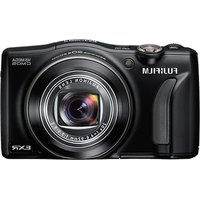
| Product Type | Compact digital camera |
| Brand | Fujifilm |
| Model | FinePix JZ710 |
| Effective Pixels | 16 megapixels |
| Optical Zoom | 8x |
| Digital Zoom | Up to 6.8x |
| Sensor Type | 1/2.3-inch CCD |
| Maximum Aperture | f/3.3 (wide) – f/5.9 (tele) |
| Lens Focal Length | 5.0 – 40.0 mm (28 – 224 mm equivalent) |
| LCD Monitor | 2.7-inch, 230,000 dots |
| Viewfinder | None |
| Shutter Speed Range | 1/4 sec to 1/2000 sec (up to 8 sec in Night mode) |
| ISO Sensitivity | Auto, 100, 200, 400, 800, 1600, 3200 |
| Video Recording | 720p HD at 30 fps (MOV format) |
| Internal Memory | Approx. 30 MB |
| Storage Media | SD / SDHC / SDXC memory card (up to 32 GB supported) |
| Power Source | NP-45A lithium-ion battery (rechargeable) |
| Battery Life | Approx. 180 shots (CIPA standard) |
| Dimensions (W x H x D) | 4.1 x 2.4 x 1.1 in (103.5 x 59.5 x 27.5 mm) |
| Weight (without battery and memory card) | Approx. 5.5 oz (156 g) |
| Interface | USB 2.0, HDMI mini (Type C) |
| Care and Cleaning | Gently wipe lens and body with a soft, dry cloth. Avoid solvents. |
| Safety Precautions | Do not expose to extreme heat, moisture, or strong magnetic fields. Use only approved batteries and chargers. |
| Spare Parts and Repairability | Spare batteries and chargers available. Repairs should be done by authorized Fujifilm service centers. |
| General Information | Released in 2011; supports PictBridge and Face Detection. |
Frequently Asked Questions - FinePix JZ710 FUJIFILM
How do I transfer photos from the FinePix JZ710 to my computer?
Connect the camera to your computer using the supplied USB cable. Set the camera to Playback mode and the PC will recognize it as a removable drive. Alternatively, remove the SD card and use a card reader.
What type of memory card does the JZ710 use?
The camera supports SD, SDHC, and SDXC memory cards up to 32 GB. For HD video recording, a Class 4 or higher card is recommended.
How can I charge the battery?
Use the included BC-45W battery charger. Remove the NP-45A battery from the camera and insert it into the charger. Plug the charger into a wall outlet. Charging time is approximately 2 hours.
Why won't my camera turn on?
Ensure the battery is fully charged and properly inserted. Check that the memory card is not damaged. If the camera still does not power on, try a different NP-45A battery.
How do I set the date and time?
Press the MENU button, go to the Setup tab, and select DATE/TIME. Use the directional pad to adjust the values and press MENU to confirm.
Can I record videos with the JZ710?
Yes. Set the mode dial to Movie and press the shutter button to start/stop recording. Videos are recorded in 720p HD at 30 fps in MOV format.
How do I clean the lens?
Use a soft, lint-free cloth or a lens cleaning pen. Gently wipe the lens in a circular motion. Avoid using paper towels or harsh chemicals.
What does the 'Face Detection' feature do?
Face Detection automatically finds human faces in the frame and adjusts focus, exposure, and white balance to optimize portrait shots. It can detect up to 10 faces.
How do I reset the camera to factory settings?
Press MENU, go to the Setup tab, select RESET, and confirm. This will restore all settings except the date/time.
Is the Fujifilm FinePix JZ710 compatible with external flashes?
No, the JZ710 does not have a hot shoe or external flash connector. It uses a built-in pop-up flash with modes including Auto, Red-eye Reduction, and Fill Flash.
User questions about FinePix JZ710 FUJIFILM
0 question about this device. Answer the ones you know or ask your own.
Ask a new question about this device
No questions yet. Be the first to ask one.
Download the instructions for your Camera in PDF format for free! Find your manual FinePix JZ710 - FUJIFILM and take your electronic device back in hand. On this page are published all the documents necessary for the use of your device. FinePix JZ710 by FUJIFILM.
USER MANUAL FinePix JZ710 FUJIFILM
Manual assistant
Powered by Anthropic
Waiting for your message
Product information
Brand : FUJIFILM
Model : FinePix JZ710
Category : Camera