FinePix 46245 - Camera FUJIFILM - Free user manual and instructions
Find the device manual for free FinePix 46245 FUJIFILM in PDF.


Pick your language and provide your email: we'll send you a specifically translated version.
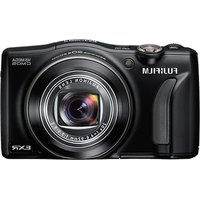
| Product Type | Digital Camera |
| Brand | Fujifilm |
| Model | FinePix 46245 |
| Sensor Resolution | 16.0 Megapixels |
| Optical Zoom | 5x |
| Display | 3.0-inch LCD |
| Dimensions | Approximately 100 x 60 x 30 mm |
| Weight | Approximately 150 g (body only) |
| Power Source | Rechargeable Li-ion battery |
| Storage Media | SD/SDHC/SDXC memory card |
| Connectivity | USB 2.0, HDMI output |
| Image Stabilization | Yes, lens-shift type |
| Video Recording | HD 720p |
| Main Functions | Auto mode, Scene modes, Face Detection, Panorama |
| Cleaning and Maintenance | Use a soft dry cloth; gently clean the lens with a lens brush. |
| Safety | Do not expose to water, humidity, or high temperatures. |
| Spare Parts and Repairability | Genuine parts available through authorized Fujifilm service centers. |
| General Information | User manual available for free download in PDF format (67 pages). |
| Included Accessories | Battery, USB cable, shoulder strap |
| Language Support | Manual available in multiple languages (English, French, German, etc.) |
Frequently Asked Questions - FinePix 46245 FUJIFILM
How do I download the user manual for my Fujifilm FinePix 46245?
You can download the PDF manual from the official Fujifilm support website or from the notice-facile.com page. Click the Download button and save the file to your device.
The camera does not turn on. What should I do?
First, check if the battery is charged and inserted correctly. Try recharging it with the provided charger or using a different battery. If the issue persists, reset the camera by removing the battery and memory card for a few minutes.
How can I transfer photos from the camera to my computer?
Use the supplied USB cable to connect the camera to your computer. Then set the camera to Playback mode. Your computer should recognize it as a removable drive, allowing you to copy the images.
What memory card type is compatible?
The camera supports SD, SDHC, and SDXC memory cards. For HD video recording, a Class 4 or higher card is recommended.
How do I clean the lens?
Use a blower brush to remove dust, then gently wipe with a microfiber cloth. Apply a drop of lens cleaning solution to the cloth if needed. Never touch the lens with your fingers.
Can I record movies with this camera?
Yes, the camera supports HD 720p video recording. Press the Movie Recording button to start and stop recording.
How do I reset the camera to factory settings?
Go to the Setup menu, select Reset, and choose Factory Reset. Confirm the action if prompted. This will restore default settings.
How do I extend battery life?
Reduce LCD brightness and use Power Save mode. Avoid using the zoom and flash frequently. Turn off the camera when not in use.
Is the camera waterproof?
No, this camera is not waterproof. Keep it away from rain and water. Use a waterproof case for underwater photography.
How do I connect the camera to a TV?
Use an HDMI cable (sold separately) to connect the camera's HDMI mini port to your television. Switch the TV to the correct input source.
User questions about FinePix 46245 FUJIFILM
0 question about this device. Answer the ones you know or ask your own.
Ask a new question about this device
No questions yet. Be the first to ask one.
Download the instructions for your Camera in PDF format for free! Find your manual FinePix 46245 - FUJIFILM and take your electronic device back in hand. On this page are published all the documents necessary for the use of your device. FinePix 46245 by FUJIFILM.
USER MANUAL FinePix 46245 FUJIFILM
Manual assistant
Powered by Anthropic
Waiting for your message
Product information
Brand : FUJIFILM
Model : FinePix 46245
Category : Camera