
WG169E.9 - Grass trimmer WORX - Free user manual and instructions
Find the device manual for free WG169E.9 WORX in PDF.




| Product type | Cordless grass trimmer |
| Brand | Worx |
| Model | WG169E.9 |
| Rated voltage | 18 V (max 20 V) |
| Power supply | Lithium-ion battery (not included) |
| No-load speed | 7600 rpm |
| Cutting diameter | 30 cm |
| Line diameter | 1.65 mm |
| Weight (without battery) | 2.2 kg |
| Handle length | Adjustable (telescopic) |
| Handle rotation | 90° |
| Head angle | Adjustable |
| Support wheels | Included (3 positions) |
| Line feed system | Automatic and manual |
| Sound pressure level | 78 dB(A) |
| Sound power level | 94 dB(A) |
| Vibration (hand-arm) | 2.8 m/s² (uncertainty K=1.5 m/s²) |
| Main functions | Grass trimming, brush cutting, edging |
| Safety switch | Yes (dual trigger) |
| Safety guard | Included |
| Spare parts (spool) | WA0004 |
| Maintenance | Clean with a dry cloth; do not use water |
| Warranty | See manufacturer's terms |
Frequently Asked Questions - WG169E.9 WORX
User questions about WG169E.9 WORX
0 question about this device. Answer the ones you know or ask your own.
Ask a new question about this device
Download the instructions for your Grass trimmer in PDF format for free! Find your manual WG169E.9 - WORX and take your electronic device back in hand. On this page are published all the documents necessary for the use of your device. WG169E.9 by WORX.
USER MANUAL WG169E.9 WORX
natural_image
Line drawing of a robotic device with labeled parts, no text or symbols present20VMAX LITHIUM
| 3 in 1 Grass Trimmer/Edger | EN | P06 |
| 3-in-1 Rasentrimmer/Kantenschneider | D | P18 |
| Coupe bordure/taille-haies 3en1 | F | P31 |
| Tosaerba/tagliabordi 3-in-1 | I | P44 |
| Cortacésped/recortadora de bordes 3 en 1 | ES | P57 |
| 3-in-1 grasrandsnijder | NL | P70 |
| Przycinarka/podkaszarka do trawy 3-w-1 | PL | P83 |
| 3 funkciós fúkasza/szegélyvágó | HU | P96 |
| Instrument 3 în 1 pentru prelucrarea produselor din sticlă/tăierea muchiilor pentru produsele din sticlă | RO | P109 |
| 3-v-1 sekačka/ořezávač hran trávníku | CZ | P122 |
| Vyžínač trávy/Zastrihávač trávnikov 3 v 1 | SK | P135 |
| Original instructions EN |
| Originalbetriebsanleitung D |
| Notice originale F |
| Istruzioni originali I |
| Manual original ES |
| Oorspronkelijke gebruiksaanwijzing NL |
| Instrukcja oryginalna PL |
| Eredeti használati utasítás HU |
| Instrucțiuni originale RO |
| Překlad CZ |
| Preklad SK |
natural_image
Mechanical assembly diagram showing a motor and housing components with no visible text or symbolsAB1B2
natural_image
Mechanical assembly diagram showing a lever mechanism with directional arrows indicating motion (no text or symbols present)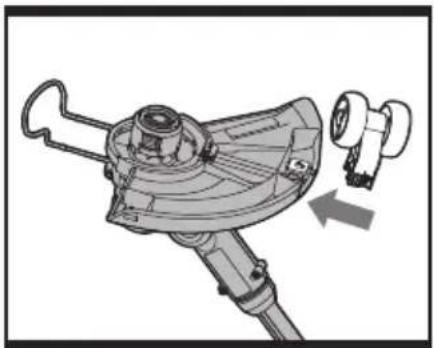
natural_image
Mechanical component diagram showing a lever mechanism with a close-up view of the handle (no text or symbols present)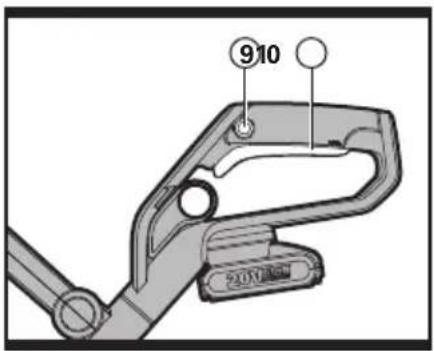
natural_image
Mechanical assembly diagram showing a motor and gear mechanism (no text or symbols)B3CD
natural_image
Illustration of a person using a vacuum cleaner to clean or adjust equipment, with no visible text or symbols.
natural_image
Illustration of a person using a vacuum cleaner to clean or adjust equipment, with no visible text or symbols.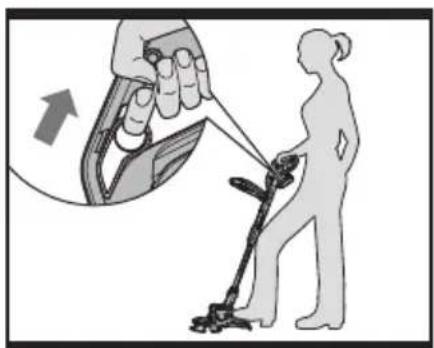
EF1F2
natural_image
Mechanical assembly diagram showing a rotating component with a magnified inset of a mechanical part (no text or symbols visible)
natural_image
Mechanical assembly diagram showing a rotating component with a magnified inset of a mechanical part (no text or symbols visible)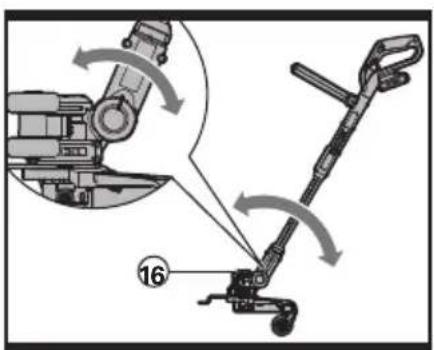
GH1H2
natural_image
Mechanical assembly diagram showing a rotating component with a magnified inset of the mechanical part (no text or symbols visible)H3I1I2
natural_image
Mechanical device diagram showing a lever mechanism with a downward arrow indicating force or motion (no text or symbols present)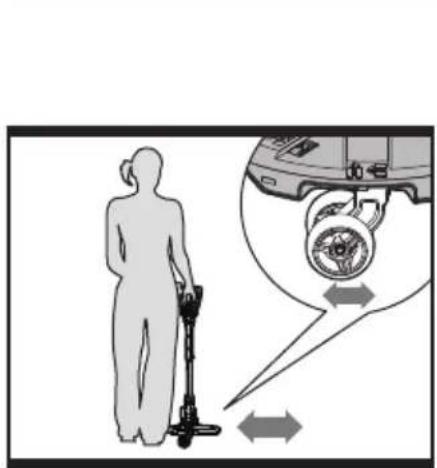
natural_image
Silhouette of a person using a vacuum cleaner with an inset diagram showing wheel and gear motion (no text or symbols)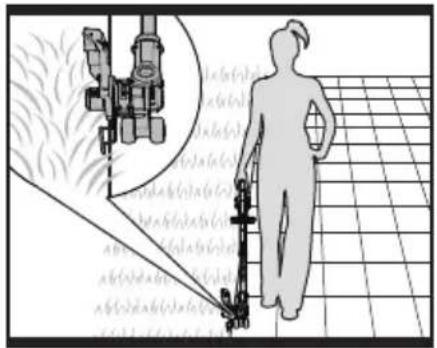
natural_image
Silhouette of a person walking with a tool near a grid-patterned area, with an inset showing mechanical components (no text or symbols visible)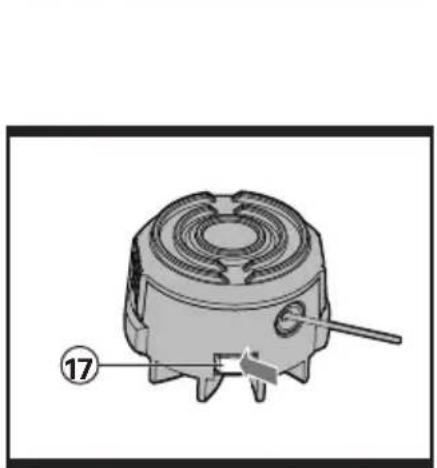
natural_image
Mechanical component diagram showing a fan-like structure with a pointer and numbered label (17), no readable text or symbols beyond the number.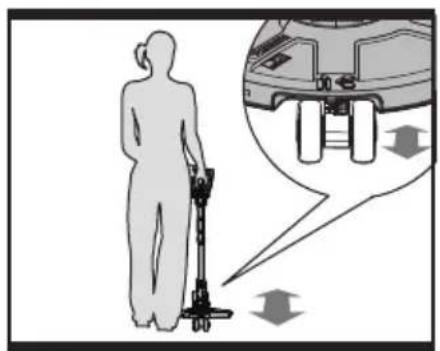
J1J2
natural_image
Exploded view diagram of mechanical components including gears and a spool (no text or labels)K1
K2K3
natural_image
Exploded view diagram of mechanical components including gears and a housing (no text or labels)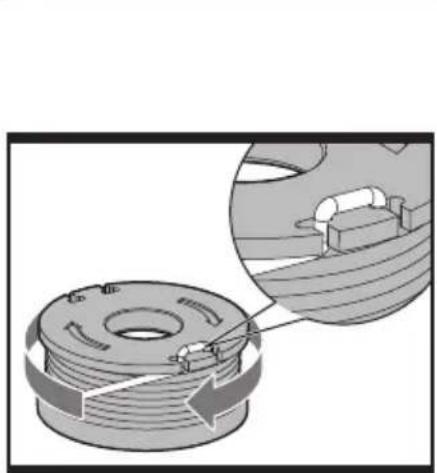
natural_image
Mechanical assembly diagram showing a coiled spring with internal components and a magnified detail (no text or symbols)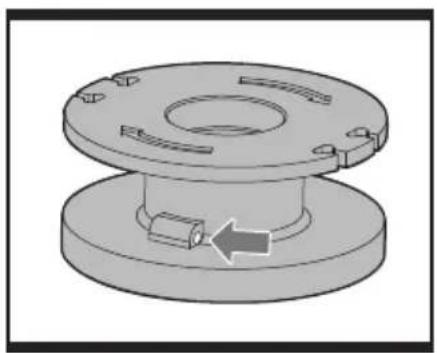
natural_image
3D mechanical component diagram showing a flange with internal slots and a bolted base (no text or symbols)L1
natural_image
3D diagram of a mechanical flange assembly with internal arrows indicating motion or force direction (no text or symbols)L2L3
natural_image
Mechanical assembly diagram showing a coiled spring with internal components and a magnified inset of a mechanical component (no text or symbols)
L4

natural_image
Completely dark image with no visible content, text, or symbols.-
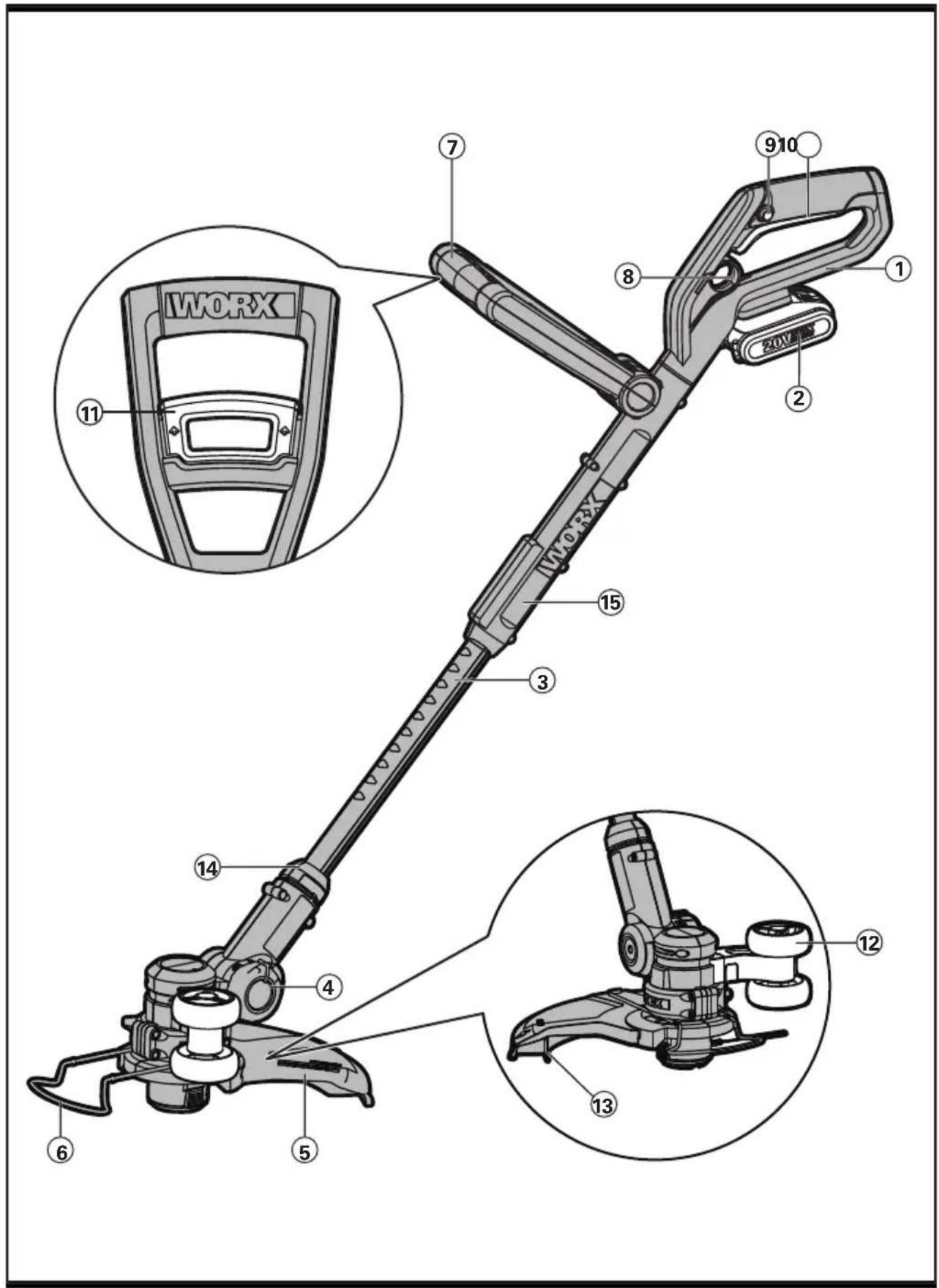
REAR HANDLE
-
BATTERY PACK
-
TELESCOPIC SHAFT
-
PIVOT HEAD LOCKING KNOB
-
SAFETY GUARD
-
FLOWER GUARD/EDGE GUIDE
-
AUXILIARY HANDLE
-
TELESCOPIC SHAFT ADJUSTMENT TRIGGER
-
LOCK OFF BUTTON
-
ON/OFF SWITCH
-
AUXILIARY HANDLE LOCKING LEVER
-
EDGE/TRIMMING SUPPORT WHEELS
-
LINE CUTTER
-
LOWER SHAFT COUPLING
-
UPPER SHAFT
-
MOTOR HOUSING OF TRIMMER HEAD (See Fig. H2)
-
LINE FEED BUTTON (See Fig. K1)
-
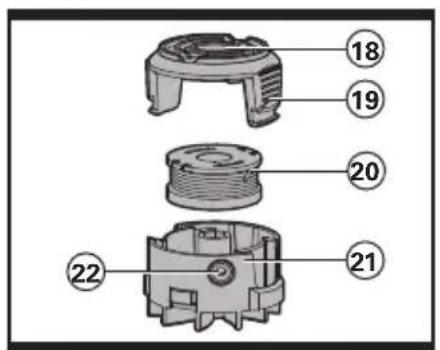
SPOOL CAP COVER (See Fig. K2)
-
CAP RELEASE LATCH (See Fig. K2)
-
SPOOL (See Fig. K2)
-
CUTTING HEAD (See Fig. K2)
-
EYELET (See Fig. K2)
Not all the accessories illustrated or described are included in standard delivery.
TECHNICAL DATA
Type WG169E WG169E.5 WG169E.9 (1-designation of machinery, representative of Grass Trimmer)
| WG169E WG1 | 69E.5 WG169E.9 | ||
| Voltage 20V | --- Max* | ||
| No load speed 7600/min | |||
| Cutting diameter 30cm | |||
| Line diameter 1.65mm | |||
| Charging time 3hr approx. 1 | hr approx. / | ||
| Machine weight 2.6kg 2.6kg | 2.2kg | ||
*Voltage measured without workload. Initial battery voltage reaches Maximum of 20volts. Nominal voltage is 18volts.
NOISE INFORMATION
| A weighted sound pressure according to Annex E of EN 786 | L_pA = 78dB(A) |
| K_pA | 3.0dB(A) |
| A weighted sound power according to Noise Directive 2000/14/EC | L_wA = 94dB(A) |
| Wear ear protection |  |
VIBRATION INFORMATION
| Vibration emission value according to Noise Directive 2000/14/EC | a_h = 2.8m/s^2 |
| Uncertainty K | 1.5m/s2 |

WARNING! The vibration emission value during actual use of the power tool can differ
from the declared value depending on the ways in which the tool is used dependant on the
following examples and other variations on how the tool is used:
How the tool is used and the materials being cut or drilled.
The tool being in good condition and well maintained.
The use the correct accessory for the tool and ensuring it is sharp and in good condition.
The tightness of the grip on the handles and if any anti vibration accessories are used.
And the tool is being used as intended by its design and these instructions.
This tool may cause hand-arm vibration syndrome if its use is not adequately managed.

WARNING! To be accurate, an estimation of exposure level in the actual conditions of use
should also take account of all parts of the operating cycle such as the times when the tool
is switched off and when it is running idle but not actually doing the job. This may significantly reduce the exposure level over the total working period.
Helping to minimize your vibration exposure risk.
ALWAYS use sharp chisels, drills and blades.
Maintain this tool in accordance with these instructions and keep well lubricated (where appropriate).
If the tool is to be used regularly then invest in anti vibration accessories.
Avoid using tools in temperatures of 10^ C or less.
Plan your work schedule to spread any high vibration tool use across a number of days.
ACCESSORIES
| WG169E WG1 | 69E.5 WG169E.9 | ||
| Charger 1 (WA3759) 1 (WA3860) / | |||
| Battery Pack 1 (WA3551.1) 1 (WA3551.1) / | |||
| Edge/Trimming Support Wheel 1 1 1 | |||
| Spool | 1 (WA0004) | 1 (WA0004) | 1 (WA0004) |
| Safety Guard | 1 | 1 | 1 |
We recommend that you purchase genuine accessories listed in the above list from the same store that sold you the tool. Use good quality accessories marked with a well-known brand name. Refer to the accessory packaging for further details. Store personnel can assist you and offer advice.
GENERAL POWER TOOL SAFETY WARNINGS

WARNING: Read all safety warnings and all instructions.
Failure to follow the warnings and instructions may result in electric shock, fire and/or serious injury.
Save all warnings and instructions for future reference.
The term “power tool” in the warnings refers to your mains-operated (corded) power tool or battery-operated (cordless) power tool.
1) WORK AREA SAFETY
a) Keep work area clean and well lit. Cluttered or dark areas invite accidents
b) Do not operate power tools in explosive atmospheres, such as in the presence of flammable liquids, gases or dust. Power tools create sparks which may ignite the dust or fumes.
c) Keep children and bystanders away while operating a power tool. Distractions can cause you to lose control.
2) ELECTRICAL SAFETY
a) Power tool plugs must match the outlet. Never modify the plug in any way. Do not use any adapter plugs with earthed (grounded) power tools.
Unmodified plugs and matching outlets will reduce risk of electric shock.
b) Avoid body contact with earthed or grounded surfaces, such as pipes, radiators, ranges and refrigerators.
There is an increased risk of electric shock if your body is earthed or grounded.
c) Do not expose power tools to rain or wet conditions. Water entering a power tool will increase the risk of electric shock.
d) Do not abuse the cord. Never use the cord for carrying, pulling or unplugging the power tool. Keep cord away from heat, oil, sharp edges or moving parts. Damaged or entangled cords increase the risk of electric shock.
e) When operating a power tool outdoors, use an extension cord suitable for outdoor use. Use of a cord
suitable for outdoor use reduces the risk of electric shock.
f) If operating a power tool in a damp location is unavoidable, use a residual current device (RCD) protected supply. Use of an RCD reduces the risk of electric shock.
3) PERSONAL SAFETY
a) Stay alert, watch what you are doing and use common sense when operating a power tool. Do not use a power tool while you are tired or under the influence of drugs, alcohol or medication. A moment of inattention while operating power tools may result in serious personal injury.
b) Use personal protective equipment. Always wear eye protection. Protective equipment such as dust mask, non-skid safety shoes, hard hat, or hearing protection used for appropriate conditions will reduce personal injuries.
c) Prevent unintentional starting. Ensure the switch is in the off-position before connecting to power source and/or battery pack, picking up or carrying the tool. Carrying power tools with your finger on the switch or energising power tools that have the switch on invites accidents.
d) Remove any adjusting key or wrench before turning the power tool on. A wrench or a key left attached to a rotating part of the power tool may result in personal injury.
e) Do not overreach. Keep proper footing and balance at all times. This enables better control of the power tool in unexpected situations.
f) Dress properly. Do not wear loose clothing or jewellery. Keep your hair, clothing and gloves away from moving parts. Loose clothes, jewellery or long hair can be caught in moving parts.
g) If devices are provided for the connection of dust extraction and collection facilities, ensure these are connected and properly used. Use of dust collection can reduce dust-related hazards.
4) POWER TOOL USE AND CARE
a) Do not force the power tool. Use the correct power tool for your application. The correct power tool will do the job better and safer at the rate for which it was designed.
b) Do not use the power tool if the switch does not turn it on and off.
Any power tool that cannot be controlled with the switch is dangerous and must be repaired.
c) Disconnect the plug from the power source and/or the battery pack from the power tool before making any adjustments, changing accessories, or storing power tools. Such preventive safety measures reduce the risk of starting the power tool accidentally.
d) Store idle power tools out of the reach of children and do not allow persons unfamiliar with the power tool or these instructions to operate the power tool. Power tools are dangerous in the hands of untrained users.
e) Maintain power tools. Check for misalignment or binding of moving parts, breakage of parts and any other condition that may affect the power tool's operation. If damaged, have the power tool repaired before use. Many accidents are caused by poorly maintained power tools.
f) Keep cutting tools sharp and clean. Properly maintained cutting tools with sharp cutting edges are less likely to bind and are easier to control.
g) Use the power tool, accessories and tool bits etc. in accordance with these instructions, taking into account the working conditions and the work to be performed. Use of the power tool for operations different from those intended could result in a hazardous situation.
5) BATTERY TOOL USE AND CARE
a) Recharge only with the charger specified by the manufacturer. A charger that is suitable for one type of battery pack may create a risk of fire when used with another battery pack.
b) Use power tools only with specifically
designated battery packs. Use of any other battery packs may create a risk of injury and fire.
c) When battery pack is not in use, keep it away from other metal objects, like paper clips, coins, keys, nails, screws or other small metal objects, that can make a connection from one terminal to another. Shorting the battery terminals together may cause burns or a fire.
d) Under abusive conditions, liquid may be ejected from the battery; avoid contact. If contact accidentally occurs, flush with water. If liquid contacts eyes, additionally seek medical help. Liquid ejected from the battery may cause irritation or burns.
6) SERVICE
a) Have your power tool serviced by a qualified repair person using only identical replacement parts. This will ensure that the safety of the power tool is maintained.
LAWN / EDGE TRIMMER SAFETY WARNINGS

WARNING: When using the machine the safety rules must be followed .For your own safety and bystanders please read the instructions before using the machine. Please keep the instructions safe for later use.
- This appliance is not intended for use by persons (including children) with reduced physical, sensory or mental capabilities, or lack of experience and knowledge, unless they have been given supervision or instruction concerning use of the appliance by a person responsible for their safety.
- Children should be supervised to ensure that they do not play with the appliance.
a) Read instruction manual.
b) Keep bystanders away.
c) Wear eye protection.
d) Do not expose to moisture.
e) Never allow children or people unfamiliar with the instructions to use the machine;
f) Stop using the machine while people,
especially children, or pets are nearby;
g) Only use the machine in daylight or good artificial light;
h) Before using the machine and after any impact, check for signs of wear or damage and repair as necessary;
i) Never operate the machine with damaged guards or without the guards in place;
j) Keep hands and feet away from the cutting means at all times and especially when switching on the motor;
k) Take care against injury from any device fitted for trimming the filament line length. After extending new cutter line always return the machine to its normal operating position before switching on;
I) Never fit metal cutting elements;
m) Never use replacement parts or accessories not provided or recommended by the manufacturer;
n) Always ensure that ventilation openings are kept clear of debris;
o) Under abusive conditions, liquid may be ejected from the battery; avoid contact. If contact accidentally occurs, flush with water. If liquid contacts eyes, additionally seek medical help. Liquid ejected from the battery may cause irritation or burns.
p) Be familiar with the controls and proper use of the equipment;
SAFETY WARNINGS FOR BATTERY PACK
a) Do not dismantle, open or shred cells or battery pack.
b) Do not short-circuit a battery pack. Do not store battery packs haphazardly in a box or drawer where they may short-circuit each other or be short-circuited by conductive materials. When battery pack is not in use, keep it away from other metal objects, like paper clips, coins, keys, nails, screws or other small metal objects, that can make a connection from one terminal to another. Shorting the battery terminals together may cause burns or a fire.
c) Do not expose battery pack to heat or fire. Avoid storage in direct sunlight.
d) Do not subject battery pack to mechanical shock.
e) In the event of battery leaking, do not allow the liquid to come into contact with the skin or eyes. If contact has been made, wash the affected area with copious amounts of water and seek medical advice.
f) Seek medical advice immediately if a cell or battery pack has been swallowed.
g) Keep battery pack clean and dry.
h) Wipe the battery pack terminals with a clean dry cloth if they become dirty.
i) Battery pack needs to be charged before use. Always refer to this instruction and use the correct charging procedure.
j) Do not maintain battery pack on charge when not in use.
k) After extended periods of storage, it may be necessary to charge and discharge the battery pack several times to obtain maximum performance.
I) Battery pack gives its best performance when it is operated at normal room temperature (20°C ± 5°C).
m) When disposing of battery packs, keep battery packs of different electrochemical systems separate from each other.
n) Recharge only with the charger specified by WORX. Do not use any charger other than that specifically provided for use with the equipment.
A charger that is suitable for one type of battery pack may create a risk of fire when used with another battery pack.
o) Do not use any battery pack which is not designed for use with the equipment.
p) Keep battery pack out of the reach of children.
q) Retain the original product literature for future reference.
r) Remove the battery from the equipment when not in use.
s) Dispose of properly.
SYMBOL ASSEMBLY

Warning

Read instruction manual

Do not expose to rain or water

Do not burn

Wear eye protection
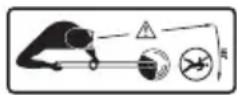
Keep bystanders away

Do not expose to moisture.
This product has been marked with a symbol relating to removing electric and electronic waste. This means that this product shall not be discarded with household waste but that it shall be returned to a collection system which conforms to the European Directive 2002/96/CE. It will then be recycled or dismantled in order to reduce the impact on the environment. Electric and electronic equipment can be hazardous for the environment and for human health since they contain hazardous substances.

Edging

Trimming
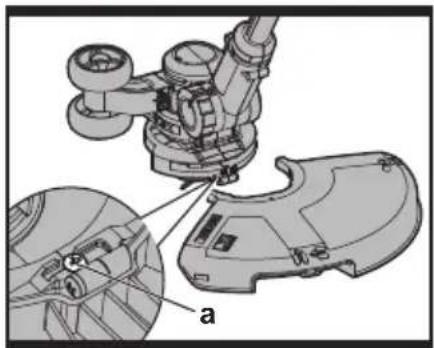
1. ASSEMBLY OF THE SAFETY GUARD (See Fig. A)
Remove a screw from the Guard; attach the Safety Guard to the trimmer head. Align the Guard so it slides into the slots located on the trimmer head. Turn the tool over and secure the Safety Guard onto the trimmer head with the screw (a) provided.
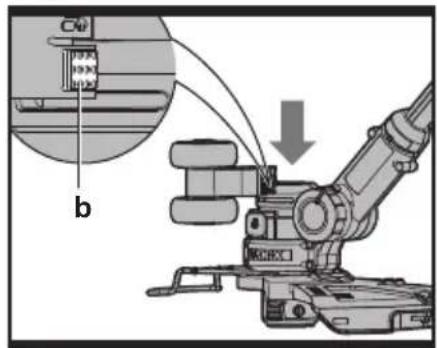
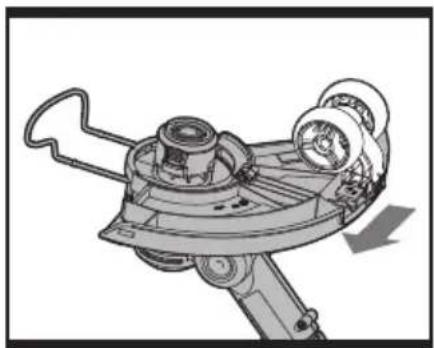
2. ASSEMBLY OF THE EDGE /TRIMMING SUPPORT WHEELS (See Fig. B1, B2, B3)
With the tool right side up, slide the Edge / Trimming Support Wheels (12) assembly onto the metal plate located on the side of the Cutting Head (See B1) or underneath the Safety Guard(5) (See B2 B3). Make sure the grooves of the Edge / Trimming Support Wheels assembly locks onto the metal plate, you will hear it click into place.
To remove the wheel assembly, press the release button (b) on the wheels and pull the wheels outside.
OPERATION INSTRUCTIONS
INTENDED USE
The machine is intended for the cutting of grass and weeds under bushes, as well as on slopes and edges that can not be reached with the lawn mower.

WARNING! The charger and Battery Pack are specially designed to work
together so do not attempt to use any other devices. Never insert or allow foreign metallic objects into your charger or Battery Pack connections because of electrical failure and other hazards that will occur.
1. BEFORE USING YOUR CORDLESS GRASS TRIMMER
Your Battery Pack is UNCHARGED and it must be fully charged once before it is used.
The battery charger supplied is matched to the Li-Ion battery for use with this tool. Do not use another battery charger.
The Li-lon battery is protected against deep discharging. When the battery is empty, the trimmer will switch off by means of a protective circuit: The trimmer head will stop rotating.
NOTE: In a warm environment or after heavy use, the Battery Pack may become too hot to permit charging. Allow time for the battery to cool down before recharging.
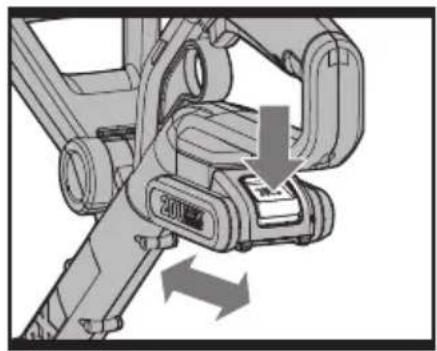
3. TO REMOVE OR INSTALL BATTERY PACK (See Fig. C)
Depress the battery release button to remove Battery Pack (2) from your trimmer. After recharging, insert the Battery Pack onto trimmer's battery bracket. A simple push and slight pressure will be sufficient.
4. SAFETY ON/OFF SWITCH (See Fig. D)
The safety switch is locked off to prevent accidental starting. Depress the Lock Off Button (9) then depress the On/Off Switch (10) and release Lock Off Button. Your trimmer is now on. To switch off, just release the on/off switch.

WARNING! The cutting head continues to rotate after the
trimmer has been switched off; wait until it has completely stopped then lay down the tool.
5. ADJUSTMENT OF THE TELESCOPIC SHAFT (See Fig. E)
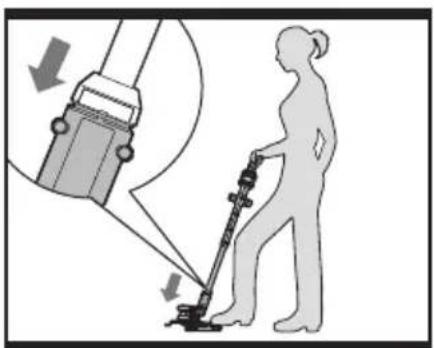
Step one foot on the Safety Guard, then use one hand to pull up the Telescopic Shaft Adjustment Trigger (8), adjust the length of the Telescopic Shaft to the most comfortable length. Release the Telescopic Shaft Adjustment Trigger to lock in position.
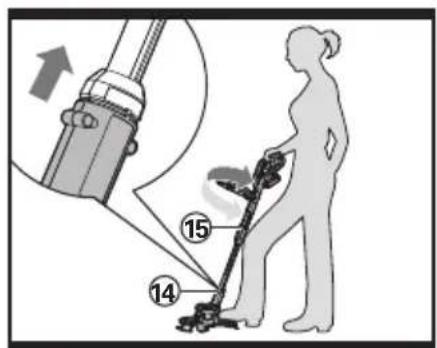
6. MAIN HANDLE ROTATION (See Fig. F1, F2)
First, hold down the lower housing with your foot and pull upward on the Upper Shaft (15). Then rotate the Upper Shaft clockwise 90 degrees (See Fig.F1) and release; the Shaft will be locked in position automatically (See Fig. F2).
7. ADJUSTMENT OF AUXILIARY HANDLE
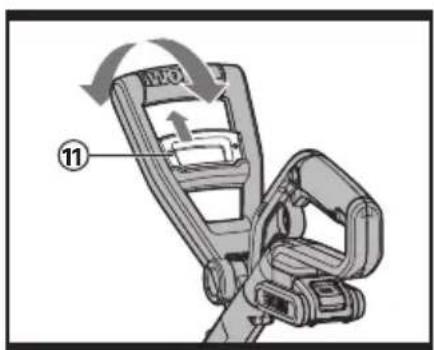
Pull up the Auxiliary Handle Locking Lever (11). Hold the Locking Lever and rotate the Auxiliary Handle to the most comfortable and balanced position (See Fig. G)
Release the lever, your Auxiliary Handle has been locked.
8. ADJUSTMENT OF THE TRIMMER HEAD ANGLE TO THE SHAFT

WARNING! Make Sure the Safety Switch is Locked Off to Prevent
Accidental Starting.
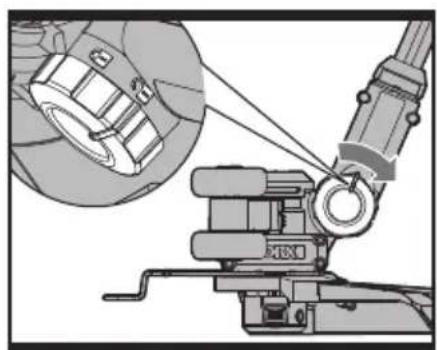
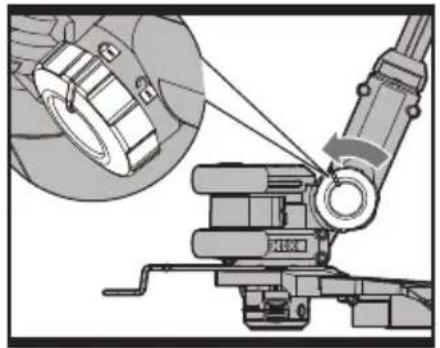
To adjust the Upper Shaft angle or convert the tool from trimming mode and edging mode, unlock the Pivot Head Locking Knob by hand, and using adequate force, pull the trimmer head into the desired position, then lock the Pivot Head Locking Knob.
9. FLOWER GUARD/EDGE GUIDE
Pull the Flower Guard/Edge Guide out before trimming, as shown in Fig. 11.
When edging, pull Flower Guard/Edge Guide out also, and keep to a side (See Fig. 12).
Before trimming or edging make sure the flower guard is locked firmly in position.
OPERATION

WARNING! Always wear the eye protection. Never lean over the
trimmer head. Rocks or debris can ricochet or be thrown into eyes and face and cause blindness or other serious injury. When operating unit, check for the following:
Wear eye protection and heavy clothing. Hold front handle with one hand and Auxiliary Handle with the other hand.
Keep unit below waist level. Work only from your right to your left to ensure debris is thrown away from you. Without bending over, keep line near and parallel to the ground (perpendicular when edging) and not crowded into material being cut.

WARNING! Make sure that line is fed out before operation. Make sure
motor is up to full speed before trimming
or edging.
WARNING! Only use 1.65mm diameter cutting line. Other sizes of line will not feed properly and will result in improper cutting head function or can cause serious injury. Do not use other material such as wire, string, rope, etc. Wire can break off during cutting and become a dangerous projectile that can cause serious injury.
EDGE /TRIMMING SUPPORT WHEELS
There are three optional positions for the Edge /Trimming Support Wheels to attach when assisting in Trimming and Edging.
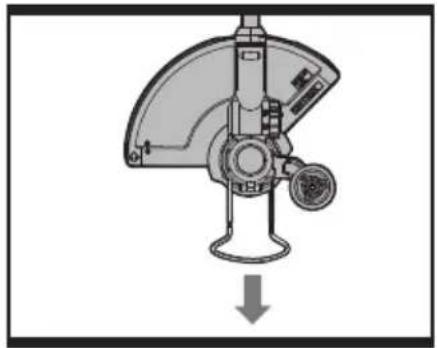
Position 1: Using the guide wheels when trimming in a forward or reverse direction (See Fig. J1)
Position the Grass Trimmer in the trimming position. Underneath the Safety Guard there is a metal plate that the Edge/Trimming Support Wheels will attach to. Slide the Support Wheels horizontally onto the metal plate until they lock into position so both the wheels are facing in the forward direction (See Fig. B3). The wheels should provide support when you are trimming in the forward or reverse direction.
Position 2: Using the guide wheels when trimming Side to Side
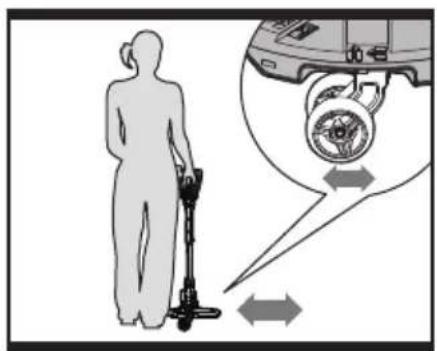
Position the Grass Trimmer in the trimming position. Underneath the Safety Guard there is a metal plate that the Edge/Trimming Support Wheels will attach to. Slide the Support Wheels vertically onto the metal plate until it locks into position (See Fig. B2). The wheels should provide support when you are trimming in a horizontal side to side direction (See Fig. J2).
NOTE: you could also use the machine without the guide wheels on guard when trimming.
Position 3: Using the guide wheels when edging (See Fig. I2)

WARNING: Make Sure the Safety Switch is Locked Off to Prevent
Accidental Starting.
Change the tool from trimming into the edging mode, the Edge /Trimming Support Wheels (12) will attach on the side the trimmer head as shown in Fig. B1.; rotate the main handle as described in "MAIN HANDLE ROTATION", then unlock the Pivot Head Locking Knob, and using adequate force, pull the trimmer head into the desired position. Make sure to adjust the trimmer head angle to be in the lowest horizontal setting. Finally, lock the Pivot Head Locking Knob (See Fig. H3) and position the wheels on the ground for the edging mode. While edging, keep the Flower Guard/Edge Guide aligned with the sidewalk edge, this will assist to edge in a straight path. Only the tip of the line will make contact with area being worked on. Do not force the line. The edging wheels help protect the unit and keep the unit from contacting the ground. Take extra caution while edging, as objects can be thrown from the trimmer line.
AUTOMATIC LINE FEED SYSTEM
When initially switching on the trimmer, a small length of line is fed out. Each time the tool is started from rest it will advance about 6.35mm of trimmer line.
A ‘clattering’ noise will be heard when the lines hit the Line Cutter. DO NOT BE ALARMED this is quite normal. After about 5 seconds the line will be cut to the correct length and the noise will reduce as the motor gains full speed.
If the noise of the line being cut can't be heard, more line will need to be fed out.
To feed more line, it is first necessary to allow the trimmer to stop completely; it must come to a complete rest, then restart, allowing the motor to reach full speed.
Repeat above until you hear the line hitting against the Line Cutter.
TO MANUALLY FEED THE LINE (See Fig. K1)
Turn off the trimmer and remove the battery. If required, line can be fed out manually.
To operate, press and release manual Line Feed Button (17), while gently pulling out the line until it is long enough to reach the Line Cutter.
If the line extends past the Line Cutter, too much line has been fed out.
If too much line is fed out, remove the Spool
Cap and turn Spool counter-clockwise until the line is at the desired length.
TO REMOVE THE SPOOL CAP COVER (See Fig. K2)
Press and hold in the two Cap Release Latches (19) (See Fig. K2).
Pull the Spool Cap Cover (18) away from the Cutting Head (21). Keep the Spool Cap Cover and the inside of the Cutting Head clean from debris. To replace the Spool Cap Cover, press it firmly onto the Spool Holder. Ensure that it is correctly connected by trying to remove it without depressing the two Cap Release Latches.
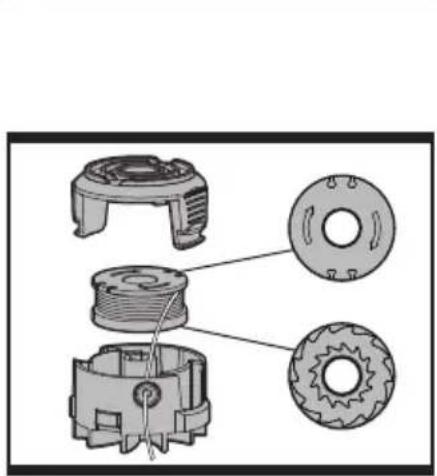
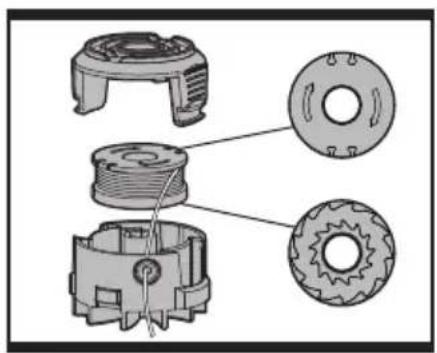
REPLACE THE TRIMMER LINE AND SPOOL (See Fig. K3).
Turn off the trimmer and remove the battery. Remove Spool Cap Cover.
Remove the old Spool from Spool Holder. Clear any broken line or cutting debris from the spool area. Pull the line from the new replacement Spool through the eyelet of the Spool Holder. Place new Spool into the holder with the cut out areas of the Spool facing inward or down. When installed into the Spool Holder, the smooth side of the Spool should be visible.
Release line from cleat on the Spool. Refit the Spool Cap Cover.
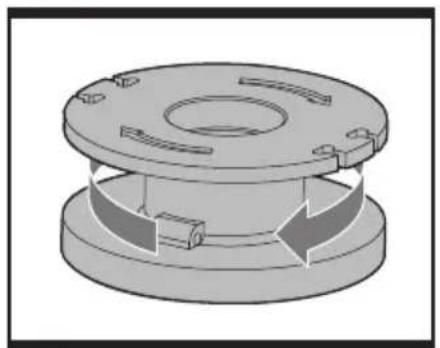
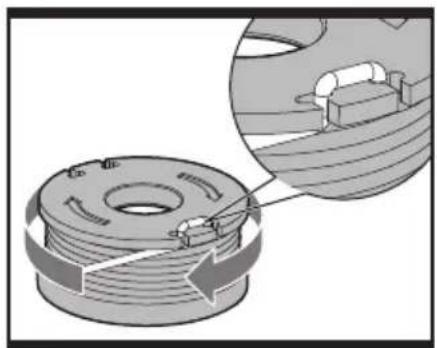
TO MANUALLY WIND LINE (See Fig. L1-L4)
Take approximately 3m of line. Insert 15mm of line into the Spool holes and wind line in the direction of the arrows on the top of the Spool.
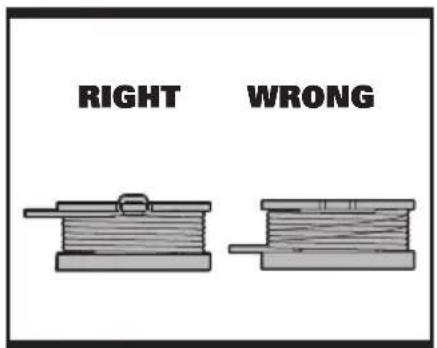
Leave approximately 100mm of line unwound and place into the cleat.
Ensure that the line is neatly coiled on the Spool. Failure to do so will impair the efficiency of the automatic line feed.
Then fit the Spool as described above in "Replace the trimmer line and Spool".
MAINTENANCE
After use, disconnect the battery from the mains and check for damage.
Your power tool requires no additional lubrication or maintenance. There are no user serviceable parts in your power tool. Never use water or chemical cleaners to clean your power tool. Wipe clean with a dry cloth. Always store your power tool in a dry room temperature location. Keep the motor ventilation slots clean. Keep all working controls free of dust.
TROUBLESHOOTING
The following table gives problems and actions that you can perform if your machine does not operate correctly.
WARNING: Switch the machine off and remove the battery prior to any troubleshooting.
| Problems Possible | Causes Corrective Action | |
| Trimmer fails to operate. | Battery discharged.Battery too hot/cold.Motor is broken.Internal wiring of machine damaged. | Recharge battery; also see “HOW TO CHARGE YOUR BATTERY”.Allow to cool/warm.Contact Service Agent.Contact Service Agent. |
| Trimmer runs intermittently. | Motor is broken.Battery not fully charged.On/Off switch defective. | Contact Service Agent.Recharge battery.Contact Service Agent. |
| Excessive vibrations/noise. | Machine defective.Line spool is not wound well. | Contact Service Agent.Rewind the line. See “ To fit spool and line assembly.” |
| Cutting time per battery charge too short. | Battery has not been used for long period or only charged for short term.Grass too high.Battery defective. | Fully charge battery; also see “HOWTO CHARGE YOUR BATTERY”.Cut in stages.Replace the battery. |
| Machine does not cut. | Line broken.Battery not fully charged.Motor is broken (speed is too low).Grass entangled around cutting head. | Replace the line.Recharge battery; also see “HOW TO CHARGE YOUR BATTERY”.Contact Service Agent.Remove grass. |
| Continuous lighting of the battery charge indicator.No charging procedure possible. | Battery not (properly) inserted.Battery contacts contaminated.Battery defective. | Properly insert battery into battery charger.Clean the battery contacts or replace the battery.Replace the battery. |
| Battery charge indicator does not light up. | Plug of battery charger not plugged in (properly).Socket outlet, mains cable or battery charger defective. | Insert mains plug (fully) into the socket outlet.Check the mains voltage; have the battery charger checked by an authorized after-sales service agent. |
| Auto feed does not work | Cutting line is not wound well.The line is tangled.Line is used up. | Manually feed the line, if still can not feed out, remove the Spool out and rewind the line.Replace with a new spool of line. |
ENVIRONMENTAL PROTECTION

This product has been marked with a symbol relating to removing electric and electronic waste. This means that this product shall not be discarded with household waste but that it shall be returned to a collection system which conforms to the European Directive 2002/96/CE. It will then be recycled or dismantled in order to reduce the impact on the environment. Electric and electronic equipment can be hazardous for the environment and for human health since they contain hazardous substances.
DECLARATION OF CONFORMITY
We,
POSITEC Germany GmbH
Declare that the product,
Description WORX 3 in 1 Lawn /Edge
Trimmer
Type WG169E WG169E.5 WG169E.9
(1-designation of machinery,
representative of Grass Trimmer)
Function Cutting grass and weeds
Complies with the following Directives,
2006/42/EC
2004/108/EC
2011/65/EU
2000/14/EC amended by 2005/88/EC.
- Conformity Assessment Procedure as per Annex VI
- Measured Sound Power Level 90.91dB(A)
- Declared Guaranteed Sound Power Level 94dB(A)
-The notified body involved
Name: Intertek Testing & Certification Ltd
Address: Davy Avenue, Knowlhill, Milton Keynes, MK5 8NL
Standards conform to:
EN 60745-1
EN 786
EN ISO 3744
EN 55014-1
EN 55014-2
The person authorized to compile the technical file,
Name: Russell Nicholson
Address: Positec Power Tools (Europe)
Ltd, PO Box 152, Leeds, LS10 9DS, UK

2013/12/20
Leo Yue
POSITEC Quality Manager
EDGE /TRIMMING SUPPORT WHEELS
Typ WG169E WG169E.5 WG169E.9(1-designation of machinery, representative of Grass Trimmer)
- Measured Sound Power Level 90.91dB(A)
Name: Intertek Testing & Certification Ltd
Anschrift: Davy Avenue, Knowlhill, Milton Keynes, MK5 8NL
Normen:
EN 60745-1
EN 786
EN ISO 3744
EN 55014-1
EN 55014-2
Name: Russell Nicholson
Adresse: Positec Power Tools (Europe) Ltd, PO Box 152, Leeds, LS10 9DS, UK
2013/12/20
Leo Yue
INFORMATIONS RELATIVES AU BRUIT
INFORMATIONS RELATIVES AUX VIBRATIONS
Position 2: Using the guide wheels when trimming Side to Side
DÉCLARATION DE CONFORMITÉ
Nous,
POSITEC Germany GmbH
Nom: Intertek Testing & Certification Ltd
Adresse: Davy Avenue, Knowlhill, Milton Keynes, MK5 8NL
Standards conform to:
EN 60745-1 EN 786
EN ISO 3744 EN 55014-1
EN 55014-2
Ltd, PO Box 152, Leeds, LS10 9DS, UK
2013/12/20
Leo Yue
WORX Tosaerba/tagliabordi 3-in-1
Codice WG169E WG169E.5 WG169E.9
Ltd, PO Box 152, Leeds, LS10 9DS, UK

2013/12/20
Leo Yue
Modelo WG169E WG169E.5 WG169E.9
ALGEMENE VEILIGHEIDSWAARSCHUWINGEN VOOR VERMOGENSMACHINE

Naam: Intertek Testing & Certification Ltd
Adres: Davy Avenue, Knowlhill, Milton Keynes, MK5 8NL
Standaards in overeenstemming met:
EN 60745-1 EN 786
EN ISO 3744 EN 55014-1
EN 55014-2
Adres: Davy Avenue, Knowlhill, Milton Keynes, MK5 8NL
Ltd, PO Box 152, Leeds, LS10 9DS, UK
$$ \text {leo.yue} $$
2013/12/20
Leo Yue
Cím: Davy Avenue, Knowlhill, Milton
Keynes, MK5 8NL
Tip WG169E WG169E.5 WG169E.9
Adresă: Davy Avenue, Knowlhill, Milton Keynes, MK5 8NL
Ltd, PO Box 152, Leeds, LS10 9DS, UK
2013/12/20
Leo Yue
Director Calitate POSITEC
-
ZADNÍ RUKOJEŤ
-
BATERIE
-
TELESKOPICKÁ TYČ
-
UPÍNACÍ ŠROUB OTOČNÉ HLAVY SEKAČKY
-
BEZPEČNOSTNÍ KRYT
-
KRYT ZÁHONŮ/VODÍTKO
-
PŘÍDAVNÁ RUKOJEŤ
-
OVLADAČ PRO NASTAVENÍ TELESKOPICKÉ TYČE
-
POJISTNÉ TLAČÍTKO
-
SPÍNAČ
-
ZAJIŠTOVACÍ PÁKA PŘÍDAVNÉ RUKOJETI
-
POMOCNÁ KOLEČKA PRO SEKÁNÍ/ÚPRAVU OKRAJŮ TRÁVNÍKŮ
-
ZKRACOVACÍ NŮŽ STRUNY
-
SPOJKA SPODNÍ TYČE
-
HORNÍ TYČ
-
KRYT MOTORU HLAVY SEKAČKY (Viz Obr. H2)
-
TLAČÍTKO PRO POSUV STRUNY (Viz Obr. K1)
18 KRYT POUZDRA NA CÍVKU (Viz Obr. K2)
19 ZÁPADKA PRO UVOLNĚNÍ KRYTU (Viz Obr. K2)
20 CÍVKA (Viz Obr. K2)
-
HLAVA SEKAČKY (Viz Obr. K2)
-
OČKO (Viz Obr. K2)
INFORMACE TÝKAJÍCÍ SE HLUČNOSTI
Adresa: Davy Avenue, Knowlhill, Milton Keynes, MK5 8NL
Použité normy:
EN 60745-1
EN 786
EN ISO 3744
EN 55014-1
EN 55014-2
Ltd, PO Box 152, Leeds, LS10 9DS, UK

2013/12/20
Leo Yue
Adresa: Davy Avenue, Knowlhill, Milton Keynes, MK5 8NL
Použité normy:
EN 60745-1
EN 786
EN ISO 3744
EN 55014-1
EN 55014-2
Ltd, PO Box 152, Leeds, LS10 9DS, UK
2013/12/20
Leo Yue
POSITEC Riaditel' oddelenia riadenia kvality
WORX
it's your nature
Copyright © 2014, Positec. All Rights Reserved.
2CGT09FPK11000A1

- 20VMAX LITHIUM
- TECHNICAL DATA
- NOISE INFORMATION
- VIBRATION INFORMATION
- GENERAL POWER TOOL SAFETY WARNINGS
- WARNING: Read all safety warnings and all instructions.
- Save all warnings and instructions for future reference.
- 1) WORK AREA SAFETY
- 2) ELECTRICAL SAFETY
- 3) PERSONAL SAFETY
- LAWN / EDGE TRIMMER SAFETY WARNINGS
- SAFETY WARNINGS FOR BATTERY PACK
- SYMBOL ASSEMBLY
- ASSEMBLY OF THE SAFETY GUARD (See Fig. A)
- ASSEMBLY OF THE EDGE /TRIMMING SUPPORT WHEELS (See Fig. B1, B2, B3)
- OPERATION INSTRUCTIONS
- INTENDED USE
- BEFORE USING YOUR CORDLESS GRASS TRIMMER
- TO REMOVE OR INSTALL BATTERY PACK (See Fig. C)
- SAFETY ON/OFF SWITCH (See Fig. D)
- WARNING! The cutting head continues to rotate after the
- ADJUSTMENT OF THE TELESCOPIC SHAFT (See Fig. E)
- MAIN HANDLE ROTATION (See Fig. F1, F2)
- ADJUSTMENT OF AUXILIARY HANDLE
- ADJUSTMENT OF THE TRIMMER HEAD ANGLE TO THE SHAFT
- WARNING! Make Sure the Safety Switch is Locked Off to Prevent
- Accidental Starting.
- FLOWER GUARD/EDGE GUIDE
- OPERATION
- WARNING! Always wear the eye protection. Never lean over the
- WARNING! Make sure that line is fed out before operation. Make sure
- or edging.
- EDGE /TRIMMING SUPPORT WHEELS
- WARNING: Make Sure the Safety Switch is Locked Off to Prevent
- AUTOMATIC LINE FEED SYSTEM
- TO MANUALLY FEED THE LINE (See Fig. K1)
- TO REMOVE THE SPOOL CAP COVER (See Fig. K2)
- REPLACE THE TRIMMER LINE AND SPOOL (See Fig. K3).
- TO MANUALLY WIND LINE (See Fig. L1-L4)
- MAINTENANCE
- After use, disconnect the battery from the mains and check for damage.
- TROUBLESHOOTING
- ENVIRONMENTAL PROTECTION
- DECLARATION OF CONFORMITY
- INFORMATIONS RELATIVES AU BRUIT
- INFORMATIONS RELATIVES AUX VIBRATIONS
- DÉCLARATION DE CONFORMITÉ
- ALGEMENE VEILIGHEIDSWAARSCHUWINGEN VOOR VERMOGENSMACHINE
- INFORMACE TÝKAJÍCÍ SE HLUČNOSTI
Brand : WORX
Model : WG169E.9
Category : Grass trimmer