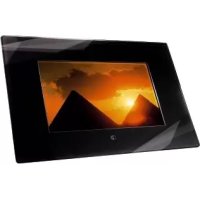
00090913 - Digital photo frame HAMA - Free user manual and instructions
Find the device manual for free 00090913 HAMA in PDF.


| Product type | Digital photo frame |
| Brand | Hama |
| Model | 00090913 |
| Screen | 7-inch TFT-LCD screen (17.78 cm), 16:9 format, 480 x 234 pixels resolution |
| Dimensions (without stand) | Approx. 25.0 × 3.0 × 18.5 cm (W × D × H) |
| Dimensions (with stand) | Approx. 25.0 × 14.0 × 18.5 cm (W × D × H) |
| Power supply | AC/DC power adapter 12V, 1.5A |
| Supported image formats | JPEG, JPG (up to 268 megapixels) |
| Storage media | SD/SDHC/MMC/MS/XD cards |
| USB interface | USB 2.0 high-speed (mini USB) |
| Main functions | Slideshow with 9 transition effects, zoom, image rotation, power-saving mode, display duration adjustment, folder mode, display format (normal, smart, zoom), menu in 7 languages |
| Remote control | Infrared remote control with battery included |
| Wall mounting | Preparation for wall mounting (mounting holes) |
| Operating temperature | 0 °C to 30 °C |
| Operating humidity | 40% to 64% RH (non-condensing) |
| Cleaning and maintenance | Use a soft lint-free cloth; avoid solvents (alcohol, gasoline, thinner) |
| Safety | Do not open the casing; do not expose to moisture or impact; use only the supplied adapter |
| Spare parts and repairability | No user-repairable parts; contact a specialized dealer for any repairs |
| General information | Compliant with European directives 2002/96/EC and 2008/96/EC; Class A device (may cause radio interference) |
Frequently Asked Questions - 00090913 HAMA
User questions about 00090913 HAMA
0 question about this device. Answer the ones you know or ask your own.
Ask a new question about this device
Download the instructions for your Digital photo frame in PDF format for free! Find your manual 00090913 - HAMA and take your electronic device back in hand. On this page are published all the documents necessary for the use of your device. 00090913 by HAMA.
USER MANUAL 00090913 HAMA
D-86651 Monheim/Germany
www.hama.com
All listed brands are trademarks of the corresponding companies. Errors and omissions excepted, and subject to technical changes. Dur general terms of delivery and payment are applied.
Operating instructions
Thank you for choosing a Hama digital picture frame. Please read the complete operating instructions carefully before using the device for the first time. Please keep this manual in a safe place. It is a great help for all your questions about your digital picture frame.
This document and any associated programs (software) are protected by copyright law. The manufacturer reserves all rights that are not explicitly granted without previous written approval. This document or software may not be copied, distributed or made public in other ways unless legally permitted. This document and associated software was created with great care and checked according to the state of technology. No explicit or implied warranty or responsibility is given for the quality, performance or marketability of the product for any purpose that deviates from the scope of services covered in the product description. The licensee alone bears the risk for dangers and quality reductions that may result when using the device.
The manufacturer is only responsible in the case of malicious intent or gross negligence for damage that results directly or indirectly from the use of the documentation, software or device as well as incidental damage or consequential damage. All liability claims for the loss or damage of hardware or software data due to direct or indirect faults or destruction as well as costs (including telecommunication costs) associated with the documentation or software and that are caused by faulty installation by the manufacturer are explicitly excluded.
The information contained in this documentation and the software may be changed without notice for the purpose of technical progress. We provide you a manufacturer's guarantee as the manufacturer of this original product.
Issue of documentation: April 2008
Safety Notes:
- Do not expose the player to heavy vibrations and do not drop or knock it.
- Moisture or liquid that penetrates the casing can make your digital photo frame irreparable. If liquid spills on the device, disconnect it from the power
supply immediately and consult your specialist dealer. - Never open the picture frame.
- Select a location where the picture frame can safely stand and can not fall down.
- The digital picture frame is a technically complex and high quality development. However, technical or electrical devices in the immediate vicinity of the picture frame can cause faulty operation. For this reason, always choose a location far enough away from TVs, radios, W-LAN devices and microwaves.
- Do not expose the device to dust or sand. The picture frame must be continually connected to the mains supply to prevent faults caused by static electricity.
- Only connect the picture frame to a suitable mains socket. The mains socket must always be easily accessed. Ensure that the cable is properly routed and maintains the frame in a safe state.
- The picture frame has a modern, high resolution LCD panel. Always avoid knocking the side of the picture frame and the display.
- Do not stand the picture frame in direct sunlight. Never operate the device when it is standing on a carpet or other textile mat. The ventilation holes on the base of the digital picture frame must not be covered.
- The display of your picture frame is behind protective glass. Only clean this when required. To do this, use a soft microfibre cleaning cloth (e.g. Hama item no. 42267 and 78399) or a special cleaning cloth for LC displays. Never use strong cleaners or cleaners that contain alcohol.
- Please contact your specialist dealer if you find a fault with your digital picture frame.
-
Please observe the technical data in the appendix with regard to multimedia compatibility when connecting USB devices or displaying photos and playing music, videos or films (according to the device specification).
-
Please note that that files that are displayed or played on the digital picture frame may be subject to copyright laws from third parties. All liability claims resulting from this are excluded by the manufacturer.
- Never remove the inserted memory card when playing or disconnect any USB devices.
- Return to the function selection menu using the EXIT/ENTER button before switching off the device. Do not switch off the device or disconnect it from the power supply when playing. Disconnect the digital picture frame from the mains power after switching it off using the ON button.
- When using external earphones/headphones (function according to device specification), make sure you do not listen over long periods of time or at high volume levels. This may cause hearing loss.
- When using the integrated loudspeaker (function according to device specification), loud volumes may lead to distortion. Set a lower volume if this occurs.
- Use the device with the enclosed power supply unit only. If the casing of the power supply unit or the picture frame is faulty, disconnect the device immediately from the mains power and contact your specialist dealer.
- Disconnect the device from the mains power immediately if unusually high operating temperatures, strange operating noises or smoke development occurs.
- The digital picture frame is sealed/closed. Guarantee claims are void if the seal is tampered with or the casing is opened.
Registered trademarks and brands are property of the respective manufacturers.
Function overview:
- 7" TFT-LCD display (17.78 cm) in 16:9 format
- Incl. integrated memory card reader for SD/SDHC/MMC/MemoryStick/MS/XD
- Incl. USB port (mini USB; 2.0 high speed)
Supported photo formats: JPG, JPEG (up to 268 megapixels) - Supported photo functions: photo rotation, zoom, slideshow (with 9 transition effects)
- Incl. power saving function, slide interval adjustment, fi le description, folder mode, aspect ratio adjustment (normal, smart, zoom) and menu in 7 languages
- Can also be used as external USB 2.0 card reader when connected to PC
- Incl. remote control (with battery), power supply unit, manual instruction, adjustable stand, wall mountable
Included:
- Digital picture frame
Power supply adapter (AC/DC adapter: 12V, 1.5mA) - Operating instructions
- Remote control (including battery)
Power supply:
Connect the power supply unit to the digital picture frame. Now connect the power supply unit to an easily accessible power outlet suitable for use.
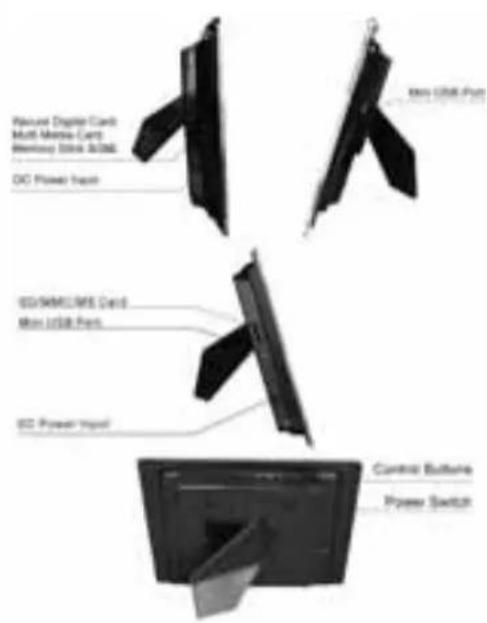
Structure of the digital picture frame and the remote control:
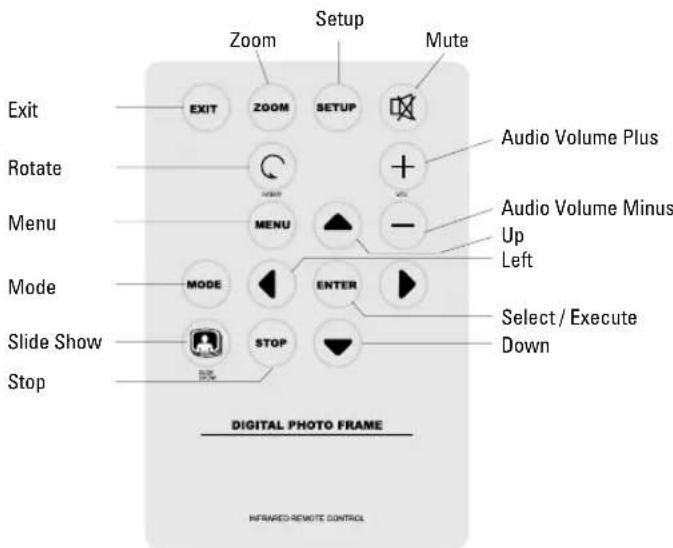
Remote Control Functions:
"ON" button: for switching the digital picture frame on or off
"MENU" button (= ,M^ ) : With this button, you get to the picture selection mode
"EXIT/ENTER" button = ,E^ : With this button, you confirm the desired menu entries and settings

- Buttons: The arrow keys are for
navigation and picture selection

Press to Rotate the photo 90 degree

Press to Zoom in photo

Turn on / Turn off Music Slide Show

Select the file to delete or copy
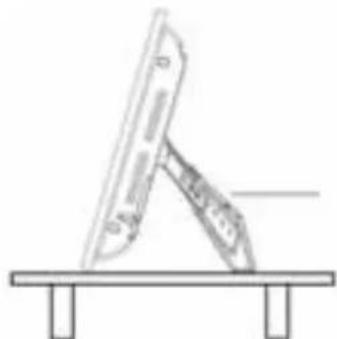
Adjustable stand:
The angle of the digital picture frame on the desk can be changed with the adjustable stand. The stand can be pulled out in 6 different lengths as you require.
Wall mounting:
There are installation holes on the rear of the digital picture frame to attach it to the wall using suitable screws.
Picture viewing:
Insert a memory card and switch on the digital picture frame. The start screen appears after a few seconds. The preset mode of the digital picture frame displays the photos on the memory card.
Use the ( 一 ) buttons in the function selection menu to select the required function as follows:
Card selection menu:
Selection of the memory card detected (varies according to the device specifi cation)
Advanced settings:
All setup/setting functions are available using the remote control. Some basic functions can be performed using the buttons located at the top of the digital picture frame.
| Setup/setting menu Submenus Functions | ||
| Screen display duration 5, 10, 30 and 60 seconds Slide show/image transfer speed | ||
| File description On | Off | Display the photo/fi le name |
| Folder mode On | Off | Display of folder structures |
| Representation format Normal/Smart | Zoom Adjustment of the photo | on the display |
| Power saving mode Off | after 15 minutes after 30 minutes after 60 minutes | Setting for automatic standby function |
| Display settings Brightness | Contrast | Control of the brightness and contrast display (using < and >) |
| Standard settings - | Restore default setting values | |
| System information | - | Information about the software version |
File browser:
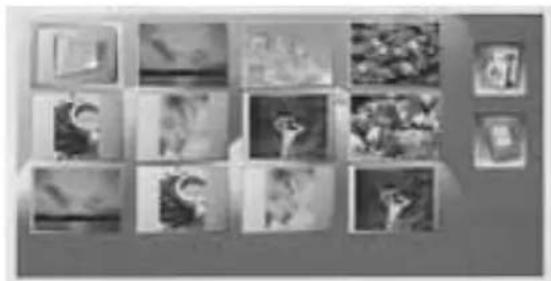
For convenient browsing of the images available. If different file directories/folders are available on the memory card used, these can be selected using the arrow buttons (on the remote control or the top of the digital picture frame) and opened using the ENTER (^ ) button. The file browser displays fi les in JPEG and JPG formats. You can delete fi les when viewing images in the file browser. Select the required image and press the "MENUR" button. Select the delete symbol and press the ENTER button to delete the file.
WARNING: Once a file has been deleted, it can not be restored.
Use as a card reader:
You can connect your digital picture frame to your computer via USB to access files on the inserted memory card or exchange/copy/delete data via the USB interface. You must switch the digital picture frame off before connecting it to your computer via USB. Proceed as follows to connect it:
- Switch the digital picture frame off
- Connect the USB cable provided separately with the picture frame (USB connection cable: A-connector with mini USB B-connector (B5 pin))
- Connect the digital picture frame to your computer
- Insert a memory card in the slot of the picture frame
- Switch on the digital picture frame using the „ON" main switch
After connecting the picture frame, it changes to USB mode. You can now access the memory card inserted in the picture frame using Windows Explorer.
WARNING: During the automatic slide show or display of individual images, no USB connection is possible. It is also not possible to start a slide show or view files while the digital picture frame is in operation.
Cleaning & Care:
Occasional care and cleaning of the device ensure a long service life. Use a soft, lint-free cloth (e.g. Hama item no. 42267 or 78399, etc.) to clean the device. Slightly dampen the cloth if the device is very dirty. However, never use strong solvents such as alcohol, petrol or thinners. This could attack the casing or the protective glass of the display.
Caution - Danger to life!
To prevent the risk of an electric shock, never open the cover of the digital picture frame, casing or power adapter components. There are no serviceable parts in the digital picture frame or power supply.
Warranty/customer service
CAUTION! Any guarantee or warranty claims are void if the device is opened by unauthorised persons or service workshops. Please contact the specialist dealer you purchased the device from if you find a fault with your digital picture frame. Your dealer can quickly deal with your customer service requirement without problem. Service and repairs on your digital picture frame must only be performed by authorised specialist workshops.
TROUBLESHOOTING:
The picture frame can not be switched on:
Cause: Problem with the electrical supply of the picture screen.
Check that the plug of the power adapter is connected correctly and completely. Also check that the power supply unit is connected to the power supply and supplied with electricity
The picture frame can no longer be operated when selecting files:
Cause: Safety violation in the internal software of the digital picture frame.
This may be due to the file format used. There are some config gurations that cause the software of the digital picture frame to crash. However, the cause does not lie with the technology/software of the digital picture screen, but with the file convention of the file to be displayed or played. If the digital picture frame can not be restored using the EXIT button in the function selection menu or can not be switched off, disconnect the picture frame from the mains supply. Reconnect it and switch it on again after a few seconds.
Films/images (according to the device specific cation) appear out of focus or grainy on the display
Cause: the data rate/quality or resolution is too low The quality loss of images is caused by compression and insufficient resolution. If it is possible to have a higher resolution for the data, use this when displaying or playing fi les.
Files are not displayed:
Cause: Resolution too high
Please note that loading requires a lot more time for large file sizes. Reduce the image size (dimensions in pixels) if required.
The sound is heavily distorted (varies according to the device specifi cation):
Cause: The volume level is too high
Reduce the volume level until the distortion disappears.
USB devices are not displayed when connected.
Cause: incompatible USB protocol
Not all devices support USB communication in the same way. If in doubt, test another device with the digital picture frame.
Data on a memory card can not be accessed.
Cause: incompatible memory card or incorrect data media format
There are some types of memory cards/media that are not compatible with the digital picture frame. In this case, the card is not recognised and can not be used to display or play files. Check whether the card uses the FAT or FAT32 file system.
The file name does not completely appear in the file menu or appears abbreviated.
Cause: File name is too long
The digital picture frame supports file names. File names that are too long can not always be fully displayed due to the limited display size and are therefore abbreviated. If the file name contains special characters and/or umlauts, these may be replaced by special characters/symbols.
Specifications:
Display: 7" TFT-LC display; 480 x 234 pixels;
USB interface: USB 2.0 high speed
Memory media for SD/SDHC/
MMC/MS/XD
Image format: JPEG, JPG
Outputs: USB device connection
Power supply: AC/DC adapter (12V, 1.5mA)
Operating temperature: 0^ 30^ (32 ~ 85 F)
Dimensions: approx. 25.0 × 3.0 × 18.5 cm
(WxDxH)
Space requirements: approx. 25.0 × 14.0 × 18.5 cm
(WxDxH)
Humidity: 40-64% RH (Non-condesing)
WARNING:
So-called pixel errors can occur depending on the manufacturing process. These manifest themselves as white or black pixels that permanently light up during display. Within the context of production tolerances, a max. 0.01% of these pixel errors measured on the total size of the screen are permitted as a tolerance and do not represent a product fault.
F Mode d'emploi
Mode d'emploi
Garantie/service client
Note on environmental protection:
Alter the implementation of the European Directive 2002/96/EU and 2008/96/EG in the national legal system, the following applies: Electric and electronic devices as well as batteries must not be disposed of with household waste. Consumers are obliged by law to return electrical and electronic devices as well as batteries at the end of their service lives to the public collecting points set up for this purpose or point of sale. Details to this are doll not by the national law of the respective country. This symbol on the product, the instruction manual or the package indicates that a product is subject to these regulations. By recycling, resuing the materials or other forms of utilising old devices/Batteries, you are making an important contribution to protecting our environment.
Class A information technology equipment
Warning! This device is categorized as class A equipment. This equipment can cause radio interference in living spaces. If this is the case, you can request the operator to undertake appropriate measures to prevent such interference.