
Slimline 00095237 - Digital photo frame HAMA - Free user manual and instructions
Find the device manual for free Slimline 00095237 HAMA in PDF.


| Product Type | Digital Photo Frame |
| Brand | Hama |
| Model | Slimline 00095237 |
| Display Size | 7 inches (diagonal) |
| Display Resolution | 800 x 480 pixels |
| Aspect Ratio | 16:9 |
| Supported Memory Cards | SD, SDHC, MMC |
| USB Port | Yes, USB 2.0 for connection to PC |
| Image Formats | JPEG, BMP, PNG |
| Video Playback | Motion JPEG (AVI) |
| Audio Playback | MP3 |
| Slideshow Modes | Multiple transition effects with adjustable intervals |
| Clock/Calendar | Built-in with alarm function |
| Remote Control | Included (infrared) |
| Power Supply | AC adapter (5V DC, 1A) |
| Dimensions (with stand) | Approx. 200 x 140 x 30 mm |
| Weight | Approx. 350 g |
| Mounting Options | Desktop stand (adjustable angle) and wall-mountable |
| Internal Memory | 128 MB (expandable via card) |
| Auto Power On/Off | Yes, programmable timer |
| Languages | Multi-OSD menu (English, French, German, etc.) |
| Certifications | CE, RoHS |
Frequently Asked Questions - Slimline 00095237 HAMA
User questions about Slimline 00095237 HAMA
0 question about this device. Answer the ones you know or ask your own.
Ask a new question about this device
Download the instructions for your Digital photo frame in PDF format for free! Find your manual Slimline 00095237 - HAMA and take your electronic device back in hand. On this page are published all the documents necessary for the use of your device. Slimline 00095237 by HAMA.
USER MANUAL Slimline 00095237 HAMA
Operating Instructions
GB
Mode d'emploi
F
natural_image
Black-and-white photo of a baby crawling on a bed inside a tablet frame (no text or symbols visible)Supporthotline .....29
Einführung
D
Vorwort
natural_image
Black-and-white photo of a baby crawling on a bed inside a rectangular frame (no text or symbols visible)
natural_image
Black electronic device with attached cable and power plug (no visible text or symbols)natural_image
Line drawing of a device with a circular component and a rotating shaft, showing no text or symbols.ACHTUNG
natural_image
Line drawing of a rectangular electronic device with a USB cable and connector, no text or symbols present
D
natural_image
Black-and-white photo collage of various black-and-white photographs displayed in a wall, including bicycles, flowers, and rocks (no text or symbols visible)Helligkeit
Photo / Bild zoomen
Photo / Bild drehen
Symbole

Video / Film Name

Dateigröße

Status: Pause


natural_image
Two horizontal sliders with icons, one labeled 1 and the other 4, both without any text or symbols.D
Datei
natural_image
Line drawing showing a laptop connected to a device via cable (no text or symbols)natural_image
Pure electrical circuit lines without any symbolsD
About these operating
instructions....31
Copyright 31
Warnings 32
Intended use ....33
Limitation of liability .....33
Safety 34
Basic safety instructions.....34
Danger due to electrical
current 34
Handling the batteries .....35
Design and functionality . . .35
Digital picture frame
(rear view) 35
Getting started .....37
Safety instructions .....37
Extent of delivery and
delivery inspection .....37
Unpacking 38
Disposal of packaging
materials....38
Positioning requirements ....38
Electrical connection .....39
Installation and connections..39
Operation .....40
Using the menu .....40
Main menu 41
Changing the operating
language 42
Functions .....42
Image....42
Music 43
Movie 44
File 46
Additional functions .....48
Calendar....48
Alarm 48
Use as a card reader .....49
System settings .....50
Battery:....51
Charging the battery /
charge state: 51
Cleaning and care .....52
Safety instructions .....52
Cleaning....52
Troubleshooting....52
Safety instructions .....52
Causes of errors and error
rectification....53
Secondary battery .....54
Storage ....55
Disposal ....55
Device disposal .....55
Battery disposal .....55
Appendix....56
Technical specifications .....56
Menüstruktur des DPF ..... 57
Support information .....57
Introduction
Preface
Dear customer,
By purchasing this Hama digital picture frame, you have chosen a quality product which conforms to state-of-the-art development standards in technology and functionality.
Read the following information carefully in order to familiarise yourself with the device and its full range of functions.
We hope you enjoy this device for many years to come.
About these operating instructions
These operating instructions are an integral part of the digital picture frame (hereinafter referred to as the "device"), and provide important information on the intended use, safety, connection and operation of the device.
The operating instructions must be kept near the device at all times. They must be read and adhered to by all persons responsible for operating the device or troubleshooting.
Keep these instructions in a safe place and pass them on to subsequent users or owners together with the device.
Copyright
This documentation is protected by copyright.
It may not be reprinted or reproduced (including illustrations) in whole or in part without prior written consent from the manufacturer. This also applies after changes to the documentation.
Warnings
The following warnings are used in these operating instructions:
GB
DANGER
A warning of this type indicates the immediate threat of a dangerous situation.
Death or serious injuries can result if this situation is not avoided.
▶ Follow the information in this warning to prevent death or serious personal injury.
WARNING
A warning of this type indicates the possibility of a dangerous situation.
Injuries and/or material damage can result if this situation is not avoided.
▶ Follow the information in this warning to prevent personal injury or material damage.
CAUTION
A warning of this type indicates the possibility of material damage.
Material damage can result if this situation is not avoided.
▶ Observe the information in this warning to prevent material damage.
NOTE
▶ A note indicates additional useful information for handling the device.
Intended use
This device is only intended for indoor use to display photos, videos and music files.
Other uses or uses that go beyond this use are considered unintended.

WARNING
Danger caused by unintended use
Danger may result from unintended or other use of the device.
▶ Only use the device as intended.
▶ Adhere to the procedures described in these operating instructions.
All claims made as a result of damage caused by unintended use are excluded.
The operator alone bears the risk resulting from unintended use.
Limitation of liability
All technical information, data and instructions contained in these operating instructions were current at the time of printing and written to the best of our knowledge based on previous experiences and findings.
Therefore, no claims can be derived from the specifications, illustrations and descriptions contained in these instructions.
The manufacturer accepts no liability for damages caused by failure to observe these instructions, improper use or repairs, unauthorised device modifications or the use of non-approved spare parts.
CAUTION
▶ Pixel defects can occur due to the manufacturing process. These manifest themselves as white or black pixels that permanently light up during playback. Within the context of production tolerances, a maximum of 0.01% of these pixel defects measured against the total size of the screen are permitted as a tolerance and are not considered a product defect.
Safety
GB
This chapter contains important safety instructions for handling the device.
This device complies with the applicable safety regulations. However, improper use can lead to personal injury or material damage.
Basic safety instructions
Observe the following safety instructions to ensure safe handling of the device:
■ Visually inspect the device before using it to make sure that there is no external damage. Do not operate the device if it is damaged.
■ Only have the device repaired by specialists. Improper repair work invalidates any warranty claims.
■ Faulty components may be replaced with original spare parts only. Only original spare parts can guarantee that applicable safety requirements are adhered to.
■ Disconnect the power supply adapter before cleaning the device, during thunderstorms, and in the event of malfunctions.
- Keep the device away from moisture and protect it from being penetrated by liquids or objects. Disconnect the power supply adapter immediately if the device comes into contact with liquids.
■ Do not place any objects on top of the device.
Danger due to electrical current

DANGER
Danger of death due to electrical current
Coming into contact with live electrical lines or components can be fatal.
Adhere to the following safety instructions to avoid dangers associated with electrical current:
▶ Only use the included power supply adapter, since otherwise the device may be damaged.
▶ Do not operate the device when the power supply adapter, connection cable or plug is damaged.
▶ Do not open the housing on the device or on the power supply adapter under any circumstances. There is a risk of electric shock when coming into contact with live connections or if the electronic or mechanical layout of the device is altered.
Handling the batteries

WARNING
Danger due to improper use
▶ For the safe handling of batteries, follow the safety instructions on page 54!
Design and functionality
Digital picture frame (rear view)

GB
- Audio out
- SD/MMC card reader
- Mini USB
- Socket for power supply adapter
- Front frame
- LCD display
- Navigation button – down ▼
- Navigation button-up
- ENTER/OK button
- ESC/back button
- ON/OFF switch
- Navigation button – photo back/left
- Navigation button – next photo/right ▶
- RESET button
- Power ON LED
- Base support
- Loudspeaker
Getting started
Safety instructions
GB
WARNING
Personal injury and material damage may occur when using the device for the first time.
Observe the following safety instructions to avoid these dangers.
▶ Packaging materials may not be used as toys. There is a risk of suffocation.
▶ Follow the instructions for positioning the device and making the electrical connections to prevent personal injury and material damage.
Extent of delivery and delivery inspection
The device includes the following components as standard:

natural_image
Black-and-white photo of a baby lying on the floor inside a rectangular frame (no text or symbols visible)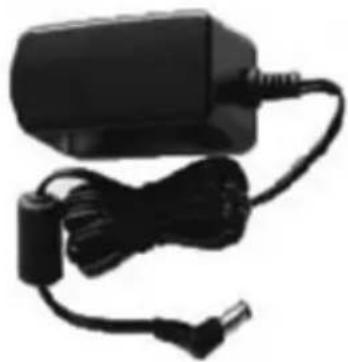
natural_image
Black electronic device with attached cable and connector (no visible text or symbols)- Digital picture frame
• Power supply adapter - Operating instructions (not shown)
- Base (not shown)
• USB connecting cable for PC (not shown) - USB adapter cable for connecting a USB storage medium to the device (not shown)
NOTE
▶ Check the delivery for completeness and visible damage. Inform your supplier/dealer in the event of incomplete or damaged deliveries.
Unpacking
When unpacking the device, proceed as follows:
◆ Take the device out of the box and remove the packaging material.
◆ Remove the packaging material for the accessories.
◆ Remove the protection foil on the LCD colour screen of the device.
Disposal of packaging materials

The packaging protects the device from damage during transportation. The packaging materials have been selected according to environmental and disposal factors and can therefore be recycled.
Recycling packaging saves raw materials and reduces the volume of waste. Dispose of packaging materials that are no longer needed according to locally applicable regulations.
NOTE
▶ If possible, retain the original packaging for the duration of the warranty period so that you can pack the device properly in the event of warranty claims.
Positioning requirements
The device must be positioned according to the following requirements in order to ensure safe and error-free operation:
■ Place the device on a flat, level surface.
■ Do not place the device in a hot, wet, or very humid environment.
■ The device requires adequate air circulation in order to function properly. During operation, do not place the device on soft surfaces, carpets, or other materials that might block air circulation.
■ The socket must be easily accessible so that it is easy to disconnect the power supply adapter in case of an emergency.
Electrical connection
The electrical connections must be made according to the following instructions in order to ensure safe and error-free operation:
■ Before you connect the device, compare the connection data for the power supply adapter (voltage and frequency) on the type plate with that of your mains power supply. This data must match to avoid damage to the device.
- Keep the cable away from hot surfaces and sharp edges.
■ Make sure not to bend the cable or pull it too tightly.
Installation and connections
For continuous playback, the device can be placed on a flat surface.
◆ The device can only be set up in the horizontal orientation.
◆ Remove the base from the packaging and screw it into the base support.
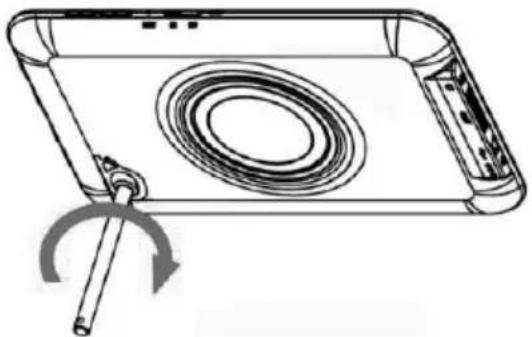
natural_image
Line drawing of a device with a circular component and a rotating shaft, showing no text or symbols.CAUTION
The device can be damaged if it tips over or falls down.
▶ Make sure that the device cannot tip over.
◆ Connect the connection cable to the socket on the device and plug in the power supply adapter.
NOTE
▶ Only use the enclosed power supply adapter.
Operation
GB
Using the menu
The device is equipped with a user-friendly menu. The menu appears on the screen.

◆ Switch on the device by pressing the ON/OFF switch
◆ The following types of storage media can be read:
- SD/SDHC cards
- MMC cards
- USB storage media
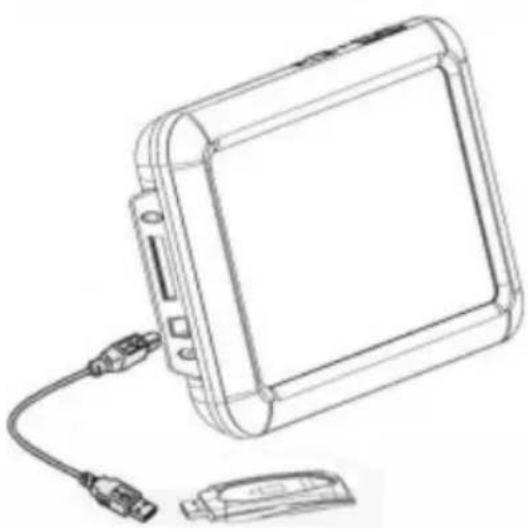
natural_image
Line drawing of a rectangular electronic device with a cable and connector, no text or symbols present
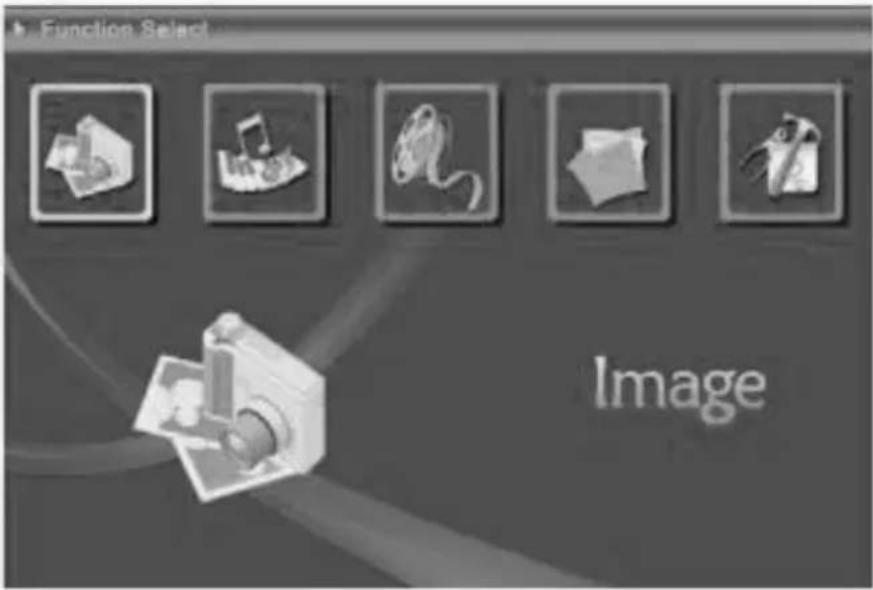
Main menu (function selection)
First select your desired storage medium to go to the main menu.
In the menu, use the buttons ◀ to move around, and select the desired function.
When you confirm your selection using "OK", a corresponding submenu appears. In this menu, use the buttons ◀▶▲▼ to move around, and select the desired line. The selected line is highlighted in colour.
Confirm your selection using "OK".
Use "ESC" to exit the current menu level.
For orientation purposes, the menu structure is also included in the Appendix.
You can operate the device using the buttons on the sides.
Changing the operating language
The operating language is set to German („Deutsch“) at the factory. To change this setting, proceed as follows:
◆ First select a desired storage medium to go to the main menu.
◆ Select the Setup menu.
In the first submenu, you can now select your operating language confirm with "OK". Use "ESC" to return to the main menu.
Functions
Image
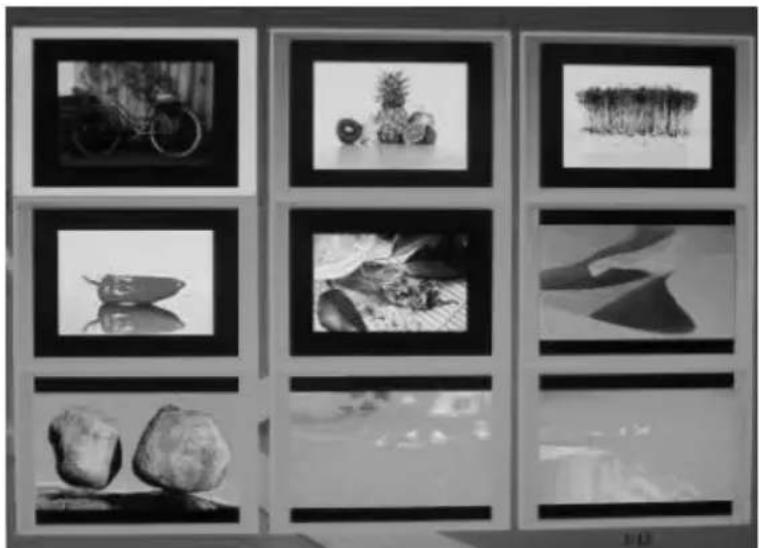
Using the buttons < >, move to the menu item and then confirm using "OK" to display photos. A "thumbnail" preview of your stored photos now appears.
natural_image
Black-and-white photo collage of various nature and objects displayed in framed frames (no text or symbols visible)Start the photo slide show by pressing the "OK" button on your device.
During the slide show, press the "OK" button to enter a submenu that allows you to change settings for the photo or the slide show.
GB
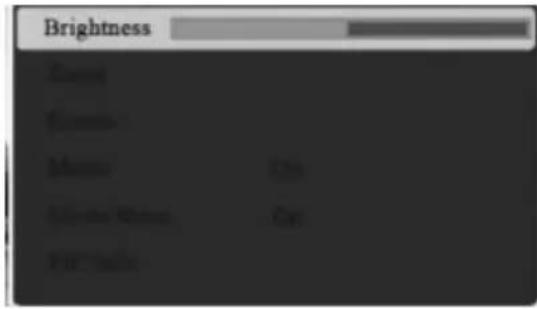
Brightness
Zoom photo/image
Rotate photo/image
Switch background music on/off
Switch slide show on/off
Display photo/image information
Music
Using the buttons ◀▶, on the top of the device, move to the menu item and then confirm with the "OK" button to show the music files. Select your desired song with the buttons ▲▼ and then press "OK" to play the song. The "OK" button also functions as a play/pause button.

GB
Symbols
Song title

Status: Play
File size
Status: Pause

Name of the artist

Elapsed time information
NOTE
▶ You can set the music repeat mode in the Setup menu.
Movie
Using the buttons ◀▶, on the top of the device, move to the menu item 📂 and then confirm with the "OK" button to show the movie files. Select your desired movie with the buttons ▲▼ and press "OK" to play the movie. The "OK" button also functions as a play/pause button.
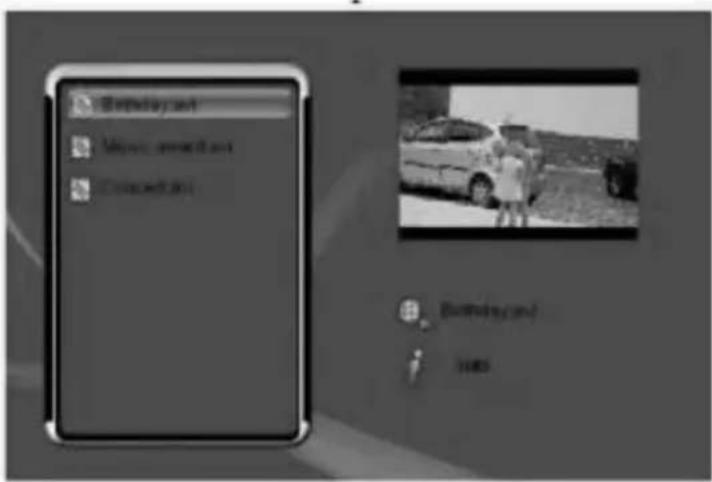
Symbols

Video/movie name

File size

Status: Pause

2x/3x/4x rewind or fast forward


NOTE
▶ You can set the music repeat mode in the Setup menu.
▶ If you want to change the volume or the brightness during playback, press the button ▲ on the side of the device – once to change the volume or twice to change the brightness – and then press button ◀ ▶ on the top of the device to make the change. Press "OK" to save.

natural_image
Two horizontal sliders with icons, one white and one gray, against a dark background (no text or symbols)File
GB
Using the buttons ◀▶, on the top of the device, move to the menu item and then confirm with the "OK" button to display the file browser. Choose your desired file with the buttons ▲▼ and then press "OK" to display the file.
You can copy and delete photos, music and movies in the file browser. Proceed as follows:
◆ Use the buttons ▲ ▼ to select the desired file.
◆ Mark the selected file by pressing the button ▶ - on the top of the device.
◆ Press the "OK" button on your device for at least 3 seconds if you wish to copy or delete the selected files.
A new submenu appears:
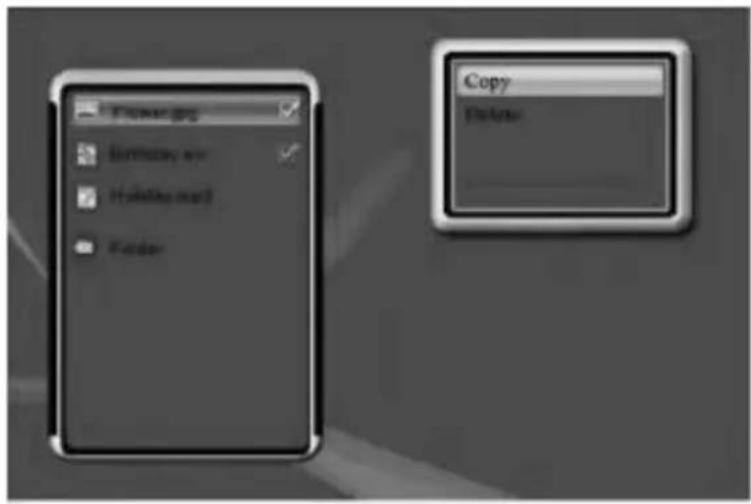
◆ Select "Copy" and then press the "OK" button to copy the selected files to another storage medium.
D: NAND (internal memory)
E: USB storage medium
C: SD/SDHC, MMC memory card
◆ Select the desired storage medium and confirm this with the ▶ - button on your device.
◆ Select "Delete" and then "OK" and select:

Irrevocable deletion
Cancel
to delete the selected files from the storage medium.
WARNING
▶ Once a file/photo has been deleted, this action cannot be undone.
NOTE
▶ During the copying or deletion process, the storage medium must not be removed under any circumstances.
▶ Use "ESC" on your remote control to return to the main menu
Additional functions
The following additional functions are available:
GB
Calendar
The calendar display starts automatically after you switch on your device. To set up this function, proceed as follows: In the main menu, use the buttons ◀▶ on the top of the device to move to the menu item "Setup" and confirm with "OK". Go to the menu item "Start Settings". Here you can choose whether or not the device should start in "Calendar Mode". You can also set up the time and date in the Setup menu.

Alarm
The alarm is displayed as a symbol in the calendar. The Alarm time is set in the Setup menu (see page 50/51).
Use as a card reader
This device has a card reader function. You can connect your device to your computer via USB to access files on the inserted storage medium or the internal memory or exchange/copy/delete data via the USB interface. Proceed as follows to connect the device to your computer using USB type A:

◆ Switch off the device.
◆ Connect the device with your computer using the included USB cable.
◆ Switch your device back on. The device now switches automatically to "PC mode"; this appears on the display of the device as well.

◆ If the USB connection to your computer is functioning properly, the device is recognised automatically and two drive letters are assigned.
◆ To exit "PC mode", switch off the device and remove the USB connection cable.
System settings
First select your desired storage medium to go to the main menu.
In the menu, use the buttons ◀ to move around, and select the desired function.
When you confirm your selection using "OK", a corresponding submenu appears. In this menu, use the buttons on the side ◀▶▲▼ to move around, and select the desired line. The selected line is highlighted in colour.
Confirm your selection using "OK".
Use "ESC" to exit the current menu level.
For orientation purposes, the menu structure is also included in the Appendix.
You can control the device using the buttons on the rear or with the included remote control.

| Language | Select your desired menu/operating language |
| Slide show time | Select the time interval at which you want the images to change. A setting from 3 seconds to a maximum of 1 hour is possible. |
| Transition Effect | Select from 16 different transition effects to be used when the images change. The “Random” setting causes the effects to be random. |
| Screen display | Choose between normal or cinema format for the display format in which the photo or video should be shown. |
| Music repeat mode | This is where you can activate (On/All) or deactivate (Off) automatic playback for the music function. |
| Movie repeat mode | This is where you can activate (On/All) or deactivate (Off) automatic playback for the movie function. |
| StartUpSet | Select which function you want the device to start in. Photos, music, film, combo (photos + music), calendar |
| Time | You can set the current time here. |
| Alarm | You can set the alarm time and activate the alarm here. |
| Default | Function menu to reset to factory settings. |
| Version | Function menu for displaying the current firmware |
GB
Charging the battery / charge state:
Charging time when switched off: 5 hours
Charging time during operation: 6 hours
Battery life: 2 hours
When the battery is fully charged, the LED will switch off, and you can disconnect the power supply unit from the photo frame. Caution: Only charge the built-in battery with the power supply unit provided.
The battery display in the top right corner of the picture shows you when the battery is dead and needs to be charged.

natural_image
Pure electrical circuit lines without any symbolsCleaning and care
This chapter contains important information for the cleaning and care of the device.
Safety instructions
CAUTION
Moisture can damage the device.
▶ To prevent irreparable damage, make sure that no moisture gets into the device when you clean it.
Cleaning
The display on your device is located behind protective glass.
■ Only clean the display with a dry, soft cloth.
■ Do not apply pressure to the screen surface when you clean the device.
■ To keep from damaging the surface, do not use solvents or alcohol-based cleaners to clean the device.
NOTE
▶ For gentle cleaning and care of the display, we recommend that you use a microfibre cleaning cloth.
■ Clean the rest of the device with a dry cloth. You can lightly dampen the cloth if the device is very dirty.
Troubleshooting
This chapter contains important information for localising and rectifying errors. Observe the information to avoid dangers and material damage.
Safety instructions
WARNING
Observe the following safety instructions to avoid safety risks and material damage:
▶ Repairs to electrical devices may only be carried out by specialists who have been trained by the manufacturer. Improper repairs can result in significant danger to the operator and damage to the device.
Causes of errors and error rectification
The following table can be used to localise and rectify minor errors with the device:
| Error | Possible cause | Solution | |
| General information | Display is blank | Device is switched off | Switch on the device. |
| Power supply adapter not connected correctly | Ensure that the power supply adapter is plugged in and connected to the device. | ||
| No mains power | Check your fuse box. | ||
| Device is faulty | Inform our customer service department. | ||
| DPF | No image appears | No storage medium is inserted | Insert a storage medium. |
| The storage medium does not contain data | Check your storage medium. | ||
| No Sound | The device is set to “Mute” | Increase the volume of the device | |
| Video/music does not play | No storage medium is inserted | Insert a storage medium. | |
| The storage medium does not contain any files | Check your storage medium | ||
| Music does not play | Incorrect format | Convert the music file to mp3 format | |
| Videos do not play, or playback is not smooth | Incorrect format | Convert the video to a different format |
NOTE
▶ Contact our customer service department if the problem remains after taking the steps detailed above.
Secondary battery (rechargeable)
GB
This rechargeable battery is equipped with special cells. These high-quality cells, when properly handled, provide a very long service life.
Operating instructions:
Please read the following instructions carefully and keep them for future reference. Use your new battery in the manner instructed in the manufacturer's instructions for use. Only use this battery for the uses for which it is intended.
- Switch off your device before changing the battery.
- Your new battery is uncharged when you receive it and must be completely charged before use. Follow the original operating instructions provided by the manufacturer when doing so.
- The battery may become slightly warm during charging. This is normal.
- The battery may become completely discharged if it is stored for a longer period of time. Because of this, we recommend that you charge the battery regularly.
- Avoid totally discharging the battery.
- The battery may be charged at any time; it is not necessary to discharge it completely before charging.
- Do not charge the batteries over a longer period of time if they are not being used.
- When possible, remove the batteries from devices that are not being used for a longer period of time.
- Store the battery in a cool and dry location when it is not being used.
- The battery may lose power when used at lower temperatures.
Safety instructions
- Batteries are not toys. Keep them away from children.
- If the batteries leak, keep the liquid away from skin and eyes. In case of contact with the liquid, wash the affected area with plenty of water and seek medical attention.
Failure to observe the following items may lead to electrolyte leakage, venting of gas, fire or explosion.
- Never open or change the battery's casing.
- Do not exert mechanical stress on the battery.
- Never throw the battery into fire.
- Never expose the battery to temperatures above 60ircC .
- Never expose the battery to direct sunlight for a longer period of time.
- Never expose the battery to water or throw it into water.
- Never short-circuit the battery.
- Never drop the battery or expose it to strong shocks.
- Never use defective or damaged batteries.
- Never charge or discharge the battery with the improper polarity.
- Never over-charge the battery.
- Use only batteries of the same manufacturer, capacity, size and type together.
- Charge the battery only at temperatures between 5ircC and 40ircC .
- Use only a suitable charger when charging the battery. Follow the charger's operating instructions.
Disposal: If possible, only dispose of the batteries when discharged. If this is not possible, insulate the contacts using rubber or adhesive tape to reduce the risk of short-circuits. See the safety instructions.
Note on environmental protection:
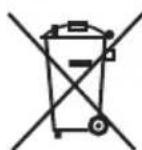
After the implementation of the European Directive 2002/96/EU and 2006/66/EU in the national legal system, the following applies:
Electric and electronic devices as well as batteries must not be disposed of with household waste. Consumers are obliged by law to return electrical and electronic devices as well as batteries at the end of their service lives to the public collecting points set up for this purpose or point of sale. Details to this are defined by the national law of the respective country.
This symbol on the product, the instruction manual or the package indicates that a product is subject to these regulations.
By recycling, reusing the materials or other forms of utilising old devices/Batteries, you are making an important contribution to protecting our environment.
Storage
If you are not going to use the device for an extended period of time, switch off the device, disconnect it from power, and store it in a clean, dry place that is away from direct sunlight.
GB
Disposal
Device disposal

After the implementation of the European Directive 2002/96/EU and 2006/66/EU in the national legal system, the following applies:
Electric and electronic devices as well as batteries must not be disposed of with household waste. Consumers are obliged by law to return electrical and electronic devices as well as batteries at the end of their service lives to the public collecting points set up for this purpose or point of sale. Details to this are defined by the national law of the respective country. This symbol on the product, the instruction manual or the package indicates that a product is subject to these regulations. By recycling, reusing the materials or other forms of utilising old devices/Batteries, you are making an important contribution to protecting our environment.
Battery disposal
Batteries must not be disposed of with household waste. Consumers are obliged by law to return batteries to the public collection points set up for this purpose. This legal obligation ensures that batteries are disposed of in an environmentally-friendly fashion. Only return discharged batteries.
Appendix
Technical specifications
GB
| General information | |
| Power supply input | 100-240 V AC / 50/60 Hz / 0,4 A Max |
| Power supply output | 5 V DC / 2 A |
| Power consumption | < 7 W |
| Dimensions (L x W x H) | 183 x 14 x 124 mm(without the base) |
| Weight | ca. 500 g |
| Li-Polymer Akku | 3,7 V / 1,8 Ah / 6,7 Wh |
| Screen | |
| Display | 17,8 cm (=7") 16:9 TFT |
| Resolution | 800 x 480 (RGB) |
| Brightness | 200cd/m2 |
| Contrast | 400:1 |
| Remote control | |
| Button cell battery (CR 2025) | 3 V |
| Compatible storage media |
| SD/SDHC/MMC |
| External connections |
| mini USB 2.0 OTG (Host & Device) |
| Audio Out 2.5 mm Klinke |
| Supported file formats | |
| JPEG,JPG (bis zu 16 Megapixels) | |
| MP3 | |
| MPEG 1/2, MJPEG (.avi) | (Video size ≤ 320 x 240) |
| MPEG 4 (.avi) | (Video size ≤ 352 x 288) |
| Internal memory |
| 2 GB |
Contact your dealer or Hama Product Consulting if you have a faulty product:
Support hotline – Hama Product Consulting (German/English):
Phone: +49 (0) 9091/502-115
Fax: +49 (0) 9091 / 502 - 272
Email: mailto:produktberatung@hama.de
For more product information see www.hama.com.
CE
⑤ Mode d'emploi
Sommaire
Introduction .....59
Préface....59
Menu principal .....69
Support technique .....85
Introduction
Préface
Chère cliente, cher client,
- Pied (sans illustration)
natural_image
Line drawing of a device with a circular component and a curved arrow indicating rotation (no text or symbols)ATTENTION
natural_image
Line drawing of a rectangular electronic device with a USB cable and connector, shown in two views (no text or symbols)
natural_image
Black-and-white photo collage of various black-and-white photographs displayed in a grid, including bicycles, flowers, and rocks (no text or symbols visible)Luminosité
Symboles

natural_image
Two horizontal sliders with icons, one labeled 1 and the other labeled 4, both without any text or symbols.Fichier
natural_image
Pure electrical circuit lines without any symbolsnatural_image
Black-and-white photo of a baby lying on the floor inside a rectangular frame (no text or symbols visible)
natural_image
Black plastic electrical adapter with attached cable and power plug (no visible text or symbols)natural_image
Line drawing of a device with a circular component and a rotating shaft, showing no text or symbols.ATENCIÓN
natural_image
Line drawing of a rectangular electronic device with a USB cable and connector, shown without any text or symbols.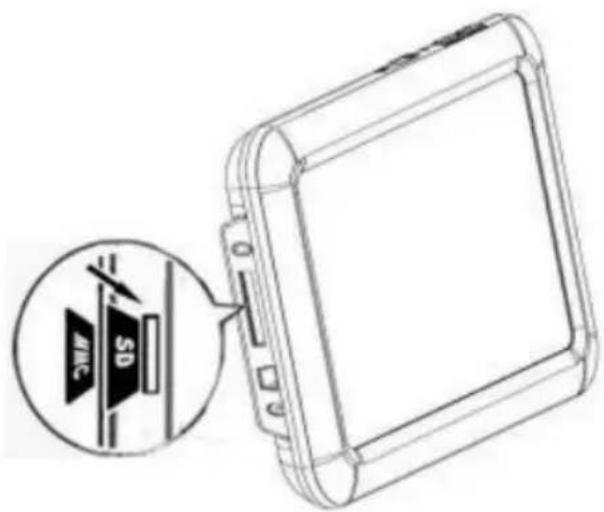
natural_image
Black-and-white photo collage of various still life photographs displayed in a framed gallery (no visible text or labels)Brillo
natural_image
Close-up of a textured surface with horizontal striations and a dark horizontal band at the bottom (no text or symbols)Símbolos

Título musical

Estado: Reproducir

Tamaño de datos

Estado: Pausa
Símbolos
natural_image
Two horizontal sliders with icons, one white and one black, against a gray background (no text or symbols)Archivo
natural_image
Pure electrical circuit lines without any symbolsLimpieza y cuidadod
natural_image
Line drawing of a device with a circular component and a rotating shaft, showing no text or symbols.ATTENTIE
natural_image
Line drawing of a rectangular electronic device with a USB cable and connector, shown from an external cable (no text or symbols present)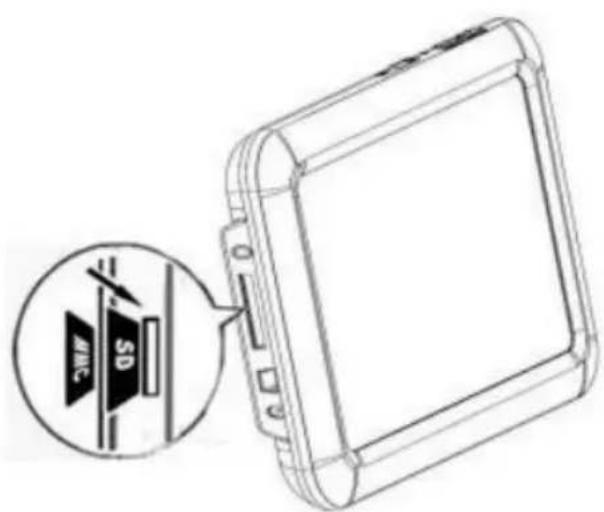
natural_image
Black-and-white photo collage of framed artworks and objects, including bicycles, flowers, peaches, rocks, and abstract shapes (no text or symbols visible)Helderheid

natural_image
Pure horizontal gradient bar with no text, numbers, or symbolsSymbolen

Muziektitel

Status: play
Gegevensgro- otte

Status: pauze

Naam muzikant

Info tijdverloop
AANWIJZING

natural_image
Pure horizontal gradient bar with no text, numbers, or symbolsSymbolen

Naam video/film

Bestandsformaat

Status: pauze


natural_image
Two horizontal sliders with icons, one white and one white with a circle, against a gray background (no text or symbols)Bestand
natural_image
Line drawing showing a laptop connected to a device via cable (no text or symbols)NL
natural_image
Simple battery icon with no text or symbolsMenu structure for the DPF

flowchart
graph TD
    A["Opslagmedium"] --> B["Photo"]
    A --> C["Musik"]
    A --> D["Film"]
    A --> E["Bestandsbrowser"]
    A --> F["Kopieren/wissen van gegevens"]
    A --> G["Setup"]
    G --> H["Menutaal"]
    G --> I["Diashow tijd"]
    G --> J["Beeldwisseling"]
    G --> K["Beeldschermweergave modus"]
    G --> L["Muziek-herhaal-modus"]
    G --> M["Film-herhaal-modus"]
    G --> N["Start Instelling"]
    G --> O["Tijd Instelling"]
    G --> P["Alarm Instelling"]
    G --> Q["Standaard Instelling"]
    G --> R["Versie"]
    S["Kalender (mits geactiveerd in „Start instelling„)"]
    T["CardReader (mogelijk, mits op pc aangesloten)"]
Supportinformatie
natural_image
Black-and-white photo of a baby on a blanket next to an electric charger (no text or symbols visible)natural_image
Line drawing of a device with a circular vent and a curved arrow indicating rotation (no text or symbols)ATTENZIONE
natural_image
Line drawing of a rectangular electronic device with a cable and connector, no text or symbols present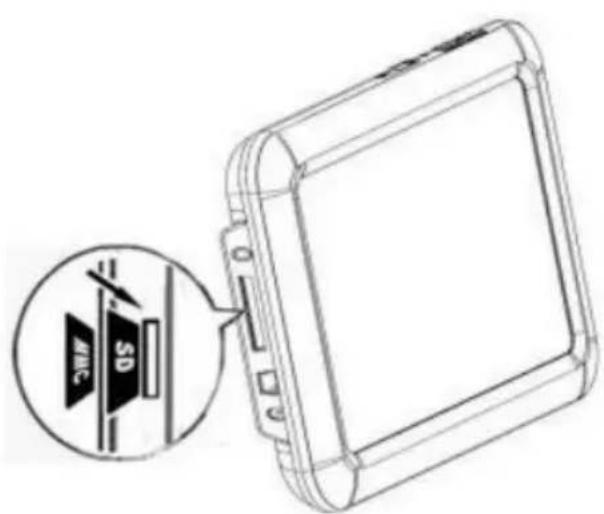
natural_image
Grid of black-and-white framed photos showing various still life and objects, including bicycles, plants, peppers, rocks, and abstract shapes (no text or symbols visible)Luminosità

Simboli

Nome film /video
Dimensione file

Stato: pausa


natural_image
Pure electrical circuit lines without any symbols
natural_image
Gray-scale icon of a speaker with sound waves, no text or symbols presentFile
natural_image
Simple battery icon with no text or symbolsPulizia e cura
natural_image
Close-up of a textured surface with horizontal striations and a dark horizontal band at the bottom (no text or symbols)natural_image
Black-and-white photo of a baby on a tablet and a charging plug (no text or symbols visible)natural_image
Line drawing of a device with a circular component and a curved arrow indicating rotation (no text or symbols)POZOR
natural_image
Line drawing of a rectangular electronic device with a cable and connector, no text or symbols present
natural_image
Black-and-white photo collage of framed artworks and objects, including bicycles, fruits, and rocks (no text or symbols visible)
natural_image
Pure horizontal gradient bar with no text, numbers, or symbolsnatural_image
Close-up of a textured surface with horizontal striations and a dark horizontal band at the bottom (no text or symbols)Symboly

Hudební skladba

Stav: Play

Velikost souboru

Stav: Pauza

Jméno interpreta


natural_image
Pure horizontal gradient bar with no text, numbers, or symbolsSymboly

Název video / filmu
Velikost souboru

Stav: Pauza


natural_image
Pure electrical circuit lines without any symbols
natural_image
Gray-scale icon set showing a speaker and playback controls (no text or symbols)Soubor
natural_image
Line drawing showing a laptop connected to a device via cable (no text or symbols)CZ
natural_image
Pure electrical circuit lines without any symbolsČištění a údržba
natural_image
Pure grayscale gradient with no text, symbols, or identifiable objectshama®
Hama GmbH & Co KG
Dresdner Str. 9
D-86651 Monheim/Germany
For more user manuals in other languages, please visit
www.hama.com

- Einführung
- Vorwort
- ACHTUNG
- D
- Datei
- Safety 34
- Design and functionality . . .35
- Getting started .....37
- Operation .....40
- Functions .....42
- Additional functions .....48
- Battery:....51
- Cleaning and care .....52
- Troubleshooting....52
- Storage ....55
- Disposal ....55
- Appendix....56
- Introduction
- Preface
- About these operating instructions
- Copyright
- Warnings
- DANGER
- WARNING
- CAUTION
- NOTE
- Intended use
- Danger caused by unintended use
- Limitation of liability
- Safety
- Basic safety instructions
- Danger due to electrical current
- Danger of death due to electrical current
- Coming into contact with live electrical lines or components can be fatal.
- Handling the batteries
- Danger due to improper use
- Design and functionality
- Digital picture frame (rear view)
- GB
- Getting started
- Safety instructions
- Extent of delivery and delivery inspection
- Unpacking
- Disposal of packaging materials
- Positioning requirements
- Electrical connection
- Installation and connections
- Operation
- Using the menu
- Main menu (function selection)
- Changing the operating language
- Functions
- Image
- Music
- Symbols
- Movie
- File
- Additional functions
- Calendar
- Alarm
- Use as a card reader
- System settings
- Charging the battery / charge state:
- Cleaning and care
- Moisture can damage the device.
- Cleaning
- Troubleshooting
- Causes of errors and error rectification
- Secondary battery (rechargeable)
- Operating instructions:
- Note on environmental protection:
- Storage
- Disposal
- Device disposal
- Battery disposal
- Appendix
- Technical specifications
- ⑤ Mode d'emploi
- Sommaire
- Introduction .....59
- Préface
- ATTENTION
- Symboles
- Fichier
- ATENCIÓN
- Brillo
- Símbolos
- Archivo
- Limpieza y cuidadod
- ATTENTIE
- Symbolen
- AANWIJZING
- Bestand
- Supportinformatie
- ATTENZIONE
- Pulizia e cura
- POZOR
- Symboly
- Soubor
- Čištění a údržba
- hama®
Brand : HAMA
Model : Slimline 00095237
Category : Digital photo frame