AP2700 - Printer AGFA - Free user manual and instructions
Find the device manual for free AP2700 AGFA in PDF.



User questions about AP2700 AGFA
0 question about this device. Answer the ones you know or ask your own.
Ask a new question about this device
Download the instructions for your Printer in PDF format for free! Find your manual AP2700 - AGFA and take your electronic device back in hand. On this page are published all the documents necessary for the use of your device. AP2700 by AGFA.
USER MANUAL AP2700 AGFA
Photo Printer AP2700
= u x,dy = v y,dz = w z.

AGFAPHOTO
English
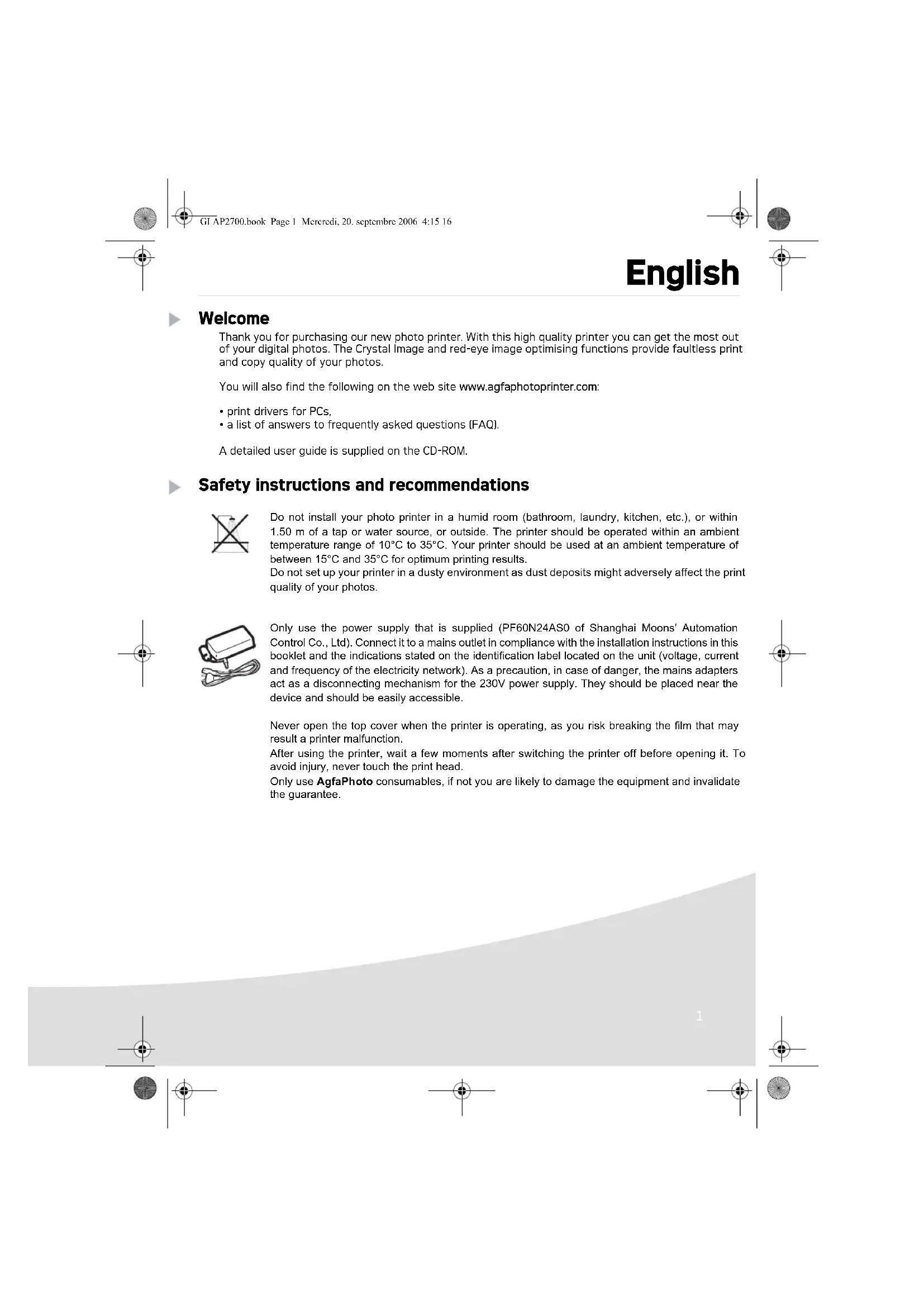
Welcome
Thank you for purchasing our new photo printer. With this high quality printer you can get the most out of your digital photos. The Crystal Image and red-eye image optimising functions provide faultless print and copy quality of your photos.
You will also find the following on the web site www.agfaphotoprinter.com:
- print drivers for PCs.
- a list of answers to frequently asked questions (FAQ).
A detailed user guide is supplied on the CD-ROM.
Safety Instructions and recommendations

Do not install your photo printer in a humid room (bathroom, laundry, kitchen, etc.), or within 1.50m of a tap or water source, or outside. The printer should be operated within an ambient temperature range of 10^ to 35^ . Your printer should be used at an ambient temperature of between 15^ and 35^ for optimum printing results.
Do not set up your printer in a dusty environment as dust deposits might adversely affect the print quality of your photos.
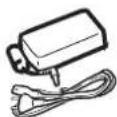
Only use the power supply that is supplied (PF60N24AS0 of Shanghai Moons' Automation Control Co., Ltd). Connect it to a mains outlet in compliance with the installation instructions in this booklet and the indications stated on the identification label located on the unit (voltage, current and frequency of the electricity network). As a precaution, in case of danger, the mains adapters act as a disconnecting mechanism for the 230V power supply. They should be placed near the device and should be easily accessible.
Never open the top cover when the printer is operating, as you risk breaking the film that may result in a printer malfunction.
After using the printer, wait a few moments after switching the printer off before opening it. To avoid injury, never touch the print head.
Only use AgfaPhoto consumables, if not you are likely to damage the equipment and invalidate the guarantee.
The crossed-out waste bin stuck on the product means that the product belongs to the family of electrical and electronic equipment.
In this respect, the European regulations ask you to dispose of it selectively:
- At sales points in the event of the purchase of similar equipment.
- At the collection points made available to you locally (drop-off centre, selective collection, etc.).
The CE marking certifies that the product meets the main requirements of the European Parliament and Council directive 1999/5/CE on telecommunications terminal equipment, regarding safety and health of users, and regarding electromagnetic interference.
The declaration of compliance can be consulted on the site www.agfaphotoprinter.com category "support", or can be requested at the following address:
AGFAPHOTO is used under license of Agfa-Gevaert AG
AP2700 is produced for Sagem Communication and distributed or sold by Sagem Communication
Sagem Communication - Customer relations department
Your printer and its accessories
Place your set in front of you. Take out the various components for your printer and check that the components shown below are present :
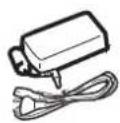
Power supply block

Mains lead
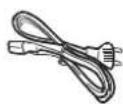
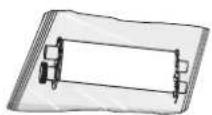
Paper tray
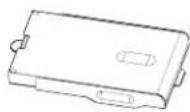
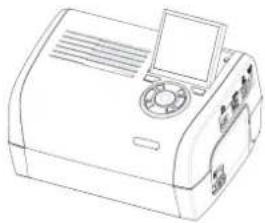
Photo printer
Installation guide

CD-ROM

Ribbon (ding on model)
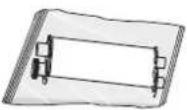
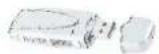
WiFi adapter (depending on model)
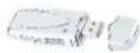
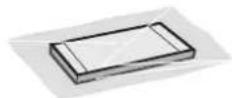
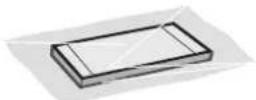
Photo paper block (depending on model)
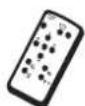
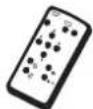
Remote control (depending on model)
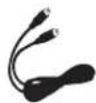
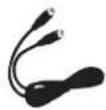
Video cable (depending on model)
Connections
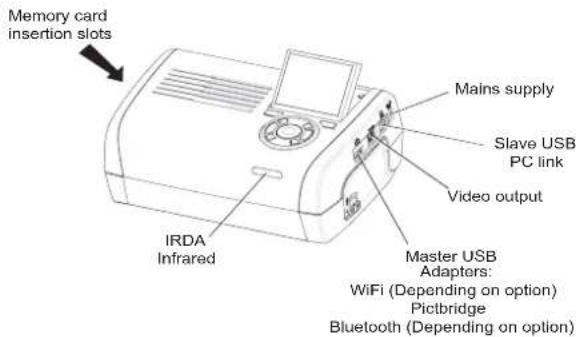

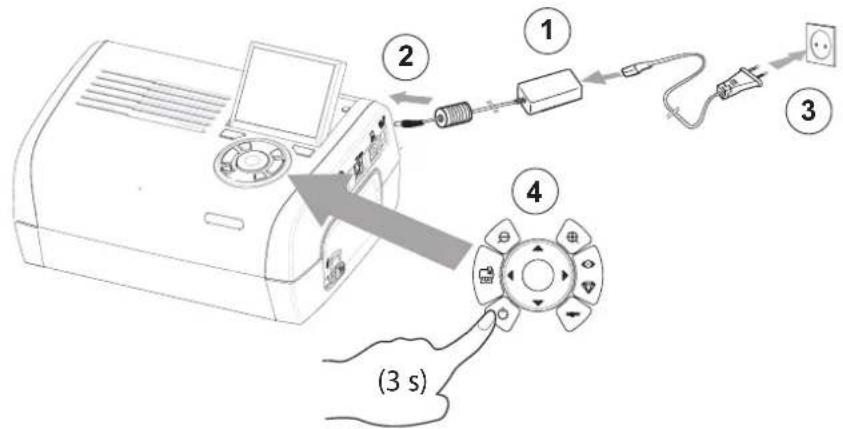
Before making the connections, please consult the safety instructions at the start of the user booklet on the CD-ROM provided with your printer.

Remarks:
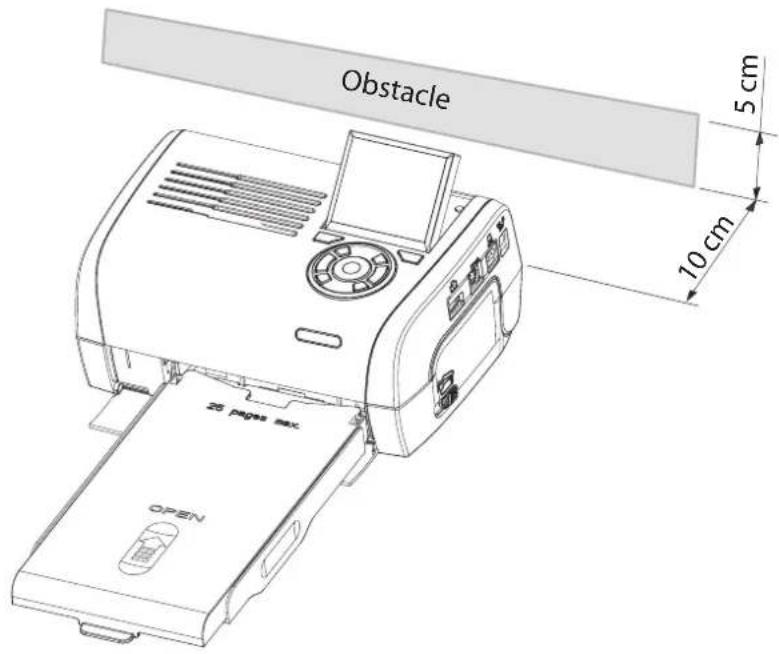
To guarantee that the sheet of paper moves correctly while printing, make sure that to allow at least 10 centimetres free space at the back of the printer.
Do not set up your printer in a dusty environment as dust deposits might adversely affect the print quality of your photos.

Setting up the printer
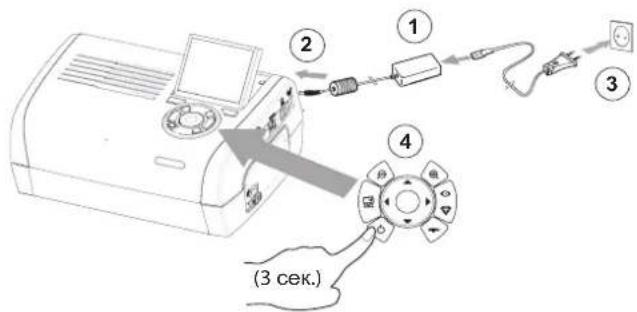
Powering up
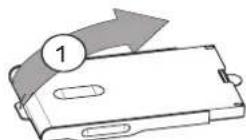
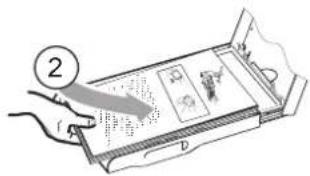
Inserting paper
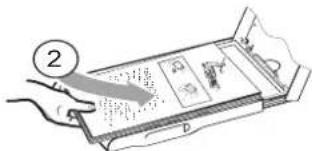
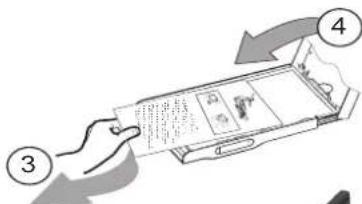
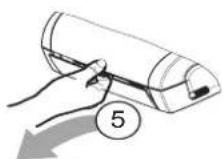
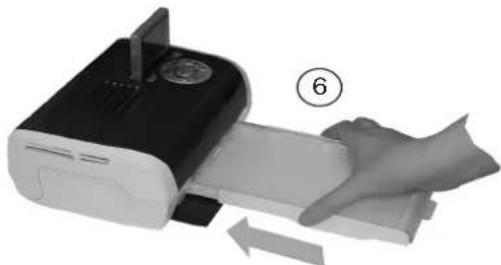




Remark: Use manufacturer consumables only. These are specially designed to provide optimum print quality.
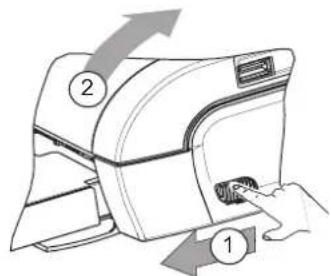
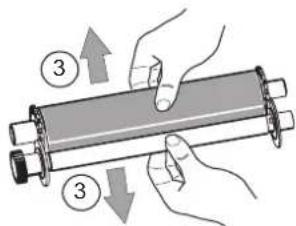
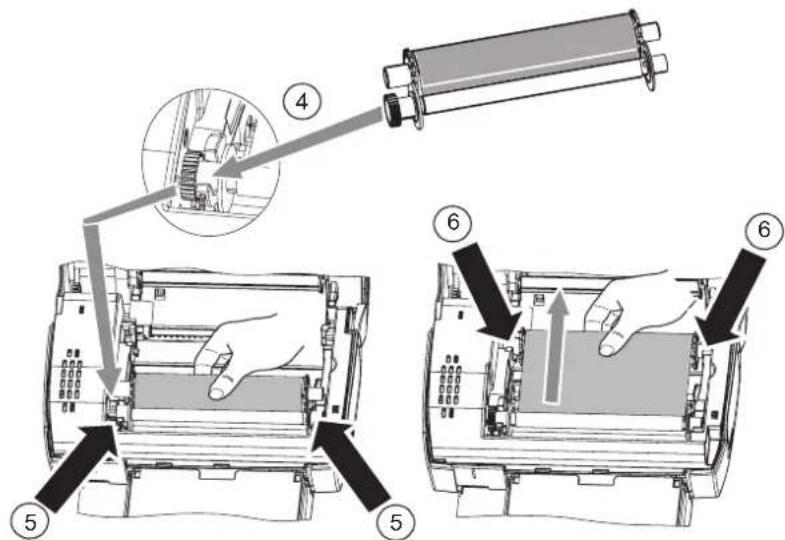

Tighton the ribbon on these spindles (6) and close the printer.
Description of the user interface
The interface is used to:
- choose photographs one at a time or switch into mosaic mode [9 photographs on screen].
- start the printout of a photograph directly,
- enable automatic improvement of the photograph prior to printout.
- set the "Format", "Preferences" and "Image setting" parameters according to your requirements.
- select several photographs and choose a different number of copies for each photograph to be printed.
- zoom in on a photograph and print it.
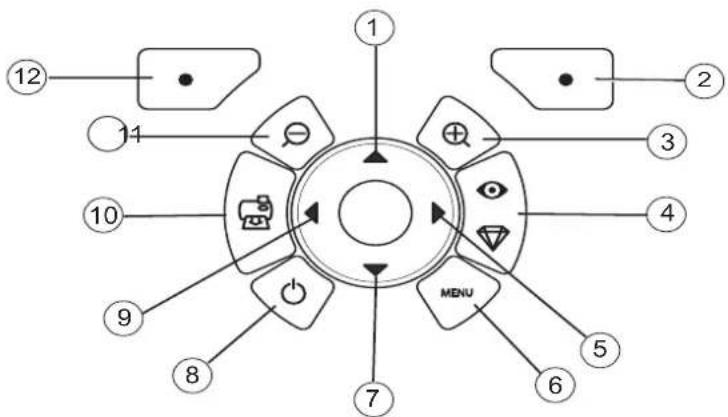
Description of the keypad
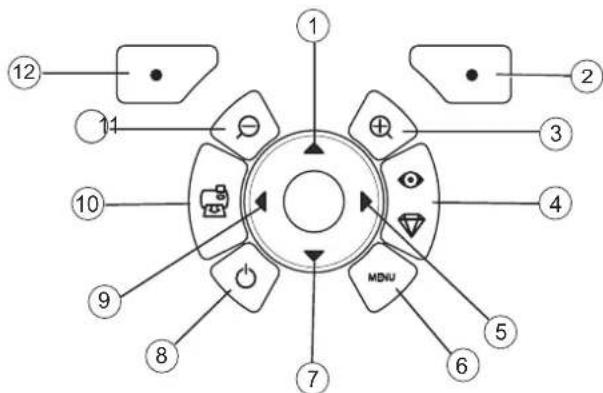
No.Key
1/5/7/9Browser
2 Validate / Enter / Add a copy
3 Zoom +
4 Crystal image / Red eyes
6
M
e
n
U
8
0
n
/
0
f
f
10 Print
11 Zoom -
12 Back / Cancel / Remove a copy
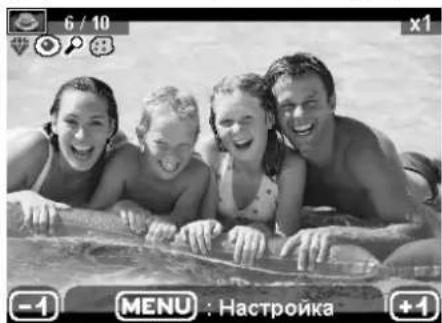
DESCRIPTION OF THE GRAPHIC USER INTERFACE
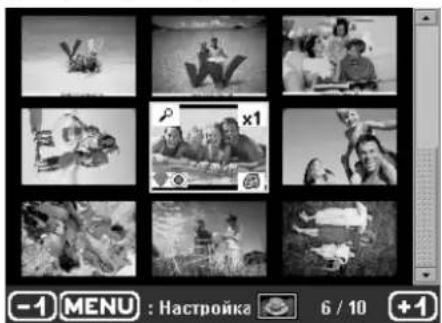
.2.4" LCD screen (1), to view your photographs
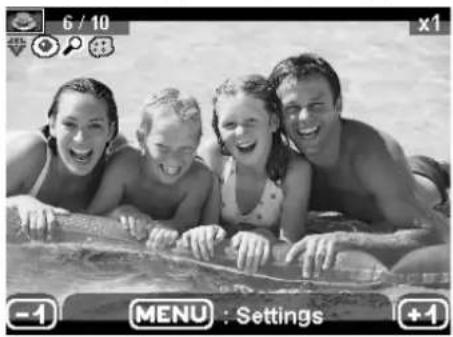
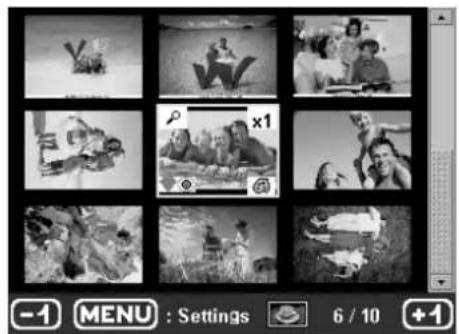
The icon... indicates...




the photograph number
the number of copies selected
Crystal image function enabled
red eye function enabled
zoom applied to part of the image
modifications made to the image
remove a copy selection key
access menus MENU key
add a copy selection key
PRINTING A PHOTOGRAPH FROM A MEMORY CARD
Check that the consumables (paper and ribbon) are installed.
Check that your printer is plugged in and switched on.
Insert your memory card into the correct slot, as shown on the diagram below.
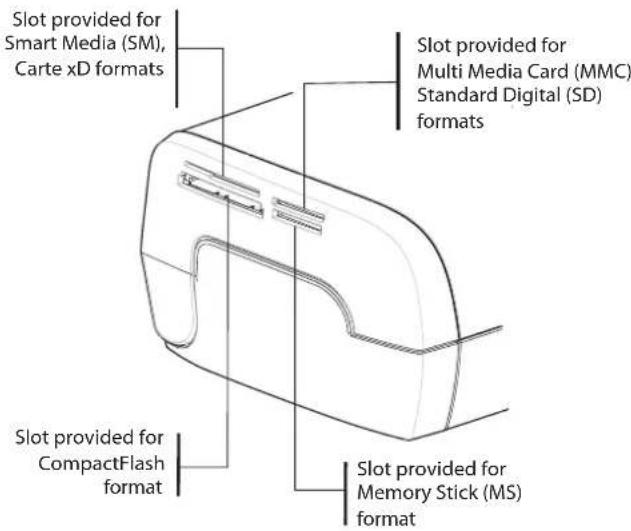
Remarks: SmartMedia CONTACTS DOWNWARD
The memory cards do not go completely inside the read slot. NEVER USE FORCE. Remove the card and check that you are inserting it the right way round into the correct slot.
For further information, refer to the user booklet on the CD-ROM provided with your printer.
Insert your memory card; after reading the card, the last photograph will be displayed on the LCD screen.
Press the key to display the first photograph on the card. Scroll through the photographs with
the and keys. After selecting the photograph, press the

key and follow the
instructions displayed on screen to print your photograph.
Improving the print quality
Use the "Crystal Image" and "Red Eye" correction functions.
Crystal Image makes all the necessary settings and corrections related to picture sharpness, colour management and contrast automatically to obtain the best print quality possible.
Furthermore, exposure defects will be corrected (for example, under-exposed photos will be made lighter or the portions of photo with strong contrasts will be compensated for). The red-eye correction function touches up "red eyes" on shots taken with the flash.
Remarks:
By default, the "Crystal Image" and "Red Eye" correction functions are disabled.
When printing from a personal computer, the "Crystal Image" and "Red Eye" correction functions are not proposed.
The following table shows the number of times that the

key must be pressed to enable or disable
the components of the "Crystal Image" function.
| Number of presses on the key | "Crystal Image" and "Red Eye" correction function status | |
| "Crystal Image" optimisation | "Red Eye" correction | |
| 0 (Default status) Disabled | Disabled | |
| 1 Enabled Disabled | ||
| 2 | E | n |
| 3 | D | i |
| 4 (return to default status) Disabled | Disabled | |
8 S
b a

Other functions
New effects (special effects, sepia, B&W, negative, black & white and colour embossing, solarisation, black & white and colour contour, charcoal).
Organisation of photographs (choice of location).
Slide show.
TV display.
Sudoku
Screen background customisation.
Use of these functions is detailed in the user booklet on the CD-ROM provided with your printer.
1
Guarantee
GUARANTEE (UK Terms and Conditions)
In order to apply the guarantee, you should contact your dealer. Proof of purchase will be required. Should malfunctioning arise, the dealer will advise you what to do.
If you bought your equipment from Sagem Communication directly, the following shall apply:
A) Sagem Communication undertakes to remedy by repair, free of charge for labour and replacement parts, any defects in the equipment during a period of twelve [12] months from the date of original delivery of the Equipment, where those defects are a result of faulty workmanship.
During this twelve month guarantee period, the defective equipment will be repaired free of charge; the customer must however return the defective equipment at his/her own expense, to the address given by Sagem Communication After Sales Department, the phone number of which can be found on the delivery slip. Unless the customer has concluded with Sagem Communication a maintenance contract in respect of the equipment which specifically provides for repairs to be carried out at the customer's premises, the repairs will not be carried out on the equipment at the customer's premises. The following sentence applies to purchases of equipment for the customer's trade, business or profession. Except as otherwise expressly provided in this Document and to the extent permitted by law, Sagem Communication makes no representations or warranties, express or implied, statutory or otherwise, and to such extent, all terms and conditions implied by law are hereby excluded. This guarantee does not affect the Customer's statutory rights.
B) Exclusions From Guarantee
Sagem Communication shall have no liability under the guarantee in respect of :
- damage, defects breakdown or malfunction due to :
-failure to properly follow the installation process and instructions for use; or
-an external cause to the equipment (including but not limited to, lightening, fire, shock or water damage of any nature); or
-modifications made without the written approval of Sagem Communication; or
-a failure or neglect to maintain the equipment or inappropriate maintenance; or
-unsuitable operating conditions, particularly of temperature and humidity; or
-repair or maintenance of the equipment by persons not authorised by Sagem Communication.
- wear and tear from normal daily use of the equipment and its accessories
- damage due to insufficient or bad packaging of equipment when returned to Sagem
Communication
- supply of new versions of software
- work on any equipment or software modified or added without the prior written consent of Sagem Communication malfunctions not resulting from the Equipment or from software installed in user workstations for the purpose of use of the equipment
- communication problems related to an unsuitable environment, including :
-problems related to access and/or connection to the Internet such as interruptions by access networks or malfunction of the line used by the subscriber or his correspondent
-transmission faults (for example poor geographical coverage by radio transmitters, interference or poor line quality)
-
the local network fault (wiring, servers, workstations) or the failure of the transmission network
-
the normal servicing (as defined in the user guide supplied with the equipment) as well as malfunctioning due to servicing not being carried out, servicing costs are in any event always borne by the customer.
C] In the cases set forth in § B] as well as after expiry of the twelve month guarantee period, the customer must ask Sagem Communication for an estimate, and he/she must accept the estimate and agree to pay the charges mentioned in it before returning the equipment to Sagem Communication. The repair and delivery costs will be invoiced to the customer.
The foregoing shall apply unless otherwise agreed in writing with the customer and only for the UK. If any provision of this guarantee shall be held to be in whole or in part invalid or illegal due to an obligatory rule applicable to consumers pursuant to their national legislation, such invalidity or illegality shall not impair or affect the remaining provisions or parts of this guarantee.


GIAP2700.book Page 14 Mercredi, 20. september 2006 4:15 16


14



François
Bienvenue
AGFAPHOTO is used under license of Agfa-Gevaert AG
AP2700 is produced for Sagem Communication and distributed or sold by Sagem Communication
Sagem Communication - Customer relations department
AGFAPHOTO is used under license of Agfa-Gevaert AG
AP2700 is produced for Sagem Communication and distributed or sold by Sagem Communication
Sagem Communication - Customer relations department
AGFAPHOTO is used under license of Agfa-Gevaert AG
AP2700 is produced for Sagem Communication and distributed or sold by Sagem Communication
Sagem Communication - Customer relations department
m = 311



PRESENTACION DEL INTERFAZ GRÁFICO
AGFAPHOTO is used under license of Agfa-Gevaert AG
AP2700 is produced for Sagem Communication and distributed or sold by Sagem Communication
Sagem Communication - Customer relations department
AGFAPHOTO is used under license of Agfa-Gevaert AG
AP2700 is produced for Sagem Communication and distributed or sold by Sagem Communication
Sagem Communication - Customer relations department
AGFAPHOTO is used under license of Agfa-Gevaert AG
AP2700 is produced for Sagem Communication and distributed or sold by Sagem Communication
Sagem Communication - Customer relations department 4, rue du Petit Albi - 95800 Cergy Saint-Christophe - FRANCE


AGFAPHOTO is used under license of Agfa-Gevaert AG
AP2700 is produced for Sagem Communication and distributed or sold by Sagem Communication
Sagem Communication - Customer relations department
www.agfaphotoprinter.com, support category.


GI AP2700 CZ.fm Page 14 Mercredi, 20. september 2006 4:47 16




14



Eλληνικα
Kαλωσηρθατε
Zaç éuxapiotoujé TTOA yopàoate To vdo JAc EKTUTWTH ωtoypaipov. Me autov TOV EKTUTWTH uynhns TIOIOTnac MTPOEITE VA ExETe O, TI KAAUATEPO OTIC UNPIAKES φutoypaipies. OI AIEUOPYIEC BATEUONG EIKOVAc Crystal Image kai "Kokk. MAtia" TAPEXOUAV aoyec EKTUTWTEIG KAI TIOITNTA AVIYPAPNCS OTIC φtoypaipies oac.
Tny tootheia web www.agfaphotoprinter.com, 0a p9eite kai ta eNc
- Tpoypaumata ohyngs Tou kTUTWTH yia PC,
- iia Aiotae aattavtnoeis oouvtheie epwtnoeis (FAQ).
TcO CD-ROM TepiaaBavetai avalutikos odnyoXphons.
Odyiec aopaaeiaac kai pporaoic

Mny eKATATE TO EKTUTWt WTOYPAHw Oa cE WUATIO UYPoia (PF60N24ASO of Shanghai Moons' Automation Control Co., Ltd), oA tOaTn 1,5 m aTo uSAtv nTyn n oEgTEPIKOs Xwouc. Av Thee va Exete Ta BAIOTa ATOTEAEJyata ATO TIC kETUTWoei Oa, TATE O EKTUTWtG Ta PteTe va xPoiotioiefai Oe EPkoPcia TEPIbAAovTOC meta 15°C KAI 35°C.
Mny TOTTOBETEITOV EKTUTWTHe TEPiBaalov ME K0vN YIATI EVbExTAlVa ETnpeaotei apvtikn n TIOIOTNTA EKTUTWONs TwV WToYpapiwos
Oa TpeTie va Xpnoioutoieite mvo To Tpoopodotik (PF60N24AS0 of Shanghai Moons Automation Control Co., Ltd) Tou TApexetai mazi me To EKTUTIW. Suvoeate to otny Tpica ouuwova me tic odyiec yekatataoans Tou 8a Bpeite otov oyoo xonot kai TAnpoopopie Tou Tepiaauabovtai otnv Etiketa avayvupianc Tou piaketai Tawo OTO Tpoopodotik (taan, peuaovotn peuatoac). Oc Tpoopuaen, aepittwn Kivbuvou, to Tpoopodotiko biakotte tv npoxh peuatoac 230 V. Oa TpeTie va Bpioketai Kovta otn ouokun kai va eviva ekola Tpoopaiaipo.
AGFAPHOTO is used under license of Agfa-Gevaert AG
AP2700 is produced for Sagem Communication and distributed or sold by Sagem Communication
Sagem Communication - Customer relations department
AGFAPHOTO is used under license of Agfa-Gevaert AG
AP2700 is produced for Sagem Communication and distributed or sold by Sagem Communication
Sagem Communication - Customer relations department
AGFAPHOTO is used under license of Agfa-Gevaert AG
AP2700 is produced for Sagem Communication and distributed or sold by Sagem Communication
Sagem Communication - Customer relations department
(B3aBNCIMOCTNOTMODEIN)
AanTep nIg 6ecnpoBnHO doctynaWiFi
(B 3aBnCmOCTN OT MoDJIH)
Budoeokaeb
(B 3aBUNMOCTN OT MOdJI)
YdaJIeHHoe ynpabJIeHne
(B 3aBcHMOCTOn OT MOdEJIIN)


3


IoproTOBka npHTepa Ka pa6oTe
PoiKIIIOUeHHe 3JIeKTPoNTaHnA
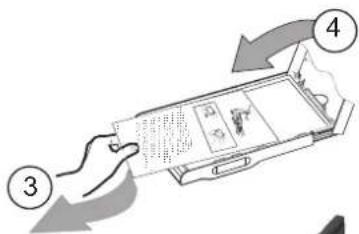
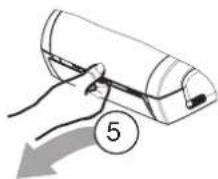
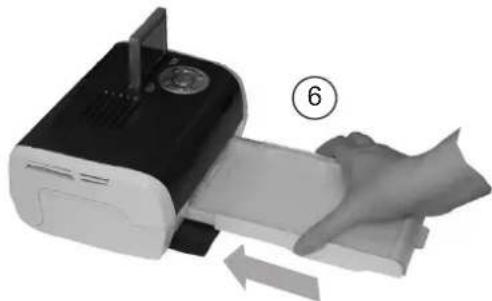
YctahOBka 6yMaRn



6




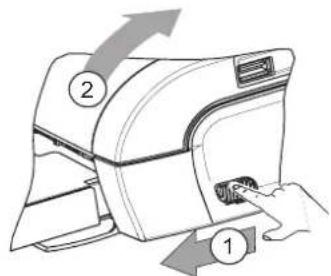
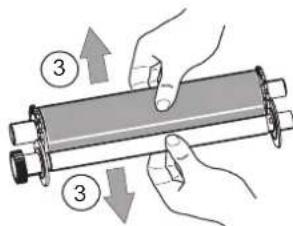
PpmeHHe: Nb3yTEcB TOIbKO paCXoNDbIM MaTePnAaMn, I3rTOBHeHHbIM mIpOu3BOUHTeNEM. OH nCneuaNbHO pa3pa60TaHb DnI O6ecNeEHn ONTImaJbHorO KaueCTBa neaTN.
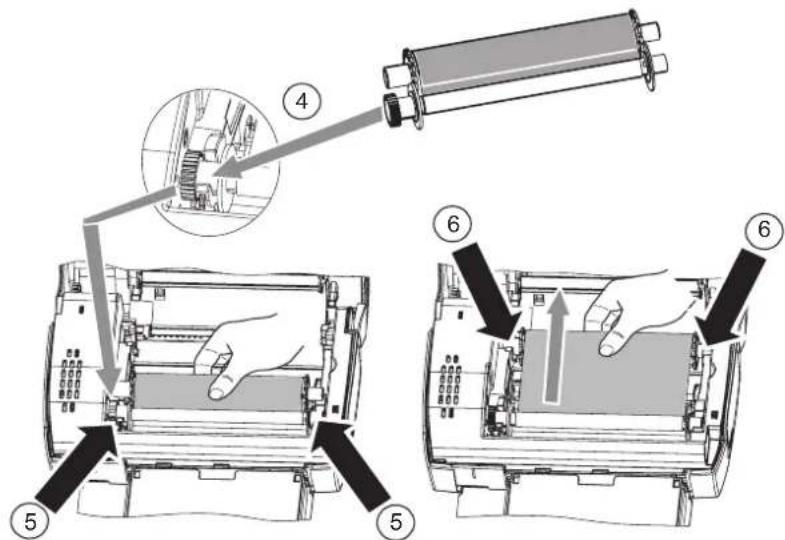
7 3akpenTe IeHTy Ha 3tNx IuHHIeJx (6) n3akpoTe npHHTep.
Onncahne noJIb3ObaTeNbckoro nHTepcpeica
HTepcne NOJb3OBAteJe No3BOJIaTeT:
- BbIbIpaTbΦOTorpaΦnOdHy 3a DpyroHn OTO6paKaTbNXBpeXmE Mo3aKn (Ha OJHom 3KpaHe OTO6paKaIOTc9ΦOTorpaΦn);
Hapmyo pacneetaTb oToTpafo;
aKTHBnPoBaTb aBtOMaTnueckoe ynyuweHne nepe neaTaIbOΦOTorpaФn;
HactpoNTb npametpyi "Opmat", "PpeNoHTeHn" n "HactpoKa n3obpaxeHn" B 3aBcIMocTn OT BaNX HxKD;
- BbIbIpaTb HeckoJIbKO φOTOrpaΦn I pa3NIuHoe KOINueCTBO KONn IJRA KaKDoI paCneUaTbIbAeMOI φOTOrpaΦn;
yBENHBAb foTOrpaFIO npneatN.
Onncahne knaBnKnaBnAtypbI
HomeknaBnua
1/5/7/9Bpay3ep
2 PoiTBePckDHeH/BBoD/IO6aBHeHne KOHN
3YBeJIuHHeHne+
4 Crystal image / Red eyes
6 MeHIO
8 BKn./BbIKN.
10 NeuTaB
11ymeHbWeHne
12 Bo3Bpa/OTMeHa/YdaJIeHHe KOHN
ONICAHNE IPAΦNUECKOHOHTEP ΦECA NOJb3OBATEJIu
JHKOKPCTaIIHueckn dncnn 6,1 cm (2,4 duim) (1) npocmotp a foTporpa
3Haoyok... 06o3HaayaeT...
HcNo BBbpaHHbIX CHIMKOB

YncNo BBb6paHHbx Konnn

AKnBnPoBaHaФyHKnCrystal Image

AkTNBnPOBaHaФyHKUra Red-Eye

YBENHHeHueactnfoTOrpaFm

13MeHeHnB n3O6paKeHH

YdaJIeHHe KOnn,KnBaBnHa BbI6opa


Docynknapaemtpam,Knabnua MENU

DobabneHNe KOnn,KnabuBbN Bb6opa



9


NEyATb FOOTOPAΦH N C KAPTbi NAMuTH
Y6eHNTecb, yTO pACXODHbIe MaTePnAnbI (6ymara n neHTa) yCTAHOBnHeHbI.
Y6eHTEcB, yTO npHTep NOKNIOUeH K 3JNEKTPoCeTn, n ERO NNTAHNE BKNIOUeHO.
BcTaBte KapTy namrtn B COOTBeTCTByIOuI pa3bEm, KaK nokaHa Ho pncyHke Hnke.
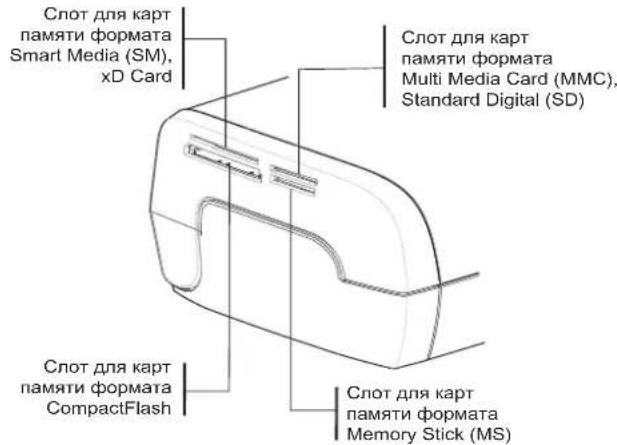
PpmeaHn: KOthakbI KapbI Smart Media hapablahotc nueBOB CTOPHOB Bn3.
KapTa naMnTHe BxOHTIeNtOMBpa3bEmuHTaIOJeroyCTpoCTBa. HE HAXIMMAITE CINUKOM CNJIbHO.BbInbTe KapTy n y6eINTecb,yTO Bbl npabnloBHO BCTaBnEe B npedHa3NaHeHbI dRn ee pa3bem.
DOnOHHTeJIbHyIO HhOpMaIIO CM. B 6poWIOpe NOnb3OBATeNIA, CoepKaUeHc HA KOMNaKT-DnCKE, BXoJAEEM B KOMNKeT NOCTaBKN PpHTEpa.
BCTabTe KapTu NamrTu. No 3aBepuHn YTeHn KaPTbHa 3KpaHe KK-dncnner oTo6paTcra nocneHn foTOrpaHn.
Haxmte KnaBnuy 1n oTo6paKeHHa nepBoo foTOrpaFNa Kapbl. IpocmoTp foTOrpaFni
ocyueCTBnraTc nomoouKnaBnU 1 BbIepeNTe foToRaΦNIO, HaxMnte KnaBnUy

CneDyIe INCTpyKUaM Ha 3KpaHe IJIe NaTn FOToRpaFm.
UnyuweHne kaueCTBa neaTu
NcnoIb3yTe KOppeKInpTyIOUe FyHKm "Crystal Image" m "YcTpaHHeNe 00fkeKa pachBx rna3". FyHKnIg Crystal Image aBOMaTHueckn YctahABnBaet BCE HAcTPOKn I NcnpabNeHn, KOtObl Heo6XoDnMbI nObeocneHnHaNNuXh 3Naehn pe3KoCTn foTOrpaFnn, a TaKoe Ubeta N KOHTpactHOCTn, 4TO npBODn K JnyuChEnHo KaeeCTBa foTOrpaFnn.
Kpome TOrO, 3a yHKUJnNo3BONReT KoppeKTnPoBaTb DeeKETbI KcN03uINn (HapnMep, fOTorpaFmC HeEOCTaTOHOn 3KcNO3uIne 6yEt npDabatbC8 6oNbuaR pKoCTb, a N3bToOHAR KOHTpACTHOCTb HEKOpToBx fOtorpaN dyET kOMNEHCPOBaNA). FyHKUy cTpaHeHHr OeFKeTa "Kpacbix rna3"Red-Eye npImeTeTc K fOTorpaFmC, cDaNHaBHm CO BCbIuKOi.
IpnmeuHn: YoymoHaHIO KOppeKTHpyUOuIe FyHKun "Crystal Image" n "YcTaPHeHne 0fpeKtA KPachbIX rna3"OTKIIouHeHb.
PnneatncIKKoppeKtpnyouneyHKun "Crystal Image" n "YcTpaHHe 3pkeKa KpaBbIX rna" He npednaIaTOca.
3Ta Ta5nua noka3bIbaeT, cKoIbKO pa3 HyxHO Haayt KnaBnWy

INBKKIOUHNEINBBKIOUHNEIN
Функлun Crystal Image.
IpepeTEm, kak cdaTb Ha peMOHT DeeKTHoe oOpyoBaHne, He 3a6yTe:
CoxpaHHTb BCE nepcoHaJIbHbIe DaHHbIe, TAK KAK OHN MOrY 6bITb ydaneHb BO BpeMa peMOHTa. KomnHn Sagem Communication He Hecet OTBETCTBeHHOCTn 3a YHmTOKeHne BaIINx nepcoHaJIbHbIX daHHbIX n He 6yET 3AHIMATbcraix NOBTOPH OYCTAHOBKOn Ha BaIeM o6OpyDobAHnn.
Bnoktb Bynakobky cObopyoBaHne Baae nAapec nTepeoh.
Bnokb BynakOBky konIO doka3aTebcTba O nOKynke o6OpydoBaHna.
-ДержпгпсбсбсьбсakceccsyapbI (npobda...),pacxoньмatepnaIbI BaunmHnHbI np6opbl (kapbl nmaTn,Иnp...)
3Ta rapaHTnHe paocpOcTaHReTcHa 3aKOHbIe npBa YacTHbIX nTope6nteNe.
HnKcneDyIOoee OTHocntca TOnbKO BEnIKO6pHTAHIN. Ecn KAKo-Ni60 NyHKT daHHOH rapaHTMH OKaKeTCACTNUHO INN PONHOCTbHO He 3aKoHEH INN He 6yET COOTBeTCTBOBaT npIMHeRMeBIM B 683aTeHBOM NOPAKe K Ntpe6bNTeJIam PpaBnJAM, B COOTBeTCTBNI C aHfNIMCKM 3aKoHOaTeJIbCTBOM, 3Ta HE3aKOHHOCTb INN HecOOTBeTCTBNE PpaBnAm He NOBIIaIOT IN He aHHYInpyIOT OCTaNBHe IyHKTB 3TOI rapaHTHM.



TAPAHINHbIE NCKJIIOUeHnA
He rapaHTnpyioTc:
- NpONOMKn HENpaBnIbHoe FyHKUHOHINPOBaHHe, PmPcHNOKOTOpbIX CTaII:
Heco6nOeHne HNCTpyKuIN npocecca HnCTaannpobAHn;nn
BHeUHn PafKTop (BKIOUa Hn He OgrpAHmBaCb yApamn, N36bTOOHM CBETOM, YMbIUNeHHO npeH, HecOToPOXkHbMn DeCTBnMn, BO3rOpAHEm, NOBpeJDeHnMn, Bb3BAHbHm PA3MHnHBmN XIKKOCTAMn, HAcEKMbIMn-NApa3ITAmn HcEOOTBeTCTBYOLUMm JNEKTPrVcHKMn HAPRKeHMeM); INI
-Модунфikaци obopydOBaHЯ, сденихьге 6e3 nucbMeHHoro pa3peWeHЯ KMнани Sagem Communication;inn
-HeIOCTaOHTHbEeKHeHBbI yXoD (coTJACHO OINCAHIO B DOKyMeHTaUIM, COpPOBxDaIOUeObOpYOBaHne) nH HeIOCTaOHTHoe bepexHoe oTHoWeHne; nJIn
-He6NaFOnpRTHbE yCnOBN kOpyKAAoUe CpeBb, B Ooc6eHHoCTn CB3aHbIe C Temnepatypo n BlaJHoCTbIO, NocTeDCTBn PA3HnCbl 3neKtpuuecknx HaprrKeHn, np6BeMbe 3neKtpuueckon ceTIN 3a3eMJIeHN, INN
- pemontipobAHne, ncpaBHeHne HenoJaDok (OTKpbTHe IIN NoNbTKn pa3o6pTaB o6pydoBaHne) INI TexHueckoe 0cbnykBaHne 6ObpDoBaHn JIcAmn, He IMeIoUmm ABTopn3aum Sagem Communication;
- NOBpeXeHnB, Bb3BaHbIe OTCyTcBHeM yNaKOBu INn HEnpaBnIbHbIM NaKOBaHMe MObOpDobAHn npn BO3Bpate B OΦmuaNbHb CepBnc-ueHTp.
3.ИЗнOCиИЗьТЕИЗHOPMaJIbHOrO NOBceDHeBHorIO NcONb3OBAHnI O6OpyIDoBaHnI n AkceccyapOB. -
KommyHnkaunOHhIe npo6JIembl, CBraHHbIe C HEnOxOJaUIMN ycNoBmN OkpyKaIOSeI cpebl, BKJIIOuay B YacTHOCTN:
-
np6bEmbl, C83aHHbIe C DOCTyNOM HIN NIOKIIHOeHEM K TENEFOHHo CETn (npepbBaHne CB3H, HeyDOBJIeTBOpNTbHoeOHyHKUHOHPOBAHHe JINHN),
-0u6Kn npn TpaHcMmccnn (Haepnmep, npepbBaHne nn noxoe KaueCTBO C83n),
-0uH6K MeCTHO CB3n (npoOda, cepBepbl, pa6oune cTAHCUN) nnn np TpaHCMNCCUN (BKIOUaH N He ORpaHINUBaCb IpepbIBaHmM pa6Otbcetn). -
YcTaHObKa HObIx BepCn nporpaMMHoro oBeCneueHna 6e3 noLyueHna npedBapuTeNbHoro corNaia KomnaHn Sagem Communication,
- DeNCTBnA, CBA3aHHbIe c NOBceDHeBHbIM NcNoJIb3OBAHHeM: OcTaBkA, yCTaHOBka paCXoDhbIX MaTePnaNOB...
- Pa6ota Ha KaKOM-ri6o IporpaMMHOM o6ecneueHH, MoiNcHIpOBaHHom 6e3 cornacn KOMnHaHm Sagem Communication
- HenpaBnIbHoe yHKUHOHPOBaHne npOyKu, paXoDHBx MaTePnaIOB n akceccyapOB, HecOBMeCTmblx cObOpYDoBaHHeM.
- 06opydobAHne, BO3BpaueHHOe B OphiuaIbHbI CepBnC-HeTp 6e3 noIyehnO T Hero npedBaPntelbHorO corNaia.
******
Ycnyu, OKa3AHbIe B pAmkax BblweoncaHHbIX rapaHTnHbIX NckIOueHm IIN NOcne nCTeHMe 12-MecyHOrO cpoKa DeIcTBnra rapaHTn, DOnIKhbl 6bITb ONaueHbI (IIATA 6yET yCTaHOBNeHa KOMNaHne Sagem Communication) noTpeBnteHem Do OTnpabKn o6OpDobAHn B OΦMuAIBhB CepBNC-ueHTp IIN do peMOHTnPOBaHn.
******
13
PENyPExKdEHN:
BcoTBeTcBnC 12-MecaHouIraHTneI npImeHaTeC nEduOiee:
- B IIO6bOM cnyae, noXanyIcTa, coXpaHIne 3a CBOHO cO6CTBeHHyIO nIATy Baun NepcoHaJIbHeI daHHbIe. Sagem Communication He Hecet HnKakoi OTBETCTBEHHOCTH 3a NobpeJdHeN E Baunx n nporpamM. Hnkakne nporpamMbI ydaHbIe He 6dyT BOCCTAHOBJIbH bKOMnAHmE Sagem Communication B cnyae nx ydaJIeHnI nn nobpeJdEHnI.
- Поврждений Детаи Ипзамеонhoe obopydobahne CTaHOBЯТС co6CTBeHHOCbH KOMnAHIN Sagem Communication.
- Ba3npyioeB O63aTeBbHOM Nop4Ke Ha 3aKOHOM NoCTaHOBHeHH, BblweonncAHhhe rapaHTM 3TOrO DOkyMeHTA PpeIeBHO RCHb H HeocOpnMbI. B Oco6eHocCTN, Sagem Communication He daet rapaHTM OTHOCNTBbHO KaucctBa N pRIOoHocCTn 6OpdyOBaHH K KaKOMy-TO ONpeDeneHHOM YCNOLb30BAHIO. O63aTeBCTBA KOMnAHmSagem Communication no OTHOeHHK Xkano6am nOKynatena Ha yTePO HNN NOBpeXdHeNe 6OpdyOBaHH, ONCAHHOR B KOHTpAKTe, DeNKte H np. HnN Ke Ha XaNATHOCTb FnpMb-IPON3BOIDTENE OTHOCNTBb HOCTABKN IN TExO6CnyKBaHH, He 6yDyT npeBOxCODITc OTHMOCTb, ONNAeHHy NOKnyATenEM 3a 6OpdyOBaHHe. Sagem Communication He 6yDet, H Npi KaKxN 6OCToRtBCTax, HECTN OTBeTCTBEHHOCTb 3a KaKoe-N5o HAHeCEHne KOCBeHHoro, HamepeHHORO INN MacuTaBHO Y6bITKa (BKlouH, Ho HE orpaHNUBaBC nbotepe 3akaz AIN cKIMOK Ha TOBAP, Uyep6om penyTuAnu npOdyKun, npepbBaHem ycIyr n npOvHn PHAHCOBBx IN KOMMepecknx Y6b1TKOB), NekAuzero B OCHOBE rapaHTNHbIX OB63aTeBCTB INN DEIKTA.
- B COOTBETCTBm C NOCTAHOBHNEHM 3aKHOdATEbCTBa, 12-MecrHbI cPOK DeiCTBnRA rapaHTM He MoKeT 6bITb npOJHeH. 12-MecrHaH rapaHTN Hmak HE BnRt Ha 3aKOHbIe npBa NotpeBntenE.
Ecnn KaKoi-Ni6o NyHKT daHHOI rapaHTm qactuHNO nn NOHOCbHc He 3aKOHn Hn Hc COOTBeCTByeT npHMHeBIM B o83aTeNbHOM nopAKe K NtpeBnteJAM npABUNaM, B COOTBeCTBN C aHIINCKM3aKOHdaTeNbCTBOM, 3Ta He3aKOHocb Hn HecOOTBeCTBne npABUNaM He NOBNIHOT H He aHHyIpyOT octaJIbHbI nyKbTI 3ToI rapaHTm.
www.agfaphotoprinter.com, support category.
Türkce
HOS GELDINIZ
AGFAPHOTO is used under license of Agfa-Gevaert AG
AP2700 is produced for Sagem Communication and distributed or sold by Sagem Communication
Sagem Communication - Customer relations department
GARANTIYE DAHIL OLMAYANLAR
www.agfaphotoprinter.com, support category.
Magyar
Udvzoljuk
www.agfaphotoprinter.com, support category.