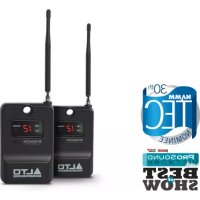
Stealth Wireless - Hi-fi system ALTO - Free user manual and instructions
Find the device manual for free Stealth Wireless ALTO in PDF.



| Brand | Alto Professional |
| Model | Stealth Wireless (mk2) |
| Product type | Wireless audio system (transmitter + receiver) |
| Transmitter power supply | 12 V power adapter (included) |
| Receiver power supply | 12 V power adapter (included) |
| Receiver audio output | Balanced TRS (TRS to XLR cable included) |
| Transmitter audio inputs | 2 combo inputs (XLR / 6.35 mm) balanced/unbalanced |
| Wireless range | Up to 60 meters (200 feet) with line of sight |
| Number of RF channels | Varies by region (manual or automatic selection) |
| Transmission modes | Mono or stereo (selectable on transmitter) |
| Receiver functions | Auto scan, manual channel selection, squelch (3 levels), RF/AF indicators |
| Transmitter functions | Volume adjustment (left/right), mono/stereo, channel selection, LCD screen |
| Receiver mounting | M10 mounting point for powered speaker |
| Antennas | BNC (transmitter) and built-in (receiver), vertical orientation recommended |
| Maximum sound level | Up to 115 dB SPL (depending on configuration) |
| Safety instructions | Hearing protection recommended for high levels |
Frequently Asked Questions - Stealth Wireless ALTO
User questions about Stealth Wireless ALTO
0 question about this device. Answer the ones you know or ask your own.
Ask a new question about this device
Download the instructions for your Hi-fi system in PDF format for free! Find your manual Stealth Wireless - ALTO and take your electronic device back in hand. On this page are published all the documents necessary for the use of your device. Stealth Wireless by ALTO.
USER MANUAL Stealth Wireless ALTO
User Guide (English)
Introduction
Box Contents
| Stealth Wireless (mk2) Receiver | Hook-and-Loop Fastening Strip |
| Power Adapter | User Guide |
| TRS to XLR Cable | Safety & Warranty Manual |
| M10 Rigging Bolt and Washer |
Note: The Stealth Wireless mk2 system is not compatible with previous versions of Alto Professional Stealth Wireless systems.
Support
For the latest information about this product (system requirements, compatibility information, etc.) and product registration, visit altoprofessional.com.
For additional product support, visit altoprofessional.com/support.
Important Safety Precautions
Please note: Alto Professional and inMusic are not responsible for the use of its products or the misuse of this information for any purpose. Alto Professional and inMusic are not responsible for the misuse of its products caused by avoiding compliance with inspection and maintenance procedures. Please also refer to the included safety and warranty manual for more information.
Sound Level
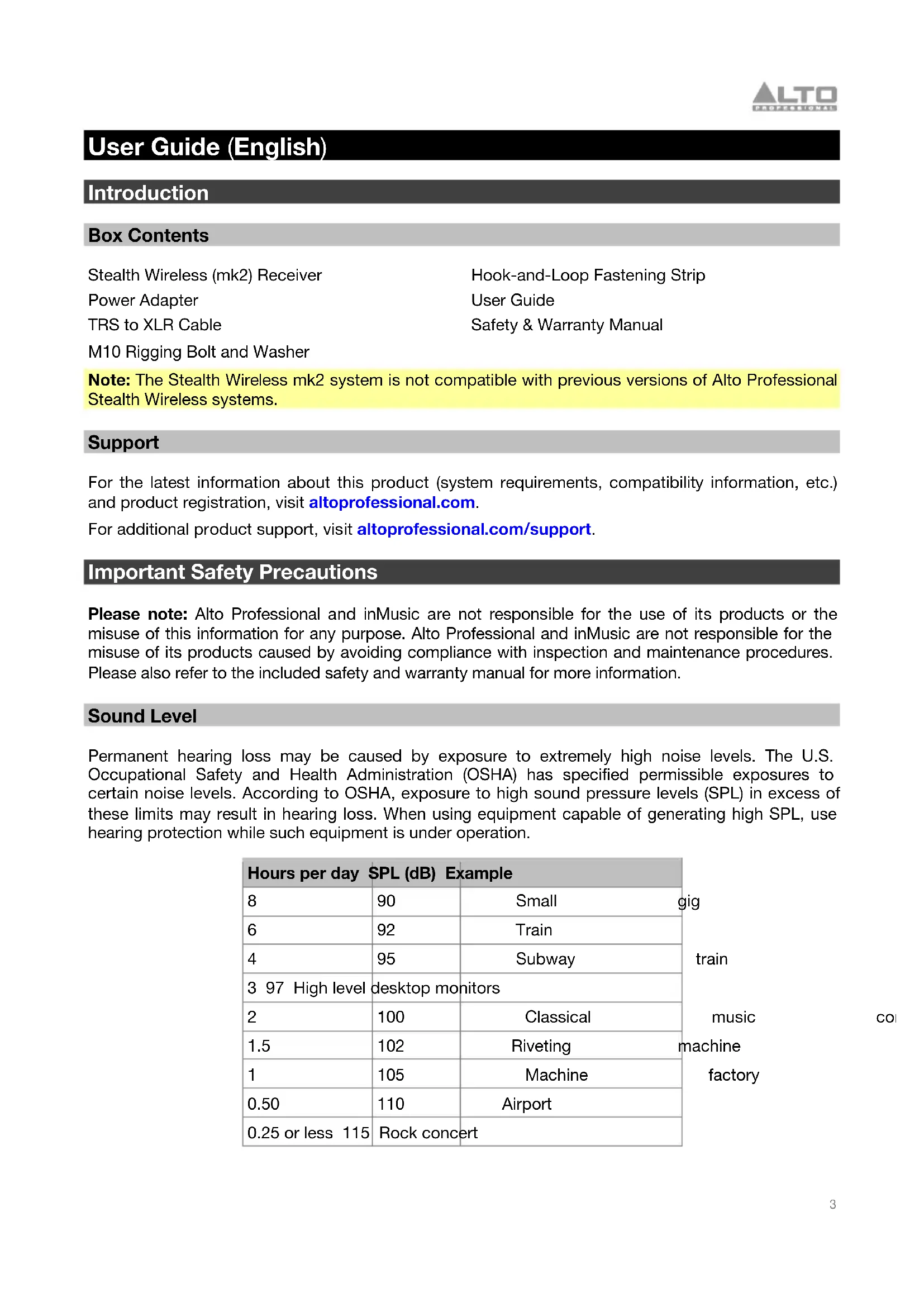
Permanent hearing loss may be caused by exposure to extremely high noise levels. The U.S. Occupational Safety and Health Administration (OSHA) has specified permissible exposures to certain noise levels. According to OSHA, exposure to high sound pressure levels (SPL) in excess of these limits may result in hearing loss. When using equipment capable of generating high SPL, use hearing protection while such equipment is under operation.
| Hours per day | SPL (dB) | Example | |
| 8 | 90 | Small | gig |
| 6 | 92 | Train | train |
| 4 | 95 | Subway | |
| 3 97 | High level | desktop monitors | music |
| 2 | 100 | Classical | |
| 1.5 | 102 | Riveting | machine |
| 1 | 105 | Machine | factory |
| 0.50 | 110 | Airport | |
| 0.25 or less | 115 | Rock concert |
Quick Start
Assembly
Note: If you require assistance, contact Alto Professional customer service at altoprofessional.com/support.
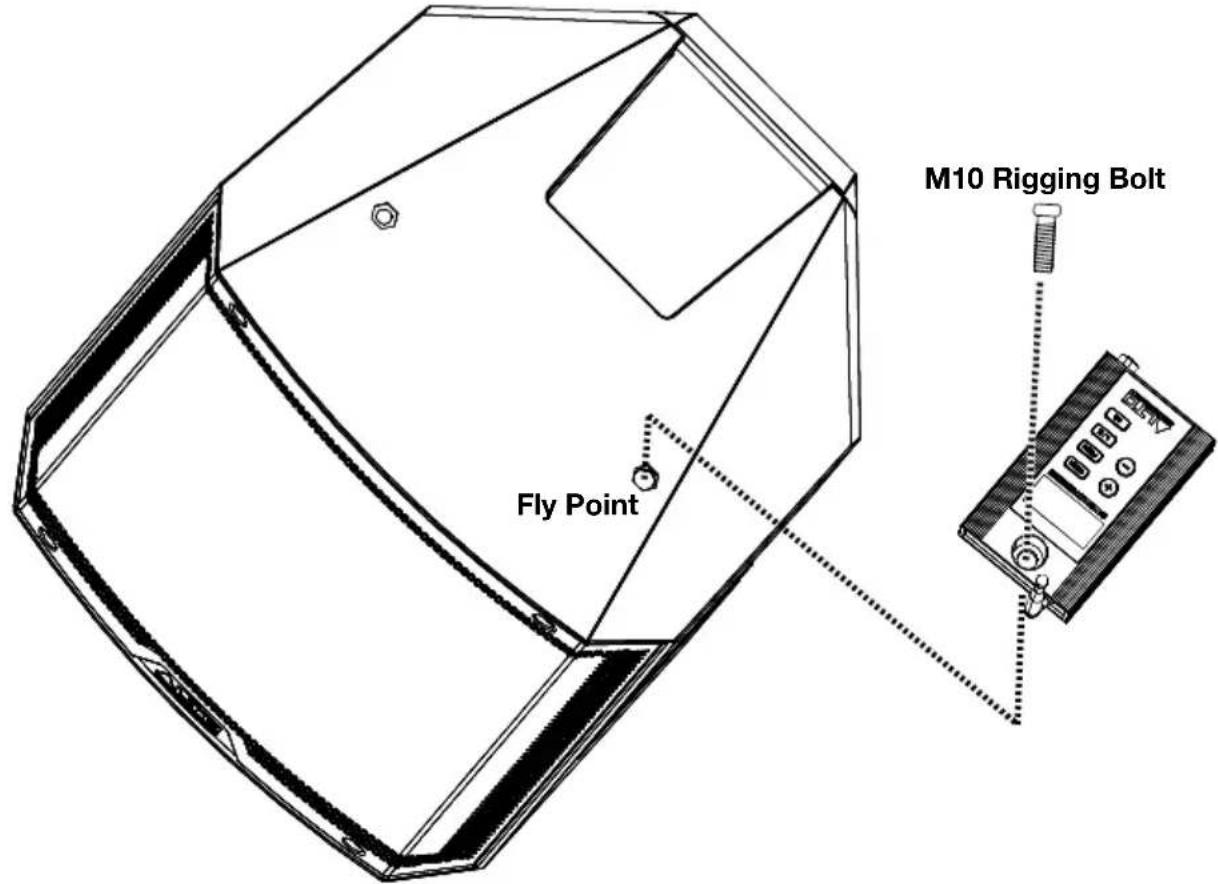
Mounting the Receiver to the Loudspeaker
Use the supplied M10 rigging bolts to connect the Stealth Wireless receiver to the powered speaker's fly point.
Connection Diagrams
Items not listed under Introduction > Box Contents are sold separately.
Example 1 - Mono Operation
To send mono signals through the Stealth Wireless transmitter to a single receiver:
- Connect your mixer's main output to an input on the Stealth Wireless transmitter and connect the receiver's output to your loudspeaker's input. Keep all mixer volume and transmitter volume controls at their minimum settings.
- Power on the Stealth Wireless transmitter and receiver. Set their channels to matching numbers. See the instructions for setting up the transmitter and receiver in Operation for more information.
- Adjust the transmitter and receiver antennas to a vertical position for best results in transmitting the wireless signal. If the wireless signal quality is poor, change the position of the antennas.
- Set the transmitter to Mono and adjust the Volume control to get a strong signal without clipping.
- Turn on your loudspeaker, adjust the output level on your mixer, and adjust the Volume control on the transmitter to hear the audio signal. If you hear noise in the signal, change to a different channel until a clean signal comes through. See the instructions for changing the RF frequency in Operation for more information.

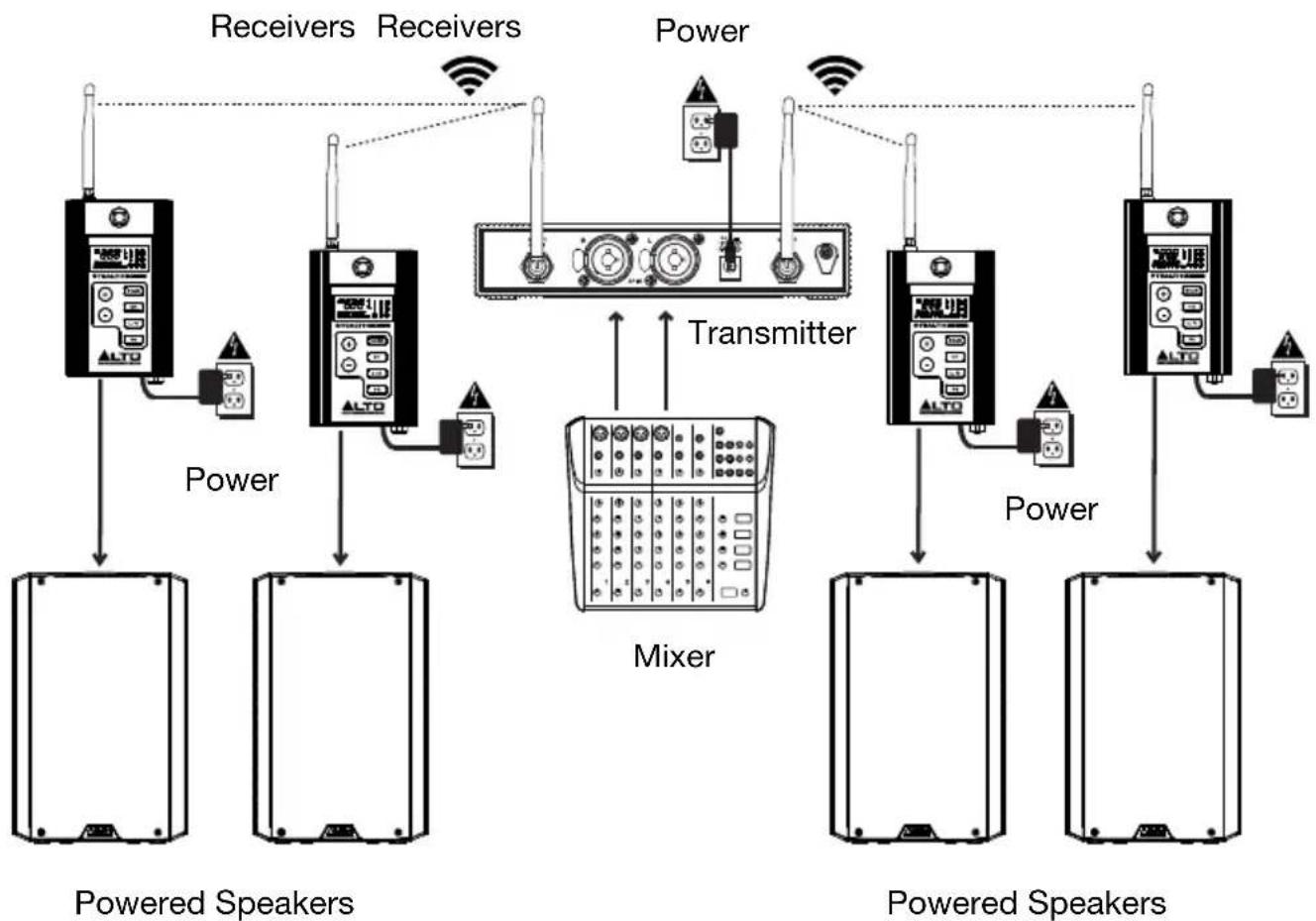
Example 2 - Stereo Operation
To send stereo signals through the Stealth Wireless transmitter to four receivers:
- Connect your mixer's main outputs to the corresponding input channels on the Stealth Wireless transmitter and connect the receivers' outputs to your loudspeakers' inputs. Keep all mixer volume and transmitter volume controls at their minimum settings.
- Power on the Stealth Wireless transmitter and receivers. Set their channels to matching numbers. See the instructions for setting up the transmitter and receivers in Operation for more information.
- Adjust the transmitter and receiver antennas to a vertical position for best results in transmitting the wireless signal. If the wireless signal quality is poor, change the position of the antennas.
- Set the transmitter to Stereo and adjust the Volume control to get a strong signal without clipping.
- Turn on your loudspeakers, adjust the output level on your mixer, and adjust the Volume control on the transmitter to hear the audio signal. If you hear noise in the signal, change to a different channel until a clean signal comes through. See the instructions for changing the RF frequency in Operation for more information.
Operation
To set up and use your Stealth Wireless, follow the steps in this chapter in order. If you are setting up a system using multiple receivers, set up each receiver one at a time, and keep each receiver powered on as you set up additional units.
Note: Wireless reception, range, and overall performance may vary from stated specifications depending on your equipment and the environment where your system is installed. See the Troubleshooting section for tips on how to improve wireless performance.
Setting Up the Receiver
- Use the included TRS to XLR cable to connect the receiver's Output to your loudspeaker.
- Use the included power adapter to connect the receiver's power connector to your power source. The receiver will power on automatically.
-
Set the receiver's channel using one of the following methods:
-
To automatically select an RF channel:
i. Press the Scan button to enter scanning mode. Scanning will begin automatically after one second. Alternatively, press the +/- buttons to scan up or down for the next available RF channel. The channel number will flash in the Display and the RF meter will show the current level of reception for each scanned channel in real-time.
ii. Once the receiver finds the next available channel with an acceptable RF level, it will hold that channel and continue flashing the channel number in the display.
iii. If you need to keep scanning for a different available frequency, press the +/- buttons while the channel number is flashing to continue scanning in that direction for the next available channel.
iv. Press the Scan button to select the auto-scanned frequency. The channel number in the display will stop flashing, indicating that the selected frequency is ready to be received from the transmitter once it has been set up. If no channel is selected after one minute, the receiver will exit channel selection mode.
- To manually select an RF channel:
i. Press the CH button once to enter manual channel selection mode. The channel number will flash in the Display.
ii. With the channel number flashing, press the +/- buttons to increase or decrease the frequency and corresponding channel. The RF meter will show the current level of reception for each channel.
iii. When an acceptable frequency is found, press the CH button to select the channel. If no channel is selected after ten seconds, the receiver will exit channel selection mode.
Setting Up the Transmitter
Note: Transmitters are not included in the Stealth Wireless mk2 Expander Pack, only with the Stealth Wireless mk2 base model. One transmitter can be used to send audio to many receiver units.
- Use a standard XLR cable or 1/4 (6.35 mm) cable (not included) to connect your mixer or other audio source to the transmitter's Combo Inputs.
- Use the included power adapter to connect the transmitter's power connector to your power source. Press the Power button to turn the transmitter on.
- Make sure the receiver is powered on and within 200 feet (61 meters) of the transmitter with clear line of sight.
- Press the CH button to enter Channel Selection mode. Press once to adjust the Left stereo channel and press a second time to adjust the Right stereo channel.
- Press the +/- buttons to cycle through the available channels until you have selected the same RF channel that the receiver has selected. Wait ten seconds or press another button to exit channel selection mode.
Important: If you are setting up a system using multiple receiver-transmitter pairs, set up each receiver one at a time and keep each receiver powered on as you set up additional units. This will prevent each pair from automatically selecting the same channel.
- Once the the receiver and transmitter are tuned to the same channel, watch the receiver's AF indicator and RF indicator to make sure a signal is being received. If you receive interference, change the receiver and transmitter to another channel until a clean signal comes through.
- Press the Mono/Stereo button to change the wireless signal that is sent to the receiver to be either mono or stereo.
- Press the Vol button to enter volume adjustment mode and use the +/- buttons to adjust the volume level. When finished, wait five seconds to exit volume adjustment mode.
Features
Transmitter
Note: Transmitters are not included in the Stealth Wireless mk2 Expander Pack, only with the Stealth Wireless mk2 base model. One transmitter can be used to send audio to many receiver units.
Front Panel

- Power: Press this button to the transmitter on or off.
-
CH: Press this button to select the RF frequency and channel for each stereo channel.
-
Match channels on the transmitter and receiver to get a signal.
- Watch the receiver's AF indicator and RF indicator to make sure a signal is being received.
- If you receive interference, change to another channel until a clean signal comes through.
- To change the channel:
a. Press the CH button to enter channel selection mode. Press once to adjust the Left stereo channel and press a second time to adjust the Right stereo channel.
b. Press the +/- buttons to cycle through the available channels. Set the transmitter and receiver(s) to the same channel.
c. When the desired channel number is shown, wait for ten seconds or press the CH button again. When the channel number stops flashing, that channel is now selected.
- VOL: Press this button to adjust the incoming signal level using the +/- buttons. Press once to adjust the volume of the Left stereo channel and press a second time to adjust the volume of the Right stereo channel. When you are finished adjusting the volume, wait five seconds to exit volume adjustment mode.
- Display: This display shows the current channel, frequency, and AF volume level. See Display for more information.
- Mono/Stereo: Press this button to change the wireless signal that is sent to the receiver to be either mono or stereo. When mono is selected, both the left and right channels are sent to one or more receivers. When stereo is selected, only one stereo channel is sent from each transmitter to each receiver. Use the receiver's L/R button to select which stereo channel it receives.
- +/-: Use these buttons to adjust the selected value on the Display.
Display
- AF: This meter shows the current audio signal level received from the Combo Inputs.
- Channel (region specific): This is the current RF channel number. The number of available channels depends on your region.
- Frequency: This is the current RF frequency in MHz.
- Vol: This indicates volume adjustment is currently active.
- Mono/Stereo: These icons indicate whether the transmitter is sending mono or stereo signal to the receiver.

Rear Panel

- Power Connector: Connect the included 12 V power adapter here.
- Combo Inputs: Connect balanced or unbalanced 1/4 (6.35 mm) or XLR line-level sources here.
- Antenna Terminals: Attach the BNC antennas to these connectors. Place the antennas in a vertical position for best results in transmitting the wireless signal. If the wireless signal quality is poor, change the position of the antennas.
- Power Adapter Restraint: Secure the power adapter cable to this restraint to prevent it from accidentally unplugging.
Receiver
Top Panel
- Antenna: The wireless receiver's antenna receives the signal that is sent from the transmitter. Place the antenna in a vertical position for best results in transmitting the wireless signal. If the wireless signal quality is poor, change the position of the antenna.
- Mount: Use this M10 mounting point to attach the receiver to a loudspeaker.
- Display: This display shows the current channel, frequency, and other settings. See Display for more information.
- +/-: Use these buttons adjust the selected value on the Display.
- Scan: Press this button to automatically scan for the best available RF frequency and channel. See Operation for more information.
- CH: Press this button to manually select the RF frequency and channel. See Operation for more information.
- L/R: Press this button to select which stereo channel the receiver receives from the transmitter. This only applies if both receivers are being used in a stereo application. On both receivers, set the switch to the appropriate positions that match the L/R speaker configuration.
- SQ (Squelch): Press this button to set an RF signal level limit. Signals must come in above that noise limit to pass through the squelch filter. Higher settings allow for greater noise reduction and dynamic range, but a setting that's too high can cause intentionally quieter sounds to be silenced along with the noise.
Use the +/- buttons to select a Low, Medium, or High level. Be sure to experiment with different settings to find an optimal balance. Once you have selected the desired level, wait three seconds to exit the Squelch setup mode.

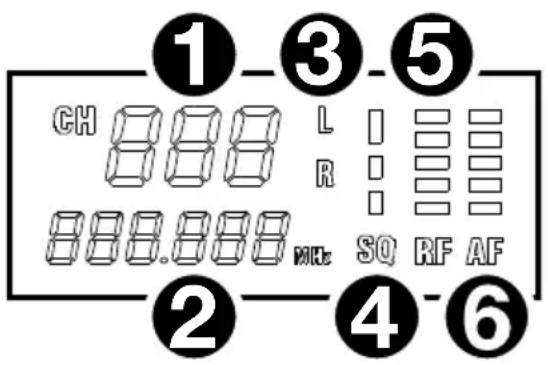
Display
- Channel (region specific): This is the current RF channel number. The number of available channels depends on your region.
- Frequency: This is the current RF frequency in MHz.
- L/R: Indicates which stereo channel the receiver is receiving from the transmitter.
- SQ: Indicates the current Squelch level, either Low, Medium, or High.
- RF: This meter shows the current level of reception between the transmitter and receiver. A high meter value indicates that the RF channel is clear, while a low meter value indicates that there is a significant amount of RF interference on the currently scanned channel.
- AF: This meter shows the current audio signal level received from the transmitter.
Front Panel
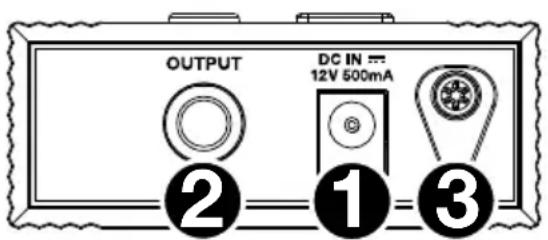
- Power Connector: Connect the included 12 V power adapter here.
- Audio Output (TRS): Use the included TRS to XLR cable to connect this balanced output to your loudspeaker.
- Power Adapter Restraint: Secure the power adapter cable to this restraint to prevent it from accidentally unplugging.
Troubleshooting
| Problem | Solution |
| The receiver does not produce any sound. | Make sure the receiver's power adapter is properly connected to the power connector and a power source. |
| Make sure the receiver's audio output is properly connected to your mixer, amplifier system, etc. Also, make sure the volume controls on your mixer and speaker are turned up. | |
| Make sure both the transmitter and receiver are set to the same RF frequency and channel. | |
| Make sure the receiver and transmitter are within 200 feet (60 meters) and have a clear line of sight. Also, make sure the receiver is not immediately near any metal objects or devices that could cause RF interference (other wireless systems, TVs, radio, etc.). | |
| Adjust the squelch control setting. A higher squelch setting provides better protection against interference but may also reduce signal range. Choose a setting that most effectively mutes interference yet allows the true signal to pass through. If poor signal quality requires a higher squelch setting, try to eliminate the interference or switch the transmitter/receiver channel to avoid a loss of signal range. | |
| There is audible interference in the transmission. | Make sure the receiver and transmitter are within 200 feet (60 meters) and have a clear line of sight. Also, make sure the receiver is not immediately near any metal objects or devices that could cause RF interference (other wireless systems, TVs, radio, etc.). |
| Change the RF frequency and channel on both the transmitter and receiver (to the same channel). | |
| If you are using multiple transmitter-receiver pairs, use only one pair at a time, or make sure the pairs are not using the same or adjacent frequencies. | |
| Adjust the squelch control setting. A higher squelch setting provides better protection against interference but may also reduce signal range. Choose a setting that most effectively mutes interference yet allows the true signal to pass through. If poor signal quality requires a higher squelch setting, try to eliminate the interference or switch the transmitter/receiver channel to avoid a loss of signal range. | |
| The signal is distorted. | Make sure the receiver is not immediately near any metal objects or devices that could cause RF interference (other wireless systems, TVs, radio, etc.). |
| Keep any connected audio cables away from the antennas. | |
| Make sure no other devices are sending signals on the same RF frequency and channel. | |
| Change the RF frequency and channel on both the transmitter and receiver (to the same channel). |
Receptor Stealth Wireless (mk2)
Technical Specifications
Specifications are subject to change without notice.
Receiver
| Sensitivity | -100 dBm |
| Image Rejection | >70 dB |
| T.H.D. | <0.05% @ 1 KHz |
| Output | 1 1/4” (6.35 mm) TRS |
| Output Impedance | 600 ohm balanced |
| Power | 12 V, 500 mA |
| Dimensions (width x depth x height) | 2.8” x 1.1” x 4.6” 72 mm x 28 mm x 118 mm |
| Weight | 0.36 lb. 162.5 g |
Trademarks and Licenses
Alto Professional is a trademark of inMusic Brands, Inc., registered in the U.S. and other countries. All other product or company names are trademarks or registered trademarks of their respective owners.
altoprofessional.com
- USER GUIDE (ENGLISH)
- INTRODUCTION
- BOX CONTENTS
- SUPPORT
- IMPORTANT SAFETY PRECAUTIONS
- SOUND LEVEL
- QUICK START
- ASSEMBLY
- MOUNTING THE RECEIVER TO THE LOUDSPEAKER
- CONNECTION DIAGRAMS
- EXAMPLE 1 - MONO OPERATION
- EXAMPLE 2 - STEREO OPERATION
- OPERATION
- SETTING UP THE RECEIVER
- SETTING UP THE TRANSMITTER
- FEATURES
- TRANSMITTER
- FRONT PANEL
- DISPLAY
- REAR PANEL
- RECEIVER
- TOP PANEL
- TROUBLESHOOTING
- TECHNICAL SPECIFICATIONS
- TRADEMARKS AND LICENSES
- ALTOPROFESSIONAL.COM
Brand : ALTO
Model : Stealth Wireless
Category : Hi-fi system