Black 12 - Hi-fi system ALTO - Free user manual and instructions
Find the device manual for free Black 12 ALTO in PDF.



| Product Type | Active PA Speaker |
| Brand | Alto Professional |
| Model | Black 12 |
| Peak Power | 2400 W (Class D) |
| Continuous Power | 1200 W |
| Woofer | 12" (30.5 cm) |
| Tweeter | 1.75" (4.4 cm) compression driver |
| Coverage | 90° x 60° |
| Wireless Connectivity | Long-range Bluetooth (up to 100 ft) |
| Remote Control | Live Drive App (iOS) |
| DSP Processor | Yes (Flat, Contour, 80 Hz HP, Ext LF, Custom) |
| Audio Inputs | 2 combo XLR / 6.35 mm (Input 1 mic/line, Input 2 line) |
| Audio Output | Balanced XLR (Mix Out) |
| Frequency Response | Not specified (estimated 50 Hz - 20 kHz) |
| Enclosure | 18 mm plywood with scratch-resistant coating |
| Grille | Powder-coated steel |
| Mounting | 35 mm pole mount, 12 x M10 suspension points |
| Power Supply | Mains (IEC cable included) |
| Weight | Approx. 20 kg (estimated) |
| Dimensions (W x H x D) | Approx. 60 x 35 x 40 cm (estimated) |
| Included Accessories | Power cable, user manual |
| Standby Function | Yes, after 15 min without signal (disableable) |
Frequently Asked Questions - Black 12 ALTO
User questions about Black 12 ALTO
0 question about this device. Answer the ones you know or ask your own.
Ask a new question about this device
Download the instructions for your Hi-fi system in PDF format for free! Find your manual Black 12 - ALTO and take your electronic device back in hand. On this page are published all the documents necessary for the use of your device. Black 12 by ALTO.
USER MANUAL Black 12 ALTO
User Guide (English)
Introduction
Alto Professional's Black Series is a full line of elite speaker systems, each designed to exacting standards with premium, purpose-matched components, wireless capability and immense built-in power. Black Series speakers have been designed with one goal in mind: satisfying the ears of your audience with the most gratifying and immersive sound experience they've ever had. Each Black Series speaker has been crafted to thunder with finely tuned sound in a virtually limitless variety of applications—from touring rigs to permanent installations and everything in between. And with 2400 watts of peak power, each one comes equipped to thrill.
Key Features
- 2400 Watts peak Class D power (1200 Watts continuous)
- Wireless connectivity for remote setup and sound-shaping control
Works with Alto Professional's Live Drive wireless speaker app for iPad and iPhone
App allows level-matching, EQ adjustment, time alignment, compression and more - Optimized 90^ x 60^ coverage field
DSP-controlled with custom crossover, superior tuning and active thermal protection - Specifically designed, purpose-matched components for maximum efficiency and industry-leading power
Precision-engineered HF waveguide, extensively tested for optimized audience coverage
Built-in mixer with two Mic/Line combo inputs, volume controls and balanced XLR mix output
12" low-frequency transducer, 1.75" driver - Contour switch for increased EQ control
Ground Lift switch to disconnect signal ground from chassis ground - Switch to turn off logo LED
Lightweight, portable design with comfortable, custom-molded handles - Heavy-duty 18 mm hardwood plywood cabinet
Rugged, highly durable scratch-resistant finish
Use as traditional PA loudspeaker or as floor wedge monitor - Steel-reinforced rubber feet on bottom and side
- Heavy-duty, powder-coated steel speaker grille
- Stand and pole-mountable via standard 35 mm socket
- Flyable via 12 M10 rigging points
- Designed and tuned in the U.S.A.
Box Contents
Black 12
User Guide
Power Cord
Safety & Warranty Manual
Support
For the latest information about this product (system requirements, compatibility information, etc.) and product registration, visit altoprofessional.com/black12.
For additional product support, visit altoprofessional.com/support.
Important Safety Precautions
Please note: Alto Professional and inMusic are not responsible for the use of its products or the misuse of this information for any purpose. Alto Professional and inMusic are not responsible for the misuse of its products caused by avoiding compliance with inspection and maintenance procedures. Please also refer to the included safety and warranty manual for more information.
Suspension/Rigging
- Only qualified persons using safe rigging standards should install this loudspeaker. The installer is responsible for proper selection and use of hardware to properly and safely install the speakers.
Always install loudspeakers in accordance with applicable electrical and building codes.
This loudspeaker should be suspended only from its suspension points (M10 x 1.5PH, 30mm length). - Do not suspend multiple loudspeakers in a vertical array.
Make sure your cables are out of the way of performers, production crew, and audience so they will not trip over them, pulling the loudspeaker off the stand or pole.
Stand-Mounting
Always install loudspeakers in accordance with applicable electrical and building codes.
- Install the loudspeaker according to its maximum weight. Check the specifications of your stand or pole to ensure it can support the loudspeaker's weight. Also, observe all safety precautions specified by the manufacturer.
- Do not mount multiple loudspeakers on the same stand or pole.
Always verify that the stand or pole is on a flat, level, and stable surface. Also, fully extend the legs of tripod-style stands, and ensure its legs do not present a trip hazard.
- Inspect the stand (or pole and associated hardware) before each use and do not use equipment with worn, damaged, or missing parts.
- Always be cautious in windy, outdoor conditions. You may need to place additional weight (e.g., sandbags) on stand's base to improve stability. Do not attach banners or similar items to any part of a loudspeaker system. Such attachments could act as a sail and topple the system.
Unless you are confident that you can handle the loudspeaker's weight, ask another person to help you lift it onto the stand or pole.
Make sure your cables are out of the way of performers, production crew, and audience so they will not trip over them, pulling the loudspeaker off the stand or pole.
Sound Level
Permanent hearing loss may be caused by exposure to extremely high noise levels. The U.S. Occupational Safety and Health Administration (OSHA) has specified permissible exposures to certain noise levels. According to OSHA, exposure to high sound pressure levels (SPL) in excess of these limits may result in hearing loss. When using equipment capable of generating high SPL, use hearing protection while such equipment is under operation.
| Hours per day SPL (dB) Example | ||
| 8 | 90 | Small |
| 6 | 92 | Train |
| 4 | 95 | Subway |
| 3 97 High level desktop monitors | ||
| 2 | 100 | Classical |
| 1.5 | 102 | Riveting |
| 1 | 105 | Machine |
| .50 | 110 | Airport |
| .25 or less 115 Rock concert | ||
gig
train
music machine factory
Quick Start / Connection Diagram
Note: Only items listed in this manual's Box Contents section are included with this product. iPad, extra loudspeakers and subwoofer, microphones, mixer, and cables are sold separately. Live Drive app is available on the App Store.

Example A: 4 loudspeakers (2 Black Series, 2 extension)
Connect your mixer's main outputs to your Black Series loudspeakers' inputs.
Connect each of your Black Series loudspeakers' outputs to the inputs of your extension loudspeakers.
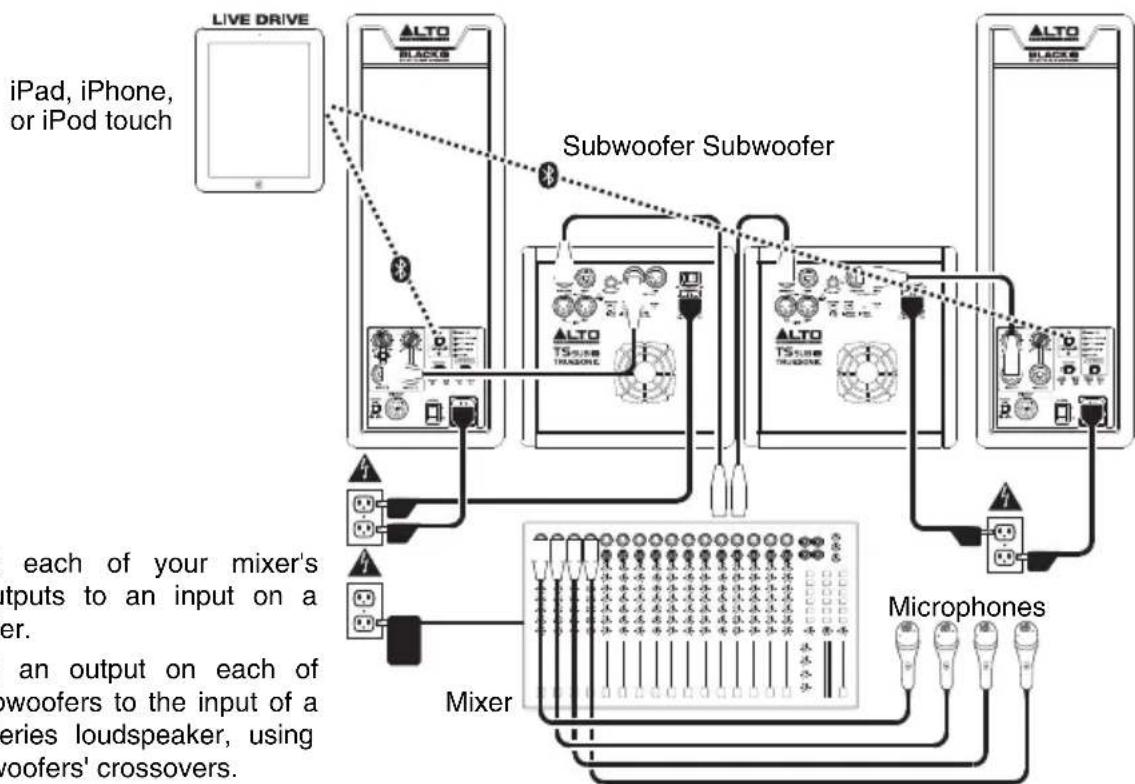
Example B: 2 loudspeakers, 2 subwoofoers
Connect each of your mixer's main outputs to an input on a subwoofer.
Connect an output on each of your subwoofoers to the input of a Black Series loudspeaker, using the subwoofoers' crossovers.
Using the Live Drive App
Black Series loudspeakers also come equipped with wireless technology and the unmatched capabilities of the Alto Professional Live Drive wireless speaker app. You'll be able to level-match, adjust EQ and compression, time-align and more. The Black Series puts active live sound control at your fingertips. Using the app on your iPad, iPhone, or iPod touch, you can adapt the speakers to new venues or tweak settings remotely from any corner of the room. Black Series loudspeakers offer a powerful new experience, not only for your audiences, but also for you—you get streamlined, sound-shaping capabilities at your fingertips.
Downloading the App
To download the App, just search for Live Drive in the App Store and download the Alto Professional Live Drive app.
Bluetooth Pairing
About Range: Black Series loudspeakers use an advanced, extended-range Bluetooth antenna design, allowing for ranges far greater than traditional Bluetooth devices. The typical range is approximately 100 feet (30 meters) with a clear line of sight. However, the range may vary depending on your source device and the environment.
To maximize the range:
- Set your source device on a flat surface and make sure there are no obstacles between the loudspeaker and your device (e.g., walls, furniture, etc.).
- Turn off your source device's Wi-Fi.
- Turn off any unneeded 2.4 GHz devices in the nearby vicinity (e.g., other Bluetooth devices, baby monitors, Wi-Fi access points, microwave ovens, etc.).
- Try using a different Bluetooth source device (iPad or iPhone). Bluetooth signal strength varies between different devices.
To pair the speaker to your Bluetooth device:
- Do this on one loudspeaker only: With the loudspeaker powered on, press and release its Pairing Button. Its Pairing LED will flash.
- From your Bluetooth device's settings page, enable Bluetooth and select Black Series as the device. When paired successfully, the Pairing LED will light continuously. (This process may take up to 30 seconds.)
Important: If your device prompts you to enter a PIN code to pair it to the speaker, enter 0000 (four zeros).
- Once your device is paired to the speaker, the speaker will remember the device even after power-cycling it. If the device does not reconnect automatically, go to your device's Bluetooth settings page and select Connect to reestablish the connection.
To erase all previous pairing and linking settings, press and hold the Pairing Button for 10 seconds. The LED will also flash to confirm the pairing records are erased. Now, you can pair to a new device.
Live Drive Operation
For more information about using Live Drive, visit altoprofessional.com/livedrive.
Features
Rear Panel
- Power Input: Use the included IEC power cable to connect this input to a power source.
- Fuse: If the unit's fuse is broken, lift this tab to replace the fuse. Replace it with a fuse with an appropriate rating (printed under the unit's power cable input). Using a fuse with an incorrect rating can damage the unit and/or fuse.
- Power Switch: Use this switch to power the loudspeaker on or off.
- Power/Standby LED: This LED illuminates when the loudspeaker is powered on.
- Standby On/Off Switch: By default, this loudspeaker has its Standby Mode enabled: when no incoming audio signal is detected for
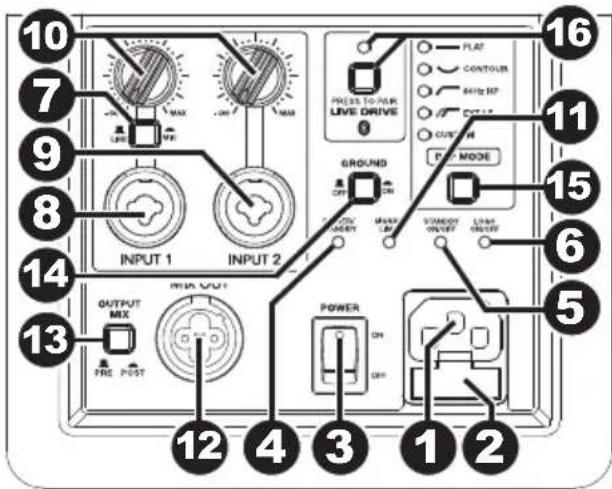
approximately 15 minutes, the loudspeaker will enter a low-power state. The loudspeaker will exit Standby Mode within 0.5 seconds of detecting an incoming audio signal. Change this recessed switch's setting to the Off position to disable this feature.
- Logo On/Off Switch: Press this to turn the light in the Alto Professional logo on or off.
- Line/Mic Switch: Engage (depress) this switch if your Input 1 audio source is a microphone. Disengage (raise) this switch if your Input 1 audio source is line-level.
- Input 1: Use a standard XLR or 1/4'' (6.35 mm) cable to connect your audio source to this input. This input accepts both line-level and microphone-level sources. Set the Line/Mic Switch to the appropriate setting.
- Input 2: Use a standard XLR or 1/4'' (6.35 mm) cable to connect your audio source to this input. This input accepts line-level sources only.
- Input Volume Knob: Use this knob to set the level of the audio going into its corresponding input below.
- Signal/Limit LED: This LED illuminates green when an incoming audio signal is detected. It illuminates red when the audio signal level is too high and is being dynamically reduced to protect the loudspeaker from damage or distortion. If this LED is continually illuminated red, or if the audio output sounds excessively distorted, then reduce the volume of the connected audio source, or reduce the setting of the Input Volume Knob.
- Mix Out: Use a standard XLR cable to connect this balanced output to the input of a second Black Series loudspeaker. Audio is sent from this output at 0 dB, depending on the setting of the Output Mix Switch.
- Output Mix Switch: In the "out" (raised) position, the Mix Out is the sum of Input 1 and Input 2, pre-volume (i.e., the Input Volume Knobs do not affect the audio signal level of the Mix Out). In the "in" (depressed) position, the Mix Out is the sum of Input 1 and Input 2 but adjustable with the Input Volume Knobs.
- Ground Switch: Engage (depress) this switch to reduce hum or noise.
-
DSP Mode Button: Press this button to set the loudspeaker's internal DSP to any of the following settings:
-
Flat: No change to the audio.
- Contour: Boosted bass and treble with a gradual cut of mid-range frequencies—a useful setting for most contemporary music.
- 80Hz HP: Applies a high-pass filter. This is useful when using the Black 12 as a crossover with a subwoofer that does not have a high-pass output. This setting is also useful for cutting all bass frequencies (e.g., for in speech-only applications, or when used as a delay or fill loudspeaker where the extra bass frequencies are not needed).
- Ext LF: Extends the loudspeaker's low-frequency response, providing increased output of bass frequencies.
-
Custom: Applies your custom DSP mode, set in the Live Drive app.
-
Pairing Button: Press and release this button to pair the loudspeaker to your iPad or iPhone. The Pairing LED will illuminate when it is paired. See the Bluetooth Pairing section for instructions.
Assistance technique
Trademarks and Licenses
The Bluetooth word mark and logos are owned by the Bluetooth SIG, Inc. and any use of such marks by Alto Professional is under license.
App Store, iPad, iPhone, and iPod touch are trademarks or service marks of Apple Inc., registered in the U.S. and other countries.
All other product or company names are trademarks or registered trademarks of their respective owners.
altoprofessional.com
- User Guide (English)
- Introduction
- Key Features
- Box Contents
- Support
- Important Safety Precautions
- Suspension/Rigging
- Stand-Mounting
- Sound Level
- Quick Start / Connection Diagram
- Using the Live Drive App
- Downloading the App
- Bluetooth Pairing
- To maximize the range:
- To pair the speaker to your Bluetooth device:
- Live Drive Operation
- Features
- Rear Panel
- Assistance technique
- Trademarks and Licenses
- altoprofessional.com
Brand : ALTO
Model : Black 12
Category : Hi-fi system