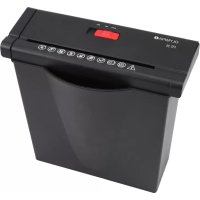
PS 36 - Shredder OLYMPIA - Free user manual and instructions
Find the device manual for free PS 36 OLYMPIA in PDF.



| Product Type | Document Shredder |
| Brand | Olympia |
| Model | PS 36 |
| Cutting Capacity | Up to 6 A4 sheets (80 g/m²) or 1 credit card |
| Cut Type | Strip cut, width 6 mm |
| Cutting Speed | 2.5 - 3.0 m/min |
| Entry Width | 220 mm |
| Continuous Operation | 2 minutes |
| Noise Level | 73 dB(A) |
| Dimensions (W x D x H) | 310-380 x 145 x 290 mm |
| Weight | 1.7 kg |
| Power Supply | 220-240 V / 50 Hz, 0.9 A |
| Security Level (DIN 66399) | P-2 |
| Functions | Automatic start/stop, reverse, stop |
| Motor Protection | Automatic shutdown in case of overload |
| Maintenance | Clean with a soft, dry cloth; regularly oil the cutting block |
| Safety | Do not use by children; keep ties, hair, jewelry away; do not insert hands |
| Spare Parts | Special oil and lubricating sheets available (ref. 9130) |
| Repairability | Repairs by qualified personnel only |
| Manufacturer | GO Europe GmbH, Germany |
Frequently Asked Questions - PS 36 OLYMPIA
User questions about PS 36 OLYMPIA
0 question about this device. Answer the ones you know or ask your own.
Ask a new question about this device
Download the instructions for your Shredder in PDF format for free! Find your manual PS 36 - OLYMPIA and take your electronic device back in hand. On this page are published all the documents necessary for the use of your device. PS 36 by OLYMPIA.
USER MANUAL PS 36 OLYMPIA
natural_image
Black industrial waste bin with control panel and indicator lights (no visible text or symbols)GO Europe GmbH
Zum Kraftwerk 1
45527 Hattingen
Germany
www.go-europe.com
PS36
DE Bedienungsanleitung. 3
GB Operating Instructions....15
FR Mode d'emploi. 27
ES Manual de instrucciones....39
NL Gebruiksaanwijzing....51
IT Istruzioni d'uso....63
© CZ Návod k obsluze ....75
PL Instrukcja obstugi. 87
PT Manual de instruções....99
HR Priručnik s uputama.... 111
GR Οδηγίες Χρήσης. 123
TR Kullanma kılavuzu....135
AR 158
دليل الاستعمال
OLYMPIA
PS 36
Operating Instructions
Contents
- Important Safety Regulations....17
- Intended Use....18
- Operating Elements. 19
- Starting up....20
- Operation....20
- Motor Protection....21
- Clearing Paper Jams....21
- Maintenance and service....22
- Technical Data....23
- Troubleshooting.....24
- Declaration of Conformity....25
- GS tested safety mark. 25
- Symbols....25
- Disposal....25
- Warranty....26
- Manufacturer....26

The operating manual represents a component part of the device. It contains important information regarding safety, use and disposal. Familiarize yourself with all the operating and safety information before starting to use the device.
Only use the device as described and for the purpose for which it is intended. Hand over all the documents with the device if it is transferred to third parties.
In order to be able to exploit all the functions provided by the shredder, please read this operating manual thoroughly before starting to use the device.
1. Important Safety Regulations
- Keep the device out of reach of children and pets! The device may only be operated by adults.
- The device may only be used by one person at a time.
- Protect the equipment from direct sunlight, extreme heat and damp!
- Do not carry out any other activities when operating the device, such as clean it.
• Repairs may only be carried out by properly trained specialists. - Never place any objects on the device.
1.1 Safety labels

In order to be able to exploit all the functions provided by the shredder, please read this operating manual thoroughly before starting to use the device.

Attention: Improper use of the device can result in severe injury!

Keep scarves, jewellery and loose clothing away from the area of the paper infeed!

The device must not be operated by children! Keep children away from the device.

Never insert your hands in the paper infeed!


Do not spray any inflammable gases in the direction of the shredder.

Keep ties away from the area of the paper infeed!

Keep your hair away from the area of the paper infeed!

Never spray any flammable gases or oil on the device. Risk of fire!

Never insert paper clips or staples in the paper infeed!

Caution! Risk of injury through sharp edge of cutting mechanism!

Warning! Risk of injury through the insertion mechanism. Loose objects could be caught in the insertion slot and cause injuries. Keep fingers, hair, scarves, ties, jewellery etc. away from the insertion slot.
Attention! Failure to observe the safety labels can result in severe personal injury! If an object (sleeve, tie, etc.) does enter the infeed accidentally, disconnect the power plug from the power socket immediately!
Safety information! The power socket must be close to the unit and easily accessible. This enables you to disconnect the machine from the power supply quickly in an emergency.
1.2 Electrical safety guidelines
- Disconnect the power plug from the power socket:
-
if it will remain unused for a longer period,
• before emptying the waste bin,
• before cleaning the device,
• before moving the device. -
Do not put the device into operation in the case of damage to the power cable, the power plug or the device itself (risk of injury)!
- Do not complete any modifications to the power cable because it is designed for the power supply specified.
- Never exceed the recommended load capacity of the power socket or any connected extension cables!
Attention! It is forbidden to open the cutting mechanism attachment for repair purposes. Risk of fatal accident! In addition, all claims under the terms of guarantee will be deemed null and void.
2. Intended Use
- Only use the PS 36 shredder to shred paper and credit cards! The paper to be shredded must be dry and comply with the requirements stipulated in Chapter "Technical Data"! Attempting to shred other material can lead to personal injury (e.g. through splinters from hard material, etc.) and damage to the equipment (e.g. damage to the cutting mechanism etc.).
- Remove all paper clips and staples from paper before feeding it in the device!
- Do not shred continuous forms in this device!
- The unit may only be used in dry, indoor rooms.
3. Operating Elements
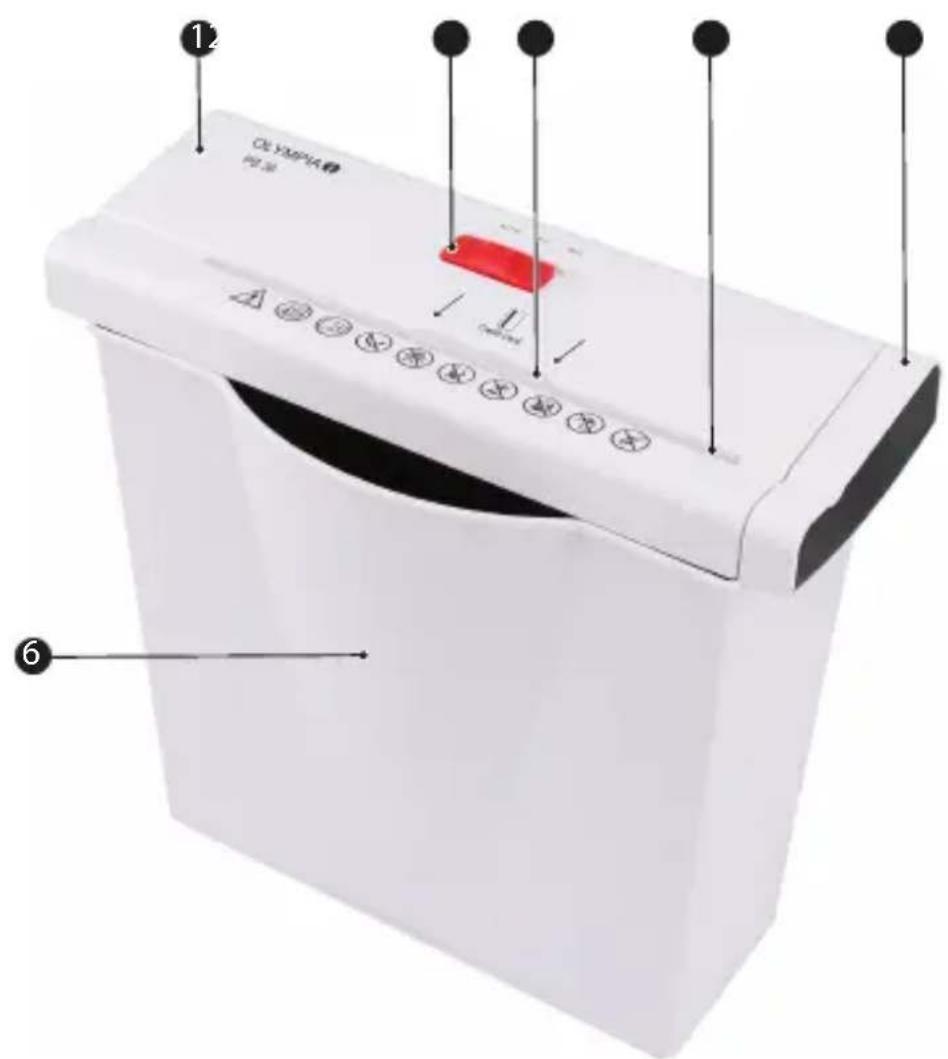
1 Shredder attachment
② Sliding switch
3 Credit card infeed
4 Paper infeed with cutting mechanism
5 Extension (to fit the shredder on larger waste bins)
6 Waste bins
4. Starting up
- Remove the device carefully from the packaging.

Attention! The underside of the cutting mechanism attachment has sharp edges. Risk of injury!
- Replace the shredder attachment on the waste bin supplied.
Note! The shredder attachment must not wobble!
-
Set the waste bin and shredder attachment on an even surface.
-
Position the device near a power socket. However, do not position the waste bin and shredder attachment near a source of heat or in the vicinity of water.
-
Connect the power plug to a power socket.
Note! Pay attention that the power cable is laid so that people or pets do not walk over it or that other objects can be set down on it. Pay attention to the information regarding power supply on the rear side of the device for the necessary precautions.
Safety information! For reasons of safety, the power socket to which the shredder power plug is connected must be near to the device and freely accessible so that the power supply can be disconnected quickly in an emergency!
5. Operation
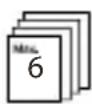
Note! The recommended capacities stipulated in Chapter "Technical Data" must not be exceeded, otherwise paper will jam! Do not forget that the thickness of the paper increases when folded, as a result of which the recommended sheet capacity can be exceeded. Also reduce the quantity of paper when shredding coarse paper.
5.1 Sliding switch
The sliding switch is used to control the cutting mechanism in the paper shredder. The sliding switch can be set to three positions:
• Position Rev: Continuous reverse running.
- Position Off: Paper shredder is switched off.
- Auto: In the Auto setting, the cutting mechanism starts automatically as soon as you feed paper or a credit card into the infeed slot. The shredder switches to forward running and draws in the paper or credit card. On completion of the shredding operation, the device continues running for approx. 2 to 4 seconds and then switches off automatically.
5.2 Switching the device on
- Connect the power plug to a power socket.
- Set the sliding switch to Auto.
5.3 Feeding in paper or credit cards
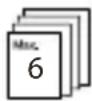
Note! A maximum of 6 sheets of A4 paper with a weight of maximally 80 g/m^2 may be inserted in the paper infeed at a time.
- The shredder is connected to the mains power outlet and the sliding switch is set to Auto.
- The paper must be straight when inserted in the paper infeed. Feed credit cards in between the two arrows.
Note! Ensure that the sliding switch is set to Off after the shredding operation has been completed.
5.4 Switching the device off
- Disconnect the power plug from the power socket.
6. Motor Protection
The motor switches off automatically in the event of an overload. First of all, disconnect the power plug from the power socket and allow the motor to cool down to room temperature. Then connect the power plug to the power socket again and continue operation.
Note! Observe the continuous operation time stipulated in Chapter "Technical Data".
7. Clearing Paper Jams
If too much paper is fed into the cutting mechanism, a paper jam occurs. The shredder switches off automatically in the event of a paper jam.
Proceed as follows:
- Press the Rev button to activate reverse operation and feed the paper back out.
- Remove any residual paper from the infeed in forward feed (Auto).
Note! If the jam is not cleared by the reverse/forward running process, disconnect the power plug and remove the residual paper from the cutting mech-anism manually.
- Set the sliding switch to Auto.
- Reduce the quantity of paper being shred and continue with the shredding process.
7.1 Rev setting (reverse operation)
Set the sliding switch to Rev so that the cutting mechanism runs in reverse and releases the paper.
7.2 Forward feed (Auto)
Set the sliding switch to Auto in order to ensure any residual paper is shredded and removed from the cutting mechanism.
8. Maintenance and service
Attention! Maintenance work may only be completed when the power plug has been disconnected from the power socket!
8.1 Emptying the Waste Bin
- Disconnect the power plug from the power socket.
- Remove the shredder attachment from the waste bin.
- Entleeren Sie den Inhalt des Auffangbeghälters an geeigneter Stelle.
- Replace the shredder attachment back on the waste bin.
Note! It is recommended not to allow the waste bin to fill up against the cutting mechanism. This prevents the shredded paper congesting and jamming in the cutting mechanism. Empty the waste bin regularly.
8.2 Oiling the Cutting Mechanism
To ensure a long service life for your paper shredder, we recommend clearing any residue from the cutting mechanism regularly and applying a little special oil for paper shredders on the cutting tool. You can obtain the special CFC-free oil from your supplier or directly from our service centre in Hattingen. This helps lengthen the service life of the device.
- Each time the waste bin is emptied, apply several lines of the special oil in a lateral direction on a suitable sheet of paper and feed this sheet through the shredder by setting the sliding switch to Auto.
- As an alternative, we offer lubricant sheets. The oil, which is on a vegetable basis, is impregnated in the paper and only escapes during the shredding process. This ensures simple, clean use. Simply insert the lubricant sheet in the paper shredder infeed, shred it and then switch the device to reverse running for approx. 10 seconds. The shredder is then ready for operation again. There are 12 lubricant sheets enclosed in one envelope and they can be obtained under Article Number 9130 from retailers or our Service department.
Attention! It is forbidden to use oil spray from aerosol cans containing CFC!
8.3 Cleaning
- Switch off the unit.
- Disconnect the power plug from the power socket.
- Clean the surface of the housing with a soft, dry, lint-free cloth. Do not use any solvents or cleaning agents.
9. Technical Data
| PS 36 | |
| Not intended for commercial use. | |
| Cutting capacity | Max. 6 sheets of A4 (80 g/m2) or 1 credit card |
| Cutting method, cut width Strip-cut, 6 mm | |
| Shredding speed 2.5 - 3.0 m/min | |
| Width of paper infeed 220 mm | |
| Continuous operation time 2 min. | |
| Noise level 73 dB(A) | |
| Range of operations | Auto start/Auto stopReverse RunningOff |
| Dimensions (W x D x H) 310 - 380 x 145 x 290 mm | |
| Weight 1.7 kg | |
| Power supply 220 - 240 V / 50 Hz | |
| Rated input power 0.9 A | |
Declaration of conformity with security level according to DIN 66399
We declare that, regarding shredding documents, this shredder complies with the requirements of security level P-2 according to DIN 66399.
P-2: Recommended for data media containing in-house data which should be rendered illegible. Material particle area ≤ 800 mm^2 or strip width ≤ 6 mm , strip length unlimited.
10. Troubleshooting
| Problem Diagnosis | & Cause Solution | |
| Device does not work | Is the power plug connected properly in the power socket? | Connect the power plug in the power socket properly. |
| Is the sliding switch set to Auto? | Set the sliding switch to Auto. | |
| Does the motor fail to start when paper is inserted? | Slide the paper in the respective infeed slot so that it makes contact with the sensor in the middle. | |
| Device no longer functions after a longer period out of service or stops during operation | Was the device shutdown for a longer time? Is the surface of the device hot? The permissible continuous operation time has probably been exceeded. | First of all, disconnect the power plug from the power socket and allow the motor to cool down to room temperature. For information on continuous operation, refer to Chapter "Technical Data". |
| Paper jam Have you | exceeded the permissible paper capacity (refer to Chapter "Technical Data")? Has the paper been fed in askew? | Clear the paper jam, refer to Chapter "Clearing a paper jam" |
Note! If you cannot clear the fault yourself, contact your dealer or call the GO Europe hotline.
11. Declaration of Conformity

The CE Mark on the device confirms conformity.
The Declaration of Conformity can be read online at www.go-europe.com.
12. GS tested safety mark

100000000

The «Geprüfte Sicherheit» mark (GS tested safety mark) certifies that the product satisfies the requirements defined by the German Product Safety Act (ProdSG).
The GS tested safety mark indicates that when implemented for
its intended use and in the event of foreseeable misuse the identified product will not endanger the safety and health of the user. It concerns a voluntary safety mark which was issued by an authorized testing institute.
13. Symbols
The following symbols are provided on the packaging or on the device itself. This section explains the significance of the individual symbols.

The symbol indicates that the design of the product complies with Protection Class II (double insulation). A safety connection to the electrical earthing (ground) is not necessary.

Only use the product indoors.
14. Disposal

Find out about the possibilities of taking back used appliances free of charge from your dealer.
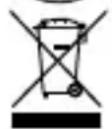
The adjacent symbol indicates laws dictate that electrical and electronic apparatus no longer required must be disposed of separate from domestic waste. Dispose of your device at a collection point provided by your local public waste authority. Packaging materials must be disposed of according to local regulations.

The packaging is made of environmentally friendly materials that you can dispose of at local recycling points. Advice on the options with which to dispose of your old device can be obtained from your municipal or local administration offices.
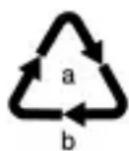
Observe the identification on the packaging materials during the waste sorting process; they are identified by abbreviations (b) and numbers (a) which have the following significance: 1–7: plastic/20–22: paper and cardboard/80–98: composite materials.
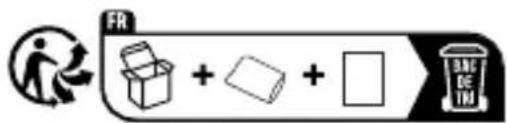
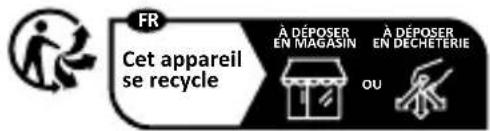
The Triman logo is only valid for France.
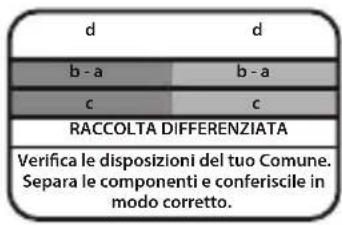
The logo is only applicable to Italy.

The logo is only valid in Spain.
15. Warranty
Dear Customer,
we are pleased that you have chosen this equipment.
In the case of a defect, please return the device together with the receipt and original packing material to the point-of-sale.
16. Manufacturer
GO Europe GmbH
Zum Kraftwerk 1
D-45527 Hattingen
Germany
www.go-europe.com
service@go-europe.com
OLYMPIA
PS 36
3 Creditcard-invoeropening
5 6
5.3 Papier of creditcard invoeren
