D942S Libra+ - Doorbells FRIEDLAND - Free user manual and instructions
Find the device manual for free D942S Libra+ FRIEDLAND in PDF.


| Product type | Wireless doorbell |
| Brand | Friedland |
| Model | D942S Libra+ |
| Chime power supply | 230 V, 50 Hz, 3 W |
| Button power supply | CR2032 battery (included) |
| Maximum range | 150 meters (in open field) |
| Radio frequency | 868 MHz |
| Typical sound level | 75 dBA at 1 meter |
| Chime protection rating | IP4x |
| Button protection rating | IP55 |
| Number of icons | 3 (front door, back door, alert) |
| Adjustable volume | Yes, via wheel |
| Light flash | Yes, switchable (on/off) |
| Ringtone selection | Yes, multiple melodies available |
| Reminder function | Yes (press button on chime) |
| Programming | Learning mode to pair a button |
| Chime operating temperature | 0 to 40°C |
| Button operating temperature | -10 to 40°C |
| Battery life (button) | Approximately 18 months (5 activations/day) |
| Warranty | 2 years |
| Maintenance | Clean with a dry, soft cloth |
| Safety | Follow instructions before drilling (check pipes/cables) |
| Spare parts | CR2032 battery commercially available |
Frequently Asked Questions - D942S Libra+ FRIEDLAND
User questions about D942S Libra+ FRIEDLAND
0 question about this device. Answer the ones you know or ask your own.
Ask a new question about this device
Download the instructions for your Doorbells in PDF format for free! Find your manual D942S Libra+ - FRIEDLAND and take your electronic device back in hand. On this page are published all the documents necessary for the use of your device. D942S Libra+ by FRIEDLAND.
USER MANUAL D942S Libra+ FRIEDLAND
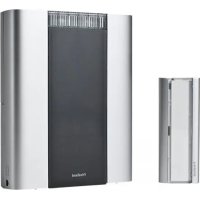
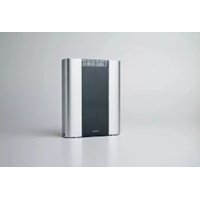
D942S Libra+ 150m Plug-in chime with Push/Converter
Bedienungsanleitung
Libra + 150m Plug-in chime with push/converter
Installation and Use
Checking pack contents.. .Pg.2
Safety
Quick start
Plug in the chime . Pg. 3
Open the bell push/converter
Fit the push battery
Switch positions
Volume control
Sliding window
Use of icons . Pg. 4
Programming procedures
Changing the tune
Recall function.
Chime sounds.. 5
Mount bell push.
Push/converter functions
Typical connections.. Pg. 6
Troubleshooting. Pg. 7
Specifications . 8
Disposal and recycling
Guarantee
Declaration
Libra + 150m Plug-in chime with push/converter
Thank you for choosing this Friedland product. Please use the following instructions to ensure correct installation and use. Keep these notes in a safe place for future reference.
Checking pack contents
Unpack your chime kit and identify the following parts:
Chime
- Bell push/converter
CR2032 battery for bell push
- Bell wire (for use with a wired push)
- 2 × fixing screws for push
Adhesive pad
You will need:
A 4mm cross-head screwdriver
A small flat bladed screwdriver
Safety
Before proceeding with the installation, please note the following safety warnings:
- Always follow the manufacturer's advice when using power tools and wear suitable protective equipment (e.g. safety goggles) when drilling holes etc.
- Before drilling holes in walls, check for hidden electricity cables and water pipes, the use of a cable/pipe locater maybe advisable if in doubt.
- When connecting the landscape push/converter to other manufacturers' equipment, check manuals and if necessary consult the manufacturer regarding suitability for the intended use.
Quick start
The bell push supplied with this kit is pre-programmed to operate with the chime. You need to do the following to get started:
- Open the bell push
Fit the push battery - Check the chime switch setting
- Check the volume setting
- Plug in the chime
When you operate the bell push, the chime will sound and the 1st Icon will flash. If you have additional pushes or you want to assign a different icon to your push, you will need to follow the programming procedure.
Open the bell push/converter remove nameplate
Using a ball point pen, press at point shown in Fig 1 (A) and remove the name plate. If desired, you can prise apart the two halves of the name plate and write on the card. Undo the retaining screw (B) and remove the back of the push.

To fit the push/converter battery
Insert the CR2032 coin cell. Ensure the face marked ^+ is uppermost (Fig. 2).
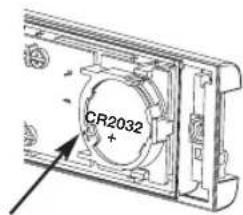
Fig. 2
Chime switch positions
Mute
To turn the sound off, set switch (C) to position 1.
Flash off
To turn the flashing light off, set switch (C) to position 3.
Normal operation
For normal operation (sound + flashing light) set switch (C) to position 2.
Volume control
The volume control is behind the sliding window on the front of the chime. Initially, set the control to mid-point. After you have tested your system, adjust to the desired volume.
Sliding window
Release the catch (D) and slide open the window (Fig. 3).

Use of icons
In addition to the chime sounds, your chime has a visual indication to show which device has activated it. An icon will illuminate when the chime is activated by a bell push or another compatible device. The chime supports 3 icons:

Main door

Back door

Alert symbol
The 'Main door' and 'Back door' icons are usually used for bell pushes. The other icons are intended for use with other compatible devices, such as PIR movement detectors and Telephone ring detector. Icons numbered 1 to 3 are also included. The Icons are self-adhesive, supplied in strips of 3. They can be changed, if required, by opening the sliding window of the chime and gently peeling off the strips.
If desired, the strips can be cut into individual icons and fixed to the chime in a different order.
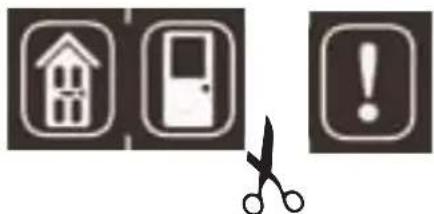
Use the Programming procedure to change the icon associated with a push.
Programming procedure
Learn mode
To enable your chime to learn the identity of your bell push:
- Press the button and keep it pressed. Each Icon will light in turn. When the Icon you want is lit, release the button.
While the Icon you have selected is lit, operate your push. The chime will sound. The Icon will flash.
Unlearn procedure
If you want to remove a push from the chime's memory:
- Press the button and keep it pressed. Each Icon will light in turn. When the Icon associated with the push to be un-learnt is lit, release the button.
Press and hold down both & buttons, until a 'beep' sound is heard.
Changing the tune
Changing the tune
Operate the push. While the icon is flashing, press the button. Press the button again and the tune will change. Repeat until the tune you want plays.
Recall function
A short push of the button will flash the icon that was last in use.
Chime sounds
To hear the chime sounds without operating the bell push, press the button. Press the button again and the tune will change.
Mount the Push/Converter
Mount using either the double sided adhesive pad, or the screws provided (see Fig 4). Test your push before fixing. Avoid fixing to metal structures.

Fig. 4
Push/Converter functions
The bell push in this kit can be used as a stand-alone wirefree push. Additionally, it can be used to interface with an existing wired doorbell system or any of the following:
A standard wired bell push
A lit bell push and transformer
A door or window contact
Any device with N/O or N/C, voltage free contacts
Any device which generates appropriate control signals < 24 (AC or DC)
See typical connections (C1-7)
Important Note: Additional wiring can be brought into the push through the grommet in the back of the push.
Once the grommet has been pierced or removed, we recommend that the push is mounted indoors.
Diagram Applications Operation
| C1 | wired bell push or 'normally open' switch/contacts | when switch is closed, chime will sound |
| C2 | door/window contact, 'normally closed' switch/contacts | when switch is opened, chime will make an 'ALERT' sound |
| C3 | a lit push (with transformer) when switch is closed, chime will sound | when switch is closed, chime will sound |
| C4 | landscape push/converter - terminal positions | |
| C5 | a typical wired bell or chime circuit - transformer powered | |
| C6 | converter connected to a wired bell or chime circuit - transformer powered | when push is operated, Libra+ chime will sound |
| C7 | converter connected to a wired bell or chime circuit - battery powered | when push is operated, Libra+ chime will sound |
D942S 48342PL_Ed3 2/1/07 6:31 PM Page 7

Typical connections
| Troubleshooting |
| A 'beep' sound is heard in learn mode... ● The push you are programming has already been learnt by the chime. ● If you want to change the icon associated with the push, use the un-learn procedure, then programme the push again. |
| Two 'beep' sounds are heard after the normal chime sound... ● This indicates a low battery in the bell push that activated the chime. Fit a new battery, type CR2032. |
| When the bell push is operated, the amber confidence light does not turn on, or is only on for a short time... ● In normal operation, the amber light will turn on for 1 second. When the battery is weak, the light will only turn on for a short time. Fit a new battery, type CR2032. |
| The chime does not work... ● Check that the chime is plugged in to 230V socket. ● Does the socket have a switch? Is it in the 'ON' position. ● The chime could be out of range of the bell push. Try the chime in a different location. ● The chime might not have learnt the identity of the bell push. Follow the programming procedure. |
| The chime does not sound... ● Check the chime switch position. ● Check that the volume control is not at the minimum setting. |
| The flashing light does not work... ● Check the chime switch position. |
| Range is reduced... ● Metal structures, including uPVC door frames can reduce the range of the product. Avoid mounting the push or chime on or near metal structures. ● Other equipment can cause radio interference that affects your chime. ● Walls and ceilings will reduce the range. ● Weak batteries will reduce range. Replace every 12 -18 months. In cold conditions (below 5°C), batteries may need to be replaced more often. |
| When the push converter function is used, the chime does not operate ... ● Ensure that the wiring to the push is correct. ● Check that the correct terminals have been used and that screws are tightened. |
| Chime/Push does not work with my older Libra equipment ... ● Libra + is not compatible with the earlier Libra system. ● Only use accessories marked Libra+. |
Specifications
| Specification | Chime | Bell push |
| Operating Temperature | 0 to 40°C | -10 to 40°C |
| Range (open feild) | 150 m | 150 m |
| RF Frequency - UK/Europe | 868 MHz | 868 MHz |
| Sound Level (typical) | 75dBA @ 1m | - |
| RF Power | - | <10 mW |
| Battery Type | - | CR2032 |
| Battery Life (5 activations/day) | - | 18 Months |
| Input | 230V, 50Hz, 3W | - |
| Maximum input voltage (T1 - T5) | - | 24V AC/DC |
| IP Rating | IP4x | IP55 |
Guarantee
Friedland guarantees this product for 2 years from the date of purchase. Proof of purchase is required; this does not affect your statutory rights. If you require further information about our product, call the Friedland helpline on 01268 563066.
Disposal & Recycling
Batteries and waste electrical products should not be disposed of with household waste. Please recycle where these facilities exist. Check with your local authority or retailer for recycling advice.
Declaration
Novar ED&S hereby declares that this product is in compliance with the essential requirements and other relevant provisions of the Radio and Telecommunications Terminal Equipment (R&TTE) directive, 1999/5/EC.
Friedland, The Arnold Centre, Paycocke Road, Basildon, Essex, SS14 3EA www.friedland.co.uk
Friedland, The Arnold Centre, Paycocke Road, Basildon, Essex, SS14 3EA www.friedland.co.uk
Friedland, The Arnold Centre, Paycocke Road, Basildon, Essex, SS14 3EA www.friedland.co.uk
- BEDIENUNGSANLEITUNG
- LIBRA + 150M PLUG-IN CHIME WITH PUSH/CONVERTER
- INSTALLATION AND USE
- CHECKING PACK CONTENTS
- YOU WILL NEED
- SAFETY
- QUICK START
- OPEN THE BELL PUSH/CONVERTER REMOVE NAMEPLATE
- TO FIT THE PUSH/CONVERTER BATTERY
- CHIME SWITCH POSITIONS
- MUTE
- FLASH OFF
- NORMAL OPERATION
- VOLUME CONTROL
- SLIDING WINDOW
- USE OF ICONS
- PROGRAMMING PROCEDURE
- LEARN MODE
- UNLEARN PROCEDURE
- CHANGING THE TUNE
- RECALL FUNCTION
- CHIME SOUNDS
- MOUNT THE PUSH/CONVERTER
- PUSH/CONVERTER FUNCTIONS
- GUARANTEE
- DISPOSAL & RECYCLING
- DECLARATION
Brand : FRIEDLAND
Model : D942S Libra+
Category : Doorbells