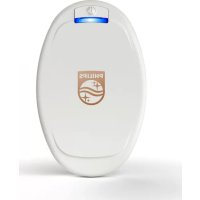
PSK2103 - Skin care device PHILIPS - Free user manual and instructions
Find the device manual for free PSK2103 PHILIPS in PDF.



| Brand | Philips |
| Model | PSK2103 |
| Category | Skin care device |
| Product type | Blue LED phototherapy medical device for the treatment of mild to moderate plaque psoriasis in adults |
| Power supply | Lithium-ion battery 3.7 V / 6.1 Wh ; mains adapter PR3089 (input 100-240 V AC, output 5 V DC / 5 W) |
| Battery life | Approximately 7 sessions of 15 minutes after full charge |
| Charging time | Approximately 3 hours |
| Main functions | Blue light emission (wavelength unspecified, max power density 600 mW/cm², average 40 mW/cm²) ; automatic 15-minute session ; infrared skin temperature detection ; automatic shut-off in case of overheating |
| Areas of use | Arms (except palms) and legs (except soles of feet) ; do not use on the head, face, scalp or genitals |
| Contraindications | Sunburned skin, fever, sun allergy, photosensitivity, skin cancer, pregnancy, breastfeeding, active implanted device, etc. (see full instructions) |
| Cleaning and maintenance | Clean the device after each session with a damp cloth ; clean the infrared sensor once a week with alcohol and a cotton swab ; the fixing strap is machine washable at a maximum of 60 °C, air dry |
| Spare parts provided | Device PSD1321, fixing strap PSS1320, short/medium/long straps, adapter PR3089, USB cable, carrying case |
| Repairability | Contact Philips consumer service (00800-7445 4778) ; warranty does not cover normal wear and tear or non-compliant use |
| Safety | Do not immerse ; do not look at the light source ; do not use in a humid environment ; keep 1 m away from wireless equipment ; operating temperature 10-35 °C |
| Symbols and certifications | CE, class IIa, risk group 1 (IEC 60601-2-57), applied part type BF |
| Expected service life | Device and adapter/cable: at least 3 years ; fixing strap: at least 1 year |
Frequently Asked Questions - PSK2103 PHILIPS
User questions about PSK2103 PHILIPS
0 question about this device. Answer the ones you know or ask your own.
Ask a new question about this device
Download the instructions for your Skin care device in PDF format for free! Find your manual PSK2103 - PHILIPS and take your electronic device back in hand. On this page are published all the documents necessary for the use of your device. PSK2103 by PHILIPS.
USER MANUAL PSK2103 PHILIPS
Important safety information 7
General description (Figure 1) 11
Charging 12
Using your Philips BlueControl 13
Preparing Philips BlueControl for use 14
Treatment procedure 15
After treatment 16
Light and sound signals during use 17
Overheating signals 17
Battery level signals 18
Cleaning and maintenance 18
Storage 19
Troubleshooting 19
Warranty and support 23
Recycling 23
Specifications 24
Symbols on the device 25
Explanation of symbols 26
Introduction
Read this user manual carefully before you use Philips BlueControl and save the user manual for future reference. To achieve optimal treatment results, use the device according to the treatment schedule and the instructions in this user manual. Philips BlueControl is a convenient wearable treatment with which you can treat your plaque psoriasis at home. With its clinically proven efficacy to reduce plaque psoriasis symptoms (Weinstabl A et al. Dermatology. 2011; 223(3):251-9 and Pfaff S et al. Dermatology. 2015; 231: 24-34), you can treat
your plaque psoriasis without interrupting your daily routine. It is safe to use as its innovative blue LED light is UV-free and non-toxic to the skin.
With Philips BlueControl, you can treat the following body areas:
- Arms, excluding the palms of the hands
- Legs, excluding the soles of the feet
Do not use Philips BlueControl on the following body areas:
- Head, including face and scalp
-Genitals
Please consult your doctor if you wish to use Philips BlueControl on any other body areas.
List of product codes
- Kit: PSK2103/10
- Device: PSD1321/10
- Fixation strap: PSS1320/10
- Adapter with USB cable: PR3089
Intended use
Philips BlueControl is intended to provide phototherapeutic light to the body. Philips BlueControl is generally indicated to treat dermatological conditions. Philips BlueControl is a wearable medical device using blue LED light to treat mild to moderate psoriasis vulgaris for adults only in the home environment.
Important safety information
Read this important information carefully before you use the appliance and save it for future reference.
Contraindications
Do not use Philips BlueControl:
-
If your skin is burnt or sunburnt.
-
If you have a fever.
-
If you have a known sun allergy.
-
If you are allergic to the surface materials of the Philips BlueControl device (polycarbonate), or the fixation strap (polyester/elastane mix).
-
If you have any known idiopathic dermatosis such as porphyria, polymorphic light eruption, chronic actinic dermatitis, actinic prurigo or solar urticaria that causes photosensitivity.
-
If you have any known disease related to low immunity.
-
If you have active skin cancer, if you have a history of skin cancer or any other localized cancer, precancerous lesions or large moles in the areas to be treated.
-
If you are taking photosensitizing agents or medications, check the package insert of your medicine and never use the device if it is stated that it can cause photo-allergic reactions, photo-toxic reactions or if you have to avoid sun when taking this medicine.
-
If you are on steroids, it makes the skin more susceptible to irritation.
-
If you have infections, unhealed tattoos, burns, inflammation of hair follicles, open lacerations, abrasions, herpes simplex, or wounds in the areas to be treated.
-
Avoid treatment of skin areas with tattoos, there is no information available yet about possible reactions.
-
If you have uncontrolled arterial hypertension, a history of stroke, myocardial infarction, angina pectoris, arteriosclerotic vascular disease (ASVD).
-
If you are pregnant or breastfeeding.
-
If you have schizophrenia, borderline syndrome or severe depression.
-
If you have any sensory deprivation or have been diagnosed with shingles or post-herpetic neuralgia, especially in the area to be treated.
-
If you have any anatomical pathology or other physical limitation which would prevent you from placing Philips BlueControl successfully.
-
If you have an active implanted device, such as a cardiac pacemaker, defibrillator, neurostimulator, cochlear implant, or an active drug administration device.
-
If you are in poor general health.
-
Keep the adapter dry.
Warnings
-
Never immerse Philips BlueControl in water or any other liquid.
-
Never wear Philips BlueControl while it is charging.
-
Never look directly into the light source during use.
-
Do not open or modify Philips BlueControl during the lifetime of the device.
-
Do not use Philips BlueControl in wet and/or hot surroundings, such as a sauna or bathroom.
-
Philips BlueControl is not intended to be used by persons younger than 18 and persons with reduced physical, sensory or mental capabilities.
-
This is a medical device. Keep the device out of the reach of children.
-
Only charge Philips BlueControl with the USB cable and the adapter supplied (PR3089).
-
Philips BlueControl is specifically designed to treat psoriasis vulgaris. Do not use it for any other purpose.
- Always check Philips BlueControl, the USB cable and the adapter for damage before use.
- Do not use the device if it is closer than 1 meter to wireless communication equipment, such as wireless home network routers and mobile phones. This wireless communication equipment may cause electromagnetic interference that prevents the device from operating properly.
- If the USB cable, the adapter, or Philips BlueControl is damaged, stop using it and contact the Philips Consumer Care Center at this telephone number 00800-7445 4778.
Cautions
- Remove Philips BlueControl from the fixation strap before you wash the fixation strap.
- Use and charge Philips BlueControl at a temperature between 10^ and 35^ and at a relative humidity between 30% and 90% .
- Store Philips BlueControl at a temperature between -20°C and 30°C and at a relative humidity between 30 and 95%
- Read section 'Contraindications' to find out if any apply to you before you start using Philips BlueControl.
- To prevent damage to the drum of the washing machine, to other laundry in the drum or the fabric of the fixation strap, close the Velcro fasteners of the slings and wash the fixation strap and the slings in a fine-mesh washing bag.
-
Always use Philips BlueControl in the fixation strap with one of the slings provided, as the fixation strap and the slings have been specially designed for this device.
-
Philips BlueControl is intended for daily use. The exact usage time is stated in chapter 'Using your Philips BlueControl', section 'Treatment schedule'.
Compliance
Philips BlueControl complies with the standard of basic safety for medical devices (IEC60601-1) and with the relevant collateral and particular standards for non-laser light source medical equipment for home use: EN 60601-1, EN 60601-1-11, EN 60601-2-57, and EN 60601-1-2. Regarding electromagnetic compatibility (EMC) and electromagnetic fields (EMF), the device should be kept away from radio frequency (RF) equipment to avoid interference.
General description (Figure 1)
The product illustration is located on the inside of the front cover of this instruction manual.
1 Philips BlueControl device
2 On/off button and LED indicator
3 Micro USB socket
4 Infrared sensor
5 Device holder
6 Short sling for e.g. lower arm or ankle
7 Medium-long sling for e.g. upper arm or knee
8 Long sling for e.g. leg
9 Adapter housing
10 European plug
11 UK plug
12 Carrying pouch
13 USB cable
Charging
Fully charge Philips BlueControl before you use it for the first time. When fully charged, Philips BlueControl has enough power for at least seven treatments. You can charge Philips BlueControl with the adapter and USB cable supplied. The adapter and USB cable have an expected lifetime of at least 3 years in normal intended operation. The device has a useful life of at least 3 years if used in accordance with its intended use. When Philips BlueControl is connected to the charger and in charging mode, the charger PR3089 is to be considered as a part of the medical system.
Note: Treatment is not possible when Philips BlueControl is charging.
Charging with the adapter
It takes approximately 3 hours to fully charge Philips BlueControl.
1 Put the European or UK mains plug in the adapter and lock it into place.
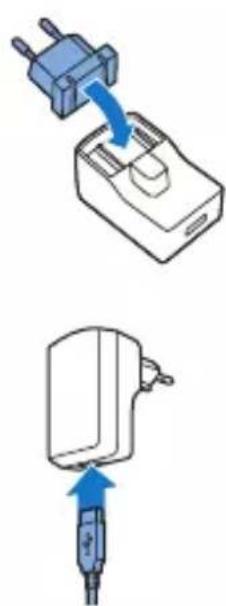
2 Insert the standard USB plug into the socket on the adapter.
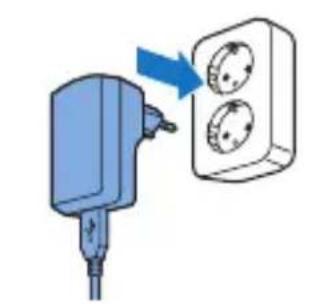
3 Insert the adapter into the wall socket (100V-240V).
4 Insert the micro USB plug into the socket on Philips BlueControl.
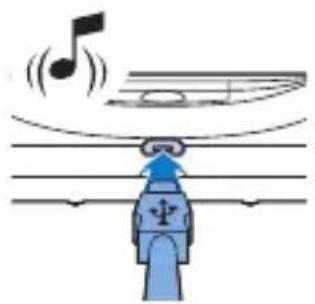
- When Philips BlueControl is connected to the mains, it beeps once and the LED indicator starts flashing green slowly to indicate that charging has started.
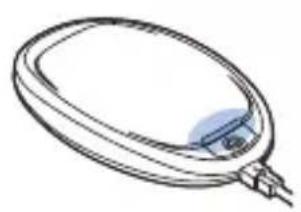
5 Always fully charge your Philips BlueControl. When Philips BlueControl is fully charged, the LED indicator lights up solid green.
6 Remove the adapter from the wall socket and pull the micro USB plug out of the micro USB socket on Philips BlueControl.
Using your Philips BlueControl
Treatment schedule
Note: Always stick to the treatment schedule.
Note: For safety reasons, the device only turns on after identifying a skin temperature above 30^ C . If the device does not turn on, warm up the to be treated skin and start the treatment again.
Philips BlueControl has been designed for daily use on psoriasis vulgaris plaques. We recommend treating single, non-overlapping psoriasis vulgaris plaques once a day. A single treatment takes approximately 15 minutes. If the infrared sensor senses a too high skin temperature, the treatment is briefly paused for safety reasons. Treatment resumes automatically if the skin has cooled down
and the device is placed on the skin.
Blue light treatment can be combined with vitamin D creams and moisturizers. Apply the cream after the treatment. For other combination treatments with blue light, please consult your doctor. We do not recommend using topical medication, creams or lotions immediately before and during treatment with Philips BlueControl. In case of unpleasant effects such as excessive, non- resolving skin redness, worsening of plaques or pain, stop the therapy immediately and consult your doctor if necessary. It is possible that you experience slight tanning of the area treated. This should diminish within a few days after the therapy has been stopped. A temporary increased redness of the treated area after treatment is normal and should also diminish.
Preparing Philips BlueControl for use
To place Philips BlueControl in the device holder and to position it correctly on your body, follow the steps below. The fixation strap has an expected lifetime of at least 1 year if used in accordance with its intended use.
There are three slings: a short sling, for e.g. lower arm or ankle, a medium-long sling for e.g. upper arm or knee, and a long sling for e.g. the leg.
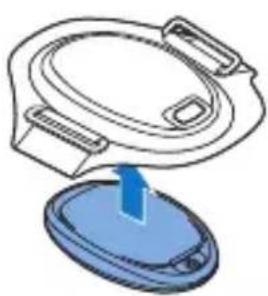
1 Place Philips BlueControl in the device holder.
Note: Make sure that the LED treatment area is not covered by the fixation strap or any other material. The on/off button must be visible through the hole on top of the device holder.
2 Select the suitable sling for the area to be treated on the arm or the leg.
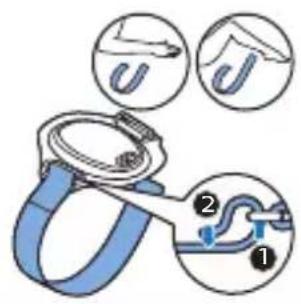
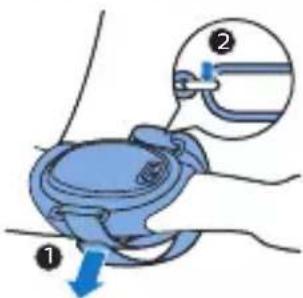
3 To attach the selected sling to the device holder, pull one end of the sling through one ring of the device holder (1) and fasten it with the Velcro fastener (2).
4 Remove clothing from the area to be treated.
5 Position the fixation strap on top of the psoriasis plaque on your arm or leg (1). Wrap the sling around your arm or leg (2).
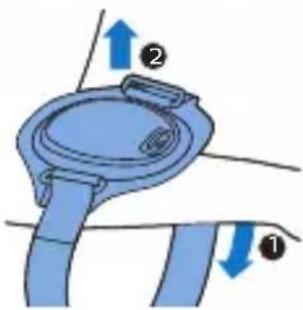
6 Pull the sling through the other ring (1). Then wrap the sling around your arm or leg once more and fasten it with the Velcro fastener (2).
Treatment procedure
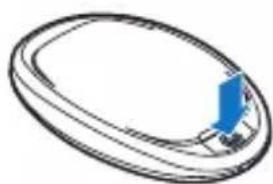
1 Press the on/off button to switch on Philips BlueControl.
Caution: Never look directly into the light source during use.
Note: Do not intentionally touch the infrared sensor in the center of Philips BlueControl when it is switched on.
Note: Do not cover Philips BlueControl with anything other than the fixation strap when it is switched on.
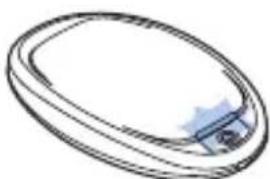
2 Philips BlueControl flashes blue to indicate that it is ready for treatment. The treatment starts soon after the sensor detects the skin to be treated.
The LED indicator lights up solid blue and a sequence of two tones indicates the treatment is in progress.
3 Philips BlueControl automatically switches off after the treatment time (approximately 15 minutes) has elapsed.
Interrupting treatment
If you want to interrupt the treatment briefly, simply remove Philips BlueControl from the skin or press the on/off button to switch it off.
Note: If you remove Philips BlueControl from the skin or press the on/off button to stop treatment before the treatment time has elapsed and you do not resume the treatment within 2 hours, the timer automatically resets. If you resume the treatment within 2 hours, the countdown of the treatment time will continue where it left off. When a treatment is resumed, there will be no sequence of 2 tones.
Note: If the treatment feels uncomfortable at any point, remove Philips BlueControl from the skin or press the on/off button to switch it off.
After treatment
Treatment ends automatically after the treatment time has elapsed, unless you remove Philips BlueControl from the skin or press the on/off button to stop the treatment earlier.
Note: A sequence of two different tones indicates that Philips BlueControl switches off and the treatment has ended.
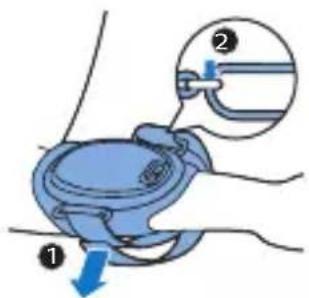
1 Open the Velcro fastener of the sling at one end (1) and pull the sling out of the ring of the device holder (2).
2 Unwrap the sling (1) and remove the fixation strap from your psoriasis plaque (2).
3 Recharge Philips BlueControl (see 'Charging').
Light and sound signals during use
Overheating signals
Overheating of the device
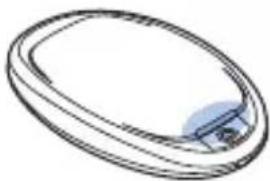
1 If the device measures a too high device temperature, Philips BlueControl switches off for safety reasons.
- A long 3-second tone indicates that Philips BlueControl switches off.
2 If you try to (re-)start Philips BlueControl before it has cooled down, the LED indicator lights up solid orange for 5 seconds. Cooling down may take several minutes.
Overheating of the skin
1 If the device measures a too high skin temperature, Philips BlueControl switches off for safety reasons.

- The LED indicator flashes blue slowly until the skin temperature has cooled down, Philips BlueControl switches on again automatically.
Battery level signals
When you press the on/off button and the LED indicator lights up solid red and you hear 3 beeps, the battery of Philips BlueControl is empty.
Note: You have to charge the battery before you can start a new treatment. Charge for at least 30 minutes to be able to complete one full treatment.
Cleaning and maintenance
Warning: Do not immerse Philips BlueControl in water or rinse it under the tap.
Caution: Always remove Philips BlueControl from the fixation strap before you put the fixation strap in the washing machine to clean it.
Note Clean Philips BlueControl after each treatment to ensure it continues to function properly.
1 Remove Philips BlueControl from the fixation strap.
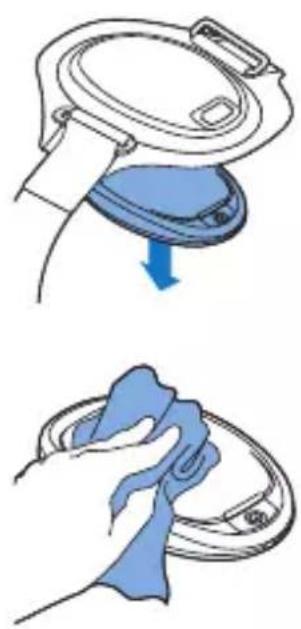
2 Clean Philips BlueControl with a damp cloth.
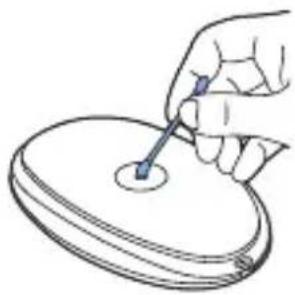
3 Clean the sensor with alcohol and a cotton bud at an ambient temperature once a week.
4 The fixation strap can be washed in the washing machine.
Caution: To prevent damage to the drum of the washing machine, to other laundry in the drum or the fabric of the fixation strap, close the Velcro fasteners of the slings and wash the fixation strap in a fine-mesh washing bag.
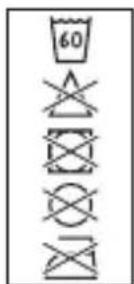
Note: Use a gentle cycle and a temperature of 60^ maximum. Dry the fixation strap on the air and not in a tumble dryer. Do not iron the fixation strap and the slings.
Storage
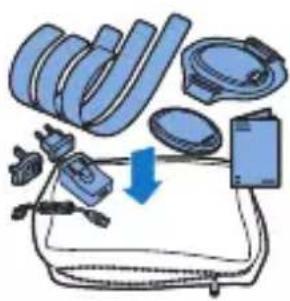
The device comes with a carrying pouch with room to store all parts.
1 Store the device and adapter in separate compartments of the pouch to prevent damage to the treatment window if you do not use it.
2 If you want to take the device with you to work or while traveling, we advise you to put it in the carrying pouch for extra protection.
Troubleshooting
This chapter summarizes the most common problems you could encounter with the device. If you are unable to solve the problem with the information below, visit www.philips.com/support for a list of frequently asked questions or contact the Consumer Care Center in your country.
Problem Possible cause Solution
| I cannot switch on Philips BlueControl even though it is fully charged. | The sensor is dirty. Clean the infrared sensor with alcohol and a cotton bud (see 'Cleaning and maintenance'). | |
| The treatment does not start although the fully charged device is correctly placed on the skin. | The skin may be too cold. | Warm up the skin that you would like to treat and try (re-)starting the treatment. |
| Philips BlueControl suddenly switches off during treatment. | The preset time has elapsed. | Philips BlueControl has been programmed to switch off automatically after the treatment time has elapsed. |
| The infrared sensor is blocked. | Check the position of Philips BlueControl in the fixation strap. Make sure that the material of the fixation strap or clothing does not cover the infrared sensor. If the infrared sensor is not covered but Philips BlueControl still switches off, the skin temperature is too high. Philips BlueControl will switch on automatically when the skin has cooled down. | |
Problem Possible cause Solution
| Philips BlueControl suddenly switches off during treatment, the light indicator lights up solid red for 5 seconds and the device beeps three times. | The rechargeable battery is empty. | Fully charge Philips BlueControl (See 'Charging'). |
| Philips BlueControl suddenly switches off with a 3-second long tone during treatment. | The temperature of Philips BlueControl itself is too high and the device switched off for safety reasons. | Let Philips BlueControl cool down for 10 minutes. Put Philips BlueControl back onto your skin and press the on/off button to resume treatment. |
| Philips BlueControl suddenly interrupts the treatment and slowly flashes blue. | The device measured a too high skin temperature and paused the treatment to allow the skin to cool down. | No action required. The treatment restarts automatically after the device measures a skin temperature in the safe range. |
| Philips BlueControl is switched off with a long beep and the LED indicator flashes orange. | Philips BlueControl was interrupted too many times during treatment, for instance because the infrared sensor sensed a too high skin temperature or because the maximum treatment time of 15 minutes was exceeded. | If this happens a few times, contact Philips. |
Problem Possible cause Solution
| The LED indicator lights up solid orange when I press the on/off button. | The device temperature is too high and Philips BlueControl switched off for safety reasons. | Let Philips BlueControl cool down for 10 minutes. Put Philips BlueControl back onto your skin and press the on/off button to resume treatment. |
| The LED indicator lights up solid red for 5 seconds and Philips BlueControl beeps 3 times when I press the on/off button. | The rechargeable battery is empty. | Charge Philips BlueControl (see 'Charging'). |
| The adapter becomes warm during charging. | This is normal. No action required. | |
| The LED indicator does not flash green when the micro USB plug is inserted into the micro USB socket of Philips BlueControl. | The adapter is not inserted or not inserted properly into the wall socket. | Insert the adapter into the wall socket properly. |
| The standard USB plug is not inserted or inserted properly into the adapter. | Insert the standard USB plug into the adapter properly. | |
| The wall socket is not live. | Connect another appliance to the same wall socket to check if the wall socket is live. If the wall socket is live, but Philips BlueControl does not charge, contact Philips. | |
Problem Possible cause Solution
Philips
BlueControl
becomes warm
during use.
This is normal. No action required.
Warranty and support
If you need service or information or if you have a question regarding Philips BlueControl, please contact the Philips Consumer Care Center at telephone number 00800-7445 4778.
Warranty restrictions
The warranty does not cover standard wear and tear. The warranty becomes invalid if Philips
BlueControl is not used according to the instructions in this user manual.
Manufacturer's legal address
Philips Electronics Nederland B.V.,
Philips Light & Health
High Tech Campus 5,
5656 AE Eindhoven,
The Netherlands
Recycling
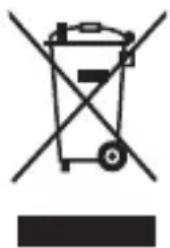
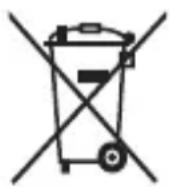
- This symbol means that this product shall not be disposed of with normal household waste (2012/19/EU).
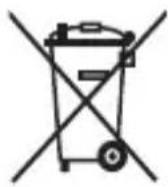
- This symbol means that this product contains a built-in rechargeable battery which shall not be disposed of with normal household waste (2006/66/EC). Please take your product to an official collection point or a Philips service center to have a professional remove the rechargeable battery.
- Follow your country's rules for the separate collection of electrical and electronic products and rechargeable batteries. Correct disposal helps prevent negative consequences for the environment and human health.
Removing the rechargeable battery
This procedure is irreversible. You cannot use the device anymore after this procedure.
Note: We strongly advise you to take your product to an official collection point or a Philips service center to have a professional remove the battery.
Note: Observe basic safety precautions when you follow the procedure described below. Be sure to protect your eyes, hands, fingers, and the surface on which you work.
1 Make sure the rechargeable battery is empty.
2 Open the device by removing the transparent lower part from the metal upper part.
3 Remove the battery with appropriate tools.
Specifications
Philips BlueControl is certified as medical non-laser light source equipment. While in operation it generates blue light with the following specifications:
Device PSD1321
Input 5V DC and 1A 5 W
Device PSD1321
| Class Medical device Class IIa | |
| Optical output classification | Risk Group 1 according to IEC60601-2-57, meaning no risk in normal intended use. |
| Optical power density 600 mW/cm2(peak), 40 mW/cm2(average). | |
| Battery type 3.7V / rated capacity 6.1 Wh Lithium-ion battery | |
| Adapter with USB PR3089 cable | |
| Input 100-240 V AC / 50-60 Hz | |
| Output 5V DC / 5W | |
| Fixation strap PSS1320 | |
| Device holder 33.5% neoprene; 23.8% polyamide; 19.4% POM; 11.0% polyurethane foam; 10.0% polypropylene; 2.2% elastane | |
| Slings (based on a medium sling) | 59.3% polyamide; 33.9% polyurethane foam; 6.8% elastane |
| Operating conditions | |
| Temperature from +10°C to +35°C | |
| Relative humidity from 30% to 90% | |
| Storage | |
| Temperature from -20°C to +30°C | |
| Relative humidity from 30% to 95% (no condensation) | |
Symbols on the device
There are several safety warning labels on the device, the fixation strap and the adapter. Not
following these warnings may result in one or more of the following hazards: electrical shock, skin burn, retinal damage and/or fire.
Explanation of symbols

This yellow/black symbol on the device label tells the user to read the enclosed documents before use and take all safety precautions required.

This white/blue symbol on the device label means: Read the user manual before you start using the device.
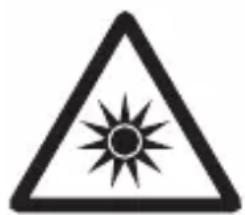
This yellow/black symbol on the device label means: Do not stare at the light source. Risk Group 1 product (IEC60601-2-57:2011).

This symbol means: Philips BlueControl is specified as applied part type BF. B indicates that it is used on the Body and F indicates that it is Floating from (not connected to) the mains voltage.

This symbol means: Conforms to EC Directives. CE stands for 'Conformité Européenne'.

This symbol means 'Manufactured by' and provides the address of the legal manufacturer.

This symbol means: Made in the Netherlands.

This symbol indicates input for power supply. PR3089 below this symbol means that the device may only be charged with the adapter that is supplied in the package. Usage of other adapters may not be safe and could lead to electrical shock. The adapter has the following electrical specification: Input 100-240V AC / 50-60 Hz, output 5V DC / 5W. When charging the device, make sure that the adapter and the device are positioned in such a way that the adapter and device can always be disconnected easily.

This symbol means: Keep dry.

This symbol indicates the serial number of the device.

This symbol indicates the USB connector.

This symbol means that the device uses LI-ION rechargeable batteries.
Symbol on the adapter

This symbol indicates that the adapter is double insulated (Class II).

This symbol indicates that the adapter may only be used indoors.
Symbols on the fixation strap

This symbol means: Wash at a maximum temperature of 60^ C .
This symbol means: Do not bleach.

This symbol means: Do not tumble-dry.

This symbol means: Do not iron.

This symbol means: Do not dry clean.

This symbol means: Made in China.

This symbol means: Read the user manual.


This symbol indicates the batch code.
Indhold
Introduktion 31
Brug/DD Philips BlueControl:
Philips Light & Health
High Tech Campus 5,
5656 AE Eindhoven,
Nederland
Resirkulering


-
Dette symbolet betyr at detteproduktet ikke avhendes i vanlig husholdningsavfall (2012/19/EU).
-
Dette symbolet betyr at produitet ineholder et innebyg odpladbart batteri som/DD kastes i vanlig husholdningsavfall (2006/66/EC). Ta med produitet til et offentlig innsamlingssted eller Philips-servicesenter, sann at batteriet kan fjernes av fagfolk.
-
Følg nasjonale bestemmelser om avfallsdeponering av elektriske og elektroniskeprodukter samt oppladbare batterier. Riktig avfallshandtering bidrar til Å forbindre negative konsekvenser for helse og miljø.
Ta ut det oppladbare batteriet
75% recycled paper
75% papier recyclé




- Introduction
- List of product codes
- Intended use
- Important safety information
- Contraindications
- Warnings
- Cautions
- Compliance
- General description (Figure 1)
- Charging
- Charging with the adapter
- Using your Philips BlueControl
- Treatment schedule
- Preparing Philips BlueControl for use
- Treatment procedure
- Caution: Never look directly into the light source during use.
- Interrupting treatment
- After treatment
- Light and sound signals during use
- Overheating signals
- Overheating of the device
- Overheating of the skin
- Battery level signals
- Cleaning and maintenance
- Storage
- Troubleshooting
- Problem Possible cause Solution
- Warranty and support
- Warranty restrictions
- Manufacturer's legal address
- Recycling
- Removing the rechargeable battery
- Specifications
- Device PSD1321
- Symbols on the device
- Explanation of symbols
- Symbol on the adapter
- Symbols on the fixation strap
- Indhold
- Resirkulering
- Ta ut det oppladbare batteriet
Brand : PHILIPS
Model : PSK2103
Category : Skin care device