
Psoriasis Treatment PSK0202 - Skin care device PHILIPS - Free user manual and instructions
Find the device manual for free Psoriasis Treatment PSK0202 PHILIPS in PDF.


| Product type | Blue LED phototherapy device for the treatment of mild to moderate psoriasis vulgaris |
| Brand | Philips |
| Model | Psoriasis Treatment PSK0202 (BlueControl PSD1211/10) |
| Power | PR3089 adapter 100-240V AC / 50-60 Hz, output 5V DC 7W; lithium-ion battery 3.7V 6.1 Wh |
| Charging time | Approximately 3 hours for a full charge |
| Treatment duration per session | Approximately 30 minutes (can be extended up to 40 minutes) |
| Maximum light dose per plaque | 90 J/cm² per day |
| Included components | Device, fixation strap, 3 bands (short, medium, long), adapter with USB cable, carrying case |
| Maintenance and cleaning | Clean the device after each use with a damp cloth; clean the sensor once a week with alcohol and a cotton swab; strap and bands machine washable at 60°C max, delicate cycle, air dry |
| Safety | Do not use if you have sunburn, fever, sun allergy, skin cancer, pregnancy, etc.; do not look at the light; do not use in a humid environment; do not open the device |
| Contraindications | Age under 18, photosensitivity, photosensitizing medications, steroids, infections, tattoos, uncontrolled hypertension, etc. |
| Indications for use | Treatment of mild to moderate psoriasis vulgaris in adults, home use |
| Spare parts and repairability | PR3089 adapter, PSS1210 strap, bands; support at 00800-7445 4778; minimum lifespan of 3 years for device and adapter, 1 year for strap |
| Operating conditions | Temperature from +10°C to +35°C, relative humidity from 30% to 90% |
| Storage conditions | Temperature from -20°C to +35°C, relative humidity from 30% to 90% (without condensation) |
| Classification | Class IIa medical device, risk group 1 (EN 60601-2-57) |
Frequently Asked Questions - Psoriasis Treatment PSK0202 PHILIPS
User questions about Psoriasis Treatment PSK0202 PHILIPS
0 question about this device. Answer the ones you know or ask your own.
Ask a new question about this device
Download the instructions for your Skin care device in PDF format for free! Find your manual Psoriasis Treatment PSK0202 - PHILIPS and take your electronic device back in hand. On this page are published all the documents necessary for the use of your device. Psoriasis Treatment PSK0202 by PHILIPS.
USER MANUAL Psoriasis Treatment PSK0202 PHILIPS
Always here to help you
Register your product and get support at www.philips.com/welcome

PSD1211
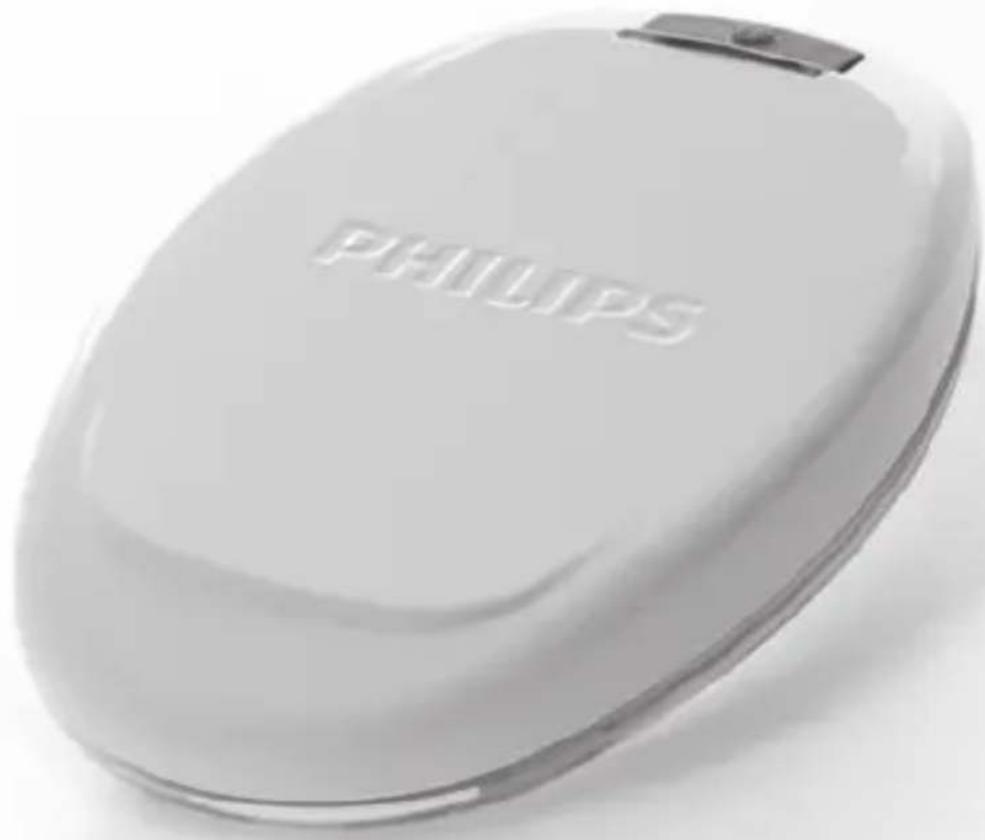
ENGLISH 4
DEUTSCH 30
FRANÇAIS 59
ITALIANO 87
NEDERLANDS 115
DANSK 144
SUOMI 170
NORSK 196
SVENSKA 222
ČEŠTINA 248
MAGYAR 275
POLSKI 302
SLOVENSKY 332
Introduction
Read this user manual carefully before you use the Philips BlueControl and save the user manual for future reference. To achieve optimal treatment results, use the device according to the treatment schedule and the instructions in this user manual.
List of product codes
- Kit PSK0202/10
- Device PSD1211/10
- Fixation strap PSS1210/10
- Adapter with USB cable PR3089
Intended use
The Philips BlueControl is intended to provide phototherapeutic light to the body. The Philips BlueControl is generally indicated to treat dermatological conditions. The Philips BlueControl is a wearable medical device using blue LED light to treat mild to moderate psoriasis vulgaris for adults only (i.e. people over the age of 18) in the home environment.
Important
Contraindications
Do not use the Philips BlueControl:
- If your skin is burnt or sunburnt.
- If you have a fever.
- If you have a known sun allergy.
- If you are allergic to the surface materials of the Philips BlueControl device (polycarbonate or polyester/elastane mix).
- If you have any known idiopathic dermatosis such as porphyria, polymorphic light eruption, chronic actinic dermatitis, actinic prurigo or solar urticaria that causes photosensitivity.
- If you have any known disease related to low immunity.
- If you have active skin cancer, if you have a history of skin cancer or any other localised cancer, precancerous lesions or large moles in the areas to be treated.
- If you are taking photosensitising agents or medications, check the package insert of your medicine and never use the device if it is stated that it can cause photo-allergic reactions, photo-toxic reactions or if you have to avoid sun when taking this medicine.
- If you are on steroids, it makes the skin more susceptible to irritation.
- If you have infections, unhealed tattoos, burns, inflammation of hair follicles, open lacerations, abrasions, herpes simplex, or wounds in the areas to be treated.
- Avoid treatment of skin areas with tattoos, there is no information available yet about possible reactions.
- If you have uncontrolled arterial hypertension, a history of stroke, myocardial infarction, angina pectoris, arteriosclerotic vascular disease (ASVD).
- If you are pregnant or breastfeeding.
- If you have schizophrenia, borderline syndrome or severe depression.
- If you have any sensory deprivation or have been diagnosed with shingles or post-herpetic neuralgia, especially in the area to be treated.
- If you have any anatomical pathology or other physical limitation which would prevent you from placing the Philips BlueControl successfully.
- If you have an active implanted device, such as a cardiac pacemaker, defibrillator, neurostimulator, cochlear implant, or an active drug administration device.
- If you are in poor general health.
Important safety information
Danger
- Keep the adapter dry.
Warning
- Never immerse the Philips BlueControl in water or any other liquid.
- Never wear the Philips BlueControl while it is charging.
- Never look directly into the light source during use.
- Do not open or modify the Philips BlueControl during the lifetime of the device.
- Do not use the Philips BlueControl in wet and/or hot surroundings, such as a sauna or bathroom.
- The Philips BlueControl is not intended to be used by persons younger than 18 and persons with reduced physical, sensory or mental capabilities.
- This is a medical device. Keep the device out of the reach of children.
- Only charge the Philips BlueControl with the USB cable and the adapter supplied (PR3089).
- The Philips BlueControl is specifically designed to treat psoriasis vulgaris. Do not use it for any other purpose.
- Always check the Philips BlueControl, the USB cable and the adapter for damage before use. - Do not use the device if it is closer than 1 metre to wireless communication equipment, such as wireless home network routers and mobile phones. This wireless communication equipment may cause electromagnetic interference that prevents the device from operating properly.
- If the USB cable, the adapter or the Philips BlueControl is damaged, stop using it and contact the Philips Consumer Care Centre at this telephone number 00800-7445 4778.
Caution
- Remove the Philips BlueControl from the fixation strap before you wash the fixation strap.
- Use, charge and store the Philips BlueControl at a temperature between 10°C and 35°C and at a relative humidity between 30% and 90%.
-
Read section ‘Contraindications’ to find out if any apply to you before you start using the Philips BlueControl.
-
To prevent damage to the drum of the washing machine, to other laundry in the drum or the fabric of the fixation strap, close the Velcro fasteners of the slings and wash the fixation strap and the slings in a fine-mesh washing bag.
- Always use the Philips BlueControl in the fixation strap with one of the slings provided, as the fixation strap and the slings have been specially designed for this device.
- Philips BlueControl is intended for daily use. The exact usage time is stated in chapter ‘Using your Philips BlueControl’, section ‘Treatment schedule’.
Compliance
The Philips BlueControl complies with the standard of basic safety for medical devices (IEC60601-1) and with the relevant collateral and particular standards for non-laser light source medical equipment for home use: EN 60601-1[1], EN 60601-1-11 [3], EN 60601-2-57 [2], and EN 60601-1-2 [4]. Regarding electromagnetic compatibility (EMC) and electromagnetic fields (EMF), the device should be kept away from radio frequency (RF) equipment to avoid interference.
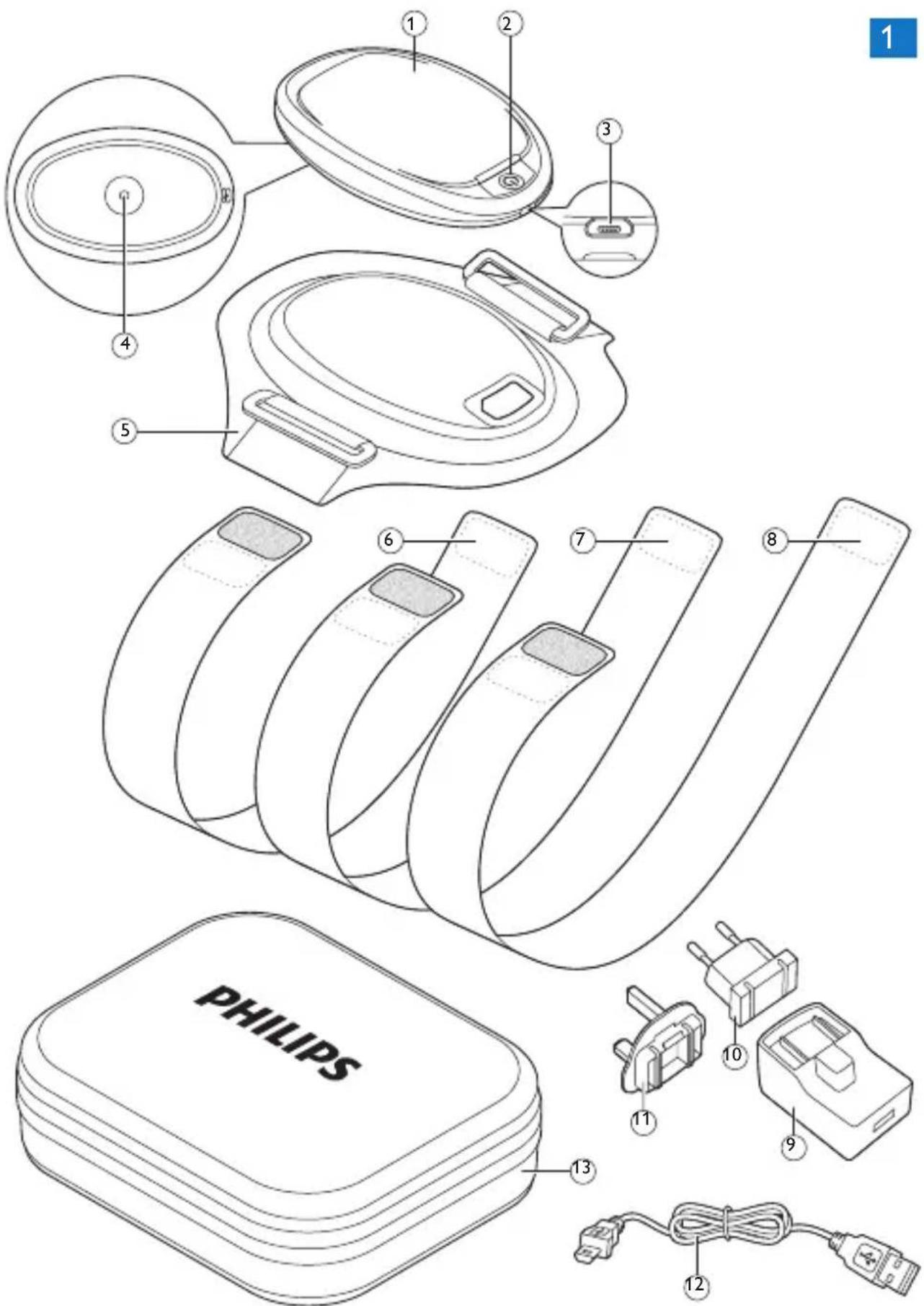
General description (Fig. 1)
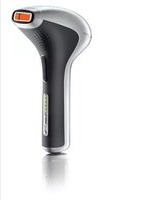
1 Philips BlueControl
2 On/off button and LED indicator
3 Micro USB socket
4 Sensor
5 Fixation strap
6 Short sling for lower arm or ankle
7 Medium-long sling for upper arm or knee
8 Long sling for leg
9 Adapter housing
10 European plug
11 UK plug
12 USB cable
13 Carry case
Charging
Fully charge the Philips BlueControl before you use it for the first time. When fully charged, the Philips BlueControl has enough power for at least four treatments. It is recommended to charge the Philips BlueControl every day. You can charge the Philips BlueControl with the adapter and USB cable supplied. The adapter and USB cable have an expected life time of at least 3 years in normal intended operation. The device has a useful life of at least 3 years if used in accordance with its intended use. When the BlueControl is connected to the charger and in charging mode, the charger PR3089 is to be considered as a part of the medical system.
Note: Treatment is not possible when the Philips BlueControl is charging.
Charging with the adapter
It takes approximately 3 hours to fully charge the Philips BlueControl.

1 Put the European or UK mains plug in the adapter and lock it into place.
2 Insert the standard USB plug into the socket on the adapter.
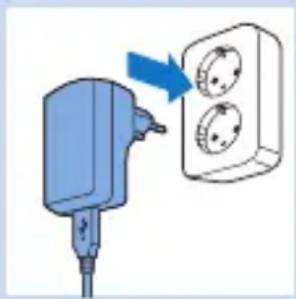
3 Insert the adapter into the wall socket (100V-240V).
4 Insert the micro USB plug into the socket on the Philips BlueControl.
When the Philips BlueControl is connected to the mains, it beeps once and the LED indicator starts flashing green slowly to indicate that charging has started.
5 When the Philips BlueControl is fully charged, the LED indicator lights up solid green.
6 Remove the adapter from the wall socket and pull the micro USB plug out of the micro USB socket on the Philips BlueControl.
Using your Philips BlueControl
Treatment schedule

natural_image
Warning symbol: black exclamation mark inside a triangle (no text or numbers)Always stick to the recommended treatment schedule. Do not treat each plaque more than once a day.
The Philips BlueControl has been designed for daily use on psoriasis vulgaris plaques. We recommend treating single, non-overlapping psoriasis vulgaris plaques only once a day. A single treatment takes approximately 30 minutes, but can be extended to 40 minutes depending on your skin sensitivity and possible treatment pauses during treatment.
For example, if the infrared sensor senses a too high skin temperature, the treatment is briefly paused for safety reasons. Treatment resumes automatically when the skin has cooled down. Following this treatment advice ensures that you do not exceed the daily light dose of 90 J/cm 2 per plaque. Blue light treatment can be combined with vitamin D creams. Apply the cream after the treatment. For other combination treatments with blue light, please consult your doctor.
We do not recommend using topical medication, creams or lotions immediately before and during treatment with the Philips BlueControl. In case of unpleasant effects such as excessive, non-resolving skin redness, worsening of plaques or pain, stop the therapy immediately and consult your doctor if necessary. It is possible that you experience slight tanning of the area treated. This should diminish within a few days after the therapy has been stopped.
A temporary increased redness of the treated area after treatment is normal but should also diminish.
Preparing the Philips BlueControl for use

natural_image
Diagram of a device with a blue lid and arrow indicating rotation (no text or symbols)To place the Philips BlueControl in the fixation strap and to position it correctly on your body, follow the steps below. The fixation strap has an expected lifetime of at least 1 year if used in accordance with its intended use. There are three slings: a short sling for lower arm or ankle, a medium-long sling for upper arm or knee, and a long sling for the leg.
1 Place the Philips BlueControl in the fixation strap.
Note: Make sure that the LED treatment area is not covered by the fixation strap material or any other textile. The on/off button must be visible through the hole on top of the fixation strap
2 Select the suitable sling for the area to be treated on the arm or the leg.
3 To attach the selected sling to the fixation strap, pull one end of the sling through one ring of the fixation strap (1) and fasten it with the Velcro fastener (2).
Note: After fastening the Velcro fastener, two small grey Velcro pads should be on the top of the sling.
4 Remove clothing from the area to be treated.
5 Position the fixation strap on top of the psoriasis plaque on your arm or leg (1). Wrap the sling around your arm or leg (2).


natural_image
Diagram of a blue wristband with two square buttons, no text or symbols present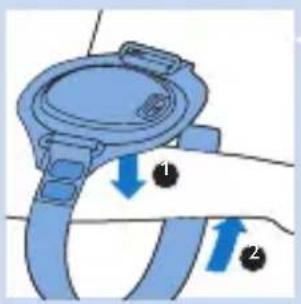
natural_image
Diagram of a blue mechanical component with directional arrows indicating motion (no text or symbols)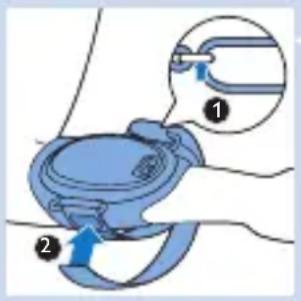
6 Pull the sling through the other ring (1). Then wrap the sling around your arm or leg once more and fasten it with the Velcro fastener (2).
Note: The two small grey Velcro pads on top of the other end of the sling enable the tightest adjustment.
Treatment procedure

natural_image
Simple line drawing of a circular object with a blue arrow pointing to its center (no text or symbols)1 Press the on/off button to switch on the Philips BlueControl.
Caution: Never look directly into the light source during use.
Do not intentionally touch the sensor in the centre of the Philips BlueControl when it is switched on.
Do not cover the Philips BlueControl with other textile materials than the fixation strap when it is switched on.

natural_image
Simple line drawing of a circular object with a small blue object on top (no text or symbols)2 The Philips BlueControl flashes blue to indicate that it is ready for treatment. The treatment starts soon after the sensor detects the skin to be treated.
The LED indicator lights up solid blue and a sequence of two tones indicates the treatment is in progress.
3 The Philips BlueControl automatically switches off after the treatment time (approximately 30 minutes) has elapsed.
Interrupting treatment
1 If you want to interrupt the treatment briefly, simply remove the Philips BlueControl or press the on/off button to switch it off.
Note: If you remove the Philips BlueControl or press the on/off button to stop treatment before the treatment time has elapsed and you do not resume the treatment within 2 hours, the timer automatically resets. If you resume the treatment within 2 hours, the countdown of the treatment time will continue where it left off. When a treatment is resumed, there will be no sequence of 2 tones.
After treatment
Treatment ends automatically after the treatment time has elapsed, unless you remove the Philips BlueControl or press the on/off button to stop treatment earlier.
Note: A sequence of two different tones indicates that the Philips BlueControl switches off and treatment has ended.


natural_image
Diagram of a blue medical device with directional arrows indicating movement or force (no text or symbols)1 Open the Velcro fastener of the sling at one end (1) and pull the strap out of the ring of the fixation strap (2).
2 Unwrap the sling (1) and remove the fixation strap from your psoriasis plaque (2).
3 Recharge the Philips BlueControl. You can take the device out of the fixation strap or charge it while it stays in the fixation strap.
Light and sound signals during use
Overheating signal
Overheating of the device.

natural_image
Simple line drawing of a circular object with a small blue segment on the side (no text or symbols)1 If the device measures a too high device temperature, the Philips BlueControl switches off for safety reasons.
The LED indicator lights up solid orange and a long 3-second tone indicates that the Philips BlueControl switches off.
2 If you try to restart the Philips BlueControl before it has cooled down, the LED indicator flashes orange for 5 seconds. Cooling down may take several minutes.
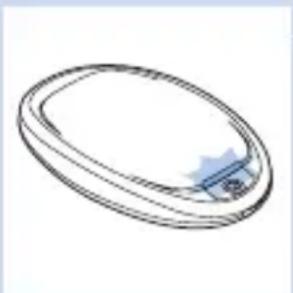
Overheating of the skin.
natural_image
Simple line drawing of an oval-shaped object with a small blue tab on the side (no text or symbols)1 If the device measures a too high skin temperature, the Philips BlueControl temporarily switches off for safety reasons. The LED indicator flashes blue slowly until the skin temperature has cooled down, the Philips BlueControl switches on again automatically.
Battery level signals
When you press the on/off button and the LED indicator lights up solid red and you hear 3 beeps, the battery of the Philips BlueControl is empty.
1 You have to charge the battery before you can start a new treatment. Charge for at least 45 minutes to be able to complete one full treatment.
Cleaning
Do not immerse the Philips BlueControl in water or rinse it under the tap.
Always remove the Philips BlueControl from the fixation strap before you put the fixation strap in the washing machine to clean it.
Caution: Clean the Philips BlueControl after each treatment to ensure it continues to function properly.

natural_image
Diagram of a medical device with a blue component and a circular top, showing a blue arrow indicating direction (no text or symbols present)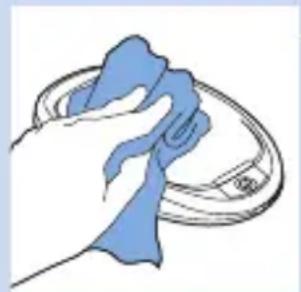
natural_image
Illustration of a hand cleaning a circular object with a blue cloth (no text or symbols)
1 Remove the Philips Blue Control from the fixation strap.
2 Clean the Philips BlueControl with a damp cloth.
3 Clean the sensor with alcohol and a cotton bud at an ambient temperature once a week.
4 The fixation strap and the slings can be washed in the washing machine.
Caution: To prevent damage to the drum of the washing machine, to other laundry in the drum or the fabric of the fixation strap, close the Velcro fasteners of the slings and wash the fixation strap and the slings in a fine-mesh washing bag.
Note: Use a gentle cycle and a temperature of 60irc C maximum. Dry the fixation strap and the slings on the air and not in a tumble dryer. Do not iron the fixation strap and the slings.
Storage
natural_image
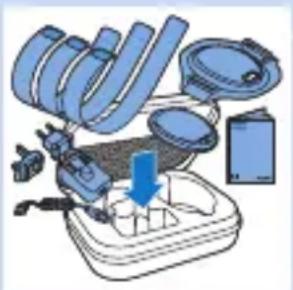
Illustration of a mechanical device with a downward arrow indicating a process or operation (no text or symbols present)The device comes with a carry case with storage spaces for all parts.
1 Use the storage case to store the device and its parts if you do not use it.
2 If you want to take the device with you to work or while travelling, we advise you to put it in the carry case for extra protection.
Troubleshooting
This chapter summarises the most common problems you could encounter with the Philips BlueControl. If you are unable to solve the problem with the information below, contact the Philips Consumer Care Centre.
Problem Possible cause Solution
| I cannot switch on the Philips BlueControl even though it is fully charged. | The sensor is dirty. | Clean the sensor with alcohol and a cotton bud (see chapter ‘Cleaning’). |
| The Philips BlueControl suddenly switches off during treatment. | The preset time has elapsed. | The Philips BlueControl has been programmed to switch off automatically after the treatment time has elapsed. |
Problem Possible cause Solution
| The sensor is blocked. | Check the position of the Philips BlueControl in the fixation strap. Make sure the material of the fixation strap or clothing does not cover the sensor. If the sensor is not covered but the Philips BlueControl still switches off, the skin temperature is too high. The Philips BlueControl will switch on automatically when the skin has cooled down. | |
| The rechargeable battery is empty. | The LED indicator flashes red. Charge the Philips BlueControl (see chapter ‘Charging’). | |
| The Philips BlueControl suddenly switches off with a long beep during treatment and the LED indicator lights up solid orange. | The temperature of the Philips BlueControl itself is too high and the Philips BlueControl switched off for safety reasons. | Let the Philips BlueControl cool down for 10 minutes. Put the Philips BlueControl back onto your skin and press the on/off button to resume treatment. |
| The Philips BlueControl suddenly interrupts the treatment and slowly flashes blue. | The device measured a too high skin temperature and paused the treatment to allow the skin to cool down. | No action required. The treatment restarts automatically after the device measures a skin temperature in the safe range. |
Problem Possible cause Solution
| The Philips BlueControl is switched off with a long beep and the LED indicator flashes orange. | The Philips BlueControl was interrupted too many times during treatment, for instance because the sensor sensed a too high skin temperature or because maximum treatment time of 40 minutes was exceeded. | If this happens a few times, contact Philips. |
| The LED indicator lights up solid orange when I press the on/off button. | The device temperature is too high and the Philips BlueControl switched off for safety reasons. | Let the Philips BlueControl cool down for 10 minutes. Put the Philips BlueControl back onto your skin and press the on/off button to resume treatment. |
| The LED indicator lights up solid red for 5 seconds and the Philips BlueControl beeps 3 times when I press the on/off button. | The rechargeable battery is empty. | Charge the Philips BlueControl (see chapter ‘Charging’). |
| The adapter becomes warm during charging. | This is normal. No action required. | |
Problem Possible cause Solution
| The LED indicator does not flash green when the micro USB plug is inserted into the micro USB socket of the Philips BlueControl. | The adapter is not inserted or not inserted properly into the wall socket. | Insert the adapter into the wall socket properly. |
| The standard USB plug is not inserted or inserted properly into the adapter. | Insert the standard USB plug into the adapter properly. | |
| The wall socket is not live. | Connect another appliance to the same wall socket to check if the wall socket is live. If the wall socket is live, but the Philips BlueControl does not charge, contact Philips. | |
| The Philips BlueControl becomes warm during use. | This is normal. No action required. | |
Guarantee and support
If you need service or information or if you have a problem, please contact the Philips Consumer Care Centre at telephone number 00800-7445 4778.
Guarantee restrictions
The guarantee does not cover standard wear and tear. The guarantee becomes invalid if the Philips BlueControl is not used according to the instructions in this user manual.
Manufacturer's legal address
Philips Electronics Nederland BV Philips Light & Health High Tech Campus 5 5656AE Eindhoven The Netherlands
Recycling

natural_image
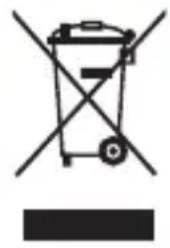
Symbol of a trash bin crossed with no text or numbers, representing waste sorting or disposal (no text present)- This symbol means that this product shall not be disposed of with normal household waste (2012/19/EU).
natural_image
Simple line drawing of a trash bin with crossed x-bracing (no text or symbols)- This symbol means that this product contains a built-in rechargeable battery which shall not be disposed of with normal household waste (2006/66/EC). We strongly advise you to take your product to an official collection point or a Philips service centre to have a professional remove the rechargeable battery. - Follow your country's rules for the separate collection of electrical and electronic products and rechargeable batteries. Correct disposal helps prevent negative consequences for the environment and human health.
Removing the rechargeable battery
This procedure is irreversible. You cannot use the device anymore after this procedure.
Note: We strongly advise you to take your product to an official collection point or a Philips service centre to have a professional remove the battery.
Caution: Observe basic safety precautions when you follow the procedure described below. Be sure to protect your eyes, hands, fingers, and the surface on which you work.
1 Make sure the rechargeable battery is empty.
2 Open the device by removing the transparent lower part from the metal upper part.
3 Remove the battery with appropriate tools.
Specifications
Philips BlueControl is certified as medical non-laser light source equipment. While in operation it generates blue light with the following specification:
Device PSD1211
Voltage 100-240V
Frequency 50-60 Hz
Input 7 W
Class Medical device Class IIa
Optical output classification
Risk Group 1 according EN 60601-2-57, meaning no risk in normal intended use.
Device PSD1211
Power density 200 mW/cm 2 (peak), 40 mW/cm 2 (average), maximum variation across the treatment area is <1.3
Max. daily dose per plaque 90 J/cm 4
Battery type 3.7V /rated capacity 6.1 Whr Lithium-ion battery
Adapter with USB cable PR3089
Input 100-240 V AC / 50-60Hz
Output 5V DC / 7 W
Fixation strap PSS1210
Fabric composition 66 % polyamide; 20 % polyester; 10 % elastane; 4 % polyurethane
Operating conditions
Temperature from +10°C to +35°C
Relative humidity from 30% to 90%
Storage conditions
Temperature from -20ircC to +35ircC
Relative humidity from 30% to 90% (no condensation)
Explanation of symbols

Symbols on device
There are several safety warning labels on the device, the fixation strap and in the user manual. Not following these warnings may result in one or more of the following hazards: electrical shock, skin burn, retinal damage and/or fire.
- This yellow/black symbol on the device label is a warning to read the enclosed documents before use and take all safety precautions required.
- This white/blue symbol on the device label means: Read the user manual before you start using the device.
- This yellow/black symbol on the device label means: Do not stare at the light source. Risk Group 1 product (IEC60601-2-57:2011).
- This symbol means: Philips BlueControl is specified as applied part type BF. B indicates that it is used on the Body and F indicates that it is Floating from (not connected to) the mains voltage.
- This symbol means: Conforms to EC Directives. CE stands for ‘Conformité Européenne’.

natural_image
Abstract black-and-white graphic of a factory or industrial structure with triangular peaks (no text or symbols)- This symbol means ‘Manufactured by’ and provides the address of the legal manufacturer.

natural_image
Simple line drawing of an industrial building with a zigzag line and 'NL' label, no text or symbols present.- This symbol means: Made in the Netherlands.

natural_image
Simple black arrow pointing right inside a circle (no text or symbols)- This symbol indicates input for power supply. PR3089 below this symbol means that the device may only be charged with the adapter that is supplied in the package. Usage of other adapters may not be safe and could lead to electrical shock. The adapter has the following electrical specification: Input 100-240V AC / 50-60 Hz, output 5V DC / 7 W. When charging the device, make sure that the adapter and the device are positioned in such a way that the adapter and device can always be disconnected easily.

natural_image
Simple black umbrella icon with raindrops falling (no text or symbols)- This symbol means: keep dry.

- This symbol indicates the serial number of the device.




- This symbol indicates the USB connector.
- This symbol means that the device uses LI-ION rechargeable batteries.
Symbols on adapter
- This symbol indicates that the adapter is double insulated (Class II).
- This symbol indicates that the adapter may only be used indoors.
Symbols on fixation strap
- This symbol means: Wash at a maximum temperature of 60irc C.

natural_image
Simple geometric symbol combining a triangle and two intersecting lines (no text or labels)- This symbol means: Do not bleach.
natural_image
Pure geometric symbol with crossed lines inside a square (no text or labels)- This symbol means: Do not tumble-dry.

natural_image
Simple line drawing of an envelope with diagonal lines (no text or symbols)- This symbol means: Do not iron.

natural_image
Symbol of crossed-out circle with diagonal lines, representing prohibition or exclusion (no text or numbers present)- This symbol means: Do not dry clean.

natural_image
Simple line drawing of a factory chimney with 'CN' label (no additional text or symbols)- This symbol means: Made in China.

natural_image
Simple icon of an open book with an information symbol inside, no text or labels present.- This symbol means: Read the user manual.

- This symbol indicates the batch code.
Einführung
natural_image
Illustration of a blue electric plug connected to a wall-mounted socket with three circular outlets (no text or symbols)natural_image
Diagram showing a musical instrument with notes and a waveform, no text or symbols presentnatural_image
Line drawing of a magnifying glass with a blue lens and cable (no text or symbols)natural_image
Warning symbol: black exclamation mark inside a triangle (no text or numbers)natural_image
Diagram of a mechanical component with a blue base and arrow indicating direction (no text or symbols)natural_image
Illustration of a blue smartwatch strap with two square buttons, mounted on a white surface (no text or symbols)natural_image
Simple line drawing of a circular object with a blue arrow pointing to its center (no text or symbols)natural_image
Simple line drawing of an oval-shaped object with a small blue tab on the side (no text or symbols)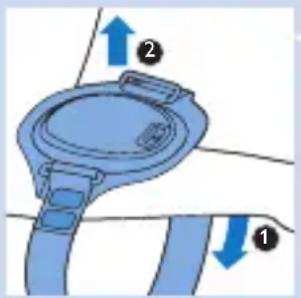
natural_image
Simple line drawing of an oval-shaped object with a small blue accent (no text or symbols)natural_image
Simple line drawing of a circular object with a small blue component on top (no text or symbols)natural_image
Diagram of a medical device with a blue device and a circular component, showing a blue arrow pointing downward (no text or symbols present)natural_image
Illustration of a hand cleaning a blue cloth over a circular object (no text or symbols)natural_image
Illustration of a mechanical device with a downward arrow indicating a process or operation (no text or symbols present)natural_image
Warning symbol: black exclamation mark inside a triangle (no text or numbers)
natural_image
Icon of a person reading a document inside a black circle (no text or symbols)natural_image
Warning symbol with a triangle and sunburst pattern (no text)natural_image
Simple black-and-white icon of a walking human figure inside a square frame (no text or symbols)natural_image
Abstract black-and-white graphic of a factory or industrial structure with no text or symbolsnatural_image
Simple line drawing of a factory with smokestacks and 'NL' label (no additional text or symbols)
natural_image
Simple black arrow pointing right inside a circle (no text or symbols)
natural_image
Simple black-and-white icon of an umbrella with raindrops falling (no text or symbols)
natural_image
Simple black arrow symbol pointing upward and left, resembling a stylized musical note or pulse icon (no text or labels)natural_image
Simple geometric symbol of a triangle crossed by two lines (no text or labels)natural_image
Illustration of a blue electrical plug connected to a wall-mounted socket (no text or symbols)natural_image
Diagram showing a musical instrument with a blue arrow pointing to a heart-shaped object, overlaid with a musical note and waveform (no text or symbols)natural_image
Line drawing of a magnifying glass with a blue circular lens and cable (no text or symbols)natural_image
Diagram of a lid with a blue plastic casing and a blue arrow indicating direction (no text or symbols)natural_image
Illustration of a blue smartwatch strap with a circular headband (no text or symbols)natural_image
Simple line drawing of a circular ring with a blue arrow pointing to the center (no text or symbols)natural_image
Simple line drawing of a circular object with a small blue component on top (no text or symbols)natural_image
Diagram of a blue medical device with directional arrows indicating movement or force (no text or symbols)Signal de surchauffe
natural_image
Simple line drawing of a circular object with a small blue accent (no text or symbols)natural_image
Simple line drawing of a circular object with a small blue component on top (no text or symbols)natural_image
Diagram of a medical device with a blue component and arrow indicating direction (no text or symbols)natural_image
Illustration of a hand cleaning a blue cloth over a circular object (no text or symbols)natural_image
Illustration of a mechanical device with a downward arrow indicating a process or operation (no text or symbols present)Philips Light & Health
High Tech Campus 5
5656AE Eindhoven
Pays-Bas
Recyclage
natural_image
Symbol of a trash bin crossed with no text or numbers, representing waste sorting or disposal (no text present)natural_image
Icon of a person reading a book inside a circle (no text or symbols)natural_image
Warning symbol with a black triangle containing a sunburst and radiating lines (no text or numbers)natural_image
Simple black-and-white icon of a human figure inside a square frame (no text or symbols)natural_image
Abstract black silhouette of a factory or industrial plant with triangular peaks (no text or symbols)natural_image
Simple line drawing of an industrial building with a zigzag line and 'NL' label, no text or symbols present.natural_image
Simple black-and-white icon of an umbrella with raindrops falling (no text or symbols)natural_image
Simple geometric symbol of a triangle crossed by two lines (no text or labels)natural_image
Diagram showing a blue plastic plug inserted into a white electronic device with a blue arrow indicating the process (no text or symbols present)natural_image
Diagram of a medical device with a blue arrow pointing upward, no text or symbols presentnatural_image
Illustration of a blue electrical outlet with three circular switches, showing an arrow pointing to the switch (no text or symbols present)natural_image
Diagram showing a musical instrument with a note and waveform, no text or symbols presentnatural_image
Line drawing of a magnifying glass with a blue lens (no text or symbols)natural_image
Warning symbol: black exclamation mark inside a triangle (no text or numbers)natural_image
Diagram of a device with a blue lid and a circular component, no text or symbols presentnatural_image
Illustration of a blue smartwatch strap with a grid overlay (no text or symbols)natural_image
Simple line drawing of a circular object with a blue arrow pointing to its side (no text or symbols)natural_image
Simple line drawing of an oval-shaped object with a small blue star-like symbol on the side (no text or symbols present)
natural_image
Diagram of a blue car seat with directional arrows indicating movement or force (no text or symbols)natural_image
Simple line drawing of a circular object with a small blue segment on the side (no text or symbols)natural_image
Simple line drawing of a circular object with a small blue component on top (no text or symbols)natural_image
Diagram of a medical device with a blue device and arrow indicating force or movement (no text or symbols)natural_image
Illustration of a hand cleaning a circular object with a blue cloth (no text or symbols)natural_image
Illustration of a mechanical device with a downward arrow indicating a process or operation (no text or symbols present)natural_image
Symbol of a trash bin crossed with no text or labels, representing waste sorting or disposal (no text present)natural_image
Icon of a person reading a book inside a circle (no text or symbols)natural_image
Warning symbol with a black triangle and sunburst pattern (no text)natural_image
Simple black-and-white icon of a human figure inside a square frame (no text or symbols)natural_image
Abstract black silhouette of a factory or industrial plant with triangular peaks (no text or symbols)natural_image
Simple line drawing of an industrial building with a zigzag line and 'NL' label, no text or symbols present.natural_image
Simple black-and-white icon of an umbrella with raindrops falling (no text or symbols)natural_image
Simple icon of an open book with an information symbol inside, no text or labels present.natural_image
Illustration of a blue electric shock absorber with a magnified inset showing three circular components (no text or symbols)natural_image
Diagram showing a musical instrument with notes and a blue arrow pointing to it, no text or symbols present.natural_image
Line drawing of a magnifying glass with a small screen and cable (no text or symbols)5 Als de Philips BlueControl volledig is opgeladen, brandt de LED-indicator onafgebroken groen.
natural_image
Diagram of a device with a blue lid and arrow indicating rotation or movement (no text or symbols)natural_image
Illustration of a blue smartwatch strap with two square buttons, no text or symbols presentnatural_image
Simple line drawing of a circular ring with a blue arrow pointing to the center (no text or symbols)natural_image
Simple line drawing of a circular object with a small blue component on top (no text or symbols)natural_image
Simple line drawing of a circular object with a small blue segment on the side (no text or symbols)natural_image
Simple line drawing of an oval-shaped object with a small blue accent (no text or symbols)natural_image
Diagram of a medical device with a blue component and arrow indicating direction (no text or symbols)
natural_image
Illustration of a hand cleaning a blue cloth over a circular object (no text or symbols)natural_image
Illustration of a mechanical device with a downward arrow indicating a process or operation (no text or symbols present)natural_image
Symbol of a trash bin crossed with no text or numbers, representing waste sorting or disposal (no text present)Stofsamenstelling 66% polyamide; 20% polyester; 10% elasthaan; 4% polyurethaan
natural_image
Icon of a person reading a book inside a circle (no text or symbols)natural_image
Warning symbol with a black triangle containing a sunburst and radiating lines (no text or numbers)natural_image
Simple black-and-white icon of a walking human figure inside a square frame (no text or symbols)natural_image
Silhouette of a factory with three triangular chimneys (no text or symbols)natural_image
Simple line drawing of a factory with zigzag lines and the letters 'NL' at the base (no text or symbols beyond the label)natural_image
Simple diagram with a circle containing an arrow pointing right (no text or symbols)natural_image
Simple black-and-white icon of an open umbrella with raindrops falling (no text or symbols)natural_image
Simple black arrow symbol pointing upward and left, resembling a USB or USB icon (no text or labels)natural_image
Simple geometric pattern of nested squares (no text or symbols)natural_image
Simple line drawing of a house with a chimney (no text or symbols)natural_image
Simple geometric symbol combining a triangle and two intersecting lines (no text or labels)natural_image
Pure geometric symbol with intersecting diagonal lines inside a square (no text or labels)natural_image
Pure electrical circuit lines without any symbolsnatural_image
Diagram of a blue electrical plug inserted into a white electronic device with a blue arrow indicating the insertion process (no text or symbols present)natural_image
Diagram of a device with a blue upward arrow pointing to it, no text or symbols present2 Sæt standard-USB-stikket i adapterens åbning.

natural_image
Illustration of a blue electrical plug connected to a wall-mounted socket (no text or symbols)3 Sæt adapteren i en stikkontakt (100-240 V).


natural_image
Line drawing of a magnifying glass with a blue lens and cable (no text or symbols)natural_image
Diagram of a device with a blue lid and a circular housing, no text or symbols present1 Sæt Philips BlueControl ind i holderen.
natural_image
Diagram of a blue wristband with two rectangular buttons, no text or symbols presentnatural_image
Simple line drawing of a circular object with a blue highlighted section (no text or symbols)natural_image
Simple line drawing of a circular object with a small blue star-like symbol on the side (no text or symbols present)2 Philips BlueControl blinker blåt for at indikere, at enheden er klar til behandling. Behandlingen starter kort efter, at sensoren registrerer huden, der skal behandles.
▶LED-indikatoren lyser konstant blåt, og en sekvens på to toner angiver, at behandlingen er i gang.
3 Philips BlueControl slukker automatisk, när behandlingstiden (ca. 30 minutter) er gået.

natural_image
Simple line drawing of an oval-shaped object with a small blue circular feature at the bottom (no text or symbols)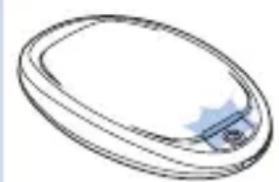
natural_image
Simple line drawing of a circular object with a small blue object on top (no text or symbols)Signaler for batterikapacitet
natural_image
Diagram of a medical device with a blue lid and arrow indicating direction (no text or symbols)
natural_image
Illustration of a hand cleaning a circular object with a blue cloth (no text or symbols)natural_image
Illustration of a mechanical device with a downward arrow indicating a process or operation (no text or symbols present)Philips Light & Health
High Tech Campus 5
5656AE Eindhoven
The Netherlands
Genanvendelse
natural_image
Warning symbol: black exclamation mark inside a triangle (no text or numbers)natural_image
Icon of a person reading a book inside a circle (no text or symbols)natural_image
Warning symbol with a black triangle and sunburst pattern (no text)natural_image
Simple black-and-white icon of a walking human figure inside a square frame (no text or symbols)natural_image
Silhouette of a factory with smokestacks and chimney (no text or symbols)- Dette symbol betyder "Fremstillet af" og oplyser adressen på den juridiske producent.

natural_image
Simple line drawing of an industrial building with a zigzag line and 'NL' label, no additional text or symbols present.- Dette symbol betyder: Fremstillet i Holland.
natural_image
Simple black arrow pointing right inside a circle (no text or symbols)
natural_image
Simple black-and-white icon of an open umbrella with raindrops falling (no text or symbols)

natural_image
Simple black USB symbol on white background, no text or labels present
natural_image
Simple geometric symbol of a triangle with two intersecting lines (no text or labels)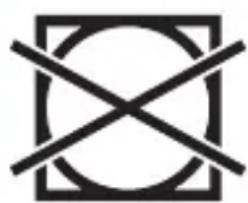
natural_image
Pure geometric symbol with intersecting diagonal lines inside a square frame (no text or symbols)Symboler på adapter
- Dette symbol indikerer, at adapteren er dobbeltisoleret (klasse II).
- Dette symbol angiver, at adapteren kun må anvendes indendørs.
Symboler på holderen
- Dette symbol betyder: Vask ved en temperatur på maks. 60 °C.
natural_image
Simple line drawing of a megaphone with crossed lines indicating no text or symbolsnatural_image
Symbol of crossed-out circle with diagonal lines, representing prohibition or exclusion (no text or numbers present)natural_image
Simple line drawing of a factory chimney with 'CN' label, no additional text or symbols- Dette symbol betyder: Fremstillet i Kina.

natural_image
Simple icon of an open book with an information symbol inside, no text or labels present.natural_image
Diagram of a blue electrical plug inserted into a white plastic housing with a blue arrow indicating the process (no text or symbols present)natural_image
Simple line drawing of a device with a blue upward arrow pointing to it (no text or symbols)natural_image
Illustration of a blue electrical plug connected to a wall-mounted socket with two circular outlets (no text or symbols)natural_image
Diagram of a musical instrument with a note and waveform, no text or symbols present
natural_image
Line drawing of a magnifying glass with a small blue lens and cable (no text or symbols)natural_image
Diagram of a toilet with a blue lid and arrow indicating direction (no text or symbols)
natural_image
Illustration of a blue smartwatch strap with three square buttons, no text or symbols present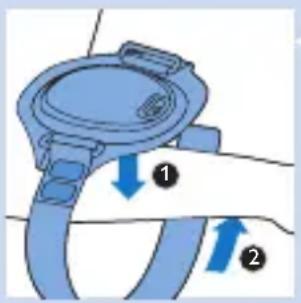
natural_image
Simple line drawing of a circular object with a blue arrow pointing to its center (no text or symbols)natural_image
Simple line drawing of an oval-shaped object with a small blue component on top (no text or symbols)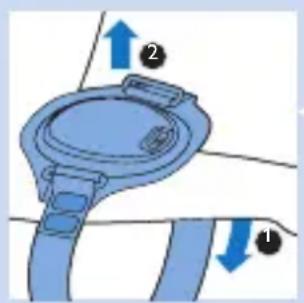
natural_image
Diagram of a blue mechanical component with directional arrows indicating movement or force (no text or symbols)natural_image
Simple line drawing of a circular object with a small blue segment on the side (no text or symbols)natural_image
Diagram of a medical device with a blue device and arrow indicating direction (no text or symbols)natural_image
Illustration of a hand cleaning a circular object with a blue cloth (no text or symbols)natural_image
Illustration of a mechanical device with a downward arrow indicating a process or operation (no text or symbols present)Philips Light & Health
High Tech Campus 5
5656AE Eindhoven
The Netherlands
Kierrätys
natural_image
Symbol of a trash bin crossed with no text or numbers, representing waste sorting or disposal (no text present)
natural_image
Icon of a person reading a book inside a circle (no text or symbols)
natural_image
Warning symbol with a black triangle and sunburst pattern (no text)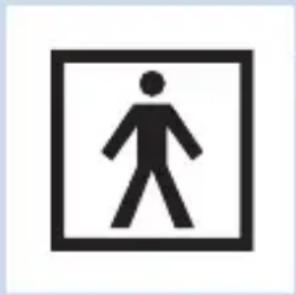
natural_image
Simple black-and-white icon of a human figure inside a square frame (no text or symbols)
Laitteen merkinnät
natural_image
Warning symbol: black exclamation mark inside a triangle (no text or numbers)Følg alltid den anbefalte timeplanen for behandlingen. Ikke behandle hvert utslett mer enn én gang per dag.
Klargjøre Philips BlueControl for bruk

natural_image
Diagram of a toilet with a blue lid and arrow indicating fluid direction (no text or symbols)Følg fremgangsmåten nedenfor for å få festet Philips BlueControl til festestroppen og plassert den riktig på kroppen. Festestroppen har en forventet levetid på minst 1 år hvis den brukes som tiltenkt. Det finnes tre slynger: en kort slynge for underarmen eller ankelen, en middels lang slynge for overarmen eller kneet og en lang slynge for beinet.

1 Fest Philips BlueControl til festestroppen.
natural_image
Illustration of a blue smartwatch strap with two square buttons, no text or symbols present

natural_image
Simple line drawing of a circular object with a blue arrow pointing to its side (no text or symbols)natural_image
Simple line drawing of a circular object with a small blue object on top (no text or symbols)
natural_image
Diagram of a blue medical device with directional arrows indicating movement or force (no text or symbols)1 Åpne borrelåsen på slyngen i den ene enden (1), og dra stroppen ut av ringen på festestroppen (2).
2 Løsne slyngen (1), og fjern festestroppen fra psoriasisutslettet (2).
3 Lad Philips BlueControl. Du kan ta enheten ut av festestroppen eller lade den mens den er festet til festestroppen.
Signal for overoppheting
natural_image
Simple line drawing of an oval-shaped object with a small blue segment on the side (no text or symbols)natural_image
Simple line drawing of a circular object with a small blue tab on top (no text or symbols)natural_image
Diagram of a medical device with a blue container and arrow indicating direction (no text or symbols)1 Løsne Philips BlueControl fra festestroppen.

natural_image
Illustration of a hand cleaning a circular object with a blue cloth (no text or symbols)natural_image
Illustration of a mechanical device with a downward arrow indicating a process or operation (no text or symbols present)Philips Electronics Nederland BV Philips Light & Health High Tech Campus 5 5656AE Eindhoven The Netherlands
Resirkulering

natural_image
Symbol of a trash bin crossed with a diagonal line and a horizontal bar below (no text or numbers present)- Dette symbolet betyr at dette produktet ikke må kastes i vanlig husholdningsavfall (2012/19/EU).

natural_image
Simple line drawing of a trash bin with crossed x-axes (no text or symbols)natural_image
Icon of a person reading a book inside a circle (no text or symbols)natural_image
Warning symbol with a black triangle and sunburst pattern (no text)natural_image
Simple black silhouette of an open umbrella with raindrops falling (no text or symbols)natural_image
Simple black arrow symbol pointing upward and downward, resembling a stylized musical note or pointer (no text or labels)- Dette symbolet indikerer USB-kontakten.

natural_image
Simple geometric pattern of nested squares (no text or symbols)Symboler på adapteren
- Dette symbolet forteller at denne adapteren er dobbeltisolert (klasse II).

natural_image
Diagram of a blue electrical plug inserted into a terminal block with a blue arrow indicating direction (no text or symbols)natural_image
Simple line drawing of a device with a blue upward arrow pointing to it, no text or symbols present.2 Sätt in standard-USB-kontakten i adapterns uttag.
natural_image
Illustration of a blue electrical plug connected to a wall-mounted socket (no text or symbols)4 Sätt in mikro-USB-kontakten i uttaget på Philips BlueControl.
natural_image
Simple line drawing of a magnifying glass with a blue lens (no text or symbols)natural_image
Warning symbol: black exclamation mark inside a triangle (no text or numbers)natural_image
Diagram of a device with a blue lid and a circular housing, showing a blue arrow pointing to the lid (no text or symbols present)
natural_image
Illustration of a blue smartwatch strap with a circular headband (no text or symbols)
5 Placera fixeringsbandet ovanpå psoriasis-placken på armen eller benet (1). Linda slingan runt armen eller benet (2).

natural_image
Simple line drawing of a circular object with a blue highlighted section (no text or symbols)natural_image
Simple line drawing of a circular object with a small blue tab on top (no text or symbols)natural_image
Simple line drawing of a circular object with a small blue segment on the side (no text or symbols)natural_image
Diagram of a medical device with a blue cap and attached tubing, showing a blue arrow pointing downward (no text or symbols present)natural_image
Hand cleaning a blue cloth over a circular object (no text or symbols visible)natural_image
Illustration of a mechanical device with a blue handle and gear, showing a downward arrow indicating a process or operation (no text or symbols present)Philips Light & Health
High Tech Campus 5
5656AE Eindhoven
The Netherlands
Återvinning

natural_image
Symbol of a trash bin crossed with no text or numbers, representing waste sorting or recycling (no text present)natural_image
Abstract black-and-white graphic of a factory chimney (no text or symbols)natural_image
Simple line drawing of a factory with a zigzag line and 'NL' label, no text or symbols present.natural_image
Simple diagram with a circle containing an arrow pointing right (no text or symbols)natural_image
Simple black silhouette of an open umbrella with raindrops falling (no text or symbols)natural_image
Simple icon of an open book with an information symbol inside, no text or labels present.natural_image
Diagram showing a blue plastic plug inserted into a white electronic device with a blue arrow indicating the process (no text or symbols present)natural_image
Diagram of a medical device with a blue arrow pointing upward, no text or symbols presentnatural_image
Illustration of a blue electrical plug connected to a wall-mounted socket (no text or symbols)natural_image
Diagram of a musical instrument with a note, staff, and waveform (no text or symbols)natural_image
Line drawing of a magnifying glass with a blue lens and cable (no text or symbols)natural_image
Warning symbol: black exclamation mark inside a triangle (no text or numbers)natural_image
Diagram of a device with a blue lid and a circular component, no text or symbols present
natural_image
Simple line drawing of a circular object with a blue arrow pointing to its center (no text or symbols)natural_image
Simple line drawing of a circular object with a small blue component on top (no text or symbols)natural_image
Diagram of a car steering wheel with directional arrows indicating motion (no text or symbols)natural_image
Simple line drawing of a circular object with a small blue segment on the side (no text or symbols)natural_image
Simple line drawing of an oval-shaped object with a small blue tab on the side (no text or symbols)natural_image
Diagram of a medical device with a blue component and arrow indicating direction (no text or symbols)natural_image
Illustration of a hand cleaning a circular object with a blue cloth (no text or symbols)Philips Light & Health
High Tech Campus 5
5656AE Eindhoven
The Netherlands
Recyklace

natural_image
Symbol of a trash bin crossed with a diagonal line, no text or numbers presentnatural_image
Icon of a person reading a document inside a circle (no text or symbols)
natural_image
Warning symbol with a black triangle containing a sunburst and radiating lines (no text or numbers)natural_image
Simple black-and-white icon of an open umbrella with raindrops falling (no text or symbols)- Tento symbol znamená: Uchovávat v suchu.

natural_image
Diagram showing a blue plastic plug inserted into a white electronic device with a blue arrow indicating the process (no text or symbols present)natural_image
Simple line drawing of a device with a blue upward arrow pointing to it (no text or symbols)natural_image
Illustration of a blue electric shock absorber emitting three circular components (no text or symbols)3 Dugja az adaptert a fali aljzatba (100 V-240 V).

natural_image
Diagram of a musical instrument with treble clef and musical notes, no text or symbols presentnatural_image
Line drawing of a magnifying glass with a blue lens and handle (no text or symbols)natural_image
Diagram of a mechanical component with a blue base and arrow indicating direction (no text or symbols)natural_image
Illustration of a blue wristband with a strap, no text or symbols presentnatural_image
Simple line drawing of a circular object with a blue arrow pointing to its center (no text or symbols)natural_image
Simple line drawing of a circular object with a small blue object on top (no text or symbols)
natural_image
Diagram of a blue mechanical component with directional arrows indicating movement (no text or symbols)natural_image
Simple line drawing of a circular object with a small blue segment on the side (no text or symbols)natural_image
Simple line drawing of a circular object with a small blue tab on top (no text or symbols)natural_image
Diagram of a medical device with a blue component and arrow indicating direction (no text or symbols)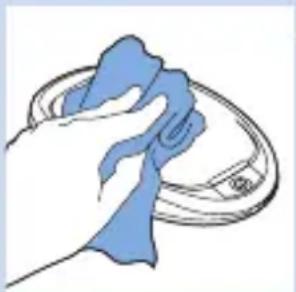
natural_image
Illustration of a hand cleaning a circular object with a blue cloth (no text or symbols)
natural_image
Illustration of a mechanical device with a downward arrow indicating a process or operation (no text or symbols present)Philips Light & Health
High Tech Campus 5
5656AE Eindhoven
The Netherlands
Újrahasznosítás
natural_image
Symbol of a waste bin crossed with a diagonal line, no text or numbers present
natural_image
Icon of a person reading a book inside a circle (no text or symbols)natural_image
Warning symbol with a black triangle containing a sunburst and radiating lines (no text or numbers)natural_image
Simple black-and-white icon of a walking human figure inside a square frame (no text or symbols)natural_image
Silhouette of a factory with smokestacks and chimney (no text or symbols)natural_image
Simple line drawing of an industrial building with a zigzag line and 'NL' label, no text or symbols present.natural_image
Simple black silhouette of an open umbrella with raindrops falling (no text or symbols)

natural_image
Simple black arrow symbol pointing upward and to the right, resembling a stylized USB or USB icon (no text or labels)

natural_image
Simple geometric pattern of concentric squares (no text or symbols)natural_image
Symbol of crossed-out circle with diagonal lines, representing prohibition or exclusion (no text or numbers present)natural_image
Simple line drawing of a factory chimney with 'CN' label (no additional text or symbols)natural_image
Simple icon of an open book with an information symbol inside, no text or labels present.natural_image
Diagram showing a blue electrical plug inserted into a white electronic device with a blue arrow indicating the process (no text or symbols present)natural_image
Simple line drawing of a device with a blue upward arrow pointing to it, no text or symbols present.natural_image
Illustration of a blue electric plug connected to a wall-mounted socket (no text or symbols)natural_image
Simple line drawing of a magnifying glass with a blue lens (no text or symbols)natural_image
Warning symbol: black exclamation mark inside a triangle (no text or numbers)natural_image
Diagram of a toilet with a blue lid and arrow indicating upward motion (no text or symbols)
natural_image
Illustration of a blue smartwatch strap with a circular button, no text or symbols presentnatural_image
Simple line drawing of a circular object with a blue component at the center (no text or symbols)natural_image
Simple line drawing of an oval-shaped object with a small blue star-like symbol on the side (no text or symbols)natural_image
Simple line drawing of an oval-shaped object with a small blue segment on the side (no text or symbols)Sygnał przegrzania
natural_image
Simple line drawing of a circular object with a small blue tab on top (no text or symbols)Przegrzanie skóry.
natural_image
Diagram of a medical device with a blue cap and arrow indicating direction (no text or symbols)natural_image
Illustration of a hand cleaning a blue cloth over a circular object (no text or symbols)natural_image
Illustration of a mechanical device with gears and a base, showing a downward arrow indicating motion (no text or symbols present)natural_image
Symbol of a trash bin crossed with no text or labels, accompanied by a solid black rectangle below (no text or symbols present)natural_image
Abstract black-and-white graphic of a factory or industrial structure with triangular peaks (no text or symbols)natural_image
Simple line drawing of a factory with a zigzag line and 'NL' label, no text or symbols present.natural_image
Simple black-and-white icon of an open umbrella with raindrops falling (no text or symbols)natural_image
Simple icon of an open book with an information symbol inside, no text or labels present.natural_image
Diagram showing a blue plastic plug inserted into a white plastic housing with a blue arrow indicating direction (no text or symbols)natural_image
Diagram of a medical device with a blue arrow pointing upward, no text or symbols presentnatural_image
Illustration of a blue electrical plug with a magnified inset showing three circular components (no text or symbols)natural_image
Diagram showing a musical instrument with a blue arrow pointing to a heart-shaped object, overlaid with a musical note and waveform (no text or symbols)natural_image
Line drawing of a magnifying glass with a blue lens (no text or symbols)5 Ked' je zariadenie Philips BlueControl úplne nabité, indikátor LED sa rozsvieti nepretržite nazeleno.
6 Adaptér odpojte zo siete a zo zariadenia Philips BlueControl odpojte mikro konektor USB.
Používanie zariadenia Philips BlueControl
Plán ošetrení
natural_image
Warning symbol: black exclamation mark inside a triangle (no text or numbers)natural_image
Diagram of a blue appliance with a blue arrow pointing to its lid (no text or symbols present)1 Zariadenie Philips BlueControl umiestnite do popruhu na upevnenie.
natural_image
Illustration of a blue smartwatch strap with a circular headband (no text or symbols)6 Remienok potiahnite cez druhý krúžok (1). Potom remienok znova omotajte okolo ruky alebo nohy a upevnite ho suchými zipsom (2).
natural_image
Simple line drawing of a circular object with a blue arrow pointing to its side (no text or symbols)natural_image
Simple line drawing of an oval-shaped object with a small blue component on the side (no text or symbols)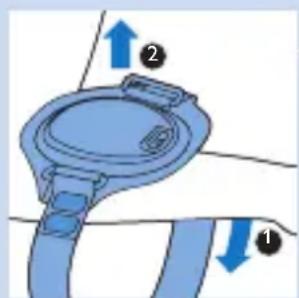
natural_image
Diagram of a blue mechanical component with directional arrows indicating movement or force (no text or symbols)natural_image
Simple line drawing of a circular object with a small protrusion and a blue accent (no text or symbols)natural_image
Simple line drawing of a circular object with a small blue tab on top (no text or symbols)natural_image
Diagram of a medical device with a blue arrow indicating direction (no text or symbols)Zariadenie Philips BlueControl neponárajte do vody ani ju nečistite pod tečúcou vodou.
natural_image
Illustration of a hand cleaning a circular object with a blue cloth (no text or symbols)natural_image
Illustration of a mechanical device with a downward arrow indicating a process or operation (no text or symbols present)natural_image
Symbol of a waste bin crossed with a diagonal line, representing no waste or disposal (no text or labels present)natural_image
Warning symbol: black exclamation mark inside a triangle (no text or numbers)
natural_image
Icon of a person using a laptop inside a circle (no text or symbols)
natural_image
Warning symbol with a black triangle and sunburst pattern (no text)natural_image
Simple black umbrella icon with raindrops falling (no text or symbols)natural_image
Simple line drawing of a house with chimney (no text or symbols)natural_image
Simple geometric symbol combining a triangle and two intersecting lines (no text or labels)natural_image
Symbol of crossed-out electrical circuit lines around a square (no text or labels)- Tento symbol znamená: nesušit' v sušičke.

natural_image
Pure electrical circuit lines without any symbols- Tento symbol znamená: nežehlit'.

natural_image
Symbol of crossed-out circle with diagonal lines, representing prohibition or exclusion (no text or numbers present)- Tento symbol znamená: nečistit' v čistiarni.

natural_image
Simple line drawing of a factory with smokestacks and 'CN' label (no additional text or symbols)natural_image
Simple icon of an open book with an information symbol inside, no text or labels present.



- Always here to help you
- Introduction
- List of product codes
- Intended use
- Important
- Contraindications
- Important safety information
- Danger
- Warning
- Caution
- Compliance
- General description (Fig. 1)
- Charging
- Charging with the adapter
- Using your Philips BlueControl
- Treatment schedule
- Preparing the Philips BlueControl for use
- Treatment procedure
- Interrupting treatment
- After treatment
- Light and sound signals during use
- Overheating signal
- Battery level signals
- Cleaning
- Storage
- Troubleshooting
- Guarantee and support
- Guarantee restrictions
- Manufacturer's legal address
- Recycling
- Removing the rechargeable battery
- Specifications
- Device PSD1211
- Adapter with USB cable PR3089
- Fixation strap PSS1210
- Operating conditions
- Storage conditions
- Explanation of symbols
- Symbols on device
- Symbols on adapter
- Symbols on fixation strap
- Einführung
- Signal de surchauffe
- Recyclage
- Signaler for batterikapacitet
- Genanvendelse
- Symboler på adapter
- Symboler på holderen
- Kierrätys
- Laitteen merkinnät
- Klargjøre Philips BlueControl for bruk
- Signal for overoppheting
- Resirkulering
- Symboler på adapteren
- Återvinning
- Recyklace
- Újrahasznosítás
- Sygnał przegrzania
- Používanie zariadenia Philips BlueControl
- Plán ošetrení
Brand : PHILIPS
Model : Psoriasis Treatment PSK0202
Category : Skin care device