
VisaCare SC6220 - Skin care device PHILIPS - Free user manual and instructions
Find the device manual for free VisaCare SC6220 PHILIPS in PDF.


| Product Name | Philips VisaCare SC6220 |
| Brand | Philips |
| Category | Skin care device |
| Type | Facial cleansing and exfoliation device |
| Dimensions | Approx. 20 x 5 x 5 cm |
| Weight | Approx. 150 g |
| Power Source | Rechargeable lithium-ion battery |
| Charging Time | Approx. 8 hours |
| Usage Time | Up to 30 minutes per charge |
| Brush Head Material | Soft silicone bristles |
| Speed Settings | 2 (Normal and Gentle) |
| Water Resistance | IPX7 (waterproof up to 1 meter) |
| Main Functions | Deep cleansing, exfoliation, gentle massage |
| Suitable For | All skin types, including sensitive |
| Maintenance | Rinse brush head after use; replace every 3 months |
| Safety Features | Automatic shut-off after 2 minutes |
| Included Accessories | 1 brush head, charger, user manual |
| Warranty | 2 years |
Frequently Asked Questions - VisaCare SC6220 PHILIPS
User questions about VisaCare SC6220 PHILIPS
0 question about this device. Answer the ones you know or ask your own.
Ask a new question about this device
Download the instructions for your Skin care device in PDF format for free! Find your manual VisaCare SC6220 - PHILIPS and take your electronic device back in hand. On this page are published all the documents necessary for the use of your device. VisaCare SC6220 by PHILIPS.
USER MANUAL VisaCare SC6220 PHILIPS
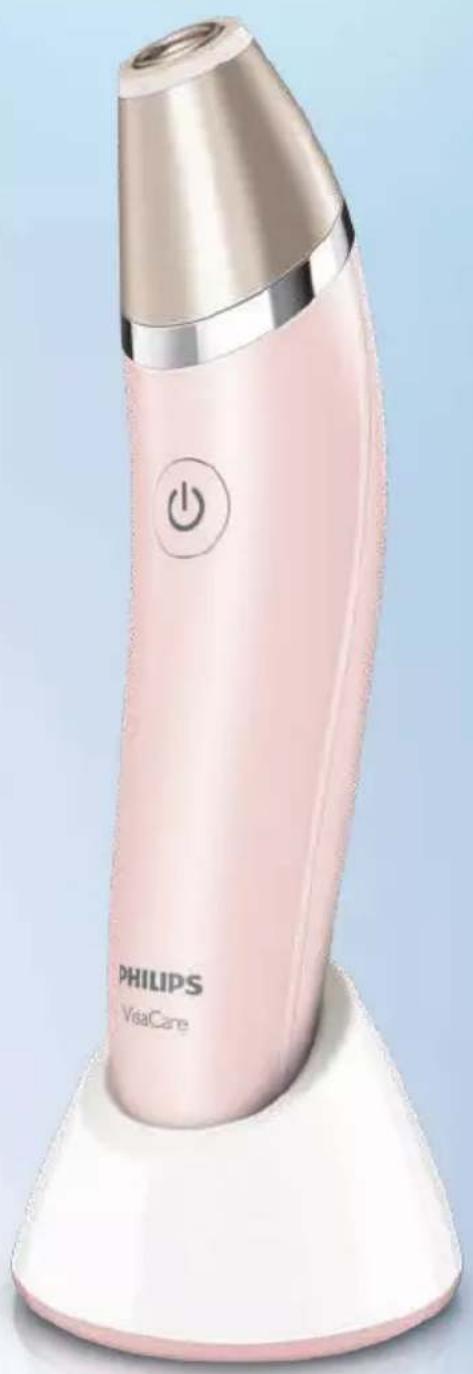
natural_image
Pink Philips VisaCare electric toothbrush with power button (no text or symbols on body)
natural_image
Diagram of a folded solar panel with arrows indicating rotation or movement (no text or symbols)
ENGLISH 6
한국어 12
繁體中文 19
简体中文 24
Introduction
Congratulations on your purchase and welcome to Philips! To fully benefit from the support that Philips offers, register your product at www.philips.com/welcome.
What is VisaCare and how can it help your skin? Age, lack of sleep, emotional stress or environmental elements can take their toll on your skin. When you start to see the first signs of skin ageing and your skin does not seem to recover so quickly anymore, your skin requires extra care and attention. That is why we have developed VisaCare, our exciting new approach to address the first signs of ageing, for a youthful looking skin today and tomorrow. Depending on your skin, you can experience immediate effects such as smoother and revitalised skin after one treatment or a few treatments. Effects such as skin firmness and a more even skin tone can be expected within 4-6 weeks. You can use VisaCare in the comfort of your own home to enjoy smoother, firmer and revitalised skin. VisaCare comes with a dual-action system that exfoliates and massages at the same time. This system is more effective and controlled than exfoliating your skin with your hands only. Designed to enhance your current routine, use VisaCare after cleansing your skin and before applying a nourishing mask, day cream or night cream. After treatment, your skin is prepared for better absorption of the mask or cream. Ready to get started? Use VisaCare at home twice a week to enjoy real and visible results.
How Philips microdermabrasion technology works
Philips VisaCare offers a DualAction Air Lift & Exfoliation system, which massages and exfoliates at the same time. This stimulates the resurfacing process of the skin for firmer, smoother and visibly radiant skin.
1 The exfoliating tip renews and unveils skin that is smoother, with more refined texture, and firmer by stimulating your natural cell renewal process. It gently nudges away roughness, flakiness to refine the skin and to prepare the skin for better absorption of your favorite cream after treatment.
2 The Air Lift System™ creates a gentle, stimulating massaging action encouraging blood circulation while removing dead skin cells and revitalising your skin.
General description (Fig. 1)
1 Filter
2 Exfoliation ring
3 Microdermabrasion treatment tip
4 On/off button
5 Charging light and 'battery low' indication
6 Handle
7 Air outlet
8 Charging stand
9 'Normal' treatment tip for regular treatment
10 'Sensitive' treatment tip for mild treatment (SC6240 only)
11 Adapter
12 Small plug
Cleaning brush (not shown)
Important
Read this user manual carefully before you use the appliance and save it for future reference.
Danger
- Keep the adapter dry.
- Do not charge this appliance in wet surroundings (e.g. near a filled bath, a running shower or near a filled swimming pool).
Warning
- This appliance is not intended for use by persons (including children) with reduced physical, sensory or mental capabilities, or lack of experience and knowledge, unless they have been given supervision or instruction concerning use of the appliance by a person responsible for their safety.
- Keep the appliance and its cord out of the reach of children.
- Only use the appliance in combination with the adapter supplied.
- Do not use the appliance or the adapter if it is damaged or broken to avoid injuries.
- If the adapter is damaged, always have it replaced with one of the original type in order to avoid a hazardous situation.
- The adapter contains a transformer. Do not cut off the adapter to replace it with another plug, as this causes a hazardous situation.
- Do not use the appliance if the treatment tip is broken, cracked, damaged or dirty. Always inspect the treatment tip before use. When in doubt, replace the treatment tip.
- Do not insert metal-containing material into the socket for the small plug to avoid short circuiting.
- This appliance contains a magnet. Persons with cardiac pacemakers or other devices implanted in their bodies should not come into close proximity with magnets. Specialist medical opinion must be sought before such persons handle or come into contact with magnets.
Caution
- Do not use the appliance for any other purpose than to massage and gently remove the dead upper skin layer to speed up normal skin turnover.
- Do not use the appliance more than twice a week, as this may cause skin irritation.
- Do not use the appliance in combination with (scrub) creams or with chemical or mechanical peelings, this may cause damage to the appliance and your skin.
- Charge, use and store the appliance at a temperature between 5°C/40°F and 35°C/95°F.
- Fully charge the appliance at least every 3 months to sustain battery lifetime.
VisaCare enhances the absorption of your creams and facial masks. Due to this enhanced uptake a negative skin reaction can appear. The advice is to not change between creams during the first 2-4 weeks of use of VisaCare. When you start to use a new cream after this period, first test this cream on a small area. Do not continue to use this cream if there is a negative skin reaction when applying it to the VisaCare treated skin. When starting treatment, or restarting after discontinuing for more than 2 weeks, begin again with the sensitive tip. This will allow your skin to once again become used to the treatment.
Contraindications and other warnings
This appliance has been developed to address the first signs of facial ageing. As the epidermal skin layer becomes thinner over the years due to extrinsic and intrinsic factors, rough skin and signs of photodamage become more prominent. The focus of this appliance is facial skin (excluding the area underneath and above the eyes).
Do not use this appliance:
- If you have skin infections, open wounds, rashes, burns, sunburn, inflammation, eczema, psoriasis, rosacea, active infections like herpes or active acne breakouts in the areas to be treated.
- If you have large moles, tattoos, port wine stains, permanent make-up or any skin irritation in the areas to be treated.
- If your skin is still recovering from a cosmetic procedure, such as a chemical or mechanical peeling, laser resurfacing, fractional laser treatment, or mesotherapy treatment or any other treatment with dermal fillers in the past two weeks.
- If you are taking medication that may affect your skin, such as steroids or acne medication (Accutane, Isotretinoine or Roaccutane). Consult your doctor.
- If you have warts, do not try to erase them with this appliance. It can spread the warts.
- If you have scars, consult your doctor or dermatologist before you start using the appliance.
- In combination with any other home skincare system containing an active peeling ingredient.
ENGLISH8
General advice
- After each treatment it is advised to use a sun protection factor (SPF) of 30 or above on the treated areas for a minimum of 3 days.
- If you have a significant skin condition (including but not limited to melanoma, basal cell carcinoma, actinic keratosis, melasma, systemic lupus erythematosus, porphyria, coagulation abnormality and collagen abnormalities such as keloid wounds, excessive scar formation or a history of bad wound healing), consult your doctor before you start using the appliance.
- If you plan to enjoy the sun (e.g. summer holidays) we recommend that you interrupt the treatment one week before the holidays and as long as you are extensively exposed to the sun.
Electromagnetic fields (EMF)
This Philips appliance complies with all applicable standards and regulations regarding exposure to electromagnetic fields.
Charging
Charging the appliance
Charging the appliance takes approximately 8 hours. A fully charged appliance has a cordless operating time of up to 30 minutes.
1 Make sure the appliance is switched off.
2 Insert the small plug in the socket of the charging stand and insert the adapter in the wall socket (Fig. 2).
3 Put the appliance in the charging stand (Fig. 3).
The charging light flashes white to indicate that the appliance is charging. (Fig. 4)
When the battery is fully charged, the charging light lights up white continuously for 30 minutes. After 30 minutes, the light goes out (Fig. 5).
Note: You can use the appliance before the battery is fully charged. However, its performance and operating time will not be optimal in this case.
'Battery low' indication
When the battery is almost empty, the charging light flashes amber for 4 seconds during use and after you have switched off the appliance. The battery still contains enough energy for a complete 5-minute treatment. When the battery is completely empty, the appliance switches off automatically and the charging light flashes amber very quickly. It is advised to charge the appliance immediately after use.
Preparing for use
Make sure you have charged the appliance for 8 hours before you use it for the first time.
Preparation
Always clean and gently dry your face until it is completely dry.
Note: The appliance is intended for dry use only. Do not use it on a wet face or in the shower or bathtub.
Note: Use the QR-code on the front cover or follow the link to watch the online video for instructions on correct use of the appliance.
Using the appliance
Note: Use the appliance twice a week. Using the appliance more often may cause skin irritation.
1 Press the on/off button to switch on the appliance (Fig. 6).
2 When you use the appliance for the first time, test the treatment tip on your forearm before you use it on your face. Make a pass with the appliance and then wait for approximately one hour. If a possible skin reaction diminishes, you can safely use the tip on your face.
Note: Always visually check the treatment tip before use to see if it is damaged. A damaged treatment tip scratches your skin. If the treatment tip is damaged, replace it.
Note: Do not use the appliance without the treatment tip as this does not benefit your skin and may cause an unwanted skin reaction.
3 Put the treatment tip on your face in such a way that you feel the suction. Make sure there is always full skin contact between the treatment tip and the area to be treated. However, do not press the treatment tip hard onto the skin's surface (Fig. 7).
4 Gently move the treatment tip in straight lines. Start on the chin, and then move to the cheeks, forehead and nose. Make sure you treat all areas.
Tip: Use your other hand to stretch and hold the skin and move the appliance away from your hand. This makes it easier to achieve proper suction, especially on the temples and cheeks.
See facial map in the back of the user manual for detailed instructions on how to move the appliance across your face.
Do not move the appliance over large moles, tattoos, port wine stains or permanent makeup.
Do not treat the skin below or above the eyes, as it is thin and delicate. When you treat fine lines on the side of the eye, put a finger of the other hand in the corner of the eyelid and move the appliance away from the finger towards the temple.
Note: Do not hold the treatment tip in one spot when you have placed it on the skin.
5 Depending on the condition of your skin, start to treat each area 2-4 times. When your skin is used to the treatment, increase to 4-6 passes or start to use the normal treatment tip. When you use the normal treatment tip, start to treat each area 3-4 passes. When your skin is used to the treatment, increase to 4-6 passes.
6 When you have treated all areas, press the on/off button to switch off the appliance. A complete treatment takes approximately 5 minutes (Fig. 8).
Depending on your skin type, you may experience a warm and tingling sensation and your skin may become slightly red. This is only a temporary effect that should diminish within 5-10 minutes.
Tip: In areas where full skin contact is harder to achieve, such as the forehead, try different ways of holding the appliance. Try vertical and horizontal movements to find the best way to establish proper contact with your skin. You can also hold your hand still and move your head instead.
If you suspect damage to the appliance (such as after a drop or bump), examine the treatment tip carefully. If the tip is damaged, replace it. Do not use a damaged treatment tip, as this may cause scratches.
After treatment
After the treatment, apply a nourishing mask, day cream or night cream and make sure you use sun protection when you go outside. Do not use any other method of mechanical or chemical exfoliation for 3 days. Do not undergo electrolysis, facial waxing or use depilatories within 3 days after you have used the appliance. You can apply make-up immediately after the treatment.
Cleaning and maintenance
Do not immerse the appliance in water. Do not use chemicals to clean the appliance. Never use scouring pads, abrasive cleaning agents or aggressive liquids such as petrol or acetone to clean the appliance.
1 Make sure the appliance is switched off before you start cleaning it (Fig. 6).
2 Remove the treatment tip from the appliance. (Fig. 9)
3 Clean the treatment tip under the tap with hot water and some washing-up liquid. If the exfoliation ring is dirty, let the tip soak in hot water with washing-up liquid for 5-10 minutes. You can use the brush to clean it. Make sure you clean the filter with the treatment tip upside down to rinse off any dirt left in the filter. Dry the treatment tip with a lint-free towel or let it air-dry (Fig. 10).
4 Clean the handle with a damp cloth (Fig. 11).
5 Place the dry treatment tip back onto the appliance.
6 Wipe the charging stand with a damp cloth.
Danger: Always keep the adapter and the charging stand dry. Never rinse them under the tap or immerse them in water.
Clean the treatment tip after every use for hygienic reasons and to prevent clogging of the filter. Only use washing-up liquid or an alcohol solution (max. 70%) to clean the treatment tip.
Storage
Store the appliance with the treatment tip attached in the charging stand or pouch.
Note: Do not store a wet treatment tip on the appliance or in the pouch.
Replacement
A worn and abrasive structure could lead to skin irritation. therefore the treatment tip should be replaced every 6 months or earlier if the abrasive structure is deformed or damaged. Replacement tips are available on our website. The treatment tip can be identified by the product code. You can find this code on the inside of the treatment tip.
Ordering accessories
To buy accessories or spare parts, visit www.shop.philips.com/service or go to your Philips dealer. You can also contact the Philips Consumer Care Centre in your country (see the worldwide guarantee leaflet for contact details).
Environment
- Do not throw away the appliance with the normal household waste at the end of its life, but hand it in at an official collection point for recycling. By doing this, you help to preserve the environment (Fig. 12).
Guarantee and support
If you need information or support, please visit www.philips.com/support or read the separate worldwide guarantee leaflet.
Troubleshooting
This chapter summarises the most common problems you could encounter with the appliance. If you are unable to solve the problem with the information below, visit www.philips.com/support for a list of frequently asked questions or contact the Consumer Care Centre in your country.
Problem Solution
I do not know if the appliance is suitable for use on my skin.
Please read section ‘Contraindications and other warnings’ in chapter ‘Important’ to check if the appliance is suitable for your skin.
| Problem Solution | |
| The appliance does not charge. | Make sure the socket to which you connect the appliance is live. Check if the voltage indicated on the appliance corresponds to the local mains voltage. Check if you have placed the appliance in the stand properly. If you use a socket in a bathroom cabinet, you may need to switch on the light to activate the socket. If the light on the appliance still does not light up or if the appliance still does not charge, contact the Philips Consumer Care Centre. |
| The appliance does not work anymore. | Charge the appliance according to the instructions in this user manual. Check if there is a power failure and if the wall socket is live. Check if the charging light on the appliance lights up to make sure the appliance is charging. Make sure that you have pressed the on/off button properly. If the appliance still does not work, contact the Philips Consumer Care Centre. |
| The appliance does not work when it is charging. | This is a safety measure. The appliance is not intended to work when it is charging. Let the appliance charge approximately 1 hour for a 5-minute treatment. |
| I don't get optimal results when I use the appliance on wet skin. | Only use the appliance on dry skin. The appliance only works optimally on dry skin. |
| My skin is reacting to treatment with the appliance. | This treatment may lead to mild redness directly after the treatment. You may experience a warm, tingly sensation during the treatment. These effects usually disappear within several minutes and are generally experienced as pleasant. It is possible that you experience dry or flaky skin, prolonged redness or swelling. In that case you may have pressed the appliance too hard on your face or treated the same area too many times. Try to exert less pressure onto the appliance during the next treatment or treat the area fewer times. In rare cases the appliance may cause a bruise or blister, scratch or pigmentation change. Almost all skin reactions will disappear within a week, pigmentation change will decrease within several weeks or a few months. To avoid possible side effects, use a day cream with sun protection factor or a sun protection cream after the treatment. This helps to avoid sunburn. The appliance has been tested and confirmed safe for use when used as described in the user manual. Medicines or products and their possible side effects can affect individual people in different ways. Since there is always the possibility that a rare or previously unknown side effect may occur with the use of this appliance or any other product, please contact the Philips Consumer Care Centre in case you experience a side effect which is not mentioned above. |
| It is difficult to slide the appliance over my skin/I do not feel the suction/ the effect seems to be less than after previous treatments. | Check if the filter is clogged. Clean the treatment tip by rinsing it under the tap. If the exfoliation ring is dirty, let the tip soak in hot water with washing-up liquid for 5-10 minutes. You can use the cleaning brush to clean it. Make sure you clean the filter with the treatment tip upside down to rinse off any dirt left in the filter. Dry the treatment tip with a lint-free towel or let it air-dry. Check if you can feel the suction of the appliance when the treatment tip is taken off: you remove the tip and then switch on the appliance. When you put your finger on the hole, you should be able to feel the suction. If you do not feel the suction, the appliance might be broken. Please contact your Philips Consumer Care Centre. |
| I have trouble keeping the suction on my forehead. | Try different ways of holding the appliance in order to find the right angle of the treatment tip with the forehead for good skin contact. Make sure to move the appliance slowly over the forehead. You can try to hold your hand still and move your head instead. |
소개
natural_image
Diagram of a folded solar panel with two panels open, showing directional arrows indicating rotation (no text or symbols)ALWAYS THERE TO HELP YOU
时刻在您身边
Register your product for further support at:
www.philips.com/welcome
SC6220
4222.100.1869.4




- Introduction
- How Philips microdermabrasion technology works
- General description (Fig. 1)
- Important
- Danger
- Warning
- Caution
- Contraindications and other warnings
- Do not use this appliance:
- ENGLISH8
- General advice
- Electromagnetic fields (EMF)
- Charging
- Charging the appliance
- 'Battery low' indication
- Preparing for use
- Preparation
- Using the appliance
- After treatment
- Cleaning and maintenance
- Storage
- Replacement
- Ordering accessories
- Environment
- Guarantee and support
- Troubleshooting
- Problem Solution
- 소개
Brand : PHILIPS
Model : VisaCare SC6220
Category : Skin care device