EasyManual
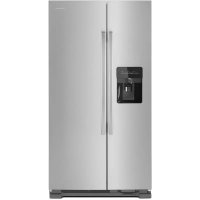
XRSS 287 BW BB - Fridge AMANA - Free user manual and instructions
Find the device manual for free XRSS 287 BW BB AMANA in PDF.



Download the instructions for your Fridge in PDF format for free! Find your manual XRSS 287 BW BB - AMANA and take your electronic device back in hand. On this page are published all the documents necessary for the use of your device. XRSS 287 BW BB by AMANA.
USER MANUAL XRSS 287 BW BB AMANA
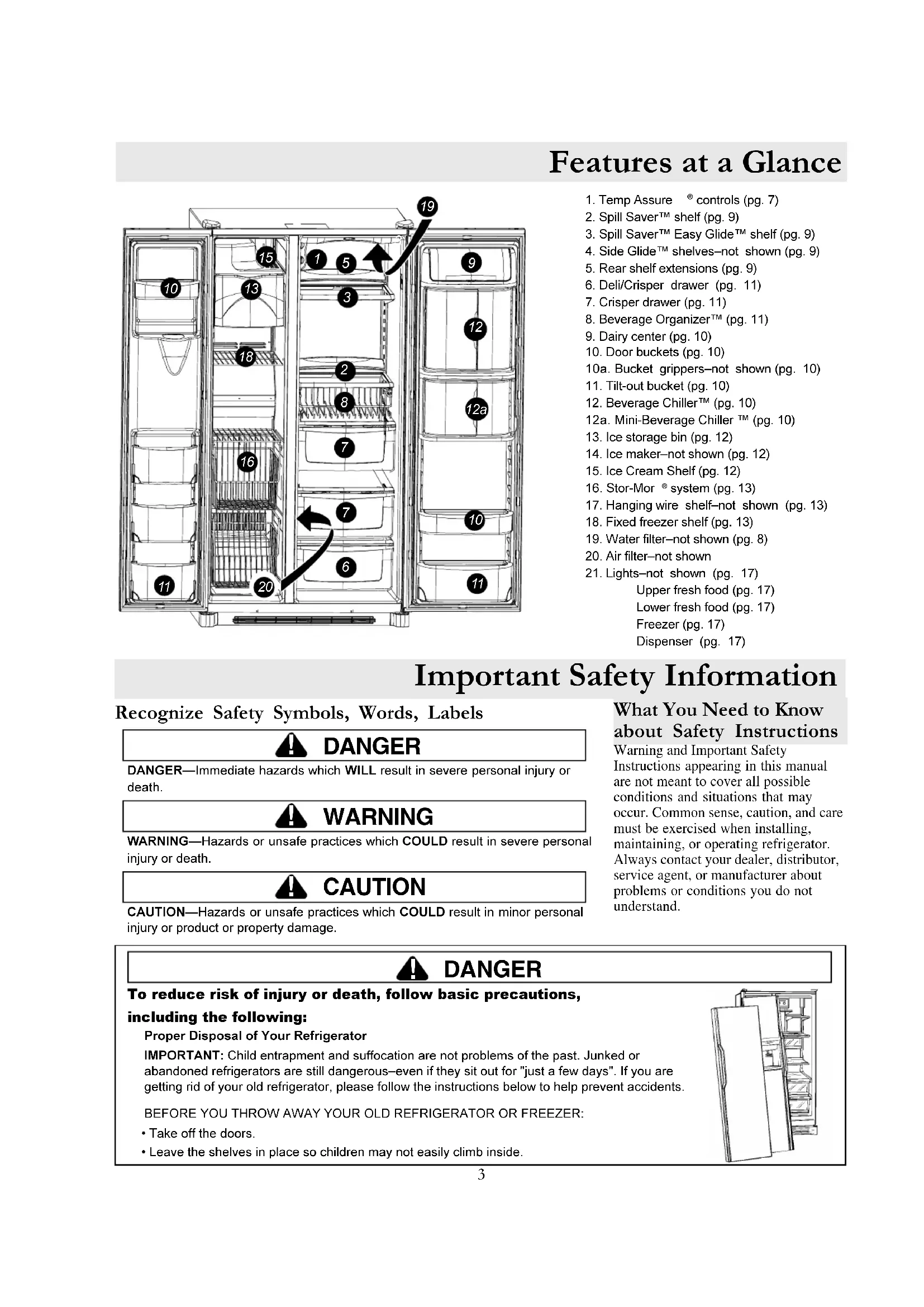
Recognize Safety Symbols, Words, Labels DANGER
DANGERImmediate hazards which WILL result in severe personal injury or death. WARNING
WARNINGHazards or unsafe practices which COULD result in severe personal injury or death. CAUTION
CAUTIONHazards or unsafe practices which COULD result in minor personal injury or product or property damage.What You Need to Knowabout Safety InstructionsWarning and Important SafetyInstructions appearing in this manualare not meant to cover all possibleconditions and situations that mayoccur. Common sense, caution, and caremust be exercised when installing,maintaining, or operating refrigerator.Always contact your dealer, distributor,service agent, or manufacturer aboutproblems or conditions you do notunderstand.Proper Disposal of Your RefrigeratorIMPORTANT: Child entrapment and suffocation are not problems of the past. Junked orabandoned refrigerators are still dangerouseven if they sit out for "just a few days". If you aregetting rid of your old refrigerator, please follow the instructions below to help prevent accidents.BEFORE YOU THROW AWAY YOUR OLD REFRIGERATOR OR FREEZER: Take off the doors. Leave the shelves in place so children may not easily climb inside. DANGER
To reduce risk of injury or death, follow basic precautions,including the following:
How to Remove and Replace Doors and Hinges Installing Your Refrigerator Contact a qualified engineer to perform this task.These instructions were provided to aid you in the installation of your unit. Amana cannot be responsible for improperinstallation. Steps to Follow... A qualified engineer must connect refrigerator in accordance with these installation instructions. Measure door opening and depth and width of refrigerator. Remove handles or doors if required. Engineer must also do the following:1. Follow local water and electrical company connection regulations.2. Complete water supply connection before electrical supply connection.Service to or replacement of power cord must be performed by a qualified servicer.Installation Requirements1. Install on an earthed outlet with a separate 230 volt, 50hz., 10A circuit.2. Protect soft flooring with cardboard or rugs.3. Install on a floor which supports up to 429 kg.4. Provide 5 mm clearance at side of refrigerator and for models more than 60 cm deep, provide 25 mm clearance at top ofrefrigerator.5. 60 cm deep models.Trim corners of counter top to a 45° angle if counter top has 25 mm overhang. How to Remove Wooden Base CAUTION
To avoid personal injury or property damage, two people must remove wooden base.1. Tape doors shut to prevent doors from opening unexpectedly.2. Slide appliance cart under side of refrigerator.3. Wrap refrigerator with blanket or pad. Thread strap around refrigerator. Put foam shipping pads, located in shippingcarton, under strap. Tighten strap securely.4. Lower appliance cart to floor with appliance cart handles on bottom.5. Remove top two bolts from skid.6. Return refrigerator and appliance cart to an upright position. Remove strap.7. Slide appliance cart under opposite side of refrigerator.8. Repeat steps 3–5.9. Remove wooden base.10. Return refrigerator and appliance cart to an upright position and remove appliance cart.IMPORTANT:Do not leave refrigerator on its side longer than necessary to remove bolts.5 Installing Your Refrigerator Remove two
" hex nut screws from bottom of refrigerator and freezer door. How to Install and Remove Handles
Insert screws removed in step 1 into screw holes at bottom of handle section.
Align door handles with top and bottom sets of door clips, and slide down until screw holes on bottom of handles match with door screw holes. Snap trim over bottom portion of handles and retainers on bottom of door
Full-Length Grab Handles (non-stainless steel)
To remove after initial install... Follow steps 3 through 4 in reverse order.NOTE: Fit may be tight. When removing handle, pull up and out. Half-Length Grab Handles (non-stainless steel) Remove four
" hex nut screws from top and bottom of doors.
Align door handles with screw holes and insert screws removed in step 1. Snap colored handle trim over screw holes at top and bottom of handles. Snap in trim by inserting large roundend first.
To remove after initial install... Handles may need to be removed if transporting unitthrough tight spaces. Follow steps 2 and 3 in reverse order.IMPORTANT: To avoid damage to handle, use aflat blade screwdriver edge wrapped in maskingtape to remove colored handle trim. Handles are located within fresh food section of refrigerator. Trim, plugs, and accent pieces will be located within the literature assembly. Fit other end of handle over upper door clip and slide up as far as possible.
Stainless Steel Models Loosen lower door clip on refrigerator door with
" hex nut driver into predrilled hole at base of handle and tighten screw.
Locate predrilled hole at base of handle, and fit hollow end of handle over lower door clip.
What if my doors are not aligned?
- Locate the higher door, and turn front adjustment screwcounterclockwise. Continue until doors are level.• If bottom of adjustment range is reached, and doors arenot level–raise opposite door by turning frontadjustment screw clockwise.• Replace toe grille Turn both front adjustment screws (A) clockwise to raise and counterclockwise to lower.
To avoid damage to walls and flooring, protect soft vinyl or other flooring with cardboard, rugs, or other protective material. To avoid damage or breakage to adjusting bolt, do not use power tools to correct leveling. DO NOT adjust unit to be any shorter than 173.9 cm tall (minus hinge and cap). Doing so may damage underside components. Turn both rear adjustment screws (B) clockwise to raise and counterclockwise to lower.
Check with level to verify 6 mm tilt to the back for proper door closure. If unit is aligned and stable, replace toe grille.
How to Level Your Refrigerator Materials Needed
" hex head driver Level What if my unit rocks?
- Turn rear adjustment screw clockwise to raiserocking corner.• Replace toe grille. Installing Your Refrigerator How to Install the Handles continued How to Connect the Water Supply Contact a qualified engineer to perform this task. Remove Toe Grille and Bottom Hinge Covers Open both doors 180°, or as wide aspossible, to remove.
To remove after initial install... Follow steps 2 through 5 in reverse order.IMPORTANT: To avoid damage to unit, usea flat blade screwdriver edge wrapped inmasking tape to remove screw plugs. Insert screw plug into predrilled hole.
Repeat steps 2 through 5 to install freezer handle.
Stainless Steel Handles continued7 Installing Your Refrigerator How to Adjust the Temperature Controls This refrigerator is designed to operate at a household temperature of 13° to 43° C.IMPORTANT: Due to design of unit, always start temperatureadjustments with freezer section. Allow 24 hours for temperatures to stabilize.
Check to see if freezer temperature is -17° to -16° C.
Turn control to next highest number if too warm. Turn control to next lowest number if too cold. Allow 5 to 8 hours for adjustments to take effect. Locate refrigerator and freezer controls on upper left wall of fresh food section, and set both controls to 4.
Check to see that fresh food section is 3° to 4° C.
Repeat process, as necessary.
IMPORTANT: Neither section will cool if freezer control isset to Off. Materials needed
- 2 thermometers measuring -21° to 10°C
- 2 drinking glasses How do I perform a temperature test? Turn control to next highest number if too warm. Turn control to next lowest number if too cold. Allow 5 to 8 hours for adjustments to take effect.
- Place thermometer in glass of vegetable oil in middle of freezer and continue with step 3 of Temperature Adjustment section. For Refrigerator
- Place thermometer in glass of water in middle of unit and continue with step 3 of Temperature Adjustment section.8 WARNING
To avoid serious illness or death, do not use unit where water is unsafe or of unknown quality without adequatedisinfection before or after use of filter. CAUTION
Bypass cartridge DOES NOT filter water. Be sure to have replacement cartridge available when filter change is required. If water filtration system has been allowed to freeze, replace filter cartridge. If system has not been used for several months, and water has an unpleasant taste or odor, flush system by dispensing23 glasses of water. If unpleasant taste or odor persists, change filter cartridge.Remove blue bypass cap andretain for later use. Remove sealing label fromend of filter and insert intofilter head. Rotate gently clockwise until filter stopsand snap filter cover closed. Reduce water spurts by flushing air fromsystem. Run water continuously(approximately 2 minutes) throughdispenser until water runs steady. Additional flushing may be required in some householdswhere water is of poor quality. Water Filter Removal and InstallationInitial Install of Water FilterIMPORTANT: Air trapped in system may cause water andcartridge to eject. Use caution when removing.Replacing Water FilterTurn filter counterclockwise until itreleases from filter head. Drain water from filter into sink or toilet,and dispose in normal household garbage. Wipe up excess water in filter cover andcontinue with installation steps 2 and 3. Select dispenser models feature a water filter change indicator.For instructions on how to operate and reset this feature, referto the dispenser features section in your manual.IMPORTANT: Condition of water and amount useddetermines life span of water filter cartridge. If water use ishigh, or if water is of poor quality, replacement may need totake place more often.When do I change the water filter?How do I order a replacement filtercartridge?Amana Replacement Water Filter cartridge model WF 50is available through Amana dealers and servicers. Contactyour local distributor for more information. About Your Filtration System... I'm trying to dispense water toflush the system. Where's the water?During initial use, allow about a 1 to 2 minute delay toallow internal water tank to fill.What if I choose not to use the waterfiltration system?Dispenser feature may be used without water filter cartridge.If you choose this option, replace filter with blue bypass cap.9 Fresh Food Features Rear Shelf Extensions (some models) Rear shelf extensions help prevent articles from fallingoff the back of the shelf.To remove and install shelf extension: To remove, pull extension straightup from rear of shelf. To install, insert posts of the shelfextension into holes in the shelfframe. CAUTION
To avoid personal injury or property damage, observe the following: Confirm shelf is secure before placing items on shelf. Handle tempered glass shelves carefully. Shelves may break suddenly if nicked, scratched, or exposed to suddentemperature change. Interior Shelves Side Glide Shelves (some models) Side Glide shelves hook onto a reardouble-crossbar assembly. Shelves may be aligned sideby side to create a full width level surface,or if attached to separate crossbars, theshelves may slide left or right toaccommodate storage needs.To remove and install shelf: To remove shelf, raise shelf10° to unhook from double crossbar and lift out. To install, reverse above procedure.To slide shelves: Lift front of shelf slightlyand slide left or right.To remove and installdouble-crossbar assembly: To remove, slide assemblyup to unhook from metaltrack. To install, reverse above procedure. Spillsaver Spillsaver stationary shelveshold simple spills for easiercleaning. To remove shelves, lift up and out. To install shelves, reverse aboveprocedure. Spillsaver Easy Glide (some models) Spillsaver Easy Glideshelves feature the convenienceof easy cleaning with a pull-outdesign to reach items in theback. For ease of cleaning,glass shelf may be removed by pulling to fullextension and lifting out of frame. To remove shelf and frame, see instructions forSpillsaver stationary shelves.This book is intended to show the variety of features that are available in the productline. If your refrigerator does not have all the options that are shown, many of theseoptions may be purchased by contacting your local distributor. What if These Features are Different from Mine?10 Door Storage Door Buckets Door buckets adjust to meet individual storage needs. To remove, slide bucket up and pull straight out. To install, reverse above procedure. Fresh Food Features Tilt-Out Door Buckets (some models) The Tilt-Out Bucket assembly consists of a bucket and frame, providing adjustable, convenient storage for food items in door. The bucket assembly tilts forward for easy access of items, and lifts out for ease in cleaning and adjusting. To remove and install bucket: To remove bucket, tip bucket forward and pull straight out to remove. To install bucket, slide bucket into bucket frame and push bucket upright. To adjust bucket frame: Remove bucket per above instructions. Lift frame off door support and place in desired door location. Dairy Center The dairy center provides convenient storage for items such as butter, yogurt, cheese, etc. This compartment is an adjustable feature located in the door. It can be moved to several different locations to accommodate storage needs. To remove, slide dairy center up and pull straight out. To install, reverse above procedure. To remove and install Beverage Chiller: If located directly above Chiller, dairy center or door bucket may need to be removed. Refer to appropriate instructions and remove item. Slide Beverage Chiller assembly up and pull straight out. To install, align one of the Beverage Chiller cold air intake holes (A) with one of the two air inlets (B) in door liner. Push assembly down onto door liner retainer until it stops. Beverage Chiller/ Mini-Chiller The Temperature-Controlled Beverage Chiller and Temperature-Controlled Mini Beverage Chiller keep beverages and other items up to 3°C colder than the rest of the fresh food section. Air inlet allows air from the freezer section to pass to Beverage Chiller. The Beverage Chiller control is located on the left wall of fresh food section. Control adjusts amount of air circulating in Beverage Chiller. Turn control toward the large snowflake icon for colder temperature.
IMPORTANT: Beverage Chiller will not operate properly if air intake holes are not aligned with air inlet in door liner. (some models) Grip Pads The Grip Pads prevent objects from sliding in the door bucket. Grip Pads are removable and are top-rack dishwasher safe for easy cleaning.11 Fresh Food Features Drawers Deli/Crisper Drawer climate controlled The Deli/Crisper system provides a drawer with a variable temperature control that keeps the compartment up to 3°C colder than refrigerator temperature. This drawer can be used for deli storage or additional produce storage. NOTE: Cold air directed to the Deli/Crisper System can decrease refrigerator temperature. Refrigerator control may need to be adjusted. Controls Located on the wall to the left of the drawer, the climate controls regulate the air temperature in the Deli/Crisper drawer. Set control level to cold to provide normal refrigerator temperature for produce with outer skins. Use the coldest setting for meats or other deli items. Crisper Drawer climate controlled Garden Fresh crisper keeps produce fresh longer by providing an environment with adjustable humidity. Controls The Garden Fresh controls regulate the amount of humidity in the crisper drawer. Use the low setting for produce with outer skins. Use the high setting for leafy produce. To remove and install drawers: To remove drawer, pull drawer out to full extension. Tilt up front of drawer and pull straight out. To install, reverse above procedure. To remove and install crisper shelf: Lift off wall supports and remove. To install shelf, lower shelf onto wall supports and push in until shelf is flush with rear wall. Beverage Organizer (some models) The Beverage Organizer slides out from underneath the Spillsaver Easy Glide shelf. The Organizer holds up to twelve 12-ounce beverage cans. To remove and install Organizer: To remove, empty contents of Organizer. Pull Organizer forward to full extension and lift front to release from shelf rail. Pull straight out to remove. To install, reverse above procedure.12 Ice Storage Bin The ice storage bin is located below the automaticdispensing ice maker.To remove and install ice storage bin: To remove bin, remove Ice CreamShelf. Raise ice maker arm todeactivate ice maker. Lift front of bin and pull out to its full extension. Lift upfront of bin and remove. To install, slide bin into rails below ice maker untilbin locks into place. Drop ice maker arm to activateice maker, and replace Ice Cream Shelf.IMPORTANT: Ice bin mustbe locked in proper place forproper ice dispensing. If freezerdoor does not close, bin is notin proper location. Turn augerdriver as shown to properly alignice bin with back of unit. Freezer Features Ice Cream Shelf The Ice Cream Shelf provides a space for items to bechilled or frozen quickly. To remove, lift Ice Cream Shelffrom ice bin rails and pullstraight out. To install, reverse aboveprocedure. Automatic Dispensing Ice Maker This ice maker creates the ice used in the dispensingsystem.Using Ice Maker for the First Time Confirm ice bin is in placeand ice maker arm is down. After freezer section reachesbetween -18° to -17° C, icemaker fills with water andbegins operating. Allow approximately 24 hoursafter installation to receive first harvest of ice. Discard ice created within first 12 hours ofoperation to verify system is flushed of impurities.Operating Instructions Confirm ice bin is in place and ice maker arm isdown. After freezer section reaches -18° to -17° C, icemaker fills with water andbegins operating. You willhave a complete harvestof ice approximately every3 hours. Stop ice production byraising ice maker arm untilclick is heard. Ice maker will remain in the off position until arm ispushed down. Primary Features CAUTION
To avoid property damage, observe the following: Do not force ice maker arm down or up. Do not place or store anything in ice storage bin.This book is intended to show the variety of features that are available in the productline. If your refrigerator does not have all the options that are shown, many of theseoptions may be purchased by contacting your local distributor. What if These Features are Different from Mine?13 Freezer Features Door Storage Stor-Mor
System Baskets slide out for easy access of items in back. Shelves can be removed to meet individual storage needs. To remove and install Stor-Mor
shelf: To remove, snap right side of shelf from cabinet railing and remove from wall mounting clips. To install, reverse above procedure. NOTE: Back of shelf must be flush with back of cabinet to secure firmly in cabinet railing. Improper alignment will cause shelf to slide. To remove and install baskets: To remove, pull basket forward to full extension. Lift front handle to release basket from rails and remove. To install, reverse above procedure. Shelves Fixed Freezer Shelf To remove and install shelves: Remove shelf from wall mounting clips and pull out of left side mounting holes. To install, reverse above procedure. Hanging Wire Shelf (some models) Hanging wire shelf provides extra storage for ice cube trays, boxed frozen foods, ice packs, etc. To remove shelf: Pinch rung hook of hanging wire shelf inward to release hanging wire shelf from right side of Stor-Mor
shelf. Shelf will swing downward. Press rung hook of hanging wire shelf outward to remove shelf from freezer section. To install shelf: Perform above steps in reverse order. Door Buckets Tilt-Out Door Buckets (some models) Refer to Fresh Food section for instructions. Refer to Fresh Food section for instructions.14 Dispenser Features Primary Features Dispenser Light not shown A light activates within the dispenser area at full power when dispensing ice or water. Front Fill Button (some models) The Front Fill button works independently of the dispenser controls, providing an up-frontalternative to the dispenser pad for dispensing water. This feature is convenient for fillinglarge items that will not fit into the dispenser area (i.e. sport bottles, pitchers, large pans,coffee pots).This feature allows added convenience of dispensing ice and water simultaneously.To use, choose your preferred ice mode from dispenser control panel. Press containeragainst dispenser pad while pressing the Front Fill button. Dispenser Pad The dispenser pad is located on the back wall of the dispensing area. When the dispenserpad is pressed, the selection chosen on your dispenser control panel will dispense. Removable Tray The removable tray at the bottom of the dispenser area is designed to collectsmall spills and may be easily removed for cleaning and emptying purposes.IMPORTANT: Removable tray does not drain. Continuous waterrunning into tray will cause tray to overflow.To avoid personal injury or property damage, observe following instructions: Do not put fingers, hands, or any foreign object into dispenser opening. Do not use sharp objects to break ice. Do not dispense ice directly into thin glass, fine china, or delicate crystal. NOTE: During initial use of water dispenser, allow an approximate 1-2 minute delay in water dispersal to allow internal water tank to fill. Discard first 10-14 containers of water after initiallyconnecting refrigerator to household water supply and extended periods of nonuse.To use dispenser pad: Choose water selection from dispenser control panel. Press sturdy, wide-mouthed container against dispenser pad. Release pressure on dispenser pad to stop water from dispensing. A small amount ofwater may continue to dispense, and collect in dispenser tray. Large spills should be wiped dry.To use Front Fill button (some models): Align container under Front Fill button using water droplet as guide. Press and hold Front Fill button. Release button when desired fill is reached. A small amount of water may continueto dispense, and collect in dispenser tray. Large spills should be wiped dry.NOTE: If water dispenser is active for more than 5 minutes, an automatic lock out sensor will shut down power to dispenser area. See Automatic Lock Out for further information. Water Dispenser Operation CAUTION !15 Ice Dispenser Operation To dispense ice: Select Cubed or Crushed ice mode by pushing button on dispenser control panel. A green indicator light above button shows mode selection. Press container against dispenser pad. When dispensing crushed ice, hold container as close to chute as possible to reduce spraying. Selection mode may not be changed while ice dispenser is in operation. NOTE: If dispenser is active for more than 3 minutes, an automatic lock out sensor will shut down power to dispenser area. See Automatic Lock Out for further information. Dispenser Features Control Features Dispenser Lock This feature prevents ice or water from being dispensed. To lock and unlock dispenser: To lock dispenser, press and hold Dispenser Lock button for 3 seconds. A green indicator light above button confirms dispenser is locked. To unlock dispenser, hold Dispenser Lock button for 3 seconds. Green indicator light above button will go out. What is the Automatic Lock Out feature? The Automatic Lock Out feature shuts down power to the water and ice dispenser when either dispenser has run continuously for approximately 3 minutes. If this mode goes into effect, the green light will activate above the Dispenser Lock button. To unlock dispenser:
- To unlock dispenser, hold Dispenser Lock button for 3 seconds. Green indicator light above button will go out. Filter Status Indicator Light The Filter Status Indicator Light serves as a reminder to replace the water filter. A green light indicates that the filter is in good condition. A red light indicates the filter should be changed. Once light turns red, it will remain red until function is reset. To reset indicator: Press and hold both Dispenser Lock and Auto Light buttons simultaneously for 4 seconds. The green Filter Status Indicator Light will flash 3 times when the function has successfully reset. Auto Light The Auto Light function offers the ability to activate the dispenser light at half-power when the Light Sensor detects that the light levels in room are low. To activate and deactivate Auto Light: To activate, press Auto Light button located on control panel. A green indicator light above button displays to show that sensor is active. To deactivate, press Auto Light button. Green indicator light will go out. NOTE: Dispenser light will operate whether or not Auto Light is selected. Sabbath Mode (some models) This mode is intended to deactivate power to the LED and dispenser lights, while allowing the controls to remain operational. To activate Sabbath Mode: Press and hold both Dispenser Lock and Auto Light buttons simultaneously for 3 to 4 seconds. After 3 to 4 seconds, the LED and dispenser lights will turn off. Dispenser light will not activate during dispensing while in this mode. To deactivate Sabbath Mode: Press and hold both Dispenser Lock and Auto Light buttons simultaneously for 3 to 4 seconds. After 3 to 4 seconds, the LED and dispenser lights will activate. NOTE: In the event that power isinterrupted while the Sabbath Modeis active, the control will remain inSabbath Mode when power returns. +16 Hints and Care WARNING
To avoid electrical shock which can cause severe personal injury or death,disconnect power to refrigerator before cleaning. After cleaning, connect power. CAUTION
To avoid personal injury or property damage: Read and follow manufacturer's directions for all cleaning products. Do not place buckets, shelves, or accessories in dishwasher. Cracking orwarping of accessories may result. Handle tempered glass shelves carefully. Shelves may break suddenly ifnicked, scratched, or exposed to sudden temperature change. Protect soft vinyl or other flooring with cardboard, rugs, or other protectivematerial.Amana has a cleaner available forpurchase (Part # 31960801).For this, or a list of other recommendedcleaning products, please contact yourlocal distributor.What cleaners doesAmana recommendfor my stainless steelproduct?How do I removean odor from myrefrigerator?How to Clean Your Unit1. Remove all food and disconnect powerto refrigerator.2. Clean all interior surfaces includingceiling, floor, and walls according to“General” instructions. Pay specialattention to corners, crevices, andgrooves. Include all drawers, shelves,and gaskets.3. Connect power to refrigerator and returnfood to refrigerator. Wash and dry allbottles, containers and jars. Wrap foodsin tightly sealed containers to preventfurther odor. After 24 hours, check ifodor was eliminated.Complete the following steps if odor was noteliminated.4. Complete steps 1–2.5. Place garden fresh crispers on top shelfof refrigerator section. Pack refrigeratorand freezer sections including doors withcrumpled sheets of black and whitenewspaper.6. Place charcoal briquettes randomlythroughout newspaper.7. Close doors and let stand 24–48 hours.8. Remove charcoal briquettes andnewspapers.9. Complete steps 2–3.Contact Consumer Affairs Department, ifodor was still not eliminated. Refer to ModelIdentification section for phone number.IMPORTANT: Damage to stainlesssteel finish due to improper use ofcleaning products or non-recommended productions is notcovered under any warranty.General1. Wash surfaces with a warm water and baking soda solution. Use a soft cleancloth to clean surfaces.2. Rinse surfaces with warm water. Dry surfaces with a soft, clean cloth.Adhesives1. Remove glue residue by rubbing toothpaste into adhesive with fingers untiladhesive loosens.2. Rinse surface with warm water. Dry surface with a soft, clean cloth.Door Gaskets1. Keep gaskets clean at all times. Clean door gaskets thoroughly every 3 monthsaccording to “General” instructions.Condenser CoilsClean condenser coil every 3 months to ensure maximum performance ofrefrigerator. Accumulated dust and lint may cause the following: reduced cooling performance increased energy usage in extreme cases, premature compressor failure1. Remove toe grille and bottom hinge covers asshown right.2. Clean front surface of condenser coil with a vacuum cleaner hose nozzle.3. Replace toe grille by inserting clips in holes and snapping in. Snap bottomhinge covers over bottom hinges.Glass ShelvesRemove shelf by lifting front, releasing hooks from metal track then pulling out.Place shelf on a towel. Allow shelf to adjust to room temperature before cleaning.Clean crevices by completing the following steps:1. Dilute mild detergent and brush solution into crevices using a plastic bristlebrush. Let set for 5 minutes.2. Spray warm water into crevices using faucet spray attachment.3. Dry shelf thoroughly and replace shelf by inserting hooks into metal track andlowering front.17 WARNING
To avoid electrical shock which can cause severe personal injury or death,disconnect power to refrigerator before replacing light bulb. After replacing lightbulb, connect power. CAUTION
To avoid personal injury or property damage, observe the following: Allow light bulb to cool. Wear gloves when replacing light bulb.How to Get theMost Out ofYour EnergyDollarThis refrigerator is designed to be oneof the most energy efficientrefrigerators available. Reduce energyuse by observing the following.• Operate in normal household temperatures of 13° to 43°C away from heat sources and directsunlight.• Set refrigerator, freezer, and ChillerFresh system controls no colderthan necessary.• Keep freezer section full.• Keep door gaskets clean andpliable. Replace gaskets if worn.• Keep condenser coils clean. How to Remove and Replace Light Bulbs Hints and Care Upper fresh food section1. Locate finger gaps on each side of clear lightshield. Insert fingers and press in on each sideof shield. Pull shield down and remove.2. Remove light bulbs.3. Replace with appliance bulbs no greater than25 watts.4. Replace light bulb cover by inserting front tabs oflight shield into holes in liner directly in front of light assembly.
Lower fresh food section andNon-dispensing model freezer section1. Pinch bottom tabs (A) on light cover and pull straight out.
2. Remove light bulb.3. Replace bulb with appliance bulb no greater than 25watts.
4. Insert top tabs (B) of light cover into refrigerator liner and
snap bottom portion over light assembly.Dispensing model freezer section1. Remove ice bin by lifting front of bin and pulling out.2. Remove light bulb cover by pinching top tab (A) andpulling cover out of liner.3. Remove light bulb. Replace with appliance bulbno greater than 25 watts.4. Insert bottom tab (B) of light cover into liner and snaptop portion over light assembly.5. Replace ice bin by sliding in until bin locks into place.
Ice N Water dispenser1. Locate light bulb inside top edge of dispenser frame. Unscrew toremove.
2. Replace light bulb with a 230 volt bulb no greater than 12 watts.18
Before Calling Service
Today’s refrigerators have new features and are more energy efficient. Foam insulation is very energy efficient and has excellent insulating capabilities, however, foam insulation is not as sound absorbent. As a result, certain sounds may be unfamiliar. In time, these sounds will become familiar. Please refer to this information before calling service. NOISE 723,&
62/87,21 Freezer control (A) clicks when starting or stopping compressor. Normal operation Clicking Defrost timer (B) sounds like an electric clock and snaps in and out of defrost cycle. Normal operation Air rushing or whirring Freezer fan (C) and condenser fan (D) make this noise while operating. Normal operation Gurgling or boiling sound Evaporator (E) and heat exchanger (F) refrigerant makes this noise when flowing. Normal operation Ice cubes from ice maker(some models) drop into ice bucket (G)
Normal operation Thumping Dispenser ice chute (H) closing. Normal operation Compressor (I) makes a pulsating sound while running. Normal operation Vibrating noise Refrigerator is not level. See Installation Instructions for details on how to level your unit. Buzzing Ice maker water valve (J) hookup (some models) buzzes when ice maker fills with water. Normal operation Ice maker (K) is in the ‘on’ position without water connection. Stop sound by raising ice maker arm to ‘off’ position. See Automatic Ice Maker section in your owner’s manual for details. Ice auger (L) (some models) hums as auger agitates ice during dispensing. Normal operation Compresser (I) can make a high pitched hum while operating. Normal operation Humming Solenoid valve (M) operating ice chute door. Normal operation
OPERATION Freezer control and lights are on, but compressor is not operating. Refrigerator is in defrost mode. Normal operation Wait 40 minutes to see if refrigerator restarts. Control settings are too low. See section on Deli/Crisper system to adjust controls. Freezer controls are set too low. See controls section in Owner’s Manual on how to adjust your controls. Deli/Crisper system temperature is too warm Drawer is improperly positioned. See section on Deli/Crisper system to verify drawer positioning. Refrigerator is not plugged in. Plug in unit. Freezer control is not on. See section on controls in your Owner’s Manual. Fuse is blown, or circuit breaker needs to be reset. Replace any blown fuses. Check circuit breaker and reset if necessary. Refrigerator does not operate Power outage has occurred Call local power company listing to report outage. Refrigerator still won’t operate Unit is malfunctioning. Unplug refrigerator and transfer food to another unit. If another unit is not available, place dry ice in freezer section to preserve food. Warranty does not cover food loss . Contact service for assistance. Condenser coils are dirty. Clean according to cleaning instructions in your Owner’s Manual. Refrigerator or freezer controls are set too high. See controls section in Owner’s Manual on how to adjust your controls. Fresh food temperature is too cold Beverage Chiller™ (some models) is improperly positioned. See section on Temperature-Controlled Beverage Chiller™ to verify proper positioning.19 Before Calling Service OPERATION 723,& 3266,%/(&$86( 62/87,21 Refrigerator is not level. See Installation Instructions for details on how to level your unit. Check gaskets for proper seal. Clean, if necessary, according to cleaning instructions in Owner’s Manual. Door is not closing properly. Check for internal obstructions that are keeping door from closing properly (i.e. improperly closed drawers, ice buckets, oversized or improperly stored containers or foodstuffs, etc.). Controls need to be adjusted. See the controls section in your Owner’s Manual for assistance in how to adjust your controls. Condenser coils are dirty. Clean according to cleaning instructions in your Owner’s Manual. Rear air grille is blocked on models over 60 cm deep. Check the positioning of food items in refrigerator to make sure grille is not blocked. Rear air grille is located behind crisper drawers. Reduce time door is open. Organize food items efficiently to assure door is open for as short a time as possible. Door has been opened frequently, or has been opened for long periods of time. Allow interior environment to adjust for period the door has been open. Food temperature appears too warm Food has recently been added. Allow time for recently-added food to reach refrigerator or freezer temperature. Compartment is dirty or has odor-causing food. Refer to odor removal instructions in Owner’s Manual. Refrigerator has an odor Air filter (some models) needs to be changed. Change air filter. Check gaskets for proper seal. Clean, if necessary, according to cleaning instructions in Owner’s Manual. Humidity levels are high. Normal during times of high humidity. Water droplets form on outside of refrigerator Controls require adjustment See the controls section in your Owner’s Manual for assistance in how to adjust your controls. Humidity levels are high or door has been opened frequently. See the controls section in your Owner’s Manual for assistance in how to adjust your controls. Reduce time door is open. Organize food items efficiently to assure door is open for as short a time as possible. Water droplets form on inside of refrigerator Check gaskets for proper seal. Clean, if necessary, according to cleaning instructions in Owner’s Manual. Refrigerator or ice maker make unfamiliar sounds or seems too loud Normal operation Refer to “Noise” section of Before Calling Service in your Owner’s Manual. Contents of drawer, or positioning of items in the surrounding compartment could be obstructing drawer Reposition food items and containers to avoid interference with the drawers. Drawer is not in proper position See section on Deli/Crisper System and/or crisper drawer section for proper placement. Refrigerator is not level. See Installation Instructions for details on how to level your unit. Clean drawer channels with warm, soapy water. Rinse and dry thoroughly. Deli/Crisper System and/or crisper drawers do not close freely Drawer channels are dirty or need treatment. Apply a thin layer of petroleum jelly to drawer channels. Reduce time door is open. Organize food items efficiently to assure door is open for as short a time as possible. Doors have been opened frequently or have been opened for long periods of time. Allow interior environment to adjust for period the door has been open. Humidity or heat in surrounding area is high. Normal operation Food has recently been added. Allow time for recently-added food to reach refrigerator or freezer temperature. Unit is exposed to heat by environment or by appliances nearby. Evaluate your unit’s environment. Unit may need to be moved to run more efficiently. Refrigerator runs too frequently Condenser coils are dirty. Clean according to cleaning instructions in your Owner’s Manual.20 Before Calling Service OPERATION (continued)
723,& 3266,%/(&$86( 62/87,21 Controls need to be adjusted. See the controls section in your Owner’s Manual for assistance in how to adjust your controls. Refrigerator is not level. See Installation Instructions for details on how to level your unit Check for internal obstructions that are keeping door from closing properly (i.e. improperly closed drawers, ice buckets, oversized or improperly stored containers or foodstuffs, etc.). Refrigerator runs too frequently (continued) Door is not closing properly Check gaskets for proper seal. Clean, if necessary, according to cleaning instructions in Owner’s Manual. ICE & WATER
Water appears cloudy Air or air bubbles in water. This is normal when first using dispenser and will disappear with use. Carbon dust from water filter cartridge. Initial water ejected through cartridge may contain harmless carbon dust flushed from cartridge. Particles are safe for consumption. Will disappear after the first few uses. Particles in water and/or ice cubes. Concentrations of minerals in water will form particles when water becomes frozen and melts. Particles are not harmful and naturally occur in water supplies. Freezer door is not closed. Verify that freezer door is closed. Power is removed from the control when freezer door is opened. Refrigerator is not plugged in. Plug in unit. Fuse is blown, or circuit breaker needs to be reset. Replace any blown fuses. Check circuit breakers for any tripped circuits. No indicator lights are lit on dispenser control (some models) Power outage has occurred. Call local power company listing to report outage. Freezer door is not closed. Verify that freezer door is closed. Power is removed from the control when freezer door is opened. Controls are in lock mode. See Dispenser control instructions. Water tank is filling. At initial use, there is an approximate 45-second delay in dispensing while the internal water tank is filling. Ice maker or ice maker-equipped unit has just recently been installed or a large amount of ice has just been used. Wait 24 hours for ice production to begin and for ice maker to restock after emptied. Neither ice nor water is dispensed when pads are pushed (some models) Water filter is clogged or needs to be changed. Change water filter. Ice maker has just recently been installed or a large amount of ice has just been used. Wait 24 hours for ice production to begin and for ice maker to restock after emptied. Water pressure is too low. Low water pressure can cause valve to leak. Water pressure must be between 20 to 100 pounds per square inch to function properly. A minimum pressure of 35 pounds per square inch is recommended for units with water filters. Ice maker is not producing enough ice or ice is malformed (some models) Water filter is clogged or needs to be changed. Change water filter. Ice maker arm is not in correct position Confirm ice maker arm is down. See Automatic Ice Maker section in your Owner’s Manual for details. Household water supply is not reaching water valve Check water connection procedure in your Installation Instructions Water supply tubing has kinks. Turn off water supply and remove kinks. If kinks cannot be removed, replace tubing. Water pressure is too low. Water pressure must be between 20 to 100 pounds per square inch to function properly. A minimum pressure of 35 pounds per square inch is recommended for units with water filters. Check freezer temperature. See the controls section in your Owner’s Manual for assistance on how to adjust your controls. Freezer must be between 0 to 2°F (-18 to –17°C) to produce ice. Ice maker is not producing ice (some models) Ice bin is not installed properly See ice bin section for proper installation and alignment.21 Before Calling Service ICE & WATER
723,& 3266,%/(&$86( 62/87,21 Ice maker is not producing ice (some models-continued) Improper water valve was installed. Check water connection procedure in your Installation Instructions. Self-piercing and
” saddle valves cause low water pressure and may clog the line over time. Amana is not responsible for property damage due to improper installation or water connection. Plastic tubing was used to complete water connection. Amana recommends using copper tubing for installation. Plastic is less durable and can cause leakage. Amana is not responsible for property damage due to improper installation or water connection. Unit is leaking water Improper water valve was installed. Check water connection procedure in your Installation Instructions . Self-piercing and
” saddle valves cause low water pressure and may clog the line over time. Amana is not responsible for property damage due to improper installation or water connection. Water pressure is low. Water pressure must be between 20 to 100 pounds per square inch to function properly. A minimum pressure of 35 pounds per square inch is recommended for units with water filters. Ice forms in inlet tube to ice maker Freezer temperature is too high. See the controls section in your Owner’s Manual for assistance on how to adjust your controls. Freezer is recommended to be between 0 to 2°F (-18 to –17°C). Water pressure is low. Water pressure must be between 20 to 100 pounds per square inch to function properly. A minimum pressure of 35 pounds per square inch is recommended for units with water filters. Improper water valve was installed. Check water connection procedure in your Installation Instructions . Self-piercing and
” saddle valves cause low water pressure and and may clog the line over time. Amana is not responsible for property damage due to improper installation or water connection. Water inlet tubing has kinks. Turn off water supply and remove kinks. If kinks cannot be removed, replace tubing. Water flow is slower than normal Water filter is clogged or needs to be changed. Change water filter. Refrigerator has been recently installed Water supply in holding tank has been depleted. Allow approximately 12 hours for water in holding tank to chill. Dispenser water is not cold Water has settle into water lines outside holding tank and has warmed to room temperature. Discard first glass of water and refill.22 Water Filter Data System Specification and Performance Data Sheet Refrigerator Water Filter Cartridge Model WF50
- Specifications Service Flow Rate (Maximum) p. 0
- .75 GPM (2.83 L/min) Rated Service Life WF50-NI300 (Maximum) p. 300
- gallons/ 1135 liters Rated Service Life WF50-WI500 (Maximum) p. 500
- gallons/ 1892 liters Maximum Operating Temperature p. 100
- ° F/38° C Minimum Pressure Requirement p. 35
- psi/ 138 kPa Maximum Operating Pressure psi/ 827 kPa General Use Conditions: Read this Performance Data Sheet and compare the capabilities of this unit with your actual water treatment needs.DO NOT use this product where water is microbiologically unsafe or of unknown quality without adequate disinfectionbefore or after the system. System certified for cyst reduction may be used on disinfected water that may containfilterable cysts.The Amana Clean n Clear retractable water filtration system uses a WF50 replacement cartridge (see Amana contact information at the front of your manual to order). Timely replacement of filter cartridge is essential for performance satisfaction from this filtration system. Please refer to the applicable section in this Owner's Manual for general operation, maintenance requirements and troubleshooting.This systems has been tested according to ANSI/NSF 42 and 53 for reduction of the substances listedbelow. The concentration of the indicated substances in water entering the system was reduced to aconcentration less than or equal to the permissible limit for water leaving the system, as specified inANSI/NSF 42 and 53. 3HUIRUPDQFH'DWD SubstanceInfluentWaterEffluentAverageAverage ReductionMaximumEffluentMin. RequiredReductionInlet Lead 0.15 mg/L 0.001 mg/L 99.33% 0.001 mg/L 0.010 mg/L 6.5Lead 0.15 mg/L 0.002 mg/L 98.66% 0.003 mg/L 0.010 mg/L 8.5 Cyst 25000 count/mL 1count/mL 99.99% 3 count/mL > 99.95% NA Turbidity 11.8 NTU 0.12 NTU 98.98% 0.18 NTU 0.5 NTU NA Lindane 0.00063 mg/L 0.00005 m p. 120
2,4-D 291.6667 ug/L 45.45 ug/L 84.42% 100 ug/L 0.0017 mg/L NA Asbestos 458 MFL/mL 0.16 MFL/mL 99.96% 0.16 MFL/mL 99% NA ∗ Tested using a flow rate of 0.75 GPM (2.83 L/min.) and a maximum pressure of 120 psi (827 kPa) under standard laboratory conditions, however, actual performance may vary. Health ClaimPerformance tested and certified by NSF International** Particle size ran
e classification of test. Particles used were 0.5 –1 microns.
Ice N Water-dispenser
(bazý modeller) Beverage Organizer