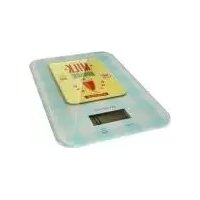
SKWD B1 - Scale SILVERCREST - Free user manual and instructions
Find the device manual for free SKWD B1 SILVERCREST in PDF.



| Product type | Kitchen scale |
| Brand | SilverCrest |
| Model | SKWD B1 |
| Dimensions (L x W x H) | 14.5 x 1.6 x 20 cm |
| Weighing range | 2 g - 5 kg |
| Accuracy | 1 g (weight), 1 ml (water) |
| Weight units | g, oz, lb:oz, ml, fl.oz |
| Power supply | 1 lithium battery CR2032, 3 V |
| Automatic shut-off | After 180 seconds of inactivity |
| Tare function | Yes |
| Maximum capacity | 5 kg |
| Care and cleaning | Slightly damp cloth, do not immerse |
| Safety | Do not exceed 5 kg, do not open the housing, keep out of reach of children |
| Warranty | 3 years |
| Use | Household use only |
Frequently Asked Questions - SKWD B1 SILVERCREST
User questions about SKWD B1 SILVERCREST
0 question about this device. Answer the ones you know or ask your own.
Ask a new question about this device
Download the instructions for your Scale in PDF format for free! Find your manual SKWD B1 - SILVERCREST and take your electronic device back in hand. On this page are published all the documents necessary for the use of your device. SKWD B1 by SILVERCREST.
USER MANUAL SKWD B1 SILVERCREST
KITCHENSCALE SKWD B1
GB IE
KITCHENSCALE
Operation and Safety Notes
SE
KÖKSVÅG
Before reading, unfold the page containing the illustrations and familiarise yourself with all functions of the device.
FI
GB / IE Operation and Safety Notes Page 5
flowchart
graph LR
    A["Lo"] --> B["1 x CR 2032"]
    B --> C["EEEE"]
    C --> D["Max. 5 kg"]
Introduction
Intended use....Page 6
Parts description....Page 6
Scope of delivery....Page 6
Technical Data Page 6
General safety instructions......Page 7
Safety Instructions for Batteries Page 8
Start-up Page 9
Changing the battery....Page 9
Operation
Setting the unit....Page 9
Weighing......Page 9
Tare Page 9
Switching off the scales Page 10
Troubleshooting Page 10
Cleaning and Care......Page 10
Disposal Page 10
Warranty / Service centre Page 11
Declaration of conformity......Page 11
| The following icons / symbols are used in these instructions for use: | |||
 | Observe warning and safety notes! |  | Do not load the scales beyond 5 kg. |
 | Explosion hazard! Food-safe! |  | |
 | Direct current(Type of current and voltage) |  | Dispose of packaging and appliancein an environmentally-friendly way! |
 | Wear protective gloves. |  | Batteries may not be disposed of withnormal domestic waste! |
 | Never leave children unsupervisedwith the packaging material orproduct. | ||
Kitchen Scale SKWD B1
- Introduction

Congratulations on your new product.
You have selected a high quality product. Please familiarise yourself with the kitchen
scale before preparing it for use and using it for the first time. To do so, please carefully read the following operating instructions and the important safety information. Only use the kitchen scale as described and for the applications indicated. Keep these instructions in a safe place. Be sure to also include all documentation when passing the kitchen scale on to others.
Intendeduse
This product is suitable for weighing and tare weighing of typical domestic quantities of foodstuffs. The kitchen scale is used to determine the weight of liquids or solids. Never weight chemicals (e.g. cleaners, grinding compounds, petrols, etc.). The kitchen scale is only intended for personal use, not for commercial purposes. Any other form of use or any modifications to the kitchen scale is not permitted and may result in injury and / or damage to the kitchen scale. The
manufacturer accepts no liability for any damage caused by improper use. The kitchen scale is not intended for commercial purposes.
Partsdescription
1 Kitchen scale
1 Lithium battery, CR2032
1 Set of instructions for use
- TechnicalData
Measuring range: 2-5,000 g/0.05 oz-176 oz (11 lb)
Graduation: Weight: 1 g/0.05 oz
Water: 1 ml
Dimensions: approx. 14.5 x 1.6 x 20 cm
(W × H × D)
IMPORTANT INFORMATION – KEEP THIS SAFE FOR FUTURE REFERENCE!

Generalsafety instructions

WARNING!
RISK OF ACCIDENT
AND DANGER TO LIFE FOR INFANTS AND CHILDREN!
Never leave children unattended with the packaging material or the product. Otherwise there is a risk to life from suffocation. Please keep children away from the product at all times.
This appliance may be used by children age 8 years and up, as well as by persons with reduced physical, sensory or mental capacities, or lacking experience and/or knowledge, so long as they are supervised or instructed in the safe use of the appliance and understand the associated risks. Children should not be allowed to play with the device. Cleaning and user maintenance
should not be performed by children without supervision.
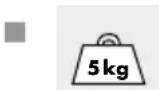
CAUTION! RISK OF
INJURY! Do not load
the scale beyond 5 kg. Otherwise the product may be damaged.
■ Do not expose the product to
- extreme temperatures,
- strong vibration,
- high mechanical loads,
- direct sunlight,
- magnetic surroundings,
- moisture.
The product may otherwise be damaged.
■ Protect the product from electrostatic charge/discharge. This could hinder the internal data exchange, which can cause errors in the LC display readout.
- Check the product for damage before use. Never use a damaged product.
WARNING!
Never open
the housing of the product. This
can result in injury and damage to the product. Repairs must only be carried out by a qualified electrician.
- Do not allow anyone inexperienced to use the product. Make sure that anyone intending to use the product has read the operating manual and is capable of operating the product safely.
- Place the product on a solid, horizontal and flat surface.
■ Magnetic fields may cause the product to function incorrectly. If this happens, briefly remove the battery from the product and re-insert it. Do this as described in the section "Changing the battery".

FOOD SAFE! This product has no adverse effect on taste or smell.

SafetyInstructions for Batteries
WARNING! DANGER
TOLIFE! Batteries are not intended for children. Do not leave batteries lying around. They may otherwise be swallowed by children or pets. If accidentally swallowed seek immediate medical attention.
EXPLOSIONHAZ-ARD! Never rech
short-circuit and / or open batteries. The battery may overheat, ignite or explode. Never throw batteries into fire or water. The batteries may explode.
- Avoid extreme environmental conditions and temperatures, e.g. above radiators as they may affect batteries. Otherwise there is an increased risk of leaking.
■ Promptly remove drained battery from the product. Otherwise there is an increased risk of leaking.
- Check the battery regularly for leaks.
Leaking or damaged batteries may result in burns upon contact with the skin; always wear suitable safety gloves!
If fluid is leaking from the battery, avoid contact with the skin, eyes and mucous membranes. In the event of contact with battery acid, thoroughly flush the affected area with clean water and seek immediate medical attention.
■ Remove light dirt from the battery and product contacts with a dry, lint-free cloth before inserting the batteries.
Safety Instructions for Batteries / Start-up / Changing the battery / Operation
■ Remove the battery if the product is not going to be used for an extended period.
- When inserting the battery ensure that it is inserted the right way round! This is shown in the battery compartment. Otherwise the battery can explode.
- Insert the battery with care. Otherwise the product can be damaged.
■ Please do not dispose of used batteries in your household waste, but take them to a designated collection depot for special waste.
- Start-up (Fig. A)
☐ Pull the insulating strip out of the battery compartment in the direction of the arrow.
Or:
Open the battery compartment at the back of the product by pressing the tab of the battery cover toward the battery compartment and lifting it upward.
Remove the insulating strip. It is located between the battery 5 and the battery compartment.
☐ Replace the battery cover. Be sure the two extensions on the battery cover engage in the opening for the battery cover. Press the battery cover onto the battery compartment until you hear and feel it lock into place.
- Changing the battery
Open the battery compartment at the back of the kitchen scale 1 as described above.
Remove the drained battery.
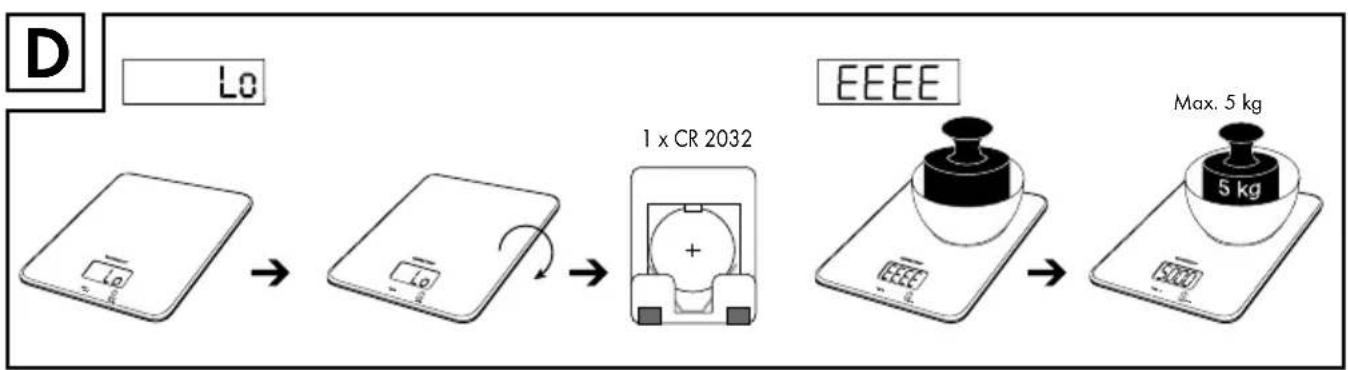
☐ Insert the new battery 5 (1 x CR2032). Please note the correct polarity: the battery 5 is inserted correctly if you can see a „+“ on the inserted battery 5 (Fig. D). The battery 5 must be kept inside the battery compartment.
☐ Close the battery compartment as described above.
Operation
- Setting the unit (Fig. B)
Place the kitchen scale on a solid, level, and flat surface.
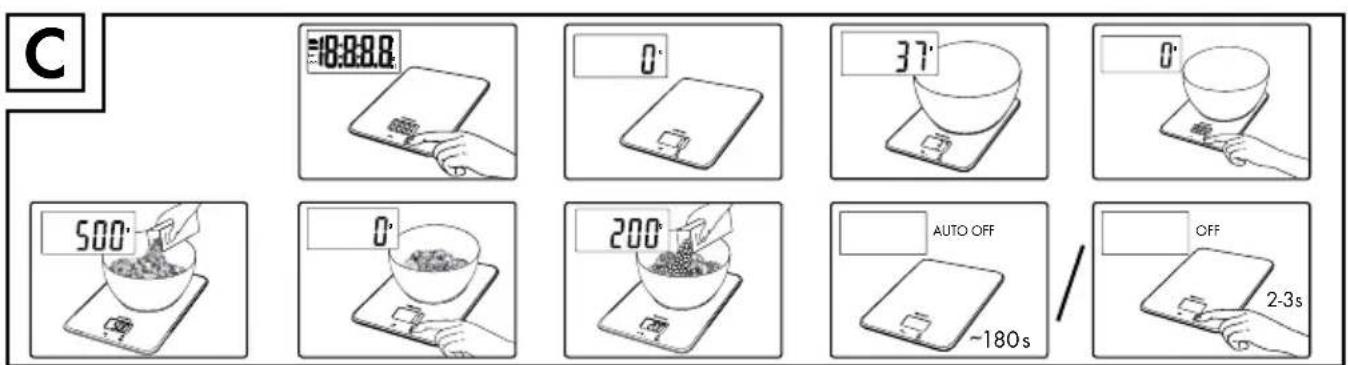
☐ Press the ON/OFF button/TARE button 3 to switch on the kitchen scale 1.
☐ Select the weight unit by pressing the UNIT button 4. You may select between „g“, „oz“, „lb:oz“, „ml“, „fl.oz“.
- Weighing (Fig. C)
Place the kitchen scale on a solid, level, and flat surface.
☐ Press the ON/OFF button/TARE button 3 to switch on the kitchen scale 1. The LC display 2 will read "0" (0.00 or 0: 0.0).
Place the item you wish to weigh onto the scale. The LC display 2 will show the weight of the items.
Tare (Fig. C)
☐ First follow the three steps in section „Weighing“.
Briefly press the ON/OFF button/TARE button 3. The LC display 2 will read "O" (0.00 or 0: 0.0) and "TARE" will appear.
☐ Add other items you wish to weigh to the scale. The LC display 2 will show the weight of the item added.
☐ When removing the added items from the scale, the LC display 2 will read „O“ (0.00 or 0: 0.0).
Operation/Troubleshooting/Cleaning and Care/Disposal
☐ When removing all items being weighed, the scale will display a negative value.
Briefly press the ON / OFF button / TARE button 3. The LC display 2 will read „0” (0.00 or 0: 0.0).
● Switching off the scale (Fig. C)
To save power, the kitchen scale 1 will automatically switch off after approx. 180 seconds of inactivity.
o manually switch off the kitchen scale 1, press and hold the ON / OFF button / TARE button 3 for 2-3 seconds.
● Troubleshooting (Fig. D)
● = Error
= Cause
O = Solution
● The LC display 2 reads „EEEE“.
The maximum weight of 5 kg (11 lb) of the kitchen scale 1 was exceeded.
Remove the items you are trying to weigh from the kitchen scale 1.
Reduce the item you are trying to weigh, and weigh in several batches.
● The LC display 2 reads „Lo“.
The battery 5 is drained.
○ Replace the battery 5 per section „Changing the battery“.
● The kitchen scale 1 won't switch on.
The battery 5 may be drained.
○ Replace the battery 5 per section „Changing the battery“.
If the kitchen scale 1 still won't switch on, please contact our Service Hotline.
● The LC display 2 reads „unSt“.
The scale is not positioned level / steady.
Place the scale on a level surface (also see Fig. A).
- Cleaning and Care
Do not use chemicals, abrasives or sharp objects for cleaning. The kitchen scale may otherwise be damaged.
■ Never immerse the kitchen scale in water or other liquids. The kitchen scale may otherwise be damaged.
☐ Clean the kitchen scale using a slightly dampened, lint-free cloth. For more stubborn dirt you can also apply a weak soap solution to the cloth.
- Disposal

The packaging is made of environmentally friendly materials, which may be disposed of through your local recycling facilities.
Contact your local refuse disposal authority for more details of how to dispose of your worn-out product.

Please dispose of the product according to the EC Waste Electrical and Electronic Equipment Directive - WEEE.
Please contact your assigned municipal authority with any questions.
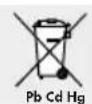
Improper disposal of batteries can harm the environment!
Never dispose of batteries in your household waste. They may contain toxic heavy metals and are subject to hazardous waste regulations. The chemical symbols of the heavy metals are: Cd = cadmium, Hg = mercury, Pb = lead. Therefore dispose of used batteries through your municipal collection site.
● Warranty / Service centre
We provide a 3 year warranty from the date of purchase for defects in material and manufacture of the product.
The warranty does not cover:
- Damage from improper use.
·Wearparts. - Damage caused by the customer.
- If the device has been opened by an unauthoried repair shop.
This warranty does not affect the customer's legal rights. The customer must provide proof of purchase in order for any warranty claims within the warranty period to be honoured. Warranty claims must be filed with MGG Elektro GmbH-Service, Düsseldorf, Germany within 3 years from the date of purchase.
In the event of a claim, please contact our Service Department listed below:
Service Hotline (toll-free):
GB
0800 93 10 319
(Mon-Fri: 8 am-6 pm)
service-uk@mgg-elektro.de
IE
∅ 1800 93 92 35
(Mon-Fri: 8 am-6 pm)
service-ie@mgg-elektro.de
If we ask you to return the defective product, please send it to the following address:
NU Service GmbH
Lessingstraße 10b
89231 Neu-Ulm
Germany
IAN 270659
● Declaration of conformity CE
These kitchen scale comply with the requirements of the relevant European and national guidelines. This is confirmed by the CE mark. The relevant declarations are held by the manufacturer.
CE
Johdanto
= Fel
= Orsak
O = Lösning
● LC-displayen 2 visar "EEEE".
Service Hotline (gratis):
DK
∅ 80 70 57 89 (man-fre: 8-18 Uhr)
service-dk@mgg-elektro.de
● = Erreur
= Cause
O = Solution
Service hotline (gratis):
NL
∅ 0800 54 30 543
(ma.-fr.: 8-18 klok)
service-nl@mgg-elektro.de
BE
∅ 0800 70 611 (ma. - fr.: 8-18 klok)
service-be@mgg-elektro.de