Medibreeze Plus - Air purifier MEDISANA - Free user manual and instructions
Find the device manual for free Medibreeze Plus MEDISANA in PDF.



User questions about Medibreeze Plus MEDISANA
0 question about this device. Answer the ones you know or ask your own.
Ask a new question about this device
Download the instructions for your Air purifier in PDF format for free! Find your manual Medibreeze Plus - MEDISANA and take your electronic device back in hand. On this page are published all the documents necessary for the use of your device. Medibreeze Plus by MEDISANA.
USER MANUAL Medibreeze Plus MEDISANA
Please read carefully!
A dire attentivement s.v.p.!.
Please fold out this page and leave it folded out for quick reference.
1.1 Thank you very much
Thank you for your confidence!
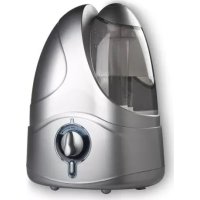
With the Medibreeze Plus personal humidifier you have acquired a quality product from MEDISANA.
To ensure the best results and long-term satisfaction with your MEDISANA Medibreeze PLUS unit, we recommend that you read the following operating and maintenance instructions carefully.
1.2 Important
Please Please read the following safety information carefully before using the device and keep these instructions in a safe place for later use.
- Before connecting the device to your power supply, please ensure that the supply voltage stated on the rating plate is compatible with your mains supply.
- Only use this unit according to the intended purpose and as directed in the instructions for use. The device is not intended for commercial use.
- Do not use the unit in the vicinity of high-frequency electromagnetic transmitters.
- Do not leave the unit unattended within the reach of children. Electrical appliances are not toys.
- In the case of a fault occurring, stop using the unit and do not attempt to repair it yourself. Consult your specialist dealer and only have repairs carried out by authorized service personnel.
- You may only clean the unit yourself.
- Only use the unit with accessories designed for this model and supplied by the manufacturer.
- Only attach or remove accessories when the unit is switched off.
- Keep the unit in a dry environment.
- Do not use the unit when the nebulizer chamber is empty or contains too little fluid.
- Do not use the unit beneath cushions or bed covers.
- Keep the ventilation slits on the underside of the unit free of dust and impurities.
Important information when using electrical appliances with a mains adaptor:
- Never touch an appliance that has fallen into water. Unplug the unit from the mains outlet immediately.
- You must not continue to use the unit if the lead or the mains adaptor are damaged. For safety reasons, these parts may only be replaced by authorized service personnel.
- You must never submerge the unit, the lead or the mains adaptor in water or hold them under running water.
- Do not store the lead near a heat source or drag it over sharp edges.
- Only handle the mains adaptor when your hands are dry.
- Never carry, pull or turn the unit by the mains lead and do not let the lead get tangled.
1.2 Important
- Only unplug the mains adaptor from the outlet when the unit is switched off and no longer in use.
- In the event of an allergic respiratory problem, consult your doctor before using the appliance.
2.1 Scope of delivery
Please check first that the unit is complete.
The package contains:
- 1 Intensive Humidifier Medibreeze PLUS unit with water tank and nebulizer attachment
1 Mains adaptor
1 Aroma essence - 1 Operating instructions
2.2 Intensive air humidifier
Especially in the winter months dryness in the atmosphere increases susceptibility to illness and infections of the respiratory tract and causes tiredness and poor concentration. Healthy air should have a relative atmospheric humidity of 40 to 60% .
The quiet, energy-saving ultrasound technology of the air humidifier converts water into a fine mist that increases the moisture level of the air. This improves the air quality and prevents the mucous membranes and skin from drying out.
3.1 Getting started

Make sure that you use your MEDISANA Intensive Humidifier on a safe and even surface that is not sensitive to moisture. There may be some condensation/ accumulation of moisture, especially when using the unit with hard water / aroma essence.
3.2 Filling and emptying the water tank
Remove the water tank 1 from the unit, and unscrew the tank cap. Fill the tank with max. 500ml fresh drinking water.
Screw the tank cap back on and replace the water tank 1 on the unit with the filling opening facing downwards.
Do not move the unit when the water chamber is full, as the tilting motion can cause the water level to rise above the nebulizer membrane, preventing it from working.
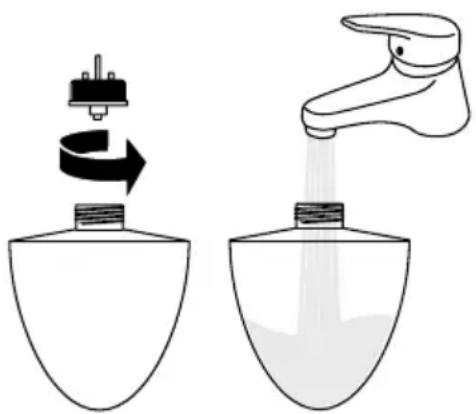
When the unit is switched off, you can remove the nebulizer attachment 2 and use a cloth to remove any excess water.
Dispose of the leftover water after use and rinse out the tank with fresh drinking water. Before using again, fill the tank with fresh drinking water.
When you have switched off the unit and do not intend to use it for an extended period of time, remove and empty the water tank.
3.3 Addition of aroma essence
If you wish to use the unit with aroma essence supplied, add 5 drops of the essence to the 500ml filled water tank. Please note that a film may form through adding the essence! You can obtain further aroma essences with other fragrances through MEDISANA.
3.4 Switching the unit on and off
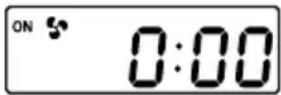
Fit the nebulizer attachment 2 onto the unit.
Connect the mains adaptor lead to the socket 6 and plug the adaptor into the mains outlet.
After a short press of the button 5, the unit will start to nebulize the water and the fan will start up. A further press of the button 5 switches the unit off.
The unit's automatic cut-off feature ensures that the fan and nebulizer are automatically switched off when the water reservoir is empty.
Operating time
Level 1 when filled with 500ml of water: approx. 9 hours.
Level 2 when filled with 500ml of water: approx. 6 hours.
3.5 Regulating nebulizer settings
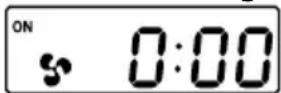
The MEDISANA Intensive Humidifier Medibreeze PLUS can be operated at 2 different power settings. To switch from setting 1 to setting 2, press the button once. Due to the higher fan output, more moisture is released into the surrounding air.
3.6 Illumination
The water tank in the MEDISANA Intensive Humidifier Medibreeze PLUS features an internal illumination unit that can be activated with a simple press of the button. A further press of the button switches the illumination off. Illumination can be used independently of the fan and nebulizer.
When the unit switches off automatically, the illumination remains on. The intensity of the light decreases when the nebulizer is activated.
3.7 Setting the convenience functions
Your MEDISANA intensive humidifier has 4 convenience functions: An integrated timer switch, a timer, a clock display and an alarm function.
The integrated timer switch allows you to automatically switch on your humidifier at a certain time.
The Medibreeze PLUS can be switched on and off at certain times using the timer function. When it is in this operating mode, the device alternately runs through the operating and idle periods at the selected time intervals.
Set the current time to use the Medibreeze PLUS as a clock and an alarm clock.
A setting procedure is used to set the timer switch, the timer, the clock and the alarm. If no button is pressed for 15 seconds during the setting procedure, the procedure is exited.
Setting the timer switch
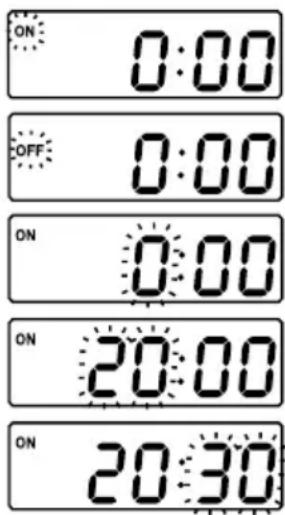
- Hold down the MODE button 5 for 3 seconds with the device switched off to start the setting procedure. "ON" or "OFF" flashes in the display 7.
- If you wish to activate the timer switch, press the SET button 4 repeatedly until "ON" flashes. Confirm by pressing the ENTER button 3.
- The hours start to flash. You can now select an activation time at which the device automatically switches on (e.g. 20:30 hrs.). Press the SET button ④ repeatedly until the required number of hours (20 hours in the example) is displayed. You can hold down the SET button ④ to set the values using the fast-forward facility. Confirm by pressing the ENTER button ③ .
- The minutes start to flash. Press the SET button 4 repeatedly until the required number of minutes (30 minutes in the example) is displayed. Confirm by pressing the ENTER button 3. The activation time is stored.
- If you do not wish to activate the timer switch, press the SET button 4 repeatedly at the start of the procedure until "OFF" flashes. Then press the ENTER button 3 three times to skip timer switch activation.
Setting the timer (TIMER)
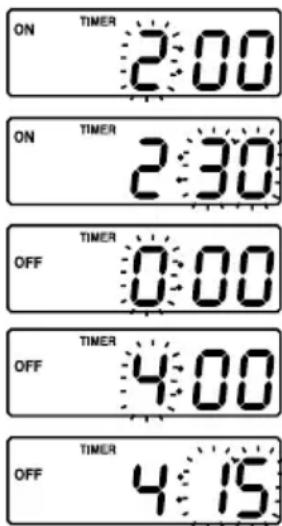
- The time interval for operating the humidifier can now be set (e.g. 2 hours and 30 minutes). To do this, press the SET button ④ repeatedly until the required hour value (2 hours in the example) is displayed. Confirm the setting by pressing the ENTER button ③ . The minutes start to flash.
- Press the SET button 4 repeatedly until the required minute value (30 minutes in the example) is displayed and confirm your setting again by pressing the ENTER button 3. "TIMER" and "OFF" appear in the display 7 and the hours start to flash.
- Now set the idle time for the humidifier (e.g. 4 hours and 15 minutes). To do this, press the SET button ④ repeatedly until the required hour value (4 hours in the example) is displayed. Confirm the setting by pressing the ENTER button ③ . The minutes start to flash.
- Press the SET button 4 again repeatedly until the required minute value (15 minutes in the example) is displayed and confirm your setting by pressing the ENTER button 3. The timer setting procedure is complete. You can now set the time.
Notes on setting the timer.
If the idle period ("TIMER", "OFF") is set to 0:00, the device automatically switches itself off after the first operating period. If the idle period has been set to a certain time (e.g. 4:15), when it is switched on the device alternates between the operating and idle periods until the water in the water tank has been used up. In the example that is shown, the device switches on at 20:30 and operates for 2 hours and 30 minutes. Then it switches off again for 4 hours and 15 minutes. It then starts to operate again for 2 hours and 30 minutes etc.
Setting the time (CLOCK)
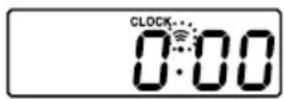
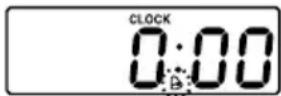
- "CLOCK" appears in the display ⑦. Press the SET button ④ if you wish to activate the alarm function. In this case the alarm bell symbol appears. Press the ENTER button ③. The time can now be set.
- The hours begin to flash. Press the SET button 4 repeatedly until the current hour value is displayed and confirm by pressing the ENTER button 4. The minutes now start to flash.
- Press the SET button 4 repeatedly until the current minute value is displayed and confirm by pressing the ENTER key 3.
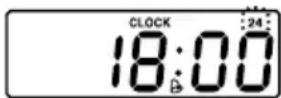
- "24" appears in the display 7 to indicate that you can select 12-hour or 24-hour display format by pressing the SET button 4. Press the ENTER button 3 to confirm your selection. The time is stored.
Alarm time setting
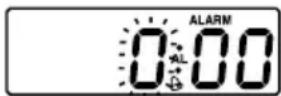
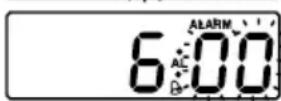
- Now set the required alarm time. "ALARM" appears in the display ⑦. Set the hours for the alarm time by pressing the SET button ④ repeatedly. Confirm the setting by pressing the ENTER button ③. The minutes now begin to flash.
- Press the SET button 4 repeatedly until the required minute value is displayed and confirm again by pressing the ENTER key 3. The setting is complete.
Notes on setting procedure
If you just wish to change the time or the alarm time later, hold down the MODE button 5 for 3 seconds to start the setting mode. Pressing the MODE button 5 again takes you straight to the time entry, and pressing again it takes you to alarm time entry.
3.8 Timer start/clear function
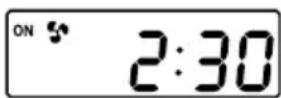
- To start the timer function, press the button 5. The humidifier switches itself on and displays the remaining operating time in the display 7. When the operating time has elapsed, your Medibreeze PLUS automatically switches itself off for the duration of the idle period and then starts the timer cycle again.
Note on timer function:
When the water in the water tank has been used up the device switches itself off. Once the time function has been programmed it is retains its settings, even if the device is switched off. When the device is switched on again the timer function restarts.
If you wish the device to operate continuously again, the two timer intervals must be cleared. To do this, set the timer intervals ("ON" and "OFF") to 0:00. Alternatively you can unplug the device and remove the batteries from the battery compartment beneath the device. Replace the batteries after several seconds
and connect the plug to the socket again ⑥. Switch the device on again. The programmed time intervals have been cleared and the device will operate continuously again when it is switched on. The clock and the alarm must be set again in this case.
3.9 Switch alarm on/off
- In order to switch a previously set alarm on or off, press the SET button 4 and the ENTER button 3 simultaneously. If the alarm bell symbol is displayed the alarm has been activated. If the alarm bell symbol is not displayed, the alarm will not go off at the set time.
- If the alarm goes off at the set time, it can be switched off by pressing the ENTER button 3. If the alarm is not switched off it stops automatically after 2 minutes. The alarm goes off again on the next day at the set time.
- The SNOOZE function can be activated by pressing the SET button 4 after the alarm has gone off. In this case the alarm stops and comes on again automatically after 4 minutes.
3.10 Changing the batteries
Your Medibreeze PLUS has a battery compartment containing three LR1130 batteries. These store the on/off time, the timer intervals, the clock and the alarm time in the event of a power failure or if the device is moved to another location.
To change the batteries, switch the device off and remove the water tank. Wipe up the water remaining in the nebulizer chamber with a cloth. Turn the device over and open the battery compartment beneath the device. Remove the three batteries and replace them with three new LR1130 batteries. Please note the battery polarities marked in the battery compartment.
4.1 Cleaning and maintenance
- Before cleaning the unit, make sure that the unit is switched off and the mains adaptor is unplugged from the outlet.
- Clean the outside of the unit with a soft, damp cloth.
- Please do not use any aggressive substances for cleaning, such as scouring cream or other detergents, as these may damage the surfaces.
- With frequent operation we recommend that you clean the unit thoroughly at least once a week. You can rinse out the water tank and atomiser attachment with hot water (>65^) or an alcohol of at least 75% vol. The atomiser chamber and tank chamber should be cleaned using an alcohol-soaked cloth and cotton bud. Take care to ensure that no water gets inside the humidifier.
- If you do not intend to use the unit for an extended period of time, empty any remaining water from the tank and dry off the unit.
- Store the unit in a cool, dry place.
4.2 Disposal

This product must not be disposed together with the domestic waste.
All users are obliged to hand in all electrical or electronic devices, regardless of whether or not they contain toxic substances, at a municipal or commercial collection point so that they can be disposed of in an environmentally acceptable manner.
Please remove the batteries before disposing of the equipment. Do not dispose of old batteries with your household waste, but dispose of them at a battery collection station at a recycling site or in a shop.
Consult your municipal authority or your dealer for information about disposal.
4.3 Specifications
Name and model : MEDISANA
Intensive Humidifier Medibreeze PLUS
Dimensions(unit) : 160 (l) x 110 (w) x 200 (h) mm
Weight with mains adaptor: appr. 1055 g
Mains adaptor : 230 V / 50 Hz
secondary 13,5 V DC 1 A
Article no.: 60001
EAN-Number:4015588600012

In accordance with our policy of continual product improvement, we reserve the right to technical and design changes without notice.
5.1 Warranty and repair terms
Please contact your dealer or the service centre in case of a claim under the warranty. If you have to send in the unit, please enclose a copy of your receipt and state what the defect is.
The following warranty terms apply:
- The warranty period for MEDISANA products is three years from date of purchase. In case of a warranty claim, the date of purchase has to be proven by means of the sales receipt or invoice.
- Defects in material or workmanship will be removed free of charge within the warranty period.
- Repairs under warranty do not extend the warranty period either for the unit or for the replacement parts.
- The following is excluded under the warranty:
a. All damage which has arisen due to improper treatment, e.g. non-observation of the user instructions.
b. All damage which is due to repairs or tampering by the customer or unauthorised third parties.
c. Damage which has arisen during transport from the manufacturer to the consumer or during transport to the service centre.
d. Accessories which are subject to normal wear and tear.
- Liability for direct or indirect consequential losses caused by the unit are excluded even if the damage to the unit is accepted as a warranty claim.
MEDISANA AG
Itterpark 7-9
D-40724 Hilden
Tel.: +49 (0) 2103 / 2007-60
Fax: +49 (0) 2103 / 2007-626
The service centre address is shown on the last page.
1.1
Merci!
3.7 Regular as funções de comfortso
'Ovoua Ka uovteLo : MEDISANA
City Business Centre 41 St.
Olav's Court Surrey Quays
London SE16 2XB
Tel.: +44/207-2378899
Fax: +44 / 207 - 252 22 99
eMail: info@medisana.co.uk
Internet: www.medisana.co.uk
F/NL/B/L
MEDISANA Benelux NV
Euregiopark 18
6467 JE Kerkrade
Tel.: +31/45-5280389
Fax: +31/45-5233518
eMail: info@medisana.nl
1
SANICO S.R.L.
Via G. Ferraris 31
20090 Cusago (MI)
Tel.: +39/02-90390038
Fax: +39/02-90390279
eMail: info@sanicare.it
Internet: www.sanicare.it
E
MEDISANA HEALTHCARE, S.L.