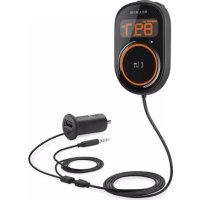
CarAudio Connect FM - Built-in kit BELKIN - Free user manual and instructions
Find the device manual for free CarAudio Connect FM BELKIN in PDF.



| Product Type | Hands-free kit FM transmitter for car |
| Brand | Belkin |
| Model | F8M120cw |
| Power | 12 V cigarette lighter socket |
| Audio transmission | FM (adjustable frequency via ClearScan) |
| Phone connectivity | 3.5 mm audio cable |
| Main functions | Hands-free calls, music listening (iTunes, Internet radio, streaming) |
| Microphone | Built-in |
| Buttons | Multifunction (answer/end, music control), ClearScan, 2 memories |
| Display | OLED screen (frequency, memory) |
| Installation | On dashboard via adhesive mounting disc (magnet) |
| Dimensions (approx.) | Approx. 8 cm diameter, 3 cm height |
| Weight (approx.) | Approx. 80 g |
| Cleaning | Dry cloth; unplug before cleaning |
| Safety | Do not use near water; do not operate while driving |
| Warranty | 3 years limited |
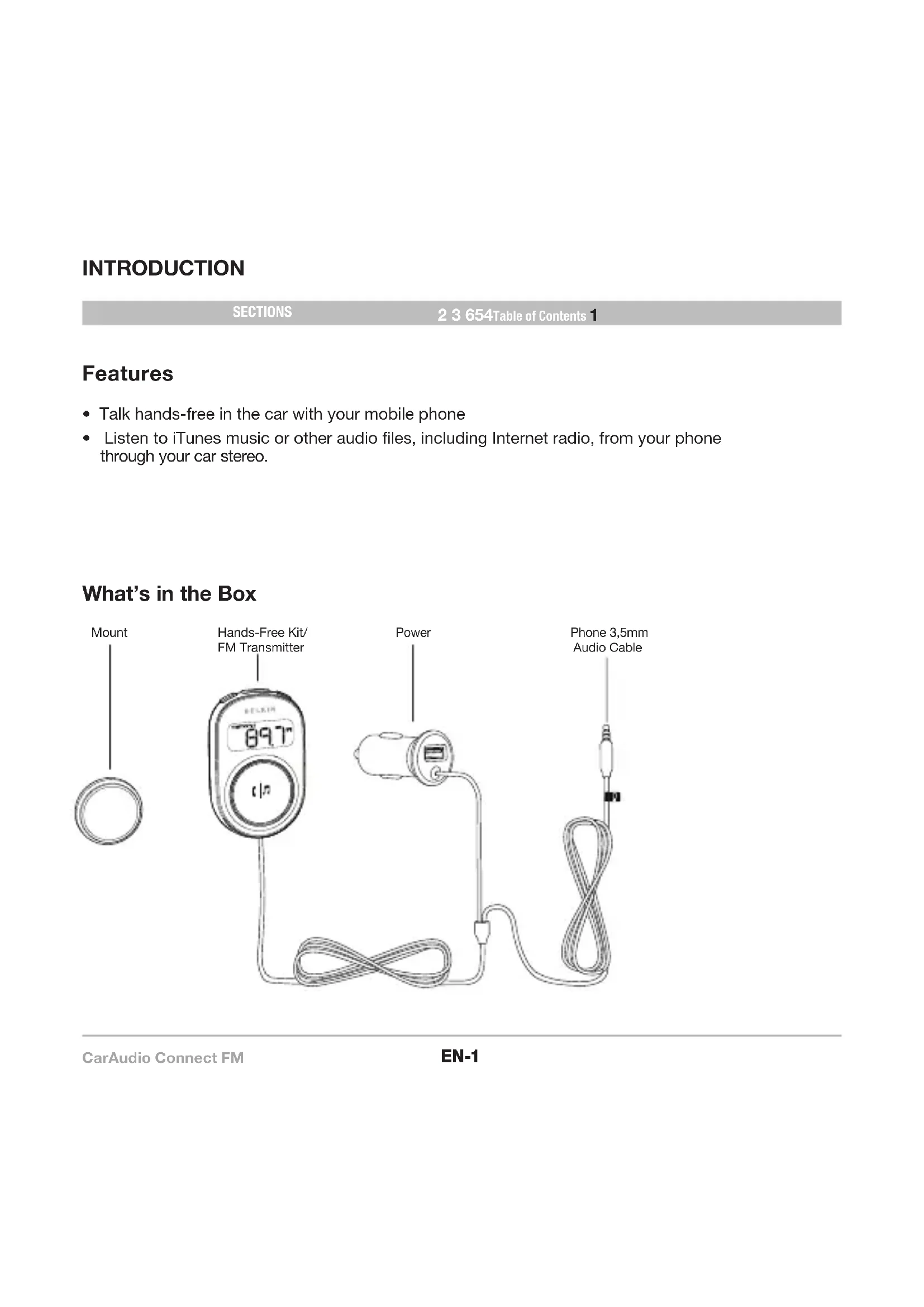
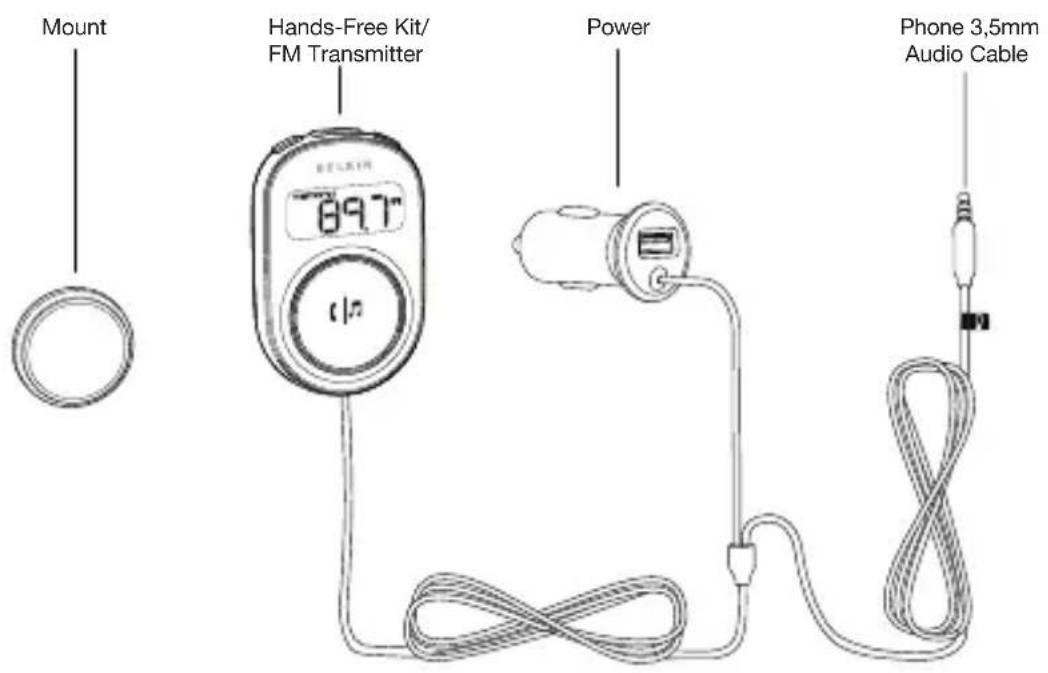
| Package contents | Holder, hands-free kit/FM transmitter, 3.5 mm audio cable, mounting disc |
| Phone compatibility | iPhone, BlackBerry, HTC, Samsung etc. (depending on model) |
| Online audio services | Pandora, iHeartRadio (compatibility varies) |
Frequently Asked Questions - CarAudio Connect FM BELKIN
User questions about CarAudio Connect FM BELKIN
0 question about this device. Answer the ones you know or ask your own.
Ask a new question about this device
Download the instructions for your Built-in kit in PDF format for free! Find your manual CarAudio Connect FM - BELKIN and take your electronic device back in hand. On this page are published all the documents necessary for the use of your device. CarAudio Connect FM by BELKIN.
USER MANUAL CarAudio Connect FM BELKIN
| Table of Contents | SECTIONS | 1 2 3 654 | 7 |
1 Introduction ...... 1
2 Initial Setup .... 2
Place the Mounting Disc. 4
Attach the CarAudio Connect FM 4
3 Daily Use....5
Connecting 5
Phone and Music Controls....6
CarAudio Connect FM – Button Functions 6
Online Audio Services....7
Transferring Audio Back to Your Phone. 7
Turning the Product Off 7
4 Troubleshooting. 8
5 Safety Warnings....9
6 Information ....10
INTRODUCTION
SECTIONS
2 3 654Table of Contents 1
Features
• Talk hands-free in the car with your mobile phone
- Listen to iTunes music or other audio files, including Internet radio, from your phone through your car stereo.
What's in the Box
INTIAL SETUP
SECTIONS
1 3 654Table of Contents 2
natural_image
Line drawing of a device panel with a connector inserted (no text or symbols)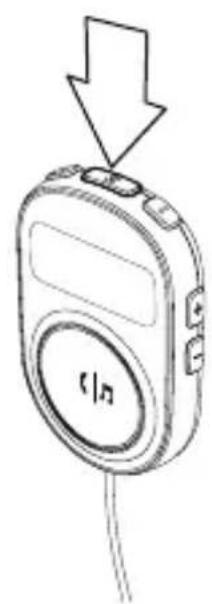
natural_image
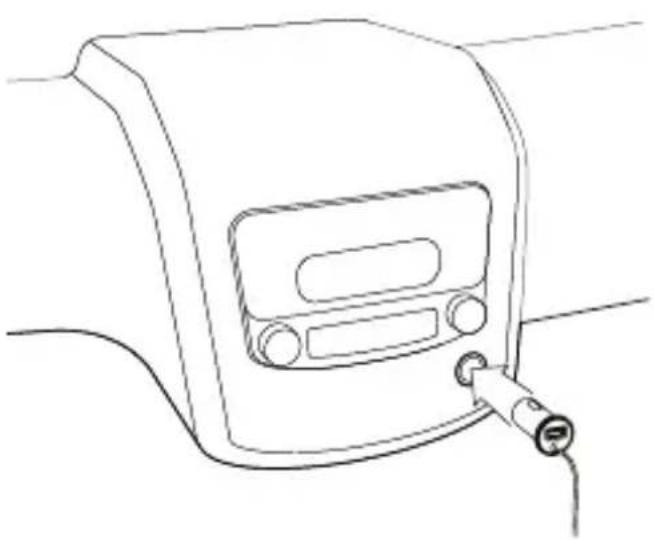
Line drawing of a handheld electronic device with a downward arrow and 'f/n' label (no readable text or symbols beyond basic design)- Insert the power plug into your car's 12V power outlet (also known as the cigarette lighter). The light ring around the multi-function button will turn on in orange.
- Press the ClearScan button on top of the product to find an FM frequency that's clear.*
INTIAL SETUP
SECTIONS
1 3 654Table of Contents 2
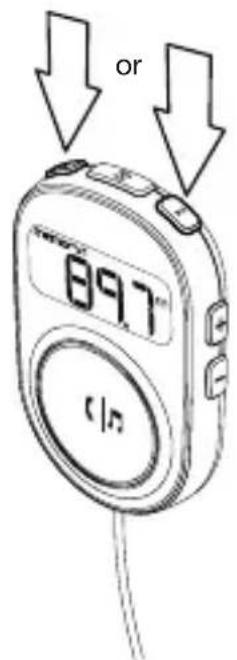
- Store that frequency in memory by pressing and holding one of the two MEM buttons. When the frequency is stored successfully, the product will beep and MEMORY 1 or MEMORY 2 will show on the display.
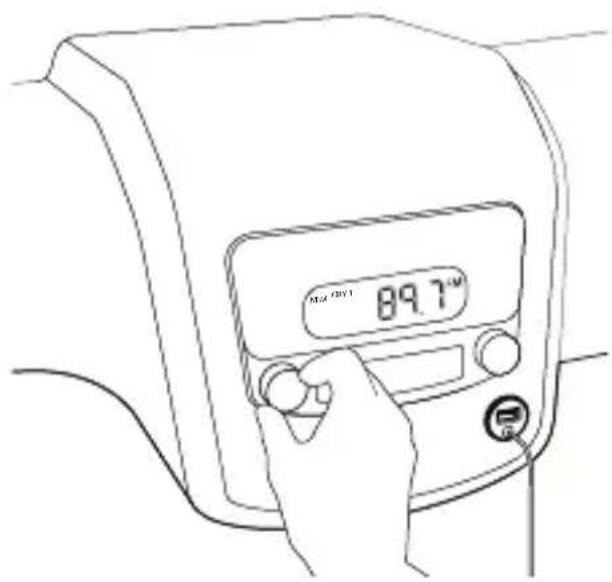
- Turn on your car stereo and set the input source to FM.
- Tune your car stereo so that its FM frequency matches the CarAudio Connect FM.
- If possible, store the frequency in one of your car stereo's preset buttons. Typically this is done by pressing and holding the chosen preset button until the stereo beeps or gives some indication that the frequency has been stored.
- Insert the product's audio cable into the headphone jack of your phone.
* If you hear static as you travel from one part of town to another, press the ClearScan button again to find a better frequency.
INTIAL SETUP
SECTIONS
1 654Table of Contents 32
Place the Mounting Disc
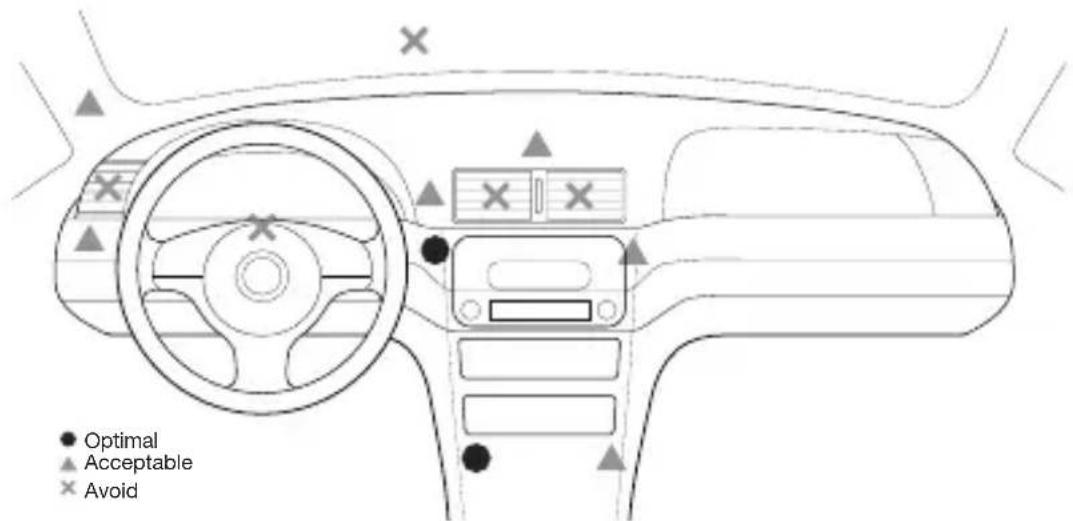
- Find a smooth and flat surface on the dashboard in front of you that is within easy reach but will not interfere with driving. The CarAudio Connect FM has a built-in microphone and should be as directly in front of you as possible. See image for some recommended areas.
- Clean the surface with an alcohol swab if possible, or with a cleaner that can remove any residue from polish/shine products that have been sprayed on the dash in the past. Please make sure to read all instructions on the cleaner to make sure it is safe to use on dashboards.
- Peel away the back of the mounting disc to expose the adhesive and stick it to the dashboard.
Attach the CarAudio Connect FM
The product will magnetically attach to the mounting disc. The product can be easily removed and stored when not in use.
DAILY USE
SECTIONS
1 2 654Table of Contents 3
Connecting
To connect to the CarAudio Connect FM:
- Connect the product's audio cable to the headphone jack on your phone.
- Make sure there's power to the CarAudio Connect FM—the light ring will be orange.
- Turn on your car stereo, set the source to FM, and match the frequency shown on the CarAudio Connect FM.
- If you're already on a call or listening to music, the audio will transfer to your car speakers.
SECTIONS
1 2 3 65Table of Contents 4
Phone and Music Controls
CarAudio Connect FM can control some of the main phone functions that you'd use while driving. It does this via the headphone cable. Mobile phones vary tremendously in terms of what commands work with them, depending on wireless carrier, manufacturer, and model. Shown below is the common set of functions with a common set of phones. Your phone may match the button functions shown, or it may vary. When your car is parked, experiment with which functions work with your phone, and write them down here.
CarAudio Connect FM - Button Functions
| Legend: | Compatible | Partially compatible |
| Phone brand w model Answer | call | End call Pause/ play music | Skips songs forward | Skip songs back Voice-dialing Comments | |||
| Apple | iPhone 4 | Tap | Tap | Tap | Double-tap | Triple-tap | Pres s/hold more than 1 sec |
| Apple | iPhone 3GS | Tap | Tap | Tap | Double-tap | Triple-tap | Pres s/hold more than 1 sec |
| BlackBerry | Bold | Tap | Press & hold | Tap | Not available | Not available | Pres s/hold more than 5 sec |
| BlackBerry Curve (T-Mobile) | Tap | Pres s & hold | Tap | Not available | Not available | Not available-When on a call, tapping the button will cause the phone to mute.-If you try to pause/un-pause music and voice-dialing starts instead, use your phone's controls for music instead. | |
| HTC | Nexus One | Tap | Pres s & hold | Tap | Double-tap | Not available | Not available |
| HTC | DROID (Hero) | Tap | Pres s & hold | Tap | Not available | Not available | Pres s/hold more than 1 sec |
| HTC | EVO | Tap | Pres s & hold | Not available | Not available | Not available | Not available |
| Samsung | Galaxy S | Tap | Tap | Tap | Not available | Not available | Not availableSome phone models do not support the pause/ un-pause music function. |
| My phone | Answer call: | End call: : | Pause/play music: | Skip songs forward: | Skip songs back: | Voice- dialing: | Notes: |
SECTIONS
1 2 3 64Table of Contents 5
Online Audio Services
If you use audio-streaming services Pandora® or iheartradio®, you might be able to use CarAudio Connect FM to listen to the streaming audio through your car stereo. However, not all phones or audio-streaming services support this feature. Experiment with your particular app while parked: when it's playing, see if the sound comes out of your car speakers. See what happens when you tap the CarAudio Connect FM button. Tap it once, and then tap it again. Tap it twice slowly, and then more quickly. Your app might play, pause, skip forward, or skip back.
| app: single tap single | tap double tap - slow double tap - fast | ||
| app: single tap single | tap (again) double tap - slow double tap - fast |
Turning the Product Off
It is normally not necessary to turn the product off, since turning the car off will usually cut power to the car's power plug (also known as a cigarette lighter adapter).
However, some cars have a power plug that stays on even when the car is off. If you have a car like that, simply remove the power plug from the power port on your car (also known as the cigarette lighter adapter).
TROUBLESHOOTING
Table of Contents
SECTIONS
1
2
3
4
5
6
You can quickly solve most problems with your CarAudio Connect FM by following the advice in this section.
The audio is not coming out of the stereo speakers.
Any changes or modifications not expressly approved by the party responsible for compliance could void the user's authority to operate this equipment.
- Make sure both the car stereo and the CarAudio Connect FM are powered on.
- Make sure the car stereo is set to FM, and the frequency matches that shown on the CarAudio Connect FM.
- Make sure the stereo volume is set to a comfortable listening level.
- Make sure the phone's volume is set to a comfortable level, and is not muted.
- Make sure that your phone or device is connected to the CarAudio Connect FM via the product's audio cable.
If you're on a phone call and you can't hear the other party very well using the CarAudio Connect FM, turn up the volume on your phone before you turn up the volume on your car stereo.
I can't control music playback using the button
- Refer to the chart provided in the “Phone and Music Controls” section of this manual.
• Unfortunately not all phones will support this feature.
This is a result of how various phone manufacturers design their audio jacks, and how various carriers implement their features.
SAFETY WARNINGS
Table of Contents
SECTIONS
1
2
3
4
5
6
Your CarAudio Connect FM requires full concentration and both hands to install. Do not attempt to connect your CarAudio Connect FM while driving. Do not attempt to adjust or retrieve an unsecured CarAudio Connect FM while driving. Adjust the position of your CarAudio Connect FM so that it does not interfere with any of the operating controls of the vehicle or your view of the road.
Do not use this apparatus near water (for example, a bath tub, wash bowl, kitchen sink, laundry tub, wet basement, swimming pool or other areas located near water).
Unplug this product from the cigarette lighter or power outlet before cleaning. Clean only with a dry cloth.
Unplug this apparatus when unused for long periods of time.
Only use attachments/accessories specified by the manufacturer.
Belkin does not assume any responsibility for personal injury or property damage incurred due to hazardous driving as a result of interaction with the CarAudio Connect FM, iPhone, iPod or other device.
FCC Statement
This device complies with part 15 of the FCC Rules. Operation is subject to the following two conditions:
(1) this device may not cause harmful interference, and
(2) this device must accept any interference received, including interference that may cause undesired operation.
This equipment has been tested and found to comply with the limits for a Class B digital device, pursuant to part 15 of the FCC Rules. These limits are designed to provide reasonable protection against harmful interference in a residential installation. This equipment generates, uses, and can radiate radio frequency energy and, if not installed and used in accordance with the instructions, may cause harmful interference to radio communications. However, there is no guarantee that interference will not occur in a particular installation. If this equipment does cause harmful interference to radio or television reception, which can be determined by turning the equipment off and on, the user is encouraged to try to correct the interference by one of the following measures:
- Reorient or relocate the receiving antenna.
- Increase the separation between the equipment and receiver.
- Connect the equipment into an outlet on a circuit different from that which the receiver is connected.
- Consult the dealer or an experienced radio/TV technician for help.
Belkin International, Inc., is not responsible for any interference caused by unauthorized modifications to this equipment. Such modifications could void the user's authority to operate this equipment.
FCC Caution: Any changes or modifications not expressly approved by the party responsible for compliance could void the user's authority to operate this equipment.
ICES
This Class B digital apparatus complies with Canadian ICES-003.
IC
This Class B digital apparatus complies with Canada RSS-210.
Europe – EU Declaration of Conformity
This device complies with the essential requirements of the R&TTE Directive 1999/5/EC, the EMC Directive 2004/108/EC, and the low-voltage Directive 2006/95/EC. A copy of the European Union CE marking “Declaration of Conformity” may be obtained at the website:
www.belkin.com/doc

Table of Contents
SECTIONS
1
2
3
4
5
6
Belkin International, Inc., Limited 3-Year Product Warranty
What this warranty covers.
Belkin International, Inc. ("Belkin") warrants to the original purchaser of this Belkin product that the product shall be free of defects in design, assembly, material, or workmanship.
What the period of coverage is.
Belkin warrants the Belkin product for three years.
What will we do to correct problems?
Product Warranty.
Belkin will repair or replace, at its option, any defective product free of charge (except for shipping charges for the product). Belkin reserves the right to discontinue any of its products without notice, and disclaims any limited warranty to repair or replace any such discontinued products. In the event that Belkin is unable to repair or replace the product (for example, because it has been discontinued), Belkin will offer either a refund or a credit toward the purchase of another product from Belkin.com in an amount equal to the purchase price of the product as evidenced on the original purchase receipt as discounted by its natural use.
What is not covered by this warranty?
All above warranties are null and void if the Belkin product is not provided to Belkin for inspection upon Belkin's request at the sole expense of the purchaser, or if Belkin determines that the Belkin product has been improperly installed, altered in any way, or tampered with. The Belkin Product Warranty does not protect against acts of God such as flood, lightning, earthquake, war, vandalism, theft, normal-use wear and tear, erosion, depletion, obsolescence, abuse, damage due to low voltage disturbances (i.e. brownouts or sags), non-authorized program, or system equipment modification or alteration.
How to get service.
To get service for your Belkin product you must take the following steps:
- Contact Belkin Ltd Express Business Park, Shipton Way, Rushden, NN106GL, United Kingdom, Attn: Customer Service, call +44 (0) 1933 35 2000 or 0845 607 77 87, within 15 days of the Occurrence.. Be prepared to provide the following information:
a. The part number of the Belkin product.
b. Where you purchased the product.
c. When you purchased the product.
d. Copy of original receipt. - Your Belkin Customer Service Representative will then instruct you on how to forward your receipt and Belkin product and how to proceed with your claim.
Belkin reserves the right to review the damaged Belkin product. All costs of shipping the Belkin product to Belkin for inspection shall be borne solely by the purchaser. If Belkin determines, in its sole discretion, that it is impractical to ship the damaged equipment to Belkin, Belkin may designate, in its sole discretion, an equipment repair facility to inspect and estimate the cost to repair such equipment. The cost, if any, of shipping the equipment to and from such repair facility and of such estimate shall be borne solely by the purchaser. Damaged equipment must remain available for inspection until the claim is finalized. Whenever claims are settled, Belkin reserves the right to be subrogated under any existing insurance policies the purchaser may have.
How state law relates to the warranty.
THIS WARRANTY CONTAINS THE SOLE WARRANTY OF BELKIN. THERE ARE NO OTHER WARRANTIES, EXPRESSED OR, EXCEPT AS REQUIRED BY LAW, IMPLIED, INCLUDING THE IMPLIED WARRANTY OR CONDITION OF QUALITY, MERCHANTABILITY OR FITNESS FOR A PARTICULAR PURPOSE, AND SUCH IMPLIED WARRANTIES, IF ANY, ARE LIMITED IN DURATION TO THE TERM OF THIS WARRANTY.
Some states do not allow limitations on how long an implied warranty lasts, so the above limitations may not apply to you.
IN NO EVENT SHALL BELKIN BE LIABLE FOR INCIDENTAL, SPECIAL, DIRECT, INDIRECT, CONSEQUENTIAL OR MULTIPLE DAMAGES SUCH AS, BUT NOT LIMITED TO, LOST BUSINESS OR PROFITS ARISING OUT OF THE SALE OR USE OF ANY BELKIN PRODUCT, EVEN IF ADVISED OF THE POSSIBILITY OF SUCH DAMAGES.
This warranty gives you specific legal rights, and you may also have other rights, which may vary from state to state. Some states do not allow the exclusion or limitation of incidental, consequential, or other damages, so the above limitations may not apply to you.
| SECTIONS 1 3 54Table of Contents 62 | ||
| Free Tech Support* *National call rates may apply www.belkin.com You can find additional support information on our website www.belkin.com through the tech-support area. If you want to contact technical support by phone, please call the number you need from this list*. | Country Number Internet adress | |
| AUSTRIA 0820 200766 www.belkin.com/de/ | ||
| BELGIUM 07 07 00 073 | ||
| CZECH REPUBLIC 239 000 406 www.belkin.com/uk/ | ||
| DENMARK 701 22 403 www.belkin.com/uk/ | ||
| FINLAND 0972519123 www.belkin.com/uk/ | ||
| FRANCE | 08 - 25 54 00 26 | |
| GERMANY | 0180 - 500 57 09 | |
| GREECE | 00800 - 44 14 23 90 | |
| HUNGARY | 06 - 17 77 49 06 | |
| ICELAND | 800 8534 | |
| IRELAND | 0818 55 50 06 | |
| ITALY | 02 - 69 43 02 51 | |
| LUXEMBOURG | 34 20 80 85 60 | |
| NETHERLANDS | 0900 - 040 07 90 €0.10 per minute | |
| NORWAY 81 50 0287 www.belkin.com/uk/ | ||
| POLAND | 00800 - 441 17 37 | |
| PORTUGAL | 707 200 676 | |
| RUSSIA | 495 580 9541 | |
| SOUTH AFRICA | 0800 - 99 15 21 | |
| SPAIN | 902 - 02 43 66 | |
| SWEDEN | 07 - 71 40 04 53 | |
| SWITZERLAND | 08 - 48 00 02 19 | |
| UNITED KINGDOM | 0845 - 607 77 87 | |
| OTHER COUNTRIES | +44 - 1933 35 20 00 | |
belkin.com
Belkin Ltd.
Express Business Park
Shipton Way, Rushden
NN10 6GL, United Kingdom
Belkin SAS
130 Rue de Silly
92100 Boulogne-Billancourt,
France
Belkin GmbH
Otto-Hahn-Straße 20
85609 Aschheim
Germany
Belkin Iberia
Avda de Barajas, 24
Edificio Gamma, 4 ^a pta
28108 Alcobendas
Madrid - Spain
Belkin Italy & Greece
Via Nino Bonnet, 4/6
20154 Milan
Italy
Belkin B.V.
Boeing Avenue 333
© 2011 Belkin International, Inc. All rights reserved. All trade names are registered trademarks of respective manufacturers listed. iPod, iPhone, and iTunes are trademarks of Apple Inc., registered in the U.S. and other countries.
BELKIN.
CarAudio Connect FM
natural_image
Line drawing of a device panel with a connector inserted (no text or symbols)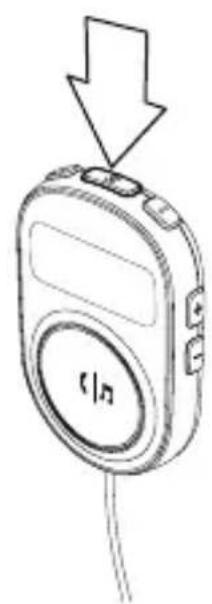
natural_image
Line drawing of a handheld electronic device with a downward arrow indicating compression or disassembly (no text or symbols)This Class B digital apparatus complies with Canadian ICES-003.
IC
Express Business Park
Shipton Way, Rushden
natural_image
Line drawing of a device panel with a connector inserted (no text or symbols)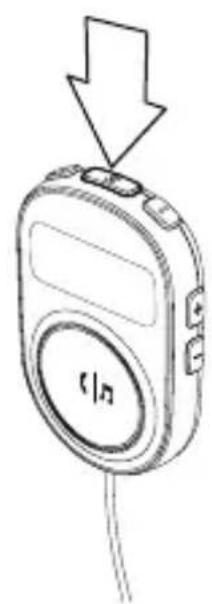
natural_image
Line drawing of a handheld electronic device with a downward arrow and 'f/n' label (no readable text or symbols beyond basic design)CarAudio Connect FM anbringen
Express Business Park
Shipton Way, Rushden
Belkin Italy & Greece
Via Nino Bonnet, 4/6
20154 Milano
Italien
Belkin B.V.
Boeing Avenue 333
Online audioservices....7
natural_image
Line drawing of a device with a connector inserted, showing no text or symbols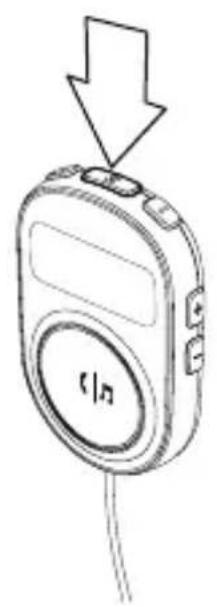
natural_image
Line drawing of a handheld electronic device with a downward arrow pointing to its top panel (no text or symbols present)Online audioservices
Express Business Park
Shipton Way, Rushden
Belkin Italy & Greece
Via Nino Bonnet, 4/6
20154 Milaan
Italie
Belkin B.V.
Boeing Avenue 333
1119 PH Schiphol-Rijk
Nederland
natural_image
Line drawing of a device panel with a connector inserted (no text or symbols)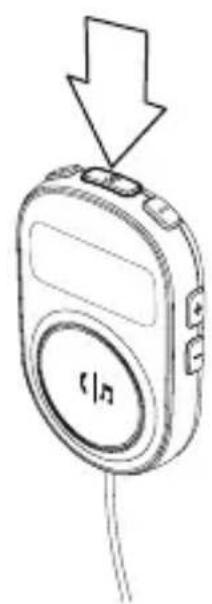
natural_image
Line drawing of a handheld electronic device with a downward arrow and 'f/n' label (no readable text or symbols beyond basic design)Acoplar el CarAudio Connect FM
Express Business Park
Shipton Way, Rushden
Belkin Italy & Greece
Via Nino Bonnet, 4/6
Milán 20154
Italia
Belkin B.V.
Boeing Avenue 333
natural_image
Line drawing of a device panel with a connector inserted (no text or symbols)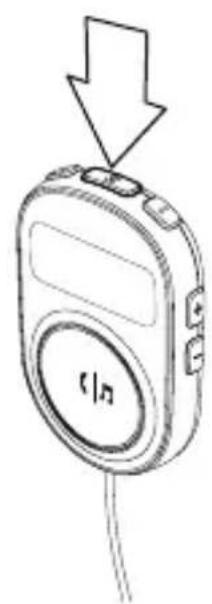
natural_image
Line drawing of a handheld electronic device with a downward arrow and 'f/n' label (no readable text or symbols beyond basic design)Express Business Park
Shipton Way, Rushden
Belkin Italy & Greece
Via Nino Bonnet, 4/6
20154 Milano
Italia+
Belkin B.V.
Boeing Avenue 333
1119 PH Schiphol-Rijk
Paesi Bassi
Acoplar o CarAudio Connect FM 4
3 Uso diário ....5
Ligar 5
natural_image
Line drawing of a device panel with a connector inserted (no text or symbols)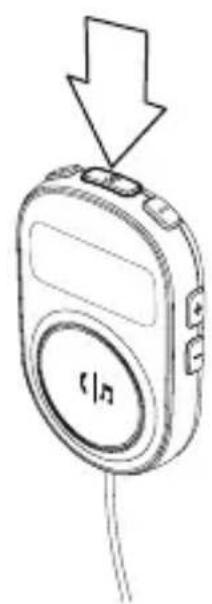
natural_image
Line drawing of a handheld electronic device with a downward arrow and 'f/n' label (no readable text or symbols beyond basic design)Express Business Park
Shipton Way, Rushden
natural_image
Line drawing of a device panel with a connector inserted (no text or symbols)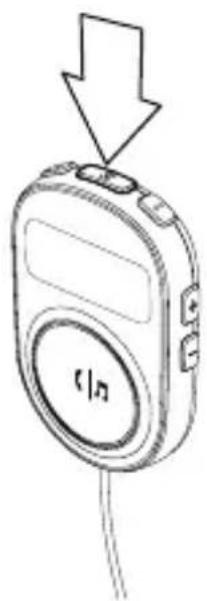
natural_image
Line drawing of a handheld electronic device with a downward arrow pointing to its top component (no text or symbols present)Express Business Park
Shipton Way, Rushden
Belkin Italy & Greece
Via Nino Bonnet, 4/6
20154 Milan
Италия
Belkin B.V.
Boeing Avenue 333
natural_image
Line drawing of a device panel with a connector inserted (no text or symbols)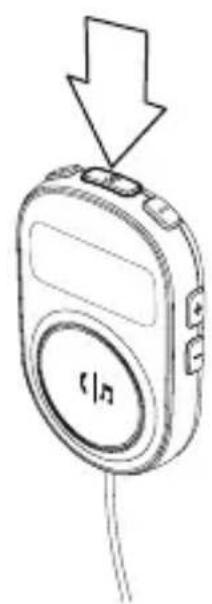
natural_image
Line drawing of a handheld electronic device with a downward arrow and 'f/n' label (no readable text or symbols beyond basic design)Kytke CarAudio Connect FM
Express Business Park
Shipton Way, Rushden
NN10 6GL, Iso-Britannia
Belkin SAS
130 Rue de Silly
92100 Boulogne-Billancourt,
Ranska
Belkin GmbH
Otto-Hahn-Straße 20
85609 Aschheim
Saksa
Belkin Iberia
Avda de Barajas, 24
Edificio Gamma, 4 ^a pta
28108 Alcobendas
Madrid - Espanja
Montere CarAudio Connect FM 4
3 Daglig bruk ....5
Koble til 5
natural_image
Line drawing of a device panel with a connector inserted (no text or symbols)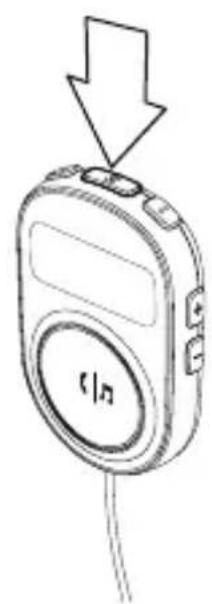
natural_image
Line drawing of a handheld electronic device with a downward arrow and 'f/n' label (no readable text or symbols beyond basic design)- Sett strømkontakten i bilens 12 V strømuttak (dvs. sigarettenneren).
Plasser monteringsdisken
Express Business Park
Shipton Way, Rushden
NN10 6GL, Storbritannia
Belkin SAS
130 Rue de Silly
92100 Boulogne-Billancourt,
Frankrike
Belkin GmbH
Otto-Hahn-Straße 20
85609 Aschheim
Tyskland
Belkin Iberia
Avda de Barajas, 24
Edificio Gamma, 4 ^a pta
28108 Alcobendas
Madrid - Spania
natural_image
Line drawing of a device panel with a connector inserted (no text or symbols)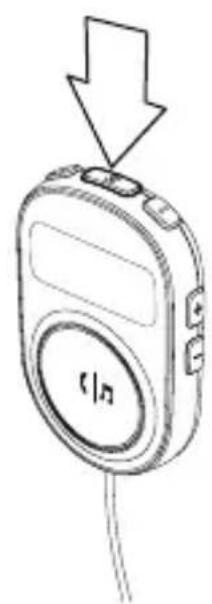
natural_image
Line drawing of a handheld electronic device with a downward arrow and 'f/n' label (no readable text or symbols beyond basic design)Express Business Park
Shipton Way, Rushden
NN10 6GL, England
Belkin SAS
130 Rue de Silly
92100 Boulogne-Billancourt,
Frankrig
Belkin GmbH
Otto-Hahn-Straße 20
85609 Aschheim
Tyskland
Belkin Iberia
Avda de Barajas, 24
Edificio Gamma, 4 ^a pta
28108 Alcobendas
Madrid - Spanien
Belkin Italy & Greece
Via Nino Bonnet, 4/6
20154 Milan
Italien
Belkin B.V.
Boeing Avenue 333
INNEHÅLLSFÖRTECKNING
natural_image
Line drawing of a device panel with a connector inserted (no text or symbols)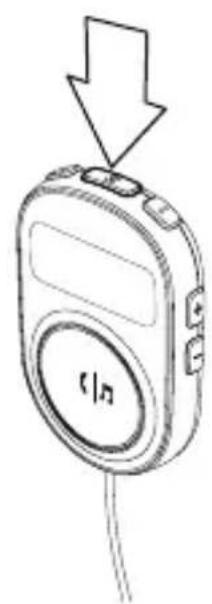
natural_image
Line drawing of a handheld electronic device with a downward arrow and 'f/n' label (no readable text or symbols beyond basic design)Express Business Park
Shipton Way, Rushden
NN10 6GL, Storbritannien
Belkin SAS
130 Rue de Silly
92100 Boulogne-Billancourt
Frankrike
Belkin GmbH
Otto-Hahn-Straße 20
85609 Aschheim
Tyskland
Belkin Iberia
Avda de Barajas, 24
Edificio Gamma, 4 ^a pta
28108 Alcobendas
Madrid - Spanien
Belkin Italy & Greece
Via Nino Bonnet, 4/6
20154 Milano
Italien
Belkin B.V.
Boeing Avenue 333
1119 PH Schiphol-Rijk
Nederländerna
natural_image
Line drawing of a device with a connector inserted, showing no text or symbols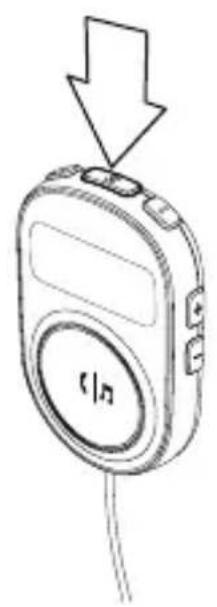
natural_image
Line drawing of a handheld electronic device with a downward arrow pointing to its top panel (no text or symbols present)Express Business Park
Shipton Way, Rushden
Belkin Italy & Greece
Via Nino Bonnet, 4/6
20154Milán
Itálie
Belkin B.V.
Boeing Avenue 333
natural_image
Line drawing of a device panel with a connector inserted (no text or symbols)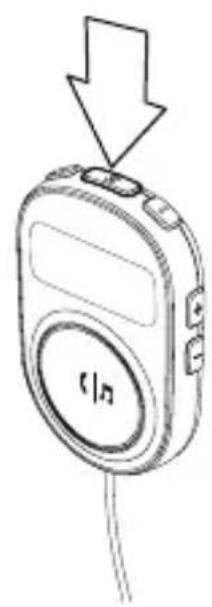
natural_image
Line drawing of a handheld electronic device with an arrow pointing downward (no text or symbols)Express Business Park
Shipton Way, Rushden
Belkin Italy & Greece
Via Nino Bonnet, 4/6
20154 Mediolan
Włochy
Belkin B.V.
Boeing Avenue 333
natural_image
Line drawing of a device panel with a connector inserted (no text or symbols)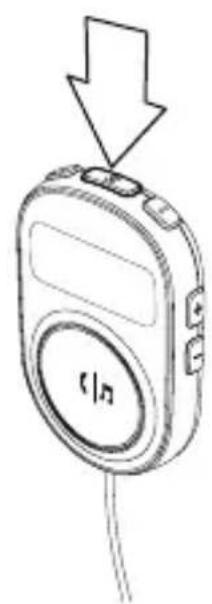
natural_image
Line drawing of a handheld electronic device with a downward arrow and 'f/n' label (no readable text or symbols beyond basic design)Express Business Park
Shipton Way, Rushden

- INTRODUCTION
- Features
- INTIAL SETUP
- Place the Mounting Disc
- Attach the CarAudio Connect FM
- DAILY USE
- Connecting
- Phone and Music Controls
- Online Audio Services
- Turning the Product Off
- TROUBLESHOOTING
- The audio is not coming out of the stereo speakers.
- I can't control music playback using the button
- SAFETY WARNINGS
- FCC Statement
- ICES
- IC
- Europe – EU Declaration of Conformity
- Belkin International, Inc., Limited 3-Year Product Warranty
- What this warranty covers.
- What the period of coverage is.
- What will we do to correct problems?
- What is not covered by this warranty?
- How to get service.
- How state law relates to the warranty.
- belkin.com
- BELKIN.
- CarAudio Connect FM
- CarAudio Connect FM anbringen
- Online audioservices
- Acoplar el CarAudio Connect FM
- Kytke CarAudio Connect FM
- Plasser monteringsdisken
- INNEHÅLLSFÖRTECKNING
Brand : BELKIN
Model : CarAudio Connect FM
Category : Built-in kit