Crystalys A EC2 - Coffee maker MOULINEX - Free user manual and instructions
Find the device manual for free Crystalys A EC2 MOULINEX in PDF.

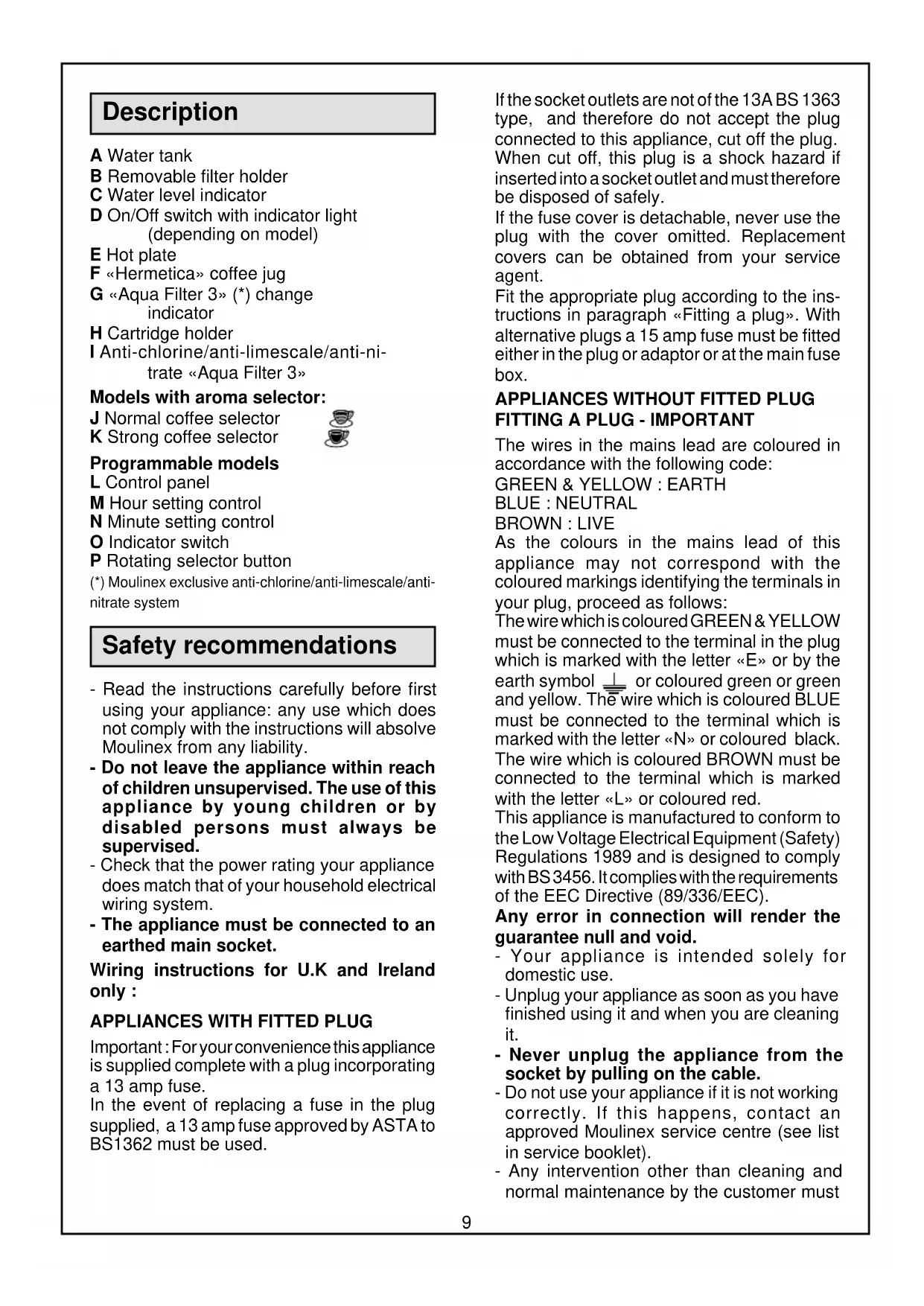


| Product type | Drip coffee maker |
| Brand | Moulinex |
| Model | Crystalys A EC2 |
| Capacity | 10 to 15 cups |
| Filtration system | "Aqua Filter 3" cartridge anti-chlorine, anti-scale, anti-nitrates |
| Carafe | "Hermetica" with lid without central hole and insulating grid, microwave-safe |
| Main features | Drip-stop, operation indicator light, aroma selector (normal/strong coffee) depending on model, programmable with clock and automatic shut-off after 2h (programmable models) |
| Filter holder | Removable, uses size 4 filters |
| Water level | Graduated indicator on the tank |
| Warming plate | Keeps coffee warm |
| Power supply | 220-240 V, grounded outlet (recommended) |
| Cord length | Adjustable by pushing it back inside the appliance |
| Maintenance | Descale every 80 cycles (white vinegar or descaling agent), change cartridge when indicator turns red |
| Cleaning | Carafe and filter holder in dishwasher (top rack); rinse cartridge holder with water |
| Safety | Automatic shut-off after 2h (programmable models), do not immerse, unplug before cleaning |
| Available accessories | Replacement carafe (code EC6), Aqua Filter 3 cartridges (code EC8, pack of 2) |
| Cartridge change indicator | Red indicator (stays red for 5 uses, then turns back to white) |
Frequently Asked Questions - Crystalys A EC2 MOULINEX
User questions about Crystalys A EC2 MOULINEX
0 question about this device. Answer the ones you know or ask your own.
Ask a new question about this device
Download the instructions for your Coffee maker in PDF format for free! Find your manual Crystalys A EC2 - MOULINEX and take your electronic device back in hand. On this page are published all the documents necessary for the use of your device. Crystalys A EC2 by MOULINEX.
USER MANUAL Crystalys A EC2 MOULINEX
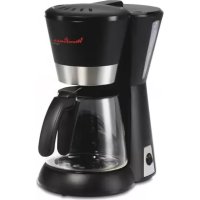
Models with aroma selector:
J Normal coffee selector
K Strong coffee selector

Programmable models
L Control panel
M Hour setting control
N Minute setting control
Indicator switch
P Rotating selector button
(*) Moulinex exclusive anti-chlorine/anti-limescale/anti-nitrate system
Safety recommendations
- Read the instructions carefully before first using your appliance: any use which does not comply with the instructions will absolve Moulinex from any liability.
- Do not leave the appliance within reach of children unsupervised. The use of this appliance by young children or by disabled persons must always be supervised.
- Check that the power rating your appliance does match that of your household electrical wiring system.
- The appliance must be connected to an earthed main socket.
Wiring instructions for U.K and Ireland only:
APPLIANCES WITH FITTED PLUG
Important: For your convenience this appliance is supplied complete with a plug incorporating a 13 amp fuse.
In the event of replacing a fuse in the plug supplied, a 13 amp fuse approved by ASTA to BS1362 must be used.
If the socket outlets are not of the 13A BS 1363 type, and therefore do not accept the plug connected to this appliance, cut off the plug. When cut off, this plug is a shock hazard if inserted into a socket outlet and must therefore be disposed of safely.
If the fuse cover is detachable, never use the plug with the cover omitted. Replacement covers can be obtained from your service agent.
Fit the appropriate plug according to the instructions in paragraph «Fitting a plug». With alternative plugs a 15 amp fuse must be fitted either in the plug or adaptor or at the main fuse box.
APPLIANCES WITHOUT FITTED PLUG FITTING A PLUG -IMPORTANT
The wires in the mains lead are coloured in accordance with the following code:
GREEN & YELLOW : EARTH
BLUE:NEUTRAL
BROWN:LIVE
As the colours in the mains lead of this appliance may not correspond with the coloured markings identifying the terminals in your plug, proceed as follows:
The wire which is coloured GREEN & YELLOW must be connected to the terminal in the plug which is marked with the letter «E» or by the earth symbol or coloured green or green and yellow. The wire which is coloured BLUE must be connected to the terminal which is marked with the letter «N» or coloured black. The wire which is coloured BROWN must be connected to the terminal which is marked with the letter «L» or coloured red.
This appliance is manufactured to conform to the Low Voltage Electrical Equipment (Safety) Regulations 1989 and is designed to comply with BS 3456. It complies with the requirements of the EEC Directive (89/336/EEC).
Any error in connection will render the guarantee null and void.
- Your appliance is intended solely for domestic use.
- Unplug your appliance as soon as you have finished using it and when you are cleaning it.
- Never unplug the appliance from the socket by pulling on the cable.
- Do not use your appliance if it is not working correctly. If this happens, contact an approved Moulinex service centre (see list in service booklet).
- Any intervention other than cleaning and normal maintenance by the customer must
be carried out by an approved Moulinex service centre.
- Never immerse the appliance, the cable or plug in water or any other liquid.
- Do not allow the power cable to hang down within reach of children.
- The power cable must never be allowed to be close to or in contact with the hot parts of your appliance, close to a source of heat or rest on sharp edges.
- If the power cable or the plug are damaged, do not use the appliance. To prevent any danger, these must be replaced by an approved Moulinex service centre (see list in service booklet).
- Do not use the coffee jug over a naked flame or on the hotplates of an electric cooker.
- Do not refill your coffee maker with water if it is still hot (allow it to cool down for about 10 minutes before refilling).
- Do not fill the water tank with hot water.
- Do not use the coffee maker without the water tank lid.
- For your own safety, use the Moulinex accessories and spare parts which are suitable for your appliance.
Advantages of the Crystallys coffee maker
. The «Aqua Filter 3»: a triple action antichlorine, anti-limescale and anti-nitrate system.
- The anti-limescale action of the system has made it possible to extend the life of your coffee maker.
- The anti-chlorine action of the cartridge means the coffee can release its most delicate flavours. Tap water very often contains a level of chlorine which prevents the flavour of the coffee from developing.
- The «Aqua Filter 3» filters the chlorine so that its odour and taste are no longer noticeable.
- The anti-nitrate action will reduce the level of nitrate in the water used for the coffee.
- The elements which go into the «Aqua Filter 3» comply with current food safety legislation.
- The cartridge which is made of vegetable and biogredable products can be disposed of as domestic waste.
. «Hermetica» coffee jug
The «Hermetica» coffee jug has a lid without a central hole, and an insulated grid on the
pouring lip. This design considerably reduces heat loss and keeps all the coffee aroma. It prevents evaporation of the aroma and air leaking in which oxidises coffee.
This coffee jug can be used in a microwave oven to re-heat the coffee.
- Power cable: adjustable for length by feeding it into or out of the interior of the appliance.
Before using your appliance for the first time
1 - Remove the «Aqua Filter 3» (I) from its plastic bag. Rinse under cold tap water for about 1 minute.
- Fit the «Aqua Filter 3» onto the cartridge holder (H) by rotating it.
③ - Place the cartridge holder in the coffee maker.
- Run your coffee maker through with cold water (drinkable) but no coffee grounds and dispose.
Your coffee maker is now ready for use.
Using the appliance
You can make 10 to 15 cups of coffee and keep it warm on the hot plate:
-
Fill the water tank (A) with cold water (drinkable), observing the water level indicator (C).
-
Insert a n^4 filter paper in the filter holder (B) and pour the coffee grounds into the filter. We recommend that you fold over the edges of the filter paper to make it easier to insert.
-
Close the water tank lid.
-
Place the coffee jug with its lid on the hot plate (E).
-
Turn on by pressing the switch (D) or by turning the rotating knob (P) to position «I»: the indicator light shows that the coffee maker is working.
The filter holder is fitted with an «antidrip» system which allows you to remove the coffee jug so that you can pour yourself a cup of coffee while it is still brewing.
-
Quickly replace the coffee jug to prevent the filter holder from overflowing.
-
THE MODEL WITH AROMA SELECTOR allows you to choose a stronger or weaker coffee:
. for a normal coffee : press button (J).
. for a strong coffee : press button (K).
. THE PROGRAMMABLE MODEL ALLOWS YOU TO:
. use the «Clock» function.
. to set the coffee maker to start up to 24 hours in advance.
. to automatically stop the coffee maker after 2 hours (manual or automatic mode).
- Plug in the appliance: the timer display flashes.
. Setting the clock
- Turn the selector (P) to position
- Press the button «H» (M) to set the hour.
- Press the button «min» (N) to set the minutes.
-
Turn the selector back to «0»: the clock is set.
-
Functioning in manual mode
-
Turn the selector (P) to position «I».
- The indicator light (O) will come on.
- Turn the selector (P) to position «0» to switch the appliance off.
. Using the appliance in programming mode
To set the time when you want to have your coffee:
- Turn the selector (P) to position PROG: the display symbol will flash.
- Press the button H (M) to set the hour.
- Press the button «min» (N) to set the minutes.
- Turn the selector (P) to position AUTO: the display symbol remains constant: your coffee maker is now programmed.
- At the time which has been programmed, the indicator light (O) will come on and the coffee maker will automatically switch itself on.
Please note: If the selector remains in AUTO position, the coffee maker will start everyday at the programmed time.
- Turn the selector (P) to position 0 to stop the coffee maker.
Maintenance
- Changing the «Aqua Filter 3»:
- Change the cartridge when the cartridge-change indicator (G) turns red.
This indicator tells you when it is time to change the cartridge; it will stay red for 5 uses, and will then go back to white, whether or not you have changed the cartridge.
⑦- Remove the used cartridge by rotating it.
- Dispose of the used cartridge in the bin with household waste.
1- Take the new «Aqua Filter 3» out of its bag and rinse it under the cold tap water for about 1 min.
-
Fit the cartridge into its holder by rotating it. Important:
-
The «Aqua Filter 3» is only suitable for Crystalys coffee makers.
- If you have not used your coffee maker for:
. more than one month: rinse the coffee maker by running it through one cycle with fresh water but no coffee.
. more than 3 months: change the «Aqua Filter 3» before use.
. Descaling
In order to guarantee good coffee for longer, it is necessary to descale your coffee maker every 80 cycles.
. To descale, you can use:
. either a sachet of descaler for coffee makers which is first diluted in 2 large cups of water (approx. 30 cl).
. or 2 large cups of white wine vinegar.
- Remove the «Aqua Filter 3» from the coffee maker.
- Pour the mixture into the water tank (A) and start the coffee maker (no coffee).
- Allow the equivalent of one cup to flow into the jug, then turn off the coffee maker.
- Leave the mixture remaining in the coffee maker to work for one hour.
- Restart the coffee maker to finish the cycle.
- Rinse the coffee maker out by running it 3 times with fresh water (8 cups).
- Replace the cartridge holder with a new «Aqua Filter 3».
Please note: Never leave the sachet of descaler where children can get hold of it.
This descaler contains chemicals, which are not recommended to be ingested.
Cleaning
- Unplug the appliance.
- Do not place the coffee maker in water or under running water.
- To dispose of the used coffee grounds, remove the filter holder (B) from the coffee maker.
- The coffee jug (F) and the removable filter holder (B) can be washed in the dishwasher (top basket).
- The cartridge holder (H) must not be washed in the dishwasher, but simply rinsed under running water.
What to do if your appliance does not work?
- Check the connection of the power cable.
- Ensure that the switch or the rotating knob is set to position «I».
If the water takes too long to run through or there are excessive bubbling noises:
- Check that the flavour selector (depending on the model) is in position.
- Your coffee maker is probably in need of.
descaling.
Your jug overflows:
- You have forgotten to insert the «Aqua Filter 3».
- Your jug was not empty when you started preparing coffee.
Your coffee filter is overflowing:
- Your jug is not sitting properly in the coffee maker and has not engaged the anti-drip device on the filter holder
- You have used too much coffee or too fine a coffee ground, which is not appropriate for filter coffee makers.
If you have followed these instructions and your appliance still does not work: Contact an approved Moulinex service centre (see list in the « Moulinex Service « booklet).
Accessories
- Coffee jug: ref. EC6
-2《AquaFilter3》:ref.EC8
Beschreibung
(*) Exklusivt for Moulinex:anti-klor/anti-kalk/anti-nitrat filter



- Models with aroma selector:
- Programmable models
- Safety recommendations
- APPLIANCES WITH FITTED PLUG
- APPLIANCES WITHOUT FITTED PLUG FITTING A PLUG -IMPORTANT
- Any error in connection will render the guarantee null and void.
- Advantages of the Crystallys coffee maker
- The «Aqua Filter 3»: a triple action antichlorine, anti-limescale and anti-nitrate system.
- «Hermetica» coffee jug
- Before using your appliance for the first time
- Using the appliance
- Maintenance
- Cleaning
- What to do if your appliance does not work?
- If the water takes too long to run through or there are excessive bubbling noises:
- Your jug overflows:
- Your coffee filter is overflowing:
- Accessories
- Beschreibung
Brand : MOULINEX
Model : Crystalys A EC2
Category : Coffee maker