Vypyr VIP - Receiver PEAVEY - Free user manual and instructions
Find the device manual for free Vypyr VIP PEAVEY in PDF.




| Product Type | Amplifier for electric, acoustic and bass guitar |
| Brand | Peavey |
| Model | Vypyr VIP (VIP 1, VIP 2, VIP 3 series) |
| Output Power (VIP 2) | 40 W RMS into 8 ohms |
| Output Power (VIP 1) | 20 W RMS into 8 ohms |
| Output Power (VIP 3) | 100 W RMS into 8 ohms |
| Power Supply | 100-240 V AC, 50/60 Hz (depending on region) |
| Dimensions (VIP 2) | 17.7" H x 19.59" W x 10" D (approx. 45 x 50 x 25 cm) |
| Weight (VIP 2) | 26 lb (approx. 11.8 kg) |
| Dimensions (VIP 3) | 19" H x 19.566" W x 10" D |
| Weight (VIP 3) | 31 lb (approx. 14 kg) |
| Speaker (VIP 2/VIP 3) | 305 mm (12") custom |
| Amplifier Modeling | 36 built-in models (including 6 for bass, 6 for acoustic) |
| Instrument Models (VIP 2/VIP 3) | 10 models (12-string guitar, baritone, violin, etc.) |
| Built-in Effects | Up to 25 effects (pedal and rack), customizable |
| Number of Simultaneous Effects (VIP 2/VIP 3) | Up to 5 |
| USB Connectivity | Bi-directional USB port (audio, MIDI, update) |
| Auxiliary Input | AUX/MP3/CD jack |
| Headphone Output | Studio quality, mutes speaker |
| Looper Function | Built-in (requires Sanpera I or II footswitch) |
| Chromatic Tuner | Built-in, LED visual |
| WYSIWYG Controls | With LEDs for instant visualization of settings |
| Tap Tempo Function | Adjust tempo of delay effects |
| Safety | Must be grounded, do not expose to moisture, leave repairs to qualified technician |
| Maintenance | Clean with a dry cloth, do not block cooling systems |
| Repairability | Spare parts available from the manufacturer, repair by Peavey authorized technician |
Frequently Asked Questions - Vypyr VIP PEAVEY
User questions about Vypyr VIP PEAVEY
0 question about this device. Answer the ones you know or ask your own.
Ask a new question about this device
Download the instructions for your Receiver in PDF format for free! Find your manual Vypyr VIP - PEAVEY and take your electronic device back in hand. On this page are published all the documents necessary for the use of your device. Vypyr VIP by PEAVEY.
USER MANUAL Vypyr VIP PEAVEY
Intended to alert the user to the presence of uninsulated "dangerous voltage" within the product's enclosure that may be of sufficient magnitude to constitute a risk of electric shock to persons.
Intended to alert the user of the presence of important operating and maintenance (servicing) instructions in the literature accompanying the product.
CAUTION: Risk of electrical shock — DO NOT OPEN!
CAUTION: To reduce the risk of electric shock, do not remove cover. No user serviceable parts inside. Refer servicing to qualified service personnel.
WARNING: To prevent electrical shock or fire hazard, this apparatus should not be exposed to rain or moisture, and objects filled with liquids, such as vases, should not be placed on this apparatus. Before using this apparatus, read the operating guide for further warnings.
Protective earthing terminal. The apparatus should be connected to a mains socket outlet with a protective earthing connection.

IMPORTANT SAFETY INSTRUCTIONS
WARNING: When using electrical products, basic cautions should always be followed, including the following:
- Read these instructions.
- Keep these instructions.
- Heed all warnings.
- Follow all instructions.
- Do not use this apparatus near water.
- Clean only with a dry cloth.
- Do not block any of the ventilation openings. Install in accordance with manufacturer's instructions.
- Do not install near any heat sources such as radiators, heat registers, stoves or other apparatus (including amplifiers) that produce heat.
- Do not defeat the safety purpose of the polarized or grounding-type plug. A polarized plug has two blades with one wider than the other. A grounding type plug has two blades and a third grounding plug. The wide blade or third prong is provided for your safety. If the provided plug does not fit into your outlet, consult an electrician for replacement of the obsolete outlet.
- Protect the power cord from being walked on or pinched, particularly at plugs, convenience receptacles, and the point they exit from the apparatus.
- Only use attachments/accessories provided by the manufacturer.
- Use only with a cart, stand, tripod, bracket, or table specified by the manufacturer, or sold with the apparatus. When a cart is used, use caution when moving the cart/apparatus combination to avoid injury from tip-over.
- Unplug this apparatus during lightning storms or when unused for long periods of time.
Refer all servicing to qualified service personnel. Servicing is required when the apparatus has been damaged in any way, such as power-supply cord or plug is damaged, liquid has been spilled or objects have fallen into the apparatus, the apparatus has been exposed to rain or moisture, does not operate normally, or has been dropped. - Never break off the ground pin. Write for our free booklet "Shock Hazard and Grounding." Connect only to a power supply of the type marked on the unit adjacent to the power supply cord.
- If this product is to be mounted in an equipment rack, rear support should be provided.
- Note for UK only: If the colors of the wires in the mains lead of this unit do not correspond with the terminals in your plug, proceed as follows: a) The wire that is colored green and yellow must be connected to the terminal that is marked by the letter E, the earth symbol, colored green or colored green and yellow. b) The wire that is colored blue must be connected to the terminal that is marked with the letter N or the color black. c) The wire that is colored brown must be connected to the terminal that is marked with the letter L or the color red.
- This electrical apparatus should not be exposed to dripping or splashing and care should be taken not to place objects containing liquids, such as vases, upon the apparatus.
- The on/off switch in this unit does not break both sides of the primary mains. Hazardous energy can be present inside the chassis when the on/off switch is in the off position. The mains plug or appliance coupler is used as the disconnect device, the disconnect device shall remain readily operable.
- Exposure to extremely high noise levels may cause a permanent hearing loss. Individuals vary considerably in susceptibility to noise-induced hearing loss, but nearly everyone will lose some hearing if exposed to sufficiently intense noise for a sufficient time. The U.S. Government's Occupational Safety and Health Administration (OSHA) has specified the following permissible noise level exposures:
Duration Per Day In Hours Sound Level dBA, Slow Response
| 8 90 | |
| 6 92 | |
| 4 95 | |
| 3 97 | |
| 2 100 | |
| 1 1/2 102 | |
| 1 105 | |
| 1/2 | 110 |
| 1/4 or less | 115 |
According to OSHA, any exposure in excess of the above permissible limits could result in some hearing loss. Earplugs or protectors to the ear canals or over the ears must be worn when operating this amplification system in order to prevent a permanent hearing loss, if exposure is in excess of the limits as set forth above. To ensure against potentially dangerous exposure to high sound pressure levels, it is recommended that all persons exposed to equipment capable of producing high sound pressure levels such as this amplification system be protected by hearing protectors while this unit is in operation.
a) The wire that is colored green and yellow must be connected to the terminal that is marked by the letter E, the earth symbol, colored green or colored green and yellow.
b) The wire that is colored blue must be connected to the terminal that is marked with the letter N or the color black.
c) The wire that is colored brown must be connected to the terminal that is marked with the letter L or the color red.
a) The wire that is colored green and yellow must be connected to the terminal that is marked by the letter E, the earth symbol, colored green or colored green and yellow.
b) The wire that is colored blue must be connected to the terminal that is marked with the letter N or the color black.
c) The wire that is colored brown must be connected to the terminal that is marked with the letter L or the color red.
a) The wire that is colored green and yellow must be connected to the terminal that is marked by the letter E, the earth symbol, colored green or colored green and yellow.
b) The wire that is colored blue must be connected to the terminal that is marked with the letter N or the color black.
c) The wire that is colored brown must be connected to the terminal that is marked with the letter L or the color red.
a) The wire that is colored green and yellow must be connected to the terminal that is marked by the letter E, the earth symbol, colored green or colored green and yellow.
b) The wire that is colored blue must be connected to the terminal that is marked with the letter N or the color black.
c) The wire that is colored brown must be connected to the terminal that is marked with the letter L or the color red.
aalall jajjssll sall sall
.16
17
Logo referenced in Directive 2002/96/EC Annex IV(OJ(L)37/38,13.02.03 and defined in EN 50419: 2005
The bar is the symbol for marking of new waste and is applied only to equipment manufactured after 13 August 2005
Correct Disposal of this product. This marking indicates that this product should not be disposed with other house hold wastes throughout the EU. To prevent possible harm to the environment or human health from uncontrolled waste disposal, recycle it responsibly to promote the sustainable reuse of material resources. To return your used device, please use the return and collection systems, or contact the retailer where the product was purchased. They can take this product for environmental safe recycling.

Logotip al que se ha Appee reference en la Directiva 2002/95/EC AnexiV/O.UJL37/38,13.02.03 y defineN en EN 50419:2005
FCC Compliance Statement
This device complies with Part 15 of the FCC rules. Operation is subject to the following two conditions: (1) this device may not cause harmful interference, and (2) this device must accept any interference received, that may cause undesired operation.
Warning: Changes or modifications to the equipment not approved by Peavey Electronics Corp. can void the user's authority to use the equipment.
Note - This equipment has been tested and found to comply with the limits for a Class B digital device, pursuant to Part 15 of the FCC Rules. These limits are designed to provide reasonable protection against harmful interference in a residential installation. This equipment generates, uses and can radiate radio frequency energy and, if not installed and used in accordance with the instructions, may cause harmful interference to radio communications. However, there is no guarantee that interference will not occur in a particular installation. If this equipment does cause harmful interference to radio or television reception, which can be determined by turning the equipment off and on, the user is encouraged to try and correct the interference by one or more of the following measures.
- Reorient or relocate the receiving antenna.
- Increase the separation between the equipment and receiver.
- Connect the equipment into an outlet on a circuit different from that to which the receiver is connected.
- Consult the dealer or an experienced radio/TV technician for help.

Peavey Electronics Corporation · 5022 Hartley Peavey Drive · Meridian, MS · 39305
(601)483-5365·FAX (601)486-1278·www.peavey.com·80305796·©2011
CANICES-3B/NMB/3B
ENGLISH
Electric · Acoustic · Bass
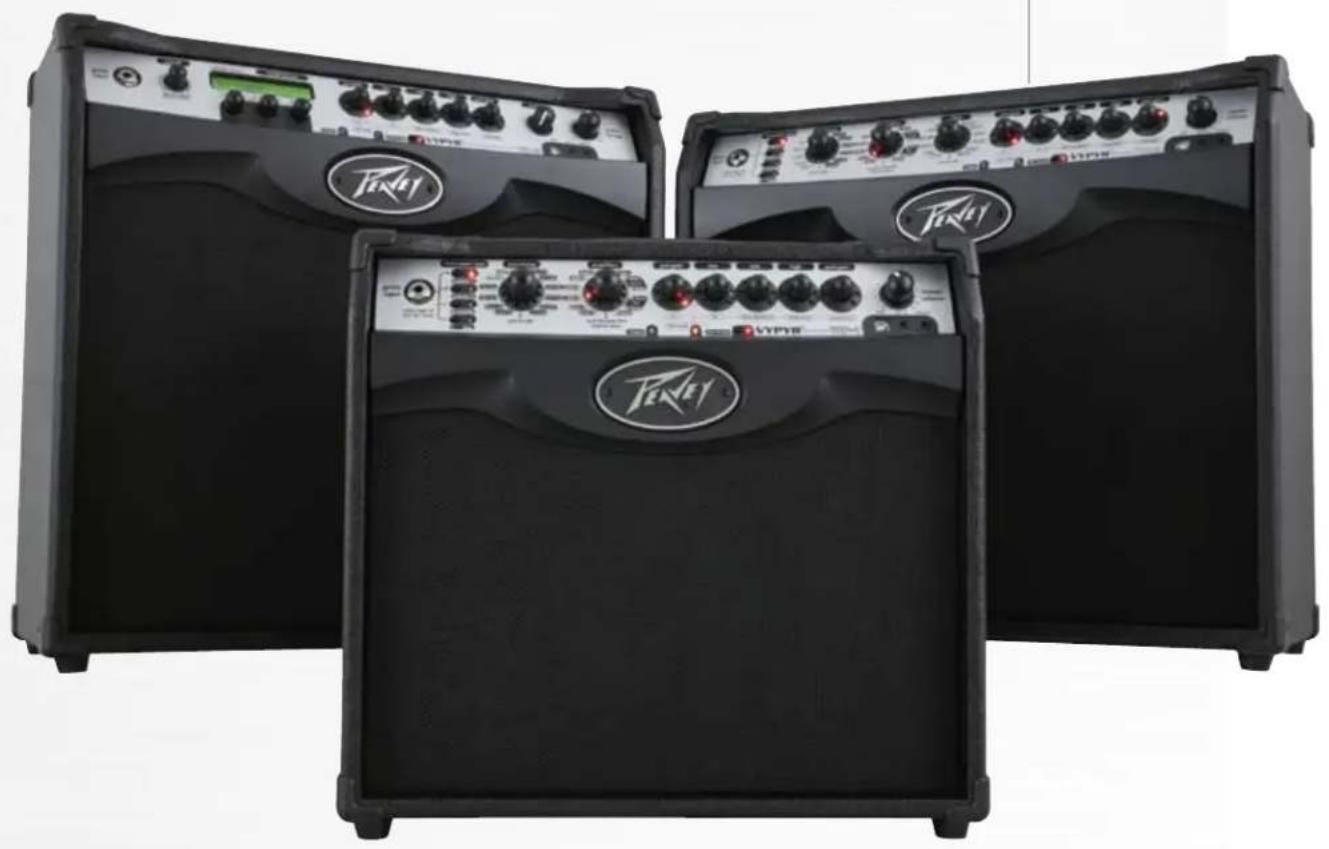
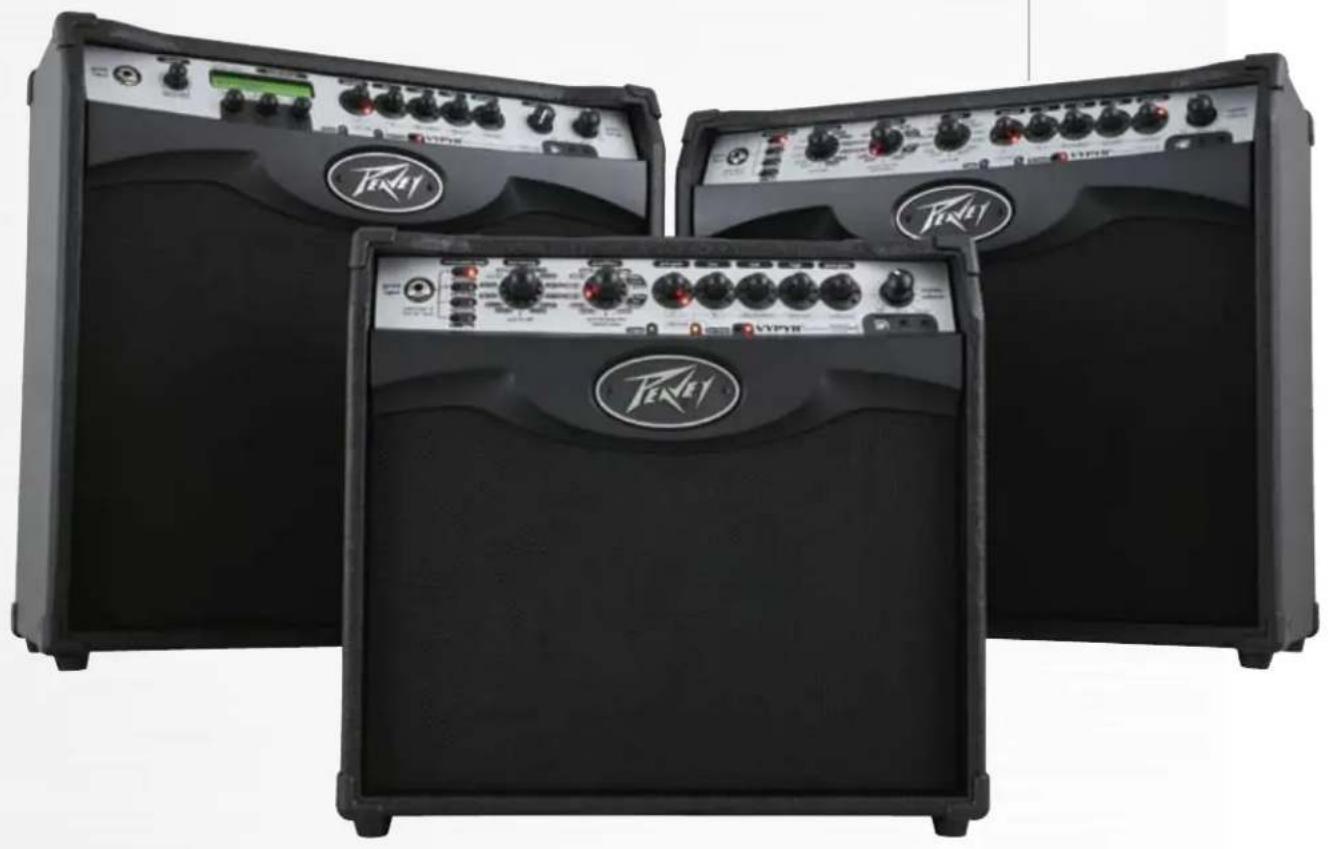
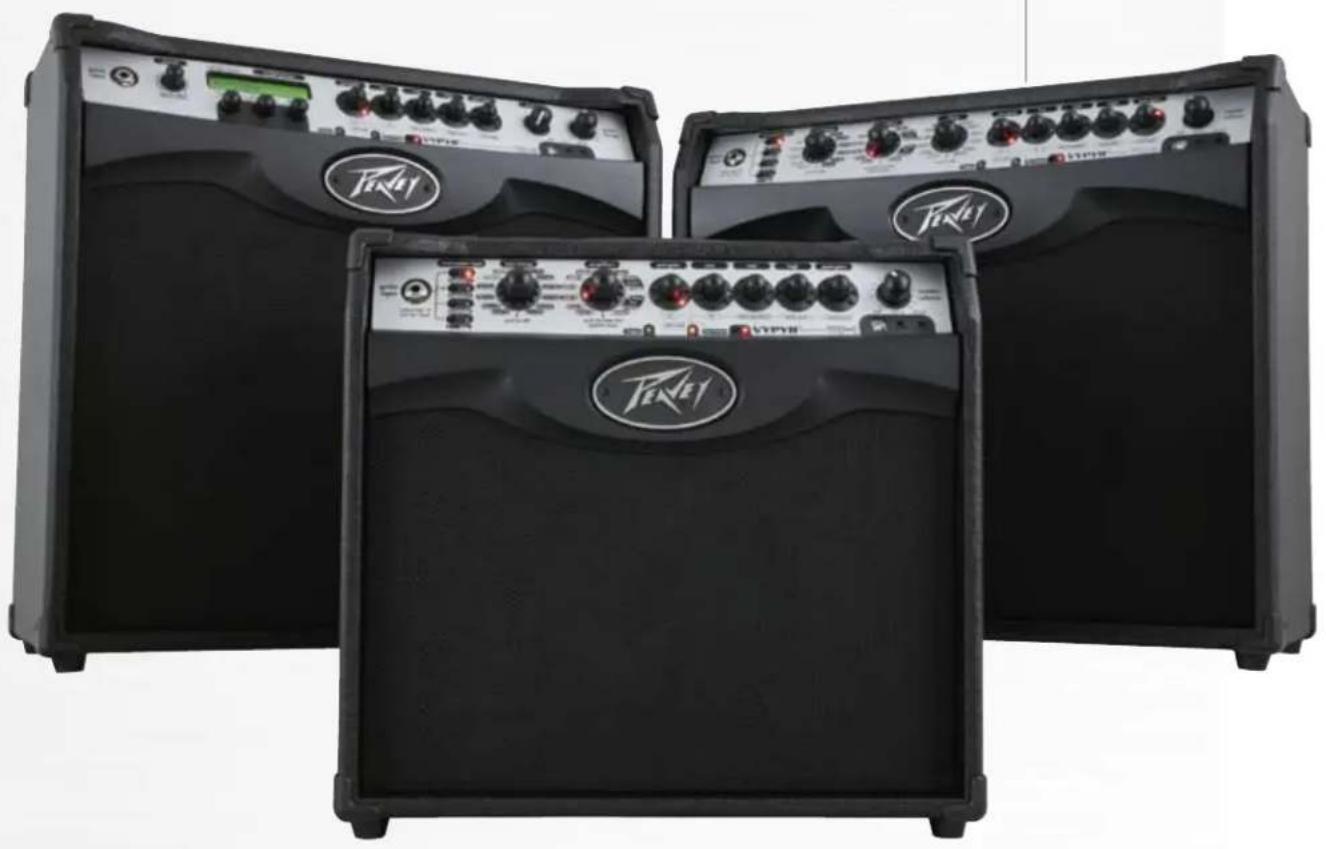
Morphing from a bass amp, to an electric amp, to an acoustic amp, the VYPYR® VIP is the industry's first Variable Instrument Performance™ amplifier.
Once again Peavey Electronics revolutionizes the modeling amp industry. Introducing the world's first Variable Instrument Performance amplifier, the VYPYR® VIP — the world's first amp that contains Bass guitar, Acoustic guitar and Electric guitar amplifier models. Now for the first time ever using our Variable Instrument Input, a single amp can provide amplification for a variety of instrument types.
Not only does the amplifier morph from a bass amp to an acoustic amp, to an electric amp, it also, for the first time ever in an amplifier in this category, allows the electric guitar player access instrument models as well.
Using appropriate technology, Peavey uses a combination of a powerful 32-bit, floating point SHARC processor and patented TransTube® analog circuitry to create the best sounding modeling amplifiers available. Nothing sounds as good as a VYPYR.
All VYPYR effects, amp models and parameter controls can be accessed via the amp itself, with no need to hook the amplifier to a computer. Peavey's WYSIWYG control surface quickly allows the user the ability to see and adjust the control position — no guessing where the control is supposed to be or having to manually move it to where it should be from preset to preset.
VYPYR's new USB bi-directional data and audio port provides an easy way to record, and/or connect to our VYPYR software and store presets, get lessons, and practice to backing tracks while connected to your computer.
All of the revolutionary features from the original VYPYR series, now even better. More power, more effects, more amp models, Variable Instrument Input, instrument models, and more make this the ultimate amplifier.
VIP 1
Variable Instrument Performance Amplifier
20 Watts RMS
- Acoustic Guitar Simulation
- Bass Guitar Simulation
- Acoustically Optimized Semi-Closed Back
Patented TRANSTUBE Technology
22 Amp Accessible Effects
36 On Board Amp Models (Includes 6 Bass Amp and 6 Acoustic Amp Models)
Enhanced Chromatic Tuner
On Board Looper
WYSIWYG LED Indicator Controls
- Amp Accessible Real-Time Dual Parameter Controls
- Amp Accessible Global Reverb and Delay
Bi-Directional USB (Data-MIDI-Audio Record Out)
AUX/MP3/CD Input
- Studio Quality Headphone Out
- Up to 4 Effects Simultaneously
- Tap Tempo
VIP 2
Variable Instrument Performance Amplifier
40 Watts RMS
12" Custom Voiced Heavy Duty Speaker
Patented TRANSTUBE Technology
- Acoustically Optimized Semi-Closed Back
- 10 Instrument Models
Enhanced Chromatic Tuner
- 12 Amp Accessible Stompbox Models
36 On Board Amp Models
- 6 Bass Amp Models
- 6 Acoustic Amp Models
25 Total On Board Amp Accessible Effects
- On Board Looper
WYSIWYG LED Indicator Controls
- Amp Accessible Real-Time Parameter Controls
- Amp Accessible Global Reverb and Delay
Tap Tempo
Bi-Directional USB (Data-MIDI-Audio Record Out)
- Studio Quality Headphone Out
- AUX/MP3/CD Input
- Up to 5 Effects Simultaneously
VIP 3
Variable Instrument Performance Amplifier
- 100 Watts RMS
- 12" Custom Voiced Heavy Duty Speaker
- Power Sponge® 100 Watts to 1 Watt
- Acoustically Optimized Semi-Closed Back
Over 400 Amp Accessible Presets
LCD Display for Quick Preset, Model, and Effect Selection
- 10 Instrument Models
Enhanced Chromatic Tuner
- 12 Amp Accessible Stompbox Models
36 On Board Amp Models
- 6 Bass Amp Models
6 Acoustic Amp Models
25 Total On Board Amp Accessible Effects
On Board Looper*
WYSIWYG LED Indicator Controls
- Amp Accessible Real-Time Parameter Controls
- Amp Accessible Global Reverb and Delay
- Tap Tempo
Bi-Directional USB (Data-MIDI-Audio Record Out)
- Studio Quality Headphone Out
- AUX/MP3/CD Input
- Up to 5 Effects Simultaneously*
VARIABLE INSTRUMENT INPUT
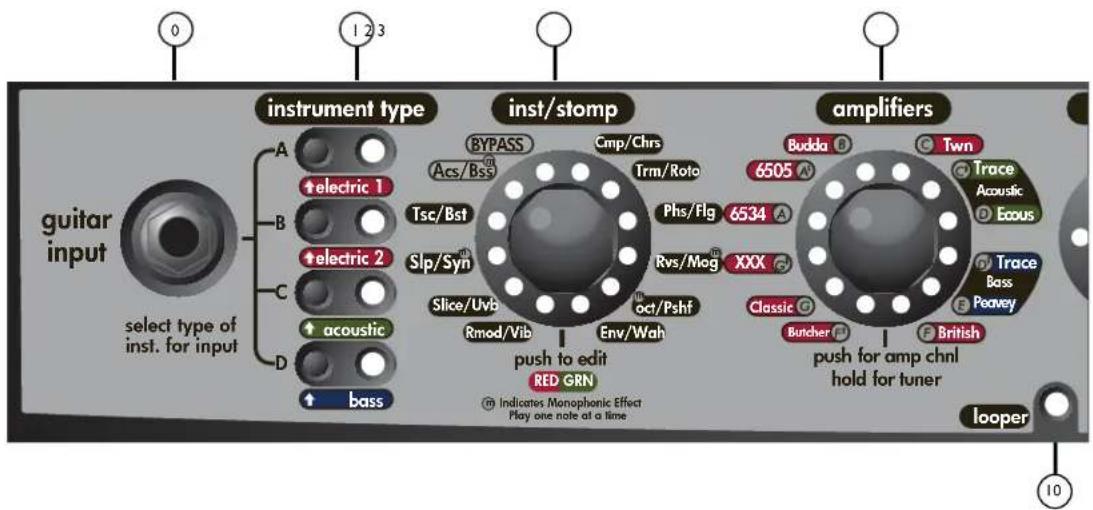
On the VIP 1, you can input an electric, an acoustic, or a bass guitar. There are amp models for all 3 instrument types. Once you plug into the amp, you select the instrument type to the right (item 1). The amp then changes its input sensitivity and gain structure to match your selection.
NOTE: VIP Amplifiers are designed to be used with instruments with passive electronics. When using instruments with active electronics, the volume of the instrument may need to be reduced to prevent clipping (unwanted distortion).
INSTRUMENT TYPE/PRESETS
With these buttons you select which type of instrument you are using with the amp. There are 4 banks with 4 presets each, for a total of 16 presets. The names of the preset banks are associated with the type of instrument being used. To access the different presets within the current bank, simply continue pressing the button and the LED will change color to indicate which preset you have selected. Any changes you make to the settings (except for master volume level) can be saved back to the preset if desired. To save settings over the loaded preset, just press and hold its bank button until its LED begins to blink and then continue to hold the button until the LED stops blinking. Pressing the Tap Tempo button cancels the save. To save changes to the current preset over a different preset, press and hold its bank button until its LED begins to blink. The LEDs for any other banks in which the preset can be saved will also blink. Select the bank to save in by tapping the desired bank button - it will continue to blink but the other bank LEDs will turn off. If the bank LED is not the color of the desired preset to overwrite, tap the bank LED again until the color matches the desired preset number. To complete the save, press and hold the bank button until the LED stops blinking. Pressing the Tap Tempo button cancels the save.
NOTE: When selecting bass or acoustic preset (Banks C & D) the VIP 1 and VIP2 will limit access to only those amp models associated with the selected instrument bank. Pressing and holding buttons B & D during power on will open up all amp models to any preset.
INSTRUMENT/STOMPBOX ENCODER
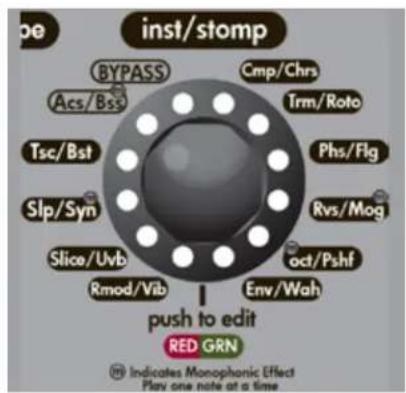
Turn this knob to select your desired pre-amplifier effect (if any). Just think, 20 pedals you'll never have to buy! In addition, there are 2 instrument models to choose from, an acoustic simulation and a bass simulation! Press the encoder momentarily to enter Edit mode (Item 11). You'll also notice a small 'm' on a few effects and the bass simulation. This is because these are monophonic effects and as such, you'll need to be careful to play one note at a time for them to work properly. The LEDs on this encoder are bi-color. At the bottom of the encoder is a guide to show which color represents which effect.
AMPS ENCODER
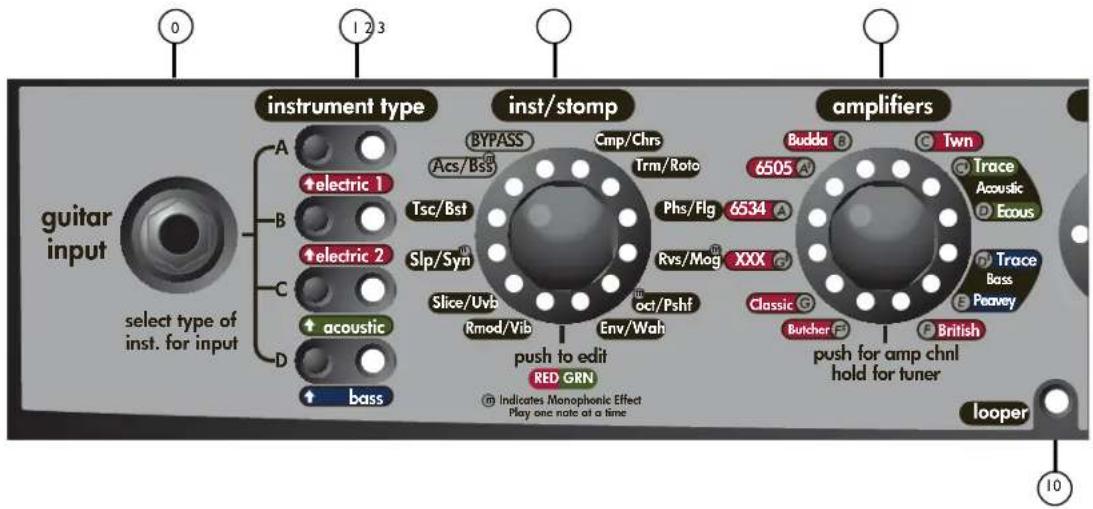
Turn this knob to select your amp model. Each amp has 3 channels: if the LED is red, you are on the high gain channel, yellow for medium gain and green for low gain. When you are using an acoustic preset (Item 1, Bank C) only the acoustic amplifiers will be available. If you are using a bass preset (Item 1, Bank D) only the bass amplifiers will be available.
TUNER MODE: Press and hold for 2 seconds to enter tune mode. The LEDs around the Amp encoder will tell you what note you are tuning. At the same time, the LEDs around the Stompbox encoder (Item 2) will indicate whether the note is sharp or flat. If the LED is to the right of the 12:00 position you are sharp (Tune down). If the LED is to the left of the 12:00 position you are flat (tune up). When all of the LEDs around the Effects encoder come on, you are in tune.
PRE GAIN
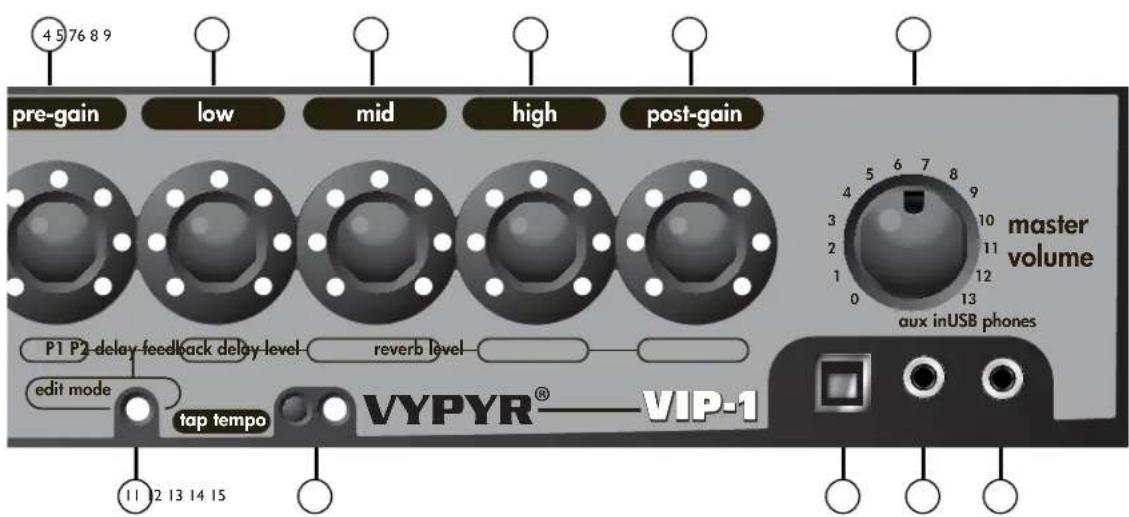
Turn this knob to crank up the gain—think of it as how much distortion you want out of the amplifier. In Edit mode this knob controls parameter 1 of either the selected Stompbox or Effect.
LOW ENCODER
Low EQ adjustment. In edit mode this knob controls parameter 2 of either the selected Stompbox or Effect.
MID ENCODER
Mid EQ adjustment. In edit mode this knob controls the Feedback of the Delay effect. Feedback is the number of times the delay repeats.
HIGH ENCODER
High EQ adjustment. In edit mode this knob controls the Level or amount of Delay effect. All the way to the left is zero and all the way to the right is max.
POST GAIN
This is the individual preset volume. In edit mode this knob controls the amount of Reverb.
MASTER VOLUME
Turn it up, ours goes to 13!
NOTE: Due to the low pregain settings for acoustic and bass amp models, the master volume may need to be set higher when using bass or acoustic guitars than when using electric guitars. Experiment with various levels of pregain, postgain, and master volume to achieve desired results.
LOOPER INDICATOR
This function requires a Sanpera® I or Sanpera II foot controller. Waste no time in making that purchase—the looper will allow you hours and hours of fun. You can record any 30 plus seconds of anything, switch your tone (preset), and play over top of your recording. For example, try recording a bass track, then change your tone to a lead tone and play over the top! Note the LED that corresponds to the looper on the encoder will turn on when recording or playing back the loop.
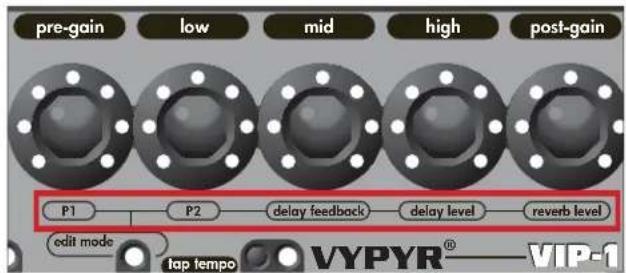
FIG 1
INST/STOMPBOXEDITMODE
Edit mode simply changes the 5 amp controls to their alternate function as listed on the bottom of the encoder (The red box in Fig 1). On VIP1, the edit mode LED color tells whether the effect is before the amp (red) or after the amp (green). To enter Edit mode simply press the Stompbox encoder (Item 2). To exit Edit mode simply press the same encoder again.
NOTE: Anytime you want access to the Delay or Reverb you will need to enter Edit mode.
TAP TEMPO
Tap on this button to set the tempo of the Delay effect. If you aren't hearing any delay enter Edit mode (Item 11) to turn the level up.
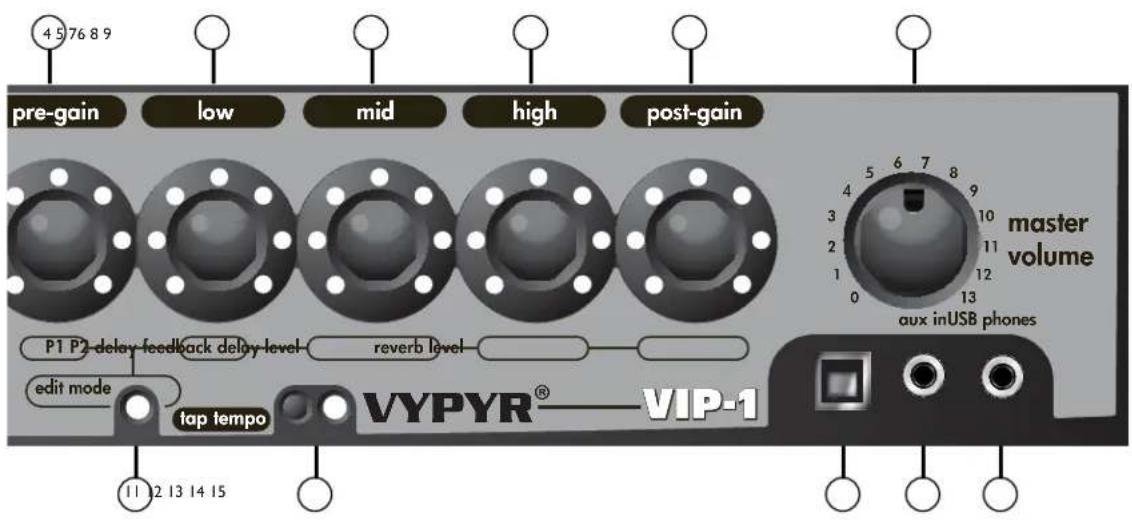
13 USB RECORD OUT
The VYPYR USB Record out requires no additional drivers—just plug a standard USB 2.0 cable into your computer and it will detect it as an audio device. Open your favorite recording program and start recording. Don't worry, the output is microphone/cabinet simulated and will sound great right in your computer.
NOTE: The speaker is intentionally muted when USB output is in use although the headphone output is active for real time monitoring. The USB port can also be used to download firmware updates and to connect to a computer to use the Vypyr Edit Graphic User Interface. MIDI works over the USB as well.
AUX INPUT
Plug in your favorite mp3 player, drum machine, or CD player and play along.
HEADPHONE/RECORD OUT
We really spent a lot of time making sure the headphone jack was studio quality. Because of that, and with the proper adapters (not supplied), you can use this output for recording as well as the USB port.
NOTE: When headphones are in use the speaker is muted and Master Volume (Item 9) controls headphone level.
VIP 2 Front Panel
VARIABLEINSTRUMENTINPUT
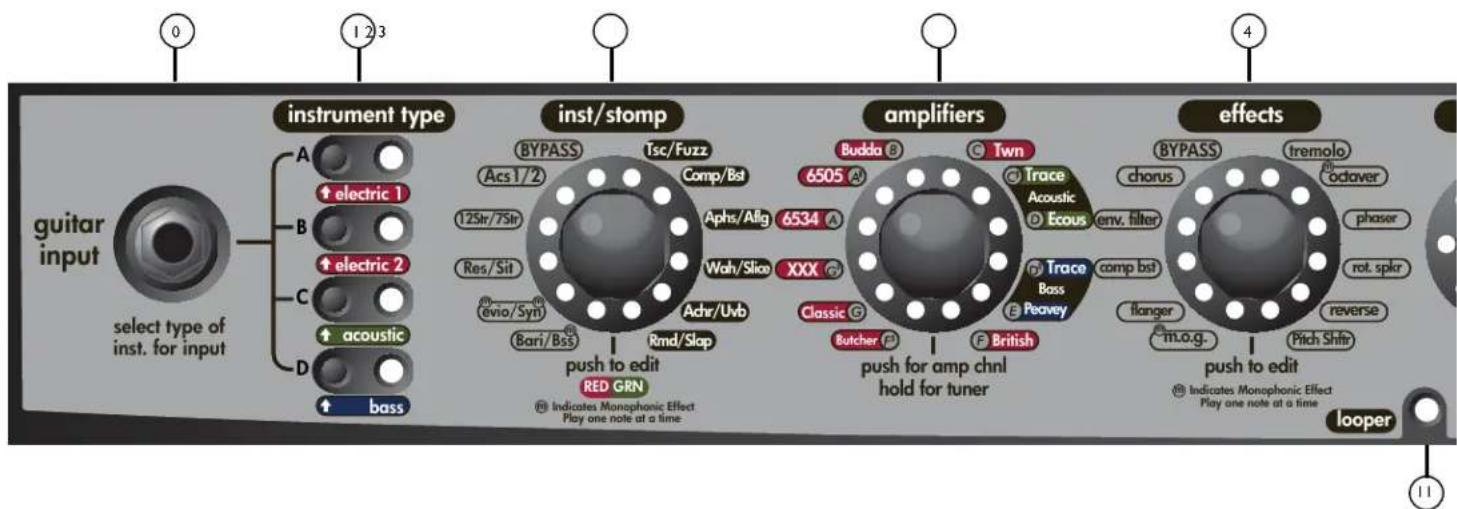
On the VIP 2, you can input an electric, an acoustic, or a bass guitar. There are amp models for all 3 instrument types. Once you plug into the amp, you select the instrument type to the right (item 1). The amp then changes its input sensitivity and gain structure to match your selection.
NOTE: VIP Amplifiers are designed to be used with instruments with passive electronics. When using instruments with active electronics, the volume of the instrument may need to be reduced to prevent clipping (unwanted distortion).
INSTRUMENT TYPE/PRESETS
The Vpyr® VIP series was designed for use with electric guitars, acoustic guitars and bass guitars! With these buttons you select which type of instrument you are using with the amp. There are 4 banks with 4 presets each, for a total of 16 presets. The names of the preset banks are associated with the type of instrument being used. To access the different presets within the current bank, simply continue tapping the button and the LED will change color to indicate which preset you have selected. Any changes you make to the settings (except for master volume level) can be saved back to the preset if desired. To save settings over the loaded preset, just press and hold its bank button until its LED begins to blink and then continue to hold the button until the LED stops blinking. Pressing the Tap Tempo button cancels the save. To save changes to the current preset over a different preset, press and hold its bank button until its LED begins to blink. The LEDs for any other banks in which the preset can be saved will also blink. Select the bank to save in by tapping the desired bank button - it will continue to blink but the other bank LEDs will turn off. If the bank LED is not the color of the desired preset to overwrite, tap the bank LED again until the color matches the desired preset number. To complete the save, press and hold the bank button until the LED stops blinking. Pressing the Tap Tempo button cancels the save.
INSTRUMENT/STOMP ENCODER
For the first time ever in a modeling amp, you have access to instrument models! Using your electric guitar, you can access 10 different instrument models, from acoustic guitars to baritone guitars and even a synth! The other side of the encoder is dedicated to stompboxes, so you have access to a full complement of stompbox effects! Turn this knob to select your desired pre-amplifier effect (if any). Press the encoder momentarily to enter Edit mode (Item 12). You'll also notice a small 'm' on a few effects and the bass simulation. This is because these are monophonic effects and as such, you'll need to be careful to play one note at a time for them to work properly. The LEDs on this encoder are bi-color. At the bottom of the encoder is a guide to show which color represents which effect.
AMPS ENCODER
Turn this knob to select your amp model. Each amp has 3 channels: if the LED is red, you are on the high gain channel, yellow for medium gain and green for low gain. When you are using an acoustic preset (Item 1, Bank C) only the acoustic amplifiers will be available. If you are using a bass preset (Item 1, Bank D) only the bass amplifiers will be available. Press and hold for 2 seconds to enter tuner mode.
The LEDs around the Amp encoder will tell you what note you are tuning. At the same time the LEDs around Effects encoder (Item 4) will indicate whether the note is sharp or flat. If the LED is to the right of the 12:00 position you are sharp (tune down). If the LED is to the left of the 12:00 position you are flat (tune up). When all of the LEDs around the Effects encoder come on, you are in tune.
EFFECTS ENCODER
Turn this knob to select any "Rack" effect. These are effects you might find attached to the effects loop of an amplifier. Press the encoder momentarily to enter Edit mode.
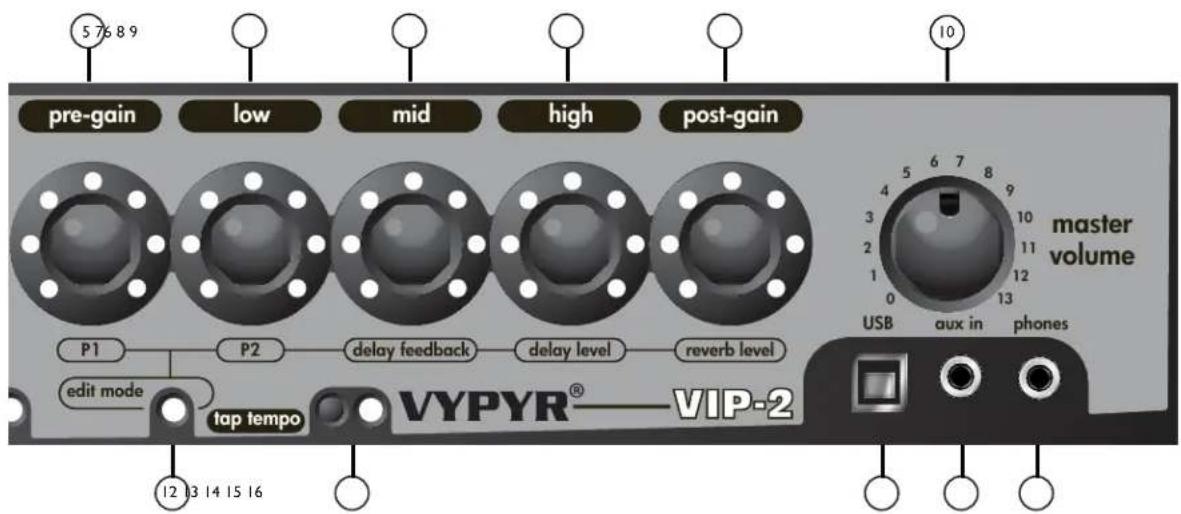
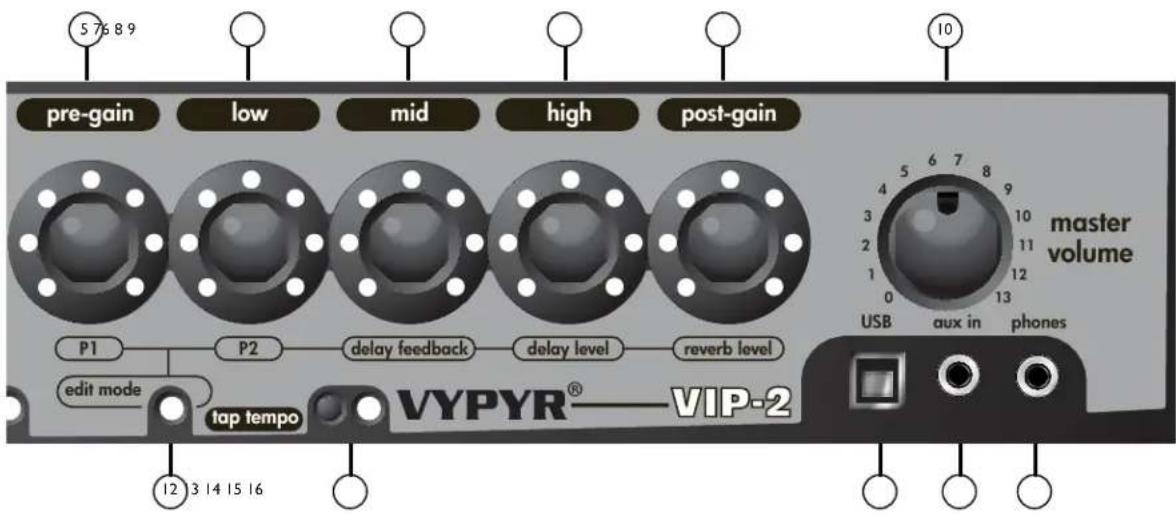
PRE GAIN
Turn this knob to crank up the gain—think of it as how much distortion you want out of the amplifier. In Edit mode this knob controls parameter 1 of either the selected Stompbox or Effect.
LOW ENCODER
Low EQ adjustment. In edit mode this knob controls parameter 2 of either the selected Stompbox or Effect.
MID ENCODER
Mid EQ adjustment. In edit mode this knob controls the Feedback of the Delay effect. Feedback is the number of times the delay repeats.
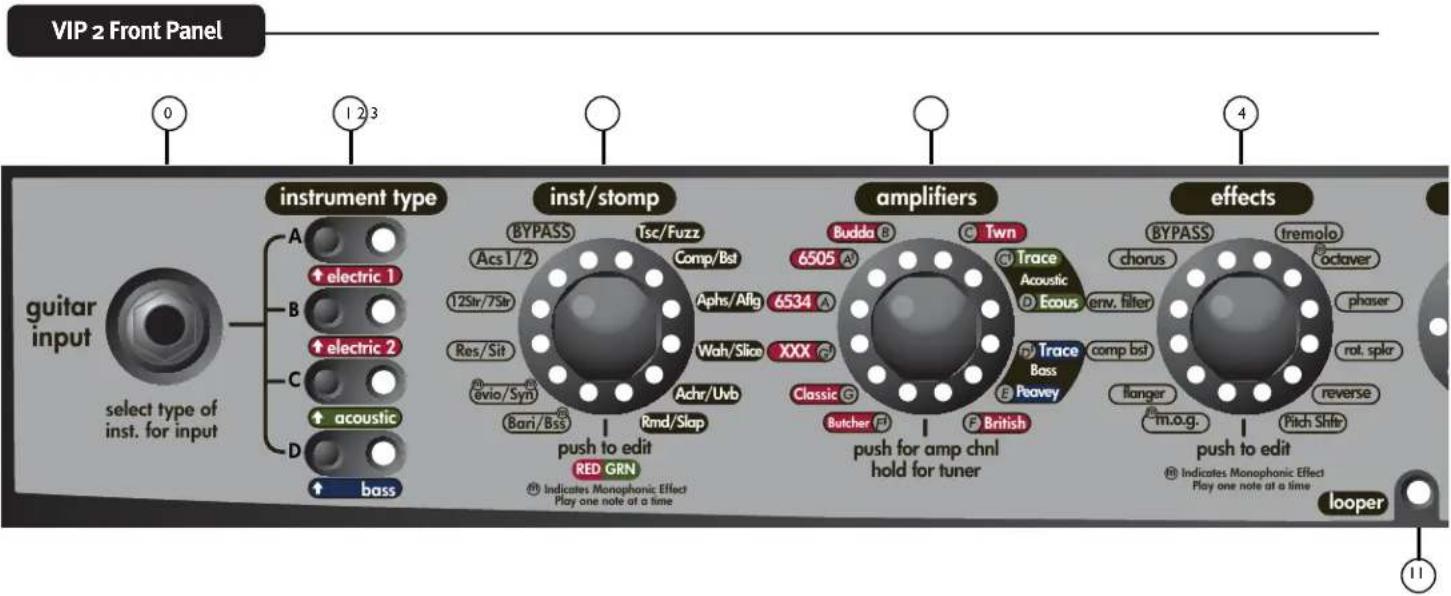
8 HIGH ENCODER
High EQ adjustment. In edit mode this knob controls the Level or amount of Delay effect. All the way to the left is zero and all the way to the right is max.
9 POST GAIN
This is the individual preset volume. In edit mode this knob controls the amount of reverb.
10 MASTERCVOLUME
Turn it up, ours goes to 13!
LOOPER INDICATOR
This function requires a Sanpera® I or Sanpera II foot controller. Waste no time in making that purchase—the looper will allow you hours and hours of fun. You can record any 30 plus seconds of anything, switch your tone (preset), and play over top of your recording. For example, try recording a bass track, then change your tone to a lead tone and play over the top! Note the LED that corresponds to the looper on the encoder will turn on when recording or playing back the loop.
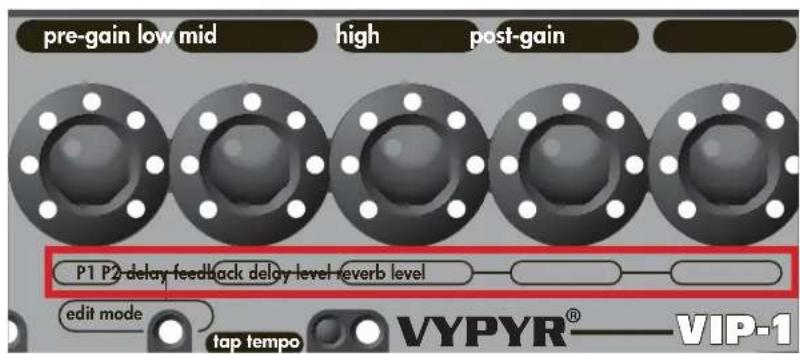
FIG 1

EDIT MODE
Edit mode simply changes the 5 amp controls to their alternate function as listed on the bottom of the encoder (The red box in Fig 1). When in Edit mode the Edit mode LED will either be green if you are editing Effects, or red if you are editing Stompboxes. In addition, the corresponding LED for the feature you are editing will flash while in Edit Mode. To enter Edit mode simply press either the Stompbox encoder (Item 2) or the Effects encoder (Item 4). To exit Edit mode simply press the same encoder again.
Anytime you want access to the Delay or Reverb you will need to enter Edit mode!

TAP TEMPO
Tap on this button to set the tempo of the Delay effect. If you aren't hearing any delay enter Edit mode to turn the level up.

USB RECORD OUT
The VYPYR USB Record out requires no additional drivers—just plug a standard USB 2.0 cable into your computer and it will detect it as an audio device. Open your favorite recording program and start recording. Don't worry, the output is microphone/cabinet simulated and will sound great right in your computer.
NOTE: The speaker is intentionally muted when USB output is in use although the headphone output is active for real time monitoring. The USB port can also be used to download firmware updates and to connect to a computer to use the Vypyr Edit Graphic User Interface. MIDI works over the USB as well.

AUX INPUT
Plug in your favorite mp3 player, drum machine, or CD player and play along.

HEADPHONE/RECORD OUT
We really spent a lot of time making sure the headphone jack was studio quality. Because of that, and with the proper adapters (not supplied), you can use this output for recording as well as the USB port.
NOTE: When headphones are in use the speaker is muted and Master Volume (Item 9) controls headphone level.
VARIABLE INSTRUMENT INPUT
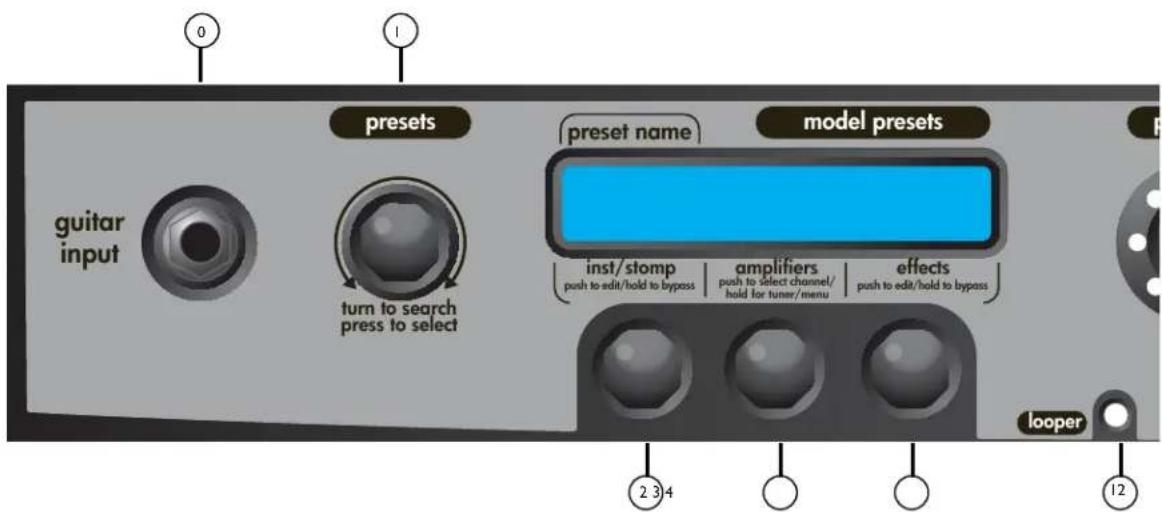
On the VIP 3, you can input an electric, an acoustic, or a bass guitar. There are amp models for all 3 instrument types. Once you plug into the amp, you select the instrument bank. The amp then changes its input sensitivity and gain structure to match your selection.
NOTE: VIP Amplifiers are designed to be used with instruments with passive electronics. When using instruments with active electronics, the volume of the instrument may need to be reduced to prevent clipping (unwanted distortion).
PRESETS ENCODER
The VIP 3 includes over 400 user definable preset locations! Use this encoder to scroll though them and when you find the preset you are looking for, press the encoder to call up that preset. Presets in bank C are designated for use with acoustic guitar and presets in bank D are designed for Bass.
2 INSTRUMENT/STOMP ENCODER
Turning the Instrument/Stompbox Encoder allows the user to select the desired instrument or effect by highling the effect and pressing the encoder. After you've made your selection, press the encoder momentarily to enter Edit mode (Item 13). Pressing and holding the encoder will toggle the effect or instrument on and off. When the effect or instrument is on, the name will be in UPPER CASE. When the effect or instrument is bypassed, the name will be displayed in lower case.
NOTE: This encoder also serves other functions, see Preset Section for more information.
AMPS ENCODER
Turn this knob to select your amp model then press the encoder to make the selection. Each amp has 3 channels, no icon (6505) represents the clean channel, a square (6505) represents the medium gain channel, and a star (6505*) represents the high gain channel. Momentarily pressing the amps encoder will change channels on the amp.
Press and hold for 2 seconds to enter Tuner mode, keep pressing to enter the System Menu mode.
NOTE: This encoder also serves other functions, see Preset Section for more information.
TUNER MODE: The tuner is shown on the screen, and an icon will indicate whether the note is sharp or flat. If the icon is to the right of the middle you are sharp (Tune down). If the icon is to the left of the middle, you are flat (Tune up). The guitar is in tune when the icon is directly in the middle.
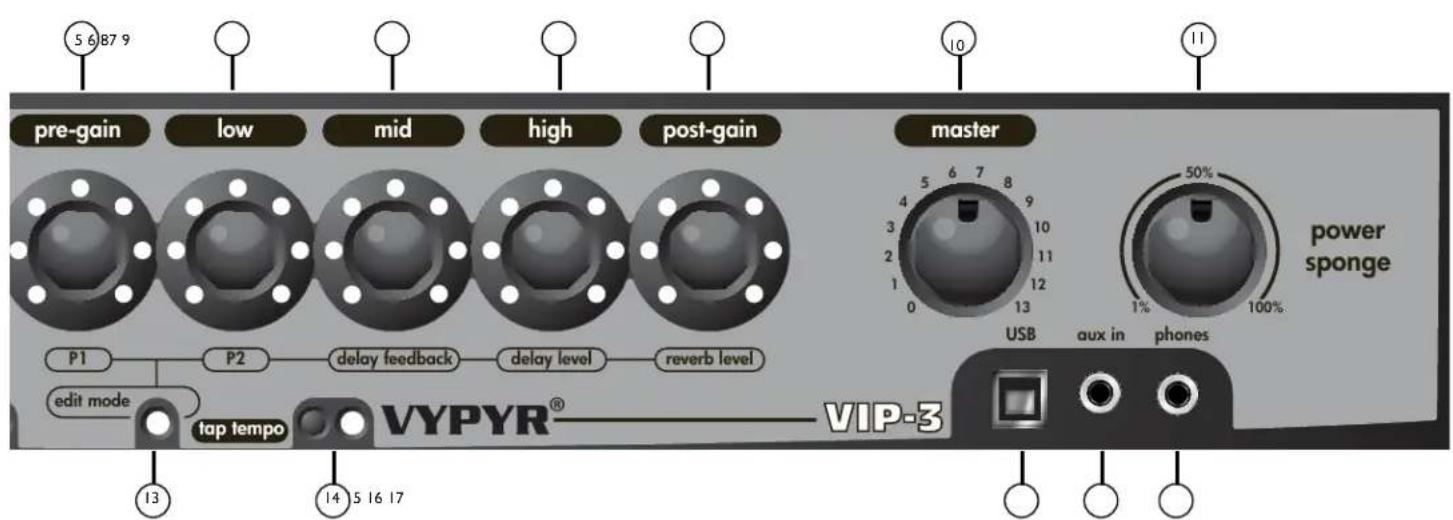
EFFECTS ENCODER
Turn this knob to select any "Rack" effect. These are effects you might find attached to the effects loop of an amplifier. Press the encoder momentarily to enter Edit mode.
NOTE: This encoder also serves other functions, see Preset Section for more information.
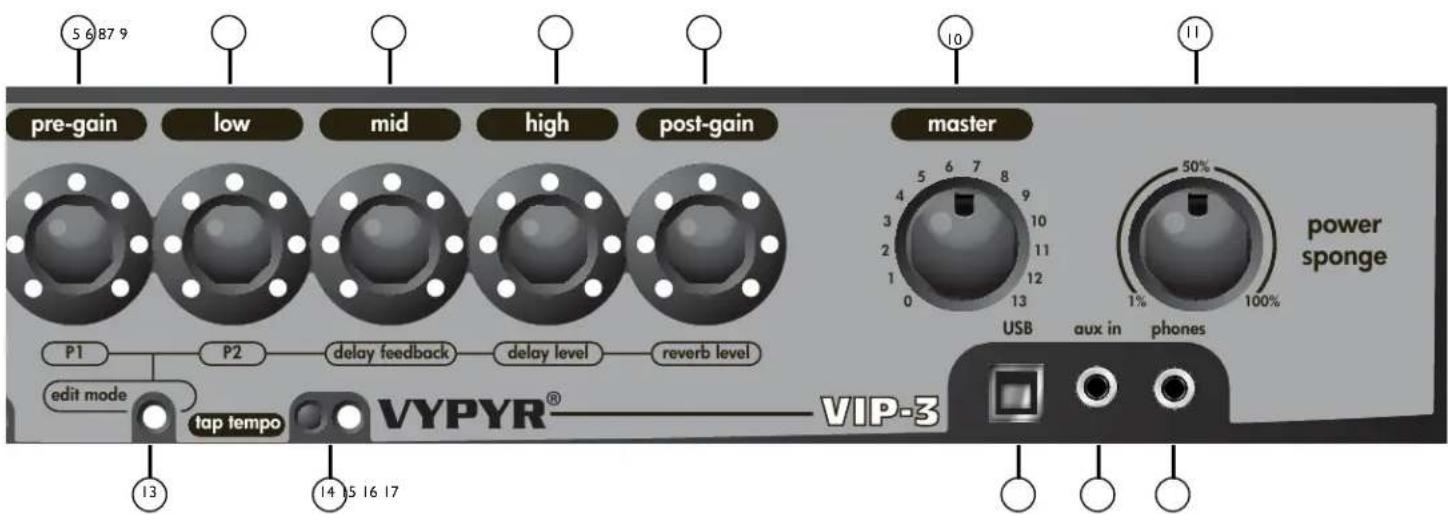
PRE GAIN
Turn this knob to crank up the gain, think of it as how much distortion you want out of the amplifier. In Edit mode this knob controls parameter 1 of either the selected Stompbox or Effect.
LOW ENCODER
Low EQ adjustment. In edit mode this knob controls parameter 2 of either the selected Stompbox or Effect.
MID ENCODER
Mid EQ adjustment. In edit mode this knob controls the Feedback of the Delay effect. Feedback is the number of times the delay repeats.
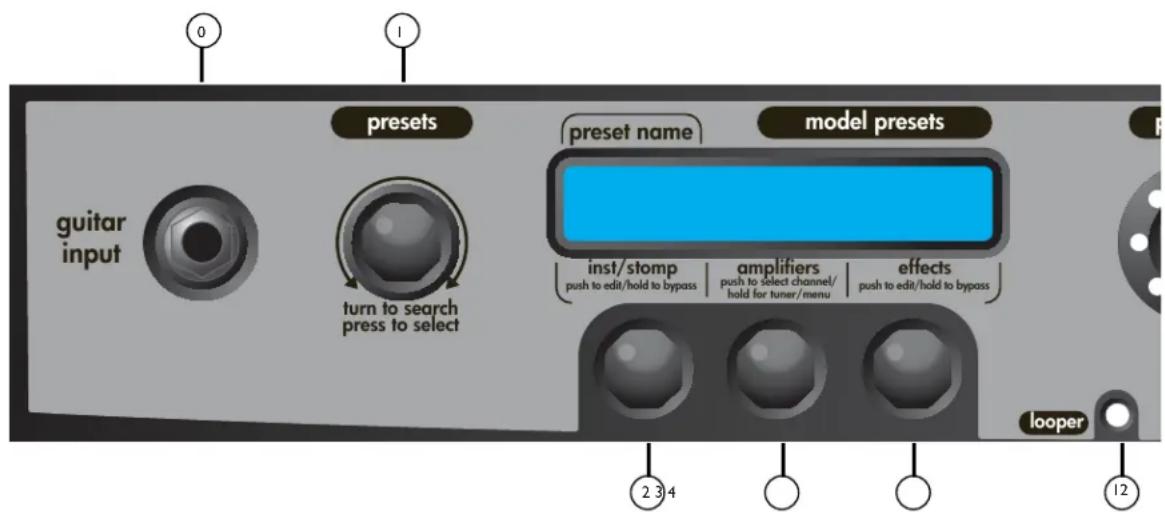
8 HIGH ENCODER
High EQ adjustment. In edit mode this knob controls the Level or amount of Delay effect. All the way to the left is zero and all the way to the right is max.
POST GAIN
This is the individual preset volume. In Edit mode this knob controls the amount of Reverb.
10 MASTERCVOLUME
Turn it up, ours goes to 13!
11 POWER SPONGE
This knob allows you to reduce the power output of the amplifier. Don't confuse this with the Master Volume control. Power Sponge adjusts the amount of power the amp is capable of producing. This circuit allows you to get that full on cranked sound at bedroom levels. The Power Sponge can adjust the maximum output of the power amp from 100 Watts all the way down to 1 Watt.
(12) LOOPER INDICATOR
This function requires a Sanpera® I or Sanpera II foot controller. Waste no time in making that purchase—the looper will allow you hours and hours of fun. You can record any 30 plus seconds of anything, switch your tone (preset), and play over top of your recording. For example, try recording a bass track, then change your tone to a lead tone and play over the top! Note the LED that corresponds to the looper on the encoder will turn on when recording or playing back the loop.
(13) EDIT MODE
Edit mode simply changes the 5 amp controls to their alternate function as listed on the bottom of the encoder. When in Edit mode the Edit mode LED will either be green if you are editing Effects, or red if you are editing Stompboxes. To enter Edit mode simply press either the Stompbox encoder (Item 2) or the Effects encoder (Item 4). To exit Edit mode simply press the same encoder again.
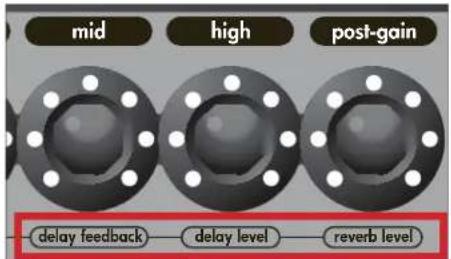
Anytime you want access to the Delay or Reverb you will need to enter Edit mode!
TAP TEMPO
Tap on this button to set the tempo of the Delay effect. If you aren't hearing any delay enter Edit mode to turn the level up.
USB RECORD OUT
The VYPYR USB Record out requires no additional drivers—just plug a standard USB 2.0 cable into your computer and it will detect it as an audio device. Open your favorite recording program and start recording. Don't worry, the output is microphone/cabinet simulated and will sound great right in your computer.
NOTE: The speaker is intentionally muted when USB output is in use although the headphone output is active for real time monitoring. The USB port can also be used to download firmware updates and to connect to a computer to use the Vypyr Edit Graphic User Interface, MIDI works over the USB as well.
AUX INPUT
Plug in your favorite mp3 player, drum machine, or CD player and play along.
HEADPHONE/RECORD OUT
We really spent a lot of time making sure the headphone jack was studio quality. Because of that, and with the proper adapters (not supplied), you can use this output for recording as well as the USB port.
NOTE: When headphones are in use the speaker is muted and Master Volume (Item 9) controls headphone level.
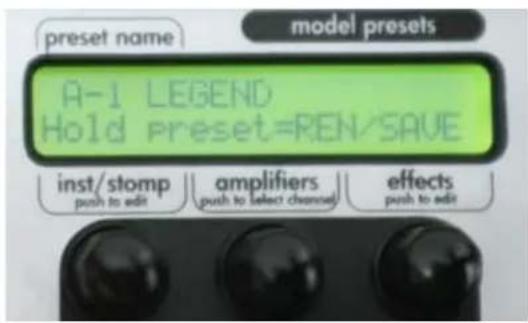
Fig 1
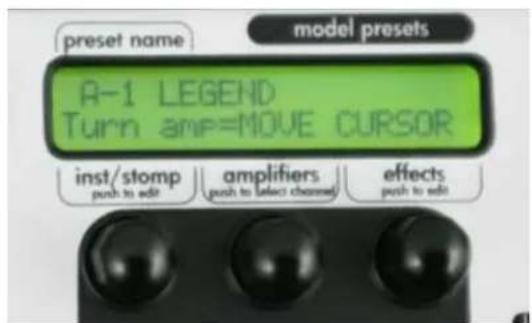
Fig 3
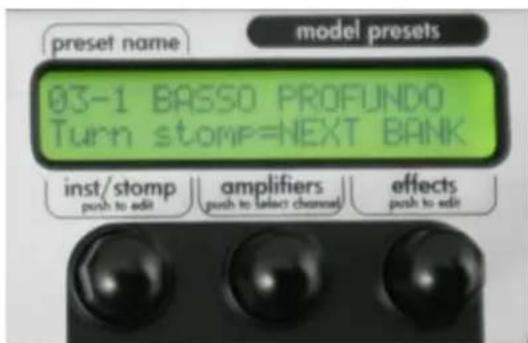
Fig 2
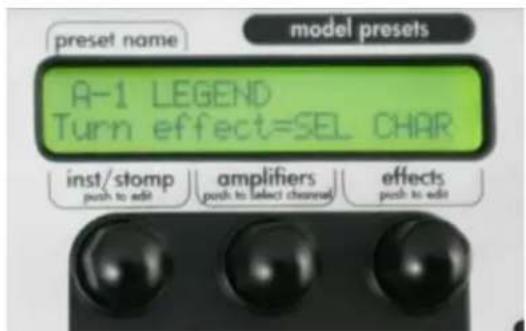
Fig 4
SAVING AND RENAMING PRESETS
- To save a preset you have edited, first press and hold the Preset Encoder for 2 seconds, then release. The screen will now look like Fig 1. You can now rename and save your preset.
- In this mode, the bottom row on the display scrolls through different commands. In this example, the display reads "Turn Stomp=NEXT BANK" meaning that the inst/stomp encoder is used to quickly scroll through the banks allowing you to choose the desired bank in which to save the current preset (See Fig. 2).
- The amplifiers and effects encoders are used to rename the preset. Use the amplifiers encoder to move the cursor and use the effect encoder to change the chosen character (See Fig 3 and Fig 4).

To save the preset, simply press the PRESET ENCODER.
NOTE: At any time during save mode press the TAP TEMPO button to cancel out of save mode and return to normal play.
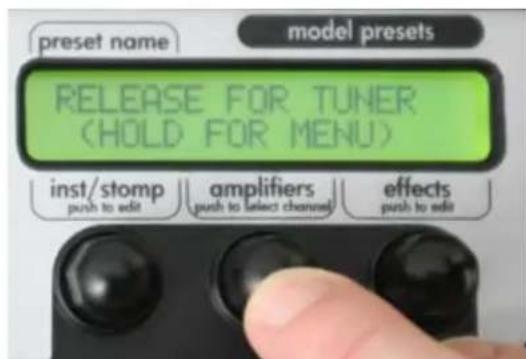
Fig 5
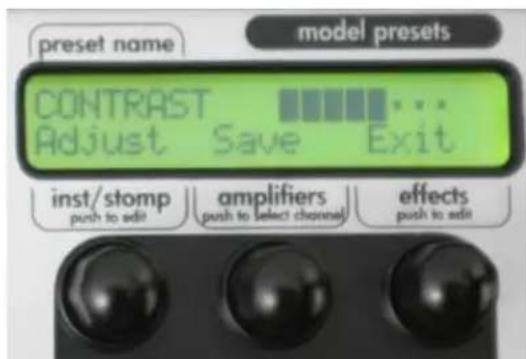
Fig 7
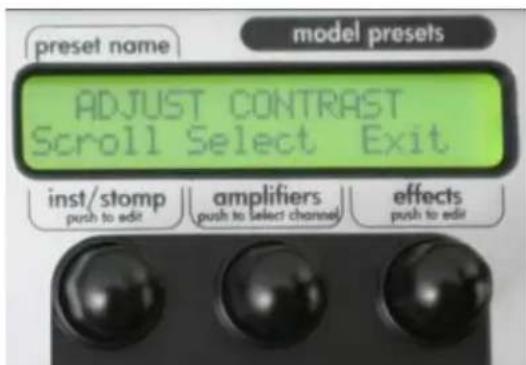
Fig 6
SYSTEM MENU COMMANDS
- To access the System Menu, press and hold the tuner button (Fig 5). The screen will display 3 choices in this menu: ADJUST CONTRAST (for changing the contrast of the display), DISABLE DEMO MODE (turns off the "light show") and FACTORY RESET (erases all user defined presets and returns the amp to original factory presets. To disable DEMO MODE, use the inst/stomp encoder to scroll until the display reads DISABLE DEMO MODE and press the amplifiers encoder to select.
IMPORTANT, ALTHOUGH THE SYSTEM MENU WILL PROMPT YOU TO SELECT YES OR NO WHEN PERFORMING A FACTORY RESET, DO NOT CLICK "YES" UNTIL YOU ARE CERTAIN, BECAUSE THE FACTORY RESET IS IRREVERSIBLE
- To adjust the contrast, press the amplifier encoder, then use the inst/stomp encoder (Fig 6) to adjust the contrast. Then, press the amplifiers encoder to save your changes or the effects encoder to exit without saving changes (Fig 7).
VIP 1
VIP 2
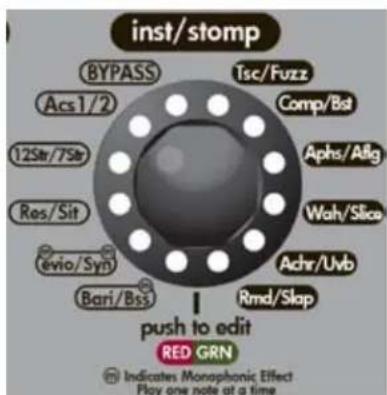
The first encoder to the right of the input jack is the Instrument/Stompbox encoder. This control selects the Instrument model or Stompbox (Traditional floor effects unit) which is exactly like connecting your guitar to your favorite pedal and then into your amplifier. With the Instrument/Stompbox encoder you can select several unique instrument models, as well as distortion and boost pedals. Combine these with the various amp channel settings and you can get some pretty amazing tones. Simply turn the Instrument/Stompbox encoder to select the effect you desire. If you want to adjust the parameters, simply press the encoder to enter Edit mode. Refer to the VIP Matrix to see what stompboxes, instruments and effects are on each model.
OPTIONS ON THE INSTRUMENT/STOMPBOX ENCODER:
12 STRING: Simulation of an electric 12 string guitar with a small body. P1: Body (fullness) P2: String (brightness)
7 STRING: Lowers the pitch by 5 half-steps to simulate a 7 string guitar. P1: Body, P2: String
ACOUSTIC 1: Bright acoustic guitar with a small body. P1: Body, P2: String
ACOUSTIC 2*: Jumbo dreadnought acoustic guitar with a deep body. P1: Body, P2: String
BARITONE* Tunes the instrument down to low A, simulating a Baritone guitar. P1: Body, P2: String
BASS: Monophonic model that tunes the instrument down an entire octave, simulating a Bass guitar. P1: Body, P2: String
EVIO*: Monophonic Electric Violin simulation. P1: Color, P2: Glide (higher settings will glide between notes).
RESONATOR*: Simulation of a Resonator guitar, commonly used in Blues and Country music. Try different settings on your guitar with the pickup selection and tone control to achieve the most realism with your instrument. P1: Body, P2: String.
SITAR*: Simulation of the traditional instrument used in Indian music. P1: Body, P2: String.
- Not available on VIP1
NOTE: MONOPHONIC MODELS ARE MEANT TO BE PLAYED ONE NOTE AT A TIME FOR BEST RESULTS.
TSC: Classic overdrive distortion with just a touch of mid boost. Great in front of almost any amp model. Try it in front of a clean TWN for starters. Parameter Adjustment: P1 Drive, P2 Level
ANALOG BOOST: One of the most useful effects, the boost offers a clean level boost which you will find handy when you want to do a solo with a clean sound or if you need a boost when playing a heavy solo. This will be useful when you have the optional Sanpera® I or II pedal, where using this effect will give you a solo boost in "manual mode". Refer to the Sanpera manual for more information. P1 Drive, P2 Level
SLAP: A very quick, short repetition of the original note, sounds like the note "slaps" back at you. This effect is great for playing country music. Parameter Adjustments: P1 Time, P2 Mix
| Stompboxes | VIP 1 | VIP 2 | VIP 3 |
| TSC | X | X | X |
| Fuzz | X | X | |
| Comp | X | X | X |
| Slap | X | ||
| Wah | X | X | X |
| Phase | | X | X | X |
| Flanger | X | X | X |
| Synth | X | X | X |
| Slice | X | X | X |
| Env Filter | X | ||
| Pitch shifter | X | ||
| Chorus | X | X | X |
| Octaver | X | ||
| Rotary | X | ||
| MOG | X | ||
| Tremolo | X | ||
| Reverse | X | ||
| Uvb | X | X | X |
| Ring Mod | X | X | X |
| Vbrato | X | ||
| Boost | X | X | X |
| Instruments | VIP 1 | VIP 2 | VIP 3 |
| Acoustic 1 | X | X | X |
| Acoustic 2 | X | X | |
| 12 string | X | X | |
| 7 string | X | X | |
| Resonator | X | X | |
| Sitar | X | X | |
| EVIO | X | X | |
| Synth | X | X | |
| Bari | X | X | |
| Bass | X | X | X |
SYNTH: The synth is a Monophonic (one note at a time) effect that creates a square wave at the frequency of the input string and runs it through a built-in envelope filter and pitch glide controller. The attack parameter controls the amount of filter modulation - higher values result in more wah-like filtering. The glide parameter controls the amount of time it takes to glide from one note to another. Higher values result in more audible sliding between notes. P1 Attack, P2 Glide
SLICER: The Slicer turns the signal on and off very fast or very slow. You can create rhythmic effects with the Slicer, you just have to experiment. P1 Speed, P2 Width
NOTE: The optional Sanpera I and Sanpera® II pedals will change the speed of this effect.
UVB: Originally designed to be a rotary speaker simulator, Uvb quickly took on a life of it's own. It's been one of the most popular effects since Hendrix pulled it out for the National Anthem at Woodstock: P1 Speed, P2 Depth
RING MODULATOR: The Ring Modulator combines two waveforms, and outputs the sum and difference of the frequencies present in each waveform. As you will see this effect is certainly a little different but can be a lot of fun. Listen to the guitar solo in "Paranoid" and you will hear a Ring Modulator combined with a Fuzz distortion. Parameter adjustments: P1 Carrier Frequency, P2 Mix
VIBRATO: Unlike Tremolo, which changes the volume of the signal to create the effect, Vibrato changes the pitch slightly to create the effect. P1 Speed, P2 Depth
COMP: This compressor allows you to set an output level and the sensitivity at which it kicks in (Edit mode). Compressors can produce percussive, clicky sounds on clean guitar - or mellow sustain for lead work. Try this stompbox effect on a clean channel and strike the strings softly at first and than harder to hear and feel the effect. Parameter Adjustments: P1 Sensitivity, P2 Level
CHORUS: This unmistakable classic warm analog chorus model will no doubt be a staple in your preset arsenal. P1 Speed, P2 Depth
ANALOG PHASE: Analog Phase is an effect commonly confused with Flanging. Phasing uses changes in the frequency spectrum to create peaks and valleys in the audio signal. Check out "Ain't Talking 'Bout Love." P1 Speed, P2 Depth
ANALOG FLANGE: Flanging is a time-based audio effect that occurs when two identical signals are mixed together with one signal slightly delayed. This delay produces a swept comb filter effect. - Check out the intro to "Cowboys from Hell" or "Barracuda". P1 Speed, P2 Depth
WAH: The auto wah uses frequency filter sweeps in the range typically associated with vocals to give the guitar a "Wah" sound. Think "Voodoo Child" on autopilot. P1 Speed, P2 Sweep Depth
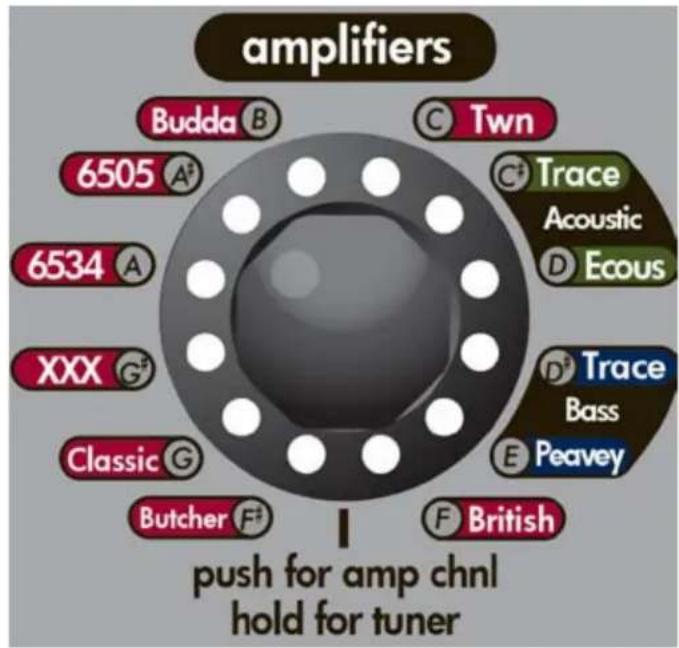
One of the most unique features of the VYPYR amplifier is the channel select encoder. Each of the amp modes contains three channel models, low gain, medium gain, and high gain. Turn the encoder to select the amplifier model you desire. To change the channel model, simply press the Amp encoder.
WORD ABOUT EQ:
When modeling the amplifiers for the VYPYR we also painstakingly modeled the EQ and how the EQ controls functioned on the various amplifiers. For instance the XXX, has active EQ on the lead channel. You will notice when you are on the Red channel model of the XXX the EQ will act very differently from that of a Green channel Twn. Some EQs will have drastic effects and some, like the British amplifier we modeled, will have little effect at all.
BRITISH: The classic sound of Queen and so many British bands from the 60's through today. The tone stack on Brian May's amplifier was shorted, so on this model the tone controls have limited response.
BUTCHER™: Modern take on a classic British stack. This very versatile amplifier can go from nice 'n clean to modern hot rodded tones.
CLASSIC®: The Peavey Classic 50 is one of the most successful amps of all time. With its responsive gain structure and warm/punchy tone. Classic Series guitar amps are revered by gritty blues benders, chicken pickin' country cats and nouveau-Stones rockers alike.
XXX: The Peavey XXX is an extremely versatile amplifier. With an ultra-clean clean channel, a modified British rhythm channel and lead channel with over-the-top gain for screamin' leads, the XXX may become your favorite amp.
6534+: The legendary sound of the 6505+ head, but with an EL34 power section for a bit of British flair. The EL34's add a "bark" to the midrange that has become a favorite for many of Peavey's artists.
6505 ^® : Named in celebration of Peavey's first 40 years, the 6505 Series is also the relaunch of the 5150 Series, the immensely popular amplifiers Peavey designed with Edward Van Halen. While known as the 5150, these amps became the undisputed go-to guitar amps for scores of rock, hardcore and metal bands due to their raw tone, relentless power and road-proven reliability. The 6505 is still the unquestionable choice for an ever-expanding list of endorsers and over the years has become the sound of metal the world over.
BUDDA®: Budda Amplification specializes in hand-wired amplifiers and cabinets that balance warm tube gain stages with defined, responsive attack. Budda sparked the low-wattage revolution in guitar amps more than a decade ago with the hand-wired Budda Twinmaster™, and the innovation continues today with the Superdrive™II Series. The proprietary Budda Dual Class Hot Bias Circuit combines the best characteristics of class A and class AB to produce lively tones defined by massive dynamics and complex overtones in second and third order harmonics, with plenty of separation to let your guitar sing.
TWN: Classic California clean. To achieve overdriven tones, we've added stompbox distortion in front of the amp on the Orange and Red Channels.
TRACE ACOUSTIC: Over two decades ago, Trace Elliot revolutionized the world of acoustic instrumentation with its original TA™ Series. Trace Elliot brought studio-quality acoustic reproduction to the stage through designs that incorporated very high-impedance (piezo pickup) inputs, notch filters, phantom power, DSP effects and Dynamic Correction™, unique circuitry that reproduces the sparkling top end of an acoustic instrument without relying on high-frequency horns (which can produce harsh, unwanted overtones).
PEAVEY ECOUSTIC®: Peavey Ecoustic Series amplifiers are highly versatile amplification systems designed for acoustic instruments, vocals and line-level devices such as samplers and audio players in performance and rehearsal applications.
TRACE BASS: Trace Elliot revolutionized bass amplification in the 1980's with a line of full-range amps and enclosures. Give the Trace Elliot signature tone a try and you'll see why over the years countless artists have relied on Trace Elliot.
PEAVEY BASS: For over 40 years, Peavey bass amps have been a mainstay in the music industry. Round, huge, loud, deep; there are many ways to describe the Peavey bass amp sound.
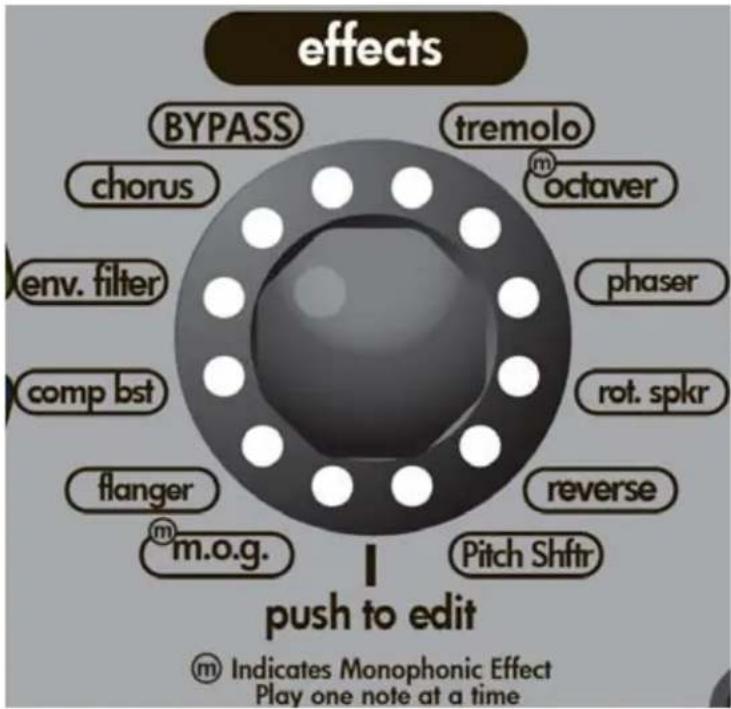
The third encoder from the right is the Effects encoder. This encoder selects any desired "Rack" effect. The term "Rack effect" is used to identify effect components that would typically be found connected to an effects loop on an amplifier. These effects are usually post input, post EQ and sound distinctly different than pre amplifier effects (Stompboxes). To select your effect, simply turn the encoder so the LED is next to the effect you desire.
TREMOLO: This effect is achieved through amplitude modulation. The note gets slightly louder and softer in rapid succession. Note this effect is different from Rotary. With Tremolo there is no pitch fluctuation. This effect is on the inst/stomp encoder on the VIP 1. P1 Speed, P2 Depth
OCTAYER: Just as the name implies this Monophonic effect will produce a tone one octave below the note you are playing. This effect is on the inst/stomp encoder on the VIP 1. P1 Mix (Amount of effect VS dry signal), P2 Octave level
PHASER: Unlike the Analog Phaser model on the Stompbox encoder, this phaser utilizes an 8 stage process. Resulting in much more of a phasing sound than you would find in a stompbox. P1 Speed, P2 Depth
ROTARY: This effect simulates the sound of a rotating speaker. Listen carefully to this effect and you will notice as the simulated speaker rotates, you will hear a pitch shift due to the Doppler effect. This effect is on the inst/stomp encoder on the VIP 1. NOTE: The optional Sanpera I and Sanpera II pedals will change the speed of this effect. P1 Speed, P2 Depth
REVERSE: As the name implies, strum or play a note - and it will play back in reverse. This effect is on the inst/stomp encoder on the VIP 1. P1 Time, P2 Mix
PITCH SHIFT: Changes the pitch of the note you are playing. With the Sanpera® I or II optional footswitch you can assign this effect to the foot controller and sweep from the original note to the note selected in the parameter adjustment. This effect is on the inst/stomp encoder on the VIP 1. P1 Interval, P2 Mix
NOTE: The optional Sanpera I and Sanpera II pedals will change the parameter of this effect.
| Effects | VIP 1 | VIP 2 | VIP 3 |
| Tremolo | X | X | |
| Octaver | X | X | |
| Phaser | X | X | |
| Rot. Spkr | X | X | |
| Reverse | X | X | |
| Pitch Shft | X | X | |
| mog | X | X | |
| Flanger | X | X | |
| CompBST | X | X | |
| Env. Filter | X | X | |
| Chorus | X | X |
MOG: An effect of our own creation. MOG stands for Monophonic Octave Generator. Basically we generate a signal one octave above the signal you are playing and another one octave below. This effect is not intended for use with chords, so try it with single notes at first. This effect is on the inst/stomp encoder on the VIP 1. P1 Octave up level, P2 Octave down level
FLANGER: Unlike the Analog Flanger model on the Stompbox encoder, this flanger uses a longer delay line. Essentially this causes the flanger to emphasise lower frequencies. Parameter Adjustments: P1 Speed, P2 Depth
COMP BST: Works in a similar fashion as Comp. However, the Comp BST compresses the dynamic range after the amp model but before the tone controls. P1: Sensitivity, P2: Level
ENV FILTER: Short for Envelope Filter, this effect is similar to Auto-Wah. The main difference is in the parameter adjustment. With the Env Filter we allow you access to the "Q" (Width of the frequency band filtered) which allows you to stray far from the sound of an Auto-Wah. This effect is on the inst/stomp encoder on the VIP 1. P1 Sensitivity (Threshold), P2 Intensity (Q)
CHORUS: Similar to the Analog Chorus on the Stompbox encoder but with a longer delay line. What does that mean? Well it means this effect will allow you to create a "Wetter" signal than you would normally find on a stompbox chorus pedal. In fact at it's most intense setting you can clearly hear a doubling effect on the signal. P1 Speed, P2 Depth
LOOPER: (not on an encoder wheel, this function will require a Sanpera I or Sanpera II foot controller). Waste no time in making that purchase, the looper will allow you hours and hours of fun. You can record any 30 plus seconds of anything, switch your tone (Preset) and play over top of that.
NOTE: The LED that corresponds to the looper on the encoder will turn on when recording or playing back the loop.
STOMP P1 P2 NOTES
TSC Drive Level Tone knob at 12:00, 12dB more gain than pedal at max
Fuzz Drive Level Russian model, tone at 11:00, 10dB more gain potential
Comp Sensitivity Level
Slap Time Mix Max Mix = 50/50 Dry/Wet, 50ms<T<167ms
Auto Wah Speed Depth At min Depth, Param1 serves as fixed
Analog Phase Speed Depth Depth adds regeneration for more intensity
Analog Flange Speed Depth Depth combines Width and Regen of original pedal
Synth Attack Glide
Slice Speed Width
Chorus Speed Depth Filters set to 12:00, flat
UVB Speed Depth
Ring Modulator Freq Mix Modulation frequency from 80 Hz to 2Khz
Vibrato Speed Depth
Boost Drive Level
EFFECT P1 P2 NOTES
Tremolo Speed Depth
Octave Mix Level
Phaser Speed Depth 8 stage phaser
Rotary Spkr Speed Depth
Reverse Time Mix Max Mix = 0/100 Dry/Wet, 250ms<1T<11s
Pitch Shifter Interval Mix At Minimum Mix,Param1 controls Detune
MOG Octave Up Octave Down Level controls
Flanger Speed Depth DelayLine=7ms
Compbst Sensitivity Level
Env Filter Sensitivity Intensity (Q)
Chorus Speed Depth DelayLine=15ms
| Instruments | VIP 1 | VIP 2 | VIP 3 |
| Acoustic 1 | X | X | X |
| Acoustic 2 | X | X | |
| 12 string | X | X | |
| 7 string | X | X | |
| Resonator | X | X | |
| Sitar | X | X | |
| EVIO | X | X | |
| Synth | X | X | |
| Bari | X | X | |
| Bass | X | X | X |
| Stompboxes | VIP 1 | VIP 2 | VIP 3 |
| TSC | X | X | X |
| Fuzz | X | X | |
| Comp | X | X | X |
| Slap | X | ||
| Wah | X | X | X |
| Phaser | X | X | X |
| Flanger | X | X | X |
| Synth | X | X | X |
| Slice | X | X | X |
| Env Filter | X | ||
| Pitch shifter | X | ||
| Chorus | X | X | X |
| Octaver | X | ||
| Rotary | X | ||
| MOG | X | ||
| Tremolo | X | ||
| Reverse | X | ||
| Uyb | X | X | X |
| Ring Mod | X | X | X |
| Vibrato | X | ||
| Boost | X | X | X |
| Effects | VIP 1 | VIP 2 | VIP 3 |
| Tremolo | X | X | |
| Octaver | X | X | |
| Phaser | X | X | |
| Rot. Spkr | X | X | |
| Reverse | X | X | |
| Pitch Shft | X | X | |
| mog | X | X | |
| Flanger | X | X | |
| Comp rst | X | X | |
| Env. Filter | X | X | |
| Chorus | X | X |
Engineering Notes
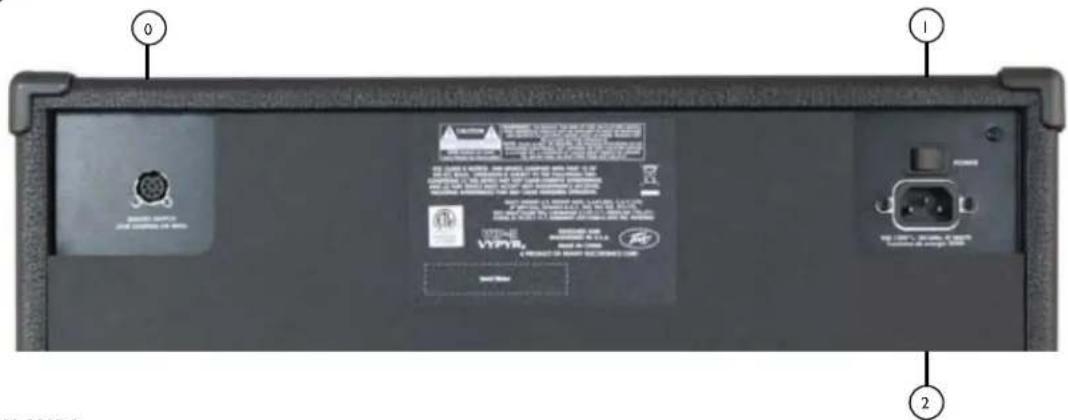

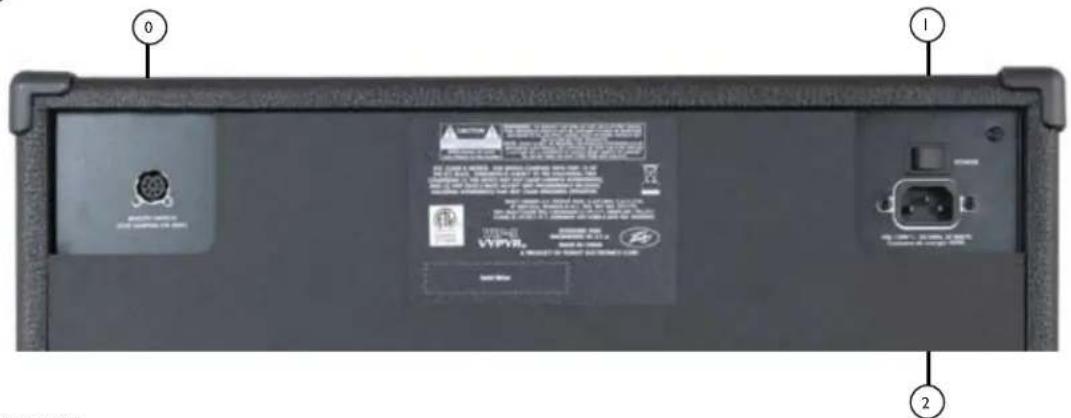
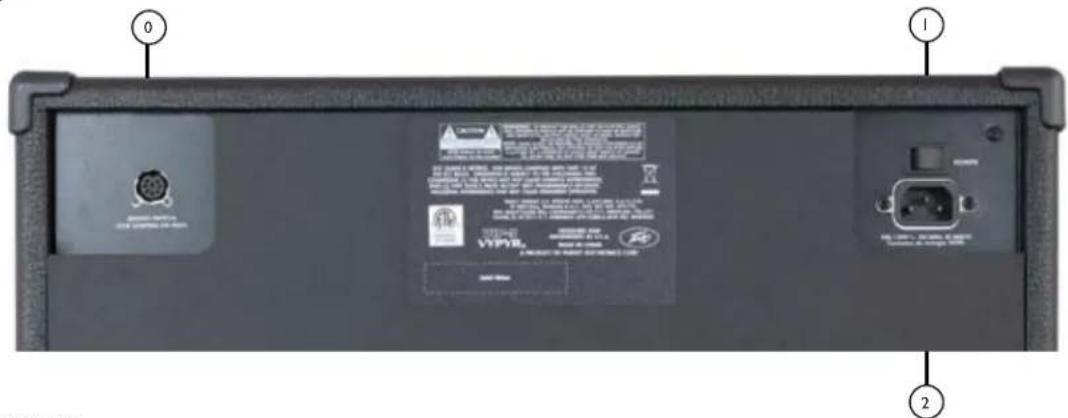
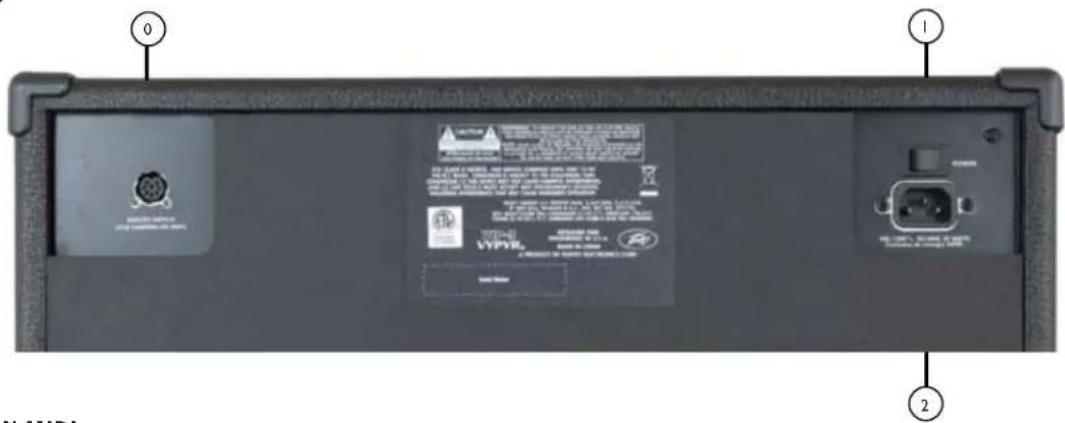
8 PIN MIDI
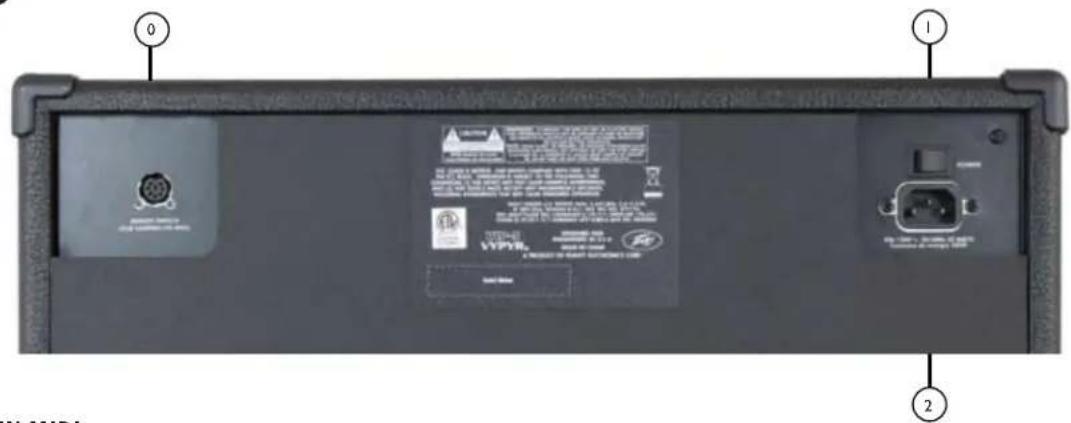
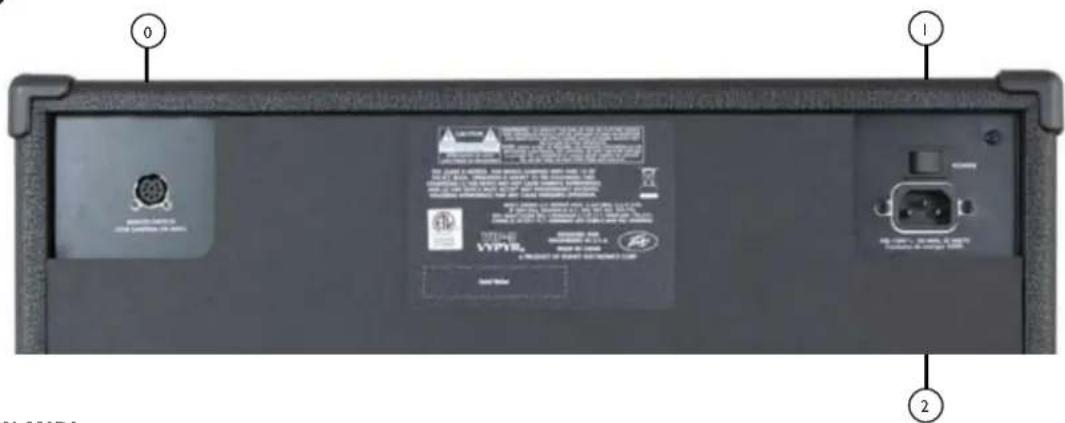
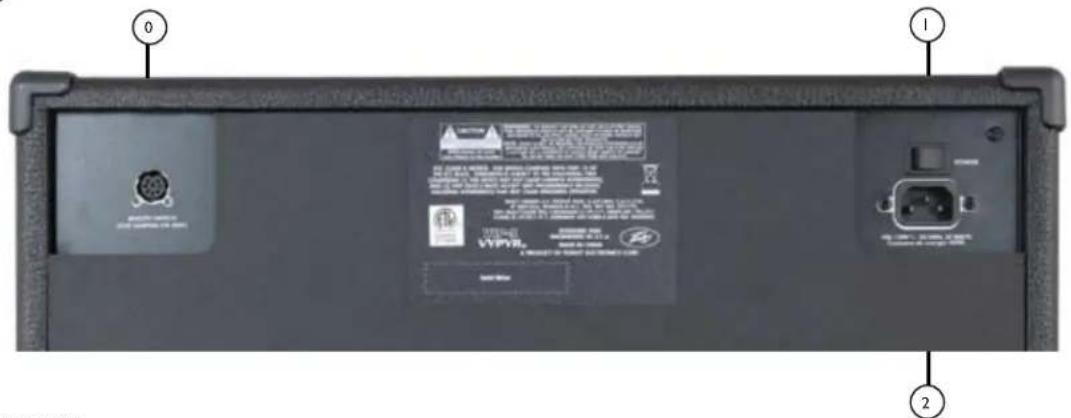
Connect your Sanpera® I or Sanpera II here. This particular style of MIDI jack provides power to the Sanpera foot controllers and is required for their operation.

POWER SWITCH
This two-way rocker switch applies power to the unit when placed in the ON position.
CAUTION: The on/off switch in this unit does not break both sides of the primary mains. Hazardous engery can be present inside the chassis when the on/off switch in the OFF position.

AC POWER INLET:
This is the receptacle for an IEC line cord, which provides AC power to the unit. Connect the line cord to this connector to provide power to the unit. Damage to the equipment may result if improper line voltage is used. (See line voltage marking on unit).
Never break off the ground pin on any equipment. It is provided for your safety. If the outlet used does not have a ground pin, a suitable grounding adapter should be used and the third wire should be grounded properly.
To prevent the risk of shock or fire hazard, always make sure that the amplifier and all associated equipment is properly grounded.
NOTE: FOR U.K. ONLY
As the colors of the wires in the mains lead of this apparatus may not correspond with the colored markings identifying the terminals in your plug, proceed as follows:
(1) The wire which is colored green and yellow must be connected to the terminal which is marked by the letter E, or by the Earth symbol, or colored green or green and yellow. (2) The wire which is colored blue must be connected to the terminal
which is marked with the letter N, or the color black. (3) The wire which is colored brown must be connected to the terminal which is marked with the letter L, or the color red.
VIP 1 - POWER SPECIFICATIONS
Rated Power & Load:
(5% THD, 1kHz, 120V AC line)
20W RMS into 8 Ohms
Power Consumption (1/8th Power Output):
20W @ 50/60Hz, 100-120V AC
20W @ 50/60Hz, 220-240V AC
Dimensions & Weight
15" H x 16.584" W x 8.5" D
17.5 lbs.
VIP 2 - POWER SPECIFICATIONS
Rated Power & Load:
(5% THD, 1kHz, 120V AC line)
40W RMS into 8 Ohms
Power Consumption (1/8th Power Output):
40W @ 50/60Hz, 100-120V AC
40W @ 50/60Hz, 220-240V AC
Dimensions & Weight
17.7" H x 19.59" W x 10" D
26 lbs.
VIP 3 - POWER SPECIFICATIONS
Rated Power & Load:
(5% THD, 1kHz, 120V AC line)
100W RMS into 8 Ohms
Power Consumption (1/8th Power Output):
42W @ 50/60Hz, 100-120V AC
42W@50/60Hz,220-240V AC
Dimensions & Weight
19"Hx19.566"Wx10"D
31 lbs.
Vypyr® VIP Series
Betriebsanleitung
www.peavey.com
DEUTSCH
| Stompboxen | VIP 1 | VIP 2 | VIP 3 |
| TSC | X | X | X |
| Fuzz | X | X | |
| Comp | X | X | X |
| Slap | X | ||
| Wah | X | X | X |
| Phaser | X | X | X |
| Flanger | X | X | X |
| Synth | X | X | X |
| Slice | X | X | X |
| Env Filter | X | ||
| Pitch shifter | X | ||
| Chorus | X | X | X |
| Octaver | X | ||
| Rotary | X | ||
| MOG | X | ||
| Tremolo | X | ||
| Reverse | X | ||
| Uvb | X | X | X |
| Ring Mod | X | X | X |
| Vibrato | X | ||
| Boost | X | X | X |
| Instrumente | VIP 1 | VIP 2 | VIP 3 |
| Akustik 1 | X | X | X |
| Akustik 2 | X | X | |
| 12-saitig | X | X | |
| 7-saitig | X | X | |
| Resonator | X | X | |
| Sitar | X | X | |
| EVIO | X | X | |
| Synth | X | X | |
| Bari | X | X | |
| Bass | X | X | X |
| Effekte | VIP 1 | VIP 2 | VIP 3 |
| Tremolo | X | X | |
| Octaver | X | X | |
| Phaser | X | X | |
| Rot. Spkr | X | X | |
| Reverse | X | X | |
| Pitch Shft | X | X | |
| mog | X | X | |
| Flanger | X | X | |
| CompBST | X | X | |
| Env. Filter | X | X | |
| Chorus | X | X |
| Instrumente | VIP 1 | VIP 2 | VIP 3 |
| Acoustic 1 | X | X | X |
| Acoustic 2 | X | X | |
| 12 string | X | X | |
| 7 string | X | X | |
| Resonator | X | X | |
| Sitar | X | X | |
| EVIO | X | X | |
| Synth | X | X | |
| Bari | X | X | |
| Bass | X | X | X |
| Stompboxen | VIP 1 | VIP 2 | VIP 3 |
| TSC | X | X | X |
| Fuzz | X | X | |
| Comp | X | X | X |
| Slap | X | ||
| Wah | X | X | X |
| Phaser | X | X | X |
| Flanger | X | X | X |
| Synth | X | X | X |
| Slice | X | X | X |
| Env Filter | X | ||
| Pitch shifter | X | ||
| Chorus | X | X | X |
| Octaver | X | ||
| Rotary | X | ||
| MOG | X | ||
| Tremolo | X | ||
| Reverse | X | ||
| Uvb | X | X | X |
| Ring Mod | X | X | X |
| Vibrato | X | ||
| Boost | X | X | X |
| Effekte | VIP 1 | VIP 2 | VIP 3 |
| Tremolo | X | X | |
| Octaver | X | X | |
| Phaser | X | X | |
| Rot. Spkr | X | X | |
| Reverse | X | X | |
| Pitch Shft | X | X | |
| mog | X | X | |
| Flanger | X | X | |
| Comp bist | X | X | |
| Env. Filter | X | X | |
| Chorus | X | X |
Technische Hinweise

8 PIN MIDI
As the colors of the wires in the mains lead of this apparatus may not correspond with the colored markings identifying the terminals in your plug, proceed as follows:
(1) The wire which is colored green and yellow must be connected to the terminal which is marked by the letter E, or by the Earth symbol, or colored green or green and yellow. (2) The wire which is colored blue must be connected to the terminal
which is marked with the letter N, or the color black. (3) The wire which is colored brown must be connected to the terminal which is marked with the letter L, or the color red.
| Pédales d'effet | VIP 1 | VIP 2 | VIP 3 |
| TSC | X | X | X |
| Fuzz | X | X | |
| Comp | X | X | X |
| Slap | X | ||
| Wah | X | X | X |
| Phaser | X | X | X |
| Flanger | X | X | X |
| Synth | X | X | X |
| Slice | X | X | X |
| Env Filter | X | ||
| Pitch shifter | X | ||
| Chorus | X | X | X |
| Octaver | X | ||
| Rotary | X | ||
| MOG | X | ||
| Tremolo | X | ||
| Reverse | X | ||
| Uvb | X | X | X |
| Ring Mod | X | X | X |
| Vibrato | X | ||
| Boost | X | X | X |
| Instruments | VIP 1 | VIP 2 | VIP 3 |
| Acoustic 1 | X | X | X |
| Acoustic 2 | X | X | |
| 12 string | X | X | |
| 7 string | X | X | |
| Resonator | X | X | |
| Sitar | X | X | |
| EVIO | X | X | |
| Synth | X | X | |
| Bari | X | X | |
| Bass | X | X | X |
| Effets | VIP 1 | VIP 2 | VIP 3 |
| Tremolo | X | X | |
| Octaver | X | X | |
| Phaser | X | X | |
| Rot. Spkr | X | X | |
| Reverse | X | X | |
| Pitch Shft | X | X | |
| mog | X | X | |
| Flanger | X | X | |
| CompBST | X | X | |
| Env. Filter | X | X | |
| Chorus | X | X |
| Instruments | VIP 1 | VIP 2 | VIP 3 |
| Acoustic 1 | X | X | X |
| Acoustic 2 | X | X | |
| 12 string | X | X | |
| 7 string | X | X | |
| Resonator | X | X | |
| Sitar | X | X | |
| EVIO | X | X | |
| Synth | X | X | |
| Bari | X | X | |
| Bass | X | X | X |
| Caisson de basses | VIP 1 | VIP 2 | VIP 3 |
| TSC | X | X | X |
| Fuzz | X | X | |
| Comp | X | X | X |
| Slap | X | ||
| Wah | X | X | X |
| Phaser | X | X | X |
| Flanger | X | X | X |
| Synth | X | X | X |
| Slice | X | X | X |
| Env Filter | X | ||
| Pitch shifter | X | ||
| Chorus | X | X | X |
| Octaver | X | ||
| Rotary | X | ||
| MOG | X | ||
| Tremolo | X | ||
| Reverse | X | ||
| Uvb | X | X | X |
| Ring Mod | X | X | X |
| Vibrato | X | ||
| Boost | X | X | X |
| Effets | VIP 1 | VIP 2 | VIP 3 |
| Tremolo | X | X | |
| Octaver | X | X | |
| Phaser | X | X | |
| Rot. Spkr | X | X | |
| Reverse | X | X | |
| Pitch Shft | X | X | |
| mog | X | X | |
| Flanger | X | X | |
| CompBST | X | X | |
| Env. Filter | X | X | |
| Chorus | X | X |
Notes techniques

8 PIN MIDI
As the colors of the wires in the mains lead of this apparatus may not correspond with the colored markings identifying the terminals in your plug, proceed as follows:
(1) The wire which is colored green and yellow must be connected to the terminal which is marked by the letter E, or by the Earth symbol, or colored green or green and yellow. (2) The wire which is colored blue must be connected to the terminal which is marked with the letter N, or the color black. (3) The wire which is colored brown must be connected to the terminal which is marked with the letter L, or the color red.
VIP 1: SPECIFICATIONS ÉLECTRIQUES
| Stompbox | VIP 1 | VIP 2 | VIP 3 |
| TSC | X | X | X |
| Fuzz | X | X | |
| Comp | X | X | X |
| Slap | X | ||
| Wah | X | X | X |
| Phaser | X | X | X |
| Flanger | X | X | X |
| Synth | X | X | X |
| Slice | X | X | X |
| Env Filter | X | ||
| Pitch shifter | X | ||
| Chorus | X | X | X |
| Octaver | X | ||
| Rotary | X | ||
| MOG | X | ||
| Tremolo | X | ||
| Reverse | X | ||
| Uvb | X | X | X |
| Ring Mod | X | X | X |
| Vibrato | X | ||
| Boost | X | X | X |
| Strumenti | VIP 1 | VIP 2 | VIP 3 |
| Acoustic 1 | X | X | X |
| Acoustic 2 | X | X | |
| 12 string | X | X | |
| 7 string | X | X | |
| Resonator | X | X | |
| Sitar | X | X | |
| EVIO | X | X | |
| Synth | X | X | |
| Bari | X | X | |
| Bass | X | X | X |
| Effetti | VIP 1 | VIP 2 | VIP 3 |
| Tremolo | X | X | |
| Octaver | X | X | |
| Phaser | X | X | |
| Rot. Spkr | X | X | |
| Reverse | X | X | |
| Pitch Shft | X | X | |
| mog | X | X | |
| Flanger | X | X | |
| CompBST | X | X | |
| Env. Filter | X | X | |
| Chorus | X | X |
| Strumenti | VIP 1 | VIP 2 | VIP 3 |
| Acoustic 1 | X | X | X |
| Acoustic 2 | X | X | |
| 12 string | X | X | |
| 7 string | X | X | |
| Resonator | X | X | |
| Sitar | X | X | |
| EVIO | X | X | |
| Synth | X | X | |
| Bari | X | X | |
| Bass | X | X | X |
| Stompbox | VIP 1 | VIP 2 | VIP 3 |
| TSC | X | X | X |
| Fuzz | X | X | |
| Comp | X | X | X |
| Slap | X | ||
| Wah | X | X | X |
| Phaser | X | X | X |
| Flanger | X | X | X |
| Synth | X | X | X |
| Slice | X | X | X |
| Env Filter | X | ||
| Pitch shifter | X | ||
| Chorus | X | X | X |
| Octaver | X | ||
| Rotary | X | ||
| MOG | X | ||
| Tremolo | X | ||
| Reverse | X | ||
| Uvb | X | X | X |
| Ring Mod | X | X | X |
| Vibrato | X | ||
| Boost | X | X | X |
| Effetti | VIP 1 | VIP 2 | VIP 3 |
| Tremolo | X | X | |
| Octaver | X | X | |
| Phaser | X | X | |
| Rot. Spkr | X | X | |
| Reverse | X | X | |
| Pitch Shft | X | X | |
| mog | X | X | |
| Flanger | X | X | |
| Comp bist | X | X | |
| Env. Filter | X | X | |
| Chorus | X | X |
Note tecniche

8 PIN MIDI
As the colors of the wires in the mains lead of this apparatus may not correspond with the colored markings identifying the terminals in your plug, proceed as follows:
(1) The wire which is colored green and yellow must be connected to the terminal which is marked by the letter E, or by the Earth symbol, or colored green or green and yellow. (2) The wire which is colored blue must be connected to the terminal
which is marked with the letter N, or the color black. (3) The wire which is colored brown must be connected to the terminal which is marked with the letter L, or the color red.
(5% THD, 1kHz, linea 120V CA)
20 W RMS in 8 Ohm
20W @ 50/60Hz, 100-120V CA
20W @ 50/60Hz, 220-240V CA
Dimensioni e Peso
15" alt. x 16,584 " largh. x 8,5" diam.
17,5 libbre.
(5% THD, 1kHz, linea 120V CA)
4o W RMS in 8 Ohm
40W @ 50/60Hz, 100-120V CA
40W @ 50/60Hz, 220-240V CA
Dimensioni e Peso
17,7" alt. x 19,59" largh. x 10" diam.
26 libbre.
(5% THD, 1kHz, linea 120V CA)
100 W RMS in 8 Ohm
42W@50/60Hz,100-120VCA
42W@50/60Hz,220-240VCA
Dimensioni e Peso
19" alt. x 19,566" largh. x 10" diam.
31 libbre.
Serie Vypyr® VIP
Manual de operación
www.peavey.com
ESPAÑOL
| Stompbox | VIP 1 | VIP 2 | VIP 3 |
| TSC | X | X | X |
| Fuzz | X | X | |
| Comp | X | X | X |
| Slap | X | ||
| Wah | X | X | X |
| Phaser | X | X | X |
| Flanger | X | X | X |
| Synth | X | X | X |
| Slice | X | X | X |
| Env Filter | X | ||
| Pitch shifter | X | ||
| Chorus | X | X | X |
| Octaver | X | ||
| Rotary | X | ||
| MOG | X | ||
| Tremolo | X | ||
| Reverse | X | ||
| Uvb | X | X | X |
| Ring Mod | X | X | X |
| Vibrato | X | ||
| Boost | X | X | X |
| Instrumentos | VIP 1 | VIP 2 | VIP 3 |
| Acoustic 1 | X | X | X |
| Acoustic 2 | X | X | |
| 12 string | X | X | |
| 7 string | X | X | |
| Resonator | X | X | |
| Sitar | X | X | |
| EVIO | X | X | |
| Synth | X | X | |
| Bari | X | X | |
| Bass | X | X | X |
| Efectos | VIP 1 | VIP 2 | VIP 3 |
| Tremolo | X | X | |
| Octaver | X | X | |
| Phaser | X | X | |
| Rot. Spkr | X | X | |
| Reverse | X | X | |
| Pitch Shft | X | X | |
| MOG | X | X | |
| Flanger | X | X | |
| CompBST | X | X | |
| Env. Filter | X | X | |
| Chorus | X | X |
| Instruments | VIP 1 | VIP 2 | VIP 3 |
| Acoustic 1 | X | X | X |
| Acoustic 2 | X | X | |
| 12 string | X | X | |
| 7 string | X | X | |
| Resonator | X | X | |
| Sitar | X | X | |
| EVIO | X | X | |
| Synth | X | X | |
| Bari | X | X | |
| Bass | X | X | X |
| Stompboxes | VIP 1 | VIP 2 | VIP 3 |
| TSC | X | X | X |
| Fuzz | X | X | |
| Comp | X | X | X |
| Slap | X | ||
| Wah | X | X | X |
| Phaser | X | X | X |
| Flanger | X | X | X |
| Synth | X | X | X |
| Slice | X | X | X |
| Env Filter | X | ||
| Pitch shifter | X | ||
| Chorus | X | X | X |
| Octaver | X | ||
| Rotary | X | ||
| MOG | X | ||
| Tremolo | X | ||
| Reverse | X | ||
| Uvb | X | X | X |
| Ring Mod | X | X | X |
| Vibrato | X | ||
| Boost | X | X | X |
| Effects | VIP 1 | VIP 2 | VIP 3 |
| Tremolo | X | X | |
| Octaver | X | X | |
| Phaser | X | X | |
| Rot. Spkr | X | X | |
| Reverse | X | X | |
| Pitch Shft | X | X | |
| mog | X | X | |
| Flanger | X | X | |
| Comp bist | X | X | |
| Env. Filter | X | X | |
| Chorus | X | X |
Notas de ingeniería

8 PIN MIDI
As the colors of the wires in the mains lead of this apparatus may not correspond with the colored markings identifying the terminals in your plug, proceed as follows:
(1) The wire which is colored green and yellow must be connected to the terminal which is marked by the letter E, or by the Earth symbol, or colored green or green and yellow. (2) The wire which is colored blue must be connected to the terminal
which is marked with the letter N, or the color black. (3) The wire which is colored brown must be connected to the terminal which is marked with the letter L, or the color red.
| Instrumentos | V IP 1 | V IP 2 | V IP 3 |
| Acoustic 1 | X | X | X |
| Acoustic 2 | X | X | |
| 12 string | X | X | |
| 7 string | X | X | |
| Resonator | X | X | |
| Sitar | X | X | |
| EVIO | X | X | |
| Synth | X | X | |
| Bari | X | X | |
| Bass | X | X | X |
| Instruments | VIP 1 | VIP 2 | VIP 3 |
| Acoustic 1 | X | X | X |
| Acoustic 2 | X | X | |
| 12 string | X | X | |
| 7 string | X | X | |
| Resonator | X | X | |
| Sitar | X | X | |
| EVIO | X | X | |
| Synth | X | X | |
| Bari | X | X | |
| Bass | X | X | X |
| Stompboxes | VIP 1 | VIP 2 | VIP 3 |
| TSC | X | X | X |
| Fuzz | X | X | |
| Comp | X | X | X |
| Slap | X | ||
| Wah | X | X | X |
| Phaser | X | X | X |
| Flanger | X | X | X |
| Synth | X | X | X |
| Slice | X | X | X |
| Env Filter | X | ||
| Pitch Shifter | X | ||
| Chorus | X | X | X |
| Octaver | X | ||
| Rotary | X | ||
| MOG | X | ||
| Tremolo | X | ||
| Reverse | X | ||
| Uvb | X | X | X |
| Ring Mod | X | X | X |
| Vibrato | X | ||
| Boost | X | X | X |
| Efeitos | VIP 1 | VIP 2 | VIP 3 |
| Tremolo | X | X | |
| Octaver | X | X | |
| Phaser | X | X | |
| Rot. Spkr | X | X | |
| Reverse | X | X | |
| Pitch Shift | X | X | |
| mog | X | X | |
| Flanger | X | X | |
| CompBST | X | X | |
| Env. Filter | X | X | |
| Chorus | X | X |

8 PIN MIDI
Conecte seu Sanpera I ou Sanpera II ici. Esse estilo especico de conector MIDI fornece energia acos sua的操作。

CHAVE POWER (ENERGIA)
As the colors of the wires in the mains lead of this apparatus may not correspond with the colored markings identifying the terminals in your plug, proceed as follows:
(1) The wire which is colored green and yellow must be connected to the terminal which is marked by the letter E, or by the Earth symbol, or colored green or green and yellow. (2) The wire which is colored blue must be connected to the terminal
which is marked with the letter N, or the color black. (3) The wire which is colored brown must be connected to the terminal which is marked with the letter L, or the color red.
ESPECIFICAÇOÉS DE POTÊNCIA - VIP1
17,7" A x 19,59" L x 10" P
26 lb.
ESPECIFICAÇOÉS DE ENERGIA - VIP 3
19" A x 19,566" L x 10" P
31 lb.
Vypyr® VIP-serien
Användarhandbok
www.peavey.com
SVENSKA
| Stompboxar | VIP 1 | VIP 2 | VIP 3 |
| TSC | X | X | X |
| Fuzz | X | X | |
| Comp | X | X | X |
| Slap | X | ||
| Wah | X | X | X |
| Phaser | X | X | X |
| Flanger | X | X | X |
| Synth | X | X | X |
| Slice | X | X | X |
| Env Filter | X | ||
| Pitch shifter | X | ||
| Chorus | X | X | X |
| Octaver | X | ||
| Rotary | X | ||
| MOG | X | ||
| Tremolo | X | ||
| Reverse | X | ||
| Uvb | X | X | X |
| Ring Mod | X | X | X |
| Vibrato | X | ||
| Boost | X | X | X |
| Instrument | VIP 1 | VIP 2 | VIP 3 |
| Acoustic 1 | X | X | X |
| Acoustic 2 | X | X | |
| 12 string | X | X | |
| 7 string | X | X | |
| Resonator | X | X | |
| Sitar | X | X | |
| EVIO | X | X | |
| Synth | X | X | |
| Bari | X | X | |
| Bass | X | X | X |
| Effekter | VIP 1 | VIP 2 | VIP 3 |
| Tremolo | X | X | |
| Octaver | X | X | |
| Phaser | X | X | |
| Rot. Spkr | X | X | |
| Reverse | X | X | |
| Pitch Shft | X | X | |
| mog | X | X | |
| Flanger | X | X | |
| CompBST | X | X | |
| Env. Filter | X | X | |
| Chorus | X | X |
| Instrument | VIP 1 | VIP 2 | VIP 3 |
| Acoustic 1 | X | X | X |
| Acoustic 2 | X | X | |
| 12 string | X | X | |
| 7 string | X | X | |
| Resonator | X | X | |
| Sitar | X | X | |
| EVIO | X | X | |
| Synth | X | X | |
| Bari | X | X | |
| Bass | X | X | X |
| Stompboxar | VIP 1 | VIP 2 | VIP 3 |
| TSC | X | X | X |
| Fuzz | X | X | |
| Comp | X | X | X |
| Slap | X | ||
| Wah | X | X | X |
| Phaser | X | X | X |
| Flanger | X | X | X |
| Synth | X | X | X |
| Slice | X | X | X |
| Env Filter | X | ||
| Pitch shifter | X | ||
| Chorus | X | X | X |
| Octaver | X | ||
| Rotary | X | ||
| MOG | X | ||
| Tremolo | X | ||
| Reverse | X | ||
| Uvb | X | X | X |
| Ring Mod | X | X | X |
| Vibrato | X | ||
| Boost | X | X | X |
| Effekter | VIP 1 | VIP 2 | VIP 3 |
| Tremolo | X | X | |
| Octaver | X | X | |
| Phaser | X | X | |
| Rot. Spkr | X | X | |
| Reverse | X | X | |
| Pitch Shft | X | X | |
| mog | X | X | |
| Flanger | X | X | |
| Comp bist | X | X | |
| Env. Filter | X | X | |
| Chorus | X | X |


8 PIN MIDI
As the colors of the wires in the mains lead of this apparatus may not correspond with the colored markings identifying the terminals in your plug, proceed as follows:
(1) The wire which is colored green and yellow must be connected to the terminal which is marked by the letter E, or by the Earth symbol, or colored green or green and yellow. (2) The wire which is colored blue must be connected to the terminal
which is marked with the letter N, or the color black. (3) The wire which is colored brown must be connected to the terminal which is marked with the letter L, or the color red.
VIP 1-STRÖMFORSÖRJNING
Märkström och belastning:
(5% THD, 1 kHz, 120 V AC-lina)
20 W RMS till 8 Ohm
Strömforbrukning (1/8 uteffekt):
20 W @ 50/60 Hz, 100-120 V AC
20 W @ 50/60 Hz, 220-240 V AC
Mått & vikt
381 mm H x 421 mm B x 216 mm D
7,9 kg
VIP 2 - STRÖMFORSÖRJNING
| Stompboxit | V/IP 1 | V/IP 2 | V/IP 3 |
| TSC | X | X | X |
| Fuzz | X | X | |
| Comp | X | X | X |
| Attack | X | ||
| Wah | X | X | X |
| Phaser | X | X | X |
| Flanger | X | X | X |
| Syntikka | X | X | X |
| Slice | X | X | X |
| Env Filtreri | X | ||
| Äänenkork.muunnin | X | ||
| Chorus | X | X | X |
| Oktaavi | X | ||
| Kierto | X | ||
| MOG | X | ||
| Tremolo | X | ||
| Reverse | X | ||
| Uvb | X | X | X |
| Rengasmodulaatio | X | X | X |
| Vibraatto | X | ||
| Boost | X | X | X |
| Instrumentit | VIP 1 | VIP 2 | VIP 3 |
| Akustinen 1 | X | X | X |
| Akustinen 2 | X | X | |
| 12-kielinen | X | X | |
| 7-kielinen | X | X | |
| Resonoija | X | X | |
| Sitar | X | X | |
| EVIO | X | X | |
| Syntikka | X | X | |
| Baritoni | X | X | |
| Basso | X | X | X |
| Efektit | VIP 1 | VIP 2 | VIP 3 |
| Tremolo | X | X | |
| Octaver | X | X | |
| Phaser | X | X | |
| Rot. Spkr | X | X | |
| Reverse | X | X | |
| Pitch Shft | X | X | |
| mog | X | X | |
| Flanger | X | X | |
| Comp BST | X | X | |
| Env. Filter | X | X | |
| Chorus | X | X |
| Instrumentit | VIP 1 | VIP 2 | VIP 3 |
| Acoustic 1 | X | X | X |
| Acoustic 2 | X | X | |
| 12 string | X | X | |
| 7 string | X | X | |
| Resonator | X | X | |
| Sitar | X | X | |
| EVIO | X | X | |
| Synth | X | X | |
| Bari | X | X | |
| Bass | X | X | X |
| Stompboxes | VIP 1 | VIP 2 | VIP 3 |
| TSC | X | X | X |
| Fuzz | X | X | |
| Comp | X | X | X |
| Slap | X | ||
| Wah | X | X | X |
| Phaser | X | X | X |
| Flanger | X | X | X |
| Synth | X | X | X |
| Slice | X | X | X |
| Env Filter | X | ||
| Pitch shifter | X | ||
| Chorus | X | X | X |
| Octaver | X | ||
| Rotary | X | ||
| MOG | X | ||
| Tremolo | X | ||
| Reverse | X | ||
| Uvb | X | X | X |
| Ring Mod | X | X | X |
| Vibrato | X | ||
| Boost | X | X | X |
| Effects | VIP 1 | VIP 2 | VIP 3 |
| Tremolo | X | X | |
| Octaver | X | X | |
| Phaser | X | X | |
| Rot. Spkr | X | X | |
| Reverse | X | X | |
| Pitch Shft | X | X | |
| mog | X | X | |
| Flanger | X | X | |
| Comp rst | X | X | |
| Env. Filter | X | X | |
| Chorus | X | X |
Teknisä ohjeita
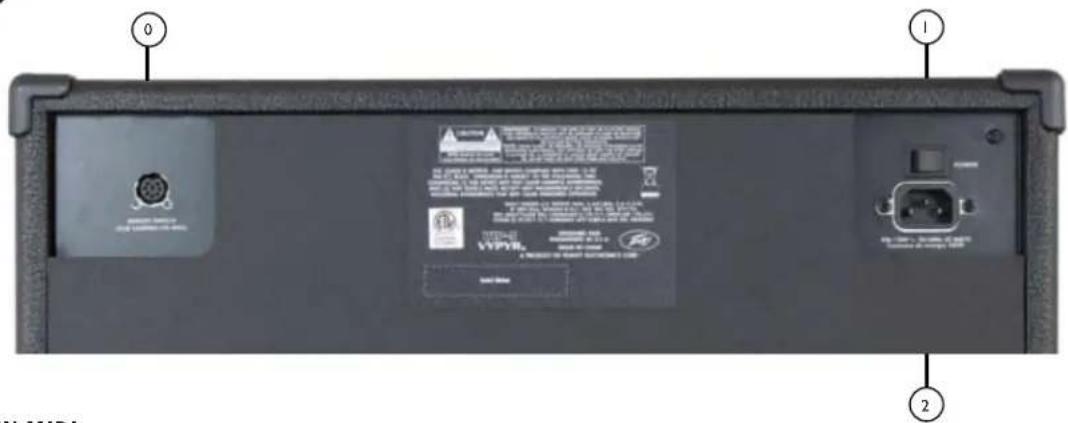

8 PIN MIDI
As the colors of the wires in the mains lead of this apparatus may not correspond with the colored markings identifying the terminals in your plug, proceed as follows:
(1) The wire which is colored green and yellow must be connected to the terminal which is marked by the letter E, or by the Earth symbol, or colored green or green and yellow. (2) The wire which is colored blue must be connected to the terminal
which is marked with the letter N, or the color black. (3) The wire which is colored brown must be connected to the terminal which is marked with the letter L, or the color red.
VIP 1 - VIRTATIEDOT
(5% THD, 1kHz, 120V AC line)
20W (RMS) 8 Ohms
Virrankulutus (1/8th Lahtöteho):
20W @ 50/60Hz, 100-120V AC
20W @ 50/60Hz, 220-240V AC
Mitat & Paino
15"Hx16.584"Wx8.5"D
17.5 lbs.
VIP 2 - VIRTATIEDOT
(5% THD, 1kHz, 120V AC line)
40W (RMS) 8 Ohms
Virrankulutus (1/8th Lahtöteho):
40W @ 50/60Hz, 100-120V AC
40W @ 50/60Hz, 220-240V AC
Mitat & Paino
17.7" H x 19.59" W x 10" D
26 lbs.
VIP 3 - VIRTATIEDOT
(5% THD, 1kHz, 120V AC line)
100W RMS 8 Ohms
Virrankulutus (1/8th Lahtöteho):
42W @ 50/60Hz, 100-120V AC
42W@50/60Hz,220-240V AC
Mitat & Paino
19"Hx19.566"Wx10" D
31 lbs.
Vypyr® VIP-serien
Operasjon Manual
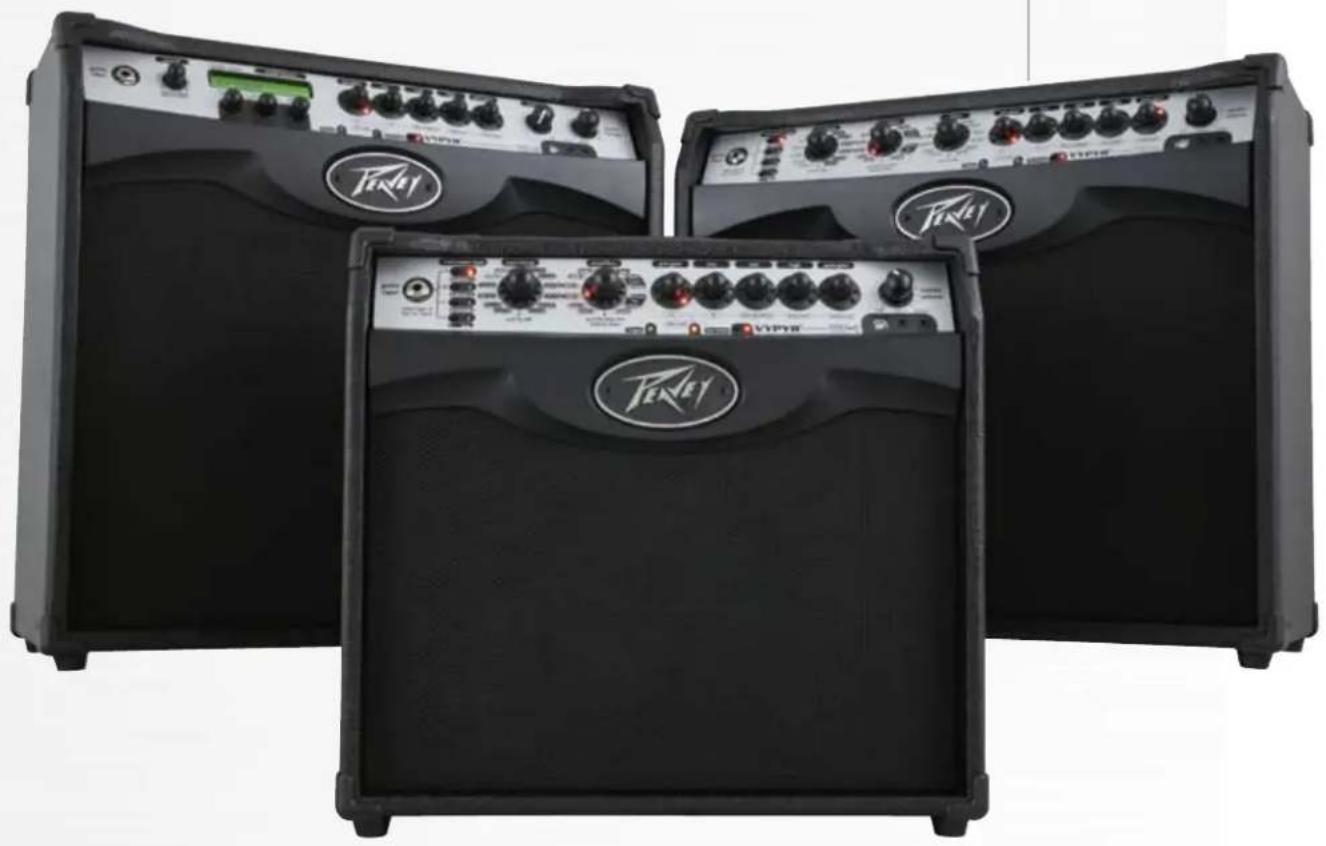
www.peavey.com
NORSK
Elektrisk • Akustisk • Bass
Gradvis transforming fra en bassforsterker, til en elektrisk forsterker, til en akustisk forsterker, er VYPYR® VIPbransjens førsteVariable Instrument Performancee™ forsterker.
HODETELEFON/OPPTAK UT
| Stompbokser | VIP 1 | VIP 2 | VIP 3 |
| TSC | X | X | X |
| Fuzz | X | X | |
| Komp | X | X | X |
| Slap | X | ||
| Wah | X | X | X |
| Phaser | X | X | X |
| Flanger | X | X | X |
| Synth | X | X | X |
| Slice | X | X | X |
| Env Filter | X | ||
| Pitch Shifter | X | ||
| Chorus | X | X | X |
| Octaver | X | ||
| Rotary | X | ||
| MOG | X | ||
| Tremolo | X | ||
| Reverse | X | ||
| Uvb | X | X | X |
| Ring Mod | X | X | X |
| Vibrato | X | ||
| Boost | X | X | X |
| Instrumens | VIP 1 | VIP 2 | VIP 3 |
| Acoustic 1 | X | X | X |
| Acoustic 2 | X | X | |
| 12 string | X | X | |
| 7 string | X | X | |
| Resonator | X | X | |
| Sitar | X | X | |
| EVIO | X | X | |
| Synth | X | X | |
| Bari | X | X | |
| Bass | X | X | X |
| Effects | VIP 1 | VIP 2 | VIP 3 |
| Tremolo | X | X | |
| Octaver | X | X | |
| Phaser | X | X | |
| Rot. Spkr | X | X | |
| Reverse | X | X | |
| Pitch Shft | X | X | |
| mog | X | X | |
| Flanger | X | X | |
| CompBST | X | X | |
| Env. Filter | X | X | |
| Chorus | X | X |
Rotary Hoytal. Fart Dybde
Reverse Tid Miks Maks Miks = 0/100 tərr/vat, 250ms < T <1s
Pitch Shifter Intervall Miks På minimum mikskontrollerer Param1 skjevstemt
| Instrumenter | VIP 1 | VIP 2 | VIP 3 |
| Acoustic 1 | X | X | X |
| Acoustic 2 | X | X | |
| 12 string | X | X | |
| 7 string | X | X | |
| Resonator | X | X | |
| Sitar | X | X | |
| EVIO | X | X | |
| Synth | X | X | |
| Bari | X | X | |
| Bass | X | X | X |
| Stompboxes | VIP 1 | VIP 2 | VIP 3 |
| TSC | X | X | X |
| Fuzz | X | X | |
| Comp | X | X | X |
| Slap | X | ||
| Wah | X | X | X |
| Phaser | X | X | X |
| Flanger | X | X | X |
| Synth | X | X | X |
| Slice | X | X | X |
| Env Filter | X | ||
| Pitch shifter | X | ||
| Chorus | X | X | X |
| Octaver | X | ||
| Rotary | X | ||
| MOG | X | ||
| Tremolo | X | ||
| Reverse | X | ||
| Uvb | X | X | X |
| Ring Mod | X | X | X |
| Vibrato | X | ||
| Boost | X | X | X |
| Effects | VIP 1 | VIP 2 | VIP 3 |
| Tremolo | X | X | |
| Octaver | X | X | |
| Phaser | X | X | |
| Rot. Spkr | X | X | |
| Reverse | X | X | |
| Pitch Shft | X | X | |
| mog | X | X | |
| Flanger | X | X | |
| CompBST | X | X | |
| Env. Filter | X | X | |
| Chorus | X | X |
Tekniske notater
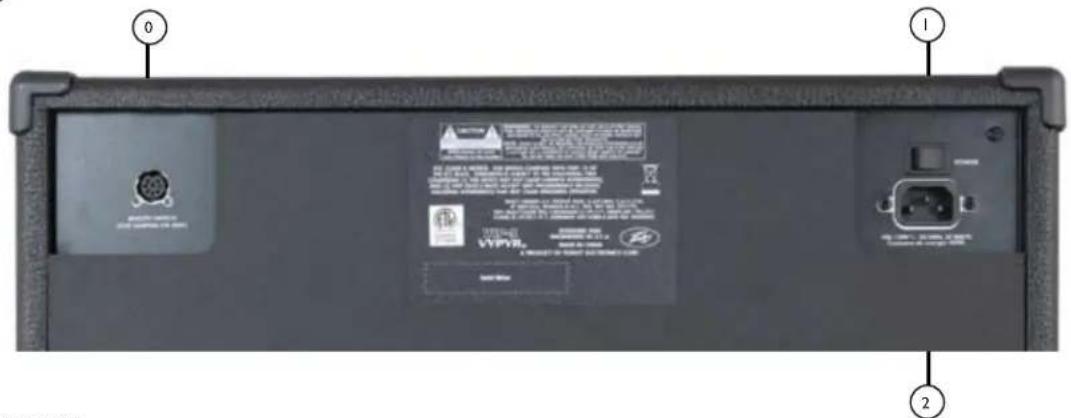

8 PIN MIDI
As the colors of the wires in the mains lead of this apparatus may not correspond with the colored markings identifying the terminals in your plug, proceed as follows:
(1) The wire which is colored green and yellow must be connected to the terminal which is marked by the letter E, or by the Earth symbol, or colored green or green and yellow. (2) The wire which is colored blue must be connected to the terminal
which is marked with the letter N, or the color black. (3) The wire which is colored brown must be connected to the terminal which is marked with the letter L, or the color red.
VIP 1-KRAFTSPESIFIKASJONER
Vurdert kraft &belastning: (5% THD, 1 kHz, 120 V AC linje) 20W RMS til 8 ohm Strømforbruk (1/8 utgangseffekt): 20W ved 50 / 60Hz, 100-120V AC 20W ved 50 / 60Hz, 220-240V AC Dimensionjoner og vekt 15" H x 16584 "W x 8,5" D 17,5 lbs.
VIP 2-KRAFTSPESIFIKASJONER
INST/STOMPBOX-BEWERKINGSGMODUS
| Stompboxes | VIP 1 | VIP 2 | VIP 3 |
| TSC | X | X | X |
| Fuzz | X | X | |
| Comp | X | X | X |
| Slap | X | ||
| Wah | X | X | X |
| Phaser | X | X | X |
| Flanger | X | X | X |
| Synth | X | X | X |
| Segment | X | X | X |
| Env Filter | X | ||
| Pitch shifter | X | ||
| Koor | X | X | X |
| Octaver | X | ||
| Rotary | X | ||
| MOG | X | ||
| Tremolo | X | ||
| Omgekeerd | X | ||
| Uvb | X | X | X |
| Ring Mod | X | X | X |
| Vibrato | X | ||
| Boost | X | X | X |
| Instrumenten | VIP 1 | VIP 2 | VIP 3 |
| Akoestisch 1 | X | X | X |
| Akoestisch 2 | X | X | |
| 12-snarig | X | X | |
| 7-snarig | X | X | |
| Resonator | X | X | |
| Sitar | X | X | |
| EVIO | X | X | |
| Synth | X | X | |
| Bari | X | X | |
| Bas | X | X | X |
| Instrumenten | VIP 1 | VIP 2 | VIP 3 |
| Acoustic 1 | X | X | X |
| Acoustic 2 | X | X | |
| 12 string | X | X | |
| 7 string | X | X | |
| Resonator | X | X | |
| Sitar | X | X | |
| EVIO | X | X | |
| Synth | X | X | |
| Bari | X | X | |
| Bass | X | X | X |
| Stompboxes | VIP 1 | VIP 2 | VIP 3 |
| TSC | X | X | X |
| Fuzz | X | X | |
| Comp | X | X | X |
| Slap | X | ||
| Wah | X | X | X |
| Phaser | X | X | X |
| Flanger | X | X | X |
| Synth | X | X | X |
| Slice | X | X | X |
| Env Filter | X | ||
| Pitch shifter | X | ||
| Chorus | X | X | X |
| Octaver | X | ||
| Rotary | X | ||
| MOG | X | ||
| Tremolo | X | ||
| Reverse | X | ||
| Uvb | X | X | X |
| Ring Mod | X | X | X |
| Vibrato | X | ||
| Boost | X | X | X |
| Effecten | VIP 1 | VIP 2 | VIP 3 |
| Tremolo | X | X | |
| Octaver | X | X | |
| Phaser | X | X | |
| Rot. Spkr | X | X | |
| Reverse | X | X | |
| Pitch Shft | X | X | |
| mog | X | X | |
| Flanger | X | X | |
| CompBST | X | X | |
| Env. Filter | X | X | |
| Chorus | X | X |
Technische opmerkingen
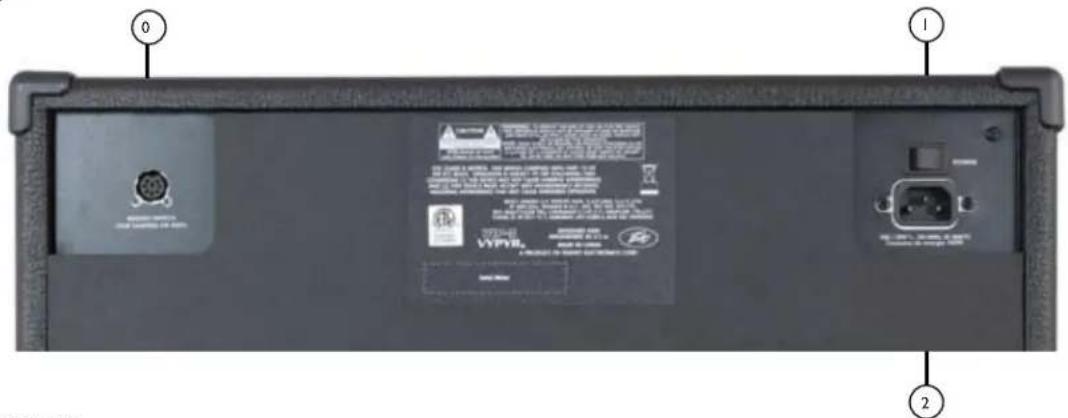

8 PIN MIDI
As the colors of the wires in the mains lead of this apparatus may not correspond with the colored markings identifying the terminals in your plug, proceed as follows:
(1) The wire which is colored green and yellow must be connected to the terminal which is marked by the letter E, or by the Earth symbol, or colored green or green and yellow. (2) The wire which is colored blue must be connected to the terminal
which is marked with the letter N, or the color black. (3) The wire which is colored brown must be connected to the terminal which is marked with the letter L, or the color red.
VIP 1 - VERMOGENSPECIFICATIONS
Nominal vermogen & belasting:
(5% THV, 1 kHz 120 V AC lijn)
20 W RMS in 8 ohm
Power Sponge' 100W 1W
LOOPER 五
i i 1 30 30 30 30 30 30 30 30 30 30 30 30 30 30 30 30 30 30 30 30 30 30 30 30 30 30 30 30 30 30 30 30 30 30
13
- 2.1.3.4.5.6.7.8.9.10.11.12.13.14.15.16.17.18.19.20.21.22.23.24.25.26.27.28.29.30.31.32.33.34.35.36.37.38.39.40.41.42.43.44.45.46.47.48.49.50.51.52.53.54.55.56.57.58.59.60.61.62.63.64.65.66.67.68.69.70.71.72.73.74.75.76.77.78.79.80.81.82.83.84.85.86.87.88.89.90.91.92.93.94.95.96.97.98.99.100
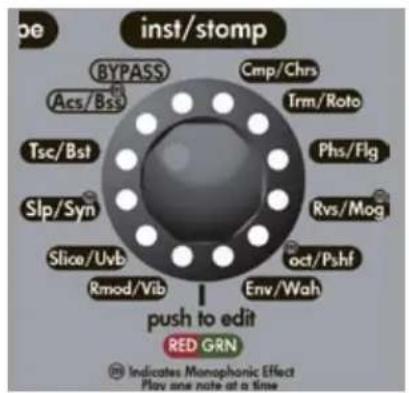
VIP 1
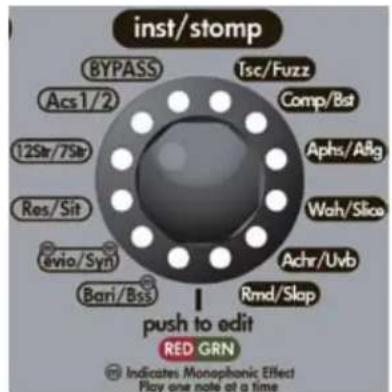
VIP 2
| : | VIP 1 | VIP 2 | VIP 3 |
| TSC: | X | X | |
| U U | X | X | |
| I I I I | X | X | |
| II N | X | X | |
| (Wah) | X | X | |
| U U L | X | X | |
| II I I | X | X | |
| I I I I | X | X | |
| I I I I | X | X | |
| I I I I | X | X | |
| I I I I | X | X | |
| I I I I | X | X | |
| I I I I | X | X | |
| I I I I | X | X | |
| I I I I | X | X | |
| I I I I | |||
| U Vb | X | X | |
| I I I | X | X | |
| I I I I | X | X | |
| I I I | X | X | |
| □□ | VIP 1 | VIP 2 | VIP 3 |
| □□□□1 | X | X | X |
| □□□□2 | X | X | |
| 12□□□ | X | X | |
| 7□□□ | X | X | |
| Resonator | X | X | |
| □□□ | X | X | |
| EVIO | X | X | |
| □□□□□ | X | X | |
| □□□ | X | X | |
| □□□ | X | X | X |
BRITISH: Queen's like, the king of the gods. The king of the gods is a good man.
BUTCHERTM: 前朝は国際政治の広を用語に。既uropeの通貨は国政の相要挟しは国政の相要挟しは国政の相要挟しは国政の相要挟しは国政の相要挟しは国政の相要挟しは国政の相要挟しは国政の相要挟しは国政の相要挟しは国政の相要挟しは国政の相要挟しは国政の相要挟しは国政の相要挟しは国政的相要挟しは国政の相要挟しは国政の相要挟しは国政の相要挟しは国政の相要挟しは国政の相要挟しは国政の相要挟しは国政の相要挟しは国政の相要挟しは国政の相要挟しは国政の相要挟しは国政の相要挟しは国政の相要挟
CLASS®: Peavey's Classic 50是gacmengcno以理,中n。Classic 50的上d#nJz贝(warm)/则i则s.
XXX: Peavey's XXX is a dangerous thing. We don't have enough time to get rid of it, so we need to find a way to stop it. But we can do it by making sure that it doesn't happen to us. We need to keep our kids from getting into trouble.
6534+: 6505+ 品三部里歌E34和的到就为真,E34=Peavey
6505+: 田H Peavey的T40孕年n能nH 士H 6505 SRIZs Edward Van Halen和 HanePeaveyAe TaeJtHnHnHnHnHnHnHnHnHnHnHnHnHnHnHnHnHnHnHnHnHnHnHnHnHnHnHnHnHnHnHnHnHnHnHnHnHnHnHnHnHnHnHnHnHnHnHnHnHnHnH n.6505 E H H H H H H H H H H H H H H H H H H H H H H H H H H H H H H H H H H H H H H H H H H H H H H H H H H H H H H H H H H H H H H H H H H H H H H H H H H H H H H H H H H H H H H H H H H H H H H H H H H H H
BUDDA®: Budda
Buddy
hand-wired) embo
Budda hand-on wioher Budda TwinmasterTM to the bueder hand-on hand-on hand-on hand-on hand-on hand-on hand-on hand-on hand-on hand-on hand-on hand-on hand-on hand-on hand-on hand-on hand-on hand-on hand-on hand-on hand-on hand-on hand-on hand-on hand-on hand-on hand-on hand-on hand-on hand-on hand-on hand-on hand-on hand-on hand-on hand-on hand-on hand-on hand-on hand-on hand-on hand-on hand-on hand-on hand-on hand-on hand-on hand-on hand-on hand-on hand on babbda Dual Class Hot Bias Circuit is SuperdriveTMII SIRIUS Ting hong chun cn jn hong hong hong hong hong hong hong hong hong hong hong hong hong hong hong hong hong hong hong hong hong hong hong hong hong hong hong hong hong hong hong hong hong hong hong hong hong hong hong hong hong hong hong hong hong hong hong hong hong hong henghenghenghenghenghenghenghenghenghenghenghenghenghenghenghenghenghenghenghenghenghenghenghenghenghenghenghenghenghenghenghenghenghenghenghenghenghenghenghenghenghenghenghenghenghenghenghenghenghengheng
TWN: 1
TRACE ACOUSTIC: 2 sey nei Trace Elliot n oRzTATM siRtZsTt TATM tA.
Dhre hien eil ou cunna. Trace Elliot n meu dne imrtd (piezo pickup) lery, noi, n, p, DSP
iTrn is mng hns Hc(wnch i ng hn oBm) on of cn hig chg hci of uKStn k it gcn hnn
Dnncn Hto In Dynamic CorrectionTM to thacn an hcn nane nane nane nn nane nn nane nn nane nn nane nn nane nn nane nn nane nn nane nn nane nn nane nn nane nn nane nn nane nn nane nn nane nn nane nn nane nn nane nn nane nn nane nn nane nn nane nn nane nn nane nn nane nn nane nn nane nn nane nn nane nn nane nn nane nn nane nn nane nn
PEAVEY ECOUSTIC: Peavey Ecoustie serisz amo hien kou stckn, bokl mng nup nre hel. 1
LOOPER: (i) it is an ordinary day when you are in Sanpera I and Sanpera II. The third day of the year is a good day for your family.
| AACQUENANCE | VIP 1 | VIP 2 | VIP 3 |
| Acoustic 1 | X | X | X |
| Acoustic 2 | X | X | |
| 12 string | X | X | |
| 7 string | X | X | |
| Resonator | X | X | |
| Sitar | X | X | |
| EVIO | X | X | |
| Synth | X | X | |
| Bari | X | X | |
| Bass | X | X | X |
| 스류목箫 | VIP 1 | VIP 2 | VIP 3 |
| TSC | X | X | X |
| Fuzz | X | X | |
| Comp | X | X | X |
| Slap | X | ||
| Wah | X | X | X |
| Phaser | X | X | X |
| Flanger | X | X | X |
| Synth | X | X | X |
| Slice | X | X | X |
| Env Filter | X | ||
| Pitch shifter | X | ||
| Chorus | X | X | X |
| Octaver | X | ||
| Rotary | X | ||
| MOG | X | ||
| Tremolo | X | ||
| Reverse | X | ||
| Uvb | X | X | X |
| Ring Mod | X | X | X |
| Vibrato | X | ||
| Boost | X | X | X |
| 이트 | VIP 1 | VIP 2 | VIP 3 |
| Tremolo | X | X | |
| Octaver | X | X | |
| Phaser | X | X | |
| Rot. Spkr | X | X | |
| Reverse | X | X | |
| Pitch Shft | X | X | |
| mog | X | X | |
| Flanger | X | X | |
| CompBST | X | X | |
| Env. Filter | X | X | |
| Chorus | X | X |
策志尼爾蒙查和
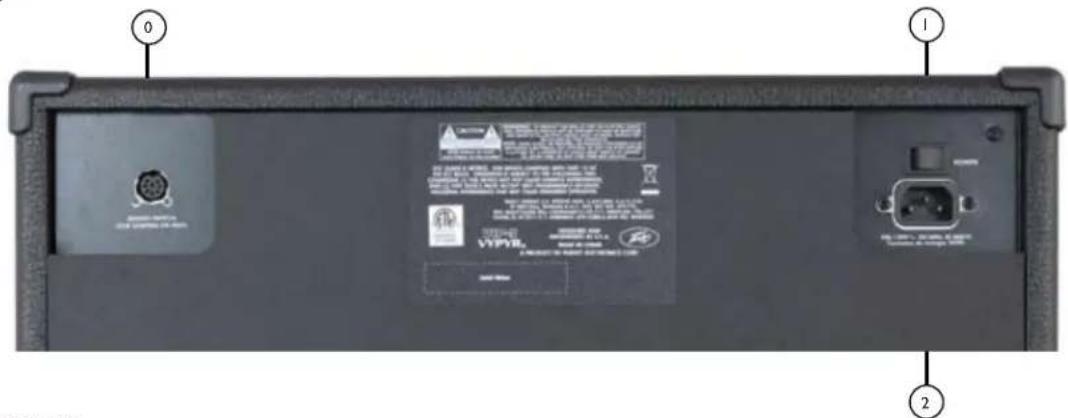

8 PIN MIDI
Sanpera I or Sanpera II to eri h e rgeln. i k t s MIDI n Sanpera f t e q n .

首頁 SWEI
ON上部日时长自动形码开S司
:iJtJOn/OffStWitJnJyJHmJInJyJHJnJHJnJHJnJHJnJHJnJHJnJHJnJHJnJHJnJHJnJHJnJHJnJHJnJHJnJHJn

ACJHJ
As the colors of the wires in the mains lead of this apparatus may not correspond with the colored markings identifying the terminals in your plug, proceed as follows:
(1) The wire which is colored green and yellow must be connected to the terminal which is marked by the letter E, or by the Earth symbol, or colored green or green and yellow. (2) The wire which is colored blue must be connected to the terminal
which is marked with the letter N, or the color black. (3) The wire which is colored brown must be connected to the terminal which is marked with the letter L, or the color red.
VIP1-
典型值函数及解法:
(5%THD,1kHz,120VAC拉-
20W RMS, 8 Ohms
真默S可(1/8th):
20W @ 50/60Hz, 100-120V AC
20W @ 50/60Hz, 220-240V AC
刘少贝
(5%THD,1kHz,120VAC拉-
40W RMS, 8 Ohms
前战 已 1/8th
40W @ 50/60Hz, 100-120V AC
40W @ 50/60Hz, 220-240V AC
刘小贝
(5%THD,1kHz,120VAC拉贝)
100W RMS into 8 Ohms
首默S可(1/8th):
42W @ 50/60Hz, 100-120V AC
42W@50/60Hz,220-240V AC
卡
| 单块效果器 | VIP 1 | VIP 2 | VIP 3 |
| TSC | X | X | X |
| Fuzz | X | X | |
| Comp | X | X | X |
| Slap | X | ||
| Wah | X | X | X |
| Phaser | X | X | X |
| Flanger | X | X | X |
| Synth | X | X | X |
| Slice | X | X | X |
| Env Filter | X | ||
| Pitch shifter | X | ||
| Chorus | X | X | X |
| Octaver | X | ||
| Rotary | X | ||
| MOG | X | ||
| Tremolo | X | ||
| Reverse | X | ||
| Uvb | X | X | X |
| Ring Mod | X | X | X |
| Vibrato | X | ||
| Boost | X | X | X |
| 乐器 | VIP 1 | VIP 2 | VIP 3 |
| Acoustic 1 | X | X | X |
| Acoustic 2 | X | X | |
| 12 string | X | X | |
| 7 string | X | X | |
| Resonator | X | X | |
| Sitar | X | X | |
| EVIO | X | X | |
| Synth | X | X | |
| Bari | X | X | |
| Bass | X | X | X |
| 效果 | VIP 1 | VIP 2 | VIP 3 |
| Tremolo | X | X | |
| Octaver | X | X | |
| Phaser | X | X | |
| Rot.Spkr | X | X | |
| Reverse | X | X | |
| Pitch Shft | X | X | |
| mog | X | X | |
| Flanger | X | X | |
| CompBST | X | X | |
| Env.Filter | X | X | |
| Chorus | X | X |
| 乐器 | VIP 1 | VIP 2 | VIP 3 |
| Acoustic 1 | X | X | X |
| Acoustic 2 | X | X | |
| 12 string | X | X | |
| 7 string | X | X | |
| Resonator | X | X | |
| Sitar | X | X | |
| EVIO | X | X | |
| Synth | X | X | |
| Bari | X | X | |
| Bass | X | X | X |
| 单块效果器 | VIP 1 | VIP 2 | VIP 3 |
| TSC | X | X | X |
| Fuzz | X | X | |
| Comp | X | X | X |
| Slap | X | ||
| Wah | X | X | X |
| Phaser | X | X | X |
| Flanger | X | X | X |
| Synth | X | X | X |
| Slice | X | X | X |
| Env Filter | X | ||
| Pitch shifter | X | ||
| Chorus | X | X | X |
| Octaver | X | ||
| Rotary | X | ||
| MOG | X | ||
| Tremolo | X | ||
| Reverse | X | ||
| Uvb | X | X | X |
| Ring Mod | X | X | X |
| Vibrato | X | ||
| Boost | X | X | X |
| 效果 | VIP 1 | VIP 2 | VIP 3 |
| Tremolo | X | X | |
| Octaver | X | X | |
| Phaser | X | X | |
| Rot.Spkr | X | X | |
| Reverse | X | X | |
| Pitch Shft | X | X | |
| mog | X | X | |
| Flanger | X | X | |
| CompBST | X | X | |
| Env.Filter | X | X | |
| Chorus | X | X |
工程说明
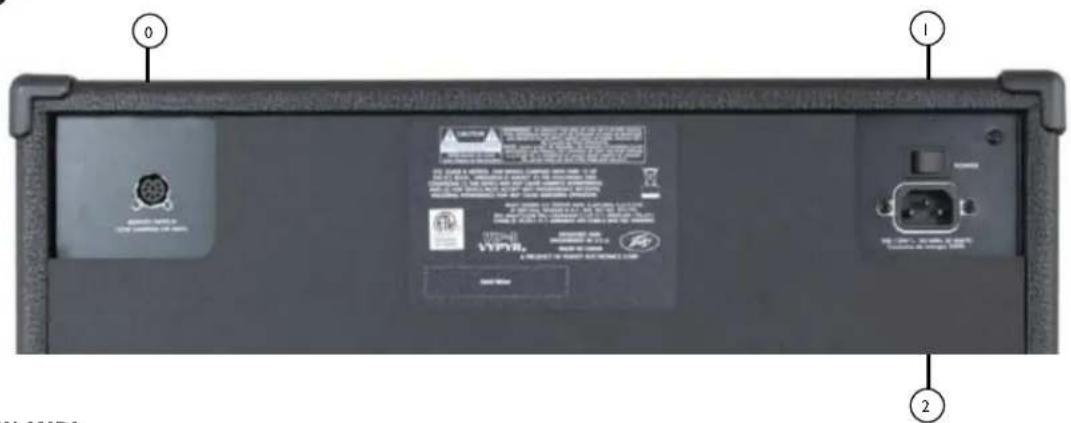

8 PIN MIDI
As the colors of the wires in the mains lead of this apparatus may not correspond with the colored markings identifying the terminals in your plug, proceed as follows:
(1) The wire which is colored green and yellow must be connected to the terminal which is marked by the letter E, or by the Earth symbol, or colored green or green and yellow. (2) The wire which is colored blue must be connected to the terminal
which is marked with the letter N, or the color black. (3) The wire which is colored brown must be connected to the terminal which is marked with the letter L, or the color red.
VIP1-功率技术规格
额定功率和负载:
This is the way to use the "en" button. It's like using the "en" button in Japanese. It's also used in other languages, such as English, Chinese, and Korean.
This is the power of the Sponges.
12 LOOPER トデイケ一夕
| 楽器 | VIP 1 | VIP 2 | VIP 3 |
| Acoustic 1 | X | X | X |
| Acoustic 2 | X | X | |
| 12 string | X | X | |
| 7 string | X | X | |
| Resonator | X | X | |
| Sitar | X | X | |
| EVIO | X | X | |
| Synth | X | X | |
| Bari | X | X | |
| Bass | X | X | X |
| Stobenbockus | VIP 1 | VIP 2 | VIP 3 |
| TSC | X | X | X |
| Fuzz | X | X | |
| Comp | X | X | X |
| Slap | X | ||
| Wah | X | X | X |
| Phaser | X | X | X |
| Flanger | X | X | X |
| Synth | X | X | X |
| Slice | X | X | X |
| Env Filter | X | ||
| Pitch shifter | X | ||
| Chorus | X | X | X |
| Octaver | X | ||
| Rotary | X | ||
| MOG | X | ||
| Tremolo | X | ||
| Reverse | X | ||
| Uvb | X | X | X |
| Ring Mod | X | X | X |
| Vibrato | X | ||
| Boost | X | X | X |
| 工廠舎 | VIP 1 | VIP 2 | VIP 3 |
| Tremolo | X | X | |
| Octaver | X | X | |
| Phaser | X | X | |
| Rot. Spkr | X | X | |
| Reverse | X | X | |
| Pitch Shft | X | X | |
| mog | X | X | |
| Flanger | X | X | |
| CompBST | X | X | |
| Env. Filter | X | X | |
| Chorus | X | X |
ENJI 一
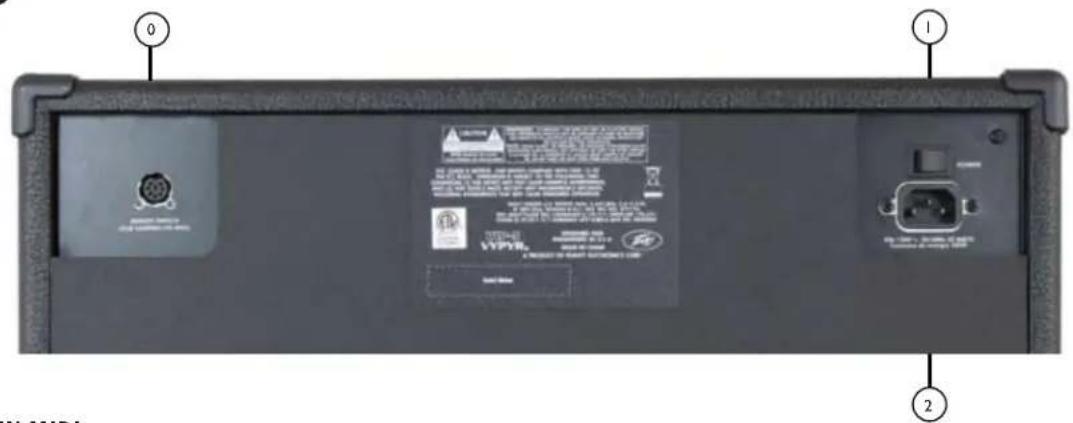

8 PIN MIDI
As the colors of the wires in the mains lead of this apparatus may not correspond with the colored markings identifying the terminals in your plug, proceed as follows:
(1) The wire which is colored green and yellow must be connected to the terminal which is marked by the letter E, or by the Earth symbol, or colored green or green and yellow. (2) The wire which is colored blue must be connected to the terminal
which is marked with the letter N, or the color black. (3) The wire which is colored brown must be connected to the terminal which is marked with the letter L, or the color red.
VIP1-電源仕樣
定格出力&負荷:
(5% THD, 1kHz, 120V AC ラン)
20W RMS-8才一ム
消費電力(1/8電源出力):
20W @ 50/60Hz, 100-120V AC
20W @ 50/60Hz, 220-240V AC
寸法&重量
15"Hx16.584"Wx8.5"D
17.5 lbs.
VIP2-電源仕樣
定格出力&負荷:
(5% THD, 1kHz, 120V AC ラン)
40W RMS-8才一么
消費電力(1/8電源出力):
40W @ 50/60Hz, 100-120V AC
40W@50/60Hz,220-240VAC
寸法&重量
17.7" H x 19.59" W x 10" D
26 lbs.
VIP3-電源仕樣
定格出力 & 負荷:
(5% THD, 1kHz, 120V AC ラン)
100W RMS-8才一么
消費電力(1/8電源出力):
42W @ 50/60Hz, 100-120V AC
42W@50/60Hz,220-240VAC
寸法&重量
19"Hx19.566"Wx10"D
31 lbs.
Vypyr® VIP
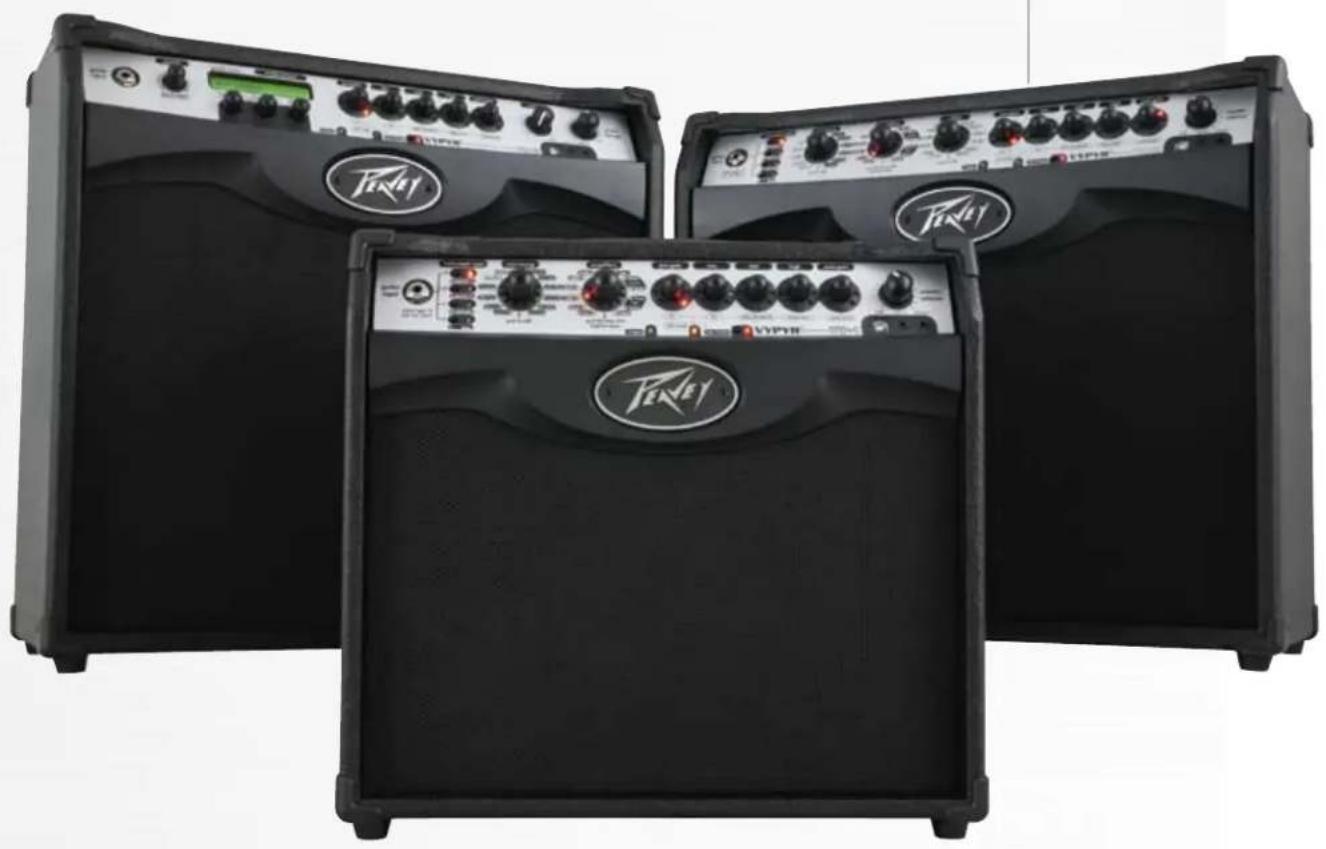
www.peavey.com
JyRgS · GsG · Gs. . Variable Instrument PerformanceTM 8VYPYR® VIP
Jie 8 jaiy Jiai y VYPYR Cgall k a KjL Jusll Jy
Cgall R So Lgill Aaln nn dAa Cgall Lds no taal
le Sdell Pavey's WYSIWYG c h j.
Jie n j i j nnnn nnnn nnnn nnnn nnnn nnnn nnnn nnnn nnnn nnnn nnnn nnnn nnnn nnnn nnnn nnnn nnnn nnnn nnnn nnnn nnnn nnnn nnnn nnnn nnnn nnnn nnnn nnnn nnnn nnnn nnnn nnnn nnnn nnnn nnne
iallll, VYPYR Cgall kay aalalalalalalalalalalalalalalalalalalalalalalalalalalalalalalalalalalalalalalalalalalalalalalalalalalalalal
Peavey Electronics 45
Peavey s
Variable Instrument Performance.VYPYR VIP
Variable Instrument Input a
Variable Instrument Input a
Variable Instrument Input a
Variable Instrument Input a
Variable Instrument Input a
Variable Instrument Input a
Variable Instrument Input a
Variable Instrument Input a
Variable Instrument Input a
Variable Instrument Input a
Variable Instrument Input a
Variable Instrument Input a
Variable Instrument Input a
Variable Instrument Input a
Variable Instrument Input a
Variable Instrument Input a
Variable Instrument Input a
Variable Instrument Input a
Variable Instrument Input a
Variable Instrument Input a
Variable Instrument Input
VIP 3
Variable Instrument Performance
100
12 1
1,1Power Sponge 100
i
a 400
ylll lccg 1
a#gao 10
juaa jia 10
12
36
j6
6
25 1
a. 与 y 轴平行的直线上的点;
WYSIWYGLED
Vypyr Edit Graphic User Interface.
USB MIDI.MIDI
AUX
A,CDJia j,1jLjSlo j,1jLjalmp3 Jia
juii/ai jiaeau
(02j 1
.USB idet al ellis, 100 wll 200 liu piinai si
aJll aIeLw gssg (gull)
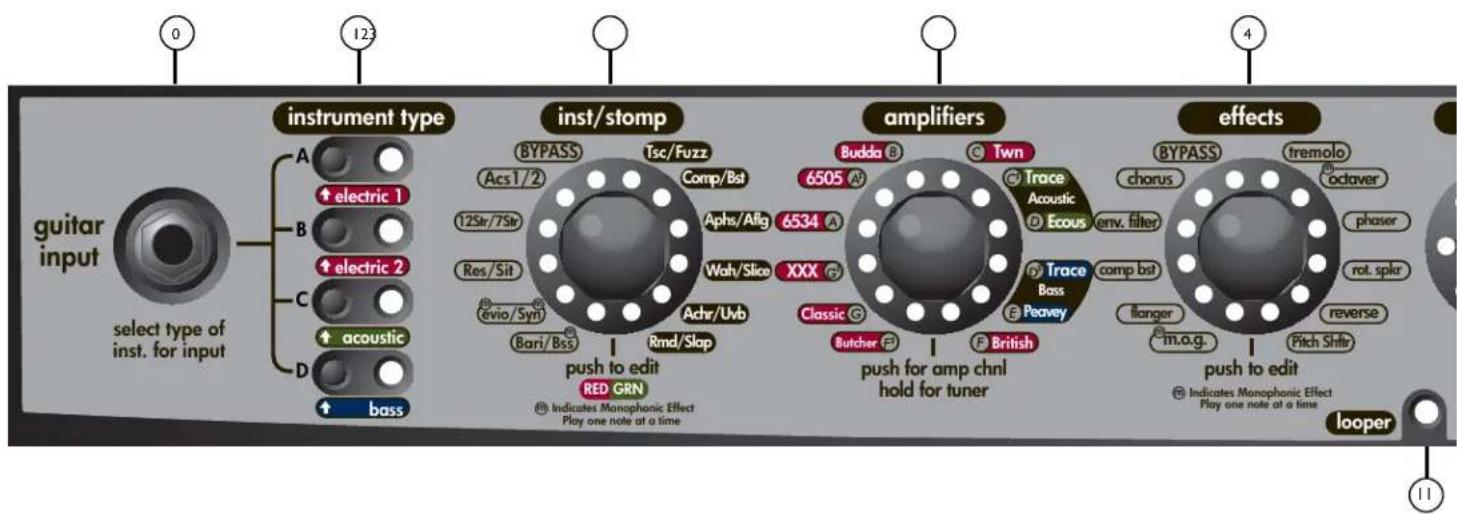
aegaaeae aee
A 1
Cui jusyIg aayuagall yI plisulie. alal g cui jusyIg ayuagall cyI g aoJusyVip Cua s: abla . (gge g)
Laaa aagaaagaaal 1yj cie gao
1000000000000000000000000000000000000000000000000000000000000000000000000000000 111111111111111111111111111111111111111111111111111 1234567890000000000000000000000000000000 134567892222222222222222222222222222222222222222222222222222222222222222222222222222222 143456789333333333333333333333333333333333333333333333333333333333333333333
ailll jaywagall ayljia
10 10 Jglll kay, yagall lalaiy baiy gall aljai ll Jglll kay aiaa aaiy jayy jayy jayy jayy jayy jayy jayy jayy jayy jayy jayy jayy jayy jayy jayy jayy jayy jayy jayy jayy jayy jayy jayy jayy jayy jayy jayy jayy jayy jayy jayy jayy jayy jay y
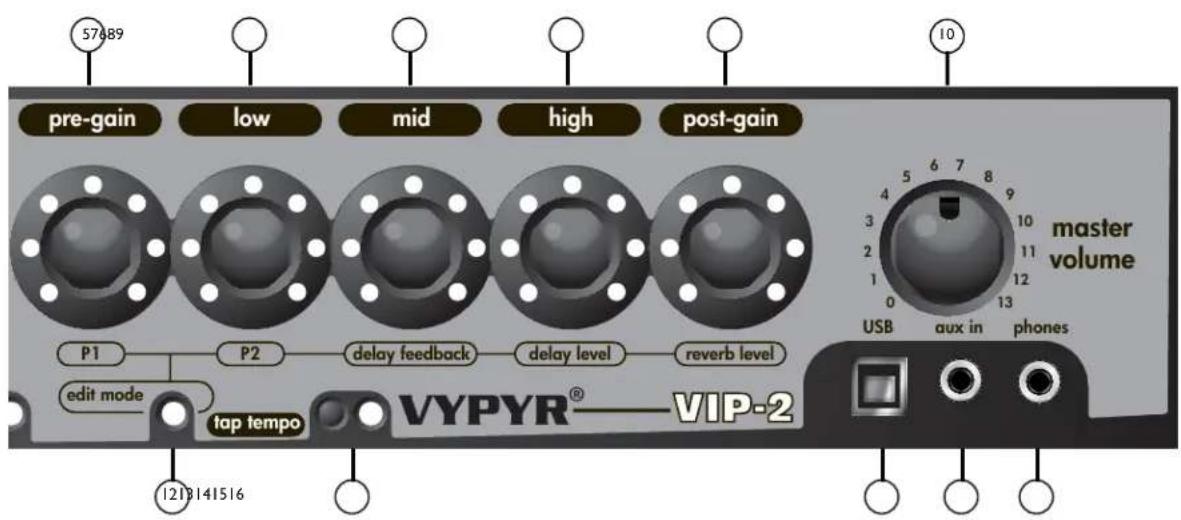
Gall
L 100000000000000000000000000000000000000000000000000000000000000000000000000000
J 111111111111111111111111111111111111111111
"Stompbox" alalal alal
"Effect" "Stompbox" "Stompbox" "Stompbox" "Stompbox" "Stompbox" "Stompbox" "Stompbox" "Stompbox" "Stompbox" "Stompbox" "Stompbox" "Stompbox" "Stompbox" "Stompbox" "Stompbox" "Stompbox" "Stompbox" "Stompbox" "Stompbox" "Stompbox" "Stompboxed
VIP2 agalil aolal alolal
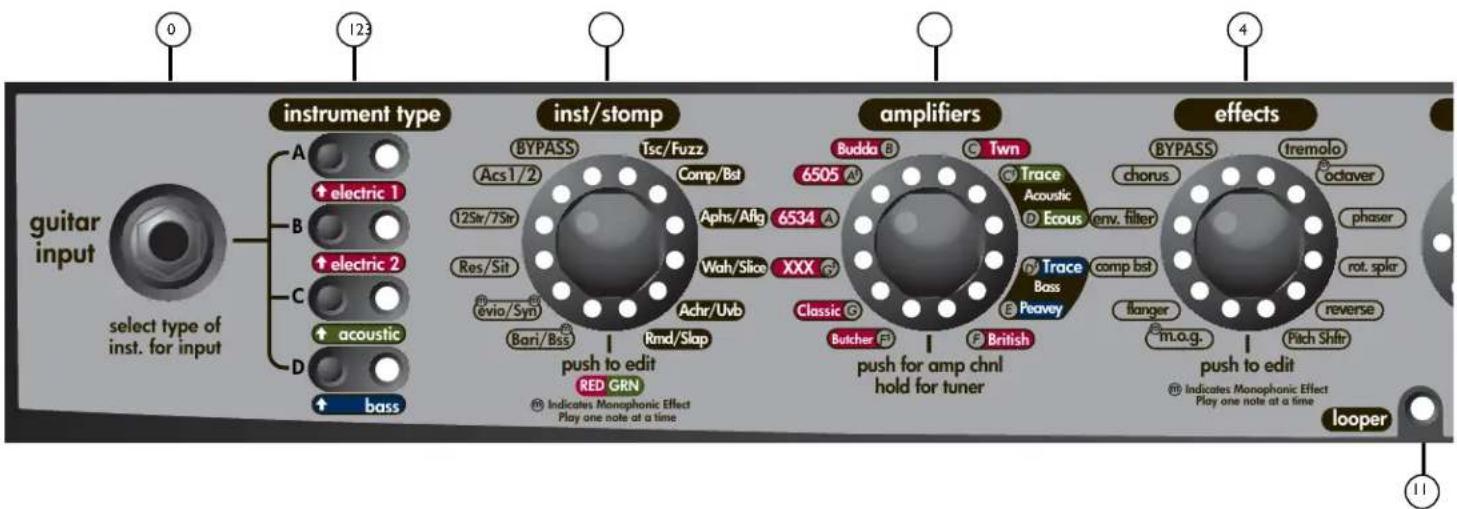
J 1
gaiy 1
113 1
LOOPER
J 30 30
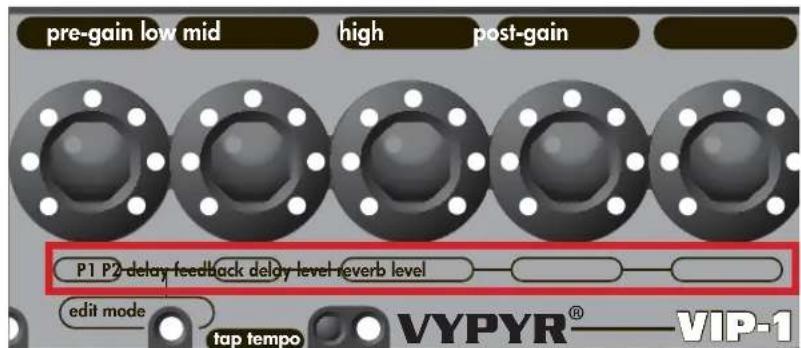
J21 J211
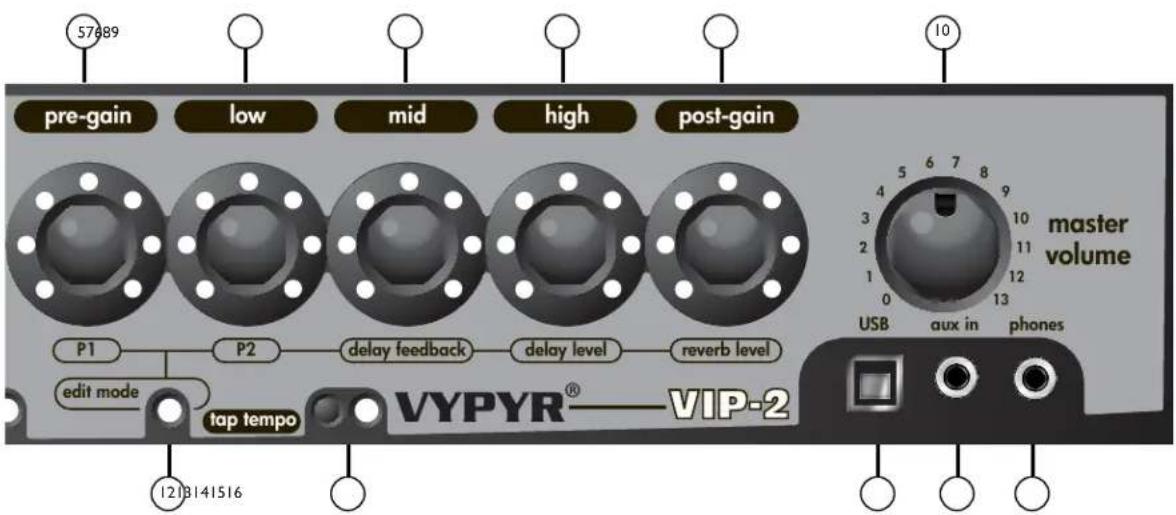
(1)
1
bi#ally 4y jy
sall
USB
j 2.0 USB LJ J - VYPYR USB j
Vypyr Edit Graphic User Interface. USB MIDI.MIDI
AUX
CD j, j, j, j, j, j, j, j, j, j, j, j, j, j, j, j, j, j, j, j, j, j, j, j, j, j, j, j, j, j, j, j, j, j, j, j, j, j, j, j, j, j, j, j, j, j, j, j, j, j, j
Jnnnnae
(2023) 15.14.15.16.17.18.19.20.21.22.23.24.25.26.27.28.29.30.31.32.33.34.35.36.37.38.39.40.41.42.43.44.45.46.47.48.49.50.51.52.53.54.55.56.57.58.59.60.61.62.63.64.65.66.67.68.69.70.71.72.73.74.75.76.77.78.79.80.81.82.83.84.85.86.87.88.89.90.91.92.93.94.95.96.97.98.99.100
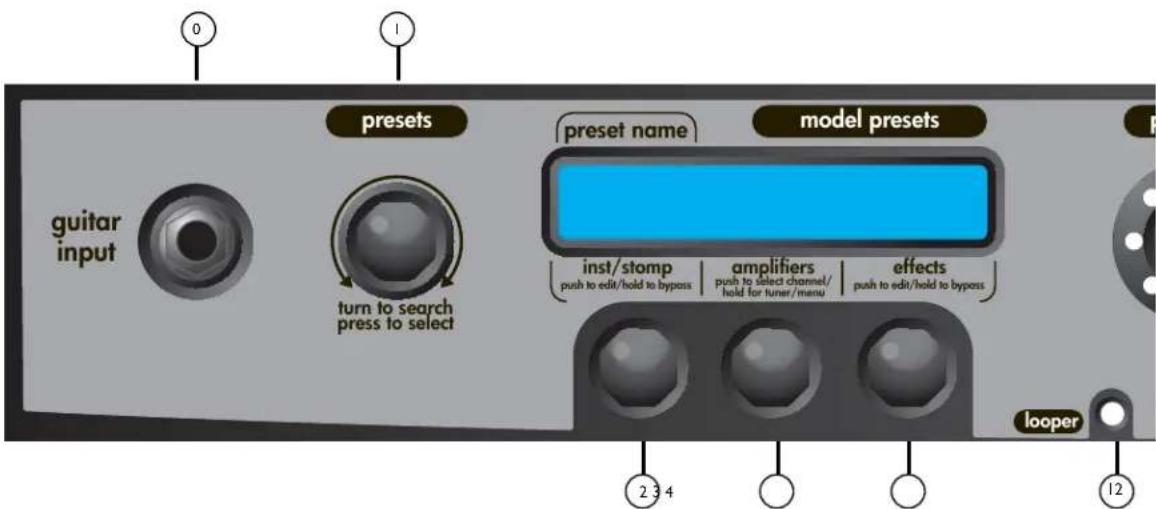
a 1
aepaae aee eae
gall gll lalie glll jaiell lal pial 400 n jSVP3 qall kaiy i gall g plaii daiia C a gall gaiia gali gall gail aiai iai iai iai iai iai
ailll 1
a a a a a a a a a a a a a a a a a a a a a a a a a a a a a a a a a a a a a a a a a a a a a
Cagaleal no jai jayal gannl pail jali gai aiilg lui jai aaii lii
Cusal
(6505) a j g y 1234567890123456789012345678901234567890123456789012345678901234567890123456789012345678901234567890123456789
ailll llll lllllllllllllllllllllllllllllll
aegaln a jal gannl paa jai gai aiagai lijai jaii iia
y 100
.6juluaaillgaiyolniok
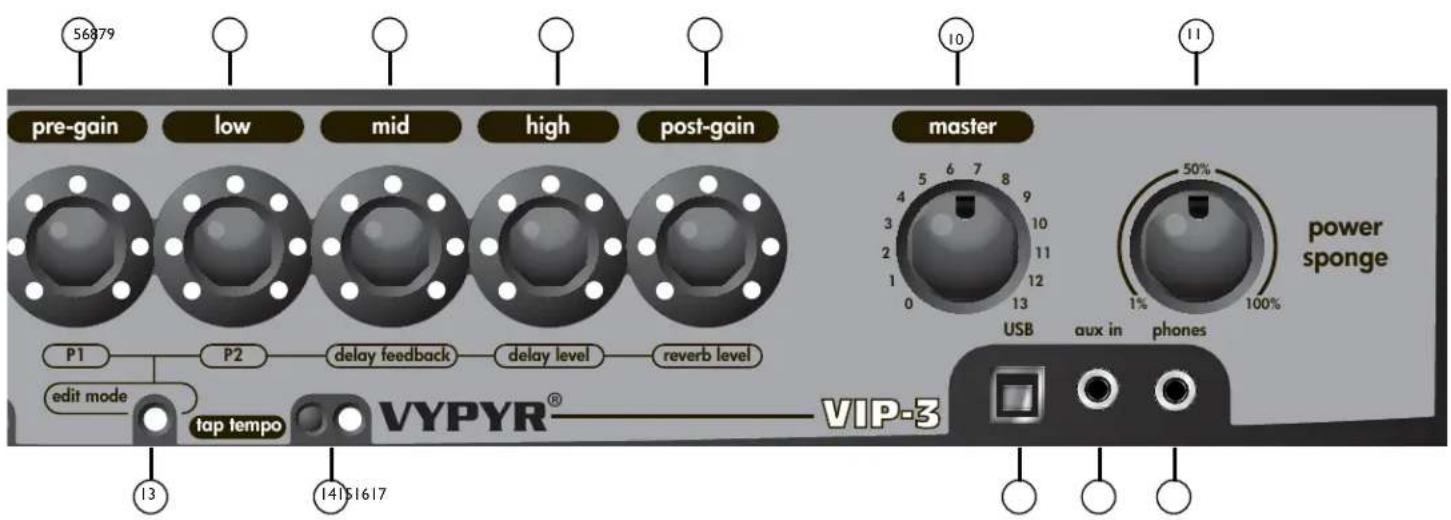
Jalal jalal jalal jalal jalal jalal jalal jalal jalal jalal jalal jalal jalal jalal jalal jalal jalal jalal jalal jalal jalal jalal jalal j
"11111111111111111111111111111111111111 0000000000000000000000000000000000000000000000000000000
"Effect" "Stompbox" "Edit" "Low EQ"
a
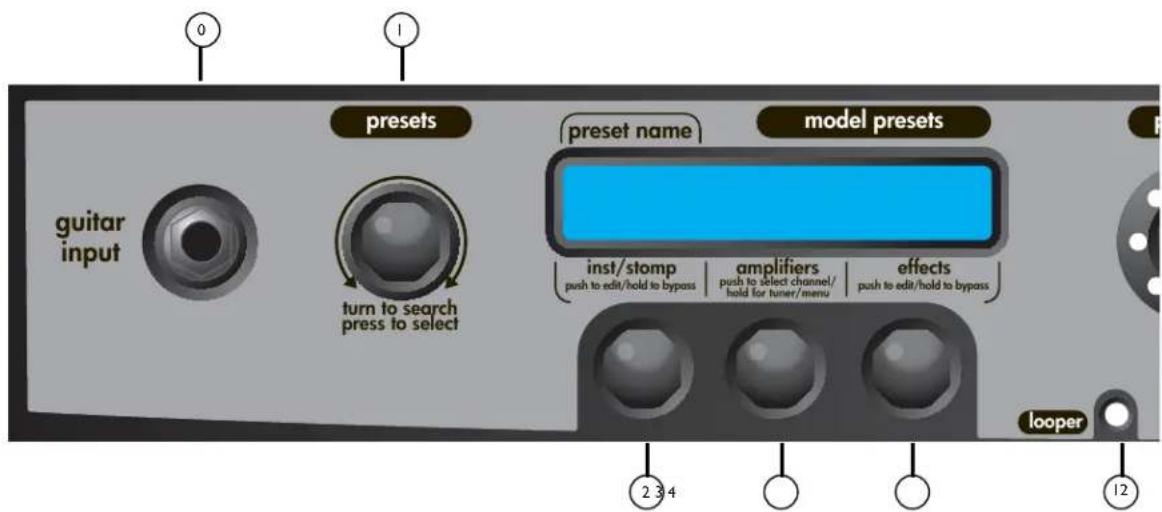
a
a a a a a a a a a a a a a a a a a a a a a a a a a
113 all JyLd yall g
POWER SPONGE
Pwr Sponge 100 no wll
LOOPER
J 30 30 30 30 30 30 30 30 30 30 30 30 30 30 30 30 30 30 30 30 30 30 30 30 30 30 30 30 30 30 30 30 30 30
J 5 a 5 1 5 1 5 1 5 1 5 1 5 1 5 1 5 1 5 1 5 1 5 1 5 1 5 1 5 1
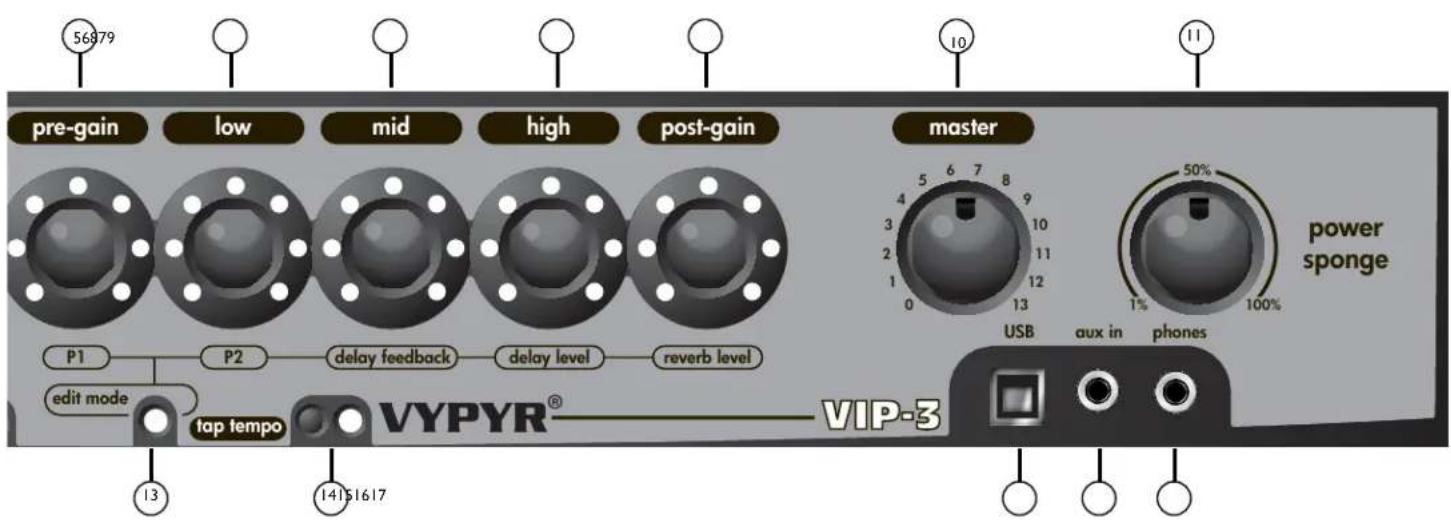
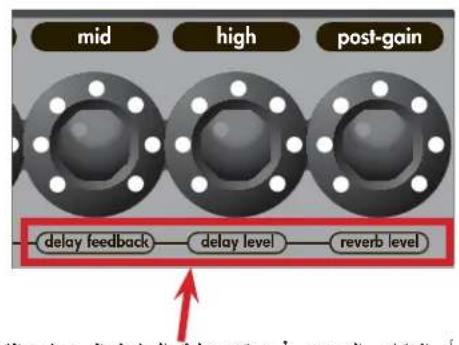
1 1
biically a
J 2.0 J S J b - a VYPYR J J J J J J J J J J J J J J J J J J J J J J J J J J J J J J J J J J J J J J J J J J J J J J J J J J J J J J J J J J J J J J J J J J J J J J J J J J J J J J J J J J J J
AUX
CD jj, jlllalmp3
Jnnnnae
()aLl 100
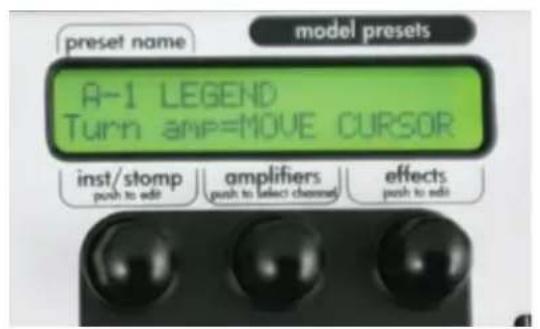
2^n + 1 · 2^n · 2^n
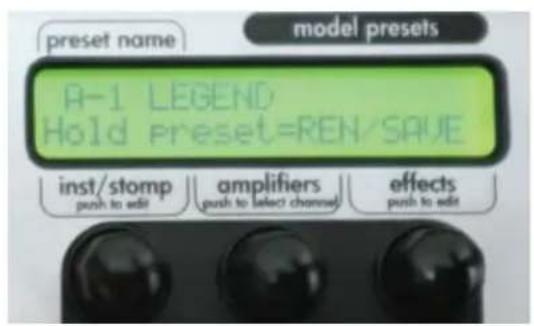
J.31 J.31
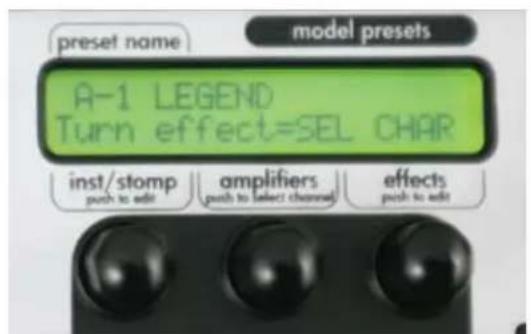
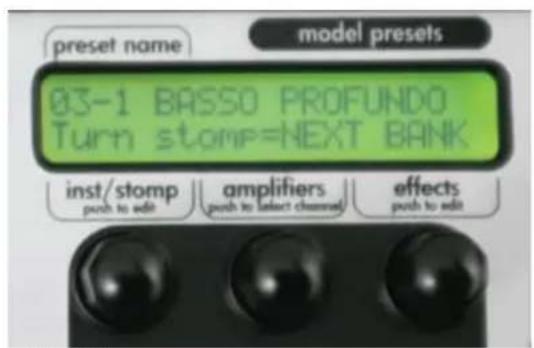
"tuner" "System Menu" "adJUST CONTRAST" "DEMO MODE" "FACTORY RESET" ("light show") "DEMO MODE" "DEMO MODE" "DISABLE DEMO MODE"
jie 1e baii a jyll bai (wll k) iiall/ay gall ay jiaei jiae ie baii y
(1)
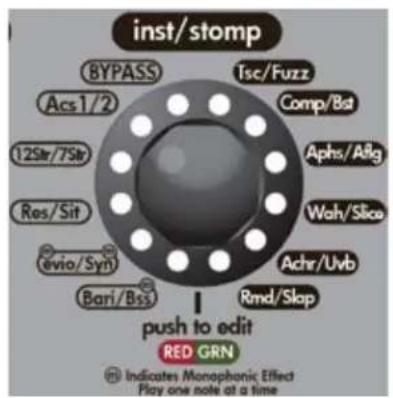
VIP 2
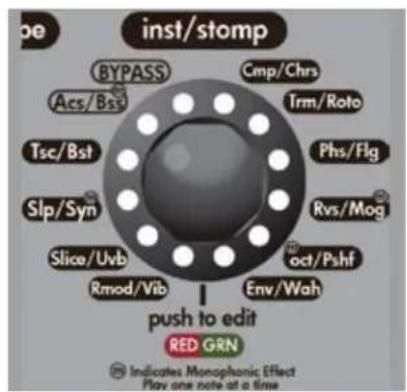
VIP 1
Innstrument/Stompbox"lalb/ajgogall jag g Jg LjLg 10000000000000000000000000000000000000000000000000000000000000000000000000000000000000000000000000000
:"INSTRUMENT/STOMPBOX" 1
(cii) j:2P (cii) 1P. j:12 n s k s l S:12 STRING
j:2P j:1P. 7 n s k s l a 5 7
j:2P 1P .J. ACOUSTIC 1
2P:1P. jae s yj :*ACOUSTIC 2
2P:1P. 1A
Jai jia jie juaaill 8y Jg jia jia jiai aia iia iia iia
| VIP 3 | VIP 2 | VIP 1 | Acoustic 1 |
| X | X | X | Acoustic 2 |
| X | X | string 12 | |
| X | X | string 7 | |
| X | X | Resonator | |
| X | X | Sitar | |
| X | X | EVIO | |
| X | X | Synth | |
| X | X | Bari | |
| X | X | Bass | |
| VIP 3 | VIP 2 | VIP 1 | Vip 1 |
| X X X T | SC | ||
| X X Fuz | |||
| X X X Comp | |||
| X Slap | |||
| X X X Wah | |||
| X X X Rhaser | |||
| X X X Rlanger | |||
| X X X S synth | |||
| X X X S lice | |||
| X Env filter | |||
| X Pitch shifter | |||
| X X X Chorus | |||
| X Octaver | |||
| X | Rotary | ||
| X MOG | |||
| X | Tremolo | ||
| X | Reverse | ||
| X X X U b | |||
| X X X Bing Mod | |||
| X Vibrato | |||
| X X X Bost | |||
23 23 23 23 23 23 23 23 23 23 23 23 23 23 23 23 23 23 23 23 23 23 23 23 23 23 23 23 23 23 23 23 23 23 1
a 1
a a 12
2P, 1P.
Slicer
2P,ac 1P.
Sanpera II Sanpera
s yjy j 11 11 11 11 11 11 11 11 11 11 11 11 11 11 11 11 11 11 11 11 11 11 11 11 11 11 11 11 11 11 11 1
2P aep 1P:di ggiia
Lg, g, g, g, g, g, g, g, g, g, g, g, g, g, g, g, g, g, g, g, g, g, g, g, g, g, g, g, g, g, g, g, g, g, g, g, g, g, g, g, g, g, g, g, g, g, g, g, g, g, g,
Ring "Paranoid" 40
12P,12a 1P:Fuuu Fuuu Modulator
P1. 150 Vibrato 150, Tremolo 150:VIBRATO
P2
Ae j 100 (Edit" y 100) 100
P2ie jll P1. 1a aal al aai y g aal al aal gaaal gaaal gaaal gaaal gaaal gaaal gaaal gaaal gaaal gaaal gaaal gaaal gaaal gaaal gaaal gaaal gaaal gaaal gaaal gaaal gaaal gaaal
Analog Phase
2P Aain't Talking 'Bout Love." 1P"
yI 150,la 150 150 150 150 150 150 150 150 150:ANALOG FLANGE
2P Barracuda".1P" "Cowboys from Hell"
Sa. "Wah" 150
J 2P, 1P. "Voodoo Child"
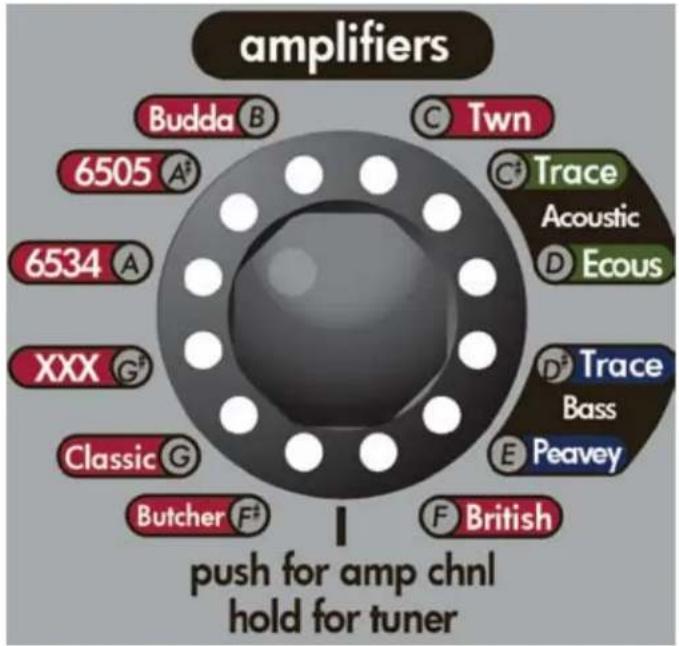
i 1 1 1 1 1 1 1 1 1 1 1 1 1 1 1 1 1 1 1 1 1 1 1 1 1 1 1 1 1
gall 15000000000000000000000000000000000000000000000000000000000000000000000000000000
aR 1234567890123456789012345678901234567890123456789012345678901234567890123456789012345678901234567890123456789
J 1000000000000000000000000000000000000000000000000000000000000000000000000000000000
Peavey Classic 50 s:CLASSIC®
Aeay XXX:XXX
EL34 6505+ 6534+ .Peavey EL34
6505 6505+ C 5150 5150Peavey 5150Peavey 5150
Budda Dual SuperdriveTM II AB A Class Hot Bias Circuit
TWN
TraceAcoustic
TraceElliot.
TMTA
Dynamic CorrectionDSP, aalalalalalalalalalalalalalalalalalalalalalalalalalalalalalalalalal
Peavey Ecousti:PEAVEY ECOUSTIC
Gg aagaaaagaaagaaagaaagaaagaaagaaagaaagaaagaaagaaagaaagaaagaaagaaagaaagaaagaaagaaagaaagaaagaaagaaagaaagaaagaaagaaagaaagaaagaaagaaagaaagaaagaaagaaagaaagaaagaaagaaagaaagaaagaaagaaagaaagaaagaaagaa
Peavey 40 le la:PEAVEY BASS Peavey
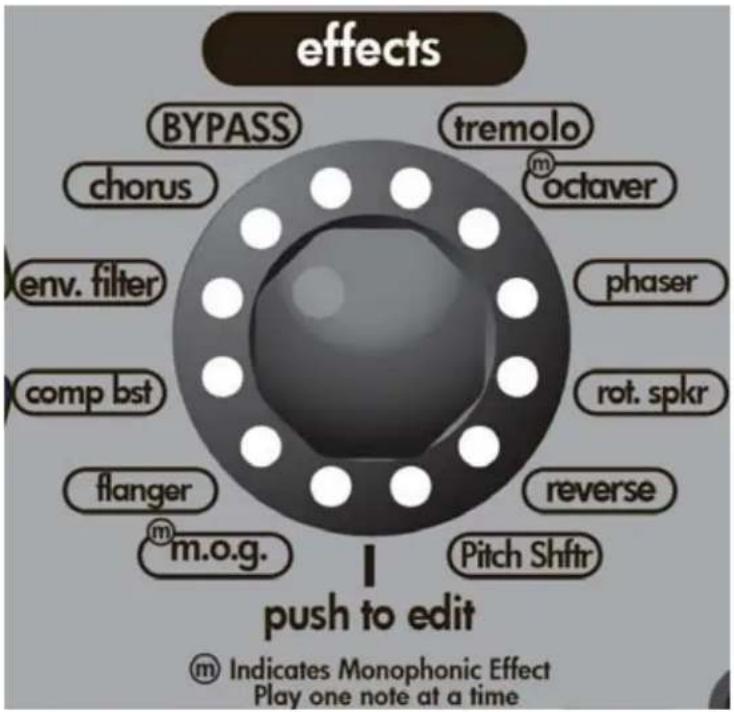
"Rackeffect" 1111111111111111111111111111111111111111111111111111111
TREMOLOVIPVIGWALIATAVGALVAGILGGLTRETTTARNTTALTALTALTALTALTALTALTALTALTALTALTALTALTALTALTALTALTALTALTALTALTALTALTALTALTALTALTALTALTALTALTALTAL
J 1234567890
1234567890
1234567890
1234567890
1234567890
1234567890
1234567890
1234567890
1234567890
1234567890
J 1234567890
1234567890
1234567890
1234567890
1234567890
1234567890
1234567890
1234567890
123456789
jai jia 1e 2gao jiu liu -sally sI lalai - gai jai yai gai aaii jai jai zie ayaiy gai bai LAS:REVERSE
Sanpera II Sanpera® I aag aeg. gaiy gaiy gaiy gaiy gaiy gaiy gaiy gaiy gaiy gaiy gaiy gaiy gaiy gaiy gaiy gaiy gaiy gaiy gaiy gaiy gaiy gaiy gaiy gaiy gaiy gaiy gaiy gaiy gaiy gaiy gaiy gaiy gaiy gaiy
Sanpera II SanperaI
| مبيور ص敗 VIP 3 | مبيور ص敗 VIP 2 | مبيور ص敗 VIP 1 | الإستعمال |
| XX Tremolo | |||
| XX Octaver | |||
| XX Phaser | |||
| XX Rot. Spkr | |||
| XX Reverse | |||
| XX Pitch Shft | |||
| XX mbg | |||
| XX Flanger | |||
| XX CompBST | |||
| XX Env.Filter | |||
| XX Chorus | |||
Monophonic Octave Generator MOG jz, lkiy:MOG 2P qjvVIP1.1P qal kai/ajgq gall dJr jg jd jaiq gall
Lalal Jolal jalal 1d 2. Stompbox jaiy Analog Flanger jaiy k:FLANGER
J 1234567890123456789012345678901234567890123456789012345678901234567890123456789012345678901234567890123456789
Ae aee eae ee eae ae eae ae eae ae eae ae eae ae eae ae eae ae eae ae eae ae eae ae eae ae eae ae eae ae eae ae eae ae eae ae eae ae eae ae eae ae eae ae eae ae eae ae eae ae eae ae eae ae eae ae eae ae eae ae eae ae eae ae eae ae eae ae eae ae eae ae ee aee
I 120000000000000000000000000000000000000000000000000000000000000000000000000000000000
aLg - 1111 (Sanpera II Sanpera® I aI aI aI aI aI aI aI aI aI aI aI aI aI aI aI aI aI aI aI aI aI aI aI aI aI aI aI aI aI aI aI aI aI aI aI aI aI aI aI aI aI aI aI aI aI aI aI aI aI aI aII
jolal jg jllllooper sall gll LED
P2 P1 STOMP
a 12.12:00 a
Jaiil 10:11:00
Saa TSC
Fuzz
Comp
167>T>50 50/50=
Slap
Param1
Auto Wah
zall jaojial jia jia jia jia jia jia jia jia jia jia jia jia jia jia jia jia jia jia jia jia jia jia jia jia jia jia jia jia jia jia jia jia jia jia jia jia jia jia
Analog Phase
aalalalalalalalalalalalalal
Analog Flange
Jy SInh
aee Slicc
12:00 12:00
Jae Jee Chorus
gall UVB
j 2 j 80 a a a a
Ring Modulator
gall Vibrato
jwll Jwll Boost
P2 P1 EFFECT
Tremold
glul
jglai jlaa qall
jazil ic jull iclaull
250 100=
15 1
(jall)
1
iiaia gila ginaa jaiie gla
ai Q. ai 的最小值为 k .
gall
sswal
()
15 = ( 1 - 23)
joll
Phaser
Rotary
Reverse
Pitch shifter
MOG
Flanger
Compbst
Env Filter
Chorus
| VIP 3 VIP 2 VIP 1 | |||
| XXX Acoustic 1 | |||
| XX Acoustic 2 | |||
| XX string 12 | |||
| XX string 7 | |||
| XX Resonator | |||
| XX Sitar | |||
| XX EVIO | |||
| XX Synth | |||
| XX Bari | |||
| XX Bass | |||
| VIP 3 VIP 2 VIP 1 | |||
| XXX TSC | |||
| XX Fuzz | |||
| XXX Comp | |||
| X | Slap | ||
| XXX | Wah | ||
| XXX | Phaser | ||
| XXX | Flanger | ||
| XXX | Synth | ||
| XXX | Slice | ||
| X | Env Filter | ||
| X | Pitch shifter | ||
| XXX | Chorus | ||
| X | Octaver | ||
| X | Rotary | ||
| X MOG | |||
| X | Tremolo | ||
| X | Reverse | ||
| XXX | Uvb | ||
| XXX Ring Mod | |||
| X | Vibrato | ||
| XXX Boost | |||
| VIP 3 VIP 2 VIP 1 | Tetrahedal | ||
| XX | Tremolo | ||
| XX | Octaver | ||
| XX | Phaser | ||
| XX | Rot. Spkr | ||
| XX | Reverse | ||
| XX | Pitch Shft | ||
| XX | mog | ||
| XX Flanger | |||
| XX | Conbst | ||
| XX | Env. Filter | ||
| XX | Chorus | ||
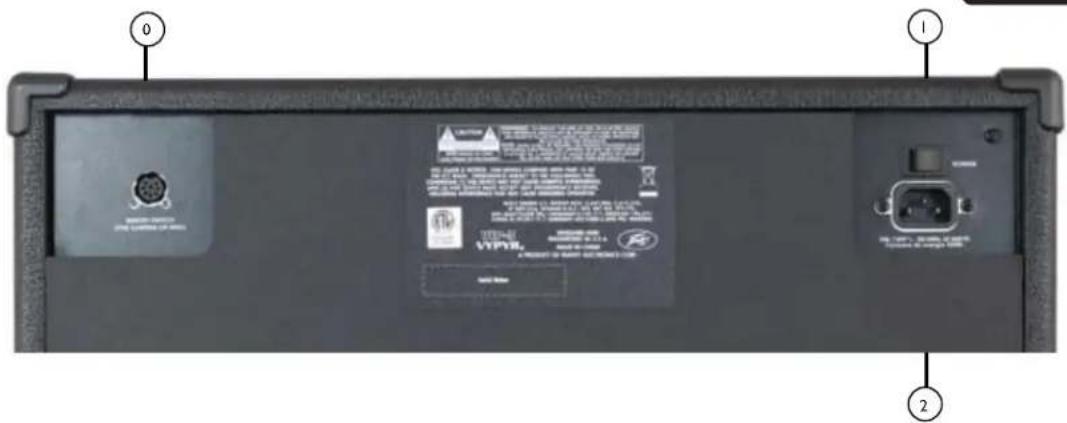
Pin MIDI 8
Sanpera Sanpera I Sanpera
(Power)
As the colors of the wires in the mains lead of this apparatus may not correspond with the colored markings identifying the terminals in your plug, proceed as follows:
(1) The wire which is colored green and yellow must be connected to the terminal which is marked by the letter E, or by the Earth symbol, or colored green or green and yellow. (2) The wire which is colored blue must be connected to the terminal
which is marked with the letter N, or the color black. (3) The wire which is colored brown must be connected to the terminal which is marked with the letter L, or the color red.
VIP 1 - Cgall
:Jaaal jai bly Jao
(120.5%)
8 20
( ab + ab - 8) ( a + b) = 0
120-100 60/50 @ 20
120-220,60/50 @ 20
jz1s2
8.5 16.584 15
17.5
VIP 2 - cagall
Jaaal
(120.5%)
8 40
( ab + 12) ( 8/1) = 12
120-100,60/50 @ 40
240-220 60/50 @ 40
j 21
10g 19.59 17.7
26
VIP 3 - cagall
Jusll
(120.5%)
8 100
( ab + ab - 8) /8 = ab( a + b) ( -8)
120-100 60/50 @ 42
240-220 60/50 @ 1,42
j
10g 19.566x
31
PEAVEY ELECTRONICS CORPORATION LIMITED WARRANTY
Effective Date: 09/15/2010
What This Warranty Covers
Your Peavey Warranty covers defects in material and workmanship in Peavey products purchased and serviced in the U.S.A. and Canada.
What This Warranty Does Not Cover
The Warranty does not cover: (1) damage caused by accident, misuse, abuse, improper installation or operation, rental, product modification or neglect; (2) damage occurring during shipment; (3) damage caused by repair or service performed by persons not authorized by Peavey; (4) products on which the serial number has been altered, defaced or removed; (5) products not purchased from an Authorized Peavey Dealer.
Who This Warranty Protects
This Warranty protects only the original purchaser of the product.
How Long This Warranty Lasts
The Warranty begins on the date of purchase by the original retail purchaser. The duration of the Warranty is as follows:
| Product Category Duration | |
| Guitars/Basses, Amplifiers, Preamplifiers, Mixers, Electronic Crossovers and Equalizers 2 years *(+3 years) | |
| Drums 2 years *(+1 year) | |
| Enclosures 3 years *(+2 years) | |
| Digital Effect Devices and Keyboards and MIDI Controllers 1 years *(+1 year) | |
| Microphones 2 years | |
| Speaker Components 1 year(incl. Speakers, Baskets, Drivers, Diaphragm Replacement Kits and Passive Crossovers) | |
| Tubes and Meters | 90 Days |
| Cables Limited Lifetime | |
| AmpKit Link, Xport, Rockmaster Series, Strum'n Fun, RetroFire, GT & BT Series Amps | 1 year |
- Denotes additional Warranty period applicable if optional Warranty Registration Card is completed and returned to Peavey by original retail purchaser within 90 days of purchase.
What Peavey Will Do
We will repair or replace (at Peavey's discretion) products covered by Warranty at no charge for labor or materials. If the product or component must be shipped to Peavey for Warranty service, the consumer must pay initial shipping charges. If the repairs are covered by Warranty, Peavey will pay the return shipping charges.
How To Get Warranty Service
(1) Take the defective item and your sales receipt or other proof of date of purchase to your Authorized Peavey Dealer or Authorized Peavey Service Center.
OR
(2) Ship the defective item, prepaid, to Peavey Electronics Corporation, International Service Center, 412 Highway 11 & 80 East, Meridian, MS 39301. Include a detailed description of the problem, together with a copy of your sales receipt or other proof of date of purchase as evidence of Warranty coverage. Also provide a complete return address.
Limitation of Implied Warranties
ANY IMPLIED WARRANTY, INCLUDING WARRANTY OF MERCHANTABILITY AND FITNESS FOR A PARTICULAR PURPOSE, ARE LIMITED IN DURATION TO THE LENGTH OF THIS WARRANTY.
Some states do not allow limitations on how long an implied Warranty lasts, so the above limitation may not apply to you.
Exclusions of Damages
PEAVEY'S LIABILITY FOR ANY DEFECTIVE PRODUCT IS LIMITED TO THE REPAIR OR REPLACEMENT OF THE PRODUCT, AT PEAVEY'S OPTION. IF WE ELECT TO REPLACE THE PRODUCT, THE REPLACEMENT MAY BE A RECONDITIONED UNIT. PEAVEY SHALL NOT BE LIABLE FOR DAMAGES BASED ON INCONVENIENCE, LOSS OF USE, LOST PROFITS, LOST SAVINGS, DAMAGE TO ANY OTHER EQUIPMENT OR OTHER ITEMS AT THE SITE OF USE, OR ANY OTHER DAMAGES WHETHER INCIDENTAL, CONSEQUENTIAL OR OTHERWISE, EVEN IF PEAVEY HAS BEEN ADVISED OF THE POSSIBILITY OF SUCH DAMAGES.
Some states do not allow the exclusion or limitation of incidental or consequential damages, so the above limitation may not apply to you.
This Warranty gives you specific legal rights, and you may also have other rights which vary from state to state.
If you have any questions about this Warranty or services received or if you need assistance in locating an Authorized Service Center, please contact the Peavey International Service Center at (601) 483-5365.
Features and specifications are subject to change without notice.
U.S. CUSTOMER WARRANTY REGISTRATION
Optional Product Extended Warranty Registration
Give us some information and put your extended warranty into effect!
Please take a few minutes to fill out this information/survey sheet to help us get to know and serve you better.
To save time, submit your warranty registration online at www.peavey.com/support/warrantyregistration
| 1. | ||
| First Name Initial Last Name | ||
| Street Address | ||
| City State/Province Postal Code | ||
| ( ) | ||
| Telephone Number | E-mail Address | |
| ( ) | - | - |
| Fax Number Date of birth | ||
| Gender M F | ||
| 2. | ||
| Model Serial # | ||
| Date of Purchase Price Paid | ||
| 3. | ||
| Name of store where purchased | ||
| City State | ||
| 4. Top two (2) reasons why you purchased from this store/dealer: | ||
| Availability of product Past favorable experience | ||
| Friend/Relative's recommendation Best price | ||
| Store credit card Advertised special Convenient location | ||
| Availability of lessons Received as a gift | ||
| Technical instruction Other | ||
| 5. Where do you most often shop for music and sound products? | ||
| Independent retailer Newspaper ads Want new and leading edge Need for improved performance equipment New technology Fullfill a specific need Availability of product Supplement existing products Value | ||
| 6. What two (2) factors most influenced your purchase of this product? | ||
| Peavey brand name Product appearance Craftsmanship Durability Features for price Prior experience with Peavey | ||
| Bundled accessories Packaging | ||
| Sound quality Other | ||
- In your opinion, what could Peavey do to improve its products and/or service? Please use the space below to tell us your answer.

Revised 1/11
Thank you for taking the time to fill out our survey! Don't forget to fold and tape (with Peavey address facing out), affix postage stamp and drop in the mail!

Logo referenced in Directive 2002/96/EC Annex IV (OJL)37/38,13.02.03 and defined in EN 50419:2005 The bar is the symbol for marking of new waste and is applied only to equipment manufactured after 13 August 2005
8019-20066 W
8019x0g°O'd
Aeaeepedeppeep
e e e