PL51 - Receiver Humantechnik - Free user manual and instructions
Find the device manual for free PL51 Humantechnik in PDF.



| Brand | Humantechnik |
| Model | PL51 |
| Category | Telephone receiver/amplifier |
| Power supply type | 2 LR06 (AA) batteries, 1.5 V |
| Estimated battery life | Several months depending on usage |
| Maximum amplification | 40 dB ± 20% |
| Available settings | Volume, bass/treble, additional amplification button |
| Operation indicator | Green LED on the front |
| Automatic shut-off | 30 seconds after hanging up |
| Connectivity | 3.5 mm jack socket for headphones or induction loop |
| Included cable | Connection cable for telephone |
| Socket adaptability | 4-position coding plate (A, B, C, D) |
| Cleaning | Soft, slightly damp cloth |
| Precautions | Do not expose to water, heat, or solvents |
| Standards | Compliant with European Union standards (CE) |
| Warranty | Manufacturer's warranty including repair and return shipping |
| Optional accessories | Stethoscope headsets, earpiece, induction plates, etc. |
| Compatibility | Infrared, FM, induction loop systems |
Frequently Asked Questions - PL51 Humantechnik
User questions about PL51 Humantechnik
0 question about this device. Answer the ones you know or ask your own.
Ask a new question about this device
Download the instructions for your Receiver in PDF format for free! Find your manual PL51 - Humantechnik and take your electronic device back in hand. On this page are published all the documents necessary for the use of your device. PL51 by Humantechnik.
USER MANUAL PL51 Humantechnik
Operating Instructions
Page 8
Telephone amplifier
F
Mode d'emploi
Page 14
Einschalten
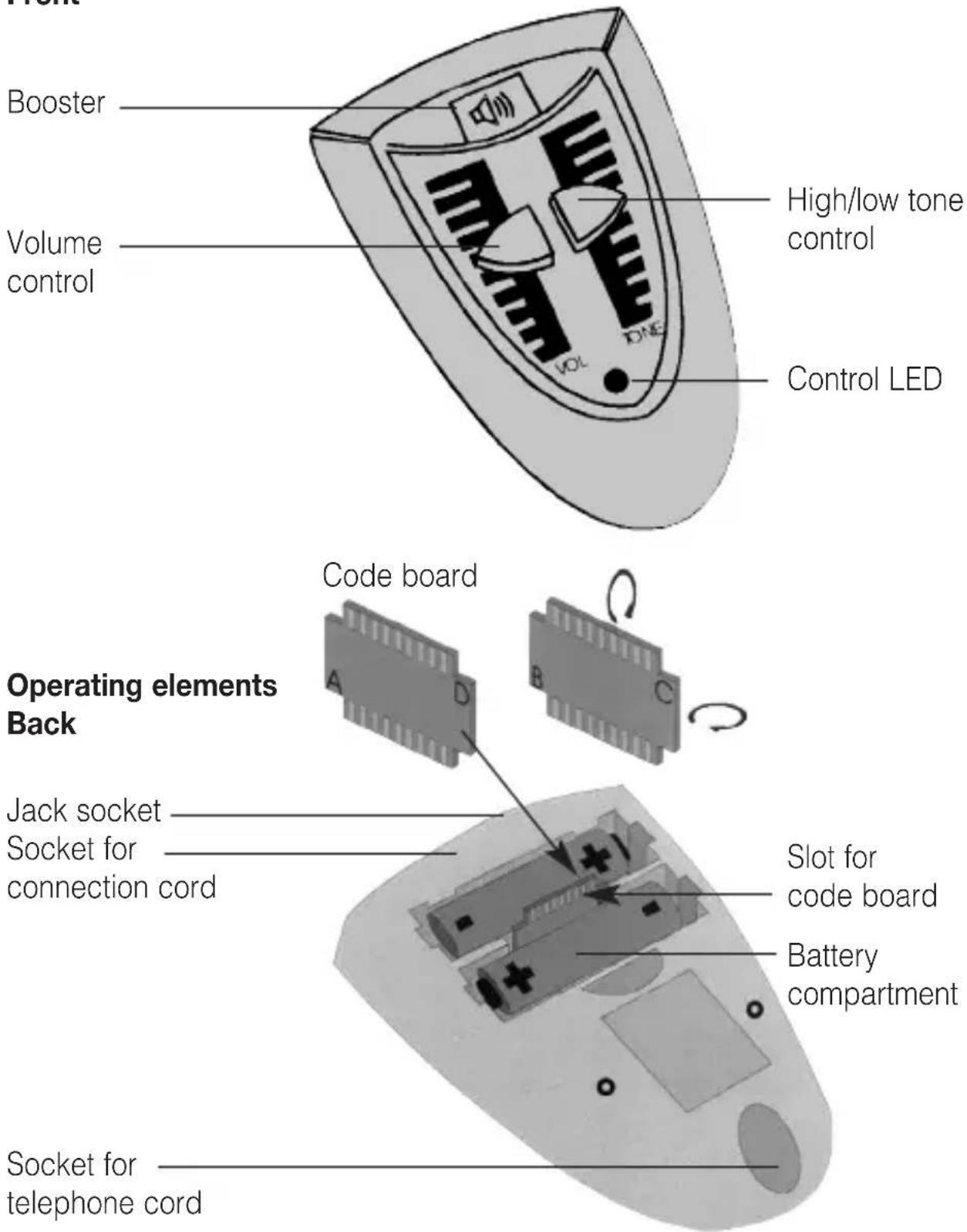
Operating elements Front
Congratulations on purchasing your telephone amplifier PL-51. We hope it will give you many years of reassuring operation. Please read through these operating instructions carefully. They tell you how to set up the system correctly and explain all the system's features to you.
Standard components
Please check if all following components are included:
- Telephone amplifier PL-51
- Connection cord
- 2 x 1,5 V mignon batteries
- Operating Instructions
- Warranty card
If any parts are missing, please immediately contact your dealer or the manufacturer directly.
Setting up the system
Please follow these instructions before using the telephone amplifier:
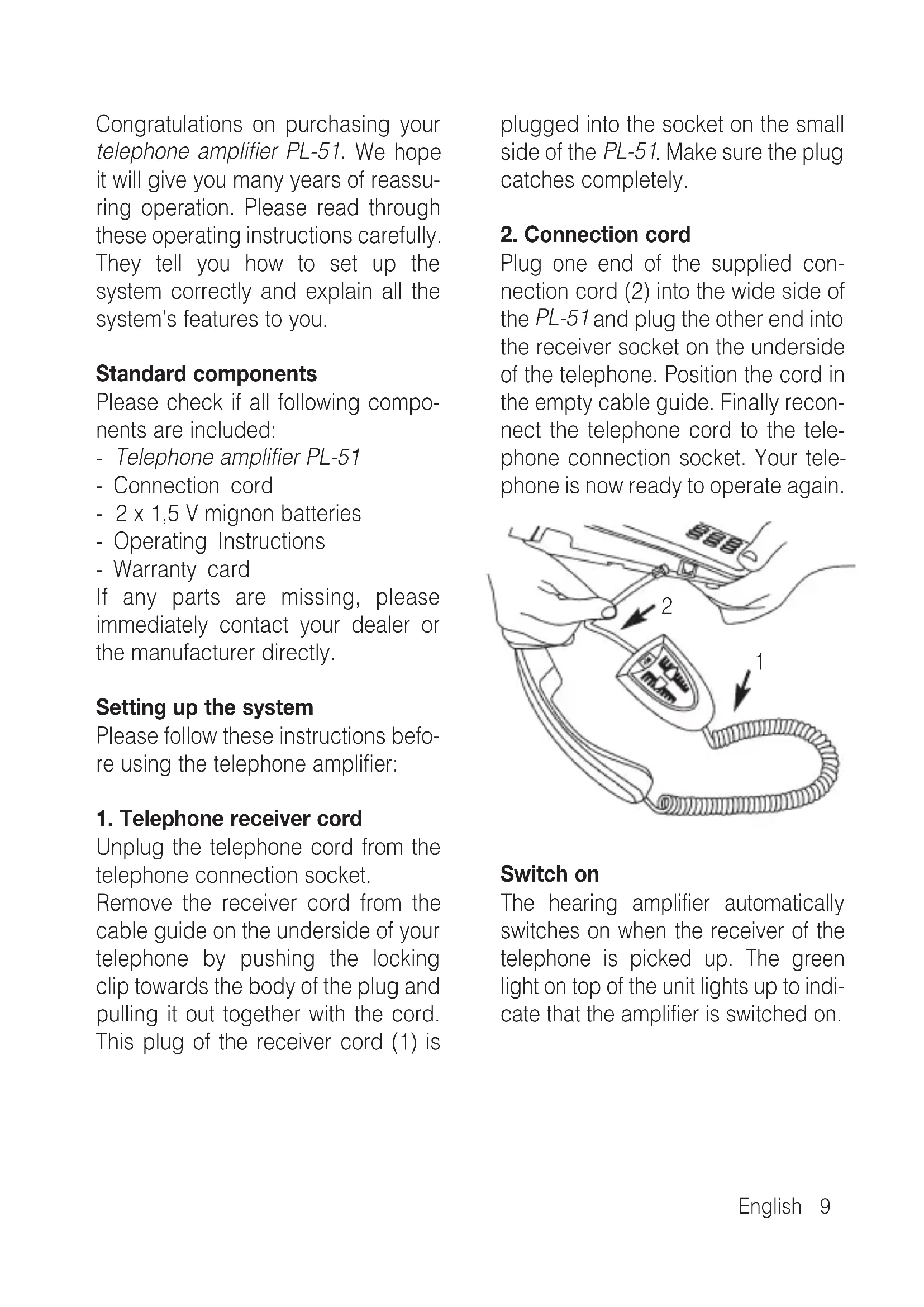
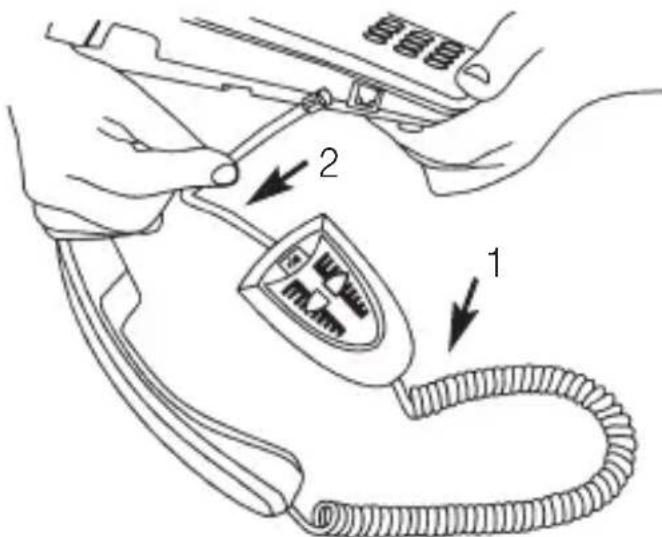
1. Telephone receiver cord
Unplug the telephone cord from the telephone connection socket.
Remove the receiver cord from the cable guide on the underside of your telephone by pushing the locking clip towards the body of the plug and pulling it out together with the cord. This plug of the receiver cord (1) is plugged into the socket on the small side of the PL-51. Make sure the plug catches completely.
2. Connection cord
Plug one end of the supplied connection cord (2) into the wide side of the PL-51 and plug the other end into the receiver socket on the underside of the telephone. Position the cord in the empty cable guide. Finally reconnect the telephone cord to the telephone connection socket. Your telephone is now ready to operate again.
Switch on
The hearing amplifier automatically switches on when the receiver of the telephone is picked up. The green light on top of the unit lights up to indicate that the amplifier is switched on.
Setting the volume/tone
Set the volume control to low before picking up the telephone and adjust the high/low tone control to medium. Now the volume can be adjusted to your needs with the volume control. The high/low tone control can be used to alter the tone by amplifying high and low tones. Furthermore the output volume can be doubled by pressing the amplifier boost er button. The set volume is increased when the amplifier button is pressed down and held. The button must be disengaged while talking.
Switch off
The hearing amplifier switches off automatically approx. 30 seconds after the receiver is placed back on the hook. The green light turns off.
Connection possibilities
The following optional accessories can be connected to the 3.5 mm socket of the PL-51:
- Small headphones: e.g. walkman headphones
- Hearing aid users can connect a neck loop to the jack socket. The hearing aids have to be switched to „T“ or „MT“. The volume can be adjusted with the volume control on the PL-51.
- Hearing aids with audio shoe can be connected to the PL-51 with the audio cable monaural (for people wearing one hearing aid) or binaural (for people wearing hearing aids in both ears)
Please note that the loudspeaker of the handset is turned off when the jack socket is used. (Avoidance of feedback).
Accessories
• Under-the-chin receiver, open system
• Under-the-chin receiver, closed system
- Earphone, inconspicuous design
- Lightweight headphones, conventional design
- Induction plate: monaural
- Induction plate: binaural
• Monaural Euro cable, damped
• Binaural Euro cable, damped
The PL-51 can be connected to the following units through the jack sokket:
• Infrared transmitting systems
• Radio transmitting systems
- Inductive loop systems
Power supply of the hearing amplifier
The PL-51 is operated with 2 batteries (type AA, LR6), which last up to 2 years. Rechargeable batteries of the same type can also be used.
Please note that when using rechargeable batteries the operating time is shortened. Unplug the telephone cord from the telephone connection socket before changing the batteries. The battery compartment is on the under side of the PL-51. Pressing the clip against the cover opens the battery compartment. The cover can now be lifted off. Insert 2 batteries as indicated by the markings in the battery compartment.
Then slide the cover back into its original position. Always use 2 new batteries (type AA, LR6) or equivalent rechargeable batteries.
What to do if problems occur
No dial tone when the telephone handset is off the hook/green LED not lit
- Check all plugs for correct connection
- Handset cord on telephone amplifier/receiver
- Connection cord on telephone/telephone connection socket
- If necessary disconnect and reconnect all plugs (faulty contact)
Telephone connection operates but telephone amplifier does not function
- Open the battery compartment and check if the batteries are inserted correctly
- If necessary insert new batteries or fully charged rechargeable batteries
Output volume low
- Batteries are empty, exchange batteries
Adjustment of the PL-51 - changing of the wire assignment
As some telephones have different wire assignments the function of the PL-51 with those telephones is not warranted. However the PL-51 can be adjusted to different wire assignments. To do this the code board inside the battery compartment has to be repluged.
There are 4 possible positions for the code board: A, B, C and D.
Position A:
works with most telephones (delivery status of the PL-51)
Position B, C and D:
further possible wire assignments
Adjusting different wire assignments:
- Unplug the telephone cord from the telephone connection socket
- Open the cover of the battery compartment
- Take out both batteries
- Pull the code board out of the slot with caution and turn it.
- Insert the code board back into the slot.
- Insert the batteries (mind the polarity).
- Close the battery compartment and plug the telephone cord back into the telephone connection soc+ket.
Should your telephone amplifier still not work, repeat the above steps.
Maintenance and care
The PL-51 does not require any maintenance. If the unit does become dirty, simply wipe it clean with a soft, damp cloth. Never use spirits, thinners or other organic solvents.
Do not set up the PL-51 where it will be exposed to full sunlight for long periods. In addition, it must be protected against excessive heat, moisture and severe mechanical shocks.
Note: This product is not protected against splash water. Do not place any containers filled with water, such as flower vases, or anything with an open flame, such as a lit candle, on or near the product.
Please make sure that the batteries are not exposed to excessive heat from such as sunlight, fire or anything similar.
Warranty
The PL-51 is a very reliable product. Should a malfunction occur despite the unit having been set up and operated correctly, please contact your dealer or the manufacturer directly. This warranty covers the repair of the product and returning it to you free of charge. It is essential that you send in the product in its original packaging, so do not throw the packaging away. The warranty does not apply to damage caused by incorrect handling or attempts to repair the unit by people not authorised to do so (destruction of the seal on the unit). Repairs will only be carried out under warranty if the completed warranty card is returned accompanied by a copy of the dealer's invoice/ till receipt.
Always specify the product number in any event.

Disposal of used electric and electronic units (applicable in the countries of the European Union and other European countries with a separate collection system). The symbol on the product or the packaging indicates that this product is not to be handled as ordinary household waste but has to be returned to a collecting point for the recycling of electric and electronic units. You protect the environment and health of your fellow men by the correct disposal of these products. Environment and health are endangered by a faulty disposal. Material recycling helps to reduce the consumption of raw material. You will receive further information on the recycling of this product from your local community, your communal disposal company or your local dealer.
Technical data
Dimensions: 40 x 70 x 105 mm (HxWxD)
Colour: silver
Weight: 122 g incl. batteries
Amplification: max. 40 dB ± 20 %
Power supply: 2 x 1,5 V mignon batteries (Type LR6 or AA)

This product complies with European Union norms.
You can obtain EC compliance declarations from your dealer, or directly from the manufacturer of this product.
Technical specifications subject to change without notice.
Mise en marche
Dimensions : 40 x 70 x 105 mm (H x L x P)
Coloris : argenté
Poids : 122 g piles incluses
Inschakelen
Accensione
Conexión
For other service-partners in Europe please contact:
Humantechnik Germany
Tel.: ++49-76 21-9 56 89-0
Fax.: ++49-76 21-9 56 89-70