A24660 - Receiver Humantechnik - Free user manual and instructions
Find the device manual for free A24660 Humantechnik in PDF.



| Product type | Door bell acoustic transmitter (radioLisa) |
| Brand | Humantechnik |
| Model | A24660 |
| Dimensions (W x D x H) | 50 x 41 x 147 mm (height with antenna: 201 mm) |
| Weight (with battery) | 135 g |
| Power supply | 9 V block battery (included) or optional mains adapter (A-2992-0) |
| Battery life | Approx. 1 year (for 7 activations per day) |
| Radio frequency | 868.35 MHz |
| Radio range | Up to 80 m (in optimal conditions) |
| Number of channels | 10 adjustable channels |
| Main functions | Acoustic detection of door bells and radio transmission to receivers; integrated personal call button; sensitivity adjustment; signal type selection (door 1 or door 2) |
| Package contents | Acoustic transmitter, microphone cable (1 m), adjustment tool, 9 V battery, instruction manual, warranty card |
| Operating temperature | 0 °C to 40 °C |
| Maintenance and cleaning | Clean with a soft, slightly damp cloth; do not use alcohol, thinner, or organic solvents |
| Safety | Do not expose to water, excessive heat, prolonged sunlight, or vibrations; do not place objects filled with liquid (vase) or sources of combustion (candle) nearby |
| Spare parts and repairability | Warranty including free repair and return shipping; return in original packaging; out-of-warranty repairs after invoice; do not attempt unauthorized repair |
| General information | Compliant with European Union standards; CE declarations available from the dealer or manufacturer |
Frequently Asked Questions - A24660 Humantechnik
User questions about A24660 Humantechnik
0 question about this device. Answer the ones you know or ask your own.
Ask a new question about this device
Download the instructions for your Receiver in PDF format for free! Find your manual A24660 - Humantechnik and take your electronic device back in hand. On this page are published all the documents necessary for the use of your device. A24660 by Humantechnik.
USER MANUAL A24660 Humantechnik
Operation Instructions
Page 8
Radio oorbell transmitter acoustic
F
Mode d'emploi
Page 14
Congratulations on purchasing your doorbell transmitter acoustic.
We hope it will give you many years of reassuring operation. Please read through these operating instructions carefully. They tell you how to set up the system correctly and explain all the system's features to you.
Standard components
Please check if all following components are included:
- lisa radio doorbell transmitter acoustic
- microphone cable 1 m
- stylus for setting the signal type
- 9 V block battery
- operating Instructions
- warranty card
If any parts are missing, please immediately contact your dealer or the manufacturer directly.
Operating principle
A signalling system consists of at least one transmitter and one receiver. The radio doorbell transmitter acoustic uses a microphone to pick up the signals from doorbell. It converts these signals into radio pulses (868.35 MHz) and transmits them to the receiver without the need for wires.
Special features
When a signal is detected, it is transmitted for a total of 22 seconds. This increases both the reliability and the range of the system.
Setting up the system -
1. Inserting the battery
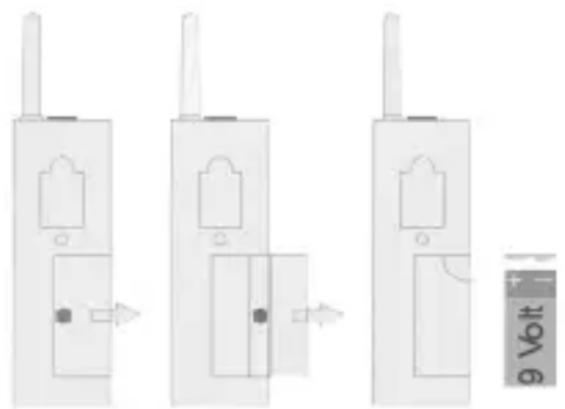
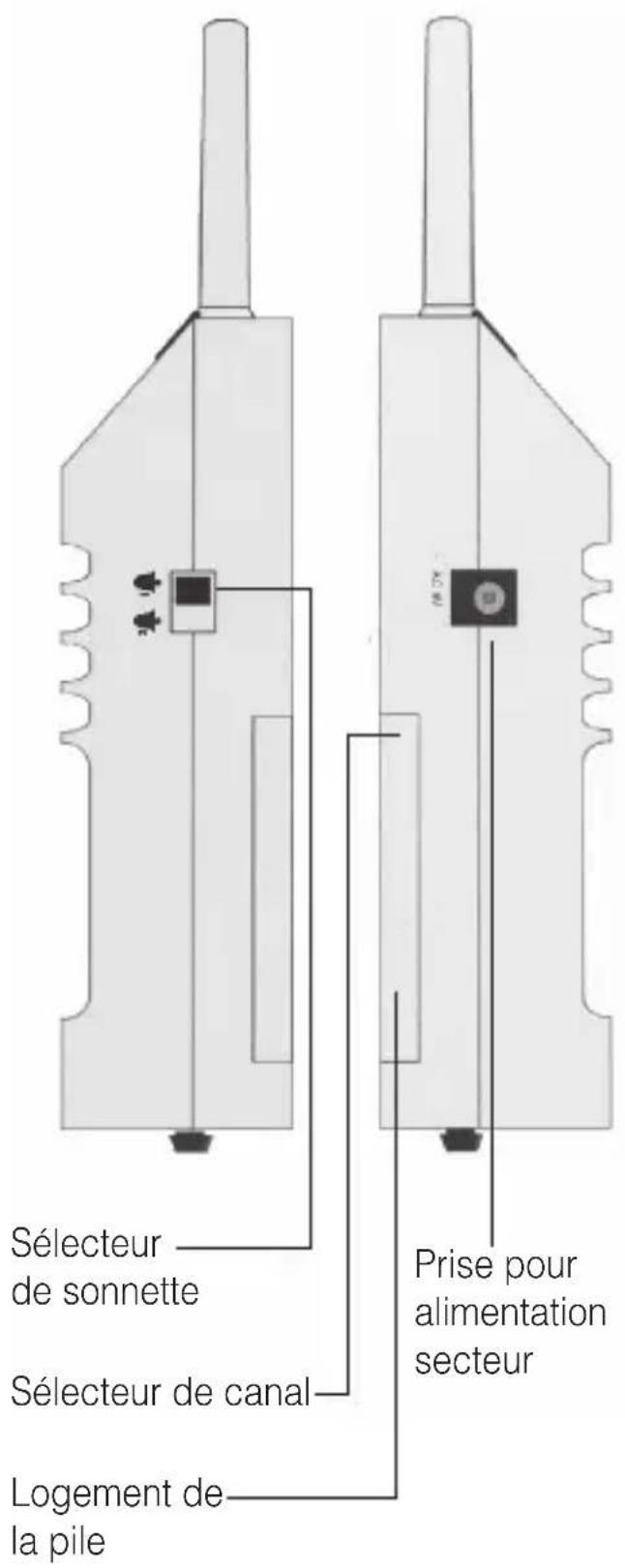
There is a battery compartment on the back of the radio doorbell transmitter acoustic. Open it by sliding the cover of the battery compartment to the right of the receiver using your thumb. Connect a 9 V block battery to the connector plug, insert the battery into the battery compartment and close the device. When the battery is connected, the receiving signals may be triggered once.
2. Setting the correct radio channel
A special digital transmission process ensures that the radio signals are picked up without errors. This process also makes it possible to set 10 different radio channels.
When supplied from the factory, all radio doorbell transmitters acoustic are set to channel 0. It is only necessary to set units to other channels, if you have several different users operating units in the same building.
Set the required channel by using a small screwdriver to turn the channel
selector switch, which is located towards the top of the battery compartment, to the required channel number.
All transmitters and receivers must be set to the same channel.
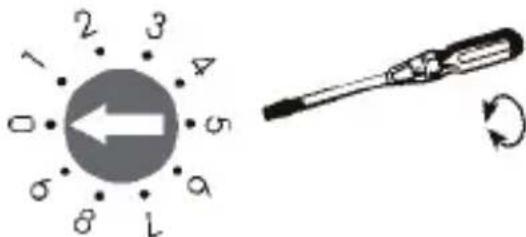
Fig. setting the correct radio channel.
3. Installing the microphone cable
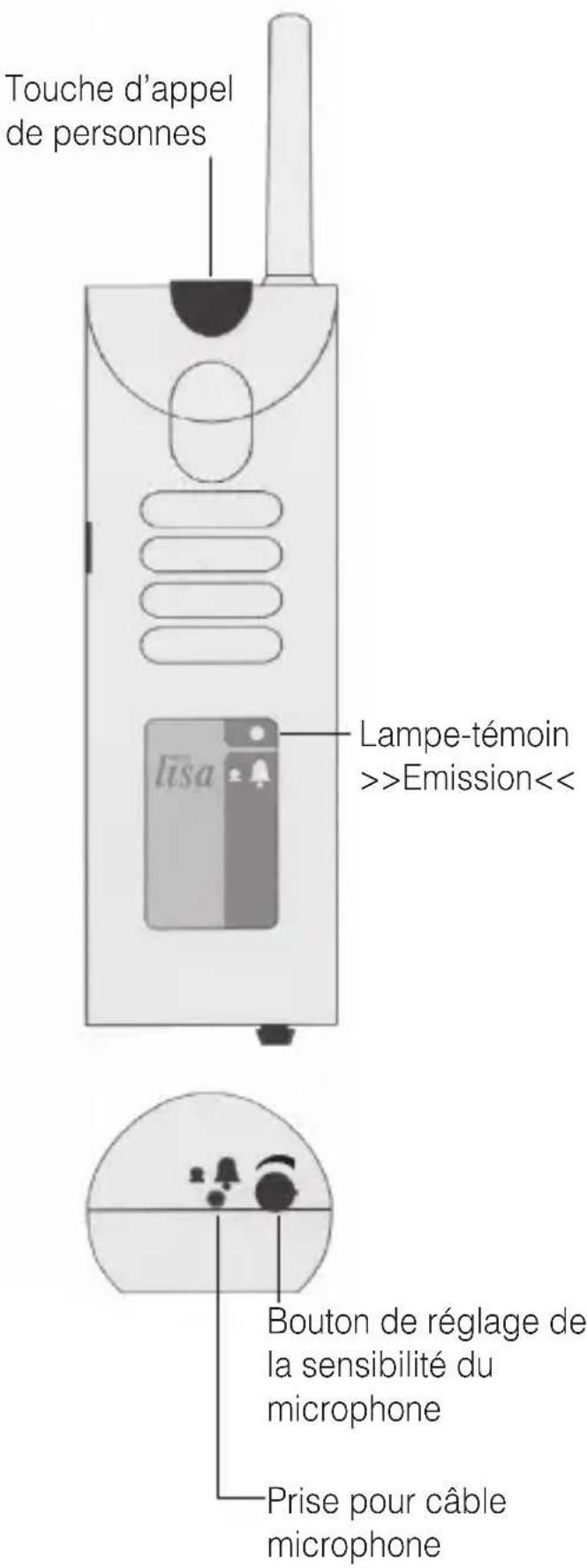
Use the adhesive ring to glue the microphone to the sound outlet of your doorbell/intercom system and plug the microphone cable into the connection jack on the bottom of the radio doorbell transmitter acoustic.
To do this, pull off the backing foil from the adhesive ring on the microphone.
For optimum function of the transmitter, its sensitivity dial switch must be set so the transmitter reliably responds to the doorbell.
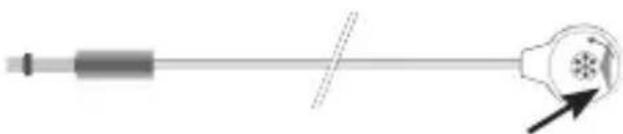
Pulling off the backing foil.
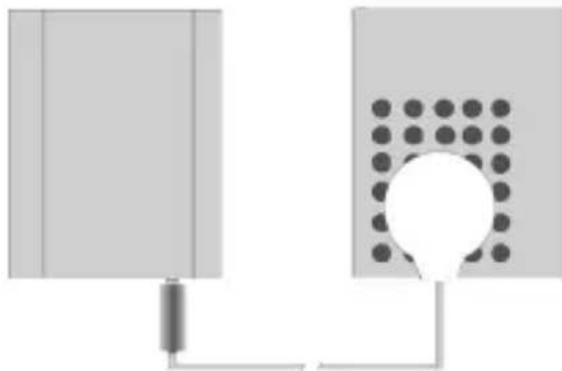
Fig.: Plug in the microphone cable and stick the microphone over the acoustic output cover of your doorbell.
4. Setting the sensitivity
Set the sensitivity controller to its lowest level (turn to the anticlockwise stop). Activate the doorbell and gradually increase the sensitivity of the transmitter (by turning the dial clockwise) until the transmitter reacts to the doorbell.
If your intercom system operates with different signal tones, make sure that both signal tones are reliably detected.
5. Setting the type of signal
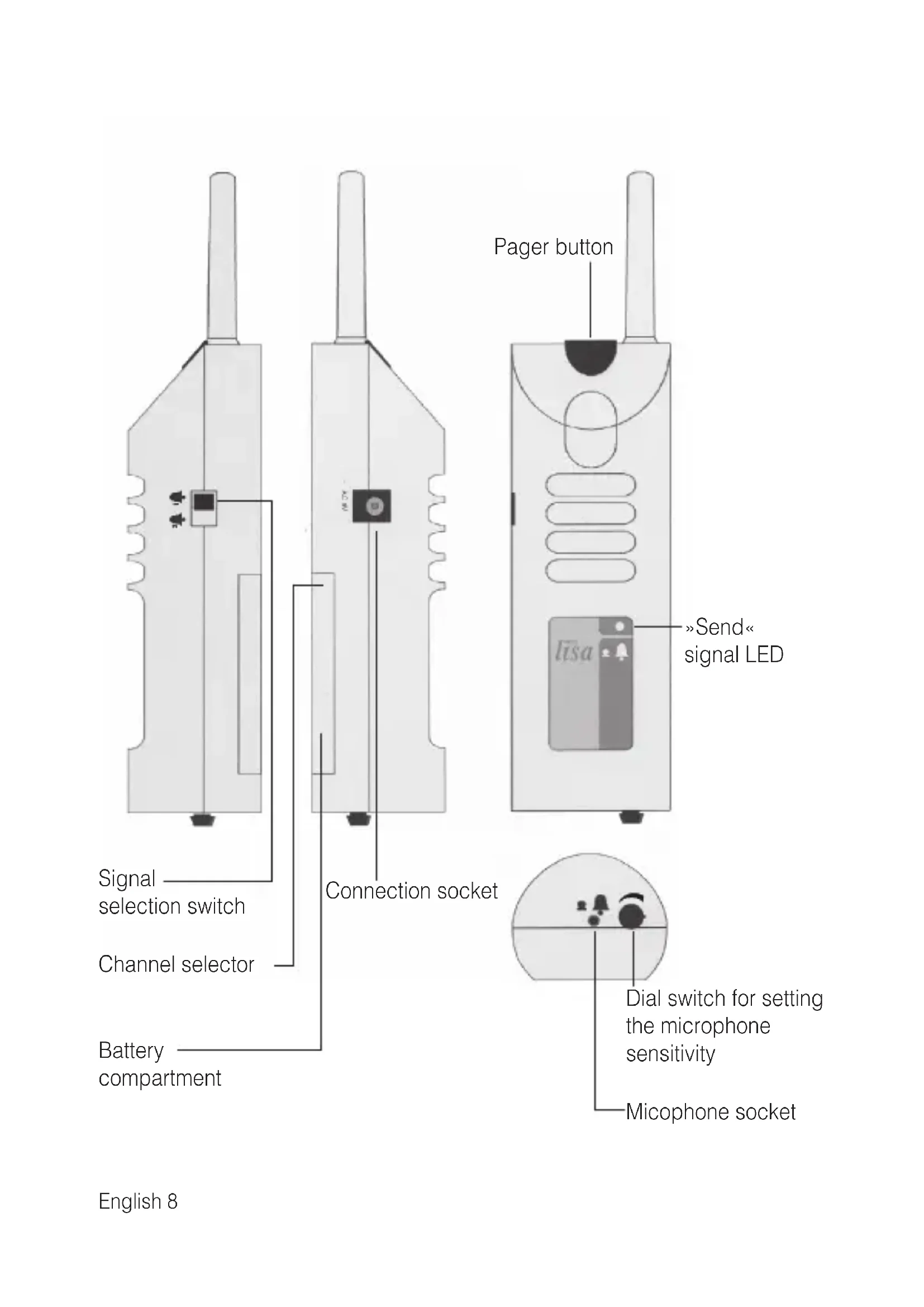
You can select one of the two signal types on the right-hand side of the radio doorbell transmitter acoustic. Use the stylus that comes included with the device to push the signal selection switch to the desired setting.
Doorbell 1
To indicate a signal from Doorbell 1, set the signal selection switch to the top position. This will send the Doorbell 1 signal to all the receivers that are switched on and set to the same channel.
Doorbell 2
To send a signal for Doorbell 2 to all the receivers which are switched on, set the signal selection switch to the bottom position.
Call button
Pressing the call button on the radio doorbell transmitter acoustic causes a signal to be triggered on every receiver, which is set to the same radio channel as the transmitter. The call button lamp lights up to indicate this. This makes it possible to call people who are in different rooms. Also, this button can be used for checking the system of its functioning even when the microphone cable is not connected.
Mains operation
You can also operate your radio doorbell transmitter acoustic via the plugin in power supply unit (A-2992-0). To connect the PSU, insert the connector on the end of the PSU cable into the corresponding socket on the left-hand side of the device. Then plug the power supply unit into the normal 230 V socket in your house.
Radio range
The radio signals are designed to have a range of 80 meters under optimum conditions. The following conditions may result in a reduced range: - Signal transmission through building structures or vegetation
- Interference from TVs, computer monitors and mobile phones. Under certain circumstances, this may prevent the receiver from functioning at all.
- Positioning of the transmitter at an unfavourable distance from surfaces, which reflect radio waves, for example floors and walls. This may lead to the signal wave being weakened or even cancelled out by the reflected wave.
- Metallic objects reduce the range due to the shielding effect of the metal.
- Particularly in towns and cities, there may be many other sources of radio waves, which can disrupt the original signal.
- Having units operating at similar frequencies located close to one another, may also result in mutual interference.
Positioning the radio transmitter
Bear in mind the following points when positioning the radio transmitter, in order to achieve the greatest possible range from the radio transmitter:
- The radio transmitter should not be set up close to devices which emit powerful interference signals, such as TVs, computer monitors or mobile phones.
- The radio transmitter should not be placed on metallic objects, since otherwise the radio range will be restricted by metallic shielding.
Maintenance and care
The radio doorbell transmitter acoustic does not require any maintenance. If the unit does become dirty, simply wipe it clean with a soft, damp cloth. Never use spirits, thinners or other organic solvents.
Do not set up the radio doorbell transmitter acoustic where it will be exposed to full sunlight for long periods. In addition, it must be protected against excessive heat, moisture and severe mechanical shocks.
Note: This product is not protected against splash water. Do not place any containers filled with water, such as flower vases, or anything with an open flame, such as a lit candle, on or near the product.
Please make sure that the batteries are not exposed to excessive heat from such as sunlight, fire or anything similar.
Warranty
The radio doorbell transmitter acoustic is a very reliable product. Should a malfunction occur despite the unit having been set up and operated correctly, please contact your dealer or the manufacturer directly. This warranty covers the repair of the product and returning it to you free of charge. It is essential that you send in the product in its original packaging, so do not throw the packaging away.
The warranty does not apply to damage caused by incorrect handling or attempts to repair the unit by people not authorised to do so (destruction of the seal on the unit). Repairs will only be carried out under warranty if the completed warranty card is returned accompanied by a copy of the dealer's invoice/ till receipt.
Always specify the product number in any event.
Battery life
Under normal conditions (7 transmissions a day), the transmitter battery should last for about 1 year. Press the pager button on the transmitter to test the battery charge status. If the "Send" signal LED on the transmitter does not come on, the battery needs to be replaced!
Disposal of used electricd electronic units (applicable in the countries of theropean Union and other
European countries with a separate collection system). The symbol on the product or the packaging indicates that this product is not to be handled as ordinary household waste but has to be returned to a collecting point for the recycling of electric and electro
nic units. You protect the environment and health of your fellow men by the correct disposal of these products. Environment and health are endangered by a faulty disposal. Material recycling helps to reduce the consumption of raw material. You will receive further information on the recycling of this product from your local community, your communal disposal company or your local dealer.
Technical data
Stromversorgung: 9 V block battery or via a plug-in PSU (special accessory)
Battery life: approx. 1 year
Frequency: 868.35 MHz
Operating range: 0^ - 40^ Height
(including the antenna): 147 mm (201 mm)
Width: 50 mm
Depth: 41 mm
Weight (including battery): 135 g

This product complies with European Union norms.
You can obtain EC compliance declarations from your dealer, or directly from the manufacturer of this product.
Technical specifications subject to change without notice.
Specifications techniques
Desechando these equipments correctly contribute to the way of mediating the media. Desechado's equipment is a good example of how media can be used to bring about the news and information in the media. It is important to understand that the media are not just a source of information but also a means of communication. The media are an important part of the media system, which is crucial for the development of new technologies.
Datasétécnicos
For other service-partners in Europe please contact:
Humantechnik Germany
Tel.: ++49-76 21-95689-0
Fax.: ++49-76 21-95689-70