TA2 - Receiver Humantechnik - Free user manual and instructions
Find the device manual for free TA2 Humantechnik in PDF.



| Brand | Humantechnik |
| Model | TA2 |
| Product type | Telephone amplifier (receiver) |
| Dimensions (H x W x D) | 52 x 115 x 157 mm |
| Weight | 253 g |
| Color | Polar white |
| Mains power supply | Power adapter 230 V, 50 Hz / 6 V |
| Battery power | 4 AA LR6 1.5 V batteries (or rechargeable batteries) |
| Max. amplification | 30 dB ± 20% |
| Connectivity | 3.5mm jack socket, handset socket (RJ11), telephone socket (RJ11) |
| Functions | Handset sound amplification, volume control (potentiometer), tone control, automatic activation on handset lift, automatic shut-off 60 seconds after hanging up |
| Special accessories | Induction loop (A-4921-0), monaural cord (A-4940-0), binaural cord (A-4950-0) |
| Adaptability | Internal wiring switches (2 variants) |
| Maintenance and cleaning | Soft, slightly damp cloth; do not use alcohol, thinner, or solvent; avoid exposure to sunlight, high temperatures, humidity, vibrations |
| Safety | Not protected against water splashes; do not place liquids or combustion sources nearby; keep batteries away from heat |
| Warranty | Free repair under conditions (original packaging, warranty card, serial number) |
| Standards | CE |
Frequently Asked Questions - TA2 Humantechnik
User questions about TA2 Humantechnik
0 question about this device. Answer the ones you know or ask your own.
Ask a new question about this device
Download the instructions for your Receiver in PDF format for free! Find your manual TA2 - Humantechnik and take your electronic device back in hand. On this page are published all the documents necessary for the use of your device. TA2 by Humantechnik.
USER MANUAL TA2 Humantechnik
Operating Instructions
Page 8
Telephone Amplifier
F
Mode d'emploi
Page 14
natural_image
Simple line drawing of a device casing with internal components and an arrow indicating direction (no text or symbols)Congratulations on purchasing your telephone amplifier TA-2. We hope it will provide you with many years of service. You have chosen a modern and reliable system.
Please read the operating instructions through carefully to be able to start the unit correctly and to familiarise yourself with all of the systems features.
Standard components
Please check if all following components are included:
- TA-2
- 6 V power supply unit
- Operating instructions
- Warranty card
If any parts are missing please immediately contact your dealer or the manufacturer directly.
Operation
Before using the telephone amplifier please follow these instruction.
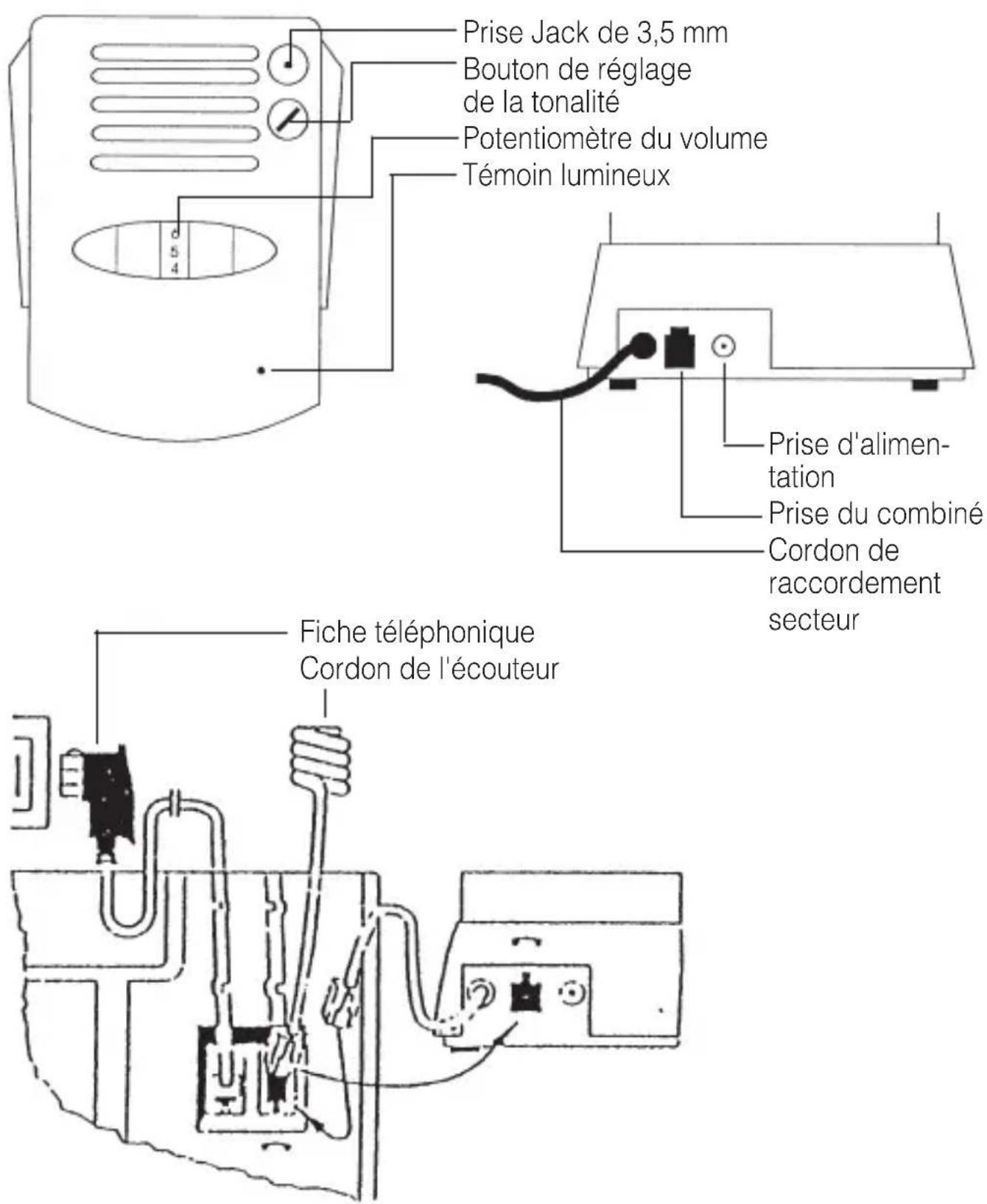
1. Telephone receiver cord
First take the wallplug out of the socket for your telephone connection. Remove the receiver cord from its cable guide on the underside of your telephone. To do this, push the locking clip towards the body of the plug at the same time as pulling the plug out of the socket using the cord. Take this plug on the end of the telephone receiver cord and push it into the socket on the back of the telephone amplifier so the plug clips into place. The socket is identified with a telephone receiver signal.
2. Connecting cable
Take the plug on the end of the connecting cable for the hearing amplifier and push it into the receiver socket on the base of the telephone. Position the cable in the empty cable guide.
Finally reconnect the wallplug into the wall socket for your telephone connection.
Your telephone is now ready to operate again.
Switching on
The hearing amplifier automatically switches itself on when you pick up the handset of the telephone.
The green light on top of the unit lights up to indicate this.
Setting the volume/tone
You can use the tumbler dial on top of the hearing amplifier to adjust the volume of the signal to a comfortable level. Turning the dial towards the larger numbers on the scale increases the volume, and vice versa. You will be able to feel the stop at either end of the dial's travel. Please do not try to force the dial past these points. In addition, you can adjust the tone using the tone control.
Switching off
The hearing amplifier switches itself off automatically about 60 seconds after you put the handset back on the hook. The green light goes off again.
Possible connections
The TA-2 is equipped with a 3.5 mm stereo jack socket to which the following accessories can be connected:
- Mini-headphones, e.g. Walkman headphones
- Hearing aid wearers can connect a neckloop to the jack socket.
The hearing aid must be set to »T« or »MT« in this case. It is easy to set the volume using the volume control on the TA-2.
- Hearing aids with a direct audio input allow a direct link to be established between the telephone and the hearing aid. Both a monaural cable (for wearers of a hearing aid in one ear) and a binaural cable (for wearers of hearing aids in both ears) are available for this.
Please note that the loudspeaker in the telephone handset is switched off when a unit is connected to the jack socket (to avoid feedback).
Special accessories
• Audio loop order no. A-4921-0
• Monaural cable order no. A-4940-0
• Binaural cable order no. A-4950-0
The TA-2 can also be connected to the following systems using the jack socket:
• Infrared transmission systems
• Radio transmission systems
- Induction loop transmission systems
Power supply for the hearing amplifier
Mains operation
Only use the mains adapter supplied. Take the plug on the end of the mains adapter cable and insert it into the socket on the back of the telephone amplifier. This socket is identified by a mains adapter symbol. Then plug the mains adapter into a standard 230 V domestic outlet.
If mains power is not available the unit will not function without batteries.
Battery operation
Open the battery compartment by pushing the battery compartment cover on the underside of the hearing amplifier out to the side. Insert 4 batteries as indicated by the markings in the battery compartment. Then slide the cover back into its original position. Always use 4 new batteries (type AA, LR6) or equivalent rechargeable batteries.
What you can do in case of problems
Not every problem means there is a serious fault in your telephone amplifier. Please check the following points before contacting your supplier.
No dial tone when telephone hand-set off the hook
- Check all the plugs to see whether they are connected properly.
- Handset cord on telephone amplifier.
- Connection cord on unit/telephone socket.
- If necessary, disconnect and then reconnect all the plugs (faulty contact).
Telephone connection is OK, but telephone amplifier does not function
- Check the mains adapter connection.
- Open the battery compartment and check if the batteries are inserted correctly.
- If necessary, fit new batteries or equivalent, charged rechargeable batteries.
Telephone amplifier emits loud peeping sounds
- Reduce the volume slightly, and make sure that the telephone handset is not directly adjacent to the hearing amplifier.
- If necessary, fit new batteries or equivalent, charged rechargeable batteries.
Procedure for adapting the TA-2
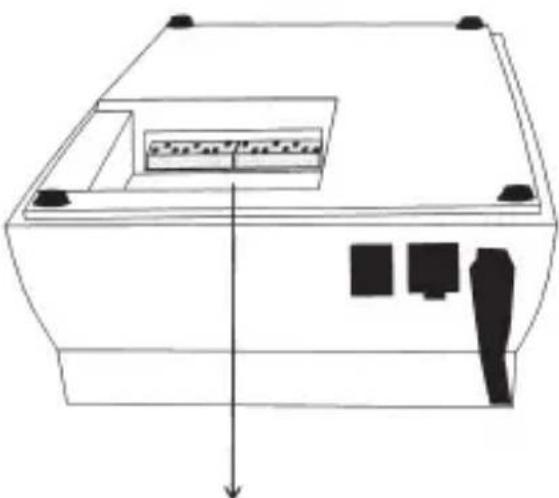
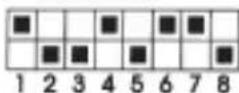
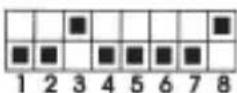
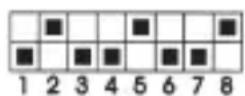
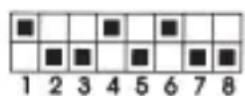
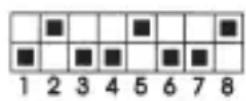
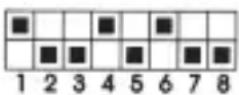
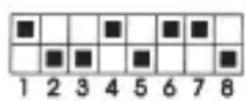
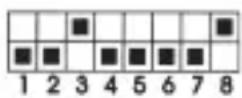
Due to the different cable connection of some telephones (e.g. T-Easy P210), the correct function of the TA-2 cannot be guaranteed with these telephones. However, the TA-2 can be adapted to different cable connections by altering the DIP switch settings in the battery compartment of the TA-2.
There are basically two different settings:
Standard setting (initial state of TA-2) and setting for type 2.
natural_image
Pure technical line drawing of a mechanical or electronic component with no text, numbers, or symbolsStandard setting
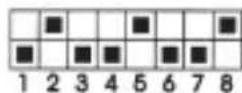
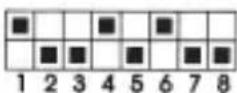
Setting for type 2
Important!
- Please use a small screwdriver when altering the DIP switch settings!
- Make sure the DIP switches are fully positioned in their end positions.
- Do not set the DIP switches to any other settings.
Maintenance and care
All units are maintenance-free. If the unit does become dirty, simply wipe it clean with a soft, damp cloth. Never use spirits, thinners or other organic solvents. Do not set up the unit where it will be exposed to full sunlight for long periods. In addition it must be protected against excessive heat, moisture and severe mechanical shocks.
Note: This product is not protected against splash water. Do not place any containers filled with water, such as flower vases, or anything with an open flame, such as a lit candle, on or near the product.
Please make sure that the batteries are not exposed to excessive heat from such as sunlight, fire or anything similar.
Warranty
The TA-2 is a very reliable product. Should a malfunction occur despite the unit having been set up and operated correctly, please contact your dealer. This warranty covers the repair of the product and returning it to you free of charge. It is essential that you send in the product in its original packaging, so do not throw the packaging away. The warranty does not apply to damage caused by incorrect handling or attempts to repair the unit by people who are not authorised to do so (destruction of the seal on the unit). Repairs under warranty are only carried out providing you have filled in and returned the enclosed warranty card from the dealer.
Always specify the product number in any event.

Disposal of used electric and electronic units (applicable in
the countries of the Euro pean Union and other European countries with a separate collection system).
The symbol on the product or the packaging indicates that this product is not to be handled as ordinary household waste but has to be returned to a collecting point for the recycling of electric and electronic units.
You protect the environment and health of your fellow men by the correct disposal of this products. Environment and health are endangered by a faulty disposal. Material recycling helps to reduce the consumption of raw material. You will receive further information on the recycling of this product from your local community, your communal disposal company or your local dealer.
Technical data:
Dimensions: 52 x 115 x 157 mm (H x W x D)
Colour: White
Weight: 253 g
Amplification factor: max. 30 dB = 20 %
Power supply: 6 V power supply unit at 230 V, 50 Hz or
Batteries (type AA, LR6) 4 x 1,5 V

This product complies with European Union norms.
You can obtain EC compliance declarations from your dealer, or directly from the manufacturer of this product.
Technical specifications Subject to change without notice.
natural_image
Simple line drawing of a device casing with internal components and an arrow indicating direction (no text or symbols)Réglage standard :
natural_image
Pure technical line drawing of a mechanical or electronic component with no text, numbers, or symbolsStandaardinstelling

Versterkingsfactor: max. 30 dB ± 20%
natural_image
Line drawing of a device casing with internal components and a downward arrow indicating direction (no text or symbols)natural_image
Pure technical diagram of a device casing with internal components and directional arrow (no text or symbols)Ajuste estándar
Ajuste para variante 2
Cuidado:
For other service-partners in Europe please contact:
Humantechnik Germany
Tel.: ++49-76 21-9 56 89-0
Fax.: ++49-76 21-9 56 89-70