Cube 80GX - Receiver ROLAND - Free user manual and instructions
Find the device manual for free Cube 80GX ROLAND in PDF.



| Product type | Guitar amplifier |
| Brand | Roland |
| Model | Cube 80GX |
| Dimensions (W x D x H) | 441 x 247 x 433 mm |
| Weight | 14.2 kg |
| Nominal output power | 80 W |
| Speaker | 30 cm (12 inches) |
| Power supply | Mains, 75 W consumption |
| Channels | JC CLEAN, LEAD, SOLO (memory) |
| COSM amplifier types (LEAD channel) | 10 types: ACOUSTIC SIM, BLACK PANEL, DLX COMBO, BRIT COMBO, TWEED, CLASSIC STACK, METAL STACK, R-FIER STACK, EXTREME, DYNA AMP |
| Built-in effects | EFX (CHORUS, FLANGER, PHASER, TREMOLO, HEAVY OCTAVE), DELAY (WARM, CLEAR), REVERB (SPRING, PLATE) |
| Connectors | INPUT (1/4-inch jack), i-CUBE LINK/AUX IN (4-pole mini-jack), RECORDING OUT/PHONES (1/4-inch stereo jack), LINE OUT (1/4-inch jack), FOOT SW (2 x TRS), AC IN |
| Tuner function | Chromatic, with altered tuning and 7-string guitar |
| i-CUBE LINK | Audio interface for iPad/iPhone via included mini cable |
| Options (sold separately) | BOSS FS-5U/FS-6 footswitch, GA-FC foot controller, Roland EV-5 / BOSS FV-500L/H expression pedals |
| Maintenance and cleaning | Soft dry cloth; avoid benzene, thinner, alcohol |
| Safety | Important safety instructions: do not disassemble, do not expose to moisture, disconnect during storms |
| Spare parts and repairability | Repairs by a Roland authorized center; speaker not user-replaceable |
| General information | Manual in French (120 pages), copyright Roland Corporation, Made in China |
Frequently Asked Questions - Cube 80GX ROLAND
User questions about Cube 80GX ROLAND
0 question about this device. Answer the ones you know or ask your own.
Ask a new question about this device
Download the instructions for your Receiver in PDF format for free! Find your manual Cube 80GX - ROLAND and take your electronic device back in hand. On this page are published all the documents necessary for the use of your device. Cube 80GX by ROLAND.
USER MANUAL Cube 80GX ROLAND
natural_image
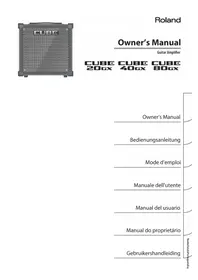
Front view of a CUBC audio amplifier with hexagonal grid pattern (no text or symbols visible)Owner's Manual
Guitar Amplifier
CUBE CUBE CUBE 20Gx 40Gx 80Gx
Owner's Manual
Bedienungsanleitung
Mode d'emploi
Manuale dell'utente
Manual del usuario
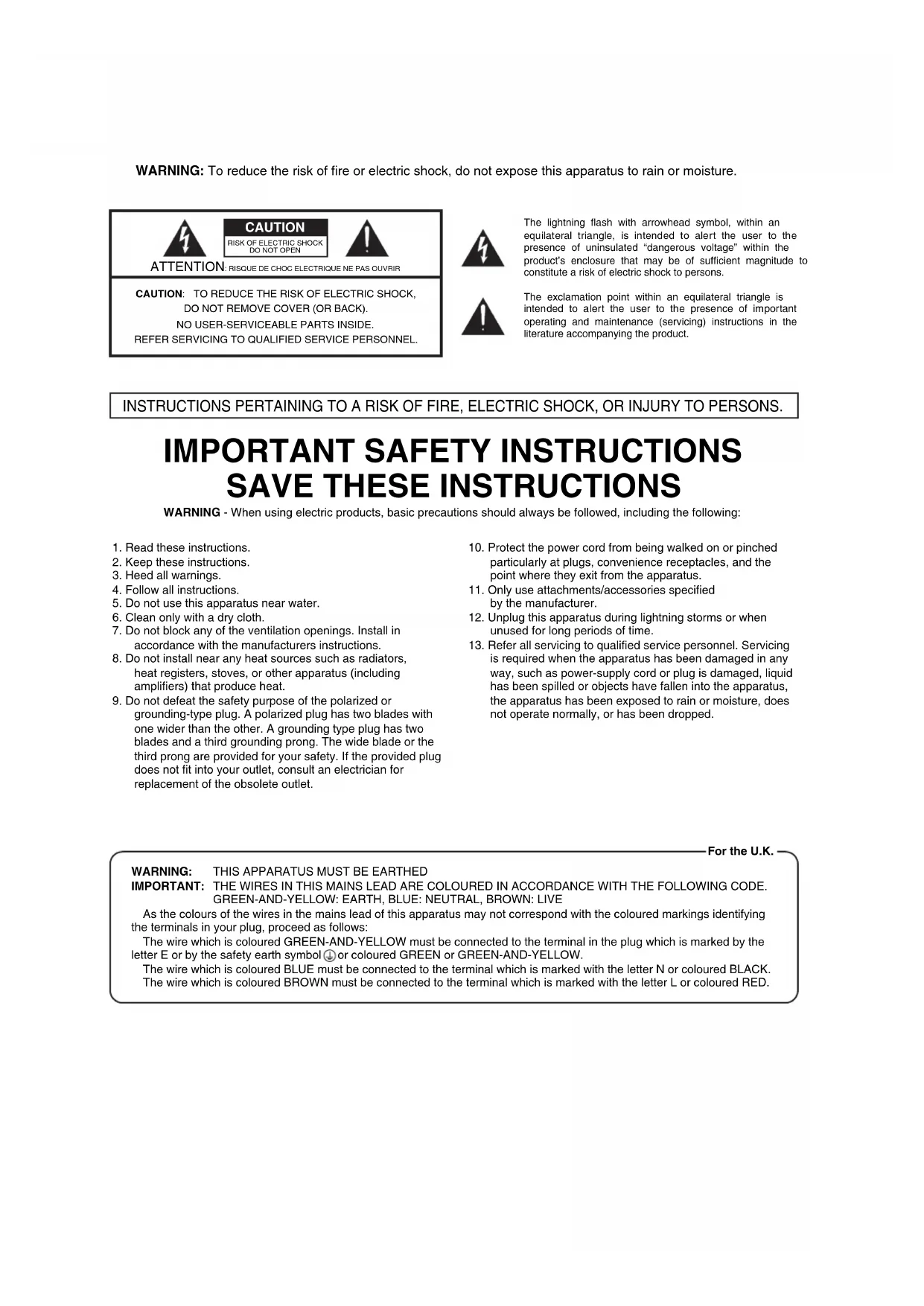
WARNING: To reduce the risk of fire or electric shock, do not expose this apparatus to rain or moisture.

ATTENTION
CAUTION
RISK OF ELECTRIC SHOCK DO NOT OPEN

RISQUE DE CHOC ELECTRIQUE NE PAS OUVRIR
CAUTION: TO REDUCE THE RISK OF ELECTRIC SHOCK,
DO NOT REMOVE COVER (OR BACK).
NO USER-SERVICEABLE PARTS INSIDE.
REFER SERVICING TO QUALIFIED SERVICE PERSONNEL.

The lightning flash with arrowhead symbol, within an equilateral triangle, is intended to alert the user to the presence of uninsulated “dangerous voltage” within the product’s enclosure that may be of sufficient magnitude to constitute a risk of electric shock to persons.

The exclamation point within an equilateral triangle is intended to alert the user to the presence of important operating and maintenance (servicing) instructions in the literature accompanying the product.
INSTRUCTIONS PERTAINING TO A RISK OF FIRE, ELECTRIC SHOCK, OR INJURY TO PERSONS.
IMPORTANT SAFETY INSTRUCTIONS SAVE THESE INSTRUCTIONS
WARNING - When using electric products, basic precautions should always be followed, including the following:
- Read these instructions.
- Keep these instructions.
- Heed all warnings.
- Follow all instructions.
- Do not use this apparatus near water.
- Clean only with a dry cloth.
- Do not block any of the ventilation openings. Install in accordance with the manufacturers instructions.
- Do not install near any heat sources such as radiators, heat registers, stoves, or other apparatus (including amplifiers) that produce heat.
-
Do not defeat the safety purpose of the polarized or grounding-type plug. A polarized plug has two blades with one wider than the other. A grounding type plug has two blades and a third grounding prong. The wide blade or the third prong are provided for your safety. If the provided plug does not fit into your outlet, consult an electrician for replacement of the obsolete outlet.
-
Protect the power cord from being walked on or pinched particularly at plugs, convenience receptacles, and the point where they exit from the apparatus.
- Only use attachments/accessories specified by the manufacturer.
- Unplug this apparatus during lightning storms or when unused for long periods of time.
- Refer all servicing to qualified service personnel. Servicing is required when the apparatus has been damaged in any way, such as power-supply cord or plug is damaged, liquid has been spilled or objects have fallen into the apparatus, the apparatus has been exposed to rain or moisture, does not operate normally, or has been dropped.
For the U.K.
WARNING: THIS APPARATUS MUST BE EARTHED
IMPORTANT: THE WIRES IN THIS MAINS LEAD ARE COLOURED IN ACCORDANCE WITH THE FOLLOWING CODE.
GREEN-AND-YELLOW: EARTH, BLUE: NEUTRAL, BROWN: LIVE
As the colours of the wires in the mains lead of this apparatus may not correspond with the coloured markings identifying the terminals in your plug, proceed as follows:
The wire which is coloured GREEN-AND-YELLOW must be connected to the terminal in the plug which is marked by the letter E or by the safety earth symbol ↓ or coloured GREEN or GREEN-AND-YELLOW.
The wire which is coloured BLUE must be connected to the terminal which is marked with the letter N or coloured BLACK.
The wire which is coloured BROWN must be connected to the terminal which is marked with the letter L or coloured RED.
natural_image
Front panel of a CUBC audio amplifier with hexagonal grid pattern (no text or symbols visible)Owner's Manual
Guitar Amplifier
CUBE CUBE CUBE 20Gx 40Gx 80Gx
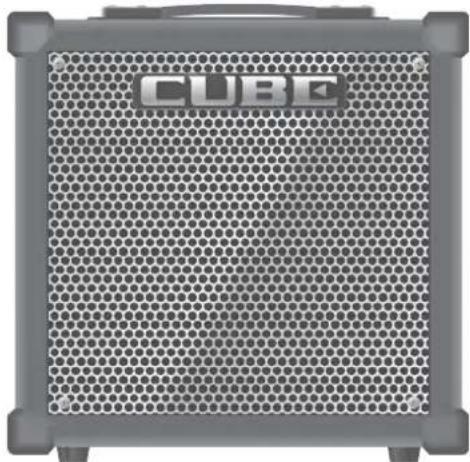
CUBE-20GX
20 cm (8 inch) speaker, 20 W output
CUBE-40GX
25 cm (10 inch) speaker, 40 W output
CUBE-80GX
30 cm (12 inch) speaker, 80 W output
This owner's manual applies to the CUBE-20GX, CUBE-40GX and the CUBE-80GX.
A CUBE-20GX only CUBE-40GX/80GX only or CUBE-80GX only icon will be used to mark explanations that pertain only to a specific model.
Superb operability with a three-channel design that provides JC CLEAN, LEAD, and SOLO
- JC CLEAN gives you a clean sound, LEAD can be switched between a variety of tones, and SOLO lets you store and call up the settings for your own sounds.
• CUBE-20GX only The LEAD channel provides six pedal effects: ACOUSTIC SIM, OVERDRIVE, DISTORTION, METAL, METAL STACK, and the original EXTREME. - CUBE-40GX/80GX only The LEAD channel provides a total of ten COSM amp types including acoustic, clean, crunch, high gain, and the original "Dyna Amp."
- Footswitch (sold separately) can be connected, allowing you to switch channels with your foot.
- CUBE-40GX/80GX only By using a GA foot controller (GA-FC; sold separately) you can switch channels as well as turn EFX, DELAY, and REVERB on/off.
• MASTER VOLUME allows you to adjust the overall volume.
COSM ( COSM Composite Object Sound Modeling) is Roland's innovative and powerful sound modeling technology. COSM analyzes the many factors that make up the original sound, such as the electrical and physical characteristics of the original, and then produces a digital model that can reproduce the same sound.
"EFX" provides five types of effects, plus independent reverb and delay (p. 6)
- Onboard EFX section includes 5 types of digital effect, CHORUS, FLANGER, PHASER, TREMOLO, and HEAVY OCTAVE.
- DELAY and REVERB are independent; choose either WARM or CLEAR for the DELAY effect, and either SPRING or PLATE for the REVERB effect.
A tuner function is included (p. 11)
- An easy-to-operate tuner is built in, allowing you to tune while leaving your guitar connected.
• Chromatic tuning is supported.
• CUBE-40GX/80GX only Flat tuning and 7-string guitars are also supported.
i-CUBE LINK jack allows convenient practicing (p. 11)
- The i-CUBE LINK jack lets you carry out recording and playback using an iPad/iPhone app.
Before using this unit, carefully read the sections entitled "IMPORTANT SAFETY INSTRUCTIONS" (inside front cover), "USING THE UNIT SAFELY" (p. 2), and "IMPORTANT NOTES" (p. 3). These sections provide important information concerning the proper operation of the unit. Additionally, in order to feel assured that you have gained a good grasp of every feature of your new unit, read Owner's Manual in its entirety. This manual should be saved and kept on hand as a convenient reference.
Copyright © 2013 ROLAND CORPORATION
All rights reserved. No part of this publication may be reproduced in any form without the written permission of ROLAND CORPORATION.
INSTRUCTIONS FOR THE PREVENTION OF FIRE, ELECTRIC SHOCK, OR INJURY TO PERSONS
About ⚠ WARNING and ⚠ CAUTION Notices
| WARNING | Used for instructions intended to alert the user to the risk of death or severe injury should the unit be used Improperly. |
| CAUTION | Used for instructions intended to alert the user to the risk of injury or material damage should the unit be used improperly.* Material damage refers to damage or other adverse effects caused with respect to the home and all its furnishings, as well to domestic animals or pets. |
About the Symbols
| The △symbol alerts the user to important instructions or warnings. The specific meaning of the symbol is determined by the design contained within the triangle. In the case of the symbol at left, it is used for general cautions, warnings, or alerts to danger. | |
| The ⚙symbol alerts the user to items that must never be carried out (are forbidden). The specific thing that must not be done is indicated by the design contained within the circle. In the case of the symbol at left, it means that the unit must never be disassembled. | |
| The ●symbol alerts the user to things that must be carried out. The specific thing that must be done is indicated by the design contained within the circle. In the case of the symbol at left, it means that the power-cord plug must be unplugged from the outlet. |
ALWAYS OBSERVE THE FOLLOWING
WARNING
Make sure that the power cord is grounded
Connect mains plug of this model to a mains socket outlet with a protective earthing connection.

To completely turn off power to the unit, pull out the plug from the outlet
Even with the power switch turned off, this unit is not completely separated from its main source of power. When the power needs to be completely turned off, turn off the power switch on the unit, then pull out the plug from the outlet. For this reason, the outlet into which you choose to connect the power cord's plug should be one that is within easy reach and readily accessible.
(for CUBE-80GX only)
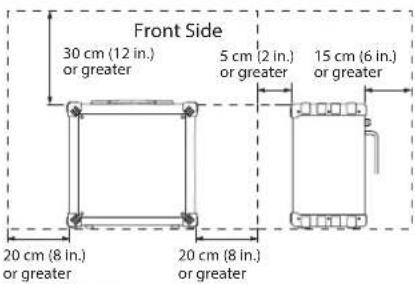
Secure a sufficient amount of space at the setup location
Since this unit will emit a slight amount of heat, it must not be used in a location that does not meet the spatial requirements shown below.

Do not disassemble or modify by yourself
Do not open or perform any internal modifications on the unit.

Do not repair or replace parts by yourself
Do not attempt to repair the unit, or replace parts within it (except when this manual provides specific instructions directing you to do so). Refer all servicing to your retailer, the nearest Roland Service Center, or an authorized Roland distributor, as listed on the "Information" page.
Do not use or store in the following types of locations
- Subject to temperature extremes (e.g., direct sunlight in an enclosed vehicle, near a heating duct, on top of heat-generating equipment); or are
- Damp (e.g., baths, washrooms, on wet floors); or are
- Exposed to steam or smoke; or are
- Subject to salt exposure; or are
- Humid; or are
- Exposed to rain; or are
- Dusty or sandy; or are
- Subject to high levels of vibration and shakiness.
Do not place in an unstable location
Make sure you always have the unit placed so it is level and sure to remain stable. Never place it on stands that could wobble, or on inclined surfaces


Connect the power cord to an outlet of the correct voltage
The unit should be connected to a power supply only of the type described as marked on the rear side of unit.


Use only the supplied power cord
Use only the attached power-supply cord. Also, the supplied power cord must not be used with any other device.

Do not bend the power cord or place heavy objects on it
Do not excessively twist or bend the power cord, nor place heavy objects on it. Doing so can damage the cord, producing severed elements and short circuits. Damaged cords are fire and shock hazards!

Avoid extended use at high volume
This unit, either alone or in combination with an amplifier and headphones or speakers, may be capable of producing sound levels that could cause permanent hearing loss. Do not operate for a long period of time at a high volume level, or a is uncomfortable. If you experience any hearing in the ears, you should immediate the unit, and consult an audiologist.

WARNING
Don't allow foreign objects or liquids to enter unit; never place containers with liquid on unit
Do not place containers containing liquid (e.g., flower vases) on this product. Never allow foreign objects (e.g., flammable objects, coins, wires) or liquids (e.g., water or juice) to enter this product. Doing so may cause short circuits, faulty operation, or other malfunctions.

Turn off the unit if an abnormality or malfunction occurs
Immediately turn the unit off, remove the power cord from the outlet, and request servicing by your retailer, the nearest Roland Service Center, or an authorized Roland distributor, as listed on the "Information" page when:
- The power-supply cord or the plug has been damaged; or
• If smoke or unusual odor occurs; or - Objects have fallen into, or liquid has been spilled onto the unit; or
- The unit has been exposed to rain (or otherwise has become wet); or
- The unit does not appear to operate normally or exhibits a marked change in performance.
Adults must provide supervision in places where children are present
When using the unit in locations where children are present, be careful so no mishandling of the unit can take place. An adult should always be on hand to provide supervision and guidance.

Do not drop or subject to strong impact
Protect the unit from strong impact. (Do not drop it!)

Do not share an outlet with an unreasonable number of other devices
Do not force the unit's power-supply cord to share an outlet with an unreasonable number of other devices. Be especially careful when using extension cords—the total power used by all devices you have connected to the extension cord's outlet must never exceed the power rating (watts/amperes) for the extension cord. Excessive loads can cause the insulation on the cord to heat up and eventually melt through.
Do not use overseas
Before using the unit in overseas, consult with your retailer, the nearest Roland Service Center, or an authorized Roland distributor, as listed on the "Information" page.

CAUTION
Place in a well ventilated location
The unit should be located so that its location or position does not interfere with its proper ventilation.

When disconnecting the power cord, grasp it by the plug
To prevent conductor damage, always grasp the power cord by its plug when disconnecting it from this unit or from a power outlet.

Periodically clean the power cord's plug
At regular intervals, you should unplug the power plug and clean it by using a dry cloth to wipe all dust and other accumulations away from its prongs.

Also, disconnect the power plug from the power outlet whenever the unit is to remain unused for an extended period of time. Any accumulation of dust between the power plug and the power outlet can result in poor insulation and lead to fire.
CAUTION
Manage cables for safety
Try to prevent cords and cables from becoming entangled. Also, all cords and cables should be placed so they are out of the reach of children.

Avoid climbing on top of the unit, or placing heavy objects on it
Never climb on top of, nor place heavy objects on the unit.

Do not connect or disconnect the power cord with wet hands
Never handle the power cord or its plugs with wet hands when plugging into, or unplugging from, an outlet or this unit.

Disconnect everything before moving the unit
Before moving the unit, disconnect the power plug from the outlet, and pull out all cords from external devices.

CAUTION
Unplug the power cord from the outlet before cleaning
Before cleaning the unit, turn it off and unplug the power cord from the outlet (p. 7).

If there is a possibility of lightning strike, disconnect the power cord from the outlet
Whenever you suspect the possibility of lightning in your area, pull the plug on the power cord out of the outlet.

Take care not to get burned
The cooling vents on the rear side of the unit may become hot, so take care to avoid burns.

Do not remove the speaker grille and speaker
Do not remove the speaker grille and speaker by any means. Speaker is not user replaceable. Shock hazardous voltages and currents are present inside the enclosure.

IMPORTANT NOTES
Power Supply
- Do not connect this unit to same electrical outlet that is being used by an electrical appliance that is controlled by an inverter or a motor (such as a refrigerator, washing machine, microwave oven, or air conditioner). Depending on the way in which the electrical appliance is used, power supply noise may cause this unit to malfunction or may produce audible noise. If it is not practical to use a separate electrical outlet, connect a power supply noise filter between this unit and the electrical outlet.
• To prevent malfunction and equipment failure, always make sure to turn off the power on all your equipment before you make any connections.
Placement
• Using the unit near power amplifiers (or other equipment containing large power transformers) may induce hum. To alleviate the problem, change the orientation of this unit; or move it farther away from the source of interference.
- This device may interfere with radio and television reception. Do not use this device in the vicinity of such receivers.
- Noise may be produced if wireless communications devices, such as cell phones, are operated in the vicinity of this unit. Such noise could occur when receiving or initiating a call, or while conversing. Should you experience such problems, you should relocate such wireless devices so they are at a greater distance from this unit, or switch them off.
- Do not expose the unit to direct sunlight, place it near devices that radiate heat, leave it inside an enclosed vehicle, or otherwise subject it to temperature extremes. Also, do not allow lighting devices that normally are used while their light source is very close to the unit (such as a piano light), or powerful spotlights to shine upon the same area of the unit for extended periods of time. Excessive heat can deform or discolor the unit.
- When moved from one location to another where the temperature and/or humidity is very different, water droplets (condensation) may form inside the unit. Damage or malfunction may result if you attempt to use the unit in this condition. Therefore, before using the unit, you must allow it to stand for several hours, until the condensation has completely evaporated.
- Do not allow rubber, vinyl, or similar materials to remain on this unit for long periods of time. Such objects can discolor or otherwise harmfully affect the finish.
- Do not paste stickers, decals, or the like to this instrument. Peeling such matter off the instrument may damage the exterior finish.
- Depending on the material and temperature of the surface on which you place the unit, its rubber feet may discolor or mar the surface. You can place a piece of felt or cloth under the rubber feet to prevent this from happening. If you do so, please make sure that the unit will not slip or move accidentally.
- Do not place containers or anything else containing liquid on top of this unit. Also, whenever any liquid has been spilled on the surface of this unit, be sure to promptly wipe it away using a soft, dry cloth.
Maintenance
- For everyday cleaning wipe the unit with a soft, dry cloth or one that has been slightly dampened with water. To remove stubborn dirt, use a cloth impregnated with a mild, non-abrasive detergent. Afterwards, be sure to wipe the unit thoroughly with a soft, dry cloth.
- Never use benzine, thinners, alcohol or solvents of any kind, to avoid the possibility of discoloration and/or deformation.
Additional Precautions
- Use a reasonable amount of care when using the unit's buttons, sliders, or other controls; and when using its jacks and connectors. Rough handling can lead to malfunctions.
- When disconnecting all cables, grasp the connector itself—never pull on the cable. This way you will avoid causing shorts, or damage to the cable's internal elements.
-
A small amount of heat will radiate from the unit during normal operation.
-
To avoid disturbing others nearby, try to keep the unit's volume at reasonable levels.
- When you need to transport the unit, package it in the box (including padding) that it came in, if possible. Otherwise, you will need to use equivalent packaging materials.
- Some connection cables contain resistors. Do not use cables that incorporate resistors for connecting to this unit. The use of such cables can cause the sound level to be extremely low, or impossible to hear. For information on cable specifications, contact the manufacturer of the cable.
Intellectual Property Right
- It is forbidden by law to make an audio recording, video recording, copy or revision of a third party's copyrighted work (musical work, video work, broadcast, live performance, or other work), whether in whole or in part, and distribute, sell, lease, perform, or broadcast it without the permission of the copyright owner.
- Do not use this product for purposes that could infringe on a copyright held by a third party. We assume no responsibility whatsoever with regard to any infringements of third-party copyrights arising through your use of this product.
- MMP (Moore Microprocessor Portfolio) refers to a patent portfolio concerned with microprocessor architecture, which was developed by Technology Properties Limited (TPL). Roland has licensed this technology from the TPL Group.
- Roland, COSM and CUBE are either registered trademarks or trademarks of Roland Corporation in the United States and/or other countries.
- Company names and product names appearing in this document are registered trademarks or trademarks of their respective owners.
• The product names mentioned in this document are registered trademarks or trademarks of their respective owners. In this manual, these names are used because it is the most practical way of describing the sounds that are simulated using COSM technology. - iPad, iPhone are either registered trademarks or trademarks of Apple Inc.
Control Panel
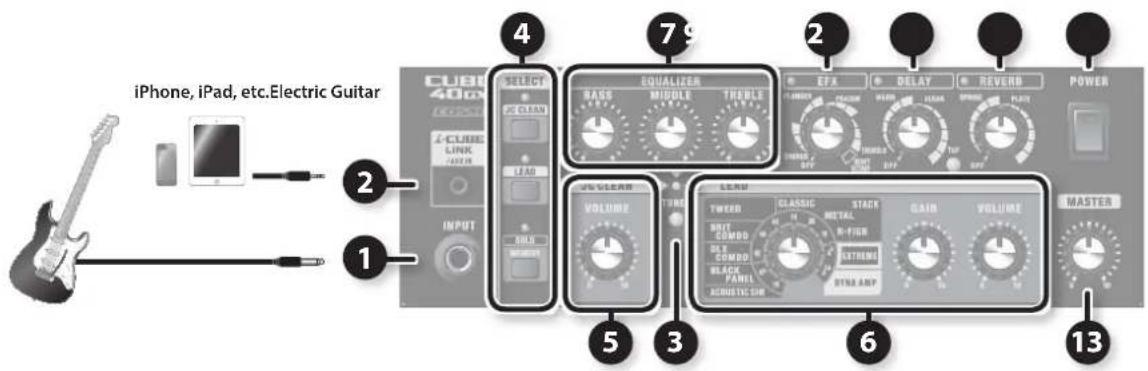
CUBE-20GX
CUBE-40GX
CUBE-80GX
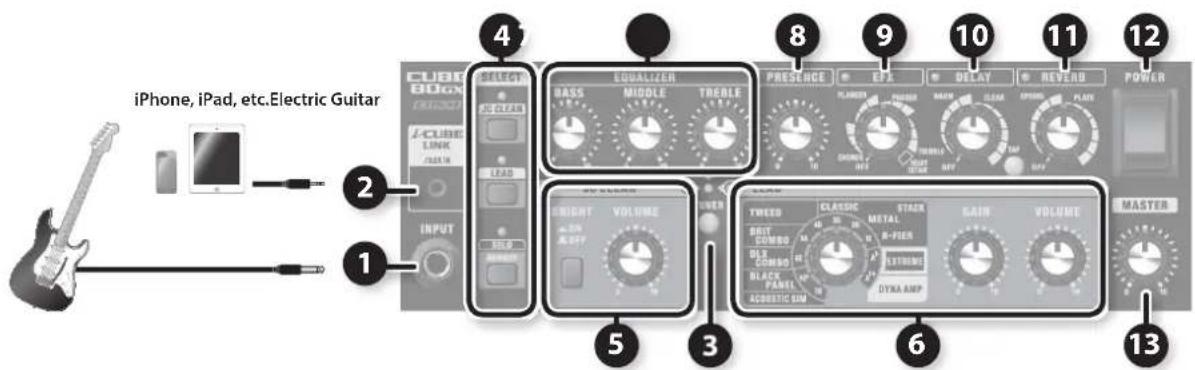
* To prevent malfunction and equipment failure, always turn down the volume, and turn off all the units before making any connections.
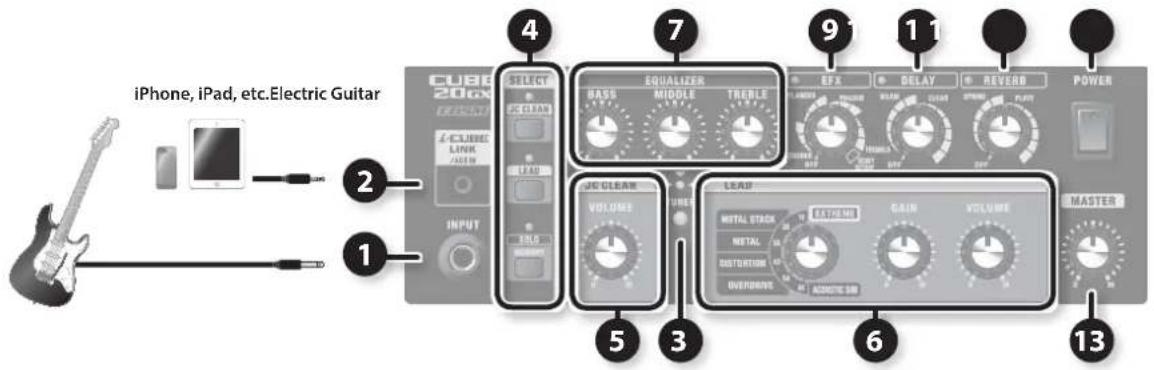
3 [TUNER] button
Use this when you want to tune your guitar. For details, refer to "Using the Tuner Function" (p. 11).
1 INPUT jack
Connect your electric guitar here.
2 i-CUBE LINK/AUX IN jack
i-CUBE LINK
If you use the included mini cable (4-pole) to connect your iPad/iPhone, you'll be able to use the i-CUBE LINK function (p. 11).
AUX IN
You can use a commercially available stereo-mini cable to connect your audio player, iPad/iPhone, or other device and listen to it while you play your guitar.
4 SELECT buttons
Use the SELECT buttons to quickly switch between the CUBE's three channels: JC CLEAN, LEAD, and SOLO.
An indicator shows the channel that's selected.
You can connect a footswitch
(BOSS FS-5U, FS-6; sold separately) or a GA foot controller (GA-FC;
sold separately (CUBE-40GX/80GX only) and use it to switch
channels (p. 8).
[JC CLEAN] button
This selects the JC CLEAN channel.
The current settings of the knobs will determine the sound.
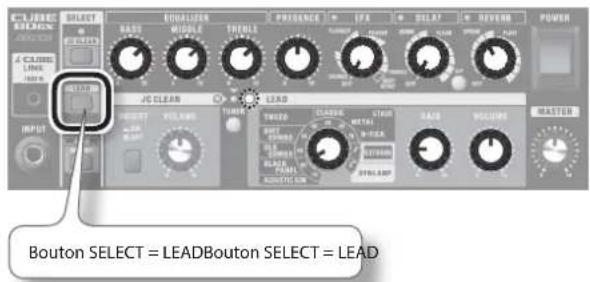
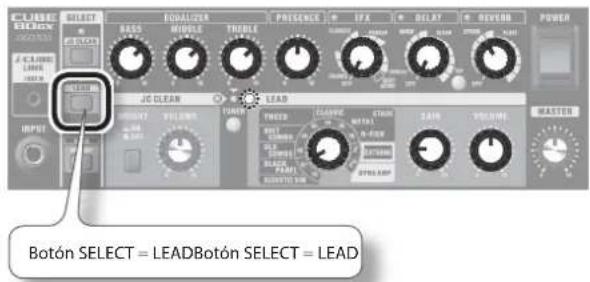
[LEAD] button
This selects the LEAD channel.
The current settings of the knobs will determine the sound.
[SOLO] (MEMORY) button
This lets you store and call up your panel settings (the positions of the knobs other than the [MASTER] knob, as well as the JC CLEAN and LEAD settings) (p. 10).
You can store the settings of either the JC CLEAN channel or the LEAD channel.
5 JC CLEAN channel
This is a model of Roland's famous JC-120 Jazz Chorus guitar amplifier. The ultra-clean, ultra-flat sound offers a smooth feel. This amp is ideal for creating sounds in combination with a multi-effects device.
[BRIGHT] switch CUBE-80GX only
This makes the mid and high ranges more brilliant, for a crisper sound.
[VOLUME] knob
This adjusts the volume level of the JC CLEAN channel.
As an original function on the CUBE, this can produce a powerful crunch at volume levels near the maximum.
6 LEAD channel
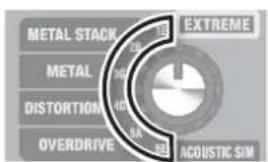
Type switch
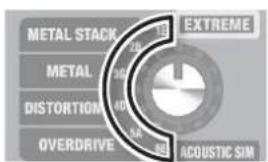
Use this to select the COSM amp type.
* If the Tuner function is on (p. 11), use this to select the string that you're tuning.
CUBE-20GX only
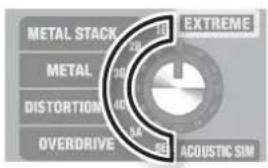
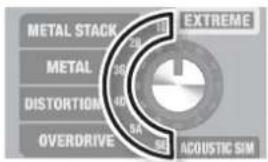
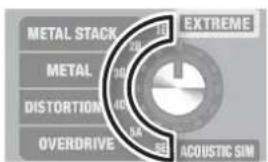
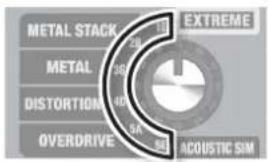
You can select from the following six amp types:
| Type Explanation | COSM |
| ACOUSTIC SIM | This original amp model gives you a dynamic acoustic guitar sound using a standard electric guitar. |
| OVERDRIVE | Natural distortion sound similar to that obtained by turning an amp's volume up completely. |
| DISTORTION Harder distortion than OVERDRIVE. | |
| METAL | Even harder and heavier than DISTORTION, which can get long sustained notes. |
| METAL STACK Very fat sound of a Heavy Metal full amp stack. | |
| EXTREME | High-gain sound delivering thick lows and intense distortion while still preserving the sound's clear definition. |
CUBE-40GX/80GX only
You can select from the following ten amp types:
| Type Explanation | |
| ACOUSTIC SIM | This is an original amp type that includes an acoustic simulator.Using this type together with a single-coil pickup in the front position produces optimal sound quality.If you're using humbucker pickups, turn down the equalizer's BASS and MIDDLE controls slightly. |
| BLACK PANEL | This is modeled on the classic Fender Twin Reverb amplifier.It's used in a wide range of musical styles, from country to blues, jazz, and rock.It features rich lows and a bright high end. |
| DLX COMBO | This is modeled on the Fender Deluxe Reverb amplifier.This amp finds use in a full range of genres, including surf music, blues, country, jazz, soul, and hard rock.It features clear, clean tones and sparkling overdrive at high volumes. |
| BRIT COMBO | This is modeled on the Vox AC-30TB.This is the rock amplifier that created the Liverpool sound of the 1960s.It can produce a broad range of sounds, from clean to overdrive. |
| TWEED | This is modeled on the vintage Fender Tweed Bassman 4 x 10" Combo.It produces a clear mid to upper range with a fat low end, and its unique crunch tones with persistent distortion have earned it a loyal following among blues and rock guitarists. |
| CLASSIC STACK | This is modeled on the features of a Marshall JMP 1987.Used extensively in hard rock in the 1970s, this is truly the perfect amp for the "top rock" guitar sound. |
| METAL STACK | This is modeled on the Peavey EVH 5150.This is a high-gain amp, so you can get heavy distortion and sustain even at low volumes. |
| R-FIER STACK | This super high-gain amp is modeled on the Mesa/Boogie Rectifier.This is a super high-gain amp. It's capable of producing slash metal, grunge, and a wide range of other lead sounds. |
| EXTREME | This original high-gain amp delivers thick lows and intense distortion while still preserving the sound's clear definition. |
| DYNA AMP | This is an original amp type that lets you obtain unprec-edented tonal changes according to your picking dynamics.Soft picking produces a transparent clean amp sound, whereas hard picking yields a deeply distorted high-gain amp sound.Once the sound is distorted, the tone then changes according to the force used in picking, greatly expanding your range of expression.Setting the [GAIN] knob at the optimal position provides maximum effectiveness. Start with the [GAIN] knob centered. Then adjust the [GAIN] knob so that soft picking yields a clean tone and hard picking produces heavy distortion. |
[GAIN] knob
This adjusts the distortion level for the LEAD channel.
[VOLUME] knob
This adjusts the volume level for the LEAD channel.
7 EQUALIZER
[BASS] knob
This adjusts the sound level of the low-frequency range.
[MIDDLE] knob
This adjusts the sound level of the middle-frequency range.
[TREBLE] knob
This adjusts the sound level of the high-frequency range.
CUBE-40GX/80GX only
* When the LEAD channel Type switch is set to BLACK PANEL, DLX COMBO, or TWEED, setting [BASS] knob, [MIDDLE] knob and [TREBLE] knob all to 0 (zero) stops all sound.
8 PRESENCE
[PRESENCE] knob CUBE-80GX only
This gives the midrange and high end a more lustrous contour. This is effective when you want to make the sound more airy and open.
9 EFX
[EFX] knob
Turn this knob to select the effect. Turn the knob to adjust the amount of effect applied.
The indicator lights up when this is on, and goes out when it's off.
* Graduations for each effect on a panel are for reference. Be sure to check the sound as you adjust the effects.
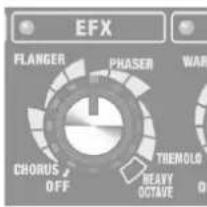
| Knob Position Explanation | |
| CHORUS | This adds a slightly detuned sound to the original sound, giving the sound greater breadth and fullness. |
| FLANGER | This creates a flanging effect that creates a sort of spinning sensation with the sound. |
| PHASER | This adds a phase-shifted signal to the original sound, giving the sound a swirling sensation. |
| TREMOLO | This effect produces cyclical changes in the volume level. |
| HEAVY OCTAVE | This adds sound lowered by an octave to the original sound. Since you can play chords even when using this effect, you can use it to fatten the sound of your chordal playing as well. |
CUBE-40GX/80GX only
You can also switch this on and off using a GA foot controller (GA-FC; sold separately).
10 DELAY
[DELAY] knob
You can switch between use of two types of delay by changing the position of the knob. The position of the knob within this range adjusts the volume of the delay sound.
The indicator lights up when delay is on and goes out when the effect is off.
* Graduations for each effect on a panel are for reference. Be sure to check the sound as you adjust the effects.
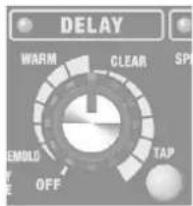
| Knob Position Explanation | |
| WARM | A delay with the sound of a warm, analog delay.Turning the knob toward the right will increase the effect sound. |
| CLEAR | A clear delay with minimal degradation in the sound.Turning the knob toward the right will increase the effect sound. |
CUBE-20GX only
The delay time will change according to the position of the knob.
CUBE-40GX/80GX only
You can also switch delay on and off using a GA foot controller (GA-FC; sold separately).
[TAP] button CUBE-40GX/80GX only
Use this to set the delay time. When you press the button twice, the delay time will be set to the time interval at which you pressed the button. The maximum length is 2000 ms.
11 REVERB
[REVERB] knob
You can switch between use of two types of reverb by changing the position of the knob. You can adjust the intensity of the effect by varying the knob position.
The indicator lights up when reverb is on and goes out when the effect is off.
* Graduations for each effect on a panel are for reference. Be sure to check the sound as you adjust the effects.
![ROLAND Cube 80GX - [REVERB] knob - 1](/content/2026/02/381648/images/496f962e5d2f59c30fa6ee79b19636bd97707ae995d8ad4ec90c07b2131dcf75.jpg)
| Knob Position Explanation | |
| SPRING | This is modeled on spring reverb.It produces the distinctive reverberations of a spring.Turning the knob clockwise makes the effect progressively more intense. |
| PLATE | This is a plate reverb.This reverb features high-end sustain. Turning the knob clockwise makes the effect progressively more intense. |
CUBE-40GX/80GX only
You can also switch reverb on and off using a GA foot controller (GA-FC; sold separately).
12 POWER
[POWER] switch
This switches the power on and off.
13 MASTER
[MASTER] knob
Adjusts the overall volume.
Rear Panel
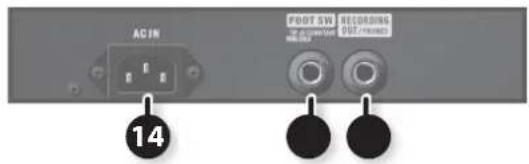
CUBE-20GX
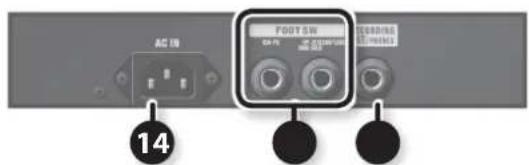
CUBE-40GX
CUBE-80GX
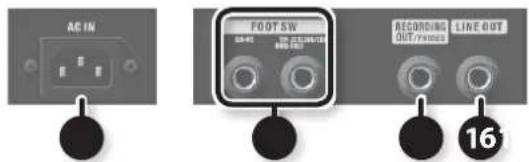

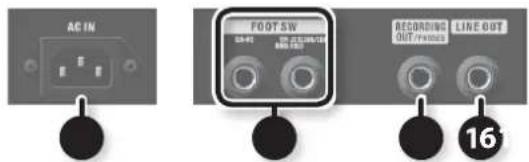
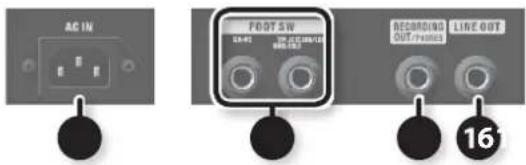
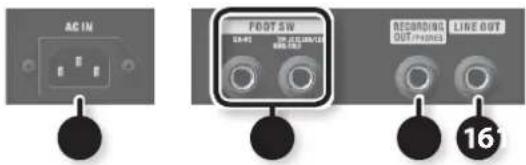
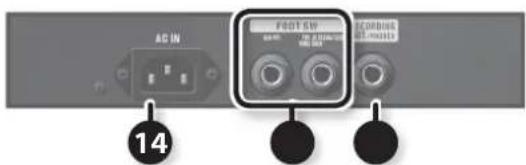
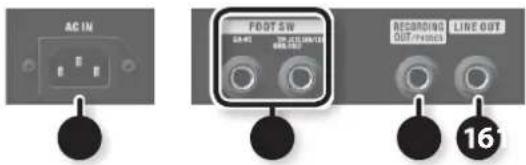
AC IN
AC IN jack
Connect the included power cord.
* Use only the power cord that was included with the unit.
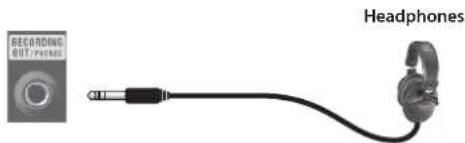
You can use this either as an output jack for recording or as a headphone jack.
This features COSM speaker modeling, enabling production of impressive guitar sound.
To adjust the volume, use the [VOLUME] knob of the JC CLEAN channel or the LEAD channel, along with the [MASTER] knob.
* If a plug is inserted in this jack, no sound will be output from the CUBE's own speaker. This is convenient if you don't want loud sound to be produced from the speaker, such as when you're practicing at night.
When using as an output jack for recording
Use a monaural 1/4" phone plug to connect a recorder or other recording device.
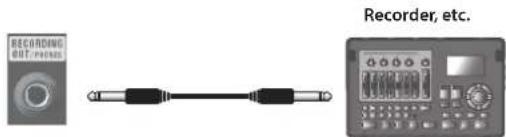
When using as a headphones jack
Connect headphones.
natural_image
Product image showing a recording output phone connected to an earphone (no text or symbols visible)16 LINE OUT
LINE OUT jack CUBE-80GX only
This is for connecting a PA system, recorder, or other external equipment.
This features COSM speaker modeling, enabling production of impressive guitar-amp sound.
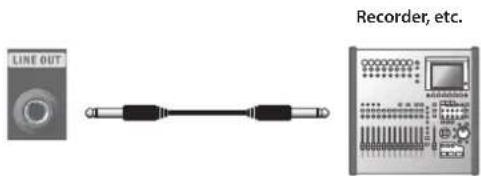
You can use this in conjunction with an external PA system, or to record your performance via direct line while monitoring the sound from the CUBE's speaker.
Adjust the output level using the [VOLUME] knobs for the JC CLEAN and LEAD channels.
* The sound from i-CUBE LINK/AUX IN jack is not output from LINE OUT jack.

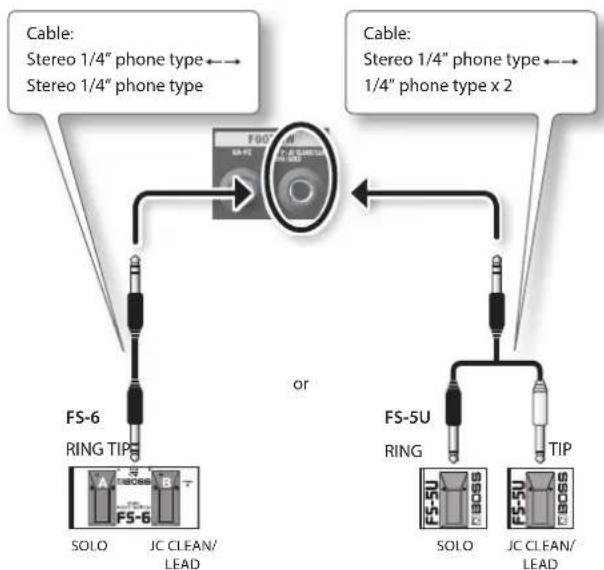
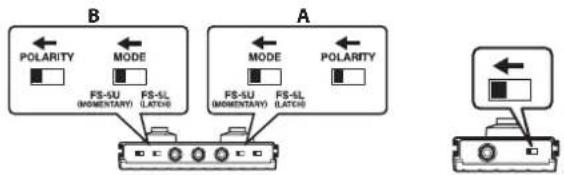
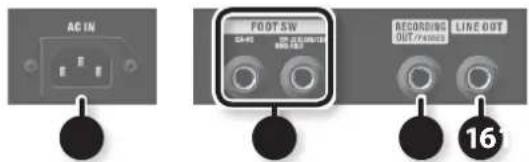
FOOT SW
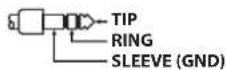
TIP: JC CLEAN/LEAD RING: SOLO jack
If a footswitch (BOSS FS-5U or FS-6; sold separately) is connected here, you'll be able to use your foot to switch channels.
* This unit is equipped with a TRS type jack that is wired as follows.
flowchart
graph TD
    A["Speaker"] -->|Cable: Stereo 1/4" phone type ←→| B["FS-6"]
    A -->|Cable: Stereo 1/4" phone type ←→| C["FS-5U"]
    B --> D["SOLO"]
    B --> E["JC CLEAN/LEAD"]
    C --> F["SOLO"]
    C --> G["JC CLEAN/LEAD"]
    H["Ring TIP"] --> I["FS-6"]
    H --> J["FS-5U"]
    style A fill:#f9f,stroke:#333
    style C fill:#f9f,stroke:#333
flowchart
graph TD
    subgraph A
        direction TB
        A1["POLARITY"] --> A2["FS-5U (MOMENTARY)"]
        A2 --> A3["FS-5L (LATCH)"]
        A4["MODE"] --> A5["FS-5U (MOMENTARY)"]
        A5 --> A6["FS-5L (LATCH)"]
        A7["POLARITY"] --> A8["FS-5U"]
        A8 --> A9["FS-5L"]
        A10["A MODE"] --> A11["FS-5U (MOMENTARY)"]
        A11 --> A12["FS-5L (LATCH)"]
        A13["POLARITY"] --> A14["FS-5U"]
        A14 --> A15["FS-5L"]
| Switch Explanation | |
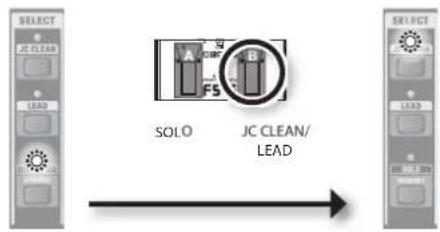
| JC CLEAN/LEAD (TIP) | Switches you between the JC CLEAN channel and the LEAD channel.If the SOLO channel is selected, switches you to the JC CLEAN channel. |
| SOLO (RING) | Switches you to the SOLO channel. |
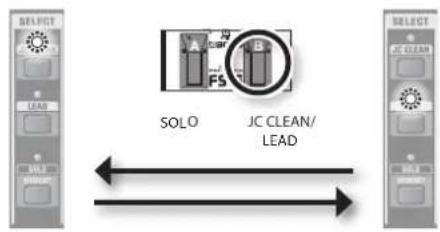
JC CLEAN/LEAD (TIP)
- If JC CLEAN is selected, pressing the [JC CLEAN/LEAD] (TIP) switch will switch you to LEAD.
- If LEAD is selected, pressing the [JC CLEAN/LEAD] (TIP) switch will switch you to JC CLEAN.
flowchart
graph LR
    A["SOLO"] --> B["JC CLEAN/LEAD"]
    C["Select"] --> A
    D["Select"] --> B
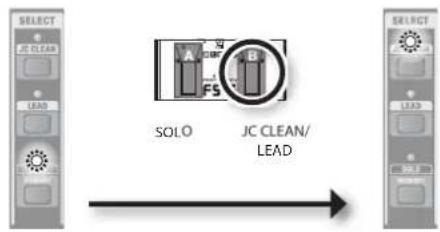
- If SOLO is selected, pressing the [JC CLEAN/LEAD] (TIP) switch will switch you to JC CLEAN.
flowchart
graph LR
    A["SOLO"] --> B["JC CLEAN/LEAD"]
    style A fill:#f9f,stroke:#333
    style B fill:#ccf,stroke:#333
MEMO
If you want to switch to LEAD, press the [JC CLEAN/LEAD] (TIP) switch once again.
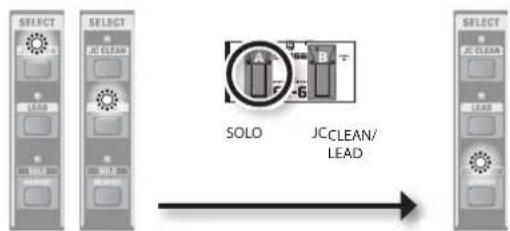
SOLO (RING)
- If JC CLEAN or LEAD is selected, pressing the [SOLO] (RING) switch will switch you to SOLO.
flowchart
graph LR
    A["SOLO"] --> B["JC CLEAN/LEAD"]
    C["Select"] --> D["Select"]
    style A fill:#f9f,stroke:#333
    style B fill:#ccf,stroke:#333
    style C fill:#cfc,stroke:#333
GA-FC jack CUBE-40GX/80GX only
You can connect the separately sold Roland GA-FC to switch channels and turn effects on/off.
Connecting the GA foot controller (GA-FC; sold separately)
Connect a stereo cable to the FOOT SW GA-FC jack of the CUBE-40GX/CUBE-80GX.
* Always use a stereo cable.
* Use cables that do not contain resistors.
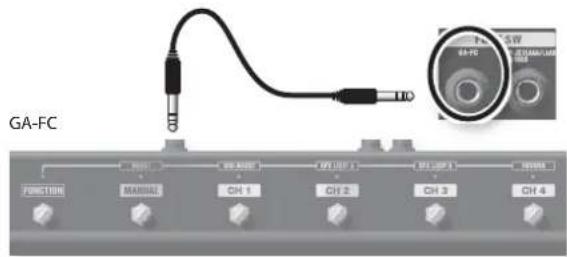
Using the GA-FC
You can use the GA-FC to switch between JC CLEAN, LEAD, and SOLO (MEMORY). You can also switch EFX, DELAY, and REVERB on/off.
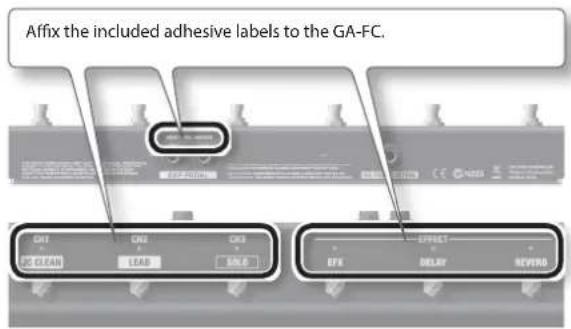
| Switch Explanation | |
| JC CLEAN Selects the JC CLEAN channel. | |
| LEAD Selects the LEAD channel. | |
| SOLO Selects the SOLO channel. | |
| EFX Turns EFX on/off. | |
| DELAY Turns DELAY on/off. | |
| REVERB | Turns REVERB on/off. |
* Once you've turned off EFX, DELAY, or REVERB from the GA-FC, you must first turn the corresponding knob to the OFF position in order for the [EFX], [DELAY], or [REVERB] knobs of the amp itself to be re-enabled.
Using the expression pedals
By connecting expression pedals (Roland EV-5, BOSS FV-500L, BOSS FV-500H; sold separately), you can change the input volume and master volume by pedal.
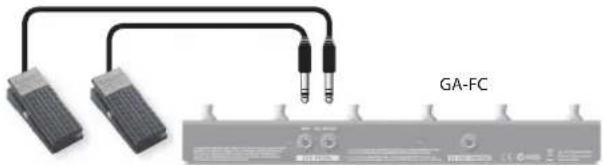
natural_image
Pure electrical circuit lines without any symbolsExpression pedals
| Jack | Explanation |
| INPUT VOL | Adjusts the input volume.* The input volume that is controlled by the expression pedal connected to this jack cannot be adjusted from the panel. |
| MASTER VOL | Adjusts the master volume. This lets you use volume changes as a performance technique, or to mute your instrument.* The master volume that is controlled by the expression pedal connected to this jack is different than that of the [MASTER] knob on the panel. |
Setting MINIMUM VOLUME of an expression pedal
With the [MINIMUM VOLUME] knob of an expression pedal, you can set the value for when the pedal is lifted up all the way (lowest value).
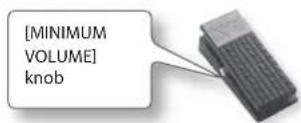
* Use only the specified expression pedal (Roland EV-5, BOSS FV-500L, BOSS FV-500H; sold separately). By connecting any other expression pedals, you risk causing malfunction and/or damage to the unit.
Memory/FC priority mode (EFX, DELAY, REVERB on/off)
You can specify how EFX, DELAY, and REVERB will operate when you switch the channel.
* The changed setting will be remembered even if you turn off the power.
Memory priority mode (factory setting)
When you select SOLO, the stored on/off settings will take priority.
To make this setting
Turn on the power while holding down the CUBE's [JC CLEAN] button.
* Hold down the button until all LEDs blink.
FC priority mode
The on/off statuses of the GA-FC will always take priority when you switch channels.
To make this setting
Turn on the power while holding down the CUBE's [LEAD] button.
* Hold down the button until all LEDs blink.
Turning the Power On/Off
* Once everything is properly connected (p. 4–p. 9), be sure to follow the procedure below to turn on their power. If you turn on equipment in the wrong order, you risk causing malfunction or equipment failure.
- Make sure that the CUBE's [MASTER] knob and the volume of the devices connected to the CUBE are set to 0.
* Set the [MASTER] knob to 0 before you connect anything to the CUBE's INPUT jack or i-CUBE LINK/AUX IN jack.
-
Turn on the power of the devices connected to the CUBE's INPUT jack and i-CUBE LINK/AUX IN jack.
-
Turn on the CUBE.
* Before turning the unit on/off, always be sure to turn the volume down. Even with the volume turned down, you might hear some sound when switching the unit on/off. However, this is normal and does not indicate a malfunction.
* This unit is equipped with a protection circuit. A brief interval (a few seconds) after turning the unit on is required before it will operate normally.
-
Turn on the power of the devices connected to the LINE OUT jack (CUBE-80GX only) and RECORDING OUT/PHONES jack.
-
Adjust the volume levels for the devices.
Before switching off the power, lower the volume on each of the devices in your system and then TURN OFF the devices in the reverse order to which they were switched on.
* If you need to turn off the power completely, first turn off the unit, then unplug the power cord from the power outlet. Refer to "To completely turn off power to the unit, pull out the plug from the outlet" (p. 2).
Using SOLO
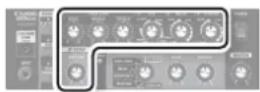
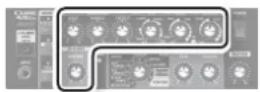
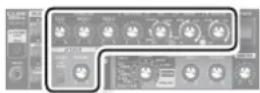
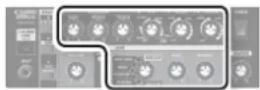
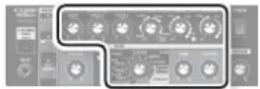
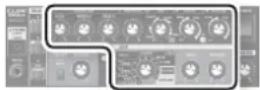
[SOLO] (MEMORY) button can store the settings of knobs other than the [MASTER] knob together with either the [JC CLEAN] or [LEAD] settings.
Storing the Panel Settings
Here's how to store the current settings of the knobs.
NOTE
- When you execute this procedure, the previously stored settings will be lost.
- The stored settings may be lost if you send the CUBE in for servicing, or if a malfunction occurs, or if an incorrect operation is performed. Make a note of important settings so that you won't be inconvenienced if they are lost. Roland can accept no responsibility for recovering lost settings, nor for any damages that may ensue from such loss.
Storing the settings for JC CLEAN
- Select JC CLEAN, and set the knobs as desired.
- Hold down the [SOLO] (MEMORY) button for several seconds.
The SOLO (MEMORY) indicator will blink.
Once the settings have been stored, the indicator will change from blinking to lit, and SOLO will be selected.
CUBE-20GX
CUBE-40GX
CUBE-80GX
Storing the settings for LEAD
- Select LEAD, and set the knobs as desired.
- Hold down the [SOLO] (MEMORY) button for several seconds.
The SOLO (MEMORY) indicator will blink.
Once the settings have been stored, the indicator will change from blinking to lit, and SOLO will be selected.
CUBE-20GX
CUBE-40GX
CUBE-80GX
Calling Up Stored Settings
Here's how to call up the channel and knob positions (settings).
- Press the [SOLO] (MEMORY) button so it's lit.
* If you move any knobs after calling up settings from memory, the settings will change to the positions of the knobs.
* When you operate a knob, the SOLO indicator will light briefly when the knob position matches the stored setting.
Editing and storing SOLO
- Select SOLO, and set the knobs as desired.
- Hold down the [SOLO] (MEMORY) button for several seconds.
The SOLO (MEMORY) indicator will blink.
Once the settings have been stored, the indicator will change from blinking to lit.
Using the Tuner Function
CUBE are equipped with a tuner function. In addition to manual tuning, you can also use it as a chromatic tuner.
* Use manual tuning when the strings are substantially out of tune (such as after changing strings).
CUBE-20GX CUBE-40GX/CUBE-80GX
pie
| Category | Value | |---|---| | METAL STACK | 10 | | METAL | 20 | | DISTORTION | 40 | | OVERDRIVE | 60 | | EXTRIMEST | 100 | | ACOUSTIC SIM | 80 |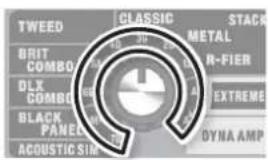
* The illustration shows the CUBE-80GX
Manual Tuning
1. Press the [TUNER] button.
The unit enters the Tuner mode and the [TUNER] button lights up.
* No sound will be output from the speaker or from any of the jacks.
* The sound input to the i-CUBE LINK/AUX IN jack is output.
2. Use the TYPE switch to select the string that you want to tune.
| Knob Position String (note name) | ||
| 7B | Open seventh string of a seven-string guitar (B) | CUBE-40GX/CUBE-80GX only |
| 6Eb | Open sixth string (semitone down) (E b) | |
| 6E Open sixth string (E) | ||
| 5A Open fifth string (A) | ||
| 4D | Open fourth string (D) | |
| 3G | Open third string (G) | |
| 2B | Open second string (B) | |
| 1E Open first string (E) | ||
| Ab | Open fifth string (semitone down) (A b) | CUBE-40GX/CUBE-80GX only |
| Abb | Open fifth string (whole tone down) (G) | |
* The reference pitch is A = 440 Hz. This cannot be changed.
3. Play a single note on the open string that you want to tune.
Tune the string until the green indicator lights.
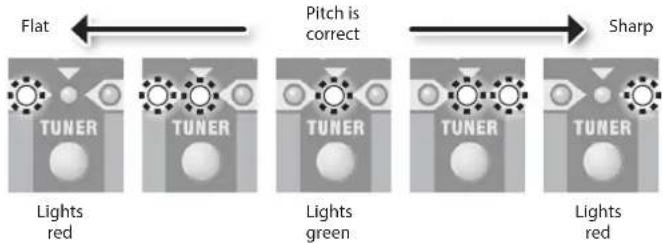
flowchart
graph LR
    A["Flat"] --> B["Pitch is correct"]
    B --> C["Sharp"]
    D["TUNER"] --> E["Lights red"]
    F["TUNER"] --> G["Lights green"]
    H["TUNER"] --> I["Lights red"]
* The red indicator blinks if the pitch is substantially out of tune.
4. When you have finished tuning, press the [TUNER] button once again.
Chromatic Tuning
If you hold down the [TUNER] button for one second or longer, the [TUNER] button blinks and the unit becomes usable as a "chromatic tuner," which automatically determines the name of the note closest to the one played.
As with manual tuning, chromatic tuning allows you to play a single note on the string that you want to tune. Tune the string until the green indicator lights.
Using i-CUBE LINK
"i-CUBE LINK" allows you to use the included mini cable (4-pole) to connect your iPad/iPhone so that audio can be played back from the iPad/iPhone while the sound of your guitar playing on the CUBE is sent to the iPad/iPhone.
This function lets you use an iPad/iPhone app to record and play back the sound of your guitar.
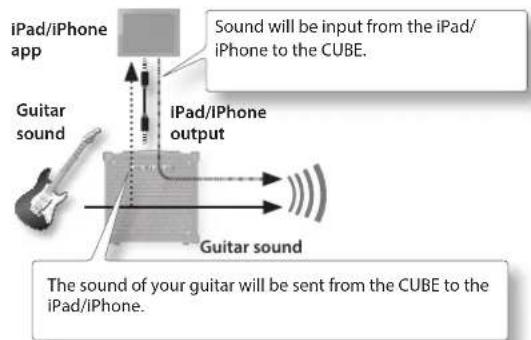
* If you only want to hear the sound that's being input from the iPad/iPhone, turn down the [VOLUME] knob of each channel.
For details on i-CUBE LINK and on iPhone/iPad apps that can use i-CUBE LINK, refer to Roland website.
http://www.roland.com/
Restoring the Factory Settings
Here's how the settings stored in the CUBE can be returned to their factory-set condition (factory reset).
1. While holding down the [LEAD] button and [SOLO] (MEMORY) button, turn the power on.
- All indicators will blink, and the settings stored in SOLO will return to their factory-set state.
- The CUBE will return to memory priority mode (p. 9) (CUBE-40GX/80GX only).
Sample Settings (CUBE-20GX)
Extreme
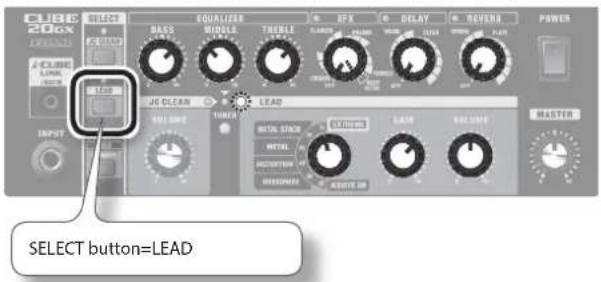
This is an extreme sound with intense distortion.
This is a high-gain sound that packs a lot of punch in the low end, while delivering a great deal of edge in the upper range.
You can obtain variations in the sound by moving the [MIDDLE] knob.
If you turn on HEAVY OCTAVE, you can achieve an even greater sense of distortion in the low end.
Space Clean
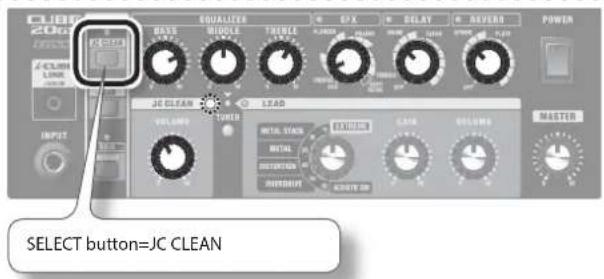
This is a transparent sound using spatial effects.
To the JC CLEAN sound that models the JC-120, this adds chorus, long delay, and reverb.
Using this setting with a guitar equipped with single coil pickups makes great sounding arpeggios and chord strumming.
Depending on the phrase being played, it can be effective to set the delay sound's delay time slightly slower than the phrase's tempo.
Power Grunge
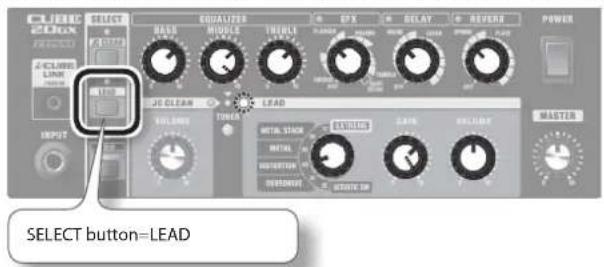
This produces a raging distortion sound that is very trebly and roughly textured.
Setting the [GAIN] knob to prevent excessive distortion of the guitar sound results in a straight guitar sound with brilliant harmonics and powerful chord sounds.
You can also add the FLANGER to produce a sound with a powerful swirling effect, much like the sound from a jet.
Additionally, using the guitar's front pickup and raising the [GAIN] and [MIDDLE] knobs results in a fat lead sound with long sustain.
Alternative Metal
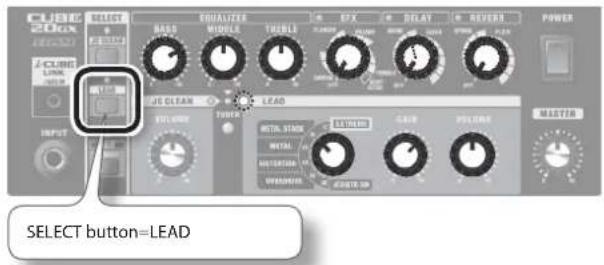
The perfect sound for heavy, sharp riffs.
Select the high-gain METAL STACK, then use the equalizer to boost the low end even more.
Used with a humbucking pickup in the rear position, it results in an extreme distortion effect.
Plus, you can add a long delay to use this as a lead sound with great sustain.
Sample Settings (CUBE-40GX/CUBE-80GX)
* For information on how to set the delay time, refer to "DELAY" (p. 6).
Extreme
CUBE-40GXCUBE-80GX
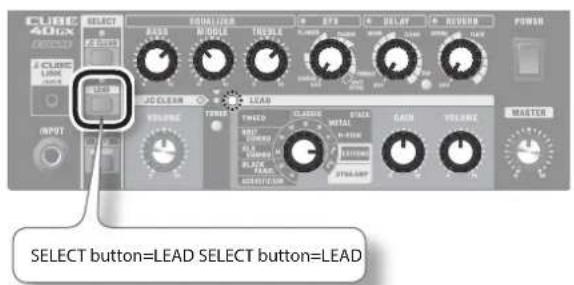
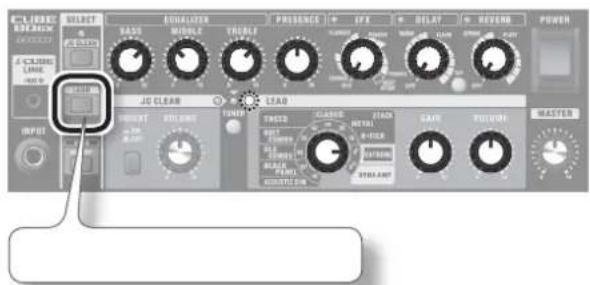
This is an extreme sound with intense distortion.
This is a high-gain sound that packs a lot of punch in the low end, while delivering a great deal of edge in the upper range.
You can obtain variations in the sound by moving the [MIDDLE] knob.
If you turn on HEAVY OCTAVE, you can achieve an even greater sense of distortion in the low end.
Space Clean
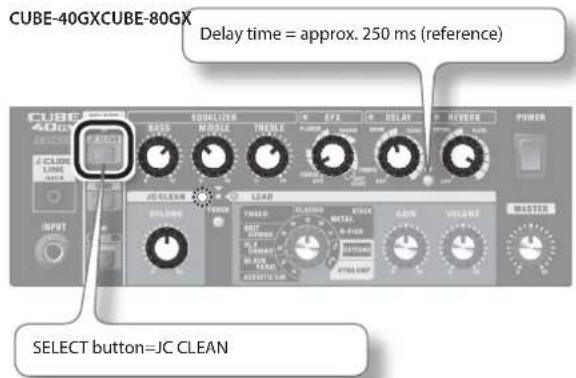
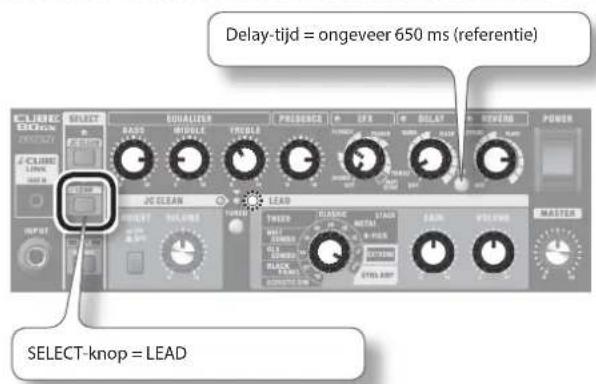
![Delay time = approx. 250 ms (reference) [CLARES] SELECT SELECT SWITCH EQUALIZER PRESENCE IFX OCLAT REVERB POWER A-CLARES LINEER JG CLEAN LEAD POWER VOLUME THICK TWOOD CONTROL TROU DETAIL GAIN VOLUME MASTER [BLIGHT] switch=OFF SELECT button=JC CLEAN](/content/2026/02/381648/images/cebf4faeeb4407f18b5899eebda2621418b0444d0e8fde3c01dba70b2c7fa678.jpg)
This is a transparent sound that uses spatial effects.
Use the JC CLEAN amp, which is modeled on the Roland JC-120, and add chorus, long delay, and reverb.
Using this setting with a guitar that has single-coil pickups makes for arpeggios and chord strumming with beautiful resonance. If you're using a guitar with humbucker pickups on CUBE-80GX, turn the [BRIGHT] button to ON to achieve a bright, open sound.
Setting the delay time to a value that makes the delay sound heard slightly ahead of the tempo of the phrase played produces a thicker sound.
Surf Line
CUBE-40GXCUBE-80GX
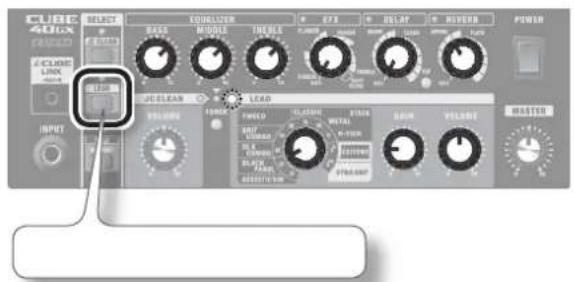
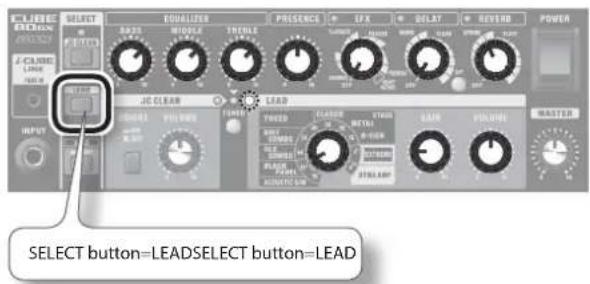
This sound is perfect for the surf music popular in the 1960s.
Using this setting with a guitar that has single-coil pickups makes for an edgy sound.
Applying deep spring reverb and using muting picking and chromatic runs (muted picking with glissandos) produces the classic surf sound.
Rockabilly Slap
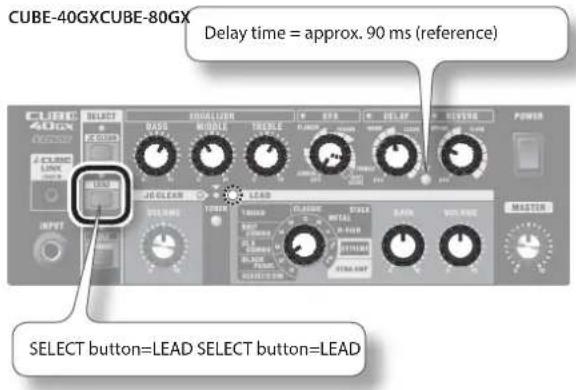
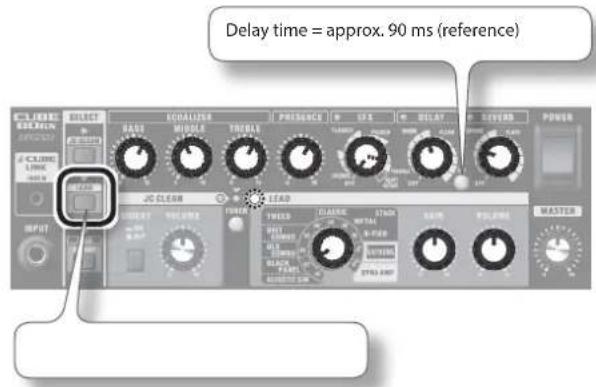
This is the slapback-echo sound used in rockabilly and country.
The BLACK PANEL amp produces a clean sound that is bright and sweet, with a powerful midrange and high end supported by a thick bass. By making the low and high ends more prominent while keeping them balanced, and also suppressing the midrange if the situation calls for it, you can bring out the dazzling resonance of the guitar even more beautifully.
The sound of a guitar that has single-coil pickups with heavy tremolo and reverb applied is also distinctive.
Loud Metal
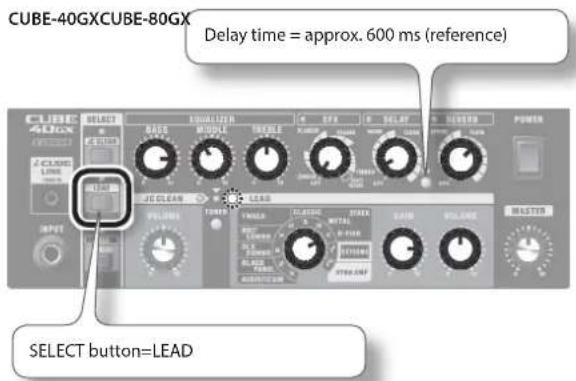
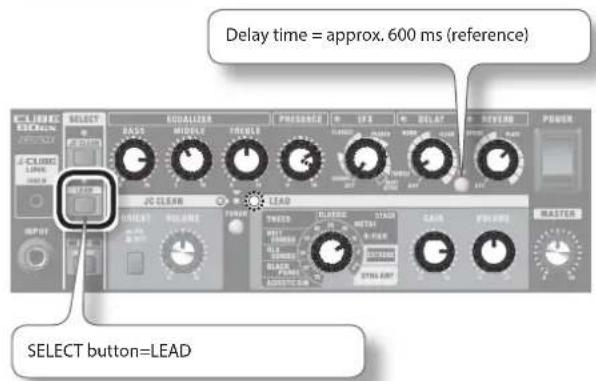
This sound produces heavy low-end reverberations when lower strings are played while muted, and airy sustain when chords are played.
Playing with a humbucking rear pickup produces even more extreme distortion. What's more, you can make the sound even heavier by using drop tuning or other such settings.
When you want to make the distortion edgier on CUBE-80GX, boost the [PRESENCE] setting. Also, when you're using this as the lead sound, raising the midrange and applying a long delay produces a fat sound with sustain.
Dynamic Style
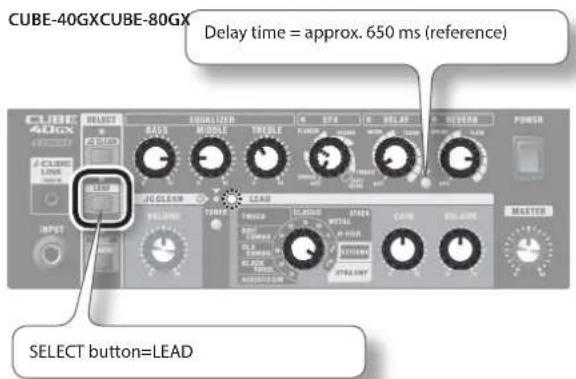
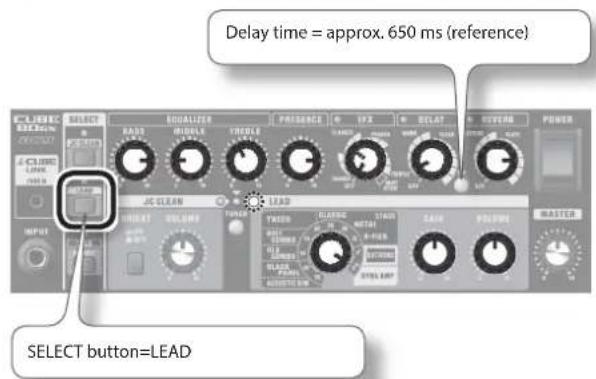
DYNA AMP is an original amp that uses relative picking intensity to create changes in distortion depth.
First, adjust the [GAIN] knob so that a clean tone is obtained with soft picking and heavy distortion is obtained when you pick hard. Now mixing arpeggios played with a gentle touch along with firmly picked chords and solos results in a guitar sound with huge dynamics. Now, to create a broader, more open sound on CUBE-80GX, cut the midrange and raise the low end and presence. Using this in combination with the EFX as well as delay and reverb creates a sound with an even greater feeling of scale.
CUBE-20GX
CUBE-40GX
CUBE-80GX: Guitar Amplifier
| CUBE-20GX CUBE-40GX CUBE-80GX | |||
| Rated Power Output 20 W | 40 W 80 W | ||
| Nominal Input Level (1 kHz) | INPUT: -10 dBu INPUT: -10 dBu INPUT: -10 dBu | ||
| i-CUBE LINK/AUX IN: -10 dBu i-CUBE LINK/AUX IN | -10 dBu i-CUBE LINK/AUX IN: -10 dBu | ||
| Input Impedance INPUT: 1 | M ohm INPUT: 1 M ohm INPUT: 1 M ohm | ||
| Speaker | 20 cm (8 inches) x 1 | 25 cm (10 inches) x 1 | 30 cm (12 inches) x 1 |
| Controls | POWER switchJC CLEAN buttonLEAD buttonSOLO (MEMORY) buttonTUNER buttonBASS knobMIDDLE knobTREBLE knobEFX knob (CHORUS, FLANGER, PHASER, TREMOLO, HEAVY OCTAVE)DELAY knob (WARM, CLEAR)REVERB knob (SPRING, PLATE)MASTER knob | POWER switchJC CLEAN buttonLEAD buttonSOLO (MEMORY) buttonTUNER buttonTAP buttonBASS knobMIDDLE knobTREBLE knobEFX knob (CHORUS, FLANGER, PHASER, TREMOLO, HEAVY OCTAVE)DELAY knob (WARM, CLEAR)REVERB knob (SPRING, PLATE)MASTER knob | POWER switchJC CLEAN buttonLEAD buttonSOLO (MEMORY) buttonTUNER buttonTAP buttonBASS knobMIDDLE knobTREBLE knobPRESENCE knobEFX knob (CHORUS, FLANGER, PHASER, TREMOLO, HEAVY OCTAVE)DELAY knob (WARM, CLEAR)REVERB knob (SPRING, PLATE)MASTER knob |
| [JC CLEAN Channel]VOLUME knob | [JC CLEAN Channel]VOLUME knob | [JC CLEAN Channel]BRIGHT switchVOLUME knob | |
| [LEAD Channel]TYPE switch (ACOUSTIC SIM, OVERDRIVE, DISTORTION, METAL, METAL STACK, EXTREME)GAIN knobVOLUME knob | [LEAD Channel]TYPE switch (ACOUSTIC SIM, BLACK PANEL, DLX COMBO, BRIT COMBO, TWEED, CLASSIC STACK, METAL STACK, R-FIRE STACK, EXTREME, DYNA AMP)GAIN knobVOLUME knob | [LEAD Channel]TYPE switch (ACOUSTIC SIM, BLACK PANEL, DLX COMBO, BRIT COMBO, TWEED, CLASSIC STACK, METAL STACK, R-FIRE STACK, EXTREME, DYNA AMP)GAIN knobVOLUME knob | |
| Indicators | JC CLEAN, LEAD, SOLO (MEMORY), EFX, DELAY, REVERB, TUNER | JC CLEAN, LEAD, SOLO (MEMORY), EFX, DELAY, REVERB, TUNER, TAP | JC CLEAN, LEAD, SOLO (MEMORY), EFX, DELAY, REVERB, TUNER, TAP |
| Connectors | INPUT jack: 1/4-inch phone typei-CUBE LINK/AUX IN jack: 4-pole miniature phone typeRECORDING OUT/PHONES jack: Stereo 1/4-inch phone typeFOOT SW (TIP: JC CLEAN/LEAD, RING: SOLO)jack: 1/4-inch TRS phone typeAC IN jack | INPUT jack: 1/4-inch phone typei-CUBE LINK/AUX IN jack: 4-pole miniature phone typeRECORDING OUT/PHONES jack: Stereo 1/4-inch phone typeFOOT SW (TIP: JC CLEAN/LEAD, RING: SOLO)jack: 1/4-inch TRS phone typeFOOT SW (GA-FC) jack: 1/4-inch TRS phone typeAC IN jack | INPUT jack: 1/4-inch phone typei-CUBE LINK/AUX IN jack: 4-pole miniature phone typeRECORDING OUT/PHONES jack: Stereo 1/4-inch phone typeLINE OUT jack: 1/4-inch phone typeFOOT SW (TIP: JC CLEAN/LEAD, RING: SOLO)jack: 1/4-inch TRS phone typeFOOT SW (GA-FC) jack: 1/4-inch TRS phone typeAC IN jack |
| Power Consumption 24 W | 43 W 75 W | ||
| Dimensions | 378 (W) x 221 (D) x 384 (H) mm14-15/16 (W) x 8-3/4 (D) x 15-1/8 (H) inches | 409 (W) x 221 (D) x 412 (H) mm16-1/8 (W) x 8-3/4 (D) x 16-1/4 (H) inches | 441 (W) x 247 (D) x 433 (H) mm17-3/8 (W) x 9-3/4 (D) x 17-1/16 (H) inches |
| Weight | 7.6 kg16 lbs 13 oz | 9.4 kg20 lbs 12 oz | 14.2 kg31 lbs 5 oz |
| Accessories | Owner's manualPower cordMini cable (4-pole miniature phone type) | Owner's manualPower cordMini cable (4-pole miniature phone type)GA-FC sticker | Owner's manualPower cordMini cable (4-pole miniature phone type)GA-FC sticker |
| Options (sold separately) | Footswitch (BOSS FS-5U, BOSS FS-6) | Footswitch (BOSS FS-5U, BOSS FS-6)GA Foot Controller (GA-FC) | Footswitch (BOSS FS-5U, BOSS FS-6)GA Foot Controller (GA-FC) |
* 0 dBu = 0.775 Vrms
* In the interest of product improvement, the specifications and/or appearance of this unit are subject to change without prior notice.
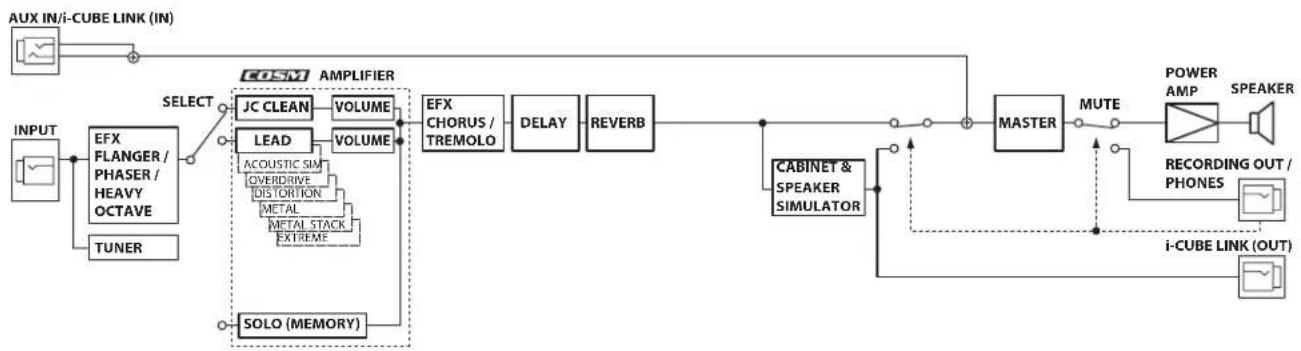
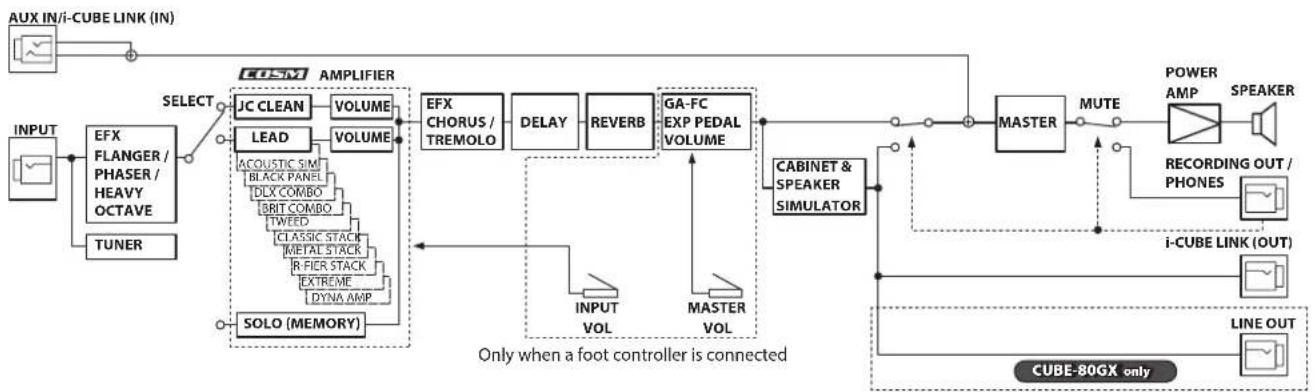
Block Diagram
CUBE-20GX
flowchart
graph LR
    A["AUX IN/i-CUBE LINK (IN)"] --> B["INPUT"]
    B --> C["EFX FLANGER / PHASER / HEAVY OCTAVE"]
    C --> D["TUNER"]
    D --> E["SOLO (MEMORY)"]
    E --> F["LEAD"]
    F --> G["ACOUSTIC SIM"]
    F --> H["OVERDRIVE"]
    F --> I["DISTORTION"]
    F --> J["METAL"]
    F --> K["METAL STACK"]
    F --> L["EXTREME"]
    F --> M["SOLO (MEMORY)"]
    M --> N["COSM AMPLIFIER"]
    N --> O["JC CLEAN"]
    O --> P["VOLUME"]
    P --> Q["VOLUME"]
    Q --> R["EFX CHORUS / TREMOLO"]
    R --> S["DELAY"]
    S --> T["REVERB"]
    T --> U["MASTER"]
    U --> V["MUTE"]
    V --> W["POWER AMP"]
    W --> X["SPEAKER"]
    U --> Y["CABINET & SPEAKER SIMULATOR"]
    Y --> Z["i-CUBE LINK (OUT)"]
    Z --> AA["RECORDING OUT / PHONES"]
    AA --> AB["Speaker"]
CUBE-40GX/CUBE-80GX
flowchart
graph TD
    A["INPUT"] --> B["EFX FLANGER / PHASER / HEAVY OCTAVE"]
    B --> C["TUNER"]
    C --> D["SOLO (MEMORY)"]
    D --> E["JC CLEAN"]
    E --> F["VOLUME"]
    F --> G["LEAD"]
    G --> H["VOLUME"]
    H --> I["ACOUSTIC SIM"]
    I --> J["BLACK PANEL"]
    J --> K["DLX COMBO"]
    K --> L["BRIT COMBO"]
    L --> M["TWEED"]
    M --> N["CLASSIC STACK"]
    N --> O["METAL STACK"]
    O --> P["R-FIER STACK"]
    P --> Q["EXTREME"]
    Q --> R["DYNA AMP"]
    R --> S["TOLE"]
    S --> T["SOLO (MEMORY)"]
    T --> U["Select"]
    U --> V["EMG"]
    V --> W["AMPLIFIER"]
    W --> X["EFX CHORUS / TREMOLO"]
    X --> Y["DELAY"]
    Y --> Z["REVERB"]
    Z --> AA["GA-FC EXP PEDAL VOLUME"]
    AA --> AB["MASTER"]
    AB --> AC["CABINET & SPEAKER SIMULATOR"]
    AC --> AD["POWER AMP"]
    AD --> AE["SPEAKER"]
    AE --> AF["RECORDING OUT / PHONES"]
    AF --> AG["i-CUBE LINK (OUT)"]
    AG --> AH["LINE OUT"]
    AH --> AI["CUBE-80GX only"]
    style A fill:#f9f,stroke:#333
    style AI fill:#f9f,stroke:#333
natural_image
Front panel of a cube-shaped electronic device with hexagonal grid pattern (no visible text or symbols)Bedienungsanleitung
Gitarrenverstärker
CUBE CUBE CUBE 20Gx 40Gx 80Gx
CUBE-20GX
CUBE-80GX

AC IN
AC IN-Buchse
JC CLEAN/LEAD (SPITZE)
CUBE-20GX CUBE-40GX/CUBE-80GX
pie
| Category | Value | |---|---| | METAL STACK | 10 | | METAL | 29 | | DISTORTION | 38 | | OVERDRIVE | 40 | | ACOUSTIC SIM | 64 | EXTREME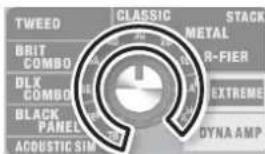
![Delayzeit = ca. 250 ms (Referenz) [CLUSTER] SELECT SELECT BASE MIDDLE TOLER PRESERCE IFX DELAY REVERB POWER JG CLEAN LEAD VOLTAGE THRU DETAIL AIR VOLUME MASTER [BLIGHT]-Schalter=OFF SELECT-Taster=JC CLEAN](/content/2026/02/381648/images/671feb601319b18d1efe557de039dd30edd29403d911104611e4ba29bc2db937.jpg)
natural_image
Front panel of a CUBC audio amplifier with hexagonal grid pattern (no text or symbols visible)Mode d'emploi
CUBE CUBE CUBE 20Gx 40Gx 80Gx
CUBE-20GX
Bouton [TAP] CUBE-40GX/80GX uniquement
CUBE-80GX
![ROLAND Cube 80GX - Bouton [TAP] CUBE-40GX/80GX uniquement - 2](/content/2026/02/381648/images/59d91d4e1b2e6113bac1c3b9190a24e82bba856611c6853d563c04e8e78a0d47.jpg)
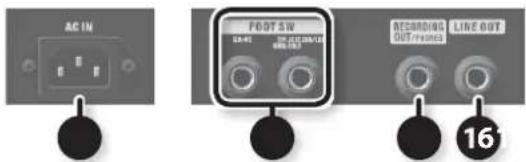
AC IN
Prise AC IN
natural_image
Audio recording device connected to a Casque ear (no text or symbols visible)16 LINE OUT
Prise LINE OUT CUBE-80GX uniquement
Prise TIP: JC CLEAN/LEAD RING: SOLO
flowchart
graph LR
    A["SOLO"] --> B["JC CLEAN/LEAD"]
    B --> A
flowchart
graph LR
    A["SOLO"] --> B["JCCLEAN/LEAD"]
    B --> C["Terminal Block 1"]
    B --> D["Terminal Block 2"]
Entrée GA-FC CUBE-40GX/80GX uniquement
natural_image
Front panel of a cube-shaped electronic device with hexagonal grid pattern (no visible text or symbols)Manuale dell'utente
CUBE CUBE CUBE 20Gx 40Gx 80Gx
CUBE-20GX
Pulsante [TAP] CUBE-40GX/80GX solo
CUBE-80GX
![ROLAND Cube 80GX - Pulsante [TAP] CUBE-40GX/80GX solo - 2](/content/2026/02/381648/images/535366623954ff84a98f29923827e2843d807459e053e9429dda71db95fd6f34.jpg)
AC IN
Jack AC IN
natural_image
Audio recording device connected to a cuffie cable (no text or symbols visible)16 LINE OUT
Jack LINE OUT CUBE-80GX solo
natural_image
Three electronic devices: a circular switch, a black cable with connectors, and a control panel (no visible text or symbols)TIP: JC CLEAN/LEAD RING: jack SOLO
flowchart
graph LR
    A["SOLO"] --> B["JC CLEAN/LEAD"]
    B --> A
NOTA
Jack GA-FC CUBE-40GX/80GX solo
CUBE-20GX CUBE-40GX/CUBE-80GX
pie
| Category | Value | |---|---| | METAL STACK | 10 | | METAL | 30 | | DISTORTION | 40 | | OVERDRIVE | 50 | | EXTREME | 60 | | ACOUSTIC SIM | 70 |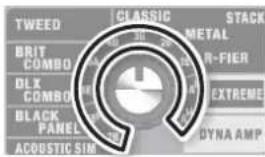
natural_image
Front view of a cube-shaped electronic device with hexagonal grid pattern (no visible text or symbols)Manual del usuario
CUBE CUBE CUBE 20Gx 40Gx 80Gx
CUBE-20GX
2 Conector i-CUBE LINK/AUX IN
i-CUBE LINK
CUBE-40GX/80GX unicamente
CUBE-40GX/80GX unicamente
CUBE-40GX/80GX unicamente
CUBE-80GX

AC IN
Conector AC IN
TIP: JC CLEAN/LEAD RING: conector SOLO
flowchart
graph LR
    A["SOLO"] --> B["JC CLEAN/LEAD"]
    B --> A
CUBE-20GX
CUBE-40GX/CUBE-80GX
pie
| Category | Value (%) | |---|---| | METAL STACK | 10 | | METAL | 20 | | DISTORTION | 40 | | OVERDRIVE | 60 | | EXTRIMEST | 10 | | ACOUSTIC SIM | 10 |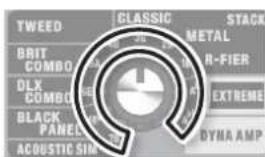
radar
| Category | Value | |---|---| | TWEED | 10 | | BLIT COMBO | 25 | | DLX COMBO | 30 | | BLACK PANEL | 20 | | ACoustIC SIM | 15 | | CLASSIC | 35 | | METAL | 40 | | R-FIER | 45 | | EXTREME | 50 | | DYNA AMP | 55 | | STACK | 60 |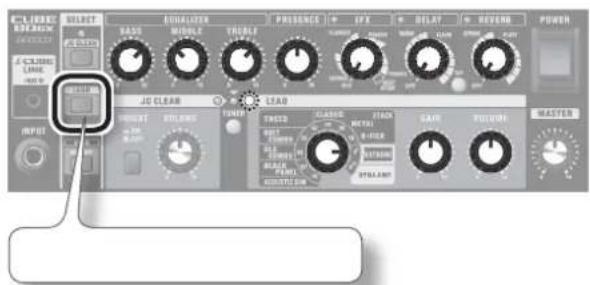
natural_image
Front view of a cube-shaped electronic device with hexagonal grid pattern (no visible text or symbols)CUBE CUBE CUBE 20Gx 40Gx 80Gx
CUBE-20GX
Alto-falante de 20 cm (8 polegadas), saída de 20 W
CUBE-40GX
Alto-falante de 25 cm (10 polegadas), saída de 40 W
CUBE-80GX
Alto-falante de 30 cm (12 polegadas), saída de 80 W
2 Conector i-CUBE LINK/AUX IN
i-CUBE LINK
Apenas CUBE-40GX/80GX
Apenas CUBE-40GX/80GX
Apenas CUBE-40GX/80GX
Apenas CUBE-40GX/80GX
Apenas CUBE-40GX/80GX
CUBE-80GX

AC IN
Conector AC IN
Conector TIP: JC CLEAN/LEAD RING: SOLO
flowchart
graph LR
    A["SOLO"] --> B["JC CLEAN/LEAD"]
    B --> A
- Se SOLO estiver seleccionado, pressionar a chave [JC CLEAN/LEAD] (TIP) alternará para JC CLEAN.
flowchart
graph LR
    A["SOLO"] --> B["JC CLEAN/LEAD"]
    style A fill:#f9f,stroke:#333
    style B fill:#ccf,stroke:#333
LEMBRETE
flowchart
graph LR
    A["SOLO"] --> B["JCCLEAN/LEAD"]
    B --> C["→"]
Conector GA-FC Apenas CUBE-40GX/80GX
CUBE-20GX CUBE-40GX/CUBE-80GX
pie
| Category | Value | |---|---| | METAL STACK | 10 | | METAL | 28 | | DISTORTION | 40 | | OVERDRIVE | 64 | | ACOUSTIC SIM | 54 | EXTREME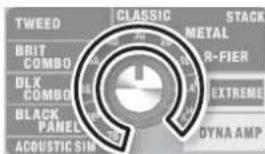
![Tempo de delay = aprox. 250 ms (referência) CLARESE SELECT BASO MIDDLE THERM JG CLEAN LEAD POWER INPUT CHAVE [BRIGHT] = OFF Botão SELECT = JC CLEAN](/content/2026/02/381648/images/c94c79338228b8be5fc0378e5f6c8ba17c3cd0e1d0411e73a3105d2c42388a5b.jpg)
natural_image
Front panel of a CUBC audio amplifier with hexagonal grid pattern (no text or symbols visible)CUBE CUBE CUBE 20Gx 40Gx 80Gx
CUBE-20GX
20 cm (8 inch) luidspreker, 20 W vermogen
CUBE-40GX
25 cm (10 inch) luidspreker, 40 W vermogen
CUBE-80GX
30 cm (12 inch) luidspreker, 80 W vermogen
CUBE-40GX
CUBE-80GX

AC IN
AC IN-aansluiting
flowchart
graph LR
    A["SOLO"] --> B["JC CLEAN/LEAD"]
    B --> A
CUBE-20GX
CUBE-40GX/CUBE-80GX
pie
| Category | Value | |---|---| | METAL STACK | 10 | | METAL | 20 | | DISTORTION | 40 | | OVERDRIVE | 60 | | EXTRIMEST | 100 | | ACQUOSTIC SIM | 100 |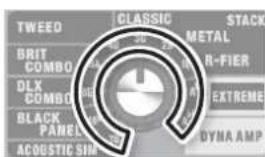
When you need repair service, call your nearest Roland Service Center or authorized Roland distributor in your country as shown below.
AFRICA
REUNION
MARCEL FO-YAM Sarl
Royal Cape Park, Unit 24
Londonderry Road, Ottery 7800
Cape Town, SOUTH AFRICA
TEL:(021)7994900
ASIA
CHINA
Roland Shanghai Electronics
Co., Ltd.
SF. No.1500 Pingliang Road,
Yangpu Shanghai 200090, CHINA
TEL:(021)5580-0800
Roland Shanghai Electronics
Co., Ltd. (BEIJING OFFICE)
3F, Soluxe Fortune Building
63 West Dawang Road,
Chaoyang Beijing, CHINA
TEL: (010) 5960-2565/0777
HONG KONG
Tom Lee Music
11/F Silvercord Tower 1
30 Canton Rd
Tsimshatsui, Kowloon,
HONG KONG
TEL: 852-2737-7688
Parsons Music Ltd.
8th Floor, Railway Plaza, 39
Chatham Road South, T.S.T.
Kowloon, HONG KONG
TEL:852-2333-1863
INDIA
Rivera Digitec (India) Pvt. Ltd.
411, Nirman Kendra Mahalaxm Hats Compound Off, Dr. Edwin Moses Road, Mumbai-400011, INDIA
TEL: (022) 2493 9051
INDONESIA
PT. Citra Intirama
Ruko Garden Shopping Arcade
Unit 8 CR, Podomoro City
JL. Letjend. S. Parman Kav. 28
Jakarta Barat 11470, INDONESIA
TEL:(021)5698-5519/5520
KAZAKHSTAN
Alatau Dybystary
141 Abylai-Khan ave, 1st floor,
050000 Almaty, KAZAKHSTAN
TEL: (727) 2725477
FAX: (727) 2/20/30
KOREA
Cosmos Corporation
1461-9, Seocho-Dang,
Seocho Gu, Seoul, KOREA
TEL:(02)3486-8855
MALAYSIA/SINGAPORE
Roland Asia Pacific Sdn. Bhd.
45-1, Block C2, Jalan PJU 1/39,
Dataran Prima, 47301 Petaling
Jaya, Selangor, MALAYSIA
TEL:(03)7805-3263
PHILIPPINES
G.A. Yupangco & Co. Inc.
339 Gil J. Puyat Avenue
Makati, Metro Manila 1200,
PHILIPPINES
TEL: (02) 899 9801
TAIWAN
ROLAND TAIWAN ENTERPRISE
CO., LTD.
9F-5, No. 112 Chung Shan
North Road Sec. 2 Taipei 104,
TAIWAN R.O.C
TEL:(02)25613339
THAILAND
Theera Music Co., Ltd.
100-108 Soi Verng
Nakornkasem, New Road,
Sumpantawong, Bangkok
10100, THAILAND
TEL:(02)224-8821
VIET NAM
VIET THUONG CORPORATION
386 CACH MANG THANG TAM ST.
DIST.3, HO CHI MINH CITY,
VIET NAM
TEL:(08)9316540
OCEANIA
AUSTRALIA/
NEW ZEALAND
Roland Corporation
Australia Pty., Ltd.
38 Campbell Avenue, Dee Why
West. NSW 2099, AUSTRALIA
For Australia
TEL: (021)9982 8266
For New Zealand
TEL: (09) 3098 715
CENTRAL/LATIN AMERICA
ARGENTINA
Instrumentos Musicales S.A.
Av.Santa Fe 2055
(1123) Buenos Aires, ARGENTINA
TEL:(011)4508-2700
BARBADOS
A&B Music Supplies LTD
12 Webster Industrial Park
Wildey, St.Michael, BARBADOS
TEL:(246)430-1100
BRAZIL
Roland Brasil Ltda.
Rua San Jose, 21
Parque Industrial San Jose
Cotia - Sao Paulo - SP, BRAZIL
TEL:(011)4615 5666
CHILE
Comercial Fancy II S.A.
Rut.: 96.919.420-1
Nataniel Cox #739, 4th Floor
Santiago - Centro, CHILE
TEL: (02) 384-2180
COLOMBIA
Boulevard Andrews, Albrook,
Panama City, REP. DE PANAMA
TEL:315-0101
PARAGUAY
WORLD MUSIC
Jebai Center 2018, Centro
155, New National Road
Patras 26442, GREECE
TEL: 2610 435400
HUNGARY
Roland East Europe Ltd.
This symbol indicates that in EU countries, this product must be collected separately from household waste, as defined in each region. Products bearing this symbol must not be discarded together with household waste.
This equipment has been tested and found to comply with the limits for a Class B digital device, pursuant to Part 15 of the FCC Rules. These limits are designed to provide reasonable protection against harmful interference in a residential installation. This equipment generates, uses, and can radiate radio frequency energy and, if not installed and used in accordance with the instructions, may cause harmful interference to radio communications. However, there is no guarantee that interference will not occur in a particular installation. If this equipment does cause harmful interference to radio or television reception, which can be determined by turning the equipment off and on, the user is encouraged to try to correct the interference by one or more of the following measures:
- Reorient or relocate the receiving antenna.
— Increase the separation between the equipment and receiver. - Connect the equipment into an outlet on a circuit different from that to which the receiver is connected.
- Consult the dealer or an experienced radio/TV technician for help.
This device complies with Part 15 of the FCC Rules. Operation is subject to the following two conditions:
(1) this device may not cause harmful interference, and
(2) this device must accept any interference received, including interference that may cause undesired operation.
This equipment requires shielded interface cables in order to meet FCC class B limit.
Any unauthorized changes or modifications not expressly approved by the party responsible for compliance could void the user's authority to operate the equipment.
For Canada
NOTICE
This Class B digital apparatus meets all requirements of the Canadian Interference-Causing Equipment Regulations.
AVIS
This product contains chemicals known to cause cancer, birth defects and other reproductive harm, including lead.
For China