
Auro 5 - Hi-fi system SAMSON - Free user manual and instructions
Find the device manual for free Auro 5 SAMSON in PDF.



| Product Type | Two-way Studio Monitor |
| Brand | Samson |
| Model | Auro 5 |
| Category | Monitor Speaker |
| Woofer | 127 mm (5") Copolymer Woofer |
| Tweeter | 13 mm PEI Dome Tweeter with Ferrite Magnet |
| Frequency Response | 55 Hz - 22 kHz |
| Nominal Impedance | 8 Ohms |
| Power Handling | 35 W RMS / 140 W Peak |
| Connectors | Gold-Plated Binding Posts (Banana Plugs, Spades, Bare Wire) |
| Construction | High-Resistance ABS Plastic Baffle |
| Finish | Ultra-Durable Black Paint |
| Dimensions (HxWxD) | 270 x 190 x 190 mm |
| Weight | 2.42 kg |
| Mounting | Wall/Ceiling Brackets Included, Microphone Stand Base (5/8" Thread) |
| Positioning | Vertical or Horizontal (Tweeters Outwards in Horizontal) |
| Recommended Use | Studio, Post-Production, Multimedia, Fixed Installation |
| Care and Cleaning | Damp Cloth Only |
| Safety | Do Not Expose to Moisture, Do Not Obstruct Ventilation |
Frequently Asked Questions - Auro 5 SAMSON
User questions about Auro 5 SAMSON
0 question about this device. Answer the ones you know or ask your own.
Ask a new question about this device
Download the instructions for your Hi-fi system in PDF format for free! Find your manual Auro 5 - SAMSON and take your electronic device back in hand. On this page are published all the documents necessary for the use of your device. Auro 5 by SAMSON.
USER MANUAL Auro 5 SAMSON
natural_image
Technical line drawing of a speaker grille with two circular cutouts and an AURO 6 label (no text or symbols beyond label)Two-way Playback Monitors
Owners Manual
WARNING: To reduce the risk of fire or electric shock, do not expose this unit to rain or moisture. To reduce the hazard of electrical shock, do not remove cover or back. No user serviceable parts inside. Please refer all servicing to qualified personnel. The lightning flash with an arrowhead symbol within an equilateral triangle, is intended to alert the user to the presence of uninsulated "dangerous voltage" within the products enclosure that may be of sufficient magnitude to constitute a risk of electric shock to persons. The exclamation point within an equilateral triangle is intended to alert the user to the presence of important operating and maintenance (servicing) instructions in the literature accompanying the product
Important Safety Instructions
- Please read all instructions before operating the unit.
- Keep these instructions for future reference.
- Please heed all safety warnings.
- Follow manufacturers instructions.
- Do not use this unit near water or moisture.
- Clean only with a damp cloth.
- Do not block any of the ventilation openings. Install in accordance with the manufacturers instructions
- Do not install near any heat sources such as radiators, heat registers, stoves, or other apparatus (including amplifiers) that produce heat.
- Do not defeat the safety purpose of the polarized or grounding-type plug. A polarized plug has two blades with one wider than the other. A grounding type plug has two blades and a third grounding prong. The wide blade or third prong is provided for your safety. When the provided plug does not fit your outlet, consult an electrician for replacement of the obsolete outlet.
- Protect the power cord from being walked on and pinched particularly at plugs, convenience receptacles and at the point at which they exit from the unit.
- Unplug this unit during lightning storms or when unused for long periods of time.
- Refer all servicing to qualified personnel. Servicing is required when the unit has been damaged in any way, such as power supply cord or plug damage, or if liquid has been spilled or objects have fallen into the unit, the unit has been exposed to rain or moisture, does not operate normally, or has been dropped.
Printed August, 2005 v5
Samson Technologies Corp
575 Underhill Blvd.
P.O. Box 903
Syosset, NY 11791-9031
Phone: 1-800-3-SAMSON (1-800-372-6766)
Fax: 516-364-3888
Contents
Introduction 2
Auro Series Features 3
Auro Series Layout 4
Front View Layout 4
Rear View Layout 4
Setting up & Operating the AuroSeries 5
Positioning the Auro Series 5
Connecting the Auro Series 6
Powering the Auro Series 7
Using the Auro Series with a Sub-woofer 8
Auro Installation 9
Specifications 5 2
Table des matières
Introduction 1 2
Thank you for purchasing the Auro Series Playback Monitors from Samson Audio. The Auro Series provide great sound in variety of playback applications including recording, video post and multi-media studios, as well as, in fixed installations at home or in commercial. As near-field monitor the Auro Series sound full and balanced with an uncompromised transparent mid-range, leaving room to accurately hear and mix vocals, instruments and even subtle reverb trails. For announcement or ambient sound in fixed installations the Auro Series are articulate and pleasing to listen to. Premium transducers, together with high quality crossover components, provide an accurate and pleasant listening experience, even through the longest sessions. Each Auro Series monitor features an extended range co-polymer woofer with a butyl surround, providing a low-end response that's tight and punchy. The sweet and truthful high frequency response is achieved via PEI dome tweeter. For installation, each Auro model comes with two sets of mounting brackets for fixing the speakers to walls or ceilings. In addition, the Auro3, Auro5 and Auro6 models can be mounted on a standard microphone stand. With their extended low end and linear frequency response, the Auro Series are ideal playback monitors for recording studios, multi media, video post-production suites, fixed installations or anywhere accurate monitoring is required.
In these pages, you'll find a detailed description of the features of the Auro Series subwoofer, as well as a guided tour through its control panel, step-by-step instructions for its setup and use, and full specifications. You'll also find a warranty card enclosed—please don't forget to fill it out and mail it in so that you can receive online technical support and so we can send you updated information about these and other Samson products in the future.
With proper care and adequate air circulation, your Auro Series will operate trouble free for many years. We recommend you record your serial number in the space provided below for future reference.
Serial number: ____
Date of purchase: ____
Should your unit ever require servicing, a Return Authorization number (RA) must be obtained before shipping your unit to Samson. Without this number, the unit will not be accepted. Please call Samson at 1-800-3SAMSON (1-800-372-6766) for a Return Authorization number prior to shipping your unit. Please retain the original packing materials and if possible, return the unit in the original carton and packing materials.
Auro Series Features
natural_image
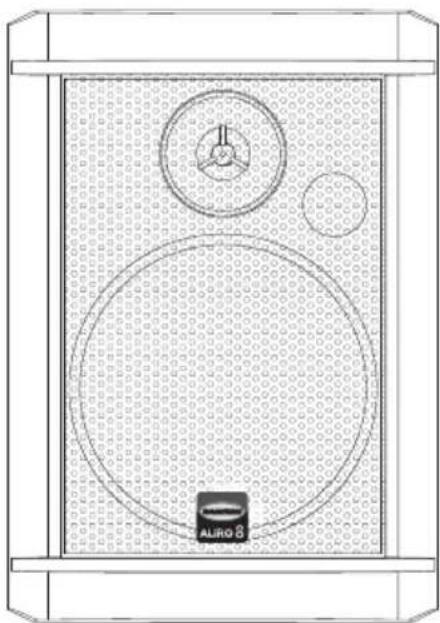
Technical line drawing of a speaker grille with two circular gauges and a central logo (no text or symbols)The Samson AURO SERIES two-way studio reference monitors provide accurate and enjoyable listening even during long, demanding sessions. Here are some of its main features:
• 2-way component speaker system
• ABS Trapezoidal cabinet design with black mesh steel grills
- The low frequencies are reproduced from custom design woofers utilizing durable Mica impregnated cones and butyl surrounds. With a 3.5-inch woofer in the Auro3, a 5-inch woofer in the Auro5, 6.5-inch woofer in the Auro6 and 8-inch in the Auro8.
- Smooth high frequency response from Ferrite Magnet, PEI Dome Tweeters.
• Two installation brackets included for flush or angle moun ting
- Microphone stand mounting available on the Auro3, Auro5 and Aurc6.
Auro Series Layout
Front View Layout
Rear View Layout
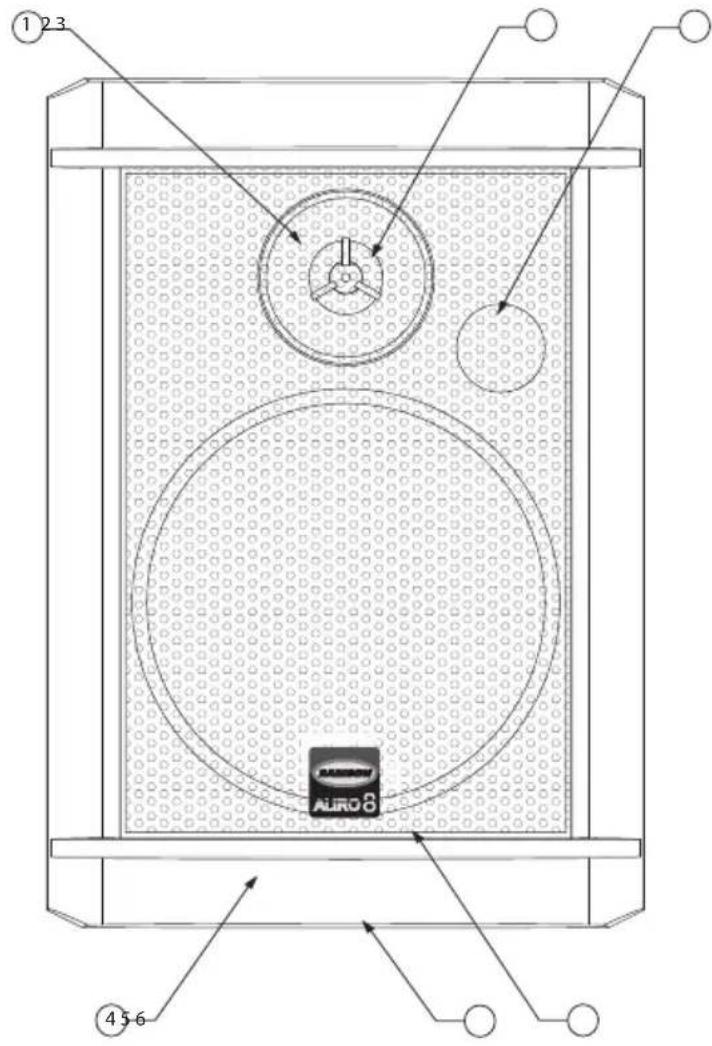
1 PEI Dome Tweeter - on waveguide with phase plug.
2 Phase Plug - Insures even dispersion of the high frequencies and improves off axis listening.
3 TUNED PORT - Quiet port design offering linear extended low frequency response.
4 Low frequency Driver - Heavy Duty extended range low frequency transducer.
5 ENCLOSURE - Rigid ABS Construction.
5 FINISH - Sleek black Textured finish
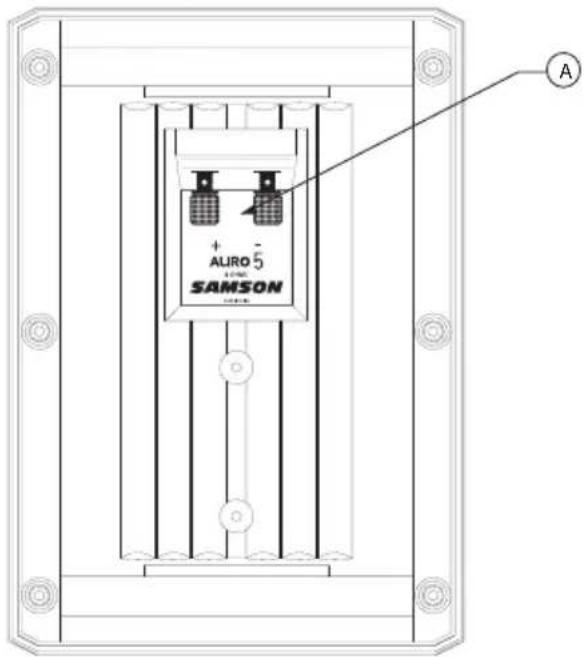
A Speaker Terminals - Gold Binding Posts on Auro 5, 6 and 8 and convenient push terminals on the Auro 3 for connecting speakers wires.
Setting up & Operating the Auro Series
Background on the AURO Playback Monitor
The Auro Series are near field reference monitors featuring custom designed co-polymer low frequency drivers and a PEI tweeters. The monitor's crossovers have been carefully designed with high quality components insuring a linear frequency and phase response. The Auro Series enclosure is constructed from high impact ABS plastic with scuff resistant texturec finish. The monitor's enclosure also includes a tuned vent port that provides extended low-end response, and with low turbulence design, the low frequency driver can move freely with minimal effect on the overall impedance. On the rear of the enclosure you'll find the connections are made from gold binding posts providing convenient hook-up via banana plugs, spade lugs or stripped and tinned wire.
Positioning the Auro Series
Near field monitoring has become the choice of many engineers in large and small studios because it minimizes the effect of room acoustics. This is especially important in today's project studios since the budget for room acoustics is often close to nothing. By positioning the reference monitors in the near field (close to the listeners), you can greatly reduce the effects of room acoustics. The most important considerations when evaluating the effects of room acoustics are reflective surfaces that are around the monitoring area. These car include flat tabletops, glass mirrors or framed pictures, large open walls and even the surface of your mixing console. Mostly all reflected sound will eventually reach the listening position, but since it is slightly delayed from the direct source, the result is random cancel lation of some frequencies or comb filtering. If possible, remove any and all reflective sur faces. You may also want to hang some acoustic tiles on walls that are close to the monitors
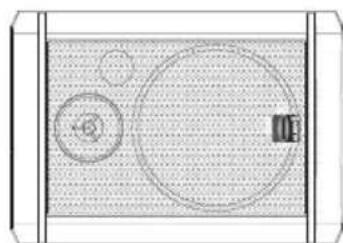
The Auro Series can be used in either the vertical or horizontal position. When using the monitors in the horizontal position, be certain to place the left and right side tweeters on the outer most sides. (Figure 1.) This will improve the stereo imaging and bass response by increasing the coupling of the low-end drivers
natural_image
Top-down schematic of a device layout with circular components and a central square (no text or symbols)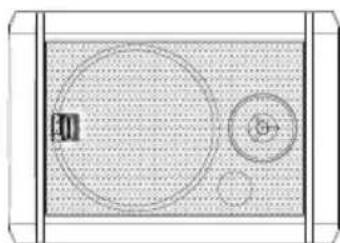
natural_image
Top-down schematic of a device layout with circular components and a central control panel (no text or symbols)Figure 1
When positioning the monitors you'll want to set up what is commonly referred to as the "mix triangle". In this ideal configuration the space between the left and right monitor is equal as is the distance from the listener to each monitor, forming an equilateral triangle. (Figure 2.)
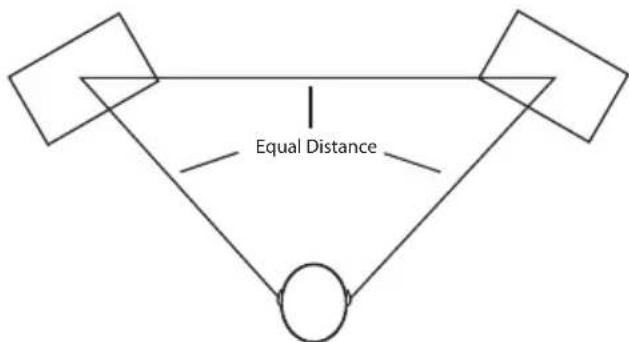
Figure 2
Prime Listening Spot
Setting up & Operating the Auro Series
Positioning the Auro Series - continued
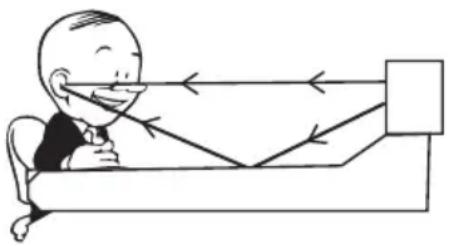
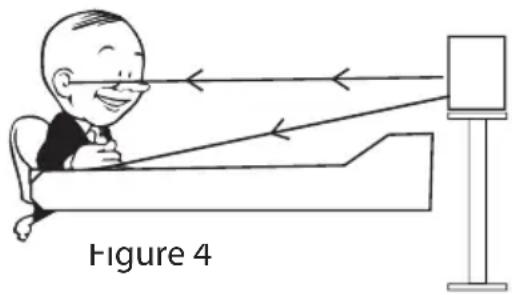
When choosing the height of your monitor system, be careful to avoid reflections off the surface of the mixing console. (Figure 3.) These reflections arrive at the listening position slightly delayed from the original sound resulting in strange cancellations and overall unpredictable response. Visualize straight lines representing the beams of sound radiating from the monitors and choose a height that reduces the occurrence of reflections that will end up in the prime listening spot. (Figure 4.) In most cases, the ideal position is slightly behind and above the mixing console's meter bridge.
natural_image
Cartoon illustration of a person sitting in bed with arrows indicating light or motion (no text or symbols)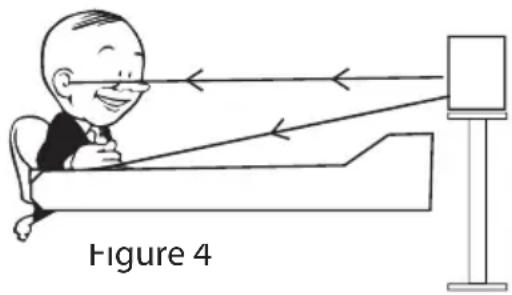
natural_image
Illustration of a person sitting in bed observing through a screen, labeled 'Figure 4' (no text on diagram itself)Connecting the Auro Series
Note: Before plugging in and turning on, remember the "last on first off" rule of power amplifiers. When powering up your system, be sure to that all the wires are connected, turn your mixer and any other outboard gear on, and then last turn your power amplifier on. When powering down, turn your power amp off first and then your mixer and outboard gear
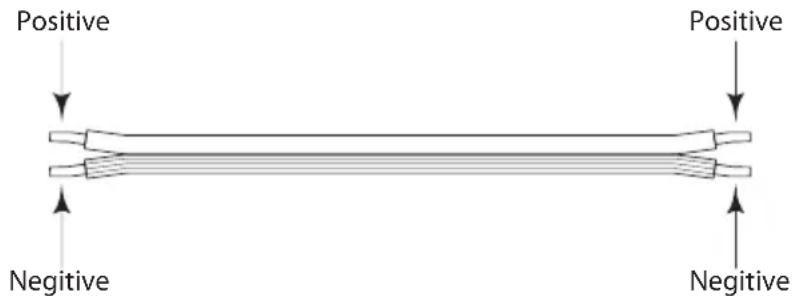
Speaker Cable (Un-Shielded)
The Auro5, Auro6, and Auro8 connections are made via the rear panel 5-way binding posts. You can use banana plugs, spade lugs or tinned and stripped wire. Standard strained speaker wire of 12-14 gauge is recommended and you should use the shortest possible wire length (equal on both sides) on both the left and right monitor. The Auro3 connections are made via the rear panel push terminals and strained speaker wire of 16-20 gauge is recommended.
Note: Just about all speaker wire will have a marking indicating the negative side. To avoid phase cancellation problems, be sure to maintain the correct connection for the positive and negative sides throughout your system
Setting up & Operating the Auro Series
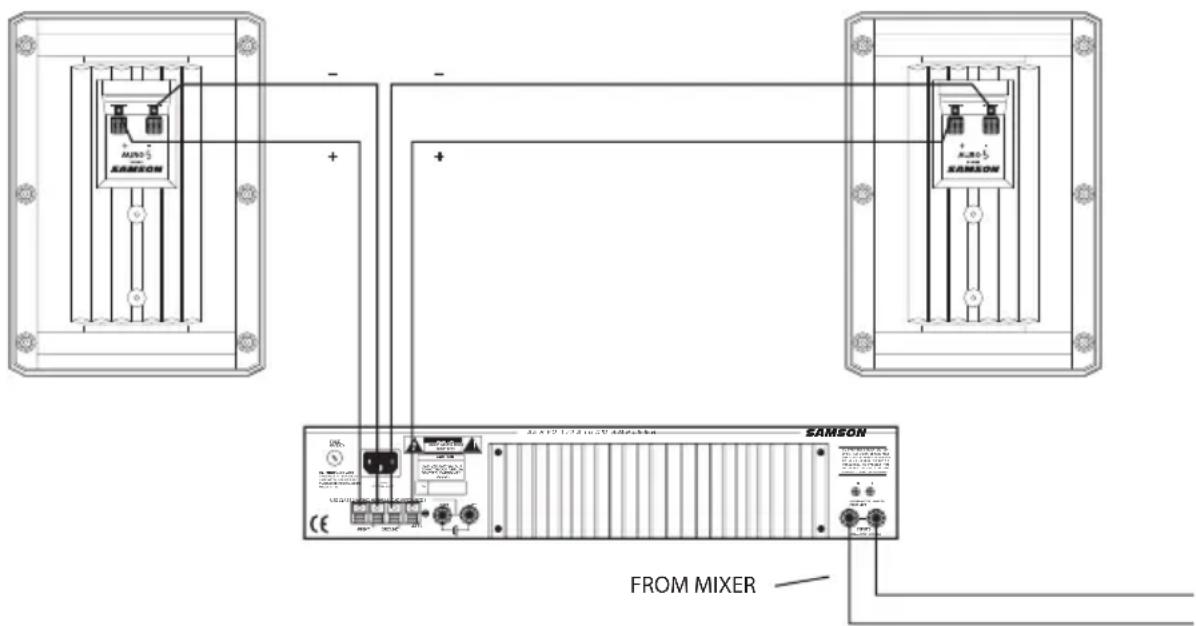
It is important that your monitor system is connected in phase otherwise you will not have the proper low-end response and stereo image.
Note: It's fairly easy to identify a monitor that is out of phase just by listening, especially on a pop record. Listen for the parts of the music that you would expect to be in the center of the mix like kick drum and vocals. If you do not hear them directly in the center (for instance they sound like they are two signals panned hard right and left) then you are more than likely listening to an out-of-phase monitor system. (This test won't work on early Beatles records where Ringo's drum kit is panned all the way to the right side. Try a Madonna record.,
In order to ensure that your monitor system is in phase, be careful to pay close attention to the positive and negative marking on the amplifier, wires and Auro Series monitors. Make sure that the + terminal of the speaker is connected to the + terminal of the power amplifier and that the - terminal of the speaker is connected to the - terminal of the power amplifier
Powering the Auro Series
The Auro Series monitors have Peak power ratings of 100 to 220 watts and thanks to the robust drivers and crossover components and efficient design, you can use any amplifier with a power rating of 60 to 240 watts. Using a power amplifier with too low of a power rating can be dangerous since the inputs signal is often clipped in an effort to get the desired level. Over powering the Auro Series car result in catastrophic failure and therefore using any amplifier with a power rating over 250 watts will void your warranty. For the best results use a quality power amplifier with a power rating of about 85-100 watts at 4 ohms like the Samson Servo 170
Using the Auro Series with a Sub-woofer
Connecting the Auro Series to the Resolv 120a Sub Woofei
For extended low end, the Auro Series can be used with the Resolv 120a active subwoofer using line level inputs and outputs. Below is a typical system set up using the Auro Series with a mixer, stereo power amplifier and the Resolv 120a active subwoofer. The Resolv 120's inputs and outputs utilize industry standard RCA connectors. Follow the steps in the diagram below to set up your system.
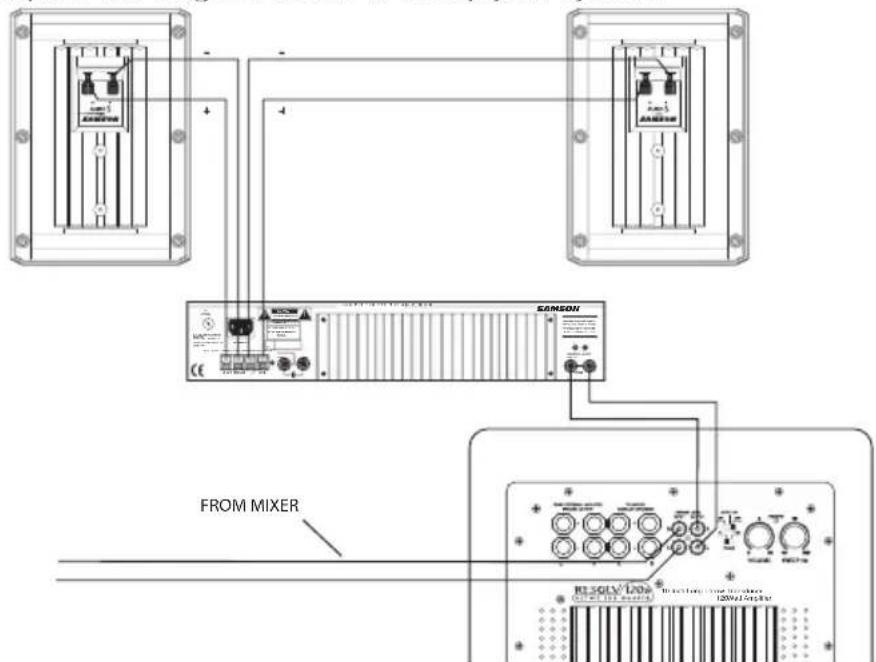
- Lower your mixer's master outputs to all the way off.
- Connect the mixer's left output to the RESOLV 120a's LEFT PREAMP LEVEL INPUT and the mixer's right output to the RESOLV 120's RIGHT PREAMP LEVEL INPUT. Now connect the RESOLV 120a's LEFT PREAMP LEVEL OUTPUT to the left side input of the power amp, and the RESOLV 120a's RIGHT PREAMP LEVEL OUTPUT to the right side input of the power amp. Connect a speaker wire from the left output of your power amp to your left Auro Series, and then, connect a speaker wire from the right output of your power amp to your right Auro Series.
- Now adjust the SWEEP control to the desired frequency. Consult the frequency response of your Auro Series in the Specification section on page 12 of this owner's manual for the sub woofer crossover point. You can also use your ears by adjusting the SWEEP control to the frequency that sounds good to you. A good place to start is about 70 Hz.
- Now set the level of your power amp up to the normal operating level. Run an audio signal (like some music from a CD) through your mixer and raise the level to a comfortable listening level. Now slowly raise the RESOLV 120a's volume control and listen to the low frequency output. Adjust the Auro Series to the level of low frequency output that you like. Now when you raise and lower your mixer's output, the RESOLV 120a and the Auro Series satellites will track at the same relative volume.
Auro Installation
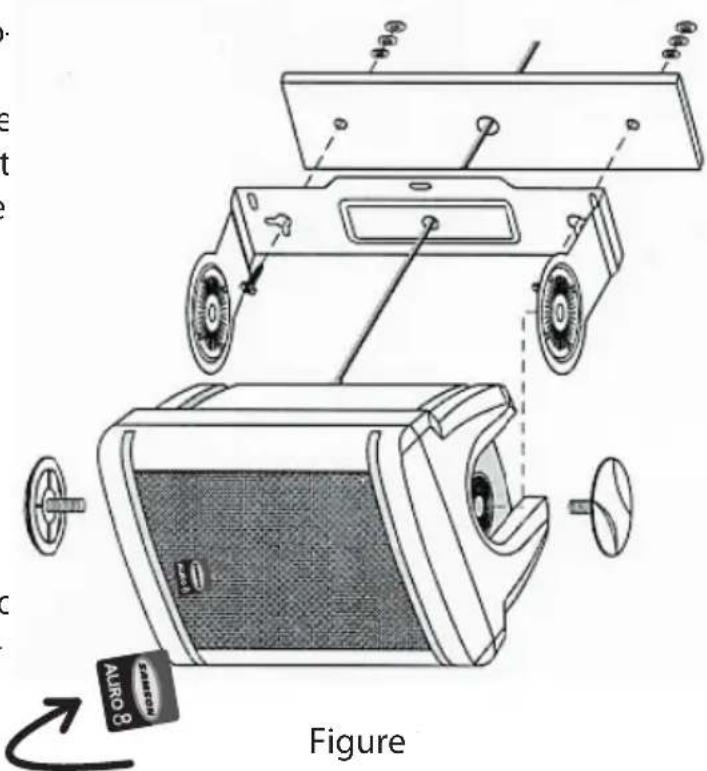
You can mount the Auro Series speakers on a wall or ceiling using the included metal mounting bracket. You can position the Auro speaker either vertically or horizontally. In the vertical position you can direct the sound left and right. In the horizontal position you can direct the sound up or down.
In figure 1, you can see the installation for an Auro series speaker mounted in the horizontal position. Follow the steps below to hang your speaker. You can turn the logo by lifting the corner and twisting 90 degrees
IMPORTANT NOTE:
Only licensed and insured professional sound contractors should install the Auro Speaker using the installation bracket. Samson assumes no liability for any installation.
- Remove the ABS plastic insert on the top and bottom of the Auro speaker.
- Mount the metal bracket on the wall or ceiling using the appropriate hardware suitable for the building material you are attaching to.
- Slide the Auro speaker into the metal bracket keeping the ends of the bracket inside the top and bottom bracket channels
- Insert the thumbscrews through the mounting bracket and into the threaded inserts, then tighten the thumbscrew, but not all the way.
Important Note: Be careful to insert the thumbscrews straight and do not cross-thread the thumbscrews.
- Position the Auro to the desired angle, and then, fully tighten the thumb-screw.
Auro Installation
You can flush-mount the Auro Series speakers on a wall using the included ABS plastic mounting bracket. You can position the Auro speaker either vertically or horizontally using the flush mount bracket.
In figure 2 you can see the installation for an Auro series speaker mounted in the vertical position. Follow the steps below to hang your speaker.
IMPORTANT NOTE: Only licensed and insured professional sound contractors should install the Auro Speaker using the flush-mount installation brackets. Samson assumes no liability for any installation.
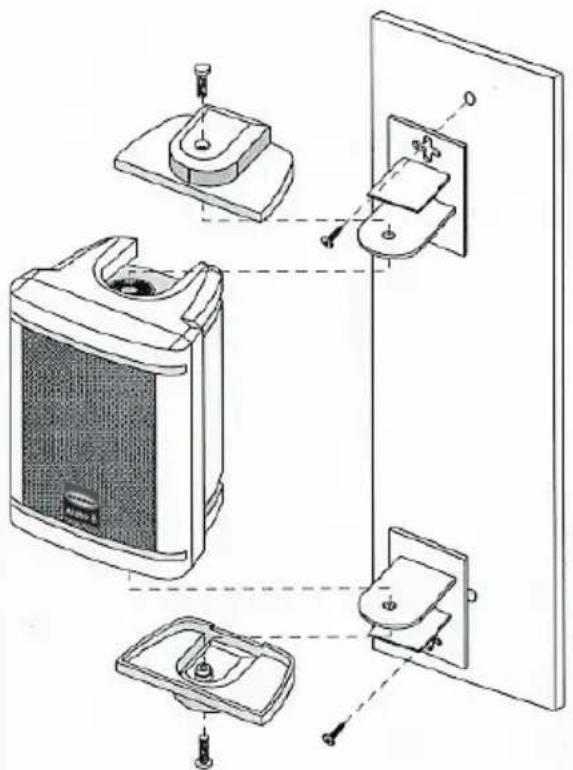
Figure 2
- Remove the ABS plastic insert on the top and bottom of the Auro speaker.
- Slide the flush-mount brackets into the bracket channel, but don't screw them in at this point.
- Hold the speaker in place and mark the holds for the mounting brackets.
- Now, remove the flush-mount brackets from the speaker and attach them to the wall using the appropriate hardware, suitable for the building material you are mounting on.
- Slide the Auro speaker into the flush-mount bracket keeping the sliding bracket inside the top and bottom bracket channels.
- Insert the thumbscrews through the mounting bracket and into the threaded inserts, and then tighten the thumbscrews all the way.
Important Note: Be careful to insert the thumbscrews straight and do not cross-thread the thumbscrews.
Auro Installation
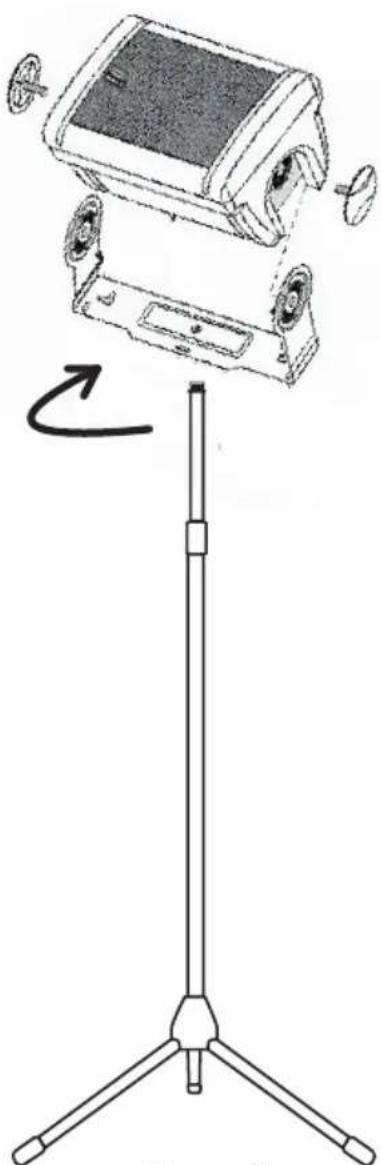
You can mount the Auro 3, Auro 5, and Auro 6 speakers on a standard microphone stand with 5/8-inch thread. In figure 3 you can see the installation for an Auro series speaker mounted on a mic stand in the horizontal position. Follow the steps below to mount your speaker.
- Remove the ABS plastic insert on the top and bottom of the Auro speaker.
- Screw the metal mounting bracket on to a microphone stand with a standard 5/8-inch thread by turning the bracket clockwise. (If you have a European stand with a 3/8-inch thread, you can get an optional 3/8 to 5/8-inch adapter from your local audio dealer.)
- Slide the Auro speaker into the metal bracket keeping the ends of the bracket inside the top and bottom bracket channels.
- Insert the thumbscrews through the mounting bracket and into the threaded inserts, then tighten the thumbscrew, but not all the way.
natural_image
Line drawing of a vintage camera mounted on a tripod stand, showing top and side views (no text or symbols)Figure 3
Important Note: Be careful to insert the thumbscrews straight and not to cross-thread the thumb screws.
- Position the Auro to the desired angle, and then, fully tighten the thumb-screw.
Introduction
natural_image
Technical line drawing of a speaker grille with two circular gauges and a central logo (no text or symbols)natural_image
Top-down schematic of a mechanical or electronic component with circular features and a rectangular block (no text or symbols)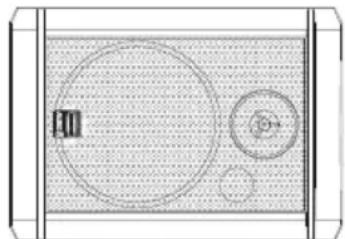
natural_image
Simple diagram of a container with two circular components, no text or symbols presentFigure 1.
natural_image
Simple line drawing of a person sitting at a desk facing a wall with arrows indicating direction (no text or symbols)Figure 3.
natural_image
Illustration of a person sitting in bed viewing an object with light rays, labeled Figure 4 (no text on diagram)Figure 2
natural_image
Technical line drawing of a mechanical device mounted on a tripod stand, showing internal components and assembly (no text or symbols)Figure 3
natural_image
Technical line drawing of a speaker grille with two circular gauges and a central logo (no text or symbols)natural_image
Diagram of a device with circular components and a grid-patterned background (no text or symbols)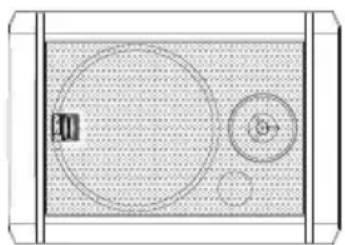
natural_image
Top-down schematic of a room layout with circular elements and a central door (no text or symbols)Abb. 1.
natural_image
Simple line drawing of a person sitting at a desk with arrows pointing to a rectangular object (no text or symbols)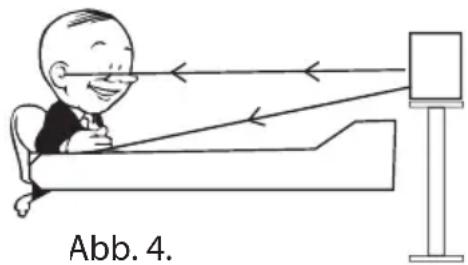
natural_image
Illustration of a person sitting on a bench with arrows indicating light rays, next to a blank display (no text or symbols)Abb. 2
natural_image
Diagram of a device mounted on a tripod stand with a base panel and fan assembly (no text or symbols)Abb. 3
natural_image
Technical line drawing of a speaker grille with two circular gauges and a central logo (no text or symbols)natural_image
Top-down schematic of a device layout with circular components and a central square (no text or symbols)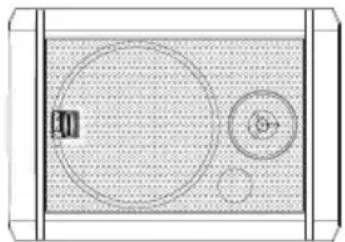
natural_image
Top-down schematic of a room layout with circular elements and a small inset object (no text or symbols)Figura 1
Figura 2
Prime Listening Spot
natural_image
Simple line drawing of a person sitting in bed facing away from a window, with no text or symbols present.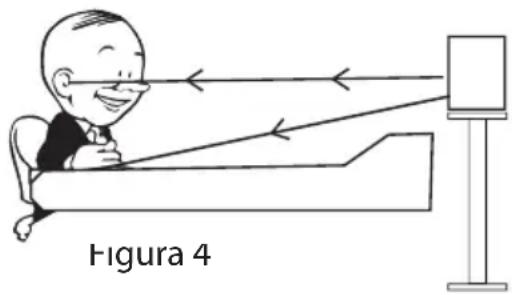
natural_image
Illustration of a person sitting in bed with light rays reflecting off a screen, labeled 'Figura 4' (no text on diagram itself)Figura 2
natural_image
Line drawing of a portable electronic device mounted on a tripod stand, showing internal components and a curved arrow indicating rotation (no text or symbols)Figura 3
natural_image
Technical line drawing of a mechanical component with circular features and a central labeled component (no text or symbols)natural_image
Diagram of a room layout with circular elements and a small inset image (no text or symbols)natural_image
Diagram of a device with two circular components and a central symbol, enclosed in a rectangular frame (no text or labels)Figura 1.
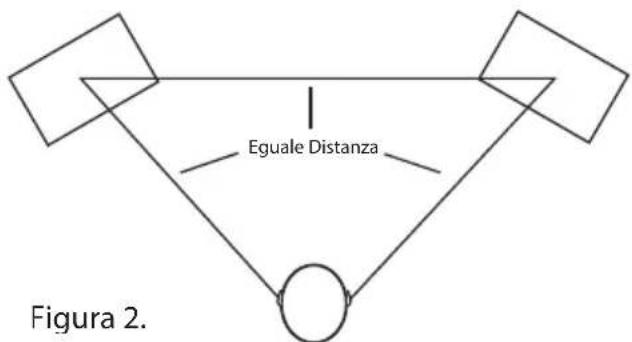
Figura 2
natural_image
Line drawing of a portable electronic device mounted on a tripod stand, showing front and side views (no text or symbols)Figura 3
Auro 3 Specifications
Transducers:
Woofer: 3.5" co-polymer
Tweeter: 13mm Ferrite Magnet, PEI-dome Tweeter
Connectors: Push Terminals
Nominal Impedance: 8 ohms
Power Handling: 25 Watts RMS / 100 Watts Peak
Frequency response: 65Hz – 22kHz
Enclosure:
Construction: High impact ABS plastic
Finish: Black textured
Dimensions: 7.5" x 5.25" x 5" 189mm x 134mm x 129mm
Weight: 3 lb. 1.34 kg
Auro 5 Specifications
Transducers:
Woofer: 5" co-polymer
Tweeter: 13mm Ferrite Magnet, PEI-dome Tweeter
Connectors: Push Terminals
Nominal Impedance: 8 ohms
Power Handling: 35 Watts RMS / 140 Watts Peak
Frequency response: 55Hz – 22kHz
Enclosure:
Construction: High impact ABS plastic
Finish: Black textured
Dimensions: 10.6" x 7.5" x 7.5" 270mm x 190mm x 190mm
Weight: 5.3 lb. 2.42 kg
Auro 6 Specifications
Transducers:
Woofer: 6.5" co-polymer
Tweeter: 20mm Ferrite Magnet, PEI-dome Tweeter
Connectors: Push Terminals
Nominal Impedance: 8 ohms
Power Handling: 45 Watts RMS / 180 Watts Peak
Frequency response 45Hz - 22kHz
Enclosure:
Construction: High impact ABS plastic
Finish: Black textured
Dimensions 12.25' x 8.75" x 8.25" 310mm x 220mm x 210mm
Weight: 7.7 lb. 3.5 kg
Auro 8 Specifications
Transducers:
Woofer: 8" co-polymer
Tweeter: 25mm Ferrite Magnet, PEI-dome Tweeter
Connectors: Push Terminals
Nominal Impedance: 8 ohms
Power Handling: 55 Watts RMS / 220 Watts Peak
Frequency response: 35Hz – 22kHz
Enclosure:
Construction: High impact ABS plastic
Finish: Black textured
Dimensions: 15 x 10.75" x 10.4". 380mm x 271mm x 264mm
Weight: 9.7 lb. 4.4 kg
Anschlüsse: Druck-Terminals
Nominalimpedanz: 8 Ohm
Anschlüsse: Druck-Terminals
Nominalimpedanz: 8 Ohm
Anschlüsse: Druck-Terminal:
Nominalimpedanz: 8 Ohm
Anschlüsse: Druck-Terminals
Nominalimpedanz: 8 Ohm
x 7.5" x 7.5" 270mm x 190mm x 190mm
Peso 5.3 lb. 2.42 kg
Woofer: da 3,5" in co-polimero
Tweeter: Tweeter PEI a cupola con Magnete in Ferrite da13mm
Samson Technologies Corp
575 Underhill Blvd.
P.O. Box 903
Syosset, NY 11791-903
Phone: 1-800-3-SAMSON (1-800-372-6766)
Fax: 516-364-3888
www.samsontech.com
- Important Safety Instructions
- Contents
- Table des matières
- Auro Series Features
- Auro Series Layout
- Setting up & Operating the Auro Series
- Background on the AURO Playback Monitor
- Positioning the Auro Series
- Positioning the Auro Series - continued
- Connecting the Auro Series
- Powering the Auro Series
- Using the Auro Series with a Sub-woofer
- Connecting the Auro Series to the Resolv 120a Sub Woofei
- Auro Installation
- IMPORTANT NOTE:
- Introduction
- Auro 3 Specifications
- Auro 5 Specifications
- Auro 6 Specifications
- Auro 8 Specifications
Brand : SAMSON
Model : Auro 5
Category : Hi-fi system