Expedition XP312w - Hi-fi system SAMSON - Free user manual and instructions
Find the device manual for free Expedition XP312w SAMSON in PDF.



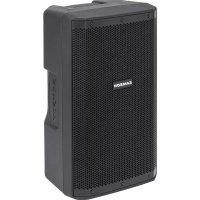
| Product Type | All-in-one portable sound system |
| Brand and Model | Samson Expedition XP312w |
| Output Power | 300 W peak |
| Speakers | 12" (30.5 cm) woofer + 1" (2.5 cm) tweeter |
| Frequency Response | 50 Hz - 18 kHz (-3 dB) |
| Weight | 17.2 kg (38 lb) |
| Power Supply | AC 100-240 V ~ 50/60 Hz or built-in rechargeable lithium-ion battery |
| Battery Life | Up to 12 hours |
| Charging Time | 4 to 6 hours |
| Inputs | 1 combo XLR/6.35mm jack (mic/line), 1 auxiliary input 3.5mm jack, Bluetooth 4.0 (A2DP), USB port for wireless (for XPD series), built-in UHF wireless receiver CR88a |
| Outputs | 1 line 6.35mm jack |
| Equalization | Master Bass and Master Treble |
| Effects | Variable reverb, voiceover attenuation |
| Wireless Connectivity | Bluetooth 4.0, UHF Concert 88a receiver (K band: 470-494 MHz), USB port for XPD |
| Included Wireless Microphone | CH88 portable transmitter (dynamic, AA batteries, 8 h battery life) |
| Mounting | Receptacle for speaker stand 35 mm (1 3/8") |
| Enclosure Material | Polypropylene with perforated powder-coated steel grille |
| Operating Temperature | -10°C to +40°C |
| Maintenance and Cleaning | Clean with a dry cloth. Do not expose to water. Unplug before cleaning. |
| Safety | Do not open the enclosure (risk of electric shock). Use only recommended accessories. Follow safety instructions in the manual. |
| Spare Parts and Repairability | Battery replaceable by a professional. Contact Samson customer service. Repairs must be carried out by qualified personnel. |
| General Information | Retractable handle and built-in wheels. Compliant with directive 2014/53/EU. Bluetooth® trademark under license. |
Frequently Asked Questions - Expedition XP312w SAMSON
User questions about Expedition XP312w SAMSON
0 question about this device. Answer the ones you know or ask your own.
Ask a new question about this device
Download the instructions for your Hi-fi system in PDF format for free! Find your manual Expedition XP312w - SAMSON and take your electronic device back in hand. On this page are published all the documents necessary for the use of your device. Expedition XP312w by SAMSON.
USER MANUAL Expedition XP312w SAMSON
natural_image
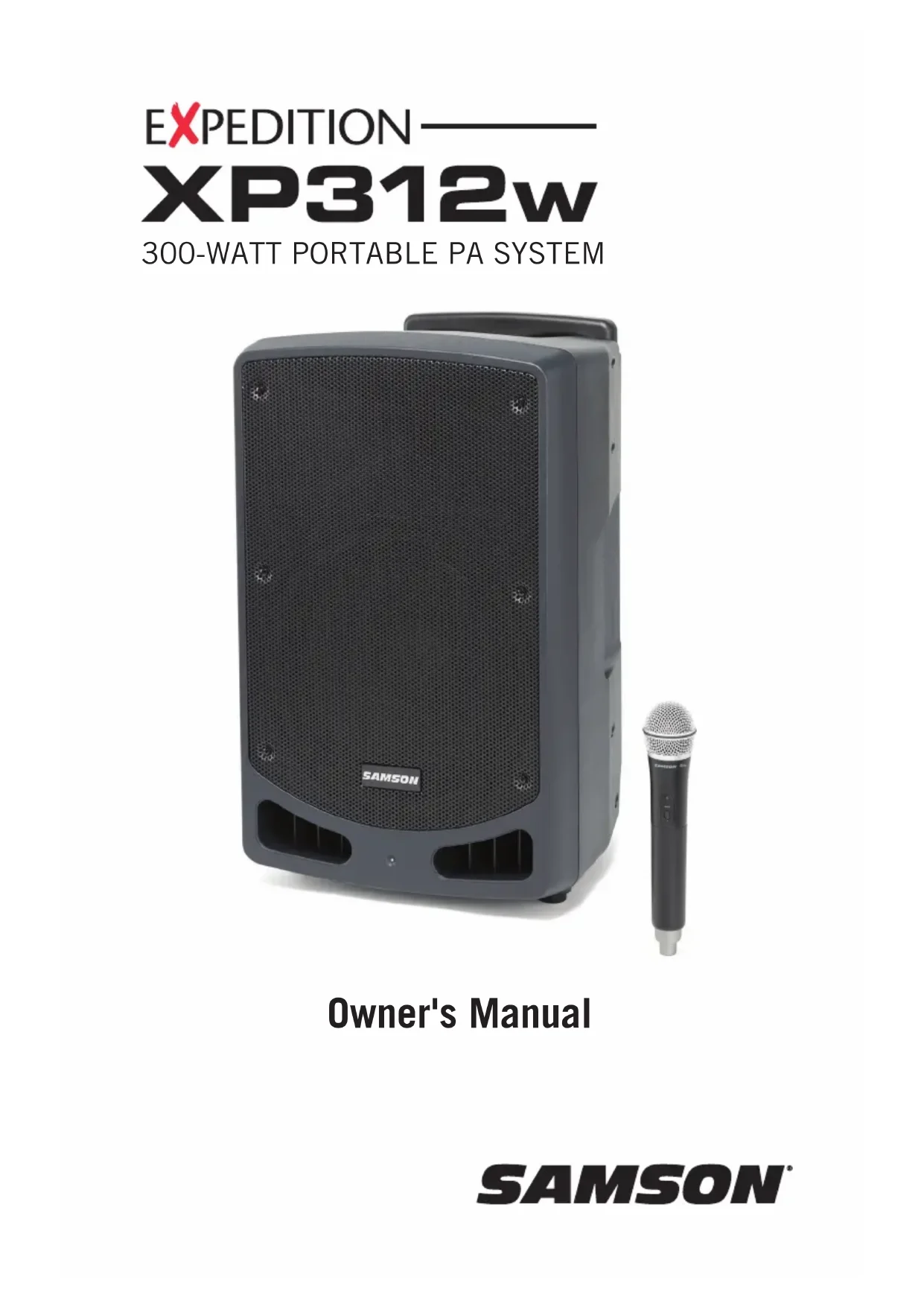
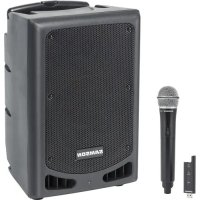
Black SAMSON audio amplifier device with a separate black microphone on the right side (no visible text or symbols on the device body)Owner's Manual
Copyright 2019 v2
Samson Technologies Corp.
278-B Duffy Ave
Hicksville, New York 11801
www.samsontech.com
The Bluetooth® word mark and logos are registered trademarks owned by Bluetooth SIG, Inc. and any use of such marks by Samson Technologies is under license. Other trademarks and trade names are those of their respective owners."
Important Safety Information

AVIS RISQUE DE CHOC ÉLECTRONIQUE - NE PAS OUVRIR

This lightning flash with arrowhead symbol within an equilateral triangle is intended to alert the user to the presence of non-insulated “dangerous voltage” within the product’s enclosure that may be of sufficient magnitude to constitute a risk of electric shock.

The exclamation point within an equilateral triangle is intended to alert the user to the presence of important operating and maintenance instructions in the literature accompanying the appliance.
WARNING: TO REDUCE THE RISK OF ELECTRIC SHOCK, DO NOT REMOVE COVER (OR BACK) AS THERE ARE NO USER-SERVICEABLE PARTS INSIDE. REFER SERVICING TO QUALIFIED SERVICE PERSONNEL.
If you want to dispose this product, do not mix it with general household waste. There is a separate collection system for used electronic products in accordance with legislation that requires proper treatment, recovery and recycling.
Private household in the 28 member states of the EU, in Switzerland and Norway may return their used electronic products free of charge to designated collection facilities or to a retailer (if you purchase a similar new one).
For Countries not mentioned above, please contact your local authorities for a correct method of disposal.
By doing so you will ensure that your disposed product undergoes the necessary treatment, recovery and recycling and thus prevent potential negative effects on the environment and human health.
Important Safety Information
- Read these instructions.
- Keep these instructions.
- Heed all warnings.
- Follow all instructions.
- Do not use this apparatus near water.
-
Clean only with dry cloth.
-
Do not block any ventilation openings. Install in accordance with the manufacturer's instructions.
-
Do not install near any heat sources such as radiators, heat registers, stoves, or other apparatus (including amplifiers) that produce heat.
-
Do not defeat the safety purpose of the polarized or grounding type plug. A polarized plug has two blades with one wider than the other. A grounding type plug has two blades and a third grounding prong. The wide blade or the third prong are provided for your safety. If the provided plug does not fit into your outlet, consult an electrician for replacement of the obsolete outlet.
-
Protect the power cord from being walked on or pinched particularly at the plugs, convenience receptacles, and at the point where they exit from the apparatus.
-
Only use attachments/accessories specified by the manufacturer.
-
Use only with the cart, stand, tripod, bracket, or table specified by the manufacturer, or sold with the apparatus. When a cart is used, use caution when moving the cart/apparatus combination to avoid injury from tip-over.

-
Unplug the apparatus during lightening storms or when unused for long periods of time.
-
Refer all servicing to qualified personnel. Service is required when the apparatus has been damaged in any way, such as power supply cord or plug is damaged, liquid has been spilled or objects have fallen into the apparatus has been exposed to rain or moisture, does not operate normally, or has been dropped.
-
This appliance shall not be exposed to dripping or splashing water and that no object filled with liquid such as vases shall be placed on the apparatus.
-
Caution-to prevent electrical shock, match wide blade plug wide slot fully insert.
-
Please keep a good ventilation environment around the entire unit.
-
To prevent injury, this apparatus must be securely attached to the stand in accordance with the installation instructions.
-
WARNING: The battery (battery or batteries or battery pack) shall not be exposed to excessive heat such as sunshine, fire or the like.
-
CAUTION: Danger of explosion if battery is incorrectly replaced. Replace only with the same or equivalent type.
-
WARNING: The mains plug/appliance coupler is used as disconnect device, the disconnect device shall remain readily operable.
-
Battery disposal should be drawn to environmental aspects and should be according to local law requirements.
-
No naked flame sources, such as lighted candles, should be placed on the apparatus.
Important Safety Information
FCC Notice
- This device complies with Part 15 of the FCC Rules. Operation is subject to the following two conditions:
(1) This device may not cause harmful interference.
(2) This device must accept any interference received, including interference that may cause undesired operation.
- Changes or modifications not expressly approved by the party responsible for compliance could void the user's authority to operate the equipment.
FCC Statement
This equipment has been tested and found to comply with the limits for a Class B digital device, pursuant to Part 15 of the FCC Rules. These limits are designed to provide reasonable protection against harmful interference in a residential installation.
This equipment generates uses and can radiate radio frequency energy and, if not installed and used in accordance with the instructions, may cause harmful interference to radio communications. However, there is no guarantee that interference will not occur in a particular installation. If this equipment does cause harmful interference to radio or television reception, which can be determined by turning the equipment off and on, the user is encouraged to try to correct the interference by one or more of the following measures:
- Reorient or relocate the receiving antenna.
- Increase the separation between the equipment and receiver.
- Connect the equipment into an outlet on a circuit different from that to which the receiver is connected.
- Consult the dealer or an experienced radio/TV technician for help.
RF Warning Statement
The device has been evaluated to meet general RF exposure requirement. The device can be used in portable exposure condition without restriction.
This device complies with RSS-310 of Industry Canada. Operation is subject to the condition that this device does not cause harmful interference.
Hereby, Samson Technologies Corp., declares that this Expedition XP312w is in compliance with the essential requirements and other relevant provisions of Directive 2014/53/EU. The declaration of conformity may be consulted at:
http://www.samsontech.com/site_media/support/manuals/XP312w_DOC.pdf
Introduction
Thank you for purchasing the XP312w battery-powered portable sound system, featuring wireless Bluetooth® connectivity. Lightweight and compact, the XP312w features 300 watts of power weighing only 38 pounds, making it an excellent complement to any mobile speaker application. The internal rechargeable battery provides up to 12 hours of continuous use. The XP312w can also be AC powered (with the included power cord). The retractable handle and integrated wheels, make the XP312w easy to transport to any outing.
The XP312w is a complete all-in-one solution providing the flexibility of a four-channel mixer (with inputs for microphones and line level devices), a line output for linking multiple speakers, and Voiceover priority ducking. For a completely untethered performance, the XP312w includes a Samson Concert 88a Handheld Wireless system and an additional slot to add a second Concert 88a system. There is also a USB jack for adding a Samson XPD Series wireless system. Whether you are looking for a sound system for use outdoors, in the classroom, for karaoke, for presentations, or performing live music, the XP312w provides high quality, portable audio in a small self-powered package.
We recommend you keep the following records for reference, as well as a copy of your sales receipt.
Serial number: ____
Date of purchase: ____
If you have any questions or comments regarding the XP312w Portable PA System or any other products from Samson, do not hesitate to contact us at support@samsontech.com.
With proper care and maintenance, your XP312w Portable PA System will operate trouble-free for many years. Should your XP312w Portable PA System ever require servicing, a Return Authorization (RA) number must be obtained before shipping your unit to Samson. Without this number, the unit will not be accepted. Please visit www.samsontech.com/ra for an RA number prior to shipping your unit. Please retain the original packing materials and, if possible, return the unit in its original carton. If your XP312w Portable PA System was purchased outside of the United States, contact your local distributor.
Features
• 300 watt, all-in-one portable PA system that weighs 38lb
- 2-way speaker enclosure with 12" woofer and 1" tweeter
- Internal rechargeable lithium ion battery for up to 12 hours of continuous use
- Bluetooth connectivity to connect wireless music sources
- Includes Concert 88a Handheld Frequency-agile UHF Wireless System
• 4-channel mixer with microphone and line level inputs
• Master Bass and Treble EQ
• Variable reverb control for mic/wireless inputs
• Voiceover control with priority ducking
• Line output to daisy-chain multiple systems together
• USB wireless port for use with Samson XPD Series USB Digital Wireless Systems
- Retractable handle and smooth rolling wheels for easy transport
• 1 3/8" speaker stand mount
XP312w Mixer Callouts
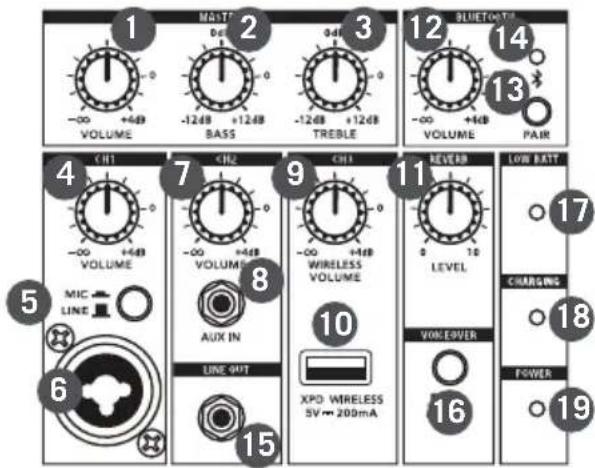
- MASTER VOLUME - Used to control the overall level of the speaker system.
- MASTER BASS - Controls the low-frequency tone of the entire system.
- MASTER TREBLE - Controls the high-frequency tone of the entire system.
- CH1 VOLUME - Controls the level of the Channel 1 Mic/Line input.
- LINE / MIC Switch - Adjusts the gain of the CH1 input for a microphone or line level device.
- CH1 Input - XLR-1/4" input for connecting a microphone or a device with a line level signal.
- CH2 VOLUME - Controls the level of the Channel 2 Aux input.
- AUX IN - Connect a line level device using an 1/8" audio cable.
- CH3 WIRELESS VOLUME - Controls the level of the Concert 88a wireless microphone receivers as well as the optional XPD USB wireless receiver.
- XPD WIRELESS Input - Connect a Samson XPD USB digital wireless receiver to this input. The wireless receiver gets its power from the XP312w, so no additional power supply is needed.
- REVERB - This knob is used to adjust the total amount of reverb added to Channel 1 and Channel 3 (wireless) input channels.
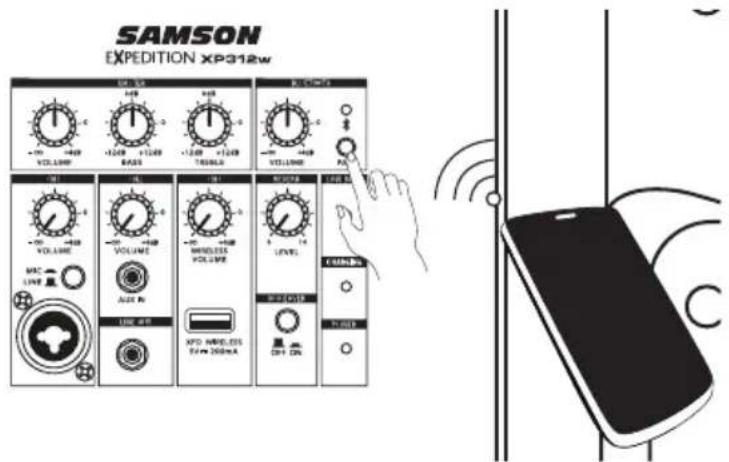
- BLUETOOTH® VOLUME - Controls the level of the Bluetooth input.
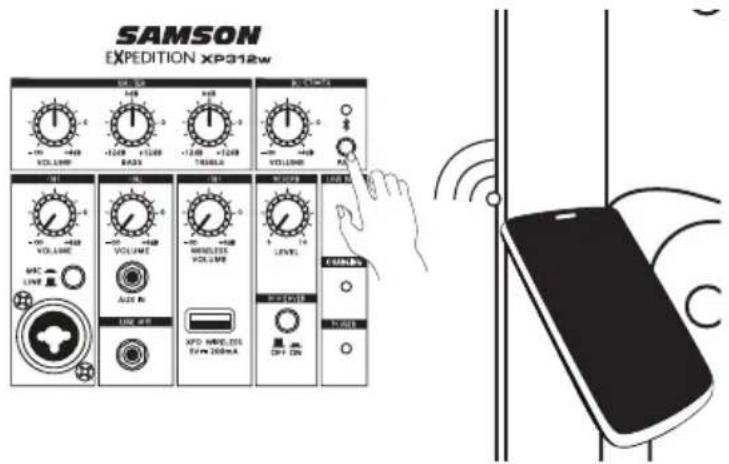
- PAIR Button - Press this button to enable pairing mode in order to connect to a Bluetooth audio device.
- Pairing Indicator - Displays the Bluetooth status of the XP312w system.
- LINE OUT - Line level 1/4" output jack to connect the XP312w to the input of another XP312w to create an expanded speaker system. The LINE OUT signal is before the MASTER VOLUME and EQ Controls.
- VOICEOVER ON/OFF Switch - Turns the VOICEOVER ducking on or off.
- LOW BATTERY Indicator - This LED lights when the XP312w battery is low. When the light is on, it is recommended to plug the XP312w into and AC outlet.
- CHARGING Indicator - When the XP312w is plugged in and the POWER switch is set to the RECHARGE position, the CHARGING indicator will illuminate RED while it is charging. Once charging is complete the indicator will turn off.
- POWER Indicator - Lights green when the power switch is in the ON position.
SAMSON
EXPEDITION XP312w
XP312w Rear Panel Callouts
-
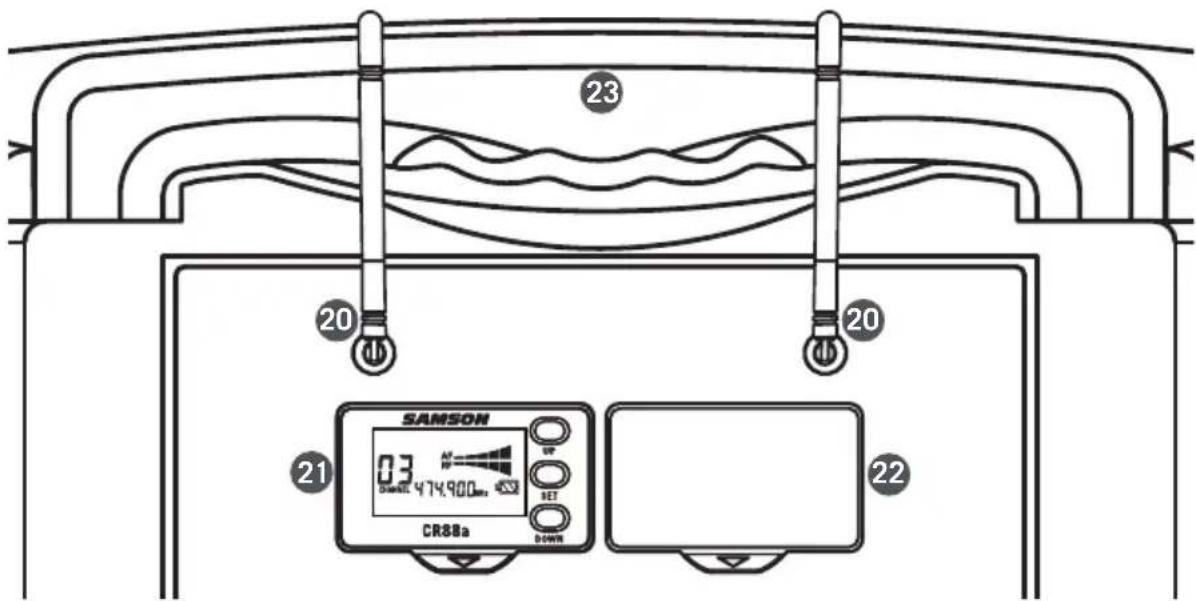
Antennas - The antenna mountings allow full rotation for optimum placement. When using the Concert 88a wireless system, both antennas should be placed in a vertical position.
-
CR88a Receiver - Included frequency agile wireless UHF receiver.
-
CR88a receiver cover/slot - Extra slot to add an additional CR88a wireless receiver.
-
Retractable handle - Pull up to extend the handle for transport.
-
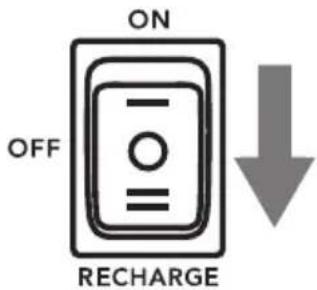
Power / Recharge Switch - This three position switch is used to turn the XP312w ON, OFF or place the system into RECHARGE mode to charge the internal battery.
-
ACINPUT- Connect the supplied power cord here.
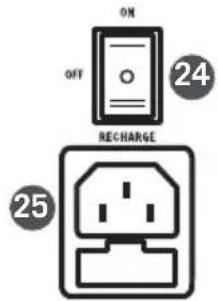
CR88a Receiver Display
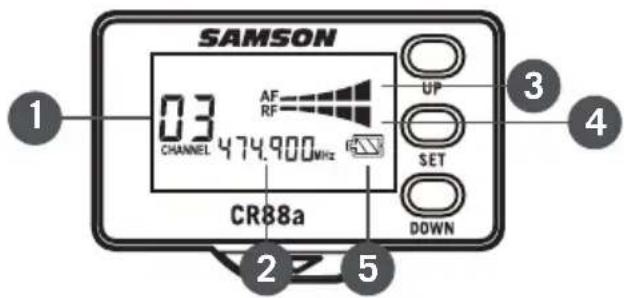
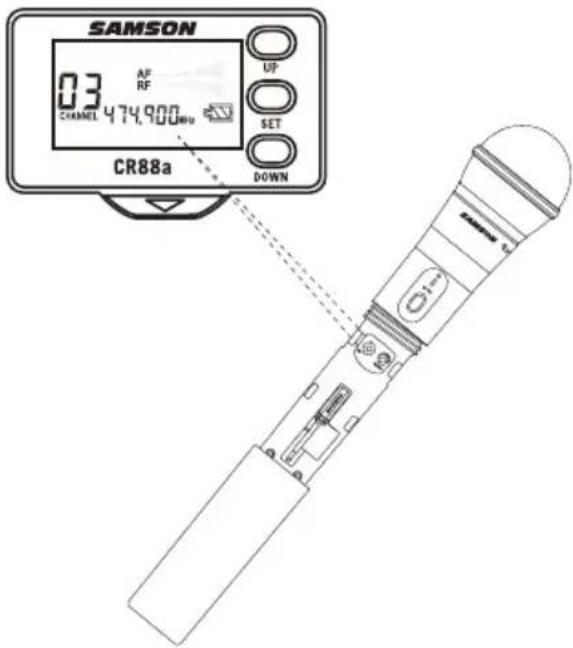
- Channel - Displays the selected channel number.
- Frequency - Indicates the operating frequency of the selected channel.
- Audio Meter - Displays the strength of the incoming audio signal.
- RF Signal Meter - Displays the strength of the incoming radio signal.
- Transmitter Battery Level - Indicates the battery level of the transmitter.
Using the CR88a Receiver
Selecting a channel
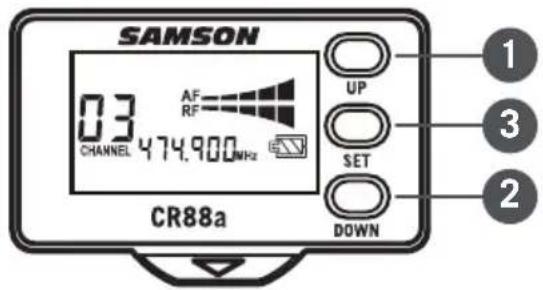
- Short press the UP (1) & DOWN (2) buttons to step through the available channels.
- Press and hold the UP (1) button for 3 seconds to enter IR Set mode to send the selected channel to the transmitter.
- Press and hold the UP (1) button for more than 6 seconds to rapidly cycle through the channels. Once the button is released, the receiver will enter IR Set mode to send the selected channel to the transmitter.
- Press and hold the DOWN (2) button for 3 seconds to enter scan mode. The CR88a will scan through the operating channels and find the optimal channel for performance. Once the scan is complete, the receiver will enter IR Set mode to send the selected channel to the transmitter.
Using the CR88a Receiver
IR Set
-
Press and hold the UP (1) button for 3 seconds to enter IR Set mode to send the selected channel to the transmitter.
-
Position the transmitter about 6"-12" (15-30 cm) from the front of the CR88a receiver display with the transmitter's IR window (located in the battery compartment facing the receiver.
-
When the transmission of the operating channel is complete, the CR88a will receive RF signal and the RF Signal Meter will light indicating that it is receiving wireless signal from the transmitter.
Setting the receiver volume
-
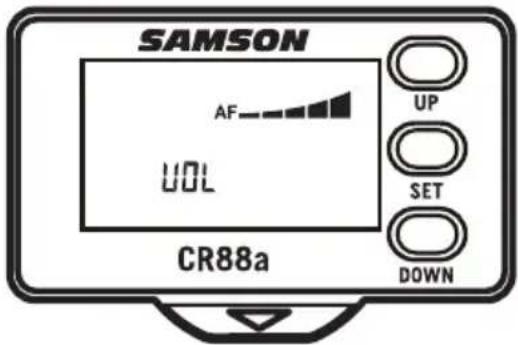
Short press the SET (3) button to enter the receiver volume adjustment mode.
-
Press the UP (1) button to increase the receiver output level.
-
Press the DOWN (2) button to decrease the receiver output level.
Adjusting the squelch
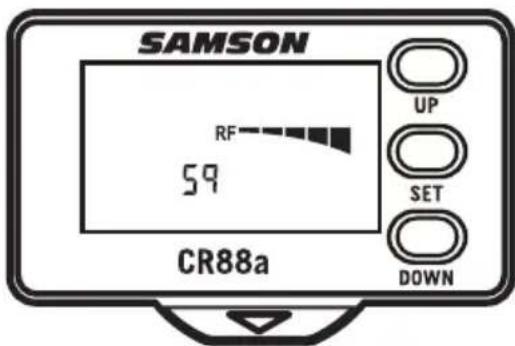
Squelch is a function of the receiver that passes audio when the desired radio signal is above the squelch threshold and mutes audio when the radio signal is below the threshold. The higher the squelch setting, the stronger the incoming signal will have to be in order for you to hear it.
To set your squelch level, place the wireless transmitter at the furthest distance you expect to use it and adjust the squelch level until it mutes the signal. Then adjust the squelch level back up until the wireless transmitter signal is heard.
The squelch level should be set just above the background radio signal noise. If the squelch setting is set too low, you will hear static noise pass through the receiver when the transmitter is turned off or out of range.
-
Short press the SET (3) button two times to enter the squelch adjustment mode.
-
Press the UP (1) button to increase the squelch threshold level.
-
Press the DOWN (2) button to decrease the squelch threshold level.
CH88 Handheld Transmitter Callouts
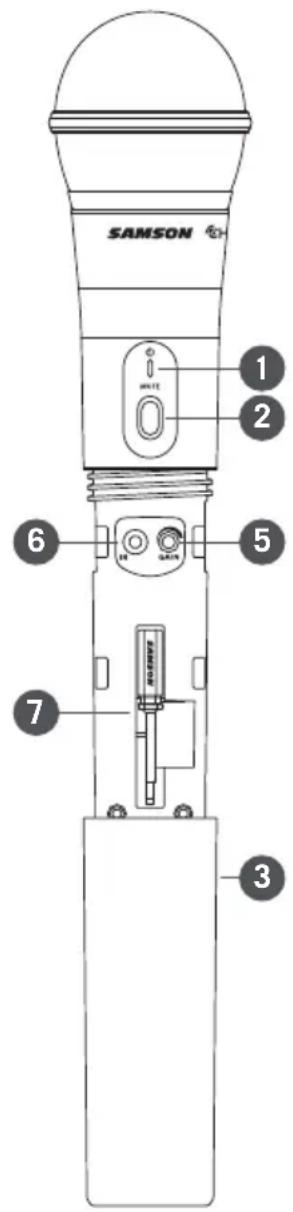
- Status Indicator - This LED displays the operation mode:
| GREEN Normal Operation | |
| RED Mute | |
| Flashing GREEN Low Battery | |
- Power/Mute Switch - Press and hold to turn the unit on or off. Press and release to mute or unmute the transmitter.
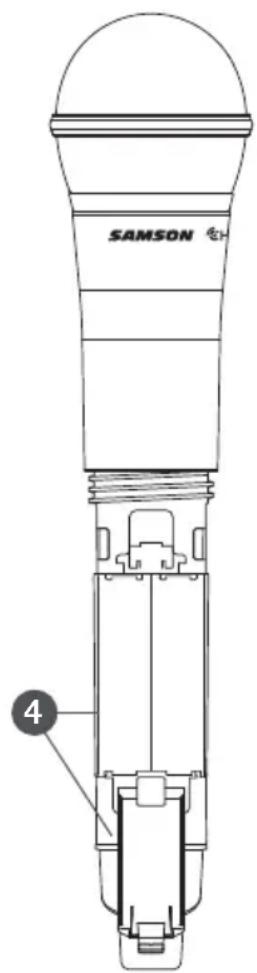
- Battery Cover - Unscrew the battery cover and slide down to open the CH88 battery compartment.
- Battery Holder - Open the battery holder by pressing the tab and lifting the cover. Insert two standard AA (LR6) batteries here, being sure to observe the plus and minus polarity markings shown. Although rechargeable Ni-Cad batteries can be used, they do not supply adequate current for more than four hours.
WARNING: Do not insert the batteries backwards; doing so can cause severe damage to the CH88 and will void your warranty.
- Input GAIN Control - This control adjusts the transmitter input sensitivity. For optimal performance, using the included screwdriver, set the input GAIN control to where you see the all of the CR88a AF indicators light under high levels, then turn down the control until the last indicator lights only during audio peaks.
- IR Lens - This window is used to capture the infrared signal sent from the CR88a during the IR SET to channelize the transmitter. The battery cover must be open and the IR Lens facing towards the receiver to load the selected channel.
- Screwdriver - Designed for use in adjusting the CH88 input GAIN control.
Quick Start
- Set the XP312w power switch to the OFF position, and fully turn all of the LEVEL controls counterclockwise to 0.
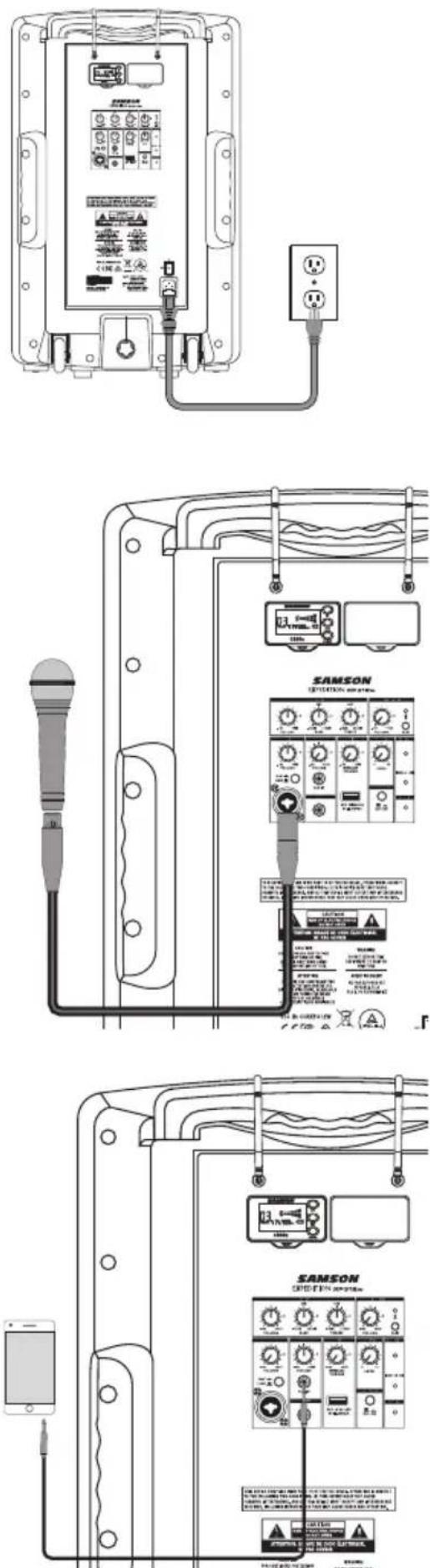
- If an outlet is available, connect the included power cord to the AC input of the speaker, and plug it into an electrical outlet.
- Set the XP312w power switch to the ON position.
- Connect your audio sources.
- Turn the MASTER VOLUME control up and set the input levels, following the steps below.
Making Connections
Channel 1 (Microphone / Line Input)
- Connect a microphone using a standard XLR cable or line level equipment using a 1/4" instrument cable.
- If connecting a microphone, set the LINE / MIC switch to the down (MIC) position. If connecting a line level device, set the LINE / MIC switch to the up (LINE) position.
- While speaking into the microphone or playing music from a line level audio source, slowly raise the CH1 VOLUME control until you have reached the desired level.
NOTE: If not using the Channel 1 input, turn the VOLUME control all the way down to keep out any unwanted noise.
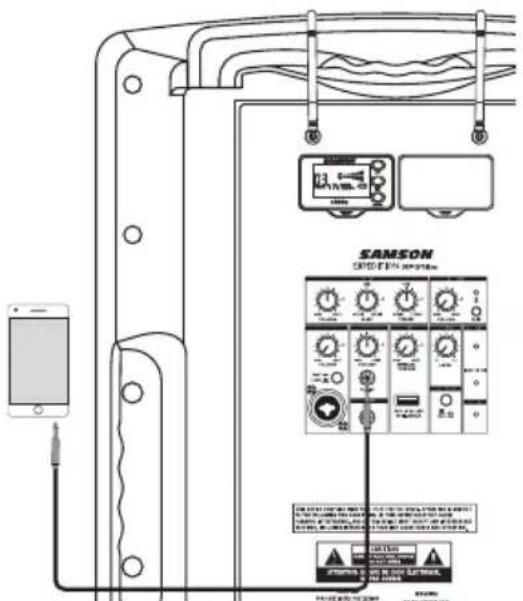
Channel 2 (Aux Input)
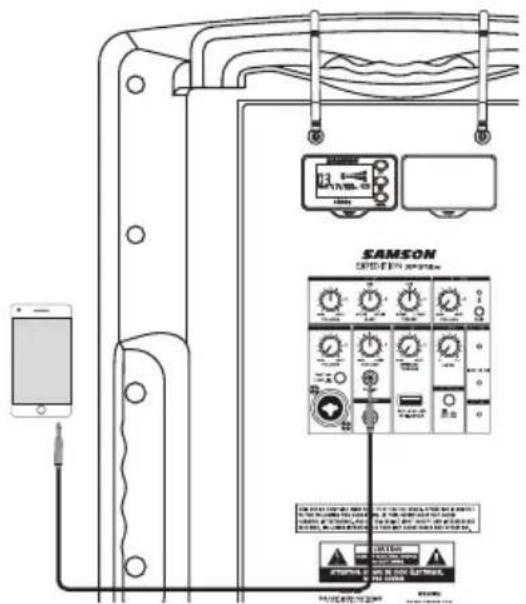
- Connect a line level device using 1/8" cable.
- While playing music from a line level audio source, slowly raise the CH2 VOLUME control until you have reached the desired level.
Quick Start
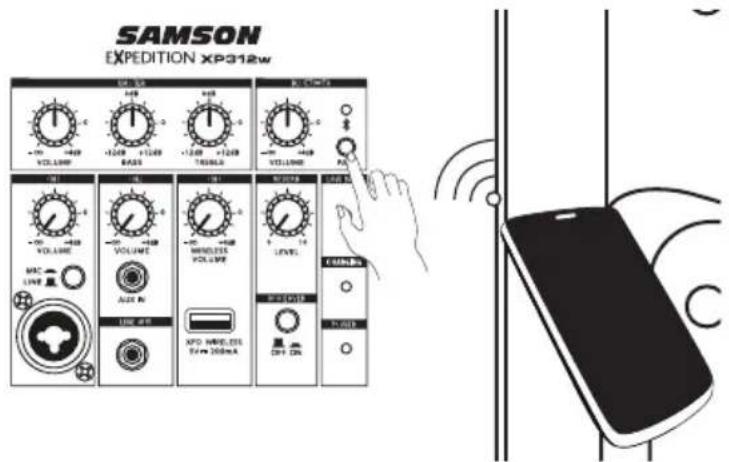
Bluetooth®
- Turn the BLUETOOTH VOLUME control down counterclockwise to 0.
- With the XP312w and your Bluetooth device powered on; press the PAIR button on the rear panel of the XP312w to make the speaker discoverable. The Bluetooth indicator will slowly flash blue.
- In the settings of your Bluetooth device, set it to "discover" available devices.
- From the Bluetooth device list, select the "Samson BLUETOOTH" device.
- If your device asks for a passkey, enter digits 0000 (four zeros) and press OK. Some devices may also ask you to accept the connection.
- The XP312w speaker indicates that pairing is complete when the indicator turns steady blue. You can now stream audio from your device to the XP312w speakers.
- With the volume control on your Bluetooth device turned up, play some music, and slowly raise the XP312w BLUETOOTH VOLUME control until you have reached the desired level.
Using the Voiceover Switch
The XP312w Voiceover ducker is a sophisticated music and paging system where the background music will automatically lower when an announcement is made. The ducker can operate with sound coming from any of the wired or wireless microphone inputs.
When the VOICEOVER switch is pressed in, when ever signal is present at the Channel 1 microphone input, Concert 88a wireless inputs or XPD wireless input, the Channel 2 line level input and Bluetooth audio will automatically be lowered.
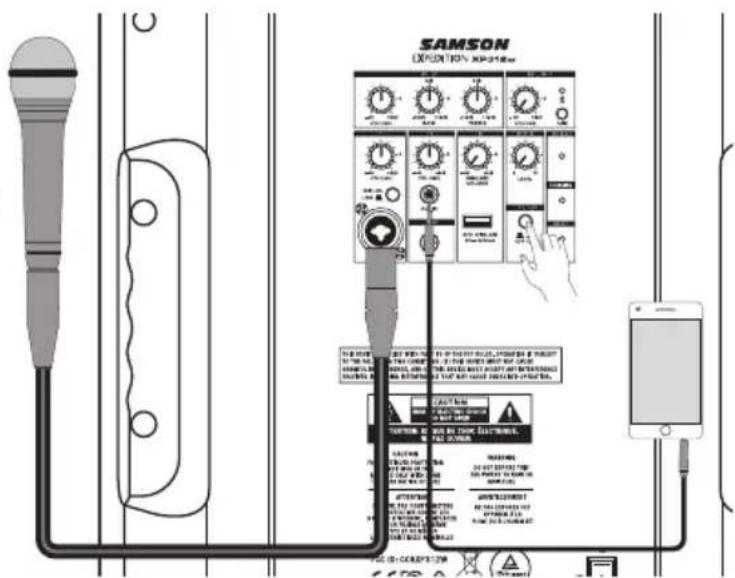
Once there is no input present on microphone and wireless microphone inputs, the line level input and Bluetooth audio will return to their normal levels.
Connecting Samson XPD Wireless
The following steps detail connecting a Samson XPD2 USB digital wireless system (sold separately) to your XP312w.
-
Plug the RXD2 USB receiver into one of the USB jacks on rear panel of the XP312w directly (figure 1) or using the included USB extension cable (figure 2).
-
Place a fresh set of AA (LR6) batteries in the transmitter battery holder, taking care to observe the polarity markings.
-
Turn the Channel 3 Wireless Volume knob completely counterclockwise, then turn the power of the XP312w to the ON position.
-
Turn on the power to the HXD1 handheld or PXD1 beltpack transmitter by pressing and holding Power switch; the indicator LED will light amber.
-
If the transmitter and receiver have not been previously paired, press and hold the button on the RXD2 receiver for >5 seconds, until it begins to flash. Press and continue to hold the Power button on the transmitter until the LED indicators on both units light steady, indicating that the receiver and transmitter are paired and ready for operation.
-
Speak or sing into the microphone at a normal performance level and raise the Channel 3 Wireless Volume knob on the XP312w until the desired level is reached.
-
If you hear distortion turn down the Channel 3 Wireless Volume on the XP312w. If distortion is still audible, use the supplied screwdriver to turn the Gain control in the HXD1 transmitter slowly counterclockwise until the distortion disappears.
Conversely, if you hear a weak, noisy signal at the desired volume level and with the Wireless level control of the XP312w is set to maximum, use the screwdriver to turn the Gain control in the HXD1 transmitter slowly clockwise until the signal reaches an acceptable level.
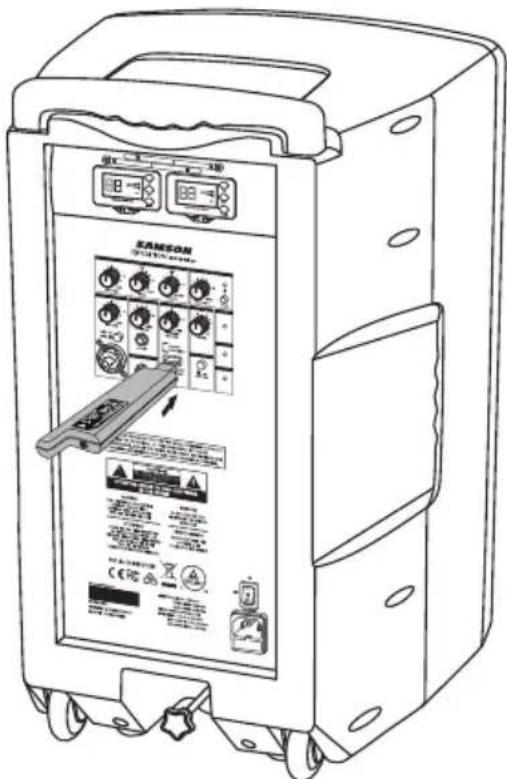
Figure 1
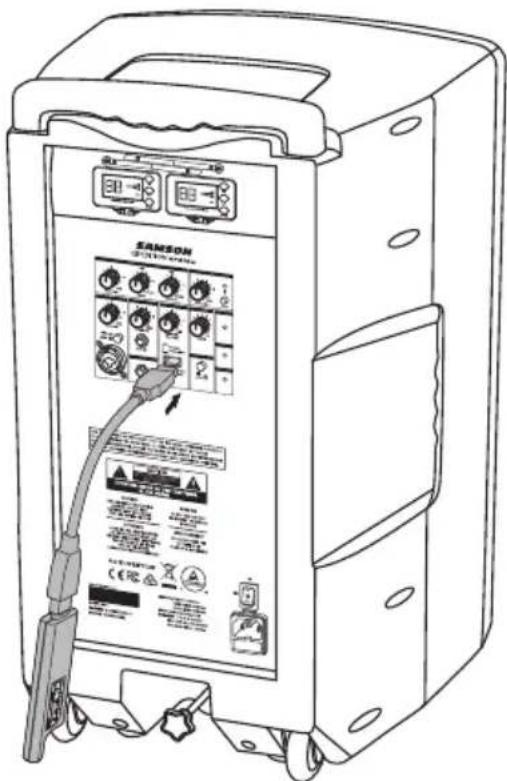
Figure 2
Using the LINE OUT Jack
The XP312w LINE OUT jack allows you to connect the XP312w with any powered speaker to expand your system or link two XP312w systems together to daisy chain the speakers.
Using a standard shielded 1/4" instrument cable, connect the LINE OUT on the XP312w to a line level input of a second powered speaker. The XP312w will send a mix of all inputs, including Bluetooth® audio. Each channel VOLUME will control corresponding output level to the LINE OUT jack.
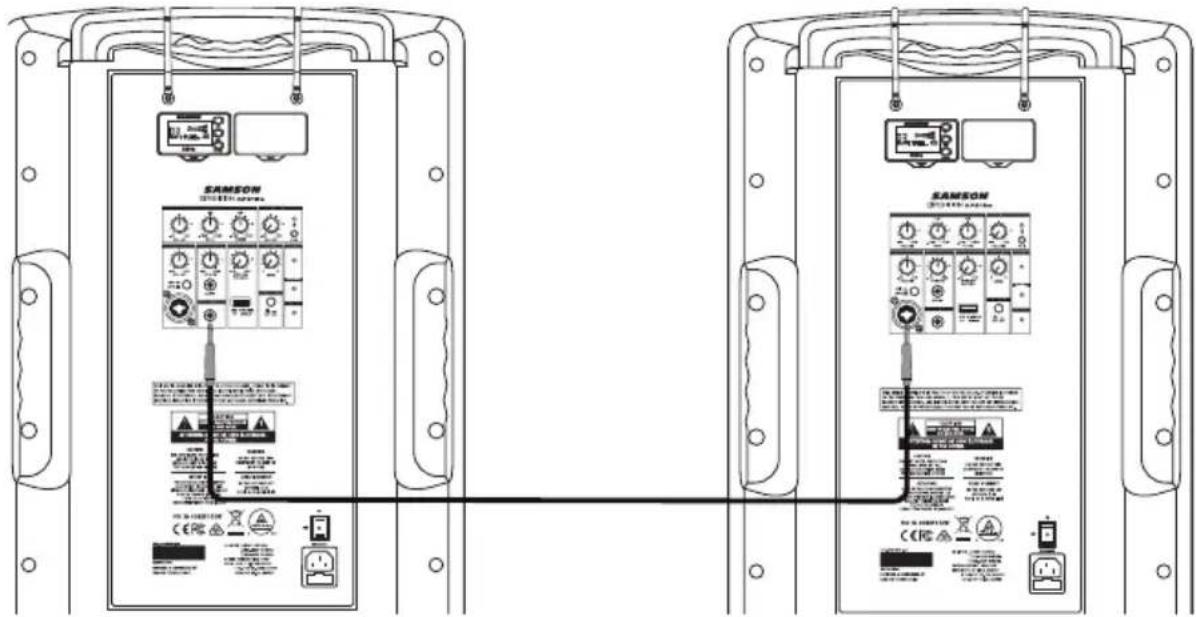
Using a Speaker Stand
The XP312w includes a 1 3/8" (35mm) pole mount receptacle on the bottom of the cabinet. This fits a standard 1-3/8" (35mm) speaker stand. For maximum coverage when using a speaker stand, the speaker should be raised above the heads of the listening audience.
Take care when placing the speaker on a stand, to ensure that it is on a level, steady surface and will not tip over. Use a stand designed to support a speaker with a minimum weight of 40lb.
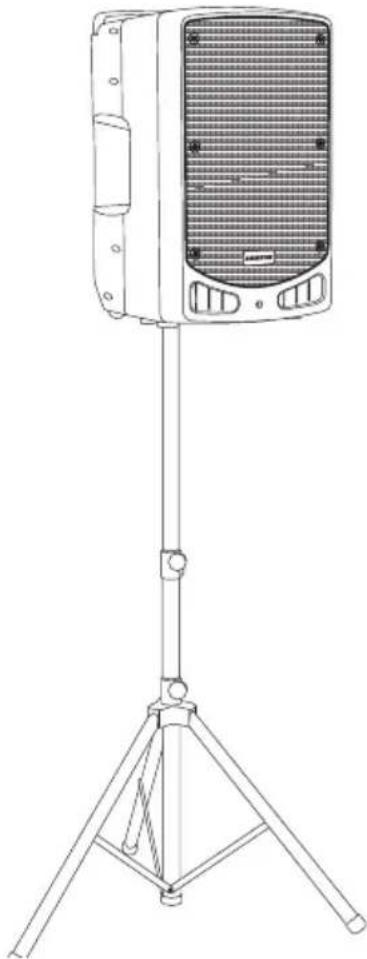
natural_image
Line drawing of a portable electronic device mounted on a tripod stand (no text or symbols)Charging the Battery
The XP312w has an internal, rechargeable battery capable of up to 12 hours of continuous audio on a full charge. Even though the system may have some charge when first taken out of the box, it is recommended to fully charge your XP312w before first using the system.
To charge the battery:
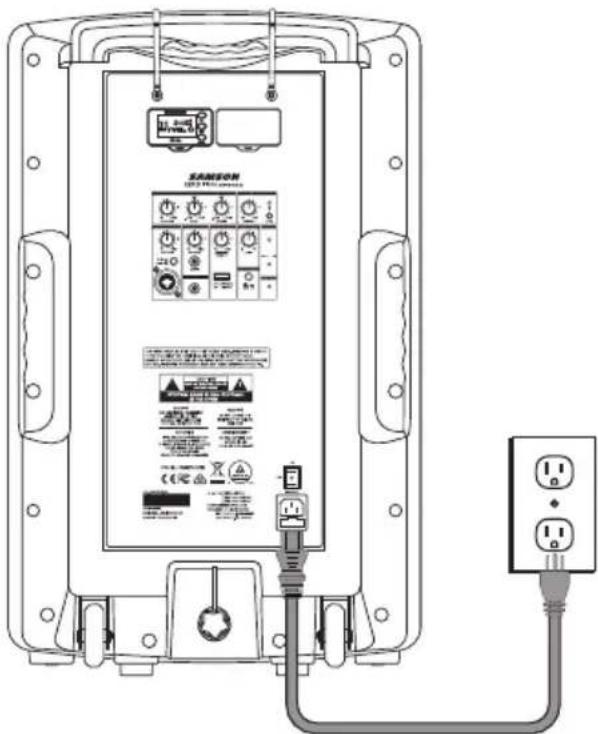
- Connect the XP312w to an AC power outlet using the included power cable.
- Set the power switch to the "RECHARGE" position.
- While charging the CHARGING indicator will light red.
- Keep the system plugged in until the CHARGING indicator changes to green, indicating the battery is fully charged.
If you find that the operation time of the XP312w becomes noticeably decreased, even after fully charging, the battery should be replaced. Contact Samson customer service or your local distributor for a replacement battery.
A warning that batteries (battery pack or batteries installed) shall not be exposed to excessive heat such as sunshine, fire or the like.
CAUTION: Danger of explosion if battery is incorrectly replaced. Replace only with the same or equivalent type. Attention should be drawn to the environmental aspects of battery disposal
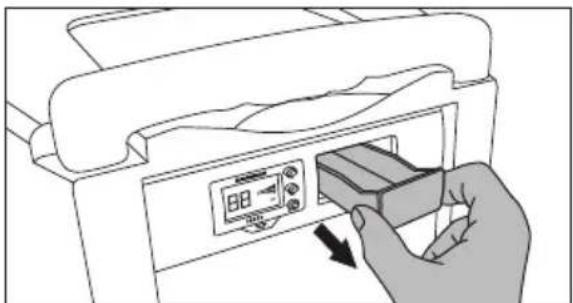
Installing the CR88a Receiver
The XP312w comes with one CR88a receiver installed. You can add an additional CR88a receiver to the system. Follow these steps to install the receiver.
- Turn the XP312w POWER off and leave the AC power cable disconnected until the installation process is completed.
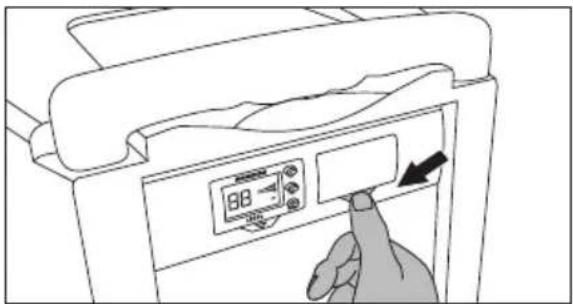
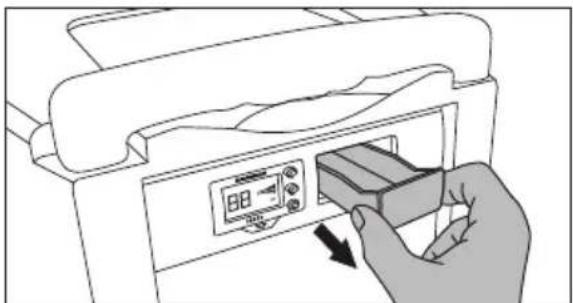
- Press the button with the arrow under the blank receiver panel until the panel pops out (you may need to use a non-marking tool).
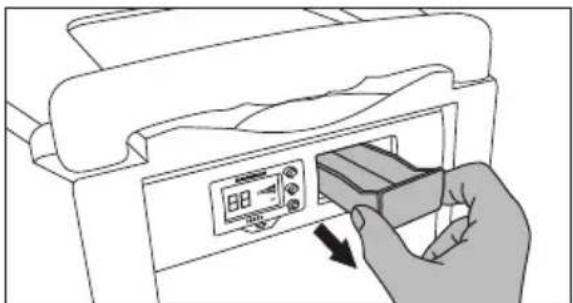
- Remove the blank panel by sliding it out of the XP312w.
- Align the CR88a module with the open slot and slide the module in until it is fully seated in the XP312w.
Note: When using multiple systems, each system must be set to a different operating channel.
natural_image
Illustration of a hand inserting a device into a printer (no text or symbols visible)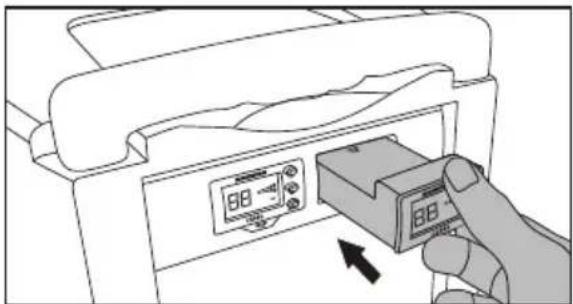
natural_image
Illustration of a hand inserting a device into a printer case, showing the next paper with a 88 dB display (no text or symbols on the device itself)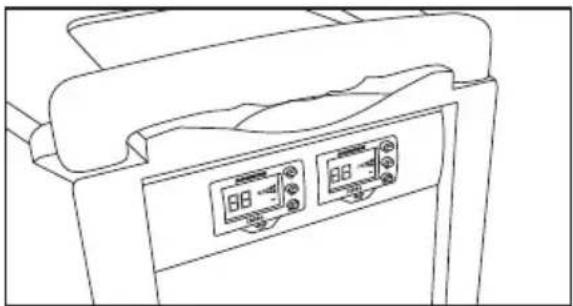
natural_image
Line drawing of a medical device with two digital display panels (no text or symbols)Specifications
Output Power 300 watts Peak
Speakers 12" woofer + 1" tweeter
Frequency Response 50Hz–18kHz (-3dB)
Mic/Line Input XLR-1/4" combo
Aux Input 1/8" Aux
Wireless Input USB wireless
Outputs 1/4" Line
Tone Control Master Bass & Treble EQ
Dynamics Control Reverb, Voiceover (ducker)
Bluetooth Bluetooth 4.0, A2DP
Working Frequency 2.402GHz\~2.480GHz
RF Power <10mW
Battery Life Up to 12 hours by built-in Li-ion
Battery Charging 4-6 hours
Power Supply AC:100-120V/220-240V, 50\~60Hz
Construction Polypropylene
Grille Perforated steel grille, powder coated
Mounting Integral 1 3/8" Pole Mount Receptacle
Wireless Receiver Samson CR88a
Wireless Sensitivity -100 dBm / 30 dB sinad
Wireless Image Rejection >50 dB
Wireless Working Range 100' (30m) line-of-sight
Operating Temperature -10^ +40^
Dimensions (LxDxH) 15.25" x 14.25" x 23.5"
390mm x 360mm x 600mm
Weight 38 lb / 17.2 kg
CH88 Handheld Transmitter
Microphone Element Dynamic
Input Gain Range 28 dB
RF Power 10 mW EIRP
Power Requirements Two AA (LR6) alkaline batteries
Battery Life 8 hours
Dimensions (Hx∅) 10.23" x 2.1"
260mm x 54mm
Weight 0.48 lb / 218 g
Concert 88a Operating Bands and Frequency Ranges
| Band Frequency Range | |
| K^a 470–494 | MHz |
| D^a 542–566 | MHz |
| IL* 794–806 | MHz |
| B* 806–810 | MHz |
| G* 863–865 | MHz |
* Not for use in the USA and Canada.
European Frequency Operation
Note: This equipment is intended for professional musical and similar applications, and may be capable of operating on some frequencies not authorized in your region. Please contact your national authority to obtain information on authorized frequencies for wireless microphone products in your region.
| Band | Frequency Range | EU Country Codes | Note |
| K^a | 470–494 MHz | AT, BE, BG, CY, CZ, DK, EE, FI, FR, DE, GR, HU, IS, IE, IT, LV, LT, LU, MT, NL, NO, PL, PT, RO, SK, SI, ES, SE, CH, UK | |
| D** | 542–566 MHz | ||
| IL** | 794–806 MHz | For use in Israel | |
| B** | 806–810 MHz | For use in Japan | |
| G | 863–865 MHz | AT, BE, BG, CY, CZ, DK, EE, FI, FR, DE, GR, HU, IS, IE, IT, LV, LT, LU, MT, NL, NO, PL, PT, RO, SK, SI, ES, SE, CH, UK | License Free |
** Not for use in the EU.
^a Licensing: Note that a ministerial license to operate this equipment may be required in certain areas. Consult your national authority for possible requirements. Licensing of Samson wireless microphone equipment is the user's responsibility, and licensability depends on the user's classification and application, and on the selected frequency.
natural_image
Technical line drawing of an electrical enclosure with wiring and socket components (no text or symbols)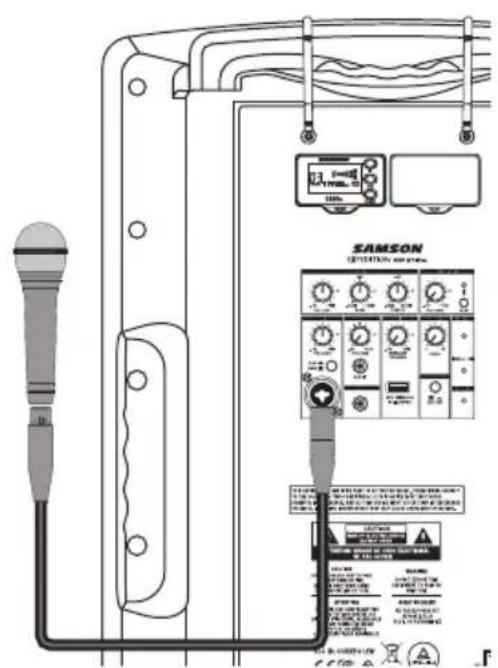
Démarrage rapide
Bluetooth®
Figure 1
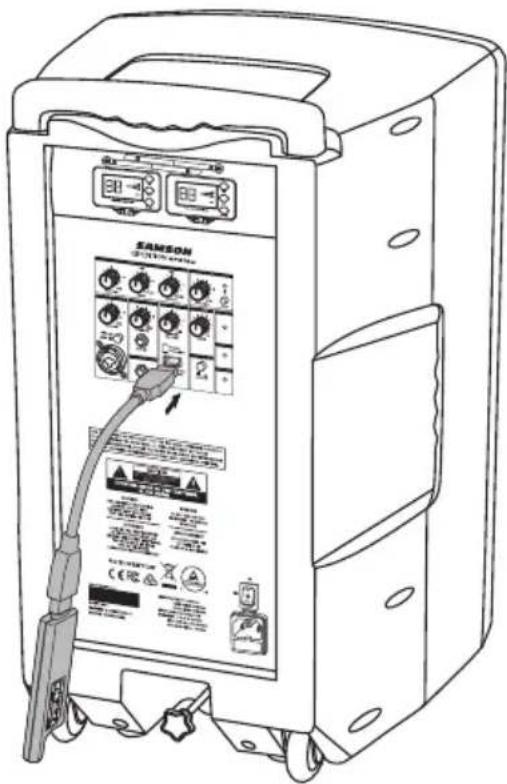
Figure 2
natural_image
Line drawing of a portable electronic device mounted on a tripod stand (no text or symbols)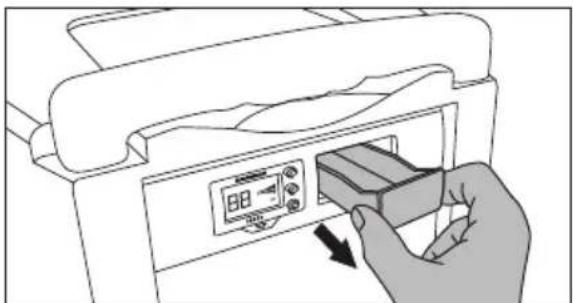
natural_image
Illustration of a hand inserting a device into a printer (no text or symbols visible)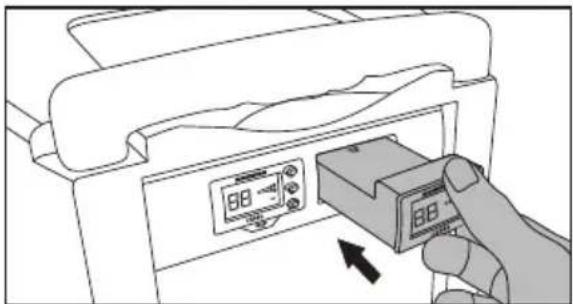
natural_image
Illustration of a hand inserting a device into a printer case, showing the next paper with a 88 dB display (no text or symbols on the device itself)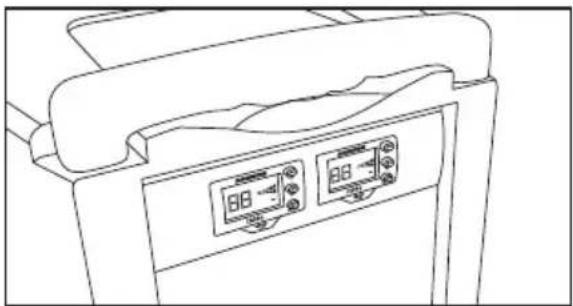
natural_image
Line drawing of a medical device with two digital display panels (no text or symbols)Dimensions (LxDxH) 15.25" x 14.25" x 23.5"
390 mm x 360 mm x 600 mm
Puissance RF 10 mW EIRP
Abbildung 1
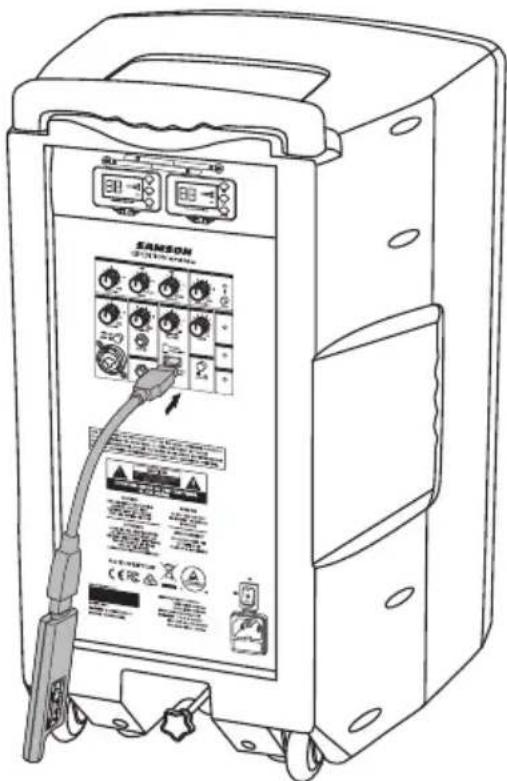
Abbildung 2
natural_image
Line drawing of a portable electronic device mounted on a tripod stand (no text or symbols)Aufladen des Akkus
natural_image
Illustration of a hand inserting a device into a printer (no text or symbols visible)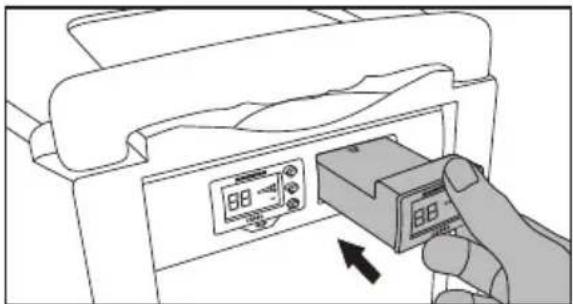
natural_image
Illustration of a hand inserting a device into a printer (no text or symbols visible)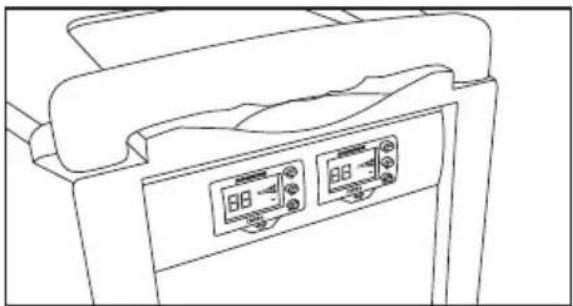
natural_image
Line drawing of a medical device with two digital display panels (no text or symbols)Technische Daten
Dynamics Control Reverb, Voiceover (Ducker)
Bluetooth Bluetooth 4.0, A2DP
Figura 1
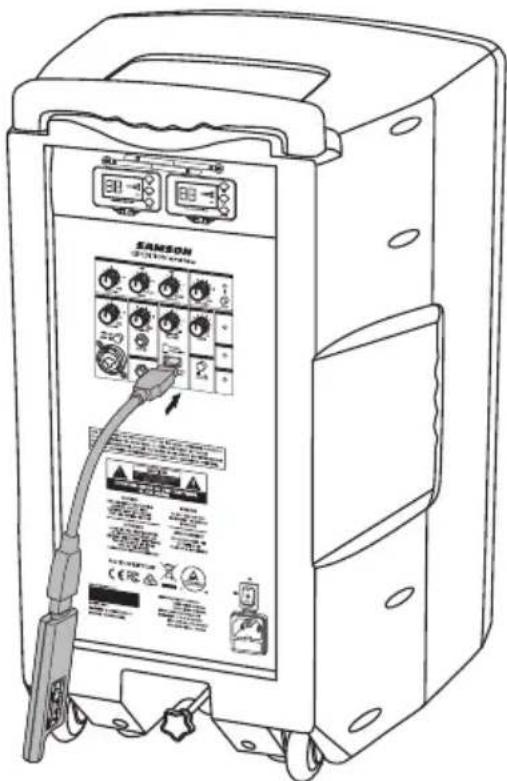
Figura 2
Uso del conector LINE OUT
natural_image
Line drawing of a portable electronic device mounted on a tripod stand (no text or symbols)Carga de la batería
natural_image
Illustration of a hand inserting a device into a printer (no text or symbols visible)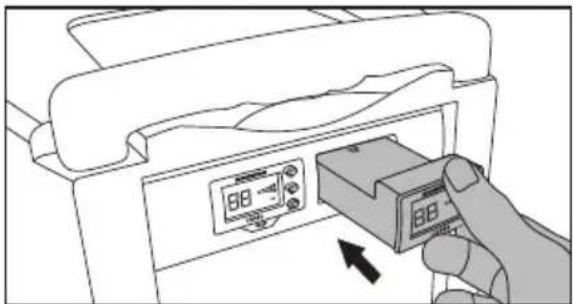
natural_image
Illustration of a hand inserting a device into a printer case, showing the next paper with a 88 dB display (no text or symbols on the device itself)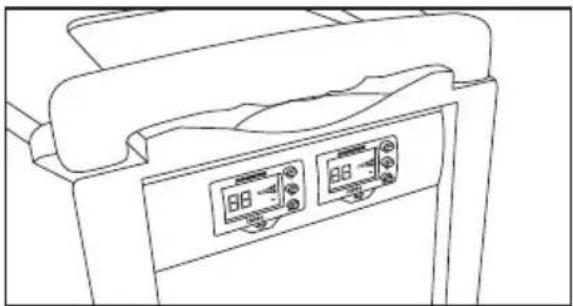
natural_image
Line drawing of a medical device with two digital display panels (no text or symbols)Especificaciones
Channel 1 (ingresso Mic/Line)
natural_image
Technical line drawing of an electrical enclosure with wiring and socket (no text or symbols)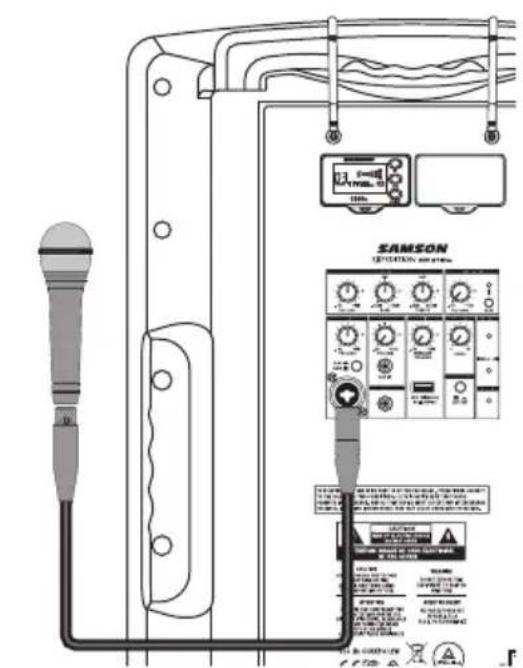
Avvio rapido
Bluetooth®
Figura 1
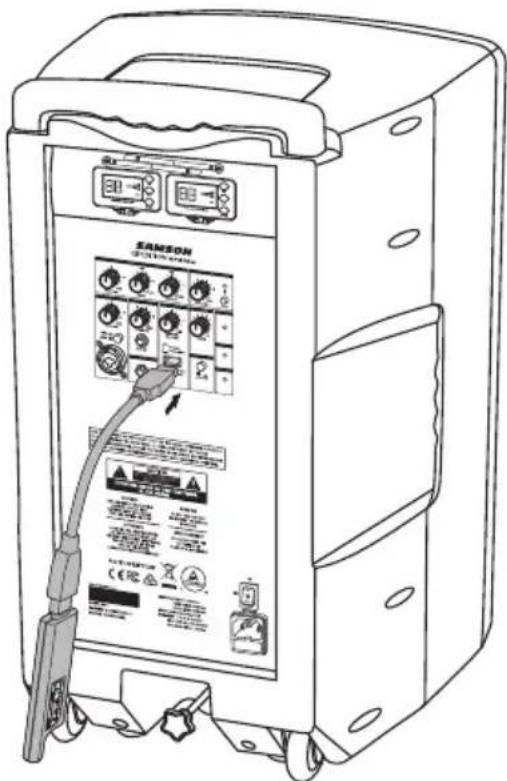
Figura 2
natural_image
Line drawing of a portable electronic device mounted on a tripod stand (no text or symbols)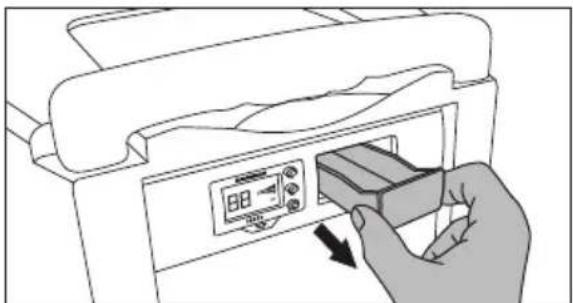
natural_image
Illustration of a hand inserting a device into a printer (no text or symbols visible)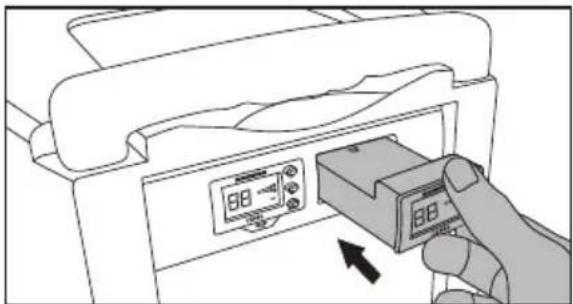
natural_image
Illustration of a hand inserting a device into a printer case, showing the next paper with a 88 dB display (no text or symbols on the device itself)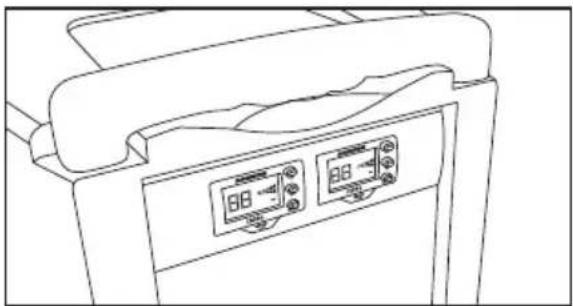
natural_image
Line drawing of a medical device with two digital display panels (no text or symbols)Specifiche
Having Trouble with your XP312w?
We can help!

CONTACT OUR SUPPORT TEAM: support@samsontech.com Our experts can help you resolve any issues.
Follow us:



@samson @samsontech @samson_technologies
- Important Safety Information
- AVIS RISQUE DE CHOC ÉLECTRONIQUE - NE PAS OUVRIR
- FCC Notice
- FCC Statement
- RF Warning Statement
- Introduction
- Features
- XP312w Mixer Callouts
- XP312w Rear Panel Callouts
- CR88a Receiver Display
- Using the CR88a Receiver
- Selecting a channel
- IR Set
- Setting the receiver volume
- Adjusting the squelch
- CH88 Handheld Transmitter Callouts
- Quick Start
- Making Connections
- Channel 1 (Microphone / Line Input)
- Channel 2 (Aux Input)
- Bluetooth®
- Using the Voiceover Switch
- Connecting Samson XPD Wireless
- Using the LINE OUT Jack
- Using a Speaker Stand
- Charging the Battery
- Installing the CR88a Receiver
- Specifications
- CH88 Handheld Transmitter
- Concert 88a Operating Bands and Frequency Ranges
- European Frequency Operation
- Démarrage rapide
- Aufladen des Akkus
- Technische Daten
- Uso del conector LINE OUT
- Carga de la batería
- Especificaciones
- Channel 1 (ingresso Mic/Line)
- Avvio rapido
- Specifiche
- Having Trouble with your XP312w?
- We can help!
Brand : SAMSON
Model : Expedition XP312w
Category : Hi-fi system